Best Video Surveillance Software

How Many Video Surveillance Software Products Does G2 Track?

Total Products under this Category: 161

Category Stats (Aug 2026)

  • Average Rating: 4.53/5 The average rating of products in this category, based on all submitted ratings
  • Top Trending Product: Videoloft (+0.92%) - Among all products in this category, Videoloft recorded the largest rating increase compared to last month

Last updated: August 07, 2026

How Does G2 Rank Video Surveillance Software Products?

Why You Can Trust G2's Software Rankings:

  • 30 Analysts and Data Experts
  • 2,100+ Authentic Reviews
  • 161+ Products
  • Unbiased Rankings

G2's software rankings are built on verified user reviews, rigorous moderation, and a consistent research methodology maintained by a team of analysts and data experts. Each product is measured using the same transparent criteria, with no paid placement or vendor influence. While reviews reflect real user experiences, which can be subjective, they offer valuable insight into how software performs in the hands of professionals. Together, these inputs power the G2 Score, a standardized way to compare tools within every category.

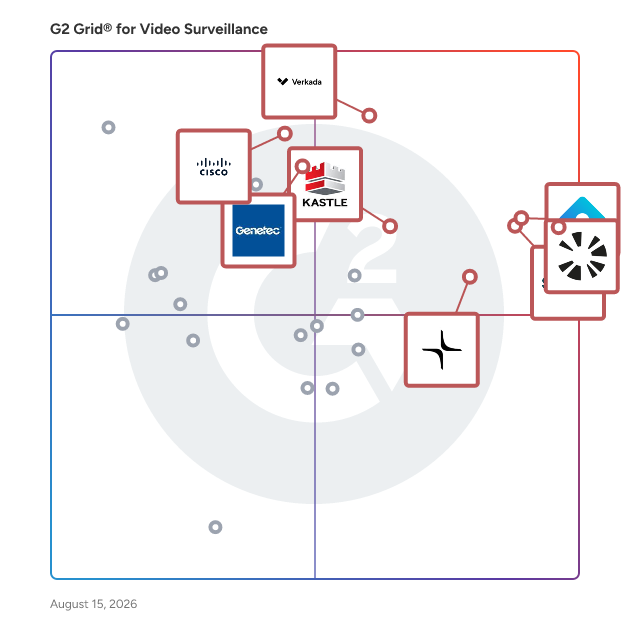
G2 Grid® for Video Surveillance Software

G2 Grid® for Video Surveillance Software plotting products by satisfaction and market presence

Highlighted products: Coram AI, Rhombus, Solink, Verkada, Lumana, Kastle, Cisco Physical Security Solution, and Genetec.

Underlying data: [Grid® JSON](https://www.g2.com/categories/video-surveillance/grids.json?focus%5B%5D=coram-ai&focus%5B%5D=rhombus-systems&focus%5B%5D=solink&focus%5B%5D=verkada&focus%5B%5D=lumana&focus%5B%5D=kastle&focus%5B%5D=cisco-physical-security-solution&focus%5B%5D=genetec-genetec)

Sponsored

Lumana

Lumana is an AI video security platform that helps security, IT, safety, and operations teams monitor, investigate, and respond to activity across their physical sites automatically. Founded to close the gap between the cameras organizations already run and the intelligence those cameras could provide, Lumana serves enterprise, mid-market, and SLED (state, local, and education) customers across retail, education, healthcare, government, hospitality, manufacturing, and logistics. Legacy video systems rely on manual monitoring, slow investigations, and fixed, rule-based analytics; Lumana applies adaptive, agentic AI to live and recorded camera feeds so video becomes searchable, real-time intelligence instead of footage that goes unwatched. The platform is camera-agnostic: it works with any IP camera and also offers a line of NDAA-compliant Lumana cameras. AI runs on-site on Lumana Core, which processes video locally, while a hybrid-cloud architecture unifies management across every location in a single interface, VMS+. Common use cases include real-time threat and safety monitoring, faster incident investigation, loss prevention, occupancy and operational analytics, and centralized multi-site security management. Main features and benefits: • VIA-1, a continuous-learning video intelligence model that adapts to each camera's environment over time and reduces false alerts by up to 90%, so teams spend less time clearing noise and more time on real events. • AI agents that automate the video security workflow across monitoring, investigation, insights, and response, including real-time alerts and automated actions such as notifications, audio messages, and webhook or GPIO triggers. • Natural language search that finds events across thousands of hours of footage in seconds by describing them in plain language, with no query syntax to learn. • Single-pane-of-glass management for every camera, site, alert, and investigation, available on desktop and mobile. • Enterprise-grade security and compliance, including SOC 2 Type II, NDAA, HIPAA, and GDPR, with role-based access control down to the camera level. Lumana is built on a hybrid-cloud architecture that scales from a single site to tens of thousands of cameras without replacing existing infrastructure. Because VIA-1 keeps learning from each deployment, detection accuracy improves in the customer's own environment rather than staying static over time. Organizations including Salesforce, Meta, McDonald's, and the University of Miami use Lumana to secure and gain intelligence from their physical environments.

Visit website

Coram AI

Coram AI is a type of physical AI solution designed to enhance safety and optimize operations through the integration of cameras, sensors, and access systems. This innovative platform serves as an AI Safety Agent, providing businesses with a comprehensive approach to security that encompasses video surveillance, access control, and emergency management. Suitable for organizations of all sizes, Coram AI is trusted by a diverse range of clients, including Fortune 500 companies, educational institutions, and various sectors such as retail and manufacturing. The target audience for Coram AI includes businesses and organizations that prioritize safety and operational efficiency. The platform is particularly beneficial for environments where security is paramount, such as schools, warehouses, and large venues. Coram AI addresses specific use cases like proactive incident prevention, real-time monitoring, and streamlined emergency response, making it an essential tool for organizations looking to enhance their safety protocols. One of the key features that sets Coram AI apart is its AI-native architecture. Unlike traditional video security systems, Coram embeds intelligence directly into its platform, enabling advanced functionalities such as weapon detection, slip-and-fall detection, and natural language alerts. These capabilities allow organizations to implement proactive safety measures that significantly reduce response times and mitigate risks before they escalate into serious incidents. Additionally, Coram's compatibility with any IP camera and its open platform design facilitate quick and cost-effective deployment, making it an attractive option for businesses looking to upgrade their security systems without extensive overhauls. Coram AI's recognition as one of the CB Insights AI 100 Companies of 2025 highlights its leadership in applying advanced AI technologies to real-world security challenges. The team behind Coram brings extensive experience from the self-driving industry, equipping them with the expertise to tackle complex perception problems in real-time. This background allows Coram to leverage the latest advancements in multimodal AI, ensuring that their solutions remain at the forefront of innovation in physical security. Moreover, Coram AI places a strong emphasis on privacy and compliance, holding SOC 2 Type II and HIPAA certifications. This commitment to cybersecurity and data protection ensures that businesses can deploy AI solutions that not only enhance safety but also adhere to the highest standards of trust and resilience. With Coram AI, organizations can confidently secure their environments while maintaining compliance with essential regulations.

Average Rating: 4.9/5.0

Total Reviews: 202

How Do G2 Users Rate Coram AI?

  • Analytics: 9.2/10 (Category avg: 8.9/10)
  • Security: 9.5/10 (Category avg: 9.2/10)
  • Ease of Admin: 9.7/10 (Category avg: 9.1/10)
  • Workflow: 9.1/10 (Category avg: 8.7/10)

Who Is the Company Behind Coram AI?

  • Seller: Coram AI
  • Company Website:
  • Year Founded: 2022
  • HQ Location: Sunnyvale, US
  • LinkedIn® Page: www.linkedin.com
    155 employees on LinkedIn®

Who Uses This Product?

  • Who Uses This: IT Director
  • Top Industries: Primary/Secondary Education, Education Management
  • Company Size: 61% Medium, 29% Small

What Do G2 Reviewers Say About Coram AI?

AI-generated summary from verified user reviews

Pros
  • Users highlight the ease of use of Coram AI, appreciating its seamless integration and user-friendly features.
  • Users appreciate the responsive customer support of Coram AI, ensuring quick resolution of any issues encountered.
  • Users value the intuitive interface and comprehensive features of Coram AI for seamless operation and effective client management.
  • Users find the helpfulness of alerts in Coram AI invaluable for safety and communication during drills.
  • Users praise the high camera quality of Coram AI, enhancing job performance and user experience significantly.
Cons
  • Users experience camera issues like freezing and delayed calibration, affecting overall functionality and video quality.
  • Users experience lagging performance with Coram AI, noticing delays in playback and camera transitions on mobile devices.
  • Users experience slow streaming issues, with audio delays and video lag affecting the overall performance of Coram AI.
  • Users experience video playback issues on mobile, including lag, grainy visuals, and inconsistent controls compared to the web interface.
  • Users experience laggy playback and connectivity issues in the mobile app, impacting usability and overall satisfaction.

What Are Recent G2 Reviews of Coram AI?

Rhombus

Protecting your organization has never been easier. With Rhombus, you can make your spaces safer and smarter with a platform that’s intuitive to use for your entire team. Rhombus delivers an enterprise physical security platform that combines smart security cameras, IoT sensors, alarms, and integrations with 3rd party solutions all under one unified console. Rhombus' cloud-based platform eliminates bulky hardware, is secure by default, and has built-in AI analytics so you can see, manage, and respond to threats in real-time. Built by cybersecurity experts, Rhombus simplifies security operations and is trusted by school districts, commercial real estate, healthcare facilities, Fortune 500 companies, and more.

Average Rating: 4.6/5.0

Total Reviews: 605

How Do G2 Users Rate Rhombus?

  • Analytics: 8.8/10 (Category avg: 8.9/10)
  • Security: 9.2/10 (Category avg: 9.2/10)
  • Ease of Admin: 9.4/10 (Category avg: 9.1/10)
  • Workflow: 8.7/10 (Category avg: 8.7/10)

Who Is the Company Behind Rhombus?

  • Seller: Rhombus
  • Company Website:
  • Year Founded: 2016
  • HQ Location: Sacramento, CA
  • LinkedIn® Page: www.linkedin.com
    214 employees on LinkedIn®

Who Uses This Product?

  • Who Uses This: Owner, Director of Technology
  • Top Industries: Education Management, Primary/Secondary Education
  • Company Size: 48% Medium, 42% Small

What Do G2 Reviewers Say About Rhombus?

AI-generated summary from verified user reviews

Pros
  • Users love the ease of use with Rhombus, highlighting its quick installation and straightforward setup.
  • Users love the great camera quality of Rhombus, ensuring no blind spots and never missing a shot!
  • Users commend the excellent customer support of Rhombus, appreciating their readiness to assist when needed.
  • Users appreciate the user-friendly interface and excellent support, making Rhombus a valuable tool for organizations.
  • Users praise the security functionality of Rhombus, appreciating its reliability and cloud integration for easy management.
Cons
  • Users report camera issues with inadequate zoom and lack of reliable maintenance affecting their overall experience.
  • Users find the annual licensing fee expensive, making it challenging to justify the purchase.
  • Users face access issues due to unprepared support and reliance on mobile devices for door access.
  • Users find the limited features during the trial frustrating, especially with navigation and reliance on onsite hardware.
  • Users experience slow performance with Rhombus, leading to frustration during loading and sharing processes.

What Are Recent G2 Reviews of Rhombus?

What Are G2 Users Discussing About Rhombus?

Solink

Solink is an AI-driven video intelligence platform that connects video with business and operational data to help teams detect, investigate, and respond to risk and performance issues across physical locations. Solink is used by multi-location operators and the teams that support them, including security leaders, loss prevention, operations, IT, and store field teams in industries like retail, QSR, and convenience. The platform is designed for environments where incident response, theft and fraud reduction, and operational consistency require more than reactive video review. Solink unifies video with signals from systems such as POS, access control, and alarms, then applies AI and business context to reduce noise and surface events that matter. This supports faster verification, more consistent workflows, and secure visibility from anywhere. Key capabilities include: • Unified visibility across systems: Connects video with operational tools such as POS and access control to provide context around incidents, transactions, and exceptions. • AI guided detection and verification: Helps distinguish real risks and anomalies from routine activity to reduce false positives and investigation effort. • Investigation and reporting workflows: Enables searching, sharing, case documentation, and standardized processes for incident review and follow up. • Remote monitoring for distributed teams: Supports secure access for authorized users across locations to improve response coordination and oversight. • Open ecosystem deployment: Works with many existing camera environments to support expansion and standardization without forcing rip-and-replace hardware changes. Solink supports use cases such as loss prevention, safety and compliance reviews, operational audits, and performance coaching, with the goal of helping teams see more, know more, and do more across every site.

Average Rating: 4.7/5.0

Total Reviews: 122

How Do G2 Users Rate Solink?

  • Analytics: 9.6/10 (Category avg: 8.9/10)
  • Security: 9.3/10 (Category avg: 9.2/10)
  • Ease of Admin: 9.4/10 (Category avg: 9.1/10)
  • Workflow: 9.0/10 (Category avg: 8.7/10)

Who Is the Company Behind Solink?

  • Seller: SOLINK
  • Company Website:
  • Year Founded: 2009
  • HQ Location: Ottawa, CA
  • Twitter: @SolinkCorp
    902 Twitter followers
  • LinkedIn® Page: www.linkedin.com
    392 employees on LinkedIn®

Who Uses This Product?

  • Top Industries: Retail, Restaurants
  • Company Size: 38% Medium, 30% Large

What Do G2 Reviewers Say About Solink?

AI-generated summary from verified user reviews

Pros
  • Users praise the camera quality of Solink for its clear images and fast performance in capturing essential details.
  • Users find SOLINK to be easy to use, appreciating its user-friendly interface and effective problem-solving support.
  • Users value the easy initial setup of Solink, making transitions across their company smooth and straightforward.
  • Users appreciate that Solink offers helpful customer service and effective tools for video review and problem-solving.
  • Users praise Solink's AI technology for transforming security footage into actionable business insights, enhancing operational efficiency.
Cons
  • Users note that the inaccurate detection in Solink's spot check feature can lead to frustrating false positives.
  • Users express concern over limited functionality, particularly with video search and app compatibility across devices.
  • Users note limited features in Solink, especially with multi-camera support and inconsistent functionality across devices.
  • Users experience scheduling issues due to data integration and time zone problems causing slow responses.
  • Users find that snapshots and zoom capabilities of Solink, particularly with 360 cams, need improvement.

What Are Recent G2 Reviews of Solink?

What Are G2 Users Discussing About Solink?

Verkada

Verkada is transforming how organizations protect their people and places with an integrated, AI-powered platform. A leader in cloud physical security, Verkada helps organizations strengthen safety and efficiency through one connected platform. Its solutions—including video security, access control, air quality sensors, alarms, intercoms, and workplace tools—work seamlessly in Verkada Command, a cloud-based software experience built for scale. From finding footage in seconds to identifying events like a door held open, a visitor check-in, or a change in air quality, Verkada gives teams the insight to see, understand, and act with confidence—helping create safer, smarter environments.

Average Rating: 4.7/5.0

Total Reviews: 138

How Do G2 Users Rate Verkada?

  • Analytics: 9.0/10 (Category avg: 8.9/10)
  • Security: 9.6/10 (Category avg: 9.2/10)
  • Ease of Admin: 9.6/10 (Category avg: 9.1/10)
  • Workflow: 9.4/10 (Category avg: 8.7/10)

Who Is the Company Behind Verkada?

  • Seller: Verkada
  • Company Website:
  • Year Founded: 2016
  • HQ Location: San Mateo, California
  • Twitter: @VerkadaHQ
    2,519 Twitter followers
  • LinkedIn® Page: www.linkedin.com
    2,701 employees on LinkedIn®

Who Uses This Product?

  • Who Uses This: IT Manager
  • Top Industries: Primary/Secondary Education, Education Management
  • Company Size: 53% Medium, 30% Large

What Do G2 Reviewers Say About Verkada?

AI-generated summary from verified user reviews

Pros
  • Users appreciate the ease of use of Verkada, finding it efficient and straightforward to operate after initial setup.
  • Users appreciate the excellent customer support of Verkada, highlighting 24/7 assistance and effective service.
  • Users praise the reliable integration of Verkada with third-party apps and the quality of its cameras.
  • Users value the ease of integration with Verkada, enhancing their experience and security capabilities effectively.
  • Users value the simple interface of Verkada, finding it easy to use on both app and computer.
Cons
  • Users find Verkada to be expensive, which limits budgeting and implementation for organizations like non-profits.
  • Users experience access issues with Verkada, including a lack of IP filters and software update complications.
  • Users report significant connectivity issues with Verkada, impacting bandwidth and causing equipment reliability concerns.
  • Users report inaccurate detection issues, such as tailgating and “unknown user” errors, affecting system reliability.
  • Users are frustrated by missing features, including an IP filter and better control over software updates.

What Are Recent G2 Reviews of Verkada?

What Are G2 Users Discussing About Verkada?

FAQs About Video Surveillance Software

Generated using AI

Last updated: June 3, 2026

Best practices for video surveillance storage and retention management to support growing teams with

G2 reviewers mention that growing teams benefit most from storage and retention setups that are easy to search, simple to manage remotely, and reliable across multiple locations. Recent reviews repeatedly highlight the value of quick playback, clip sharing, cloud or centralized access, and retention that supports investigations without forcing teams to scrub through hours of footage. Buyers also call out the importance of balancing longer footage availability with practical storage planning, since some users noted storage limits, lag during playback, or higher costs tied to camera count and retention needs. Systems that reduce manual review and make saved evidence easy to retrieve tend to fit scaling environments best.

How video surveillance improves facility security and incident response for organizations evaluating solutions to

According to verified users, video surveillance improves facility security by giving teams faster visibility into entrances, exits, restricted areas, and unusual activity. In recent G2 reviews, buyers frequently describe using alerts, remote access, and searchable footage to respond more quickly to theft, break-ins, safety issues, and day-to-day incidents. Many reviewers also mention that centralized monitoring helps teams cover multiple buildings or campuses without being physically present. For incident response, the biggest advantage is speed: users repeatedly note that better search, clip export, and event review make it easier to confirm what happened, share evidence, and take action without relying on slow manual footage checks or older DVR-style workflows.

Surveillance solutions compared to traditional on-premise camera systems for organizations comparing vendors on features

According to verified users, newer surveillance platforms are often preferred over traditional on-premise camera systems when buyers want easier remote access, faster search, simpler sharing, and less dependence on aging local hardware. Recent G2 reviews repeatedly contrast modern platforms with older DVR or fragmented systems that were harder to use, slower to review, and more difficult to manage across locations. Buyers also value features such as cloud access, centralized dashboards, AI-assisted search, alerts, and easier user administration. That said, reviewers still mention tradeoffs to evaluate, including learning curves, bandwidth or internet dependence, retention costs, and occasional lag or integration challenges during setup or expansion.

What are the most important features in video surveillance software

According to verified users, the most important features in video surveillance software are easy search and playback, remote access, reliable alerts, clear live and recorded video, and a simple interface that nontechnical teams can use quickly. Recent reviews also emphasize centralized multi-site visibility, fast clip export and sharing, customizable permissions, and integrations with access control, sensors, or existing camera infrastructure. Many buyers also value AI-assisted capabilities such as person or vehicle search, motion filtering, people counting, license plate recognition, and event-based alerts when they reduce manual review time. Common watchouts in reviews include lag during playback, storage constraints, and a learning curve when advanced analytics or configuration options become more complex.

How do teams use video surveillance for investigations

According to verified users, teams use video surveillance for investigations by narrowing timelines quickly, searching for motion or specific people and vehicles, and pulling clips to share with internal stakeholders or law enforcement. Recent G2 reviews describe investigators using searchable footage to review theft, safety incidents, suspicious behavior, customer disputes, employee activity, package movement, and access events across multiple cameras. Buyers repeatedly mention that the best workflows reduce hours of manual scrubbing by linking events, surfacing alerts, or helping users follow a subject from camera to camera. Reviewers also value export tools, saved evidence, and centralized access because they help teams move from basic recording to faster fact-finding and better incident documentation.

Lumana

Lumana is an AI video security platform that helps security, IT, safety, and operations teams monitor, investigate, and respond to activity across their physical sites automatically. Founded to close the gap between the cameras organizations already run and the intelligence those cameras could provide, Lumana serves enterprise, mid-market, and SLED (state, local, and education) customers across retail, education, healthcare, government, hospitality, manufacturing, and logistics. Legacy video systems rely on manual monitoring, slow investigations, and fixed, rule-based analytics; Lumana applies adaptive, agentic AI to live and recorded camera feeds so video becomes searchable, real-time intelligence instead of footage that goes unwatched. The platform is camera-agnostic: it works with any IP camera and also offers a line of NDAA-compliant Lumana cameras. AI runs on-site on Lumana Core, which processes video locally, while a hybrid-cloud architecture unifies management across every location in a single interface, VMS+. Common use cases include real-time threat and safety monitoring, faster incident investigation, loss prevention, occupancy and operational analytics, and centralized multi-site security management. Main features and benefits: • VIA-1, a continuous-learning video intelligence model that adapts to each camera's environment over time and reduces false alerts by up to 90%, so teams spend less time clearing noise and more time on real events. • AI agents that automate the video security workflow across monitoring, investigation, insights, and response, including real-time alerts and automated actions such as notifications, audio messages, and webhook or GPIO triggers. • Natural language search that finds events across thousands of hours of footage in seconds by describing them in plain language, with no query syntax to learn. • Single-pane-of-glass management for every camera, site, alert, and investigation, available on desktop and mobile. • Enterprise-grade security and compliance, including SOC 2 Type II, NDAA, HIPAA, and GDPR, with role-based access control down to the camera level. Lumana is built on a hybrid-cloud architecture that scales from a single site to tens of thousands of cameras without replacing existing infrastructure. Because VIA-1 keeps learning from each deployment, detection accuracy improves in the customer's own environment rather than staying static over time. Organizations including Salesforce, Meta, McDonald's, and the University of Miami use Lumana to secure and gain intelligence from their physical environments.

Average Rating: 4.9/5.0

Total Reviews: 59

How Do G2 Users Rate Lumana?

  • Analytics: 9.8/10 (Category avg: 8.9/10)
  • Security: 9.4/10 (Category avg: 9.2/10)
  • Ease of Admin: 9.8/10 (Category avg: 9.1/10)
  • Workflow: 9.5/10 (Category avg: 8.7/10)

Who Is the Company Behind Lumana?

  • Seller: Lumana
  • Company Website:
  • Year Founded: 2021
  • HQ Location: Los Gatos, California, United States
  • Twitter: @LumanaHQ
    53 Twitter followers
  • LinkedIn® Page: www.linkedin.com
    105 employees on LinkedIn®

Who Uses This Product?

  • Top Industries: Computer & Network Security, Security and Investigations
  • Company Size: 53% Medium, 28% Small

What Do G2 Reviewers Say About Lumana?

AI-generated summary from verified user reviews

Pros
  • Users value Lumana's Agentic AI approach, enhancing physical security with intelligent alerts and real-time threat detection.
  • Users value the intelligent alert notifications of Lumana for their timely and proactive security management.
  • Users value Lumana's Agentic AI approach, enhancing security through intelligent alerts and real-time threat detection.
  • Users praise Lumana for its ease of use, noting quick setup and intuitive features that streamline operations.
  • Users value Lumana’s efficiency, which dramatically reduces investigation time and simplifies security management processes.
Cons
  • Users report inaccurate detection with alerts and recognize the need for improvements in facial recognition features.
  • Users experience a noticeable learning curve with Lumana, particularly in understanding its advanced features and setup.
  • Users face camera issues such as unreliable PTZ function and problems with GPIO, impacting functionality.
  • Users face a difficult training process due to the extensive AI capabilities, impacting the setup of advanced features.
  • Users highlight the missing PTZ presets and unreliable GPIO functions, which detract from the overall experience with Lumana.

What Are Recent G2 Reviews of Lumana?

Kastle

Kastle offers unparalleled property technology solutions, safeguarding premier commercial real estate, multifamily communities, enterprise clients, and school and government facilities. Integrating advanced access control, video surveillance, and visitor management technologies, we ensure enhanced security and superior performance. As tens of thousands trust our services daily, we stand out as a partner dedicated to innovation, leadership, and comprehensive managed security services. Discover the Kastle difference at kastle.com.

Average Rating: 4.6/5.0

Total Reviews: 186

How Do G2 Users Rate Kastle?

  • Analytics: 8.1/10 (Category avg: 8.9/10)
  • Security: 8.7/10 (Category avg: 9.2/10)
  • Ease of Admin: 9.1/10 (Category avg: 9.1/10)
  • Workflow: 8.0/10 (Category avg: 8.7/10)

Who Is the Company Behind Kastle?

  • Seller: Kastle Systems
  • Company Website:
  • Year Founded: 1972
  • HQ Location: Falls Church, VA
  • Twitter: @KastleSystems
    2,057 Twitter followers
  • LinkedIn® Page: www.linkedin.com
    701 employees on LinkedIn®

Who Uses This Product?

  • Who Uses This: Office Manager, Property Manager
  • Top Industries: Commercial Real Estate, Real Estate
  • Company Size: 49% Medium, 40% Small

What Do G2 Reviewers Say About Kastle?

AI-generated summary from verified user reviews

Pros
  • Users appreciate the user-friendly design of Kastle, making access management straightforward and efficient.
  • Users highlight the friendly and reliable customer support of Kastle, enhancing their overall experience with the software.
  • Users commend the helpful customer service and friendly tech support, enhancing their Kastle experience.
  • Users appreciate the flexibility and reliability of Kastle's access control, enhancing their office entry experience.
  • Users value the reliability of Kastle, praising its consistent performance and effective integration into various infrastructures.
Cons
  • Users experience access issues with Kastle, facing complications in managing staff access across different locations.
  • Users express frustration with poor customer support, citing slow response times and inadequate communication from representatives.
  • Users find the pricing to be high compared to similar products, considering lower-cost alternatives.
  • Users experience inaccurate detection issues, with the scanner often failing to recognize the card reader properly.
  • Users experience inconsistent communication with Kastle, leading to delays in response and follow-up challenges.

What Are Recent G2 Reviews of Kastle?

Cisco Physical Security Solution

Cisco Meraki smart cameras offer a cloud-managed, intelligent security solution that integrates advanced video analytics, robust security features, and seamless management through the Cisco Meraki dashboard. These cameras feature powerful onboard processors, high-resolution sensors (ranging from 4MP to 12.4MP), and various form factors including fixed-lens mini domes, varifocal domes, fisheye, and telephoto bullet cameras suitable for both indoor and outdoor environments. They provide extensive storage options with high-endurance solid-state drives, support wireless connectivity, and include features such as motion and audio analytics, person and vehicle detection, and privacy-first AI-powered cross-camera tracking without facial recognition. The system enables network-wide visibility, granular access controls, easy video export and sharing, and integrates with other Meraki devices like sensors and wireless access points to deliver comprehensive physical security and business intelligence. These smart cameras are designed for easy installation, durability with vandal resistance and weatherproof ratings, and support advanced use cases such as license plate recognition and location analytics, making them ideal for protecting and optimizing various business and organizational environments.

Average Rating: 4.3/5.0

Total Reviews: 29

How Do G2 Users Rate Cisco Physical Security Solution?

  • Analytics: 10.0/10 (Category avg: 8.9/10)
  • Security: 9.6/10 (Category avg: 9.2/10)
  • Ease of Admin: 8.8/10 (Category avg: 9.1/10)
  • Workflow: 10.0/10 (Category avg: 8.7/10)

Who Is the Company Behind Cisco Physical Security Solution?

  • Seller: Cisco
  • Company Website:
  • Year Founded: 1984
  • HQ Location: San Jose, CA
  • Twitter: @Cisco
    720,366 Twitter followers
  • LinkedIn® Page: www.linkedin.com
    95,545 employees on LinkedIn®

Who Uses This Product?

  • Top Industries: Information Technology and Services
  • Company Size: 43% Medium, 33% Small

What Are Recent G2 Reviews of Cisco Physical Security Solution?

Genetec

Genetec Inc. is a global technology company that has been transforming the physical security industry for over 25 years. Our unified Security Center platform brings together video, access control, ALPR, evidence management, and more, all in one intuitive experience. Organizations around the world rely on the powerful Genetec platform to secure their people and assets. Intelligent automations help them improve operational efficiency while respecting individual privacy. Our global network of technology partners means users are never locked into a single vendor, and the choice of an on-prem or cloud deployment — or a mix of both — means organizations can scale their security system with their changing needs. Headquartered in Montreal, Canada, we serve more than 42,500 customers via our extensive network of accredited channel partners and consultants, located in more than 159 countries.

Average Rating: 4.4/5.0

Total Reviews: 30

How Do G2 Users Rate Genetec?

  • Analytics: 8.9/10 (Category avg: 8.9/10)
  • Security: 9.4/10 (Category avg: 9.2/10)
  • Ease of Admin: 8.3/10 (Category avg: 9.1/10)
  • Workflow: 9.0/10 (Category avg: 8.7/10)

Who Is the Company Behind Genetec?

  • Seller: Genetec
  • Company Website:
  • Year Founded: 1997
  • HQ Location: Montreal, CA
  • Twitter: @genetec
    16,465 Twitter followers
  • LinkedIn® Page: www.linkedin.com
    2,315 employees on LinkedIn®

Who Uses This Product?

  • Company Size: 47% Medium, 27% Small

What Do G2 Reviewers Say About Genetec?

AI-generated summary from verified user reviews

Pros
  • Users value the ease of use of Genetec, highlighted by its seamless integration and expansive service options.
  • Users value the seamless integrations of Genetec, benefiting from a unified platform and extensive third-party support.
  • Users value the unified platform of Genetec for its integration with cameras, access control, and emergency response services.
  • Users value the excellent customer support from Genetec, ensuring assistance is available whenever needed.
  • Users value the unified platform and expanding services of Genetec for seamless camera and access control management.
Cons
  • Users may face a complexity issue as they adapt to multiple sites and cameras, causing a learning curve.

What Are Recent G2 Reviews of Genetec?

What Are G2 Users Discussing About Genetec?

XProtect

Milestone Systems transforms security into competitive advantage with a comprehensive product portfolio consisting of XProtect video management software (VMS), BriefCam video analytics, and Arcules cloud-based video surveillance as a service (VSaaS). With responsible and ethical use of technology as their core value, Milestone empowers industries and people to leverage technology in an ethical and responsible manner and supports their compliance with industry standards such as the GDPR, FIPS 140-2 and the NIST standards for secure software development of XProtect as required by the U.S. Executive Order 14028. Milestone delivers open platform software that seamlessly integrates with third-party security tools meeting the industry need for flexible, adaptable and scalable technology. In addition to security, Milestone’s offerings can optimize business operations with artificial intelligence (AI) and video analytics. Technical support is available in 14 languages around the globe. XProtect, offered in five variants, helps you stay protected and resilient with continual updates and robust cybersecurity; simplify security operations with a single interface that connects all cameras, sensors, analytics and sites; and grow your organization with a VMS that is compatible with over 14,000 cameras and devices.

Average Rating: 4.5/5.0

Total Reviews: 90

How Do G2 Users Rate XProtect?

  • Analytics: 7.6/10 (Category avg: 8.9/10)
  • Security: 9.0/10 (Category avg: 9.2/10)
  • Ease of Admin: 8.4/10 (Category avg: 9.1/10)
  • Workflow: 7.9/10 (Category avg: 8.7/10)

Who Is the Company Behind XProtect?

  • Seller: Milestone Systems
  • Company Website:
  • Year Founded: 1998
  • HQ Location: Copenhagen, Denmark
  • Twitter: @milestonesys
    15,775 Twitter followers
  • LinkedIn® Page: www.linkedin.com
    1,829 employees on LinkedIn®

Who Uses This Product?

  • Top Industries: Marketing and Advertising, Hospital & Health Care
  • Company Size: 48% Medium, 31% Large

What Do G2 Reviewers Say About XProtect?

AI-generated summary from verified user reviews

Pros
  • Users value the intuitive user interface and comprehensive camera setup features of XProtect, enhancing security management ease.
  • Users value the robust integration capabilities of XProtect, allowing seamless compatibility with various CCTV brands and solutions.
  • Users highly value the ease of use of XProtect, appreciating its reliability and scalability for security needs.
  • Users commend the quick and helpful customer support from XProtect, ensuring a reliable monitoring experience.
  • Users highlight the effective monitoring capabilities of XProtect, benefiting from its user-friendly interface and advanced features.
Cons
  • Users find XProtect to be expensive, particularly with licensing fees and ongoing care costs impacting smaller customers.
  • Users face a complex setup with XProtect, making initial installations and advanced features challenging to navigate.
  • Users find the interface design outdated and suggest a need for modernization and improved usability in XProtect.
  • Users find the limited customization options of XProtect frustrating compared to competitors, hindering user-specific adaptations.
  • Users experience slow performance with XProtect, including high resource usage and slow uploading speeds affecting usability.

What Are Recent G2 Reviews of XProtect?

What Are G2 Users Discussing About XProtect?

Alarm.com for Business

Alarm.com for Business is the platform of choice for more than a million locations, with a unified platform that allows customers to manage intrusion, video, access control and more from a single intuitive interface.

Average Rating: 4.5/5.0

Total Reviews: 24

How Do G2 Users Rate Alarm.com for Business?

  • Analytics: 9.5/10 (Category avg: 8.9/10)
  • Security: 9.6/10 (Category avg: 9.2/10)
  • Ease of Admin: 9.4/10 (Category avg: 9.1/10)
  • Workflow: 9.0/10 (Category avg: 8.7/10)

Who Is the Company Behind Alarm.com for Business?

  • Seller: Alarm.com
  • Company Website:
  • Year Founded: 2000
  • HQ Location: McLean, Virginia, United States
  • Twitter: @AlarmDotCom
    14,376 Twitter followers
  • LinkedIn® Page: www.linkedin.com
    1,386 employees on LinkedIn®

Who Uses This Product?

  • Company Size: 42% Medium, 33% Small

What Do G2 Reviewers Say About Alarm.com for Business?

AI-generated summary from verified user reviews

Pros
  • Users appreciate the ease of use of Alarm.com for Business, finding it intuitive and reliable for quick access.
  • Users value the seamless access control features of Alarm.com, enhancing security management across multiple locations effortlessly.
  • Users appreciate the seamless integration of tools on Alarm.com, enhancing project optimization and user experience.
  • Users praise the management ease of Alarm.com for Business, enjoying intuitive controls and the ability to manage multiple locations seamlessly.
  • Users love the easy access provided by Alarm.com, seamlessly managing multiple locations and user controls.
Cons
  • Users note the high costs associated with licensing and hardware upgrades for Alarm.com for Business, impacting budget decisions.
  • Users note the need for improved interface labeling and CCTV optimization to enhance usability and visualization.
  • Users feel the system offers limited customization, hindering necessary adjustments and support options for their specific needs.
  • Users find the limited features of Alarm.com for Business restrictive, hindering optimal use of the system.
  • Users note the poor interface design in Alarm.com for Business, suggesting better organization and labeling for efficiency.

What Are Recent G2 Reviews of Alarm.com for Business?

Brivo

Brivo is the global leader in cloud-native physical security, with more than 2 million devices deployed across 100,000+ locations in 80 countries. The flagship product, Brivo Security Suite, unifies access control, video intelligence, visitor management, and intrusion into a single view to centralize security across the enterprise. Businesses use Brivo’s AI-powered unified security platform to proactively detect and deter threats, improve operations, reduce liability, comply with regulations, increase sales, and maximize profits. The pioneer in both cloud-native access control and video surveillance, Brivo is trusted by more than 25 million users across the globe to protect people, property, and digital assets. Headquartered in Bethesda, Md., and Austin, Texas, Brivo has additional offices in Lehi, Utah; Amsterdam; Bangalore; and Tokyo. Learn more at brivo.com. Brivo recently merged with Eagle Eye Networks. Please visit een.com to learn more about the Eagle Eye Cloud VMS (video management system) and its AI-powered video intelligence capabilities.

Average Rating: 4.6/5.0

Total Reviews: 35

How Do G2 Users Rate Brivo?

  • Analytics: 8.5/10 (Category avg: 8.9/10)
  • Security: 9.5/10 (Category avg: 9.2/10)
  • Ease of Admin: 9.4/10 (Category avg: 9.1/10)
  • Workflow: 8.6/10 (Category avg: 8.7/10)

Who Is the Company Behind Brivo?

  • Seller: Brivo
  • Year Founded: 1999
  • HQ Location: Bethesda, MD
  • LinkedIn® Page: www.linkedin.com
    1,147 employees on LinkedIn®

Who Uses This Product?

  • Top Industries: Security and Investigations, Information Technology and Services
  • Company Size: 57% Small, 34% Medium

What Do G2 Reviewers Say About Brivo?

AI-generated summary from verified user reviews

Pros
  • Users value the remote management capabilities of Brivo's cloud technology, significantly enhancing convenience and efficiency.
  • Users appreciate the excellent customer support from Brivo, with quick resolutions and helpful assistance.
  • Users appreciate the ease of installation and remote management of Brivo, along with responsive customer support.
  • Users appreciate the communication speed of Brivo, with quick resolution times from customer service enhancing their experience.
  • Users love the ease of use of Brivo, enjoying seamless remote control and excellent customer support.
Cons
  • Users are concerned about internet dependency, as losing connectivity restricts scheduling and user management capabilities.
  • Users find the slow performance of Brivo frustrating, especially with updates lagging behind during last-minute reservations.

What Are Recent G2 Reviews of Brivo?

What Are G2 Users Discussing About Brivo?

OpenEye

Headquartered in Liberty Lake, Washington, OpenEye, a subsidiary of Alarm.com, is a leading provider of intelligent cloud solutions for video security, business intelligence, and loss prevention. Combining powerful cloud-managed video with AI-based video analytics, OpenEye Web Services uncovers insights that enhance security and increase your bottom line. Our cloud-managed platform gets the video you need quickly, whether you’re receiving real-time alert notifications, searching for specific events, or monitoring areas for safety. See the next opportunity to secure and scale smart environments and enhance experiences for your customers, employees, and students with an intelligent and aware cloud video platform.

Average Rating: 4.4/5.0

Total Reviews: 42

How Do G2 Users Rate OpenEye?

  • Analytics: 8.5/10 (Category avg: 8.9/10)
  • Security: 9.3/10 (Category avg: 9.2/10)
  • Ease of Admin: 9.1/10 (Category avg: 9.1/10)
  • Workflow: 8.1/10 (Category avg: 8.7/10)

Who Is the Company Behind OpenEye?

  • Seller: OpenEye
  • Company Website:
  • Year Founded: 1999
  • HQ Location: Liberty Lake, WA
  • Twitter: @OpenEyeVideo
    525 Twitter followers
  • LinkedIn® Page: www.linkedin.com
    322 employees on LinkedIn®

Who Uses This Product?

  • Top Industries: Information Technology and Services
  • Company Size: 40% Medium, 40% Small

What Do G2 Reviewers Say About OpenEye?

AI-generated summary from verified user reviews

Pros
  • Users value the fast and responsive AI tools in OpenEye, enhancing their overall experience and satisfaction.
  • Users value the excellent customer support from OpenEye, highlighting their commitment to customer success and responsiveness.
  • Users highlight the fast responsiveness and AI tools of OpenEye, along with great customer support and easy integration.
  • Users appreciate the easy remote access of OpenEye, allowing quick checks and clear footage from anywhere.
  • Users value the affordable pricing of OpenEye, making it accessible without compromising on quality.
Cons
  • Users find OpenEye's offerings expensive, with limited storage options and cost-prohibitive packages affecting accessibility.
  • Users find the complexity of initialization challenging, often facing lengthy setup times and configuration difficulties.
  • Users find the complexity of initialization in OpenEye to be a challenging barrier to entry.
  • Users express concern over dependency issues with OpenEye, which complicate usage and can be frustrating.
  • Users find the difficult setup of OpenEye frustrating, as remote configuration can take a significant amount of time.

What Are Recent G2 Reviews of OpenEye?

Spot AI

Spot AI brings Video AI to the physical world, helping organizations see, understand, and improve their workspaces. Built on 1B+ hours of video data and trusted by 1,000+ leading businesses, we deliver measurable ROI in safety, operations, and security across manufacturing floors, retail stores, schools, hospitals, and beyond. Our mission: Turn every camera into a source of business value—helping organizations build safer, smarter, and more efficient spaces.

Average Rating: 4.8/5.0

Total Reviews: 75

How Do G2 Users Rate Spot AI?

  • Analytics: 9.1/10 (Category avg: 8.9/10)
  • Security: 9.6/10 (Category avg: 9.2/10)
  • Ease of Admin: 9.6/10 (Category avg: 9.1/10)
  • Workflow: 9.2/10 (Category avg: 8.7/10)

Who Is the Company Behind Spot AI?

  • Seller: Spot AI
  • Year Founded: 2018
  • HQ Location: Burlingame, California
  • LinkedIn® Page: www.linkedin.com
    112 employees on LinkedIn®

Who Uses This Product?

  • Top Industries: Manufacturing, Electrical/Electronic Manufacturing
  • Company Size: 60% Medium, 32% Small

What Do G2 Reviewers Say About Spot AI?

AI-generated summary from verified user reviews

Pros
  • Users love the easy access to multiple locations and data, enhancing operational efficiency and team collaboration.
  • Users commend the quality and clarity of Spot AI's cameras, enhancing their surveillance experience across multiple locations.
  • Users find Spot AI's helpful smart AI features invaluable for efficiently managing security and data across multiple locations.
  • Users appreciate the seamless access control across multiple locations, simplifying management and oversight for security needs.
  • Users praise the incredible technology of Spot AI, particularly appreciating the unified dashboard experience.
Cons
  • Users find access issues with Spot AI, particularly needing enhancements for the Azure SSO logon process.
  • Users find camera adjustment issues challenging when setting up Turret & Dome Cameras in Spot AI.
  • Users face challenges with slow video downloads for cases, often experiencing timeouts during the process.
  • Users found the complex setup of Spot AI challenging due to unexpected cabling requirements.
  • Users find the difficult setup of Spot AI a challenge due to unexpected cabling requirements.

What Are Recent G2 Reviews of Spot AI?

What Are G2 Users Discussing About Spot AI?

Eagle Eye Networks

Eagle Eye Networks has now merged with Brivo. Brivo is the global leader in cloud-native AI-driven physical security, with more than 2 million devices deployed across 100,000+ locations in 80 countries. The flagship product, Brivo Security Suite, unifies access control, video intelligence, visitor management, and intrusion into a single view to centralize security across the enterprise. Businesses use Brivo’s AI-powered unified security platform to proactively detect and deter threats, improve operations, reduce liability, comply with regulations, increase sales, and maximize profits. The pioneer in both cloud-native access control and video surveillance, Brivo is trusted by more than 25 million users across the globe to protect people, property, and digital assets. Eagle Eye Networks is the #1 provider of on-demand, true cloud-based security and operations video management system (VMS) worldwide. Eagle Eye utilizes artificial intelligence to provide a simply smarter platform, purpose-built to help businesses improve safety, security, operations, and reduce costs.

Average Rating: 4.8/5.0

Total Reviews: 49

How Do G2 Users Rate Eagle Eye Networks?

  • Analytics: 8.7/10 (Category avg: 8.9/10)
  • Security: 9.1/10 (Category avg: 9.2/10)
  • Ease of Admin: 9.1/10 (Category avg: 9.1/10)
  • Workflow: 8.6/10 (Category avg: 8.7/10)

Who Is the Company Behind Eagle Eye Networks?

  • Seller: Brivo
  • Company Website:
  • Year Founded: 1999
  • HQ Location: Bethesda, MD
  • LinkedIn® Page: www.linkedin.com
    1,147 employees on LinkedIn®

Who Uses This Product?

  • Top Industries: Security and Investigations, Construction
  • Company Size: 51% Small, 39% Medium

What Do G2 Reviewers Say About Eagle Eye Networks?

AI-generated summary from verified user reviews

Pros
  • Users highlight the ease of use of Eagle Eye Networks, making transitions and remote access seamless and efficient.
  • Users find Eagle Eye Networks to be a cost-effective solution, simplifying remote video surveillance without sacrificing quality.
  • Users commend the easy setup of Eagle Eye Networks, facilitating smooth transitions and intuitive software for effective monitoring.
  • Users highlight the seamless remote access to cameras, enhancing convenience and flexibility for monitoring anywhere.
  • Users value the robust security features of Eagle Eye Networks, ensuring flexibility and peace of mind in surveillance.
Cons
  • Users experience camera issues, with frequent discrepancies between online status and actual functionality, causing unnecessary service calls.
  • Users experience video playback issues, including lag and camera status discrepancies, complicating troubleshooting efforts.
  • Users experience app instability with Eagle Eye Networks, particularly in video searching and the download interface.
  • Users often face communication issues with Eagle Eye Networks, leading to confusion about camera statuses and unnecessary maintenance efforts.
  • Users find the storage capacity limited unless they opt for costly upgrades, which can be a drawback.

What Are Recent G2 Reviews of Eagle Eye Networks?

What Are G2 Users Discussing About Eagle Eye Networks?

Videoloft

Videoloft is a powerful, AI-driven cloud Video Management System that transforms even the most basic security setup into an advanced, feature-rich surveillance solution. With Videoloft, monitoring your security has never been easier. View all your sites in one centralized platform using our web VMS or mobile app, accessible anytime. Need to check in remotely? No problem. With seamless remote access and hassle-free installation, you’re always connected and in control – no matter where you are. There are no limits on resolution, record in crystal clear 8MP straight to the cloud. Built in data redundancy ensures nothing gets lost, while long-term storage options – up to 10 years – mean your video is there whenever you need it. Protecting your data is our top priority. With banking grade end to end encryption, your footage stays secure from capture to cloud. Multi user permissions give you full control over who can access what – ensuring the right people have the right level of access and keeping your system locked down from authorized use.

Average Rating: 4.8/5.0

Total Reviews: 16

How Do G2 Users Rate Videoloft?

  • Analytics: 9.4/10 (Category avg: 8.9/10)
  • Security: 9.6/10 (Category avg: 9.2/10)
  • Ease of Admin: 9.6/10 (Category avg: 9.1/10)
  • Workflow: 6.9/10 (Category avg: 8.7/10)

Who Is the Company Behind Videoloft?

Who Uses This Product?

  • Company Size: 63% Small, 38% Medium

What Do G2 Reviewers Say About Videoloft?

AI-generated summary from verified user reviews

Pros
  • Users commend Videoloft for its user-friendly interface and seamless integration, enhancing security and video management effortlessly.
  • Users value the seamless remote access of Videoloft, enabling easy and fast management from anywhere without complications.
  • Users value the centralized management system of Videoloft, enjoying effortless integration and intuitive control over their cameras.
  • Users find Videoloft's platform to be very easy to manage and implement, making camera integration simple and hassle-free.
  • Users commend Videoloft's seamless integration capabilities, enhancing efficiency and reducing costs in existing systems.
Cons
  • Users experience connectivity issues with Videoloft, as disconnections and re-logins disrupt their recording experience.
  • Users find limited customization options with Videoloft, which may restrict their ability to tailor the experience.
  • Users find the mobile app limited in features compared to the web version, which impacts functionality slightly.
  • Users note the limited storage options, finding it challenging for continuous recording situations without high-speed internet.
  • Users experience frequent login issues, having to reconnect and re-enter credentials, disrupting their experience.

What Are Recent G2 Reviews of Videoloft?

Rachana Hasyagar
RH
Researched and written by Rachana Hasyagar
Updated April 9, 2026