# Best Workforce Management Software for Small Business - Page 3

*By [Jeffrey Lin](https://research.g2.com/insights/author/jeffrey-lin)*


Products classified in the overall Workforce Management category are similar in many regards and help companies of all sizes solve their business problems. However, small business features, pricing, setup, and installation differ from businesses of other sizes, which is why we match buyers to the right Small Business Workforce Management to fit their needs. Compare product ratings based on reviews from enterprise users or connect with one of G2&#39;s buying advisors to find the right solutions within the Small Business Workforce Management category.

In addition to qualifying for inclusion in the Workforce Management Software category, to qualify for inclusion in the Small Business Workforce Management Software category, a product must have at least 10 reviews left by a reviewer from a small business.


## Top Workforce Management Software at a Glance
| # | Product | Rating | Best For | What Users Say |
|---|---------|--------|----------|----------------|
| 1 | [BambooHR](https://www.g2.com/products/bamboohr/reviews) | 4.4/5.0 (5,223 reviews) | Employee self-service with centralized time-off tracking | "[Streamlined HR Tasks with Ultimate Ease](https://www.g2.com/survey_responses/bamboohr-review-13088413)" |
| 2 | [Rippling](https://www.g2.com/products/rippling/reviews) | 4.8/5.0 (11,568 reviews) | HR-IT unified onboarding with workflow automation | "[Smooth User Experience with Rippling](https://www.g2.com/survey_responses/rippling-review-11136743)" |
| 3 | [Employment Hero](https://www.g2.com/products/employment-hero/reviews) | 4.4/5.0 (2,577 reviews) | Award-compliant payroll with integrated HR onboarding | "[Helping HR Focus Less on Admin, More on People - Valuable all-in-one platform](https://www.g2.com/survey_responses/employment-hero-review-13108243)" |
| 4 | [Connecteam](https://www.g2.com/products/connecteam/reviews) | 4.6/5.0 (3,491 reviews) | Mobile-first scheduling with GPS-verified time tracking | "[Connecteam Review](https://www.g2.com/survey_responses/connecteam-review-10735494)" |
| 5 | [ADP Workforce Now](https://www.g2.com/products/adp-workforce-now/reviews) | 4.2/5.0 (4,152 reviews) | Integrated payroll and HR with self-service | "[Solid product that could benefit from more updated reporting functionality](https://www.g2.com/survey_responses/adp-workforce-now-review-13117601)" |
| 6 | [UKG Ready](https://www.g2.com/products/ukg-ready/reviews) | 4.4/5.0 (2,369 reviews) | Unified timekeeping, payroll, and HR workflows | "[Intuitive, Fast, and Insightful—UKG Ready Delivers Real Workflow Efficiency](https://www.g2.com/survey_responses/ukg-ready-review-12643555)" |
| 7 | [HROne](https://www.g2.com/products/uneecops-hrone/reviews) | 4.8/5.0 (2,062 reviews) | Automated attendance-to-payroll with biometric integration | "[On-time support &amp; easy access, email pay-slip automation can be improved](https://www.g2.com/survey_responses/hrone-review-10898412)" |
| 8 | [Homebase](https://www.g2.com/products/homebase/reviews) | 4.6/5.0 (548 reviews) | Hourly scheduling with shift-swap automation | "[Gorgeous Scheduling and Secure Team Communication That Boosts Efficiency](https://www.g2.com/survey_responses/homebase-review-13067764)" |
| 9 | [Paylocity](https://www.g2.com/products/paylocity/reviews) | 4.4/5.0 (5,997 reviews) | Unified payroll, time tracking, and onboarding | "[Seamless All-in-One HR Platform That Saves Hours](https://www.g2.com/survey_responses/paylocity-review-12915096)" |
| 10 | [Keka](https://www.g2.com/products/keka/reviews) | 4.4/5.0 (2,035 reviews) | — | "[Streamlined HR Tasks with Some Room for Improvement](https://www.g2.com/survey_responses/keka-review-13070476)" |

---
## What Are the Most Common Questions About Workforce Management Software?
*AI-generated · Last updated: May 26, 2026*
### What leading workforce management services for midsize companies?
Based on G2 reviews, midsize companies in this category often prioritize platforms that centralize scheduling, time tracking, payroll-related workflows, and employee records while staying easy for both managers and employees to use. According to verified users, products that stand out tend to reduce spreadsheet work, improve visibility into staffing, and support smoother day-to-day coordination. G2 reviewers mention that buyers in this segment value strong reporting, mobile access, onboarding support, and reliable customer service when rolling out workforce management software across growing teams. They also frequently call out the importance of balancing broad functionality with ease of use so managers can adopt the system without adding administrative burden.

**Here are some of the top-rated products on G2:**

- [BambooHR](https://www.g2.com/products/bamboohr/reviews) – often used to centralize employee information, time off, onboarding, and HR tasks in one place
- [Rippling](https://www.g2.com/products/rippling/reviews) – frequently highlighted for combining HR, payroll, onboarding, and broader workforce operations in one system
- [ADP Workforce Now](https://www.g2.com/products/adp-workforce-now/reviews) – commonly used by teams that need payroll, attendance, benefits, and employee management together


### What is the best workforce software for productivity tracking?
Based on G2 reviews, [BambooHR](https://www.g2.com/products/bamboohr/reviews) appears most often in recent feedback among products in this category, and reviewers frequently describe it as helpful for keeping employee information, time off, goals, and performance-related tasks in one place. According to verified users, productivity tracking in workforce management software is less about surveillance and more about reducing manual work, improving visibility, and helping teams stay organized. G2 reviewers mention that useful capabilities include tracking attendance, schedules, approvals, performance conversations, and workload planning in a single workflow. Many also note that buyer value comes from how quickly teams can access information and complete routine tasks without relying on multiple disconnected systems.

**Here are some of the top-rated products on G2:**

- [BambooHR](https://www.g2.com/products/bamboohr/reviews) – commonly used to manage goals, employee information, time off, and routine HR tasks from one dashboard
- [Rippling](https://www.g2.com/products/rippling/reviews) – often mentioned for tracking employee changes, time, payroll, and automation across teams
- [UKG Ready](https://www.g2.com/products/ukg-ready/reviews) – frequently used for timekeeping, scheduling, and payroll visibility in one system


### Which cost-effective workforce management systems?
Based on G2 reviews, cost-effective workforce management software is usually described as tools that reduce manual admin, combine core HR and scheduling tasks, and save teams time without requiring extra systems. According to verified users, buyers often look for products that handle attendance, payroll-related processes, leave, scheduling, and employee self-service in one place. G2 reviewers mention that value is not only about upfront affordability but also about fewer errors, less duplicate entry, and faster day-to-day operations. Reviews in this category also show that ease of setup, accessible support, and practical mobile use matter when assessing affordability because teams want software that works quickly without adding hidden operational complexity.

**Here are some of the top-rated products on G2:**

- [BambooHR](https://www.g2.com/products/bamboohr/reviews) – praised for centralizing employee data, time off, documents, and HR tasks in one user-friendly system
- [Rippling](https://www.g2.com/products/rippling/reviews) – valued for consolidating HR, payroll, and employee management workflows into one platform


### What best-rated workforce management solutions?
Based on G2 reviews, best-rated workforce management solutions are typically the ones users describe as reliable, easy to navigate, and effective at centralizing scheduling, employee data, time tracking, and payroll-related administration. According to verified users, strong solutions reduce manual work and make it easier for employees to self-serve routine tasks like checking schedules, requesting time off, or accessing documents. G2 reviewers mention that buyers also care about how well a platform supports reporting, onboarding, attendance visibility, and internal coordination. Across the category, the most positively discussed tools tend to be those that help teams manage workforce operations in one place while still remaining approachable for both administrators and frontline staff.

**Here are some of the top-rated products on G2:**

- [BambooHR](https://www.g2.com/products/bamboohr/reviews) – widely praised for organizing employee records, leave, onboarding, and day-to-day HR work
- [Rippling](https://www.g2.com/products/rippling/reviews) – frequently highlighted for centralizing HR, payroll, IT-related workflows, and employee operations
- [ADP Workforce Now](https://www.g2.com/products/adp-workforce-now/reviews) – often used to connect payroll, attendance, benefits, and reporting in one environment


### What is the best workforce management software for a small business?
Based on G2 reviews, [BambooHR](https://www.g2.com/products/bamboohr/reviews) is the strongest single-product pick from the recent review set for buyers asking this exact type of question. According to verified users, it is often described as easy to navigate, simple to adopt, and helpful for keeping employee information, time off, documents, and onboarding steps in one place. G2 reviewers mention that small businesses often want workforce management software that reduces paperwork, gives employees self-service access, and makes routine tasks easier without requiring multiple systems. Ease of setup, visibility into leave and employee records, and a clean everyday user experience are common strengths buyers highlight when comparing options for smaller teams.

**Here are some of the top-rated products on G2:**

- [BambooHR](https://www.g2.com/products/bamboohr/reviews) – well suited for teams that want simple HR workflows, employee records, leave tracking, and onboarding in one place
- [Rippling](https://www.g2.com/products/rippling/reviews) – useful for small businesses needing one platform for HR, payroll, onboarding, and employee operations
- [UKG Ready](https://www.g2.com/products/ukg-ready/reviews) – often used for payroll, timekeeping, and employee access to pay and scheduling information


### What is the best all-in-one workforce platform?
Based on G2 reviews, [BambooHR](https://www.g2.com/products/bamboohr/reviews) is the most supported all-in-one option within this recent dataset. According to verified users, it is repeatedly described as a centralized place for employee records, time off, onboarding, documents, benefits access, and other day-to-day HR tasks. G2 reviewers mention that an all-in-one workforce management software platform is most useful when employees and managers do not need to jump between disconnected tools for scheduling, people data, requests, and reporting. Reviews also show that buyers value clean navigation, self-service access, and smoother administrative workflows. The strongest all-in-one products are the ones that reduce friction for both HR teams and employees while keeping workforce processes visible in one system.

**Here are some of the top-rated products on G2:**

- [BambooHR](https://www.g2.com/products/bamboohr/reviews) – commonly used as a central hub for employee data, leave, onboarding, and HR self-service
- [Rippling](https://www.g2.com/products/rippling/reviews) – frequently cited for unifying HR, payroll, IT-related access, and employee lifecycle workflows
- [ADP Workforce Now](https://www.g2.com/products/adp-workforce-now/reviews) – often chosen for bringing payroll, attendance, benefits, and employee management together


### What is the best workforce management software to integrate with existing systems?
Based on G2 reviews, [BambooHR](https://www.g2.com/products/bamboohr/reviews) is the strongest single recent-review choice for this type of buyer need. According to verified users, integration is a major factor when teams want workforce management software that connects employee data, onboarding, reporting, and routine workflows without creating duplicate admin work. G2 reviewers mention successful use with other systems for HR workflows, and they also highlight the value of having one source for employee information that supports easier day-to-day coordination. More broadly, buyers in this category tend to favor platforms that reduce handoffs, keep records organized, and help information move cleanly between workforce processes such as payroll, attendance, documents, and team management.

**Here are some of the top-rated products on G2:**

- [BambooHR](https://www.g2.com/products/bamboohr/reviews) – often mentioned for helping teams streamline HR workflows and centralize employee information
- [Rippling](https://www.g2.com/products/rippling/reviews) – noted for broad integration use cases spanning HR, payroll, finance, apps, and employee operations
- [ADP Workforce Now](https://www.g2.com/products/adp-workforce-now/reviews) – frequently discussed for connecting payroll, compliance, attendance, and employee data processes


### What what&#39;s the best staff scheduling tool?
Based on G2 reviews, staff scheduling buyers most often praise tools that make shift creation quick, improve visibility into who is working, and reduce manual back-and-forth around changes. According to verified users, effective scheduling software supports reminders, time tracking, easy approvals, and a clear view of staffing coverage. G2 reviewers mention that the best tools also help managers react quickly to absences, open shifts, and labor planning without relying on paper schedules or scattered messages. Across this review set, users repeatedly value mobile access, clean layouts, and simple ways for employees to see schedules, request time off, or pick up shifts. Strong scheduling tools also help reduce confusion and keep teams aligned in real time.

**Here are some of the top-rated products on G2:**

- [Homebase](https://www.g2.com/products/homebase/reviews) – often used for shift scheduling, time tracking, payroll prep, and team communication in one place
- [Connecteam](https://www.g2.com/products/connecteam/reviews) – commonly chosen for mobile-first scheduling, task coordination, and employee communication
- [Rippling](https://www.g2.com/products/rippling/reviews) – frequently mentioned for managing schedules, time off, and broader workforce workflows together


### What top-rated workforce management apps?
Based on G2 reviews, top-rated workforce management apps are usually the ones employees describe as easy to access on mobile while still giving managers clear visibility into schedules, time, and employee information. According to verified users, strong mobile experiences matter for checking schedules, requesting time off, accessing pay details, and staying informed without needing a desktop. G2 reviewers mention that good apps support employee self-service, reduce communication gaps, and help teams stay organized in day-to-day work. In this category, highly rated apps tend to stand out when they keep common workforce tasks simple, fast, and centralized while also helping businesses maintain better coordination across shifts, documents, and HR processes.

**Here are some of the top-rated products on G2:**

- [Rippling](https://www.g2.com/products/rippling/reviews) – often praised for giving employees one mobile-friendly place for payroll, time, benefits, and HR tasks
- [BambooHR](https://www.g2.com/products/bamboohr/reviews) – valued for app access to leave requests, employee information, and key HR resources
- [Connecteam](https://www.g2.com/products/connecteam/reviews) – frequently highlighted for scheduling, communication, forms, and workforce coordination on mobile


### Which user-friendly workforce app for companies?
Based on G2 reviews, companies looking for a user-friendly workforce app usually care most about fast adoption, simple navigation, and easy access to schedules, employee records, and common HR actions. According to verified users, the strongest apps minimize training needs and make it easy for employees to request time off, check information, and complete basic tasks without confusion. G2 reviewers mention that intuitive mobile access is especially valuable for distributed teams, frontline workers, and managers who need real-time visibility. Ease of use consistently appears alongside benefits like centralized information, smoother communication, and reduced manual follow-up, which makes a user-friendly app a practical extension of broader workforce management software.

**Here are some of the top-rated products on G2:**

- [UKG Ready](https://www.g2.com/products/ukg-ready/reviews) – often praised for straightforward timekeeping, payroll access, and easy employee self-service
- [Connecteam](https://www.g2.com/products/connecteam/reviews) – useful for companies that want a simple mobile-first app for scheduling, tasks, and updates
- [Homebase](https://www.g2.com/products/homebase/reviews) – commonly used for easy scheduling, communication, and time tracking across hourly teams


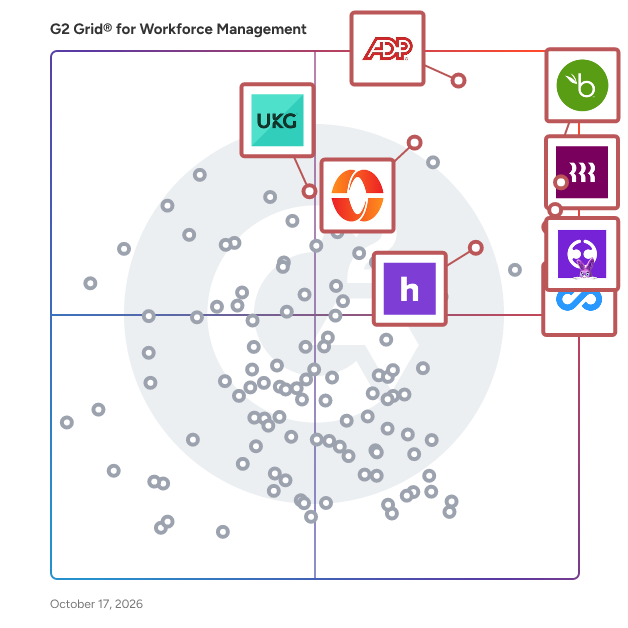
## G2 Grid® for Workforce Management Software
![G2 Grid® for Workforce Management Software plotting products by satisfaction and market presence](https://www.g2.com/categories/workforce-management/grids.png?focus%5B%5D=3236&focus%5B%5D=20433&focus%5B%5D=53090&focus%5B%5D=19474&focus%5B%5D=3924&focus%5B%5D=4132&focus%5B%5D=553&focus%5B%5D=1698)
Highlighted products: BambooHR, Connecteam, Rippling, Homebase, ADP Workforce Now, UKG Ready, UKG Pro, and Paychex.
Underlying data: [Grid® JSON](https://www.g2.com/categories/workforce-management/grids.json?focus%5B%5D=bamboohr&amp;focus%5B%5D=connecteam&amp;focus%5B%5D=rippling&amp;focus%5B%5D=homebase&amp;focus%5B%5D=adp-workforce-now&amp;focus%5B%5D=ukg-ready&amp;focus%5B%5D=ukg-pro&amp;focus%5B%5D=paychex&amp;segment=small-business)


## How Many Workforce Management Software Products Does G2 Track?
**Total Products under this Category:** 498

### Category Stats (Jul 2026)
- **Average Rating**: 4.33/5 (↓0.01 vs Jun 2026) The average rating of products in this category, based on all submitted ratings
- **Top Trending Product**: G&amp;A Partners (+10.2%) - Among all products in this category, G&amp;A Partners recorded the largest rating increase compared to last month
*Last updated: July 17, 2026*


## How Does G2 Rank Workforce Management Software Products?

**Why You Can Trust G2's Software Rankings:**

- 30 Analysts and Data Experts
- 88,300+ Authentic Reviews
- 498+ Products
- Unbiased Rankings

G2's software rankings are built on verified user reviews, rigorous moderation, and a consistent research methodology maintained by a team of analysts and data experts. Each product is measured using the same transparent criteria, with no paid placement or vendor influence. While reviews reflect real user experiences, which can be subjective, they offer valuable insight into how software performs in the hands of professionals. Together, these inputs power the G2 Score, a standardized way to compare tools within every category.


---

**Sponsored**

### Checkr

Checkr is the AI verification platform for high-stakes decisions. Checkr AI decodes messy, fragmented, hard-to-verify information about people, and delivers clear answers about a person&#39;s identity, background, and credentials. Trusted by more than 140,000 customers globally across employment, mortgage, and tenant verifications, Checkr helps businesses and individuals make more confident decisions. Checkr has offices in San Francisco, CA; Denver, CO; and Santiago, Chile. Learn more at: checkr.com.


[Visit website](https://www.g2.com/external_clickthroughs/record?secure%5Bad_program%5D=ppc&amp;secure%5Bad_slot%5D=category_product_list&amp;secure%5Bcategory_id%5D=171&amp;secure%5Bchosen_at%5D=2026-07-18T22%3A05%3A53Z&amp;secure%5Bdisplayable_resource_id%5D=171&amp;secure%5Bdisplayable_resource_type%5D=Category&amp;secure%5Bmedium%5D=sponsored&amp;secure%5Bplacement_reason%5D=page_category&amp;secure%5Bplacement_resource_ids%5D%5B%5D=171&amp;secure%5Bprioritized%5D=false&amp;secure%5Bproduct_id%5D=24496&amp;secure%5Bresource_id%5D=171&amp;secure%5Bresource_type%5D=Category&amp;secure%5Bsource_type%5D=category_page&amp;secure%5Bsource_url%5D=https%3A%2F%2Fwww.g2.com%2Fcategories%2Fworkforce-management%2Fsmall-business%3Fpage%3D3&amp;secure%5Btoken%5D=4bb1a0f1042bb3416a845835e783cb457102367e54930ef2c1c218854285cb98&amp;secure%5Burl%5D=https%3A%2F%2Fcheckr.com%2Fsignup%3Futm_medium%3Daffiliate%26utm_source%3Dg2%26utm_term%3Dlist-ranking&amp;secure%5Burl_type%5D=custom_url)

---

## What Are the Top-Rated Workforce Management Software Products in 2026?
### 1. [Assembled WFM](https://www.g2.com/products/assembled-wfm/reviews)
Assembled is an all-in-one support platform designed to enhance customer service operations by integrating AI agents with intelligent workforce management. This solution aims to help companies deliver exceptional support experiences while efficiently managing their resources. By leveraging advanced technology, Assembled enables organizations to streamline their support processes, ensuring that both AI and human agents work in harmony to meet customer needs. The platform primarily targets customer support teams across various industries that seek to improve their operational efficiency and service quality. Assembled is particularly beneficial for businesses that handle high volumes of customer interactions and require precise forecasting and staffing solutions. With its capabilities, teams can automate a significant portion of customer interactions, allowing human agents to focus on more complex inquiries, thereby enhancing overall productivity and customer satisfaction. Key features of Assembled include fast and intuitive scheduling, which allows teams to create customized work schedules that adapt to fluctuating demand. This flexibility is crucial for organizations that experience varying levels of customer inquiries throughout the day or week. Additionally, the platform offers human-in-the-loop AI-powered automation, which ensures that AI agents can seamlessly collaborate with human staff, providing a balanced approach to customer support. This unique feature helps to maintain a personal touch in customer interactions while benefiting from the efficiency of automation. Another standout aspect of Assembled is its powerful forecasting capabilities, which boast over 90% accuracy. This feature enables teams to predict customer demand accurately, allowing for optimal staffing decisions that align with anticipated workload. Furthermore, the platform provides meaningful cross-team visibility, ensuring that all stakeholders have access to relevant information and insights, fostering collaboration and informed decision-making. Assembled also excels in reporting, offering centralized and robust analytics that deliver actionable insights. This comprehensive reporting functionality empowers teams to track performance metrics, identify trends, and make data-driven adjustments to their support strategies. By utilizing Assembled, organizations can scale their support operations intelligently, balancing the strengths of AI with the irreplaceable value of human interaction, ultimately leading to enhanced customer experiences and operational success.


**Average Rating:** 4.6/5.0
**Total Reviews:** 184
**How Do G2 Users Rate Assembled WFM?**

- **Has the product been a good partner in doing business?:** 9.5/10 (Category avg: 8.7/10)
- **Performance:** 8.8/10 (Category avg: 8.6/10)
- **Skills Management:** 8.1/10 (Category avg: 8.3/10)
- **Workforce Analytics:** 8.7/10 (Category avg: 8.4/10)

**Who Is the Company Behind Assembled WFM?**

- **Seller:** [Assembled](https://www.g2.com/sellers/assembled)
- **Company Website:** https://www.assembled.com
- **Year Founded:** 2018
- **HQ Location:** San Francisco, California
- **Twitter:** @assembledhq (372 Twitter followers)
- **LinkedIn® Page:** https://www.linkedin.com/company/26571599/ (134 employees on LinkedIn®)

**Who Uses This Product?**
- **Top Industries:** Financial Services, Information Technology and Services
- **Company Size:** 63% Mid-Market, 21% Small-Business


#### What Are Assembled WFM's Pros and Cons?

**Pros:**

- Ease of Use (39 reviews)
- Scheduling (28 reviews)
- Scheduling Ease (25 reviews)
- Intuitive (20 reviews)
- Efficiency (19 reviews)

**Cons:**

- Scheduling Issues (15 reviews)
- Missing Features (10 reviews)
- Limited Features (9 reviews)
- Poor Reporting (9 reviews)
- Slow Loading (9 reviews)


### What Do G2 Reviewers Say About Assembled WFM?
*AI-generated summary from verified user reviews*

**Pros:**

- Users find Assembled WFM to be **very approachable** , allowing quick understanding and effective management for all backgrounds.
- Users appreciate the **seamless scheduling capabilities** of Assembled WFM, allowing easy adjustments and real-time updates.
- Users appreciate the **ease of scheduling** with Assembled WFM, enjoying seamless adjustments and real-time data tracking.
- Users love the **intuitive design** of Assembled WFM, making it easy for anyone to understand and use.
- Users highlight the **efficiency** of Assembled WFM, streamlining scheduling and enhancing forecasting capabilities for optimal operations.

**Cons:**

- Users find **schedule changes complicated** , impacting their ability to manage tasks effectively and access their scores.
- Users find the **missing features** in Assembled WFM, like custom reporting and shift swap, frustrating and limiting.
- Users find Assembled WFM has **limited features** , hindering efficiency, especially in reporting and workforce management functionalities.
- Users frequently struggle with **poor reporting** , including limited customization and delays in data refreshing, affecting efficiency.
- Users often experience **slow loading** times, hindering task completion and complicating schedule management.

#### What Are Recent G2 Reviews of Assembled WFM?

**"[Improves Staffing Visibility and Operational Efficiency](https://www.g2.com/survey_responses/assembled-wfm-review-12977659)"**

**Rating:** 4.0/5.0 stars
*— Airene D.*

[Read full review](https://www.g2.com/survey_responses/assembled-wfm-review-12977659)

---

**"[Streamlined Workforce Management with Ease](https://www.g2.com/survey_responses/assembled-wfm-review-12980620)"**

**Rating:** 5.0/5.0 stars
*— Verified User in Leisure, Travel &amp; Tourism*

[Read full review](https://www.g2.com/survey_responses/assembled-wfm-review-12980620)

---


#### What Are G2 Users Discussing About Assembled WFM?

- [What is your primary use case for Assembled in workforce management, and how has it impacted your team&#39;s efficiency?](https://www.g2.com/discussions/what-is-your-primary-use-case-for-assembled-in-workforce-management-and-how-has-it-impacted-your-team-s-efficiency)
- [What is Assembled used for?](https://www.g2.com/discussions/what-is-assembled-used-for)

### 2. [Arcoro](https://www.g2.com/products/arcoro/reviews)
Arcoro is on a mission to elevate those who build our world. Construction companies and contractors have special workforce management needs, and Arcoro offers time tracking and an all-in-one HR platform that enables companies to address them successfully. Arcoro is the #1 workforce management company focused on the construction industry, offering solutions to help companies hire, manage and grow their back office, professional and skilled trade workforce. Arcoro’s suite of solutions includes: Applicant Tracking Onboarding Core HR Benefits ExakTime by Arcoro Learning Management Performance Management and Succession Deep ERP integrations Advanced Analytics Arcoro’s solutions scale as construction companies grow; we offer more ERP integrations than any other construction software provider. Arcoro also maintains strong partnerships with other leading construction tech providers to ensure a seamless experience for our customers. Over 7,000 construction companies and contractors of all sizes in North America rely on Arcoro to help them address their HR needs. Every day more than one million construction pros clock in and out on an Arcoro product. Arcoro strives to deliver the best experience for employees in the field and in the office. For more info, please visit us at www.arcoro.com.


**Average Rating:** 4.0/5.0
**Total Reviews:** 166
**How Do G2 Users Rate Arcoro?**

- **Has the product been a good partner in doing business?:** 8.4/10 (Category avg: 8.7/10)
- **Performance:** 8.9/10 (Category avg: 8.6/10)
- **Skills Management:** 8.7/10 (Category avg: 8.3/10)
- **Workforce Analytics:** 8.8/10 (Category avg: 8.4/10)

**Who Is the Company Behind Arcoro?**

- **Seller:** [Arcoro](https://www.g2.com/sellers/arcoro)
- **Company Website:** https://arcoro.com/
- **Year Founded:** 2018
- **HQ Location:** Scottsdale, Arizona
- **Twitter:** @arcoro (4 Twitter followers)
- **LinkedIn® Page:** https://www.linkedin.com/company/arcorohr/ (182 employees on LinkedIn®)

**Who Uses This Product?**
- **Who Uses This:** Office Manager, President
- **Top Industries:** Construction, Human Resources
- **Company Size:** 52% Mid-Market, 44% Small-Business


#### What Are Arcoro's Pros and Cons?

**Pros:**

- Ease of Use (8 reviews)
- Customer Support (5 reviews)
- Easy Onboarding (4 reviews)
- Helpful (4 reviews)
- Simple (4 reviews)

**Cons:**

- Missing Features (4 reviews)
- Expensive (3 reviews)
- Inadequate Reporting (3 reviews)
- Poor Customer Support (3 reviews)
- Difficult Learning (2 reviews)


### What Do G2 Reviewers Say About Arcoro?
*AI-generated summary from verified user reviews*

**Pros:**

- Users appreciate the **intuitive dashboard** of Arcoro, making HR functions straightforward and enhancing productivity.
- Users value the **top-notch customer support** of Arcoro, which enhances their overall experience and efficiency.
- Users appreciate the **easy onboarding** process, highlighting its user-friendly interface and seamless integration with applicant tracking.
- Users commend the **excellent client support** and helpful office hours that enhance their experience significantly.
- Users appreciate the **user-friendly dashboard** of Arcoro, which simplifies project management with its clear layout and features.

**Cons:**

- Users find the **missing features** in reporting and integration limit Arcoro&#39;s effectiveness and functionality.
- Users find Arcoro to be too **expensive for smaller organizations** and question its return on investment.
- Users criticize the **inadequate reporting** capabilities of Arcoro, finding it clunky and lacking in necessary detail.
- Users experience **poor customer support** with long resolution times and inconsistent assistance complicating their experience.
- Users find **difficult learning** curves in using Arcoro, especially with time clocks and analytics features.

#### What Are Recent G2 Reviews of Arcoro?

**"[Exaktime Makes Time Tracking and Reporting Effortless](https://www.g2.com/survey_responses/arcoro-review-12115463)"**

**Rating:** 5.0/5.0 stars
*— Verified User in Construction*

[Read full review](https://www.g2.com/survey_responses/arcoro-review-12115463)

---

**"[Easy-to-Navigate Hub for Employee Information](https://www.g2.com/survey_responses/arcoro-review-12700041)"**

**Rating:** 5.0/5.0 stars
*— Heather D.*

[Read full review](https://www.g2.com/survey_responses/arcoro-review-12700041)

---


#### What Are G2 Users Discussing About Arcoro?

- [What are the benefits and drawbacks of using Arcoro for HR management, and what improvements would you like to see?](https://www.g2.com/discussions/what-are-the-benefits-and-drawbacks-of-using-arcoro-for-hr-management-and-what-improvements-would-you-like-to-see)
- [What is Arcoro used for?](https://www.g2.com/discussions/what-is-arcoro-used-for)
- [What is ExakTime used for?](https://www.g2.com/discussions/what-is-exaktime-used-for)

### 3. [Legion WFM](https://www.g2.com/products/legion-wfm/reviews)
Legion Technologies is a workforce management platform designed to help businesses enhance labor efficiency while simultaneously boosting employee engagement. This innovative solution leverages advanced technology to streamline various aspects of workforce management, making it easier for organizations to optimize their operations and improve overall productivity. The Legion WFM platform stands out due to its intelligent automation and employee-centric approach, ensuring that both management and staff benefit from its features. The target audience for Legion Technologies includes businesses with 1000+ employees looking to improve their workforce management practices. Industries such as retail, hospitality, restaurants and convenience stores can particularly benefit from the platform&#39;s capabilities. By providing tools for strategic insights, labor budgeting, and demand forecasting, Legion enables organizations to make informed decisions that align workforce capabilities with business needs. Legion AI is crucial for optimizing labor costs and ensuring that the right number of employees are scheduled at the right times. Key features of the Legion WFM platform include labor optimization, automated scheduling, and time and attendance tracking. These functionalities work together to create a seamless execution process that maximizes operational efficiency. Automated scheduling reduces the time managers spend on creating shifts, while labor optimization ensures that businesses are not overstaffed or understaffed. The time and attendance feature simplifies tracking employee hours, allowing for accurate payroll processing and compliance with labor regulations. In addition to operational features, Legion Technologies places a strong emphasis on employee empowerment. The platform includes tools for frontline communications, enabling team members to stay informed and connected. Legion InstantPay is another notable feature that allows employees to access their earned wages before the traditional payday, enhancing financial flexibility. Furthermore, the platform includes performance and rewards tracking, which helps organizations recognize and incentivize employee contributions, fostering a positive workplace culture. Overall, Legion Technologies provides a comprehensive workforce management solution that not only enhances operational efficiency but also prioritizes employee satisfaction. By integrating advanced technology with user-friendly interfaces, the Legion WFM platform positions itself as a valuable asset for businesses aiming to thrive in a competitive landscape.


**Average Rating:** 4.3/5.0
**Total Reviews:** 70
**How Do G2 Users Rate Legion WFM?**

- **Has the product been a good partner in doing business?:** 9.2/10 (Category avg: 8.7/10)
- **Performance:** 8.7/10 (Category avg: 8.6/10)
- **Skills Management:** 8.7/10 (Category avg: 8.3/10)
- **Workforce Analytics:** 8.6/10 (Category avg: 8.4/10)

**Who Is the Company Behind Legion WFM?**

- **Seller:** [Legion Technologies](https://www.g2.com/sellers/legion-technologies)
- **Company Website:** https://legion.co/
- **Year Founded:** 2016
- **HQ Location:** Palo Alto, US
- **Twitter:** @legiontech (243 Twitter followers)
- **LinkedIn® Page:** https://www.linkedin.com/company/24584274/ (257 employees on LinkedIn®)

**Who Uses This Product?**
- **Top Industries:** Retail, Health, Wellness and Fitness
- **Company Size:** 47% Enterprise, 29% Small-Business


#### What Are Legion WFM's Pros and Cons?

**Pros:**

- Ease of Use (4 reviews)
- Scheduling (3 reviews)
- Scheduling Ease (3 reviews)
- Access Ease (1 reviews)
- Automation (1 reviews)

**Cons:**

- Holiday Management (1 reviews)
- Inadequate Tracking (1 reviews)
- Limited Features (1 reviews)
- Organizational Challenges (1 reviews)
- PTO Issues (1 reviews)


### What Do G2 Reviewers Say About Legion WFM?
*AI-generated summary from verified user reviews*

**Pros:**

- Users appreciate the **ease of use** of Legion WFM, enabling effortless scheduling and communication with team members.
- Users enjoy the **easy scheduling** features of Legion WFM, facilitating communication and shift management effortlessly.
- Users value the **ease of scheduling** with Legion WFM, enhancing communication and shift management seamlessly.
- Users enjoy the **access ease** of Legion WFM, allowing convenient login and onsite scheduling insights before arrival.
- Users value the **automation capabilities** of Legion WFM, streamlining location open hours for efficiency across platforms.

**Cons:**

- Users face **difficulties with holiday management** , particularly regarding clocking in and out on designated holidays.
- Users struggle with **inadequate tracking** of paid time off, making it difficult to manage schedules and understand earnings.
- Users find the **limited features** of Legion WFM make tracking paid time off and hours challenging.
- Users find the **paid time off tracking challenging** , complicating the weekly scheduling and understanding of estimated pay.
- Users find the **PTO issues** frustrating, as tracking hours and estimated pay is complicated and unclear.

#### What Are Recent G2 Reviews of Legion WFM?

**"[Efficient Scheduling and Real-Time Insights](https://www.g2.com/survey_responses/legion-wfm-review-12545507)"**

**Rating:** 5.0/5.0 stars
*— Carl J.*

[Read full review](https://www.g2.com/survey_responses/legion-wfm-review-12545507)

---

**"[Optimizes Strategy with Intuitive Employee Engagement](https://www.g2.com/survey_responses/legion-wfm-review-12642349)"**

**Rating:** 4.0/5.0 stars
*— Tim C.*

[Read full review](https://www.g2.com/survey_responses/legion-wfm-review-12642349)

---


#### What Are G2 Users Discussing About Legion WFM?

- [What is Legion WFM used for?](https://www.g2.com/discussions/what-is-legion-wfm-used-for)

### 4. [Playvox WFM](https://www.g2.com/products/playvox-wfm/reviews)
Playvox by NICE Workforce Management (WFM) uses AI for efficient capacity planning, forecasting, scheduling, and intraday planning, accessible via the cloud. It provides real-time visibility into staff allocation, supports shift swaps and time-off requests, and enhances employee engagement. Its interactive dashboard focuses on key KPIs like shrinkage and service levels. Designed for digital, omnichannel contact centers, Playvox WFM handles complex interactions and concurrent work for chat, email, and social media. Its intuitive design simplifies workforce management, allowing quick training and improved customer experiences.


**Average Rating:** 4.7/5.0
**Total Reviews:** 122
**How Do G2 Users Rate Playvox WFM?**

- **Has the product been a good partner in doing business?:** 9.4/10 (Category avg: 8.7/10)
- **Performance:** 9.3/10 (Category avg: 8.6/10)
- **Skills Management:** 9.2/10 (Category avg: 8.3/10)
- **Workforce Analytics:** 9.2/10 (Category avg: 8.4/10)

**Who Is the Company Behind Playvox WFM?**

- **Seller:** [Playvox](https://www.g2.com/sellers/playvox)
- **Year Founded:** 2012
- **HQ Location:** Sunnyvale, CA
- **Twitter:** @PlayVoxCX (1,675 Twitter followers)
- **LinkedIn® Page:** https://www.linkedin.com/company/1085709/ (43 employees on LinkedIn®)

**Who Uses This Product?**
- **Who Uses This:** Customer Service Representative
- **Top Industries:** Consumer Services, Retail
- **Company Size:** 49% Mid-Market, 33% Enterprise


#### What Are Playvox WFM's Pros and Cons?

**Pros:**

- Ease of Use (10 reviews)
- Scheduling (10 reviews)
- Scheduling Ease (9 reviews)
- Efficiency (7 reviews)
- Time Management (6 reviews)

**Cons:**

- Missing Features (4 reviews)
- Limited Features (3 reviews)
- Display Issues (2 reviews)
- Inefficient Reporting (2 reviews)
- Poor Interface Design (2 reviews)


### What Do G2 Reviewers Say About Playvox WFM?
*AI-generated summary from verified user reviews*

**Pros:**

- Users value the **ease of use** of Playvox WFM, simplifying team management and enhancing organization effortlessly.
- Users appreciate the **easy scheduling** features of Playvox WFM, making team management stress-free and organized.
- Users appreciate the **scheduling ease** of Playvox WFM, making team management stress-free and organized.
- Users value the **efficiency** of Playvox WFM, simplifying team management and ensuring smooth operations without stress.
- Users appreciate the **time management** features of Playvox WFM, enabling them to stay organized and punctual effortlessly.

**Cons:**

- Users criticize the **missing features** in Playvox WFM, including inadequate shift swaps and limited mobile access.
- Users experience **limited features** with Playvox WFM, particularly missing key tools for scheduling and performance tracking.
- Users experience **display issues** with calendar formats and unsupported icons that hinder usability and customization.
- Users experience **inefficient reporting** in Playvox WFM, struggling with slow performance and inconsistent data retrieval.
- Users find the **poor interface design** of Playvox WFM hampers usability, despite some overall positive aspects.

#### What Are Recent G2 Reviews of Playvox WFM?

**"[Great reporting and time tracking tool](https://www.g2.com/survey_responses/playvox-wfm-review-11419098)"**

**Rating:** 5.0/5.0 stars
*— Alberto L.*

[Read full review](https://www.g2.com/survey_responses/playvox-wfm-review-11419098)

---

**"[Effortless Team Management, Smooth Operations](https://www.g2.com/survey_responses/playvox-wfm-review-12229198)"**

**Rating:** 4.5/5.0 stars
*— Felipe B.*

[Read full review](https://www.g2.com/survey_responses/playvox-wfm-review-12229198)

---


#### What Are G2 Users Discussing About Playvox WFM?

- [What is Playvox WFM used for?](https://www.g2.com/discussions/what-is-playvox-wfm-used-for)

### 5. [Calabrio ONE](https://www.g2.com/products/calabrio-one/reviews)
Calabrio ONE is now Verint. The workforce engagement and contact center intelligence capabilities you knew as Calabrio ONE are now offered through Verint CX Automation Platform – with expanded AI capabilities, deeper integrations, and the same focus on agent experience and customer outcomes. The Verint CX Automation Platform helps contact centers automate CX workflows and deliver measurable outcomes. Built to run on your existing infrastructure, it integrates with any CCaaS, CRM, or AI model. Powered by a shared CX Data Hub and Verint Da Vinci™ AI, the platform learns from every interaction to drive automation across self-service, agent support, analytics, quality, and workforce engagement.


**Average Rating:** 4.4/5.0
**Total Reviews:** 423
**How Do G2 Users Rate Calabrio ONE?**

- **Has the product been a good partner in doing business?:** 8.8/10 (Category avg: 8.7/10)
- **Performance:** 9.1/10 (Category avg: 8.6/10)
- **Skills Management:** 8.8/10 (Category avg: 8.3/10)
- **Workforce Analytics:** 9.0/10 (Category avg: 8.4/10)

**Who Is the Company Behind Calabrio ONE?**

- **Seller:** [Verint](https://www.g2.com/sellers/verint)
- **Company Website:** https://www.verint.com/
- **Year Founded:** 1994
- **HQ Location:** Melville, New York
- **Twitter:** @Verint (7,739 Twitter followers)
- **LinkedIn® Page:** https://www.linkedin.com/company/verint (4,343 employees on LinkedIn®)

**Who Uses This Product?**
- **Who Uses This:** Workforce Analyst, Risk Investigator
- **Top Industries:** Consumer Services, Hospital &amp; Health Care
- **Company Size:** 54% Mid-Market, 36% Enterprise


#### What Are Calabrio ONE's Pros and Cons?

**Pros:**

- Ease of Use (44 reviews)
- Efficiency (29 reviews)
- Features (28 reviews)
- Scheduling (21 reviews)
- Customer Support (20 reviews)

**Cons:**

- Inadequate Reporting (13 reviews)
- Poor Reporting (13 reviews)
- Missing Features (12 reviews)
- Inaccurate Data Analysis (10 reviews)
- Not Intuitive (10 reviews)


### What Do G2 Reviewers Say About Calabrio ONE?
*AI-generated summary from verified user reviews*

**Pros:**

- Users find Calabrio ONE&#39;s **ease of use** a vital advantage, significantly streamlining workflows and enhancing efficiency.
- Users value the **time-saving efficiency** of Calabrio ONE, transforming lengthy tasks into quick, streamlined processes.
- Users highlight the **ease of use** and regular updates of Calabrio ONE, enhancing team efficiency and satisfaction.
- Users value the **flexible scheduling feature** of Calabrio ONE, enhancing employee satisfaction in dynamic environments.
- Users appreciate the **customer support** from Calabrio ONE, especially the attentive service from their Customer Success Manager.

**Cons:**

- Users find the **inadequate reporting** and confusing support of Calabrio ONE frustrating, impacting usability and efficiency.
- Users experience **poor reporting** with Calabrio ONE due to complexity, inconsistencies, and lack of tailored support.
- Users express concerns about the **limited features** of Calabrio ONE, impacting usability and overall effectiveness.
- Users express concern over **inaccurate data analysis** , which undermines confidence in the reliability of reporting results.
- Users find the **interface not intuitive** , facing challenges in navigating features and utilizing Insights effectively.

#### What Are Recent G2 Reviews of Calabrio ONE?

**"[Effortless Scheduling with Some Connectivity Hiccups](https://www.g2.com/survey_responses/calabrio-one-review-12662134)"**

**Rating:** 4.0/5.0 stars
*— martino b.*

[Read full review](https://www.g2.com/survey_responses/calabrio-one-review-12662134)

---

**"[Calabrio ONE Makes Schedule Management Effortless with Reliable Real-Time Updates](https://www.g2.com/survey_responses/calabrio-one-review-12761859)"**

**Rating:** 4.5/5.0 stars
*— Yonis A.*

[Read full review](https://www.g2.com/survey_responses/calabrio-one-review-12761859)

---


#### What Are G2 Users Discussing About Calabrio ONE?

- [What is Calabrio ONE used for?](https://www.g2.com/discussions/what-is-calabrio-one-used-for)
- [What is calabrio WFM?](https://www.g2.com/discussions/what-is-calabrio-wfm) - 1 comment
- [Is calabrio owned by Cisco?](https://www.g2.com/discussions/is-calabrio-owned-by-cisco)
- [What does calabrio one do?](https://www.g2.com/discussions/what-does-calabrio-one-do)
- [How much does calabrio cost?](https://www.g2.com/discussions/how-much-does-calabrio-cost)

### 6. [Crew](https://www.g2.com/products/crew-crew/reviews)
Crew is the #1 digital workplace trusted by the world’s largest enterprises to streamline post-COVID-19 operations. Core to the platform is a highly engaging, secure mobile app that transforms how work gets done for frontline teams. Crew better connects organizations through communication, optimizes labor through streamlined scheduling and staffing workflows, and builds culture through public recognition and motivation. Crew helps more than 40,000 organizations create more productive frontline teams. Crew is headquartered in San Francisco, CA. To learn more, visit www.crewapp.com.


**Average Rating:** 4.2/5.0
**Total Reviews:** 54
**How Do G2 Users Rate Crew?**

- **Has the product been a good partner in doing business?:** 8.3/10 (Category avg: 8.7/10)
- **Performance:** 7.7/10 (Category avg: 8.6/10)
- **Skills Management:** 6.7/10 (Category avg: 8.3/10)
- **Workforce Analytics:** 7.7/10 (Category avg: 8.4/10)

**Who Is the Company Behind Crew?**

- **Seller:** [Crew](https://www.g2.com/sellers/crew)
- **Year Founded:** 2015
- **HQ Location:** San Francisco, CA
- **Twitter:** @crew_app (1,653 Twitter followers)
- **LinkedIn® Page:** https://www.linkedin.com/company/10356167/ (132 employees on LinkedIn®)

**Who Uses This Product?**
- **Top Industries:** Food &amp; Beverages, Restaurants
- **Company Size:** 67% Small-Business, 24% Mid-Market


#### What Are Crew's Pros and Cons?

**Pros:**

- Accessibility (1 reviews)
- Communication (1 reviews)
- Communication Efficiency (1 reviews)
- Convenience (1 reviews)
- Customization (1 reviews)

**Cons:**

- Data Security (1 reviews)
- Difficult Setup (1 reviews)
- Display Issues (1 reviews)
- File Sharing Issues (1 reviews)
- Improvement Needed (1 reviews)


### What Do G2 Reviewers Say About Crew?
*AI-generated summary from verified user reviews*

**Pros:**

- Users value the **accessibility across multiple platforms** , making communication seamless and efficient for everyone involved.
- Users love the **effective communication features** of Crew, making collaboration seamless and engaging across various platforms.
- Users praise the **effective communication** features of Crew, enhancing group interactions and information sharing effortlessly.
- Users love the **convenience** of Crew for seamless communication, scheduling, and sharing across multiple platforms and devices.
- Users enjoy the **customization options** in Crew, facilitating effective communication and collaboration across various platforms.

**Cons:**

- Users are concerned about **data security** due to a lack of encryption in Crew, making them feel less protected.
- Users find the **difficult setup** in Crew frustrating, especially with individual message selection and thread recovery issues.
- Users face **display issues** with Crew, particularly its lack of landscape mode and cumbersome messaging features.
- Users face **file sharing issues** with Crew, including limits on message distribution and difficulty in recovering archived threads.
- Users face **improvement needed** due to limited messaging options, lack of landscape mode, and difficulties recovering archived threads.

#### What Are Recent G2 Reviews of Crew?

**"[CREW 4 LIFE](https://www.g2.com/survey_responses/crew-review-5096691)"**

**Rating:** 5.0/5.0 stars
*— Aimee V.*

[Read full review](https://www.g2.com/survey_responses/crew-review-5096691)

---

**"[Use it for multiple groups in a charitable organization setting](https://www.g2.com/survey_responses/crew-review-1184841)"**

**Rating:** 5.0/5.0 stars
*— Larry M.*

[Read full review](https://www.g2.com/survey_responses/crew-review-1184841)

---


#### What Are G2 Users Discussing About Crew?

- [Does the crew app cost money?](https://www.g2.com/discussions/does-the-crew-app-cost-money)
- [Is the crew app safe?](https://www.g2.com/discussions/is-the-crew-app-safe) - 1 comment
- [What happened to the crew app?](https://www.g2.com/discussions/what-happened-to-the-crew-app)
- [Is crew a good app?](https://www.g2.com/discussions/is-crew-a-good-app) - 1 comment

### 7. [ProLiant](https://www.g2.com/products/proliant/reviews)
Who is ProLiant? ProLiant is a payroll and HR technology provider dedicated to striking the perfect balance between service and technology. We offer fully integrated, cloud-based tools that simplify processes while improving accuracy and ensuring compliance. Our solutions include: - Applicant Tracking &amp; Recruitment - Employee Onboarding - Time &amp; Labor Management - Payroll &amp; Tax Services - HR &amp; Benefits Administration - Performance Management - Early Wage Access (ReadyPay Today) - Learning Management System At ProLiant, we combine our robust suite of products with a CPA-like approach to our clients’ needs. We care about the small details and listen; we strive to find a solution to even the most demanding challenges, and we make decisions based on data. This approach has helped us regularly achieve an NPS score greater than 80, making us a leader in our industry and other recognizable companies. What can we say? When you’ve been delivering powerful technology and services for over 30 years and have over 5,000 customers, people pay attention. We approach everything we do here at ProLiant with you in mind. We’re ready to offer you frictionless tools that empower your workforce. We’re committed to providing personalized and memorable support. And we’ll do it all with absolute accuracy. Let’s get started!


**Average Rating:** 4.4/5.0
**Total Reviews:** 707
**How Do G2 Users Rate ProLiant?**

- **Has the product been a good partner in doing business?:** 8.8/10 (Category avg: 8.7/10)
- **Performance:** 8.4/10 (Category avg: 8.6/10)
- **Skills Management:** 7.5/10 (Category avg: 8.3/10)
- **Workforce Analytics:** 7.6/10 (Category avg: 8.4/10)

**Who Is the Company Behind ProLiant?**

- **Seller:** [ProLiant](https://www.g2.com/sellers/proliant)
- **Company Website:** https://www.proliant.com
- **Year Founded:** 1993
- **HQ Location:** Atlanta, Georgia, United States
- **Twitter:** @ProliantInc (254 Twitter followers)
- **LinkedIn® Page:** https://www.linkedin.com/company/146237/ (332 employees on LinkedIn®)

**Who Uses This Product?**
- **Who Uses This:** Controller, Office Manager
- **Top Industries:** Restaurants, Hospital &amp; Health Care
- **Company Size:** 56% Mid-Market, 37% Small-Business


#### What Are ProLiant's Pros and Cons?

**Pros:**

- Ease of Use (191 reviews)
- Customer Support (177 reviews)
- Helpful (149 reviews)
- Payroll (104 reviews)
- Response Time (79 reviews)

**Cons:**

- Poor Customer Support (49 reviews)
- Not Intuitive (45 reviews)
- Complex Reporting (40 reviews)
- Steep Learning Curve (31 reviews)
- Limited Customization (30 reviews)


### What Do G2 Reviewers Say About ProLiant?
*AI-generated summary from verified user reviews*

**Pros:**

- Users appreciate the **ease of use** of ProLiant, finding navigation and information access straightforward and efficient.
- Users praise the **timely and superior customer support** of ProLiant, enhancing the overall experience and setup process.
- Users appreciate the **easy navigation** of ProLiant, enhancing access to payroll and employee information effectively.
- Users value the **efficient payroll processing** of ProLiant, enjoying quick resolution and outstanding customer service.
- Users appreciate the **timely response from customer service** of ProLiant, enhancing their overall experience.

**Cons:**

- Users express frustration over **poor customer support** , highlighting communication issues and unresolved problems with the service.
- Users find the **ProLiant interface not intuitive** , making navigation and basic tasks unnecessarily complicated and overwhelming.
- Users find the **complex reporting** features overwhelming, often struggling to locate necessary reports effectively.
- Users find the **steep learning curve** of ProLiant challenging, often relying on customer support for assistance.
- Users feel the **limited customization** of ProLiant&#39;s reporting features hampers their user experience and functionality.

#### What Are Recent G2 Reviews of ProLiant?

**"[Proliant is an absolute life saver!](https://www.g2.com/survey_responses/proliant-review-4753750)"**

**Rating:** 5.0/5.0 stars
*— Elizabeth D.*

[Read full review](https://www.g2.com/survey_responses/proliant-review-4753750)

---

**"[ProLiant Makes Payroll Easy and Gives Us Peace of Mind](https://www.g2.com/survey_responses/proliant-review-13105194)"**

**Rating:** 5.0/5.0 stars
*— Dan&#39;s Whetstone M.*

[Read full review](https://www.g2.com/survey_responses/proliant-review-13105194)

---


#### What Are G2 Users Discussing About ProLiant?

- [What is Proliant used for?](https://www.g2.com/discussions/what-is-proliant-used-for)

### 8. [Dialpad Support](https://www.g2.com/products/dialpad-support/reviews)
Dialpad elevates every conversation with the leading Ai-powered customer communications platform. Tap into real-time Ai insights to enhance and streamline every interaction. Dialpad Support modernizes your inbound contact center with Ai agents, assistants, real-time guidance, and coaching. Dialpad Sell is the outbound solution that guides your sales reps with real-time Ai coaching, automation, and insights. Together Dialpad Support and Dialpad Sell are the leading contact center solution. You can: - Call, message, and meet in a single app - Focus on the conversation with real-time call transcriptions, Ai summaries, and action items - Provide real-time guidance and instant knowledge to agents - Empower supervisors to coach and monitor teams with live sentiment and automated quality management - Deflect simple customer inquiries 24/7 with our Ai Agent


**Average Rating:** 4.4/5.0
**Total Reviews:** 679
**How Do G2 Users Rate Dialpad Support?**

- **Has the product been a good partner in doing business?:** 9.0/10 (Category avg: 8.7/10)
- **Performance:** 9.0/10 (Category avg: 8.6/10)
- **Skills Management:** 8.5/10 (Category avg: 8.3/10)
- **Workforce Analytics:** 8.7/10 (Category avg: 8.4/10)

**Who Is the Company Behind Dialpad Support?**

- **Seller:** [Dialpad](https://www.g2.com/sellers/dialpad)
- **Company Website:** https://Dialpad.com
- **Year Founded:** 2011
- **HQ Location:** San Ramon, California
- **Twitter:** @DialpadHQ (60 Twitter followers)
- **LinkedIn® Page:** https://www.linkedin.com/company/3967399/ (1,491 employees on LinkedIn®)

**Who Uses This Product?**
- **Who Uses This:** Account Manager, Customer Service Rep
- **Top Industries:** Financial Services, Consumer Services
- **Company Size:** 45% Mid-Market, 31% Small-Business


#### What Are Dialpad Support's Pros and Cons?

**Pros:**

- Helpful (84 reviews)
- Ease of Use (60 reviews)
- Customer Support (46 reviews)
- Features (27 reviews)
- Response Time (22 reviews)

**Cons:**

- Poor Customer Support (32 reviews)
- Call Issues (29 reviews)
- Delayed Support (21 reviews)
- Dialer Issues (21 reviews)
- Long Wait Times (21 reviews)


### What Do G2 Reviewers Say About Dialpad Support?
*AI-generated summary from verified user reviews*

**Pros:**

- Users find the **online help section incredibly helpful** , enabling quick answers and enhancing the support experience.
- Users appreciate the **ease of use** of Dialpad Support, finding navigation and support requests simple and efficient.
- Users enjoy the **responsive customer support** of Dialpad, appreciating quick resolutions and effective communication for their issues.
- Users value the **transcription and CRM integration** features of Dialpad Support, enhancing efficiency in client communications.
- Users appreciate the **quick response times** of Dialpad Support, effectively addressing issues with prompt assistance.

**Cons:**

- Users find the **poor customer support** of Dialpad Support time-consuming and often unhelpful in resolving issues.
- Users experience **call connection delays** and find reporting and app functionality lacking, impacting their overall experience.
- Users are frustrated with the **delayed support** , making urgent assistance difficult to obtain when needed most.
- Users experience **dialer issues** including delays, call queue inaccuracies, and challenges with reporting and app utilization.
- Users experience frustratingly **long wait times** for responses, especially during peak hours, hindering quick resolutions.

#### What Are Recent G2 Reviews of Dialpad Support?

**"[Dialpad Updated Review](https://www.g2.com/survey_responses/dialpad-support-review-10344582)"**

**Rating:** 5.0/5.0 stars
*— Mohammed P.*

[Read full review](https://www.g2.com/survey_responses/dialpad-support-review-10344582)

---

**"[Easy Setup, Fair Pricing, and Solid Integrations with Halo PSA and Slack](https://www.g2.com/survey_responses/dialpad-support-review-12836209)"**

**Rating:** 5.0/5.0 stars
*— Christopher R.*

[Read full review](https://www.g2.com/survey_responses/dialpad-support-review-12836209)

---


#### What Are G2 Users Discussing About Dialpad Support?

- [What is Dialpad Sell used for?](https://www.g2.com/discussions/what-is-dialpad-sell-used-for)
- [What is Dialpad Contact Center used for?](https://www.g2.com/discussions/what-is-dialpad-contact-center-used-for) - 1 comment

### 9. [TrackSmart.com](https://www.g2.com/products/tracksmart-com/reviews)
TrackSmart is a web-based, affordable solution that simplifies employee time-tracking and scheduling tasks. Trusted by thousands of businesses, TrackSmart lets your employees handle everyday attendance tasks so you can focus on what matters most. And with TrackSmart, you have the flexibility to only use the features you need. TrackSmart Attendance makes it simple to keep track of employee time off, such as vacations, sick days, and personal time. More than just an attendance calendar, it lets you quickly handle time-off requests and timesheets, run detailed reports and maintain employee records – all in one online program. With TrackSmart TimeClock, employees clock in and out, managers approve the records, and then TrackSmart does the rest of the work for you! You can handle payroll in one-click, prevent employees from clocking in before their shift begins, and see who’s clocked in from any computer. No more expensive machines or timesheets needed. TrackSmart Scheduling helps you quickly plan work shifts and lets employees see their schedules anytime, anywhere— from a computer, smart phone or tablet. Plus, employees can communicate with each other and swap shifts on their own, allowing you and your managers to get back to business. Plus, you don’t have to worry about compromising the information of your employees. The TrackSmart system uses industry-standard SSL encryption as well as permission-based access controlled by the administrator. Experience TrackSmart for FREE – No credit card required!


**Average Rating:** 3.4/5.0
**Total Reviews:** 14
**How Do G2 Users Rate TrackSmart.com?**

- **Has the product been a good partner in doing business?:** 8.3/10 (Category avg: 8.7/10)
- **Performance:** 7.8/10 (Category avg: 8.6/10)
- **Skills Management:** 5.0/10 (Category avg: 8.3/10)
- **Workforce Analytics:** 8.3/10 (Category avg: 8.4/10)

**Who Is the Company Behind TrackSmart.com?**

- **Seller:** [ComplyRight](https://www.g2.com/sellers/complyright)
- **Year Founded:** 1987
- **HQ Location:** Pompano Beach, FL
- **Twitter:** @ComplyRight (1,264 Twitter followers)
- **LinkedIn® Page:** https://www.linkedin.com/company/complyright-inc/ (186 employees on LinkedIn®)

**Who Uses This Product?**
- **Company Size:** 73% Small-Business, 20% Mid-Market


#### What Are Recent G2 Reviews of TrackSmart.com?

**"[Easy to navigate](https://www.g2.com/survey_responses/tracksmart-com-review-4202283)"**

**Rating:** 5.0/5.0 stars
*— Verified User in Consumer Services*

[Read full review](https://www.g2.com/survey_responses/tracksmart-com-review-4202283)

---

**"[Good attendance tracking software](https://www.g2.com/survey_responses/tracksmart-com-review-5130030)"**

**Rating:** 4.0/5.0 stars
*— Verified User in Information Technology and Services*

[Read full review](https://www.g2.com/survey_responses/tracksmart-com-review-5130030)

---


#### What Are G2 Users Discussing About TrackSmart.com?

- [What is TrackSmart.com used for?](https://www.g2.com/discussions/what-is-tracksmart-com-used-for)


## What Is Workforce Management Software?

[HR Software](https://www.g2.com/categories/hr)

## What Software Categories Are Similar to Workforce Management Software?

- [HCM Software](https://www.g2.com/categories/hcm-software)
- [Performance Management Software](https://www.g2.com/categories/performance-management)
- [Payroll Software](https://www.g2.com/categories/payroll)
- [Core HR Software](https://www.g2.com/categories/core-hr)
- [Time Tracking Software](https://www.g2.com/categories/time-tracking-software)
- [Employee Scheduling Software](https://www.g2.com/categories/employee-scheduling-software)
- [Time &amp; Attendance Software](https://www.g2.com/categories/time-attendance)


---

## How Do You Choose the Right Workforce Management Software?

### What You Should Know About Workforce Management Software

### What is Workforce Management Software?

Workforce management solutions help businesses track, monitor, and evaluate business metrics, which in turn help human resources departments and personnel oversee and optimize employee schedules and workloads.

Key Benefits of Workforce Management Software

- Reduce expenses by optimizing employee schedules
- ncrease operational productivity
- Minimize financial and non-compliance risks
- Improve employee morale and reduce churn rates
- Automate non-critical labor activities
- Optimize skill usage around value-driving activities

### Why Use Workforce Management software?

Workforce management platforms help businesses optimize their workforce efforts by forecasting labor demand, creating and managing employee schedules, tracking employee attendance, and reporting on workforce efficiency. Workforce management solution use and implementation varies from organization to organization; it also differs in terms of scope. Some tools only focus on employee scheduling and time-off requests; meanwhile, the more robust (and more commonly used) workforce management tools provide payroll, time tracking, and reporting solutions.

**Forecast labor demands –** Many workforce management tools enable businesses to forecast labor demands that help reduce over- or understaffed workdays. This also helps prevent businesses from paying unnecessary overtime pay. Since workforce management tools allow employees to submit time-off requests directly into the software, mistakes such as scheduling an employee when she or he is unavailable are significantly mitigated because all requests are documented in the system.

**Employee schedules –** Depending on the nature and size of a business, scheduling employees can be a complicated task. One that, when mistakes are made, can result in missed shifts, upset employees, and poor customer service. Workforce management software solutions enable employers to house all employee schedules in one place. The software also allows employees to gain greater insight into their upcoming schedules, while providing communication tools for things like time-off requests.

**Payroll –** Many workforce management tools have payroll functionality, or integrate with payroll software, to automatically account for employee hours worked.

**Time tracking –** Through the use of built-in time tracking features, workforce management solutions helps users ensure that their employees are only accruing time worked when they are actually working.

**Employee portal–** Workforce management products often provide an employee portal. This way, employees can log into the system and see when they are scheduled to work, request time off, and even clock in and out.

**Reports –** Workforce management software can generate reports based on time clocked. This provides employers with insights into which employees are on time and which aren’t; it also allows employers to identify any missed shifts.

### Who Uses Workforce Management software?

Though workforce management tools can be used by any business, traditionally they are used by organizations with large hourly and part-time workforces in industries such as retail, manufacturing, hospitality, and health care.

Small businesses in some industries, such as retail or hospitality, deal with a larger number of high turnover rates and employees that work part-time. Workforce management systems make it easy to track all employees. Organizations in other sectors have seen the need to track time and work activities for highly skilled and diverse workforces increase, particularly with the increase in remote and contract employees.

Ultimately, workforce management software is great for businesses of all sizes looking to streamline management’s workload while providing more transparency to the entire team when it comes to scheduling.

### Workforce Management Software Features

**Labor forecasting –** Workforce management solutions help companies predict the number and types of employees necessary to meet anticipated demand and control labor costs.

**Shift scheduling –** Companies can use WFM solutions to plan employee work shifts according to availability, as well as provide notifications to employees when they are scheduled.

**Time &amp; attendance management –** Workforce management tools let employees track the hours they have worked through integrations with time tracking products or built-in time tracking features.

**Absence &amp; leave management –** With workforce management solutions, employees can submit paid time off (PTO) or leave of absence requests that managers can approve or deny within the platform.

**Skills management –** WFM solutions let businesses organize, sort, and view employees based on skills and qualifications in order to make smarter scheduling decisions.

**Succession management –** With WFM solutions, businesses can identify high-performing employees with potential to be promoted with minimal development.

**Workforce analytics –** Workforce management tools are designed to help analyze employee data and develop a baseline for evaluating and optimizing workforce management.

**Self-service capabilities –** Workforce management solutions provide employee self-service portals through which they can view their schedules, submit PTO requests, configure work availability and preferences, and self-schedule from available work times.

**Mobile shift scheduling –** Many workforce management tools offer mobile applications or mobile-optimized websites that provide mobile workforce management solutions. Many of these mobile applications facilitate communication between employees and managers around shift scheduling. Managers and employees can use WFM solutions to create or claim available work shifts and receive notifications on their mobile devices. Features such as leave and absence management, as well as time and attendance tracking features, are often included in mobile applications, allowing managers to approve or deny employee requests on the go.

**Team communication –** WFM solutions provide messaging solutions for team members or managers through built-in text or emailing functions and communicate scheduling or leave requests. Another great function of many workforce management tools is communication between management and employees. If you are managing a team, it can be easy to lose track of individual correspondences with each employee. Many workforce management tools allow you to communicate with employees inside the tool. This way you can make changes to a schedule and notify an employee all in the same tool.

**Customization –** Workforce management software allows administrators to customize the solution to accommodate their unique processes. This includes the ability to create custom objects, fields, rules, calculations, and views.

**Cloud-based solutions –** Cloud-based workforce management software lets companies and employees access the software anywhere.

**Integrated application programming interface (APIs) –** WFM solutions provide specifications for how the application communicates with other software. APIs typically enable integration of data, logic, and objects with other software applications.

**Dashboards –** WFM software provides an easy-to-read, often single-page, real-time user interface, showing a graphical presentation of the current status and historical trends of an organization’s key performance indicators (KPIs) to enable instantaneous and informed decisions to be made at a glance.

**Reporting –** Workforce management systems enable reporting of all data contained within the system. Typically contains standard reports as well as the ability to create ad-hoc reports.

**Analytics –** An emerging area of importance in workforce management tools is the ability to provide actionable workforce analytics about people in the workplace. The data collected by workforce management software includes information such as employee skills and time attendance, which can be used to uncover and report on insights into workforce efficiencies. Companies are also able to identify the likelihood of employee success and predict the need for certain skill sets.

#### Additional Workforce Management Software Features

Additional features that some workforce management solutions may offer include succession and contingency planning, as well as compliance and risk management.

### Potential Issues with Workforce Management Software

Workforce management vs. time tracking software – Workforce management and time tracking software are often confused due to their overlap in functionality. These solutions are not the same; workforce management is more concerned with scheduling worker hours, and time tracking software is concerned with tracking the hours that were scheduled. However, given how closely related these two functions are, it’s common for one tool to contain functionality for both tasks.

### Software and Services Related to Workforce Management Software

[**HR Management Suites Software**](https://www.g2.com/categories/hr-management-suites)

[**Core HR Software**](https://www.g2.com/categories/core-hr)

[**Time Tracking Software**](https://www.g2.com/categories/time-tracking)

[**Payroll Software**](https://www.g2.com/categories/payroll)

[**Contact Center Infrastructure Software**](https://www.g2.com/categories/contact-center-infrastructure)

[**Field Service Management Software**](https://www.g2.com/categories/field-service-management)

[**Onboarding Software**](https://www.g2.com/categories/onboarding)

[**Employee Engagement Software**](https://www.g2.com/categories/employee-engagement)

### What are the best workforce management software options to integrate with existing systems?

Here are some of the best workforce management platforms that integrate easily with existing tools and systems.

- [Rippling](https://www.g2.com/products/rippling/reviews) offers seamless integration across HR, IT, and payroll systems, making it ideal for unifying workforce operations without manual syncing.
- [BambooHR](https://www.g2.com/products/bamboohr/reviews) integrates easily with third-party tools and HR tech stacks, allowing companies to expand functionality without switching platforms.
- [Zoho People](https://www.g2.com/products/zoho-people/reviews) provides a highly flexible API and built-in integrations, making it simple to connect with CRMs, payroll, and productivity apps.
- [UKG Ready](https://www.g2.com/products/ukg-ready/reviews) delivers robust integration capabilities with payroll, time tracking, and ERP systems to streamline complex workforce processes.
- [Deputy](https://www.g2.com/products/deputy/reviews) connects with POS, payroll, and HR systems, helping businesses simplify scheduling and labor cost tracking with minimal friction.

### What are the most user-friendly workforce apps for companies?

Here are some of the most user-friendly workforce apps designed to simplify team management and scheduling:

- [Connecteam](https://www.g2.com/products/connecteam/reviews) delivers an all-in-one mobile-first platform that’s easy to navigate for deskless teams handling scheduling, communication, and task management.
- [Homebase](https://www.g2.com/products/homebase/reviews) offers an intuitive interface for time tracking, shift planning, and team messaging, making it ideal for small business teams.
- [BambooHR](https://www.g2.com/products/bamboohr/reviews) combines simplicity with powerful HR features, giving teams a clear and accessible platform for employee data and workflows.
- [When I Work](https://www.g2.com/products/when-i-work/reviews) simplifies staff scheduling and attendance tracking with a clean, drag-and-drop interface that’s easy for managers and employees alike.
- [Zoho People](https://www.g2.com/products/zoho-people/reviews) packs essential HR functions into a user-friendly dashboard that can be customized to fit a company’s unique workflow needs.

### What are the most cost-effective workforce management systems?

Here are some cost-effective workforce management systems that offer strong value without compromising on features:

- [Homebase](https://www.g2.com/products/homebase/reviews) offers free scheduling and time-tracking tools for small teams, making it a budget-friendly option for growing businesses.
- [greytHR](https://www.g2.com/products/greythr/reviews) delivers essential HR and payroll features at a competitive price, ideal for companies looking to digitize without overspending.
- [Zoho People](https://www.g2.com/products/zoho-people/reviews) provides a scalable HR suite with affordable pricing tiers, helping businesses manage attendance, leave, and performance cost-effectively.
- [When I Work](https://www.g2.com/products/when-i-work/reviews) combines low-cost scheduling and team communication features in an easy-to-use platform suited for hourly workforces.
- [Hubstaff](https://www.g2.com/products/hubstaff/reviews) enables remote time tracking and productivity monitoring with transparent pricing, great for lean teams needing basic workforce visibility.


