# Best Work Management Software for Small Business - Page 2

*By [Subhransu Sahu](https://research.g2.com/insights/author/subhransu-sahu)*


Products classified in the overall Work Management category are similar in many regards and help companies of all sizes solve their business problems. However, small business features, pricing, setup, and installation differ from businesses of other sizes, which is why we match buyers to the right Small Business Work Management to fit their needs. Compare product ratings based on reviews from enterprise users or connect with one of G2&#39;s buying advisors to find the right solutions within the Small Business Work Management category.

In addition to qualifying for inclusion in the Work Management Software category, to qualify for inclusion in the Small Business Work Management Software category, a product must have at least 10 reviews left by a reviewer from a small business.


## Top Work Management Software at a Glance
| # | Product | Rating | Best For | What Users Say |
|---|---------|--------|----------|----------------|
| 1 | [Slack](https://www.g2.com/products/slack/reviews) | 4.5/5.0 (37,455 reviews) | Real-time team communication with threaded context | "[Dependable Communication Tool with Swift File Sharing](https://www.g2.com/survey_responses/slack-review-13128520)" |
| 2 | [Asana](https://www.g2.com/products/asana/reviews) | 4.4/5.0 (13,240 reviews) | Cross-functional project visibility with multi-homing tasks | "[Asana Keeps Me Organized—Fast, Fair-Priced, and Great Support](https://www.g2.com/survey_responses/asana-review-13108618)" |
| 3 | [monday AI Work Platform](https://www.g2.com/products/monday-com/reviews) | 4.7/5.0 (16,491 reviews) | Visual project boards with cross-team automations | "[Cross-Department Work Visible &amp; Trackable A Strong Tool for Team Accountability One Shared Place](https://www.g2.com/survey_responses/monday-ai-work-platform-review-13087738)" |
| 4 | [ClickUp](https://www.g2.com/products/clickup/reviews) | 4.6/5.0 (12,625 reviews) | Cross-functional task visibility with workflow automation | "[My Brain in Digital Form: Why I Love ClickUp](https://www.g2.com/survey_responses/clickup-review-13126929)" |
| 5 | [Smartsheet](https://www.g2.com/products/smartsheet/reviews) | 4.4/5.0 (22,166 reviews) | Spreadsheet-style project tracking with cross-team automation | "[Turns Scattered Workflows Into a Clear, Trackable System](https://www.g2.com/survey_responses/smartsheet-review-13093527)" |
| 6 | [Confluence](https://www.g2.com/products/confluence/reviews) | 4.1/5.0 (4,246 reviews) | Atlassian-native documentation with Jira workflow integration | "[The Ultimate Source of Truth for Engineering and Product Teams](https://www.g2.com/survey_responses/confluence-review-12546661)" |
| 7 | [Quickbase](https://www.g2.com/products/quickbase/reviews) | 4.5/5.0 (1,518 reviews) | No-code workflow apps with relational data | "[Quickbase Delivers Real Value for Our Customers](https://www.g2.com/survey_responses/quickbase-review-13041718)" |
| 8 | [Keka](https://www.g2.com/products/keka/reviews) | 4.4/5.0 (2,035 reviews) | Payroll-integrated attendance and leave workflows | "[Streamlined HR Tasks with Some Room for Improvement](https://www.g2.com/survey_responses/keka-review-13070476)" |
| 9 | [Wrike](https://www.g2.com/products/wrike/reviews) | 4.2/5.0 (4,456 reviews) | Cross-functional marketing workflows with blueprint automation | "[Makes Collaboration EASY](https://www.g2.com/survey_responses/wrike-review-10927348)" |
| 10 | [Microsoft Planner](https://www.g2.com/products/microsoft-planner/reviews) | 4.2/5.0 (233 reviews) | — | "[Lightweight Project Management Made Easy](https://www.g2.com/survey_responses/microsoft-planner-review-12375025)" |


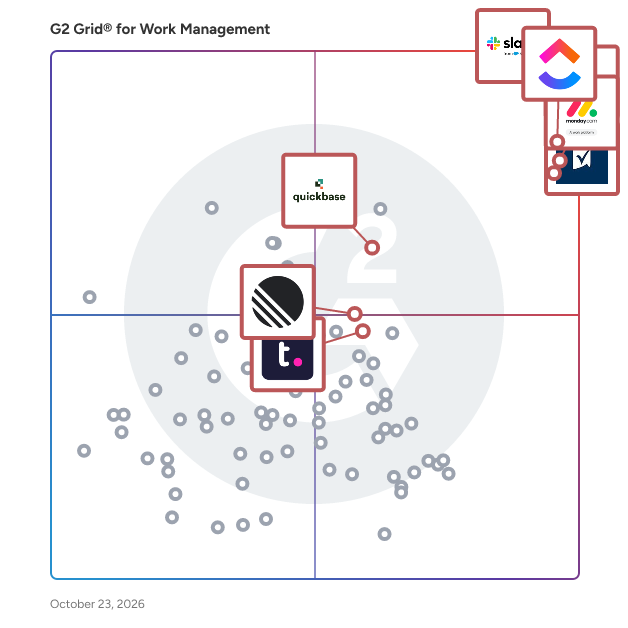
## G2 Grid® for Work Management Software
![G2 Grid® for Work Management Software plotting products by satisfaction and market presence](https://www.g2.com/categories/work-management/grids.png?focus%5B%5D=3437&focus%5B%5D=278&focus%5B%5D=25675&focus%5B%5D=16194&focus%5B%5D=530&focus%5B%5D=931&focus%5B%5D=5095&focus%5B%5D=280)
Highlighted products: Slack, Asana, ClickUp, monday AI Work Platform, Smartsheet, Quickbase, Teamwork.com, and Confluence.
Underlying data: [Grid® JSON](https://www.g2.com/categories/work-management/grids.json?focus%5B%5D=slack&amp;focus%5B%5D=asana&amp;focus%5B%5D=clickup&amp;focus%5B%5D=monday-com&amp;focus%5B%5D=smartsheet&amp;focus%5B%5D=quickbase&amp;focus%5B%5D=teamwork-com&amp;focus%5B%5D=confluence&amp;segment=small-business)


## How Many Work Management Software Products Does G2 Track?
**Total Products under this Category:** 188

### Category Stats (Jul 2026)
- **Average Rating**: 4.51/5 The average rating of products in this category, based on all submitted ratings
- **Top Trending Product**: Furious (+0.97%) - Among all products in this category, Furious recorded the largest rating increase compared to last month
*Last updated: July 20, 2026*


## How Does G2 Rank Work Management Software Products?

**Why You Can Trust G2's Software Rankings:**

- 30 Analysts and Data Experts
- 142,200+ Authentic Reviews
- 188+ Products
- Unbiased Rankings

G2's software rankings are built on verified user reviews, rigorous moderation, and a consistent research methodology maintained by a team of analysts and data experts. Each product is measured using the same transparent criteria, with no paid placement or vendor influence. While reviews reflect real user experiences, which can be subjective, they offer valuable insight into how software performs in the hands of professionals. Together, these inputs power the G2 Score, a standardized way to compare tools within every category.


---

**Sponsored**

### Wrike

Wrike is the trusted work delivery platform where AI extends what people can accomplish. By centralizing all work in one governed, context-rich environment, Wrike helps organizations streamline collaboration, project planning, and task execution while maintaining the control and accountability that complex work demands. Wrike serves project managers, team leaders, and organizations of all sizes across marketing, IT, product development, professional services, and beyond. Teams use Wrike to track work progress, assign tasks, set deadlines, and facilitate communication, eliminating silos and fostering a culture of transparency and accountability that is crucial for successful delivery. Key features include AI Agents, Wrike Copilot, Wrike MCP Server, workflow automations, customizable dashboards, real-time collaboration tools, and advanced reporting capabilities. Teams can build and automate tailored workflows that reflect their unique processes, visualize timelines through Gantt charts and Kanban boards, and integrate seamlessly with tools like Slack, Google Drive, and Microsoft Teams. Wrike&#39;s MCP server extends this further, allowing AI assistants to connect directly to the platform where execution actually happens so AI-driven actions become part of the auditable record of how work gets done, not disconnected outputs living outside the system. And powered by the Wrike Work Intelligence® Graph, the platform gives AI the structured context it needs to act reliably inside the same roles, permissions, and access controls as your people. The result goes far beyond task management. Wrike reduces time spent on administrative work, scales alongside growing organizations, and gives teams the governed foundation they need to put AI to work on their most consequential workflows without losing control. With more than 20,000 organizations worldwide, including Siemens, Walmart, NVIDIA, and The Estée Lauder Companies, trusting Wrike to deliver their most important work, the platform has earned its place as a reliable partner for organizations to deliver without doubt


[Visit website](https://www.g2.com/external_clickthroughs/record?secure%5Bad_program%5D=paid_promo&amp;secure%5Bad_slot%5D=category_product_list&amp;secure%5Bcategory_id%5D=2360&amp;secure%5Bchosen_at%5D=2026-07-20T21%3A38%3A46Z&amp;secure%5Bmedium%5D=sponsored&amp;secure%5Bprioritized%5D=false&amp;secure%5Bproduct_id%5D=1382&amp;secure%5Bresource_id%5D=2360&amp;secure%5Bresource_type%5D=Category&amp;secure%5Bsource_type%5D=category_page&amp;secure%5Bsource_url%5D=https%3A%2F%2Fwww.g2.com%2Fcategories%2Fwork-management%2Fsmall-business%3Fpage%3D2&amp;secure%5Btoken%5D=9862f8cff53f99f3fabaa3d5a19ddb45ac59e1b999cb33c3d0a140be7a56881d&amp;secure%5Burl%5D=https%3A%2F%2Fwww.wrike.com%2Fuse-cases%2Fproject-management%2F%3Futm_medium%3Dcpc%26utm_campaign%3Dg2_paid%26utm_source%3Dg2crowd%26utm_content%3Dwork_management&amp;secure%5Burl_type%5D=paid_promos)

---

## What Are the Top-Rated Work Management Software Products in 2026?
### 1. [Agency Handy](https://www.g2.com/products/agency-handy/reviews)
Agency Handy is a single system built for service based agencies to manage clients, delivery, and billing without juggling multiple tools. Most agencies use one tool for proposals, another for onboarding, another for tasks, and something else for invoicing. Things break in between. Details get missed. Payments get delayed. Agency Handy brings all of that into one place. You can list your services in a catalog, send proposals, collect client inputs through forms, manage tasks and deliverables, get approvals, and handle one-time or recurring payments inside a branded workspace. We built Agency Handy to fix what usually goes wrong after a deal is closed. Approvals are tied to delivery and billing. Onboarding is structured. Client communication stays visible. That means fewer follow ups, fewer missed steps, and faster payments. Today, 500 plus agencies across 60-plus countries use Agency Handy to run their operations with more clarity and less friction.


**Average Rating:** 4.9/5.0
**Total Reviews:** 19
**How Do G2 Users Rate Agency Handy?**

- **Has the product been a good partner in doing business?:** 9.9/10 (Category avg: 9.2/10)
- **Planning:** 9.8/10 (Category avg: 9.0/10)
- **Procedures:** 9.8/10 (Category avg: 8.5/10)
- **Insights:** 9.7/10 (Category avg: 8.6/10)

**Who Is the Company Behind Agency Handy?**

- **Seller:** [Agency Handy PTE](https://www.g2.com/sellers/agency-handy-pte)
- **HQ Location:** N/A
- **LinkedIn® Page:** https://www.linkedin.com/company/No-Linkedin-Presence-Added-Intentionally-By-DataOps (1 employees on LinkedIn®)

**Who Uses This Product?**
- **Top Industries:** Marketing and Advertising
- **Company Size:** 89% Small-Business


#### What Are Agency Handy's Pros and Cons?

**Pros:**

- Ease of Use (10 reviews)
- Customer Support (6 reviews)
- Intuitive (6 reviews)
- Easy Setup (4 reviews)
- Organization (4 reviews)

**Cons:**

- Limited Customization (2 reviews)
- Expensive (1 reviews)
- Limited Features (1 reviews)
- Limited Integrations (1 reviews)


### What Do G2 Reviewers Say About Agency Handy?
*AI-generated summary from verified user reviews*

**Pros:**

- Users appreciate the **ease of use** of Agency Handy, making organization and task management straightforward and efficient.
- Users commend the **incredible 24/7 customer support** from Agency Handy, providing prompt assistance and listening to feedback.
- Users love the **intuitive interface** of Agency Handy, making it easy to work efficiently and stay organized.
- Users commend the **easy setup** of Agency Handy, enabling quick understanding and organization of their workflow.
- Users appreciate the **clean and intuitive interface** of Agency Handy, enhancing their organization and workflow efficiency.

**Cons:**

- Users find **limited customization** in Agency Handy, expressing a desire for more options in client portals and layouts.
- Users find the service **expensive** , wishing for more features in lower tiers to suit their budgets.
- Users desire **more features in lower tiers** , feeling limited by availability and affordability on tier two.
- Users desire **more integrations** with other tools, which limits the overall versatility of Agency Handy.

#### What Are Recent G2 Reviews of Agency Handy?

**"[Agency Handy Delivers on the All-in-One Promise—Clean UI, Seamless Workflows](https://www.g2.com/survey_responses/agency-handy-review-12567997)"**

**Rating:** 5.0/5.0 stars
*— James K.*

[Read full review](https://www.g2.com/survey_responses/agency-handy-review-12567997)

---

**"[All-in-One, White-Labeled Portal for Agency Operations](https://www.g2.com/survey_responses/agency-handy-review-12566089)"**

**Rating:** 4.5/5.0 stars
*— Milan B.*

[Read full review](https://www.g2.com/survey_responses/agency-handy-review-12566089)

---


### 2. [Backlog](https://www.g2.com/products/backlog/reviews)
Backlog is an all-in-one online tool designed for project management, task tracking, version control, and bug tracking, now supercharged with an AI Assistant to help you get more done with less effort. This comprehensive solution enables teams to seamlessly integrate project and code management, allowing them to plan work, monitor progress, and release code all within a single platform. By consolidating these functions and letting AI handle the busywork, Backlog enhances collaboration and efficiency, making it an ideal choice for teams looking to streamline their workflows and improve project outcomes. Backlog caters to professionals who require robust tools for managing complex projects. It is particularly beneficial for teams that operate in agile environments, where flexibility and rapid iteration are essential. With its diverse range of features, Backlog supports various use cases, from tracking tasks and managing bugs to overseeing version control and facilitating team communication. This versatility makes it suitable for both small startups and larger organizations, combining project management, issue tracking, and team collaboration into one platform without per-user pricing, so you can scale without the extra cost. One of the standout features of Backlog is its subtask management system, which allows users to break down larger tasks into manageable components. This process is now faster than ever: the AI Assistant can turn chats, notes, or meeting takeaways into clear timelines with actionable tasks at the speed of thought. This functionality promotes clarity and accountability, enabling team members to focus on specific aspects of a project without losing sight of the overall objectives. Additionally, customizable statuses provide teams with the ability to tailor their workflow according to their unique processes. Backlog also adapts to how you work with visual project management tools like Kanban-style boards and Gantt charts. Whether you prefer a big-picture view or detailed tracking, the AI Assistant helps create and update tasks quickly. For developers, built-in Git and SVN allow teams to manage code, review pull requests, and link commits to tasks without switching tools, while AI provides instant project updates and generates progress reports. Furthermore, built-in Wikis and file repositories centralize your team’s knowledge; users can leverage AI to draft, review, and polish well-structured documentation in seconds from raw inputs. Overall, Backlog stands out in the project management category by offering a comprehensive suite of tools built with trust in mind—keeping AI support fully secure by ensuring nothing moves forward without your team’s green light. Its ability to unify project and code management in one platform not only enhances transparency but also breaks down silos, enabling teams to work more efficiently. By providing a structured, AI-powered environment for collaboration, Backlog empowers teams to find answers without the deep dive, achieve their goals, and deliver high-quality results.


**Average Rating:** 4.6/5.0
**Total Reviews:** 385
**How Do G2 Users Rate Backlog?**

- **Has the product been a good partner in doing business?:** 8.9/10 (Category avg: 9.2/10)
- **Planning:** 9.2/10 (Category avg: 9.0/10)
- **Procedures:** 9.2/10 (Category avg: 8.5/10)
- **Insights:** 9.3/10 (Category avg: 8.6/10)

**Who Is the Company Behind Backlog?**

- **Seller:** [Nulab Inc.](https://www.g2.com/sellers/nulab-inc-9c44ff5b-8b59-4627-9703-f685e195f1ff)
- **Year Founded:** 2004
- **HQ Location:** Fukuoka, Japan
- **Twitter:** @nulabinc (2,186 Twitter followers)
- **LinkedIn® Page:** https://www.linkedin.com/company/729787/ (122 employees on LinkedIn®)

**Who Uses This Product?**
- **Who Uses This:** Software Engineer, Software Developer
- **Top Industries:** Information Technology and Services, Computer Software
- **Company Size:** 45% Mid-Market, 44% Small-Business


#### What Are Backlog's Pros and Cons?

**Pros:**

- Task Management (81 reviews)
- Ease of Use (77 reviews)
- Project Management (77 reviews)
- Task Tracking (77 reviews)
- Features (49 reviews)

**Cons:**

- Slow Performance (26 reviews)
- Slow Loading (23 reviews)
- Slow Speed (21 reviews)
- Limited Features (11 reviews)
- Notification Issues (11 reviews)


### What Do G2 Reviewers Say About Backlog?
*AI-generated summary from verified user reviews*

**Pros:**

- Users value the **efficient task management** and bug tracking features of Backlog, seamlessly enhancing team productivity.
- Users find the **ease of use** of Backlog exceptional, allowing quick bug tracking and task management for everyone.
- Users find **project management** in Backlog efficient, enabling easy task assignments and seamless bug tracking.
- Users find **task tracking efficient** with Backlog, as it simplifies assignment, bug reporting, and progress monitoring.
- Users appreciate the **easy-to-use interface** of Backlog, praising its clarity and helpful project management features.

**Cons:**

- Users find the **slow performance** of Backlog frustrating, especially with glitches and delays affecting their experience.
- Users experience **slow loading** times with Backlog, which can hinder productivity and frustrate the overall user experience.
- Users find the **slow speed** of the Backlog mobile app and website frustrating, impacting their overall experience.
- Users feel that Backlog has **limited features** which hampers customization and ease of use for non-technical users.
- Users find the **excessive email notifications** overwhelming, cluttering their inbox and causing irritation.

#### What Are Recent G2 Reviews of Backlog?

**"[I&#39;ve found something much more useful than just a project management tool](https://www.g2.com/survey_responses/backlog-review-13002482)"**

**Rating:** 5.0/5.0 stars
*— Phil J.*

[Read full review](https://www.g2.com/survey_responses/backlog-review-13002482)

---

**"[Simple task management that keeps our team on track](https://www.g2.com/survey_responses/backlog-review-12572285)"**

**Rating:** 4.0/5.0 stars
*— Luong B.*

[Read full review](https://www.g2.com/survey_responses/backlog-review-12572285)

---


#### What Are G2 Users Discussing About Backlog?

- [What is Backlog used for?](https://www.g2.com/discussions/what-is-backlog-used-for) - 1 comment
- [WHAT IS backlog project management?](https://www.g2.com/discussions/what-is-backlog-project-management) - 1 comment
- [What is in a backlog?](https://www.g2.com/discussions/what-is-in-a-backlog) - 1 comment
- [What are product backlog features?](https://www.g2.com/discussions/what-are-product-backlog-features) - 1 comment
- [What is a feature backlog?](https://www.g2.com/discussions/what-is-a-feature-backlog) - 1 comment

### 3. [Wrike](https://www.g2.com/products/wrike/reviews)
Wrike is the trusted work delivery platform where AI extends what people can accomplish. By centralizing all work in one governed, context-rich environment, Wrike helps organizations streamline collaboration, project planning, and task execution while maintaining the control and accountability that complex work demands. Wrike serves project managers, team leaders, and organizations of all sizes across marketing, IT, product development, professional services, and beyond. Teams use Wrike to track work progress, assign tasks, set deadlines, and facilitate communication, eliminating silos and fostering a culture of transparency and accountability that is crucial for successful delivery. Key features include AI Agents, Wrike Copilot, Wrike MCP Server, workflow automations, customizable dashboards, real-time collaboration tools, and advanced reporting capabilities. Teams can build and automate tailored workflows that reflect their unique processes, visualize timelines through Gantt charts and Kanban boards, and integrate seamlessly with tools like Slack, Google Drive, and Microsoft Teams. Wrike&#39;s MCP server extends this further, allowing AI assistants to connect directly to the platform where execution actually happens so AI-driven actions become part of the auditable record of how work gets done, not disconnected outputs living outside the system. And powered by the Wrike Work Intelligence® Graph, the platform gives AI the structured context it needs to act reliably inside the same roles, permissions, and access controls as your people. The result goes far beyond task management. Wrike reduces time spent on administrative work, scales alongside growing organizations, and gives teams the governed foundation they need to put AI to work on their most consequential workflows without losing control. With more than 20,000 organizations worldwide, including Siemens, Walmart, NVIDIA, and The Estée Lauder Companies, trusting Wrike to deliver their most important work, the platform has earned its place as a reliable partner for organizations to deliver without doubt


**Average Rating:** 4.2/5.0
**Total Reviews:** 4,456
**How Do G2 Users Rate Wrike?**

- **Has the product been a good partner in doing business?:** 8.5/10 (Category avg: 9.2/10)
- **Planning:** 8.5/10 (Category avg: 9.0/10)
- **Procedures:** 8.2/10 (Category avg: 8.5/10)
- **Insights:** 8.0/10 (Category avg: 8.6/10)

**Who Is the Company Behind Wrike?**

- **Seller:** [Wrike, Inc.](https://www.g2.com/sellers/wrike-inc)
- **Company Website:** https://www.wrike.com
- **Year Founded:** 2006
- **HQ Location:** San Diego, CA
- **Twitter:** @wrike (13,574 Twitter followers)
- **LinkedIn® Page:** https://www.linkedin.com/company/612239/ (1,254 employees on LinkedIn®)

**Who Uses This Product?**
- **Who Uses This:** Project Manager, Marketing Manager
- **Top Industries:** Marketing and Advertising, Information Technology and Services
- **Company Size:** 43% Mid-Market, 35% Small-Business


#### What Are Wrike's Pros and Cons?

**Pros:**

- Project Management (477 reviews)
- Team Collaboration (456 reviews)
- Task Management (450 reviews)
- Organization (383 reviews)
- Ease of Use (331 reviews)

**Cons:**

- Learning Curve (305 reviews)
- Not Intuitive (239 reviews)
- Missing Features (203 reviews)
- Limited Features (190 reviews)
- Complex Usability (171 reviews)


### What Do G2 Reviewers Say About Wrike?
*AI-generated summary from verified user reviews*

**Pros:**

- Users find Wrike to greatly enhance **project tracking and team collaboration** , boosting productivity and organization.
- Users appreciate the **seamless team collaboration** in Wrike, enhancing productivity and simplifying project management processes.
- Users appreciate the **effective task management** in Wrike, enhancing team collaboration and productivity through real-time updates.
- Users value the **organization capabilities** of Wrike, enhancing task management and team collaboration effectively.
- Users appreciate the **ease of use** of Wrike, streamlining task management and enhancing team collaboration effortlessly.

**Cons:**

- Users find Wrike has a steep **learning curve** , making initial navigation and usage quite challenging and overwhelming.
- Users find Wrike&#39;s interface **not intuitive** , making it challenging to train others and leading to frequent user frustration.
- Users find the **lack of built-in templates** and steep learning curve challenging, affecting workflow efficiency in Wrike.
- Users find Wrike&#39;s **limited features** frustrating, desiring more templates and customizability for a smoother experience.
- Users find Wrike&#39;s interface initially **overwhelming and complex** , making it challenging to navigate and utilize effectively.

#### What Are Recent G2 Reviews of Wrike?

**"[Makes Collaboration EASY](https://www.g2.com/survey_responses/wrike-review-10927348)"**

**Rating:** 4.5/5.0 stars
*— Kylee H.*

[Read full review](https://www.g2.com/survey_responses/wrike-review-10927348)

---

**"[Wrike Reduced Small Decision Bottlenecks Across Projects](https://www.g2.com/survey_responses/wrike-review-12897394)"**

**Rating:** 4.0/5.0 stars
*— Sakshi B.*

[Read full review](https://www.g2.com/survey_responses/wrike-review-12897394)

---


#### What Are G2 Users Discussing About Wrike?

- [How is Wrike facilitating project management and team collaboration in fast-paced business environments?](https://www.g2.com/discussions/how-is-wrike-facilitating-project-management-and-team-collaboration-in-fast-paced-business-environments) - 1 comment
- [How is Wrike being used to enhance operational efficiency and user experience in its specific field?](https://www.g2.com/discussions/how-is-wrike-being-used-to-enhance-operational-efficiency-and-user-experience-in-its-specific-field)
- [What is Wrike used for?](https://www.g2.com/discussions/wrike-what-is-wrike-used-for) - 3 comments
- [What should you check for when selecting your tool for a project?](https://www.g2.com/discussions/what-should-you-check-for-when-selecting-your-tool-for-a-project)
- [What are the features of project management?](https://www.g2.com/discussions/wrike-what-are-the-features-of-project-management) - 2 comments

### 4. [Progress Podio](https://www.g2.com/products/progress-podio/reviews)
Progress Podio is a flexible, custom collaboration database that enables you to accelerate and simplify your work. An all-in-one solution to accelerate productivity, digitize essential processes, streamline data collection, and automate document workflows in one secure tool. Progress Podio can automate, operationalize, and secure important business and document processes that reduces manual work and increases efficiency. Transform how work is done with versatile forms, powerful data collection, and automated client and document workflows— customized all by you with a few simple clicks. From key industries such as, creative agencies, legal services, accounting firms, real-estate, construction / manufacturing, to key departmental areas—sales, HR, marketing, legal, finance. Podio’s ability to connect diverse teams and disparate processes helps thousands of companies optimize their entire operations in one place. With Progress Podio, give your team a single tool to automate timely processes that unify in one tool. From simplifying client data collection to automating client interactions and agreements, Progress Podio simplifies your business’s most core activities.


**Average Rating:** 4.2/5.0
**Total Reviews:** 507
**How Do G2 Users Rate Progress Podio?**

- **Has the product been a good partner in doing business?:** 8.4/10 (Category avg: 9.2/10)
- **Planning:** 8.7/10 (Category avg: 9.0/10)
- **Procedures:** 8.6/10 (Category avg: 8.5/10)
- **Insights:** 8.2/10 (Category avg: 8.6/10)

**Who Is the Company Behind Progress Podio?**

- **Seller:** [Progress Software](https://www.g2.com/sellers/progress-software)
- **Company Website:** https://www.progress.com/
- **Year Founded:** 1981
- **HQ Location:** Burlington, MA.
- **Twitter:** @ProgressSW (48,773 Twitter followers)
- **LinkedIn® Page:** https://www.linkedin.com/company/progress-software/ (4,205 employees on LinkedIn®)

**Who Uses This Product?**
- **Who Uses This:** Owner, Project Manager
- **Top Industries:** Real Estate, Information Technology and Services
- **Company Size:** 61% Small-Business, 28% Mid-Market


#### What Are Progress Podio's Pros and Cons?

**Pros:**

- Ease of Use (4 reviews)
- Automation (2 reviews)
- Customization Options (2 reviews)
- Features (2 reviews)
- Integrations (2 reviews)

**Cons:**

- Learning Curve (3 reviews)
- Billing Issues (2 reviews)
- Complexity (2 reviews)
- Poor Customer Support (2 reviews)
- Slow Performance (2 reviews)


### What Do G2 Reviewers Say About Progress Podio?
*AI-generated summary from verified user reviews*

**Pros:**

- Users appreciate the **ease of use** in Progress Podio, making collaboration and management tasks simple and efficient.
- Users appreciate the **automation capabilities** of Progress Podio, enhancing productivity and simplifying task management significantly.
- Users love the **customization options** that adapt Progress Podio to their specific business processes seamlessly.
- Users love the **integrated workflows and no-code capabilities** of Progress Podio, enhancing productivity and ease of use.
- Users appreciate the **seamless integrations** in Progress Podio, enhancing collaboration and simplifying business processes across various areas.

**Cons:**

- Users face a challenging **learning curve** with Progress Podio due to complex setup and technical limitations.
- Users find the **billing issues** challenging, especially with recent changes affecting admin member pricing.
- Users find the **complexity** of Progress Podio challenging, requiring significant effort to create an effective setup.
- Users express frustration with **poor customer support** , indicating a need for improvement in assistance and integration.
- Users find the **slow performance** of Progress Podio frustrating, as it hampers efficiency and productivity.

#### What Are Recent G2 Reviews of Progress Podio?

**"[Versatile Platform with Excellent Collaboration Tools](https://www.g2.com/survey_responses/progress-podio-review-12063894)"**

**Rating:** 4.0/5.0 stars
*— Katie B.*

[Read full review](https://www.g2.com/survey_responses/progress-podio-review-12063894)

---

**"[Progress Podio - Efficient and Organized CRM for Real Estate Teams](https://www.g2.com/survey_responses/progress-podio-review-9216544)"**

**Rating:** 5.0/5.0 stars
*— Norma I.*

[Read full review](https://www.g2.com/survey_responses/progress-podio-review-9216544)

---


#### What Are G2 Users Discussing About Progress Podio?

- [What is Citrix Podio used for?](https://www.g2.com/discussions/what-is-citrix-podio-used-for)

### 5. [Scoro](https://www.g2.com/products/scoro/reviews)
Scoro is a professional services automation (PSA) software purpose-built for consultancies, agencies, IT firms, architecture companies, and other professional services businesses. It unites projects, resources, and finances in one system, so you don’t need to juggle multiple tools for planning, tracking, and billing for your work. Core features include: - CRM &amp; pipeline – Get a complete overview of your sales funnel and upcoming work - Quote-to-cash – Estimate scope, track progress and budget burn, and bill for work in one system - Capacity &amp; resource planning – Plan ahead with live heatmaps and utilization forecasts - Time &amp; expense tracking – Log time with built-in timers and auto-populated timesheets - Cost &amp; profit forecasts – Understand margins with role or service-level insights - Billing &amp; invoicing – Automate time &amp; material, fixed-fee, and retainer billing - Revenue forecasting – Track project income based on pipeline and committed work - AI-powered insights &amp; actions – Save time with automation and data-driven suggestions - Live dashboards – Monitor progress, profitability, and capacity in real time By uniting this data, Scoro gives you end-to-end visibility across your business. Helping you spot risks sooner, allocate resources smarter, and protect profitability as you scale.


**Average Rating:** 4.5/5.0
**Total Reviews:** 487
**How Do G2 Users Rate Scoro?**

- **Has the product been a good partner in doing business?:** 9.0/10 (Category avg: 9.2/10)
- **Planning:** 8.9/10 (Category avg: 9.0/10)
- **Procedures:** 8.5/10 (Category avg: 8.5/10)
- **Insights:** 8.5/10 (Category avg: 8.6/10)

**Who Is the Company Behind Scoro?**

- **Seller:** [Scoro](https://www.g2.com/sellers/scoro)
- **Company Website:** https://www.scoro.com
- **Year Founded:** 2013
- **HQ Location:** London
- **Twitter:** @ScoroSoftware (8,204 Twitter followers)
- **LinkedIn® Page:** https://www.linkedin.com/company/294623/ (143 employees on LinkedIn®)

**Who Uses This Product?**
- **Who Uses This:** Project Manager, CEO
- **Top Industries:** Marketing and Advertising, Information Technology and Services
- **Company Size:** 66% Small-Business, 25% Mid-Market


#### What Are Scoro's Pros and Cons?

**Pros:**

- Ease of Use (54 reviews)
- Project Management (49 reviews)
- Project Tracking (43 reviews)
- Time Tracking (38 reviews)
- Task Management (35 reviews)

**Cons:**

- Learning Curve (28 reviews)
- Not Intuitive (13 reviews)
- Missing Features (12 reviews)
- Steep Learning Curve (12 reviews)
- Complexity (11 reviews)


### What Do G2 Reviewers Say About Scoro?
*AI-generated summary from verified user reviews*

**Pros:**

- Users appreciate the **ease of use** of Scoro, benefiting from its streamlined all-in-one platform for various tasks.
- Users value Scoro for its **integrated project management capabilities** , simplifying task tracking and business conversations significantly.
- Users value the **comprehensive project tracking** in Scoro, enhancing management and profitability for their campaigns.
- Users value the **efficient time tracking** feature of Scoro, enhancing productivity without adding complexity.
- Users find the **task management features** of Scoro invaluable for integrating projects, budgets, and workflows in one platform.

**Cons:**

- Users find the **learning curve** challenging due to complexity and rigidity, impacting workflow efficiency during setup.
- Users find Scoro&#39;s interface **not intuitive** , especially for tasks like creating PTO days and using the mobile app.
- Users note the **missing features** in Scoro&#39;s mobile version and some integrations that limit functionality.
- Users experience a **steep learning curve** with Scoro, challenging for new users due to its complexity and usability issues.
- Users find Scoro&#39;s **complexity** necessitates extensive training, hindering the initial user experience despite its robust features.

#### What Are Recent G2 Reviews of Scoro?

**"[Subtasks and dependencies made cross-functional delivery planning much easier](https://www.g2.com/survey_responses/scoro-review-13115286)"**

**Rating:** 5.0/5.0 stars
*— Yaroslav B.*

[Read full review](https://www.g2.com/survey_responses/scoro-review-13115286)

---

**"[Absolutely essential for time and team management](https://www.g2.com/survey_responses/scoro-review-4620988)"**

**Rating:** 4.5/5.0 stars
*— Anna-Kaisa R.*

[Read full review](https://www.g2.com/survey_responses/scoro-review-4620988)

---


#### What Are G2 Users Discussing About Scoro?

- [What is Scoro used for?](https://www.g2.com/discussions/what-is-scoro-used-for)
- [What features and benefits does project management software provide?](https://www.g2.com/discussions/what-features-and-benefits-does-project-management-software-provide)
- [What are the features of a project?](https://www.g2.com/discussions/what-are-the-features-of-a-project)
- [How much does Scoro cost?](https://www.g2.com/discussions/how-much-does-scoro-cost)
- [What are some unique features of project management software?](https://www.g2.com/discussions/scoro-what-are-some-unique-features-of-project-management-software)

### 6. [Float.com](https://www.g2.com/products/float-com/reviews)
Float.com is the #1 resource management software for delivery teams, designed to give Operations and Delivery leaders the full picture of who’s working on what, whether delivery’s on track, and how to take on what’s next. Unlike disconnected spreadsheets or complex PSAs, Float offers a single, clear source of truth to plan, resource, and report on client work. It doesn’t replace existing CRMs, spreadsheets, HRIS, project and finance tools: it works alongside them to give you the full picture of delivery, so every decision gets made with complete visibility. 4,500+ of the best creative agencies, professional services, and in-house delivery teams globally choose Float to: ✔️ Always know who’s available and what’s coming next. No more spreadsheets that don’t match: your people’s availability, roles, and skills live in Float and update in real time. See who’s working on what at a glance, catch capacity issues early, and (re)allocate resources flexibly when plans change. ✔️ Scope accurately and adjust quickly. Set a baseline for every project—price, budget, roles, timeline—and know what delivery takes before work begins. Find the best-fit person with AI-assisted staffing; when something changes, compare your adjusted scope vs. the baseline and adapt with confidence instead of guesswork. ✔️ Stay on top of delivery performance. Get a live view of how delivery’s going, with the reporting depth to understand what’s driving it. From team capacity and utilization to actuals, margin, and budget burn: if things drift from the plan, you see it as it happens instead of finding out weeks (or months) later.


**Average Rating:** 4.3/5.0
**Total Reviews:** 2,001
**How Do G2 Users Rate Float.com?**

- **Has the product been a good partner in doing business?:** 8.9/10 (Category avg: 9.2/10)
- **Planning:** 8.3/10 (Category avg: 9.0/10)
- **Procedures:** 8.0/10 (Category avg: 8.5/10)
- **Insights:** 7.9/10 (Category avg: 8.6/10)

**Who Is the Company Behind Float.com?**

- **Seller:** [Float.com](https://www.g2.com/sellers/float-com)
- **Company Website:** https://www.float.com
- **Year Founded:** 2011
- **HQ Location:** Remote, OO
- **Twitter:** @float (1,591 Twitter followers)
- **LinkedIn® Page:** https://www.linkedin.com/company/5301969/ (56 employees on LinkedIn®)

**Who Uses This Product?**
- **Who Uses This:** Project Manager, Software Developer
- **Top Industries:** Marketing and Advertising, Information Technology and Services
- **Company Size:** 45% Mid-Market, 45% Small-Business


#### What Are Float.com's Pros and Cons?

**Pros:**

- Ease of Use (318 reviews)
- User Interface (154 reviews)
- Intuitive (146 reviews)
- Scheduling Management (144 reviews)
- Visibility (124 reviews)

**Cons:**

- Limited Features (69 reviews)
- Scheduling Issues (60 reviews)
- Missing Features (44 reviews)
- Task Management (44 reviews)
- Not Intuitive (42 reviews)


### What Do G2 Reviewers Say About Float.com?
*AI-generated summary from verified user reviews*

**Pros:**

- Users find Float.com’s **ease of use** exceptional, praising its intuitive interface and simple management for scheduling and coordination.
- Users appreciate Float.com’s **intuitive interface** , enhancing team scheduling and project planning with ease and visibility.
- Users love Float.com for its **intuitive interface** , which simplifies scheduling and enhances project planning efficiency.
- Users appreciate Float.com for its **intuitive scheduling management** that simplifies project organization and team visibility.
- Users appreciate the **visibility of upcoming tasks** with Float, enhancing organization and team communication significantly.

**Cons:**

- Users note the **limited features** of Float.com, wishing for enhanced reporting and customization options for better usability.
- Users struggle with **scheduling issues** in Float.com, finding the interface and functionality less than intuitive.
- Users require more **easy of life features** like copying timesheets and easier project access requests for efficiency.
- Users face **functional issues** with task management, including problems with split/delete functions and incorrect task assignments.
- Users find the interface **not intuitive** , particularly for new users navigating project planning features.

#### What Are Recent G2 Reviews of Float.com?

**"[Simple Interface and Clear Visual Scheduling for Organized Project Planning](https://www.g2.com/survey_responses/float-com-review-12956639)"**

**Rating:** 4.5/5.0 stars
*— Rehan A.*

[Read full review](https://www.g2.com/survey_responses/float-com-review-12956639)

---

**"[Clear, Visual Resource Planning That Makes Scheduling Easy](https://www.g2.com/survey_responses/float-com-review-12631696)"**

**Rating:** 4.0/5.0 stars
*— keith .*

[Read full review](https://www.g2.com/survey_responses/float-com-review-12631696)

---


#### What Are G2 Users Discussing About Float.com?

- [What is float software?](https://www.g2.com/discussions/what-is-float-software) - 3 comments
- [What is a resource management tool?](https://www.g2.com/discussions/what-is-a-resource-management-tool)
- [What is resource planning software?](https://www.g2.com/discussions/float-what-is-resource-planning-software)
- [What is float schedule?](https://www.g2.com/discussions/what-is-float-schedule)

### 7. [OneSuite](https://www.g2.com/products/onesuite/reviews)
OneSuite is a complete client work management platform designed specifically for service agencies and independent professionals. Instead of juggling multiple tools for projects, clients, and communication, everything you need is in one place. From onboarding new clients to offboarding them properly, the entire client journey is managed smoothly inside OneSuite. At the core, OneSuite gives you powerful project management tools that keep your team organized and clients in the loop. You can plan projects with boards or lists, assign tasks, set deadlines, and track progress without losing sight of priorities. It goes beyond task tracking by connecting your work directly with the clients it’s for. The built-in CRM is tailored for agencies that sell services, not products. Capture leads, nurture opportunities, and move deals through your pipeline until they become long-term clients. Proposals, contracts, and agreements can be created and shared directly in the platform, with e-signatures included so you close deals faster without chasing paperwork. Billing is also handled with client work in mind. You can create one-time or recurring invoices, perfect for agencies that sell monthly retainers or ongoing service packages. Clients can pay online through trusted providers like Stripe, PayPal, Razorpay, or QuickPay. Recurring invoices mean you spend less time on admin and more time delivering value. OneSuite also includes a secure client portal that carries your own branding. Clients log in to see project updates, approve deliverables, pay invoices, or sign documents. This not only saves you endless back-and-forth emails but also creates a professional experience that builds trust. Team management is built in too. Assign roles, balance workloads, and track performance so your agency operates smoothly. Everything is designed around collaboration between your team and your clients, not just internal work. The real value of OneSuite is that it replaces a messy toolkit of disconnected apps with a single system built specifically for agencies and service professionals. You save money by not paying for multiple subscriptions. You save time by keeping your projects, communication, documents, and billing all connected. And most importantly, you deliver a seamless, professional experience that keeps clients happy and coming back. With OneSuite, agencies can finally run their business end-to-end in one platform, reduce overhead, and focus on growing instead of managing chaos.


**Average Rating:** 4.8/5.0
**Total Reviews:** 15
**How Do G2 Users Rate OneSuite?**

- **Has the product been a good partner in doing business?:** 9.2/10 (Category avg: 9.2/10)
- **Planning:** 10.0/10 (Category avg: 9.0/10)
- **Procedures:** 8.3/10 (Category avg: 8.5/10)
- **Insights:** 10.0/10 (Category avg: 8.6/10)

**Who Is the Company Behind OneSuite?**

- **Seller:** [OneSuite](https://www.g2.com/sellers/onesuite)
- **Year Founded:** 1999
- **HQ Location:** Wilmington, US
- **Twitter:** @getOneSuite (25 Twitter followers)
- **LinkedIn® Page:** https://www.linkedin.com/company/onesuite (7 employees on LinkedIn®)

**Who Uses This Product?**
- **Company Size:** 93% Small-Business, 7% Mid-Market


#### What Are OneSuite's Pros and Cons?

**Pros:**

- Task Management (4 reviews)
- Ease of Use (3 reviews)
- Project Management (3 reviews)
- Automation (2 reviews)
- Easy Setup (2 reviews)

**Cons:**

- Missing Features (2 reviews)
- Time Management (2 reviews)
- App Functionality (1 reviews)
- Cost Issues (1 reviews)
- Expensive (1 reviews)


### What Do G2 Reviewers Say About OneSuite?
*AI-generated summary from verified user reviews*

**Pros:**

- Users appreciate the **effective task management** of OneSuite, enabling seamless tracking of multiple projects in one place.
- Users love the **intuitive interface** of OneSuite, making it easy to manage multiple projects efficiently.
- Users appreciate the **efficient project management** in OneSuite, seamlessly integrating tasks, invoices, and client communication.
- Users praise the **automation features** of OneSuite, streamlining tasks and improving efficiency in project management.
- Users love the **easy setup** of OneSuite, allowing effortless onboarding with predefined stages and payment integration.

**Cons:**

- Users feel that **missing features** limit OneSuite&#39;s functionality, particularly the absence of time tracking options.
- Users find the **time management features lacking** , requiring manual input for tracking, complicating usage significantly.
- Users find the absence of **time tracking functionality** in OneSuite a significant limitation, requiring manual entry instead.
- Users feel that while OneSuite is satisfactory, they should **reduce costs** for better overall value.
- Users feel that the service is great, but **the cost is too high** and could be reduced.

#### What Are Recent G2 Reviews of OneSuite?

**"[A robust alternative to the most popular project management platforms](https://www.g2.com/survey_responses/onesuite-review-10391597)"**

**Rating:** 5.0/5.0 stars
*— Luca P.*

[Read full review](https://www.g2.com/survey_responses/onesuite-review-10391597)

---

**"[One Suite Makes Client Communication and Process Visibility Effortless](https://www.g2.com/survey_responses/onesuite-review-13043702)"**

**Rating:** 5.0/5.0 stars
*— Jude .*

[Read full review](https://www.g2.com/survey_responses/onesuite-review-13043702)

---


### 8. [morningmate](https://www.g2.com/products/morningmate/reviews)
Your team’s new flow starts with Morningmate — the single workspace where work moves seamlessly from morning to done. Not as many integrations as Slack. Not as automated as Asana. But just enough of the right features to manage tasks, communicate in real time, and collaborate with clients — all without per-seat pricing. Stop switching between disconnected tools for chat, tasks, and calendars. Morningmate brings it all together with feed-style collaboration, built-in chat, and customizable workflows that adapt to any team. More than 550,000 teams rely on Morningmate to stay organized and connected. From your first login, our onboarding experts provide tailored, friendly support — for as long as you need it. With a familiar, social-style interface and hands-on help every step of the way, your team will be up and running in minutes — not months.


**Average Rating:** 4.8/5.0
**Total Reviews:** 265
**How Do G2 Users Rate morningmate?**

- **Has the product been a good partner in doing business?:** 9.5/10 (Category avg: 9.2/10)
- **Planning:** 9.3/10 (Category avg: 9.0/10)
- **Procedures:** 9.1/10 (Category avg: 8.5/10)
- **Insights:** 8.9/10 (Category avg: 8.6/10)

**Who Is the Company Behind morningmate?**

- **Seller:** [morningmate](https://www.g2.com/sellers/morningmate)
- **Company Website:** https://www.morningmate.com/
- **HQ Location:** N/A
- **Twitter:** @morningmateGL (18 Twitter followers)
- **LinkedIn® Page:** https://www.linkedin.com/company/morningmate/ (11 employees on LinkedIn®)

**Who Uses This Product?**
- **Who Uses This:** Assistant Manager, Developer
- **Top Industries:** Computer Software, Information Technology and Services
- **Company Size:** 52% Mid-Market, 40% Small-Business


#### What Are morningmate's Pros and Cons?

**Pros:**

- Ease of Use (139 reviews)
- Team Collaboration (113 reviews)
- Task Management (97 reviews)
- Communication (81 reviews)
- Organization (77 reviews)

**Cons:**

- Missing Features (27 reviews)
- Notification Issues (24 reviews)
- Learning Curve (22 reviews)
- Notification System (22 reviews)
- Slow Loading (22 reviews)


### What Do G2 Reviewers Say About morningmate?
*AI-generated summary from verified user reviews*

**Pros:**

- Users love the **intuitive interface** of Morningmate, enhancing seamless collaboration and efficient task management.
- Users value the **easy communication and collaboration** offered by Morningmate, enhancing project management and team synergy.
- Users appreciate the **task management** features of Morningmate, enabling effective communication and seamless project organization.
- Users appreciate the **easy communication and collaboration** features of Morningmate, enhancing project management and teamwork.
- Users value the **effective organization** of project materials and seamless collaboration offered by Morningmate.

**Cons:**

- Users find the **missing features** in Morningmate, such as limited emotions and imperfect UI, detracting from their experience.
- Users experience **notification issues** with morningmate, finding the system overwhelming and sometimes inconsistent during busy periods.
- Users find the **learning curve challenging** initially due to the interface and multitude of features, requiring time to adjust.
- Users find the **notification system overwhelming** during busy times, making it difficult to manage multiple projects effectively.
- Users face **slow loading times** when searching for older files or switching sections, impacting their overall experience.

#### What Are Recent G2 Reviews of morningmate?

**"[An all-in-one project management tool that excels at measuring KPIs](https://www.g2.com/survey_responses/morningmate-review-11606171)"**

**Rating:** 5.0/5.0 stars
*— Emily C.*

[Read full review](https://www.g2.com/survey_responses/morningmate-review-11606171)

---

**"[A project management tool that drives measurable marketing results](https://www.g2.com/survey_responses/morningmate-review-11606329)"**

**Rating:** 5.0/5.0 stars
*— Elias .*

[Read full review](https://www.g2.com/survey_responses/morningmate-review-11606329)

---


### 9. [ProofHub](https://www.g2.com/products/proofhub/reviews)
Founded in the year 2012, ProofHub is a cloud-based project management and team collaboration platform that is used by teams across the globe. ProofHub is a top-rated work management application that has been designed to help teams in everyday work and is used by over 85,000 teams globally, including Netflix, Google, NASA, Nike, and Trip Advisor. ProofHub is a surprisingly simple yet powerful project management software that provides a consolidated view of tasks and progress. This project management software allows teams to communicate on work from anywhere using any device. With a rich set of features put in one location, this online SaaS tool is designed to help businesses swiftly plan, coordinate, organise, and deliver projects of all sizes. ProofHub is a cost-effective solution utilized by teams and enterprises of all sizes in various sectors. ProofHub can help businesses structure their work process while saving time and resources, with features ranging from task management to time tracking, bespoke workflows to online proofing, and much more. ProofHub offers a plethora of collaboration features such as chat, discussions, announcements, third-party integrations, file transfer, and more. ProofHub has a clean, simple layout with a low learning curve that makes users feel right at home. Apart from English, ProofHub is available in German, Spanish, Portuguese, French, Russian, Italian, Dutch, Chinese (Taiwan), Turkish, and Polish. ProofHub is a cost-effective solution that can be utilized by teams and enterprises in various sectors. ProofHub provides all the features you need to get your work done efficiently, from creating a project to assigning tasks, keeping track of progress, interacting with your team, and ultimately completing your projects on time.


**Average Rating:** 4.6/5.0
**Total Reviews:** 107
**How Do G2 Users Rate ProofHub?**

- **Has the product been a good partner in doing business?:** 8.5/10 (Category avg: 9.2/10)
- **Planning:** 9.3/10 (Category avg: 9.0/10)
- **Procedures:** 9.0/10 (Category avg: 8.5/10)
- **Insights:** 9.2/10 (Category avg: 8.6/10)

**Who Is the Company Behind ProofHub?**

- **Seller:** [ProofHub](https://www.g2.com/sellers/proofhub)
- **Year Founded:** 2012
- **HQ Location:** Covina, CA
- **LinkedIn® Page:** https://www.linkedin.com/company/3216845/ (43 employees on LinkedIn®)

**Who Uses This Product?**
- **Who Uses This:** Marketing Manager
- **Top Industries:** Computer Software, Marketing and Advertising
- **Company Size:** 51% Small-Business, 41% Mid-Market


#### What Are ProofHub's Pros and Cons?

**Pros:**

- Organization (6 reviews)
- Project Management (6 reviews)
- Task Management (6 reviews)
- Team Collaboration (6 reviews)
- Ease of Use (5 reviews)

**Cons:**

- Lack of Intuitiveness (2 reviews)
- Not Intuitive (2 reviews)
- Budgeting/Accounting Issues (1 reviews)
- Bug Issues (1 reviews)
- Collaboration Issues (1 reviews)


### What Do G2 Reviewers Say About ProofHub?
*AI-generated summary from verified user reviews*

**Pros:**

- Users value the **centralized organization** of ProofHub, enhancing task clarity and streamlining cross-departmental communication.
- Users value the **real-time insights** provided by ProofHub, enhancing project tracking without unnecessary micromanagement.
- Users value the **real-time task management** in ProofHub, enhancing visibility and reducing the need for micromanagement.
- Users value the **real-time collaboration** in ProofHub, enhancing project visibility and reducing the need for micromanagement.
- Users find ProofHub&#39;s **ease of use** invaluable for centralizing communication and enhancing collaborative efficiency across teams.

**Cons:**

- Users find ProofHub to be **less intuitive** than expected, indicating a steeper learning curve for the app.
- Users find ProofHub&#39;s interface **not intuitive** , making it challenging to use compared to other platforms.
- Users highlight the **lack of budgeting options** in ProofHub, finding time management in projects somewhat challenging.
- Users face **bug issues** that prevent adding participants to projects they did not create, hindering collaboration.
- Users face **collaboration issues** , particularly struggling to add participants to projects not created by them.

#### What Are Recent G2 Reviews of ProofHub?

**"[All-in-One Platform with a Clean, Easy-to-Navigate Interface](https://www.g2.com/survey_responses/proofhub-review-12713292)"**

**Rating:** 4.0/5.0 stars
*— Verified User in Oil &amp; Energy*

[Read full review](https://www.g2.com/survey_responses/proofhub-review-12713292)

---

**"[usage report](https://www.g2.com/survey_responses/proofhub-review-10777936)"**

**Rating:** 5.0/5.0 stars
*— Denys K.*

[Read full review](https://www.g2.com/survey_responses/proofhub-review-10777936)

---


#### What Are G2 Users Discussing About ProofHub?

- [What do you think needs improvement in ProofHub to better support project management?](https://www.g2.com/discussions/what-do-you-think-needs-improvement-in-proofhub-to-better-support-project-management)
- [What is ProofHub used for?](https://www.g2.com/discussions/what-is-proofhub-used-for)
- [What is Pmis explain important features and function?](https://www.g2.com/discussions/what-is-pmis-explain-important-features-and-function)
- [What are the features of project management?](https://www.g2.com/discussions/proofhub-what-are-the-features-of-project-management) - 1 comment
- [What are the features of projects?](https://www.g2.com/discussions/what-are-the-features-of-projects)

### 10. [Ravetree](https://www.g2.com/products/ravetree/reviews)
Ravetree is the all-in-one project management platform designed specifically to empower client service businesses with the tools they need to manage projects, teams, and finances with confidence and clarity. Unlike generic project management tools, Ravetree delivers advanced capabilities for handling project budgets, tracking fees and costs, and providing real-time insights that drive profitability and client satisfaction. At the heart of Ravetree’s value is its robust project budgeting framework. You can forecast project budgets based on anticipated resource needs and time to completion, then track actual spend against estimates with powerful visualizations and reports. This means you always know where you stand financially, from initial proposal to final invoice. With Ravetree, you get deep insights into project fees and costs, allowing you to identify trends, monitor profitability, and make data-driven decisions that keep your business on track. Ravetree’s time tracking and billing features are among the most flexible and comprehensive available. You can create client rate cards with customizable start and end dates, ensuring billing accuracy and consistency across projects and engagements. The platform supports multiple people assigned to the same task, each with their own bill rates, work roles, and time estimates—making it ideal for complex client service scenarios where different team members contribute at different levels and costs. With Ravetree, you can break free from the limitations of generic project management tools. Its intuitive interface, robust reporting, and seamless integrations with CRM, resource planning, and client portals make it the perfect solution for agencies, consultancies, and professional service firms that demand more than just task management—they need a platform that brings together projects, people, and profits in one powerful system. Choose Ravetree and experience project management that truly supports your business goals.


**Average Rating:** 4.2/5.0
**Total Reviews:** 27
**How Do G2 Users Rate Ravetree?**

- **Has the product been a good partner in doing business?:** 9.8/10 (Category avg: 9.2/10)
- **Planning:** 10.0/10 (Category avg: 9.0/10)
- **Procedures:** 8.3/10 (Category avg: 8.5/10)
- **Insights:** 10.0/10 (Category avg: 8.6/10)

**Who Is the Company Behind Ravetree?**

- **Seller:** [Ravetree](https://www.g2.com/sellers/ravetree)
- **Year Founded:** 2013
- **HQ Location:** Raleigh, NC
- **Twitter:** @ravetree (435 Twitter followers)
- **LinkedIn® Page:** https://www.linkedin.com/company/ravetree (4 employees on LinkedIn®)

**Who Uses This Product?**
- **Top Industries:** Marketing and Advertising
- **Company Size:** 96% Small-Business, 4% Mid-Market


#### What Are Ravetree's Pros and Cons?

**Pros:**

- Customer Support (3 reviews)
- Analytics Insights (2 reviews)
- Functionality (2 reviews)
- Project Management (2 reviews)
- Team Collaboration (2 reviews)

**Cons:**

- Learning Curve (1 reviews)
- Missing Features (1 reviews)
- Overwhelming Experience (1 reviews)


### What Do G2 Reviewers Say About Ravetree?
*AI-generated summary from verified user reviews*

**Pros:**

- Users commend the **outstanding customer support** from Ravetree, consistently praising their helpfulness and responsiveness.
- Users value the **analytics insights** from Ravetree, enhancing project tracking and performance evaluation effectively.
- Users commend Ravetree for its **comprehensive functionality** , seamlessly integrating budgeting, project management, and collaboration tools.
- Users praise Ravetree for its **exceptional project budgeting features** , which enhance project management and team collaboration.
- Users highlight the **strong team collaboration** features of Ravetree, enhancing project management and workflow efficiency.

**Cons:**

- Users find the **learning curve steep** , which can overwhelm team members resistant to change initially.
- Users desire a **full general ledger accounting system** in Ravetree to improve accounts management and functionality.
- Users find the **overwhelming experience** of Ravetree challenging, especially for those resistant to change, despite its effectiveness.

#### What Are Recent G2 Reviews of Ravetree?

**"[Solid All-in-One Project Management Tool](https://www.g2.com/survey_responses/ravetree-review-10909411)"**

**Rating:** 4.5/5.0 stars
*— Sarel D.*

[Read full review](https://www.g2.com/survey_responses/ravetree-review-10909411)

---

**"[Great for Project Budgets](https://www.g2.com/survey_responses/ravetree-review-11122478)"**

**Rating:** 5.0/5.0 stars
*— Ed S.*

[Read full review](https://www.g2.com/survey_responses/ravetree-review-11122478)

---


#### What Are G2 Users Discussing About Ravetree?

- [What is Ravetree used for?](https://www.g2.com/discussions/what-is-ravetree-used-for) - 1 comment

### 11. [IBM Targetprocess](https://www.g2.com/products/ibm-targetprocess/reviews)
IBM Targetprocess, is a platform for enterprise agile planning (EAP) and strategic portfolio management (SPM) solutions that allows business and technology planners at all levels to dynamically plan and manage work, resources, investments, programs, and portfolios while ensuring continuous alignment to the enterprise strategy in a single source of truth. IBM Targetprocess is a platform for enterprise agile planning (EAP) and strategic portfolio management (SPM) solutions that allows business and technology planners at all levels to dynamically plan and manage work, resources, investments, programs, and portfolios while ensuring continuous alignment to the enterprise strategy in a single source of truth. The combination of flexible architecture and Solutions Library helps to ensure the fastest time to value for every solution. IBM Targetprocess integrates directly with the financial management platform to provide financial insights into labor allocations, labor capitalization, and labor forecasts to improve how a company measures, plans, and invests in their workforce. Solutions: IBM Targetprocess&#39; solutions-led strategy to make Enterprise Agile easier, allowing teams to take a building-block style approach to their agile transformation. Strategic planning solutions allow business leaders to capture strategy and OKRs in a single source of truth, and even update priorities with confidence that portfolio, product managers, and even autonomous Agile teams will see and align their work to the new priorities. Resource Management solutions allow portfolio and product teams to plan and forecast capacity and dynamically manage resources while minimizing risks and optimizing resource utilization. The Portfolio budgeting solutions enabled by IBM Targetprocess partners financial teams with product and portfolio managers to enable a shift to continuous product funding, and Program Management solutions ensure the successful execution of Agile programs across hybrid and strategic portfolios. Strategic Planning: Align work, labor, and investments to the strategic objectives of the business and maximize execution. • Capture and communicate corporate objectives in a persistent tool visible by the entire organization. • Link specific elements of execution to strategic objectives (i.e. initiatives, epics, features, teams, budgets, etc.). • View the split between Run-the-Business and Change-the-Business goals and pivot investments. • Easily track and view progress of strategic objectives. Portfolio Budgeting: Align with finance as you shift from annual funding of projects to continuous product funding. • View portfolio totals, actuals, OpEx, and CapEx, budgeted costs, and labor and non-labor costs in one place. • One source of truth to view portfolio budgets and their initiatives. • View the split between labor and non-labor actuals on a monthly basis. • Quickly change Funded costs and labor/non-labor costs in the initiative breakdown. Resource Management: Optimize resources, capacity, and demand to reduce risk and maximize utilization of headcount. • Monitor the impact of changes in real-time, with multiple views of reports to minimize inefficiency and overutilization. • Dashboards allow optimization of incoming demand against capacity. • Connect resource bill rates, team rates, and blended rates and utilization with automatic cost forecasting. Program Management: Digitize and automate quarterly business and program increment planning. • Seamlessly setup PI Planning with connected backlogs for Portfolio, Product, and Teams. • Visualize key metrics and flow of value with Flow metrics in a customizable dashboard. • Execute confidently by easily tracking progress in real-time, quickly identifying dependencies, and adapting to changes through the Program Board. Market Differentiators: - Flexible architecture: Targetprocess flexible architecture adapts to your organizations operating models – no matter how unique. - Time to value: Targetprocess Solutions Library minimizes administrative overhead and delivers rapid time to value for every solution. - Holistic financials: Targetprocess and IBM Apptio provide visibility to labor and non-labor costs for planning and managing investments.


**Average Rating:** 4.3/5.0
**Total Reviews:** 236
**How Do G2 Users Rate IBM Targetprocess?**

- **Has the product been a good partner in doing business?:** 9.0/10 (Category avg: 9.2/10)
- **Planning:** 8.0/10 (Category avg: 9.0/10)
- **Procedures:** 6.9/10 (Category avg: 8.5/10)
- **Insights:** 7.6/10 (Category avg: 8.6/10)

**Who Is the Company Behind IBM Targetprocess?**

- **Seller:** [Apptio, an IBM Company](https://www.g2.com/sellers/apptio-an-ibm-company)
- **Year Founded:** 1996
- **HQ Location:** Bellevue, WA
- **Twitter:** @Apptio (9,662 Twitter followers)
- **LinkedIn® Page:** https://www.linkedin.com/company/apptio/ (1,280 employees on LinkedIn®)

**Who Uses This Product?**
- **Who Uses This:** Software Developer
- **Top Industries:** Computer Software, Information Technology and Services
- **Company Size:** 42% Mid-Market, 35% Small-Business


#### What Are IBM Targetprocess's Pros and Cons?

**Pros:**

- Visibility (6 reviews)
- Flexibility (5 reviews)
- Organization (4 reviews)
- Project Management (4 reviews)
- Team Collaboration (4 reviews)

**Cons:**

- Learning Curve (6 reviews)
- Learning Difficulty (4 reviews)
- Complexity (3 reviews)
- Difficult Navigation (3 reviews)
- Navigation Difficulty (3 reviews)


### What Do G2 Reviewers Say About IBM Targetprocess?
*AI-generated summary from verified user reviews*

**Pros:**

- Users love the **bird&#39;s eye view of projects** , enhancing collaboration and visibility across the enterprise for better decision-making.
- Users appreciate the **flexibility** of IBM Targetprocess, as it adapts well to various frameworks and organizational needs.
- Users appreciate the **comprehensive organization** capabilities of IBM Targetprocess, which enhance project visibility and management efficiency.
- Users appreciate the **ease of use and seamless integration** of IBM Targetprocess, enhancing team management and communication.
- Users commend the **seamless team collaboration** of IBM Targetprocess, enhancing communication and project tracking effectively.

**Cons:**

- Users find the **steep learning curve** challenging, wishing for more documentation and guidance for better tool utilization.
- Users find the **learning difficulty** problematic due to unclear documentation and inadequate training resources, hindering best practices.
- Users find the **complexity** of IBM Targetprocess can hinder setup and usability, especially for Agile newcomers.
- Users find the **difficult navigation** in IBM Targetprocess frustrating, hindering their ability to easily access information.
- Users struggle with **navigation difficulty** in IBM Targetprocess, finding it hard to locate essential features and information.

#### What Are Recent G2 Reviews of IBM Targetprocess?

**"[Single Source of Truth with Clear Visibility Across Teams and Portfolios](https://www.g2.com/survey_responses/ibm-targetprocess-review-12285719)"**

**Rating:** 5.0/5.0 stars
*— Verified User in Automotive*

[Read full review](https://www.g2.com/survey_responses/ibm-targetprocess-review-12285719)

---

**"[Streamlined Project Management, Needs UI Improvements](https://www.g2.com/survey_responses/ibm-targetprocess-review-11647564)"**

**Rating:** 4.0/5.0 stars
*— Anant D.*

[Read full review](https://www.g2.com/survey_responses/ibm-targetprocess-review-11647564)

---


#### What Are G2 Users Discussing About IBM Targetprocess?

- [What is Apptio Targetprocess used for?](https://www.g2.com/discussions/what-is-apptio-targetprocess-used-for)

### 12. [Projectworks](https://www.g2.com/products/projectworks/reviews)
Grow your firm, and your impact.  Projectworks is AI-powered, operator-built professional services automation software for consulting firms that want to grow and make a difference. Bringing deals, proposals, time tracking, resourcing, invoicing, and forecasting together in one platform, it gives you the visibility to see what’s working, fix what’s not, and scale your firm with confidence. Projectworks was built by consultants who know what it’s like to lose hours to spreadsheets and billing chaos. Designed specifically for engineering, architecture, software development, and management consulting, it’s professional services automation (PSA) software that gets experts out of the admin grind and back to the work that matters. Our cloud-based PSA tool brings together everything your business needs to plan, track, forecast, and grow. By automating time tracking, expense tracking, resource planning, project financials, and real-time reporting, Projectworks frees your people to focus on solving the world’s hardest problems - not wrestling with manual processes. On average, Projectworks users grow 20% in their first year. Connect Projectworks with your existing stack - including Xero, QuickBooks Online, MYOB, Jira, Azure DevOps, HubSpot, and Salesforce - to eliminate double handling, align your data, and operate with confidence. We’ll help you set up for success with expert data migration, comprehensive training, and responsive ongoing support. Key features Time tracking software Easy, accurate timesheets that actually get filled out. Simplify project time tracking and keep billing up to date with integrated time management software for consultants. Expense tracking Track project spend against budget with simple, mobile-friendly expense submission. Sync approved expenses directly to Xero as bills to pay. Resource management software Plan and allocate resources effectively. See availability, utilization, and capacity in real time with powerful resource planning tools that make project delivery predictable. Revenue forecasting &amp; project profitability Combine financial and resourcing data to model revenue, monitor utilization and profitability, and make confident growth decisions. Invoicing automation Create pre-populated invoices that sync seamlessly with Xero, reducing admin and helping you get paid faster. Reporting &amp; insights Access real-time dashboards, project profitability reports, and PSA analytics that bring clarity to every decision. Track the consulting metrics that matter most - across projects, clients, and teams. Integrations Connect your favorite tools and run your firm on a unified project management and financial reporting platform. Get a 10% discount on annual subscriptions.


**Average Rating:** 4.5/5.0
**Total Reviews:** 214
**How Do G2 Users Rate Projectworks?**

- **Has the product been a good partner in doing business?:** 9.3/10 (Category avg: 9.2/10)
- **Planning:** 8.3/10 (Category avg: 9.0/10)
- **Procedures:** 7.2/10 (Category avg: 8.5/10)
- **Insights:** 8.4/10 (Category avg: 8.6/10)

**Who Is the Company Behind Projectworks?**

- **Seller:** [Projectworks](https://www.g2.com/sellers/projectworks)
- **Company Website:** https://projectworks.com
- **Year Founded:** 2019
- **HQ Location:** San Mateo, California
- **Twitter:** @projectworksltd (28 Twitter followers)
- **LinkedIn® Page:** https://www.linkedin.com/company/projectworks-io/ (77 employees on LinkedIn®)

**Who Uses This Product?**
- **Who Uses This:** Project Manager, Director
- **Top Industries:** Information Technology and Services, Consulting
- **Company Size:** 65% Small-Business, 33% Mid-Market


#### What Are Projectworks's Pros and Cons?

**Pros:**

- Ease of Use (82 reviews)
- Project Management (63 reviews)
- User-Friendly (38 reviews)
- User Interface (37 reviews)
- Comprehensive Features (36 reviews)

**Cons:**

- Limited Features (23 reviews)
- Missing Features (23 reviews)
- Limited Customization (19 reviews)
- Learning Curve (17 reviews)
- Reporting Issues (17 reviews)


### What Do G2 Reviewers Say About Projectworks?
*AI-generated summary from verified user reviews*

**Pros:**

- Users appreciate the **ease of use** of Projectworks, finding the interface intuitive and supportive for their needs.
- Users appreciate the **centralized and streamlined project management** of Projectworks, enhancing efficiency across multiple regions.
- Users highly value the **user-friendly interface** of Projectworks, enhancing day-to-day operations and improving overall efficiency.
- Users appreciate the **intuitive user interface** of Projectworks, enhancing efficiency and collaboration across diverse teams.
- Users praise Projectworks for its **comprehensive features** that streamline management and enhance decision-making across multiple regions.

**Cons:**

- Users find the **limited features** in Projectworks restrict project management capabilities and integration flexibility.
- Users find **missing invoicing features** frustrating, necessitating workarounds and lacking customization for their specific needs.
- Users find **limited customization** in reporting and workflows, leading to minor frictions during fast-paced project management.
- Users find the **learning curve steep** due to complex features and unclear WIP functionality, requiring time to adapt.
- Users note that **reporting issues** create minor friction, with requests for improved customization and speed in Projectworks.

#### What Are Recent G2 Reviews of Projectworks?

**"[All-in-One, Flexible End-to-End Project Management Solution](https://www.g2.com/survey_responses/projectworks-review-13100948)"**

**Rating:** 5.0/5.0 stars
*— Kevin L.*

[Read full review](https://www.g2.com/survey_responses/projectworks-review-13100948)

---

**"[Reliable, Data-Rich Projectworks with Great Integrations and Support](https://www.g2.com/survey_responses/projectworks-review-12888353)"**

**Rating:** 4.5/5.0 stars
*— Stefi G.*

[Read full review](https://www.g2.com/survey_responses/projectworks-review-12888353)

---


#### What Are G2 Users Discussing About Projectworks?

- [What is Projectworks used for?](https://www.g2.com/discussions/what-is-projectworks-used-for) - 1 comment

### 13. [OneDeck](https://www.g2.com/products/onedeck/reviews)
OneDeck is a business management platform designed to help users efficiently manage their business information and data. This comprehensive solution enables organizations to publish documents, automate workflows, and gain valuable insights, ultimately streamlining operations and enhancing productivity. By integrating various functionalities into a single platform, OneDeck serves as a centralized hub for businesses looking to optimize their management processes. Targeted towards small to medium-sized enterprises, OneDeck caters to a diverse range of industries that require effective management of their operational data. The platform is particularly beneficial for teams seeking to improve collaboration and communication while simplifying their workflows. With its user-friendly interface and customizable features, OneDeck allows businesses to tailor their management solutions to meet specific requirements, making it an ideal choice for organizations aiming to enhance their efficiency. OneDeck&#39;s core features include document publishing, workflow automation, data management, and analytical insights. Each feature is designed to be intuitive and flexible, allowing users to create a management system that aligns with their unique business needs. Document publishing enables teams to share important information seamlessly, while workflow automation reduces the time spent on repetitive tasks, allowing employees to focus on more strategic initiatives. The platform&#39;s data management capabilities ensure that all business information is organized and easily accessible, promoting informed decision-making. Additionally, OneDeck provides analytical insights that empower users to monitor performance metrics and identify areas for improvement. By leveraging these insights, businesses can make data-driven decisions that enhance operational efficiency and drive growth. The combination of these features not only simplifies the management process but also fosters a culture of collaboration and innovation within teams. Overall, OneDeck stands out in the business management software category by offering a highly customizable and user-friendly platform that adapts to the evolving needs of organizations. Its focus on enhancing collaboration, simplifying workflows, and providing actionable insights makes it a valuable tool for businesses looking to optimize their management practices and achieve their goals.


**Average Rating:** 5.0/5.0
**Total Reviews:** 24
**How Do G2 Users Rate OneDeck?**

- **Has the product been a good partner in doing business?:** 9.7/10 (Category avg: 9.2/10)
- **Planning:** 10.0/10 (Category avg: 9.0/10)
- **Procedures:** 0.0/10 (Category avg: 8.5/10)
- **Insights:** 10.0/10 (Category avg: 8.6/10)

**Who Is the Company Behind OneDeck?**

- **Seller:** [OneDeck Ltd](https://www.g2.com/sellers/onedeck-ltd)
- **HQ Location:** San Francisco, US
- **LinkedIn® Page:** https://www.linkedin.com/company/onedeckcom (4 employees on LinkedIn®)

**Who Uses This Product?**
- **Top Industries:** Facilities Services
- **Company Size:** 96% Small-Business, 4% Mid-Market


#### What Are OneDeck's Pros and Cons?

**Pros:**

- Ease of Use (6 reviews)
- Organization (5 reviews)
- Task Management (5 reviews)
- Customer Support (4 reviews)
- Simple (4 reviews)

**Cons:**

- Limited Features (3 reviews)
- Expensive (2 reviews)
- Integration Issues (2 reviews)
- Lack of Integration (2 reviews)
- Limited Integrations (2 reviews)


### What Do G2 Reviewers Say About OneDeck?
*AI-generated summary from verified user reviews*

**Pros:**

- Users find OneDeck&#39;s **ease of use** exceptional, enabling efficient project management for all employees effortlessly.
- Users value the **organizational capabilities** of OneDeck, enhancing data management and improving team collaboration.
- Users find OneDeck&#39;s **task management system intuitive and effective** , greatly enhancing their project organization and collaboration.
- Users appreciate the **quick and efficient customer support** of OneDeck, enhancing their overall experience and satisfaction.
- Users appreciate the **ease of use** of OneDeck, enhancing daily convenience and supporting effective project management.

**Cons:**

- Users are disappointed by the **limited features** of OneDeck, lacking essential tools for efficient design and payment processing.
- Users find the product **expensive** as key features are locked behind the paid plans, limiting usability.
- Users desire improved **integration options** with other tools, particularly for seamless payment processing and functionality.
- Users experience a **lack of integration** with essential tools, making workflows less efficient than desired.
- Users desire more **integrations with other tools** when using OneDeck, which limits their overall experience.

#### What Are Recent G2 Reviews of OneDeck?

**"[Game changer! We don&#39;t use Excel anymore.](https://www.g2.com/survey_responses/onedeck-review-10637833)"**

**Rating:** 5.0/5.0 stars
*— Megan L.*

[Read full review](https://www.g2.com/survey_responses/onedeck-review-10637833)

---

**"[A warm recommendation for OneDeck](https://www.g2.com/survey_responses/onedeck-review-10631718)"**

**Rating:** 5.0/5.0 stars
*— Sarah K.*

[Read full review](https://www.g2.com/survey_responses/onedeck-review-10631718)

---


### 14. [Kantata Professional Services Automation (formerly Mavenlink+ Kimble)](https://www.g2.com/products/kantata-professional-services-automation-formerly-mavenlink-kimble/reviews)
Kantata helps professional services organizations of 50 to 5,000+ employees ensure consistent excellence and profitability across every project. With a platform that connects everything from scoping to resourcing to forecasting, you can always deliver amazing. The real challenge for most PS organizations is that their projects are so unpredictable. They never really know how an engagement is going to play out until it’s too late to do anything about it. And that undermines profits, strains resources, and leaves clients wondering what they’re really paying for. Kantata PSA puts an end to unpredictable projects by enabling you to: • Instantly assemble the ideal team – so you can deploy resources based on the best match for scope, scheduling, skillsets, and more • Easily amplify institutional knowledge – by turning past experience into real-time intelligence so all your expertise is available to all your people • Confidently forecast every outcome – with an accurate, comprehensive view of everything from revenue and margins to capacity and sentiment Not every services firm operates the same way — and your PSA shouldn’t either. Kantata is the only PSA offering both a Salesforce-native and an open infrastructure option, so you can choose the ecosystem that fits your business. With over 1,200 prebuilt connectors — including Salesforce, NetSuite, HubSpot, Workday, Sage Intacct, Microsoft Dynamics 365, Google Workspace, and Jira — Kantata extends the value of your existing tech stack while keeping all your operational data connected in one AI-powered platform. That’s why professional services organizations across software, IT services, management consulting, and marketing agencies rely on Kantata to operate with greater precision, predictability, and profitability. Leading organizations like Deloitte, Sage, and Hitachi trust Kantata, and our customers consistently achieve a 33% increase in on-time project delivery.


**Average Rating:** 4.2/5.0
**Total Reviews:** 1,457
**How Do G2 Users Rate Kantata Professional Services Automation (formerly Mavenlink+ Kimble)?**

- **Has the product been a good partner in doing business?:** 8.6/10 (Category avg: 9.2/10)
- **Planning:** 8.0/10 (Category avg: 9.0/10)
- **Procedures:** 7.4/10 (Category avg: 8.5/10)
- **Insights:** 7.8/10 (Category avg: 8.6/10)

**Who Is the Company Behind Kantata Professional Services Automation (formerly Mavenlink+ Kimble)?**

- **Seller:** [Kantata (formerly Mavenlink + Kimble)](https://www.g2.com/sellers/kantata-formerly-mavenlink-kimble)
- **Company Website:** https://kantata.com
- **Year Founded:** 2008
- **HQ Location:** Irvine, CA
- **Twitter:** @GoKantata (11,518 Twitter followers)
- **LinkedIn® Page:** https://www.linkedin.com/company/gokantata/ (485 employees on LinkedIn®)

**Who Uses This Product?**
- **Who Uses This:** Project Manager, Consultant
- **Top Industries:** Information Technology and Services, Marketing and Advertising
- **Company Size:** 57% Mid-Market, 30% Small-Business


#### What Are Kantata Professional Services Automation (formerly Mavenlink+ Kimble)'s Pros and Cons?

**Pros:**

- Project Management (35 reviews)
- Project Tracking (28 reviews)
- Ease of Use (27 reviews)
- Reporting Efficiency (23 reviews)
- Report Generation (20 reviews)

**Cons:**

- Complex Usability (17 reviews)
- Learning Curve (16 reviews)
- Not Intuitive (15 reviews)
- Task Management (14 reviews)
- Lack of Customization (12 reviews)


### What Do G2 Reviewers Say About Kantata Professional Services Automation (formerly Mavenlink+ Kimble)?
*AI-generated summary from verified user reviews*

**Pros:**

- Users value the **efficiency and simplicity** of Kantata, enhancing their project management and workflow processes effectively.
- Users value the **efficient project tracking** of Kantata, enhancing workflow and simplifying resource management processes.
- Users appreciate the **user-friendly interface** of Kantata, making it easy to navigate and utilize its features.
- Users value the **reporting efficiency** of Kantata, enhancing resource management and project tracking for better decision-making.
- Users appreciate the **robust report generation** in Kantata, which enhances project tracking and simplifies financial management.

**Cons:**

- Users find the **complex usability** of Kantata PSA challenging, particularly regarding navigation and workflow efficiency.
- Users face a challenging **learning curve** with the interface and data optimization, necessitating early and ongoing training.
- Users find the interface **not intuitive** , making it challenging to track resources and necessary updates efficiently.
- Users face **rigid task management** that lacks flexibility, making project tracking and input tedious and time-consuming.
- Users find the **lack of customization** challenging, impacting their ability to tailor reports and insights effectively.

#### What Are Recent G2 Reviews of Kantata Professional Services Automation (formerly Mavenlink+ Kimble)?

**"[Game-Changer for Resource Management and Project Profitability](https://www.g2.com/survey_responses/kantata-professional-services-automation-formerly-mavenlink-kimble-review-6929274)"**

**Rating:** 5.0/5.0 stars
*— T.J. D.*

[Read full review](https://www.g2.com/survey_responses/kantata-professional-services-automation-formerly-mavenlink-kimble-review-6929274)

---

**"[Ten years and counting](https://www.g2.com/survey_responses/kantata-professional-services-automation-formerly-mavenlink-kimble-review-9529908)"**

**Rating:** 5.0/5.0 stars
*— Grace P.*

[Read full review](https://www.g2.com/survey_responses/kantata-professional-services-automation-formerly-mavenlink-kimble-review-9529908)

---


#### What Are G2 Users Discussing About Kantata Professional Services Automation (formerly Mavenlink+ Kimble)?

- [How do I effectively manage project budgets using Kantata Professional Services Cloud?](https://www.g2.com/discussions/how-do-i-effectively-manage-project-budgets-using-kantata-professional-services-cloud)
- [What is Kantata Cloud for Professional Services (formerly Mavenlink + Kimble) used for?](https://www.g2.com/discussions/what-is-kantata-cloud-for-professional-services-formerly-mavenlink-kimble-used-for)
- [What does Mavenlink do?](https://www.g2.com/discussions/what-does-mavenlink-do) - 1 comment
- [What is a good project management software?](https://www.g2.com/discussions/kantata-cloud-for-professional-services-formerly-mavenlink-kimble-what-is-a-good-project-management-software) - 1 comment
- [How much does MavenLink cost?](https://www.g2.com/discussions/how-much-does-mavenlink-cost) - 1 comment

### 15. [Agiled](https://www.g2.com/products/agiled/reviews)
Agiled is a business and work management platform which helps users manage their business in one place. Agiled offers CRM, HRM, Financial Management, Projects and Task Management, Contracts and Professional Proposals. Agiled comes with many native Integrations along with Zapier Integration, Integromate Integration, API and Custom Webhooks. With Agiled businesses can stop switching between tools and manage their business in one integrated place.


**Average Rating:** 4.7/5.0
**Total Reviews:** 372
**How Do G2 Users Rate Agiled?**

- **Has the product been a good partner in doing business?:** 9.3/10 (Category avg: 9.2/10)
- **Planning:** 8.7/10 (Category avg: 9.0/10)
- **Procedures:** 8.9/10 (Category avg: 8.5/10)
- **Insights:** 8.8/10 (Category avg: 8.6/10)

**Who Is the Company Behind Agiled?**

- **Seller:** [ZTABS](https://www.g2.com/sellers/ztabs)
- **Year Founded:** 2015
- **HQ Location:** Houston, Texas
- **LinkedIn® Page:** https://www.linkedin.com/company/ztabs/about (7 employees on LinkedIn®)

**Who Uses This Product?**
- **Who Uses This:** CEO, Founder
- **Top Industries:** Marketing and Advertising, Information Technology and Services
- **Company Size:** 94% Small-Business, 1% Mid-Market


#### What Are Agiled's Pros and Cons?

**Pros:**

- Project Management (3 reviews)
- Customer Support (2 reviews)
- Ease of Use (2 reviews)
- Efficiency (2 reviews)
- Flexibility (2 reviews)

**Cons:**

- Learning Curve (3 reviews)
- Limited Features (3 reviews)
- Missing Features (3 reviews)
- Limited Customization (2 reviews)
- Not Intuitive (2 reviews)


### What Do G2 Reviewers Say About Agiled?
*AI-generated summary from verified user reviews*

**Pros:**

- Users love Agiled for its **comprehensive project management features** , enhancing productivity and collaboration effortlessly.
- Users praise the **awesome customer support** of Agiled, highlighting timely responses and effective assistance.
- Users find Agiled&#39;s **intuitive interface** enhances productivity, allowing easy navigation for effective project management.
- Users value the **efficiency** of Agiled, praising its speed and the ability to manage tasks seamlessly.
- Users praise the **flexibility** of Agiled, facilitating seamless integrations and versatility for diverse business needs.

**Cons:**

- Users note a significant **learning curve** due to the complex interface and extensive features of Agiled.
- Users feel that Agiled&#39;s **features are limited** , hoping for enhancements in customization and functionality for better usability.
- Users are frustrated by **missing essential features** in Agiled, including language support and project management tools.
- Users find Agiled&#39;s **limited customization** frustrating, especially regarding the kanban board and note-taking features.
- Users find Agiled&#39;s interface **not intuitive** , highlighting needs for improved usability and additional features.

#### What Are Recent G2 Reviews of Agiled?

**"[Agiled makes business management easy](https://www.g2.com/survey_responses/agiled-review-12462145)"**

**Rating:** 4.5/5.0 stars
*— Verified User in Public Relations and Communications*

[Read full review](https://www.g2.com/survey_responses/agiled-review-12462145)

---

**"[Brandable All-in-One CRM with Great Value](https://www.g2.com/survey_responses/agiled-review-12643866)"**

**Rating:** 4.0/5.0 stars
*— Ninos H.*

[Read full review](https://www.g2.com/survey_responses/agiled-review-12643866)

---


#### What Are G2 Users Discussing About Agiled?

- [What is Agiled used for?](https://www.g2.com/discussions/what-is-agiled-used-for) - 1 comment
- [What software is used for agile?](https://www.g2.com/discussions/what-software-is-used-for-agile) - 1 comment
- [What are the features of agile?](https://www.g2.com/discussions/what-are-the-features-of-agile) - 1 comment
- [What are some common features of Agile tools?](https://www.g2.com/discussions/what-are-some-common-features-of-agile-tools) - 1 comment

### 16. [Synergist](https://www.g2.com/products/synergist/reviews)
Synergist is an all-in-one agency and project management software, designed for agencies that want to improve performance and profitability. From CRM, job costing, project management, resource scheduling and capacity planning to timesheets, expenses, billing and reporting, Synergist gives you everything you need to manage your agency’s projects, people, clients, and financials. Synergist comes with hundreds of features and gives you more advanced functionality as you grow. But we get that every agency is unique, so your system setup should be too. Synergist’s flexible nature means it can be configured to work as your agency does and give you the exact data intelligence you need. https://www.synergist.co.uk/


**Average Rating:** 4.6/5.0
**Total Reviews:** 31
**How Do G2 Users Rate Synergist?**

- **Has the product been a good partner in doing business?:** 8.9/10 (Category avg: 9.2/10)
- **Planning:** 7.1/10 (Category avg: 9.0/10)
- **Procedures:** 7.9/10 (Category avg: 8.5/10)
- **Insights:** 8.6/10 (Category avg: 8.6/10)

**Who Is the Company Behind Synergist?**

- **Seller:** [Synergist](https://www.g2.com/sellers/synergist)
- **Company Website:** https://www.synergist.co.uk/
- **Year Founded:** 2003
- **HQ Location:** Bollington, England, United Kingdom
- **LinkedIn® Page:** https://www.linkedin.com/company/synergist/ (41 employees on LinkedIn®)
- **Ownership:** Private

**Who Uses This Product?**
- **Top Industries:** Marketing and Advertising
- **Company Size:** 63% Small-Business, 34% Mid-Market


#### What Are Synergist's Pros and Cons?

**Pros:**

- Ease of Use (11 reviews)
- Features (9 reviews)
- Project Management (9 reviews)
- Ease of Learning (8 reviews)
- Project Tracking (8 reviews)

**Cons:**

- Learning Curve (8 reviews)
- Complexity (6 reviews)
- Steep Learning Curve (5 reviews)
- Difficult Navigation (3 reviews)
- Difficult Onboarding (3 reviews)


### What Do G2 Reviewers Say About Synergist?
*AI-generated summary from verified user reviews*

**Pros:**

- Users appreciate the **ease of use** of Synergist, benefiting from seamless visibility and informed decision-making.
- Users value Synergist&#39;s **end-to-end visibility** across projects, enhancing decision-making with real-time insights on profitability.
- Users value the **comprehensive project management features** of Synergist, enabling seamless workflow and capacity management.
- Users find the **ease of learning** with Synergist exceptional, thanks to excellent training and ongoing support.
- Users value Synergist for its **end-to-end visibility** , offering real-time insights and comprehensive project lifecycle management.

**Cons:**

- Users find the **initial learning curve** for Synergist challenging, requiring time and training to become proficient.
- Users find Synergist&#39;s interface to be **very complex** , requiring training and effort to navigate effectively.
- Users face a **steep learning curve** with Synergist, requiring time and training to master its complexities.
- Users find the **difficult navigation** of Synergist challenging initially, but support helps ease the learning curve.
- Users find the **difficult onboarding** process a hurdle, emphasizing the need for extensive training to maximize the system&#39;s benefits.

#### What Are Recent G2 Reviews of Synergist?

**"[End-to-End Project Visibility and Profitability Insights with Synergist](https://www.g2.com/survey_responses/synergist-review-12409450)"**

**Rating:** 5.0/5.0 stars
*— Paula M.*

[Read full review](https://www.g2.com/survey_responses/synergist-review-12409450)

---

**"[User-Friendly ERP with Stellar Scheduling, Needs Better Integration](https://www.g2.com/survey_responses/synergist-review-12970708)"**

**Rating:** 5.0/5.0 stars
*— Vince M.*

[Read full review](https://www.g2.com/survey_responses/synergist-review-12970708)

---


#### What Are G2 Users Discussing About Synergist?

- [What is Synergist used for?](https://www.g2.com/discussions/what-is-synergist-used-for)

### 17. [Moovila](https://www.g2.com/products/moovila/reviews)
Moovila Perfect Project is an AI-powered project management and automation platform developed by Moovila to help organizations plan, predict, and deliver projects with precision. Built for Managed Service Providers (MSPs), IT service firms, and other project-driven organizations, Moovila enables teams to manage complex, resource-dependent workflows while eliminating uncertainty in project timelines. Unlike traditional project management tools, the platform uses artificial intelligence to dynamically create and maintain optimized project schedules, ensuring that teams can adapt in real time while staying on track for on-time delivery. Moovila is designed for organizations that manage a high volume of concurrent projects, particularly MSPs, consulting firms, and professional services teams that rely on structured workflows and accurate resource planning. Its ideal users are teams working within PSA environments such as ConnectWise PSA, Autotask PSA, and HaloPSA, where alignment between sales, operations, and project delivery is critical. These organizations often face challenges such as missed deadlines, limited visibility into project health, and inefficient resource allocation, all of which Moovila is built to solve through automation and intelligent forecasting. What differentiates Moovila Perfect Project from other platforms is its focus on predictability and real-time intelligence rather than manual tracking. At the core of the platform is its AI-driven Critical Path Engine, which automatically maps task dependencies and continuously recalculates the most efficient path to project completion as conditions evolve. This is paired with real-time risk detection, which monitors projects for potential delays or bottlenecks and proactively alerts teams with recommended actions to mitigate those risks before they impact delivery timelines. Another key advantage of Moovila is its native bi-directional integration with major PSA systems, including ConnectWise PSA, Autotask PSA, and HaloPSA, allowing for seamless, real-time synchronization of project data without the need for middleware or manual data entry. This integration ensures that all teams are working from the same source of truth. In addition, Moovila’s intelligent resource and capacity forecasting capabilities help organizations optimize team utilization by analyzing workloads and availability, preventing overallocation while improving efficiency across projects. The platform also features Smart Scheduling, which automatically generates and adjusts timelines based on real-time inputs, ensuring that project plans remain accurate without constant manual updates. Moovila supports structured, dependency-driven workflows through a waterfall methodology, with optional Gantt chart visualization for teams that require a visual representation of project timelines. Its Project Hub further enhances efficiency by providing a library of pre-built templates, enabling teams to quickly launch standardized, well-structured projects with confidence and consistency. Moovila Perfect Project is used across a variety of use cases, including client project delivery such as onboarding, migrations, and implementations, as well as internal operations management and cross-functional coordination. It is equally effective for both short-term initiatives and long-term strategic projects, making it a flexible solution for organizations that require both structure and adaptability. By automating scheduling, monitoring risks, and optimizing resources, Moovila helps teams stay aligned, accountable, and in control of even the most complex project environments. By combining automation, real-time intelligence, and seamless integration, Moovila Perfect Project enables organizations to move from simply managing projects to delivering them with consistency and precision.


**Average Rating:** 4.8/5.0
**Total Reviews:** 49
**How Do G2 Users Rate Moovila?**

- **Has the product been a good partner in doing business?:** 10.0/10 (Category avg: 9.2/10)
- **Planning:** 9.4/10 (Category avg: 9.0/10)
- **Procedures:** 7.5/10 (Category avg: 8.5/10)
- **Insights:** 8.3/10 (Category avg: 8.6/10)

**Who Is the Company Behind Moovila?**

- **Seller:** [Moovila](https://www.g2.com/sellers/moovila)
- **Company Website:** https://www.moovila.com/
- **HQ Location:** Mount Pleasant, South Carolina
- **Twitter:** @Moovila_App (767 Twitter followers)
- **LinkedIn® Page:** https://www.linkedin.com/company/6596080 (27 employees on LinkedIn®)

**Who Uses This Product?**
- **Who Uses This:** Project Manager
- **Top Industries:** Information Technology and Services, Computer &amp; Network Security
- **Company Size:** 52% Small-Business, 40% Mid-Market


#### What Are Moovila's Pros and Cons?

**Pros:**

- Project Management (20 reviews)
- Ease of Use (15 reviews)
- Automation (13 reviews)
- Project Tracking (11 reviews)
- Customer Support (10 reviews)

**Cons:**

- Limited Customization (5 reviews)
- Integration Issues (4 reviews)
- Learning Curve (3 reviews)
- Limited Features (3 reviews)
- Not Intuitive (3 reviews)


### What Do G2 Reviewers Say About Moovila?
*AI-generated summary from verified user reviews*

**Pros:**

- Users value the **outstanding project management capabilities** of Moovila, enjoying its user-friendly interface and responsive support.
- Users find Moovila&#39;s **ease of use** remarkable, enhancing project management and simplifying workflow customization seamlessly.
- Users value the **automation capabilities** of Moovila, significantly enhancing efficiency and reducing human error in project management.
- Users value the **effective project tracking** of Moovila, which enhances resource planning and project management clarity.
- Users commend the **outstanding customer support** of Moovila, highlighting their responsiveness and helpfulness throughout the process.

**Cons:**

- Users find the **limited customization** options in Moovila&#39;s interface restrict intuitive use and overall project navigation.
- Users experience **integration issues** with Moovila, particularly with platforms like Teams and delayed updates on others.
- Users find the **learning curve steep** , making it difficult to navigate and fully utilize Moovila effectively.
- Users find Moovila&#39;s **limited features** hinder customization, reporting, and usability, making the interface feel clunky and outdated.
- Users find Moovila&#39;s interface **not intuitive** , with a steep learning curve and overwhelming layout complexity.

#### What Are Recent G2 Reviews of Moovila?

**"[Moovila Made Our Project Management Spot-On and Easy](https://www.g2.com/survey_responses/moovila-review-12387234)"**

**Rating:** 5.0/5.0 stars
*— Jeremy B.*

[Read full review](https://www.g2.com/survey_responses/moovila-review-12387234)

---

**"[Moovila Streamlines Project Flow, Capacity Planning, and On-Time Delivery](https://www.g2.com/survey_responses/moovila-review-12992307)"**

**Rating:** 5.0/5.0 stars
*— Erik K.*

[Read full review](https://www.g2.com/survey_responses/moovila-review-12992307)

---


#### What Are G2 Users Discussing About Moovila?

- [What is Moovila used for?](https://www.g2.com/discussions/what-is-moovila-used-for)

### 18. [TaskRay](https://www.g2.com/products/taskray/reviews)
TaskRay is your ultimate solution for streamlined project management and seamless customer onboarding—all within Salesforce. Empower your teams to create project plans, automate repetitive tasks, allocate resources effectively, and foster collaboration across departments. Whether you&#39;re managing new customer implementations or driving internal initiatives, TaskRay ensures every project is delivered with precision and efficiency. 100% Salesforce Native TaskRay integrates seamlessly into your existing Salesforce ecosystem, offering unmatched visibility and alignment across Sales, CPQ, Service, and Experience Clouds. Designed for Growing Businesses If your organization has outgrown spreadsheets or non-Salesforce tools and needs better visibility into project performance, TaskRay is your next step. It&#39;s ideal for businesses facing challenges like: ✓ Revenue delays caused by lengthy onboarding or implementation timelines. ✓ Complex implementations, where multiple SKUs require custom solutions and support. ✓ Integrated customer management, spanning multiple Salesforce Clouds. Industry-Specific Expertise • TaskRay is trusted by industry leaders in: • Technology &amp; SaaS • Healthcare &amp; Life Sciences • Manufacturing • Real Estate &amp; Franchising • Financial Services • Telecommunications Deliver Faster, Reduce Costs, and Increase Customer Satisfaction TaskRay helps you accelerate project timelines, cut operational costs, and improve productivity. Here&#39;s what our customers achieve: • 2.5x Faster Project Completion: Streamline workflows and improve efficiency. • 29% Faster Revenue Realization: Get to value quicker with optimized onboarding. • 21% Cost Reduction: Save time and resources with automation and visibility. • 15% Increase in Customer Satisfaction: Delight customers with smooth implementations. • 200% Boost in Project Visibility: Gain clarity and insight into every project detail. • 20% More Project Capacity: Handle more work without adding complexity. Proven Success Across Industries Join the growing list of businesses transforming their operations with TaskRay. From technology innovators to global manufacturers, our platform drives results.


**Average Rating:** 4.3/5.0
**Total Reviews:** 156
**How Do G2 Users Rate TaskRay?**

- **Has the product been a good partner in doing business?:** 9.1/10 (Category avg: 9.2/10)
- **Planning:** 8.2/10 (Category avg: 9.0/10)
- **Procedures:** 7.7/10 (Category avg: 8.5/10)
- **Insights:** 7.1/10 (Category avg: 8.6/10)

**Who Is the Company Behind TaskRay?**

- **Seller:** [TaskRay](https://www.g2.com/sellers/taskray)
- **Company Website:** https://taskray.com
- **Year Founded:** 2010
- **HQ Location:**  Denver, CO
- **Twitter:** @TaskRay (400 Twitter followers)
- **LinkedIn® Page:** https://www.linkedin.com/company/1160248/ (54 employees on LinkedIn®)

**Who Uses This Product?**
- **Top Industries:** Computer Software, Information Technology and Services
- **Company Size:** 50% Mid-Market, 47% Small-Business


#### What Are TaskRay's Pros and Cons?

**Pros:**

- Ease of Use (7 reviews)
- Easy Integration (7 reviews)
- Salesforce Integration (7 reviews)
- Integrations (6 reviews)
- Organization (6 reviews)

**Cons:**

- Limitations (4 reviews)
- Inefficient Task Management (3 reviews)
- Complexity (2 reviews)
- Difficult Customization (2 reviews)
- Learning Curve (2 reviews)


### What Do G2 Reviewers Say About TaskRay?
*AI-generated summary from verified user reviews*

**Pros:**

- Users appreciate the **ease of use** of TaskRay, facilitating seamless navigation and efficient team collaboration on projects.
- Users highlight the **easy integration** of TaskRay with Salesforce, streamlining project management and enhancing collaboration.
- Users value the **seamless integration with Salesforce** , enhancing collaboration and data management for efficient project execution.
- Users value the **efficient integrations** of TaskRay with Salesforce, enhancing project management and stakeholder communication significantly.
- Users value the **organization and clarity** TaskRay provides, enhancing project management and collaboration effortlessly.

**Cons:**

- Users face **limitations in managing multiple portfolios** , as complex projects and dependencies overwhelm TaskRay&#39;s capabilities.
- Users find **inefficient task management** in TaskRay, leading to challenges with scheduling and project organization.
- Users find TaskRay&#39;s interface **overwhelmingly complex** and difficult to navigate, particularly for managing multiple portfolios.
- Users find **difficult customization** in TaskRay, leading to challenges in managing projects and navigating the interface.
- Users find the **steep learning curve** of TaskRay challenging, especially those unfamiliar with Salesforce, impacting adoption.

#### What Are Recent G2 Reviews of TaskRay?

**"[Taskray Brings Structure, Visibility, and Predictable Project Delivery](https://www.g2.com/survey_responses/taskray-review-12301365)"**

**Rating:** 5.0/5.0 stars
*— Melissa B.*

[Read full review](https://www.g2.com/survey_responses/taskray-review-12301365)

---

**"[Seamless Salesforce Integration Makes Task Management Effortless](https://www.g2.com/survey_responses/taskray-review-12195817)"**

**Rating:** 5.0/5.0 stars
*— Brandon O.*

[Read full review](https://www.g2.com/survey_responses/taskray-review-12195817)

---


#### What Are G2 Users Discussing About TaskRay?

- [What is TaskRay used for?](https://www.g2.com/discussions/what-is-taskray-used-for) - 1 comment

### 19. [Planview AgilePlace](https://www.g2.com/products/planview-agileplace/reviews)
Planview AgilePlace is a kanban-based work management software solution that helps engineering and delivery teams visualize, plan, and manage work at the team and cross-team level. It translates tasks, steps, and handoffs into boards and cards, giving anyone on the team a clear view of what is in progress, what is blocked, and where work stands at any point in the delivery cycle. AgilePlace&#39;s kanban model is methodology-agnostic. It supports Scrum, SAFe, Kanban, waterfall, and hybrid delivery equally, so teams can configure boards around their existing process rather than adopting a new one. The software scales from a single team&#39;s board to cross-team and portfolio-level views of larger initiatives, connecting day-to-day delivery work to broader objectives. Primary users include software engineering leaders, application development leaders, CTOs and CPOs, and Agile or Lean transformation leads, typically in organizations that already have delivery teams in place and are working to improve cross-team visibility, delivery predictability, or consistency at scale. Main capabilities include: • Configurable Kanban boards and cards with an unlimited number of boards, flexible layouts, and a library of board templates for common team and program use cases • Work in process (WIP) limits and lane policies that restrict how much work a team or individual can take on at once, along with blocked-status flags that surface impediments immediately • Cross-team dependency visibility, including card connections that link related work items and roll up status across teams • Collaboration tools such as card comments, mentions, and notifications that keep discussion and context attached to the work itself • Lean and Agile metrics and reporting, along with OKR integration that connects team-level delivery to shared objectives and key results AgilePlace is designed to work alongside the tools already in use across a delivery organization rather than replace them, connecting teams working in different tools and methodologies into a shared view of status and priority. Organizations use it to reduce reliance on manual status updates, spreadsheets, and disconnected reporting, and to give both individual teams and cross-team programs a consistent way to track flow, manage dependencies, and measure delivery performance over time.


**Average Rating:** 4.1/5.0
**Total Reviews:** 363
**How Do G2 Users Rate Planview AgilePlace?**

- **Has the product been a good partner in doing business?:** 8.2/10 (Category avg: 9.2/10)
- **Planning:** 9.5/10 (Category avg: 9.0/10)
- **Procedures:** 9.2/10 (Category avg: 8.5/10)
- **Insights:** 9.6/10 (Category avg: 8.6/10)

**Who Is the Company Behind Planview AgilePlace?**

- **Seller:** [Planview](https://www.g2.com/sellers/planview)
- **Year Founded:** 1989
- **HQ Location:** Austin, TX
- **Twitter:** @Planview (3,049 Twitter followers)
- **LinkedIn® Page:** https://www.linkedin.com/company/7268/ (1,868 employees on LinkedIn®)

**Who Uses This Product?**
- **Who Uses This:** Project Manager
- **Top Industries:** Information Technology and Services, Computer Software
- **Company Size:** 45% Enterprise, 31% Mid-Market


#### What Are Planview AgilePlace's Pros and Cons?

**Pros:**

- Ease of Learning (1 reviews)
- Ease of Use (1 reviews)
- Intuitive (1 reviews)
- Simple (1 reviews)
- User-Friendly (1 reviews)


### What Do G2 Reviewers Say About Planview AgilePlace?
*AI-generated summary from verified user reviews*

**Pros:**

- Users find the **ease of learning** with Planview AgilePlace enhances their overall experience and productivity.
- Users appreciate the **ease of use** of Planview AgilePlace, highlighting its user-friendly interface and reduced clicks.
- Users appreciate the **intuitive interface** of Planview AgilePlace, making it easy to learn and use effectively.
- Users love the **great interface** of Planview AgilePlace, highlighting its ease of use and customer-oriented design.
- Users love the **user-friendly interface** of Planview AgilePlace, finding it intuitive and easy to navigate.


#### What Are Recent G2 Reviews of Planview AgilePlace?

**"[Flexible, Intuitive, and Automation-Friendly](https://www.g2.com/survey_responses/planview-agileplace-review-12749449)"**

**Rating:** 4.5/5.0 stars
*— Oluwaseun S.*

[Read full review](https://www.g2.com/survey_responses/planview-agileplace-review-12749449)

---

**"[Powerful Portfolio Visibility and Executive Reporting for Clearer Project Decisions](https://www.g2.com/survey_responses/planview-agileplace-review-12999050)"**

**Rating:** 4.0/5.0 stars
*— Verified User in Oil &amp; Energy*

[Read full review](https://www.g2.com/survey_responses/planview-agileplace-review-12999050)

---


### 20. [PSOHUB.](https://www.g2.com/products/psohub/reviews)
PSOhub is PSA software purpose-built for professional services organizations: IT firms, consultancies, marketing agencies, and financial services teams. It covers the entire delivery cycle in one connected platform, from quoting and project management through resource and capacity planning, time and expense tracking, and invoicing. Built by a founding team with over 30 years of combined experience in professional services, and trusted by organizations across 40+ countries. From quote to project When a quote is accepted, the project is ready to start. Tasks are structured, budgets are set, and the team is assigned. Project managers get a real-time view of task progress, budget burn, and margin at every stage, so there are no surprises at month-end. Most professional services teams run 6 to 10 separate tools. PSOhub replaces that stack so data flows without manual handovers at every step. Resource and capacity planning The AI scheduling layer automatically assigns and reschedules resources based on skills, live capacity, and current utilization. When someone hits full utilization, the system flags it and suggests moving tasks to another team member with headroom. Keeping utilization high without blowing deadlines used to mean constant manual oversight. With PSOhub, it largely handles itself. Time and expense tracking Time and expenses connect directly to each project&#39;s budget and contract type. Whether billing fixed-fee, time and material, or retainer, hours log against the right scope and invoices generate without a manual reconciliation step. AI project and risk management The AI Copilot generates a full project plan, including financials, team assignment, and timeline, in around 10 seconds, drawing on the organization&#39;s own historical data rather than generic benchmarks. It monitors margins continuously, flags scope creep early, including situations like a senior consultant logging hours on a junior task, and generates risk assessments with concrete recommended actions. Integrations For teams using HubSpot as their CRM, a native two-way integration connects closed deals directly to projects, with time logs flowing back to the CRM. Also integrates with SAP Business One, QuickBooks, Xero, and Salesforce. Works for organizations of 10 to 1,000+.


**Average Rating:** 4.2/5.0
**Total Reviews:** 209
**How Do G2 Users Rate PSOHUB.?**

- **Has the product been a good partner in doing business?:** 8.6/10 (Category avg: 9.2/10)
- **Planning:** 8.1/10 (Category avg: 9.0/10)
- **Procedures:** 6.8/10 (Category avg: 8.5/10)
- **Insights:** 7.6/10 (Category avg: 8.6/10)

**Who Is the Company Behind PSOHUB.?**

- **Seller:** [PSOHUB.](https://www.g2.com/sellers/psohub)
- **Company Website:** https://www.psohub.com/
- **Year Founded:** 2020
- **HQ Location:** Bussum, North Holland, Netherlands
- **Twitter:** @PSOhub (38 Twitter followers)
- **LinkedIn® Page:** https://www.linkedin.com/company/64996832/ (16 employees on LinkedIn®)

**Who Uses This Product?**
- **Top Industries:** Consulting, Marketing and Advertising
- **Company Size:** 66% Small-Business, 32% Mid-Market


#### What Are PSOHUB.'s Pros and Cons?

**Pros:**

- Ease of Use (44 reviews)
- Time Tracking (38 reviews)
- Project Management (29 reviews)
- Project Tracking (26 reviews)
- Intuitive (21 reviews)

**Cons:**

- Not Intuitive (15 reviews)
- Limited Customization (11 reviews)
- Limited Features (10 reviews)
- Time Tracking Issues (10 reviews)
- Complex Usability (9 reviews)


### What Do G2 Reviewers Say About PSOHUB.?
*AI-generated summary from verified user reviews*

**Pros:**

- Users appreciate the **ease of use** of PSOhub, highlighting its smooth navigation and efficient project management capabilities.
- Users praise the **easy time tracking** and streamlined project management of PSOhub, enhancing efficiency and productivity.
- Users appreciate the **ease of use** of PSOHUB, benefiting from its intuitive interface and efficient project management.
- Users value the **ease of project tracking** with PSOHUB, appreciating its intuitive interface and time-saving capabilities.
- Users love the **intuitive interface** of PSOHUB, making task organization and time tracking straightforward and efficient.

**Cons:**

- Users find PSOHUB **not intuitive** , struggling with navigation and feature understanding without proper guidance.
- Users find the **limited customization** options in PSOHUB restricting, affecting their ability to tailor the system effectively.
- Users experience **limited features** in PSOhub, especially in customization and connectivity, hindering overall usability and efficiency.
- Users face **time tracking issues** with PSOHUB that complicate task management and hinder progress visibility.
- Users find the **complex usability** of PSOHUB challenging initially, requiring time and support to navigate effectively.

#### What Are Recent G2 Reviews of PSOHUB.?

**"[PSOHUB Boosts Productivity with Intuitive Drag-and-Drop and Real-Time Collaboration](https://www.g2.com/survey_responses/psohub-review-12819605)"**

**Rating:** 5.0/5.0 stars
*— Muhammad Ganda R.*

[Read full review](https://www.g2.com/survey_responses/psohub-review-12819605)

---

**"[PSOhub: All-in-One Project Management That Boosts Team Productivity](https://www.g2.com/survey_responses/psohub-review-12754483)"**

**Rating:** 4.5/5.0 stars
*— M. Arghian T.*

[Read full review](https://www.g2.com/survey_responses/psohub-review-12754483)

---


#### What Are G2 Users Discussing About PSOHUB.?

- [What is PSOHUB. used for?](https://www.g2.com/discussions/what-is-psohub-used-for)

### 21. [BQE CORE](https://www.g2.com/products/core-bqe-software-inc/reviews)
Designed for and built by Architects , Engineers, Consulting Firms, and Professional Service Practices, BQE CORE is an all-in-one professional services work management platform that enables firms to control every aspect of their operations - project management, project accounting, time &amp; expense, time tracking, billing &amp; invoicing, project-based ERP, professional services automation, and so much more. BQE CORE makes it easier and more profitable to run professional services firms. It organizes information, automates repetitive tasks, and allows your firm to spend more time providing service to your clients instead of managing internal processes. It is built by Architects, Engineers, and CPA&#39;s to meet the specific needs of professional services firms. It helps firms bolster their cash flow by expediting their billing process while improving their project management and their ability to analyze performance. BQE CORE utilizes state-of-the-art technologies delivering actionable business intelligence and award winning artificial intelligence including natural language processing and speech recognition. BQE CORE supports a wide range of industries, including architect firms, engineering, legal services and many more. You can access BQE CORE from any browser or mobile device and experience full functionality. The native mobile app includes iPhone and Android devices. CORE also has over 200 report and invoice templates. Invoices for every contract type conceivable.


**Average Rating:** 4.3/5.0
**Total Reviews:** 437
**How Do G2 Users Rate BQE CORE?**

- **Has the product been a good partner in doing business?:** 8.4/10 (Category avg: 9.2/10)
- **Planning:** 8.8/10 (Category avg: 9.0/10)
- **Procedures:** 8.8/10 (Category avg: 8.5/10)
- **Insights:** 8.7/10 (Category avg: 8.6/10)

**Who Is the Company Behind BQE CORE?**

- **Seller:** [BQE Software, Inc.](https://www.g2.com/sellers/bqe-software-inc)
- **Company Website:** https://www.bqe.com
- **Year Founded:** 1995
- **HQ Location:** Torrance, CA
- **Twitter:** @bqesoftware (3,923 Twitter followers)
- **LinkedIn® Page:** https://www.linkedin.com/company/151644/ (410 employees on LinkedIn®)

**Who Uses This Product?**
- **Who Uses This:** Office Manager, Architect
- **Top Industries:** Architecture &amp; Planning, Civil Engineering
- **Company Size:** 79% Small-Business, 19% Mid-Market


#### What Are BQE CORE's Pros and Cons?

**Pros:**

- Ease of Use (9 reviews)
- User Interface (5 reviews)
- Invoice Management (4 reviews)
- Invoicing (4 reviews)
- Time Tracking (4 reviews)

**Cons:**

- Slow Loading (4 reviews)
- Slow Performance (4 reviews)
- Learning Difficulty (3 reviews)
- Complex Usability (2 reviews)
- Learning Curve (2 reviews)


### What Do G2 Reviewers Say About BQE CORE?
*AI-generated summary from verified user reviews*

**Pros:**

- Users find **BQE CORE&#39;s ease of use** to be exceptional, facilitating various business functions seamlessly.
- Users appreciate the **intuitive user interface** of BQE CORE, enhancing project management and time tracking efficiency.
- Users praise BQE CORE&#39;s **efficient invoice management** , enjoying its simplicity and responsive customer support for seamless transactions.
- Users praise the **easy invoicing process** in BQE CORE, highlighting its efficiency and helpful customer support.
- Users find **time tracking effortless** with BQE CORE, enhancing project management and invoicing capabilities significantly.

**Cons:**

- Users note that the **slow loading** of BQE CORE can hinder the overall experience, despite its reliability.
- Users experience **slow performance** with BQE CORE, noting lag and refresh needs, despite its reliability.
- Users find the **learning difficulty** frustrating due to complicated navigation and cumbersome record management.
- Users find the **navigation complex** and scheduling training challenging, impacting their overall experience with BQE CORE.
- Users find the **learning curve steep** , making initial navigation and training a challenge for new users.

#### What Are Recent G2 Reviews of BQE CORE?

**"[Good Software](https://www.g2.com/survey_responses/bqe-core-review-11659639)"**

**Rating:** 5.0/5.0 stars
*— Camilo R.*

[Read full review](https://www.g2.com/survey_responses/bqe-core-review-11659639)

---

**"[BQE has all of the pieces we were missing!](https://www.g2.com/survey_responses/bqe-core-review-7306061)"**

**Rating:** 4.0/5.0 stars
*— Verified User in Civil Engineering*

[Read full review](https://www.g2.com/survey_responses/bqe-core-review-7306061)

---


#### What Are G2 Users Discussing About BQE CORE?

- [What are the components in a core ERP system?](https://www.g2.com/discussions/what-are-the-components-in-a-core-erp-system)
- [What are the 3 most common core ERP components?](https://www.g2.com/discussions/what-are-the-3-most-common-core-erp-components)
- [What are two features of a ERP?](https://www.g2.com/discussions/what-are-two-features-of-a-erp)
- [What are the main features of ERP?](https://www.g2.com/discussions/bqe-core-what-are-the-main-features-of-erp)

### 22. [Accelo](https://www.g2.com/products/accelo/reviews)
Most PSA platforms tell you what happened. Accelo tells you what&#39;s coming. Professional services firms running on disconnected tools are making critical decisions on data that&#39;s always a few weeks behind: a project tool here, a resourcing spreadsheet there, an invoicing system that talks to neither. Scope drifts unnoticed. Margins erode before anyone sees them. Resourcing decisions get made on gut feel. And 42% of professional services firms are losing revenue they&#39;ve already earned as a result. Accelo is an AI-powered PSA platform that connects project delivery, resourcing, and financials in one place and tells you what&#39;s coming before it becomes a problem. Not another tool to add to the stack. The platform that replaces the gaps between them. Where traditional PSA software records and reports, Accelo forecasts and flags. AI surfaces scope drift and margin risk in real time, while there&#39;s still a conversation to have, not a write-off to explain. Intelligent resourcing matches people to work based on skills, workload, and past performance, not just who has an opening in a spreadsheet. Capacity gaps show up against your live pipeline before they affect delivery, not after a hiring decision goes wrong. Accelo&#39;s AI is embedded across the platform, not bolted on as a separate module or a marketing claim. Predictive risk flagging monitors projects, resourcing, and financials simultaneously, surfacing early warning signals before they escalate. AI-predicted project completion dates update in real time as delivery data changes. Automated time capture logs billable hours as work happens, closing the gap between hours worked and revenue collected. Intelligent resource matching evaluates skills, workload, and past project performance (not just calendar availability) to recommend the right person for every engagement. For teams already using AI tools in their workflow, Accelo connects natively to ChatGPT, Claude, Gemini, and Microsoft Copilot via MCP, enabling natural language queries against live project, resource, and financial data without leaving the tools your team already uses. Every project your team completes makes the platform&#39;s recommendations sharper. Accelo serves agencies, consulting firms, IT services companies, and other professional services businesses with 20 to +500 employees managing a mix of project and retainer work, where leadership is making decisions based on incomplete or delayed data and the cost of finding out too late is already showing up in the margins.


**Average Rating:** 4.3/5.0
**Total Reviews:** 661
**How Do G2 Users Rate Accelo?**

- **Has the product been a good partner in doing business?:** 8.8/10 (Category avg: 9.2/10)
- **Planning:** 8.2/10 (Category avg: 9.0/10)
- **Procedures:** 7.6/10 (Category avg: 8.5/10)
- **Insights:** 7.4/10 (Category avg: 8.6/10)

**Who Is the Company Behind Accelo?**

- **Seller:** [Accelo](https://www.g2.com/sellers/accelo)
- **Company Website:** https://www.accelo.com/
- **Year Founded:** 2011
- **HQ Location:** Denver, Colorado
- **Twitter:** @accelo (2,980 Twitter followers)
- **LinkedIn® Page:** https://www.linkedin.com/company/6652457/ (73 employees on LinkedIn®)

**Who Uses This Product?**
- **Who Uses This:** Project Manager, CEO
- **Top Industries:** Marketing and Advertising, Information Technology and Services
- **Company Size:** 72% Small-Business, 25% Mid-Market


#### What Are Accelo's Pros and Cons?

**Pros:**

- Ease of Use (34 reviews)
- Project Management (29 reviews)
- Efficiency (26 reviews)
- Client Management (24 reviews)
- Task Management (24 reviews)

**Cons:**

- Missing Features (20 reviews)
- Learning Curve (19 reviews)
- Limited Features (16 reviews)
- Complexity (12 reviews)
- Limited Customization (12 reviews)


### What Do G2 Reviewers Say About Accelo?
*AI-generated summary from verified user reviews*

**Pros:**

- Users value the **ease of use** of Accelo, enjoying seamless access and efficient project management across departments.
- Users value the **comprehensive project oversight** of Accelo, enhancing coordination, efficiency, and profitability across tasks.
- Users value the **seamless integration** of Accelo, enhancing efficiency across multiple business functions for scalable growth.
- Users appreciate the **integrated client management** features of Accelo, enhancing efficiency and supporting business growth.
- Users value the **effective task management** provided by Accelo, enhancing project tracking and minimizing manual overhead.

**Cons:**

- Users express frustration over **missing features** in Accelo, impacting usability and complicating task management.
- Users struggle with the **steep learning curve** of Accelo, requiring extensive configuration and causing frustration for small businesses.
- Users criticize Accelo for its **limited features** , which hinder efficiency and contribute to poor overall performance.
- Users find Accelo&#39;s **complexity** overwhelming, noting its steep learning curve and confusing multitude of options.
- Users find the **limited customization** in Accelo frustrating, hindering ability to tailor workflows to their unique needs.

#### What Are Recent G2 Reviews of Accelo?

**"[Streamlined Project Management, But Setup Can Be Overwhelming for Small Businesses](https://www.g2.com/survey_responses/accelo-review-11856029)"**

**Rating:** 4.5/5.0 stars
*— Ifeoma E.*

[Read full review](https://www.g2.com/survey_responses/accelo-review-11856029)

---

**"[Total control of projects and billing in an integrated and agile platform](https://www.g2.com/survey_responses/accelo-review-12720113)"**

**Rating:** 4.0/5.0 stars
*— Antonio H.*

[Read full review](https://www.g2.com/survey_responses/accelo-review-12720113)

---


#### What Are G2 Users Discussing About Accelo?

- [What is Accelo used for?](https://www.g2.com/discussions/what-is-accelo-used-for) - 1 comment

### 23. [Planview AdaptiveWork](https://www.g2.com/products/planview-adaptivework/reviews)
Planview® AdaptiveWork: Adapt and Deliver with Confidence Any Portfolio, Any Project, Any Team. Planview AdaptiveWork (formerly Clarizen) is a versatile portfolio, project, and work management software embedded with practical AI capabilities that adapts to how you operate so you can proactively plan and deliver any type and size of portfolio, project, and work. Whether you manage IT initiatives, business projects, R&amp;D programs, or professional services, AdaptiveWork provides ready-to-use capabilities whether you’re just starting, expanding and growing, or ready to scale into a full enterprise-wide strategy execution machine. Planview Anvi™, the AI for Connected Work, delivers expert-level guidance and intelligent actions powered by deep domain expertise and contextual data intelligence across your work ecosystem. This AI-driven capability enables strategic work execution by understanding your unique business context, helping organizations make more informed decisions and optimize their workflows. Built for (Nearly) Any Project Type Examples on projects include: - IT Portfolios - Business Projects - R&amp;D Programs - Professional Services Key Capabilities Ready on Day One - Artificial Intelligence - Portfolio Management - Project Management - Resource Planning - Team Collaboration Quick to Start, Ready to Adapt Start with out-of-box templates and workflows, then adjust as needed. AdaptiveWork grows with your organization while maintaining consistency across all portfolios. Thousands of global customers across 124 countries, including industry leaders such as Cognizant, Benifex, Dell, Publicis Groupe, JLL, IBM, and Siemens Energy, rely on AdaptiveWork to drive their business success. The platform&#39;s versatility makes it suitable for various industries, from technology and consulting to manufacturing and professional services. &quot;After successfully implementing core project and program management capabilities over the past few years, we&#39;ve built a solid foundation of data and processes. This positions us very well to leverage Gen AI and Planview Anvi to drive the next wave of transformation - enhancing productivity, accelerating adoption, and achieving higher levels of PPM maturity.&quot; – Estela Lauricella-Thota, Senior Director of Technology Transformation at Cognizant


**Average Rating:** 4.1/5.0
**Total Reviews:** 519
**How Do G2 Users Rate Planview AdaptiveWork?**

- **Has the product been a good partner in doing business?:** 8.4/10 (Category avg: 9.2/10)
- **Planning:** 9.4/10 (Category avg: 9.0/10)
- **Procedures:** 9.1/10 (Category avg: 8.5/10)
- **Insights:** 8.9/10 (Category avg: 8.6/10)

**Who Is the Company Behind Planview AdaptiveWork?**

- **Seller:** [Planview](https://www.g2.com/sellers/planview)
- **Company Website:** https://www.planview.com
- **Year Founded:** 1989
- **HQ Location:** Austin, TX
- **Twitter:** @Planview (3,049 Twitter followers)
- **LinkedIn® Page:** https://www.linkedin.com/company/7268/ (1,868 employees on LinkedIn®)

**Who Uses This Product?**
- **Who Uses This:** Project Manager, Senior Project Manager
- **Top Industries:** Information Technology and Services, Computer Software
- **Company Size:** 49% Mid-Market, 41% Enterprise


#### What Are Planview AdaptiveWork's Pros and Cons?

**Pros:**

- Easy Management (2 reviews)
- Project Management (2 reviews)
- Customizability (1 reviews)
- Customization (1 reviews)
- Ease of Use (1 reviews)

**Cons:**

- Access Limitations (1 reviews)
- App Functionality (1 reviews)
- Change Adjustments (1 reviews)
- Inadequate Tools (1 reviews)
- Manual Data Entry (1 reviews)


### What Do G2 Reviewers Say About Planview AdaptiveWork?
*AI-generated summary from verified user reviews*

**Pros:**

- Users value the **easy management** features of Planview AdaptiveWork, enabling seamless project tracking and customizable workflows.
- Users value the **customizability** of Planview AdaptiveWork, enabling easy workflow creation and effective project tracking.
- Users appreciate the **high customizability** of Planview AdaptiveWork, allowing easy creation of workflows and flexible views.
- Users value the **customizability** of Planview AdaptiveWork, enabling easy setup of workflows without coding skills.
- Users appreciate the **ease of use** with customizable workflows and intuitive views, enhancing their overall experience.

**Cons:**

- Users criticize the **access limitations** of Planview AdaptiveWork, finding many features ineffective and support insufficient.
- Users find that **app functionality is lacking** , as many processes fail to work seamlessly within the tool.
- Users report that **change adjustments** don’t work well initially, requiring external processes and facing inadequate support.
- Users experience **inadequate tools** , as many processes need to be handled outside the system and manually entered later.
- Users experience significant **manual data entry** challenges due to poor initial functionality and inadequate support.

#### What Are Recent G2 Reviews of Planview AdaptiveWork?

**"[Easy Project Organization and Progress Tracking in One Place](https://www.g2.com/survey_responses/planview-adaptivework-review-13132644)"**

**Rating:** 4.0/5.0 stars
*— Verified User in Computer Software*

[Read full review](https://www.g2.com/survey_responses/planview-adaptivework-review-13132644)

---

**"[Centralized Project Visibility That Keeps Teams Aligned](https://www.g2.com/survey_responses/planview-adaptivework-review-13112288)"**

**Rating:** 5.0/5.0 stars
*— Isis M.*

[Read full review](https://www.g2.com/survey_responses/planview-adaptivework-review-13112288)

---


#### What Are G2 Users Discussing About Planview AdaptiveWork?

- [What are the features of project management?](https://www.g2.com/discussions/planview-adaptivework-what-are-the-features-of-project-management)
- [What is clarizen used for?](https://www.g2.com/discussions/what-is-clarizen-used-for)
- [What is clarizen one?](https://www.g2.com/discussions/what-is-clarizen-one)
- [What is clarizen software?](https://www.g2.com/discussions/what-is-clarizen-software) - 1 comment

### 24. [Swit](https://www.g2.com/products/swit/reviews)
Swit is every team&#39;s work hub that consolidates collaboration essentials in one place - task, chat, goals, approvals, and integrations with Google Workspace and Microsoft 365. It&#39;s purpose-built to drive Employee Connection Where It Counts. Bring your entire company together on a unified platform that supports communication, work management, task tracking, goal setting, and so much more! Swit is flexible and scalable to meet the needs of any organization of any size. Drag and drop emails into Channels or convert them into task cards. Drag and drop task cards into Channels or DMs. Attach Approvals or OKRs directly to task cards. See why Swit is loved by organizations of all sizes from Small Businesses to Enterprise customers.


**Average Rating:** 4.7/5.0
**Total Reviews:** 349
**How Do G2 Users Rate Swit?**

- **Has the product been a good partner in doing business?:** 8.9/10 (Category avg: 9.2/10)
- **Planning:** 8.3/10 (Category avg: 9.0/10)
- **Procedures:** 8.3/10 (Category avg: 8.5/10)

**Who Is the Company Behind Swit?**

- **Seller:** [Swit](https://www.g2.com/sellers/swit)
- **Year Founded:** 2018
- **HQ Location:** San Francisco, California
- **Twitter:** @GetSwit (207 Twitter followers)
- **LinkedIn® Page:** https://www.linkedin.com/company/18707183/ (178 employees on LinkedIn®)

**Who Uses This Product?**
- **Who Uses This:** CEO, Deputy General Manager
- **Top Industries:** Airlines/Aviation, Computer Software
- **Company Size:** 50% Small-Business, 42% Mid-Market


#### What Are Recent G2 Reviews of Swit?

**"[Swit - A very practical upgrade](https://www.g2.com/survey_responses/swit-review-10033940)"**

**Rating:** 5.0/5.0 stars
*— Chad P.*

[Read full review](https://www.g2.com/survey_responses/swit-review-10033940)

---

**"[Efficient project collaboration tool.](https://www.g2.com/survey_responses/swit-review-9705526)"**

**Rating:** 4.5/5.0 stars
*— Hany I.*

[Read full review](https://www.g2.com/survey_responses/swit-review-9705526)

---


#### What Are G2 Users Discussing About Swit?

- [What is Swit used for?](https://www.g2.com/discussions/what-is-swit-used-for) - 1 comment

### 25. [eResource Scheduler](https://www.g2.com/products/eresource-scheduler/reviews)
eResource Scheduler (eRS) is enterprise resource management &amp; scheduling software built to cut chaos clean. Whether managing 50 resources or 5000, eRS gives real-time visibility into capacity, availability, schedule, actuals (timesheets), and financials, no messy spreadsheets required. Plans stay fast and friction-free with drag-and-drop scheduling, resource requests, and semi-auto scheduling. Actuals flow from schedules into timesheets, giving immediate planned vs. actuals insight. Heatmaps flag bottlenecks before they burn, capacity planning reports forecast demand, and financials track costs, revenue, and profit. Management reports turn data into decisions, user access rights keep control tight, and integrations tie in seamlessly with your go-to platforms. From one office to global teams, eRS keeps resources optimized and teams billable, not just busy. The eRS mobile app extends the same real-time resource scheduling experience beyond the desk, enabling managers and teams to view schedules, enter, approve, and update timesheets, and stay informed through real-time notifications wherever work happens. Trusted across industries, eRS turns scheduling from guesswork into growth, with visibility into the dollar impact of every allocation.


**Average Rating:** 4.9/5.0
**Total Reviews:** 45
**How Do G2 Users Rate eResource Scheduler?**

- **Has the product been a good partner in doing business?:** 9.2/10 (Category avg: 9.2/10)

**Who Is the Company Behind eResource Scheduler?**

- **Seller:** [Enbraun](https://www.g2.com/sellers/enbraun)
- **Company Website:** https://ers_enbraun.com
- **Year Founded:** 2010
- **HQ Location:** Jaipur, IN
- **LinkedIn® Page:** https://www.linkedin.com/company/enbraun/ (67 employees on LinkedIn®)

**Who Uses This Product?**
- **Company Size:** 70% Small-Business, 17% Mid-Market


#### What Are eResource Scheduler's Pros and Cons?

**Pros:**

- Ease of Use (6 reviews)
- Resource Management (4 reviews)
- Scheduling Management (4 reviews)
- Easy Setup (3 reviews)
- User Interface (3 reviews)

**Cons:**

- Lack of Clarity (2 reviews)
- Complex UI (1 reviews)
- Learning Curve (1 reviews)
- Limited Features (1 reviews)
- Mobile App Limitations (1 reviews)


### What Do G2 Reviewers Say About eResource Scheduler?
*AI-generated summary from verified user reviews*

**Pros:**

- Users praise the **ease of use** of eResource Scheduler, benefiting from its clear scheduling views and straightforward setup.
- Users appreciate the **clarity of scheduling views** in eResource Scheduler, making resource management easy and efficient.
- Users appreciate the **clean and easy-to-use scheduling** interface of eResource Scheduler, which enhances efficiency and reduces conflicts.
- Users appreciate the **easy setup** of eResource Scheduler, allowing quick access to essential functionalities without extensive onboarding.
- Users appreciate the **clean and intuitive interface** of eResource Scheduler, enhancing scheduling efficiency and clarity.

**Cons:**

- Users find the **lack of clarity in advanced options** could complicate complex use cases, yet it remains manageable.
- Users find the **complex UI** of eResource Scheduler challenging, wishing for a more modern and user-friendly design.
- Users find the **limited advanced features and integrations** of eResource Scheduler restrict their overall efficiency and experience.
- Users express frustration over the **lack of a mobile app** , limiting access and convenience on the go.

#### What Are Recent G2 Reviews of eResource Scheduler?

**"[eResource Scheduler: Intuitive Drag-and-Drop Scheduling &amp; Clear Team Availability](https://www.g2.com/survey_responses/eresource-scheduler-review-13053309)"**

**Rating:** 5.0/5.0 stars
*— Richard  T.*

[Read full review](https://www.g2.com/survey_responses/eresource-scheduler-review-13053309)

---

**"[Helpful Resource Planning Tool with Strong Scheduling Features](https://www.g2.com/survey_responses/eresource-scheduler-review-12843092)"**

**Rating:** 5.0/5.0 stars
*— Stefan  H.*

[Read full review](https://www.g2.com/survey_responses/eresource-scheduler-review-12843092)

---


## What Is Work Management Software?

[Project, Portfolio &amp; Program Management Software](https://www.g2.com/categories/project-portfolio-program-management)

## What Software Categories Are Similar to Work Management Software?

- [Project Management Software](https://www.g2.com/categories/project-management)
- [Professional Services Automation Software](https://www.g2.com/categories/professional-services-automation)
- [Time Tracking Software](https://www.g2.com/categories/time-tracking-software)
- [Task Management Software](https://www.g2.com/categories/task-management-software)
- [Project and Portfolio Management Software](https://www.g2.com/categories/project-and-portfolio-management)
- [Resource Management Software](https://www.g2.com/categories/resource-management)
- [Project Collaboration Software](https://www.g2.com/categories/project-collaboration)


---

## How Do You Choose the Right Work Management Software?

### What You Should Know About Work Management Software

### Work management software buying insights at a glance

[Work management software](https://www.g2.com/categories/work-management) enables organizations to coordinate projects, tasks, and operational processes across teams. These platforms provide a centralized workspace where teams can assign responsibilities, monitor deadlines, and track progress throughout the lifecycle of work. By consolidating planning, collaboration, and execution in a single system, work management software helps organizations maintain clarity around priorities and responsibilities. It acts as a foundation for coordinating work across multiple teams and functions, maintaining operational alignment as the volume and complexity of work grow.

According to G2 review data, work management software receives consistently high ratings across usability and support indicators. The category averages 4.53 out of 5 stars and an average likelihood-to-recommend score of 9.05 out of 10. Ease-of-use metrics are also strong, including 6.31/7 for Ease of Use, 6.24/7 for Ease of Setup, and 6.28/7 for Quality of Support. These ratings indicate that many organizations are able to implement work management solutions effectively once teams establish clear workflows.

Review trends suggest that organizations evaluating the best work management software often prioritize both flexibility and visibility. Buyers look for platforms that allow teams to customize workflows while maintaining clear oversight of tasks, deadlines, and project progress. The most effective work management platforms typically combine collaboration features, workflow automation, and reporting capabilities that support coordinated work across departments.

Organizations adopt work management software to coordinate projects, manage tasks, and maintain visibility into ongoing work. These platforms support cross-team collaboration, enable structured workflows for recurring operational processes, and provide managers with insight into workloads and project timelines. By centralizing work tracking in a shared system, work management tools help reduce communication gaps and improve coordination across teams.

Pricing for work management solutions typically depends on the number of users, the level of workflow automation, integrations, and the reporting functionality included in each plan. Entry-level options often focus on task management and collaboration for smaller teams, while enterprise work management systems provide more advanced automation, analytics, and governance features designed to support large organizations.

### Top 5 FAQs from software buyers

- What capabilities should organizations evaluate when selecting work management software?
- How does work management software differ from [project management platforms](https://www.g2.com/categories/project-management)?
- Which integrations are most valuable for work management tools?
- Can work management systems support multiple workflows across departments?
- What is the best work management software for coordinating cross-functional teams?

G2’s top-rated work management software, based on G2 review data, includes [Slack](https://www.g2.com/products/slack/reviews), [Asana](https://www.g2.com/products/asana/reviews), [Smartsheet](https://www.g2.com/products/smartsheet/reviews), [monday Work Management](https://www.g2.com/products/monday-com/reviews), and [ClickUp](https://www.g2.com/products/clickup/reviews).

### What are the top-reviewed work management software on G2?

[**Slack**](https://www.g2.com/products/slack/reviews)

- Number of Reviews: 1713
- Satisfaction: 100
- Market Presence: 99
- G2 Score: 100

[**Asana**](https://www.g2.com/products/asana/reviews)

- Number of Reviews: 3217
- Satisfaction: 98
- Market Presence: 87
- G2 Score: 93

[**Smartsheet**](https://www.g2.com/products/smartsheet/reviews)

- Number of Reviews: 5990
- Satisfaction: 98
- Market Presence: 85
- G2 Score: 91

[**monday Work Management**](https://www.g2.com/products/monday-com/reviews)

- Number of Reviews: 7739
- Satisfaction: 100
- Market Presence: 82
- G2 Score: 91

[**ClickUp**](https://www.g2.com/products/clickup/reviews)

- Number of Reviews: 5702
- Satisfaction: 92
- Market Presence: 81
- G2 Score: 86

Satisfaction reflects how users rate their experience with the product based on review signals such as usability, support quality, and likelihood to recommend. ([Source 2](https://www.g2.com/reports/5ea7e79b-a3bf-4700-a833-6bd58a7d37e2/preview?tab=scores))

Market Presence represents a product’s footprint in the market using signals such as company size, user adoption, and product growth indicators. ([Source 2](https://www.g2.com/reports/5ea7e79b-a3bf-4700-a833-6bd58a7d37e2/preview?tab=scores))

G2 Score combines Satisfaction and Market Presence to provide a category-level comparison between products. ([Source 2](https://www.g2.com/reports/5ea7e79b-a3bf-4700-a833-6bd58a7d37e2/preview?tab=scores))

Learn more about how G2 calculates these scores. ([Source 1](https://documentation.g2.com/docs/research-scoring-methodologies))

### What I Often See in Work Management Software

#### Feedback Pros: What Users Consistently Appreciate

- **Flexible workflow customization supports different projects and operational processes**

_“What I like best about monday Work Management is its clear visual structure and flexibility. It makes it easy to track tasks, responsibilities, and deadlines in one centralized place, while still allowing customization to fit different workflows. The automation features also help reduce manual follow-ups and improve overall team transparency and efficiency.”_

- [monday Work Management Review](https://www.g2.com/products/monday-com/reviews/monday-work-management-review-12416698), Verified User in Consumer Goods

- **Clear task organization improves visibility into responsibilities and deadlines**

_“I really like how ClickUp keeps me in the loop with my projects and those from other teams. The &#39;followers&#39; feature is really helpful for that. I also enjoy receiving notifications in my inbox and email. These features help me review what&#39;s happening from a broader perspective and remind me of things I have forgotten.”_

- [ClickUp Review](https://www.g2.com/products/clickup/reviews/clickup-review-12398953), Ricardo J.

- **Collaboration features help teams coordinate work across projects efficiently**

_“Confluence&#39;s enterprise collaboration features are the best because of their adaptability and integration with all your work processes, facilitating tasks automation and the resolution of problems related to your work processes. I can also say that Confluence stands out for its AI capabilities to create secure and professional work environments for active collaboration among all its users, facilitating communication and the transmission of professional ideas.”_

- [Confluence Review](https://www.g2.com/products/confluence/reviews/confluence-review-12419363), Karen C.

#### Cons: Where Many Platforms Fall Short

- **Advanced features may require additional setup or training**

_“One downside is that I wish the AI functionality (excluding the Super Agents - those are amazing) had stronger memory and training capabilities. Right now, it’s incredibly helpful in the moment, but it doesn’t retain long-term context about our brand voice, processes, or recurring workflows the way a fully trainable AI model can. If ClickUp’s AI could be trained on our internal documentation and retain memory across projects and time, it would become even more powerful. That would allow us to centralize not just project management, but also strategic thinking and content support, eliminating the need for additional AI tools. The AI is strong, but the ability to personalize and “teach” it over time would take it from helpful to indispensable.”_

- [ClickUp Review](https://www.g2.com/products/clickup/reviews/clickup-review-10453135), Danielle W.

- **Reporting capabilities sometimes require configuration to surface useful insights**

_“One thing I’ve noticed is that when there are too many tasks and notifications, it can feel slightly overwhelming, especially during busy sprints. It takes some effort to organize projects properly in the beginning; otherwise, things can look cluttered. Also, some advanced features like automation and detailed reporting are limited unless you upgrade, which can be a drawback for smaller teams or startups.”_

- [Asana Review](https://www.g2.com/products/asana/reviews/asana-review-12330470), Radhika R.

- **Performance may slow when managing large volumes of projects or tasks**

_“High-volume workspace often leads to &quot;notification fatigue and constant pings from numerous channels. The real-time nature of Slack can create a &quot;hyper-responsive&quot; environment where employees feel pressured to respond instantly, often at the expense of deep work and thoughtful decision-making.”_

- [Slack Review](https://www.g2.com/products/slack/reviews/slack-review-12438507), Venkat R.

### My Expert Takeaway on Work Management Software in 2026

Analysis of G2 review data indicates that work management software performs particularly well in areas that support sustained adoption. The category averages 4.53 out of 5 stars, alongside a 9.05 out of 10 likelihood-to-recommend score, suggesting that organizations frequently see operational benefits once these platforms become embedded in daily workflows.

Organizations that gain the most value from work management tools typically use them to structure operational processes rather than relying solely on basic task tracking. Defining clear workflow stages, assigning ownership, and automating routine coordination activities help teams maintain visibility into work progress while reducing manual oversight.

Industry trends within the review data show strong adoption among technology organizations, marketing teams, and professional services firms, where projects often involve multiple stakeholders and overlapping responsibilities. In these environments, work management systems provide a centralized view of tasks, deadlines, and ownership, helping teams coordinate complex initiatives.

Usability also appears to influence adoption patterns. Platforms that receive higher recommendation scores often combine customizable workflows with interfaces that remain accessible to everyday users. Metrics such as Ease of Use (6.31/7) and Quality of Support (6.28/7) indicate that many organizations are able to implement work management solutions without significant onboarding challenges.

Organizations evaluating the best work management software frequently prioritize three factors: the ability to customize workflows, visibility into project progress and workload distribution, and integrations with collaboration or productivity tools. Platforms that perform well across these areas often become central systems for coordinating work across teams.

### Work Management Software FAQs

#### Who are the leaders in work management software?

Several vendors consistently rank among the leaders in the work management software category, based on platform adoption, collaboration capabilities, and user satisfaction, as reflected in G2 review data. Commonly recognized leaders include:

- [Slack](https://www.g2.com/products/slack/reviews) is widely used as a collaboration hub that connects conversations, workflows, and integrations with productivity and project tools.
- [Asana](https://www.g2.com/products/asana/reviews) is known for structured project planning features such as timelines, task dependencies, and cross-team coordination workflows.
- [Smartsheet](https://www.g2.com/products/smartsheet/reviews) is often adopted by organizations that need spreadsheet-style work management combined with automation and reporting.

These platforms are frequently referenced in G2 review data when organizations evaluate the best work management software for managing tasks, projects, and cross-team collaboration.

#### What is the best work management tool for cross-functional teams?

Cross-functional teams typically need platforms that allow multiple departments to collaborate on shared projects while maintaining visibility into responsibilities. Popular work management tools for cross-team collaboration include:

- [monday Work Management](https://www.g2.com/products/monday-work-management/reviews) provides customizable workflow boards and dashboards that help teams track work across multiple departments.
- [ClickUp](https://www.g2.com/products/clickup/reviews) offers shared workspaces, automation rules, and reporting tools to coordinate projects across teams.
- [Teamwork.com](https://www.g2.com/products/teamwork/reviews) focuses on project coordination with task tracking, timelines, and collaboration tools for distributed teams.

These work management platforms are commonly adopted by organizations that manage projects involving multiple stakeholders.

#### What is the most affordable work management software for SMBs?

[Small and midsize businesses](https://www.g2.com/categories/work-management/small-business) often prioritize work management systems that are easy to implement while still supporting task tracking and workflow automation. Affordable options frequently chosen by SMB teams include:

- [Slack](https://www.g2.com/products/slack/reviews) provides channel-based collaboration, integrations, and lightweight workflow automation that help smaller teams coordinate work and communication.
- [Asana](https://www.g2.com/products/asana/reviews) offers structured project tracking with timelines, task assignments, and workflow visibility designed for growing teams.
- [monday Work Management](https://www.g2.com/products/monday-work-management/reviews) provides flexible workflow customization with entry-level plans suited to small organizations.

#### What is the top-rated work management platform for enterprises?

Large organizations typically need work management platforms that support complex workflows, integrations, and reporting capabilities. Platforms commonly used by enterprise teams include:

- [Smartsheet](https://www.g2.com/products/smartsheet/reviews) is frequently adopted for large-scale project coordination, reporting, and operational workflow management.
- [Wrike](https://www.g2.com/products/wrike/reviews) is known for advanced reporting dashboards and workflow customization used by large teams.
- [monday Work Management](https://www.g2.com/products/monday-work-management/reviews) provides scalable workflow automation and visibility across multiple departments.

#### What platform integrates work management with collaboration tools?

Many organizations prefer work management software that connects with communication platforms, document tools, and productivity apps. Platforms with strong collaboration integrations include:

- [Slack](https://www.g2.com/products/slack/reviews) integrates communication channels with task updates, workflow automation, and productivity tools.
- [Confluence](https://www.g2.com/products/confluence/reviews) provides documentation-driven workflows that enable teams to manage work alongside shared knowledge and collaboration spaces.
- [ClickUp](https://www.g2.com/products/clickup/reviews) connects task management with collaboration tools through integrations with communication and [productivity platforms](https://www.g2.com/categories/collaboration-productivity).

#### Sources

1. [G2 Research Scoring Methodologies](https://documentation.g2.com/docs/research-scoring-methodologies)
2. [G2 Market Presence Score Overview](https://www.g2.com/reports/5ea7e79b-a3bf-4700-a833-6bd58a7d37e2/preview?tab=scores)

**Researched By:** [Subhransu Sahu](https://research.g2.com/insights/author/subhransu-sahu)

Last updated on: March 16, 2026


---
## What Are the Most Common Questions About Work Management Software?
*AI-generated · Last updated: June  3, 2026*
### Which vendor offers AI-powered work prioritization features
Based on G2 reviews, several work management products are associated with AI-assisted prioritization, planning, or workflow guidance in recent feedback.

- [Asana](https://www.g2.com/products/asana) — task prioritization and workflow planning.
- [monday Work Management](https://www.g2.com/products/monday-com) — AI-supported boards and automation setup.
- [ClickUp](https://www.g2.com/products/clickup) — AI summaries and task organization.
- [Slack](https://www.g2.com/products/slack) — AI summaries for busy channels.


### Which work management platform offers the most comprehensive task and project tracking
Based on G2 reviews, buyers most often compare platforms by how well they centralize tasks, deadlines, ownership, and visibility.

- [Asana](https://www.g2.com/products/asana) — task timelines and ownership tracking.
- [monday Work Management](https://www.g2.com/products/monday-com) — customizable boards and status visibility.
- [ClickUp](https://www.g2.com/products/clickup) — dashboards, views, and dependencies.
- [Smartsheet](https://www.g2.com/products/smartsheet) — spreadsheet-style tracking and dashboards.


### Which vendor provides real-time work progress dashboards
Based on G2 reviews, several products are described as giving teams real-time visibility into work, workloads, and project status.

- [monday Work Management](https://www.g2.com/products/monday-com) — live project and workload dashboards.
- [Asana](https://www.g2.com/products/asana) — real-time progress and team visibility.
- [ClickUp](https://www.g2.com/products/clickup) — dashboard views for active work.
- [Smartsheet](https://www.g2.com/products/smartsheet) — dashboards and auto-updating project data.


### What are work management platforms
Work management platforms are tools teams use to organize tasks, timelines, ownership, updates, and collaboration in one place. Across recent G2 reviews, users describe them as replacing scattered work across email, spreadsheets, chat threads, and separate apps. Common capabilities mentioned include task assignment, project tracking, dashboards, reminders, file sharing, workload visibility, and automations. Reviewers also highlight the value of having a central place to see priorities, deadlines, and progress across teams. In practice, buyers use these platforms to reduce follow-up work, improve accountability, and keep projects moving with clearer visibility into who is doing what and when.


### What features define modern work management
According to verified users, modern work management is defined by visibility, coordination, and flexibility. In recent reviews, buyers repeatedly mention task assignment, due dates, subtasks, dashboards, workload views, timelines, automations, and reporting as core capabilities. They also value integrations that connect work with tools like Slack, Google Drive, Outlook, GitHub, Jira, and calendars so updates stay in one workflow. Search, notifications, reminders, and customizable views also come up often because they help teams stay organized without losing context. Across products, the strongest theme is centralization: users want one place to track ownership, progress, documents, approvals, and team communication without relying on scattered systems.