# Best Virtual Classroom Software - Page 2

  *By [Emma Stein](https://research.g2.com/insights/author/emma-stein)*

   A virtual classroom is an online learning environment in which students and teachers interact via the technical tools provided by the software. Virtual classroom software is used by educational institutions to host classes remotely while maintaining the functionality available in a traditional classroom environment.

A virtual classroom holds real-time lessons remotely while offering the same collaborative tools and level of interaction possible in a physical classroom. Educational institutions utilize virtual classroom software to provide access to students who may not be able to attend in-person courses. Through the virtual classroom environment, teachers can interact with students and students can engage with lesson materials, view presentations and videos, and take tests, all in real time.

[Online course providers](https://www.g2.com/categories/online-course-providers) may either offer virtual classroom software or utilize it to provide their lessons. Virtual classrooms may come as an integrated part of a [learning management system (LMS)](https://www.g2.com/categories/learning-management-system-lms) or integrate with one.

To qualify for inclusion in the Virtual Classroom category, a product must:

- Contain live video streaming capability
- Provide screen sharing
- Contain an online whiteboard feature
- Provide a comprehensive online classroom environment designed for use by educational institutions as well as individual teachers and tutors
- Stream live rich media interactive presentations


## Category Overview

**Total Products under this Category:** 106


## Trust & Credibility Stats

**Why You Can Trust G2's Software Rankings:**

- 30 Analysts and Data Experts
- 79,500+ Authentic Reviews
- 106+ Products
- Unbiased Rankings

G2's software rankings are built on verified user reviews, rigorous moderation, and a consistent research methodology maintained by a team of analysts and data experts. Each product is measured using the same transparent criteria, with no paid placement or vendor influence. While reviews reflect real user experiences, which can be subjective, they offer valuable insight into how software performs in the hands of professionals. Together, these inputs power the G2 Score, a standardized way to compare tools within every category.


## Best Virtual Classroom Software At A Glance

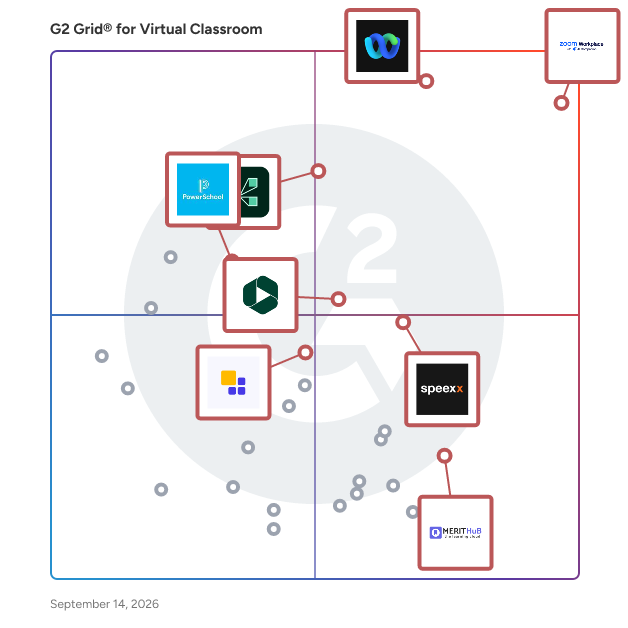
- **Leader:** [Zoom Workplace](https://www.g2.com/products/zoom-workplace/reviews)
- **Highest Performer:** [Speexx](https://www.g2.com/products/speexx/reviews)
- **Easiest to Use:** [Zoom Workplace](https://www.g2.com/products/zoom-workplace/reviews)
- **Top Trending:** [Panopto](https://www.g2.com/products/panopto/reviews)
- **Best Free Software:** [Zoom Workplace](https://www.g2.com/products/zoom-workplace/reviews)


---

**Sponsored**

### Heropa

Heropa specializes in high-performance, cloud-based Virtual IT Labs designed for hands-on software training, sales demos, and proofs of concept. Labs can be provisioned on-demand, scaled globally, and configured to support advanced networking or compute-intensive software. We help software companies get their products into the hands of learners and prospects quickly, reliably, and securely. Whether you&#39;re training customers, onboarding partners, or enabling your sales team, Heropa streamlines the process, reduces support overhead, and delivers engaging, hands-on experiences that drive adoption, sales success, and long-term customer satisfaction. Founded in 2010, with a global team supporting customers worldwide, we combine deep technical expertise with real-world experience in infrastructure and software enablement to support complex, global training and demo programs. Key capabilities include: - Customizable lab templates - Real-time classroom management tools - Support for instructor-led and on-demand sessions - User access controls - Detailed analytics


[Visit website](https://www.g2.com/external_clickthroughs/record?secure%5Bad_program%5D=ppc&amp;secure%5Bad_slot%5D=category_product_list&amp;secure%5Bcategory_id%5D=1415&amp;secure%5Bdisplayable_resource_id%5D=1415&amp;secure%5Bdisplayable_resource_type%5D=Category&amp;secure%5Bmedium%5D=sponsored&amp;secure%5Bplacement_reason%5D=page_category&amp;secure%5Bplacement_resource_ids%5D%5B%5D=1415&amp;secure%5Bprioritized%5D=false&amp;secure%5Bproduct_id%5D=78170&amp;secure%5Bresource_id%5D=1415&amp;secure%5Bresource_type%5D=Category&amp;secure%5Bsource_type%5D=category_page&amp;secure%5Bsource_url%5D=https%3A%2F%2Fwww.g2.com%2Fcategories%2Fvirtual-classroom%3Fpage%3D2&amp;secure%5Btoken%5D=6ac619e6e073979fdc27389800f0ecd95ea686359c781c041ef5715db4016f6f&amp;secure%5Burl%5D=https%3A%2F%2Fwww.heropa.com%2Fget-a-demo%2F%3Futm_source%3DG2%26utm_medium%3Dpaid%26utm_campaign%3DG2_paid_Virtual_IT_Labs&amp;secure%5Burl_type%5D=book_demo)

---

## Top-Rated Products (Ranked by G2 Score)
### 1. [ConexED](https://www.g2.com/products/conexed-conexed/reviews)
  The ConexED Student Services Management Platform is designed exclusively for streamlining and simplifying complex enrollment, eligibility, support, and completion processes. ConexED provides critical engagement features and tools such as Campus Anywhere Booths and functionality on any device so that every student has opportunities to connect in high-touch meaningful ways, especially for those in historically marginalized populations. Too often students give up because they can’t find the time to get to an office or don’t have the right technology. ConexED has spent thousands of hours with education administrators, faculty, and staff to create a product tuned to the needs of students so that they can be successful and persist to graduation. ConexED’s easy-to-use platform with its user-friendly interface and automated processes allows staff to have 25% more time each day to focus on connecting with and helping students in meaningful ways that best match the student&#39;s needs. The ConexED platform facilitates face-to-face meetings both online and in person so that students have equitable access to support services. Robust reporting capabilities capture all meetings and interactions that can help with grant opportunities. The single platform eliminates redundant technologies and reduces associated expenses, simplifies training, promotes ease of use, and provides a consistent user and student experience.


  **Average Rating:** 4.2/5.0
  **Total Reviews:** 190

**User Satisfaction Scores:**

- **Has the product been a good partner in doing business?:** 8.5/10 (Category avg: 9.1/10)
- **Video Streaming:** 9.0/10 (Category avg: 8.5/10)
- **Session Recording:** 9.9/10 (Category avg: 8.7/10)
- **Screen Sharing:** 8.8/10 (Category avg: 8.9/10)


**Seller Details:**

- **Seller:** [ConexEd](https://www.g2.com/sellers/conexed)
- **Year Founded:** 2014
- **HQ Location:** Salt Lake City, Utah
- **Twitter:** @_Conexed (1,466 Twitter followers)
- **LinkedIn® Page:** https://www.linkedin.com/company/2108936/ (16 employees on LinkedIn®)

**Reviewer Demographics:**
  - **Who Uses This:** Student, Instructor
  - **Top Industries:** Higher Education, Education Management
  - **Company Size:** 58% Small-Business, 22% Mid-Market


#### Pros & Cons

**Pros:**

- Scheduling Ease (3 reviews)
- Convenience (2 reviews)
- Ease of Use (2 reviews)
- Easy Access (2 reviews)
- Customer Support (1 reviews)

**Cons:**

- Glitches (4 reviews)
- Missing Features (4 reviews)
- Limited Features (3 reviews)
- Connectivity Issues (2 reviews)
- Limited Customization (2 reviews)

### 2. [Tovuti LMS](https://www.g2.com/products/tovuti-lms/reviews)
  Transform your organization&#39;s learning experience with Tovuti LMS, the all-in-one learning platform that makes training effortless and impactful. L&amp;D professionals love how our AI assistant, Dizi, creates professional courses in minutes instead of weeks, while learners engage through gamification, social features, and interactive content that actually makes training enjoyable. Enterprise-ready with SOC2 compliance and seamless integration with your existing tech stack (including Salesforce, ADP, Workday, and 7,000+ apps via Zapier), Tovuti scales with your business while providing the real-time analytics you need to prove ROI. Organizations across industries trust Tovuti because we turn training from a checkbox exercise into a strategic advantage that drives productivity, ensures compliance, and elevates your entire workforce—all with an intuitive interface that anyone can master quickly. Experience why growing businesses choose Tovuti when they&#39;re serious about making learning a competitive edge.


  **Average Rating:** 4.6/5.0
  **Total Reviews:** 291

**User Satisfaction Scores:**

- **Has the product been a good partner in doing business?:** 8.9/10 (Category avg: 9.1/10)
- **Video Streaming:** 9.2/10 (Category avg: 8.5/10)
- **Session Recording:** 9.1/10 (Category avg: 8.7/10)
- **Screen Sharing:** 9.1/10 (Category avg: 8.9/10)


**Seller Details:**

- **Seller:** [Tovuti Inc.](https://www.g2.com/sellers/tovuti-inc)
- **Company Website:** https://www.tovutilms.com/
- **Year Founded:** 2017
- **HQ Location:** Eagle, Idaho
- **Twitter:** @LearnTOVUTI (300 Twitter followers)
- **LinkedIn® Page:** https://www.linkedin.com/company/18192826/ (55 employees on LinkedIn®)

**Reviewer Demographics:**
  - **Who Uses This:** Software Engineer, Software Developer
  - **Top Industries:** Information Technology and Services, Computer Software
  - **Company Size:** 45% Mid-Market, 32% Small-Business


#### Pros & Cons

**Pros:**

- Customer Support (14 reviews)
- Ease of Use (11 reviews)
- Helpful (11 reviews)
- Responsive Support (10 reviews)
- Customization (9 reviews)

**Cons:**

- Not Intuitive (9 reviews)
- Navigation Difficulties (8 reviews)
- Learning Curve (7 reviews)
- Not User-Friendly (7 reviews)
- Lack of Intuitiveness (6 reviews)

### 3. [ClassLink](https://www.g2.com/products/classlink/reviews)
  ClassLink is a leading provider of cloud-based education products that connect educators and students with their classroom, curriculum, and each other in richer, more powerful ways. As leading advocates for open data standards, we offer instant access to apps and files with single sign-on, streamline class rostering, automate account provisioning, and provide actionable analytics. ClassLink empowers 14 million students and staff in over 1,800 school systems.


  **Average Rating:** 4.7/5.0
  **Total Reviews:** 57

**User Satisfaction Scores:**

- **Has the product been a good partner in doing business?:** 9.8/10 (Category avg: 9.1/10)
- **Video Streaming:** 2.8/10 (Category avg: 8.5/10)
- **Session Recording:** 2.8/10 (Category avg: 8.7/10)
- **Screen Sharing:** 4.2/10 (Category avg: 8.9/10)


**Seller Details:**

- **Seller:** [ClassLink](https://www.g2.com/sellers/classlink)
- **Year Founded:** 1998
- **HQ Location:** Clifton, NJ
- **Twitter:** @ClassLink (3,352 Twitter followers)
- **LinkedIn® Page:** https://www.linkedin.com/company/classlink/ (294 employees on LinkedIn®)

**Reviewer Demographics:**
  - **Who Uses This:** Teacher
  - **Top Industries:** Primary/Secondary Education, Education Management
  - **Company Size:** 57% Mid-Market, 37% Enterprise


#### Pros & Cons

**Pros:**

- Ease of Use (22 reviews)
- Customer Support (20 reviews)
- Easy Setup (20 reviews)
- Setup Ease (14 reviews)
- Efficiency (13 reviews)

**Cons:**

- Difficulty (3 reviews)
- Integration Issues (3 reviews)
- Access Issues (2 reviews)
- Access Restrictions (2 reviews)
- Complex Usability (2 reviews)

### 4. [MagicBox](https://www.g2.com/products/magicbox/reviews)
  MagicBox is an AI-powered, end-to-end digital publishing platform that empowers K-12 and higher education publishers, authors, and content providers, as well as enterprise publishers, to create, manage, enrich, and deliver digital content through custom-branded web and mobile apps. With its multi-tenant architecture, each school, district, or corporate entity is a separate tenant that can be customized to individual requirements. With over 7 million users globally, MagicBox has received several accolades for its inclusive learning solutions and continues to innovate to enhance its features and functionalities.


  **Average Rating:** 4.6/5.0
  **Total Reviews:** 28

**User Satisfaction Scores:**

- **Has the product been a good partner in doing business?:** 9.5/10 (Category avg: 9.1/10)
- **Video Streaming:** 8.1/10 (Category avg: 8.5/10)
- **Session Recording:** 9.4/10 (Category avg: 8.7/10)
- **Screen Sharing:** 8.9/10 (Category avg: 8.9/10)


**Seller Details:**

- **Seller:** [Magic Software](https://www.g2.com/sellers/magic-software-76936fad-6630-4967-840b-2cee2a08adb2)
- **Year Founded:** 2013
- **HQ Location:** New York, US
- **Twitter:** @getmagicbox (220 Twitter followers)
- **LinkedIn® Page:** https://www.linkedin.com/company/13638124/admin/feed/posts/ (4 employees on LinkedIn®)

**Reviewer Demographics:**
  - **Top Industries:** Primary/Secondary Education, Publishing
  - **Company Size:** 71% Mid-Market, 26% Small-Business


#### Pros & Cons

**Pros:**

- Ease of Use (14 reviews)
- Features (7 reviews)
- Intuitive (7 reviews)
- Education Platform (6 reviews)
- Effective (6 reviews)

**Cons:**

- Not User-Friendly (5 reviews)
- Difficult Usability (4 reviews)
- Difficulty (4 reviews)
- Expensive (4 reviews)
- Lack of Customization (3 reviews)

### 5. [Strigo](https://www.g2.com/products/strigo/reviews)
  Strigo’s product-led education solutions help SaaS and software providers bring their training programs right into the product so that customers can access them exactly when and where they need them the most. Users gain convenient in-product access to the highly engaging hands-on learning experiences they need to quickly become productive, while companies are able to easily scale these highly effective tailored education offerings across the entire customer journey. Our customers have logged more than 3 million hours on Strigo’s powerful Academy, Classroom and Labs products, rapidly expanding the reach of their product onboarding and training programs and significantly improving both customer satisfaction and product adoption rates.


  **Average Rating:** 4.8/5.0
  **Total Reviews:** 14

**User Satisfaction Scores:**

- **Has the product been a good partner in doing business?:** 9.7/10 (Category avg: 9.1/10)
- **Screen Sharing:** 10.0/10 (Category avg: 8.9/10)


**Seller Details:**

- **Seller:** [Strigo](https://www.g2.com/sellers/strigo)
- **Year Founded:** 2017
- **HQ Location:** Tel Aviv, Tel Aviv
- **Twitter:** @StrigoIO (134 Twitter followers)
- **LinkedIn® Page:** https://www.linkedin.com/company/10520137/ (10 employees on LinkedIn®)

**Reviewer Demographics:**
  - **Top Industries:** Computer Software, Information Technology and Services
  - **Company Size:** 57% Mid-Market, 29% Small-Business


### 6. [Agora](https://www.g2.com/products/agora-io-agora/reviews)
  Agora&#39;s Video Calling API enables developers to seamlessly integrate high-definition, real-time video communication into web, mobile, and native applications. Designed for ultra-low latency and cross-platform compatibility, it ensures smooth video experiences even under challenging network conditions. This solution is ideal for various applications, including telehealth, education, team collaboration, and any scenario requiring face-to-face interaction. Key Features and Functionality: - Global Coverage: Agora&#39;s Software-Defined Real-Time Network (SDRTN®) supports users in over 200 countries and regions, ensuring reliable connectivity worldwide. - High-Quality Video at Scale: Delivers consistent high-definition video quality for both one-on-one calls and large group meetings, maintaining performance even with thousands of concurrent users. - Multiple Audio and Video Tracks: Allows publishing multiple audio and video streams from a single instance, supporting multi-channel capture from various cameras and microphones. - Screen Sharing and Collaboration: Facilitates screen sharing and interactive whiteboards, enabling users to draw, annotate, and share content across multiple devices simultaneously. - AI-Powered Audio Enhancement: Incorporates advanced audio features such as 3D spatial audio, AI noise suppression, and gain control to provide an immersive and clear audio experience. - Call Recording: Offers options for recording video calls either in the cloud or on-premises, with customizable settings for format, storage path, and quality. Primary Value and User Solutions: Agora&#39;s Video Calling API addresses the need for reliable, high-quality real-time video communication across diverse applications. By providing a scalable and customizable solution, it empowers developers to enhance user engagement and collaboration within their platforms. The API&#39;s robust features, including global coverage, AI-driven enhancements, and flexible integration options, ensure that users experience seamless and interactive video communication, thereby improving productivity and user satisfaction.


  **Average Rating:** 4.1/5.0
  **Total Reviews:** 41

**User Satisfaction Scores:**

- **Has the product been a good partner in doing business?:** 8.2/10 (Category avg: 9.1/10)
- **Video Streaming:** 10.0/10 (Category avg: 8.5/10)
- **Session Recording:** 8.3/10 (Category avg: 8.7/10)
- **Screen Sharing:** 10.0/10 (Category avg: 8.9/10)


**Seller Details:**

- **Seller:** [Agora.io](https://www.g2.com/sellers/agora-io)
- **Year Founded:** 2014
- **HQ Location:** Santa Clara, CA
- **Twitter:** @AgoraIO (26,370 Twitter followers)
- **LinkedIn® Page:** https://www.linkedin.com/company/agora-lab-inc/ (903 employees on LinkedIn®)
- **Ownership:** NASDAQ:API

**Reviewer Demographics:**
  - **Who Uses This:** CEO
  - **Top Industries:** Computer Software, Events Services
  - **Company Size:** 68% Small-Business, 27% Mid-Market


#### Pros & Cons

**Pros:**

- Audio Quality (1 reviews)
- Customer Support (1 reviews)
- High Quality (1 reviews)
- Video Conferencing (1 reviews)

**Cons:**

- Learning Curve (1 reviews)
- Limited Customization (1 reviews)

### 7. [Pearl](https://www.g2.com/products/pearl-pearl/reviews)
  Pearl develops software for tutoring at scale. Our fully integrated classroom and administrative tools allow enterprise tutoring companies, academic organizations and ARP ESSER funded State Education Agencies (SEAs) to launch and scale tutoring programs with ease. Whether instruction occurs online or in person, Pearl&#39;s platform provides education leaders everything they need to improve student learning outcomes while collecting and protecting the necessary data to prove efficacy for multiple stakeholders (parents, teachers, districts, states, agencies). Under a robust Research Collaboration Agreement, Pearl&#39;s team works closely with the Annenberg Institute at Brown University to ensure that every piece of the platform empowers evidence-based tutor program design.


  **Average Rating:** 4.4/5.0
  **Total Reviews:** 11

**User Satisfaction Scores:**

- **Has the product been a good partner in doing business?:** 7.6/10 (Category avg: 9.1/10)
- **Video Streaming:** 8.8/10 (Category avg: 8.5/10)
- **Session Recording:** 10.0/10 (Category avg: 8.7/10)
- **Screen Sharing:** 9.6/10 (Category avg: 8.9/10)


**Seller Details:**

- **Seller:** [Pearl](https://www.g2.com/sellers/pearl)
- **Year Founded:** 2016
- **HQ Location:** Richmond, US
- **Twitter:** @TutorWithPearl (169 Twitter followers)
- **LinkedIn® Page:** https://www.linkedin.com/company/tutorwithpearl/ (54 employees on LinkedIn®)

**Reviewer Demographics:**
  - **Company Size:** 91% Small-Business, 9% Mid-Market


#### Pros & Cons

**Pros:**

- Education Platform (1 reviews)
- Features (1 reviews)

**Cons:**

- Expensive (1 reviews)
- Meeting Management (1 reviews)

### 8. [K-12 Online](https://www.g2.com/products/k-12-online/reviews)
  K12 is the leading online learning provider serving K12 online schools. The K12 program is offered through tuition-free online public schools\* and online private schools.


  **Average Rating:** 4.6/5.0
  **Total Reviews:** 5

**User Satisfaction Scores:**

- **Has the product been a good partner in doing business?:** 10.0/10 (Category avg: 9.1/10)
- **Video Streaming:** 9.2/10 (Category avg: 8.5/10)
- **Session Recording:** 9.2/10 (Category avg: 8.7/10)
- **Screen Sharing:** 9.2/10 (Category avg: 8.9/10)


**Seller Details:**

- **Seller:** [K12](https://www.g2.com/sellers/k12)
- **Year Founded:** 1999
- **HQ Location:** Herndon, VA
- **Twitter:** @StrideLearn (16,159 Twitter followers)
- **LinkedIn® Page:** https://www.linkedin.com/company/164570/ (2,738 employees on LinkedIn®)

**Reviewer Demographics:**
  - **Company Size:** 60% Small-Business, 20% Enterprise


### 9. [SimpleHelp VCR](https://www.g2.com/products/simplehelp-vcr/reviews)
  SimpleHelp has grown from the highly competetive remote support industry where above all we have been providing simplicity both for the host and attendee, and stability. If a technician is remotely helping a paying customer then it is crucial that their support software lets them get their job done efficiently with zero headaches for the often non-technical customer.


  **Average Rating:** 4.4/5.0
  **Total Reviews:** 5

**User Satisfaction Scores:**

- **Has the product been a good partner in doing business?:** 10.0/10 (Category avg: 9.1/10)
- **Screen Sharing:** 8.3/10 (Category avg: 8.9/10)


**Seller Details:**

- **Seller:** [SimpleHelp](https://www.g2.com/sellers/simplehelp)
- **Year Founded:** 2007
- **HQ Location:** EDINBURGH, GB
- **Twitter:** @SimpleHelpLtd (369 Twitter followers)
- **LinkedIn® Page:** https://www.linkedin.com/company/22053227 (2 employees on LinkedIn®)

**Reviewer Demographics:**
  - **Company Size:** 60% Small-Business, 40% Mid-Market


### 10. [TutorRoom](https://www.g2.com/products/tutorroom/reviews)
  TutorRoom offers a state-of-the-art virtual classroom. Classroom has video, messaging, PDF uploads, whiteboard tools and more.


  **Average Rating:** 4.6/5.0
  **Total Reviews:** 6

**User Satisfaction Scores:**

- **Has the product been a good partner in doing business?:** 10.0/10 (Category avg: 9.1/10)
- **Video Streaming:** 8.8/10 (Category avg: 8.5/10)
- **Session Recording:** 9.2/10 (Category avg: 8.7/10)
- **Screen Sharing:** 9.2/10 (Category avg: 8.9/10)


**Seller Details:**

- **Seller:** [TutorRoom](https://www.g2.com/sellers/tutorroom)
- **Year Founded:** 2018
- **HQ Location:** Taipei, TW
- **Twitter:** @RoomTutor (10 Twitter followers)
- **LinkedIn® Page:** https://www.linkedin.com/company/33194834/ (2 employees on LinkedIn®)

**Reviewer Demographics:**
  - **Company Size:** 50% Small-Business, 30% Enterprise


### 11. [Wise](https://www.g2.com/products/wise-app-wise/reviews)
  Wise is a platform built for online teaching and tutoring businesses. Automate scheduling, reminders and invoices. With the 2-way sync calendar scheduling afford greater flexibility to students and instructors. Simplify tutor management and keep parents up-to-date with student reports. Set your tutoring business operations on auto-pilot and do more with your time. Wise offers a host of features tailored for every type of learning- 1-1 personalized sessions, self-paced recorded courses, cohort-based sessions and in-person sessions. Built by Educators to simplify daily time taking tasks- The platform offers 1-click start to sessions, automatic attendance, gamified sessions, detailed learner reports, feedback forms and a whole lot more.


  **Average Rating:** 4.7/5.0
  **Total Reviews:** 9

**User Satisfaction Scores:**

- **Has the product been a good partner in doing business?:** 8.9/10 (Category avg: 9.1/10)
- **Video Streaming:** 8.3/10 (Category avg: 8.5/10)
- **Session Recording:** 7.5/10 (Category avg: 8.7/10)
- **Screen Sharing:** 10.0/10 (Category avg: 8.9/10)


**Seller Details:**

- **Seller:** [WISE App](https://www.g2.com/sellers/wise-app)
- **Year Founded:** 2020
- **HQ Location:** Bengaluru South, Karnataka
- **Twitter:** @wiseapplive (601 Twitter followers)
- **LinkedIn® Page:** https://www.linkedin.com/company/wiseapplive (34 employees on LinkedIn®)

**Reviewer Demographics:**
  - **Top Industries:** Education Management
  - **Company Size:** 92% Small-Business, 8% Mid-Market


#### Pros & Cons

**Pros:**

- Collaboration (3 reviews)
- Communication (2 reviews)
- Ease of Use (2 reviews)
- Features (2 reviews)
- Helpful (2 reviews)

**Cons:**

- Internet Dependency (2 reviews)
- Access Issues (1 reviews)
- Difficult Learning (1 reviews)
- Difficulty (1 reviews)
- High Bandwidth Requirement (1 reviews)

### 12. [PeopleLink Unified Communications Pvt Ltd](https://www.g2.com/products/peoplelink-unified-communications-pvt-ltd/reviews)
  PeopleLink offers enterprise collaboration solutions with a wide range of products across four main categories Video conference endpoints, Audiovisuals, Podiums &amp; AV/UC controllers, and Video-enabled business process applications. Thus, establishing its positions as A2Z of enterprise collaboration.


  **Average Rating:** 4.5/5.0
  **Total Reviews:** 20

**User Satisfaction Scores:**

- **Has the product been a good partner in doing business?:** 8.8/10 (Category avg: 9.1/10)
- **Video Streaming:** 10.0/10 (Category avg: 8.5/10)
- **Session Recording:** 9.2/10 (Category avg: 8.7/10)
- **Screen Sharing:** 10.0/10 (Category avg: 8.9/10)


**Seller Details:**

- **Seller:** [PeopleLink](https://www.g2.com/sellers/peoplelink)
- **Year Founded:** 2007
- **HQ Location:** Palo Alto, IN
- **LinkedIn® Page:** https://www.linkedin.com/company/peoplelinkcompany (536 employees on LinkedIn®)

**Reviewer Demographics:**
  - **Top Industries:** Information Technology and Services
  - **Company Size:** 38% Mid-Market, 23% Small-Business


#### Pros & Cons

**Pros:**

- Video Quality (12 reviews)
- Reliability (11 reviews)
- Audio Quality (9 reviews)
- High Quality (8 reviews)
- Ease of Use (7 reviews)

**Cons:**

- Mobile App Issues (6 reviews)
- Slow Loading (4 reviews)
- User Interface (4 reviews)
- Difficult Setup (3 reviews)
- Difficulty (3 reviews)

### 13. [Buzz](https://www.g2.com/products/agilix-buzz/reviews)
  Agilix is a SaaS company that empowers educational content creators and publishers to deliver quality online and blended learning to any LMS and on mobile. We partner with leading educational content publishers to deliver online courses for blended, virtual, hybrid, and remote learning.


  **Average Rating:** 4.1/5.0
  **Total Reviews:** 10

**User Satisfaction Scores:**

- **Has the product been a good partner in doing business?:** 9.6/10 (Category avg: 9.1/10)


**Seller Details:**

- **Seller:** [Agilix](https://www.g2.com/sellers/agilix)
- **Year Founded:** 2001
- **HQ Location:** N/A
- **Twitter:** @agilix (1,317 Twitter followers)
- **LinkedIn® Page:** https://www.linkedin.com/company/agilix-labs-inc- (20 employees on LinkedIn®)

**Reviewer Demographics:**
  - **Top Industries:** Education Management
  - **Company Size:** 65% Small-Business, 17% Mid-Market


#### Pros & Cons

**Pros:**

- Education Platform (3 reviews)
- Student Engagement (3 reviews)
- Customer Support (2 reviews)
- Ease of Use (2 reviews)
- Engagement (2 reviews)

**Cons:**

- Slow Loading (2 reviews)
- Slow Performance (2 reviews)
- Expensive (1 reviews)
- Navigation Issues (1 reviews)
- Slow Response (1 reviews)

### 14. [EduGyaan](https://www.g2.com/products/edugyaan/reviews)
  EduGyaan is a leading provider of high-definition video communication products, including a virtual classroom solution and a cloud-based HD video conferencing solution. The products are used by educational/training institutes and corporates.


  **Average Rating:** 4.7/5.0
  **Total Reviews:** 3

**User Satisfaction Scores:**

- **Video Streaming:** 8.9/10 (Category avg: 8.5/10)
- **Session Recording:** 9.4/10 (Category avg: 8.7/10)
- **Screen Sharing:** 8.9/10 (Category avg: 8.9/10)


**Seller Details:**

- **Seller:** [EduGyaan](https://www.g2.com/sellers/edugyaan)
- **Year Founded:** 2015
- **HQ Location:** Pune, IN
- **LinkedIn® Page:** https://www.linkedin.com/company/edugyaan-official/ (2 employees on LinkedIn®)

**Reviewer Demographics:**
  - **Company Size:** 100% Small-Business


### 15. [enabley](https://www.g2.com/products/enabley/reviews)
  Empower your Deskless Workforce with a revolutionary mobile training platform - ENABLEY. Transform and enhance training for Deskless workers through easy content creation, personalized micro-learning experiences, and real-time learning opportunities in the flow of work. Ensure all front-line team members, distributors, partners, and franchises are aligned with critical business and technical knowledge, effortlessly by a decentralized management system and agile reporting. Stay ahead of the game, enhance performance, and achieve remarkable results. Enabley - Elevate the training experience, Near, Far, Wherever your workers are.


  **Average Rating:** 4.5/5.0
  **Total Reviews:** 20

**User Satisfaction Scores:**

- **Has the product been a good partner in doing business?:** 9.6/10 (Category avg: 9.1/10)
- **Video Streaming:** 5.0/10 (Category avg: 8.5/10)
- **Session Recording:** 5.8/10 (Category avg: 8.7/10)
- **Screen Sharing:** 9.2/10 (Category avg: 8.9/10)


**Seller Details:**

- **Seller:** [enabley](https://www.g2.com/sellers/enabley)
- **Year Founded:** 2005
- **HQ Location:** Tel Aviv, IL
- **LinkedIn® Page:** https://www.linkedin.com/company/71444/ (88 employees on LinkedIn®)

**Reviewer Demographics:**
  - **Company Size:** 46% Mid-Market, 38% Small-Business


### 16. [YuJa](https://www.g2.com/products/yuja/reviews)
  YuJa provides cloud-powered solutions that enable leading organizations to create engaging media experiences. Our portfolio includes products for video management, lecture capture, live streaming, social learning, video conferencing, digital asset management, video test proctoring, and digital media accessibility. We serve organizations of all sizes within all sectors including higher-ed, K-12, government, non-profit, healthcare and corporate. We have legal headquarters in Delaware with primary U.S. offices in Silicon Valley, California and Canadian offices in Toronto.


  **Average Rating:** 4.3/5.0
  **Total Reviews:** 13

**User Satisfaction Scores:**

- **Has the product been a good partner in doing business?:** 8.3/10 (Category avg: 9.1/10)


**Seller Details:**

- **Seller:** [YuJa](https://www.g2.com/sellers/yuja)
- **Year Founded:** 2007
- **HQ Location:** San Jose, California
- **LinkedIn® Page:** https://www.linkedin.com/company/yuja/ (145 employees on LinkedIn®)

**Reviewer Demographics:**
  - **Top Industries:** Information Technology and Services, Higher Education
  - **Company Size:** 62% Mid-Market, 31% Enterprise


### 17. [Blink Session](https://www.g2.com/products/blink-session/reviews)
  The All-Inclusive Telehealth Solution. What does your telehealth software do for you? Blink Session goes beyond video-conferencing to an all-inclusive platform built around your entire telehealth operation. White-board, videos, games, documents, HIPAA-compliant recording. Schedule, reminders, document, sharing files, and get paid. All of this and more in a HIPAA compliant user friendly platform that runs completely in your web browser. Plus training from telehealth.training, will make your clinic, hospital, or school telehealth or teletherapy program a success.


  **Average Rating:** 5.0/5.0
  **Total Reviews:** 2

**User Satisfaction Scores:**

- **Video Streaming:** 10.0/10 (Category avg: 8.5/10)
- **Session Recording:** 10.0/10 (Category avg: 8.7/10)
- **Screen Sharing:** 10.0/10 (Category avg: 8.9/10)


**Seller Details:**

- **Seller:** [Blink Session](https://www.g2.com/sellers/blink-session)
- **Year Founded:** 2016
- **HQ Location:** Colorado Springs, US
- **Twitter:** @blink_session (8 Twitter followers)
- **LinkedIn® Page:** https://www.linkedin.com/company/blink-session/ (5 employees on LinkedIn®)

**Reviewer Demographics:**
  - **Company Size:** 67% Small-Business, 33% Mid-Market


### 18. [classroom.cloud](https://www.g2.com/products/classroom-cloud/reviews)
  Award-winning cloud-based, classroom management, safeguarding and IT management platform for schools! Super easy to set up and use, classroom.cloud is a low-cost and scalable cloud-based solution, providing the essential tools for supporting schools worldwide. Teachers can easily connect to their students’ devices quickly and easily by a range of methods and see thumbnails of all connected students’ devices on their screen to monitor activity. With classroom.cloud, teachers can easily explain and demonstrate lesson activity using the screen sharing and audio broadcast features – plus remedy any unwanted activity with remote control tools or by simply locking the students’ screens. Keeping students focused and on track is easy with ‘allowed’ and ‘restricted’ lists of websites and applications – as well as chat and messaging tools for interaction, guidance and collaboration.   Using class surveys, teachers gain instant feedback on topic understanding and can gamify assessment by using the ‘random select’ mode which selects students at random to answer the question. In addition, to reinforce good behavior, correct answers, and celebrate great pieces of work, teachers can assign ‘rewards’ during the lesson. Any students who find themselves struggling with a task can send discreet help requests directly to the teacher.   In addition, schools can ensure that their students are safe at all times (and in any location) with the optional safeguarding toolkit. This helps to keep the school’s online environment protected by monitoring concerning activity, identifying students at risk, and spotting online safety trends – even in Microsoft Teams. Its range of proactive and reactive tools include multi-language keyword and phrase monitoring, word cloud of trending topics, contextual intelligence-based Risk Index, full reporting, and more. Schools can also set school-wide internet restrictions to block and approve websites and set the times they can be accessed. With the new Enhanced Safeguarding feature, Image Analysis (optional), schools can also monitor and detect inappropriate images displayed on students’ screens from websites, apps, and media. With no swapping between solutions required for in-school and/or remote learning, classroom.cloud provides a simple and effective way to provide continuity for students and reduce edtech fatigue for teachers.  For technicians, classroom.cloud is easy to set up, configure, manage, and use – virtually taking care of itself! Integrating directly with the school&#39;s existing infrastructure and with Google Classroom, ClassLink, Microsoft School Data Sync and Clever, they can deploy it in minutes and manage teacher and student devices centrally – saving a bunch of time.  Plus, with hardware and software inventories, power management, PowerShell, school-wide internet and application metering, and more, they can see at a glance how school technology is being used and how to maximize it.


  **Average Rating:** 4.9/5.0
  **Total Reviews:** 4

**User Satisfaction Scores:**

- **Has the product been a good partner in doing business?:** 10.0/10 (Category avg: 9.1/10)
- **Video Streaming:** 8.3/10 (Category avg: 8.5/10)
- **Session Recording:** 8.3/10 (Category avg: 8.7/10)
- **Screen Sharing:** 6.7/10 (Category avg: 8.9/10)


**Seller Details:**

- **Seller:** [NetSupport Limited](https://www.g2.com/sellers/netsupport-limited)
- **Year Founded:** 1989
- **HQ Location:** Market Deeping, United Kingdom
- **Twitter:** @NetSupportGroup (6,767 Twitter followers)
- **LinkedIn® Page:** https://www.linkedin.com/company/642889/ (115 employees on LinkedIn®)

**Reviewer Demographics:**
  - **Company Size:** 50% Mid-Market, 50% Small-Business


### 19. [Dreamtek Virtual Classroom](https://www.g2.com/products/dreamtek-virtual-classroom/reviews)
  Stream content live and enable audience participation with webcam / audio chat facilities, interactive content sharing. Dreamtek has also developed a HQ video pod that is a plug in for streaming hIgh quality video content important if you are delivering complex training such as engine repair or medical applications via an online classroom.


  **Average Rating:** 2.8/5.0
  **Total Reviews:** 2

**User Satisfaction Scores:**

- **Video Streaming:** 10.0/10 (Category avg: 8.5/10)
- **Session Recording:** 10.0/10 (Category avg: 8.7/10)
- **Screen Sharing:** 10.0/10 (Category avg: 8.9/10)


**Seller Details:**

- **Seller:** [Dreamtek Limited](https://www.g2.com/sellers/dreamtek-limited)
- **Year Founded:** 1999
- **HQ Location:** London, England, United Kingdom
- **Twitter:** @dreamtek (1,425 Twitter followers)
- **LinkedIn® Page:** https://www.linkedin.com/company/dreamtek/ (252 employees on LinkedIn®)

**Reviewer Demographics:**
  - **Company Size:** 50% Mid-Market, 50% Enterprise


### 20. [Jumbula](https://www.g2.com/products/jumbula/reviews)
  Jumbula is an innovative provider of online registration, payment, and class/camp management systems designed to streamline the administrative tasks for programs ranging from after-school activities to sports camps and beyond. This solution is tailored to enhance the operational efficiency of educational and recreational programs, offering a comprehensive suite of tools that meet the unique needs of business owners, program operators, and instructors. The primary target audience for Jumbula includes educational institutions, recreational centers, and independent program operators who require a user-friendly platform to manage their activities. With its robust features, Jumbula caters to a variety of use cases, such as simplifying the enrollment process for parents, managing class schedules, and facilitating secure payment processing. This versatility makes it an essential tool for organizations looking to optimize their administrative workflows while providing a seamless experience for their clients. Key features of Jumbula include an online registration system that simplifies the enrollment process with customizable forms and real-time class availability updates. This ensures that parents can easily register their children for activities without the hassle of paper forms or manual tracking. The secure online payment gateway further enhances the user experience by offering flexible payment plans and automated billing, allowing organizations to manage their finances efficiently. In addition to registration and payment processing, Jumbula provides comprehensive class and camp management tools. Users can create and manage schedules, track attendance, and communicate effectively with staff members. This functionality not only improves organizational efficiency but also fosters better engagement between instructors and participants. The platform also features a user-friendly parent portal that keeps families informed with instant notifications and detailed progress tracking, enhancing the overall experience for both parents and students. Moreover, Jumbula supports business management through comprehensive reporting and analytics, enabling organizations to make data-driven decisions. Marketing and promotion tools are integrated into the platform, allowing users to reach their target audience effectively. Additionally, Jumbula&#39;s ability to integrate with third-party applications ensures that organizations can customize their operational processes to fit their specific needs, making it a versatile solution in the realm of class and camp management.


  **Average Rating:** 3.8/5.0
  **Total Reviews:** 2

**User Satisfaction Scores:**

- **Has the product been a good partner in doing business?:** 8.3/10 (Category avg: 9.1/10)


**Seller Details:**

- **Seller:** [Jumbula](https://www.g2.com/sellers/jumbula)
- **Year Founded:** 2013
- **HQ Location:** San Mateo, US
- **Twitter:** @jumbulame (38 Twitter followers)
- **LinkedIn® Page:** https://www.linkedin.com/company/jumbula/ (26 employees on LinkedIn®)

**Reviewer Demographics:**
  - **Company Size:** 100% Small-Business


### 21. [Pencil Spaces](https://www.g2.com/products/pencil-spaces/reviews)
  Pencil Spaces is a virtual classroom software solution that enables educators, tutors, and students to collaborate in real time through a fully integrated online learning environment. It is designed specifically for live instruction, combining core classroom functions into a single platform to streamline virtual teaching and enhance student engagement. Pencil Spaces supports a wide range of educational use cases including one-on-one tutoring, group instruction, after-school programs, and hybrid or remote classroom learning. The platform reduces the need for multiple tools by integrating video conferencing, collaborative whiteboards, file sharing, chat, and third-party app access (e.g., Google Drive, LMS integrations, educational apps) into one cohesive experience. This allows instructors and learners to focus on content and interaction without switching platforms. Key features and benefits include: - Seamless virtual learning environment that combines video, whiteboards, chat, file sharing, and apps into one space. - No downloads or installations required, with simple one-click access to join or host a session. - AI-powered tools such as session summaries and smart companions to support post-class review and accessibility. - Breakout rooms and moderation tools such as distraction alerts that allow educators to manage larger classes and personalize learning experiences. - Extensive integrations with popular tools including Microsoft and Google products, Wikipedia, and major LMS platforms like Canvas, i-Ready, Google Classroom, and Blackboard, as well as educational apps such as Kahoot, IXL, GeoGebra, and Wolfram Alpha. Pencil Spaces is suitable for K-12 schools, higher education institutions, private tutoring organizations, and educational technology providers looking for a purpose-built virtual classroom. The platform is student-focused, designed to minimize friction and maximize engagement in online learning environments.


  **Average Rating:** 4.9/5.0
  **Total Reviews:** 6

**User Satisfaction Scores:**

- **Has the product been a good partner in doing business?:** 8.3/10 (Category avg: 9.1/10)
- **Video Streaming:** 9.2/10 (Category avg: 8.5/10)
- **Session Recording:** 9.2/10 (Category avg: 8.7/10)
- **Screen Sharing:** 9.2/10 (Category avg: 8.9/10)


**Seller Details:**

- **Seller:** [Pencil Spaces](https://www.g2.com/sellers/pencil-spaces)
- **Year Founded:** 2020
- **HQ Location:** San Francisco, US
- **LinkedIn® Page:** https://www.linkedin.com/company/pencilspaces (131 employees on LinkedIn®)

**Reviewer Demographics:**
  - **Top Industries:** Primary/Secondary Education
  - **Company Size:** 83% Small-Business, 17% Mid-Market


#### Pros & Cons

**Pros:**

- Ease of Use (3 reviews)
- Education Platform (3 reviews)
- Engagement (3 reviews)
- Features (3 reviews)
- Team Collaboration (3 reviews)

**Cons:**

- Difficult Usability (2 reviews)
- Delay Issues (1 reviews)
- Difficulty (1 reviews)
- Not User-Friendly (1 reviews)
- Poor Usability (1 reviews)

### 22. [StandUp Meet](https://www.g2.com/products/standup-meet/reviews)
  Online Learning Engagement Platform gives you the smooth interaction with teachers and students by simulating interactive classrooms experience from anywhere, on any device, for any class size


  **Average Rating:** 4.0/5.0
  **Total Reviews:** 2

**User Satisfaction Scores:**

- **Video Streaming:** 6.7/10 (Category avg: 8.5/10)
- **Session Recording:** 8.3/10 (Category avg: 8.7/10)
- **Screen Sharing:** 8.3/10 (Category avg: 8.9/10)


**Seller Details:**

- **Seller:** [Standupmeet](https://www.g2.com/sellers/standupmeet)
- **Year Founded:** 2019
- **HQ Location:** BANGALORE, IN
- **LinkedIn® Page:** https://www.linkedin.com/company/73258816 (2 employees on LinkedIn®)

**Reviewer Demographics:**
  - **Company Size:** 50% Enterprise, 50% Mid-Market


### 23. [Teams](https://www.g2.com/products/24houranswers-teams/reviews)
  24HourAnswers is an all in one education management platform designed for organizations that run live instruction with multiple instructors and students. 24ha is used by tutoring centers, language schools, exam prep programs, homeschool and microschool programs, and professional training teams to manage scheduling, live sessions, payments, and student communication from a single system. Organizations use 24ha to replace multiple tools such as video conferencing software, scheduling tools, invoicing systems, and shared content platforms. Classes, one to one lessons, group sessions, and webinars can all be managed in one place without requiring additional licenses or third party integrations. Core features include instructor and student management, calendar based scheduling, live whiteboard and classroom sessions, group and individual invoicing, webinars, shared learning resources, and reporting for attendance and revenue. Administrators can manage multiple instructors, programs, and student groups while maintaining a consistent experience across their organization. 24ha is designed for small to mid sized education teams that need flexibility across different instructional models, including online, hybrid, and multi location programs. The platform supports organizations operating in multiple countries and currencies and is used by teams across North America, Latin America, and Europe.


  **Average Rating:** 5.0/5.0
  **Total Reviews:** 2

**User Satisfaction Scores:**

- **Has the product been a good partner in doing business?:** 10.0/10 (Category avg: 9.1/10)
- **Video Streaming:** 10.0/10 (Category avg: 8.5/10)
- **Session Recording:** 10.0/10 (Category avg: 8.7/10)
- **Screen Sharing:** 10.0/10 (Category avg: 8.9/10)


**Seller Details:**

- **Seller:** [24HourAnswers](https://www.g2.com/sellers/24houranswers)
- **Year Founded:** 2008
- **HQ Location:** Nashville, US
- **LinkedIn® Page:** https://www.linkedin.com/company/24houranswers-com/ (41 employees on LinkedIn®)

**Reviewer Demographics:**
  - **Company Size:** 100% Small-Business


#### Pros & Cons

**Pros:**

- Customer Support (1 reviews)
- Education Platform (1 reviews)
- Features (1 reviews)

**Cons:**

- Limited Participation (1 reviews)
- Unnecessary Features (1 reviews)

### 24. [AyoTree](https://www.g2.com/products/ayotree/reviews)
  AyoTree is a cloud-based software to help manage almost every aspect of your language school that also comes with a virtual classroom.


  **Average Rating:** 5.0/5.0
  **Total Reviews:** 1

**User Satisfaction Scores:**

- **Video Streaming:** 10.0/10 (Category avg: 8.5/10)
- **Session Recording:** 10.0/10 (Category avg: 8.7/10)
- **Screen Sharing:** 10.0/10 (Category avg: 8.9/10)


**Seller Details:**

- **Seller:** [H&amp;C Systems](https://www.g2.com/sellers/h-c-systems)
- **HQ Location:** East Pasadena, US
- **LinkedIn® Page:** http://www.linkedin.com/company/ayotree (8 employees on LinkedIn®)

**Reviewer Demographics:**
  - **Company Size:** 100% Enterprise


### 25. [catchapp.me](https://www.g2.com/products/catchapp-me/reviews)
  Catchapp is a Virtual Classroom software that combines all the tools that Tutors are using for remote tutoring in one place. Catchapp was build by requirements getting from Tutors and for Tutors. Catchapp combines calls functionality alongside with CRM functions, messaging, invoicing and calendar tools. Catchapp also provides mobile app with basic functionality to join the call and chat. Also with Catchapp personal tutor&#39;s page like user.catchapp.me cab be built and shared across potential Clients to promote services. One of the advantages is that Catchapp works in browser and provides the same features as desktop apps.


  **Average Rating:** 5.0/5.0
  **Total Reviews:** 1


**Seller Details:**

- **Seller:** [Catchapp](https://www.g2.com/sellers/catchapp)
- **HQ Location:** N/A
- **LinkedIn® Page:** https://www.linkedin.com/company/No-Linkedin-Presence-Added-Intentionally-By-DataOps (1 employees on LinkedIn®)

**Reviewer Demographics:**
  - **Company Size:** 100% Small-Business


## Parent Category

[Education Software](https://www.g2.com/categories/education)


## Related Categories

- [Learning Management Systems](https://www.g2.com/categories/learning-management-system-lms)
- [Assessment Software](https://www.g2.com/categories/assessment)
- [Online Learning Platforms](https://www.g2.com/categories/online-learning-platform)


---

## Buyer Guide

### What You Should Know About Virtual Classroom Software

### What is Virtual Classroom Software?

Virtual classroom software enables instructors to deliver distance learning experiences through a combination of video conferencing, collaboration and participation, and assessment features. Educators use this software to provide engaging eLearning experiences, both in real time and through playback recordings for students to access material wherever and whenever. Virtual classroom software can be sold as a standalone product or an integrated feature within a larger platform. It is quickly becoming a must-have tool for educators, allowing them to maximize student learning beyond the physical classroom setting.

### What are the Common Features of Virtual Classroom Software?

**Video conferencing:** Live video allows students and teachers to see each other during the lesson, facilitating more student engagement and opportunities for real-time discussions. A growing number of platforms offer high-definition video and automatically optimize a user’s video and audio for their connection speed to enable users with lower bandwidth connections to participate.

**Video encryption and password protection:** End-to-end encryption of video feeds ensure privacy and security for users, while passwords limit who can access a class session.

**Multimedia presentations:** Instructors can upload slides presentations to virtual classroom platforms, then share those slides during a lesson as a visual aid for students. Many platforms also enable instructors to upload audio or video files.

**Whiteboards:** Digital whiteboards can be used in a variety of ways, such as an instructor looking to demonstrate the steps to solving a math problem or diagram the structure of a single-celled organism. Some products offer interactive whiteboards, enabling the instructor to share the space with students, which offers more opportunities for student participation.

[**Session recording**](https://www.g2.com/categories/virtual-classroom/f/session-recording) **:** For students who can’t make a virtual class or want to review the material again later, professors can save a recording of the session, including video and audio, and post it online for later viewing. Some virtual classroom products offer the option to post directly to the institution’s learning management system or online learning platform.

[**Live chat**](https://www.g2.com/categories/virtual-classroom/f/live-chat) **:** In addition to video and audio communications, a text chat feature makes it possible for participants to quietly ask questions or communicate during a session. Messaging can be either public (visible to the entire room of participants) or private (only between the sender and receiver).

**File sharing and storage:** File storage functionality enables users to upload a variety of file types, including documents, video, audio, PDFs, and presentations. These files can then be shared with students and may be able to include annotations that add additional context or clarification. Some products offer a cloud-based content library that instructors can use to organize and reuse files or course content from past classes.

**Screen sharing:** Instructors (and sometimes session participants, with the instructor’s permission) can share their computer screen during a session. This can be useful when an instructor is trying to demonstrate something, such as how to use a piece of software.

[**Polls and surveys**](https://www.g2.com/categories/virtual-classroom/f/survey-tools) **:** With live polls and surveys, teachers can ask students a question and instantly see results.

**Breakout rooms:** If an instructor wants to break up a large class into smaller groups, breakout rooms enable them to split up students for small group projects, discussions, or other learning activities. The instructor can later reconvene the entire class for a larger discussion.

**Mobile compatibility:** Platforms that are compatible with desktop operating systems, as well as mobile devices, allow students to connect from their device of choice.

**Analytics** : Virtual classroom software can capture a variety of data about student attendance, engagement, and performance, then compile it into reports or visual dashboards.

Many virtual classroom platforms will also offer the following features:&amp;nbsp;

- [Virtual classroom software with hand raising capabilities](https://www.g2.com/categories/virtual-classroom/f/hand-raising)
- [Virtual classroom software with participation control capabilities](https://www.g2.com/categories/virtual-classroom/f/participation-controls)
- [Virtual classroom software with technical support capabilities](https://www.g2.com/categories/virtual-classroom/f/technical-support)
- [Virtual classroom software with markup tool capabilities](https://www.g2.com/categories/virtual-classroom/f/markup-tools)

### What are the Benefits of Virtual Classroom Software?

**Streamlines delivery of live online learning experiences:** Virtual classroom software enables students to engage in so-called synchronous learning experiences or those in which all the students are engaged in learning at the same time. These platforms include live video streaming capabilities, so teachers and instructors can communicate via video and audio during the session. Holding live classes using virtual classroom software means instructors can have real-time discussions with students or change a lesson dynamically based on students’ needs. These actions would not be possible in an asynchronous learning environment, such as an online course that students click through at their own pace. Virtual classrooms combine live video streaming with other teaching tools in a single software product, streamlining the learning process for both teacher and student.

**Engages and assesses learners from afar:** Engaging students in an online course can be a challenge for teachers, as students may lose interest during the session, such as a lengthy presentation or lecture. Virtual classroom products offer ways for instructors to make the learning more dynamic and more closely replicate the options they have available in a physical classroom. Many tools include digital whiteboards, polling functions, text chat features, and the ability to show videos.

**Enables student collaboration online:** Peer interactions are a key part of many learning experiences, so virtual classroom software products typically offer ways for instructors to facilitate those conversations. In addition to the video conferencing capabilities that allow students to see and hear each other during discussions, many virtual classroom platforms enable instructors to create virtual breakout rooms where smaller groups of students can meet and collaborate on assignments. Some virtual classroom products also let learners work together on projects using digital whiteboards that can accommodate multiple editors or collaborative coding environments for honing computer programming skills.

### Who Uses Virtual Classroom Software?

In general, virtual classroom software users fall into one of two categories, instructors or students. However, there are several contexts in which users can leverage virtual classroom products.

**College and university professors:** Many virtual classroom platforms are aimed at helping instructors at colleges and universities improve their delivery of online education, including courses that are held either partially or entirely online. Professors can host live online classes to deliver lessons and engage students using a variety of features.

**K-12 teachers:** While K-12 teachers use virtual classrooms less commonly than higher education instructors, teachers in the primary grades can use these tools to connect with students who are learning remotely. Teachers in K-12 schools where students learn exclusively online can use virtual classroom software to deliver daily lessons. They also might use it to reach students who are out of the classroom temporarily, such as because of an illness.

**Students:** Once an instructor uses virtual classroom software to launch an online class meeting, students use the platform to join the class, either by downloading the software or via a web browser.

**Online tutors:** Private businesses that offer [tutoring](https://g2.com/categories/tutoring) for test preparation, language learning, or other academic subjects can use virtual classrooms to connect with their clients and engage in online tutoring sessions.

**Education administrators:** Institutional leaders use virtual classrooms in the same way they would leverage the features of video conferencing software, such as holding collaborative meetings on a variety of topics.

**Employee trainers:** In a business context, virtual classrooms can allow trainers to conduct online training sessions or webinars for groups of employees in disparate locations. Virtual training can also take place in the education industry, allowing teachers to complete professional development sessions from anywhere with an internet connection.

### What are the Alternatives to Virtual Classroom Software?

Alternatives to Virtual Classroom software can replace this type of software, either partially or completely:

[Video conferencing software](https://g2.com/categories/video-conferencing) **:** Virtual classroom products incorporate live video streaming, much like video conferencing platforms, which tend to be more business oriented. Video conferencing platforms can be very similar in functionality to virtual classroom software.

[Learning management systems (LMS)](https://www.g2.com/categories/learning-management-system-lms) **:** Some LMS products offer built-in video streaming functionality to host virtual classrooms. Virtual sessions can be scheduled through an LMS and a link to the session can be posted on it. Afterward, recordings can be updated on the LMS for students to access.

### Challenges with Virtual Classroom Software

**Video and audio performance:** A central part of the virtual classroom experience is being able to communicate via live audio and video with other participants, underscoring how crucial it is that a platform provides high-quality, reliable delivery of that data. If the video or audio is constantly cutting out for instructors or students, the lesson will be impossible to follow. While the quality and reliability of video streaming platforms have both improved significantly in recent years, buyers should make sure to demo virtual classroom products under a range of conditions to ensure that the product will perform when it is time to hold class. That includes testing how the platform performs with large numbers of participants or over slower internet connections.

**Inadequate internet connectivity for students:** Virtual classrooms require a reliable broadband internet connection to function properly. Students who lack reliable internet access could be in for a frustrating experience involving choppy audio and video or frequent disconnections. This so-called digital divide has the potential to exacerbate inequities between students by preventing some students from being able to attend virtual sessions. Instructors who intend to use virtual classroom software have a responsibility to ensure that each student has the necessary resources to access the software.

### Which Companies Should Buy Virtual Classroom Software?

Any educational institution that wants to provide remote learning should consider purchasing virtual classroom software. While there are free web conferencing tools that can be used, virtual classroom products are designed to enhance remote learning beyond basic video stream and participation tools. Features such as whiteboards and quizzes allow teachers to engage their students and prevent passive listening during virtual classes.&amp;nbsp;

For online schools or higher education institutions that want to enhance their online course offerings, virtual classroom software can increase the number of prospective students who choose to attend their institution. These tools offer far more flexibility with when and how students can learn.

### How to Buy Virtual Classroom Software

#### Requirements Gathering (RFI/RFP) for Virtual Classroom Software

For the most part, virtual classroom products will not differ greatly in features, which should help prospective buyers feel at ease when beginning their search for the right product. Institutions should start their RFI/RFP process by honing in on the current and future needs for their remote learning plan. Buyers must determine what set of features will help teachers feel more empowered to deliver high-quality virtual classes, and ensure they have the tools to limit student interruptions as needed.

#### Compare Virtual Classroom Software Products

**Create a long list**

Long lists are created by eliminating the options that do not provide critical functionality. For example, schools should seek out virtual classroom products that offer a predetermined set of must-have features to help teachers deliver quality remote learning experiences. A typical long list should not include more than 10 products unless many options are very similar. In this case, additional details like the geographical presence of the company or its reputation can be used to eliminate vendors.

**Create a short list**

Short lists are created by reviewing the RFI information received from vendors. Some vendors may decline to participate and respond to RFIs. These vendors are usually eliminated from the selection process. From there, this short list steers the buying decision closer to completion, leaving only a couple of vendors to choose between. This decision is based on small, key factors that fulfill all the requirements and considerations a school or company has for implementing a virtual classroom.

**Conduct demos**

Demos are a great opportunity for buyers to see how the virtual classroom works. Only the shortlisted vendors are invited to demonstrate their solutions. Demos should be performed live, using the system, and not through slide decks and screenshots. All vendors should follow a predetermined scenario that simulates the business processes of the buyer. Buyers should request to see a walkthrough from the perspective of an instructor and a student to understand how the interface looks for both sides and ensure it is user friendly for everyone. Additionally, request to see various stress tests on the virtual classroom to see how video, audio, and internet connection quality holds up for higher participant sizes. Buyers can then determine what integrations exist for the product to see how it would work with other products in the tech stack.

#### Selection of Virtual Classroom Software

**Choose a selection team**

To choose a selection team, decision makers need to involve subject matter experts from all teams that will use the system. For schools, this will likely involve the principal or dean, as well as a select number of teachers who represent the larger faculty&#39;s needs. An IT administrator should also be present, to weigh in on technical concerns with specific virtual classroom products.

**Negotiation**

Negotiation happens between the buyer and the short list of vendors. In some cases, there are only two vendors that make it to this stage, which means that they offer similar products. At this point, the dealbreaker is the price of the product, which can vary based on the discounts offered by each vendor. Buyers should consider upfront costs, both for implementation and ongoing maintenance, and if the virtual classroom is priced per month or year.

**Final decision**

The final decision should be based on all the information gathered previously.

### Virtual Classroom Software Trends

**Browser-based connectivity:** One hurdle that both students and instructors face in implementing virtual classroom software is getting it up and running. A growing number of products have developed versions of their software that run straight from a web browser. This saves students the hassle of downloading and installing a new piece of software. Others may not be able to install software on their device because they are on a shared computer, lack the administrative permissions necessary to run installation files, or their device is not supported by the software. Virtual classrooms that can run from a browser help students overcome these obstacles, especially when they are trying to juggle other responsibilities and simply want to get to their virtual class quickly.

**Blurring the line with video conferencing software:** As the quality and reliability of live video streaming has improved, video conferencing software has become increasingly ubiquitous, especially for companies with remote workers. Educational institutions have also adopted popular video conferencing platforms that were originally designed for businesses but now also serve thousands of schools. Many of these video conferencing platforms now go beyond bare-bones live video streaming and have features that mirror many of those of virtual classrooms, such as whiteboards and quizzes or polls. Combined with marketing efforts that pitch many platforms as virtual classrooms, there is more grey area between what is a video conferencing platform and what is a virtual classroom. Buyers should investigate a product’s features to determine whether it has the functionality to create an effective learning environment.