Top Free Virtual Classroom Software

How Many Virtual Classroom Software Products Does G2 Track?

Total Products under this Category: 125

Category Stats (Oct 2026)

  • Average Rating: 4.46/5 The average rating of products in this category, based on all submitted ratings
  • Top Trending Product: Pencil Spaces (+1.48%) - Among all products in this category, Pencil Spaces recorded the largest rating increase compared to last month

Last updated: October 01, 2026

How Does G2 Rank Virtual Classroom Software Products?

Why You Can Trust G2's Software Rankings:

  • 30 Analysts and Data Experts
  • 79,600+ Authentic Reviews
  • 125+ Products
  • Unbiased Rankings

G2's software rankings are built on verified user reviews, rigorous moderation, and a consistent research methodology maintained by a team of analysts and data experts. Each product is measured using the same transparent criteria, with no paid placement or vendor influence. While reviews reflect real user experiences, which can be subjective, they offer valuable insight into how software performs in the hands of professionals. Together, these inputs power the G2 Score, a standardized way to compare tools within every category.

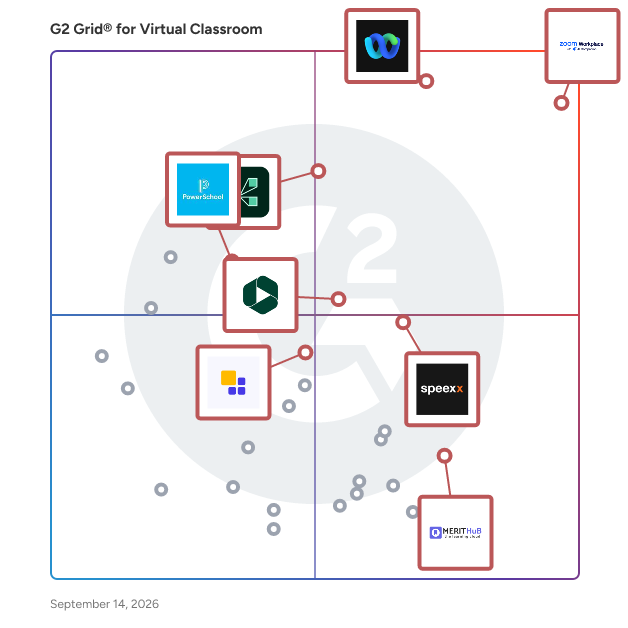
G2 Grid® for Virtual Classroom Software

G2 Grid® for Virtual Classroom Software plotting products by satisfaction and market presence

Highlighted products: Zoom Workplace, Webex Suite, Adobe Connect, Speexx, Panopto, MeritHub, PowerSchool Schoology Learning, and Class.

Underlying data: [Grid® JSON](https://www.g2.com/categories/virtual-classroom/grids.json?focus%5B%5D=zoom-workplace&focus%5B%5D=cisco-webex-suite&focus%5B%5D=adobe-connect&focus%5B%5D=speexx&focus%5B%5D=panopto&focus%5B%5D=merithub&focus%5B%5D=powerschool-schoology-learning&focus%5B%5D=class-technologies)

Zoom Workplace

Goodbye app overload. Hello effortless work. Work can be complicated. Your tools shouldn't be. Zoom Workplace connects all the ways you collaborate — from meetings to docs to chat and more — with built-in AI and seamless integrations that help teams focus and work flawlessly. Zoom Communications: Unified, Effortless Connection for Modern Work Bring every way your teams communicate—meetings, chat, calls, email, and scheduling—into one seamless experience. With Zoom, collaboration happens faster and more naturally across channels, without switching apps or losing context. From spontaneous chats to scheduled meetings and calls, everything stays connected, searchable, and secure—powered by one intuitive platform built for how modern teams work. Zoom Productivity: Workflows Connected, Work Effortless Transform how work gets done with AI-first collaboration that keeps people, content, and actions in one place. From brainstorming on whiteboards to co-creating in docs, sharing clips, and automating follow-ups, Zoom connects every step of your workflow. With Zoom Hub and integrated video management, knowledge stays organized, accessible, and actionable—so teams can move from idea to outcome without friction. Zoom Spaces: Smarter, Connected Workplaces for Every Team Bring your physical and hybrid environments to life with intelligent, connected spaces. Zoom Spaces unifies meeting rooms, desk reservations, digital signage, and visitor management into one seamless experience—making it simple to collaborate, navigate, and manage the workplace. Whether employees are remote, hybrid, or on-site, Zoom creates a consistent, secure, and flexible environment that keeps teams connected wherever work happens. Zoom Employee Engagement: Connect, Inspire, and Empower Every Employee Foster belonging and alignment with Workvivo by Zoom—a modern employee experience platform that unites communication, culture, and community in one place. From company-wide updates to recognition, feedback, and social engagement, Workvivo gives every employee a voice and a sense of connection. Built right into Zoom Workplace, it helps organizations strengthen culture, boost engagement, and keep teams informed and inspired—no matter where they work.

Average Rating: 4.5/5.0

Total Reviews: 53,423

How Do G2 Users Rate Zoom Workplace?

  • Has the product been a good partner in doing business?: 9.1/10 (Category avg: 9.1/10)
  • Video Streaming: 9.0/10 (Category avg: 8.5/10)
  • Session Recording: 9.1/10 (Category avg: 8.7/10)
  • Screen Sharing: 9.3/10 (Category avg: 8.9/10)

Who Is the Company Behind Zoom Workplace?

  • Seller: Zoom
  • Company Website:
  • Year Founded: 2011
  • HQ Location: San Jose, CA
  • Twitter: @zoom
    1,042,714 Twitter followers
  • LinkedIn® Page: www.linkedin.com
    14,013 employees on LinkedIn®

Who Uses This Product?

  • Who Uses This: Owner, Software Engineer
  • Top Industries: Information Technology and Services, Computer Software
  • Company Size: 51% Small, 31% Medium

What Do G2 Reviewers Say About Zoom Workplace?

AI-generated summary from verified user reviews

Pros
  • Users love the ease of use of Zoom Workplace, enjoying seamless access to features with just a click.
  • Users enjoy the easy-to-use video conferencing features of Zoom, facilitating smooth communication and collaboration in hybrid work settings.
  • Users appreciate the excellent video quality of Zoom Workplace, enhancing communication and making meetings more effective.
  • Users value the reliability of Zoom Workplace, ensuring seamless connectivity and stability even during adverse conditions.
  • Users appreciate the ease of collaboration in Zoom Workplace, especially with breakout rooms and seamless screen sharing.
Cons
  • Users note the limited features of Zoom Workplace, expressing a need for improved built-in collaboration tools.
  • Users experience Zoom issues like fatigue, connectivity problems, and confusing configurations that hinder their overall meeting effectiveness.
  • Users experience Zoom fatigue, notification overload, and connectivity issues, making long meetings feel overwhelming and impersonal.
  • Users often face connection issues with Zoom Workplace, leading to a frustrating and less seamless experience.
  • Users face video quality issues and discomfort with camera usage, impacting the overall experience of Zoom meetings.

What Are Recent G2 Reviews of Zoom Workplace?

What Are G2 Users Discussing About Zoom Workplace?

Webex Suite

Webex Suite is an all-in-one, AI-powered collaboration suite built to increase productivity and maximize teamwork in today’s hybrid work. With 8 powerful individual workflows – Meetings, Messaging, Calling, Webinar, Events, Polling, Whiteboarding and Video Messaging in one, Webex Suite delivers exceptional value, world-class user experiences, and incredible audio and video, anywhere on any device. With a variety of collaboration and AI innovations, such as Webex AI Assistant, Real-time Translation, Background Noise Removal, and more, Webex Suite delivers rich and innovative experiences for employees and customers, enabling them to seamlessly connect, collaborate, engage and get work done. Webex Suite is powered by the industry-leading Webex Platform that is secure, compliant, and easily managed with built-in pervasive intelligence, bringing AI innovations across the entire Webex portfolio. The entire Webex Suite can be managed via the single-pane-of-glass management tool, Webex Control Hub. Webex Suite is backed by Cisco’s industry-leading security and networking infrastructure that ensures the best quality video and audio communications. Webex Suite Workflows: Meetings: Drive more productive meetings with AI-powered experiences and high-quality audio and video. Messaging: Collaborate async with rich messaging, secure file sharing, and digital whiteboarding to keep work flowing between meetings. Calling: Stay connected with modern business phone system and flexible calling options. Webinar: Host high quality webinars and drive engagement with immersive content and interactive audience experiences. Events: Power virtual, in-person, and hybrid events with immersive multi-track agendas, ticketing, attendee networking, analytics, and more. Polling: Enable active participation in every meeting with quizzes, polling, and interactive Q&A. Whiteboarding: Unleash creativity with a digital whiteboarding solution for everyone, on any device. Video Messaging: Record, share ideas, engage, and facilitate real-time feedback with intuitive video messaging.

Average Rating: 4.2/5.0

Total Reviews: 17,667

How Do G2 Users Rate Webex Suite?

  • Has the product been a good partner in doing business?: 8.7/10 (Category avg: 9.1/10)
  • Video Streaming: 9.1/10 (Category avg: 8.5/10)
  • Session Recording: 9.0/10 (Category avg: 8.7/10)
  • Screen Sharing: 9.2/10 (Category avg: 8.9/10)

Who Is the Company Behind Webex Suite?

  • Seller: Cisco
  • Company Website:
  • Year Founded: 1984
  • HQ Location: San Jose, CA
  • Twitter: @Cisco
    720,366 Twitter followers
  • LinkedIn® Page: www.linkedin.com
    95,294 employees on LinkedIn®

Who Uses This Product?

  • Who Uses This: Software Engineer, Senior Software Engineer
  • Top Industries: Information Technology and Services, Computer Software
  • Company Size: 50% Large, 31% Medium

What Do G2 Reviewers Say About Webex Suite?

AI-generated summary from verified user reviews

Pros
  • Users appreciate the ease of use of Webex Suite for its all-in-one solution for communication and collaboration.
  • Users value the high-quality video and audio of Webex Suite, enabling effective and seamless collaboration across locations.
  • Users appreciate the reliable connections provided by Webex Suite, enhancing their collaboration experience seamlessly.
  • Users value the all-in-one collaboration capabilities of Webex Suite, enhancing productivity with excellent video and audio quality.
  • Users commend the excellent video quality of Webex Suite, enhancing their meeting and collaboration experiences.
Cons
  • Users often experience slow loading issues with Webex Suite, causing frustration during calls and overall usage.
  • Users report performance issues with Webex Suite, describing lag, freezes, and a cluttered interface that complicates usability.
  • Users find Webex Suite not user-friendly, citing a cluttered interface and confusion with settings as major drawbacks.
  • Users find the lack of intuitiveness in Webex Suite's interface challenging, especially for new users navigating features.
  • Users find the poor user experience of Webex Suite challenging, with a complex setup and a cluttered interface.

What Are Recent G2 Reviews of Webex Suite?

What Are G2 Users Discussing About Webex Suite?

Adobe Connect

Adobe Connect empowers you with the true potential of virtual technology to craft unforgettable stories. Utilize its adaptable platform to create and present exceptional virtual experiences for diverse audiences. Elevate your training sessions, webinars, and meetings, making them extraordinary while ensuring secure outreach beyond the ordinary. Create Genuine Connections: Redefine audience engagement by crafting immersive virtual experiences using robust storyboarding and engagement design tools. Global Outreach: Harness the genuine power of virtual communication to connect with audiences from various backgrounds and abilities worldwide. All-in-One Solution: Your search ends here. A unified platform to plan, execute, and monitor your events. We've got all your event workflows covered.

Average Rating: 4.0/5.0

Total Reviews: 917

How Do G2 Users Rate Adobe Connect?

  • Has the product been a good partner in doing business?: 7.8/10 (Category avg: 9.1/10)
  • Video Streaming: 8.0/10 (Category avg: 8.5/10)
  • Session Recording: 8.7/10 (Category avg: 8.7/10)
  • Screen Sharing: 8.5/10 (Category avg: 8.9/10)

Who Is the Company Behind Adobe Connect?

  • Seller: Adobe
  • Year Founded: 1982
  • HQ Location: San Jose, CA
  • Twitter: @Adobe
    956,842 Twitter followers
  • LinkedIn® Page: www.linkedin.com
    42,975 employees on LinkedIn®
  • Ownership: NASDAQ:ADBE

Who Uses This Product?

  • Who Uses This: Teacher, Instructor
  • Top Industries: Higher Education, Primary/Secondary Education
  • Company Size: 37% Medium, 33% Large

What Do G2 Reviewers Say About Adobe Connect?

AI-generated summary from verified user reviews

Pros
  • Users appreciate the ease of use of Adobe Connect, enhancing their virtual communication and project collaboration efficiently.
  • Users appreciate the robust features of Adobe Connect for effective collaboration and presentation in virtual workspaces.
  • Users commend the excellent video quality of Adobe Connect, enhancing their virtual meetings and collaboration effectively.
  • Users value the efficiency of Adobe Connect, enhancing collaboration and presentation capabilities for seamless virtual teamwork.
  • Users value the high security of Adobe Connect, ensuring confidentiality and controlled access during virtual meetings.
Cons
  • Users find Adobe Connect to be expensive for smaller organizations, limiting access to essential features and functionality.
  • Users find the mobile app performance lacking on phones and older laptops, preferring more functionality from desktop versions.
  • Users experience inconsistent audio and video quality, and dislike limited mic access without purchasing the software for hosting.
  • Users experience admin control issues that limit personal access and hinder effective participation in meetings.
  • Users experience application instability on mobile devices and older laptops, leading to a frustrating experience.

What Are Recent G2 Reviews of Adobe Connect?

What Are G2 Users Discussing About Adobe Connect?

AI can help you find the answers. G2 helps you trust them.

Connect G2 to Claude or ChatGPT for answers grounded in G2's trusted reviews, comparisons, and pricing from real user insights.

How it works

Speexx

Speexx is the people development platform, trusted by global corporations to upskill their workforce. Speexx delivers language training, business coaching, strategic mentoring, intercultural training, and skills assessment, combining AI-driven learning with certified trainers and coaches, CEFR-based assessment, and role-specific content to more than 2,000 clients and 8 million+ users across 80 countries. Speexx is the first provider to pass two independent audits by ICF Germany, evaluating both the Speexx Team Coaching Framework and Speexx AI Coaching Platform against ICF's professional and AI coaching standards for quality, safety, transparency, and governance. Built for corporate L&D teams, Speexx integrates with SAP SuccessFactors, Workday, and Microsoft Teams. Speexx is GDPR compliant and holds ISO/IEC 27001:2022, ISO 9001, SOC 2 Type II, TISAX, and CyberVadis Platinum certifications, alongside EcoVadis (Silver, 2024) and CDP ESG/CSR accreditations, and has earned more than 200 industry awards for technology and innovation, including recognition as a TIME Magazine Top EdTech company. Founded in 2012, Speexx operates with a global team of more than 2,800 trainers, coaches, and employees, driving professional development and upskilling at scale.

Average Rating: 4.6/5.0

Total Reviews: 664

How Do G2 Users Rate Speexx?

  • Has the product been a good partner in doing business?: 9.3/10 (Category avg: 9.1/10)
  • Video Streaming: 8.8/10 (Category avg: 8.5/10)
  • Session Recording: 8.3/10 (Category avg: 8.7/10)
  • Screen Sharing: 8.8/10 (Category avg: 8.9/10)

Who Is the Company Behind Speexx?

  • Seller: Speexx
  • Company Website:
  • Year Founded: 2012
  • HQ Location: Munich, Bavaria
  • Twitter: @speexx
    1,424 Twitter followers
  • LinkedIn® Page: www.linkedin.com
    958 employees on LinkedIn®

Who Uses This Product?

  • Who Uses This: Project Manager, Consultant
  • Top Industries: Automotive, Banking
  • Company Size: 50% Large, 26% Medium

What Do G2 Reviewers Say About Speexx?

AI-generated summary from verified user reviews

Pros
  • Users find Speexx to be very easy to use, with a step-by-step learning approach enhancing language acquisition.
  • Users love the interactive live group sessions of Speexx, fostering global communication and practical language skills.
  • Users value the flexibility in learning options offered by Speexx, enhancing their language acquisition process.
  • Users appreciate the highly qualified teachers at Speex, enhancing their learning experience with effective group and individual sessions.
  • Users appreciate the engaging exercises in Speexx, facilitating enjoyable and effective language learning experiences at their convenience.
Cons
  • Users desire a greater variety of classes and improved explanations, feeling limited by the current offerings in Speexx.
  • Users find the lack of support for Ukrainian and repetitive exercises hinder an engaging learning experience on Speexx.
  • Users experience pronunciation recognition issues with Speexx, often requiring slow speech for proper system response.
  • Users find the limited topics in Speexx frustrating, desiring broader content that aligns better with their learning needs.
  • Users face pronunciation issues with Speexx, often struggling for recognition and finding it unhelpful for training.

What Are Recent G2 Reviews of Speexx?

What Are G2 Users Discussing About Speexx?

Panopto

Panopto is the leading provider of video knowledge management, enabling universities and enterprises to create, manage, and scale knowledge with confidence. Panopto is trusted by 1,600+ organizations to turn expertise into searchable, accessible video at scale. With AI-powered creation, centralized governance, and secure delivery, Panopto improves engagement and comprehension, accelerates onboarding, and extends institutional knowledge. The Panopto platform serves a wide range of use cases—from lecture capture and flipped classrooms in academic institutions to employee training, onboarding, and knowledge management in corporate environments. Deep integrations with learning management systems (LMS) and enterprise tools ensure a seamless experience across every workflow. Powerful features, including automated video indexing, full-text search, and detailed analytics, help organizations unlock the full value of their video libraries. Panopto's AI video studio, Elai, extends the platform's capabilities with an all-in-one solution for AI-generated video content. Trusted by over 2,000 clients, Elai enables organizations to produce professional, interactive videos narrated by digital human presenters—in minutes, and without a camera, studio, or green screen. Its intuitive editor supports instant video creation from text, PowerPoint, and PDF files; translation into 75+ languages; and interactive elements including buttons, quizzing, and branching scenarios—making scalable content creation accessible to everyone. Panopto's customer base spans higher education, global enterprises, and government agencies, reflecting a shared commitment to accessibility, engagement, and the lasting impact of well-managed knowledge.

Average Rating: 4.4/5.0

Total Reviews: 166

How Do G2 Users Rate Panopto?

  • Has the product been a good partner in doing business?: 9.2/10 (Category avg: 9.1/10)
  • Video Streaming: 9.4/10 (Category avg: 8.5/10)
  • Session Recording: 9.8/10 (Category avg: 8.7/10)
  • Screen Sharing: 9.2/10 (Category avg: 8.9/10)

Who Is the Company Behind Panopto?

  • Seller: Panopto
  • Company Website:
  • Year Founded: 2007
  • HQ Location: 600 River Avenue Suite 100 Pittsburgh, PA 15212
  • Twitter: @Panopto
    2,831 Twitter followers
  • LinkedIn® Page: www.linkedin.com
    194 employees on LinkedIn®

Who Uses This Product?

  • Top Industries: Higher Education, Education Management
  • Company Size: 51% Large, 35% Medium

What Do G2 Reviewers Say About Panopto?

AI-generated summary from verified user reviews

Pros
  • Users find Panopto to be extremely user-friendly, facilitating easy adoption for both faculty and students alike.
  • Users highlight the ease of use and seamless integration of Panopto with platforms like Canvas and Zoom.
  • Users value the helpfulness of Panopto, enhancing learning through easy access and streamlined video integration.
  • Users praise the friendly and efficient customer support from Panopto, quickly resolving issues and providing valuable insights.
  • Users appreciate the user-friendly recording feature of Panopto, which simplifies video creation and organization significantly.
Cons
  • Users find Panopto's feature deficiencies frustrating, citing slow performance and limited editing capabilities as major drawbacks.
  • Users find difficulty in learning and using basic editing tools, and the unarchive process is often slow and unpredictable.
  • Users experience significant interface issues with Panopto, facing slow navigation and cumbersome admin functionalities.
  • Users often experience slow performance with Panopto, finding video uploads and editing tools less responsive than expected.
  • Users often find Panopto slow and clunky, causing frustration during video uploads and processing times.

What Are Recent G2 Reviews of Panopto?

What Are G2 Users Discussing About Panopto?

MeritHub

MeritHub is a powerful, globally trusted platform purpose-built for interactive online teaching and learning. It combines a complete virtual classroom, Learning Management System (LMS), and Tutor Management System in one integrated solution, helping tutoring companies, schools, colleges, universities, training organizations, and corporates streamline operations and deliver engaging learning experiences. The platform covers every aspect of online teaching, including HD audio/video communication, tabbed whiteboards, drawing and annotation tools, screen sharing, breakout rooms, and lesson recording in MP4 format. Educators can store and share content, assignments, and homework while tracking attendance, course progress, and learner activity. Tutors love MeritHub’s interactive whiteboard, which enables real-time collaboration across devices. They can share and annotate PDFs and presentations, copy and paste text and images, insert mathematical equations, embed and edit Google Docs, and play audio, video, YouTube content, quizzes, and educational games. Beyond the virtual classroom, MeritHub provides a comprehensive LMS and Tutor Management System with course and curriculum management, student information management, scheduling and calendars, attendance tracking, assessments and quizzes, progress monitoring, feedback collection, and communication tools. It also streamlines business operations with automated payment collection, invoicing, tutor payroll, billing, and performance dashboards. By bringing teaching, learning, and administration together on a single platform, MeritHub helps organizations automate operations, reduce manual effort, and deliver exceptional online learning experiences at scale.

Average Rating: 4.9/5.0

Total Reviews: 16

How Do G2 Users Rate MeritHub?

  • Has the product been a good partner in doing business?: 10.0/10 (Category avg: 9.1/10)
  • Video Streaming: 9.2/10 (Category avg: 8.5/10)
  • Session Recording: 9.4/10 (Category avg: 8.7/10)
  • Screen Sharing: 9.2/10 (Category avg: 8.9/10)

Who Is the Company Behind MeritHub?

Who Uses This Product?

  • Top Industries: Education Management
  • Company Size: 63% Small, 25% Medium

What Do G2 Reviewers Say About MeritHub?

AI-generated summary from verified user reviews

Pros
  • Users appreciate the high audio clarity of MeritHub, enhancing their conferencing experience significantly.
  • Users appreciate the rich features of MeritHub, enhancing virtual learning with engaging tools and a responsive experience.
  • Users commend the excellent video quality of MeritHub, enhancing their online learning and conferencing experiences.
  • Users praise the responsive and flexible customer support from MeritHub, enhancing their virtual classroom experience.
  • Users appreciate the ease of use of MeritHub, highlighting the simple setup and intuitive functionalities for online classes.

What Are Recent G2 Reviews of MeritHub?

What Are G2 Users Discussing About MeritHub?

VEDAMO Virtual Classroom

VEDAMO is a virtual classroom platform and online teaching software designed for educators, tutors, training providers, corporate teams, and educational organizations of all kinds that need structured, engaging, and scalable live learning. Built specifically for education and training, VEDAMO goes beyond standard video conferencing by combining a virtual classroom, classroom management tools, and LMS functionality in one platform. Teachers and tutors can deliver interactive online lessons using a powerful whiteboard, breakout rooms, quizzes, and real-time collaboration tools. Built-in classroom management features such as distraction monitoring and participation controls help keep learners focused and engaged. Training providers, language schools, and educational organizations can streamline their operations with reusable lesson templates, structured course delivery, and efficient session management, saving time while maintaining consistency across programs. Corporate teams can run effective employee training, onboarding, and client education through live, instructor-led sessions in a controlled and professional environment. VEDAMO integrates with leading LMS platforms and supports custom API and LTI integrations, making it easy to fit into existing ecosystems. It also connects with systems like Salesforce and TutorCruncher, enabling organizations to manage training, learners, and business operations in one connected workflow. Whether you are teaching one-on-one, running group classes, or managing large-scale training programs, VEDAMO provides the tools to deliver engaging, structured, and results-driven online learning experiences.

Average Rating: 4.7/5.0

Total Reviews: 68

How Do G2 Users Rate VEDAMO Virtual Classroom?

  • Has the product been a good partner in doing business?: 9.7/10 (Category avg: 9.1/10)
  • Video Streaming: 8.7/10 (Category avg: 8.5/10)
  • Session Recording: 8.9/10 (Category avg: 8.7/10)
  • Screen Sharing: 8.5/10 (Category avg: 8.9/10)

Who Is the Company Behind VEDAMO Virtual Classroom?

  • Seller: Vedamo
  • Year Founded: 2013
  • HQ Location: Sofia, Sofia
  • Twitter: @vedamoelearning
    353 Twitter followers
  • LinkedIn® Page: www.linkedin.com
    14 employees on LinkedIn®

Who Uses This Product?

  • Top Industries: E-Learning, Primary/Secondary Education
  • Company Size: 87% Small, 12% Medium

What Do G2 Reviewers Say About VEDAMO Virtual Classroom?

AI-generated summary from verified user reviews

Pros
  • Users appreciate the interactive tools of VEDAMO, which enhance learning and make lessons engaging and effective.
  • Users value the collaborative features of Vedamo Virtual Classroom that enhance interactive learning and communication.
  • Users value the effective communication tools of VEDAMO, enhancing engagement and learning in virtual classrooms.
  • Users commend Vedamo's excellent customer support, appreciating their responsiveness and commitment to enhancing the platform.
  • Users love the customization options in VEDAMO Virtual Classroom, tailoring lessons to meet individual learner needs effectively.
Cons
  • Users find the interface design lacking, noting it feels less smooth compared to Zoom and Teams.

What Are Recent G2 Reviews of VEDAMO Virtual Classroom?

What Are G2 Users Discussing About VEDAMO Virtual Classroom?

weConnect

weConnect is a subscription-based software solution designed for teaching/training & learning needs across the entire campus/company. weConnect wraps around the (class)rooms design and integrates with the devices of your choice to deliver the desired use case experience, whether on-site or online. weConnect enables instructors to tailor the learning experience to their objectives with a dedicated set of tools, including polling, chat, whiteboarding & content sharing capabilities. weConnect allows group work collaboration and lets remote employees/students participate and engage as if they were in the room. Meet new levels of engagement, learning outcomes, retention, and growth worldwide with weConnect.

Average Rating: 4.5/5.0

Total Reviews: 22

How Do G2 Users Rate weConnect?

  • Has the product been a good partner in doing business?: 9.6/10 (Category avg: 9.1/10)
  • Video Streaming: 8.8/10 (Category avg: 8.5/10)
  • Session Recording: 9.2/10 (Category avg: 8.7/10)
  • Screen Sharing: 9.1/10 (Category avg: 8.9/10)

Who Is the Company Behind weConnect?

  • Seller: Barco
  • Year Founded: 1934
  • HQ Location: Kortrijk, Belgium
  • Twitter: @Barco
    16,787 Twitter followers
  • LinkedIn® Page: www.linkedin.com
    4,679 employees on LinkedIn®
  • Ownership: EBR: BAR

Who Uses This Product?

  • Top Industries: Information Technology and Services
  • Company Size: 45% Small, 41% Medium

What Are Recent G2 Reviews of weConnect?

ReadyTech

All-in-one technical training with multiple lab options. ReadyTech is an all-in-one platform for hands-on technical training. It brings virtual IT labs, lab management, a training-focused virtual classroom, course materials, assessments, self-paced learning, and instructor monitoring and control into one place. Choose the lab environment that fits the course. Use ReadyTech-hosted cloud or bare metal, your own AWS, Azure, or Google Cloud account, existing in-house systems and equipment, or Local Labs on learner computers. In-House Labs let you use infrastructure you already own for browser-based training. Local Labs let instructors monitor and assist learners on local machines, including systems with installed software, GPUs, USB license dongles, printers, and serial devices. Instructors can monitor and control learner labs during class, provide remote assistance, transfer files, manage timers, and respond to help requests. ReadyTech supports instructor-led, self-paced, and blended training. Pricing is flexible, with pay-as-you-go or month-to-month options, no long-term contracts, and 24/7/365 live human support.

Average Rating: 4.5/5.0

Total Reviews: 220

How Do G2 Users Rate ReadyTech?

  • Has the product been a good partner in doing business?: 9.2/10 (Category avg: 9.1/10)
  • Video Streaming: 8.0/10 (Category avg: 8.5/10)
  • Session Recording: 7.5/10 (Category avg: 8.7/10)
  • Screen Sharing: 8.8/10 (Category avg: 8.9/10)

Who Is the Company Behind ReadyTech?

  • Seller: ReadyTech Corporation
  • Company Website:
  • Year Founded: 1993
  • HQ Location: Oakland, CA
  • Twitter: @readytech
    134 Twitter followers
  • LinkedIn® Page: www.linkedin.com
    43 employees on LinkedIn®

Who Uses This Product?

  • Who Uses This: Student, Consultant
  • Top Industries: Computer Software, Information Technology and Services
  • Company Size: 39% Large, 32% Medium

What Do G2 Reviewers Say About ReadyTech?

AI-generated summary from verified user reviews

Pros
  • Users commend ReadyTech's excellent customer support, highlighting quick responses and efficient issue resolutions when needed.
  • Users appreciate the ease of use of ReadyTech, allowing quick setups and management with minimal effort.
  • Users appreciate the reliability of ReadyTech, highlighting its quick support response and consistent availability.
  • Users value the ease of setup with ReadyTech, ensuring smooth and efficient training experiences every time.
  • Users appreciate ReadyTech's fast response, with support resolving issues quickly, enhancing their training experience.
Cons
  • Users experience connectivity issues with ReadyTech, complicating troubleshooting and limiting flexibility in VM management.
  • Users experience audio issues that disrupt training, occasionally losing connectivity and necessitating frequent support intervention.
  • Users report audio quality issues and connectivity disruptions with ReadyTech, impacting training effectiveness despite good support.
  • Users experience limited features with ReadyTech, facing issues like connectivity problems and less flexibility in troubleshooting.
  • Users report technical issues with ReadyTech, including outages and audio problems that disrupt learning experiences.

What Are Recent G2 Reviews of ReadyTech?

Heropa

Heropa specializes in high-performance, cloud-based Virtual IT Labs designed for hands-on software training, sales demos, and proofs of concept. Labs can be provisioned on-demand, scaled globally, and configured to support advanced networking or compute-intensive software. We help software companies get their products into the hands of learners and prospects quickly, reliably, and securely. Whether you're training customers, onboarding partners, or enabling your sales team, Heropa streamlines the process, reduces support overhead, and delivers engaging, hands-on experiences that drive adoption, sales success, and long-term customer satisfaction. Founded in 2010, with a global team supporting customers worldwide, we combine deep technical expertise with real-world experience in infrastructure and software enablement to support complex, global training and demo programs. Key capabilities include: - Customizable lab templates - Real-time classroom management tools - Support for instructor-led and on-demand sessions - User access controls - Detailed analytics

Average Rating: 4.9/5.0

Total Reviews: 46

How Do G2 Users Rate Heropa?

  • Has the product been a good partner in doing business?: 9.9/10 (Category avg: 9.1/10)
  • Video Streaming: 6.1/10 (Category avg: 8.5/10)
  • Session Recording: 0.0/10 (Category avg: 8.7/10)
  • Screen Sharing: 9.6/10 (Category avg: 8.9/10)

Who Is the Company Behind Heropa?

  • Seller: HEROPA
  • Company Website:
  • Year Founded: 2010
  • HQ Location: Sydney, New South Wales
  • Twitter: @HeropaLabs
    838 Twitter followers
  • LinkedIn® Page: www.linkedin.com
    16 employees on LinkedIn®

Who Uses This Product?

  • Top Industries: Computer Software, Information Technology and Services
  • Company Size: 54% Medium, 28% Large

What Do G2 Reviewers Say About Heropa?

AI-generated summary from verified user reviews

Pros
  • Users find Heropa’s ease of use outstanding, enabling quick setup of realistic lab environments for effective learning.
  • Users praise Heropa's super-fast customer support, ensuring prompt solutions and minimal disruptions to teaching and learning.
  • Users appreciate the quick and easy setup of Heropa for creating interactive lab environments for students.
  • Users value the powerful and user-friendly platform of Heropa, complemented by exceptional customer support and stability.
  • Users value the fast response times of Heropa's support, ensuring quick resolutions and a smooth experience.
Cons
  • Users face frustrating connectivity issues that can disrupt file sharing and slow down access to cloud environments.
  • Users find the navigation somewhat cumbersome, requiring extra clicks and making the experience less intuitive.
  • Users find difficult navigation occasionally complicates the experience, but improvements are anticipated in future updates.
  • Users find the internet connectivity issues frustrating, especially when file uploads are interrupted and retries are frequent.
  • Users find that navigation issues can complicate the experience, requiring extra clicks at times.

What Are Recent G2 Reviews of Heropa?

What Are G2 Users Discussing About Heropa?

Sibme

Sibme improves the way professionals learn at work. We help teams build cultures of continuous improvement. Sibme’s Learning Engagement Platform powers professional development through virtual- and hybrid-coaching, peer-to-peer collaboration, cohort-based professional learning communities, and micro-credentials. Sibme works with more than 1,000 innovative schools, districts, and institutions–including Houghton Mifflin Harcourt, ASCD, Scholastic, the University of Texas, and Houston Independent School District. Sibme is designed by teachers. From K-12 and higher education to corporate learning & development, educators trust us to encourage critical conversations about real work, using real tools, with real people -- from anywhere at any time. Sibme’s Learning Engagement Platform embeds practice and collaboration in every workday, engaging employees while building a stronger community of learners. Sibme encourages teams to more frequently and authentically discuss the work, the challenges and, ultimately, the opportunities to maximize capacity through real-world experience.

Average Rating: 4.8/5.0

Total Reviews: 65

How Do G2 Users Rate Sibme?

  • Has the product been a good partner in doing business?: 9.8/10 (Category avg: 9.1/10)
  • Video Streaming: 8.3/10 (Category avg: 8.5/10)
  • Session Recording: 9.8/10 (Category avg: 8.7/10)
  • Screen Sharing: 10.0/10 (Category avg: 8.9/10)

Who Is the Company Behind Sibme?

  • Seller: Sibme
  • Year Founded: 2013
  • HQ Location: Houston, US
  • Twitter: @SibmeApp
    2,171 Twitter followers
  • LinkedIn® Page: www.linkedin.com
    70 employees on LinkedIn®

Who Uses This Product?

  • Top Industries: Education Management, Primary/Secondary Education
  • Company Size: 56% Small, 39% Medium

What Are Recent G2 Reviews of Sibme?

BrainCert

BrainCert is an all-in-one Learning Management System (LMS) platform designed to facilitate the delivery of various types of training online. It serves as a comprehensive solution for organizations looking to create, market, and sell courses, tests, and products while also hosting webinars, live classes, and collaborative meetings. BrainCert is particularly useful for a wide range of applications, including academic assessments, certification exams, compliance training, workplace skills development, and customer and partner education. The platform also features an integrated virtual classroom and meeting rooms, enabling real-time collaboration and interaction among learners and instructors. Targeted at businesses, educational institutions, and training organizations, BrainCert caters to users who require a versatile and robust platform for their training needs. The platform is designed to support diverse use cases, making it suitable for anyone from corporate trainers to educators and even independent course creators. Its flexibility allows users to tailor their training programs to meet specific audience requirements, ensuring that learning experiences are both relevant and impactful. BrainCert boasts over 500 premium features that enhance the learning experience. Users can leverage gamification elements, such as certificates and badges, to motivate learners and encourage participation. The platform also includes tools for creating learning paths, assignments, and landing pages, along with email marketing capabilities and automation workflows to streamline communication and engagement. Detailed reports and analytics provide insights into learner progress and course effectiveness, allowing organizations to make data-driven decisions to improve their training programs. Additionally, BrainCert offers Digital Rights Management (DRM) to protect content, multi-domain support for branding, and a powerful mobile app for learning on the go. Security and compliance are fundamental aspects of BrainCert's infrastructure, which is designed to meet the stringent requirements of enterprise-level organizations. The platform is SOC 2 Type II and ISO 27001:2013 certified, ensuring that it adheres to high standards of data security and privacy. Furthermore, BrainCert is fully compliant with HIPAA and GDPR regulations, providing users with peace of mind regarding the protection of sensitive information. This commitment to security makes BrainCert a reliable choice for organizations that prioritize data integrity and compliance in their training initiatives.

Average Rating: 4.6/5.0

Total Reviews: 80

G2 Deal: 40% off life-time recurring discount on all annual plans.

Black Friday 2022 limited offer

Price: ~~$468 per month~~ → $281 per month

View this exclusive G2 deal

How Do G2 Users Rate BrainCert?

  • Has the product been a good partner in doing business?: 9.4/10 (Category avg: 9.1/10)
  • Video Streaming: 9.2/10 (Category avg: 8.5/10)
  • Session Recording: 8.9/10 (Category avg: 8.7/10)
  • Screen Sharing: 8.6/10 (Category avg: 8.9/10)

Who Is the Company Behind BrainCert?

  • Seller: BrainCert
  • Year Founded: 2013
  • HQ Location: Herndon, Virginia
  • Twitter: @BrainCert
    4,446 Twitter followers
  • LinkedIn® Page: www.linkedin.com
    26 employees on LinkedIn®

Who Uses This Product?

  • Top Industries: Accounting, Education Management
  • Company Size: 69% Small, 19% Medium

What Do G2 Reviewers Say About BrainCert?

AI-generated summary from verified user reviews

Pros
  • Users appreciate the course variety in BrainCert, enabling easy creation of integrated learning experiences.
  • Users appreciate the integrated features of BrainCert, making online course creation easy and effective.
  • Users find BrainCert incredibly user-friendly, seamlessly integrating multiple tools for a streamlined e-learning experience.
  • Users appreciate the distinctive exam and assessment features of BrainCert, enhancing their learning and knowledge evaluation.
  • Users appreciate the comprehensive features of BrainCert, offering a versatile and reliable e-learning solution for various needs.
Cons
  • Users find the complexity of initial setup and frequent UI changes challenging, hindering effective navigation and usage.
  • Users feel that BrainCert has limited features, especially lacking the ability for students to self-book classes conveniently.
  • Users find the difficult setup of BrainCert overwhelming, requiring time to learn its numerous features effectively.
  • Users find the initial setup overwhelming, requiring time to learn and adapt to BrainCert's numerous features.
  • Users desire the absence of self-booking features for students, necessitating alternative systems for scheduling and payments.

What Are Recent G2 Reviews of BrainCert?

What Are G2 Users Discussing About BrainCert?

Kaltura

Kaltura helps organizations turn content, knowledge, and audience signals into personalized, AI-powered experiences that move people forward. Our platform brings together content, video, data, intelligence, and agentic AI to help businesses engage customers, enable employees, and guide every user with the right content, interaction, or next step in the moment. Kaltura’s solutions are built around two critical business challenges: accelerating revenue across the customer journey and helping people learn, perform, and succeed at scale. **Agentic Revenue Engagement** Kaltura Agentic Revenue Engagement helps organizations create connected, personalized experiences across the buyer and customer journey. Instead of leaving people to navigate static websites, disconnected content, forms, webinars, and follow-up on their own, Kaltura turns these touchpoints into interactive experiences that understand intent and actively guide each user forward. Organizations can create digital destinations, events, webinars, content experiences, and AI-powered conversational interactions that adapt to each buyer or customer. Agentic experiences can answer questions, recommend relevant content, help users explore solutions, capture intent, identify meaningful engagement signals, and connect people with sales or customer teams when human involvement adds value. For marketing and revenue teams, this creates a more continuous journey from first engagement through purchase, onboarding, adoption, and expansion, while providing richer insight into what each account and individual actually cares about. Teams can use Kaltura to: • Create personalized digital experiences for buyers and customers • Run webinars, virtual events, and always-on content destinations • Turn video and other content into interactive, discoverable experiences • Deploy AI-powered agents that answer questions and guide users in real time • Recommend content and next steps based on user needs and behavior • Capture and activate engagement and intent signals • Support customer onboarding, education, activation, and ongoing engagement • Connect digital interactions with revenue workflows and business outcomes The goal is simple: reduce friction across the journey and help every interaction create momentum toward the next meaningful action. **Agentic Learning & Enablement** Kaltura Agentic Learning & Enablement helps organizations turn institutional knowledge into personalized learning, practice, and on-demand guidance that improves performance. Traditional learning often depends on static courses, fragmented knowledge, and one-size-fits-all training. Kaltura creates a more continuous model of enablement, where employees, sales teams, customers, and partners can access the knowledge, practice, and guidance they need at the moment they need it. Organizations can create and manage learning content at scale, transform existing knowledge and video into new learning experiences, personalize learning based on individual needs, and give users AI-powered guides that help them find answers and apply knowledge in their day-to-day work. Kaltura also supports interactive practice and simulation, allowing people to rehearse important conversations and scenarios and receive immediate feedback. This can include sales conversations, customer interactions, leadership scenarios, onboarding, certification, and other high-stakes situations where practice directly affects performance. Teams can use Kaltura to: • Create and manage video, learning, and enablement content at scale • Generate and repurpose content using AI-powered creation tools • Deliver personalized onboarding, upskilling, and continuous learning • Give employees on-demand access to company knowledge and guidance • Provide sales teams with training, coaching, and in-the-moment enablement • Run realistic roleplay and simulation experiences with AI-powered feedback and assessment • Educate and enable customers and partners • Support structured learning paths, certifications, and skills development • Understand engagement, readiness, and learning effectiveness • Connect learning and enablement programs more closely to business performance Rather than treating learning as an occasional activity, Kaltura helps make knowledge and guidance available continuously, embedded into the way people work and perform. **One platform for intelligent digital experiences** Both solutions are powered by the same Kaltura foundation. Kaltura has spent years helping global organizations create, manage, distribute, and understand video and digital content at enterprise scale. Today, those capabilities are combined with AI, audience intelligence, content generation, conversational agents, analytics, and experience orchestration. This means organizations do not have to treat content, engagement, learning, and AI as separate layers. Kaltura can help teams turn existing content and organizational knowledge into active, reusable intelligence; understand what each user needs based on context and behavior; and deliver a personalized experience that responds in real time. The result is a new type of digital experience: one that does more than present information. It understands, interacts, guides, and helps each person take the next step. Whether that next step is booking a meeting, exploring a solution, completing onboarding, learning a new skill, practicing an important conversation, adopting a product, or finding the right answer, Kaltura helps organizations make every interaction more relevant, useful, and measurable. Kaltura is used by organizations around the world to power digital experiences across marketing, sales, customer engagement, learning, employee enablement, education, media, and communications.

Average Rating: 4.3/5.0

Total Reviews: 117

How Do G2 Users Rate Kaltura?

  • Has the product been a good partner in doing business?: 8.7/10 (Category avg: 9.1/10)
  • Video Streaming: 8.8/10 (Category avg: 8.5/10)
  • Session Recording: 9.0/10 (Category avg: 8.7/10)
  • Screen Sharing: 9.6/10 (Category avg: 8.9/10)

Who Is the Company Behind Kaltura?

  • Seller: Kaltura
  • Company Website:
  • Year Founded: 2006
  • HQ Location: New York, NY
  • Twitter: @Kaltura
    8,954 Twitter followers
  • LinkedIn® Page: www.linkedin.com
    734 employees on LinkedIn®

Who Uses This Product?

  • Top Industries: Higher Education, Education Management
  • Company Size: 42% Medium, 33% Large

What Do G2 Reviewers Say About Kaltura?

AI-generated summary from verified user reviews

Pros
  • Users find the ease of use of Kaltura Video Cloud makes creating and managing business videos seamless and efficient.
  • Users appreciate Kaltura's robust features for video creation, including seamless integration, analytics, and superb customer support.
  • Users value the seamless integrations of Kaltura, enhancing video solutions for diverse business applications effortlessly.
  • Users praise Kaltura for its excellent features, allowing seamless video creation for various business purposes and needs.
  • Users highlight the reliability of Kaltura, with smooth performance and consistent functionality boosting their experience.
Cons
  • Users find the reporting system lacking customization, making it difficult to access detailed insights efficiently.
  • Users find the difficult setup process cumbersome, requiring internal readiness before implementing Kaltura's platform.
  • Users experience integration issues with Kaltura’s PATH tool, though support helps resolve some problems quickly.
  • Users report technical issues with Kaltura involving slow uploads, high bandwidth needs, and integration challenges.
  • Users find Kaltura's setup process complex and requiring developer assistance, making updates challenging and unintuitive.

What Are Recent G2 Reviews of Kaltura?

What Are G2 Users Discussing About Kaltura?

LearnCube

Tired of clunky systems and boring business conferencing software? LearnCube provides professional virtual classroom software made for tutoring & teaching. It's perfect for teachers and online schools wanting to brand their classroom, boost student engagement/retention and make teaching online feel effortless. Our virtual classroom includes: - Interactive online whiteboard - Reliable live video + high-quality audio - Instant access to your saved lesson materials (PDF, video, Google docs, etc) - Student access via link (i.e. download-free) - Teacher features (multiple tabs, on-page annotations, video-sync, subject-specific tools, pointer, etc) - Automated note-taking (post-class review) Most tutors will want our standalone virtual classroom software that you can signup for free on our website. If you are part of a large-scale business or developer, you'll most likely want to use our API which you can access via the same free trial account, just click Software Developer when you signup. Finally, if you run an online tutoring company and language school, you'll love our Online School solution. On top of having the world's leading online classroom, our Online School feels like 8+ solutions wrapped into one easy platform: 1 - Streamline online classes/courses and automated email reminders 2 - Centrally manage content in the cloud 3 - Engage students with personalised homework 4 - Protect students and your database via our internal messaging system 5 - Take payments through our optional payment gateway (class credit system) 6 - Manage staff, students, teachers, admins with role permissions 7 - Boost your business with unique student self-booking flows 8 - Identify threats & opportunities with powerful reports. It all starts with a free 14 day free trial. Sign up today at https://www.learncube.com/

Average Rating: 4.7/5.0

Total Reviews: 23

How Do G2 Users Rate LearnCube?

  • Has the product been a good partner in doing business?: 9.3/10 (Category avg: 9.1/10)
  • Video Streaming: 9.8/10 (Category avg: 8.5/10)
  • Session Recording: 8.3/10 (Category avg: 8.7/10)
  • Screen Sharing: 9.4/10 (Category avg: 8.9/10)

Who Is the Company Behind LearnCube?

  • Seller: LearnCube
  • Year Founded: 2014
  • HQ Location: London, England
  • Twitter: @LearnCubeLMS
    850 Twitter followers
  • LinkedIn® Page: www.linkedin.com
    15 employees on LinkedIn®

Who Uses This Product?

  • Top Industries: Education Management, E-Learning
  • Company Size: 71% Small, 29% Medium

What Are Recent G2 Reviews of LearnCube?

What Are G2 Users Discussing About LearnCube?

Digital Samba

Since its foundation in 2003, Digital Samba has been a trusted provider of secure video conferencing solutions in the European market. Entirely built and hosted within the European Union, it guarantees full GDPR compliance and delivers a robust platform for modern digital communication. With both a free, ready-to-use platform and an embeddable API/SDK, Digital Samba is designed for effortless use or seamless integration into applications across industries, from healthcare to event management. Digital Samba stands out for its minimalist design combined with a feature-rich conferencing experience. Core features include high-definition group video calls, customisable roles and permissions, screen sharing, interactive hand raise, AI-powered captions, and secure cloud recordings. The platform also offers multilingual support in English, German, and Spanish. For organisations requiring deeper integration, Digital Samba Embedded extends these capabilities with advanced options such as full white labelling, CNAME support, and extensive developer tools for custom branding and workflow integration. Known for its reliability, Digital Samba ensures smooth connectivity with negligible downtime and swift resolution of any technical issues. The platform emphasises security, featuring anonymised user IDs and token-based authentication to safeguard user data. To discover more about Digital Samba, visit www.digitalsamba.com.

Average Rating: 4.3/5.0

Total Reviews: 55

How Do G2 Users Rate Digital Samba?

  • Has the product been a good partner in doing business?: 9.4/10 (Category avg: 9.1/10)
  • Video Streaming: 7.7/10 (Category avg: 8.5/10)
  • Session Recording: 8.8/10 (Category avg: 8.7/10)
  • Screen Sharing: 7.7/10 (Category avg: 8.9/10)

Who Is the Company Behind Digital Samba?

Who Uses This Product?

  • Top Industries: E-Learning, Information Technology and Services
  • Company Size: 56% Small, 36% Medium

What Do G2 Reviewers Say About Digital Samba?

AI-generated summary from verified user reviews

Pros
  • Users value the ease of use in Digital Samba, appreciating its simple setup and smooth collaboration features.
  • Users find the initial setup easy, enabling a seamless experience for secure and professional video communication.
  • Users appreciate the consistently strong video quality of Digital Samba, ensuring smooth interactions during important events.
  • Users appreciate the reliable and secure video communication of Digital Samba, enhancing engagement and professionalism in meetings.
  • Users commend the reliability of Digital Samba, enjoying seamless video communication with minimal technical issues.
Cons
  • Users feel that Digital Samba has limited features, seeking improvements in usability and mobile performance.
  • Users find the limited customization options of Digital Samba restricts flexibility and complicates specific setups.
  • Users find missing features in Digital Samba, urging for enhancements in integrations and customization options.
  • Users find the learning curve steep for first-time use, especially with webinar setups and navigation complications.
  • Users often face integration issues with Digital Samba, affecting the overall functionality and ease of use.

What Are Recent G2 Reviews of Digital Samba?

What Are G2 Users Discussing About Digital Samba?

Emma Stein
ES
Researched and written by Emma Stein
Updated October 3, 2024