Best Enterprise Time & Attendance Software - Page 3

How Many Time & Attendance Software Products Does G2 Track?

Total Products under this Category: 608

Category Stats (Aug 2026)

  • Average Rating: 4.42/5 The average rating of products in this category, based on all submitted ratings
  • Top Trending Product: Paylite HR (+14.02%) - Among all products in this category, Paylite HR recorded the largest rating increase compared to last month

Last updated: August 06, 2026

How Does G2 Rank Time & Attendance Software Products?

Why You Can Trust G2's Software Rankings:

  • 30 Analysts and Data Experts
  • 105,000+ Authentic Reviews
  • 608+ Products
  • Unbiased Rankings

G2's software rankings are built on verified user reviews, rigorous moderation, and a consistent research methodology maintained by a team of analysts and data experts. Each product is measured using the same transparent criteria, with no paid placement or vendor influence. While reviews reflect real user experiences, which can be subjective, they offer valuable insight into how software performs in the hands of professionals. Together, these inputs power the G2 Score, a standardized way to compare tools within every category.

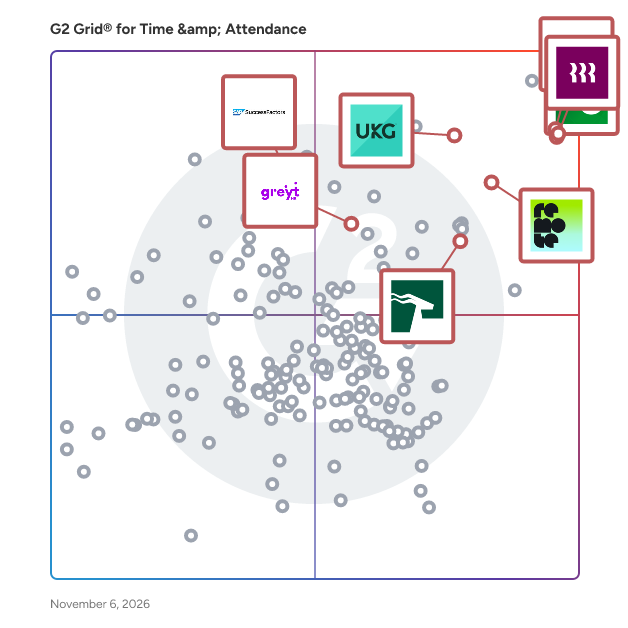
G2 Grid® for Time & Attendance Software

G2 Grid® for Time & Attendance Software plotting products by satisfaction and market presence

Highlighted products: UKG Ready, Rippling, HROne, SAP SuccessFactors HCM, greytHR, Remote, Paylocity, and Gusto.

Underlying data: [Grid® JSON](https://www.g2.com/categories/time-attendance/grids.json?focus%5B%5D=ukg-ready&focus%5B%5D=rippling&focus%5B%5D=uneecops-hrone&focus%5B%5D=sap-sap-successfactors-hcm&focus%5B%5D=greythr&focus%5B%5D=remote&focus%5B%5D=paylocity&focus%5B%5D=gusto&segment=enterprise)

Sponsored

Justworks

Justworks is a multi-product solution offering global payroll, benefits, compliance support, time tracking, HR tools and more with award-winning support by HR certified experts. We handle the nitty gritty so you can focus on what matters: building your business and your team.

Visit website

Leapsome

Leapsome is the only HR platform with AI that raises your talent density, built on the deepest people data foundation in HR. One platform spanning HRIS, recruiting, talent, and AI: every employee’s full journey in one place, from first interview to compensation. The result gives HR leaders the ability to run the people operations of a company twice its size. That depth is what lets the AI do what scattered tools never could. More than 2,000 companies run on Leapsome, including Spotify, Notion, Mercedes-Benz, and Bolt. ℹ️ Learn more here: https://hubs.li/Q04pxFwV0 💬 Join 10,000+ HR & People Ops pros in our community: https://hubs.li/Q02_B0Gc0

Average Rating: 4.8/5.0

Total Reviews: 2,498

How Do G2 Users Rate Leapsome?

  • Has the product been a good partner in doing business?: 9.5/10 (Category avg: 8.9/10)
  • Dashboards & Reporting: 9.3/10 (Category avg: 8.6/10)
  • Process Automation: 9.5/10 (Category avg: 8.7/10)
  • Data Collection: 9.3/10 (Category avg: 8.7/10)

Who Is the Company Behind Leapsome?

  • Seller: Leapsome
  • Company Website:
  • Year Founded: 2016
  • HQ Location: New York, New York, United States
  • Twitter: @leapsome
    1,889 Twitter followers
  • LinkedIn® Page: www.linkedin.com
    140 employees on LinkedIn®

Who Uses This Product?

  • Who Uses This: Software Engineer, Senior Software Engineer
  • Top Industries: Information Technology and Services, Computer Software
  • Company Size: 63% Medium, 19% Large

What Do G2 Reviewers Say About Leapsome?

AI-generated summary from verified user reviews

Pros
  • Users love the ease of use of Leapsome, making feedback sharing effortless and intuitive.
  • Users value Leapsome for its helpful support and intuitive design, enhancing collaboration and simplifying performance management.
  • Users appreciate Leapsome's intuitive design, making feedback and performance management seamless and user-friendly.
  • Users love Leapsome for its amazing UI and ease of use, facilitating goal tracking and management effortlessly.
  • Users appreciate the easy and transparent feedback process in Leapsome, fostering meaningful conversations and growth.
Cons
  • Users find the missing features in Leapsome limit functionality, desiring better navigation and export options.
  • Users find the learning curve steep, as some features are hard to discover and require additional training.
  • Users find the navigation difficult, with a confusing setup and unclear menus impacting their experience.
  • Users find the interface not intuitive, struggling with navigation and clarity across different modules and menus.
  • Users highlight feedback issues due to lengthy overlays and concerns over bias in visibility during the review process.

What Are Recent G2 Reviews of Leapsome?

What Are G2 Users Discussing About Leapsome?

TimeClock Plus by TCP

TimeClock Plus by TCP makes it easy to track employee hours, manage schedules, and handle time off, without messy spreadsheets and clunky systems. Your team can clock in however they prefer, while managers get real-time visibility to stay on top of hours, overtime, leave and absences. TimeClock Plus works with your ERP, HCM, and payroll tools to save time and reduce errors, while helping you stay compliant without the extra effort. Whether your people are in one location or many, TimeClock Plus helps you run smoother, smarter, and more efficiently so that you can focus on your people and not paperwork. From time tracking to delivering the perfect paycheck, get time right, every time.

Average Rating: 4.3/5.0

Total Reviews: 589

How Do G2 Users Rate TimeClock Plus by TCP?

  • Has the product been a good partner in doing business?: 8.7/10 (Category avg: 8.9/10)
  • Dashboards & Reporting: 8.3/10 (Category avg: 8.6/10)
  • Process Automation: 7.8/10 (Category avg: 8.7/10)
  • Data Collection: 8.5/10 (Category avg: 8.7/10)

Who Is the Company Behind TimeClock Plus by TCP?

  • Seller: TCP Software
  • Company Website:
  • Year Founded: 1988
  • HQ Location: Plano, US
  • Twitter: @tcpsoftware
    450 Twitter followers
  • LinkedIn® Page: www.linkedin.com
    1,356 employees on LinkedIn®

Who Uses This Product?

  • Who Uses This: Office Manager, IT Manager
  • Top Industries: Education Management, Primary/Secondary Education
  • Company Size: 55% Medium, 35% Small

What Do G2 Reviewers Say About TimeClock Plus by TCP?

AI-generated summary from verified user reviews

Pros
  • Users appreciate the ease of use of TimeClock Plus, making time tracking intuitive and efficient.
  • Users commend the excellent customer support from TimeClock Plus, praising their responsiveness and willingness to assist.
  • Users value the ease of time tracking with TimeClock Plus, appreciating its straightforward design and real-time updates.
  • Users love the intuitive design of TimeClock Plus, making time tracking simple and efficient for everyone.
  • Users appreciate the easy tracking of time and attendance in TimeClock Plus, enhancing overall efficiency and organization.
Cons
  • Users express disappointment over missing features and unfulfilled promises, complicating their overall experience with TimeClock Plus.
  • Users experience clocking issues with TimeClock Plus, including navigation confusion and system glitches affecting clock-ins.
  • Users find the limited customization options frustrating, making adjustments to PTO and approvals cumbersome.
  • Users find the system's limited features can be overwhelming, with many promised improvements still unmet.
  • Users find the system not user-friendly, with clunky navigation and unintuitive menus complicating their experience.

What Are Recent G2 Reviews of TimeClock Plus by TCP?

What Are G2 Users Discussing About TimeClock Plus by TCP?

Jibble

Jibble is the #1 time tracking and attendance platform built for deskless and mobile workforces — field service teams, construction crews, manufacturing floors, and any business where work happens away from a desk. Time theft is one of the most costly and overlooked forms of payroll fraud. Jibble eliminates it at the source. AI-powered face recognition ends buddy punching for good. GPS-verified clock-ins and geofencing give you auditable proof of where every hour was worked — keeping you compliant, protected, and in control. Fraud Prevention & Payroll Security Enforce face recognition at every clock-in so the right person is always on the clock. Shared worksite kiosks let you verify attendance at scale on a single tablet. Accurate, tamper-proof records mean fewer disputes and a payroll you can trust. Built for Field & On-Site Teams Whether your team is spread across job sites, client locations, or multiple facilities, Jibble goes where work happens. Clock in via mobile, browser, or a shared kiosk — even without an internet connection. Offline time tracking ensures no hours are ever lost when the signal drops, with automatic sync once reconnected. GPS Compliance, Built Right In Real-time GPS timestamps, geofencing, and breadcrumb route maps give you location-verified timesheets. Set geofences around job sites to prevent clock-ins outside designated zones. Follow travel routes in real time to ensure your mobile workforce is on track and on schedule. Project & Labor Cost Visibility Switch between projects and activities with a single tap. Get real-time visibility into labor allocation across sites, teams, and cost centers — and catch budget overruns before they happen. Payroll-Ready in Minutes Manual timesheets are a compliance liability. Jibble auto-compiles every shift into accurate, audit-ready records. Run payroll faster, reduce disputes, and keep your books clean. FREE forever for unlimited users. Trusted by 10,000+ companies from 5 to 50,000 employees — across construction, manufacturing, field services, and hybrid teams.

Average Rating: 4.7/5.0

Total Reviews: 523

How Do G2 Users Rate Jibble?

  • Has the product been a good partner in doing business?: 9.1/10 (Category avg: 8.9/10)
  • Dashboards & Reporting: 8.6/10 (Category avg: 8.6/10)
  • Process Automation: 8.5/10 (Category avg: 8.7/10)
  • Data Collection: 8.8/10 (Category avg: 8.7/10)

Who Is the Company Behind Jibble?

  • Seller: Jibble Tech
  • Year Founded: 2016
  • HQ Location: United Kingdom
  • Twitter: @jibblebot
    14 Twitter followers
  • LinkedIn® Page: www.linkedin.com
    75 employees on LinkedIn®

Who Uses This Product?

  • Who Uses This: Real estate agent, Real estate consultant
  • Top Industries: Real Estate, Construction
  • Company Size: 78% Small, 19% Medium

What Do G2 Reviewers Say About Jibble?

AI-generated summary from verified user reviews

Pros
  • Users appreciate the ease of use of Jibble, highlighting its intuitive design and effortless time tracking.
  • Users value the efficient time tracking of Jibble, facilitating easy monitoring of hours and attendance.
  • Users appreciate the time-saving efficiency of Jibble, enjoying effortless tracking and organized reports for easy payroll processing.
  • Users enjoy the intuitive user interface of Jibble, allowing seamless tracking and easy access to data across devices.
  • Users value the simplicity and intuitiveness of Jibble, making daily time tracking quick and efficient.
Cons
  • Users find limited customization options frustrating, particularly with reports and dashboards affecting their overall experience.
  • Users experience clocking issues with errors and automatic actions, leading to confusion and inaccurate time tracking.
  • Users express concern over limited features like the lack of dark mode and customizable pay options in Jibble.
  • Users note the missing features in Jibble, including limited scheduling, lack of chat, and outdated UI.
  • Users mention a steep learning curve with Jibble, finding it complex and challenging to navigate initially.

What Are Recent G2 Reviews of Jibble?

What Are G2 Users Discussing About Jibble?

Legion WFM

Legion Technologies is a workforce management platform designed to help businesses enhance labor efficiency while simultaneously boosting employee engagement. This innovative solution leverages advanced technology to streamline various aspects of workforce management, making it easier for organizations to optimize their operations and improve overall productivity. The Legion WFM platform stands out due to its intelligent automation and employee-centric approach, ensuring that both management and staff benefit from its features. The target audience for Legion Technologies includes businesses with 1000+ employees looking to improve their workforce management practices. Industries such as retail, hospitality, restaurants and convenience stores can particularly benefit from the platform's capabilities. By providing tools for strategic insights, labor budgeting, and demand forecasting, Legion enables organizations to make informed decisions that align workforce capabilities with business needs. Legion AI is crucial for optimizing labor costs and ensuring that the right number of employees are scheduled at the right times. Key features of the Legion WFM platform include labor optimization, automated scheduling, and time and attendance tracking. These functionalities work together to create a seamless execution process that maximizes operational efficiency. Automated scheduling reduces the time managers spend on creating shifts, while labor optimization ensures that businesses are not overstaffed or understaffed. The time and attendance feature simplifies tracking employee hours, allowing for accurate payroll processing and compliance with labor regulations. In addition to operational features, Legion Technologies places a strong emphasis on employee empowerment. The platform includes tools for frontline communications, enabling team members to stay informed and connected. Legion InstantPay is another notable feature that allows employees to access their earned wages before the traditional payday, enhancing financial flexibility. Furthermore, the platform includes performance and rewards tracking, which helps organizations recognize and incentivize employee contributions, fostering a positive workplace culture. Overall, Legion Technologies provides a comprehensive workforce management solution that not only enhances operational efficiency but also prioritizes employee satisfaction. By integrating advanced technology with user-friendly interfaces, the Legion WFM platform positions itself as a valuable asset for businesses aiming to thrive in a competitive landscape.

Average Rating: 4.3/5.0

Total Reviews: 72

How Do G2 Users Rate Legion WFM?

  • Has the product been a good partner in doing business?: 9.2/10 (Category avg: 8.9/10)
  • Dashboards & Reporting: 7.7/10 (Category avg: 8.6/10)
  • Process Automation: 8.0/10 (Category avg: 8.7/10)
  • Data Collection: 8.1/10 (Category avg: 8.7/10)

Who Is the Company Behind Legion WFM?

  • Seller: Legion Technologies
  • Company Website:
  • Year Founded: 2016
  • HQ Location: Palo Alto, US
  • Twitter: @legiontech
    243 Twitter followers
  • LinkedIn® Page: www.linkedin.com
    263 employees on LinkedIn®

Who Uses This Product?

  • Top Industries: Retail, Health, Wellness and Fitness
  • Company Size: 49% Large, 28% Small

What Do G2 Reviewers Say About Legion WFM?

AI-generated summary from verified user reviews

Pros
  • Users appreciate the ease of use of Legion WFM, enabling effortless scheduling and communication with team members.
  • Users enjoy the easy scheduling features of Legion WFM, facilitating communication and shift management effortlessly.
  • Users value the ease of scheduling with Legion WFM, enhancing communication and shift management seamlessly.
  • Users enjoy the access ease of Legion WFM, allowing convenient login and onsite scheduling insights before arrival.
  • Users value the automation capabilities of Legion WFM, streamlining location open hours for efficiency across platforms.
Cons
  • Users face difficulties with holiday management, particularly regarding clocking in and out on designated holidays.
  • Users struggle with inadequate tracking of paid time off, making it difficult to manage schedules and understand earnings.
  • Users find the limited features of Legion WFM make tracking paid time off and hours challenging.
  • Users find the paid time off tracking challenging, complicating the weekly scheduling and understanding of estimated pay.
  • Users find the PTO issues frustrating, as tracking hours and estimated pay is complicated and unclear.

What Are Recent G2 Reviews of Legion WFM?

What Are G2 Users Discussing About Legion WFM?

Inova Payroll

nova is a fully unified payroll, HR, and benefits solution designed to help organizations automate their most critical workforce management tasks. This comprehensive platform addresses the evolving needs of employees while ensuring compliance with changing employer regulations. By centralizing key HR functions, Inova streamlines the management of the entire employee lifecycle, making it an essential tool for businesses looking to enhance operational efficiency—especially those that rely on industry-specific and financial system integrations. Inova caters to organizations of all sizes that require a robust system to manage payroll, benefits, and employee relations. The platform is particularly beneficial for companies in industries such as construction, field services, and property management, with deep integrations to leading industry platforms like ServiceTitan, Aspire Software, and M3. Inova also connects seamlessly with popular ERP and accounting systems including Acumatica, Sage Intacct, and QuickBooks Online, ensuring accurate data flow between workforce and financial operations. Inova’s key features include: Payroll and tax filing Time and attendance tracking Scheduling Recruiting and applicant tracking Employee onboarding Benefits administration Performance management Compliance reporting Each of these components works seamlessly together within a single database, ensuring employee information is consistent, accurate, and always up to date. Through its native and integrated ecosystem, Inova reduces manual data entry, minimizes errors, and simplifies complex workflows—allowing HR and finance teams to focus on strategic initiatives rather than administrative tasks. The platform’s user-friendly web and mobile interface enhances accessibility, enabling employees and managers to engage with the system from anywhere. This flexibility supports a modern workforce that values convenience and efficiency. Inova’s compliance reporting tools further help organizations stay ahead of regulatory changes, reducing risk and supporting adherence to federal, state, and local labor laws. Overall, Inova stands out in the HR technology landscape by offering a comprehensive, integration-ready solution that brings payroll, HR, benefits, and industry-specific systems together into one cohesive platform. By leveraging Inova, organizations can improve workforce management, enhance employee satisfaction, and maintain compliance with confidence—ultimately driving better business outcomes.

Average Rating: 4.4/5.0

Total Reviews: 631

How Do G2 Users Rate Inova Payroll?

  • Has the product been a good partner in doing business?: 9.3/10 (Category avg: 8.9/10)
  • Dashboards & Reporting: 8.0/10 (Category avg: 8.6/10)
  • Process Automation: 8.4/10 (Category avg: 8.7/10)
  • Data Collection: 8.2/10 (Category avg: 8.7/10)

Who Is the Company Behind Inova Payroll?

  • Seller: Inova Payroll, Inc.
  • Year Founded: 2011
  • HQ Location: Nashville, TN
  • Twitter: @InovaPayroll
    566 Twitter followers
  • LinkedIn® Page: www.linkedin.com
    187 employees on LinkedIn®

Who Uses This Product?

  • Who Uses This: Office Manager, HR Manager
  • Top Industries: Construction, Non-Profit Organization Management
  • Company Size: 53% Medium, 42% Small

What Do G2 Reviewers Say About Inova Payroll?

AI-generated summary from verified user reviews

Pros
  • Users commend Inova Payroll’s exceptional customer support, appreciating their attentive and responsive service for all inquiries.
  • Users praise Inova's exceptional customer support, highlighting quick responses and knowledgeable representatives.
  • Users appreciate the ease of use of Inova Payroll, simplifying their workflow and enhancing overall efficiency.
  • Users commend Inova Payroll for its fantastic customer service, highlighting the personal touch and responsiveness of support staff.
  • Users value the quick response time from Inova Payroll's customer support, enhancing their overall service experience.
Cons
  • Users find Inova Payroll to be not intuitive, leading to a challenging experience when navigating the system.
  • Users face a steep learning curve with Inova Payroll, finding navigation and reporting challenging initially.
  • Users find the complex reporting difficult to navigate, often struggling to access specific or past reports effectively.
  • Users often face navigation difficulties in Inova Payroll, leading to confusion and inefficient payroll processing experiences.
  • Users report poor customer support, highlighting issues with communication and frustrating assistance from representatives.

What Are Recent G2 Reviews of Inova Payroll?

What Are G2 Users Discussing About Inova Payroll?

MakeShift

MakeShift is the only people first cloud scheduling solution that improves the scheduling experience for managers and employees alike. It's easy to set up and even easier to use. You'll create schedules faster, track attendance more accurately, and communicate with staff in real time regardless of the size of your team. Our customers experience fewer unfilled shifts, better work-life balance, happier employees, and a healthier bottom line. It's People First scheduling and businesses love it! Sign up today to save time, reduce labor costs, and increase employee engagement --> makeshift.ca MakeShift offers a free 14-day trial.

Average Rating: 4.3/5.0

Total Reviews: 290

How Do G2 Users Rate MakeShift?

  • Has the product been a good partner in doing business?: 8.8/10 (Category avg: 8.9/10)
  • Dashboards & Reporting: 8.0/10 (Category avg: 8.6/10)
  • Process Automation: 8.0/10 (Category avg: 8.7/10)
  • Data Collection: 7.8/10 (Category avg: 8.7/10)

Who Is the Company Behind MakeShift?

  • Seller: MakeShift
  • Company Website:
  • Year Founded: 2014
  • HQ Location: Calgary, CA
  • Twitter: @makeshiftapp
    505 Twitter followers
  • LinkedIn® Page: www.linkedin.com
    25 employees on LinkedIn®

Who Uses This Product?

  • Who Uses This: Manager, Supervisor
  • Top Industries: Hospital & Health Care, Health, Wellness and Fitness
  • Company Size: 57% Medium, 33% Small

What Do G2 Reviewers Say About MakeShift?

AI-generated summary from verified user reviews

Pros
  • Users appreciate the easy scheduling features of MakeShift, making it simple to manage and reference work schedules.
  • Users find Scheduling Ease in MakeShift beneficial, as it simplifies management and visibility of work schedules.
  • Users love the ease of use of MakeShift, finding it convenient and user-friendly for scheduling tasks.
  • Users love the easy-to-understand shift management and valuable notifications provided by MakeShift's dashboard.
  • Users value the easy access to schedules and employee information, enhancing overall management and workflow efficiency.
Cons
  • Users find scheduling issues in MakeShift tedious due to manual time selection and small screen size.
  • Users find the missing features of MakeShift hinder their scheduling efficiency and overall user experience.
  • Users struggle with shift management, citing difficulties in scheduling, bulk adding, and exporting shifts efficiently.
  • Users are frustrated by display issues, particularly the small scheduling view on the desktop affecting usability.
  • Users are frustrated by MakeShift's limited features, lacking essential tools like notes, communication, and robust scheduling options.

What Are Recent G2 Reviews of MakeShift?

What Are G2 Users Discussing About MakeShift?

ProLiant

Who is ProLiant? ProLiant is a payroll and HR technology provider dedicated to striking the perfect balance between service and technology. We offer fully integrated, cloud-based tools that simplify processes while improving accuracy and ensuring compliance. Our solutions include: - Applicant Tracking & Recruitment - Employee Onboarding - Time & Labor Management - Payroll & Tax Services - HR & Benefits Administration - Performance Management - Early Wage Access (ReadyPay Today) - Learning Management System At ProLiant, we combine our robust suite of products with a CPA-like approach to our clients’ needs. We care about the small details and listen; we strive to find a solution to even the most demanding challenges, and we make decisions based on data. This approach has helped us regularly achieve an NPS score greater than 80, making us a leader in our industry and other recognizable companies. What can we say? When you’ve been delivering powerful technology and services for over 30 years and have over 5,000 customers, people pay attention. We approach everything we do here at ProLiant with you in mind. We’re ready to offer you frictionless tools that empower your workforce. We’re committed to providing personalized and memorable support. And we’ll do it all with absolute accuracy. Let’s get started!

Average Rating: 4.4/5.0

Total Reviews: 729

How Do G2 Users Rate ProLiant?

  • Has the product been a good partner in doing business?: 8.9/10 (Category avg: 8.9/10)
  • Dashboards & Reporting: 7.9/10 (Category avg: 8.6/10)
  • Process Automation: 8.0/10 (Category avg: 8.7/10)
  • Data Collection: 7.8/10 (Category avg: 8.7/10)

Who Is the Company Behind ProLiant?

  • Seller: ProLiant
  • Company Website:
  • Year Founded: 1993
  • HQ Location: Atlanta, Georgia, United States
  • Twitter: @ProliantInc
    254 Twitter followers
  • LinkedIn® Page: www.linkedin.com
    333 employees on LinkedIn®

Who Uses This Product?

  • Who Uses This: Controller, Office Manager
  • Top Industries: Restaurants, Hospital & Health Care
  • Company Size: 56% Medium, 37% Small

What Do G2 Reviewers Say About ProLiant?

AI-generated summary from verified user reviews

Pros
  • Users appreciate the ease of use of ProLiant, finding navigation and information access straightforward and efficient.
  • Users praise the timely and superior customer support of ProLiant, enhancing the overall experience and setup process.
  • Users appreciate the easy navigation of ProLiant, enhancing access to payroll and employee information effectively.
  • Users value the efficient payroll processing of ProLiant, enjoying quick resolution and outstanding customer service.
  • Users appreciate the timely response from customer service of ProLiant, enhancing their overall experience.
Cons
  • Users express frustration over poor customer support, highlighting communication issues and unresolved problems with the service.
  • Users find the ProLiant interface not intuitive, making navigation and basic tasks unnecessarily complicated and overwhelming.
  • Users find the complex reporting features overwhelming, often struggling to locate necessary reports effectively.
  • Users find the steep learning curve of ProLiant challenging, often relying on customer support for assistance.
  • Users feel the limited customization of ProLiant's reporting features hampers their user experience and functionality.

What Are Recent G2 Reviews of ProLiant?

What Are G2 Users Discussing About ProLiant?

Deltek Replicon Time

Deltek Replicon Time is an AI-powered time intelligence software that helps project- based firms recover missed billable hours, reduce revenue leakage, and speed up billing cycles. It unifies project time capture, workforce management, time off, and labour compliance in one configurable, cloud-based application — part of the Deltek platform. ZeroTime™, powered by Dela, auto-captures time from 100+ work applications and translates activity into accurate, ready-to-submit timesheets. Best for: Project-based firms — from growing consultancies to global enterprises — managing distributed teams, complex billing models, and evolving labour regulations across multiple regions. Use cases:  Track project billable hours automatically to improve margins and accelerate invoicing  Manage workforce attendance, schedules, overtime, and gross pay calculations in one place  Navigate labour compliance across 145+ jurisdictions in 75+ countries using preconfigured rules  Consolidate disconnected time-tracking systems into a single, scalable application  Capture project expenses and map them to jobs for on-time billing and reimbursement Key Features:  ZeroTime™ intelligent timesheets — AI-powered time capture from 100+ work apps  Configurable project time tracking with flexible approval workflows  Global labour compliance with preconfigured rules for overtime, breaks, leave, and gross pay  CloudClock with facial recognition and voice commands for field and frontline teams  Workforce management — attendance, scheduling, and time-off administration  Seamless integration with ERP, CRM, HCM, payroll, and project management systems  Advanced analytics with custom dashboards, reports, and connections to Tableau and Power BI Why project-based firms choose Replicon Time:  AI captures every billable hour so revenue stops slipping through the cracks. ZeroTime™ auto-populates timesheets from 100+ work apps — eliminating the end-of-week scramble and recovering hours that manual entry misses.  One application replaces fragmented time-tracking systems across the business. Replicon Time brings project time, workforce management, leave, and compliance together — cutting silos and reducing manual errors at source.  Global teams stay compliant without adding operational overhead. Preconfigured rules cover labour laws in 145+ jurisdictions across 75+ countries, with intelligent validation and complete audit trails built in. Used by: Professional services, consulting, government contracting, and technology firms — from mid-market to Fortune 500 — managing complex projects and distributed workforces globally. Replicon Time is FedRAMP Moderate authorized and supports 30+ languages and multiple currencies. Backed by 25+ years of industry leadership in time tracking and workforce management.

Average Rating: 4.3/5.0

Total Reviews: 777

How Do G2 Users Rate Deltek Replicon Time?

  • Has the product been a good partner in doing business?: 8.9/10 (Category avg: 8.9/10)
  • Dashboards & Reporting: 8.2/10 (Category avg: 8.6/10)
  • Process Automation: 8.3/10 (Category avg: 8.7/10)
  • Data Collection: 8.5/10 (Category avg: 8.7/10)

Who Is the Company Behind Deltek Replicon Time?

  • Seller: Deltek
  • Company Website:
  • Year Founded: 1983
  • HQ Location: Herndon, VA
  • Twitter: @Deltek
    6,574 Twitter followers
  • LinkedIn® Page: www.linkedin.com
    4,828 employees on LinkedIn®

Who Uses This Product?

  • Who Uses This: Controller, Office Manager
  • Top Industries: Information Technology and Services, Computer Software
  • Company Size: 43% Medium, 41% Small

What Do G2 Reviewers Say About Deltek Replicon Time?

AI-generated summary from verified user reviews

Pros
  • Users appreciate the ease of use of Deltek Replicon Time, citing its straightforward interface and quick navigation.
  • Users appreciate the straightforward time tracking of Deltek Replicon Time, simplifying project management and organization.
  • Users appreciate the user-friendly interface of Deltek Replicon Time, enabling efficient tracking and management of projects and time.
  • Users commend the efficiency of Deltek Replicon Time, streamlining project management and time tracking effortlessly.
  • Users value the excellent customer support from Deltek Replicon Time, noting prompt resolutions and outstanding service.
Cons
  • Users face reporting issues with Deltek Replicon Time, impacting accuracy and customization options in their experience.
  • Users express frustration over limited customization options in Deltek Replicon, hindering their ability to tailor the system effectively.
  • Users find the data management to be lacking, with issues like empty timesheets and unhelpful logs.
  • Users find the learning curve steep, noting that initial setup and reporting features can be complex.
  • Users find the limited features of Deltek Replicon Time hinder effective organization and accurate reporting.

What Are Recent G2 Reviews of Deltek Replicon Time?

What Are G2 Users Discussing About Deltek Replicon Time?

DeskTime

Founded in 2011 and headquartered in Riga, Latvia, DeskTime is an automatic time tracking and workforce management solution under the Draugiem Group ecosystem. Serving over 730,000 users across 6,000+ teams globally, this growth-focused software company specializes in delivering data insights designed for small-to-medium businesses. The platform operates silently in the background, offering 100% automated time tracking without requiring manual employee entry. Its robust feature set includes URL, app, and document-level tracking, real-time productivity percentages, project tracking linked to billable rates, team shift scheduling, and an absence calendar. For organizations requiring deeper oversight, it delivers customizable admin dashboards, third-party integrations, and automated screenshots with optional blurring capabilities to balance accountability with personal privacy. DeskTime addresses the core friction of modern hybrid and remote work setups by replacing error-prone manual timesheets with objective data. It solves widespread workplace challenges like administrative time drain, misallocated resources, and hidden employee burnout. By highlighting workflow bottlenecks and isolating unproductive habits, DeskTime empowers teams to optimize project profitability, streamline payroll processing, and build workplace cultures rooted in trust and operational efficiency. DeskTime officially supports the following languages within its user software interface: English, Spanish, and Latvian.

Average Rating: 4.5/5.0

Total Reviews: 395

How Do G2 Users Rate DeskTime?

  • Has the product been a good partner in doing business?: 9.0/10 (Category avg: 8.9/10)
  • Dashboards & Reporting: 8.7/10 (Category avg: 8.6/10)
  • Process Automation: 8.4/10 (Category avg: 8.7/10)
  • Data Collection: 8.7/10 (Category avg: 8.7/10)

Who Is the Company Behind DeskTime?

  • Seller: Draugiem Group
  • Company Website:
  • Year Founded: 2004
  • HQ Location: Rīga, Rīgas rajons
  • LinkedIn® Page: www.linkedin.com
    50 employees on LinkedIn®

Who Uses This Product?

  • Who Uses This: CEO, Software Engineer
  • Top Industries: Information Technology and Services, Computer Software
  • Company Size: 66% Small, 32% Medium

What Do G2 Reviewers Say About DeskTime?

AI-generated summary from verified user reviews

Pros
  • Users appreciate the automatic time tracking features of DeskTime, which enhance productivity and provide valuable insights.
  • Users value the time-saving automatic tracking of DeskTime, enhancing productivity with minimal manual effort.
  • Users value the ease of use of DeskTime, appreciating its simplicity and seamless integration into workflows.
  • Users value the effortless time tracking of DeskTime, as it automates the process for enhanced productivity.
  • Users appreciate the efficiency of DeskTime, gaining valuable insights into time management and productivity improvement.
Cons
  • Users express frustration with missing features in DeskTime, particularly regarding reporting and leave management options.
  • Users find the limited features of DeskTime require manual adjustments, hindering the overall automation experience.
  • Users express frustration over DeskTime's expensive pricing structure and lack of transparency in billing practices.
  • Users are frustrated with the limited customization options in DeskTime, hindering their experience and tailored usage.
  • Users express concerns regarding inaccurate tracking that can lead to discomfort and feelings of being micromanaged.

What Are Recent G2 Reviews of DeskTime?

What Are G2 Users Discussing About DeskTime?

isolved

isolved is a provider of human capital management (HCM) solutions that help organizations recruit, retain and elevate their workforce. More than 195,000 employers and 8 million employees rely on isolved's software and services to streamline human resource (HR) operations and deliver employee experiences that matter. isolved People Cloud™ is a unified yet modular HCM platform with built-in artificial intelligence (AI) and analytics that connects HR, payroll, benefits, and workforce and talent management into a single solution that drives better business outcomes. Through the Sidekick Advantage™, isolved also provides expert guidance, embedded services and an engaged community that empowers People Heroes™ to grow their companies and careers. Learn more at www.isolvedhcm.com.

Average Rating: 4.3/5.0

Total Reviews: 1,285

How Do G2 Users Rate isolved?

  • Has the product been a good partner in doing business?: 8.5/10 (Category avg: 8.9/10)
  • Dashboards & Reporting: 8.0/10 (Category avg: 8.6/10)
  • Process Automation: 8.1/10 (Category avg: 8.7/10)
  • Data Collection: 8.0/10 (Category avg: 8.7/10)

Who Is the Company Behind isolved?

  • Seller: isolved HCM
  • Company Website:
  • Year Founded: 1986
  • HQ Location: Charlotte, NC
  • Twitter: @iSolvedHCM
    2,254 Twitter followers
  • LinkedIn® Page: www.linkedin.com
    1,867 employees on LinkedIn®

Who Uses This Product?

  • Who Uses This: HR Manager, Office Manager
  • Top Industries: Hospital & Health Care, Non-Profit Organization Management
  • Company Size: 54% Medium, 41% Small

What Do G2 Reviewers Say About isolved?

AI-generated summary from verified user reviews

Pros
  • Users find Isolved's helpful support team and features immensely beneficial for ease of use and solutions.
  • Users appreciate the wonderful customer support from isolved, highlighting their responsiveness and ease of resolving issues.
  • Users commend the ease of use of isolved, highlighting its user-friendly design and responsive support team.
  • Users commend the timely response time of isolved's customer service, enhancing their overall experience with the platform.
  • Users appreciate the robust payroll management features of iSolved, making processes seamless and efficient.
Cons
  • Users report poor customer support from isolved, citing slow responses and inefficiencies in handling inquiries and issues.
  • Users find Isolved not user-friendly, citing issues with screen changes and a need for improved design for ease of use.
  • Users report that Isolved can be not intuitive, with frequent changes complicating navigation and access to features.
  • Users feel there is a need for more features and functionality in Isolved's payroll portal for improved usability.
  • Users express frustration over the missing features in isolved, leading to complications and inefficiencies during updates.

What Are Recent G2 Reviews of isolved?

What Are G2 Users Discussing About isolved?

Insightful

Insightful is a Work Intelligence platform that helps organizations understand how work actually happens across people, processes, and AI, so they can improve performance, optimize workflows, and reduce operational waste. When work is spread across people, locations, and tools, small gaps add up fast. Time goes missing. Work slows down. Problems surface late. Insightful brings this together in one platform, built to help organizations optimize People, Process, and Technology through three core capabilities: 1. Workforce Analytics: Measure workforce productivity, utilization, and performance with real-time visibility into how work gets done. 2. Workflow Optimization: Identify bottlenecks, eliminate inefficiencies, and optimize workflows across teams and processes. 3. Work Intelligence: Measure AI adoption, usage, and business impact to maximize the ROI of your AI investments. With a customizable dashboard, users can create a custom layout with configurable widgets to surface the KPIs and insights most relevant to their role. You can see where time is going, how AI is being absorbed across your organization, how teams are performing, and where work is breaking down, without relying on manual tracking or guesswork. With Insightful, you can: - Understand how work happens across teams, processes, and AI - Spot drops in utilization and output early - Track AI adoption, usage, and business impact - See your most important KPIs and insights at a glance with a customizable homepage - See where work slows, stalls, or creates rework across workflows - Compare performance across teams, roles, or locations - Use real activity data to review work and resolve disputes - Automate time tracking and reporting This is not just another monitoring tool. It’s a precision Work Intelligence for actionable bottom line impact. Insightful helps you run better operations. You get clear data you can use in weekly reviews, planning, and day-to-day decisions. It combines automatic time tracking, activity data, and reporting in one place — so you can improve performance without adding overhead. Teams choose Insightful because it delivers strong visibility and control without the cost or complexity of heavier tools.

Average Rating: 4.6/5.0

Total Reviews: 377

How Do G2 Users Rate Insightful?

  • Has the product been a good partner in doing business?: 9.3/10 (Category avg: 8.9/10)
  • Dashboards & Reporting: 9.0/10 (Category avg: 8.6/10)
  • Process Automation: 8.5/10 (Category avg: 8.7/10)
  • Data Collection: 8.6/10 (Category avg: 8.7/10)

Who Is the Company Behind Insightful?

Who Uses This Product?

  • Who Uses This: CEO, Director
  • Top Industries: Information Technology and Services, Computer Software
  • Company Size: 51% Small, 34% Medium

What Do G2 Reviewers Say About Insightful?

AI-generated summary from verified user reviews

Pros
  • Users value Insightful's ease of use, finding the user-friendly interface helps streamline their workflow effectively.
  • Users appreciate the simple and user-friendly interface of Insightful, enhancing the convenience of time tracking.
  • Users value the time-saving features of Insightful, enhancing efficiency and streamlining employee monitoring processes effortlessly.
  • Users value the real-time visibility into productivity offered by Insightful, enhancing accountability and optimizing workflows effectively.
  • Users commend Insightful for its exceptional efficiency, thanks to its user-friendly design and automation features.
Cons
  • Users struggle with missing features, particularly bulk shift deletion and better reporting options, impacting overall efficiency.
  • Users experience technical issues like login difficulty, lag in reports, and complex setups that hinder usability.
  • Users face a steep learning curve with Insightful, requiring significant time to understand all features and options.
  • Users desire more customization options in Insightful, particularly for tailored reporting and specific tracking needs.
  • Users feel that Insightful has limited features, lacking options for tracking diverse productivity tasks and payroll functionalities.

What Are Recent G2 Reviews of Insightful?

What Are G2 Users Discussing About Insightful?

Oracle Workforce Management

Oracle Workforce Management Cloud automates the entire time and attendance record-keeping process and provides an intuitive, web-based interface for time entry and approval. It offers a simplified way to submit, review, track and approve timecards.

Average Rating: 3.7/5.0

Total Reviews: 50

How Do G2 Users Rate Oracle Workforce Management?

  • Has the product been a good partner in doing business?: 6.9/10 (Category avg: 8.9/10)
  • Dashboards & Reporting: 5.8/10 (Category avg: 8.6/10)
  • Process Automation: 5.0/10 (Category avg: 8.7/10)
  • Data Collection: 6.7/10 (Category avg: 8.7/10)

Who Is the Company Behind Oracle Workforce Management?

  • Seller: Oracle
  • Year Founded: 1977
  • HQ Location: Austin, TX
  • Twitter: @Oracle
    827,997 Twitter followers
  • LinkedIn® Page: www.linkedin.com
    208,078 employees on LinkedIn®
  • Ownership: NYSE:ORCL

Who Uses This Product?

  • Company Size: 73% Large, 13% Medium

What Do G2 Reviewers Say About Oracle Workforce Management?

AI-generated summary from verified user reviews

Pros
  • Users value the cloud-based payroll and HR features that streamline processes for diverse employee roles in local government.
  • Users value the centralized and interoperable system of Oracle Workforce Management, ensuring seamless data connectivity.
  • Users value the ease of use with Oracle Workforce Management, enjoying its intuitive interface and seamless integration.
  • Users value the cloud-based payroll and HR features of Oracle Workforce Management for managing diverse employee needs effectively.
  • Users value the seamless ERP and EPM integration that enhances real-time staffing insights and forecasting efficiency.
Cons
  • Users find the complexity and size of Oracle Workforce Management leads to slow performance and necessitates UX improvements.
  • Users find customization difficult, particularly when aligning specific collective bargaining provisions with Oracle's default settings.
  • Users find Oracle Workforce Management not user-friendly, citing complexity and slow performance as major issues.
  • Users find the software performance lacking due to complexity and size, suggesting improvements for better UX.

What Are Recent G2 Reviews of Oracle Workforce Management?

What Are G2 Users Discussing About Oracle Workforce Management?

TimeCamp

Know what every project earns. You bill by the hour and only find out how fruitful the project is after it's done? We change that – TimeCamp logs your team hands-free, in the background, and with AI suggestions, so the profit you see is based on what actually happened, not what someone remembered on Friday. - Hours log themselves in the background, no timers, no timesheet chasing - Real-time margin on every client and project - Time, attendance, reporting, and capacity planning in one login Automatic capture, not clock-watching. For teams who are done guessing. TimeCamp is the time tracking software teams use to record work hours, create accurate timesheets, and bill with confidence. Designed for remote, hybrid, and in-office environments, it delivers granular, up-to-date insights into team performance, employees’ daily activity, project progress, and billable vs. non-billable time. Track hours by project and client, streamline employee time tracking, and simplify timesheet submission so managers get reliable data without the back-and-forth. With billable hours tracking and clear time reports, you can improve productivity, stay on budget, and keep work on schedule while ensuring accurate invoicing and better forecasting. If you need dependable timesheet software that makes project time tracking effortless and provides real-time team insights, TimeCamp brings everything together in one place. Start your free trial or book a demo to see how TimeCamp can help your team track hours, bill accurately, and make smarter decisions faster. TimeCamp is a perfect fit for mid-market services firms, agencies, software houses, and consultancies in the 51–1,000-employee range that bill by the hour and need to see real project margins. Larger enterprise teams (1,000+) are also a strong fit, especially where a high volume of time and project data, as well as a self-hosted deployment, are important for scaling. Still weighing your options? We've put together honest, side-by-side breakdowns of how TimeCamp stacks up against the tools you're probably evaluating: TimeCamp vs Clockify (https://www.timecamp.com/blog/timecamp-vs-clockify/), TimeCamp vs Toggl (https://www.timecamp.com/blog/timecamp-vs-toggl/), TimeCamp vs Harvest (https://www.timecamp.com/blog/timecamp-vs-harvest/), TimeCamp vs Hubstaff (https://www.timecamp.com/blog/timecamp-vs-hubstaff/), TimeCamp vs Everhour (https://www.timecamp.com/blog/timecamp-vs-everhour/), TimeCamp vs Time Doctor (https://www.timecamp.com/blog/timecamp-vs-time-doctor/), and TimeCamp vs Jibble (https://www.timecamp.com/blog/timecamp-vs-jibble/). Feature-by-feature comparisons so you can pick what actually fits your team. 1. Native Integrations (Account-Level API Sync) These integrations import project/task structure, synchronize data bidirectionally, or export time to the connected tool. Each is configured in the TimeCamp Integrations panel by an Administrator. Jira (Cloud + Self-hosted) Asana Trello Monday.com ClickUp Notion Smartsheet Wrike Basecamp (2 + 3) Teamwork Podio Redmine ActiveCollab MeisterTask Breeze Targetprocess Dropbox Paper Todoist Azure DevOps GitHub GitLab Slack Microsoft Teams Salesforce Insightly Zendesk Freshdesk QuickBooks (Online only) Xero Google Calendar Outlook Calendar iCal / Calendar (ICS feed) Microsoft Entra (Azure AD) LDAP BambooHR Sage HRIS Zapier Toggl (migration tool) Global Holidays Custom Attendance Day Types 2. Browser Extension Timer Buttons (Chrome / Edge) These integrations add a one-click "Start timer" button directly into the interface of third-party web applications via the TimeCamp Chrome Extension or Microsoft Edge Extension. They do NOT sync project structure – they only provide a timer button that logs time to the currently selected project in TimeCamp. Requirement: TimeCamp Chrome Extension or Microsoft Edge Extension installed and logged in. Project Management Asana Trello ClickUp Monday.com Notion Wrike Todoist Podio Teamwork Projects OpenProject YouTrack Redbooth Fibery DokuWiki Unfuddle CodebaseHQ Zube Kantree Sprintly CRM & Sales HubSpot Pipedrive Insightly MiniCRM Bitrix24 Helpdesk & Support Zendesk Freshdesk osTicket Zammad Google Workspace Google Docs Google Keep Google Mail (Gmail) Productivity & Other TickTick Habitica Odoo Remember The Milk Toodledo PagerDuty Sifterapp Spidergap Focuster Husky Marketing Planner Engineering & CAD Onshape 3. Tools with Both Native Integration + Browser Extension These tools appear in both categories – they have a native account-level integration AND a dedicated Chrome extension timer button for quick access: Asana Trello ClickUp Monday.com Notion Wrike Todoist Insightly Zendesk Podio Teamwork Summary: 40 native integrations, 42 browser extension timer integrations, 11 tools available in both categories.

Average Rating: 4.7/5.0

Total Reviews: 381

How Do G2 Users Rate TimeCamp?

  • Has the product been a good partner in doing business?: 9.1/10 (Category avg: 8.9/10)
  • Dashboards & Reporting: 7.4/10 (Category avg: 8.6/10)
  • Process Automation: 6.8/10 (Category avg: 8.7/10)
  • Data Collection: 6.7/10 (Category avg: 8.7/10)

Who Is the Company Behind TimeCamp?

  • Seller: TimeCamp
  • Year Founded: 2010
  • HQ Location: Covina, CA
  • Twitter: @timecamp
    4,985 Twitter followers
  • LinkedIn® Page: www.linkedin.com
    39 employees on LinkedIn®

Who Uses This Product?

  • Who Uses This: Owner, Founder
  • Top Industries: Information Technology and Services, Marketing and Advertising
  • Company Size: 80% Small, 15% Medium

What Do G2 Reviewers Say About TimeCamp?

AI-generated summary from verified user reviews

Pros
  • Users appreciate the ease of use of TimeCamp, highlighting its simple interface and effective team overview.
  • Users love the automatic time tracking feature of TimeCamp, simplifying their workflow and enhancing productivity.
  • Users appreciate the easy setup and user-friendly interface of TimeCamp for efficient task management and tracking.
  • Users appreciate the simplicity and ease of use of TimeCamp, making team management straightforward and accessible.
  • Users find the time-saving features of TimeCamp invaluable for tracking tasks and generating invoices efficiently.
Cons
  • Users struggle with time tracking issues, like difficulty pausing timers and inaccuracies in recorded activity.
  • Users find the deletion difficulty frustrating, as recovering or modifying deleted tasks is quite cumbersome.
  • Users often face slow loading times, impacting their productivity and making the app frustrating to use effectively.
  • Users find task selection cumbersome, as quick methods to move selected tasks are not available, complicating their workflow.
  • Users find task management cumbersome due to slow selection methods and lack of undo functionality, causing frustration.

What Are Recent G2 Reviews of TimeCamp?

What Are G2 Users Discussing About TimeCamp?

Rotageek

Put simply, we provide app-based workforce management and scheduling solutions that help you plan labour to demand more efficiently. Whether you're scheduling staff on the shop floor or rostering doctors, we’ll help you create the perfect workforce schedule every time, broadcast it to your employees, fill and mitigate shift gaps, improve your labour to demand match and increase your sales or patient care. Our workforce management solutions range from intuitive digital schedules to AI optimised rotas using forecasts from data points at your locations. And with tools to book leave, track time and attendance, clock in and out for shifts, a self-serve employee app and integrations into HR & Payroll integration, we can provide an all-in-one workforce management solution.

Average Rating: 4.6/5.0

Total Reviews: 27

How Do G2 Users Rate Rotageek?

  • Has the product been a good partner in doing business?: 9.8/10 (Category avg: 8.9/10)
  • Dashboards & Reporting: 8.6/10 (Category avg: 8.6/10)
  • Process Automation: 8.6/10 (Category avg: 8.7/10)
  • Data Collection: 8.3/10 (Category avg: 8.7/10)

Who Is the Company Behind Rotageek?

  • Seller: Rotageek
  • HQ Location: London, United Kingdom
  • Twitter: @Rotageek
    1,526 Twitter followers
  • LinkedIn® Page: www.linkedin.com
    61 employees on LinkedIn®

Who Uses This Product?

  • Top Industries: Retail
  • Company Size: 54% Large, 32% Small

What Are Recent G2 Reviews of Rotageek?

What Are G2 Users Discussing About Rotageek?

Timesheets.com

Timesheets.com is a user-friendly and affordable employee time tracking solution for businesses who want to save on payroll costs or increase billing. Employees can track their time with our mobile site or admins can restrict where employees clock in to just certain office locations. Our DCAA compliant system has a full audit trail and permissions architecture ensuring security and accountability. Reports can be exported to a number of payroll and accounting software platforms including QuickBooks.

Average Rating: 4.2/5.0

Total Reviews: 450

How Do G2 Users Rate Timesheets.com?

  • Has the product been a good partner in doing business?: 9.0/10 (Category avg: 8.9/10)
  • Dashboards & Reporting: 8.2/10 (Category avg: 8.6/10)
  • Process Automation: 8.7/10 (Category avg: 8.7/10)
  • Data Collection: 8.7/10 (Category avg: 8.7/10)

Who Is the Company Behind Timesheets.com?

  • Seller: Timesheets.com
  • Year Founded: 2004
  • HQ Location: San Jose, CA
  • Twitter: @timesheets
    4,290 Twitter followers
  • LinkedIn® Page: www.linkedin.com
    14 employees on LinkedIn®

Who Uses This Product?

  • Who Uses This: President, Administrator
  • Top Industries: Education Management, Hospital & Health Care
  • Company Size: 52% Small, 29% Medium

What Do G2 Reviewers Say About Timesheets.com?

AI-generated summary from verified user reviews

Pros
  • Users appreciate the friendly customer support of Timesheets.com, enhancing their experience with helpful assistance.
  • Users appreciate the ease of use of Timesheets.com, enjoying its simplicity and friendly customer support.
  • Users value the flexibility of Timesheets.com, appreciating the ease of use and no-contract policy.
  • Users value the helpful customer support, finding it friendly and responsive to their needs.
  • Users value the simplicity and flexibility of Timesheets.com, along with friendly support and affordable pricing.
Cons
  • Users face integration issues with Timesheets.com, hindering connections to essential HR management platforms and limiting customization.
  • Users report limited customization and integration options in Timesheets.com, hindering their HR management experience.
  • Users find limited functionality in Timesheets.com due to customization and reporting constraints, along with integration issues.
  • Users find the limited customization and reporting options of Timesheets.com to be restrictive for their needs.
  • Users express dissatisfaction with the missing features like limited customization, reporting options, and integration capabilities.

What Are Recent G2 Reviews of Timesheets.com?

What Are G2 Users Discussing About Timesheets.com?