# Best Single Sign-On (SSO) Software

*By [Brandon Summers-Miller](https://research.g2.com/insights/author/brandon-summers-miller)*


Single sign-on (SSO) solutions are authentication tools that allows users to sign into multiple applications or databases with a single set of credentials. Federation is the linking of IT systems, organizations, and personal identities with credentials and repositories. The [best SSO solutions](https://learn.g2.com/best-sso-software) serve to simplify identification processes and create an uninhibited feel when working to access applications, portals, and servers. The software is designed to provide users with access to multiple applications or datasets without requiring multiple logins.

The goal of SSO software is not only to improve ease of use while navigating across applications but also to minimize work for IT administrators and developers by centralizing access management. SSO products effectively join the desired applications and route logins through an SSO server. These solutions often include features such as dashboards for simplified navigation, application clouds, directory integration, and mobile applications for remote access.

There is some crossover between SSO software and solution types such as [cloud identity and access management software](https://www.g2.com/categories/cloud-identity-and-access-management), [password management software](https://www.g2.com/categories/password-management), and [user provisioning/governance software](https://www.g2.com/categories/user-provisioning-governance), but single sign-on products focus mainly on secure enterprise access to servers, applications, and databases rather than the management of data or passwords.

To qualify for inclusion in the SSO category, a product must:

- Allow users access to multiple applications or databases through one portal
- Automate authentication to prevent multiple logins
- Centralize authentication servers across applications
- Provide secure access to applications and data
- Integrate login access to business applications


## Top Single Sign-On (SSO) Solutions at a Glance
| # | Product | Rating | Best For | What Users Say |
|---|---------|--------|----------|----------------|
| 1 | [Okta](https://www.g2.com/products/okta/reviews) | 4.5/5.0 (1,270 reviews) | SSO with automated provisioning across SaaS | "[Streamlined Logins and Consistent Security with Okta](https://www.g2.com/survey_responses/okta-review-12998269)" |
| 2 | [Rippling IT](https://www.g2.com/products/rippling-it/reviews) | 4.7/5.0 (1,048 reviews) | HR-integrated SSO with automated provisioning | "[IT provisioning and app access made completely painless for everyday employees.](https://www.g2.com/survey_responses/rippling-it-review-13035351)" |
| 3 | [JumpCloud](https://www.g2.com/products/jumpcloud/reviews) | 4.5/5.0 (3,887 reviews) | Cloud directory SSO with cross-platform MDM | "[All-in-One Access and Device Management That Saves Time](https://www.g2.com/survey_responses/jumpcloud-review-12977315)" |
| 4 | [Microsoft Entra ID](https://www.g2.com/products/microsoft-entra-id/reviews) | 4.5/5.0 (872 reviews) | Microsoft ecosystem SSO with conditional access | "[Entra ID P2 Makes Conditional Access and Security Policies Easy to Configure](https://www.g2.com/survey_responses/microsoft-entra-id-review-12889489)" |
| 5 | [Cisco Duo](https://www.g2.com/products/cisco-duo/reviews) | 4.5/5.0 (499 reviews) | MFA-enabled SSO with SAML flexibility | "[Effortless Security Compliance with Cisco Duo](https://www.g2.com/survey_responses/cisco-duo-review-12676028)" |
| 6 | [1Password](https://www.g2.com/products/1password/reviews) | 4.6/5.0 (1,789 reviews) | Team password vaults with granular access control | "[Seamless, Simple Password Management Across Desktop and Mobile](https://www.g2.com/survey_responses/1password-review-12976873)" |
| 7 | [LastPass](https://www.g2.com/products/lastpass/reviews) | 4.5/5.0 (2,039 reviews) | Password vault with secure credential sharing | "[Stress-Free Password Management with Seamless Autofill and Sync](https://www.g2.com/survey_responses/lastpass-review-12845237)" |
| 8 | [Auth0](https://www.g2.com/products/auth0/reviews) | 4.3/5.0 (266 reviews) | Developer-first SSO with extensible authentication workflows | "[Auth0 Makes Secure Authentication Easy for a Beginner Developer](https://www.g2.com/survey_responses/auth0-review-12955437)" |
| 9 | [Zscaler Private Access](https://www.g2.com/products/zscaler-private-access/reviews) | 4.4/5.0 (133 reviews) | Zero Trust application access replacing VPNs | "[Brilliant Zero Trust Secure Access That Replaces Traditional VPNs](https://www.g2.com/survey_responses/zscaler-private-access-review-12870112)" |
| 10 | [Citrix Secure Private Access](https://www.g2.com/products/citrix-citrix-secure-private-access/reviews) | 4.5/5.0 (70 reviews) | VPN-less SSO with zero-trust remote access | "[Strong Security, Minor Connection Hiccups](https://www.g2.com/survey_responses/citrix-secure-private-access-review-12952066)" |


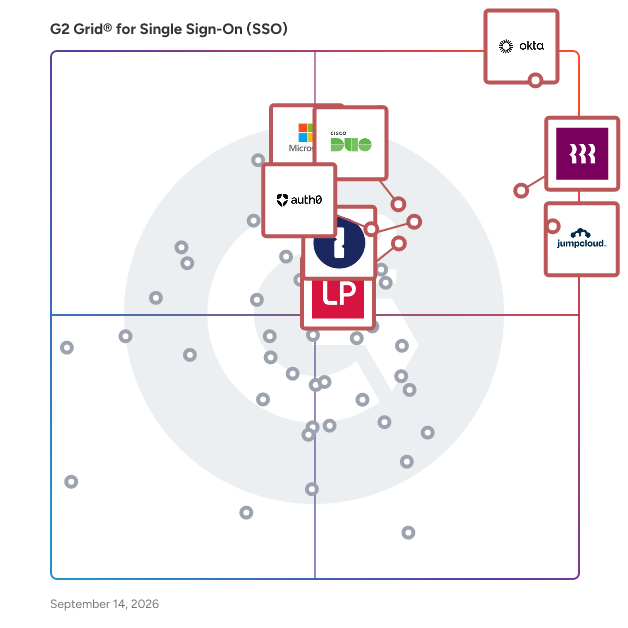
## G2 Grid® for Single Sign-On (SSO) Solutions
![G2 Grid® for Single Sign-On (SSO) Solutions plotting products by satisfaction and market presence](https://www.g2.com/categories/single-sign-on-sso/grids.png?focus%5B%5D=633&focus%5B%5D=1640029&focus%5B%5D=36316&focus%5B%5D=3899&focus%5B%5D=5282&focus%5B%5D=4533&focus%5B%5D=1718&focus%5B%5D=22264)
Highlighted products: Okta, Rippling IT, JumpCloud, Microsoft Entra ID, Cisco Duo, 1Password, LastPass, and Auth0.
Underlying data: [Grid® JSON](https://www.g2.com/categories/single-sign-on-sso/grids.json?focus%5B%5D=okta&amp;focus%5B%5D=rippling-it&amp;focus%5B%5D=jumpcloud&amp;focus%5B%5D=microsoft-entra-id&amp;focus%5B%5D=cisco-duo&amp;focus%5B%5D=1password&amp;focus%5B%5D=lastpass&amp;focus%5B%5D=auth0)


## How Many Single Sign-On (SSO) Solutions Products Does G2 Track?
**Total Products under this Category:** 171

### Category Stats (Jul 2026)
- **Average Rating**: 4.4/5 The average rating of products in this category, based on all submitted ratings
- **Top Trending Product**: ID.me (+1.62%) - Among all products in this category, ID.me recorded the largest rating increase compared to last month
*Last updated: July 11, 2026*


## How Does G2 Rank Single Sign-On (SSO) Solutions Products?

**Why You Can Trust G2's Software Rankings:**

- 30 Analysts and Data Experts
- 17,900+ Authentic Reviews
- 171+ Products
- Unbiased Rankings

G2's software rankings are built on verified user reviews, rigorous moderation, and a consistent research methodology maintained by a team of analysts and data experts. Each product is measured using the same transparent criteria, with no paid placement or vendor influence. While reviews reflect real user experiences, which can be subjective, they offer valuable insight into how software performs in the hands of professionals. Together, these inputs power the G2 Score, a standardized way to compare tools within every category.


## Which Single Sign-On (SSO) Solutions Is Best for Your Use Case?

- **Leader:** [Okta](https://www.g2.com/products/okta/reviews)
- **Highest Performer:** [Descope](https://www.g2.com/products/descope/reviews)
- **Easiest to Use:** [Rippling IT](https://www.g2.com/products/rippling-it/reviews)
- **Top Trending:** [Rippling IT](https://www.g2.com/products/rippling-it/reviews)
- **Best Free Software:** [JumpCloud](https://www.g2.com/products/jumpcloud/reviews)


---

**Sponsored**

### ManageEngine ADSelfService Plus

ManageEngine ADSelfService Plus is an identity security solution with MFA, SSO, and SSPR capabilities. ADSelfService Plus is an identity security solution that ensures secure and seamless access to enterprise resources and establishes a Zero Trust environment. With adaptive multi-factor authentication (MFA), single sign-on (SSO), self-service password management, a password policy enhancer, remote work enablement, and workforce self-service, ADSelfService Plus provides your employees with secure, simple access to the resources they need. ADSelfService Plus helps keep identity-based threats out, fast-tracks application onboarding, improves password security, reduces help desk tickets, and empowers remote workforces. The core features of ADSelfService Plus include: Adaptive MFA Enable context-based MFA with 19 different authentication factors for endpoint and application logins. Enterprise SSO Allow users to access all enterprise applications with a single, secure authentication flow. Password management and security Simplify password management with self-service password resets and account unlocks, strong password policies, and password expiry notifications. Enterprise self-service Delegate profile updates and group subscriptions to end users and monitor these self-service actions with approval workflows. Remote work enablement Enhance remote work with cached credential updates, secure logins, and mobile password management. Powerful integrations Establish an efficient and secure IT environment through integration with SIEM, ITSM, and IAM tools. Reporting and auditing Simplify auditing with predefined, actionable reports about authentication failures, logon attempts, and blocked users.


[Visit website](https://www.g2.com/external_clickthroughs/record?secure%5Bad_program%5D=ppc&amp;secure%5Bad_slot%5D=category_product_list&amp;secure%5Bcategory_id%5D=254&amp;secure%5Bchosen_at%5D=2026-07-11T20%3A38%3A39Z&amp;secure%5Bdisplayable_resource_id%5D=254&amp;secure%5Bdisplayable_resource_type%5D=Category&amp;secure%5Bmedium%5D=sponsored&amp;secure%5Bplacement_reason%5D=page_category&amp;secure%5Bplacement_resource_ids%5D%5B%5D=254&amp;secure%5Bprioritized%5D=false&amp;secure%5Bproduct_id%5D=5690&amp;secure%5Bresource_id%5D=254&amp;secure%5Bresource_type%5D=Category&amp;secure%5Bsource_type%5D=category_page&amp;secure%5Bsource_url%5D=https%3A%2F%2Fwww.g2.com%2Fcategories%2Fsingle-sign-on-sso%3Fsource%3Dsearch&amp;secure%5Btoken%5D=059aa7a60aa5a812ff1e951d3bc29b11610d0276173db2c243fc93c879a0954c&amp;secure%5Burl%5D=https%3A%2F%2Fwww.manageengine.com%2Fproducts%2Fself-service-password%2Fsem%2Fadselfservice-plus.html%3Futm_source%3DG2%26utm_medium%3Dtpac%26utm_campaign%3DADSSP-SSO&amp;secure%5Burl_type%5D=custom_url)

---

## What Are the Top-Rated Single Sign-On (SSO) Solutions Products in 2026?
### 1. [JumpCloud](https://www.g2.com/products/jumpcloud/reviews)
JumpCloud® delivers a unified identity, device, and access management platform that makes it easy to securely manage identities, devices, and access across your organization. With JumpCloud, IT teams and MSPs enable users to work securely from anywhere and manage their Windows, Apple, Linux, and Android devices from a single platform.


**Average Rating:** 4.5/5.0
**Total Reviews:** 3,887
**How Do G2 Users Rate JumpCloud?**

- **Has the product been a good partner in doing business?:** 9.0/10 (Category avg: 8.9/10)
- **Partner Access:** 8.4/10 (Category avg: 8.8/10)
- **Ease of connecting applications:** 8.7/10 (Category avg: 8.6/10)
- **Supports BYOD users:** 8.4/10 (Category avg: 8.7/10)

**Who Is the Company Behind JumpCloud?**

- **Seller:** [JumpCloud Inc.](https://www.g2.com/sellers/jumpcloud-inc)
- **Company Website:** https://jumpcloud.com/
- **Year Founded:** 2012
- **HQ Location:** Louisville, CO
- **Twitter:** @JumpCloud (36,368 Twitter followers)
- **LinkedIn® Page:** https://www.linkedin.com/company/jumpcloud/ (974 employees on LinkedIn®)

**Who Uses This Product?**
- **Who Uses This:** IT Manager, System Administrator
- **Top Industries:** Information Technology and Services, Computer Software
- **Company Size:** 53% Mid-Market, 35% Small-Business


#### What Are JumpCloud's Pros and Cons?

**Pros:**

- Ease of Use (766 reviews)
- Device Management (588 reviews)
- Security (471 reviews)
- Integrations (430 reviews)
- Features (400 reviews)

**Cons:**

- Missing Features (326 reviews)
- Improvement Needed (263 reviews)
- Limited Features (199 reviews)
- Limitations (162 reviews)
- UX Improvement (134 reviews)


### What Do G2 Reviewers Say About JumpCloud?
*AI-generated summary from verified user reviews*

**Pros:**

- Users appreciate the **ease of use** of JumpCloud, praising its simple setup and effective management across devices.
- Users appreciate the **unified device management** capabilities of JumpCloud, streamlining operations across all platforms with ease.
- Users value the **strong security measures** of JumpCloud, including MFA and a zero trust model for robust protection.
- Users value the **easy integrations** of JumpCloud, simplifying user and device management across various platforms.
- Users appreciate the **comprehensive multi-platform support** of JumpCloud, enhancing identity and device management seamlessly.

**Cons:**

- Users note several **missing features** , like advanced controls for macOS and pre-built integrations, which hinder functionality.
- Users feel that **improvement is needed** in macOS app deployments, configuration options, and reporting capabilities in JumpCloud.
- Users find the **limited features** of JumpCloud frustrating, especially its smaller SSO app catalog compared to competitors.
- Users experience **limitations in macOS deployments** and desire improved endpoint controls and reporting capabilities in JumpCloud.
- Users find the **UI outdated** and experience a learning curve with complex permissions, causing confusion during setup.

#### What Are Recent G2 Reviews of JumpCloud?

**"[All-in-One Access and Device Management That Saves Time](https://www.g2.com/survey_responses/jumpcloud-review-12977315)"**

**Rating:** 4.5/5.0 stars
*— AK J.*

[Read full review](https://www.g2.com/survey_responses/jumpcloud-review-12977315)

---

**"[Easy Setup and Strong Security for Password Management](https://www.g2.com/survey_responses/jumpcloud-review-12976011)"**

**Rating:** 4.5/5.0 stars
*— Siddharth V.*

[Read full review](https://www.g2.com/survey_responses/jumpcloud-review-12976011)

---


#### What Are G2 Users Discussing About JumpCloud?

- [How is JumpCloud redefining identity and access management in hybrid IT environments for tech companies?](https://www.g2.com/discussions/how-is-jumpcloud-redefining-identity-and-access-management-in-hybrid-it-environments-for-tech-companies) - 1 comment, 4 upvotes
- [What is JumpCloud used for?](https://www.g2.com/discussions/jumpcloud-what-is-jumpcloud-used-for) - 3 comments, 4 upvotes
- [Can JumpCloud replace Active Directory?](https://www.g2.com/discussions/jumpcloud-can-jumpcloud-replace-active-directory) - 3 comments, 1 upvote
- [Is JumpCloud secure?](https://www.g2.com/discussions/is-jumpcloud-secure) - 2 comments, 3 upvotes
- [What is JumpCloud?](https://www.g2.com/discussions/what-is-jumpcloud) - 1 comment

### 2. [Okta](https://www.g2.com/products/okta/reviews)
Okta, Inc. is The World’s Identity Company™. We secure AI, machine, and human identity so everyone is free to safely use any technology. Our customer and workforce solutions empower businesses and developers to protect their AI agents, users, employees, and partners while driving security, efficiencies, and innovation. Learn why the world’s leading brands trust Okta for authentication, authorization, and more at okta.com.


**Average Rating:** 4.5/5.0
**Total Reviews:** 1,270
**How Do G2 Users Rate Okta?**

- **Has the product been a good partner in doing business?:** 8.9/10 (Category avg: 8.9/10)
- **Partner Access:** 9.0/10 (Category avg: 8.8/10)
- **Ease of connecting applications:** 9.1/10 (Category avg: 8.6/10)
- **Supports BYOD users:** 9.0/10 (Category avg: 8.7/10)

**Who Is the Company Behind Okta?**

- **Seller:** [Okta](https://www.g2.com/sellers/okta)
- **Company Website:** https://okta.com
- **Year Founded:** 2009
- **HQ Location:** San Francisco, California
- **Twitter:** @okta (42,953 Twitter followers)
- **LinkedIn® Page:** https://www.linkedin.com/company/926041/ (7,513 employees on LinkedIn®)

**Who Uses This Product?**
- **Who Uses This:** Software Engineer, Account Executive
- **Top Industries:** Computer Software, Information Technology and Services
- **Company Size:** 51% Mid-Market, 38% Enterprise


#### What Are Okta's Pros and Cons?

**Pros:**

- Ease of Use (204 reviews)
- Security (155 reviews)
- Authentication Security (149 reviews)
- Single Sign-On (141 reviews)
- Easy Access (140 reviews)

**Cons:**

- Authentication Issues (75 reviews)
- Login Issues (62 reviews)
- Expensive (44 reviews)
- Complex Setup (43 reviews)
- Frequent Authentication (38 reviews)


### What Do G2 Reviewers Say About Okta?
*AI-generated summary from verified user reviews*

**Pros:**

- Users enjoy the **ease of use** of Okta, benefiting from its centralized authentication and simplified app access.
- Users appreciate the **enhanced security** provided by Okta, which streamlines access across multiple applications effortlessly.
- Users appreciate the **strong SSO capabilities and robust MFA** of Okta, enhancing security and simplifying login processes.
- Users value the **efficiency of single sign-on** with Okta, enhancing access speed and security across applications.
- Users value the **easy access** provided by Okta, streamlining logins and improving efficiency across applications.

**Cons:**

- Users experience **authentication issues** , including lockouts and complex troubleshooting, hindering their access and efficiency.
- Users face **login issues** with Okta due to MFA complications and multiple logins needed throughout the day.
- Users highlight the **high licensing costs** of Okta, making it difficult for smaller organizations to adopt effectively.
- Users find the **initial setup and policy configuration complex** , particularly when managing a high number of users.
- Users find the **frequent authentication** requirements of Okta tedious, disrupting workflow and causing frustration during long work hours.

#### What Are Recent G2 Reviews of Okta?

**"[Streamlined Logins and Consistent Security with Okta](https://www.g2.com/survey_responses/okta-review-12998269)"**

**Rating:** 4.0/5.0 stars
*— Aasis  Y.*

[Read full review](https://www.g2.com/survey_responses/okta-review-12998269)

---

**"[Strong Security Without Sacrificing User Experience](https://www.g2.com/survey_responses/okta-review-12974377)"**

**Rating:** 4.5/5.0 stars
*— Arnold D.*

[Read full review](https://www.g2.com/survey_responses/okta-review-12974377)

---


#### What Are G2 Users Discussing About Okta?

- [What database does Just Eat use?](https://www.g2.com/discussions/what-database-does-just-eat-use) - 1 comment
- [How good is Okta?](https://www.g2.com/discussions/how-good-is-okta) - 2 comments
- [What are the 4 A&#39;s of cloud identity?](https://www.g2.com/discussions/what-are-the-4-a-s-of-cloud-identity)
- [How do I enable MFA in Okta?](https://www.g2.com/discussions/how-do-i-enable-mfa-in-okta)
- [Why do companies use Okta?](https://www.g2.com/discussions/why-do-companies-use-okta) - 1 comment

### 3. [1Password](https://www.g2.com/products/1password/reviews)
The Most Used Enterprise Password Manager, trusted by over 180,00 businesses, 1Password helps improve security, visibility and control over how their passwords and company data are protected. Secure every sign-in by integrating 1Password with your existing IAM infrastructure. Enforce strong, integrated security policies at scale, be proactive about cybersecurity threats to reduce risk, and quickly and easily generate detailed reports on password security posture.


**Average Rating:** 4.6/5.0
**Total Reviews:** 1,789
**How Do G2 Users Rate 1Password?**

- **Has the product been a good partner in doing business?:** 9.3/10 (Category avg: 8.9/10)
- **Partner Access:** 8.0/10 (Category avg: 8.8/10)
- **Ease of connecting applications:** 8.6/10 (Category avg: 8.6/10)
- **Supports BYOD users:** 8.5/10 (Category avg: 8.7/10)

**Who Is the Company Behind 1Password?**

- **Seller:** [1Password](https://www.g2.com/sellers/1password)
- **Company Website:** https://1password.com/
- **Year Founded:** 2005
- **HQ Location:** Ontario
- **Twitter:** @1Password (139,683 Twitter followers)
- **LinkedIn® Page:** https://www.linkedin.com/company/1password/ (2,930 employees on LinkedIn®)

**Who Uses This Product?**
- **Who Uses This:** Software Engineer, CEO
- **Top Industries:** Computer Software, Information Technology and Services
- **Company Size:** 54% Small-Business, 32% Mid-Market


#### What Are 1Password's Pros and Cons?

**Pros:**

- Ease of Use (333 reviews)
- Security (271 reviews)
- Password Management (182 reviews)
- Intuitive (144 reviews)
- Easy Access (134 reviews)

**Cons:**

- Password Management (95 reviews)
- Expensive (91 reviews)
- Login Issues (69 reviews)
- Autofill Issues (64 reviews)
- Cost (60 reviews)


### What Do G2 Reviewers Say About 1Password?
*AI-generated summary from verified user reviews*

**Pros:**

- Users praise 1Password for its **ease of use** , making password management seamless and efficient across all devices.
- Users value the **robust security** of 1Password, ensuring peace of mind while managing their passwords effortlessly.
- Users enjoy the **secure and easy-to-use password management** of 1Password, enhancing daily routines with peace of mind.
- Users value the **intuitive design** of 1Password, making password management simple and stress-free across devices.
- Users love the **easy access** of 1Password, enjoying quick login processes across websites and applications.

**Cons:**

- Users find **password management limitations** with 1Password, desiring better tracking and easier account distinction.
- Users find the **pricing to be quite high** for personal use, making it a burden for some individuals.
- Users face **login issues** with 1Password, particularly with browser extensions and maintaining account distinctions.
- Users face frustrating **autofill issues** with 1Password, making control over login processes less reliable and intuitive.
- Users find the **cost of 1Password high** compared to competitors, with no free plan available.

#### What Are Recent G2 Reviews of 1Password?

**"[Seamless, Simple Password Management Across Desktop and Mobile](https://www.g2.com/survey_responses/1password-review-12976873)"**

**Rating:** 5.0/5.0 stars
*— Roger B.*

[Read full review](https://www.g2.com/survey_responses/1password-review-12976873)

---

**"[One-Place Password Management with 1Password](https://www.g2.com/survey_responses/1password-review-11960967)"**

**Rating:** 4.0/5.0 stars
*— Joanna J.*

[Read full review](https://www.g2.com/survey_responses/1password-review-11960967)

---


#### What Are G2 Users Discussing About 1Password?

- [I&#39;m struggling with 1Password&#39;s secure sharing features. Can anyone explain the best way to use them?](https://www.g2.com/discussions/i-m-struggling-with-1password-s-secure-sharing-features-can-anyone-explain-the-best-way-to-use-them) - 3 comments, 2 upvotes
- [What is 1Password used for?](https://www.g2.com/discussions/1password-what-is-1password-used-for) - 2 comments
- [Is 1password any good?](https://www.g2.com/discussions/is-1password-any-good) - 4 comments, 4 upvotes
- [What is 1password used for?](https://www.g2.com/discussions/what-is-1password-used-for) - 2 comments
- [Can you use 1password for free?](https://www.g2.com/discussions/can-you-use-1password-for-free) - 3 comments, 1 upvote

### 4. [Rippling IT](https://www.g2.com/products/rippling-it/reviews)
Transform your organization’s IT operations with Rippling’s unified platform for identity, device, access, and security management. Centralize every IT workflow, from provisioning apps and laptops to enforcing security policies, in a single dashboard. Seamlessly manage the entire employee lifecycle, automatically granting and revoking app access, configuring devices, and maintaining least-privilege controls. Enforce compliance with real-time monitoring, automated patching, and integrated endpoint protection. Streamline offboarding with instant lockouts and secure device recovery. Gain full visibility across hardware, software, and user risk without the complexity of multiple tools. Rippling helps your business cut costs, eliminate manual work, and strengthen security, so your team can move faster. Experience the power of unified IT management with Rippling today.


**Average Rating:** 4.7/5.0
**Total Reviews:** 1,048
**How Do G2 Users Rate Rippling IT?**

- **Has the product been a good partner in doing business?:** 8.9/10 (Category avg: 8.9/10)
- **Partner Access:** 9.1/10 (Category avg: 8.8/10)
- **Ease of connecting applications:** 9.3/10 (Category avg: 8.6/10)
- **Supports BYOD users:** 9.1/10 (Category avg: 8.7/10)

**Who Is the Company Behind Rippling IT?**

- **Seller:** [Rippling](https://www.g2.com/sellers/rippling)
- **Company Website:** https://www.rippling.com
- **Year Founded:** 2016
- **HQ Location:** San Francisco, CA
- **Twitter:** @Rippling (12,402 Twitter followers)
- **LinkedIn® Page:** https://www.linkedin.com/company/17988315/ (7,523 employees on LinkedIn®)

**Who Uses This Product?**
- **Who Uses This:** Software Engineer, CEO
- **Top Industries:** Computer Software, Information Technology and Services
- **Company Size:** 59% Mid-Market, 27% Small-Business


#### What Are Rippling IT's Pros and Cons?

**Pros:**

- Ease of Use (670 reviews)
- Intuitive (467 reviews)
- Simple (413 reviews)
- Easy Access (374 reviews)
- User Interface (363 reviews)

**Cons:**

- Missing Features (165 reviews)
- Limited Features (112 reviews)
- Improvement Needed (89 reviews)
- Learning Curve (74 reviews)
- Poor Customer Support (73 reviews)


### What Do G2 Reviewers Say About Rippling IT?
*AI-generated summary from verified user reviews*

**Pros:**

- Users appreciate the **ease of use** of Rippling IT, highlighting its intuitive design and smooth integration with applications.
- Users find Rippling to be **intuitive and user-friendly** , streamlining their workflow and enhancing overall efficiency.
- Users value the **simple user interface** of Rippling, making it easy to navigate and learn for efficient usage.
- Users appreciate the **easy access** provided by Rippling, streamlining login processes and improving organizational efficiency.
- Users highlight the **simple and intuitive interface** of Rippling IT, facilitating easy navigation and accessibility.

**Cons:**

- Users express a need for improved **integration and availability of features** in Rippling IT, affecting user experience.
- Users find the **limited feature set** of Rippling IT restrictive, lacking essential functionalities like sharing and password management support.
- Users feel that **improvement is needed** in features like process viewing, password management, and workflow conditions in Rippling IT.
- Users often find the **learning curve steep** , making it challenging for less tech-savvy individuals to navigate effectively.
- Users experience **poor customer support** despite friendly interactions, facing limitations that hinder effective resolution of issues.

#### What Are Recent G2 Reviews of Rippling IT?

**"[IT provisioning and app access made completely painless for everyday employees.](https://www.g2.com/survey_responses/rippling-it-review-13035351)"**

**Rating:** 5.0/5.0 stars
*— Kupeshanth K.*

[Read full review](https://www.g2.com/survey_responses/rippling-it-review-13035351)

---

**"[Focus on Centralized Management, Focus on Ease of Use &amp; Visibility](https://www.g2.com/survey_responses/rippling-it-review-13062629)"**

**Rating:** 5.0/5.0 stars
*— Mihir M.*

[Read full review](https://www.g2.com/survey_responses/rippling-it-review-13062629)

---


### 5. [LastPass](https://www.g2.com/products/lastpass/reviews)
LastPass delivers Secure Access Essentials, helping individuals and organizations manage and protect access to AI, applications, and credentials straight from the browser. Trusted by more than 100,000 businesses and millions of users worldwide, LastPass combines strong security with everyday simplicity. For individuals, LastPass makes online life easier by securely storing credentials, generating strong passwords, and autofilling logins when needed. That means less friction, fewer resets, and safer access wherever work and life happens. For businesses, LastPass helps lean IT teams secure AI‑driven work by reducing risk by controlling access to unapproved apps, while storing and managing employee credentials and integrating with identity providers to fill gaps left by SSO. It’s simpler access, better visibility, and stronger security without added complexity.


**Average Rating:** 4.5/5.0
**Total Reviews:** 2,039
**How Do G2 Users Rate LastPass?**

- **Has the product been a good partner in doing business?:** 8.6/10 (Category avg: 8.9/10)
- **Partner Access:** 8.6/10 (Category avg: 8.8/10)
- **Ease of connecting applications:** 8.7/10 (Category avg: 8.6/10)
- **Supports BYOD users:** 8.8/10 (Category avg: 8.7/10)

**Who Is the Company Behind LastPass?**

- **Seller:** [LastPass](https://www.g2.com/sellers/lastpass)
- **Company Website:** https://www.lastpass.com/
- **Year Founded:** 2008
- **HQ Location:** Boston, Massachusetts
- **Twitter:** @LastPass (45,838 Twitter followers)
- **LinkedIn® Page:** https://www.linkedin.com/company/lastpass/ (726 employees on LinkedIn®)

**Who Uses This Product?**
- **Who Uses This:** Owner, CEO
- **Top Industries:** Information Technology and Services, Computer Software
- **Company Size:** 63% Small-Business, 25% Mid-Market


#### What Are LastPass's Pros and Cons?

**Pros:**

- Ease of Use (227 reviews)
- Password Management (170 reviews)
- Security (155 reviews)
- Autofill Feature (107 reviews)
- Password Security (99 reviews)

**Cons:**

- Autofill Issues (83 reviews)
- Password Management (78 reviews)
- Login Issues (66 reviews)
- Password Issues (44 reviews)
- Browser Extension Issues (43 reviews)


### What Do G2 Reviewers Say About LastPass?
*AI-generated summary from verified user reviews*

**Pros:**

- Users appreciate the **ease of use** of LastPass, enjoying secure password management across multiple devices effortlessly.
- Users appreciate the **secure password storage** and seamless integrations, making password management simple and efficient.
- Users value the **high security levels** of LastPass, ensuring their passwords remain safe even during potential data breaches.
- Users love the **Autofill feature** of LastPass, making password management quick, easy, and secure for everyone.
- Users appreciate the **strong password security** of LastPass, ensuring confidence even during potential data breaches.

**Cons:**

- Users face **autofill issues** with LastPass, including incorrect prefills and confusion with non-username/password fields.
- Users find that **password length issues** and auto-fill errors can complicate their LastPass experience.
- Users face **login issues** with LastPass, finding it challenging to access apps and experiencing frequent autofill failures.
- Users often face **password issues** with LastPass, including frequent change requests and unreliable copy functions.
- Users experience **browser extension issues** that can hinder usability, making it challenging to trust LastPass fully.

#### What Are Recent G2 Reviews of LastPass?

**"[Excellent Password Management with Smart New Password Suggestions](https://www.g2.com/survey_responses/lastpass-review-12745127)"**

**Rating:** 5.0/5.0 stars
*— Deepak A.*

[Read full review](https://www.g2.com/survey_responses/lastpass-review-12745127)

---

**"[Stress-Free Password Management with Seamless Autofill and Sync](https://www.g2.com/survey_responses/lastpass-review-12845237)"**

**Rating:** 4.5/5.0 stars
*— Ashwin B.*

[Read full review](https://www.g2.com/survey_responses/lastpass-review-12845237)

---


#### What Are G2 Users Discussing About LastPass?

- [I&#39;m having trouble organizing and sharing passwords securely with LastPass. How can I do this more efficiently?](https://www.g2.com/discussions/i-m-having-trouble-organizing-and-sharing-passwords-securely-with-lastpass-how-can-i-do-this-more-efficiently)
- [What is LastPass used for?](https://www.g2.com/discussions/lastpass-what-is-lastpass-used-for) - 3 comments
- [What is LastPass used for?](https://www.g2.com/discussions/what-is-lastpass-used-for) - 4 comments, 1 upvote
- [Is LastPass app safe?](https://www.g2.com/discussions/is-lastpass-app-safe) - 2 comments, 2 upvotes
- [What are LastPass premium features?](https://www.g2.com/discussions/what-are-lastpass-premium-features) - 1 comment, 1 upvote

### 6. [Microsoft Entra ID](https://www.g2.com/products/microsoft-entra-id/reviews)
Entra ID is a complete identity and access management solution with integrated security that connects people to their apps, devices, and data and helps protect from identity compromise. With Entra ID, you get: • Secure adaptive access with multi-factor authentication and Conditional Access policies • Seamless user experience with single sign-on, passwordless and user portal • Unified identity management that connect all internal and external users to all apps and devices. • Simplified Identity Governance with provisioning, access packages, and access reviews. Microsoft Entra is our new product family that encompasses all of Microsoft’s identity and access capabilities. The Entra family includes Microsoft Entra ID, as well as two new product categories: Cloud Infrastructure Entitlement Management (CIEM) and decentralized identity. The products in the Entra family will help provide secure access to everything for everyone, by providing identity and access management, cloud infrastructure entitlement management, and identity verification.


**Average Rating:** 4.5/5.0
**Total Reviews:** 872
**How Do G2 Users Rate Microsoft Entra ID?**

- **Has the product been a good partner in doing business?:** 9.0/10 (Category avg: 8.9/10)
- **Partner Access:** 8.8/10 (Category avg: 8.8/10)
- **Ease of connecting applications:** 8.7/10 (Category avg: 8.6/10)
- **Supports BYOD users:** 8.8/10 (Category avg: 8.7/10)

**Who Is the Company Behind Microsoft Entra ID?**

- **Seller:** [Microsoft](https://www.g2.com/sellers/microsoft)
- **Year Founded:** 1975
- **HQ Location:** Redmond, Washington
- **Twitter:** @microsoft (13,091,739 Twitter followers)
- **LinkedIn® Page:** https://www.linkedin.com/company/microsoft/ (231,632 employees on LinkedIn®)
- **Ownership:** MSFT

**Who Uses This Product?**
- **Who Uses This:** Software Engineer, System Engineer
- **Top Industries:** Information Technology and Services, Computer Software
- **Company Size:** 39% Mid-Market, 37% Enterprise


#### What Are Microsoft Entra ID's Pros and Cons?

**Pros:**

- Security (122 reviews)
- Identity Management (89 reviews)
- Integrations (80 reviews)
- Easy Integrations (73 reviews)
- Ease of Use (65 reviews)

**Cons:**

- Expensive (53 reviews)
- Complexity (47 reviews)
- Complex Administration (42 reviews)
- Complex Configuration (36 reviews)
- Complex Usability (31 reviews)


### What Do G2 Reviewers Say About Microsoft Entra ID?
*AI-generated summary from verified user reviews*

**Pros:**

- Users value the **strong security features** of Microsoft Entra ID, ensuring robust protection and seamless access management.
- Users value the **strong security and seamless user management** of Microsoft Entra ID, enhancing identity protection effortlessly.
- Users value the **seamless integration** of Microsoft Entra ID with Microsoft cloud services, enhancing identity management efficiency.
- Users value the **easy integrations** of Microsoft Entra ID, enjoying seamless access and enhanced security across services.
- Users appreciate the **ease of use** of Microsoft Entra ID, enjoying intuitive navigation and simple setup for all.

**Cons:**

- Users find the **cost of Microsoft Entra ID** significant, especially for advanced features, impacting overall budget considerations.
- Users find Microsoft Entra ID **complex to configure** , leading to confusion over features, licensing, and management for beginners.
- Users find **Microsoft Entra ID&#39;s complex administration** challenging, especially with its intricate configurations and confusing licensing.
- Users find the **complex configuration** of Microsoft Entra ID challenging, especially with conditional access and licensing issues.
- Users find the **complex usability** of Microsoft Entra ID frustrating, with challenging feature configurations and multi-portal navigation.

#### What Are Recent G2 Reviews of Microsoft Entra ID?

**"[Entra ID P2 Makes Conditional Access and Security Policies Easy to Configure](https://www.g2.com/survey_responses/microsoft-entra-id-review-12889489)"**

**Rating:** 4.5/5.0 stars
*— Ankit G.*

[Read full review](https://www.g2.com/survey_responses/microsoft-entra-id-review-12889489)

---

**"[Microsoft Entra is one of best Modern and Robust Cloud Identity and Access Management Platform](https://www.g2.com/survey_responses/microsoft-entra-id-review-12609554)"**

**Rating:** 5.0/5.0 stars
*— Kush Kumar K.*

[Read full review](https://www.g2.com/survey_responses/microsoft-entra-id-review-12609554)

---


#### What Are G2 Users Discussing About Microsoft Entra ID?

- [What is Microsoft Azure Active Directory used for?](https://www.g2.com/discussions/what-is-microsoft-azure-active-directory-used-for) - 1 comment, 1 upvote
- [How good is Microsoft authenticator app?](https://www.g2.com/discussions/how-good-is-microsoft-authenticator-app) - 4 comments
- [Is Azure Active Directory SaaS or PaaS?](https://www.g2.com/discussions/is-azure-active-directory-saas-or-paas) - 2 comments
- [Can Microsoft authenticator app be hacked?](https://www.g2.com/discussions/can-microsoft-authenticator-app-be-hacked) - 3 comments
- [How does Azure integrate with Active Directory?](https://www.g2.com/discussions/how-does-azure-integrate-with-active-directory) - 1 comment

### 7. [Keeper Password Manager](https://www.g2.com/products/keeper-password-manager/reviews)
Keeper Security is transforming cybersecurity for millions of individuals and thousands of organizations globally. Built with end-to-end encryption, Keeper&#39;s intuitive cybersecurity platform is trusted by Fortune 100 companies to protect every user, on every device, in every location. Our patented zero-trust and zero-knowledge privileged access management solution unifies enterprise password, secrets and connections management with zero-trust network access and endpoint privilege mangement. By combining these critical identity and access management components into a single cloud-based solution, Keeper delivers unparalleled visibility, security and control while ensuring compliance and audit requirements are met. Learn how Keeper can defend your organization against today’s cyber threats at KeeperSecurity.com.


**Average Rating:** 4.6/5.0
**Total Reviews:** 1,226
**How Do G2 Users Rate Keeper Password Manager?**

- **Has the product been a good partner in doing business?:** 9.0/10 (Category avg: 8.9/10)
- **Partner Access:** 8.3/10 (Category avg: 8.8/10)
- **Ease of connecting applications:** 8.8/10 (Category avg: 8.6/10)
- **Supports BYOD users:** 8.7/10 (Category avg: 8.7/10)

**Who Is the Company Behind Keeper Password Manager?**

- **Seller:** [Keeper Security](https://www.g2.com/sellers/keeper-security)
- **Company Website:** https://www.keepersecurity.com/
- **Year Founded:** 2011
- **HQ Location:** Chicago, IL
- **Twitter:** @keepersecurity (18,913 Twitter followers)
- **LinkedIn® Page:** https://www.linkedin.com/company/3554342/ (797 employees on LinkedIn®)

**Who Uses This Product?**
- **Who Uses This:** IT Manager, Owner
- **Top Industries:** Information Technology and Services, Financial Services
- **Company Size:** 43% Mid-Market, 41% Small-Business


#### What Are Keeper Password Manager's Pros and Cons?

**Pros:**

- Ease of Use (142 reviews)
- Security (108 reviews)
- Secure Sharing (76 reviews)
- Password Management (72 reviews)
- Features (68 reviews)

**Cons:**

- Password Management (63 reviews)
- Autofill Issues (45 reviews)
- Login Issues (35 reviews)
- Password Issues (30 reviews)
- Browser Extension Issues (28 reviews)


### What Do G2 Reviewers Say About Keeper Password Manager?
*AI-generated summary from verified user reviews*

**Pros:**

- Users value the **ease of use** of Keeper Password Manager, appreciating its quick navigation and seamless autofill features.
- Users appreciate the **robust security features** of Keeper Password Manager, enhancing password management and safeguarding sensitive information.
- Users appreciate the **secure sharing** capabilities of Keeper, enabling easy password management for teams and personal use.
- Users appreciate **Keeper&#39;s excellent password management** , making secure sharing and organization effortless for both personal and professional use.
- Users value the **user-friendly interface** and appreciate frequent updates, enhancing the overall experience with Keeper Password Manager.

**Cons:**

- Users find the **password management process clunky** , wishing for more seamless editing and generation features in the extension.
- Users find the **autofill issues** with Keeper Password Manager frustrating, hindering password changes and new credential setups.
- Users often face **login issues** that disrupt their experience and hinder access to saved information.
- Users often face **password issues** with Keeper, such as clunky generation and inconsistent autofill functionality.
- Users find the **browser extension issues** frustrating, especially regarding editing entries and password generation accessibility.

#### What Are Recent G2 Reviews of Keeper Password Manager?

**"[Keeper is phenomenal - Highly recommended for companies looking to enhance their security.](https://www.g2.com/survey_responses/keeper-password-manager-review-11840869)"**

**Rating:** 5.0/5.0 stars
*— Juliano B.*

[Read full review](https://www.g2.com/survey_responses/keeper-password-manager-review-11840869)

---

**"[Feature rich password manager meeting all our business needs for password security and hygiene](https://www.g2.com/survey_responses/keeper-password-manager-review-10821974)"**

**Rating:** 4.5/5.0 stars
*— John C.*

[Read full review](https://www.g2.com/survey_responses/keeper-password-manager-review-10821974)

---


#### What Are G2 Users Discussing About Keeper Password Manager?

- [What is Keeper Password Manager used for?](https://www.g2.com/discussions/what-is-keeper-password-manager-used-for) - 2 comments
- [What is a good password keeper app?](https://www.g2.com/discussions/what-is-a-good-password-keeper-app) - 1 comment, 1 upvote
- [How do I get rid of Keeper Password Manager?](https://www.g2.com/discussions/how-do-i-get-rid-of-keeper-password-manager)
- [How do I use Keeper Password Manager?](https://www.g2.com/discussions/how-do-i-use-keeper-password-manager)
- [Is Keeper Password Manager Secure?](https://www.g2.com/discussions/is-keeper-password-manager-secure) - 1 comment

### 8. [Cisco Duo](https://www.g2.com/products/cisco-duo/reviews)
Duo stops identity-based threats and boosts workforce productivity. Our Continuous Identity Security solution provides the best access management experience across users, devices, and applications while incorporating identity visibility and context from multiple identity sources.


**Average Rating:** 4.5/5.0
**Total Reviews:** 499
**How Do G2 Users Rate Cisco Duo?**

- **Has the product been a good partner in doing business?:** 9.2/10 (Category avg: 8.9/10)
- **Partner Access:** 9.1/10 (Category avg: 8.8/10)
- **Ease of connecting applications:** 9.3/10 (Category avg: 8.6/10)
- **Supports BYOD users:** 9.2/10 (Category avg: 8.7/10)

**Who Is the Company Behind Cisco Duo?**

- **Seller:** [Cisco](https://www.g2.com/sellers/cisco)
- **Company Website:** https://www.cisco.com
- **Year Founded:** 1984
- **HQ Location:** San Jose, CA
- **Twitter:** @Cisco (720,366 Twitter followers)
- **LinkedIn® Page:** https://www.linkedin.com/company/cisco/ (95,545 employees on LinkedIn®)

**Who Uses This Product?**
- **Who Uses This:** Software Engineer, Network Administrator
- **Top Industries:** Information Technology and Services, Higher Education
- **Company Size:** 41% Enterprise, 37% Mid-Market


#### What Are Cisco Duo's Pros and Cons?

**Pros:**

- Ease of Use (71 reviews)
- Security (67 reviews)
- Authentication (46 reviews)
- Easy Access (46 reviews)
- Authentication Ease (40 reviews)

**Cons:**

- Authentication Issues (24 reviews)
- Login Issues (16 reviews)
- Complexity (15 reviews)
- Notification Issues (15 reviews)
- Delay Issues (14 reviews)


### What Do G2 Reviewers Say About Cisco Duo?
*AI-generated summary from verified user reviews*

**Pros:**

- Users praise Cisco Duo for its **ease of use** and quick deployment, enhancing the overall user experience significantly.
- Users value Cisco Duo for its **ease of deployment and user-friendly, secure authentication** that enhances overall security experience.
- Users praise the **stronger security features** of Cisco Duo, particularly the effective multi-factor authentication options.
- Users value the **easy access and quick approval** process of Cisco Duo, enhancing efficiency while maintaining security.
- Users value the **authentication ease** of Cisco Duo, enjoying seamless login with multiple convenient options.

**Cons:**

- Users express frustration with **authentication issues** , particularly regarding device approval and delays in notifications.
- Users face **login issues** with Cisco Duo, including slow approvals and dependence on internet connectivity for notifications.
- Users find the **complexity of setup and integration** with other apps challenging, complicating the overall user experience.
- Users frequently face **notification issues** , with missed push alerts requiring manual app access for authentication.
- Users experience frustrating **delay issues** with push notifications and login approvals, affecting timely access to the application.

#### What Are Recent G2 Reviews of Cisco Duo?

**"[Effortless Security Compliance with Cisco Duo](https://www.g2.com/survey_responses/cisco-duo-review-12676028)"**

**Rating:** 5.0/5.0 stars
*— Shawn L.*

[Read full review](https://www.g2.com/survey_responses/cisco-duo-review-12676028)

---

**"[Cisco DUO has been our most reliable 2FA solution so far](https://www.g2.com/survey_responses/cisco-duo-review-12662471)"**

**Rating:** 5.0/5.0 stars
*— Jason L.*

[Read full review](https://www.g2.com/survey_responses/cisco-duo-review-12662471)

---


#### What Are G2 Users Discussing About Cisco Duo?

- [What is Duo Security used for?](https://www.g2.com/discussions/what-is-duo-security-used-for) - 3 comments
- [Is Duo Security Safe?](https://www.g2.com/discussions/is-duo-security-safe) - 2 comments
- [Is Duo Security free?](https://www.g2.com/discussions/is-duo-security-free) - 3 comments
- [What is a key feature of duo?](https://www.g2.com/discussions/what-is-a-key-feature-of-duo) - 2 comments
- [What is duo security software?](https://www.g2.com/discussions/what-is-duo-security-software) - 2 comments

### 9. [OneLogin](https://www.g2.com/products/onelogin/reviews)
OneLogin simpliﬁes identity management with secure, one-click access, for employees, customers and partners, through all device types, to all enterprise cloud and on-premises applications. OneLogin enables IT identity policy enforcement and instantly disables app access for employees who leave or change roles in real-time by removing them from Active Directory. Take control over application access, quickly on- and off-board team members, and provide end-users with easy access to all their applications on every device. Extend your on-premises security model to the cloud in minutes. Eliminate the pain and expense of extensive identity policy management. OneLogin reduces identity infrastructure costs and complex integration projects for each new app and efficiently extends identity policies to the cloud. OneLogin eliminates the need for lengthy integration and provisioning projects, manual de-provisioning, protracted on- and off-boarding processes, username and password resets, and Shadow IT.


**Average Rating:** 4.4/5.0
**Total Reviews:** 273
**How Do G2 Users Rate OneLogin?**

- **Has the product been a good partner in doing business?:** 8.7/10 (Category avg: 8.9/10)
- **Partner Access:** 8.8/10 (Category avg: 8.8/10)
- **Ease of connecting applications:** 9.1/10 (Category avg: 8.6/10)
- **Supports BYOD users:** 9.0/10 (Category avg: 8.7/10)

**Who Is the Company Behind OneLogin?**

- **Seller:** [One Identity](https://www.g2.com/sellers/one-identity)
- **HQ Location:** Aliso Viejo, CA
- **Twitter:** @OneIdentity (7,871 Twitter followers)
- **LinkedIn® Page:** https://www.linkedin.com/company/one-identity (718 employees on LinkedIn®)

**Who Uses This Product?**
- **Who Uses This:** Account Manager
- **Top Industries:** Computer Software, Education Management
- **Company Size:** 49% Mid-Market, 40% Enterprise


#### What Are OneLogin's Pros and Cons?

**Pros:**

- Easy Access (4 reviews)
- Security (4 reviews)
- Single Sign-On (4 reviews)
- SSO (4 reviews)
- SSO (Single Sign-On) (4 reviews)

**Cons:**

- Limited Features (2 reviews)
- Limited Functionality (2 reviews)
- Login Issues (2 reviews)
- Missing Features (2 reviews)
- Product Issues (2 reviews)


### What Do G2 Reviewers Say About OneLogin?
*AI-generated summary from verified user reviews*

**Pros:**

- Users value the **easy access** provided by OneLogin, simplifying their login experience with just one passphrase.
- Users appreciate the **robust security features** of OneLogin, effectively managing authentication and reducing unauthorized access risks.
- Users highlight the **efficiency of Single Sign-On** with OneLogin, enhancing security and simplifying access across applications.
- Users benefit from the **easy app aggregation and seamless SSO** provided by OneLogin, ensuring robust security and accessibility.
- Users appreciate the **seamless SSO experience** of OneLogin, enhancing access and security across applications.

**Cons:**

- Users find the **limited advanced IAM features** of OneLogin restrict the platform&#39;s overall functionality and effectiveness.
- Users express dissatisfaction with the **limited functionality** of OneLogin, highlighting gaps in advanced IAM features and support.
- Users experience occasional **login issues** with OneLogin, often needing alternative solutions during outages that disrupt access.
- Users note a **lack of advanced IAM features** , with unexpected outages and slow support impacting their experience.
- Users are concerned about frequent **outages** that disrupt access and impact business operations significantly.

#### What Are Recent G2 Reviews of OneLogin?

**"[Reliable SSO and Access Management Platform](https://www.g2.com/survey_responses/onelogin-review-13076565)"**

**Rating:** 5.0/5.0 stars
*— Utkarsh K.*

[Read full review](https://www.g2.com/survey_responses/onelogin-review-13076565)

---

**"[Outstanding IAM &amp; SSO Solution with Robust Security Features](https://www.g2.com/survey_responses/onelogin-review-11936577)"**

**Rating:** 5.0/5.0 stars
*— Veerendra C.*

[Read full review](https://www.g2.com/survey_responses/onelogin-review-11936577)

---


#### What Are G2 Users Discussing About OneLogin?

- [What is OneLogin used for?](https://www.g2.com/discussions/what-is-onelogin-used-for)
- [How much does SSO cost?](https://www.g2.com/discussions/how-much-does-sso-cost)
- [What is OneLogin app?](https://www.g2.com/discussions/what-is-onelogin-app) - 1 comment
- [How do I log into OneLogin?](https://www.g2.com/discussions/how-do-i-log-into-onelogin) - 1 comment
- [Is OneLogin safe?](https://www.g2.com/discussions/is-onelogin-safe) - 3 comments

### 10. [Auth0](https://www.g2.com/products/auth0/reviews)
Auth0 takes a modern approach to Identity, providing secure access to any application, for any user. Safeguarding billions of login transactions each month, Auth0 delivers convenience, privacy, and security so customers can focus on innovation. Auth0 is part of Okta, The World’s Identity Company™. Auth0 lets you quickly integrate authentication and authorization for web, mobile, and legacy applications, with new Fine Grained Authorization (FGA) that goes beyond role-based access control. Authenticate users across all applications with a customized, secure, and standards-based single login. Universal Login connects users to a central authorization server. Credentials aren’t transferred across sources, which boosts security and protects against phishing and credential stuffing attacks. OAuth 2.0 recommends that only external user agents (like the browser) be used by native applications for authentication flows. Auth0’s Universal Login achieves this while also enabling SSO.


**Average Rating:** 4.3/5.0
**Total Reviews:** 266
**How Do G2 Users Rate Auth0?**

- **Has the product been a good partner in doing business?:** 8.3/10 (Category avg: 8.9/10)
- **Partner Access:** 8.9/10 (Category avg: 8.8/10)
- **Ease of connecting applications:** 9.1/10 (Category avg: 8.6/10)
- **Supports BYOD users:** 8.9/10 (Category avg: 8.7/10)

**Who Is the Company Behind Auth0?**

- **Seller:** [Okta](https://www.g2.com/sellers/okta)
- **Company Website:** https://okta.com
- **Year Founded:** 2009
- **HQ Location:** San Francisco, California
- **Twitter:** @okta (42,953 Twitter followers)
- **LinkedIn® Page:** https://www.linkedin.com/company/926041/ (7,513 employees on LinkedIn®)

**Who Uses This Product?**
- **Who Uses This:** Software Engineer, Software Developer
- **Top Industries:** Computer Software, Information Technology and Services
- **Company Size:** 51% Small-Business, 29% Mid-Market


#### What Are Auth0's Pros and Cons?

**Pros:**

- Ease of Use (52 reviews)
- Security (47 reviews)
- Authentication (38 reviews)
- Integrations (33 reviews)
- Easy Integrations (32 reviews)

**Cons:**

- Expensive (26 reviews)
- Cost (19 reviews)
- Expensive Pricing (17 reviews)
- Difficult Learning (15 reviews)
- Complexity (12 reviews)


### What Do G2 Reviewers Say About Auth0?
*AI-generated summary from verified user reviews*

**Pros:**

- Users appreciate the **ease of use** of Auth0, enhancing security without hindering development speed and efficiency.
- Users appreciate the **robust security features** of Auth0, enabling quick implementation of secure authentication effortlessly.
- Users appreciate the **ease of authentication** provided by Auth0, enhancing security without hindering development speed.
- Users appreciate the **diverse integrations** offered by Auth0, simplifying authentication and enhancing security across applications.
- Users appreciate the **easy integrations** of Auth0, which simplify secure authentication across their applications effectively.

**Cons:**

- Users find Auth0 **expensive** to scale due to costs for critical advanced features and production-level apps.
- Users find that **cost can escalate** with Auth0 as essential features require pricier plans for production use.
- Users find Auth0&#39;s **expensive pricing** challenging as necessary features may require costlier plans as usage increases.
- Users find the **difficult learning** curve challenging, especially for non-technical individuals trying to implement advanced setups.
- Users find the **complexity** of the Auth0 interface overwhelming, requiring significant effort to navigate and configure.

#### What Are Recent G2 Reviews of Auth0?

**"[Auth0 Makes Secure Authentication Easy for a Beginner Developer](https://www.g2.com/survey_responses/auth0-review-12955437)"**

**Rating:** 5.0/5.0 stars
*— Sunshine H.*

[Read full review](https://www.g2.com/survey_responses/auth0-review-12955437)

---

**"[Fast to Integrate, Scales Well, and Affordable for MVPs](https://www.g2.com/survey_responses/auth0-review-12849763)"**

**Rating:** 4.0/5.0 stars
*— Roger F.*

[Read full review](https://www.g2.com/survey_responses/auth0-review-12849763)

---


#### What Are G2 Users Discussing About Auth0?

- [What is Auth0 used for?](https://www.g2.com/discussions/auth0-what-is-auth0-used-for)
- [Is auth0 free?](https://www.g2.com/discussions/is-auth0-free)
- [Is auth0 expensive?](https://www.g2.com/discussions/is-auth0-expensive) - 1 comment
- [Is auth0 good?](https://www.g2.com/discussions/is-auth0-good)
- [What is auth0 used for?](https://www.g2.com/discussions/what-is-auth0-used-for) - 1 comment

### 11. [Dashlane Password Manager](https://www.g2.com/products/dashlane-password-manager/reviews)
Dashlane provides complete credential security, protecting businesses against the threat of human risk. Our intelligent Omnix™ platform unifies credential protection and password management, equipping security teams with proactive intelligence, real-time response, and protected access to secure every employee. Over 25,000 brands worldwide trust Dashlane for industry-leading innovations, patented zero-knowledge security, and an unmatched user experience. What are the features of Dashlane Password Manager? - Passkeys, passwords, and payment storage - Admin Console - Granular sharing controls and security policies - Proactive Credential Risk Detection - Smart, in-context employee alerts - Integration with communication tools, such as Slack - AI phishing alerts - SIEM integration - SCIM integration - Password Health score - Activity Logs - Dark Web Monitoring &amp; Insights - VPN for Wi-Fi protection - Zero-knowledge security architecture


**Average Rating:** 4.5/5.0
**Total Reviews:** 623
**How Do G2 Users Rate Dashlane Password Manager?**

- **Has the product been a good partner in doing business?:** 8.8/10 (Category avg: 8.9/10)
- **Partner Access:** 9.0/10 (Category avg: 8.8/10)
- **Ease of connecting applications:** 8.9/10 (Category avg: 8.6/10)
- **Supports BYOD users:** 9.2/10 (Category avg: 8.7/10)

**Who Is the Company Behind Dashlane Password Manager?**

- **Seller:** [Dashlane](https://www.g2.com/sellers/dashlane)
- **Company Website:** https://www.dashlane.com
- **Year Founded:** 2009
- **HQ Location:** New York
- **Twitter:** @dashlane (28,390 Twitter followers)
- **LinkedIn® Page:** https://www.linkedin.com/company/2049626/ (310 employees on LinkedIn®)

**Who Uses This Product?**
- **Who Uses This:** CEO, Owner
- **Top Industries:** Information Technology and Services, Computer Software
- **Company Size:** 64% Small-Business, 32% Mid-Market


#### What Are Dashlane Password Manager's Pros and Cons?

**Pros:**

- Ease of Use (124 reviews)
- Security (93 reviews)
- Sharing Ease (90 reviews)
- Intuitive (74 reviews)
- Secure Storage (71 reviews)

**Cons:**

- Autofill Issues (58 reviews)
- Password Issues (56 reviews)
- Login Issues (46 reviews)
- Password Management (29 reviews)
- Expensive (22 reviews)


### What Do G2 Reviewers Say About Dashlane Password Manager?
*AI-generated summary from verified user reviews*

**Pros:**

- Users appreciate the **ease of use** of Dashlane Password Manager, highlighting its intuitive interface and seamless functionality.
- Users value the **tight security** provided by Dashlane, making password storage and sharing effortless and safe.
- Users value the **ease of sharing passwords** securely with others, enhancing both personal and work experiences.
- Users find Dashlane **intuitive and user-friendly** , simplifying password management across all devices without hassle.
- Users appreciate the **secure storage** features of Dashlane, enabling safe sharing and management of team passwords efficiently.

**Cons:**

- Users face **autofill issues** with Dashlane, leading to incorrect details and challenges in managing multiple accounts.
- Users experience **password issues** with Dashlane, including difficulties in searching and inconsistent auto-fill functionality.
- Users face **login issues** with frequent password re-entry and auto sign-in complications disrupting the experience.
- Users face challenges with **password management for multiple logins** , making recovery and usage cumbersome during secure processes.
- Users find Dashlane Password Manager **somewhat expensive** , with yearly price increases making it harder to justify the cost.

#### What Are Recent G2 Reviews of Dashlane Password Manager?

**"[A Must-Have for Agency Password Management](https://www.g2.com/survey_responses/dashlane-password-manager-review-6669879)"**

**Rating:** 5.0/5.0 stars
*— Jon R.*

[Read full review](https://www.g2.com/survey_responses/dashlane-password-manager-review-6669879)

---

**"[Dashlane Makes Strong Passwords Effortless with Autofill, Syncing, and Security Insights](https://www.g2.com/survey_responses/dashlane-password-manager-review-12769396)"**

**Rating:** 4.5/5.0 stars
*— Nagesh B.*

[Read full review](https://www.g2.com/survey_responses/dashlane-password-manager-review-12769396)

---


### 12. [Frontegg](https://www.g2.com/products/frontegg/reviews)
Frontegg is the only solution that provides robust and scalable user management infrastructure for B2B SaaS, handling the full user journey, from signup to subscription. The platform is multi-tenant at its core, which enables organization-level granularity for any setting or configuration. For a comprehensive user experience, Frontegg offers a self-serve Admin Portal, which provides the user with full visibility and control over their personal and organizational settings. Our platform enables app builders by supporting their efforts all the way from fundamental authentication flows to the most advanced capabilities such as complex organizational structures (multi-tenancy), fine-grained authorization, API-token management, self-service admin portal for end-users, subscription enforcement, single-sign-on (SSO), and much more. Frontegg’s interfaces are embedded as a UI layer within your app and become a customer-facing management interface for your end-users, both on the personal and workspace levels. Frontegg also powers-up your backend through rich SDKs supported in various languages and frameworks.


**Average Rating:** 4.8/5.0
**Total Reviews:** 362
**How Do G2 Users Rate Frontegg?**

- **Has the product been a good partner in doing business?:** 9.6/10 (Category avg: 8.9/10)
- **Partner Access:** 9.2/10 (Category avg: 8.8/10)
- **Ease of connecting applications:** 9.4/10 (Category avg: 8.6/10)
- **Supports BYOD users:** 9.2/10 (Category avg: 8.7/10)

**Who Is the Company Behind Frontegg?**

- **Seller:** [Frontegg LTD](https://www.g2.com/sellers/frontegg-ltd)
- **Company Website:** https://www.frontegg.com
- **Year Founded:** 2019
- **HQ Location:** Mountain View, California, United States
- **Twitter:** @FronteggForSaaS (457 Twitter followers)
- **LinkedIn® Page:** https://www.linkedin.com/company/29365766/ (72 employees on LinkedIn®)

**Who Uses This Product?**
- **Who Uses This:** Software Engineer, CTO
- **Top Industries:** Computer Software, Computer &amp; Network Security
- **Company Size:** 54% Small-Business, 32% Mid-Market


#### What Are Frontegg's Pros and Cons?

**Pros:**

- Ease of Use (19 reviews)
- Customer Support (17 reviews)
- Integrations (15 reviews)
- Features (14 reviews)
- Easy Integrations (13 reviews)

**Cons:**

- Poor Documentation (9 reviews)
- Outdated Documentation (7 reviews)
- Integration Issues (6 reviews)
- Lack of Information (6 reviews)
- Limited Customization (5 reviews)


### What Do G2 Reviewers Say About Frontegg?
*AI-generated summary from verified user reviews*

**Pros:**

- Users appreciate the **ease of use** of Frontegg, which simplifies authentication and user management effortlessly.
- Users commend the **responsive customer support** of Frontegg, significantly enhancing their overall experience and efficiency.
- Users value the **seamless integrations** of Frontegg, significantly easing authentication and user management processes for their teams.
- Users commend Frontegg for its **seamless integration and flexibility** , enhancing user management and login processes effortlessly.
- Users commend the **easy integrations** of Frontegg, enabling quick setup and saving valuable engineering resources.

**Cons:**

- Users find the **documentation inadequate** , often requiring additional support to navigate API endpoints effectively.
- Users find the **outdated documentation** frustrating, lacking detailed examples and clarity for API usage, hindering their experience.
- Users face **integration issues** with Frontegg, requiring significant effort for setup and adaptation to existing systems.
- Users find the **lack of clear documentation** frustrating, often requiring extra effort to understand API endpoints and error handling.
- Users find **customization options limited** , which impacts brand consistency and flexibility in design choices with Frontegg.

#### What Are Recent G2 Reviews of Frontegg?

**"[Works well once you get started](https://www.g2.com/survey_responses/frontegg-review-12515838)"**

**Rating:** 4.5/5.0 stars
*— Nick Z.*

[Read full review](https://www.g2.com/survey_responses/frontegg-review-12515838)

---

**"[Streamlines Streamlit Authentication with Stellar Support](https://www.g2.com/survey_responses/frontegg-review-12818227)"**

**Rating:** 4.0/5.0 stars
*— Thomas S.*

[Read full review](https://www.g2.com/survey_responses/frontegg-review-12818227)

---


#### What Are G2 Users Discussing About Frontegg?

- [What is Frontegg used for?](https://www.g2.com/discussions/what-is-frontegg-used-for) - 1 upvote

### 13. [FusionAuth](https://www.g2.com/products/fusionauth/reviews)
FusionAuth is a customer identity and access management (CIAM) platform specifically engineered to address the challenges of security, scalability, and developer efficiency. This solution is designed for organizations seeking to enhance their identity management processes while ensuring compliance with stringent regulatory standards such as GDPR and SOC2. By offering a flexible deployment model, FusionAuth allows users to maintain control over their data residency, whether in the cloud, on-premises, or in hybrid environments. Targeted towards developers and organizations that require robust identity solutions, FusionAuth is particularly beneficial for businesses experiencing rapid growth or those that need to streamline their authentication processes. Its API-first architecture enables organizations to embed identity management directly into their existing workflows, reducing the operational burden associated with traditional identity providers. This capability is especially valuable for companies that wish to eliminate the complexities and costs associated with maintaining homegrown authentication systems. Key features of FusionAuth include its flexible deployment options, which empower organizations to choose how and where they host their identity management solution. This flexibility is complemented by an API-driven architecture, where every feature is accessible through APIs, allowing for seamless integration and management of identity as part of the overall infrastructure. This approach not only enhances developer velocity but also ensures that organizations can adapt their identity solutions to meet evolving business needs without being locked into a single vendor&#39;s cloud. Additionally, FusionAuth offers predictable pricing models that help organizations avoid unexpected costs commonly associated with monthly active user (MAU) surges. This transparency in pricing is a significant advantage for businesses looking to scale without incurring excessive expenses. The platform has demonstrated its effectiveness across various industries, with notable success stories highlighting its ability to handle massive traffic surges, reduce operational bottlenecks, and lower engineering burdens. For instance, Bilt leveraged FusionAuth to manage high traffic volumes while ensuring compliance with data residency requirements. Similarly, Vatix transitioned from a cumbersome homegrown system to FusionAuth, enabling their Customer Success team to onboard clients quickly and efficiently. UrbanSitter&#39;s implementation of FusionAuth significantly reduced their authentication development time, allowing them to focus on core product innovation. These examples illustrate how FusionAuth not only enhances security and compliance but also drives operational efficiency and cost savings for organizations across diverse sectors.


**Average Rating:** 4.5/5.0
**Total Reviews:** 137
**How Do G2 Users Rate FusionAuth?**

- **Has the product been a good partner in doing business?:** 9.3/10 (Category avg: 8.9/10)
- **Partner Access:** 8.5/10 (Category avg: 8.8/10)
- **Ease of connecting applications:** 8.8/10 (Category avg: 8.6/10)
- **Supports BYOD users:** 8.7/10 (Category avg: 8.7/10)

**Who Is the Company Behind FusionAuth?**

- **Seller:** [FusionAuth](https://www.g2.com/sellers/fusionauth)
- **Company Website:** https://fusionauth.io
- **Year Founded:** 2009
- **HQ Location:** Broomfield, US
- **Twitter:** @FusionAuth (2,032 Twitter followers)
- **LinkedIn® Page:** https://www.linkedin.com/company/11861048/ (65 employees on LinkedIn®)

**Who Uses This Product?**
- **Who Uses This:** CEO, CTO
- **Top Industries:** Computer Software, Information Technology and Services
- **Company Size:** 46% Small-Business, 45% Mid-Market


#### What Are FusionAuth's Pros and Cons?

**Pros:**

- Ease of Use (49 reviews)
- Integrations (40 reviews)
- Easy Integrations (37 reviews)
- Features (37 reviews)
- Customer Support (35 reviews)

**Cons:**

- Complexity (28 reviews)
- Difficult Learning (19 reviews)
- Complex Setup (18 reviews)
- Learning Curve (14 reviews)
- Limited Customization (14 reviews)


### What Do G2 Reviewers Say About FusionAuth?
*AI-generated summary from verified user reviews*

**Pros:**

- Users appreciate the **ease of use** of FusionAuth, finding it simple to set up and manage.
- Users value the **ease of integration** with third parties, enhancing flexibility and user management capabilities.
- Users praise the **easy integrations** with third parties, enhancing their experience with seamless login options and support.
- Users love the **comprehensive integration** and customization of FusionAuth that streamlines user management and enhances security.
- Users value the **excellent customer support** from FusionAuth, enhancing their implementation and problem-solving experience.

**Cons:**

- Users face **complexity issues** with FusionAuth&#39;s configuration and setup, which hinder seamless integration and use.
- Users experience **difficult learning** with FusionAuth, facing challenges in customization and advanced implementation details.
- Users find the **complex setup** of FusionAuth challenging, leading to longer onboarding and configuration difficulties.
- Users face a **learning curve** with FusionAuth&#39;s UI and social login, complicating the user experience for beginners.
- Users find the **limited customization** options for UI and themes in FusionAuth to be frustrating and complicating.

#### What Are Recent G2 Reviews of FusionAuth?

**"[Flexible Self-Hosted Solution with Great Documentation and Support at an affordable price](https://www.g2.com/survey_responses/fusionauth-review-12481920)"**

**Rating:** 4.5/5.0 stars
*— Idan Y.*

[Read full review](https://www.g2.com/survey_responses/fusionauth-review-12481920)

---

**"[Powerful, Flexible Authentication with Effortless Setup and a Great UI](https://www.g2.com/survey_responses/fusionauth-review-12527838)"**

**Rating:** 5.0/5.0 stars
*— Nate B.*

[Read full review](https://www.g2.com/survey_responses/fusionauth-review-12527838)

---


#### What Are G2 Users Discussing About FusionAuth?

- [What is the difference between Okta and Auth0?](https://www.g2.com/discussions/what-is-the-difference-between-okta-and-auth0)
- [Is FusionAuth free?](https://www.g2.com/discussions/is-fusionauth-free) - 1 comment
- [How do you use FusionAuth?](https://www.g2.com/discussions/how-do-you-use-fusionauth)
- [Why use FusionAuth?](https://www.g2.com/discussions/why-use-fusionauth)

### 14. [CyberArk Workforce Identity](https://www.g2.com/products/cyberark-workforce-identity/reviews)
CyberArk Identity Overview CyberArk Identity is a SaaS-delivered suite of solutions designed to simplify identity and access management in enterprises. CyberArk Identity unifies Workforce Access and Identity Management solutions in a single offering. Workforce Access capabilities include single sign-on, multi-factor authentication, session security, and credential management. Identity Management capabilities include lifecycle management, identity orchestration, and identity governance. With CyberArk Identity, organizations can secure workforce access to applications, endpoints, and infrastructure and protect themselves from the leading cause of data breaches – compromised credentials. CyberArk Identity is part of the CyberArk Identity Security Platform. Built for the dynamic enterprise, CyberArk Identity Security Platform secures access for any identity to any resource or environment from anywhere using any device. The CyberArk Identity Security Platform enables operational efficiencies with a single admin portal, streamlines meeting compliance requirements with unified audit capabilities, and delivers Identity Security Intelligence for continuous identity threat detection and protection. Workforce Access solutions: • CyberArk Single Sign-On (SSO) is an easy-to-manage solution for one-click access to your cloud, mobile, and legacy apps. CyberArk SSO enables a secure and frictionless sign-in experience for both internal and external users that adjusts based on risk. • CyberArk App Gateway is an add-on to our Single Sign-On solution that enables VPN-less access to legacy applications. It allows companies to set up per-application, per-user access to individual legacy applications hosted on-premises. • CyberArk Adaptive Multi-Factor Authentication (MFA) helps strengthen security and prevent attacks involving compromised credentials by requiring users to present multiple forms of evidence to gain access to your applications. Unlike traditional MFA solutions, CyberArk Adaptive MFA uses AI-powered behavioral analytics and contextual information to determine which authentication factors to apply to a particular user in a specific situation. • CyberArk Secure Web Sessions is a cloud-based service that enables organizations to monitor, record, and audit end-user activity within high-risk and high-value web applications. Security and compliance specialists can use Secure Web Sessions to search recorded sessions using free text input and quickly filter events by users, dates, and actions. • CyberArk Workforce Password Management is an enterprise-focused password manager providing a user-friendly solution to store business application credentials in a centralized vault and securely share them with other users in the organization. Identity Management Services: • CyberArk Identity Lifecycle Management provides an easy way to route application access requests, create application accounts, manage entitlements for those accounts, and revoke access when necessary. • CyberArk Identity Flows is an identity orchestration solution that improves security, efficiency, and productivity by automating identity data and events. With Identity Flows, organizations can orchestrate complex identity management processes and synchronize identity data across diverse applications, directory stores, and repositories. • CyberArk Identity Compliance solution continuously discovers access, streamlines access certifications, and provides comprehensive identity analytics. Identity Compliance automates manually intensive, error-prone administrative processes, ensuring all workforce and privileged access rights are properly assigned and continually certified across enterprises.


**Average Rating:** 4.5/5.0
**Total Reviews:** 126
**How Do G2 Users Rate CyberArk Workforce Identity?**

- **Has the product been a good partner in doing business?:** 9.0/10 (Category avg: 8.9/10)
- **Partner Access:** 9.2/10 (Category avg: 8.8/10)
- **Ease of connecting applications:** 9.0/10 (Category avg: 8.6/10)
- **Supports BYOD users:** 8.9/10 (Category avg: 8.7/10)

**Who Is the Company Behind CyberArk Workforce Identity?**

- **Seller:** [Palo Alto Networks](https://www.g2.com/sellers/palo-alto-networks)
- **Year Founded:** 2005
- **HQ Location:** Santa Clara, CA
- **Twitter:** @PaloAltoNtwks (128,951 Twitter followers)
- **LinkedIn® Page:** https://www.linkedin.com/company/30086/ (22,313 employees on LinkedIn®)
- **Ownership:** NYSE: PANW

**Who Uses This Product?**
- **Top Industries:** Information Technology and Services, Financial Services
- **Company Size:** 48% Enterprise, 48% Mid-Market


#### What Are CyberArk Workforce Identity's Pros and Cons?

**Pros:**

- Ease of Use (14 reviews)
- Access Management (6 reviews)
- Intuitive (6 reviews)
- Customer Support (5 reviews)
- Access Control (4 reviews)

**Cons:**

- Missing Features (4 reviews)
- Integration Issues (2 reviews)
- Lack of Automation (2 reviews)
- Lack of Features (2 reviews)
- Browser Extension Issues (1 reviews)


### What Do G2 Reviewers Say About CyberArk Workforce Identity?
*AI-generated summary from verified user reviews*

**Pros:**

- Users love the **ease of use** of CyberArk Workforce Identity, citing its intuitive UI and streamlined processes.
- Users value the **streamlined access management** of CyberArk Workforce Identity, enhancing efficiency and control over user access.
- Users find CyberArk Workforce Identity to be **intuitive and easy to use** , enhancing their overall security and user experience.
- Users commend the **responsiveness of customer support** , appreciating quick solutions and helpful interactions throughout their experience.
- Users appreciate the **effective access review capabilities** of CyberArk Workforce Identity, enhancing management and security for authorized users.

**Cons:**

- Users feel the need for **missing features** like more integrations and enhanced dashboard capabilities in CyberArk Workforce Identity.
- Users express frustration over **integration issues** , noting limitations with legacy systems and manual processes in CyberArk Workforce Identity.
- Users wish for **automated remediation** in CyberArk Workforce Identity, as manual processes hinder efficiency and integration.
- Users find the **lack of integrations** limiting, especially for legacy platforms and customized reporting needs.
- Users are frustrated by the **manual processes** required for user mapping and integration with non-ZUS compatible applications.

#### What Are Recent G2 Reviews of CyberArk Workforce Identity?

**"[Fast User-Device Linking, Needs Installation Speed Boost](https://www.g2.com/survey_responses/cyberark-workforce-identity-review-12700425)"**

**Rating:** 4.0/5.0 stars
*— Dominika T.*

[Read full review](https://www.g2.com/survey_responses/cyberark-workforce-identity-review-12700425)

---

**"[The way Access Reviews should be!](https://www.g2.com/survey_responses/cyberark-workforce-identity-review-8369131)"**

**Rating:** 5.0/5.0 stars
*— kam n.*

[Read full review](https://www.g2.com/survey_responses/cyberark-workforce-identity-review-8369131)

---


#### What Are G2 Users Discussing About CyberArk Workforce Identity?

- [What are the benefits and drawbacks of using CyberArk Identity for identity and access management?](https://www.g2.com/discussions/what-are-the-benefits-and-drawbacks-of-using-cyberark-identity-for-identity-and-access-management)

### 15. [RSA SecureID](https://www.g2.com/products/rsa-secureid/reviews)
Ensure users have convenient, secure access—from any device, anywhere—to the applications they need, whether in the cloud or on-premises. RSA SecurID Access is an enterprise-grade multi-factor authentication and access management solution that lets organizations consistently and centrally enforce dynamic risk-driven access policies aimed at providing continuous, seamless authentication. It protects all of your resources with a wide range of authentication methods, including push notification, biometrics, OTP, SMS, and traditional hardware and software tokens. Visit us at https://www.rsa.com/


**Average Rating:** 4.4/5.0
**Total Reviews:** 104
**How Do G2 Users Rate RSA SecureID?**

- **Has the product been a good partner in doing business?:** 9.3/10 (Category avg: 8.9/10)
- **Partner Access:** 8.6/10 (Category avg: 8.8/10)
- **Ease of connecting applications:** 8.6/10 (Category avg: 8.6/10)
- **Supports BYOD users:** 8.9/10 (Category avg: 8.7/10)

**Who Is the Company Behind RSA SecureID?**

- **Seller:** [RSA Security](https://www.g2.com/sellers/rsa-security-520d10cb-0052-4033-b6ef-85c594df8c8b)
- **HQ Location:** Bedford, MA
- **Twitter:** @RSAsecurity (110,293 Twitter followers)
- **LinkedIn® Page:** https://www.linkedin.com/company/rsasecurity/ (2,761 employees on LinkedIn®)

**Who Uses This Product?**
- **Top Industries:** Information Technology and Services, Financial Services
- **Company Size:** 67% Enterprise, 27% Mid-Market


#### What Are RSA SecureID's Pros and Cons?

**Pros:**

- Data Security (3 reviews)
- Risk Assessment (2 reviews)
- 2FA Security (1 reviews)
- Access Control (1 reviews)
- Adaptability (1 reviews)

**Cons:**

- 2FA Issues (1 reviews)
- Complex Administration (1 reviews)
- Complexity (1 reviews)
- Complex Setup (1 reviews)
- Data Security (1 reviews)


### What Do G2 Reviewers Say About RSA SecureID?
*AI-generated summary from verified user reviews*

**Pros:**

- Users value the **robust data security** of RSA SecureID, ensuring trustworthy and smooth access every time.
- Users value the **dynamic risk assessment** of RSA SecurID, enhancing security through intelligent user behavior analysis.
- Users value the **strong security** and reliability of RSA SecurID for flexible multi-factor authentication and time-based OTPs.
- Users appreciate the **secure access control** of RSA SecureID, ensuring safe remote connections in a VPN environment.
- Users value the **adaptability** of RSA SecurID, enhancing security through intelligent, behavior-based authentication methods.

**Cons:**

- Users face **2FA issues** with RSA SecurID, finding hardware token management complex and costly compared to modern solutions.
- Users find the **administration complex** , making setup and management a challenging aspect of using RSA SecureID.
- Users find the **complex setup and management** of RSA SecureID to be a significant drawback in their experience.
- Users find the **complex setup** of RSA SecurID cumbersome, adding challenges to deployment and management processes.
- Users highlight concerns about **data security** , especially regarding the risks associated with lost tokens or mobile apps.

#### What Are Recent G2 Reviews of RSA SecureID?

**"[Cybersecurity expert in IoT/OT security, MFA, threat detection, and compliance.](https://www.g2.com/survey_responses/rsa-secureid-review-10939550)"**

**Rating:** 5.0/5.0 stars
*— Verified User in Investment Banking*

[Read full review](https://www.g2.com/survey_responses/rsa-secureid-review-10939550)

---

**"[Secure Multi-Factor Authentication in a Trusted Environment](https://www.g2.com/survey_responses/rsa-secureid-review-12724214)"**

**Rating:** 4.5/5.0 stars
*— Ankur V.*

[Read full review](https://www.g2.com/survey_responses/rsa-secureid-review-12724214)

---


#### What Are G2 Users Discussing About RSA SecureID?

- [What are the benefits and drawbacks of using SecurID for identity and access management?](https://www.g2.com/discussions/what-are-the-benefits-and-drawbacks-of-using-securid-for-identity-and-access-management)
- [What is RSA Fraud &amp; Risk Intelligence Suite used for?](https://www.g2.com/discussions/what-is-rsa-fraud-risk-intelligence-suite-used-for)
- [How do I set up RSA SecurID?](https://www.g2.com/discussions/how-do-i-set-up-rsa-securid)
- [How do I log into my RSA token?](https://www.g2.com/discussions/how-do-i-log-into-my-rsa-token)
- [How does the RSA SecurID work?](https://www.g2.com/discussions/how-does-the-rsa-securid-work)

### 16. [Ping Identity](https://www.g2.com/products/ping-identity/reviews)
Ping Identity is a type of identity management solution designed to help organizations implement Zero Trust security frameworks while enhancing user experiences across various platforms. With a focus on intelligent identity solutions, Ping Identity empowers enterprises to securely manage access to cloud, mobile, Software as a Service (SaaS), and on-premises applications, facilitating a seamless integration of identity management into their digital business strategies. The target audience for Ping Identity primarily includes large enterprises and organizations that require robust security measures and streamlined access management for their workforce, customers, and partners. This solution is particularly beneficial for businesses operating in hybrid environments, where applications and data are spread across multiple platforms and locations. By adopting Ping Identity, organizations can ensure that their security protocols are not only effective but also user-friendly, thereby improving overall productivity and satisfaction. Key features of the PingOne Cloud Platform include single sign-on (SSO), multi-factor authentication (MFA), and adaptive authentication, which collectively enhance security while simplifying the user experience. The platform&#39;s SSO capability allows users to access multiple applications with a single set of credentials, reducing password fatigue and improving user compliance. MFA adds an extra layer of security by requiring additional verification steps, which is crucial in today’s threat landscape. Adaptive authentication further strengthens security by assessing user behavior and context, enabling organizations to respond dynamically to potential risks. Ping Identity stands out in the identity management category through its commitment to open standards and strategic partnerships with industry leaders such as Microsoft and Amazon. This approach not only enhances interoperability with existing systems but also ensures that organizations can leverage the latest technologies and innovations in identity management. By providing flexible solutions tailored to meet the unique needs of each enterprise, Ping Identity accelerates digital transformation initiatives, enhances customer engagement, and fortifies security measures, making it a valuable asset for any organization looking to navigate the complexities of modern identity management.


**Average Rating:** 4.4/5.0
**Total Reviews:** 117
**How Do G2 Users Rate Ping Identity?**

- **Has the product been a good partner in doing business?:** 8.6/10 (Category avg: 8.9/10)
- **Partner Access:** 8.6/10 (Category avg: 8.8/10)
- **Ease of connecting applications:** 8.5/10 (Category avg: 8.6/10)
- **Supports BYOD users:** 9.0/10 (Category avg: 8.7/10)

**Who Is the Company Behind Ping Identity?**

- **Seller:** [Ping Identity](https://www.g2.com/sellers/ping-identity)
- **Company Website:** https://www.PingIdentity.com
- **Year Founded:** 2002
- **HQ Location:** Denver, CO
- **Twitter:** @pingidentity (42,053 Twitter followers)
- **LinkedIn® Page:** https://www.linkedin.com/company/21870/ (2,378 employees on LinkedIn®)

**Who Uses This Product?**
- **Top Industries:** Information Technology and Services, Computer Software
- **Company Size:** 70% Enterprise, 23% Mid-Market


#### What Are Ping Identity's Pros and Cons?

**Pros:**

- Customer Management (2 reviews)
- Ease of Use (2 reviews)
- Adaptability (1 reviews)
- Administration Management (1 reviews)
- Customer Support (1 reviews)

**Cons:**

- Limited Features (2 reviews)
- Authentication Issues (1 reviews)
- Complex Administration (1 reviews)
- Complex Setup (1 reviews)
- Confusing Interface (1 reviews)


### What Do G2 Reviewers Say About Ping Identity?
*AI-generated summary from verified user reviews*

**Pros:**

- Users appreciate the **responsive customer management** of Ping Identity, finding it easy to work with excellent support.
- Users appreciate the **ease of use** of Ping Identity, finding configuration and management straightforward and efficient.
- Users value the **adaptability** of Ping Identity for efficiently configuring and managing various applications.
- Users value the **easy app configuration and management** capabilities of Ping Identity, enhancing their overall experience.
- Users value the **responsive customer support** of Ping Identity, appreciating their attentiveness and ease of collaboration.

**Cons:**

- Users note **limited features** in Ping Identity, specifically lacking extended properties for OIDC connections, which complicates setups.
- Users find **authentication issues** with Ping Identity due to its confusing setup and maintenance, despite improvements on the horizon.
- Users find the **complex administration** of Ping Identity challenging, particularly in setting up and maintaining configurations.
- Users find the **complex setup** of Ping Identity confusing, which complicates maintenance and implementation efforts.
- Users find the **interface confusing** to set up and maintain, affecting their experience with Ping Identity.

#### What Are Recent G2 Reviews of Ping Identity?

**"[Scalable and Reliable Identity Management at Massive Scale](https://www.g2.com/survey_responses/ping-identity-review-12643118)"**

**Rating:** 5.0/5.0 stars
*— Peter B.*

[Read full review](https://www.g2.com/survey_responses/ping-identity-review-12643118)

---

**"[Comprehensive, Stable Authentication Suite That’s Easy to Use](https://www.g2.com/survey_responses/ping-identity-review-12827456)"**

**Rating:** 4.5/5.0 stars
*— Naveen Kumar S.*

[Read full review](https://www.g2.com/survey_responses/ping-identity-review-12827456)

---


#### What Are G2 Users Discussing About Ping Identity?

- [How has Ping Identity supported your identity and access management, and what challenges have you faced?](https://www.g2.com/discussions/how-has-ping-identity-supported-your-identity-and-access-management-and-what-challenges-have-you-faced)
- [What is Ping Identity used for?](https://www.g2.com/discussions/what-is-ping-identity-used-for)

### 17. [NordPass Business](https://www.g2.com/products/nordpass-business/reviews)
Trusted by more than 9,000 businesses worldwide, NordPass is a password management tool that upholds the finest privacy and security standards for businesses. Unlock the ease of cybersecurity and bring peace to your team&#39;s digital world. Its intuitive interface ensures seamless adoption for your teams. Optimize daily operations by enabling straightforward account access, secure password sharing, and setting company-wide password policies. Encrypted with the industry-leading XChaCha20 algorithm, NordPass allows companies to manage and monitor access to the company&#39;s resources and prevent unwanted credential exposure. In case of an issue, best-in-class 24/7 tech support is always available, with no hidden costs. \_\_\_\_\_\_\_\_\_\_\_\_\_ Start your NordPass Business Free Trial The 14-day free trial gives you full access to all NordPass features. No credit card required. https://nordpass.com/business-free-trial/


**Average Rating:** 4.5/5.0
**Total Reviews:** 641
**How Do G2 Users Rate NordPass Business?**

- **Has the product been a good partner in doing business?:** 9.0/10 (Category avg: 8.9/10)
- **Partner Access:** 8.4/10 (Category avg: 8.8/10)
- **Ease of connecting applications:** 8.5/10 (Category avg: 8.6/10)
- **Supports BYOD users:** 8.1/10 (Category avg: 8.7/10)

**Who Is the Company Behind NordPass Business?**

- **Seller:** [Nord Security](https://www.g2.com/sellers/nord-security)
- **Company Website:** https://nordsecurity.com/
- **Year Founded:** 2012
- **HQ Location:** Global
- **Twitter:** @NordPass (9,488 Twitter followers)
- **LinkedIn® Page:** https://www.linkedin.com/company/nordsecurity/ (1,915 employees on LinkedIn®)

**Who Uses This Product?**
- **Who Uses This:** CEO, CTO
- **Top Industries:** Information Technology and Services, Marketing and Advertising
- **Company Size:** 72% Small-Business, 25% Mid-Market


#### What Are NordPass Business's Pros and Cons?

**Pros:**

- Ease of Use (194 reviews)
- Security (156 reviews)
- Password Management (128 reviews)
- Intuitive (120 reviews)
- Sharing Ease (117 reviews)

**Cons:**

- Password Management (90 reviews)
- Password Issues (66 reviews)
- Login Issues (54 reviews)
- Autofill Issues (48 reviews)
- Browser Extension Issues (43 reviews)


### What Do G2 Reviewers Say About NordPass Business?
*AI-generated summary from verified user reviews*

**Pros:**

- Users appreciate the **ease of use** of NordPass Business, making password management quick and efficient.
- Users value the **robust security** of NordPass Business, ensuring safe password management across multiple devices and accounts.
- Users appreciate the **convenient password management** of NordPass Business, enjoying secure and easy access to their passwords.
- Users appreciate the **intuitive design** of NordPass Business, making password management effortless and secure for their teams.
- Users value the **seamless password sharing** with colleagues, enhancing security and managing access efficiently.

**Cons:**

- Users face issues with **password management** , such as lost passwords and difficulties with autofill options on some devices.
- Users experience **password issues** with NordPass, including unreliable autofill and difficulty accessing saved passwords.
- Users experience frequent **login issues** , including timeouts, inconsistent password filling, and random logouts.
- Users frequently face **autofill issues** with NordPass Business, leading to frustrations and confusion during usage.
- Users report frequent **browser extension issues** , including bugs and limitations requiring browser restarts for functionality.

#### What Are Recent G2 Reviews of NordPass Business?

**"[Simple, Secure Team Password Management with NordPass Business](https://www.g2.com/survey_responses/nordpass-business-review-12856345)"**

**Rating:** 4.0/5.0 stars
*— Nagesh B.*

[Read full review](https://www.g2.com/survey_responses/nordpass-business-review-12856345)

---

**"[Enhances Security with Group Sharing](https://www.g2.com/survey_responses/nordpass-business-review-10473026)"**

**Rating:** 5.0/5.0 stars
*— Curtis L.*

[Read full review](https://www.g2.com/survey_responses/nordpass-business-review-10473026)

---


### 18. [WSO2 Identity Platform](https://www.g2.com/products/wso2-identity-platform/reviews)
What is WSO2 Identity Platform? WSO2 Identity Platform is a unified, API-first suite designed to orchestrate identity for humans, applications, and autonomous AI agents. It provides a modular fabric for modern identity, allowing organizations to deploy the full platform or select specific capabilities to enhance their existing IAM stack. Managed identities within the suite now exceed one billion for more than 250 customers across global industries including financial services, healthcare, and government. Comprehensive capabilities WSO2 Identity Platform serves as a strategic foundation for modern identity by offering: - Developer-first design with extreme extensibility: Use an API-first approach to customize every stage of the user journey. Avoid proprietary black boxes with a platform built for deep technical integration. - Open source freedom without hidden vendor lock-in: Retain full control of your identity data and logic. Benefit from a transparent, community-vetted codebase that ensures long-term agility and security. - Deploy anywhere across hybrid and cloud environments: Run WSO2 Access Manager on-premises, in private clouds, or as a containerized solution. Maintain consistency across your infrastructure with ease. - Scale to millions of users with proven reliability: Effortlessly manage complex B2B and B2C requirements. From progressive profiling to delegated administration, handle massive growth without performance loss. - Future-proof security for humans and AI agents: Secure the next generation of digital interactions. Use AI-powered flows and branding to protect both human users and autonomous AI agents seamlessly. - Meet global standards with built-in compliance: Simplify adherence to GDPR, FAPI, and OIDC. WSO2 Access Manager provides the granular consent and security protocols required for highly regulated industries. Value proposition: How do you position yourself against your competitors? - WSO2 Identity Platform is designed for deep technical integration and absolute deployment freedom. - Total deployment freedom: Maintain control with options for self-managed software for privacy or managed SaaS for speed. - Agentic enterprise strategy: WSO2 is a pioneer in treating AI agents as first-class citizens, providing the identity layer required to secure and govern autonomous AI interactions. - Extreme extensibility: Service extensions and an API-first approach allow developers to modify flow behaviors to meet unique requirements without being locked into a &quot;proprietary black box&quot;. - Lower TCO &amp; high ROI: Proven to provide a 332% ROI over three years, with pricing that allows for scaling to over 100 million users without exponential cost increases. - Open source transparency: A community-vetted codebase ensures long-term agility, security, and the elimination of hidden vendor lock-in.


**Average Rating:** 4.5/5.0
**Total Reviews:** 107
**How Do G2 Users Rate WSO2 Identity Platform?**

- **Has the product been a good partner in doing business?:** 8.8/10 (Category avg: 8.9/10)
- **Partner Access:** 8.9/10 (Category avg: 8.8/10)
- **Ease of connecting applications:** 8.4/10 (Category avg: 8.6/10)
- **Supports BYOD users:** 8.5/10 (Category avg: 8.7/10)

**Who Is the Company Behind WSO2 Identity Platform?**

- **Seller:** [WSO2](https://www.g2.com/sellers/wso2)
- **Company Website:** https://wso2.com
- **Year Founded:** 2005
- **HQ Location:** Mountain View, CA
- **Twitter:** @wso2 (12,751 Twitter followers)
- **LinkedIn® Page:** https://www.linkedin.com/company/66028/ (1,254 employees on LinkedIn®)

**Who Uses This Product?**
- **Who Uses This:** Software Engineer
- **Top Industries:** Information Technology and Services, Computer Software
- **Company Size:** 47% Mid-Market, 37% Enterprise


#### What Are WSO2 Identity Platform's Pros and Cons?

**Pros:**

- Authentication (31 reviews)
- Security (26 reviews)
- Ease of Use (24 reviews)
- Identity Management (24 reviews)
- Single Sign-On (22 reviews)

**Cons:**

- Difficult Learning (14 reviews)
- Complexity (11 reviews)
- Complex Setup (11 reviews)
- Learning Curve (10 reviews)
- Poor Documentation (10 reviews)


### What Do G2 Reviewers Say About WSO2 Identity Platform?
*AI-generated summary from verified user reviews*

**Pros:**

- Users value the **versatile authentication options** of WSO2 Identity Platform, enhancing user experience across various applications.
- Users appreciate the **enhanced security features** of WSO2 Identity Platform, ensuring robust protection for sensitive data.
- Users praise the **ease of use** of WSO2 Identity Platform, appreciating its intuitive design and comprehensive documentation.
- Users appreciate the **user-friendly interface** of WSO2 Identity Platform, simplifying identity management and enhancing overall productivity.
- Users value the **seamless SSO experience** provided by WSO2 Identity Platform, enhancing access management across systems.

**Cons:**

- Users experience a **difficult learning curve** with WSO2 Identity Platform, making it tough for beginners to start effectively.
- Users find the **steep learning curve** of WSO2 Identity Platform challenging, impacting setup and usability.
- Users find the **complex setup** of WSO2 Identity Platform challenging, requiring extensive IAM knowledge and causing performance issues.
- Users often face a steep **learning curve** with WSO2 Identity Platform, making it challenging for beginners to adopt.
- Users face challenges with **poor documentation** , leading to a steep learning curve and unanswered integration questions.

#### What Are Recent G2 Reviews of WSO2 Identity Platform?

**"[Bridging RFC Precision with Real-World Flexibility in WSO2 IS](https://www.g2.com/survey_responses/wso2-identity-platform-review-11404135)"**

**Rating:** 5.0/5.0 stars
*— CEDRIC G.*

[Read full review](https://www.g2.com/survey_responses/wso2-identity-platform-review-11404135)

---

**"[Total Control and Unmatched Customization](https://www.g2.com/survey_responses/wso2-identity-platform-review-12748062)"**

**Rating:** 4.5/5.0 stars
*— Octavio d.*

[Read full review](https://www.g2.com/survey_responses/wso2-identity-platform-review-12748062)

---


### 19. [IBM Verify CIAM](https://www.g2.com/products/ibm-verify-ciam/reviews)
A centralized solution for managing customer and workforce identity and access including capabilities such as single-sign-on, multifactor authentication, adaptive AI-based access, passwordless access, and lifecycle and consent management. IBM Verify is a single-stack cloud-based, on premises, or hybrid-cloud solution for all identity and access needs listed above. Other advantages it presents are a way to integrate with legacy access and CRM applications, reverse proxies to help increase performance, reliability, and security, and a way to migrate from on-premises to cloud, not only from an application standpoint, but also in unifying directories. IBM Verify is available on AWS Marketplace. If data residency is a top concern, when combined with AWS, the vendor states that IBM Verify has the broadest tenancy, and can be delivered using a rapid deployment model that has already been put to the test in several critical situations. IBM further states they continue to invest in achieving and maintaining all the pertinent certifications such as SOC 2, ISO 27001, and PCI DSS, plus full FedRAMP authorization. IBM Verify is not just a solution IBM provides to clients for identity and access, but it is used it to establish a zero-trust posture for over 25 million of the company&#39;s own internal and external end-users, supporting 5,000 applications, more than 600 federated client companies and their workforces, and over 150,000 authorization groups, plus Mac, iOS, Android, Windows, Linux, and Z (mainframe) operating systems, which they state includes one of the world’s largest Apple deployments, and one of the largest Linux deployments.


**Average Rating:** 4.3/5.0
**Total Reviews:** 177
**How Do G2 Users Rate IBM Verify CIAM?**

- **Has the product been a good partner in doing business?:** 8.3/10 (Category avg: 8.9/10)
- **Partner Access:** 8.0/10 (Category avg: 8.8/10)
- **Ease of connecting applications:** 7.9/10 (Category avg: 8.6/10)
- **Supports BYOD users:** 7.8/10 (Category avg: 8.7/10)

**Who Is the Company Behind IBM Verify CIAM?**

- **Seller:** [IBM](https://www.g2.com/sellers/ibm)
- **Company Website:** https://www.ibm.com
- **Year Founded:** 1911
- **HQ Location:** Armonk, New York, United States
- **Twitter:** @IBMSecurity (74,660 Twitter followers)
- **LinkedIn® Page:** https://www.linkedin.com/company/1009/ (328,202 employees on LinkedIn®)

**Who Uses This Product?**
- **Top Industries:** Information Technology and Services, Computer Software
- **Company Size:** 52% Enterprise, 39% Mid-Market


#### What Are IBM Verify CIAM's Pros and Cons?

**Pros:**

- Security (49 reviews)
- Ease of Use (38 reviews)
- Authentication (29 reviews)
- Integrations (25 reviews)
- MFA Authentication (25 reviews)

**Cons:**

- Complex Setup (32 reviews)
- Complexity (30 reviews)
- Complex Administration (28 reviews)
- Difficult Learning (28 reviews)
- Difficult Setup (28 reviews)


### What Do G2 Reviewers Say About IBM Verify CIAM?
*AI-generated summary from verified user reviews*

**Pros:**

- Users commend the **robust security** of IBM Verify CIAM, enhancing their experience while managing customer identities effectively.
- Users appreciate the **ease of use** of IBM Verify CIAM, highlighting its smooth setup and clean interface.
- Users value the **multiple factor authentication** feature of IBM Verify CIAM for its strong security and ease of use.
- Users appreciate the **seamless integrations** of IBM Verify CIAM, enhancing user experience and operational efficiency.
- Users value the **strong MFA authentication** of IBM Verify CIAM, enhancing security and user trust effectively.

**Cons:**

- Users find the **complex setup** of IBM Verify CIAM challenging and time-consuming, especially for beginners.
- Users find the **complex nature** of IBM Verify CIAM challenging, particularly during the initial setup and configuration process.
- Users struggle with **complex administration** due to intricate setups, lengthy training, and cumbersome policy modifications.
- Users find the **difficult learning** curve to be a significant challenge, making deployment and initial use time-consuming.
- Users find the **difficult setup** of IBM Verify CIAM challenging and time-consuming, especially for beginners.

#### What Are Recent G2 Reviews of IBM Verify CIAM?

**"[Easy SSO &amp; MFA Management with a Helpful Login Activity Dashboard](https://www.g2.com/survey_responses/ibm-verify-ciam-review-12870983)"**

**Rating:** 4.0/5.0 stars
*— Divyanshi B.*

[Read full review](https://www.g2.com/survey_responses/ibm-verify-ciam-review-12870983)

---

**"[Low-Code Identity Orchestration with Smart Adaptive Risk and Legacy Integration](https://www.g2.com/survey_responses/ibm-verify-ciam-review-12900550)"**

**Rating:** 4.5/5.0 stars
*— Vamshi Pasala Narayan V.*

[Read full review](https://www.g2.com/survey_responses/ibm-verify-ciam-review-12900550)

---


#### What Are G2 Users Discussing About IBM Verify CIAM?

- [What are the benefits and drawbacks of using IBM Security Verify for identity and access management?](https://www.g2.com/discussions/what-are-the-benefits-and-drawbacks-of-using-ibm-security-verify-for-identity-and-access-management) - 1 upvote

### 20. [AuthX](https://www.g2.com/products/authx/reviews)
AuthX is a cloud-based IAM platform offering Passwordless Authentication with SSO, MFA, Passkeys, Badge Tap &amp; Go, and Biometrics. It streamlines secure access across Workstations, Web, Network, and Mobile endpoints with advanced authentication workflows. Enabling Zero Trust Security, AuthX unifies credentials, apps, and devices while proactively managing risks.


**Average Rating:** 4.9/5.0
**Total Reviews:** 66
**How Do G2 Users Rate AuthX?**

- **Has the product been a good partner in doing business?:** 10.0/10 (Category avg: 8.9/10)
- **Partner Access:** 9.8/10 (Category avg: 8.8/10)
- **Ease of connecting applications:** 9.7/10 (Category avg: 8.6/10)
- **Supports BYOD users:** 9.9/10 (Category avg: 8.7/10)

**Who Is the Company Behind AuthX?**

- **Seller:** [AuthX](https://www.g2.com/sellers/authx)
- **Year Founded:** 2019
- **HQ Location:** Gaithersburg, Maryland, United States
- **Twitter:** @auth_x (229 Twitter followers)
- **LinkedIn® Page:** https://www.linkedin.com/company/authx1 (31 employees on LinkedIn®)

**Who Uses This Product?**
- **Top Industries:** Information Technology and Services
- **Company Size:** 88% Mid-Market, 17% Enterprise


#### What Are AuthX's Pros and Cons?

**Pros:**

- Ease of Use (43 reviews)
- Security (41 reviews)
- Single Sign-On (30 reviews)
- Easy Access (25 reviews)
- Easy Integrations (20 reviews)

**Cons:**

- Difficult Learning (2 reviews)
- Difficult Learning Process (2 reviews)
- High Learning Curve (2 reviews)
- Learning Curve (2 reviews)
- API Difficulty (1 reviews)


### What Do G2 Reviewers Say About AuthX?
*AI-generated summary from verified user reviews*

**Pros:**

- Users value the **ease of use** of AuthX, as it simplifies authentication with passwordless options and smooth integrations.
- Users value the **efficient and secure authentication** of AuthX, appreciating its modern, passwordless access and seamless integration.
- Users love the **effortless authentication** with AuthX&#39;s SSO, enhancing workflow while ensuring robust security.
- Users value the **easy access** with AuthX, enjoying seamless passwordless authentication and efficient login processes.
- Users love the **easy integrations** of AuthX, enhancing security and streamlining access across various platforms.

**Cons:**

- Users find the **difficult learning curve** of AuthX challenging, especially for those new to IAM systems.
- Users face a **difficult learning process** with AuthX, especially if unfamiliar with IAM systems, but support helps ease it.
- Users find the **high learning curve** of AuthX challenging initially, but it becomes manageable with use.
- Users find the **initial learning curve** steep, especially for those unfamiliar with IAM systems like AuthX.
- Users find the **difficult API integration** a challenge, especially for those new to IAM systems and configurations.

#### What Are Recent G2 Reviews of AuthX?

**"[Passwordless Authentication That Fits Naturally Into Everyday Work](https://www.g2.com/survey_responses/authx-review-11920325)"**

**Rating:** 5.0/5.0 stars
*— Chethan  M.*

[Read full review](https://www.g2.com/survey_responses/authx-review-11920325)

---

**"[Seamless Single Sign-On That Keeps Work Moving](https://www.g2.com/survey_responses/authx-review-11920358)"**

**Rating:** 5.0/5.0 stars
*— Allwin I.*

[Read full review](https://www.g2.com/survey_responses/authx-review-11920358)

---


#### What Are G2 Users Discussing About AuthX?

- [What is AuthX used for?](https://www.g2.com/discussions/what-is-authx-used-for)

### 21. [Citrix Secure Private Access](https://www.g2.com/products/citrix-citrix-secure-private-access/reviews)
Citrix Secure Workspace Access provides a comprehensive, zero-trust approach to deliver secure and contextual access to the corporate internal web apps, SaaS, and virtual applications. It enables the consolidation of traditional security products like VPN, single sign-on, and browser isolation technologies and provides advanced security controls for managed, unmanaged, and BYO devices. Citrix Secure Workspace Access provides a holistic security approach based on zero-trust principles, protecting users, applications, and corporate data against internet web threats and data exfiltration.


**Average Rating:** 4.5/5.0
**Total Reviews:** 70
**How Do G2 Users Rate Citrix Secure Private Access?**

- **Has the product been a good partner in doing business?:** 8.9/10 (Category avg: 8.9/10)
- **Partner Access:** 9.1/10 (Category avg: 8.8/10)
- **Ease of connecting applications:** 9.0/10 (Category avg: 8.6/10)
- **Supports BYOD users:** 9.1/10 (Category avg: 8.7/10)

**Who Is the Company Behind Citrix Secure Private Access?**

- **Seller:** [Citrix](https://www.g2.com/sellers/citrix)
- **Year Founded:** 1989
- **HQ Location:** Fort Lauderdale, FL
- **Twitter:** @citrix (197,812 Twitter followers)
- **LinkedIn® Page:** https://www.linkedin.com/company/2641/ (4,232 employees on LinkedIn®)
- **Ownership:** NASDAQ:CTXS

**Who Uses This Product?**
- **Top Industries:** Information Technology and Services, Computer Software
- **Company Size:** 58% Enterprise, 27% Mid-Market


#### What Are Citrix Secure Private Access's Pros and Cons?

**Pros:**

- Ease of Use (1 reviews)
- Easy Access (1 reviews)
- Intuitive (1 reviews)
- Login Efficiency (1 reviews)
- Simple (1 reviews)

**Cons:**

- Connection Issues (1 reviews)
- Delay Issues (1 reviews)
- Login Issues (1 reviews)
- Slow Internet (1 reviews)


### What Do G2 Reviewers Say About Citrix Secure Private Access?
*AI-generated summary from verified user reviews*

**Pros:**

- Users appreciate the **ease of use** of Citrix Secure Private Access, enjoying a quick and simple login process.
- Users appreciate the **easy access** of Citrix Secure Private Access, enjoying a quick and seamless login experience.
- Users value the **intuitive design** of Citrix Secure Private Access, enhancing their overall experience without any issues.
- Users find the **login efficiency** of Citrix Secure Private Access to be very easy and quick.
- Users appreciate the **user-friendly experience** of Citrix Secure Private Access, enjoying seamless and hassle-free usage.

**Cons:**

- Users face frequent **connection issues** that cause significant delays when reconnecting after network disruptions.
- Users experience **delay issues** when reconnecting after network disruptions, impacting their efficiency and satisfaction.
- Users often face **login issues** , requiring them to restart the program to access their accounts.
- Users experience **slow internet** with Citrix Secure Private Access, leading to lag when reconnecting after disconnections.

#### What Are Recent G2 Reviews of Citrix Secure Private Access?

**"[Strong Security, Minor Connection Hiccups](https://www.g2.com/survey_responses/citrix-secure-private-access-review-12952066)"**

**Rating:** 4.0/5.0 stars
*— Yash R.*

[Read full review](https://www.g2.com/survey_responses/citrix-secure-private-access-review-12952066)

---

**"[Keeping our Company Information Secure](https://www.g2.com/survey_responses/citrix-secure-private-access-review-12207512)"**

**Rating:** 5.0/5.0 stars
*— Michelle R.*

[Read full review](https://www.g2.com/survey_responses/citrix-secure-private-access-review-12207512)

---


#### What Are G2 Users Discussing About Citrix Secure Private Access?

- [What does Citrix Secure Workspace Access do?](https://www.g2.com/discussions/what-does-citrix-secure-workspace-access-do)
- [What is included in Citrix Workspace?](https://www.g2.com/discussions/what-is-included-in-citrix-workspace)
- [How secure is Citrix Workspace?](https://www.g2.com/discussions/how-secure-is-citrix-workspace)

### 22. [Zscaler Private Access](https://www.g2.com/products/zscaler-private-access/reviews)
Zscaler Private Access (ZPA) is a cloud-based zero trust solution that securely connects users to private applications hosted in public clouds, data centers, or on-premises environments without relying on traditional VPNs or exposing them to the internet. Built on the principles of zero trust, ZPA ensures that users are authenticated and authorized before granting access, providing application-specific access rather than exposing the network. With AI-powered segmentation and identity-based policies, ZPA minimizes the attack surface, makes applications invisible to the internet, and prevents lateral movement. By simplifying access, reducing IT complexity, and improving user experience, ZPA supports modern hybrid work while delivering unmatched scalability and performance. Key Features and Benefits: • Minimize the Attack Surface: Private applications are hidden behind the Zero Trust Exchange, making them invisible and unreachable. Users connect to apps, not the network. • Eliminate Lateral Movement: Least-privileged access allows one-to-one user-to-application connections, avoiding network-wide exposure. • Deliver Exceptional User Experience &amp; Boost Hybrid Workforce Productivity: Fast, direct access to apps via 160+ global points of presence ensures low latency and no backhauling, boosting productivity. • Accelerate Zero Trust Journey with AI-powered User-to-app Segmentation: AI/ML generates custom app segmentation recommendations, simplifying user-to-app segmentation. • Prevent Compromised Users, Insider Threats &amp; Advanced Attackers: Comprehensive protection for private apps with OWASP Top 10 prevention, inline inspection, advanced threat protection, and data loss prevention. • Extend Zero Trust to All Applications: Enable secure remote access for legacy network connected applications such as VOIP and server-to-client applications, and extranet applications hosted in business partner or vendor networks. • Ensure Business Continuity and High Availability: ZPA Private Service Edge caches policies for zero trust access during internet outages, allowing for secure connectivity and business continuity. • Reduce Cost &amp; Operational Complexity: Replaces legacy VPNs, simplifying management and cutting hardware and operational costs. Accelerate M&amp;A time-to-value without having to integrate networks.


**Average Rating:** 4.4/5.0
**Total Reviews:** 133
**How Do G2 Users Rate Zscaler Private Access?**

- **Has the product been a good partner in doing business?:** 9.2/10 (Category avg: 8.9/10)
- **Partner Access:** 8.0/10 (Category avg: 8.8/10)
- **Ease of connecting applications:** 8.9/10 (Category avg: 8.6/10)
- **Supports BYOD users:** 7.9/10 (Category avg: 8.7/10)

**Who Is the Company Behind Zscaler Private Access?**

- **Seller:** [Zscaler](https://www.g2.com/sellers/zscaler)
- **Company Website:** https://www.zscaler.com/
- **Year Founded:** 2008
- **HQ Location:** San Jose, California
- **Twitter:** @zscaler (17,676 Twitter followers)
- **LinkedIn® Page:** https://www.linkedin.com/company/234625/ (8,830 employees on LinkedIn®)

**Who Uses This Product?**
- **Top Industries:** Information Technology and Services, Computer Software
- **Company Size:** 43% Enterprise, 29% Mid-Market


#### What Are Zscaler Private Access's Pros and Cons?

**Pros:**

- Security (64 reviews)
- Ease of Use (53 reviews)
- Secure Access (49 reviews)
- VPN Efficiency (30 reviews)
- Reliability (25 reviews)

**Cons:**

- Connection Issues (24 reviews)
- Error Handling (21 reviews)
- Slow Loading (20 reviews)
- Expensive (18 reviews)
- Slow Internet (16 reviews)


### What Do G2 Reviewers Say About Zscaler Private Access?
*AI-generated summary from verified user reviews*

**Pros:**

- Users value the **robust security features** of Zscaler Private Access, ensuring private applications remain protected from attacks.
- Users appreciate the **ease of use** of Zscaler Private Access, praising its simple setup and smooth implementation.
- Users value the **secure and fast access** Zscaler Private Access provides to internal applications without traditional VPN hassles.
- Users find Zscaler Private Access to offer **fast and reliable VPN efficiency** without the hassle of traditional options.
- Users value the **reliability** of Zscaler Private Access, enjoying seamless connectivity without constant refreshes or interruptions.

**Cons:**

- Users experience frustrating **connection issues** with Zscaler Private Access, including random disconnections and inconsistent performance during network changes.
- Users experience **inconsistent error handling** with Zscaler Private Access, leading to confusion and frustration during troubleshooting.
- Users experience frustrating **slow loading** issues and dropped connections with Zscaler Private Access, hindering usability.
- Users find Zscaler Private Access to be **expensive** , making budget approvals challenging for smaller organizations.
- Users often experience **slow internet connections** with Zscaler Private Access, particularly during peak usage times.

#### What Are Recent G2 Reviews of Zscaler Private Access?

**"[Zscaler Private Access: Stable, Secure VPN Alternative That Streamlines Daily Work](https://www.g2.com/survey_responses/zscaler-private-access-review-12629828)"**

**Rating:** 4.0/5.0 stars
*— Esma Y.*

[Read full review](https://www.g2.com/survey_responses/zscaler-private-access-review-12629828)

---

**"[Brilliant Zero Trust Secure Access That Replaces Traditional VPNs](https://www.g2.com/survey_responses/zscaler-private-access-review-12870112)"**

**Rating:** 4.5/5.0 stars
*— Luciana S.*

[Read full review](https://www.g2.com/survey_responses/zscaler-private-access-review-12870112)

---


#### What Are G2 Users Discussing About Zscaler Private Access?

- [What are the 6 components of ZPA solution?](https://www.g2.com/discussions/what-are-the-6-components-of-zpa-solution)
- [What does zscaler software do?](https://www.g2.com/discussions/zscaler-private-access-what-does-zscaler-software-do) - 1 comment
- [What is private access zscaler?](https://www.g2.com/discussions/what-is-private-access-zscaler) - 1 comment
- [What are the features of Zscaler?](https://www.g2.com/discussions/zscaler-private-access-what-are-the-features-of-zscaler)

### 23. [Teleport](https://www.g2.com/products/teleport/reviews)
Teleport is the Infrastructure Identity Company, modernizing identity, access, and policy for infrastructure, improving engineering velocity and infrastructure resiliency against human factors and compromise. The Teleport Infrastructure Identity Platform implements trusted computing at scale, with unified cryptographic identities for humans, machines and workloads, endpoints, infrastructure assets, and AI agents. Our identity-everywhere approach vertically integrates access management, zero trust networking, identity governance, and identity security into a single platform, eliminating overhead and operational silos. Headquartered in Oakland, CA, Teleport operates globally, with industry-leading customers such as Nasdaq, Moody’s, Adobe, and Elastic.


**Average Rating:** 4.4/5.0
**Total Reviews:** 109
**How Do G2 Users Rate Teleport?**

- **Has the product been a good partner in doing business?:** 8.9/10 (Category avg: 8.9/10)
- **Partner Access:** 8.3/10 (Category avg: 8.8/10)
- **Ease of connecting applications:** 8.3/10 (Category avg: 8.6/10)
- **Supports BYOD users:** 8.2/10 (Category avg: 8.7/10)

**Who Is the Company Behind Teleport?**

- **Seller:** [Teleport](https://www.g2.com/sellers/teleport)
- **Year Founded:** 2015
- **HQ Location:** Oakland, California
- **Twitter:** @goteleport (3,841 Twitter followers)
- **LinkedIn® Page:** https://www.linkedin.com/company/go-teleport/ (298 employees on LinkedIn®)

**Who Uses This Product?**
- **Top Industries:** Information Technology and Services, Computer Software
- **Company Size:** 43% Mid-Market, 38% Small-Business


#### What Are Teleport's Pros and Cons?

**Pros:**

- Ease of Use (47 reviews)
- Security (37 reviews)
- Access Control (29 reviews)
- Reliability (22 reviews)
- Time-saving (20 reviews)

**Cons:**

- Poor Documentation (17 reviews)
- Documentation (15 reviews)
- Missing Features (13 reviews)
- Difficult Setup (12 reviews)
- Complex Administration (10 reviews)


### What Do G2 Reviewers Say About Teleport?
*AI-generated summary from verified user reviews*

**Pros:**

- Users find Teleport&#39;s **ease of use** remarkable, appreciating its simple setup and streamlined resource management.
- Users appreciate the **excellent zero-trust security** of Teleport, enabling secure and seamless remote access to resources.
- Users value the **seamless role-based access control** in Teleport, simplifying user management and integration processes.
- Users praise Teleport&#39;s **reliable access control** and consistent improvements, ensuring secure and efficient management of critical assets.
- Users highlight the **time-saving features** of Teleport, streamlining access and management for both cloud and on-premises resources.

**Cons:**

- Users find **poor documentation** a challenge, though active support channels offer some assistance for navigating features.
- Users find that **documentation can be challenging to navigate** , though support from the community helps mitigate issues.
- Users express concerns about **missing features** in Teleport, feeling the product lacks necessary support and usability enhancements.
- Users find the **difficult setup** of Teleport overwhelming, requiring significant technical knowledge and troubleshooting efforts.
- Users report that **initial setup is complex** , often requiring significant technical expertise and time to configure effectively.

#### What Are Recent G2 Reviews of Teleport?

**"[Unified Secure Access and Auditing in a single Consistent Workflow](https://www.g2.com/survey_responses/teleport-review-7875461)"**

**Rating:** 5.0/5.0 stars
*— Verified User in Financial Services*

[Read full review](https://www.g2.com/survey_responses/teleport-review-7875461)

---

**"[Top-Notch Security and Effortless Onboarding with Teleport](https://www.g2.com/survey_responses/teleport-review-12638998)"**

**Rating:** 5.0/5.0 stars
*— Zois P.*

[Read full review](https://www.g2.com/survey_responses/teleport-review-12638998)

---


#### What Are G2 Users Discussing About Teleport?

- [What is Teleport used for?](https://www.g2.com/discussions/what-is-teleport-used-for) - 1 comment, 1 upvote

### 24. [Citrix Workspace](https://www.g2.com/products/citrix-workspace-2024-10-30/reviews)
Citrix Workspace Essentials provides a comprehensive, zero-trust approach to deliver secure and contextual access to corporate internal web apps, SaaS, and virtual applications. With Citrix Workspace Essentials, IT can consolidate traditional security products such as VPN, single-sign on, multi-factor authentication, and provide usage analytics for Web and SaaS apps. Citrix Workspace Essentials provides end-users with simplified, secure, and VPN-less access to Web apps, SaaS, virtualized apps, and data.


**Average Rating:** 4.4/5.0
**Total Reviews:** 67
**How Do G2 Users Rate Citrix Workspace?**

- **Has the product been a good partner in doing business?:** 9.0/10 (Category avg: 8.9/10)
- **Partner Access:** 8.7/10 (Category avg: 8.8/10)
- **Ease of connecting applications:** 8.6/10 (Category avg: 8.6/10)
- **Supports BYOD users:** 8.8/10 (Category avg: 8.7/10)

**Who Is the Company Behind Citrix Workspace?**

- **Seller:** [Citrix](https://www.g2.com/sellers/citrix)
- **Year Founded:** 1989
- **HQ Location:** Fort Lauderdale, FL
- **Twitter:** @citrix (197,812 Twitter followers)
- **LinkedIn® Page:** https://www.linkedin.com/company/2641/ (4,232 employees on LinkedIn®)
- **Ownership:** NASDAQ:CTXS

**Who Uses This Product?**
- **Top Industries:** Information Technology and Services, Financial Services
- **Company Size:** 61% Enterprise, 33% Mid-Market


#### What Are Citrix Workspace's Pros and Cons?

**Pros:**

- Security (7 reviews)
- Ease of Use (5 reviews)
- Internet Security (4 reviews)
- Remote Work (4 reviews)
- Secure Access (4 reviews)

**Cons:**

- Connection Issues (3 reviews)
- Slow Loading (3 reviews)
- Slow Performance (3 reviews)
- Complex Configuration (2 reviews)
- Complex Setup (2 reviews)


### What Do G2 Reviewers Say About Citrix Workspace?
*AI-generated summary from verified user reviews*

**Pros:**

- Users value the **strong security features** of Citrix Workspace, ensuring safe collaboration and protecting sensitive data.
- Users love the **ease of use** of Citrix Workspace, appreciating its seamless setup and intuitive features.
- Users value the **strong security features** of Citrix Workspace, ensuring data is protected and accessible only to authorized users.
- Users value the **secure remote work capabilities** of Citrix Workspace, enabling access to applications and desktops from anywhere.
- Users appreciate the **strong security measures** of Citrix Workspace, enabling safe remote access and an excellent user experience.

**Cons:**

- Users report **connection issues** , experiencing disconnections and slow performance, particularly during poor network conditions.
- Users often face **slow loading times** , leading to disruptions and difficulties in continuing their work effectively.
- Users experience **slow performance** with Citrix Workspace, leading to frustrations and interruptions in their workflow.
- Users find the **complex configuration** of Citrix Workspace challenging, requiring significant time and effort for setup and integration.
- Users find the **complex setup** of Citrix Workspace time-consuming, especially during integration and for new users.

#### What Are Recent G2 Reviews of Citrix Workspace?

**"[Secure, Seamless Remote Access with Citrix Workspace](https://www.g2.com/survey_responses/citrix-workspace-review-12736255)"**

**Rating:** 5.0/5.0 stars
*— mani s.*

[Read full review](https://www.g2.com/survey_responses/citrix-workspace-review-12736255)

---

**"[User-Friendly Workspace, Occasional Crashes](https://www.g2.com/survey_responses/citrix-workspace-review-13074692)"**

**Rating:** 5.0/5.0 stars
*— Vince Dustien C.*

[Read full review](https://www.g2.com/survey_responses/citrix-workspace-review-13074692)

---


#### What Are G2 Users Discussing About Citrix Workspace?

- [What does Citrix Workspace Essentials do?](https://www.g2.com/discussions/what-does-citrix-workspace-essentials-do)
- [What is the difference between Citrix workspace and Citrix Workspace app?](https://www.g2.com/discussions/what-is-the-difference-between-citrix-workspace-and-citrix-workspace-app)
- [What is Citrix virtual desktops essentials?](https://www.g2.com/discussions/what-is-citrix-virtual-desktops-essentials)

### 25. [Descope](https://www.g2.com/products/descope/reviews)
Descope is a drag &amp; drop customer authentication and identity management platform. Our no / low code CIAM solution helps organizations easily create and customize their entire user journey using visual workflows – from authentication and authorization to MFA and federated SSO. Hundreds of customers including GoFundMe, Navan, You.com, and Branch use Descope to reduce user friction, prevent account takeover, and get a unified view of their customer journey. Descope was named a Momentum Leader in the G2 Fall Reports for the CIAM and Passwordless categories. Descope also provides a connector ecosystem with dozens of third-party services for use cases such as identity verification, fraud prevention, risk-based authentication, and identity orchestration. Descope is built on a scalable multi-tenant architecture with high availability that can support advanced enterprise requirements. Founded in 2022, Descope is backed by Lightspeed and Notable Capital (previously GGV Capital) and is a member of the FIDO Alliance.


**Average Rating:** 4.8/5.0
**Total Reviews:** 86
**How Do G2 Users Rate Descope?**

- **Has the product been a good partner in doing business?:** 9.8/10 (Category avg: 8.9/10)
- **Partner Access:** 9.7/10 (Category avg: 8.8/10)
- **Ease of connecting applications:** 9.6/10 (Category avg: 8.6/10)
- **Supports BYOD users:** 10.0/10 (Category avg: 8.7/10)

**Who Is the Company Behind Descope?**

- **Seller:** [Descope](https://www.g2.com/sellers/descope)
- **Company Website:** https://www.descope.com/
- **Year Founded:** 2022
- **HQ Location:** Los Altos, California
- **Twitter:** @descopeinc (651 Twitter followers)
- **LinkedIn® Page:** https://www.linkedin.com/company/descope/ (109 employees on LinkedIn®)

**Who Uses This Product?**
- **Who Uses This:** CTO
- **Top Industries:** Computer Software, Information Technology and Services
- **Company Size:** 84% Small-Business, 15% Mid-Market


#### What Are Descope's Pros and Cons?

**Pros:**

- Ease of Use (15 reviews)
- Customer Support (14 reviews)
- Authentication (13 reviews)
- Implementation Ease (12 reviews)
- Easy Setup (10 reviews)

**Cons:**

- Complex Setup (6 reviews)
- Difficult Learning (5 reviews)
- Outdated Documentation (4 reviews)
- Complexity (3 reviews)
- Difficult Learning Process (3 reviews)


### What Do G2 Reviewers Say About Descope?
*AI-generated summary from verified user reviews*

**Pros:**

- Users praise the **ease of use** of Descope, appreciating its intuitive setup and customizable features for all skill levels.
- Users praise the **exceptional customer support** provided by Descope, highlighting their quick response and helpfulness.
- Users appreciate the **trustworthy authentication solution** of Descope, simplifying identity management with expert support and customization.
- Users commend the **exceptional ease of implementation** with Descope, appreciating its seamless integrations and user-friendly interface.
- Users find Descope&#39;s **easy setup** remarkable, noting quick deployment and seamless user flow configurations.

**Cons:**

- Users find the **initial setup complex** , requiring substantial time and effort to understand all aspects effectively.
- Users find the **difficult learning** curve challenging, despite excellent support during setup and configuration. 
- Users encounter **outdated documentation** , which can complicate the understanding and implementation of advanced features.
- Users find the **complexity of advanced features** in Descope challenging, requiring significant time and effort to master.
- Users find the **difficult learning process** of Descope challenging, especially with advanced features and unique setups.

#### What Are Recent G2 Reviews of Descope?

**"[Game-Changing WYSIWYG Auth Flows with Integrations That Scale](https://www.g2.com/survey_responses/descope-review-12672849)"**

**Rating:** 4.5/5.0 stars
*— Vishesh B.*

[Read full review](https://www.g2.com/survey_responses/descope-review-12672849)

---

**"[Works great for our multi-tenant B2B auth needs](https://www.g2.com/survey_responses/descope-review-12183990)"**

**Rating:** 5.0/5.0 stars
*— Arun K.*

[Read full review](https://www.g2.com/survey_responses/descope-review-12183990)

---


## What Is Single Sign-On (SSO) Solutions?

[Identity Management Software](https://www.g2.com/categories/identity-management)

## What Software Categories Are Similar to Single Sign-On (SSO) Solutions?

- [User Provisioning and Governance Tools](https://www.g2.com/categories/user-provisioning-and-governance-tools)
- [Identity and Access Management (IAM) Software](https://www.g2.com/categories/identity-and-access-management-iam)
- [Multi-Factor Authentication (MFA) Software](https://www.g2.com/categories/multi-factor-authentication-mfa)
- [Risk-Based Authentication Software](https://www.g2.com/categories/risk-based-authentication-rba)
- [Customer Identity and Access Management (CIAM) Software](https://www.g2.com/categories/customer-identity-and-access-management-ciam)
- [Biometric Authentication Software](https://www.g2.com/categories/biometric-authentication)
- [Passwordless Authentication Software](https://www.g2.com/categories/passwordless-authentication)


---

## How Do You Choose the Right Single Sign-On (SSO) Solutions?

### What You Should Know About Single Sign-On Solutions

### What are Single Sign-On (SSO) Solutions?

Single sign-on (SSO) solutions are user authentication solution that helps companies secure access to business applications and assets. It does so while also providing end users with a convenient, easy-to-use portal that requires them only to sign in and authenticate once to access multiple corporate applications and resources.&amp;nbsp;

SSO solutions share authentication sessions between a trusted identity provider, which manages digital identities and applications. In practice, commonly, an identity provider requires the user to log in and authenticate; the identity provider then shares this authentication session with other applications by passing digitally signed tokens for the receiving application to verify that it is coming from a trusted provider before granting the user with access to the application. If the user identity token is accepted, the user is automatically granted access to the application.

Companies use SSO software mainly to improve security and enhance the end-user sign-on experience, whether that be internal employees, end customers, or corporate business partners. SSO solutions also centralizes user access management, thus reducing the security management burden on administrators. Using an SSO solution, IT administrators can reduce or eliminate common time-consuming tasks like password resets. SSO products contain features that benefit both end users and administrators. For end users, this includes an easy-to-use user portal, intuitive authentication, and often a mobile application. For administrators, these solutions often include an identity directory or directory integrations, multiple multi-factor authentication (MFA) methods, audit features, and prebuilt application integrations.&amp;nbsp;

**What Does SSO Stand For?**

SSO most commonly stands for single sign-on. The acronym SSO is less frequently used to describe same sign-on, which is different from single sign-on; same sign-on does not rely on trusted tokens, but rather credential sharing. Rarely, the acronym SSO is used to describe single sign-out.

Other common acronyms people may encounter regarding SSO products include:

FIM: federated identity management, of which SSO is a part

IAM: identity and access management

IdP: identity provider

JWT: JSON Web Token, a protocol commonly used in business-to-consumer (B2C) SSO applications

LDAP: lightweight directory access protocol, an open protocol used for directory services authentication

MFA: multi-factor authentication

OIDC: OpenID Connect, an authentication protocol

OAuth: an open standard authentication protocol

SAML: Security Assertion Markup Language, an open standard used for SSO solutions

#### What Types of Single Sign-On (SSO) Solutions Exist?

**Business to employee (B2E)**

Companies use B2E SSO solutions to securely manage their employees’ access to corporate accounts, provide an easy-to-use user experience, and reduce user need for IT administrators services.

**Business to business (B2B)**

Companies use B2B SSO solutions to enable their business partners and corporate customers to best utilize the company’s services, using the partner or corporate customer’s preferred identity providers.

**Business to consumer (B2C) or customer identity and access management (CIAM)**

In B2C or CIAM use cases, customers are able to sign into other accounts and connect them to the business’ app to provide an SSO experience. Most commonly, customers authenticate using social media identity providers like Facebook or Google enabling them access to connected accounts. **&amp;nbsp;**

### What are the Common Features of Single Sign-On (SSO) Solutions?

The following are some core features within SSO solutions that can help users and administrators.

**User portal:** User portals provide an intuitive, easy-to-use end-user interface.

**Mobile app:** Many SSO solutions offer a mobile app for end users to both authenticate and access the SSO solution from their mobile devices.

**MFA methods:** Most SSO providers offer multiple authentication methods to end users, from software or hardware token-based authentication, to mobile push, passwordless authentication, biometric authentication, or one-time passcodes (OTPs).&amp;nbsp;

**Adaptive or contextual access:** Some SSO software offers advanced authentication tools, such as adaptive or contextual access. Using machine learning to understand a user’s contextual use of the SSO product, such as location, IP address, time, and other real-time factors to create a user baseline profile. This profile is then used to determine anomalous access activity to prevent access when risk is deemed too high.

**Directory or integration:** To assist with user provisioning and management, SSO solutions either integrate with standard directories, such as Microsoft Active Directory, LDAP-based directories, or Google Cloud Directory or offer their own cloud directories built into the SSO software.

**Prebuilt integration application catalog:** SSO solutions commonly provide prebuilt integrations to widely used SaaS applications, which are available on an application catalog.

**Role management:** SSO solutions assist administrators with user provisioning and assigning permissions based on user role for access control.

**Audit features** : Audit features provide administrators audit logs to monitor user access.

### What are the Benefits of Single Sign-On (SSO) Solutions?

**Increases security:** The main benefit of using an SSO solution is for securing user access to company applications and other resources through user authentication.

**Reduces password authentication risk:** Since users must only sign in and authenticate once to access multiple applications, SSO solutions reduce the risks associated with poor password management and using only a single factor for authentication.

**Saves users time and frustration:** SSO solutions reduce the number of logins end users such as employees or customers must remember and SSO solutions reduce user frustration when switching between multiple applications once authenticated.

**Saves administrators time and money:** Users can access their accounts in one centralized location, reducing the number of calls to administrators for password resets, saving time and, therefore money on labor costs.

**Seamless experience across assets:** SSO solutions reduce login friction for end users once authenticated and give them access to multiple accounts.&amp;nbsp;

**Centralizes consumer profiles:** SSO software consolidates end-user experiences in one tool to provide a centralized view of end-user or customer data.

### Who Uses Single Sign-On (SSO) Solutions?

**Systems administrators:** Systems administrators are responsible for deploying and managing a company’s SSO solutions.

**Employees:** Employees are end users of SSO solutions in a B2E use case to sign on and authenticate with the user portal to access their corporate accounts.

**Customers:** Customers are end users of SSO solutions in a B2C use case and sign in and authenticate using an identity provider, often a social media account, to access a business’ applications.

**Business contacts:** Companies may use SSO software to enable their business partners and corporate customers to securely authenticate and access the company’s assets, often with multiple identity providers.

#### Software Related to Single Sign-On (SSO) Solutions

Related solutions that can be used together with SSO software include:

[Identity and access management (IAM) software](https://www.g2.com/categories/identity-and-access-management-iam) **:** For employee use cases, IAM software offers broader identity solutions, of which SSO is often a part. IAM software authenticates users, provides access to systems and data based on company policies, tracks user activity, and provides reporting tools to ensure employees comply with company policies and regulations.

[Customer identity and access management (CIAM) software](https://www.g2.com/categories/customer-identity-and-access-management-ciam) **:** For customer use cases, CIAM software provides robust identity functionality. CIAM software enables businesses to centralize and manage customer identities, preferences, and profile information at scale while offering customers self-registration options.

[Password manager software](https://www.g2.com/categories/password-manager) **:** Password managers are secure repositories that store individual user passwords, much like a vault. SSO solutions differs from password managers because SSO software provides authentication before granting a trusted token, not an actual password, for access to an application.&amp;nbsp;

[SaaS operations management software](https://www.g2.com/categories/saas-operations-management) **:** SaaS operations management software tools enable businesses to manage, govern, and secure their SaaS product portfolios; many of these tools integrate with SSO solutions to manage user permissions. **&amp;nbsp;&amp;nbsp;&amp;nbsp;**

[SaaS spend management software](https://www.g2.com/categories/saas-spend-management) **:** This software enables companies to manage SaaS utilization to identify cost savings. Many of these tools integrate with SSO software to manage end-user utilization of SaaS subscriptions.

### Challenges with Single Sign-On (SSO) Solutions

Software solutions can come with their own set of challenges. Issues to consider include:&amp;nbsp;

**Legacy applications** : SSO tools may not integrate with legacy applications; a solution to overcome this may include password vaulting tools within the SSO software to provide the end user with ease of use, despite not technically functioning as SSO regarding authentication.&amp;nbsp;

**High availability:** It is important that the SSO provider has high availability to avoid users being locked out of their systems; with applications managed centrally with an SSO solution, any downtime can prevent end users from accessing their applications and resources. If a company has mission-critical applications that must be available 24/7, many companies will not integrate these tools with SSO providers and instead log in and authenticate separately.

### Which Companies Should Buy Single Sign-On (SSO) Solutions?

All companies can benefit from securing their login process to corporate assets.

**Companies securing employees:** Companies of all sizes that want to secure their employees’ access to corporate applications use SSO solutions.

**Companies securing customers:** Companies that want to enable their customers to provide self service to securely authenticate and login to applications use SSO solutions.

**Companies securing partners:** Companies that want to secure their partners and contractors access to corporate applications use SSO solutions.

### How to Buy Single Sign-On (SSO) Solutions

#### Requirements Gathering (RFI/RFP) for Single Sign-On (SSO) Software

Prior to selecting an SSO software service provider or solution, buyers must consider what factors are important to the company, which may include:

**End-user use case:** Buyers must determine their end users—whether employees, customers, or business partners—to determine what kind of SSO solution works best for these constituencies.

**Cloud vs. on-premises application support:** The buyer should determine what applications and company resources will be connected to the SSO software. For applications that need high availability (24/7), they may not wish to connect those in case of downtime with the SSO provider. Many SSO providers offer prebuilt integrations with the most popular business software. If the business has applications that are custom-built, legacy, or on-premises, those may need integrations built to connect with the SSO. Another workaround would be to use a password vault within an SSO solution for legacy applications that are difficult to connect.

**Federation protocols** : If the organization needs to integrate with multiple identity providers outside of the organization, especially for authenticating business partners, FIM can achieve this. Federation protocols include SAML 1.1, SAML2, WS-Federation, OAuth2, OpenID Connect, WS-Trust, and other protocols.

**Authentication type** : The company should ensure that the authentication types its employees, customers, or partners will use are supported by the SSO solution of choice. This may include software or hardware-token-based authentication for employees and OTPs via email, SMS, or phone for customers, among many other authentication methods. Many SSO solutions now offer contextual or risk-based authentication measures to learn user behaviors, identify patterns, and thus provide risk-based assessments when the authentication process does not meet typical patterns.&amp;nbsp;

**Mobile app** : If end users will access corporate applications from mobile devices, ensure the SSO software provider’s mobile app meets particular business needs.&amp;nbsp;

**Developer support** : Buyers must ensure the SSO provider has the developer support the team requires, including software development kits (SDKs) and application programming interface (API) lifecycle management functions, particularly for B2C SSO use cases.&amp;nbsp;

**Meets security standards** : SSO is a security tool providing users with authenticated access to their company resources. It is important that the SSO service provider meet security standards that are important to the company, which may include ISO 27017, ISO 27018, ISO 27001, SOC 2 Type 2, and others.&amp;nbsp;

#### Compare Single Sign-On Software (SSO) Products

**Create a long list**

Buyers should create a long list of software solutions by researching on g2.com, by reading real-user reviews, seeing how vendors compare on G2 Grid® reports, and saving the software selections to “My List” to reference them in the future. Using g2.com, users can learn about which solutions are most often used in the geographic market and which ones are best for every business segment size—whether that is for small, medium, and enterprise businesses.

**Create a short list**

After creating a long list of vendors, buyers must do further research to narrow down the selections. Using g2.com’s compare feature, they can stack specific software up side by side to learn about how real users of the software rate their functionality. G2 also has quarterly reports showcasing users’ perception of return on investment (in months),&amp;nbsp;the software provider’s average implementation time in months, usability scores, and many other factors.

**Conduct demos**

Up next is time to demo the products. Many vendors enable buyers to contact them directly from g2’s website by clicking the “Get a quote” button on their product profile. Buyers must prepare for each demo by having a standard list of questions and clarifications to ask each vendor.&amp;nbsp;

#### Selection of Single Sign-On (SSO) Solutions&amp;nbsp;

**Choose a selection team**

Single sign-on solutions impact users across the business—from employees, customers, business partners, IT teams, infosec teams, and more. The company’s software selection team should include people representative of these groups. They must start with three to five people to join the selection committee and clearly define project roles.&amp;nbsp;

**Negotiation**

It is important to know how many licenses are needed, as pricing often depends on the number of licenses the buyer purchases and the length of time they purchase it for. Often buyers can get discounts if they purchase large blocks of licenses for a longer duration. They must be sure to negotiate not just on price, but also implementation. Companies may be able to get free or reduced implementation services or ongoing support, as well.

**Final decision**

Before making a final choice, buyers should check if they can get a trial run of the product to test adoption with a small sample size of users. If the tool is well used and well received, the buyer can be confident that the selection was correct.