Best Resource Management Software

How Many Resource Management Software Products Does G2 Track?

Total Products under this Category: 215

Category Stats (Nov 2026)

  • Average Rating: 4.32/5 The average rating of products in this category, based on all submitted ratings
  • Top Trending Product: PSOHUB. (+0.32%) - Among all products in this category, PSOHUB. recorded the largest rating increase compared to last month

Last updated: November 01, 2026

How Does G2 Rank Resource Management Software Products?

Why You Can Trust G2's Software Rankings:

  • 30 Analysts and Data Experts
  • 77,300+ Authentic Reviews
  • 215+ Products
  • Unbiased Rankings

G2's software rankings are built on verified user reviews, rigorous moderation, and a consistent research methodology maintained by a team of analysts and data experts. Each product is measured using the same transparent criteria, with no paid placement or vendor influence. While reviews reflect real user experiences, which can be subjective, they offer valuable insight into how software performs in the hands of professionals. Together, these inputs power the G2 Score, a standardized way to compare tools within every category.

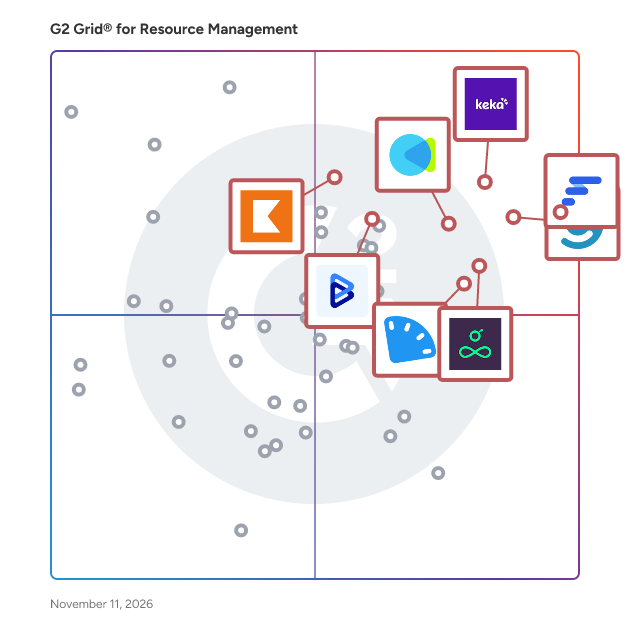
G2 Grid® for Resource Management Software

G2 Grid® for Resource Management Software plotting products by satisfaction and market presence

Highlighted products: Float.com, Keka, Celoxis, CMap, Resource Guru, ClickTime, Kantata Professional Services Automation (formerly Mavenlink+ Kimble), and BigTime.

Underlying data: [Grid® JSON](https://www.g2.com/categories/resource-management/grids.json?focus%5B%5D=float-com&focus%5B%5D=keka&focus%5B%5D=celoxis&focus%5B%5D=cmap&focus%5B%5D=resource-guru&focus%5B%5D=clicktime&focus%5B%5D=kantata-professional-services-automation-formerly-mavenlink-kimble&focus%5B%5D=bigtime)

Float.com

Float.com is the #1 resource management software for delivery teams, designed to give Operations and Delivery leaders the full picture of who’s working on what, whether delivery’s on track, and how to take on what’s next. Unlike disconnected spreadsheets or complex PSAs, Float offers a single, clear source of truth to plan, resource, and report on client work. It doesn’t replace existing CRMs, spreadsheets, HRIS, project and finance tools: it works alongside them to give you the full picture of delivery, so every decision gets made with complete visibility. 4,500+ of the best creative agencies, professional services, and in-house delivery teams globally choose Float to: ✔️ Always know who’s available and what’s coming next. No more spreadsheets that don’t match: your people’s availability, roles, and skills live in Float and update in real time. See who’s working on what at a glance, catch capacity issues early, and (re)allocate resources flexibly when plans change. ✔️ Scope accurately and adjust quickly. Set a baseline for every project—price, budget, roles, timeline—and know what delivery takes before work begins. Find the best-fit person with AI-assisted staffing; when something changes, compare your adjusted scope vs. the baseline and adapt with confidence instead of guesswork. ✔️ Stay on top of delivery performance. Get a live view of how delivery’s going, with the reporting depth to understand what’s driving it. From team capacity and utilization to actuals, margin, and budget burn: if things drift from the plan, you see it as it happens instead of finding out weeks (or months) later.

Average Rating: 4.2/5.0

Total Reviews: 2,126

How Do G2 Users Rate Float.com?

  • Ease of Use: 8.8/10 (Category avg: 8.6/10)
  • Resource Definiton: 8.1/10 (Category avg: 8.6/10)
  • Capacity: 8.5/10 (Category avg: 8.8/10)
  • Forecasting: 8.0/10 (Category avg: 8.5/10)

Who Is the Company Behind Float.com?

  • Seller: Float.com
  • Company Website:
  • Year Founded: 2011
  • HQ Location: Remote, OO
  • LinkedIn® Page: www.linkedin.com
    53 employees on LinkedIn®

Who Uses This Product?

  • Who Uses This: Project Manager, Designer
  • Top Industries: Marketing and Advertising, Information Technology and Services
  • Company Size: 47% Medium, 43% Small

What Do G2 Reviewers Say About Float.com?

AI-generated summary from verified user reviews

Pros
  • Users love the ease of use of Float.com, benefiting from its clear interface and simple task management.
  • Users value the clarity and visual organization of Float.com, enhancing the ability to manage projects efficiently.
  • Users appreciate the intuitive user interface of Float.com, making scheduling and task management straightforward and efficient.
  • Users praise Float.com for its intuitive scheduling management, enabling effortless tracking of team availability and project planning.
  • Users love the clear visibility of schedules in Float, facilitating project planning and team alignment effortlessly.
Cons
  • Users find Float.com has limited features, lacking advanced project management tools and clarity in day-to-day breakdowns.
  • Users experience scheduling issues due to limited navigation options and difficulty in viewing deadlines, which hampers usability.
  • Users find Float.com lacks advanced project management features, making task tracking and time logging more cumbersome.
  • Users find missing features like task dependencies and deadline visibility limit Float.com’s effectiveness compared to competitors.
  • Users find the limited functionality of Float.com restricts advanced project management and complicates daily usage.

What Are Recent G2 Reviews of Float.com?

What Are G2 Users Discussing About Float.com?

Keka

Keka is a global HRMS built for mid-market and enterprise organizations. 12500 organisations across 180+ countries run people operations across multiple entities, countries, and workforce types on Keka. To support them, Keka's PeopleOS brings Core HR, payroll, time and attendance, hiring, performance, employee experience, and project and service automation onto one employee-first platform. As a result, every people decision flows directly into pay, compliance, and business outcomes. HR teams run statutory-compliant payroll in US, India, APAC, GCC countries, and more. Beyond payroll, HR teams manage attendance, shifts, and leave for office, field, and frontline workers. All of this runs from a single employee record. Moreover, leaders get real-time visibility into headcount, workforce cost, and engagement. Employees, in turn, handle requests, payslips, and approvals from the Keka mobile app. Today, more than 12,500 businesses across 40+ countries trust Keka. The platform is SOC 2 Type II and ISO 27001 certified. Furthermore, Keka integrates with 70+ apps, so it fits right into your existing stack. Notable clients include eBay, Randstad, OnePlus, Grant Thortan, Cleatz and more Pros: 1) One employee record powers every operation. Attendance, leave, bonuses, compensation changes, and full-and-final settlements sync into payroll in real time, so HR and finance close the month on data they already trust. 2) Payroll built for local compliance in each market. Keka calculates TDS, PF, ESI, and PT on current rates in India and prepares 24Q, 26Q, and ECR filings. GCC teams run WPS-compliant payroll with gratuity and end-of-service calculations, and US teams connect their existing payroll provider or run payroll through Keka. 3) Time and attendance that fits every kind of workforce. Keka handles shift scheduling, attendance policies, overtime, and mobile or kiosk check-ins for knowledge workers, field staff, and shift-based teams, and feeds all of it straight into payroll. 4) Scales across entities, locations, and countries. Organizations operate multiple entities, branches, and locations on a single license, with role-based access that keeps sensitive people and pay data visible only to the right teams. 5) People experience that employees actually use. Hiring, onboarding, performance reviews, engagement surveys, and helpdesk requests live on the same platform as payroll and attendance, so every employee interaction builds on one connected profile. 6) Enterprise-grade security and reliability. Keka holds SOC 2 Type II, ISO 27001, GDPR, and CCPA compliance, runs at 99.9% uptime with round-the-clock monitoring, and connects with 70+ business apps. Cons 1) Keka's breadth rewards upfront planning. Organizations with many entities, pay structures, and policies get the most value when they map those policies carefully during implementation. 2) Some AI and advanced analytics capabilities are rolling out in phases. Teams evaluating specific AI workflows should confirm availability for their region and plan during the demo.

Average Rating: 4.4/5.0

Total Reviews: 2,214

How Do G2 Users Rate Keka?

  • Ease of Use: 9.1/10 (Category avg: 8.6/10)
  • Resource Definiton: 8.4/10 (Category avg: 8.6/10)
  • Capacity: 8.4/10 (Category avg: 8.8/10)
  • Forecasting: 8.3/10 (Category avg: 8.5/10)

Who Is the Company Behind Keka?

Who Uses This Product?

  • Who Uses This: HR Manager, HR Executive
  • Top Industries: Information Technology and Services, Computer Software
  • Company Size: 69% Medium, 20% Small

What Do G2 Reviewers Say About Keka?

AI-generated summary from verified user reviews

Pros
  • Users like the intuitive, user-friendly interface, which makes everyday HR tasks easy to navigate and use.
  • Users value the responsive, helpful support team for providing timely assistance and guidance.
  • Users like how it streamlines everyday HR processes, making routine tasks and administrative work easier to manage.
  • Users value routine task automation because it saves time and reduces manual effort across HR and payroll work.
  • Users find implementation straightforward and smooth, helping organizations get set up with little difficulty.
Cons
  • Users find some features and modules complicated to understand, making the system difficult to learn, especially for newcomers.
  • Users report slow page loading and occasional lag, particularly during peak usage.
  • Users say support responses and issue resolution can be slow, sometimes requiring days or repeated follow-ups.
  • Users find customization limited across modules and company-specific settings, with some changes requiring support intervention.
  • Users find report customization limited, with settings and formats too rigid for specific or advanced needs.

What Are Recent G2 Reviews of Keka?

What Are G2 Users Discussing About Keka?

Celoxis

Celoxis is an all-in-one project management tool with deep, built-in capabilities for projects, resources, financials, and processes. Everything works out of the box, no add-ons or automations needed. Our reports and dashboards are the best in the industry, fully customizable and easy to use. Getting started is easy, our experts set everything up with your workflows and data and walk you through exactly how it works. Zero risk. Zero stress. Just results. Yes, and unlike others, it stays fast as your data grows.

Average Rating: 4.6/5.0

Total Reviews: 513

How Do G2 Users Rate Celoxis?

  • Ease of Use: 9.0/10 (Category avg: 8.6/10)
  • Resource Definiton: 9.0/10 (Category avg: 8.6/10)
  • Capacity: 9.1/10 (Category avg: 8.8/10)
  • Forecasting: 8.9/10 (Category avg: 8.5/10)

Who Is the Company Behind Celoxis?

  • Seller: Celoxis
  • Company Website:
  • Year Founded: 2001
  • HQ Location: Pune, India
  • LinkedIn® Page: www.linkedin.com
    63 employees on LinkedIn®

Who Uses This Product?

  • Who Uses This: Software Engineer, Project Manager
  • Top Industries: Information Technology and Services, Computer Software
  • Company Size: 50% Medium, 38% Small

What Do G2 Reviewers Say About Celoxis?

AI-generated summary from verified user reviews

Pros
  • Users benefit from the integrated project management system of Celoxis, enhancing productivity with its insightful dashboards and tools.
  • Users value the strong project tracking capabilities of Celoxis, enhancing collaboration and decision-making across multi-project environments.
  • Users find Celoxis to have an intuitive and seamless interface, enhancing productivity with connected project management tools.
  • Users appreciate the efficient time tracking in Celoxis, enhancing productivity and project oversight with seamless integration.
  • Users appreciate the informative dashboard features of Celoxis, facilitating quick insights and effective project management.
Cons
  • Users find the learning curve challenging, noting confusion in navigation and outdated UI elements that hinder usability.
  • Users find the steep learning curve of Celoxis challenging, particularly for those new to the software.
  • Users find the interface not intuitive, often feeling overwhelmed by the complexity and dense options available.
  • Users find the beginner difficulty of Celoxis challenging, feeling overwhelmed by its complexity and extensive features.
  • Users find the complex UI of Celoxis overwhelming and outdated, making navigation and understanding functionalities challenging.

What Are Recent G2 Reviews of Celoxis?

What Are G2 Users Discussing About Celoxis?

AI can help you find the answers. G2 helps you trust them.

Connect G2 to Claude or ChatGPT for answers grounded in G2's trusted reviews, comparisons, and pricing from real user insights.

How it works

CMap

CMap is a PSA software that helps professional services firms, from consultancies to architecture & engineering practices, manage their people, projects, profits and more - all in one place. We help project-based businesses to move on from spreadsheets and retire homegrown, ad-hoc tools to give them complete visibility, clarity, and control over their firm. Whether it’s winning new business, delivering projects, resourcing, billing, or reporting, it can all be done in one easy-to-use platform. CMap is trusted by over 750 service firms around the globe, from executives, operations leaders, finance teams, and project managers, down to individual consultants and architects. We offer four distinct, sector-specific products: CMap Consulting Edition, CMap AEC edition, CMap PIM & CMap Mail. CMap goes far beyond traditional project management or CRM systems. It’s a modular, fully integrated, cloud-based platform designed to support your entire business lifecycle from the first client conversation to the final invoice. Our core features include: - CRM - Win more of the right work. Track opportunities, manage pipelines, and forecast revenue with accuracy. No more fragmented data or endless email chains. - Project Management - Deliver on time and on budget. Plan projects, allocate resources, and monitor progress with live budget-vs-actual insights and milestone tracking. - Resourcing & Capacity Planning - Match the right people to the right projects. Balance workloads, identify bottlenecks early, and make data-driven decisions about hiring and utilization. - Time & Expenses - Give your teams a simple, intuitive way to log time and expenses from any device. Improve compliance and capture billable time effortlessly. - Billing & Financials - Keep cash flowing and admin low. Automate invoicing, track WIP, manage revenue recognition, and connect seamlessly to your accounting software. - Reporting & Business Intelligence - See the full picture. Real-time dashboards and customizable reports turn data into insight, helping you make faster, more confident decisions. CMap helps professional services firms streamline operations, escape
Excel hell, & get back to doing what they do best.

Average Rating: 4.4/5.0

Total Reviews: 333

How Do G2 Users Rate CMap?

  • Ease of Use: 8.4/10 (Category avg: 8.6/10)
  • Resource Definiton: 8.6/10 (Category avg: 8.6/10)
  • Capacity: 9.0/10 (Category avg: 8.8/10)
  • Forecasting: 9.6/10 (Category avg: 8.5/10)

Who Is the Company Behind CMap?

  • Seller: CMAP Software Ltd
  • Company Website:
  • Year Founded: 2000
  • HQ Location: Alderley Edge, GB
  • LinkedIn® Page: www.linkedin.com
    231 employees on LinkedIn®

Who Uses This Product?

  • Who Uses This: Director, Finance Manager
  • Top Industries: Architecture & Planning, Consulting
  • Company Size: 57% Small, 41% Medium

What Do G2 Reviewers Say About CMap?

AI-generated summary from verified user reviews

Pros
  • Users appreciate the ease of use of CMap, finding it intuitive and beneficial for their workflow.
  • Users appreciate the easy-to-use project management features of CMap, enhancing clarity and organization across projects.
  • Users rave about the exceptional customer support of CMap, enhancing their overall experience and satisfaction.
  • Users find CMap intuitive and user-friendly, enhancing setup ease and overall workflow efficiency.
  • Users value the intuitive design and comprehensive features of CMap, enhancing project management and financial tracking.
Cons
  • Users find CMap has limited features, especially in reporting and mobile functionality, affecting their overall experience.
  • Users often face integration issues with CMap, affecting functionality and collaboration with various systems.
  • Users find CMap's limited functionality frustrating, particularly with inconsistent design and basic reporting capabilities.
  • Users find the complex usability of CMap challenging, hindering effective reporting and integration processes.
  • Users find limitations in reporting and design consistency, impacting their overall experience with CMap.

What Are Recent G2 Reviews of CMap?

What Are G2 Users Discussing About CMap?

Resource Guru

Resource Guru is the resource management software that helps professional services teams schedule with clarity and deliver projects with confidence. Unlike spreadsheets that quickly become outdated — or PSA tools where resource management is an afterthought — Resource Guru is purpose-built for resource scheduling, giving teams a flexible, visual way to plan capacity and keep projects on track. ⭐ See who’s working on what and when, forecast accurately, and spot conflicts before they impact delivery ⭐ Quickly find the right person for each project and keep workloads realistic, even as priorities shift ⭐ Plan projects with clear timelines, milestones, and budgets, then track progress with visibility into competing workloads ⭐ Understand how your team really spends its time with accurate time tracking to compare scheduled vs. actual hours ⭐ Use ready-made reports to analyze project health, team utilization, billable hours, profit margins, and more Resource Guru is SOC 2 Type II compliant and trusted by 60,000+ people at companies including NASA, Publicis, and CNN. Try it free for 30 days.

Average Rating: 4.6/5.0

Total Reviews: 476

How Do G2 Users Rate Resource Guru?

  • Ease of Use: 9.4/10 (Category avg: 8.6/10)
  • Resource Definiton: 8.9/10 (Category avg: 8.6/10)
  • Capacity: 9.2/10 (Category avg: 8.8/10)
  • Forecasting: 8.5/10 (Category avg: 8.5/10)

Who Is the Company Behind Resource Guru?

  • Seller: Resource Guru
  • Company Website:
  • Year Founded: 2011
  • HQ Location: London, UK
  • LinkedIn® Page: www.linkedin.com
    27 employees on LinkedIn®

Who Uses This Product?

  • Who Uses This: Project Manager
  • Top Industries: Marketing and Advertising, Information Technology and Services
  • Company Size: 41% Medium, 39% Small

What Do G2 Reviewers Say About Resource Guru?

AI-generated summary from verified user reviews

Pros
  • Users appreciate the ease of use in Resource Guru, benefiting from simple management and helpful project overviews.
  • Users value the real-time visibility provided by Resource Guru, enhancing project management and team coordination seamlessly.
  • Users find Resource Guru's scheduling management intuitive and efficient, greatly enhancing team visibility and productivity.
  • Users find Resource Guru intuitive, making scheduling and resource management smooth and efficient for their teams.
  • Users value the efficient resource management provided by Resource Guru, enhancing team collaboration and productivity significantly.
Cons
  • Users note the limited features for reporting and forecasting, lacking depth for complex analysis and customization.
  • Users find Resource Guru's limitations frustrating, particularly the need for advanced reporting and customization options.
  • Users face scheduling issues due to difficulty in editing bookings and syncing with Outlook, complicating their planning.
  • Users find limited functionality in Resource Guru, expressing a need for improved reporting and flexibility features.
  • Users express frustration over missing features, including limited reporting tools and customization options.

What Are Recent G2 Reviews of Resource Guru?

What Are G2 Users Discussing About Resource Guru?

ClickTime

ClickTime is AI-powered time tracking software that turns work hours into finance-ready labor cost data. ClickTime AI automatically captures hours from the tools your team already uses, maps every hour to your organization's cost categories, and turns that data into instant answers, giving finance and operations the same numbers for billing, cost classification, capacity planning, and audit-ready compliance. Most mid-market and enterprise organizations track cloud spend, software costs, and equipment depreciation with precision. Labor costs, typically 70% of operating expenses, still get managed with spreadsheets and manager estimates. ClickTime closes that gap, so no one rebuilds the numbers after the fact. Best for: Mid-market and enterprise organizations, professional services firms, internal technical teams, and nonprofits, where finance and operations leaders both need labor cost and capacity data they can trust. Use cases: - Automatically capture and code billable hours to speed up invoicing and protect margins - Classify labor as CapEx, OpEx, R&D, or billable at the moment it's captured - Ask natural language questions about labor costs and get instant charts and dashboards - Plan capacity and monitor utilization without exporting to spreadsheets - Produce audit-ready records for grant compliance, R&D credits, and financial reviews What makes ClickTime AI different Most AI tools for workforce data query whatever they can find, unverified logs, rough estimates, reconstructed activity. ClickTime AI starts from a different foundation: it maps activity to the right cost categories before employees confirm and submit. Then ask a question in plain language and get an instant answer, chart, or dashboard (Canvas) built on that clean, human-approved data. Clean data in. Defensible answers out. Who uses ClickTime Professional services firms capture billable hours, protect margins, and give clients transparent reporting. Operations leaders plan capacity, balance workloads, and give managers visibility without exposing salaries. Internal teams classify CapEx vs. OpEx labor, track R&D tax credit eligibility, manage chargebacks, and prepare for audits. Nonprofits prove where grant funding went and stay audit-ready year-round. Key capabilities - ClickTime AI: automatically captures and maps hours from connected tools, no manual entry required - No monitoring: connects to tools your team already uses (no screenshots, no keystroke logging, no install) - Configurable approval flow: auto-submit or review-and-confirm - Canvas: ask questions about labor cost data, get instant charts and dashboards - Billable and non-billable hour tracking with client billing outputs - CapEx/OpEx labor classification at the moment of entry - R&D tax credit and grant compliance reporting - Departmental chargebacks and internal billing - Budget monitoring and project profitability dashboards - Resource management: capacity planning and utilization visibility by department, skill, or client - Audit trail with approval workflows - Integrations with Outlook, Jira, Zoom, GitHub, Asana, and major ERP, HRIS, PM, and analytics platforms Built for finance and operations, designed for adoption ClickTime works alongside your ERP and financial planning tools, giving finance and operations the same accurate, verified labor data. Trusted by organizations from 50 to 5,000 employees across professional services, technology, healthcare, and the public sector. Learn more at clicktime.com

Average Rating: 4.6/5.0

Total Reviews: 1,180

How Do G2 Users Rate ClickTime?

  • Ease of Use: 9.2/10 (Category avg: 8.6/10)
  • Resource Definiton: 8.0/10 (Category avg: 8.6/10)
  • Capacity: 8.3/10 (Category avg: 8.8/10)
  • Forecasting: 8.1/10 (Category avg: 8.5/10)

Who Is the Company Behind ClickTime?

  • Seller: ClickTime
  • Company Website:
  • Year Founded: 1999
  • HQ Location: San Francisco, CA
  • LinkedIn® Page: www.linkedin.com
    47 employees on LinkedIn®

Who Uses This Product?

  • Who Uses This: Software Engineer, Director
  • Top Industries: Non-Profit Organization Management, Information Technology and Services
  • Company Size: 49% Small, 29% Medium

What Do G2 Reviewers Say About ClickTime?

AI-generated summary from verified user reviews

Pros
  • Users enjoy the ease of use of ClickTime, making time tracking and project management quick and efficient.
  • Users value the ease of time tracking in ClickTime, enhancing project management and reporting efficiency.
  • Users praise ClickTime for its intuitive interface, making time tracking and project management effortless and efficient.
  • Users appreciate the simplicity of ClickTime, finding it easy and quick for managing projects and tracking hours.
  • Users value the tracking ease of ClickTime, finding it simple to record and manage hours effectively.
Cons
  • Users find the manual entry tedious, preferring more efficient methods and clearer time breakdowns for better usability.
  • Users are frustrated by the limited options in ClickTime, finding the interface outdated and the mobile app lacking functionality.
  • Users face time tracking issues due to glitches, long descriptions, and difficulties with the correction feature.
  • Users experience timesheet issues with ClickTime, including lag, outdated UI, and limited mobile app functionality.
  • Users find the limited features of ClickTime frustrating, particularly with outdated UI and restricted mobile app functionality.

What Are Recent G2 Reviews of ClickTime?

What Are G2 Users Discussing About ClickTime?

Kantata Professional Services Automation (formerly Mavenlink+ Kimble)

Kantata helps professional services organizations of 50 to 5,000+ employees ensure consistent excellence and profitability across every project. With a platform that connects everything from scoping to resourcing to forecasting, you can always deliver amazing. The real challenge for most PS organizations is that their projects are so unpredictable. They never really know how an engagement is going to play out until it’s too late to do anything about it. And that undermines profits, strains resources, and leaves clients wondering what they’re really paying for. Kantata PSA puts an end to unpredictable projects by enabling you to: • Instantly assemble the ideal team – so you can deploy resources based on the best match for scope, scheduling, skillsets, and more • Easily amplify institutional knowledge – by turning past experience into real-time intelligence so all your expertise is available to all your people • Confidently forecast every outcome – with an accurate, comprehensive view of everything from revenue and margins to capacity and sentiment Not every services firm operates the same way — and your PSA shouldn’t either. Kantata is the only PSA offering both a Salesforce-native and an open infrastructure option, so you can choose the ecosystem that fits your business. With over 1,200 prebuilt connectors — including Salesforce, NetSuite, HubSpot, Workday, Sage Intacct, Microsoft Dynamics 365, Google Workspace, and Jira — Kantata extends the value of your existing tech stack while keeping all your operational data connected in one AI-powered platform. That’s why professional services organizations across software, IT services, management consulting, and marketing agencies rely on Kantata to operate with greater precision, predictability, and profitability. Leading organizations like Deloitte, Sage, and Hitachi trust Kantata, and our customers consistently achieve a 33% increase in on-time project delivery.

Average Rating: 4.2/5.0

Total Reviews: 1,515

How Do G2 Users Rate Kantata Professional Services Automation (formerly Mavenlink+ Kimble)?

  • Ease of Use: 7.7/10 (Category avg: 8.6/10)
  • Resource Definiton: 7.8/10 (Category avg: 8.6/10)
  • Capacity: 8.0/10 (Category avg: 8.8/10)
  • Forecasting: 7.9/10 (Category avg: 8.5/10)

Who Is the Company Behind Kantata Professional Services Automation (formerly Mavenlink+ Kimble)?

Who Uses This Product?

  • Who Uses This: Project Manager, Consultant
  • Top Industries: Information Technology and Services, Marketing and Advertising
  • Company Size: 57% Medium, 30% Small

What Do G2 Reviewers Say About Kantata Professional Services Automation (formerly Mavenlink+ Kimble)?

AI-generated summary from verified user reviews

Pros
  • Users value Kantata for its real-time financial visibility and resource management, significantly enhancing project efficiency and profitability.
  • Users value the efficient project tracking in Kantata, enhancing workload management, profitability, and team accountability.
  • Users value the ease of use of Kantata, benefiting from streamlined features and simplified training for new staff.
  • Users highlight the reporting efficiency of Kantata, benefiting from seamless integration of resourcing and revenue functions.
  • Users value the efficient report generation in Kantata, streamlining project management and enhancing visibility and control.
Cons
  • Users struggle with complex usability in Kantata, finding advanced features hidden and configuration processes overwhelming.
  • Users face a significant learning curve with Kantata, as configuring features can be overwhelming and complex.
  • Users find Kantata's interface not intuitive, with hidden features and a challenging dashboard creation process.
  • Users find the lack of intuitive features in task management frustrating, impacting workflow and efficiency.
  • Users are frustrated by the lack of customization, hindering efficiency and complicating project management tasks drastically.

What Are Recent G2 Reviews of Kantata Professional Services Automation (formerly Mavenlink+ Kimble)?

What Are G2 Users Discussing About Kantata Professional Services Automation (formerly Mavenlink+ Kimble)?

BigTime

BigTime Software: The AI-powered professional services platform enabling intelligent decisions and delivering profitable growth. Too many firms rely on disconnected quoting tools, spreadsheets, and manual handoffs between sales and delivery. This creates misaligned expectations, margin erosion, and frustrated clients. BigTime changes that. We unify the entire professional services journey—from scoping and quoting to staffing and invoicing—so you can sell with confidence, deliver with precision, and grow with profitability.
 BigTime helps professional services firms reduce operational costs, easily align talent to the right projects, and accelerate time to get paid for completed work, all while enabling quicker decision-making by delivering the information you need, when you need it. By streamlining project operations, maximizing resource utilization, accelerating the account receivable cycle, and connecting scattered data sources, BigTime makes it easier for professional services firms to scale and grow. With 2,800+ customers and 20+ years of experience, BigTime is built to get you up and running quickly, operate with flexibility and agility, and enable you to solve today’s challenges while scaling with you for tomorrow’s opportunities.

Average Rating: 4.4/5.0

Total Reviews: 1,774

How Do G2 Users Rate BigTime?

  • Ease of Use: 8.8/10 (Category avg: 8.6/10)
  • Resource Definiton: 7.5/10 (Category avg: 8.6/10)
  • Capacity: 7.8/10 (Category avg: 8.8/10)
  • Forecasting: 7.6/10 (Category avg: 8.5/10)

Who Is the Company Behind BigTime?

  • Seller: BigTime
  • Company Website:
  • Year Founded: 2002
  • HQ Location: Chicago, IL
  • LinkedIn® Page: www.linkedin.com
    166 employees on LinkedIn®

Who Uses This Product?

  • Who Uses This: Office Manager, President
  • Top Industries: Accounting, Architecture & Planning
  • Company Size: 73% Small, 19% Medium

What Do G2 Reviewers Say About BigTime?

AI-generated summary from verified user reviews

Pros
  • Users find BigTime's ease of use enhances their productivity, making navigation and task management simple and intuitive.
  • Users value the strong time tracking features of BigTime, simplifying project management and enhancing team productivity.
  • Users find BigTime's intuitive interface easy to navigate, with convenient access from any browser for greater flexibility.
  • Users value the tracking ease of BigTime, noting its intuitive design and seamless integration with QuickBooks.
  • Users value the time-saving features of BigTime, simplifying time tracking and invoicing for professional services.
Cons
  • Users are frustrated by missing features like automatic column alignment and task copying, impacting their efficiency.
  • Users find the software time-consuming, with setup and customization processes requiring considerable effort and trial and error.
  • Users find the learning curve steep, facing difficulties with customizing reports and dashboards effectively.
  • Users express frustration with manual entry requirements that disrupt workflow and complicate task reporting.
  • Users express frustration with persistent software bugs and inadequate support response times that hinder billing processes.

What Are Recent G2 Reviews of BigTime?

What Are G2 Users Discussing About BigTime?

Rocketlane

Rocketlane is the only execution platform for professional services. For decades, PSA tools tracked the work — status, resources, financials — but never executed on it. Rocketlane, with Nitro,Rocketlane’s native AI capabilities, runs the actual work: from kickoff, plan generation, QBR, status, and customer onboarding, on the same platform the team already tracks against. Operations, delivery, and the work itself live on one engagement record, on the same data the human manages. Rocketlant works with service leaders to define your successes and provide desired outcomes. Proven across 800 customers, including 19 of the Forbes Cloud 100.

Average Rating: 4.7/5.0

Total Reviews: 853

How Do G2 Users Rate Rocketlane?

  • Ease of Use: 9.1/10 (Category avg: 8.6/10)
  • Resource Definiton: 8.3/10 (Category avg: 8.6/10)
  • Capacity: 8.9/10 (Category avg: 8.8/10)
  • Forecasting: 8.3/10 (Category avg: 8.5/10)

Who Is the Company Behind Rocketlane?

  • Seller: Rocketlane Corp
  • Company Website:
  • Year Founded: 2020
  • HQ Location: Walnut, US
  • LinkedIn® Page: www.linkedin.com
    310 employees on LinkedIn®

Who Uses This Product?

  • Who Uses This: Customer Success Manager, Software Engineer
  • Top Industries: Computer Software, Information Technology and Services
  • Company Size: 56% Medium, 27% Small

What Do G2 Reviewers Say About Rocketlane?

AI-generated summary from verified user reviews

Pros
  • Users praise the ease of use of Rocketlane, enjoying its intuitive interface and seamless project management features.
  • Users appreciate the intuitive project management capabilities of Rocketlane, enjoying its organized layout and seamless collaboration tools.
  • Users find task management effortless with Rocketlane, thanks to integrated tools and streamlined project tracking.
  • Users appreciate the transparent project tracking in Rocketlane, allowing clear oversight of timelines, tasks, and progress.
  • Users praise Rocketlane for its seamless team collaboration, enhancing project communication and simplifying management tasks significantly.
Cons
  • Users express concerns about missing features like audit logs and reporting capabilities in Rocketlane.
  • Users experience slow performance with Rocketlane, leading to delays in responses and notification fatigue during complex projects.
  • Users experience a learning curve with Rocketlane as workflows are not immediately clear, initially slowing down productivity.
  • Users find limited customization options in Rocketlane restrict their ability to tailor the platform to their needs.
  • Users find Rocketlane's interface not intuitive, struggling with features like tagging and templates that hinder user experience.

What Are Recent G2 Reviews of Rocketlane?

What Are G2 Users Discussing About Rocketlane?

Workfront

Adobe Workfront is the leader in collaborative work management and marketing work management. Workfront connects strategy to delivery, integrating people and data across the enterprise, and manages work from start to finish to help teams deliver measurable outcomes. At every stage of planning, executing, and automating work, Workfront enables the business capabilities companies need to deliver exceptional customer experiences and to connect planning processes to execution workflows.

Average Rating: 4.1/5.0

Total Reviews: 1,162

How Do G2 Users Rate Workfront?

  • Ease of Use: 7.8/10 (Category avg: 8.6/10)
  • Resource Definiton: 8.3/10 (Category avg: 8.6/10)
  • Capacity: 8.1/10 (Category avg: 8.8/10)
  • Forecasting: 7.4/10 (Category avg: 8.5/10)

Who Is the Company Behind Workfront?

  • Seller: Adobe
  • Company Website:
  • Year Founded: 1982
  • HQ Location: San Jose, CA
  • LinkedIn® Page: www.linkedin.com
    42,975 employees on LinkedIn®
  • Ownership: NASDAQ:ADBE

Who Uses This Product?

  • Who Uses This: Project Manager, Graphic Designer
  • Top Industries: Marketing and Advertising, Information Technology and Services
  • Company Size: 47% Large, 35% Medium

What Do G2 Reviewers Say About Workfront?

AI-generated summary from verified user reviews

Pros
  • Users appreciate the user-friendly interface and centralized project management of Workfront, enhancing workflow efficiency and organization.
  • Users value the user-friendly interface of Workfront, enhancing workflow management and task assignment efficiency.
  • Users value the efficient team collaboration in Workfront, facilitating organized project management and improved productivity.
  • Users appreciate the ease of task management with Workfront, enhancing collaboration and visibility while reducing confusion.
  • Users appreciate the centralized project management of Workfront, enhancing organization and efficiency in team collaboration.
Cons
  • Users face a steep learning curve with Workfront, making onboarding and setup challenging for new team members.
  • Users find the interface not intuitive, making navigation and managing the admin console challenging.
  • Users find the complexity of the interface overwhelming, leading to a steep learning curve and setup challenges.
  • Users experience slow performance with Workfront, especially during heavy use or with large datasets, affecting efficiency.
  • Users express concerns about limited features in Workfront, especially in reporting and agile capabilities, impacting usability.

What Are Recent G2 Reviews of Workfront?

What Are G2 Users Discussing About Workfront?

Productive

Productive is the all-in-one professional services automation platform built for agencies, consultancies, and service businesses. Manage projects, resources, and finances in one place — with real-time visibility and advanced AI and agentic features. AI Experience a modern way of working with Productive’s AI features: an integrated AI Assistant that you can ask anything, Skills that make your processes shareable and standardize AI output, and fully autonomous, custom Agents that run work for you. With Connectors, AI fetches data and acts on external tools, so you can pull everything into one place. Notetaker Turn meetings into actionable tasks and to-dos, directly in the platform where you handle your work. The Notetaker connects to your Google or Outlook Calendar, joins meetings, and provides AI-generated summaries directly to your email. Sales Pipeline Easily manage your sales funnel, create and send polished proposals to clients, and win more deals. You won't ever forget to follow up on that potential business opportunity. When the deal is won, convert it into a project, and continue working in the same tool. Project Management Assign work, collaborate, and organize agency projects. Project Management features are integrated with Time Tracking and Task Management so you will run projects faster and more elegantly. Delegate busywork to autonomous agents, and focus on the work that matters most. Resource Planning Organize and plan a work schedule for your entire agency with smart resourcing suggestions. Find bottlenecks that cost money and consume time. Avoid collisions, burnouts, and overbooking with resource planning features. Powerful Business Insights Build customizable reports, or ask AI to do it for you. Check your Actual Utilization by People, Revenue & Profitability by Client, Invoiced Revenue by Months, Overtime by People, Profitability by Months, etc. Billing and Invoicing Automatically track invoiced amounts and be confident you’ve billed everything you need. Simply generate invoices using tracked time on billable services.

Average Rating: 4.6/5.0

Total Reviews: 93

How Do G2 Users Rate Productive?

  • Ease of Use: 8.8/10 (Category avg: 8.6/10)
  • Resource Definiton: 8.6/10 (Category avg: 8.6/10)
  • Capacity: 8.9/10 (Category avg: 8.8/10)
  • Forecasting: 8.9/10 (Category avg: 8.5/10)

Who Is the Company Behind Productive?

  • Seller: Productive
  • Company Website:
  • Year Founded: 2014
  • HQ Location: Claymont, US
  • LinkedIn® Page: www.linkedin.com
    187 employees on LinkedIn®

Who Uses This Product?

  • Top Industries: Marketing and Advertising, Computer Software
  • Company Size: 74% Small, 21% Medium

What Do G2 Reviewers Say About Productive?

AI-generated summary from verified user reviews

Pros
  • Users find Productive's ease of use transformative, streamlining their workflow and enhancing productivity effortlessly.
  • Users praise the customizability of Productive, allowing tailored views and reports to fit diverse workflows seamlessly.
  • Users value the seamless team collaboration enabled by Productive, enhancing project management and overall efficiency across the company.
  • Users praise the intuitive and user-friendly interface of Productive, making project management seamless and efficient.
  • Users value the responsive and personal support from Productive, enhancing their overall experience and satisfaction.
Cons
  • Users find the lack of integrations limiting, as essential tools and modules are not well-connected, complicating workflows.
  • Users find the missing mobile reporting features limiting, wishing for more detailed access and flexibility.
  • Users face organization difficulties due to overwhelming layouts and limited customization options in Productive's reporting tools.
  • Users find the reporting options lacking flexibility, limiting detailed data access, especially on the mobile app.
  • Users find complex usability in configuring reports, making navigation challenging and limiting customization options.

What Are Recent G2 Reviews of Productive?

What Are G2 Users Discussing About Productive?

Teamwork.com

Combining powerful project management and easily streamlined operations - we’re the only platform built for managing client projects, profitably. Deliver work on time and on budget, eliminate client chaos, and understand profitability, all in one platform. Headquartered in Cork, Ireland and founded by a team who have run an agency before, Teamwork.com has more than 20,000 customers around the world with a global team of over 350 employees. Learn more at teamwork.com.

Average Rating: 4.4/5.0

Total Reviews: 1,180

How Do G2 Users Rate Teamwork.com?

  • Ease of Use: 8.6/10 (Category avg: 8.6/10)
  • Resource Definiton: 8.0/10 (Category avg: 8.6/10)
  • Capacity: 7.9/10 (Category avg: 8.8/10)
  • Forecasting: 7.3/10 (Category avg: 8.5/10)

Who Is the Company Behind Teamwork.com?

  • Seller: Teamwork
  • Company Website:
  • Year Founded: 2007
  • HQ Location: Cork
  • LinkedIn® Page: www.linkedin.com
    549 employees on LinkedIn®

Who Uses This Product?

  • Who Uses This: Project Manager, Owner
  • Top Industries: Marketing and Advertising, Information Technology and Services
  • Company Size: 57% Small, 31% Medium

What Do G2 Reviewers Say About Teamwork.com?

AI-generated summary from verified user reviews

Pros
  • Users value the efficient project management capabilities of Teamwork.com, enhancing collaboration and simplifying workflows effectively.
  • Users value the efficient task management of Teamwork.com, streamlining project workflows and enhancing team collaboration.
  • Users appreciate the powerful team collaboration in Teamwork.com, enhancing communication and project management efficiency.
  • Users find Teamwork.com to have a simple and organized interface that enhances teamwork and project efficiency.
  • Users find task tracking in Teamwork.com efficient, enabling effective project management and streamlined team collaboration.
Cons
  • Users report a steep learning curve with Teamwork.com, making it challenging for new users and smaller teams.
  • Users find missing features on Teamwork.com, impacting navigation and leading to unexpected errors during usage.
  • Users note limited features in certain tiers, creating frustrations for small businesses needing crucial tools and upgrades.
  • Users experience a steep learning curve and complexity in navigating Teamwork.com, especially for new or small teams.
  • Users find the interface not intuitive, with hidden features and clunky navigation complicating the user experience.

What Are Recent G2 Reviews of Teamwork.com?

What Are G2 Users Discussing About Teamwork.com?

Projectworks

Grow your firm, and your impact.
 Projectworks is AI-powered, operator-built professional services automation software for consulting firms that want to grow and make a difference. Bringing deals, proposals, time tracking, resourcing, invoicing, and forecasting together in one platform, it gives you the visibility to see what’s working, fix what’s not, and scale your firm with confidence. Projectworks was built by consultants who know what it’s like to lose hours to spreadsheets and billing chaos. Designed specifically for engineering, architecture, software development, and management consulting, it’s professional services automation (PSA) software that gets experts out of the admin grind and back to the work that matters. Our cloud-based PSA tool brings together everything your business needs to plan, track, forecast, and grow. By automating time tracking, expense tracking, resource planning, project financials, and real-time reporting, Projectworks frees your people to focus on solving the world’s hardest problems - not wrestling with manual processes. On average, Projectworks users grow 20% in their first year. Connect Projectworks with your existing stack - including Xero, QuickBooks Online, MYOB, Jira, Azure DevOps, HubSpot, and Salesforce - to eliminate double handling, align your data, and operate with confidence. We’ll help you set up for success with expert data migration, comprehensive training, and responsive ongoing support. Key features CRM and Proposals Manage your pipeline and turn qualified opportunities into custom proposals, faster. Win more work and grow your firm. Time tracking software Easy, accurate timesheets that actually get filled out. Simplify project time tracking and keep billing up to date with integrated time management software for consultants. Expense tracking Track project spend against budget with simple, mobile-friendly expense submission. Sync approved expenses directly to Xero as bills to pay. Resource management software Plan and allocate resources effectively. See availability, utilization, and capacity in real time with powerful resource planning tools that make project delivery predictable. Revenue forecasting & project profitability Combine financial and resourcing data to model revenue, monitor utilization and profitability, and make confident growth decisions. Invoicing automation Create pre-populated invoices that sync seamlessly with Xero, reducing admin and helping you get paid faster. Reporting & insights Access real-time dashboards, project profitability reports, and PSA analytics that bring clarity to every decision. Track the consulting metrics that matter most - across projects, clients, and teams. Integrations Connect your favorite tools and run your firm on a unified project management and financial reporting platform. Get a 10% discount on annual subscriptions.

Average Rating: 4.4/5.0

Total Reviews: 249

How Do G2 Users Rate Projectworks?

  • Ease of Use: 8.7/10 (Category avg: 8.6/10)
  • Resource Definiton: 7.9/10 (Category avg: 8.6/10)
  • Capacity: 8.5/10 (Category avg: 8.8/10)
  • Forecasting: 8.6/10 (Category avg: 8.5/10)

Who Is the Company Behind Projectworks?

  • Seller: Projectworks
  • Company Website:
  • Year Founded: 2019
  • HQ Location: San Mateo, California
  • LinkedIn® Page: www.linkedin.com
    79 employees on LinkedIn®
  • Ownership: Charlotte Steel

Who Uses This Product?

  • Who Uses This: Project Manager, Director
  • Top Industries: Consulting, Civil Engineering
  • Company Size: 67% Small, 32% Medium

What Do G2 Reviewers Say About Projectworks?

AI-generated summary from verified user reviews

Pros
  • Users appreciate the ease of use of Projectworks, highlighting its intuitive interface and seamless integration capabilities.
  • Users value the effective project tracking capabilities of Projectworks, enhancing workflow management and budget tracking significantly.
  • Users value the comprehensive features of Projectworks, simplifying management with visual tools and seamless integrations.
  • Users appreciate the efficient project tracking capabilities of Projectworks, enabling timely insights and resource management.
  • Users value the user-friendly interface of Projectworks, making it intuitive and easy to navigate and implement.
Cons
  • Users find the limited features in Projectworks hinder customization and ease of use for varying needs.
  • Users find some missing features in Projectworks, such as flexible metrics definitions and enhanced templates for efficiency.
  • Users find the limited customization frustrating, particularly in reporting capabilities and feature definitions.
  • Users note a significant learning curve, requiring consistent use to become proficient with Projectworks.
  • Users find the reporting capabilities limited, wishing for more customization and flexibility to suit their needs.

What Are Recent G2 Reviews of Projectworks?

What Are G2 Users Discussing About Projectworks?

Scoro

Scoro is a professional services automation (PSA) software purpose-built for consultancies, agencies, IT firms, architecture companies, and other professional services businesses. It unites projects, resources, and finances in one system, so you don’t need to juggle multiple tools for planning, tracking, and billing for your work. Core features include: - CRM & pipeline – Get a complete overview of your sales funnel and upcoming work - Quote-to-cash – Estimate scope, track progress and budget burn, and bill for work in one system - Capacity & resource planning – Plan ahead with live heatmaps and utilization forecasts - Time & expense tracking – Log time with built-in timers and auto-populated timesheets - Cost & profit forecasts – Understand margins with role or service-level insights - Billing & invoicing – Automate time & material, fixed-fee, and retainer billing - Revenue forecasting – Track project income based on pipeline and committed work - AI-powered insights & actions – Save time with automation and data-driven suggestions - Live dashboards – Monitor progress, profitability, and capacity in real time Scoro’s pricing is modular, built around core apps rather than fixed tiers, so you can shape a package to match your actual workflow. You choose which apps you need and price is shaped by the chosen combination, billed per user per month.

Average Rating: 4.5/5.0

Total Reviews: 489

How Do G2 Users Rate Scoro?

  • Ease of Use: 8.7/10 (Category avg: 8.6/10)
  • Resource Definiton: 8.1/10 (Category avg: 8.6/10)
  • Capacity: 8.6/10 (Category avg: 8.8/10)
  • Forecasting: 6.9/10 (Category avg: 8.5/10)

Who Is the Company Behind Scoro?

  • Seller: Scoro
  • Company Website:
  • Year Founded: 2013
  • HQ Location: London
  • LinkedIn® Page: www.linkedin.com
    141 employees on LinkedIn®

Who Uses This Product?

  • Who Uses This: Project Manager, CEO
  • Top Industries: Marketing and Advertising, Information Technology and Services
  • Company Size: 67% Small, 25% Medium

What Do G2 Reviewers Say About Scoro?

AI-generated summary from verified user reviews

Pros
  • Users value the ease of use of Scoro, seamlessly integrating with Xero and Expensify for efficient financial management.
  • Users highlight the efficient project management tools in Scoro, enhancing productivity and clarity in workflows.
  • Users value the efficient project tracking in Scoro, which enhances productivity and simplifies task management.
  • Users value the time tracking features of Scoro, which streamline project management and enhance productivity significantly.
  • Users value the effective task management in Scoro, enhancing productivity and simplifying project tracking.
Cons
  • Users report a steep learning curve with Scoro, requiring more time and effort to adapt to its features.
  • Users find the missing features in Scoro's mobile version limit its usability compared to the desktop experience.
  • Users find the interface not intuitive, feeling overwhelmed by excessive information and complex workflows that hinder efficiency.
  • Users find a steep learning curve due to overwhelming features and complex navigation that hinder quick use.
  • Users find the complexity of Scoro overwhelming, with learning curves and non-intuitive workflows that hinder efficiency.

What Are Recent G2 Reviews of Scoro?

What Are G2 Users Discussing About Scoro?

GanttPRO

GanttPRO is intuitive online Gantt chart software for robust project management. The tool meets the needs of project, product, and portfolio managers from different spheres. GanttPRO offers task, deadline, cost, resource, and portfolio management, team collaboration, time logging, baselines, advanced export and sharing features. Robust import from MS Project and Excel as well as ready-made professional templates allows starting projects right away.

Average Rating: 4.8/5.0

Total Reviews: 529

How Do G2 Users Rate GanttPRO?

  • Ease of Use: 9.4/10 (Category avg: 8.6/10)

Who Is the Company Behind GanttPRO?

  • Seller: GanttPRO
  • Year Founded: 2015
  • HQ Location: Krakow, PL
  • LinkedIn® Page: www.linkedin.com
    23 employees on LinkedIn®

Who Uses This Product?

  • Who Uses This: Student, Project Manager
  • Top Industries: Higher Education, Computer Software
  • Company Size: 76% Small, 11% Large

What Do G2 Reviewers Say About GanttPRO?

AI-generated summary from verified user reviews

Pros
  • Users love the intuitive ease of use of GanttPRO, making it simple to manage projects efficiently.
  • Users appreciate the intuitive project management features of GanttPRO, enabling efficient planning and task delegation.
  • Users appreciate the effective team collaboration features of GanttPRO, enhancing communication and project alignment effortlessly.
  • Users love the intuitive interface of GanttPRO, making project management simple and efficient for all tasks.
  • Users appreciate the intuitive and easy-to-use interface of GanttPRO, streamlining project management effectively.
Cons
  • Users find GanttPRO's missing features hinder overall functionality, with suggestions for greater flexibility and advanced options.
  • Users find GanttPRO to be expensive, especially students on a limited budget without flexible payment options.
  • Users find the learning curve steep, making GanttPRO complicated and restrictive, especially for basic project management needs.
  • Users find the limited customization options in GanttPRO restrictive, affecting their editing and project management flexibility.
  • Users find GanttPRO's high pricing challenging, particularly for students and small businesses with limited budgets.

What Are Recent G2 Reviews of GanttPRO?

What Are G2 Users Discussing About GanttPRO?

Subhransu Sahu
SS
Researched and written by Subhransu Sahu
Updated November 6, 2024