Best Database Management Systems (DBMS)

How Many Database Management Systems (DBMS) Products Does G2 Track?

Total Products under this Category: 291

Category Stats (Sep 2026)

  • Average Rating: 4.29/5 The average rating of products in this category, based on all submitted ratings
  • Top Trending Product: Cloudera (+2.21%) - Among all products in this category, Cloudera recorded the largest rating increase compared to last month

Last updated: September 01, 2026

How Does G2 Rank Database Management Systems (DBMS) Products?

Why You Can Trust G2's Software Rankings:

  • 30 Analysts and Data Experts
  • 10,000+ Authentic Reviews
  • 291+ Products
  • Unbiased Rankings

G2's software rankings are built on verified user reviews, rigorous moderation, and a consistent research methodology maintained by a team of analysts and data experts. Each product is measured using the same transparent criteria, with no paid placement or vendor influence. While reviews reflect real user experiences, which can be subjective, they offer valuable insight into how software performs in the hands of professionals. Together, these inputs power the G2 Score, a standardized way to compare tools within every category.

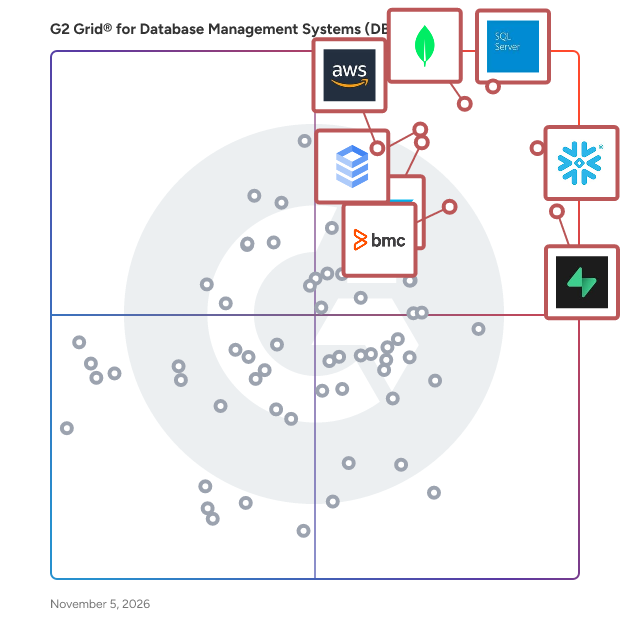
G2 Grid® for Database Management Systems (DBMS)

G2 Grid® for Database Management Systems (DBMS) plotting products by satisfaction and market presence

Highlighted products: Microsoft SQL Server, Snowflake, Supabase, Google Cloud SQL, SAP HANA Cloud, Amazon Athena, BMC AMI Data, and SQL Developer.

Underlying data: [Grid® JSON](https://www.g2.com/categories/database-management-systems-dbms/grids.json?focus%5B%5D=microsoft-sql-server&focus%5B%5D=snowflake&focus%5B%5D=supabase-supabase&focus%5B%5D=google-cloud-sql&focus%5B%5D=sap-hana-cloud-2025-10-01&focus%5B%5D=amazon-athena&focus%5B%5D=bmc-ami-data&focus%5B%5D=sql-developer)

Microsoft SQL Server

SQL Server 2017 brings the power of SQL Server to Windows, Linux and Docker containers for the first time ever, enabling developers to build intelligent applications using their preferred language and environment. Experience industry-leading performance, rest assured with innovative security features, transform your business with AI built-in, and deliver insights wherever your users are with mobile BI.

Average Rating: 4.4/5.0

Total Reviews: 2,131

How Do G2 Users Rate Microsoft SQL Server?

  • Has the product been a good partner in doing business?: 8.4/10 (Category avg: 8.8/10)
  • Data dictionary: 8.9/10 (Category avg: 8.5/10)
  • Backup and Recovery: 9.1/10 (Category avg: 8.5/10)
  • Data Migration: 8.9/10 (Category avg: 8.4/10)

Who Is the Company Behind Microsoft SQL Server?

  • Seller: Microsoft
  • Year Founded: 1975
  • HQ Location: Redmond, Washington
  • Twitter: @microsoft
    13,091,739 Twitter followers
  • LinkedIn® Page: www.linkedin.com
    232,750 employees on LinkedIn®
  • Ownership: MSFT

Who Uses This Product?

  • Who Uses This: Software Engineer, Software Developer
  • Top Industries: Information Technology and Services, Computer Software
  • Company Size: 45% Large, 38% Medium

What Do G2 Reviewers Say About Microsoft SQL Server?

AI-generated summary from verified user reviews

Pros
  • Users appreciate the ease of use of Microsoft SQL Server, highlighting its seamless integration and simplicity in management.
  • Users appreciate the robust database management of Microsoft SQL Server, enhancing performance and simplifying data handling.
  • Users appreciate the powerful performance of Microsoft SQL Server, recognizing it as an industry standard for databases.
  • Users appreciate the easy integrations of Microsoft SQL Server, enhancing their reporting and data management experience.
  • Users value the enterprise-grade security of Microsoft SQL Server, ensuring safety for sensitive data is prioritized.
Cons
  • Users find Microsoft SQL Server's high licensing costs a burden, especially for small businesses and budget constraints.
  • Users express concern about the high licensing costs of Microsoft SQL Server, making it tough for small businesses.
  • Users find the high licensing costs of Microsoft SQL Server a barrier for small businesses and budget constraints.
  • Users find the licensing costs steep, making Microsoft SQL Server less accessible for small businesses and limiting flexibility.
  • Users report slow performance of Microsoft SQL Server, especially when multitasking, affecting overall efficiency and usability.

What Are Recent G2 Reviews of Microsoft SQL Server?

What Are G2 Users Discussing About Microsoft SQL Server?

Snowflake

Snowflake makes enterprise AI easy, efficient and trusted. Thousands of companies around the globe, including hundreds of the world’s largest, use Snowflake’s AI Data Cloud to share data, build applications, and power their business with AI. The era of enterprise AI is here. Learn more at snowflake.com (NYSE: SNOW).

Average Rating: 4.6/5.0

Total Reviews: 713

How Do G2 Users Rate Snowflake?

  • Has the product been a good partner in doing business?: 9.0/10 (Category avg: 8.8/10)
  • Data dictionary: 9.0/10 (Category avg: 8.5/10)
  • Backup and Recovery: 9.0/10 (Category avg: 8.5/10)
  • Data Migration: 9.3/10 (Category avg: 8.4/10)

Who Is the Company Behind Snowflake?

  • Seller: Snowflake, Inc.
  • Company Website:
  • Year Founded: 2012
  • HQ Location: 135 Constitution Drive, Menlo Park CA
  • Twitter: @SnowflakeDB
    278 Twitter followers
  • LinkedIn® Page: www.linkedin.com
    12,574 employees on LinkedIn®

Who Uses This Product?

  • Who Uses This: Data Engineer, Data Analyst
  • Top Industries: Information Technology and Services, Computer Software
  • Company Size: 45% Medium, 42% Large

What Do G2 Reviewers Say About Snowflake?

AI-generated summary from verified user reviews

Pros
  • Users appreciate the ease of use of Snowflake, which simplifies data sharing and enhances productivity across teams.
  • Users value the reliable features and user-friendly interface of Snowflake, enhancing data management and analytics efficiency.
  • Users value the seamless scalability of Snowflake, enabling efficient handling of large datasets and workload changes without performance loss.
  • Users value the fast and efficient data processing capabilities of Snowflake, enhancing their analysis experience significantly.
Cons
  • Users highlight the high costs of Snowflake, making it less accessible for smaller businesses with limited budgets.
  • Users find feature limitations in Snowflake, such as lack of code blocks and restricted permissions, frustrating.
  • Users often struggle with high costs due to unoptimized queries and inadequate cost control measures in Snowflake.
  • Users find the cost structure challenging, requiring time to optimize for efficient use of Snowflake.
  • Users find Snowflake's limited features in dynamic scripts and monitoring hinder flexibility and usability.

What Are Recent G2 Reviews of Snowflake?

What Are G2 Users Discussing About Snowflake?

Supabase

Supabase is an open-source backend-as-a-service (BaaS) platform that enables developers to build and scale applications efficiently without managing server infrastructure. Launched in 2020 as an alternative to Firebase, Supabase offers a suite of tools including a PostgreSQL database, authentication, real-time subscriptions, and storage capabilities. By leveraging the robustness of PostgreSQL, Supabase provides a scalable and secure foundation for modern web and mobile applications. Key Features and Functionality: - PostgreSQL Database: Each Supabase project includes a dedicated PostgreSQL database, offering full SQL support and advanced features such as JSON handling, full-text search, and vector support. - Instant APIs: Supabase automatically generates RESTful and GraphQL APIs based on your database schema, eliminating the need for manual coding and accelerating development. - Authentication and Authorization: The platform provides built-in user authentication with support for various sign-in methods, including email/password, magic links, and social logins. It also integrates seamlessly with PostgreSQL's Row Level Security for fine-grained access control. - Real-time Capabilities: Supabase enables real-time data synchronization via WebSockets, allowing applications to respond instantly to database changes. - Edge Functions: Developers can deploy serverless functions close to users for low-latency execution, facilitating scalable and efficient backend logic. - File Storage: Supabase offers scalable storage solutions for managing and serving files, complete with configurable access policies to ensure data security. Primary Value and User Solutions: Supabase addresses the challenges developers face in building and scaling applications by providing a comprehensive, open-source backend platform. It eliminates the complexities of managing server infrastructure, allowing developers to focus on creating feature-rich applications. With its real-time capabilities, robust authentication, and seamless integration with PostgreSQL, Supabase empowers developers to build secure, scalable, and responsive applications efficiently.

Average Rating: 4.6/5.0

Total Reviews: 230

How Do G2 Users Rate Supabase?

  • Has the product been a good partner in doing business?: 9.3/10 (Category avg: 8.8/10)
  • Data dictionary: 8.3/10 (Category avg: 8.5/10)
  • Backup and Recovery: 9.0/10 (Category avg: 8.5/10)
  • Data Migration: 9.3/10 (Category avg: 8.4/10)

Who Is the Company Behind Supabase?

  • Seller: Supabase
  • Year Founded: 2020
  • HQ Location: Global, US
  • LinkedIn® Page: www.linkedin.com
    436 employees on LinkedIn®

Who Uses This Product?

  • Who Uses This: Founder, Software Engineer
  • Top Industries: Computer Software, Information Technology and Services
  • Company Size: 77% Small, 20% Medium

What Do G2 Reviewers Say About Supabase?

AI-generated summary from verified user reviews

Pros
  • Users find Supabase easy to use, enjoying its user-friendly interface and smooth integration with tools for app development.
  • Users appreciate the powerful design and easy integration of Supabase, enhancing their development experience significantly.
  • Users appreciate the user-friendly interface of Supabase, making it easy to set up and integrate smoothly.
  • Users love the easy integrations of Supabase, enhancing their workflow and speeding up project development seamlessly.
  • Users appreciate the seamless integrations of Supabase, enhancing the developer experience across various tools and projects.
Cons
  • Users feel that Supabase has beginner unfriendliness, citing complexity and limited resources for novice coders.
  • Users find the pricing expensive, especially for premium features that should be accessible to all users.
  • Users find Supabase has a high complexity that challenges novice coders and could benefit from better documentation.
  • Users face insufficient guidance in Supabase, making it challenging for novice coders to navigate the platform.
  • Users find that learning difficulties with Supabase arise due to its complexity and limited documentation for novices.

What Are Recent G2 Reviews of Supabase?

Google Cloud SQL

Cloud SQL is a fully-managed managed relational database service for MySQL, PostgreSQL, and SQL Server with rich extension collections, configuration flags, and developer ecosystems.

Average Rating: 4.5/5.0

Total Reviews: 355

How Do G2 Users Rate Google Cloud SQL?

  • Has the product been a good partner in doing business?: 9.0/10 (Category avg: 8.8/10)
  • Data dictionary: 8.8/10 (Category avg: 8.5/10)
  • Backup and Recovery: 9.1/10 (Category avg: 8.5/10)
  • Data Migration: 9.0/10 (Category avg: 8.4/10)

Who Is the Company Behind Google Cloud SQL?

  • Seller: Google
  • Year Founded: 1998
  • HQ Location: Mountain View, CA
  • Twitter: @google
    31,899,995 Twitter followers
  • LinkedIn® Page: www.linkedin.com
    301,144 employees on LinkedIn®
  • Ownership: NASDAQ:GOOG

Who Uses This Product?

  • Who Uses This: Software Engineer, Data Engineer
  • Top Industries: Information Technology and Services, Computer Software
  • Company Size: 41% Medium, 34% Small

What Do G2 Reviewers Say About Google Cloud SQL?

AI-generated summary from verified user reviews

Pros
  • Users appreciate the efficiency and automation of Google Cloud SQL for hassle-free database management and maintenance.
  • Users value the seamless integration of Google Cloud SQL with Google Cloud services, enhancing scalability and performance.
  • Users appreciate the ease of use of Google Cloud SQL, simplifying database management without infrastructure worries.
  • Users value the easy integrations of Google Cloud SQL, enhancing efficiency and convenience for database management.
  • Users commend the scalability of Google Cloud SQL, appreciating its seamless integration and efficient management of databases.
Cons
  • Users find Google Cloud SQL to be expensive, especially for storage and smaller projects, making it less accessible.
  • Users find Google Cloud SQL to be expensive, especially as workloads increase, straining budgets and resources.
  • Users face scaling issues with Google Cloud SQL due to slow support and manual adjustments for changing workloads.
  • Users find the complex pricing of Google Cloud SQL challenging, leading to confusion and difficulty in cost prediction.
  • Users find Google's pricing to be confusing, especially with unexpected usage spikes affecting cost predictions.

What Are Recent G2 Reviews of Google Cloud SQL?

What Are G2 Users Discussing About Google Cloud SQL?

FAQs About Database Management Systems (DBMS)

Generated using AI

Last updated: June 3, 2026

Which DBMS offers the most advanced indexing capabilities

According to verified users, advanced indexing in this category is most often described through fast query optimization, execution plan visibility, and smoother performance tuning on large structured datasets. Recent reviewers repeatedly connect strong indexing with handling high-volume transactions, improving reporting speed, and reducing bottlenecks in ETL and analytics workflows. They also mention that indexing matters most when teams need consistent performance across growing workloads and concurrent usage. In the current review set, buyers most often praise indexing alongside query analyzers, stored procedures, partitioning, and centralized administration rather than as an isolated capability, so evaluation tends to focus on overall tuning experience and operational reliability.

Which DBMS supports the widest range of data types

According to verified users, support for different data types usually shows up in reviews as the ability to work with structured records plus formats like JSON, semi-structured data, document-style content, graph, spatial, or time-series use cases. Recent reviewers frame this less as a checklist and more as a practical question of whether a platform can unify multiple workloads without forcing teams into separate systems. They also highlight that flexible data type support matters most for integrations, analytics, and evolving application requirements. In this review set, buyers frequently mention structured data first, then call out JSON, semi-structured data, multi-model processing, and vector or relational combinations as useful differentiators for broader database needs.

Which DBMS offers the lowest total cost of ownership

According to verified users, total cost of ownership in this category depends on more than licensing alone. Recent reviews point to infrastructure overhead, scaling efficiency, administration effort, backup and recovery management, and how many separate tools a team needs around the database. Buyers often describe lower ownership costs when a platform reduces manual tuning, simplifies deployment, automates maintenance, or consolidates analytics, storage, and governance tasks. At the same time, reviewers frequently note that premium editions, complex enterprise pricing, and resource-heavy workloads can raise costs quickly. In practice, G2 reviewers evaluate cost through the balance of performance, reliability, support burden, and operational simplicity rather than through sticker price alone.

What are the most important features in database management systems

According to verified users, the most important features in database management systems are reliability, performance, security, scalability, and ease of administration. Recent reviews also emphasize backup and recovery, high availability, query optimization, monitoring, and support for reporting or analytics workflows. Integration is another recurring theme, especially with cloud platforms, BI tools, ETL pipelines, and application environments. Buyers repeatedly mention that the best systems make it easier to centralize data, maintain a single source of truth, and keep workloads stable as usage grows. For many teams, the most valuable feature set is the one that combines dependable day-to-day operations with enough flexibility for analytics, automation, and future expansion.

How do teams use Database Management Systems (DBMS) for reporting

According to verified users, teams use Database Management Systems (DBMS) for reporting by centralizing structured data, running queries across large datasets, and feeding dashboards or business intelligence tools with more consistent information. Recent reviews describe reporting workflows tied closely to ETL pipelines, stored procedures, fact tables, and scheduled data transformations. Buyers also mention using database platforms to improve data accessibility, reduce duplication, and create a single source of truth for operational and strategic decisions. In many cases, reporting use includes downstream integrations with visualization tools, cloud services, and analytics environments. The strongest review themes connect reporting value to faster decision-making, smoother daily operations, and more reliable access to current business data.

SAP HANA Cloud

SAP HANA Cloud is a modern database-as-a-service (DBaaS) powering the next generation of intelligent data applications. SAP HANA Cloud offers a competitive edge by incorporating advanced machine learning and predictive tools grounded in modern data science. Its powerful in-memory performance safeguards efficient data processing. By securely storing vast amounts of data with its integrated multitier storage and handling various types on a single copy in its native multi-model database, SAP HANA Cloud simplifies data management and connects to other data sources. The seamless integration of these capabilities in a reliable, unified foundation makes it easier for developers to build high-demand intelligent data apps.

Average Rating: 4.3/5.0

Total Reviews: 521

How Do G2 Users Rate SAP HANA Cloud?

  • Has the product been a good partner in doing business?: 8.5/10 (Category avg: 8.8/10)
  • Data dictionary: 8.7/10 (Category avg: 8.5/10)
  • Backup and Recovery: 9.0/10 (Category avg: 8.5/10)
  • Data Migration: 8.6/10 (Category avg: 8.4/10)

Who Is the Company Behind SAP HANA Cloud?

  • Seller: SAP
  • Year Founded: 1972
  • HQ Location: Walldorf
  • Twitter: @SAP
    297,052 Twitter followers
  • LinkedIn® Page: www.linkedin.com
    149,349 employees on LinkedIn®
  • Ownership: NYSE:SAP

Who Uses This Product?

  • Who Uses This: Consultant, SAP Consultant
  • Top Industries: Information Technology and Services, Computer Software
  • Company Size: 61% Large, 26% Medium

What Do G2 Reviewers Say About SAP HANA Cloud?

AI-generated summary from verified user reviews

Pros
  • Users appreciate the exceptional ease of use of SAP HANA Cloud, contributing to improved decision-making and collaboration.
  • Users appreciate the easy integrations of SAP HANA Cloud, enhancing data management and reporting efficiency seamlessly.
  • Users appreciate the seamless integration capabilities of SAP HANA Cloud, enhancing data management and reporting efficiencies.
  • Users praise SAP HANA Cloud for its exceptional real-time performance, enhancing usability and driving significant business value.
  • Users commend the scalability of SAP HANA Cloud, enabling flexibility and efficiency in managing large, complex datasets.
Cons
  • Users often struggle with the complexity of setup and configuration, making it challenging for new users to navigate.
  • Users feel that the cost can be prohibitive for smaller organizations, particularly with premium features and usage growth.
  • Users note a steep learning curve for SAP HANA Cloud, which may require specialized training to navigate effectively.
  • Users find the difficult learning curve of SAP HANA Cloud challenging, particularly for those new to SAP technologies.
  • Users point out the complex setup of SAP HANA Cloud, which can be challenging for specialized applications and users.

What Are Recent G2 Reviews of SAP HANA Cloud?

Amazon Athena

Amazon Athena is a serverless, interactive query service that enables users to analyze large datasets directly in Amazon S3 using standard SQL. With no infrastructure to manage, Athena allows for quick, ad-hoc querying without the need for complex ETL processes. It automatically scales to execute queries in parallel, delivering fast results even for complex queries and large datasets. Key Features and Functionality: - Serverless Architecture: Athena requires no server management, automatically handling infrastructure scaling and maintenance. - Standard SQL Support: Users can run ANSI SQL queries, facilitating easy data analysis without learning new languages. - Broad Data Format Compatibility: Supports various data formats, including CSV, JSON, ORC, Avro, and Parquet, allowing flexibility in data storage and analysis. - Integration with AWS Glue: Seamlessly integrates with AWS Glue Data Catalog for metadata management, enabling schema discovery and versioning. - Security and Compliance: Provides robust security features, including data encryption at rest and in transit, and integrates with AWS Identity and Access Management (IAM) for fine-grained access control. Primary Value and User Solutions: Amazon Athena simplifies the process of analyzing vast amounts of data stored in Amazon S3 by eliminating the need for complex infrastructure setup and management. Its serverless nature and support for standard SQL make it accessible to users with varying levels of technical expertise. By enabling quick, cost-effective querying of large datasets, Athena addresses challenges related to data analysis speed, scalability, and operational overhead, empowering organizations to derive insights efficiently.

Average Rating: 4.4/5.0

Total Reviews: 162

How Do G2 Users Rate Amazon Athena?

  • Has the product been a good partner in doing business?: 8.7/10 (Category avg: 8.8/10)
  • Data dictionary: 8.0/10 (Category avg: 8.5/10)
  • Backup and Recovery: 8.3/10 (Category avg: 8.5/10)
  • Data Migration: 8.0/10 (Category avg: 8.4/10)

Who Is the Company Behind Amazon Athena?

  • Seller: Amazon Web Services (AWS)
  • Year Founded: 2006
  • HQ Location: Seattle, WA
  • Twitter: @awscloud
    2,232,483 Twitter followers
  • LinkedIn® Page: www.linkedin.com
    147,094 employees on LinkedIn®
  • Ownership: NASDAQ: AMZN

Who Uses This Product?

  • Who Uses This: Data Engineer, Senior Data Engineer
  • Top Industries: Information Technology and Services, Computer Software
  • Company Size: 51% Large, 27% Medium

What Do G2 Reviewers Say About Amazon Athena?

AI-generated summary from verified user reviews

Pros
  • Users find Amazon Athena to be an excellent choice for running analysis on S3-stored data efficiently.
  • Users find Amazon Athena ideal for big data handling, enabling efficient analysis of data stored in S3.
  • Users find Athena to be a perfect choice for data analysis on S3, seamlessly enabling efficient data queries.
  • Users appreciate the user-friendly interface of Amazon Athena, making it accessible for both tech and non-tech individuals.
  • Users appreciate the user-friendly interface of Amazon Athena, making it accessible for both tech and non-tech users.
Cons
  • Users express frustration with the function limitations of Amazon Athena, hindering their ability to query and update data efficiently.
  • Users find it challenging due to limited SQL capabilities that hinder querying and updating data effectively.
  • Users experience poor usability with Amazon Athena, making data querying and updates challenging and inefficient.

What Are Recent G2 Reviews of Amazon Athena?

What Are G2 Users Discussing About Amazon Athena?

BMC AMI Data

BMC AMI Data is an intelligent data management and optimization solution for IBM Z environments. It helps enterprises manage, protect, and optimize mission-critical mainframe data while reducing operational complexity, cost, and risk. BMC AMI Data leverages automation, advanced analytics, and predictive insights to streamline data maintenance, improve performance, and ensure the availability of critical workloads across Db2, IMS, VSAM, and related systems. The solution enables data teams to move from reactive management to proactive, insights-driven operations. Key capabilities include: - Automated data management and maintenance to reduce manual effort and improve operational efficiency - Real-time analytics and predictive insights to optimize performance and anticipate issues before they impact workloads - CPU and resource optimization to control costs and improve system efficiency at scale - Data protection and risk reduction to safeguard critical information and maintain data integrity - Support for modernization initiatives by simplifying how mainframe data is managed and integrated with evolving business needs - On-platform processing that keeps data secure and managed directly within the IBM Z environment By modernizing mainframe data management with automation and intelligence, BMC AMI Data helps organizations control data growth, reduce operational risk, and ensure high-performance delivery of always-on, business-critical applications.

Average Rating: 4.4/5.0

Total Reviews: 47

How Do G2 Users Rate BMC AMI Data?

  • Has the product been a good partner in doing business?: 8.8/10 (Category avg: 8.8/10)
  • Data dictionary: 9.6/10 (Category avg: 8.5/10)
  • Backup and Recovery: 8.1/10 (Category avg: 8.5/10)
  • Data Migration: 9.6/10 (Category avg: 8.4/10)

Who Is the Company Behind BMC AMI Data?

  • Seller: BMC Software
  • Company Website:
  • Year Founded: 1980
  • HQ Location: Houston, TX
  • Twitter: @BMCSoftware
    47,946 Twitter followers
  • LinkedIn® Page: www.linkedin.com
    8,646 employees on LinkedIn®

Who Uses This Product?

  • Top Industries: Computer Software, Information Technology and Services
  • Company Size: 45% Large, 34% Small

What Do G2 Reviewers Say About BMC AMI Data?

AI-generated summary from verified user reviews

Pros
  • Users appreciate the analytics capabilities of BMC AMI Data, enhancing database management and decision-making processes.
  • Users value the automation features of BMC AMI Data, enhancing integration and ensuring quality standards are met.
  • Users appreciate the user-friendly interface of BMC AMI Data, finding it easy to navigate and utilize effectively.
  • Users appreciate the easy integrations with tools like Jenkins and UrbanCode, enhancing workflow efficiency and compatibility.
  • Users appreciate the automation and monitoring features of BMC AMI Data, enhancing database management efficiency and usability.
Cons
  • Users are concerned about the high expense of BMC AMI Data, which may deter budget-conscious clients.
  • Users report installation difficulties with BMC AMI Data, impacting their ability to effectively set up the system.
  • Users report a significant learning curve with BMC AMI Data, making initial use challenging for many.
  • Users find limited compatibility with older Db2 systems, which hampers the overall integration experience with BMC AMI Data.
  • Users express concerns about the limited customization options in BMC AMI Data, affecting their ability to adapt the product.

What Are Recent G2 Reviews of BMC AMI Data?

What Are G2 Users Discussing About BMC AMI Data?

SQL Developer

Oracle SQL Developer is a free, integrated development environment (IDE) designed to simplify the development and management of Oracle Databases across both traditional and cloud deployments. It provides a comprehensive suite of tools for PL/SQL application development, database administration, data modeling, and migration from third-party databases to Oracle. With over 5 million users, SQL Developer enhances productivity by offering a user-friendly interface for tasks ranging from running queries and scripts to debugging and testing PL/SQL code. Key Features and Functionality: - PL/SQL IDE: A full-featured environment for writing, compiling, debugging, and testing PL/SQL applications. - Database Administration: Tools for managing database performance, security, storage, and configurations. - Data Modeling: Capabilities to create Entity Relationship Diagrams (ERDs), generate reports, and perform SQL and DDL scripting. - Migration Platform: Facilitates the migration of databases from platforms like Microsoft SQL Server, Sybase Adaptive Server, IBM DB2, MySQL, Microsoft Access, and Teradata to Oracle. - Multiple Interfaces: Offers desktop, browser-based (Database Actions), and command-line (SQLcl) interfaces to cater to diverse user preferences. Primary Value and User Solutions: Oracle SQL Developer addresses the complexities associated with database development and management by providing an all-encompassing toolset that streamlines workflows. It eliminates the need for multiple disparate tools by integrating essential functionalities into a single platform, thereby reducing development time and operational costs. Its support for various interfaces ensures flexibility, allowing users to choose the environment that best fits their needs. Additionally, the migration capabilities simplify the transition from other database systems to Oracle, facilitating a smoother integration process.

Average Rating: 4.3/5.0

Total Reviews: 245

How Do G2 Users Rate SQL Developer?

  • Has the product been a good partner in doing business?: 8.8/10 (Category avg: 8.8/10)
  • Data dictionary: 9.0/10 (Category avg: 8.5/10)
  • Backup and Recovery: 8.4/10 (Category avg: 8.5/10)
  • Data Migration: 8.7/10 (Category avg: 8.4/10)

Who Is the Company Behind SQL Developer?

  • Seller: Oracle
  • Year Founded: 1977
  • HQ Location: Austin, TX
  • Twitter: @Oracle
    827,997 Twitter followers
  • LinkedIn® Page: www.linkedin.com
    207,576 employees on LinkedIn®
  • Ownership: NYSE:ORCL

Who Uses This Product?

  • Who Uses This: Software Engineer, Software Developer
  • Top Industries: Information Technology and Services, Computer Software
  • Company Size: 47% Large, 39% Medium

What Do G2 Reviewers Say About SQL Developer?

AI-generated summary from verified user reviews

Pros
  • Users value the efficiency in database management provided by SQL Developer, facilitating quick and clear task execution.
  • Users appreciate the intuitive and easy navigation of SQL Developer, making even complex tasks feel simple.
  • Users value the powerful analytics capabilities of SQL Developer for deciphering complex transaction data effectively.
  • Users value the effective big data handling of SQL Developer, enabling insightful analysis and risk detection in finance.
  • Users find the documentation clear and helpful, making it easy to resolve issues and learn effectively.
Cons
  • Users experience slow performance with SQL Developer, particularly when handling large queries and databases.
  • Users often face connection issues that delay server access, impacting the overall performance experience with SQL Developer.
  • Users find difficult learning due to awkward debugging and limited portability in complex SQL queries.
  • Users find function limitations in SQL Developer, struggling with complex queries and lacking advanced features for testing and experimentation.
  • Users experience slowness with large databases, which can impact performance and system efficiency.

What Are Recent G2 Reviews of SQL Developer?

What Are G2 Users Discussing About SQL Developer?

Azure Data Studio

Azure Data Studio is a lightweight, cross-platform data management and development tool designed for data professionals. It offers a modern editor experience with features like IntelliSense, code snippets, source control integration, and an integrated terminal, facilitating efficient database management and development. Supporting Windows, macOS, and Linux, Azure Data Studio allows connections to various databases, including Azure SQL, SQL Server, MySQL, PostgreSQL, and Cosmos DB. Its extensibility enables users to customize their experience by installing relevant extensions tailored to their workflow. Key Features and Functionality: - Modern SQL Code Editor: Provides a keyboard-focused SQL coding experience with multiple tab windows, IntelliSense, keyword completion, code snippets, code navigation, and Git integration. - Smart SQL Code Snippets: Generates proper SQL syntax for creating databases, tables, views, stored procedures, users, logins, and roles, streamlining development tasks. - Customizable Dashboards: Allows creation of rich, customizable dashboards to monitor and troubleshoot database performance bottlenecks effectively. - Integrated Terminal: Supports command-line tools like Bash, PowerShell, sqlcmd, BCP, and ssh within the user interface, enhancing workflow efficiency. - Extensibility: Offers a range of extensions to enhance functionality, including support for various databases and tools, enabling users to tailor the environment to their specific needs. Primary Value and User Solutions: Azure Data Studio addresses the need for a versatile, cross-platform database management tool that caters to the diverse environments in which data professionals operate. By integrating advanced coding features, customizable dashboards, and support for multiple databases, it streamlines database development and management tasks. Its extensibility ensures that users can adapt the tool to their specific workflows, enhancing productivity and efficiency in handling data-related tasks.

Average Rating: 4.5/5.0

Total Reviews: 35

How Do G2 Users Rate Azure Data Studio?

  • Has the product been a good partner in doing business?: 9.6/10 (Category avg: 8.8/10)
  • Data dictionary: 8.8/10 (Category avg: 8.5/10)
  • Backup and Recovery: 8.9/10 (Category avg: 8.5/10)
  • Data Migration: 9.2/10 (Category avg: 8.4/10)

Who Is the Company Behind Azure Data Studio?

  • Seller: Microsoft
  • Year Founded: 1975
  • HQ Location: Redmond, Washington
  • Twitter: @microsoft
    13,091,739 Twitter followers
  • LinkedIn® Page: www.linkedin.com
    232,750 employees on LinkedIn®
  • Ownership: MSFT

Who Uses This Product?

  • Top Industries: Information Technology and Services, Computer Software
  • Company Size: 43% Large, 40% Small

What Do G2 Reviewers Say About Azure Data Studio?

AI-generated summary from verified user reviews

Pros
  • Users value the ease of use in Azure Data Studio, enabling quick application of their data analytics skills.
  • Users find Azure Data Studio easy to use, enabling newcomers to quickly apply their knowledge in data analytics.
Cons
  • Users are frustrated by Data Studio's failure to remember credentials, leading to recurring access issues and inconvenience.

What Are Recent G2 Reviews of Azure Data Studio?

SAS Viya

SAS Viya is a cloud-native data and AI platform that enables teams to build, deploy and scale explainable AI that drives trusted, confident decisions. It unites the entire data and AI life cycle and empowers teams to innovate quickly while balancing speed, automation and governance by design. Viya unifies data management, advanced analytics and decisioning in a single platform, so organizations can move from experimentation to production with confidence, delivering measurable business impact that is secure, explainable and scalable across any environment. Key capabilities required to deliver trusted decisions include: • End-to-end clarity across the data and AI life cycle, with built-in lineage, auditability and continuous monitoring to support defensible decisions. • Governance by design, enabling consistent oversight across data, models and decisions to reduce risk and accelerate adoption. • Explainable AI at scale, so insights and outcomes can be understood, validated and trusted by business and regulators alike. • Operationalized analytics, ensuring value continues beyond deployment through monitoring, retraining and life cycle management. • Flexible, cloud-native deployment, allowing organizations to start anywhere and scale everywhere while maintaining control.

Average Rating: 4.3/5.0

Total Reviews: 775

How Do G2 Users Rate SAS Viya?

  • Has the product been a good partner in doing business?: 8.2/10 (Category avg: 8.8/10)
  • Data dictionary: 8.8/10 (Category avg: 8.5/10)
  • Backup and Recovery: 8.9/10 (Category avg: 8.5/10)
  • Data Migration: 8.6/10 (Category avg: 8.4/10)

Who Is the Company Behind SAS Viya?

  • Seller: SAS Institute Inc.
  • Company Website:
  • Year Founded: 1976
  • HQ Location: Cary, NC
  • Twitter: @SASsoftware
    60,863 Twitter followers
  • LinkedIn® Page: www.linkedin.com
    15,122 employees on LinkedIn®

Who Uses This Product?

  • Who Uses This: Student, Biostatistician
  • Top Industries: Pharmaceuticals, Banking
  • Company Size: 33% Small, 33% Large

What Do G2 Reviewers Say About SAS Viya?

AI-generated summary from verified user reviews

Pros
  • Users value the ease of use in SAS Viya, enhancing data visualization and decision-making for businesses.
  • Users appreciate the advanced analytical capabilities of SAS Viya, making data analysis and decision-making more efficient.
  • Users value the sophisticated analytical capabilities of SAS Viya, enhancing decision-making and insights from diverse data sources.
  • Users value the end-to-end data lifecycle tooling in SAS Viya, enhancing insights and strategic decision-making capabilities.
  • Users value the powerful data visualization capabilities of SAS Viya, enhancing insights and decision-making in their organizations.
Cons
  • Users find SAS Viya difficult for non-technical users to navigate, impacting ease of access to reports and dashboards.
  • Users find the visualization complexity of SAS Viya challenging, especially for those without technical expertise.
  • Users find the learning curve challenging, especially for non-technical individuals navigating reports and dashboards.
  • Users find the difficult learning curve for SAS Viya challenging, especially for non-technical users attempting to access features.
  • Users find the expensive pricing of SAS Viya a potential barrier, complicating their decision-making process.

What Are Recent G2 Reviews of SAS Viya?

What Are G2 Users Discussing About SAS Viya?

Mysql workbench

MySQL Workbench is a comprehensive visual tool designed for database architects, developers, and database administrators (DBAs) to facilitate the design, development, and management of MySQL databases. It integrates data modeling, SQL development, and administrative tasks into a unified environment, streamlining workflows and enhancing productivity. Available on Windows, Linux, and macOS, MySQL Workbench offers a user-friendly interface that simplifies complex database operations. Key Features and Functionality: - Visual Database Design: Enables users to create, model, generate, and manage databases visually. It supports the creation of complex Entity-Relationship (ER) models, forward and reverse engineering, and provides tools for change management and documentation. - SQL Development: Offers a robust SQL Editor with features like syntax highlighting, auto-completion, SQL code generation, and execution history, facilitating efficient query development and optimization. - Database Administration: Provides a visual console for server configuration, user administration, backup and recovery, and performance monitoring, allowing DBAs to manage MySQL environments effectively. - Performance Tuning: Includes a Performance Dashboard and reports that help identify and address performance bottlenecks, offering insights into server performance, I/O hotspots, and expensive SQL statements. - Database Migration: Supports migration from various database systems such as Microsoft SQL Server, Microsoft Access, Sybase ASE, and PostgreSQL to MySQL, simplifying the transition process. Primary Value and Problem Solving: MySQL Workbench addresses the challenges associated with database design, development, and administration by providing an integrated, visual environment that simplifies complex tasks. For database architects and developers, it streamlines the creation and management of database schemas, reducing the likelihood of errors and improving efficiency. For DBAs, it offers comprehensive tools for server management, performance tuning, and user administration, enhancing the overall health and performance of MySQL databases. By consolidating multiple functionalities into a single platform, MySQL Workbench reduces the need for disparate tools, thereby improving workflow continuity and productivity.

Average Rating: 4.5/5.0

Total Reviews: 49

How Do G2 Users Rate Mysql workbench?

  • Has the product been a good partner in doing business?: 9.3/10 (Category avg: 8.8/10)
  • Data dictionary: 8.9/10 (Category avg: 8.5/10)
  • Backup and Recovery: 8.2/10 (Category avg: 8.5/10)
  • Data Migration: 9.0/10 (Category avg: 8.4/10)

Who Is the Company Behind Mysql workbench?

  • Seller: Oracle
  • Year Founded: 1977
  • HQ Location: Austin, TX
  • Twitter: @Oracle
    827,997 Twitter followers
  • LinkedIn® Page: www.linkedin.com
    207,576 employees on LinkedIn®
  • Ownership: NYSE:ORCL

Who Uses This Product?

  • Who Uses This: Software Engineer
  • Top Industries: Computer Software, Information Technology and Services
  • Company Size: 37% Small, 35% Medium

What Do G2 Reviewers Say About Mysql workbench?

AI-generated summary from verified user reviews

Pros
  • Users appreciate the easy data management in MySQL Workbench, enabling straightforward database handling and SQL querying.
  • Users appreciate the ease of use of MySQL Workbench, finding it simple to implement and navigate.
  • Users appreciate the ease of use and implementation of MySQL Workbench, making database management straightforward and efficient.
  • Users praise the implementation ease of MySQL Workbench, finding it straightforward for managing databases effectively.
  • Users find learning easy with MySQL Workbench due to its simple commands and effective SQL query guidance.
Cons
  • Users find the missing basic features in MySQL Workbench limit its usability and organization capabilities.

What Are Recent G2 Reviews of Mysql workbench?

Teradata Autonomous Knowledge Platform

Teradata Autonomous Knowledge Platform activates enterprise intelligence by unifying data, knowledge and business context to achieve tangible outcomes. With Teradata, organizations can provide agents with full context for impact when it matters. Our solution lets businesses connect and scale on premises, in the cloud, or through a hybrid approach. Teradata delivers real business value with AI. Learn more at Teradata.com.

Average Rating: 4.3/5.0

Total Reviews: 354

How Do G2 Users Rate Teradata Autonomous Knowledge Platform?

  • Has the product been a good partner in doing business?: 8.2/10 (Category avg: 8.8/10)
  • Data dictionary: 7.9/10 (Category avg: 8.5/10)
  • Backup and Recovery: 7.9/10 (Category avg: 8.5/10)
  • Data Migration: 8.6/10 (Category avg: 8.4/10)

Who Is the Company Behind Teradata Autonomous Knowledge Platform?

Who Uses This Product?

  • Who Uses This: Data Engineer, Software Engineer
  • Top Industries: Information Technology and Services, Financial Services
  • Company Size: 69% Large, 22% Medium

What Do G2 Reviewers Say About Teradata Autonomous Knowledge Platform?

AI-generated summary from verified user reviews

Pros
  • Users highlight the extreme performance of Teradata Autonomous Knowledge Platform, emphasizing its speed in processing large data volumes.
  • Users value the high performance and scalability of Teradata for handling complex queries and data integration.
  • Users value the scalability of Teradata Autonomous Knowledge Platform, seamlessly integrating and managing vast data resources efficiently.
  • Users commend the extreme performance of Teradata, highlighting its speed in processing large datasets seamlessly.
  • Users value the fast processing of large datasets in Teradata, appreciating its stability and integration capabilities.
Cons
  • Users identify a steep learning curve for Teradata Autonomous Knowledge Platform, hindering new user adaptation and productivity.
  • Users find the steep learning curve of Teradata Autonomous Knowledge Platform challenging, especially for those less technically inclined.
  • Users find the complexity of the Teradata platform challenging, especially for non-technical users and new adopters.
  • Users struggle with the cost transparency of Teradata Autonomous Knowledge Platform, needing close management to avoid issues.
  • Users express concerns about the high cost of the Teradata Autonomous Knowledge Platform, highlighting affordability issues.

What Are Recent G2 Reviews of Teradata Autonomous Knowledge Platform?

What Are G2 Users Discussing About Teradata Autonomous Knowledge Platform?

TiDB

TiDB is an advanced open-source, distributed SQL database solution designed to help data-intensive businesses manage and scale their data operations seamlessly. Developed by PingCAP, TiDB combines the scalability of NoSQL databases with the full functionality of traditional relational database management systems (RDBMS). This unique architecture allows organizations to build petabyte-scale clusters while efficiently handling millions of tables, numerous concurrent connections, and frequent schema changes without experiencing downtime. The target audience for TiDB includes large enterprises, software-as-a-service (SaaS) providers, and digital-native companies that require robust data management capabilities. These organizations often face challenges related to data scalability, operational complexity, and the need for high availability. TiDB addresses these challenges by offering a solution that supports a wide range of workloads, including transactional, analytical, operational, and artificial intelligence (AI) tasks. Its multi-tenant architecture further enhances operational agility, allowing businesses to adapt to changing demands quickly. Key features of TiDB include seamless scalability, which enables organizations to expand their database infrastructure effortlessly as their data needs grow. The platform's MySQL compatibility ensures that developers can easily integrate TiDB into existing workflows and leverage familiar tools and platforms. Additionally, TiDB supports online DDL (Data Definition Language) operations, allowing for worry-free schema changes that do not disrupt ongoing processes. This operational flexibility is critical for businesses that require constant uptime and reliability. TiDB also prioritizes data security and availability, boasting built-in ACID (Atomicity, Consistency, Isolation, Durability) compliance and a remarkable 99.99% availability rate. The database adheres to various regulatory standards, including GDPR, SOC, HIPAA, and PCI, ensuring that organizations can trust their data management practices. Notable companies such as Databricks, Pinterest, and Plaid have adopted TiDB, allowing them to concentrate on growth and innovation rather than the complexities of data infrastructure management. With its AI-driven innovations and multi-cloud capabilities, TiDB stands out as a powerful solution for businesses looking to enhance their data management strategies. By providing unmatched agility, resilience, and security, TiDB empowers organizations to unlock their full potential in an increasingly data-driven world. For more information, please visit TiDB.io.

Average Rating: 4.6/5.0

Total Reviews: 66

How Do G2 Users Rate TiDB?

  • Has the product been a good partner in doing business?: 9.2/10 (Category avg: 8.8/10)
  • Data dictionary: 8.5/10 (Category avg: 8.5/10)
  • Backup and Recovery: 9.0/10 (Category avg: 8.5/10)
  • Data Migration: 9.1/10 (Category avg: 8.4/10)

Who Is the Company Behind TiDB?

  • Seller: PingCAP
  • Company Website:
  • Year Founded: 2015
  • HQ Location: Sunnyvale
  • Twitter: @PingCAP
    7,268 Twitter followers
  • LinkedIn® Page: www.linkedin.com
    507 employees on LinkedIn®

Who Uses This Product?

  • Who Uses This: Senior Software Engineer, DBA
  • Top Industries: Computer Software, Information Technology and Services
  • Company Size: 32% Large, 27% Small

What Do G2 Reviewers Say About TiDB?

AI-generated summary from verified user reviews

Pros
  • Users value TiDB's seamless scalability, effortlessly managing increasing data and users while maintaining strong performance and consistency.
  • Users appreciate the ease of use of TiDB, benefiting from its simple implementation and smooth deployment.
  • Users highlight TiDB's horizontal scalability and strong consistency, making database management straightforward and efficient.
  • Users value the MySQL compatibility of TiDB, facilitating smooth adoption and seamless scaling as data grows.
  • Users value TiDB's high performance in handling vast data and executing analytical queries efficiently in real-time.
Cons
  • Users face a steep learning curve with TiDB's distributed architecture, complicating onboarding and performance tuning for newcomers.
  • Users experience performance issues with TiDB, particularly in vector search and resource requirements for testing and scaling.
  • Users notice slow performance in TiDB, especially in smaller deployments requiring excessive system resources for optimal use.
  • Users find the difficult learning curve of TiDB challenging, especially for teams transitioning from simpler database systems.
  • Users find TiDB's poor documentation challenging, complicating setup and usage for beginners and real-world applications.

What Are Recent G2 Reviews of TiDB?

DbVisualizer

DbVisualizer is a universal database client and SQL tool for anyone who works with data, including developers, analysts, DBAs, and data engineers. From indie developers and startups to professional teams managing complex, multi-database environments, DbVisualizer adapts to how you work. It provides a graphical interface and powerful SQL editor for relational and NoSQL databases. Ask questions, explain errors, and analyze code with the built-in AI Assistant, and use built-in Git integration to manage SQL scripts and collaborate with your team. Connect to multiple databases, browse structures, manage objects like tables and indexes, and analyze data through query execution and result visualization, all from a single, consistent workspace. Whether you're writing your first query or optimizing complex SQL across dozens of connections, DbVisualizer supports the full range of database development and administration tasks: writing and optimizing queries, inspecting schemas, editing table data, and troubleshooting. It connects to many widely used databases and runs on Windows, macOS, and Linux. With nearly 7 million downloads and Pro users in more than 150 countries, DbVisualizer is trusted by individuals, startups, and large organizations worldwide as their everyday database client. Multi-database connectivity Connect to MySQL, PostgreSQL, SQL Server, Oracle, Snowflake, SQLite, Cassandra, BigQuery, and 35+ of the most popular databases. It also connects to virtually any JDBC-compatible database via the built-in JDBC driver manager. SQL development tools Write, edit, format, and execute queries with an advanced SQL editor featuring auto-completion, query history, visual query building, and result set management. Database exploration and management Visualize schemas, browse tables and views, inspect indexes and constraints, and edit table data through an intuitive graphical interface. AI-assisted SQL workflows An integrated AI Assistant helps generate queries, explain database objects, interpret results, and troubleshoot SQL errors, making databases more approachable for newcomers and more productive for experts. Git version control integration Built-in Git support lets you manage SQL scripts with repository cloning, branching, change tracking, and collaboration workflows directly within the application. Cross-platform support DbVisualizer runs on Windows, macOS, and Linux and supports both cloud-based and on-premises databases. DbVisualizer is available in Free and Pro editions. The Pro edition uses a perpetual license model, letting users keep access to versions released during the license period, with optional renewals for continued updates and new releases.

Average Rating: 4.7/5.0

Total Reviews: 264

How Do G2 Users Rate DbVisualizer?

  • Has the product been a good partner in doing business?: 9.4/10 (Category avg: 8.8/10)
  • Data dictionary: 8.6/10 (Category avg: 8.5/10)
  • Backup and Recovery: 7.7/10 (Category avg: 8.5/10)
  • Data Migration: 8.0/10 (Category avg: 8.4/10)

Who Is the Company Behind DbVisualizer?

  • Seller: DbVis Software AB
  • Company Website:
  • Year Founded: 2003
  • HQ Location: Stockholm
  • Twitter: @dbvisualizer
    343 Twitter followers
  • LinkedIn® Page: www.linkedin.com
    21 employees on LinkedIn®

Who Uses This Product?

  • Top Industries: Information Technology and Services, Computer Software
  • Company Size: 45% Small, 29% Large

What Do G2 Reviewers Say About DbVisualizer?

AI-generated summary from verified user reviews

Pros
  • Users appreciate the ease of use of DbVisualizer, praising its intuitive interface and seamless navigation for complex tasks.
  • Users value the smooth UI and usability of DbVisualizer, facilitating seamless database management across various platforms.
  • Users appreciate the intuitive interface and comprehensive features of DbVisualizer, enhancing productivity for database management.
  • Users value the convenient data export options in DbVisualizer, enhancing flexibility and efficiency in their workflows.
  • Users value the easy management of multiple databases in DbVisualizer, enhancing productivity and simplifying data analysis.
Cons
  • Users report slow performance with large datasets and queries, impacting productivity and usability of DbVisualizer.
  • Users find autocomplete issues frustrating, as they hinder productivity and lack essential features like IntelliSense support.
  • Users find DbVisualizer's expensive licensing challenging, especially students seeking a budget-friendly option for advanced features.
  • Users find the error handling lacking, as it could benefit from improved autocomplete and suggested resolutions for errors.
  • Users find function limitations in DbVisualizer burdensome, especially with query formatting and advanced features locked behind a paywall.

What Are Recent G2 Reviews of DbVisualizer?

What Are G2 Users Discussing About DbVisualizer?

Azure Database for PostgreSQL

Azure Database for PostgreSQL is a Managed PostgreSQL database service for app developers that integrates the PostgreSQL community edition with Azure for scalability, high-availability, and your choice of languages and frameworks.

Average Rating: 4.0/5.0

Total Reviews: 18

How Do G2 Users Rate Azure Database for PostgreSQL?

  • Has the product been a good partner in doing business?: 8.7/10 (Category avg: 8.8/10)
  • Data dictionary: 10.0/10 (Category avg: 8.5/10)
  • Backup and Recovery: 10.0/10 (Category avg: 8.5/10)
  • Data Migration: 10.0/10 (Category avg: 8.4/10)

Who Is the Company Behind Azure Database for PostgreSQL?

  • Seller: Microsoft
  • Year Founded: 1975
  • HQ Location: Redmond, Washington
  • Twitter: @microsoft
    13,091,739 Twitter followers
  • LinkedIn® Page: www.linkedin.com
    232,750 employees on LinkedIn®
  • Ownership: MSFT

Who Uses This Product?

  • Top Industries: Computer Software
  • Company Size: 42% Medium, 37% Small

What Are Recent G2 Reviews of Azure Database for PostgreSQL?

Shalaka Joshi
SJ
Researched and written by Shalaka Joshi
Updated October 3, 2024

Learn More About Database Management Systems (DBMS)

What are Database Management Systems (DBMS)?

A database management system (DBMS) is a software application that is designed to store, retrieve, define, and manage the data within a database. DBMS can be viewed as an interface between the user and the database. The software is used to manage the data, database engine, and database schema. Simply put, DBMS manipulates the database as per the user requirements. Using DBMS ensures that the data of an organization is clean, consistent, secure, relevant, and supports concurrency.

To understand database management systems, it’s important to clearly define a database. A database is a collection of structured data stored within a computer system. The control of this database is done via DBMS. Data is modeled into rows and columns to make it more structured for applications to query information as required by the user. The data can be accessed from the database via Structured Query Language (SQL) or NoSQL databases. Some popular database solutions include Oracle database (Oracle RDBMS offering), Microsoft SQL Server, IBM DB2, Amazon RDS, among others.

In addition, several DBMS products are open source in nature, which means it grants the users complete freedom to customize the data as per requirements. An open-source database has its code freely available for download, modification, and reuse. Open source is the opposite of a proprietary database wherein the code cannot be accessed by anyone. Some examples include MongoDB, MariaDB, PostgreSQL, MySQL, and so on.

What does a database management system (DBMS) do?

In addition to all the features shared above, DBMS supports change management, security, backup and recovery, analyzes performance management, concurrency, among several other features. All the data being generated is being logged in the database, and also undergoes continuous audits to ensure that the applications that access them get the correct data.

From a user perspective, DBMS is a unified repository where end users can access any data required. The software ensures that the end user can access the required information limited to the particular persona. The user does not have to be concerned about where the data is located, as long as they can obtain the data for running their applications. The DBMS will handle every request that comes from an end user or any application.

Components of a DBMS

To understand more about database management systems, it is a good idea to identify the various components that constitute a DBMS:

Storage: This is the database or the place where the company stores its data. DBMS will act as the interface between the computer and the user to provide the data. It acts as an interface between an operating system (OS) (such as Windows or Linux) and a file system to store any data that comes through.

Access language: The DBMS needs to have an access language that allows it to communicate with multiple parties. SQL is an example of this.

Metadata catalog: This is also known as a data dictionary. It is a storehouse of all the data objects created. This catalog serves as an index page for users to query the information, or verify data requests. This catalog can hold various levels of details such as schemas, programs, usage details, communication details, performance updates, and several others.

Lock managers: This component of DBMS ensures that all user access is restricted to what rights have been set for that persona. Only those with access can add, edit, or delete data.

Changelog: The changelog component keeps a track of all changes being made to the database application. A record of all changes is known as the log. DBMS uses a log manager to keep track of all the logs created.

Additional features: Some database management tools can also include other additional components such as backup, copy, data integrity checks, among several others.

What Does DBMS Stand For?

DBMS stands for database management systems. DBMS is involved with incoming data, or more specifically managing and running the data. Data is unprocessed and random in nature. When this data is organized, this is known as information. Database management systems involve processing or managing data, and not information. With the growth of big data, data-intensive applications and data-heavy workloads being used to drive well-informed decisions has become the new norm. Having a strong database management system in place which understands a company's data needs and manages the data accordingly is key to ensuring that the data is being used justifiably.

What Types of Database Management Systems (DBMS) Exist?

DBMS are based on the database models that it works with. Some of the best database management systems are as follows:

Hierarchical data model: In this data model, data elements have a 1:n (one-to-many) relationship. It is a tree structure of data. It is a good option to store data that involves features, attributes, child-parent relationships, and other types of data.

Network data model: In this type of data model, the data is structured as 1:1 or many-to-many. Data can have more than one parent node. A key benefit of this type of database model is that it can build several relationships among different data types, which makes it much more efficient. 

Relational database model: This is the most commonly used data model by companies. In this, data has a 2D relationship, where the data is organized into rows and columns. The data within the table is related to each other, hence the term relational. Data within one table can also be linked to data in another table by using keys.

Object-Oriented data model: In this database model, the data is stored in the form of objects and not within tables or rows. The object would contain all the required data within it, and the user needs to access the address of the object to obtain the data for usage. Object-oriented databases are highly compatible with several programming languages, key ones include Java, C++, Perl, and several others.

No SQL data model: NoSQL data models support both structured and unstructured data. There is no set defined schema as compared to other data models. The key benefit of this data model is that users can process queries of various elements and not be limited by the structure.

Cloud-based data model: Companies can also choose to store their databases online as a cloud database. Here, the DBaaS model comes into the picture, wherein databases are managed via the cloud provider, the user only needs to pay the subscription fee. There is no need for the user to procure any additional hardware, which allows companies to save a significant amount of money on initial investments.

What are the Common Features of Database Management Systems (DBMS)?

The following are some core features within database management software that can help users in several ways:

Data structure: This is the key feature of DBMS. All the data is stored in a categorized structure so that it becomes easier for the user to call upon the data when it is required. It makes it easier for applications to understand the data structure. DBMS can also ensure continuous updates when the data is in a clear hierarchical structure.

Minimized duplication and redundancy: Databases are used across almost all functions within a company. Since there are several users, this could cause issues such as data duplication and redundancy. DBMS ensures that the data present is only in a single instance, thereby reducing redundancy significantly.

Database maintenance: Every transaction creates a large amount of unstructured data. Large enterprises will have tons of data that require cleaning, security, and even backup and recovery. DBMS allows enterprises to ensure that the tons of data being generated every minute are being processed and managed correctly.

Permanent data storage: DBMS ensures that the data being stored is permanent and that there is no loss to the data. In case a loss occurs due to any unforeseen activity, the DBMS ensures that the data is backed up and can be recovered by the user when needed.

Data security support: Data needs to be safe. Ensuring that the data does not fall in the wrong hands is a key concern for companies especially when there are several data breaches causing companies to lose critical information. The DBMS features allow companies to create “personas” who can access all the data or some of the data (for a specific function for example). These key personas create user identities and approve access to ensure that security is maintained to a maximum.

Multi-user access: In continuation of the above point, multiple users can be given access once certain limits are set. These limits ensure that the data can be accessed or viewed as per the rights given.

Metadata support: Metadata is defined as the data that summarizes the main data; it makes finding the actual data easier. It provides the user what all data is within it, such as related files and objects. It provides more context for the data being stored. DBMS has a key feature of providing metadata libraries, making it easier for applications to call out the required data.

What are the Benefits of Database Management Systems (DBMS)?

Improved process efficiency: One of the key features of DBMS is that it ensures that there are no inconsistencies in the data, caused by duplication. This allows for a clean database and smoother data management which improves the process efficiency across the company. In addition, since data is shared, it does not require much storage space, further streamlining the process.

Data consistency: DBMS ensures that the data is the same which is being used across various functions within a company. There is no change to the data, regardless of who is viewing it. 

Customization: A key benefit of DBMS is that it keeps applications and the database separate. An application can be customized as per user requirements, but the data being called or used will remain the same. In addition, these applications need not use all the data called while using the DBMS, only the required data is used. Ideally, each employee will have different ways to access the database based on the front-end application that they have been given. For example, an employee will not be able to access other employees’ personal information but the HR department will have access to this.

Data availability: DBMS needs to ensure that the data is made accessible to different employees at any time and from anywhere. Multiple users can access data remotely 24 hours a day.

Who Uses Database Management Systems (DBMS)?

Users of DBMS have an important job of ensuring that the valuable data of a company is handled efficiently. These users need to be mindful of who can/cannot access the critical data and ensure the right settings and permissions have been given. Other users are primarily developers and designers who need access to the data while creating a new product/application.

Some of the main users of DBMS have been listed below:

Database administrator (DBA): Key persona handling the DBMS. The schema is determined by the DBA. They are also responsible for setting up different user IDs and rights for those who can access the database. This persona also monitors the database, ensures security is maintained, monitors backup and recovery plans, tracks errors or failures, provides database support, and several other requirements.

Database designers: Under this persona, the designer uses the DBMS to create data tables, rows, columns, indexes, and other design structures.

Software developers: Programmers and software developers would need access to data when developing a software application or making changes to one. This persona will have access to the database to ensure that the software application development process goes smoothly. In addition, as long as the various programs being created use an application programming interface (API) for the database software that has been provided by the DBMS provider, developers need not modify any programs just because changes were made to a database. This API does not bother the developer to keep track of any changes done to the database, it will automatically make the modifications that the developer requires.

Managers: Managers can use the database temporarily or whenever they require new information. This persona doesn't use DBMS daily, as the other personas, only when the requirement arises. 

Other users: This includes users such as analysts, scientists who do not write a code, but use the DBMS to query some information as and when required. They have interactions with the database as per their data requirements.

Challenges with Database Management Systems (DBMS)

DBMS software is critical for any organization that manages its data. The software needs to be effective in handling the data accurately and safely. However, DBMS software does come with its own set of challenges. 

Security challenges: Hacking of the database is the biggest concern companies face. Critical data, master data, financial data, and several other data points of a company could be breached by hackers, who could misuse this information. Having robust, secure, and high-performance DBMS to ensure that the database is fully protected is a necessity. Setting up user rights for the database, which limits to which section of data a user can access, is a must.

Safety of data: Data needs to be clean, concise, and without any errors. When data is being processed, no part of it should be lost. DBMS should ensure that the database does not have any duplicate data points, cannot be deleted without the correct user rights, and should have transactional guarantees to ensure that all the data generated by a transaction is pure.

Increased cost: As the amount of data increases, there is a need to purchase more memory and higher server processing power to process large amounts of data. Along with the cost of infrastructure, security costs, maintenance costs, staff training costs, and data center construction costs, several other additional costs could end up becoming a huge investment for the firm. Although the introduction of cloud database as a service (DBaaS) does alleviate the issue, not many customers might be keen to move all their critical data to cloud and would prefer it on-premises.

Data integration: There are numerous sources of data—from hardware points such as mobile phones, laptops, to social media to IoT and several others. Businesses need to ensure that all this valuable data is being recorded properly. It can be a huge task for the DBMS to ensure that all the data from all these various data points are being recorded properly. Ensuring that the data is clean and has no duplicates or errors is a strenuous task.

Managing both cloud and on-premises databases: Companies can choose to opt for a mix of cloud and on-premises databases as per requirements. This could be a major challenge for DBMS since it would need to handle requests of both the databases and treat it as one big database. The user of the database does not need to know where or how the data is located, but only how they can access it. In addition, the vendor will need to choose a DBMS that is scalable when cloud is involved.

How to Buy Database Management Systems (DBMS)

Requirements Gathering (RFI/RFP) for Database Management Systems (DBMS)

When choosing a DBMS, some important criteria need to be considered. Factors such as usability, functionality, and security are key criteria that cannot be compromised on. Having features such as dashboards and visualizations is a great benefit to have, to ensure ease of analyzing the data and keeping track of several queries. Other important features to look out for are support and development—the hours when customer support is available, the willingness to solve user queries, and so on.

As a business grows, scalability is an important criterion to keep in mind. With tons of data being generated, it can get difficult for the customers’ DBMS to scale as per requirement and manage millions of rows and columns of data. Another key feature to ensure that the DBMS has is integration support. There are numerous other software that are a part of a company's environment such as CRM, ERP, and others. How these integrations are managed and how the company ensures all these software connect with the DBMS is critical for the smooth flow of data.

Compare Database Management Systems (DBMS) Products

Create a long list

In this step, buyers should keep their options open to consider the full range of products. Buyers have the freedom to explore numerous offerings that the database management software market has. In addition, this is the main step to evaluate the answers to the above questions. The long list can be made much more concise and smaller by addressing the goals.

Create a short list

Buyers can make much more granular comparisons on this step. In addition to this, buyers can use the G2 reviews to further narrow this list down.

Conduct demos

Once the list has been reduced to a couple of vendors, buyers may begin to request a demo. During the demo, buyers should seek out information that is related to their non-negotiable terms. This is a good stage where the buyer can delve more deeply into understanding how secure their database will be, if they can promise high-performance support, and what the features are—latency in loading databases, after-service support, staff training, and other additional features that can be provided when opting for their DBMS product. 

Selection of Database Management Systems (DBMS)

Choose a selection team

Choosing the right team to work together to decide the right DBMS is a critical part of the process since several personas would need to access the database applications as per requirements. The team should include a mix of different personas who have the required skills, the interest, and the time. Some roles include DBMS admins, CXOs, application developers, and others.

Negotiation

A buyer can choose to negotiate to trim costs. The buyer needs to note that if in the future there is a requirement for scaling, there would be additional costs or an increase to the subscription pricing. For example, in case a customer chooses to opt for DBaaS solutions in addition to on-premises DBMS, it would be a good practice to check with the DBMS vendor if they offer any cloud support, training, and other factors. Keeping such factors in mind will help the buyer to put forward better negotiation tactics for the specific functions that matter.

Final decision

Once all the steps are complete, the final decision is made weighing all factors and scenarios. Having a trial run of the DBMS using smaller databases is a good place to start. A small group of database admins can pass on their views to the team making the final decision.