Best Field Service Management Software for Small Business - Page 3

How Many Field Service Management Software Products Does G2 Track?

Total Products under this Category: 1,933

Category Stats (Nov 2026)

  • Average Rating: 4.43/5 The average rating of products in this category, based on all submitted ratings
  • Top Trending Product: AI-Powered Invoicing & Job Management for Trade Businesses (+5.56%) - Among all products in this category, AI-Powered Invoicing & Job Management for Trade Businesses recorded the largest rating increase compared to last month

Last updated: November 01, 2026

How Does G2 Rank Field Service Management Software Products?

Why You Can Trust G2's Software Rankings:

  • 30 Analysts and Data Experts
  • 42,900+ Authentic Reviews
  • 1,933+ Products
  • Unbiased Rankings

G2's software rankings are built on verified user reviews, rigorous moderation, and a consistent research methodology maintained by a team of analysts and data experts. Each product is measured using the same transparent criteria, with no paid placement or vendor influence. While reviews reflect real user experiences, which can be subjective, they offer valuable insight into how software performs in the hands of professionals. Together, these inputs power the G2 Score, a standardized way to compare tools within every category.

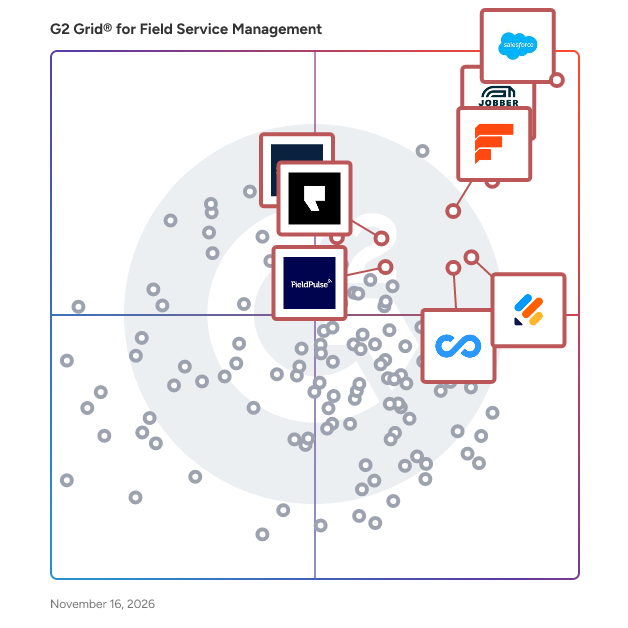
G2 Grid® for Field Service Management Software

G2 Grid® for Field Service Management Software plotting products by satisfaction and market presence

Highlighted products: Salesforce Field Service and Operations, Jobber, Simpro, Field Nation, Podium, FieldPulse, Jotform, and Connecteam.

Underlying data: [Grid® JSON](https://www.g2.com/categories/field-service-management/grids.json?focus%5B%5D=salesforce-field-service-and-operations&focus%5B%5D=jobber&focus%5B%5D=simpro&focus%5B%5D=field-nation&focus%5B%5D=podium&focus%5B%5D=fieldpulse-fieldpulse&focus%5B%5D=jotform&focus%5B%5D=connecteam&segment=small-business)

Zuper

Zuper is the most adaptable and intelligent field service management (FSM) solution that helps service businesses automate scheduling, dispatching, mobile workforce operations, and customer communications. Designed for mid-market and enterprise organizations, such as Roofing, HVAC, Plumbing, Electrical, and other field service companies—Zuper transforms technology into a competitive advantage. With Zuper’s unrivalled technology, organizations can empower field teams, delight customers and grow their businesses, transforming their teams into Zuper heroes. Key features: Intelligent Scheduling & Dispatching Automate scheduling and routing by matching jobs to the right technician based on skills, availability, territory and proximity, and generate efficient recurring routes to save travel time and fuel. Mobile App with Offline Mode Empower technicians with a user-friendly iOS/Android interface for job details, service history, checklists and customer data—even without connectivity—so they have everything they need onsite. Customer Portal & Real-Time Updates Offer end users a self-serve portal for service requests, quote approvals, job tracking, online payments and automated ETAs/notifications to keep customers informed at every step. No-Code Workflows & Automation Empower operations teams to build end-to-end workflows for scheduling, invoicing, contract renewals and notifications via drag-and-drop logic, reducing manual effort and errors. Analytics & Reporting Turn operational data into actionable insights with customizable dashboards and reports on workforce productivity, service performance and revenue trends, accelerating business growth through upsell opportunities and instant payments. Scalable Integrations Connect to 60+ best-in-class applications—such as HubSpot, QuickBooks, Zendesk and Sage—via prebuilt connectors and open APIs to maintain a unified, extensible technology stack.

Average Rating: 4.7/5.0

Total Reviews: 146

How Do G2 Users Rate Zuper?

  • Has the product been a good partner in doing business?: 9.4/10 (Category avg: 9.0/10)
  • Roles: 8.4/10 (Category avg: 8.7/10)
  • Analytics: 7.9/10 (Category avg: 8.4/10)
  • Location: 8.0/10 (Category avg: 8.5/10)

Who Is the Company Behind Zuper?

  • Seller: Zuper
  • Year Founded: 2020
  • HQ Location: Seattle, Washington
  • LinkedIn® Page: www.linkedin.com
    289 employees on LinkedIn®

Who Uses This Product?

  • Who Uses This: Director, Operations Manager
  • Top Industries: Information Technology and Services, Consumer Services
  • Company Size: 57% Small, 39% Medium

What Do G2 Reviewers Say About Zuper?

AI-generated summary from verified user reviews

Pros
  • Users praise Zuper's exceptional customer support, highlighting the team's responsiveness and tailored assistance for their business needs.
  • Users value the customization options of Zuper, tailoring the software to fit specific business needs effectively.
  • Users value the ease of use of Zuper, enjoying seamless field service operations and excellent support throughout.
  • Users value the seamless integrations of Zuper, enhancing efficiency and improving overall management of field operations.
  • Users value the easy scheduling in Zuper, enhancing field operations and improving overall efficiency in service management.
Cons
  • Users note that Zuper requires improvement in bug fixes and parts integration to enhance overall functionality.
  • Users find the long learning curve challenging, especially for first-time users adjusting to Zuper's features.
  • Users face customization difficulties with Zuper, finding it complex and needing extra support for efficient setup.
  • Users find the feature limitations in Zuper frustrating, leading to reliance on custom solutions and increased implementation times.
  • Users experience slow performance with Zuper, affecting efficiency in tasks and feature implementation.

What Are Recent G2 Reviews of Zuper?

What Are G2 Users Discussing About Zuper?

Knowify

**NEW** - Knowify now connects directly to AI platforms like Claude and ChatGPT. No generic AI advice. No reports to build. No analyst to hire. Just the insights you need to grow with confidence. ✅ “What jobs need my attention this week?” ✅ “What’s my WIP this month?” ✅ “Who’s making me the most money on commercial work?” Every job. Every number. Everything that drives profitability. Any question you’ve every had about your business. Now all you have to do is ask. ------------------------------------------------- Knowify is job management software built for trade contractors. Founded in New York City, with team members across the U.S. and Canada, Knowify supports growing subcontractors with teams ranging from 2 to 200. The platform is trusted by contractors across trades like electrical, plumbing, HVAC, drywall, and remodeling. Knowify brings estimating, job costing, scheduling, time tracking, and invoicing together in one platform. It supports construction-specific workflows including AIA billing, change orders, certified payroll, and prevailing wage tracking. Mobile tools keep field teams connected to the office, and everything stays in sync with QuickBooks Online, QuickBooks Payroll, QuickBooks time, QuickBooks Payments, and Intuit Enterprise Suite through a best-in-class two-way integration. Knowify helps contractors stay organized, on schedule, and profitable. With real-time visibility into costs and progress, contractors can manage every job more efficiently and make confident financial decisions. Knowify replaces spreadsheets and disconnected tools with one system built to support growing construction businesses. Most importantly - our fully U.S.-based support team is full of real people ready to talk and help you solve the challenges in your business. We're proud partners of the trades - and proud of our commitment to top quality software and service.

Average Rating: 4.5/5.0

Total Reviews: 103

How Do G2 Users Rate Knowify?

  • Has the product been a good partner in doing business?: 9.1/10 (Category avg: 9.0/10)
  • Roles: 6.2/10 (Category avg: 8.7/10)
  • Analytics: 7.5/10 (Category avg: 8.4/10)
  • Location: 7.2/10 (Category avg: 8.5/10)

Who Is the Company Behind Knowify?

  • Seller: Knowify
  • Company Website:
  • Year Founded: 2012
  • HQ Location: New York, NY
  • LinkedIn® Page: www.linkedin.com
    53 employees on LinkedIn®

Who Uses This Product?

  • Who Uses This: Owner
  • Top Industries: Construction
  • Company Size: 86% Small, 12% Medium

What Do G2 Reviewers Say About Knowify?

AI-generated summary from verified user reviews

Pros
  • Users find Knowify to be incredibly easy to use, benefiting from its quick implementation and responsive support team.
  • Users praise the responsive customer support of Knowify, enhancing their overall experience and satisfaction.
  • Users appreciate the convenient data management features of Knowify, enabling effortless tracking and impressive reporting capabilities.
  • Users commend Knowify for its efficient implementation and automation features, greatly enhancing productivity and job management.
  • Users value the responsive support team and appreciate the quick implementation of Knowify, enhancing their experience.
Cons
  • Users highlight a desperate need for improvements in Knowify, particularly in inventory sync, reporting, and payroll management.
  • Users express a desperate need for missing features in Knowify, impacting inventory, reporting, and payroll functionalities.
  • Users face access limitations with Knowify, impacting stability, mobile usability, and invoicing processes.
  • Users face significant invoicing issues due to challenges with reports, tax mismatches, and commission calculations.
  • Users express frustration over limited customization options, especially regarding templates and reporting capabilities in Knowify.

What Are Recent G2 Reviews of Knowify?

What Are G2 Users Discussing About Knowify?

BlueFolder

BlueFolder is a Work Order and Field Service Management Software that helps commercial service pros in the field stay on-schedule, access critical job details & work order management features in a mobile and web-based user-friendly interface. Access robust features: recurring jobs, secure custom user permissions, scheduling/dispatch, asset/equipment tracking, customer portals, & more. Reduce or eliminate paperwork using integrations with QuickBooks & more. Keep all your field techs on track and streamline operations with powerful features and a simple, user-friendly interface. Our customers regularly tell us that adopting it has been the key to realizing the productivity gains that have propelled their business to the next level. BlueFolder’s pricing plans and features are structured to meet the needs of service teams of all sizes, from small companies with only a few users to large scale enterprise organizations with hundreds of users. Schedule a demo today to see how BlueFolder can help your service team.

Average Rating: 4.3/5.0

Total Reviews: 29

How Do G2 Users Rate BlueFolder?

  • Has the product been a good partner in doing business?: 9.2/10 (Category avg: 9.0/10)
  • Roles: 8.2/10 (Category avg: 8.7/10)
  • Analytics: 8.3/10 (Category avg: 8.4/10)
  • Location: 10.0/10 (Category avg: 8.5/10)

Who Is the Company Behind BlueFolder?

Who Uses This Product?

  • Company Size: 80% Small, 23% Medium

What Are Recent G2 Reviews of BlueFolder?

What Are G2 Users Discussing About BlueFolder?

AI can help you find the answers. G2 helps you trust them.

Connect G2 to Claude or ChatGPT for answers grounded in G2's trusted reviews, comparisons, and pricing from real user insights.

How it works

QuoteIQ

QuoteIQ is the definitive all-in-one CRM and business management software built specifically for home‑service professionals—whether you’re in pressure washing, landscaping, painting, pest control, HVAC, mobile detailing, or handyman services. Designed by contractor-led founders who scaled multi-truck service businesses, QuoteIQ brings every essential tool—quoting, invoicing, scheduling, payments, marketing, client communication, photo documentation, analytics, route optimization—into one cohesive, mobile-first platform, eliminating the need for third-party add-ons or expensive integrations . At its core, QuoteIQ accelerates lead-to-cash workflows with features like MapMeasure Pro, which lets you outline properties remotely via satellite or street view, calculate area or linear footage, and instantly populate pricing into your estimates—all from your phone or tablet . InstaQuote and InstaSchedule empower customers to generate quotes and book appointments online based on real-time availability, turning your website or social profiles into active sales channels . Once a job is booked, robust job and crew scheduling tools—with drag-and-drop UIs, “on-the-way” texts, and route optimization—keep your team organized and reduce no-shows. Meanwhile, QuoteIQ Cam captures before-and-after photos and inspection forms directly within each job, linking documentation, notes, and client approval into a single accessible record . ClientHub handles two-way business texting, keeping all communication in one place without resorting to personal lines . When work is complete, QuoteIQ lets you send branded invoices, collect payments online or in-person, track outstanding balances, and automatically trigger review requests via the built-in Review Multiplier to boost your Google reputation—all while consolidating tips, expenses, and team time tracking in one dashboard . Its real-time analytics dashboard provides visibility into revenue, conversion rates, lead sources, average ticket size, profit margins, and ROI—empowering data-driven decisions in the office or on the road . Unlike platforms that fragment functionality across multiple subscriptions and integrations, QuoteIQ delivers everything under one transparent pricing model that scales with your team—starting at $29/month for beginners, $79/month for Pro users, and $149.99/month for up to ten users in the Elite tier (). That flat-fee approach offers full feature access—InstaQuote, InstaSchedule, marketing campaigns, virtual call teams, dedicated account manager, route optimization, and more—without hidden fees or surprises . Today, over 10,000 service professionals trust QuoteIQ to streamline operations, save time, close more deals, and scale their businesses—without juggling multiple tools or subscriptions

Average Rating: 4.6/5.0

Total Reviews: 20

How Do G2 Users Rate QuoteIQ?

  • Has the product been a good partner in doing business?: 9.3/10 (Category avg: 9.0/10)
  • Roles: 10.0/10 (Category avg: 8.7/10)
  • Analytics: 10.0/10 (Category avg: 8.4/10)

Who Is the Company Behind QuoteIQ?

Who Uses This Product?

  • Who Uses This: Owner
  • Top Industries: Consumer Services
  • Company Size: 105% Small

What Are Recent G2 Reviews of QuoteIQ?

Resco – Mobility & Productivity

Resco helps the world work better outside the office by making it simple to build complex mobile experiences for frontline workers. The company’s low-code tools and solutions enable organizations to build and deploy enterprise-level business apps quickly and easily. These solutions allow mobile workers to access or capture data on the go, using any mobile device, even when offline. Field teams can tackle field service, mobile sales, data collection, or any other frontline scenario while delivering valuable data back to the office. With full offline functionality, a no-code/low-code development platform, and native integration with Microsoft Dynamics 365, Power Platform, or Salesforce, Resco empowers organizations worldwide to tackle the most demanding mobile challenges faced by frontline workers. Over 800 enterprise and corporate companies from segments like utilities, retail, energy, oil & gas, manufacturing, telecommunications, transportation & logistics, or NGOs rely on Resco to simplify their frontline operations, improve efficiency, and reduce paperwork.

Average Rating: 4.5/5.0

Total Reviews: 50

How Do G2 Users Rate Resco – Mobility & Productivity?

  • Has the product been a good partner in doing business?: 9.1/10 (Category avg: 9.0/10)
  • Roles: 8.7/10 (Category avg: 8.7/10)
  • Analytics: 8.4/10 (Category avg: 8.4/10)
  • Location: 8.6/10 (Category avg: 8.5/10)

Who Is the Company Behind Resco – Mobility & Productivity?

  • Seller: Resco.net
  • Year Founded: 1999
  • HQ Location: Bratislava, Slovakia
  • LinkedIn® Page: www.linkedin.com
    322 employees on LinkedIn®

Who Uses This Product?

  • Top Industries: Information Technology and Services
  • Company Size: 44% Medium, 38% Small

What Do G2 Reviewers Say About Resco – Mobility & Productivity?

AI-generated summary from verified user reviews

Pros
  • Users find Resco's ease of use exceptional, enabling efficient task management across devices and boosting overall productivity.
  • Users value the seamless integrations of Resco, enhancing collaboration and productivity across various devices and platforms.
  • Users value the efficiency of Resco, boosting productivity and simplifying workflows across various devices and environments.
  • Users appreciate the implementation ease of Resco, benefiting from intuitive use and responsive support for seamless productivity.
  • Users value the offline access of Resco, enhancing productivity and collaboration even in low connectivity areas.
Cons
  • Users feel that missing features limit Resco's effectiveness for specific workflows, impacting its overall competitiveness.
  • Users experience syncing issues with Resco that can slow down productivity and affect app functionality.
  • Users experience sync issues that lead to slower times, impacting efficiency with the large published app.
  • Users experience bugs and syncing issues in Resco – Mobility & Productivity, especially with niche workflows and remote app updates.
  • Users face call issues with Resco, particularly with syncing and delayed updates that hinder their workflow.

What Are Recent G2 Reviews of Resco – Mobility & Productivity?

What Are G2 Users Discussing About Resco – Mobility & Productivity?

Re-flow Field Management

Re-flow is the trusted end-to-end field operations platform for highways, civils, utilities and commercial landscaping. Its intuitive, cloud-based platform streamlines every aspect of fieldwork, from job scheduling, work evidencing and resource allocation to safety, compliance and real-time reporting. Configured to the unique requirements of each industry, organisations like Breedon Group, FM Conway and Core Highways achieve greater efficiency, accuracy, and professionalism. Offline capabilities empower operatives to access crucial information, complete forms, and focus on delivering results, enhancing productivity while minimising downtime. Re-flow's market leading form system and user-friendly interface, enables teams to create forms, automate workflows, and maintain compliance with ISO standards, eliminating the need for paperwork and spreadsheets, ensuring no detail is missed. Its scalable design adapts seamlessly to the needs of businesses, from small teams to national operations.

Average Rating: 4.5/5.0

Total Reviews: 39

How Do G2 Users Rate Re-flow Field Management?

  • Has the product been a good partner in doing business?: 9.0/10 (Category avg: 9.0/10)
  • Roles: 7.6/10 (Category avg: 8.7/10)
  • Analytics: 8.0/10 (Category avg: 8.4/10)
  • Location: 5.7/10 (Category avg: 8.5/10)

Who Is the Company Behind Re-flow Field Management?

  • Seller: Re-flow
  • Company Website:
  • Year Founded: 2018
  • HQ Location: Exeter, GB
  • LinkedIn® Page: www.linkedin.com
    63 employees on LinkedIn®

Who Uses This Product?

  • Top Industries: Construction, Civil Engineering
  • Company Size: 46% Small, 41% Medium

What Do G2 Reviewers Say About Re-flow Field Management?

AI-generated summary from verified user reviews

Pros
  • Users find Re-flow Field Management to be very user-friendly, enhancing efficiency and accessibility for on-site workers.
  • Users value the phenomenal data management capabilities of Re-flow Field Management, making processes more streamlined and efficient.
  • Users commend the exceptional customer support from Re-flow, facilitating smooth integration and ongoing assistance.
  • Users value the real-time data access of Re-flow Field Management, enhancing site management and decision-making efficiency.
  • Users appreciate the easy access to detailed information on-site, enhancing communication and efficiency in field management.
Cons
  • Users find form design limited with confusing features and restricted options, complicating the user experience.
  • Users find that improvement is needed in usability and speed throughout the Re-flow Field Management system.
  • Users face connectivity issues in areas with poor signal, leading to app freezes and data syncing delays.
  • Users find the learning curve challenging, noting confusion and time consumption in mastering the platform's features.
  • Users experience issues with poor connectivity, leading to app freezes and lost data in low reception areas.

What Are Recent G2 Reviews of Re-flow Field Management?

Quickbase

Quickbase is an AI-driven platform designed to help businesses streamline their operations by adapting to their unique workflows and processes. Unlike traditional off-the-shelf software, which often requires users to conform to predefined structures, Quickbase empowers organizations to create customized solutions that align with their specific needs. This flexibility is crucial for companies seeking to eliminate inefficiencies and reduce the burden of 'Gray Work' - what we call the time-consuming tasks and manual processes that arise from using rigid software systems. The target audience for Quickbase includes businesses of all sizes across various industries that are looking to enhance their operational efficiency. Whether it's a 50 person small business or a large enterprise, organizations can benefit from a platform that allows them to connect disparate data sources, automate repetitive tasks, and scale their competitive advantages. Quickbase is particularly valuable for teams that rely on collaboration and data-driven decision-making, as it fosters an environment where information flows seamlessly and processes are optimized. Key features of Quickbase include its intuitive interface, which allows users to build custom applications without extensive coding knowledge. This user-friendly design enables teams to quickly adapt the platform to their specific workflows, ensuring that they can address unique challenges without the need for extensive IT support. Additionally, Quickbase offers powerful automation capabilities, allowing users to set up triggers and workflows that reduce manual effort and streamline operations. The platform also supports integration with various data sources, enabling businesses to consolidate their information and gain valuable insights. One of the standout benefits of Quickbase is its ability to scale with your business. As organizations grow and evolve, their processes often become more complex. Quickbase's adaptable nature ensures that users can modify their applications and workflows as needed, without the constraints typically associated with traditional software. This flexibility not only saves time but also fosters innovation, as teams can experiment with new processes and tools that enhance their productivity. By prioritizing user-centric design and adaptability, Quickbase stands out in the crowded landscape of business software solutions. It provides organizations with the tools they need to optimize their operations, reduce inefficiencies, and ultimately drive growth. With Quickbase, businesses can focus on what truly matters—leveraging their unique processes to gain a competitive edge in their respective markets.

Average Rating: 4.4/5.0

Total Reviews: 1,625

How Do G2 Users Rate Quickbase?

  • Has the product been a good partner in doing business?: 8.8/10 (Category avg: 9.0/10)

Who Is the Company Behind Quickbase?

  • Seller: Quickbase
  • Company Website:
  • Year Founded: 2012
  • HQ Location: Boston, MA
  • LinkedIn® Page: www.linkedin.com
    806 employees on LinkedIn®

Who Uses This Product?

  • Who Uses This: Project Manager, Software Engineer
  • Top Industries: Information Technology and Services, Construction
  • Company Size: 45% Medium, 30% Small

What Do G2 Reviewers Say About Quickbase?

AI-generated summary from verified user reviews

Pros
  • Users admire the ease of use of Quickbase, finding it beginner-friendly with intuitive drag-and-drop features.
  • Users value the full customization of Quickbase, enabling seamless integration and efficient business processes across various functions.
  • Users value the customizability of Quick Base, making it adaptable to various business needs and processes.
  • Users value the flexibility of Quickbase, enabling seamless customization and integration for diverse business needs.
  • Users appreciate the fully customizable nature of Quickbase, enabling smooth integration and tailored solutions for their businesses.
Cons
  • Users find the learning curve steep, especially for those without technical experience, making onboarding challenging.
  • Users express frustration over missing features in Quickbase, hindering usability and smooth workflow management.
  • Users find Quickbase not intuitive, with a clunky mobile experience that impacts overall usability and flow.
  • Users find the limited features of Quickbase can complicate use and require additional financial commitment.
  • Users find limited customization options in Quickbase hinder their ability to tailor the experience to their needs.

What Are Recent G2 Reviews of Quickbase?

What Are G2 Users Discussing About Quickbase?

MobiWork

MobiWork is a Field Services Management (FSM) software solution that helps businesses with field employees or contractors streamline operations, increase productivity, and deliver consistent, high-quality services across small, mid-size, and enterprise-level organizations. MobiWork is a mobile-first, cloud-based platform that unifies all critical field operations into one system, connecting office personnel and mobile workers in real-time. The MobiWork solution is utilized by any company with employees or contractors in the field on a regular basis. The field services management software solution is fast and responsive, ready for immediate deployment, and available worldwide. Designed for operations across 16+ industries, including HVAC Services, Plumbing Services, Oil & Gas Field Services, Pool & Spa Services, Hauling Services, and Vegetation Management Services, MobiWork addresses the core challenge of managing remote workforces, paper-based processes, and fragmented data systems. The platform's architecture is built for robust scalability, supporting customers from two users up to thousands globally. The platform centralizes job management and execution, providing consistency and visibility from quote to final payment. Core operational management includes real-time job scheduling, dispatch, mobile work orders, time tracking, and detailed job costing. For the mobile workforce, the system enables technicians to complete digital forms, capture signatures and images, and receive step-by-step guidance via patented workflow technology. Financially, the system handles customizable quoting, automated invoicing, on-site payment capture, and supports progressive billing. For enterprise needs, the platform includes AI-driven route optimization, inventory management, asset tracking, and preventative maintenance, alongside integration with ERP, CRM, and accounting systems like QuickBooks and Sage Intacct. MobiWork provides tools that support reducing operational costs and boosting productivity and efficiency, offering a consistent operational framework.

Average Rating: 4.9/5.0

Total Reviews: 77

How Do G2 Users Rate MobiWork?

  • Has the product been a good partner in doing business?: 9.9/10 (Category avg: 9.0/10)
  • Roles: 9.3/10 (Category avg: 8.7/10)
  • Analytics: 9.1/10 (Category avg: 8.4/10)
  • Location: 8.8/10 (Category avg: 8.5/10)

Who Is the Company Behind MobiWork?

  • Seller: MobiWork
  • Company Website:
  • Year Founded: 2010
  • HQ Location: Delray Beach , Florida
  • LinkedIn® Page: www.linkedin.com
    31 employees on LinkedIn®

Who Uses This Product?

  • Top Industries: Recreational Facilities and Services, Real Estate
  • Company Size: 51% Small, 36% Medium

What Do G2 Reviewers Say About MobiWork?

AI-generated summary from verified user reviews

Pros
  • Users appreciate the intuitive and user-friendly interface of MobiWork, simplifying workflows and enhancing productivity effortlessly.
  • Users appreciate MobiWork's exceptional customer support, noting quick responses and helpful troubleshooting assistance.
  • Users value the customization capabilities of MobiWork, enhancing flexibility and efficiency for various field service needs.
  • Users value the optimized dispatching and reporting features of MobiWork, enhancing productivity and customer interactions.
  • Users value the intuitive scheduling management of MobiWork, enhancing productivity and flexibility with customized workflows.
Cons
  • Users find the learning curve challenging due to complexity and a need for better user interface improvements.
  • Users find the setup process complex, making scheduling and invoicing less user-friendly and harder to navigate.
  • Users find inventory management cumbersome, requiring significant effort to achieve efficient control of parts and reports.
  • Users express concern over limited customization, wishing for easier form creation and improved integration with inventory sales.
  • Users find MobiWork's interface to have poor usability, complicating scheduling and invoicing tasks significantly.

What Are Recent G2 Reviews of MobiWork?

What Are G2 Users Discussing About MobiWork?

TrueContext

TrueContext is the field service workflow platform for today’s connected worker. It enables frontliners with smart, context-aware forms and AI-augmented mobile workflows, unlocking technician mastery and productivity at scale. The platform unifies people, processes, and data so technicians can focus on real work, not busywork — enabling data-driven field service without the data burden. Built for operational excellence, TrueContext transforms field action into strategic vision, turning every job into a source of real-time intelligence that compounds long-term success. Over 100,000 users in high-complexity, low-connectivity field environments use TrueContext every day to improve asset uptime, ensure safety and compliance, and deliver certainty to customers. --- KEY PRODUCT FEATURES Offline, cross-platform mobile forms that work anywhere, anytime TrueContext’s cross-platform mobile app delivers reliable performance in any environment. Offline capabilities let technicians access service history, go through workflows, and capture photos, signatures, and GPS coordinates without connectivity. Everything syncs automatically when your techs reconnect. Field service software needs to work where your teams work, including basements, oil rigs, and medical facilities. TrueContext stays productive regardless of location or network conditions. Build custom field service workflows without coding TrueContext’s low-code platform empowers operations teams to create, deploy, and modify guided workflows tailored to your field service needs. Operations teams can build adaptive forms with conditional logic and data validation that reduce errors and improve first-time fix rates, without IT dependencies or development time. Workflows guide technician behavior, reduce human error, and deliver audit-ready data back to enterprise systems. Operations teams control the process, and field teams get clear instructions that make complex jobs simpler. Automated field service reporting and documentation TrueContext eliminates manual paperwork by automatically generating custom reports in multiple formats (PDF, HTML, and Word) from completed forms. Reports are instantly distributed to stakeholders, customers, and back-office systems with timestamps, audit trails, and compliance-ready documentation. Administrative burden drops. Data accuracy improves. Workflow analytics show you where processes can be optimized, turning every completed job into insight that makes the next one better. Actionable, real-time analytics for field operations With configurable dashboards, you get immediate visibility into field performance metrics. Drill down into submission analytics by form, team, user, and location to identify trends and address issues before they escalate. Connect to your existing business intelligence tools for extended analysis. Add Birst integration to gain deeper insights into how field performance impacts your broader business goals.

Average Rating: 4.4/5.0

Total Reviews: 430

How Do G2 Users Rate TrueContext?

  • Has the product been a good partner in doing business?: 8.9/10 (Category avg: 9.0/10)
  • Roles: 8.3/10 (Category avg: 8.7/10)
  • Analytics: 8.2/10 (Category avg: 8.4/10)
  • Location: 8.3/10 (Category avg: 8.5/10)

Who Is the Company Behind TrueContext?

Who Uses This Product?

  • Who Uses This: Project Manager, Business Analyst
  • Top Industries: Construction, Oil & Energy
  • Company Size: 37% Medium, 32% Large

What Do G2 Reviewers Say About TrueContext?

AI-generated summary from verified user reviews

Pros
  • Users find TrueContext to be very intuitive and easy to implement, simplifying their workflow and improving efficiency.
  • Users find form creation intuitive and easy, enhancing efficiency and reducing manual effort through automation and structured workflows.
  • Users appreciate the form customization options in TrueContext, enhancing efficiency and data quality in their processes.
  • Users appreciate the streamlined data management of TrueContext, enhancing efficiency and reducing manual paperwork significantly.
  • Users appreciate the high level of customization in TrueContext, enabling tailored forms and efficient workflows.
Cons
  • Users find the steep learning curve and maintenance challenges frustrating when designing forms in TrueContext.
  • Users find the steep learning curve for advanced features in TrueContext challenging and time-consuming for implementation.
  • Users find the complexity of TrueContext's advanced features and management a significant challenge, affecting usability and efficiency.
  • Users experience significant limitations with TrueContext due to submission size, complexity, and navigation issues.
  • Users feel disappointed by the limited features of TrueContext, which restrict creativity and streamline workflows.

What Are Recent G2 Reviews of TrueContext?

Verizon Connect

Unlock your business’ full potential with Verizon Connect. We combine the power of the world’s most reliable network with AI-driven insights to bring total visibility to your fleet operations. We are more than just a provider; we’re a partner dedicated to your safety, productivity, and future sustainability. From real-time driver coaching to predictive analytics, we help provide the clarity you need to innovate, optimize, and confidently navigate the road ahead. Let’s connect.

Average Rating: 3.8/5.0

Total Reviews: 970

How Do G2 Users Rate Verizon Connect?

  • Has the product been a good partner in doing business?: 7.1/10 (Category avg: 9.0/10)
  • Roles: 4.7/10 (Category avg: 8.7/10)
  • Analytics: 5.6/10 (Category avg: 8.4/10)
  • Location: 6.0/10 (Category avg: 8.5/10)

Who Is the Company Behind Verizon Connect?

  • Seller: Verizon Connect
  • Company Website:
  • HQ Location: Atlanta, GA
  • LinkedIn® Page: www.linkedin.com
    2,086 employees on LinkedIn®
  • Ownership: VZ
  • Total Revenue (USD mm): $126,034

Who Uses This Product?

  • Who Uses This: Office Manager, Owner
  • Top Industries: Construction, Transportation/Trucking/Railroad
  • Company Size: 66% Small, 30% Medium

What Do G2 Reviewers Say About Verizon Connect?

AI-generated summary from verified user reviews

Pros
  • Users value the fantastic reporting and backend features, efficiently meeting their towing and tracking needs.
  • Users find Verizon Connect's ease of use invaluable for managing plans and accessing features effortlessly.
  • Users value the robust reporting capabilities of Verizon Connect, making data management efficient and informative.
  • Users value the fantastic reporting features of Verizon Connect, enhancing their ability to manage and analyze vehicle data.
  • Users appreciate the real-time data from Verizon Connect, enjoying efficient vehicle management and timely updates.
Cons
  • Users experience poor customer support with Verizon Connect, facing unresponsive service and unresolved issues throughout their interactions.
  • Users express frustration with Verizon Connect’s poor support, highlighting slow response times and lack of issue resolution.
  • Users are frustrated by the high costs of Verizon Connect, given its subpar service and installation issues.
  • Users express frustration with billing issues, citing unreceived invoices and unjust service interruptions due to payment disputes.
  • Users are frustrated with billing problems, often lacking invoices and facing threats of service disconnection for non-payment.

What Are Recent G2 Reviews of Verizon Connect?

What Are G2 Users Discussing About Verizon Connect?

MotionOps

MotionOps is an end-to-end software that helps service companies and trade contractors digitalize their business operations. Simple to use and quick to start, yet rich with powerful features and all the essentials a service business needs to make day-to-day operations run smoothly, maximizing the efficiency of each employee and profitability. MotionOps delivers powerful features like full-blown CRM, Proposal Builder, Scalable Scheduling, Invoicing, Change Orders, TimeSheet Tracking, Materials and Expense Tracking, Payroll Prep, Job Profitability, and HR Document Management, to name a few. If you're looking for an affordable, easy-to-use & start product, MotionOps is what you need. Visit https://motionops.com for more details.

Average Rating: 4.9/5.0

Total Reviews: 18

How Do G2 Users Rate MotionOps?

  • Has the product been a good partner in doing business?: 9.7/10 (Category avg: 9.0/10)
  • Roles: 9.6/10 (Category avg: 8.7/10)
  • Analytics: 9.6/10 (Category avg: 8.4/10)
  • Location: 9.6/10 (Category avg: 8.5/10)

Who Is the Company Behind MotionOps?

Who Uses This Product?

  • Top Industries: Construction
  • Company Size: 94% Small, 6% Medium

What Do G2 Reviewers Say About MotionOps?

AI-generated summary from verified user reviews

Pros
  • Users appreciate the ease of use of MotionOps, allowing all team members to access job details effortlessly.
  • Users value the simple use of MotionOps, enjoying easy access to all job information in one place.
  • Users value the simplicity of MotionOps, appreciating its all-in-one platform for effortless job management and communication.
  • Users rave about MotionOps' quick and caring customer support, ensuring prompt assistance for all inquiries.
  • Users love the all-in-one scheduling management of MotionOps, enhancing team communication and simplifying job organization.

What Are Recent G2 Reviews of MotionOps?

Commusoft

Commusoft is an all-in-one field service management (FSM) platform that acts as the primary "operating system" for growth-oriented trade businesses. Engineered for industries including HVAC, plumbing, electrical, and renewables, it bridges the gap between back-office strategy and field execution. Unlike basic dispatch tools, Commusoft provides the commercial depth required to manage complex service contracts and multi-site assets. The platform is natively powered by Ai:den, an AI engine that automates intelligent scheduling and route optimization to maximize technician productivity. With the Sales+ module, teams can build professional, tiered digital proposals on-site to boost conversion rates and revenue. By centralizing the entire "Lead-to-Invoice" journey and integrating seamlessly with QuickBooks, Xero, Sage, and Stripe, Commusoft provides a single source of truth. It empowers contractors to eliminate administrative friction, achieve real-time job costing, and scale their operations with absolute confidence.

Average Rating: 4.8/5.0

Total Reviews: 40

How Do G2 Users Rate Commusoft?

  • Has the product been a good partner in doing business?: 9.8/10 (Category avg: 9.0/10)
  • Roles: 9.2/10 (Category avg: 8.7/10)
  • Analytics: 8.7/10 (Category avg: 8.4/10)
  • Location: 9.0/10 (Category avg: 8.5/10)

Who Is the Company Behind Commusoft?

Who Uses This Product?

  • Who Uses This: Director
  • Top Industries: Construction, Mechanical or Industrial Engineering
  • Company Size: 98% Small, 2% Large

What Do G2 Reviewers Say About Commusoft?

AI-generated summary from verified user reviews

Pros
  • Users find Commusoft easy to use with helpful features and seamless integration, enhancing their overall experience.
  • Users highlight the helpfulness of customer support at Commusoft, enhancing their overall experience with the software.
  • Users value the easy creation process in Commusoft, enhancing job tracking and simplifying invoicing and integration.
  • Users value the easy integration with accounting software, streamlining their workflow and improving efficiency.
  • Users value the user-friendly interface of Commusoft, finding it easy to navigate and efficient.
Cons
  • Users express dissatisfaction with poor support, wishing for more accessible phone support across all license levels.

What Are Recent G2 Reviews of Commusoft?

What Are G2 Users Discussing About Commusoft?

Pega Platform

Pega is a powerful low-code platform that builds agility into the world’s leading organizations so they can adapt to change. Clients use our AI-powered decisioning and workflow automation to solve their most pressing business challenges – from personalizing engagement to automating service to streamlining operations. Since 1983, we’ve built our scalable and flexible architecture to help people focus on what matters most, so they can meet today’s customer demands while continuously transforming for tomorrow. Experience the simplicity and power of the Pega Platform today: https://www.pega.com/platform-guided-tour

Average Rating: 4.2/5.0

Total Reviews: 199

How Do G2 Users Rate Pega Platform?

  • Has the product been a good partner in doing business?: 8.3/10 (Category avg: 9.0/10)
  • Roles: 9.2/10 (Category avg: 8.7/10)
  • Analytics: 9.5/10 (Category avg: 8.4/10)
  • Location: 9.0/10 (Category avg: 8.5/10)

Who Is the Company Behind Pega Platform?

  • Seller: Pegasystems
  • Year Founded: 1983
  • HQ Location: Cambridge, MA
  • LinkedIn® Page: www.linkedin.com
    5,547 employees on LinkedIn®
  • Ownership: NASDAQ:PEGA
  • Phone: +1 (617) 374 9600

Who Uses This Product?

  • Who Uses This: Senior Software Engineer, Consultant
  • Top Industries: Information Technology and Services, Banking
  • Company Size: 68% Large, 20% Medium

What Do G2 Reviewers Say About Pega Platform?

AI-generated summary from verified user reviews

Pros
  • Users value the helpful customer support, enhancing their experience and facilitating integration with existing systems.
  • Users value the automation of complicated processes in Pega Platform, enhancing efficiency without the need for coding.
  • Users appreciate the ease of use of Pega Platform, allowing automation and integration without extensive coding knowledge.
  • Users value the easy integration and user-friendly interface of Pega Platform, enabling non-developers to enhance operations.
  • Users value the seamless integrations of Pega Platform for effective data handling and system orchestration.
Cons
  • Users face strict customization limitations in Pega Platform, hindering the ability to create desired user interfaces.
  • Users face limited features in Pega Platform, making customization challenging and restricting desired UI designs.
  • Users find the interface outdated, making customization difficult and leading to a frustrating user experience.
  • Users struggle with poor interface design, feeling restricted by stringent customization and outdated UI elements in Pega Platform.
  • Users are frustrated with the poor UI of Pega Platform, feeling constrained by strict customization limitations.

What Are Recent G2 Reviews of Pega Platform?

What Are G2 Users Discussing About Pega Platform?

Service Autopilot

Service Autopilot is a scheduling software for small business owners puts your service company on autopilot by managing scheduling, routing, field service scheduling and communication, service business marketing, billing, call center, service tickets, finances and much more.

Average Rating: 3.7/5.0

Total Reviews: 20

How Do G2 Users Rate Service Autopilot?

  • Has the product been a good partner in doing business?: 9.0/10 (Category avg: 9.0/10)
  • Roles: 10.0/10 (Category avg: 8.7/10)
  • Analytics: 8.6/10 (Category avg: 8.4/10)
  • Location: 9.5/10 (Category avg: 8.5/10)

Who Is the Company Behind Service Autopilot?

Who Uses This Product?

  • Top Industries: Consumer Services
  • Company Size: 67% Small, 48% Medium

What Are Recent G2 Reviews of Service Autopilot?

What Are G2 Users Discussing About Service Autopilot?

FieldCamp

Most field service businesses still run on a patchwork of phone calls, spreadsheets, and manual coordination. A job comes in → someone assigns it → confirms it → follows up → invoices it. At every step, a human has to run the process. FieldCamp was built to automate that entire operational layer. Unlike traditional field service management software that forces businesses into rigid workflows, FieldCamp works differently. You tell the platform how your business operates and the system adapts to your workflow, not the other way around. That flexibility comes from a two-layer architecture: • Core Layer → clients, jobs, visits, invoices, payments • Custom Layer → custom objects, workflows, fields, and operational logic tailored to your business No developers. No workarounds. No rigid templates. Across that foundation, FieldCamp runs four products that automate field operations from first contact to final payment. AI Dispatcher An optimization-based dispatch engine that evaluates: * Technician skills * Location * Availability * Workload * Multi-day routing efficiency Jobs are assigned automatically with intelligent scheduling logic — eliminating manual dispatch coordination. AI Agents Autonomous AI agents that automate: * Appointment confirmations * Rescheduling * Follow-ups * Invoice triggers * Workflow automations Configured once. Running 24/7. AI Receptionist Handles inbound calls, texts, and messages automatically. The AI receptionist can: * Qualify leads * Answer service inquiries * Schedule jobs directly into the calendar No human intervention required. AI Field Service Management Software The operational core of FieldCamp. Manages the full lifecycle: * Service requests * Scheduling * Dispatching * Work orders * Invoicing * Payment collection Accessible from both desktop and mobile. All FieldCamp products run on the same data layer. When: * the AI Receptionist books a job * the AI Dispatcher schedules it * the technician completes it …invoice generation and operational workflows trigger automatically. No duplicate entry. No disconnected systems. No manual handoffs between tools. Everything runs from one command centre. Dispatch, scheduling, client communication, invoicing, technician tracking, and AI agent activity are all visible from a single operational interface. No switching between tools. No context loss between teams. FieldCamp is designed for operations leaders managing 20–200+ field technicians across: * HVAC * Plumbing * Electrical * Cleaning * Pest Control * Landscaping * Insulation * Specialty Field Services If your business sends technicians to job sites and still relies on manual coordination, FieldCamp replaces that operational bottleneck with AI-driven automation. Key Features Automation & Dispatch AI Dispatcher Automated technician-job matching based on: * skills * location * workload * route efficiency * multi-day optimization Capacity-Based Dispatching Tracks operational constraints beyond simple availability: * vehicle capacity * equipment load * service-specific limits Hierarchical Skill Matching Jobs only assign when the required technician skill tier matches exactly. Multi-Day Route Chaining Optimizes technician schedules across multiple days, not just single appointments. AI Products AI Agents 24/7 operational workflow automation for: * scheduling * reminders * follow-ups * custom business logic AI Receptionist AI-powered inbound communication handling with direct-to-calendar booking. Operations & Scheduling Recurring & Multi-Day Scheduling Supports: * recurring service contracts * multi-day projects * grouped invoicing * automated visit generation Online Booking Customers can self-book services directly into the dispatch pipeline. Real-Time Team Location Live GPS visibility across all active technicians and routes. Revenue Operations Estimates & Quoting Create, send, approve, and convert estimates into jobs within one workflow. Invoicing & Payments Automated invoicing tied directly to job completion. Analytics & Reporting Track: * revenue trends * technician utilization * recurring vs one-time jobs * operational performance Platform & Infrastructure Custom Data Model Flexible architecture supporting custom workflows and service operations without code. Command Centre Single operational interface to monitor: * dispatch activity * AI agent status * technician locations * client communication * job pipelines * revenue operations All in real time from one dashboard. Client Pipeline Management Track the full lifecycle: lead → request → customer → active account Inventory Management Track: * parts * materials * warehouse inventory * vehicle stock * vendor purchasing Timesheet & Labor Tracking Track technician labor hours by: * job * visit * project Exportable for payroll and operational analysis. Integrations Works alongside existing tools including: * Jobber * ServiceTrade * Housecall Pro * FieldEdge * Google Calendar * QuickBooks No rip-and-replace migration required.

Average Rating: 4.8/5.0

Total Reviews: 10

How Do G2 Users Rate FieldCamp?

  • Has the product been a good partner in doing business?: 10.0/10 (Category avg: 9.0/10)
  • Roles: 10.0/10 (Category avg: 8.7/10)
  • Analytics: 10.0/10 (Category avg: 8.4/10)
  • Location: 10.0/10 (Category avg: 8.5/10)

Who Is the Company Behind FieldCamp?

Who Uses This Product?

  • Company Size: 100% Small

What Do G2 Reviewers Say About FieldCamp?

AI-generated summary from verified user reviews

Pros
  • Users commend the ease of use of FieldCamp, appreciating the intuitive interface and efficient scheduling tools.
  • Users value the easy scheduling capabilities of FieldCamp, enabling efficient technician management and job tracking.
  • Users love the intuitive interface of FieldCamp, making scheduling and job tracking effortless and efficient.
  • Users value the easy scheduling and organization features of FieldCamp, which streamline technician management and invoicing.
  • Users appreciate the time efficiency of FieldCamp, benefiting from easy scheduling and streamlined job tracking.
Cons
  • Users experience slow loading times, particularly in areas with weak internet connectivity, impacting their overall efficiency.
  • Users experience slow performance occasionally, especially with slower internet, but issues are typically resolved quickly.
  • Users wish for more customization options in FieldCamp, as current options may be insufficient for various equipment types.

What Are Recent G2 Reviews of FieldCamp?

Inia Debnath
ID
Researched and written by Inia Debnath
Updated