Best Employee Scheduling Software - Page 14

How Many Employee Scheduling Software Products Does G2 Track?

Total Products under this Category: 686

Category Stats (Nov 2026)

  • Average Rating: 4.44/5 (↑0.01 vs Oct 2026) The average rating of products in this category, based on all submitted ratings
  • Top Trending Product: Timefold (+3.06%) - Among all products in this category, Timefold recorded the largest rating increase compared to last month

Last updated: November 01, 2026

How Does G2 Rank Employee Scheduling Software Products?

Why You Can Trust G2's Software Rankings:

  • 30 Analysts and Data Experts
  • 77,200+ Authentic Reviews
  • 686+ Products
  • Unbiased Rankings

G2's software rankings are built on verified user reviews, rigorous moderation, and a consistent research methodology maintained by a team of analysts and data experts. Each product is measured using the same transparent criteria, with no paid placement or vendor influence. While reviews reflect real user experiences, which can be subjective, they offer valuable insight into how software performs in the hands of professionals. Together, these inputs power the G2 Score, a standardized way to compare tools within every category.

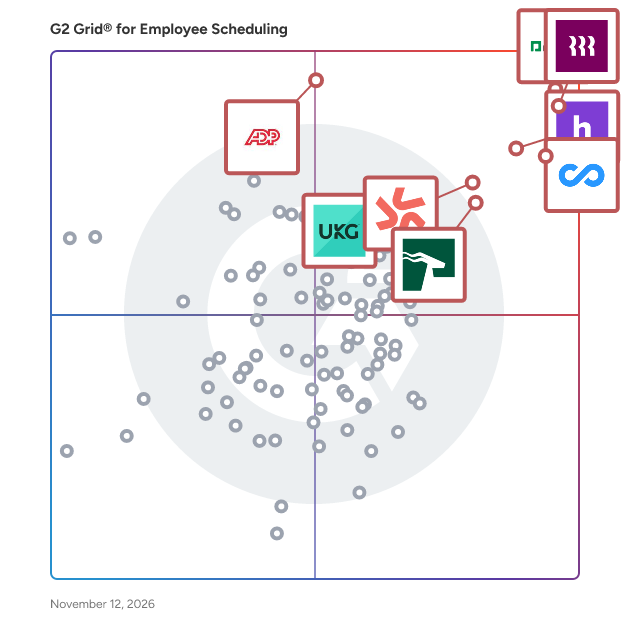
G2 Grid® for Employee Scheduling Software

G2 Grid® for Employee Scheduling Software plotting products by satisfaction and market presence

Highlighted products: Paycom, Rippling, Connecteam, Homebase, Deputy, HROne, ADP Time and Labor Management, and UKG Ready.

Underlying data: [Grid® JSON](https://www.g2.com/categories/employee-scheduling-software/grids.json?focus%5B%5D=paycom&focus%5B%5D=rippling&focus%5B%5D=connecteam&focus%5B%5D=homebase&focus%5B%5D=deputy&focus%5B%5D=uneecops-hrone&focus%5B%5D=adp-adp-time-and-labor-management&focus%5B%5D=ukg-ready)

Shyfter

Shift Work Management. Employee scheduling & time attendance app. Fixed or flexible schedules, our planning and schedule management app saves you considerable time. With leaves and absences management and time & attendance, you can track the work time of your employees in a transparent way.

Average Rating: 5.0/5.0

Total Reviews: 1

How Do G2 Users Rate Shyfter?

  • Reporting: 10.0/10 (Category avg: 8.4/10)
  • Portal: 8.3/10 (Category avg: 8.3/10)
  • Automation: 10.0/10 (Category avg: 8.5/10)

Who Is the Company Behind Shyfter?

  • Seller: Shyfter
  • Year Founded: 2019
  • HQ Location: Brussels, BE
  • LinkedIn® Page: www.linkedin.com
    27 employees on LinkedIn®

Who Uses This Product?

  • Company Size: 100% Small

What Are Recent G2 Reviews of Shyfter?

SubItUp

SubItUp is an industry-leading, intelligent and customizable online employee scheduling platform built around your business. SubItUp streamlines and improves your scheduling processes by first using a team of experts to understand them. Our workforce experts then help you configure SubItUp to automate collection of availability and schedule generation, eliminate scheduling conflicts across your enterprise, build time clocks that work for your team, communicate time-and-attendance data to your payroll software, and meet the highest accessibility and compliance standards along the way. It's time to get your time back. It's time to automate the management of your workforce. And, it's time to focus on all of the other tasks you need to do every day. SubItUp's proprietary platform was developed from the ground up to maximize the time you spend dealing with business-related tasks and minimizing workforce management issues.

Average Rating: 4.1/5.0

Total Reviews: 14

How Do G2 Users Rate SubItUp?

  • Has the product been a good partner in doing business?: 8.3/10 (Category avg: 9.1/10)

Who Is the Company Behind SubItUp?

  • Seller: SubItUp
  • Year Founded: 2010
  • HQ Location: Manchester, NH
  • LinkedIn® Page: www.linkedin.com
    12 employees on LinkedIn®

Who Uses This Product?

  • Top Industries: Higher Education
  • Company Size: 50% Small, 36% Medium

What Are Recent G2 Reviews of SubItUp?

What Are G2 Users Discussing About SubItUp?

Teamspot

Teamspot is a workforce management software solution that helps organizations plan employee schedules, track working hours, manage absences, and coordinate team operations in a centralized system. It is designed primarily for small to mid-sized businesses in industries such as retail, logistics, and manufacturing, where shift-based work, hourly tracking, and workforce visibility are critical. Teamspot supports day-to-day workforce operations by replacing spreadsheets and disconnected tools with a single platform that provides real-time insights into staffing, availability, and labor activity. The software is used by operations managers, HR teams, and business owners to coordinate schedules, monitor attendance, and enforce company policies. Employees use the platform to view shifts, clock in and out, and submit leave requests. This creates a shared, up-to-date source of truth for workforce data across the organization. Key capabilities include: - Employee scheduling: Create, edit, and manage shifts using calendar-based views with support for multiple locations, templates, and conflict detection - Time tracking and attendance:** Record working hours through clock-in/out functionality, including break tracking, overtime calculation, and exportable timesheets - Absence management:** Configure leave types, track balances, and manage approval workflows with visibility directly in the schedule - Workforce visibility and reporting:** Access real-time dashboards, weekly summaries, and reports on hours worked, attendance, and labor distribution - Team and operations management:** Maintain employee records, roles, and permissions while supporting onboarding, communication, and document storage By combining these functions, Teamspot enables organizations to manage workforce planning and execution within a single environment. It is particularly suited for companies that require coordination of shift-based employees, need accurate time tracking for payroll, and want improved visibility into staffing and labor costs.

Average Rating: 4.8/5.0

Total Reviews: 2

Who Is the Company Behind Teamspot?

Who Uses This Product?

  • Company Size: 50% Medium, 50% Small

What Are Recent G2 Reviews of Teamspot?

AI can help you find the answers. G2 helps you trust them.

Connect G2 to Claude or ChatGPT for answers grounded in G2's trusted reviews, comparisons, and pricing from real user insights.

How it works

TeamUltim

TeamUltim is a web app for personnel management and shift scheduling, which perfectly fits the needs of small and medium-sized businesses in retail, catering, sports, hospitality and professional services. Schedule shifts, manage paid time-offs and absences, let your team swap shifts and get comprehensive reporting on all of this with TeamUltim.

Average Rating: 5.0/5.0

Total Reviews: 1

Who Is the Company Behind TeamUltim?

Who Uses This Product?

  • Company Size: 100% Small

What Are Recent G2 Reviews of TeamUltim?

What Are G2 Users Discussing About TeamUltim?

TimeClock Plus by TCP

TimeClock Plus by TCP makes it easy to track employee hours, manage schedules, and handle time off, without messy spreadsheets and clunky systems. Your team can clock in however they prefer, while managers get real-time visibility to stay on top of hours, overtime, leave and absences. TimeClock Plus works with your ERP, HCM, and payroll tools to save time and reduce errors, while helping you stay compliant without the extra effort. Whether your people are in one location or many, TimeClock Plus helps you run smoother, smarter, and more efficiently so that you can focus on your people and not paperwork. From time tracking to delivering the perfect paycheck, get time right, every time.

Average Rating: 4.3/5.0

Total Reviews: 593

How Do G2 Users Rate TimeClock Plus by TCP?

  • Has the product been a good partner in doing business?: 8.7/10 (Category avg: 9.1/10)

Who Is the Company Behind TimeClock Plus by TCP?

  • Seller: TCP Software
  • Company Website:
  • Year Founded: 1988
  • HQ Location: Plano, US
  • LinkedIn® Page: www.linkedin.com
    1,386 employees on LinkedIn®

Who Uses This Product?

  • Who Uses This: Office Manager, IT Manager
  • Top Industries: Education Management, Primary/Secondary Education
  • Company Size: 54% Medium, 35% Small

What Do G2 Reviewers Say About TimeClock Plus by TCP?

AI-generated summary from verified user reviews

Pros
  • Users appreciate the ease of use of TimeClock Plus, finding it customizable and supportive for their needs.
  • Users value the responsive customer support of TimeClock Plus, appreciating prompt assistance and tailored solutions.
  • Users value the easy time and attendance tracking with real-time updates and excellent customer support from TimeClock Plus.
  • Users love the easy access and intuitive design of TimeClock Plus, streamlining employee management and tracking.
  • Users find TimeClock Plus intuitive and user-friendly, making navigation and access extremely efficient for everyone.
Cons
  • Users note the missing features of TimeClock Plus, expressing frustration over unfulfilled promises and limited reporting options.
  • Users experience clocking issues with TimeClock Plus, facing complexities and glitches affecting navigation and functionality.
  • Users note the limited customization in TimeClock Plus, especially regarding approval levels and account overview options.
  • Users find the reporting features limited, leading to frustrations despite other positive aspects of TimeClock Plus.
  • Users express frustration with the poor customer support system, struggling with case management and ineffective communication.

What Are Recent G2 Reviews of TimeClock Plus by TCP?

What Are G2 Users Discussing About TimeClock Plus by TCP?

UniFocus

UniFocus is a well-established innovator in labor-management solutions, time and attendance systems, employee engagement and customer satisfaction. Our tools leverage UniFocus's deep well of industry expertise to make easy work of labor forecasting, budgeting, scheduling and compliance. Our integrations mean that our cloud-based tools can connect to your existing systems and provide powerful business insights from any device. The robust collection of expert software, combined with outstanding consulting services and a performance guarantee, make it the most effective and reliable integrated solution for optimizing workforce performance. Built for hospitality, restaurants, retail, healthcare, senior living and any other industry with dynamic staffing needs.

Average Rating: 4.0/5.0

Total Reviews: 3

Who Is the Company Behind UniFocus?

  • Seller: UniFocus
  • Year Founded: 1998
  • HQ Location: Dallas, US
  • LinkedIn® Page: www.linkedin.com
    223 employees on LinkedIn®

Who Uses This Product?

  • Company Size: 67% Medium, 33% Small

What Are Recent G2 Reviews of UniFocus?

What Are G2 Users Discussing About UniFocus?

Weeksort

Weeksort is shift scheduling software for workplaces that build their own week, organised around Auto-assign, which proposes who works each shift within the workplace's rules. Configuration. A workplace defines the positions it schedules, the qualifications each position requires, and named sets of hour limits — hours per day, week or month, shifts and working days per week, consecutive days, and rest between shifts — applied to individual people. Only staff holding every qualification a position requires are eligible for it, and a manager can force a person in or out of a single shift. Auto-assign. Once the shifts are drawn — by hand, from a template, from a copy of a past week or as recurring shifts — a constraint solver works through every open slot. It respects eligibility, approved time off, unavailability, shifts marked Can't and each person's hour limits, with rest and consecutive days counted within the week being filled, and never books anyone on two overlapping shifts. It staffs mandatory shifts before important ones and important before optional, favours stated preferences, and by default spreads hours towards each person's own weekly target. Slots that cannot be filled within the rules are left open and listed with the blocking reasons and the people who could still be placed there by hand. Per run, a manager chooses whether to keep existing assignments and solve only the rest or re-solve the whole week, whether unanswered preferences count as available, and between spreading hours and matching preferences. Individuals can be excluded from Auto-assign and remain available for manual placement. Nothing is written until the proposal is applied, and an applied run can be undone from the builder. Staff participation, configured per workplace. A week can be published without ever being opened for preferences. When it is opened, staff rank eligible shifts on five levels, from Want a lot to Can't, individually or on manager-defined windows, with a cap on Can't answers that can be zero and can be overridden per week or per person. Outside mandatory shifts, Auto-assign can be limited to people who asked for the shift. Staff enter their own unavailability under every setting, and a manager can override it on a single shift. Staff request time off and ask for open shifts, both decided by a manager. For a handover or a swap between two people, a workplace setting decides whether a manager approves the result or the two of them settle it themselves, and handovers can be switched off entirely; hour limits still bind a trade colleagues settle themselves. Manual control. Managers build on a weekly grid of positions against days, with minute-precise shifts that may cross midnight, may require multiple people, and carry one of three coverage levels. Understaffed mandatory slots are flagged. In manual placement, hour limits are warnings a manager may override; an ineligible person (unless force-included), an overlapping shift and a full shift are refused. Publishing. Staff are notified in the app's inbox, and by email where enabled. Each publish sets visibility: each person sees only their own shifts, everyone sees the whole schedule, or holders of chosen qualifications see the whole schedule. A change to a published week notifies either only the people whose shifts moved or everyone, at the manager's choice. Reporting covers assignments over any date range with per-person totals separating worked from scheduled hours, exportable to Excel or CSV, as is each week, alongside a printable roster and a per-week hours summary against each person's limits. The interface runs in twelve languages including right-to-left Arabic and Hebrew, chosen per person. It is browser-based, with an Android app on Google Play; building the week, Auto-assign included, happens in the browser. Weeksort is made by Solvern.

Average Rating: 4.5/5.0

Total Reviews: 1

How Do G2 Users Rate Weeksort?

  • Automation: 10.0/10 (Category avg: 8.5/10)

Who Is the Company Behind Weeksort?

  • Seller: Solvern
  • Year Founded: 2026
  • HQ Location: Haifa, Israel
  • LinkedIn® Page: www.linkedin.com
    1 employees on LinkedIn®

Who Uses This Product?

  • Company Size: 100% Small

What Are Recent G2 Reviews of Weeksort?

Wiz Scheduler

Wiz Scheduler is a multi-location employee scheduling app. It builds the weekly schedule from manager and employee preferences, together with availability, roles and skill levels, so the draft reflects the preferences on file. Managers can enter preferences for everyone: preferred days (up to 3), preferred time ranges, a weekly maximum of hours, caps such as "at most N shifts in this time range a week", unavailable times, and coworker relationships (work with, keep apart, or do not schedule together, limited to people who share a location). Employees can send their own preferences once an admin turns on preference requests in Company Settings. Preference requests are off by default, and a manager approves each request and sets its weight. How preferences act is visible. A weight of 1.0 is a firm rule: that employee is not considered for the shift, and if nobody else qualifies, the shift stays open instead of being filled badly. Lower weights are soft: the employee is a less likely pick. When a shift is assigned against a soft preference, it is marked with an asterisk, so the manager sees every compromise at a glance. Managers still review and edit the draft, and the aim is simply that there is less to fix afterwards. Every generation applies hard rules: role, availability and unavailability, weekly maximum hours, and pairs marked never to be scheduled together. A minimum-rest rule between shifts (for example 11 hours) is available per location, and it is off until you set it. There are two ways to generate. Normal Generate offers random, rotation, rotation with about three months of history, and max-hours strategies, and managers can set priority weights for seniority, pay rate and overtime. AI Generate uses fixed weights and is paid from prepaid credits. Employee names are pseudonymized before anything is sent to the AI model. Other features: QR check-in on the paid plan, employee pages in 19 languages, and importers that bring data in from 7shifts and Deputy. The importers are paid-plan only, need an API token you paste in, and do not import preferences or coworker relationships. Pricing: Free plan with 2 locations, 25 employees and one schedule a month for each location, 2 attempts and no AI Generate. Pro starts at $18 a month, flat, for unlimited locations, and includes 500 employees, plus $1 for each additional 500 employees above 500. AI Generate is not included in Pro; it is paid from prepaid credit packs of $10, $25 or $50.

Average Rating: 5.0/5.0

Total Reviews: 1

How Do G2 Users Rate Wiz Scheduler?

  • Has the product been a good partner in doing business?: 10.0/10 (Category avg: 9.1/10)
  • Automation: 10.0/10 (Category avg: 8.5/10)

Who Is the Company Behind Wiz Scheduler?

Who Uses This Product?

  • Company Size: 100% Small

What Are Recent G2 Reviews of Wiz Scheduler?

Workforces.AI

Scheduling staff with Workforces.AI will decrease labor costs through automatic control inflated hours, unnecessary overtime, and labor law violations. Furthermore, it will give you compliance with company and legal regulations on a Federal and State basis

Average Rating: 5.0/5.0

Total Reviews: 1

How Do G2 Users Rate Workforces.AI?

  • Reporting: 10.0/10 (Category avg: 8.4/10)
  • Portal: 10.0/10 (Category avg: 8.3/10)
  • Automation: 8.3/10 (Category avg: 8.5/10)

Who Is the Company Behind Workforces.AI?

Who Uses This Product?

  • Company Size: 100% Small

What Are Recent G2 Reviews of Workforces.AI?

Adi Insights

Multi-site staff scheduling software and time & attendance solutions that travel with you.

Who Is the Company Behind Adi Insights?

ADVANTUM Software Suite

The ADVANTUM Software is a modular suite of logistics, labour & resource management solutions. You can use the individual modules or any combination seamlessly in one platform to improve operational efficiency. Our software modules include: • ADVANTUM Freight • ADVANTUM Logistics • ADVANTUM Port • ADVANTUM Warehouse • ADVANTUM eLabour • ADVANTUM Equipment • ADVANTUM Motor Vehicle We work closely with our clients to understand your unique needs so we can deliver a solution that works for you.

Who Is the Company Behind ADVANTUM Software Suite?

Agendize

More than just a single online appointment booking and scheduling software, Agendize develops flexible solutions, that suits well your environment thanks to our advanced APIs. Agendize has created a SaaS platform which enables any size business and any industry to improve business productivity for customer acquisition, engagement, and retention. Stay competitive by transforming the online customer journey View your customer information easily within a centralized management system Save time with an easy-to-deploy solution that synchronizes with your existing tools (CRM, calendar, emailing...)

Average Rating: 4.5/5.0

Total Reviews: 1

Who Is the Company Behind Agendize?

  • Seller: Agendize
  • Year Founded: 2003
  • HQ Location: Troyes, FR
  • LinkedIn® Page: www.linkedin.com
    22 employees on LinkedIn®

Who Uses This Product?

  • Company Size: 100% Large

What Are Recent G2 Reviews of Agendize?

What Are G2 Users Discussing About Agendize?

AgentTime

Portage Communications provides a workforce management solutions that are easy to learn and flexible in their use, call center managers from financial services, catalog sales, customer service centers, help desks, health care, utilities, government institutions and others are using our solutions for maximum productivity.

Average Rating: 4.9/5.0

Total Reviews: 5

How Do G2 Users Rate AgentTime?

  • Has the product been a good partner in doing business?: 9.2/10 (Category avg: 9.1/10)

Who Is the Company Behind AgentTime?

Who Uses This Product?

  • Company Size: 80% Medium, 20% Large

What Are Recent G2 Reviews of AgentTime?

What Are G2 Users Discussing About AgentTime?

AI Field Mgmt

Need to know in real time WHO is doing WHAT, WHEN, WHERE, WHY, and for HOW much? AI-FM is the solution for you... But is AI-FM really different? It is as Easy as 1-2-3! 1) Award Winning Tech + 2) Fair Pricing + 3) 5 Star Reviews - AI-FM has won SEVEN 2019/20 Awards from Gartner. - Pricing starts at only $7.99/user/mo or $99/mo (UNLIMITED Basic). - Please see our cherished Reviews, AI-FM is a true partner to our Members. Manage your Org, top to bottom via 1 Intelligent Platform: Employees, Contractors, Customers, Jobs, & Assets by Geography & Time. Plus, the Field can use VERBAL Commands via "Siri" or "Google Assistant" in ANY Language

Who Is the Company Behind AI Field Mgmt?

Inia Debnath
ID
Researched and written by Inia Debnath
Updated April 9, 2026