AIGNE DocSmith
Who Is the Company Behind AIGNE DocSmith?
- Seller: AIGNE DocSmith
- HQ Location: N/A
-
LinkedIn® Page: www.linkedin.com
1 employees on LinkedIn®
Total Products under this Category: 750
Last updated: October 26, 2026
Why You Can Trust G2's Software Rankings:
G2's software rankings are built on verified user reviews, rigorous moderation, and a consistent research methodology maintained by a team of analysts and data experts. Each product is measured using the same transparent criteria, with no paid placement or vendor influence. While reviews reflect real user experiences, which can be subjective, they offer valuable insight into how software performs in the hands of professionals. Together, these inputs power the G2 Score, a standardized way to compare tools within every category.
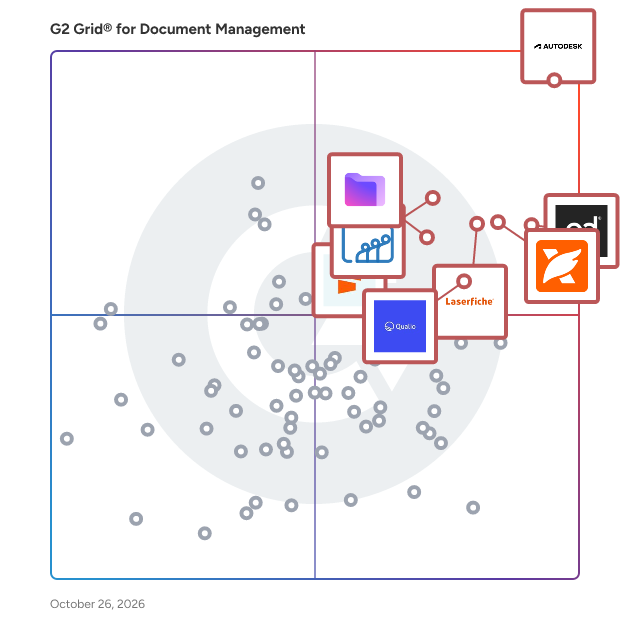
Highlighted products: Autodesk Forma (formerly Autodesk Construction Cloud), PandaDoc, Foxit PDF Editor, Laserfiche, Zoho WorkDrive, Proton Drive For Business, Qualio, and Seismic Enablement Cloud.
Underlying data: [Grid® JSON](https://www.g2.com/categories/document-management/grids.json?focus%5B%5D=autodesk-forma-formerly-autodesk-construction-cloud&focus%5B%5D=pandadoc&focus%5B%5D=foxit-pdf-editor&focus%5B%5D=laserfiche&focus%5B%5D=zoho-workdrive&focus%5B%5D=proton-drive-for-business&focus%5B%5D=qualio&focus%5B%5D=seismic-enablement-cloud)
Almarix is document filing automation software for bookkeeping and accounting firms. It streamlines the intake, naming, sorting, and filing of documents, saving administrative time. Acting as an intake layer, it integrates with existing systems, organizing documents before they reach the books. Clients can submit documents via photo, email, portal, or scanner. Almarix automatically identifies the client, renames files per firm conventions, and organizes them in cloud storage like Google Drive, Dropbox, or OneDrive. It extracts vendor details, dates, amounts, and tax information without manual entry. Almarix integrates with QuickBooks Online and Xero, posting data with attached documents. For other platforms like Sage 50, filing features remain functional. It automates document chasing, sending reminders for overdue submissions. With Canadian data residency, encryption, and audit trails, the software provides secure and compliant document management.
Connect G2 to Claude or ChatGPT for answers grounded in G2's trusted reviews, comparisons, and pricing from real user insights.
AMAGNo Digital Workplace is a single-solution document management system.
Approval Path for Confluence is a document management and approval workflow solution that helps teams review, approve, sign off, and publish Confluence content with confidence. Replace scattered email requests, manual follow-ups, and unclear approval statuses with structured, traceable document approval processes directly in Confluence. From a simple page sign-off to complex, multi-team document reviews, Approval Path provides flexible approval workflows, controlled publishing, automation, and a complete history of approval decisions. Build flexible, multi-step approval workflows Create reusable document approval workflows with unlimited steps, sequential or parallel reviews, conditional routing, voting, consent, and formal sign-off. Assign individual users, groups, managers, or external approvers to ensure the right stakeholders participate in every decision. Manage document versions and control publishing Keep approved content available to readers while teams continue editing drafts. Automatically trigger re-approval when published content changes, helping prevent unreviewed updates from being treated as approved documentation. Automate reviews and reduce approval bottlenecks Set deadlines, reminders, escalation rules, and reviewer delegations to keep documents moving. Use notifications, automation steps, webhooks, and Slack integration to connect approvals to existing team processes. Maintain a traceable audit trail Track pending approvals, reviewer decisions, comments, and approval history from a centralized dashboard. Export decision records to CSV to support internal audits, accountability, and document control requirements. Support real-world document management processes Approval Path for Confluence helps teams manage policy and procedure approvals, technical documentation reviews, knowledge base publishing, compliance documentation, change control, and cross-departmental sign-off. Keep documents current, approvals accountable, and published information controlled without moving your review process outside Confluence.
ArchiveKeeper is a comprehensive document management system (DMS) designed to facilitate the digital transformation of businesses by providing secure, compliant, and efficient document handling. It enables organizations to create, distribute, modify, archive, search, and delete documents seamlessly, ensuring that all document-related processes are streamlined and audit-proof. By centralizing document storage, ArchiveKeeper eliminates information silos, offering a unified platform for managing all types of documents. Its integrated automatic versioning ensures that the entire document history is traceable, maintaining integrity and compliance with regulations such as GDPR and GoBD. The system's encryption, role-based access controls, and support for digital signatures further enhance security and authenticity. ArchiveKeeper is certified by independent auditors according to standards like IDW PS 880, KFS/DV 1, IDW RS FAIT 1, and IDW RS FAIT 3, meeting official requirements for proper electronic archiving. Additionally, it supports the TR-ESOR-compatible XAIP format for audit-proof validation of stored document versions, providing maximum transparency and legal certainty. Key Features and Functionality: - Universal Document Support: ArchiveKeeper allows for the storage, search, and structuring of all file formats, ensuring versatility in document management. - Rapid Search Capabilities: The system offers extremely fast access to information through optimized metadata search, enhancing productivity. - Modern Web Interface: Users can intuitively access millions of documents via a high-performance web frontend from any location, facilitating remote work and collaboration. - Audit Compliance: ArchiveKeeper provides integrity protection and versioning to ensure compliance with GDPR and GoBD. Features like encryption, role-based permissions, and digital signatures are standard, safeguarding sensitive information. Primary Value and User Solutions: ArchiveKeeper addresses the critical need for secure and compliant document management in the digital era. By centralizing document storage and management, it dissolves information silos, enhancing organizational efficiency. The system's robust security measures, including encryption and access controls, protect sensitive data from unauthorized access. Its compliance with legal standards ensures that businesses meet regulatory requirements, reducing the risk of legal issues. The intuitive web interface and rapid search functionality improve user experience and productivity, allowing employees to access and manage documents effortlessly from any location. Overall, ArchiveKeeper empowers organizations to manage their documents securely, efficiently, and in full compliance with legal standards, supporting their digital transformation initiatives.
artifact.guru is a secure publishing and sharing platform for work created by AI agents. It gives teams one place to store, organize, version, and share documents, presentations, dashboards, prototypes, and other files—without losing track of the latest version. Connect artifact.guru to AI tools such as Claude, ChatGPT, Codex, Gemini CLI, and Grok through MCP, or upload files directly. Publish each artifact through a controlled link, optionally on your own domain, then update the content while keeping the same URL. Teams can choose how work is shared, invite specific viewers, and see who opened a link. Built for agencies, consultants, product teams, and business-development teams, artifact.guru turns AI-generated output into polished, accessible deliverables that are easy to share with clients and stakeholders. It supports formats including HTML, React apps, PowerPoint, Word, Excel, PDF, Markdown, Mermaid, Excalidraw, images, and zipped websites.
Aryson PDF Bates Numbering Tool is a powerful solution designed to simplify the process of adding sequential Bates numbers to PDF documents. It enables users to assign unique identifiers to each page, making document tracking, indexing, and management more efficient. The software supports batch processing, allowing multiple PDF files or folders to be numbered in a single operation. Users can fully customize Bates stamps with options like prefix, suffix, font style, size, color, and placement. It also offers advanced features such as adding confidential text, date stamps, and background text or images for better document identification and branding. The tool works seamlessly with password-protected PDFs and provides options to apply or remove encryption. With adjustable page margins, orientation, and layout settings, users get complete control over output formatting. A built-in preview feature ensures accuracy before final processing. Compatible with all Windows versions, this standalone utility works without Adobe Acrobat and delivers fast, secure, and reliable performance.
