Best Document Creation Software - Page 2

How Many Document Creation Software Products Does G2 Track?

Total Products under this Category: 343

Category Stats (Sep 2026)

  • Average Rating: 4.37/5 The average rating of products in this category, based on all submitted ratings
  • Top Trending Product: DocNexus (+2.22%) - Among all products in this category, DocNexus recorded the largest rating increase compared to last month

Last updated: September 01, 2026

How Does G2 Rank Document Creation Software Products?

Why You Can Trust G2's Software Rankings:

  • 30 Analysts and Data Experts
  • 156,500+ Authentic Reviews
  • 343+ Products
  • Unbiased Rankings

G2's software rankings are built on verified user reviews, rigorous moderation, and a consistent research methodology maintained by a team of analysts and data experts. Each product is measured using the same transparent criteria, with no paid placement or vendor influence. While reviews reflect real user experiences, which can be subjective, they offer valuable insight into how software performs in the hands of professionals. Together, these inputs power the G2 Score, a standardized way to compare tools within every category.

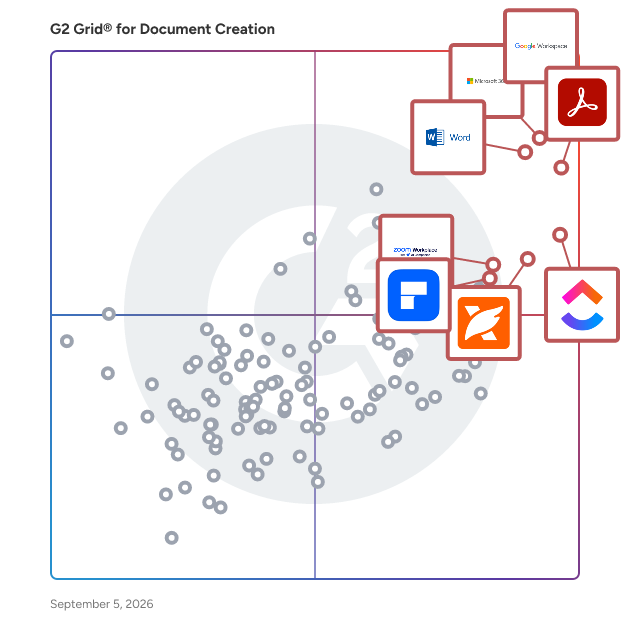
G2 Grid® for Document Creation Software

G2 Grid® for Document Creation Software plotting products by satisfaction and market presence

Highlighted products: Google Workspace, Microsoft 365, Adobe Acrobat, Microsoft Word, ClickUp, Foxit PDF Editor, Zoom Workplace, and Wondershare PDFelement.

Underlying data: [Grid® JSON](https://www.g2.com/categories/document-creation/grids.json?focus%5B%5D=google-workspace&focus%5B%5D=microsoft365&focus%5B%5D=adobe-acrobat&focus%5B%5D=microsoft-word&focus%5B%5D=clickup&focus%5B%5D=foxit-pdf-editor&focus%5B%5D=zoom-workplace&focus%5B%5D=wondershare-wondershare-pdfelement)

Zoho WorkDrive

Zoho Docs is now Zoho WorkDrive! Launched in 2019 as the successor to Zoho Docs, Zoho WorkDrive is a robust content management platform trusted by over 1 million businesses worldwide. Built for modern teams, small businesses, and enterprises, it provides secure file storage, seamless collaboration, and powerful automation features. With detailed access stats, mobile apps for Android and iOS, and a desktop sync application, WorkDrive empowers teams to work efficiently from anywhere, anytime.

Average Rating: 4.4/5.0

Total Reviews: 697

How Do G2 Users Rate Zoho WorkDrive?

  • Has the product been a good partner in doing business?: 8.8/10 (Category avg: 9.0/10)
  • Quality of Support: 8.7/10 (Category avg: 8.6/10)
  • Ease of Use: 9.1/10 (Category avg: 8.9/10)
  • Ease of Admin: 8.7/10 (Category avg: 8.9/10)

Who Is the Company Behind Zoho WorkDrive?

  • Seller: Zoho
  • Year Founded: 1996
  • HQ Location: Austin, TX
  • Twitter: @Zoho
    137,880 Twitter followers
  • LinkedIn® Page: www.linkedin.com
    30,913 employees on LinkedIn®
  • Phone: +1 (888) 900-9646

Who Uses This Product?

  • Who Uses This: Software Engineer, Owner
  • Top Industries: Information Technology and Services, Computer Software
  • Company Size: 51% Small, 35% Medium

What Do G2 Reviewers Say About Zoho WorkDrive?

AI-generated summary from verified user reviews

Pros
  • Users praise the easy-to-use interface of Zoho WorkDrive, enhancing organization and collaboration without confusion.
  • Users value the effective team collaboration features of Zoho WorkDrive, enhancing project organization and real-time teamwork.
  • Users appreciate the real-time collaboration features of Zoho WorkDrive, enhancing teamwork and productivity effortlessly.
  • Users value the real-time collaboration feature in Zoho WorkDrive, enhancing team communication and workflow efficiency.
  • Users value the seamless integration of Zoho WorkDrive across devices and apps, streamlining collaboration and organization.
Cons
  • Users experience slow file syncing with Zoho WorkDrive, especially for larger files, which can hinder productivity under tight deadlines.
  • Users experience slow performance with Zoho WorkDrive, impacting navigation, syncing, and collaboration on large projects.
  • Users experience syncing issues that can slow down workflow, especially when managing large files under tight deadlines.
  • Users note the missing features in Zoho WorkDrive, particularly compared to more integrated solutions like SharePoint.
  • Users experience performance issues with slow file syncing and poor mobile app quality, affecting overall usability.

What Are Recent G2 Reviews of Zoho WorkDrive?

What Are G2 Users Discussing About Zoho WorkDrive?

Adobe PDF Pack

Adobe Acrobat PDF Pack is a comprehensive suite of online tools designed to streamline the creation, conversion, organization, and sharing of PDF documents. Accessible via web browsers and mobile devices, it offers a user-friendly platform for managing PDFs without the need for additional software installations. Key Features and Functionality: - Create PDFs: Convert various file formats, including Microsoft Word, Excel, PowerPoint, and image files, into high-quality PDFs. - Combine and Organize: Merge multiple documents into a single PDF and rearrange pages as needed. - Export PDFs: Transform PDFs into editable Word, Excel, PowerPoint, or RTF files, facilitating easy content reuse. - Compress PDFs: Reduce file sizes for more efficient storage and sharing. - E-Signatures: Fill out, sign, and send forms digitally, as well as request signatures from others, streamlining document approval processes. - Share and Track: Distribute PDFs for review, collect feedback from multiple reviewers, and monitor the status of shared documents. Primary Value and User Solutions: Adobe Acrobat PDF Pack addresses the need for efficient document management by providing a centralized platform for handling PDFs. It simplifies tasks such as document conversion, organization, and electronic signing, thereby enhancing productivity and collaboration. By offering these tools online, it eliminates the necessity for complex software installations, making it an ideal solution for both individuals and businesses seeking a reliable and accessible PDF management system.

Average Rating: 4.5/5.0

Total Reviews: 333

How Do G2 Users Rate Adobe PDF Pack?

  • Has the product been a good partner in doing business?: 9.1/10 (Category avg: 9.0/10)
  • Quality of Support: 8.6/10 (Category avg: 8.6/10)
  • Ease of Use: 9.1/10 (Category avg: 8.9/10)
  • Ease of Admin: 9.1/10 (Category avg: 8.9/10)

Who Is the Company Behind Adobe PDF Pack?

  • Seller: Adobe
  • Year Founded: 1982
  • HQ Location: San Jose, CA
  • Twitter: @Adobe
    956,842 Twitter followers
  • LinkedIn® Page: www.linkedin.com
    42,975 employees on LinkedIn®
  • Ownership: NASDAQ:ADBE

Who Uses This Product?

  • Top Industries: Information Technology and Services, Marketing and Advertising
  • Company Size: 42% Small, 34% Medium

What Do G2 Reviewers Say About Adobe PDF Pack?

AI-generated summary from verified user reviews

Pros
  • Users love the ease of use of Adobe PDF Pack, finding its tools and integration straightforward and efficient.
  • Users value the ease of daily PDF management with Adobe PDF Pack, appreciating its comprehensive features and mobile accessibility.
  • Users find Adobe PDF Pack's PDF processing capabilities invaluable, offering seamless editing and managing tools all in one platform.
  • Users value the comprehensive document management of Adobe PDF Pack, enjoying easy access and premium tools all in one place.
  • Users value the easy installation of Adobe PDF Pack, enhancing accessibility and user experience across devices.
Cons
  • Users experience interface bugs and glitches with Adobe PDF Pack, impacting usability and file loading.
  • Users often face compatibility issues with Adobe PDF Pack, struggling to open various file types smoothly.
  • Users find the conversion process cumbersome, as editing documents becomes time-consuming and challenging.
  • Users find editing documents difficult with Adobe PDF Pack, often needing to convert to Word for easier modifications.
  • Users find editing difficulties in Adobe PDF Pack, requiring time-consuming conversions to Word for modifications.

What Are Recent G2 Reviews of Adobe PDF Pack?

What Are G2 Users Discussing About Adobe PDF Pack?

StudioBinder

Provides customizable solutions for photo and video production companies to better manage their productions, all in one place.

Average Rating: 3.8/5.0

Total Reviews: 18

How Do G2 Users Rate StudioBinder?

  • Has the product been a good partner in doing business?: 9.4/10 (Category avg: 9.0/10)
  • Quality of Support: 6.9/10 (Category avg: 8.6/10)
  • Ease of Use: 8.4/10 (Category avg: 8.9/10)
  • Ease of Admin: 9.4/10 (Category avg: 8.9/10)

Who Is the Company Behind StudioBinder?

  • Seller: StudioBinder
  • Year Founded: 2014
  • HQ Location: Santa Monica, California
  • Twitter: @studiobinder
    10,704 Twitter followers
  • LinkedIn® Page: www.linkedin.com
    26 employees on LinkedIn®

Who Uses This Product?

  • Top Industries: Entertainment
  • Company Size: 72% Small, 28% Medium

What Are Recent G2 Reviews of StudioBinder?

What Are G2 Users Discussing About StudioBinder?

Zoho Sheet

Zoho Sheet is an online spreadsheet app from Zoho's Office Suite, built for businesses of all sizes. It lets teams create, edit, and most importantly, collaborate on spreadsheets in real time. Offering all the core spreadsheet features in a clean, intuitive interface—at no cost—it delivers both productivity and value. Key features: 1. Import data or existing spreadsheets from cloud drives or devices in your preferred format (XLS, XLSX, XLSM, CSV, PDF, and more) and continue where you left off. 2. Remove duplicates, fix inconsistencies, and fill in missing values—all in no time using Zia, our in-house AI. 3. Crunch numbers with 450+ built-in functions; ask Zia for suggestions. Even better, create and use functions unique to your use cases using Deluge, our own programming language for non-developers. 4. Analyze your data further with pivot tables and slicers. Watch Zia automatically generate different pivot tables based on different aspects of your dataset. 5. Visualize your data with a variety of charts and embed them on your website or blog with full control. Not sure which chart suits your dataset best? Don't worry! Zia automatically generates relevant options at the click of a button. 6. Share your spreadsheets with different permissions, edit and chat with collaborators in real time, @mention them in comment threads, and more. 7. Maximize clarity for collaborators and maintain data integrity by setting up review and approval workflows, locking different parts of your spreadsheets, and preserving audit trails and version histories for transparency. 8. Automate repetitive tasks with VBA macros. 9. Create invoices, employee records, sales quotes, and more from within your spreadsheets using merge templates. 10. Work on the go with apps for your iOS and Android devices with instant and automatic data synchronization with the web. Have important questions you'd like to ask before you try Zoho Sheet? Please get in touch with us at support@zohosheet.com, and our product experts will assist you promptly.

Average Rating: 4.4/5.0

Total Reviews: 154

How Do G2 Users Rate Zoho Sheet?

  • Has the product been a good partner in doing business?: 9.1/10 (Category avg: 9.0/10)
  • Quality of Support: 8.7/10 (Category avg: 8.6/10)
  • Ease of Use: 9.1/10 (Category avg: 8.9/10)
  • Ease of Admin: 8.7/10 (Category avg: 8.9/10)

Who Is the Company Behind Zoho Sheet?

  • Seller: Zoho
  • Year Founded: 1996
  • HQ Location: Austin, TX
  • Twitter: @Zoho
    137,880 Twitter followers
  • LinkedIn® Page: www.linkedin.com
    30,913 employees on LinkedIn®
  • Phone: +1 (888) 900-9646

Who Uses This Product?

  • Top Industries: Computer Software, Information Technology and Services
  • Company Size: 52% Small, 36% Medium

What Do G2 Reviewers Say About Zoho Sheet?

AI-generated summary from verified user reviews

Pros
  • Users find Zoho Sheet to be incredibly easy to use, facilitating smooth integration and intuitive functionality.
  • Users find Zoho Sheet intuitive and easy to use, enhancing their workflow and simplifying data management seamlessly.
  • Users value the easy integrations of Zoho Sheet, enhancing workflow efficiency and accessibility across platforms.
  • Users admire the easy setup of Zoho Sheet, making integration and implementation into workflows swift and efficient.
  • Users value the efficiency of Zoho Sheet, benefiting from seamless integration and quick setup for enhanced productivity.
Cons
  • Users find internet dependency frustrating with Zoho Sheet, wishing for a desktop application to enhance usability.
  • Users dislike the mandatory Zoho Mail access, requiring alternate logins for those without a Zoho email.
  • Users experience slow performance and internet dependency with Zoho Sheet, hindering their productivity and efficiency.
  • Users dislike the mandatory Zoho Mail requirement, limiting login options and creating inconvenience for non-Zoho users.
  • Users wish for a desktop application to enhance offline functionality of Zoho Sheet, improving usability and access.

What Are Recent G2 Reviews of Zoho Sheet?

What Are G2 Users Discussing About Zoho Sheet?

FineReader PDF for Windows and Mac

FineReader is an all-in-one OCR and PDF software application designed to increase business productivity. It provides easy-to-use tools to access and modify information locked in paper-based documents and PDFs. ABBYY FineReader PDF 16 for Windows Digitize, retrieve, edit, protect, share, and collaborate on all kinds of documents in the same workflow. Edit digital and scanned PDFs with a newfound ease: correct whole sentences and paragraphs or even adjust the layout. Incorporate paper documents into a digital workplace with AI-based OCR technology to simplify daily work. ABBYY FineReader PDF for Mac® Manage your documents more easily and perform all document tasks quicker in digital workflows. Convert PDFs, document images and scans with unmatched accuracy Achieve new levels of productivity when converting documents with the latest OCR technology and view and reuse content from PDFs of any kind with ease. ABBYY FineReader PDF for iOS - The first smart AI-powered scanner that turns your mobile device into an all-purpose tool to quickly capture docs and books, create electronic copies in PDF and JPEG, and extract texts from scans for further editing and sharing.

Average Rating: 4.5/5.0

Total Reviews: 293

How Do G2 Users Rate FineReader PDF for Windows and Mac?

  • Has the product been a good partner in doing business?: 8.9/10 (Category avg: 9.0/10)
  • Quality of Support: 8.4/10 (Category avg: 8.6/10)
  • Ease of Use: 8.9/10 (Category avg: 8.9/10)
  • Ease of Admin: 9.1/10 (Category avg: 8.9/10)

Who Is the Company Behind FineReader PDF for Windows and Mac?

  • Seller: ABBYY
  • Company Website:
  • Year Founded: 1989
  • HQ Location: Milpitas, CA
  • Twitter: @ABBYY_Software
    3,018 Twitter followers
  • LinkedIn® Page: www.linkedin.com
    947 employees on LinkedIn®

Who Uses This Product?

  • Who Uses This: Owner, President
  • Top Industries: Translation and Localization, Information Technology and Services
  • Company Size: 74% Small, 18% Medium

What Do G2 Reviewers Say About FineReader PDF for Windows and Mac?

AI-generated summary from verified user reviews

Pros
  • Users find FineReader PDF to offer exceptional ease of use, making document editing and conversion straightforward and efficient.
  • Users value the accurate document conversion of FineReader PDF, enabling efficient edits and maintaining original layouts effortlessly.
  • Users value the easy conversion capabilities of FineReader PDF, praising its accuracy and editing flexibility for professional use.
  • Users appreciate the high accuracy of OCR in FineReader PDF, ensuring minimal errors when converting scanned documents.
  • Users appreciate the easy editing feature of FineReader PDF, simplifying document management and enhancing productivity.
Cons
  • Users find the high pricing of FineReader PDF to be a significant drawback compared to alternatives.
  • Users report a steep learning curve that can hinder productivity and complicate the initial experience with FineReader.
  • Users face difficulty with OCR accuracy and inconsistent usage between Windows and Mac, complicating the experience.
  • Users highlight missing features like limited cloud integration and inconsistent functionality between Windows and Mac versions.
  • Users frequently encounter OCR errors, particularly with low-quality scans, complicating their experience on Mac versus Windows.

What Are Recent G2 Reviews of FineReader PDF for Windows and Mac?

What Are G2 Users Discussing About FineReader PDF for Windows and Mac?

Lark

Built by ByteDance, Lark is an enterprise AI workspace designed for seamless human-agent collaboration. It unifies teams, communication, knowledge, and business workflows in one connected environment with an open architecture for AI models and agents. By bringing work into one place rather than scattering it across separate apps, Lark gives AI complete, real-time context and the native ability to act across the entire business. Today, organizations in more than 190 markets use Lark to turn AI into measurable business value.

Average Rating: 4.6/5.0

Total Reviews: 178

How Do G2 Users Rate Lark?

  • Has the product been a good partner in doing business?: 9.5/10 (Category avg: 9.0/10)
  • Quality of Support: 9.0/10 (Category avg: 8.6/10)
  • Ease of Use: 9.1/10 (Category avg: 8.9/10)
  • Ease of Admin: 9.1/10 (Category avg: 8.9/10)

Who Is the Company Behind Lark?

  • Seller: Lark Technologies
  • Year Founded: 2003
  • HQ Location: Singapore, Singapore
  • Twitter: @lark
    471 Twitter followers
  • LinkedIn® Page: www.linkedin.com
    210 employees on LinkedIn®

Who Uses This Product?

  • Top Industries: Information Technology and Services, Computer Software
  • Company Size: 48% Small, 31% Medium

What Do G2 Reviewers Say About Lark?

AI-generated summary from verified user reviews

Pros
  • Users appreciate the seamless remote work experience offered by Lark, facilitating easy collaboration across teams worldwide.
  • Users love the automation capabilities of Lark, streamlining workflows and enhancing productivity effortlessly.
  • Users appreciate the ease of use of Lark, enjoying seamless collaboration and efficient navigation across its features.
  • Users love Lark for its user-friendly features, including real-time collaboration, integrated tools, and easy navigation.
  • Users love the reminders feature of Lark, enhancing team collaboration and scheduling efficiency effortlessly.
Cons
  • Users experience occasional glitches and delays on the PC version, impacting overall performance and usability.
  • Users find the overwhelming experience of navigating numerous features and complex onboarding challenging at first.
  • Users find the overwhelming features of Lark complicate initial setup and navigation, impacting user experience.
  • Users desire more integrations with other platforms, though some improvements have been noted and custom options exist.
  • Users experience software glitches in Lark, especially with login issues and limited customization options affecting usability.

What Are Recent G2 Reviews of Lark?

What Are G2 Users Discussing About Lark?

WPS Writer

WPS Writer is a powerful and versatile word processing application designed to meet the needs of both individual users and businesses. It offers a comprehensive suite of tools for creating, editing, and formatting documents with ease. Compatible with various file formats, including Microsoft Word, WPS Writer ensures seamless collaboration and document sharing across different platforms. Key Features and Functionality: - Intuitive Interface: User-friendly design that simplifies document creation and editing. - Rich Formatting Tools: Advanced options for text formatting, paragraph alignment, and style customization. - Templates and Styles: A wide range of pre-designed templates and styles to enhance document appearance. - Collaboration Tools: Real-time collaboration features, including track changes and comments, to facilitate teamwork. - Compatibility: Supports multiple file formats, ensuring smooth interoperability with other word processors. - Cloud Integration: Seamless integration with cloud storage services for easy access and backup of documents. - Security Features: Password protection and encryption options to safeguard sensitive information. Primary Value and User Solutions: WPS Writer addresses the need for a reliable and feature-rich word processing tool that enhances productivity and collaboration. Its compatibility with various file formats ensures that users can work with documents from different sources without compatibility issues. The intuitive interface and rich set of features make it suitable for a wide range of users, from students to professionals. By offering real-time collaboration tools and cloud integration, WPS Writer facilitates efficient teamwork and document management, making it an ideal solution for both personal and business use.

Average Rating: 4.3/5.0

Total Reviews: 186

How Do G2 Users Rate WPS Writer?

  • Has the product been a good partner in doing business?: 8.5/10 (Category avg: 9.0/10)
  • Quality of Support: 8.5/10 (Category avg: 8.6/10)
  • Ease of Use: 9.1/10 (Category avg: 8.9/10)
  • Ease of Admin: 9.0/10 (Category avg: 8.9/10)

Who Is the Company Behind WPS Writer?

  • Seller: Kingsoft Office Software
  • Year Founded: 1988
  • HQ Location: Palo Alto, California
  • Twitter: @WPS_Office
    27,484 Twitter followers
  • LinkedIn® Page: www.linkedin.com
    1,838 employees on LinkedIn®
  • Ownership: KSFTF

Who Uses This Product?

  • Who Uses This: Software Engineer
  • Top Industries: Information Technology and Services, Computer Software
  • Company Size: 51% Small, 33% Medium

What Do G2 Reviewers Say About WPS Writer?

AI-generated summary from verified user reviews

Pros
  • Users find WPS Writer to be incredibly user-friendly, making document creation simple and accessible for all.
  • Users appreciate the user-friendly interface and comprehensive features of WPS Writer for creating professional documents.
  • Users value the accessibility of WPS Writer, appreciating the ability to create documents from anywhere.
  • Users find WPS Writer to be a versatile and user-friendly tool for daily document creation, accessible from anywhere.
  • Users enjoy the easy creation capabilities of WPS Writer, benefiting from its seamless interface and powerful tools.
Cons
  • Users feel the expensive subscription for advanced features diminishes value and impacts usability due to lagging performance.
  • Users find the learning curve steep with WPS Writer's spell checking, especially compared to simpler alternatives.
  • Users find the missing traditional spell check frustrating, especially with complex AI features and subscription limitations.
  • Users find WPS Writer not intuitive, citing a need for a better UI and performance improvements.
  • Users express concerns about privacy issues related to WPS Writer's cloud features affecting data security.

What Are Recent G2 Reviews of WPS Writer?

What Are G2 Users Discussing About WPS Writer?

Nitro PDF

1. What is Nitro PDF? Nitro PDF is a full-featured PDF editor that enables you to create, edit, convert, sign, and secure PDF documents. It is designed for individuals, small businesses, and enterprises as a cost-effective alternative to Adobe Acrobat, combining powerful functionality with an intuitive interface that works across devices. 2. What are the main features of Nitro PDF? Nitro PDF is a comprehensive solution for creating, editing, and securing documents across Windows, Mac, iOS, and web browsers. It includes powerful AI productivity tools and is built with an intuitive interface mirroring the Microsoft Office and Apple toolbars. Key features of Nitro PDF include: • Core Editing: Tools to create, edit, convert, combine, and annotate PDFs, including advanced OCR and secure signing capabilities. • AI Smart Tools: Enhances productivity via smart data extraction, automated form creation, and intelligent document redaction. • Nitro Analytics: Real-time visibility into PDF usage, allowing organizations to measure productivity, prove ROI, and track sustainability. • Nitro Workspace: A centralized cloud hub for accessing PDF and eSign tools, AI assistants, and administration from any device. • Advanced Editing: Create PDFs from any file type and convert PDFs into editable Microsoft Word, Excel, and PowerPoint files while maintaining original layouts. • Powerful OCR (Optical Character Recognition): Turn scanned paper documents and images into fully searchable and editable PDFs with high-accuracy text recognition. Nitro PDF is available in multiple plans to suit different business needs. 3. What support options does Nitro offer? Whether you're a five-person team or a global enterprise, our dedicated support is available 24/7. • Human Support: Nitro offers dedicated customer support, including onboarding, training, and troubleshooting resources, to ensure a smooth experience for your team. • Knowledge Base and Guides: Access hundreds of detailed articles covering product features, integrations, workflows, and best practices. • Video Tutorials: Step-by-step walkthroughs and demonstrations to help you learn and master Nitro tools quickly. • Community Forum: Connect with other Nitro users, share feedback, ask questions, and discover tips and solutions. • Knowledge Assistant: A 24/7 in-app AI assistant providing instant, context-aware guidance on features, workflows, and troubleshooting. 4. Does Nitro PDF support integrations with other business tools? Yes. Nitro PDF integrates with software such as Microsoft Office suite, OneDrive, Dropbox, and other platforms. These integrations simplify document workflows and make it easy to create, edit, and share PDFs directly within your existing environment. 5. How does Nitro ensure document security and compliance? Nitro protects sensitive information with advanced encryption, password protection, granular access controls, and tamper-evident audit trails. Nitro's solutions are designed to meet enterprise and mid-market compliance requirements, including ISO 27001, SOC 2, HIPAA, GDPR, eIDAS, UETA, and the ESIGN Act.

Average Rating: 4.4/5.0

Total Reviews: 378

How Do G2 Users Rate Nitro PDF?

  • Has the product been a good partner in doing business?: 8.9/10 (Category avg: 9.0/10)
  • Quality of Support: 8.1/10 (Category avg: 8.6/10)
  • Ease of Use: 8.8/10 (Category avg: 8.9/10)
  • Ease of Admin: 8.9/10 (Category avg: 8.9/10)

Who Is the Company Behind Nitro PDF?

  • Seller: Nitro, Inc
  • Company Website:
  • Year Founded: 2005
  • HQ Location: San Francisco, CA
  • LinkedIn® Page: www.linkedin.com
    382 employees on LinkedIn®

Who Uses This Product?

  • Who Uses This: IT Manager
  • Top Industries: Information Technology and Services, Construction
  • Company Size: 47% Small, 35% Medium

What Do G2 Reviewers Say About Nitro PDF?

AI-generated summary from verified user reviews

Pros
  • Users find Nitro PDF's ease of use remarkable, appreciating its intuitive interface and minimal learning curve.
  • Users love the easy editing features of Nitro PDF, ensuring quick and accurate document management for all skill levels.
  • Users praise Nitro PDF for its exceptional security features and comprehensive editing tools, enhancing overall productivity.
  • Users appreciate the easy conversion feature of Nitro PDF, enabling quick and accurate file management for everyone.
  • Users value the robust PDF processing capabilities of Nitro PDF, enhancing document management and streamlining workflows effectively.
Cons
  • Users report performance issues with Nitro PDF, facing slow processing and uninstallation problems with large documents.
  • Users find the pricing too high, making Nitro PDF less accessible for casual and individual users.
  • Users experience slow performance with Nitro PDF, especially when handling large documents, affecting overall efficiency.
  • Users note the limited features of Nitro PDF, particularly when compared to high-end PDF tools for complex tasks.
  • Users report significant performance issues with Nitro PDF, especially when handling large files or after updates.

What Are Recent G2 Reviews of Nitro PDF?

What Are G2 Users Discussing About Nitro PDF?

DocHub

DocHub is a browser-based solution for editing, signing, filling out, and sharing documents, built to replace the scattered mix of scanners, printers, and disconnected apps that everyday paperwork often requires. With DocHub, any lease can be finalized, a school form completed, or a client agreement reviewed in a single sitting, from first edit to final signature, without installing any software on your computer, tablet, or phone. DocHub is designed to fit directly into the tools that people are already using. Through native integrations with well-known services like Google Drive and Gmail, DocHub lets documents move from inbox to completed form without leaving a familiar workspace. There is no need to download a file, open a separate program, and re-upload it elsewhere. DocHub meets people where their documents already are, which is why it has become a natural part of how millions of users handle everyday paperwork. DocHub is trusted by more than one hundred million users, spanning from individuals completing simple personal forms to mid-sized and larger organizations running well- structured & high-volume document processes. To serve both audiences, DocHub maintains compliance with GDPR, HIPAA, and SOC 2 Type II. DocHub naturally applies artificial intelligence in a focused and practical way rather than as a separate, general-purpose chat experience layered on top. DocHub's offers built-in intelligence support for the most specific tasks: locating a clause within a large text, clarifying dense language, reorganizing a file as such, moving a delayed document forward. Such level of AI support lets DocHub function less like an added, separate tool and more like a capable, truly “smart” assistant, already familiar with all your daily tasks. DocHub serves a broad base of individuals and independent professionals. Freelancers use DocHub to send polished, signable invoices along with contracts, application forms and tax documentation. Contractors and business owners across multiple sectors use DocHub to prepare and finalize agreements on site, in the office or even while commuting between both. Solo practitioners, consultants, and service providers rely on DocHub for client-facing paperwork that needs to look professional without having a dedicated back office. DocHub is also capable of supporting other routine paperwork that has nothing to do with running business. Students use DocHub to complete enrollment forms, permission slips, and financial aid documents without hunting for a printer. Job seekers use DocHub to fill out applications and survey forms and then sign offer letters quickly. People handling routine personal administration tasks, from medical intake forms to rental applications and leases, confirm that DocHub turns a multi-step exhausting chore into an easy, doable task which does not require much time or effort.

Average Rating: 4.6/5.0

Total Reviews: 273

How Do G2 Users Rate DocHub?

  • Has the product been a good partner in doing business?: 9.2/10 (Category avg: 9.0/10)
  • Quality of Support: 8.5/10 (Category avg: 8.6/10)
  • Ease of Use: 9.0/10 (Category avg: 8.9/10)
  • Ease of Admin: 9.2/10 (Category avg: 8.9/10)

Who Is the Company Behind DocHub?

  • Seller: airSlate
  • Company Website:
  • Year Founded: 2006
  • HQ Location: Brookline, Massachusetts
  • Twitter: @airSlate
    1,234 Twitter followers
  • LinkedIn® Page: www.linkedin.com
    798 employees on LinkedIn®

Who Uses This Product?

  • Who Uses This: Owner, President
  • Top Industries: Real Estate, Construction
  • Company Size: 81% Small, 16% Medium

What Do G2 Reviewers Say About DocHub?

AI-generated summary from verified user reviews

Pros
  • Users find DocHub to be incredibly easy to use, making document management and signing a straightforward process.
  • Users value the signature functionality of DocHub, appreciating its ease of use for signing and managing PDFs.
  • Users appreciate the simplicity and straightforwardness of DocHub, making document editing and signing effortless.
  • Users value the signature features of DocHub, appreciating its ease of use and reliability for PDF management.
  • Users appreciate the intuitive design of DocHub, making PDF editing and signing refreshingly simple and efficient.
Cons
  • Users often find signature issues in DocHub, particularly with editing documents after sending them for signatures.
  • Users find that the missing features hinder advanced editing and document management, impacting their overall experience.
  • Users find DocHub not user-friendly, especially on mobile, making tasks like editing and sending documents cumbersome.
  • Users find difficult editing in DocHub, struggling with limitations on advanced features and document management.
  • Users find DocHub not user-friendly, particularly on mobile, often facing confusion and clunkiness in navigation.

What Are Recent G2 Reviews of DocHub?

What Are G2 Users Discussing About DocHub?

Hudu

Hudu is a comprehensive IT documentation platform designed to help organizations streamline their operations and improve team efficiency. It provides a centralized hub for storing critical documentation—covering everything from systems, processes, and policies to credentials, SOPs, and asset records. With Hudu, teams can ensure that important information is always organized, easy to access, and kept up to date, making day-to-day work smoother and decision-making faster. While originally built for internal IT departments and MSPs, Hudu is flexible enough to support a wide range of industries, including finance, healthcare, education, and construction. Its structure can be tailored to fit the needs of any organization, whether you're managing internal infrastructure, supporting clients, or coordinating distributed teams. Teams can build custom asset layouts to track hardware, software, or industry-specific data. Knowledge base articles and SOPs support rich formatting, embedded content, and reusable templates to keep documentation consistent and easy to follow. Passwords and OTPs are stored securely with full access controls and history tracking for auditability and compliance. Hudu supports detailed permission management, so teams can control access at a granular level across departments, roles, or clients. It integrates with popular tools like Microsoft 365, ConnectWise, HaloPSA, NinjaOne, N-able, and many more to automatically sync key data and reduce manual entry. A browser extension and mobile app make it easy to access or update documentation on the go, whether in the office or the field. For more advanced workflows, Hudu offers a powerful API, allowing teams to automate documentation or integrate with internal systems. Organizations with strict security requirements can also choose to deploy Hudu on-premises with full control over their environment. With Hudu, teams can reduce onboarding time, cut down on repetitive questions, and ensure processes are followed consistently. It replaces scattered documentation with a centralized source of truth that’s easy to manage and scale. If your team depends on shared knowledge to operate efficiently, Hudu helps you keep it organized, accessible, and secure—no matter your industry or size.

Average Rating: 4.7/5.0

Total Reviews: 358

How Do G2 Users Rate Hudu?

  • Has the product been a good partner in doing business?: 9.5/10 (Category avg: 9.0/10)
  • Quality of Support: 9.2/10 (Category avg: 8.6/10)
  • Ease of Use: 9.2/10 (Category avg: 8.9/10)
  • Ease of Admin: 9.2/10 (Category avg: 8.9/10)

Who Is the Company Behind Hudu?

  • Seller: Hudu
  • Company Website:
  • Year Founded: 2018
  • HQ Location: Fort Collins, Colorado
  • Twitter: @HuduHQ
    500 Twitter followers
  • LinkedIn® Page: www.linkedin.com
    32 employees on LinkedIn®

Who Uses This Product?

  • Who Uses This: Owner, Director
  • Top Industries: Information Technology and Services, Computer & Network Security
  • Company Size: 70% Small, 12% Medium

What Do G2 Reviewers Say About Hudu?

AI-generated summary from verified user reviews

Pros
  • Users value the clean and simple interface of Hudu, enhancing usability and customization for their unique needs.
  • Users appreciate the intuitive interface and comprehensive features of Hudu for organizing IT data efficiently.
  • Users rave about Hudu's seamless integrations, making it easy to incorporate existing systems and enhancing daily operations.
  • Users love the easy setup of Hudu, enabling quick customization and immediate access to documentation.
  • Users appreciate the clean and simple interface of Hudu, making it easy to use and customize for their needs.
Cons
  • Users find Hudu's missing features, such as a unified search bar and limited customization, affecting their overall experience.
  • Users find the poor integration process challenging and desire additional options for improved efficiency.
  • Users note that UX improvement is needed, especially in search, navigation, and overall interface design.
  • Users are disappointed by Hudu's limited features, particularly regarding support for VPS providers and third-party integrations.
  • Users face integration issues with Hudu, needing more support for third-party tools and a broader range of VPS options.

What Are Recent G2 Reviews of Hudu?

What Are G2 Users Discussing About Hudu?

ConvertAPI

Blazing Fast Document Conversion API for Developers & Enterprises ConvertAPI helps you automate document workflows with a powerful REST API that converts Word, Excel, PowerPoint, HTML, PDF, and over 500+ file formats in seconds. Whether you’re building a product, processing thousands of files per day, or need secure, scalable document handling, ConvertAPI delivers with low latency, enterprise-grade uptime (99.95% SLA), and full compliance (ISO 27001, GDPR, HIPAA). Features Below is an overview of the key functionalities: Document Conversion - Office to PDF: Convert Word (DOC, DOCX), Excel (XLS, XLSX), and PowerPoint (PPT, PPTX) documents to PDF or PDF/A formats. - PDF to Office: Transform PDFs into editable Word, Excel, and PowerPoint documents. HTML/Web to PDF: Convert HTML files or web pages to PDF using a headless Chrome browser. - Image to PDF: Convert various image formats (e.g., JPG, PNG, BMP) to PDF. - PDF to Image: Convert PDFs to image formats such as JPG, PNG, TIFF, SVG, and WebP. - eBook Conversion: Convert DJVU and other eBook formats to PDF or images. - Email Conversion: Convert EML and MSG email files to PDF or image formats. Document Processing & Transformation - Merge PDF: Combine multiple PDF documents into one PDF. - Split PDF: Split PDF into several parts, by page ranges, patterns, bookmarks and etc. - Rotate: Rotate pages in PDF. - Delete Pages: Remove unwanted pages from PDF. - Watermarking: Add text or image watermarks to PDF and images. - Flatten PDFs: Flatten PDF layers to prevent further editing. - Repair Documents: Recover corrupted or damaged PDF and DOCX files. - Rasterize PDFs: Convert vector PDFs into raster images. Security & Optimization - Password Protection: Encrypt PDF and Office documents with passwords and AES-256 encryption. - Remove Protection: Unlock password-protected PDFs. - Redact PDF: Automatically detect and redact sensitive information in PDF files using AI. - Compress PDF: Reduce PDF sizes by up to 90% without compromising quality. - PDF/A Conversion: Convert PDFs to PDF/A format for long-term archiving. - Metadata Management: Edit or remove metadata from PDF documents. - Data Extraction & OCR - Text Extraction: Extract text content from PDFs, with optional OCR for scanned documents. - Table Extraction: Extract tabular data from PDFs into CSV or Excel formats. - Image Extraction: Extract images from PDFs into various image formats. - Form Data Extraction: Extract form field data from PDFs into FDF format. - Email Attachments: Extract attachments from EML and MSG email files. Advanced Tools - Document Generation: Create DOCX or PDF documents dynamically using templates and JSON data. - Format Comparison: Compare DOCX documents to identify differences in content and formatting. - ZIP Archiving: Create ZIP archives from multiple files, with optional password protection. - For a complete list of supported conversions and tools, visit https://www.convertapi.com/api. Get started in minutes with simple integration, transparent pricing, and world-class support.

Average Rating: 4.5/5.0

Total Reviews: 44

How Do G2 Users Rate ConvertAPI?

  • Has the product been a good partner in doing business?: 8.8/10 (Category avg: 9.0/10)
  • Quality of Support: 8.8/10 (Category avg: 8.6/10)
  • Ease of Use: 9.5/10 (Category avg: 8.9/10)
  • Ease of Admin: 9.2/10 (Category avg: 8.9/10)

Who Is the Company Behind ConvertAPI?

  • Seller: ConvertAPI
  • Year Founded: 2011
  • HQ Location: N/A
  • Twitter: @convertapi
    6 Twitter followers
  • LinkedIn® Page: www.linkedin.com
    7 employees on LinkedIn®

Who Uses This Product?

  • Top Industries: Computer Software, Information Technology and Services
  • Company Size: 71% Small, 24% Medium

What Do G2 Reviewers Say About ConvertAPI?

AI-generated summary from verified user reviews

Pros
  • Users find ConvertAPI to be very straightforward, making implementation and usage quick and efficient for various needs.
  • Users value the API integration of ConvertAPI, enhancing flexibility and enabling seamless workflow automation.
  • Users value the easy integrations of ConvertAPI, enabling seamless functionality across various platforms and languages.
  • Users value the comprehensive converters of ConvertAPI, appreciating its ease of use and excellent support features.
  • Users value the easy integrations with ConvertAPI, appreciating its wide variety of converters and excellent documentation.
Cons
  • Users find ConvertAPI expensive, especially for small businesses needing cost-effective options for occasional conversions.
  • Users desire more affordable pricing options to better accommodate small businesses and infrequent converters.
  • Users regret the missing features like account hold options and lack of support for certain file formats.
  • Users are frustrated with the data restrictions as ConvertAPI doesn't support xlsm file extensions, limiting usability.
  • Users find the limited features of ConvertAPI frustrating, especially the lack of an account hold option.

What Are Recent G2 Reviews of ConvertAPI?

What Are G2 Users Discussing About ConvertAPI?

IronPDF

IronPDF is the leading C# PDF library for generating & editing PDFs. Its user friendly API allows developers to rapidly deliver professional, high quality PDFs from HTML in .NET projects.

Average Rating: 4.9/5.0

Total Reviews: 64

How Do G2 Users Rate IronPDF?

  • Has the product been a good partner in doing business?: 7.1/10 (Category avg: 9.0/10)
  • Quality of Support: 9.4/10 (Category avg: 8.6/10)
  • Ease of Use: 9.9/10 (Category avg: 8.9/10)
  • Ease of Admin: 7.5/10 (Category avg: 8.9/10)

Who Is the Company Behind IronPDF?

  • Seller: Iron Software
  • Year Founded: 2016
  • HQ Location: Chicago, IL
  • Twitter: @ironsoftwaredev
    143 Twitter followers
  • LinkedIn® Page: www.linkedin.com
    56 employees on LinkedIn®

Who Uses This Product?

  • Top Industries: Accounting, Information Technology and Services
  • Company Size: 66% Small, 26% Medium

What Do G2 Reviewers Say About IronPDF?

AI-generated summary from verified user reviews

Pros
  • Users appreciate the time-saving and formatting features of IronPDF, enabling professional and organized PDF generation effortlessly.
  • Users highlight the ease of use of IronPDF, making PDF creation smooth and professional for various projects.
  • Users value the product quality of IronPDF, as it maintains formatting and enhances the professionalism of documents.
  • Users value the easy integrations of IronPDF, enabling seamless PDF generation within existing systems effortlessly.
  • Users value the easy integration of IronPDF, enabling seamless creation of professional and consistent PDF documents.
Cons
  • Users find debugging rendering issues challenging with IronPDF, particularly when handling large workloads.
  • Users struggle with bug issues, including difficulties in debugging rendering problems and slow OCR performance under heavy loads.
  • Users find the customization options for fonts and styles limited, affecting their design flexibility with IronPDF.
  • Users find the licensing cost to be high, making it challenging for smaller teams and ongoing projects.
  • Users feel the high licensing cost makes it challenging for smaller teams and ongoing projects to adopt IronPDF.

What Are Recent G2 Reviews of IronPDF?

Microsoft Loop

Microsoft Loop is the next-generation co-creation experience that brings together teams, content, and tasks across your apps and devices.

Average Rating: 4.4/5.0

Total Reviews: 11

How Do G2 Users Rate Microsoft Loop?

  • Has the product been a good partner in doing business?: 10.0/10 (Category avg: 9.0/10)
  • Quality of Support: 9.0/10 (Category avg: 8.6/10)
  • Ease of Use: 8.8/10 (Category avg: 8.9/10)
  • Ease of Admin: 10.0/10 (Category avg: 8.9/10)

Who Is the Company Behind Microsoft Loop?

  • Seller: Microsoft
  • Year Founded: 1975
  • HQ Location: Redmond, Washington
  • Twitter: @microsoft
    13,091,739 Twitter followers
  • LinkedIn® Page: www.linkedin.com
    232,750 employees on LinkedIn®
  • Ownership: MSFT

Who Uses This Product?

  • Company Size: 45% Large, 45% Medium

What Do G2 Reviewers Say About Microsoft Loop?

AI-generated summary from verified user reviews

Pros
  • Users appreciate the ease of real-time collaboration in Microsoft Loop, enhancing teamwork across Microsoft 365 apps.
  • Users find Microsoft Loop to offer ease of use with seamless integration and real-time collaboration across Microsoft 365 apps.
  • Users love the synchronized integrations of Microsoft Loop with Microsoft 365 apps, enhancing collaboration and project management.
  • Users commend the seamless integration of Microsoft Loop with Microsoft 365 apps, enhancing collaboration and project management.
  • Users appreciate the integration of Microsoft apps, allowing seamless collaboration and accessibility for team members.
Cons
  • Users find Microsoft Loop's difficulties in feature polish and team alignment can create confusion and uncertainty in usage.
  • Users find Microsoft Loop's functionality severely limited due to its dependency on an internet connection.
  • Users desire more advanced features in Microsoft Loop for enhanced project management and customization options.
  • Users find the missing features in Microsoft Loop can make it feel less polished and create confusion in collaboration.
  • Users find Microsoft Loop not intuitive, leading to confusion on usage compared to other Microsoft 365 applications.

What Are Recent G2 Reviews of Microsoft Loop?

Zoho Writer

Zoho Writer is an online word processor that allows you to write, edit, and collaborate on documents, as well as publish them on multiple platforms. With powerful editing tools, an AI-powered, multilingual writing assistant, and a multi-stage approval workflow, Writer is just the right tool for all your content-writing needs. Writer is a powerful, cloud-based word processor that allows you to easily and efficiently create online documents. With Writer you can: Collaborate with your team in real-time and leverage their collective knowledge to build informative and engaging documents Receive writing and style suggestions from the smart writing assistant Instantly check for plagiarized and duplicated content in your document Automate document creation and simplify business processes with mail merge, fillable forms, and e-signature collection Confidently finalize all documents with multi-stage document approval workflows Publish and distribute documents in multiple channels directly from the Writer platform Maximize your productivity with extensions Create and edit documents from anywhere, on any device with apps for iOS and Android and mobile web browser support Create, edit, and collaborate on documents from the comfort of your PC with desktop app Writer's compatibility with popular platforms like MS Word and OpenOffice, along with its integration with over 25 productivity apps and document platforms including Zoho CRM, Zoho Creator, Adobe Sign, WordPress, Google Drive, Dropbox, and OneDrive make it the ideal document creation application.

Average Rating: 4.4/5.0

Total Reviews: 96

How Do G2 Users Rate Zoho Writer?

  • Has the product been a good partner in doing business?: 9.4/10 (Category avg: 9.0/10)
  • Quality of Support: 8.8/10 (Category avg: 8.6/10)
  • Ease of Use: 9.2/10 (Category avg: 8.9/10)
  • Ease of Admin: 9.8/10 (Category avg: 8.9/10)

Who Is the Company Behind Zoho Writer?

  • Seller: Zoho
  • Year Founded: 1996
  • HQ Location: Austin, TX
  • Twitter: @Zoho
    137,880 Twitter followers
  • LinkedIn® Page: www.linkedin.com
    30,913 employees on LinkedIn®
  • Phone: +1 (888) 900-9646

Who Uses This Product?

  • Who Uses This: Professor
  • Top Industries: Higher Education, Computer Software
  • Company Size: 67% Small, 32% Medium

What Do G2 Reviewers Say About Zoho Writer?

AI-generated summary from verified user reviews

Pros
  • Users appreciate the easy access offered by Zoho Writer, seamlessly integrating with OneDrive for smooth document management.
  • Users appreciate the easy integrations of Zoho Writer, seamlessly accessing and importing documents from OneDrive.
  • Users appreciate the clean interface and excellent export options of Zoho Writer, enhancing their writing experience.
  • Users appreciate the seamless integrations in Zoho Writer, enhancing document accessibility and streamlining workflow efficiency.
  • Users love the reliability of Zoho Writer, appreciating its organized interface and seamless integration with OneDrive.

What Are Recent G2 Reviews of Zoho Writer?

What Are G2 Users Discussing About Zoho Writer?

Smallpdf

Smallpdf is the Zurich-based company behind one of the world’s most popular and trusted PDF editing software suites. Founded in 2013, Smallpdf offers secure and easy-to-use PDF software that over 1 billion users have used to compress, translate, sign, edit, merge, and convert PDF documents online, on their computers, or mobile devices. Smallpdf is built for individual professionals and teams of all sizes. Smallpdf Pro gives individual users unlimited access to all 40+ tools, AI-powered features, OCR, strong compression, and mobile app access. Smallpdf Pro for Teams adds member access management, special discounted pricing, centralized billing, and priority support. No onboarding or IT setup is required, and the platform works on web, Windows desktop, and mobile (iOS and Android). It also integrates natively with Google Drive, Microsoft OneDrive, and Dropbox. Security is a core part of Smallpdf: it is ISO/IEC 27001-certified and GDPR-, CCPA-, and nFADP-compliant. It uses 256-bit TLS encryption, and files are automatically deleted from servers after processing for added peace of mind.

Average Rating: 4.5/5.0

Total Reviews: 299

How Do G2 Users Rate Smallpdf?

  • Has the product been a good partner in doing business?: 9.2/10 (Category avg: 9.0/10)
  • Quality of Support: 8.7/10 (Category avg: 8.6/10)
  • Ease of Use: 9.4/10 (Category avg: 8.9/10)
  • Ease of Admin: 9.5/10 (Category avg: 8.9/10)

Who Is the Company Behind Smallpdf?

  • Seller: Smallpdf
  • Year Founded: 2013
  • HQ Location: Zurich
  • Twitter: @smallpdf
    8,080 Twitter followers
  • LinkedIn® Page: www.linkedin.com
    77 employees on LinkedIn®

Who Uses This Product?

  • Who Uses This: Administrative Assistant, Consultant
  • Top Industries: Information Technology and Services, Computer Software
  • Company Size: 48% Small, 38% Medium

What Do G2 Reviewers Say About Smallpdf?

AI-generated summary from verified user reviews

Pros
  • Users appreciate the ease of use of Smallpdf, praising its smooth interface and comprehensive functionality across devices.
  • Users love the easy conversion process of Smallpdf, enabling fast and efficient PDF format transformations.
  • Users praise Smallpdf for its easy PDF processing, streamlining tasks like merging, compressing, and converting files effortlessly.
  • Users find easy editing in Smallpdf makes their PDF tasks faster and more efficient, enhancing overall productivity.
  • Users love the ease of use and comprehensive functionalities of Smallpdf for all their PDF needs.
Cons
  • Users note limited features in Smallpdf compared to competitors, impacting flexibility and overall functionality.
  • Users find the service expensive, as many features require a costly upgrade for frequent use and extra functionality.
  • Users report unexpected additional costs from Smallpdf, even after canceling subscriptions, causing frustration and distrust.
  • Users find conversion issues with Smallpdf, noting functionality limits, cost concerns, and quality loss in images.
  • Users find difficult navigation on Smallpdf, especially when accessing various image formats and customizable options.

What Are Recent G2 Reviews of Smallpdf?

What Are G2 Users Discussing About Smallpdf?

Neeraja Prakash
NP
Researched and written by Neeraja Prakash
Updated April 10, 2026