Top Free Document Creation Software - Page 2

How Many Document Creation Software Products Does G2 Track?

Total Products under this Category: 338

Category Stats (Oct 2026)

  • Average Rating: 4.38/5 The average rating of products in this category, based on all submitted ratings
  • Top Trending Product: Lasernet (+0.89%) - Among all products in this category, Lasernet recorded the largest rating increase compared to last month

Last updated: October 13, 2026

How Does G2 Rank Document Creation Software Products?

Why You Can Trust G2's Software Rankings:

  • 30 Analysts and Data Experts
  • 157,200+ Authentic Reviews
  • 338+ Products
  • Unbiased Rankings

G2's software rankings are built on verified user reviews, rigorous moderation, and a consistent research methodology maintained by a team of analysts and data experts. Each product is measured using the same transparent criteria, with no paid placement or vendor influence. While reviews reflect real user experiences, which can be subjective, they offer valuable insight into how software performs in the hands of professionals. Together, these inputs power the G2 Score, a standardized way to compare tools within every category.

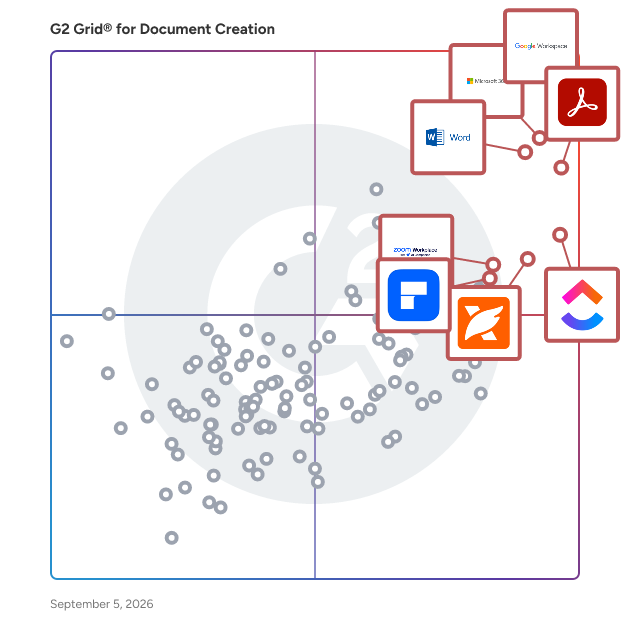
G2 Grid® for Document Creation Software

G2 Grid® for Document Creation Software plotting products by satisfaction and market presence

Highlighted products: Google Workspace, Microsoft 365, Adobe Acrobat, Microsoft Word, ClickUp, Foxit PDF Editor, Zoom Workplace, and Wondershare PDFelement.

Underlying data: [Grid® JSON](https://www.g2.com/categories/document-creation/grids.json?focus%5B%5D=google-workspace&focus%5B%5D=microsoft365&focus%5B%5D=adobe-acrobat&focus%5B%5D=microsoft-word&focus%5B%5D=clickup&focus%5B%5D=foxit-pdf-editor&focus%5B%5D=zoom-workplace&focus%5B%5D=wondershare-wondershare-pdfelement)

Hudu

Hudu is a comprehensive IT documentation platform designed to help organizations streamline their operations and improve team efficiency. It provides a centralized hub for storing critical documentation—covering everything from systems, processes, and policies to credentials, SOPs, and asset records. With Hudu, teams can ensure that important information is always organized, easy to access, and kept up to date, making day-to-day work smoother and decision-making faster. While originally built for internal IT departments and MSPs, Hudu is flexible enough to support a wide range of industries, including finance, healthcare, education, and construction. Its structure can be tailored to fit the needs of any organization, whether you're managing internal infrastructure, supporting clients, or coordinating distributed teams. Teams can build custom asset layouts to track hardware, software, or industry-specific data. Knowledge base articles and SOPs support rich formatting, embedded content, and reusable templates to keep documentation consistent and easy to follow. Passwords and OTPs are stored securely with full access controls and history tracking for auditability and compliance. Hudu supports detailed permission management, so teams can control access at a granular level across departments, roles, or clients. It integrates with popular tools like Microsoft 365, ConnectWise, HaloPSA, NinjaOne, N-able, and many more to automatically sync key data and reduce manual entry. A browser extension and mobile app make it easy to access or update documentation on the go, whether in the office or the field. For more advanced workflows, Hudu offers a powerful API, allowing teams to automate documentation or integrate with internal systems. Organizations with strict security requirements can also choose to deploy Hudu on-premises with full control over their environment. With Hudu, teams can reduce onboarding time, cut down on repetitive questions, and ensure processes are followed consistently. It replaces scattered documentation with a centralized source of truth that’s easy to manage and scale. If your team depends on shared knowledge to operate efficiently, Hudu helps you keep it organized, accessible, and secure—no matter your industry or size.

Average Rating: 4.7/5.0

Total Reviews: 361

How Do G2 Users Rate Hudu?

  • Has the product been a good partner in doing business?: 9.5/10 (Category avg: 9.0/10)
  • Quality of Support: 9.2/10 (Category avg: 8.6/10)
  • Ease of Use: 9.2/10 (Category avg: 8.9/10)
  • Ease of Admin: 9.2/10 (Category avg: 8.9/10)

Who Is the Company Behind Hudu?

  • Seller: Hudu
  • Company Website:
  • Year Founded: 2018
  • HQ Location: Fort Collins, Colorado
  • Twitter: @HuduHQ
    500 Twitter followers
  • LinkedIn® Page: www.linkedin.com
    40 employees on LinkedIn®

Who Uses This Product?

  • Who Uses This: Owner, Director
  • Top Industries: Information Technology and Services, Computer & Network Security
  • Company Size: 71% Small, 12% Medium

What Do G2 Reviewers Say About Hudu?

AI-generated summary from verified user reviews

Pros
  • Users value the clean and simple interface of Hudu, enhancing usability and customization for their unique needs.
  • Users appreciate the intuitive interface and comprehensive features of Hudu for organizing IT data efficiently.
  • Users rave about Hudu's seamless integrations, making it easy to incorporate existing systems and enhancing daily operations.
  • Users love the easy setup of Hudu, enabling quick customization and immediate access to documentation.
  • Users appreciate the clean and simple interface of Hudu, making it easy to use and customize for their needs.
Cons
  • Users find Hudu's missing features, such as a unified search bar and limited customization, affecting their overall experience.
  • Users find the poor integration process challenging and desire additional options for improved efficiency.
  • Users note that UX improvement is needed, especially in search, navigation, and overall interface design.
  • Users are disappointed by Hudu's limited features, particularly regarding support for VPS providers and third-party integrations.
  • Users face integration issues with Hudu, needing more support for third-party tools and a broader range of VPS options.

What Are Recent G2 Reviews of Hudu?

What Are G2 Users Discussing About Hudu?

IronPDF

IronPDF is the leading C# PDF library for generating & editing PDFs. Its user friendly API allows developers to rapidly deliver professional, high quality PDFs from HTML in .NET projects.

Average Rating: 4.9/5.0

Total Reviews: 64

How Do G2 Users Rate IronPDF?

  • Has the product been a good partner in doing business?: 7.1/10 (Category avg: 9.0/10)
  • Quality of Support: 9.4/10 (Category avg: 8.6/10)
  • Ease of Use: 9.9/10 (Category avg: 8.9/10)
  • Ease of Admin: 7.5/10 (Category avg: 8.9/10)

Who Is the Company Behind IronPDF?

  • Seller: Iron Software
  • Year Founded: 2016
  • HQ Location: Chicago, IL
  • Twitter: @ironsoftwaredev
    143 Twitter followers
  • LinkedIn® Page: www.linkedin.com
    56 employees on LinkedIn®

Who Uses This Product?

  • Top Industries: Accounting, Information Technology and Services
  • Company Size: 66% Small, 26% Medium

What Do G2 Reviewers Say About IronPDF?

AI-generated summary from verified user reviews

Pros
  • Users appreciate the time-saving and formatting features of IronPDF, enabling professional and organized PDF generation effortlessly.
  • Users highlight the ease of use of IronPDF, making PDF creation smooth and professional for various projects.
  • Users value the product quality of IronPDF, as it maintains formatting and enhances the professionalism of documents.
  • Users value the easy integrations of IronPDF, enabling seamless PDF generation within existing systems effortlessly.
  • Users value the easy integration of IronPDF, enabling seamless creation of professional and consistent PDF documents.
Cons
  • Users find debugging rendering issues challenging with IronPDF, particularly when handling large workloads.
  • Users struggle with bug issues, including difficulties in debugging rendering problems and slow OCR performance under heavy loads.
  • Users find the customization options for fonts and styles limited, affecting their design flexibility with IronPDF.
  • Users find the licensing cost to be high, making it challenging for smaller teams and ongoing projects.
  • Users feel the high licensing cost makes it challenging for smaller teams and ongoing projects to adopt IronPDF.

What Are Recent G2 Reviews of IronPDF?

ConvertAPI

Blazing Fast Document Conversion API for Developers & Enterprises ConvertAPI helps you automate document workflows with a powerful REST API that converts Word, Excel, PowerPoint, HTML, PDF, and over 500+ file formats in seconds. Whether you’re building a product, processing thousands of files per day, or need secure, scalable document handling, ConvertAPI delivers with low latency, enterprise-grade uptime (99.95% SLA), and full compliance (ISO 27001, GDPR, HIPAA). Features Below is an overview of the key functionalities: Document Conversion - Office to PDF: Convert Word (DOC, DOCX), Excel (XLS, XLSX), and PowerPoint (PPT, PPTX) documents to PDF or PDF/A formats. - PDF to Office: Transform PDFs into editable Word, Excel, and PowerPoint documents. HTML/Web to PDF: Convert HTML files or web pages to PDF using a headless Chrome browser. - Image to PDF: Convert various image formats (e.g., JPG, PNG, BMP) to PDF. - PDF to Image: Convert PDFs to image formats such as JPG, PNG, TIFF, SVG, and WebP. - eBook Conversion: Convert DJVU and other eBook formats to PDF or images. - Email Conversion: Convert EML and MSG email files to PDF or image formats. Document Processing & Transformation - Merge PDF: Combine multiple PDF documents into one PDF. - Split PDF: Split PDF into several parts, by page ranges, patterns, bookmarks and etc. - Rotate: Rotate pages in PDF. - Delete Pages: Remove unwanted pages from PDF. - Watermarking: Add text or image watermarks to PDF and images. - Flatten PDFs: Flatten PDF layers to prevent further editing. - Repair Documents: Recover corrupted or damaged PDF and DOCX files. - Rasterize PDFs: Convert vector PDFs into raster images. Security & Optimization - Password Protection: Encrypt PDF and Office documents with passwords and AES-256 encryption. - Remove Protection: Unlock password-protected PDFs. - Redact PDF: Automatically detect and redact sensitive information in PDF files using AI. - Compress PDF: Reduce PDF sizes by up to 90% without compromising quality. - PDF/A Conversion: Convert PDFs to PDF/A format for long-term archiving. - Metadata Management: Edit or remove metadata from PDF documents. - Data Extraction & OCR - Text Extraction: Extract text content from PDFs, with optional OCR for scanned documents. - Table Extraction: Extract tabular data from PDFs into CSV or Excel formats. - Image Extraction: Extract images from PDFs into various image formats. - Form Data Extraction: Extract form field data from PDFs into FDF format. - Email Attachments: Extract attachments from EML and MSG email files. Advanced Tools - Document Generation: Create DOCX or PDF documents dynamically using templates and JSON data. - Format Comparison: Compare DOCX documents to identify differences in content and formatting. - ZIP Archiving: Create ZIP archives from multiple files, with optional password protection. - For a complete list of supported conversions and tools, visit https://www.convertapi.com/api. Get started in minutes with simple integration, transparent pricing, and world-class support.

Average Rating: 4.5/5.0

Total Reviews: 44

How Do G2 Users Rate ConvertAPI?

  • Has the product been a good partner in doing business?: 8.8/10 (Category avg: 9.0/10)
  • Quality of Support: 8.8/10 (Category avg: 8.6/10)
  • Ease of Use: 9.5/10 (Category avg: 8.9/10)
  • Ease of Admin: 9.2/10 (Category avg: 8.9/10)

Who Is the Company Behind ConvertAPI?

  • Seller: ConvertAPI
  • Year Founded: 2011
  • HQ Location: N/A
  • Twitter: @convertapi
    6 Twitter followers
  • LinkedIn® Page: www.linkedin.com
    6 employees on LinkedIn®

Who Uses This Product?

  • Top Industries: Computer Software, Information Technology and Services
  • Company Size: 71% Small, 24% Medium

What Do G2 Reviewers Say About ConvertAPI?

AI-generated summary from verified user reviews

Pros
  • Users find ConvertAPI to be very straightforward, making implementation and usage quick and efficient for various needs.
  • Users value the API integration of ConvertAPI, enhancing flexibility and enabling seamless workflow automation.
  • Users value the easy integrations of ConvertAPI, enabling seamless functionality across various platforms and languages.
  • Users value the comprehensive converters of ConvertAPI, appreciating its ease of use and excellent support features.
  • Users value the easy integrations with ConvertAPI, appreciating its wide variety of converters and excellent documentation.
Cons
  • Users find ConvertAPI expensive, especially for small businesses needing cost-effective options for occasional conversions.
  • Users desire more affordable pricing options to better accommodate small businesses and infrequent converters.
  • Users regret the missing features like account hold options and lack of support for certain file formats.
  • Users are frustrated with the data restrictions as ConvertAPI doesn't support xlsm file extensions, limiting usability.
  • Users find the limited features of ConvertAPI frustrating, especially the lack of an account hold option.

What Are Recent G2 Reviews of ConvertAPI?

What Are G2 Users Discussing About ConvertAPI?

AI can help you find the answers. G2 helps you trust them.

Connect G2 to Claude or ChatGPT for answers grounded in G2's trusted reviews, comparisons, and pricing from real user insights.

How it works

Superhuman Docs

Superhuman Docs (formerly Coda) gets your team and AI on the same page. Most AI tools are built for solo work, so the work ends up trapped in chats. Docs brings your team and AI together in a familiar space, reimagining what a doc can do. Drafts happen faster, projects stay on task, and decisions don’t stall. Ask for what you need and Docs helps your team build and run with it. Docs is part of Superhuman, the AI productivity platform on a mission to unlock the superhuman potential in everyone. AI is everywhere, but what it creates stays disconnected from where your team actually works. Superhuman Docs fixes that. Instead of generating alone and copy-pasting results somewhere else, your whole team works with AI in one shared place—asking, editing, and building on one another’s work without context switching or silos. And you can create docs, trackers, and workflows in plain language. Just say what you need and Docs AI builds it with you. No code. No writing formulas. No learning curve. Superhuman Docs supports real-time multi-user collaboration, rich content editing, AI generation, and text summarization, so your team can ask for a first draft, meeting notes, or a project tracker and build on it together, instantly. Docs features templates, task creation and assignment mapping, GANTT charts, revision history, in-line comments, notifications, and knowledge sharing—all in one shared doc. No switching between tools to generate, organize, and move work forward. And since Docs connects to over 1,000 tools, including Slack, Jira, and Salesforce, you’ll always have access to the latest data so due dates for your team’s OKRs are always current.

Average Rating: 4.6/5.0

Total Reviews: 477

How Do G2 Users Rate Superhuman Docs?

  • Has the product been a good partner in doing business?: 9.3/10 (Category avg: 9.0/10)
  • Quality of Support: 9.1/10 (Category avg: 8.6/10)
  • Ease of Use: 8.5/10 (Category avg: 8.9/10)
  • Ease of Admin: 8.5/10 (Category avg: 8.9/10)

Who Is the Company Behind Superhuman Docs?

  • Seller: Superhuman
  • Company Website:
  • HQ Location: San Francisco, California
  • LinkedIn® Page: www.linkedin.com
    7,182 employees on LinkedIn®

Who Uses This Product?

  • Who Uses This: CEO, Founder
  • Top Industries: Computer Software, Information Technology and Services
  • Company Size: 54% Small, 31% Medium

What Do G2 Reviewers Say About Superhuman Docs?

AI-generated summary from verified user reviews

Pros
  • Users love the ease of use of Superhuman Docs, making project management and collaboration effortless and efficient.
  • Users love the flexibility and efficiency of Superhuman Docs, seamlessly integrating docs, data, and workflows together.
  • Users value the flexibility of Superhuman Docs, appreciating its ability to customize and streamline various workflows effortlessly.
  • Users love the automation features of Superhuman Docs for efficient project management and task assignment.
  • Users love the customization options of Coda, allowing them to tailor the platform to meet their specific needs.
Cons
  • Users find the steep learning curve of Superhuman Docs challenging, feeling overwhelmed and needing more time to adapt.
  • Users note a steep learning curve with Superhuman Docs, especially when mastering advanced features and functionalities.
  • Users find the complexity of the authors system to be a learning curve, which can be frustrating.
  • Users find the limited and unattractive canvas layout options hinder usability and functionality in Superhuman Docs.
  • Users find the learning curve difficult, especially with complex features and initial intimidation affecting usability.

What Are Recent G2 Reviews of Superhuman Docs?

What Are G2 Users Discussing About Superhuman Docs?

Zoho Writer

Zoho Writer is an online word processor that allows you to write, edit, and collaborate on documents, as well as publish them on multiple platforms. With powerful editing tools, an AI-powered, multilingual writing assistant, and a multi-stage approval workflow, Writer is just the right tool for all your content-writing needs. Writer is a powerful, cloud-based word processor that allows you to easily and efficiently create online documents. With Writer you can: Collaborate with your team in real-time and leverage their collective knowledge to build informative and engaging documents Receive writing and style suggestions from the smart writing assistant Instantly check for plagiarized and duplicated content in your document Automate document creation and simplify business processes with mail merge, fillable forms, and e-signature collection Confidently finalize all documents with multi-stage document approval workflows Publish and distribute documents in multiple channels directly from the Writer platform Maximize your productivity with extensions Create and edit documents from anywhere, on any device with apps for iOS and Android and mobile web browser support Create, edit, and collaborate on documents from the comfort of your PC with desktop app Writer's compatibility with popular platforms like MS Word and OpenOffice, along with its integration with over 25 productivity apps and document platforms including Zoho CRM, Zoho Creator, Adobe Sign, WordPress, Google Drive, Dropbox, and OneDrive make it the ideal document creation application.

Average Rating: 4.4/5.0

Total Reviews: 96

How Do G2 Users Rate Zoho Writer?

  • Has the product been a good partner in doing business?: 9.4/10 (Category avg: 9.0/10)
  • Quality of Support: 8.8/10 (Category avg: 8.6/10)
  • Ease of Use: 9.2/10 (Category avg: 8.9/10)
  • Ease of Admin: 9.8/10 (Category avg: 8.9/10)

Who Is the Company Behind Zoho Writer?

  • Seller: Zoho
  • Year Founded: 1996
  • HQ Location: Austin, TX
  • Twitter: @Zoho
    137,880 Twitter followers
  • LinkedIn® Page: www.linkedin.com
    30,913 employees on LinkedIn®
  • Phone: +1 (888) 900-9646

Who Uses This Product?

  • Who Uses This: Professor
  • Top Industries: Higher Education, Computer Software
  • Company Size: 67% Small, 32% Medium

What Do G2 Reviewers Say About Zoho Writer?

AI-generated summary from verified user reviews

Pros
  • Users appreciate the easy access offered by Zoho Writer, seamlessly integrating with OneDrive for smooth document management.
  • Users appreciate the easy integrations of Zoho Writer, seamlessly accessing and importing documents from OneDrive.
  • Users appreciate the clean interface and excellent export options of Zoho Writer, enhancing their writing experience.
  • Users appreciate the seamless integrations in Zoho Writer, enhancing document accessibility and streamlining workflow efficiency.
  • Users love the reliability of Zoho Writer, appreciating its organized interface and seamless integration with OneDrive.

What Are Recent G2 Reviews of Zoho Writer?

What Are G2 Users Discussing About Zoho Writer?

Smallpdf

Smallpdf is the Zurich-based company behind one of the world’s most popular and trusted PDF editing software suites. Founded in 2013, Smallpdf offers secure and easy-to-use PDF software that over 1 billion users have used to compress, translate, sign, edit, merge, and convert PDF documents online, on their computers, or mobile devices. Smallpdf is built for individual professionals and teams of all sizes. Smallpdf Pro gives individual users unlimited access to all 40+ tools, AI-powered features, OCR, strong compression, and mobile app access. Smallpdf Pro for Teams adds member access management, special discounted pricing, centralized billing, and priority support. No onboarding or IT setup is required, and the platform works on web, Windows desktop, and mobile (iOS and Android). It also integrates natively with Google Drive, Microsoft OneDrive, and Dropbox. Security is a core part of Smallpdf: it is ISO/IEC 27001-certified and GDPR-, CCPA-, and nFADP-compliant. It uses 256-bit TLS encryption, and files are automatically deleted from servers after processing for added peace of mind.

Average Rating: 4.5/5.0

Total Reviews: 299

How Do G2 Users Rate Smallpdf?

  • Has the product been a good partner in doing business?: 9.2/10 (Category avg: 9.0/10)
  • Quality of Support: 8.7/10 (Category avg: 8.6/10)
  • Ease of Use: 9.4/10 (Category avg: 8.9/10)
  • Ease of Admin: 9.5/10 (Category avg: 8.9/10)

Who Is the Company Behind Smallpdf?

  • Seller: Smallpdf
  • Year Founded: 2013
  • HQ Location: Zurich
  • Twitter: @smallpdf
    8,080 Twitter followers
  • LinkedIn® Page: www.linkedin.com
    76 employees on LinkedIn®

Who Uses This Product?

  • Who Uses This: Administrative Assistant, Consultant
  • Top Industries: Information Technology and Services, Computer Software
  • Company Size: 48% Small, 38% Medium

What Do G2 Reviewers Say About Smallpdf?

AI-generated summary from verified user reviews

Pros
  • Users appreciate the ease of use of Smallpdf, praising its smooth interface and comprehensive functionality across devices.
  • Users love the easy conversion process of Smallpdf, enabling fast and efficient PDF format transformations.
  • Users praise Smallpdf for its easy PDF processing, streamlining tasks like merging, compressing, and converting files effortlessly.
  • Users find easy editing in Smallpdf makes their PDF tasks faster and more efficient, enhancing overall productivity.
  • Users love the ease of use and comprehensive functionalities of Smallpdf for all their PDF needs.
Cons
  • Users note limited features in Smallpdf compared to competitors, impacting flexibility and overall functionality.
  • Users report unexpected additional costs from Smallpdf, even after canceling subscriptions, causing frustration and distrust.
  • Users find conversion issues with Smallpdf, noting functionality limits, cost concerns, and quality loss in images.
  • Users find difficult navigation on Smallpdf, especially when accessing various image formats and customizable options.
  • Users find editing issues significant, particularly with functionality limits and quality loss during compression and merging.

What Are Recent G2 Reviews of Smallpdf?

What Are G2 Users Discussing About Smallpdf?

UpSlide

UpSlide is a document production solution specifically designed for the financial services sector, enabling firms to create and manage high-stakes documents within the Microsoft 365 environment. With over 15 years of experience, UpSlide focuses on enhancing the accuracy, consistency, and control of document creation, ensuring that financial professionals can deliver polished and compliant materials efficiently. Targeted primarily at finance firms, UpSlide caters to a diverse audience that includes investment banks, asset managers, and consulting firms. The platform is particularly beneficial for teams involved in the production of pitchbooks, investment memorandums (IMs), and financial reports. By streamlining the document creation process, UpSlide allows users to focus on the content and strategy rather than the formatting and compliance aspects, which are critical in the financial industry. One of the standout features of UpSlide is its ability to bridge the gap between AI-generated drafts and client-ready documents. The solution integrates AI agents with Microsoft 365, enabling seamless orchestration and deterministic workflows. This ensures that all documents remain on-brand and are thoroughly verified from the initial draft to the final version. The platform's robust capabilities help finance teams maintain high standards of quality while reducing the time spent on document production. UpSlide is trusted by over 900 teams, including prominent firms such as KPMG, Deloitte, PwC, and Rothschild & Co. The platform boasts a remarkable 98% renewal rate, reflecting its effectiveness and reliability in the industry. Additionally, UpSlide has earned a reputation as a Leader on G2, underscoring its strong market presence. The in-house implementation team provides comprehensive support throughout the rollout process, ensuring a smooth transition for new users. With an impressive customer satisfaction score of 4.9 out of 5 and an average deployment time of under six weeks, UpSlide demonstrates its commitment to delivering value to its clients. In summary, UpSlide stands out in the document production landscape for financial services by offering a powerful combination of AI integration, workflow automation, and dedicated support. This enables finance professionals to produce high-quality documents that meet the rigorous demands of their industry while enhancing overall productivity and efficiency.

Average Rating: 4.6/5.0

Total Reviews: 69

How Do G2 Users Rate UpSlide?

  • Has the product been a good partner in doing business?: 9.4/10 (Category avg: 9.0/10)
  • Quality of Support: 9.6/10 (Category avg: 8.6/10)
  • Ease of Use: 8.7/10 (Category avg: 8.9/10)
  • Ease of Admin: 8.7/10 (Category avg: 8.9/10)

Who Is the Company Behind UpSlide?

  • Seller: UpSlide
  • Company Website:
  • Year Founded: 2009
  • HQ Location: Paris, Ile-de-France
  • Twitter: @Up_Slide
    3,510 Twitter followers
  • LinkedIn® Page: www.linkedin.com
    173 employees on LinkedIn®

Who Uses This Product?

  • Top Industries: Financial Services, Accounting
  • Company Size: 48% Medium, 38% Large

What Do G2 Reviewers Say About UpSlide?

AI-generated summary from verified user reviews

Pros
  • Users appreciate the ease of use with UpSlide, enabling efficient document creation and enhancing productivity significantly.
  • Users praise the responsive customer support of UpSlide, ensuring seamless integration and efficient content management.
  • Users find UpSlide to be a major time-saver, streamlining document preparation and boosting overall productivity.
  • Users appreciate the seamless integration with Microsoft Office, enhancing productivity and streamlining document creation.
  • Users rave about UpSlide as a significant time-saver, streamlining document creation and enhancing productivity effortlessly.
Cons
  • Users report that complex features in UpSlide can lead to muddled functions and decreased usability, impacting efficiency.
  • Users feel the lack of features in UpSlide limits customization and slows down content management processes.
  • Users express concerns about missing features, like slow content addition and lack of flexibility in slide management.
  • Users experience significant performance issues with slow loading times and efficiency interruptions in UpSlide functionalities.
  • Users experience slow performance with UpSlide, facing delays while updating the library and navigating content.

What Are Recent G2 Reviews of UpSlide?

Synology Office Suite

Synology Office Suite is a comprehensive on-prem productivity solution designed to help organizations embrace AI transformation, enhancing communication, streamlining workflows, and accelerating content creation. With a one-time purchase, it provides a cost-effective solution for organizations of all sizes. The suite brings user-friendly and intuitive tools including Synology Drive, Office, MailPlus, Chat, Calendar, Contacts, Note Station, and AI Console, making it easy for teams to get started. For more information please visit: https://www.synology.com/en-global/dsm/overview/productivity

Average Rating: 4.4/5.0

Total Reviews: 22

How Do G2 Users Rate Synology Office Suite?

  • Has the product been a good partner in doing business?: 8.9/10 (Category avg: 9.0/10)
  • Quality of Support: 9.2/10 (Category avg: 8.6/10)
  • Ease of Use: 8.4/10 (Category avg: 8.9/10)
  • Ease of Admin: 8.5/10 (Category avg: 8.9/10)

Who Is the Company Behind Synology Office Suite?

  • Seller: Synology
  • Year Founded: 2000
  • HQ Location: Taiwan
  • Twitter: @Synology
    67,298 Twitter followers
  • LinkedIn® Page: www.linkedin.com
    993 employees on LinkedIn®

Who Uses This Product?

  • Company Size: 68% Small, 32% Medium

What Do G2 Reviewers Say About Synology Office Suite?

AI-generated summary from verified user reviews

Pros
  • Users find Synology Office Suite easy to use, enhancing daily collaboration and efficiency in small office environments.
  • Users appreciate the seamless integrations of Synology Office Suite, enhancing collaboration and data protection across various platforms.
  • Users enjoy the seamless team collaboration with Synology Office Suite, enhancing productivity through real-time document sharing and management.
  • Users appreciate the real-time collaboration features of Synology Office Suite, enhancing teamwork and document management effortlessly.
  • Users enjoy the easy-to-use collaboration tools of Synology Office Suite, enhancing productivity and workflow efficiency.
Cons
  • Users find the limited features of Synology Office Suite restrict its functionality compared to Office 365.
  • Users note the missing features in Synology Office Suite, impacting functionality and limiting complex task performance.
  • Users find Synology Office Suite lacking in features compared to competitors, impacting usability for complex tasks.
  • Users find the lack of advanced features in Synology Office Suite makes it a less viable solution compared to Office 365.
  • Users find the learning curve steep with Synology Office Suite, especially when transitioning from other office solutions.

What Are Recent G2 Reviews of Synology Office Suite?

Documentero

Introducing: Documentero, a cloud-based documents service that helps you with document automation. Generate Word, Excel & PDF documents from custom templates using API, Shareable Forms, Spreadsheets or AI Integrations with 5000+ Apps using Zapier, Make, n8n, Power Automate, Webflow, Bubble.io and more Supports a variety of template features like dynamic fields, formulas, conditional sections, images, html - Create a template online or upload it from a computer (.docx, .xlsx) - Supports Word (.docx), Excel(.xlsx) & PDF output format - Best in-market PDF/Word parser under the hood -- create consistent documents - Easy to use & set up -- no coding required Additional features: - Bulk document generation from spreadsheet data (copy from CSV, Excel, Google Sheets) - Embed a document generation form into your website. - Ability to pass HTML or Markdown formatted fields to document - More than 1000+ template examples ready to use

Average Rating: 4.5/5.0

Total Reviews: 12

How Do G2 Users Rate Documentero?

  • Has the product been a good partner in doing business?: 10.0/10 (Category avg: 9.0/10)
  • Quality of Support: 9.4/10 (Category avg: 8.6/10)
  • Ease of Use: 8.6/10 (Category avg: 8.9/10)
  • Ease of Admin: 9.7/10 (Category avg: 8.9/10)

Who Is the Company Behind Documentero?

Who Uses This Product?

  • Company Size: 92% Small, 8% Large

What Do G2 Reviewers Say About Documentero?

AI-generated summary from verified user reviews

Pros
  • Users find Documentero's ease of use exceptional, allowing efficient and automated document creation seamlessly integrated into workflows.
  • Users highlight Documentero's seamless integration and powerful automation that significantly saves time in document creation processes.
  • Users value the advanced template capabilities of Documentero, streamlining report generation and enhancing productivity significantly.
  • Users appreciate the easy integrations of Documentero, enhancing automation and streamlining document creation across workflows.
  • Users value the time-saving automated reporting of Documentero, making document creation efficient and professional with ease.
Cons
  • Users note the missing features in Documentero, hindering functionality and limiting design flexibility within workflows.
  • Users often find Documentero difficult to navigate due to basic tools and poorly structured documentation.
  • Users find email functionality lacking, with issues in usability and documentation hindering efficient communication.
  • Users note a learning curve for uploading documents and marking fields, but find the process straightforward after getting started.

What Are Recent G2 Reviews of Documentero?

CloudFiles

CloudFiles is an all-in-one document operations platform for Salesforce and HubSpot that helps organizations manage, generate, process, share, and automate documents directly from their CRM. Built for document-intensive business processes, CloudFiles combines document management, AI-powered document processing, document generation, secure sharing, external storage integrations, and workflow automation into a single platform. Organizations use CloudFiles to connect Salesforce and HubSpot with SharePoint, Google Drive, OneDrive, Dropbox, Amazon S3, and other enterprise storage platforms while maintaining structured document organization, centralized visibility, and secure access across teams. With CloudFiles, teams can: • Manage files and folders directly inside Salesforce and HubSpot • Automate document generation for agreements, proposals, onboarding forms, financial documents, and client communications • Extract and process data from documents using AI • Build secure datarooms and external document-sharing workflows • Automate document-heavy processes like client onboarding, loan processing, document verification, intake forms, and operational workflows • Configure CRM-native automations using flows, widgets, and custom actions CloudFiles helps organizations reduce manual work, centralize document operations, streamline document-heavy workflows, and improve productivity without leaving Salesforce or HubSpot. CloudFiles supports enterprise security and compliance requirements with SOC 2, HIPAA, GDPR, and ISO 27001 aligned practices. Data residency is supported across the US, EU, UK, and AU, while files remain securely stored within customers’ external storage platforms and are never used to train AI models. Trusted by teams across financial services, healthcare, insurance, legal, real estate, technology, and professional services, CloudFiles enables businesses to modernize document workflows with enterprise-grade security, flexible storage integrations, and AI-powered automation.

Average Rating: 4.5/5.0

Total Reviews: 221

How Do G2 Users Rate CloudFiles?

  • Has the product been a good partner in doing business?: 8.8/10 (Category avg: 9.0/10)
  • Quality of Support: 8.7/10 (Category avg: 8.6/10)
  • Ease of Use: 9.1/10 (Category avg: 8.9/10)
  • Ease of Admin: 9.0/10 (Category avg: 8.9/10)

Who Is the Company Behind CloudFiles?

  • Seller: CloudFiles
  • Year Founded: 2021
  • HQ Location: Fremont, US
  • Twitter: @cloudfilesapp
    54 Twitter followers
  • LinkedIn® Page: www.linkedin.com
    30 employees on LinkedIn®
  • Ownership: Venture-backed

Who Uses This Product?

  • Who Uses This: Manager
  • Top Industries: Information Technology and Services, Computer Software
  • Company Size: 44% Small, 29% Medium

What Do G2 Reviewers Say About CloudFiles?

AI-generated summary from verified user reviews

Pros
  • Users enjoy the ease of use of CloudFiles, praising its seamless setup and centralized file management.
  • Users value the robust security of CloudFiles, ensuring their sensitive files remain safe and compliant while being easily accessible.
  • Users value the efficient cloud storage of CloudFiles, allowing seamless access and management of documents across platforms.
  • Users love the easy access to files from anywhere with an internet connection, enhancing convenience and productivity.
  • Users appreciate the easy setup of CloudFiles, finding it user-friendly and efficient for daily file management.
Cons
  • Users have noted the slow loading times for downloads and uploads, impacting their overall experience with CloudFiles.
  • Users find that the training required for CloudFiles can slow down initial usage and frustrate new members.
  • Users desire limited customization options in CloudFiles, wishing for features like custom tags and color coding.
  • Users experience slow performance with CloudFiles, noting glitches and delays in response time during specific actions.
  • Users often face slow upload speeds with CloudFiles, leading to a frustrating and time-consuming experience.

What Are Recent G2 Reviews of CloudFiles?

What Are G2 Users Discussing About CloudFiles?

Drawboard PDF

Millions of engineers, architects, lawyers, students and educators are already using Drawboard PDF every day for fast and collaborative PDF markup. Our remarkable markup tools are helping streamline workflows and reduce the world’s reliance on paper. Drawboard PDF is available as a Windows 10+11 app, an iOS app and as web app. - Feels like real ink - Store+Share markups with your team - Text review tools - Bookmarks, markup history and keyword search - Favorites toolbar - Draw objects and shapes - Signatures library - Page manipulation PRO - Document Builder - Calibrated Measurements - Digital Protractor - Grids and Lines - Engineering Line Styles - Callouts

Average Rating: 4.3/5.0

Total Reviews: 39

How Do G2 Users Rate Drawboard PDF?

  • Quality of Support: 8.6/10 (Category avg: 8.6/10)
  • Ease of Use: 8.9/10 (Category avg: 8.9/10)

Who Is the Company Behind Drawboard PDF?

  • Seller: Drawboard
  • Year Founded: 2011
  • HQ Location: Melbourne, VIC
  • Twitter: @drawboard
    869 Twitter followers
  • LinkedIn® Page: www.linkedin.com
    39 employees on LinkedIn®

Who Uses This Product?

  • Top Industries: Higher Education
  • Company Size: 50% Small, 40% Medium

What Do G2 Reviewers Say About Drawboard PDF?

AI-generated summary from verified user reviews

Pros
  • Users appreciate the full-featured capabilities of Drawboard PDF, enhancing their PDF editing and workflow efficiency significantly.
  • Users commend the responsive customer support of Drawboard PDF, appreciating quick resolutions to their issues.
  • Users enjoy the daily usefulness of Drawboard PDF for document markup and note-taking, enhancing productivity.
  • Users praise the ease of use of Drawboard PDF, finding it intuitive and effective for detailed PDF markup.
  • Users find the easy implementation of Drawboard PDF allows seamless annotation and editing of PDF documents.
Cons
  • Users find the missing hot keys and PDF cropping features limiting their overall experience with Drawboard PDF.
  • Users find the lack of hotkeys and cropping features in Drawboard PDF limits efficiency and usability.
  • Users experience occasional slow performance with large documents, but updates have improved speed and stability.

What Are Recent G2 Reviews of Drawboard PDF?

What Are G2 Users Discussing About Drawboard PDF?

Adobe InCopy

InCopy lets copywriters and editors style text, track changes, and make simple layout modifications to a document while designers work on the same document simultaneously in Adobe InDesign — all without overwriting each other’s contributions.

Average Rating: 4.2/5.0

Total Reviews: 66

How Do G2 Users Rate Adobe InCopy?

  • Has the product been a good partner in doing business?: 8.3/10 (Category avg: 9.0/10)
  • Quality of Support: 8.5/10 (Category avg: 8.6/10)
  • Ease of Use: 8.1/10 (Category avg: 8.9/10)
  • Ease of Admin: 8.0/10 (Category avg: 8.9/10)

Who Is the Company Behind Adobe InCopy?

  • Seller: Adobe
  • Year Founded: 1982
  • HQ Location: San Jose, CA
  • Twitter: @Adobe
    956,842 Twitter followers
  • LinkedIn® Page: www.linkedin.com
    42,975 employees on LinkedIn®
  • Ownership: NASDAQ:ADBE

Who Uses This Product?

  • Top Industries: Publishing, Marketing and Advertising
  • Company Size: 55% Small, 39% Medium

What Do G2 Reviewers Say About Adobe InCopy?

AI-generated summary from verified user reviews

Pros
  • Users find Adobe InCopy easy to use, enjoying its intuitive interface designed for seamless publishing collaboration.
  • Users find Adobe InCopy intuitive, making the publishing process straightforward and familiar, akin to using Github.
  • Users find the team collaboration in Adobe InCopy straightforward, enhancing their publishing workflow effectively.
Cons
  • Users find a heavy dependency on the internet challenging when using Adobe InCopy alongside InDesign.

What Are Recent G2 Reviews of Adobe InCopy?

What Are G2 Users Discussing About Adobe InCopy?

Xara Cloud

Xara Cloud is an AI real estate marketing automation platform for brokerages and agents that want every listing and agent consistently promoted across more channels without requests or manual work. Xara runs 24/7 in the background, detecting new listings and listing updates, turning MLS property data into branded campaigns, and delivering ready-to-publish marketing assets to agents. Campaigns can include social media posts, captions, flyers, postcards, listing presentations, open house materials, email content, and other brokerage-approved materials. With Xara, brokerages can increase listing visibility, give every agent consistent marketing support, and keep every campaign on brand without adding marketing headcount or increasing operating costs. Xara helps brokerages scale listing marketing across every agent, every listing, and every channel.

Average Rating: 4.7/5.0

Total Reviews: 33

How Do G2 Users Rate Xara Cloud?

  • Has the product been a good partner in doing business?: 9.8/10 (Category avg: 9.0/10)
  • Quality of Support: 9.6/10 (Category avg: 8.6/10)
  • Ease of Use: 9.0/10 (Category avg: 8.9/10)
  • Ease of Admin: 9.6/10 (Category avg: 8.9/10)

Who Is the Company Behind Xara Cloud?

  • Seller: Xara Cloud Limited
  • Year Founded: 1981
  • HQ Location: Berlin, Germany
  • Twitter: @XaraGroup
    1,492 Twitter followers
  • LinkedIn® Page: www.linkedin.com
    46 employees on LinkedIn®

Who Uses This Product?

  • Top Industries: Real Estate
  • Company Size: 79% Small, 21% Medium

What Are Recent G2 Reviews of Xara Cloud?

What Are G2 Users Discussing About Xara Cloud?

Lumin

Lumin is a document and agreement workflow solution trusted by more than 100 million people worldwide. Create, edit and collaborate on documents with AI assistance, then send them for signing, all in one place. Standardize how agreements get done, close them faster and keep the work inside the systems your team already uses. Create and collaborate - Generate documents from reusable templates, populated with data from your existing systems or CRM - Describe the agreement you need in plain language and generate it with an AI assistant, then refine it by continuing the conversation or editing the document directly - Draft together in real time, comment, tag teammates and resolve feedback without leaving the document Work with PDFs - Edit PDF text, images and pages directly and annotate with highlights, comments, shapes and images, no conversion or re-uploading - Flexible PDF management, including merging, splitting, compressing and reordering pages - Share PDFs with colleagues for review, with comments and mentions keeping feedback attached to the document Send and sign - Send for legally binding eSignatures and follow progress from sent to signed - Every request carries a full audit trail covering who opened it, who signed and when - Verified Digital Signing adds an extra layer of security by confirming each signer's identity before they sign, so the signature is tied to a verified person rather than an email address Integrations - Work directly from the storage you already use, including Google Drive, Microsoft OneDrive and Dropbox - Connect Lumin to Salesforce, HubSpot, Slack and Claude to keep documents moving with the rest of your work - API and SDKs for teams building Lumin into their own products Lumin is free to start, with Business and Enterprise plans that scale with your team. Available in the browser, on desktop and on mobile.

Average Rating: 4.5/5.0

Total Reviews: 772

How Do G2 Users Rate Lumin?

  • Has the product been a good partner in doing business?: 9.1/10 (Category avg: 9.0/10)
  • Quality of Support: 9.0/10 (Category avg: 8.6/10)
  • Ease of Use: 9.0/10 (Category avg: 8.9/10)
  • Ease of Admin: 9.4/10 (Category avg: 8.9/10)

Who Is the Company Behind Lumin?

  • Seller: Lumin PDF
  • Company Website:
  • Year Founded: 2014
  • HQ Location: Christchurch, Canterbury
  • Twitter: @LuminPdf
    1,249 Twitter followers
  • LinkedIn® Page: www.linkedin.com
    61 employees on LinkedIn®

Who Uses This Product?

  • Who Uses This: Student, Teacher
  • Top Industries: Primary/Secondary Education, Higher Education
  • Company Size: 59% Small, 26% Medium

What Do G2 Reviewers Say About Lumin?

AI-generated summary from verified user reviews

Pros
  • Users find Lumin for G Suite to have a clear and easy layout, making document management a breeze.
  • Users find Lumin PDF's easy editing features perfect for quick and efficient office tasks, enhancing their productivity.
  • Users love the ease of use of Lumin for G Suite, making document editing a simple and familiar experience.
  • Users appreciate the easy-to-use editing capabilities of Lumin for G Suite, making it ideal for office tasks.
  • Users appreciate the convenience of sending faxes from anywhere, making work on-the-go easy and efficient.
Cons
  • Users find the learning curve somewhat steep, requiring time to adapt compared to other PDF editors.
  • Users experience editing difficulties with lag on large files, making small layout changes less smooth.
  • Users experience difficult editing, as large files open slowly and text editing features can glitch and frustrate efficiency.
  • Users experience editing issues with Lumin for G Suite, affecting efficiency and the document's professional appearance.
  • Users find the limited editing options in Lumin for G Suite frustrating, affecting efficiency and document quality.

What Are Recent G2 Reviews of Lumin?

What Are G2 Users Discussing About Lumin?

CocoDoc

CocoDoc is a cutting-edge online PDF editor. Our interactive interface makes it easier for users to utilize the different tools and features available, therefore increasing efficiency and chopping off time. With our secure gateways, users can enjoy the peace of mind that their documents are safe and private.

Average Rating: 4.8/5.0

Total Reviews: 14

How Do G2 Users Rate CocoDoc?

  • Has the product been a good partner in doing business?: 10.0/10 (Category avg: 9.0/10)
  • Quality of Support: 10.0/10 (Category avg: 8.6/10)
  • Ease of Use: 10.0/10 (Category avg: 8.9/10)
  • Ease of Admin: 6.7/10 (Category avg: 8.9/10)

Who Is the Company Behind CocoDoc?

  • Seller: CocoFax
  • HQ Location: Singapore
  • Twitter: @coco_fax
    1,501 Twitter followers
  • LinkedIn® Page: www.linkedin.com
    5 employees on LinkedIn®

Who Uses This Product?

  • Top Industries: Information Technology and Services
  • Company Size: 57% Medium, 43% Small

What Do G2 Reviewers Say About CocoDoc?

AI-generated summary from verified user reviews

Pros
  • Users value the quick conversion feature of CocoDoc, enabling seamless format changes and intuitive document management.
  • Users appreciate the quick conversion feature in CocoDoc, enabling seamless document format switching without quality loss.
  • Users love the easy access provided by CocoDoc, enabling quick conversions and seamless document management.
  • Users appreciate the easy conversion feature of CocoDoc, allowing seamless format changes without quality loss.
  • Users appreciate the e-signing features of CocoDoc, enabling easy online signing and document management.

What Are Recent G2 Reviews of CocoDoc?

What Are G2 Users Discussing About CocoDoc?

Neeraja Prakash
NP
Researched and written by Neeraja Prakash
Updated April 10, 2026