Top Free Document Creation Software - Page 5

How Many Document Creation Software Products Does G2 Track?

Total Products under this Category: 338

Category Stats (Oct 2026)

  • Average Rating: 4.38/5 The average rating of products in this category, based on all submitted ratings
  • Top Trending Product: Lasernet (+0.89%) - Among all products in this category, Lasernet recorded the largest rating increase compared to last month

Last updated: October 13, 2026

How Does G2 Rank Document Creation Software Products?

Why You Can Trust G2's Software Rankings:

  • 30 Analysts and Data Experts
  • 157,200+ Authentic Reviews
  • 338+ Products
  • Unbiased Rankings

G2's software rankings are built on verified user reviews, rigorous moderation, and a consistent research methodology maintained by a team of analysts and data experts. Each product is measured using the same transparent criteria, with no paid placement or vendor influence. While reviews reflect real user experiences, which can be subjective, they offer valuable insight into how software performs in the hands of professionals. Together, these inputs power the G2 Score, a standardized way to compare tools within every category.

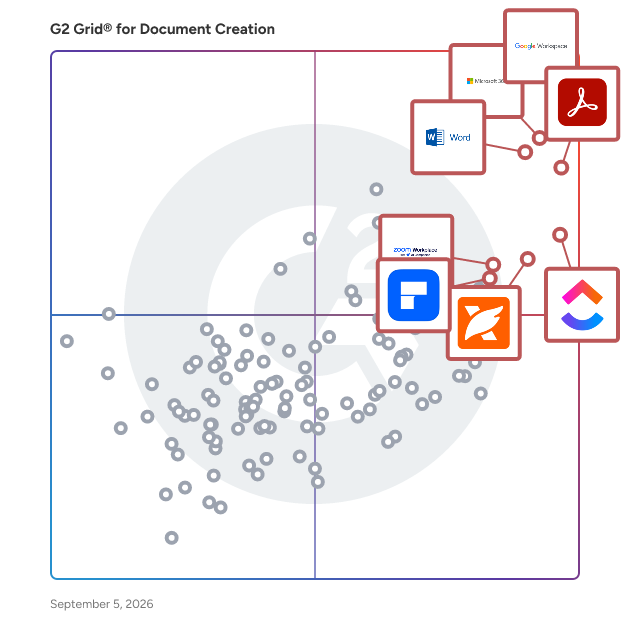
G2 Grid® for Document Creation Software

G2 Grid® for Document Creation Software plotting products by satisfaction and market presence

Highlighted products: Google Workspace, Microsoft 365, Adobe Acrobat, Microsoft Word, ClickUp, Foxit PDF Editor, Zoom Workplace, and Wondershare PDFelement.

Underlying data: [Grid® JSON](https://www.g2.com/categories/document-creation/grids.json?focus%5B%5D=google-workspace&focus%5B%5D=microsoft365&focus%5B%5D=adobe-acrobat&focus%5B%5D=microsoft-word&focus%5B%5D=clickup&focus%5B%5D=foxit-pdf-editor&focus%5B%5D=zoom-workplace&focus%5B%5D=wondershare-wondershare-pdfelement)

Docsie

Docsie is an innovative documentation management tool designed for ease of use and efficiency. It stands out with its AI-powered features, enabling automated content creation and updates. Ideal for technical writers, product managers, and developers, Docsie supports multi-language documentation and integrates seamlessly into various workflows. It is particularly popular in the manufacturing sector for its ability to handle extensive product manuals and technical documents. With Docsie, businesses can significantly streamline their documentation processes, improving overall productivity and user experience. You can access Docsie through a SaaS web application to create and edit documentation from any location. Then, you can publish content to a dynamic knowledge portal that end-users and employees can access whenever they need information! Docsie offers a range of powerful business-grade features to help you write and manage product documentation with ease. Onboarding Service: • Free onboarding with Docsie Pilot to import your content and help you get the most value from the platform. • Get help with custom portal design, and an optional training session so your employees can maximize their productivity in Docsie. Knowledge Base and Documentation Portal: • Internal knowledge portals to share self-service knowledge with employees. • External customer knowledge bases to share self-service help documentation and reduce customer support workloads. • Built-in knowledge base statistics and documentation feedback surveys with Docsie Vocally. • Use the default Docsie portal design or deploy a custom knowledge base design based on your brand style and image. • A free custom domain on the free plan for everyone, with additional domains available on paid plans. • Deploy knowledge portals using Docsie hosting, custom deployments, or on-premise instances (Organization plan) Documents and Content Editor: • Support for Markdown syntax and import or export Markdown content. • Docsie Editor allows you to create content in a WYSIWYG editor that supports rich text formatting, emoji symbols, section headers, tables and lists, image and video, iFrame embedded content, tooltip callouts, code snippets, URL hyperlinks • Grammar or spell checking with a configurable rule-based content linter. • Create API documentation, standard operating procedures (SOPs), and technical documents from scratch or with built-in templates. • Create your own snippet and fragment templates to reuse content across your documents with one click. Help Centers and In-App Help Interfaces: • Deploy help centers and in-app support interfaces to share contextual point-in-time help documentation with end-users using a HTML footer script. • Create product and software guided tours to walk end-users through step-by-step workflows. • Add in-app help interfaces to your web application so users can access documentation on the same page. Languages, Versions, and Translations: • Version management allows end-users to view historical documentation in your knowledge base via canonical URLs rather than duplicate pages. • Language management and extended localization helps you automate the deployment of multilingual content without the need for professional translators. • Ghost AI language translation converts source documents automatically to the target language. Docsie AI translation supports these languages: English, French, Spanish, German, Dutch, Norwegian, Portuguese, Danish, Swedish, Arabic, Chinese, and Japanese. Collaboration and Project Management: • Create workspaces for each team, business department, or product and service in your portfolio and organize your content. • Add comments, notes, and tasks to documents and tag team members to assign tasks. • Project management tools based on Agile working methodologies, with Kanban style status indicators for Draft-Review-Approval, per task user assignment, due dates and timelines, and target document or topic selection. • Webhook support enables you to share updates when content is created, edited, deleted, and published in Slack, Mattermost and other business IM tools. Security, Compliance, User Roles, and Data Protection: • Role-based access controls (RBAC) and granular permissions for each workspace. • JWT token authentication with strict and lax options. • Temporary passwords to enable access for contractors and freelancers. • Single sign on via corporate SSO, Google, LinkedIn, or Microsoft logins.

Average Rating: 4.8/5.0

Total Reviews: 115

How Do G2 Users Rate Docsie?

  • Has the product been a good partner in doing business?: 9.7/10 (Category avg: 9.0/10)
  • Quality of Support: 9.9/10 (Category avg: 8.6/10)
  • Ease of Use: 9.5/10 (Category avg: 8.9/10)
  • Ease of Admin: 10.0/10 (Category avg: 8.9/10)

Who Is the Company Behind Docsie?

  • Seller: Docsie
  • Company Website:
  • Year Founded: 2020
  • HQ Location: Austin, US
  • Twitter: @likalo_llc
    18,887 Twitter followers
  • LinkedIn® Page: www.linkedin.com
    17 employees on LinkedIn®

Who Uses This Product?

  • Who Uses This: Technical Writer, Project Manager
  • Top Industries: Information Technology and Services, Management Consulting
  • Company Size: 78% Small, 19% Large

What Do G2 Reviewers Say About Docsie?

AI-generated summary from verified user reviews

Pros
  • Users value the centralization of documentation in Docsie, enhancing collaboration and management for all team members.
  • Users value the collaboration features of Docsie, enabling simultaneous work and seamless version control for all team members.
  • Users appreciate the centralized documentation management of Docsie, making collaboration and version control seamless for all teams.
  • Users appreciate the centralized documentation management of Docsie, enjoying its intuitive interface and collaboration features.
  • Users love the ease of use of Docsie, enjoying its intuitive interface for seamless documentation collaboration.
Cons
  • Users face integration issues with Docsie, longing for better compatibility with popular tools and smoother experience.
  • Users find the lack of integrations with popular tools limits their workflow and overall productivity in Docsie.
  • Users find a steep learning curve with Docsie, particularly regarding advanced features and intuitive UI elements.
  • Users face a learning difficulty with Docsie, particularly regarding advanced features and UI intuitiveness.
  • Users experience a steep learning curve with Docsie, especially for advanced features and UI intuitiveness.

What Are Recent G2 Reviews of Docsie?

What Are G2 Users Discussing About Docsie?

Tex-Edit Plus

Trans-Tex Software Tex-Edit Plus is a scriptable, ASCII text editor that fills the gap between a Apple's bare-bones TextEdit and a full-featured word processor. It's fast, efficient, and has a clean, uncluttered interface. It's also great for cleaning up text which is transmitted over the Internet.

Average Rating: 4.2/5.0

Total Reviews: 18

How Do G2 Users Rate Tex-Edit Plus?

  • Has the product been a good partner in doing business?: 7.5/10 (Category avg: 9.0/10)
  • Quality of Support: 8.3/10 (Category avg: 8.6/10)
  • Ease of Use: 9.0/10 (Category avg: 8.9/10)
  • Ease of Admin: 7.5/10 (Category avg: 8.9/10)

Who Is the Company Behind Tex-Edit Plus?

Who Uses This Product?

  • Company Size: 56% Large, 28% Small

What Are Recent G2 Reviews of Tex-Edit Plus?

What Are G2 Users Discussing About Tex-Edit Plus?

Doxillion

Doxillion is a document converter to convert pdf, docx, doc, pdf, rtf, html, xml, wpd, odt and txt document files. Convert documents one at a time or batch convert many files at once. Even integrate Doxillion conversion option to your right click menu to quickly convert documents to many frequently used formats. Convert between many different text document formats. Supports Word converting doc and docx. Convert source code to html. Batch convert thousands of files at once. Use your right click menu to convert documents from outside the program. Drag and drop documents to be converted into Doxillion. Integrate with Express Burn Disc Burning Software to backup documents.

Average Rating: 4.4/5.0

Total Reviews: 7

How Do G2 Users Rate Doxillion?

  • Has the product been a good partner in doing business?: 8.3/10 (Category avg: 9.0/10)
  • Quality of Support: 8.6/10 (Category avg: 8.6/10)
  • Ease of Use: 8.6/10 (Category avg: 8.9/10)
  • Ease of Admin: 8.3/10 (Category avg: 8.9/10)

Who Is the Company Behind Doxillion?

  • Seller: NCH Software
  • Year Founded: 1993
  • HQ Location: Greenwood Village, CO
  • Twitter: @nchsoftware
    9,910 Twitter followers
  • LinkedIn® Page: www.linkedin.com
    77 employees on LinkedIn®

Who Uses This Product?

  • Company Size: 43% Medium, 29% Small

What Are Recent G2 Reviews of Doxillion?

What Are G2 Users Discussing About Doxillion?

AI can help you find the answers. G2 helps you trust them.

Connect G2 to Claude or ChatGPT for answers grounded in G2's trusted reviews, comparisons, and pricing from real user insights.

How it works

DocsFromTemplate

DocsFromTemplate takes the hassle out of PDF creation. With automatic PDF generation from Gravity Forms, you can turn form entries into professional, ready-to-share PDFs instantly. This solution handles everything—from form-to-PDF export to delivering fillable, branded documents—making it perfect for invoices, contracts, and more.

Average Rating: 5.0/5.0

Total Reviews: 6

How Do G2 Users Rate DocsFromTemplate?

  • Has the product been a good partner in doing business?: 10.0/10 (Category avg: 9.0/10)
  • Quality of Support: 10.0/10 (Category avg: 8.6/10)
  • Ease of Use: 9.7/10 (Category avg: 8.9/10)
  • Ease of Admin: 9.7/10 (Category avg: 8.9/10)

Who Is the Company Behind DocsFromTemplate?

  • Seller: WPRiders
  • Year Founded: 2015
  • HQ Location: Sacramento, US
  • Twitter: @wpriders
    99 Twitter followers
  • LinkedIn® Page: www.linkedin.com
    14 employees on LinkedIn®

Who Uses This Product?

  • Company Size: 83% Small, 17% Medium

What Do G2 Reviewers Say About DocsFromTemplate?

AI-generated summary from verified user reviews

Pros
  • Users love the time-saving automation of DocsFromTemplate, significantly reducing manual work for document generation.
  • Users love the automation features of DocsFromTemplate, streamlining document creation and saving valuable time.
  • Users find DocsFromTemplate to be an extremely easy-to-use plugin that streamlines daily document generation efficiently.
  • Users highlight the ease of use of DocsFromTemplate, significantly streamlining their document generation processes.
  • Users find DocsFromTemplate easy to use, greatly enhancing their document generation process and saving valuable time.

What Are Recent G2 Reviews of DocsFromTemplate?

HelpStudio Suite

HelpStudio simplifies the process of creating, managing, and publishing professional-quality documentation and help systems. With its single-source publishing capabilities, you can generate multiple output formats—such as Web Help, mobile-responsive documentation, and printable PDFs—from a single project, ensuring consistency and efficiency. 1. Single-Source Authoring & Multi-Format Publishing Write once, publish anywhere – Generate output in Web Help (responsive for desktop, tablet, and mobile) and PDF without duplicating efforts. Consistent branding & formatting – Maintain uniform styling across multiple formats. Effortless updates – Edit once and apply changes automatically across all published formats. 2. Intuitive, Feature-Packed Authoring Environment WYSIWYG editor – No coding required. Create professional, structured documentation with an easy-to-use interface. HTML-based layout templates – Fully customizable templates that align with your brand and style. Content widgets – Predefined dynamic elements to enhance interactivity and usability. 3. Seamless Content Reuse & Importing Use existing documentation – Import from Microsoft Word, Adobe RoboHelp, HTML, or other external sources. Content re-use in HelpStudio allows you to efficiently manage and maintain your documentation by reusing common content across multiple topics. 4. Advanced Styling & Customization Built-in CSS support – Fine-tune styles, layouts, and visual elements to match your corporate branding. Table editing & hyperlink designer – Create structured, easy-to-navigate documentation with rich formatting tools. Customizable TOC & terminology – Adapt content structure and language to align with internal standards. 5. Localization & Global Reach Multi-language support – Create help documentation in multiple languages, including Japanese, Chinese, and Korean. Embedded localization tips – Ensure high-quality translations with built-in guidance for different language settings. Unicode support – Maintain accurate, readable documentation in any character set. 6. Collaborative & Scalable Workflow Team-friendly authoring – Work on projects with multiple authors while maintaining consistency. Version control & unlimited undo – Track and manage changes effortlessly. Help desk – Access product documentation and support through the Contiem help desk portal. 7. Interactive & Dynamic User Experience Predefined content widgets – Enhance engagement with interactive elements. Auto-generated navigation & search – Ensure users can quickly find relevant information. Multiple output types – Deliver context-sensitive help, end-user manuals, online knowledge bases, and more. 8. Editions and Versions Editions and versions functionality allows you to publish multiple variations of your documentation, enabling users to switch between different editions and versions.

Average Rating: 3.9/5.0

Total Reviews: 9

How Do G2 Users Rate HelpStudio Suite?

  • Has the product been a good partner in doing business?: 7.8/10 (Category avg: 9.0/10)
  • Quality of Support: 8.6/10 (Category avg: 8.6/10)
  • Ease of Use: 8.1/10 (Category avg: 8.9/10)
  • Ease of Admin: 5.0/10 (Category avg: 8.9/10)

Who Is the Company Behind HelpStudio Suite?

  • Seller: Contiem
  • HQ Location: Annapolis, Maryland, United States
  • LinkedIn® Page: www.linkedin.com
    139 employees on LinkedIn®

Who Uses This Product?

  • Company Size: 56% Small, 33% Large

What Are Recent G2 Reviews of HelpStudio Suite?

What Are G2 Users Discussing About HelpStudio Suite?

Snowbound

Take your document viewer to the next level with our web-based viewer that allows you to view, annotate, redact, split & merge, search, OCR, compare documents and more - all without the need for the creator application. Integrates with your ECM, BPM, CRM and homegrown repositories. Supports numerous document, image, audio and video file types including PDF, Word, Excel, AFP, DWG, TIFF, JPEG, SVG and more.

Average Rating: 4.3/5.0

Total Reviews: 5

How Do G2 Users Rate Snowbound?

  • Quality of Support: 9.3/10 (Category avg: 8.6/10)
  • Ease of Use: 8.3/10 (Category avg: 8.9/10)

Who Is the Company Behind Snowbound?

Who Uses This Product?

  • Company Size: 60% Medium, 40% Small

What Are Recent G2 Reviews of Snowbound?

What Are G2 Users Discussing About Snowbound?

TurboDocx

TurboDocx is an AI-powered platform for proposals, quoting, document generation, e-signatures, and APIs—built to automate the entire document lifecycle from data to signed agreement. Teams use TurboDocx to generate proposals, statements of work (SOWs), quotes, contracts, and slide decks by pulling structured data from CRMs, project management tools, spreadsheets, and internal knowledge bases. Dynamic templates, reusable content blocks, and AI-assisted drafting ensure documents are accurate, consistent, and on-brand—without manual copy-paste work. TurboDocx includes native quoting and pricing workflows, enabling teams to assemble line items, pricing tables, and commercial terms directly into proposals and contracts. Once finalized, documents can be sent for signature using built-in e-signature capabilities, creating a seamless flow from quote → proposal → signed agreement. The platform is API-first and developer-friendly, offering robust APIs and SDKs that allow teams to embed document generation, quoting, and e-signature directly into their own products, portals, and internal systems. TurboDocx supports both no-code web workflows and fully programmable automation, making it flexible enough for sales teams and powerful enough for engineering teams. TurboDocx is used by professional services firms, MSPs, and SaaS platforms that need end-to-end, composable document automation—whether as a standalone tool or embedded infrastructure.

Average Rating: 4.9/5.0

Total Reviews: 10

How Do G2 Users Rate TurboDocx?

  • Has the product been a good partner in doing business?: 10.0/10 (Category avg: 9.0/10)
  • Quality of Support: 10.0/10 (Category avg: 8.6/10)
  • Ease of Use: 9.8/10 (Category avg: 8.9/10)
  • Ease of Admin: 9.7/10 (Category avg: 8.9/10)

Who Is the Company Behind TurboDocx?

  • Seller: TurboDocx
  • HQ Location: Jupiter, Florida
  • Twitter: @TurboDocx
    3 Twitter followers
  • LinkedIn® Page: www.linkedin.com
    6 employees on LinkedIn®
  • Ownership: Private

Who Uses This Product?

  • Company Size: 64% Small, 27% Medium

What Do G2 Reviewers Say About TurboDocx?

AI-generated summary from verified user reviews

Pros
  • Users commend the robust API and multi-language SDKs that facilitate seamless integration and enhance workflow automation.
  • Users commend the automation features of TurboDocx, streamlining document generation and enhancing workflow efficiency.
  • Users appreciate the ease of use of TurboDocx, enabling seamless document generation and integration into workflows.
  • Users commend TurboDocx for its efficient document automation, streamlining real estate and sales processes with AI assistance.
  • Users commend TurboDocx for its robust REST API, enabling seamless integration and automation in document management.
Cons
  • Users face integration issues that can delay setup, especially for non-technical teams requiring custom configurations.
  • Users find the learning curve steep due to initial setup and configuration requirements for non-technical teams.
  • Users find the missing features in TurboDocx, like advanced templates and deeper integrations, hinder initial setup efficiency.
  • Users note that AI-generated text often requires edits to align with specific industry terminology and needs.
  • Users find the difficult setup process time-consuming, especially for teams less familiar with technical configurations.

What Are Recent G2 Reviews of TurboDocx?

OneDeck

OneDeck is a business management platform designed to help users efficiently manage their business information and data. This comprehensive solution enables organizations to publish documents, automate workflows, and gain valuable insights, ultimately streamlining operations and enhancing productivity. By integrating various functionalities into a single platform, OneDeck serves as a centralized hub for businesses looking to optimize their management processes. Targeted towards small to medium-sized enterprises, OneDeck caters to a diverse range of industries that require effective management of their operational data. The platform is particularly beneficial for teams seeking to improve collaboration and communication while simplifying their workflows. With its user-friendly interface and customizable features, OneDeck allows businesses to tailor their management solutions to meet specific requirements, making it an ideal choice for organizations aiming to enhance their efficiency. OneDeck's core features include document publishing, workflow automation, data management, and analytical insights. Each feature is designed to be intuitive and flexible, allowing users to create a management system that aligns with their unique business needs. Document publishing enables teams to share important information seamlessly, while workflow automation reduces the time spent on repetitive tasks, allowing employees to focus on more strategic initiatives. The platform's data management capabilities ensure that all business information is organized and easily accessible, promoting informed decision-making. Additionally, OneDeck provides analytical insights that empower users to monitor performance metrics and identify areas for improvement. By leveraging these insights, businesses can make data-driven decisions that enhance operational efficiency and drive growth. The combination of these features not only simplifies the management process but also fosters a culture of collaboration and innovation within teams. Overall, OneDeck stands out in the business management software category by offering a highly customizable and user-friendly platform that adapts to the evolving needs of organizations. Its focus on enhancing collaboration, simplifying workflows, and providing actionable insights makes it a valuable tool for businesses looking to optimize their management practices and achieve their goals.

Average Rating: 5.0/5.0

Total Reviews: 24

How Do G2 Users Rate OneDeck?

  • Has the product been a good partner in doing business?: 9.7/10 (Category avg: 9.0/10)
  • Quality of Support: 9.9/10 (Category avg: 8.6/10)
  • Ease of Use: 10.0/10 (Category avg: 8.9/10)
  • Ease of Admin: 9.7/10 (Category avg: 8.9/10)

Who Is the Company Behind OneDeck?

Who Uses This Product?

  • Top Industries: Facilities Services
  • Company Size: 96% Small, 4% Medium

What Do G2 Reviewers Say About OneDeck?

AI-generated summary from verified user reviews

Pros
  • Users appreciate the ease of use of OneDeck, finding it intuitive and efficient for daily operations.
  • Users commend the fast and efficient customer service of OneDeck, enhancing their overall experience with the platform.
  • Users appreciate the excellent organization of OneDeck, enhancing collaboration and efficiency across various projects and tasks.
  • Users value the ease of use and efficiency of OneDeck, enhancing project management and customer service experience.
  • Users value the intuitive task management of OneDeck, enhancing workflow efficiency and overall organization.
Cons
  • Users express frustration over the missing features, specifically the lack of an app market and credit card charging capabilities.
  • Users feel limited by the lack of essential features like user flow visualization and direct payment integrations.
  • Users find OneDeck to be expensive, especially since essential features require purchasing a higher-tier plan.
  • Users desire more integration options, noting reliance on additional tools for essential functions.
  • Users desire more integrations with essential tools, as the lack complicates processes and workflows.

What Are Recent G2 Reviews of OneDeck?

Pubrella

Pubrella is a workflow engine for regulatory writers, medical writers, and policy consultants who produce source-heavy deliverables where every claim must survive expert scrutiny. Most tools handle research or drafting — not the handoff between them. That's where citation integrity collapses and rework begins. Upload your sources. Pubrella structures research, drafting, and verification into one connected pipeline — every claim linked to a specific source, every gap flagged before your client or regulator sees it.

Average Rating: 4.6/5.0

Total Reviews: 4

How Do G2 Users Rate Pubrella?

  • Quality of Support: 9.2/10 (Category avg: 8.6/10)
  • Ease of Use: 7.5/10 (Category avg: 8.9/10)

Who Is the Company Behind Pubrella?

Who Uses This Product?

  • Company Size: 100% Small

What Are Recent G2 Reviews of Pubrella?

Unlayer

Unlayer is an embeddable drag-and-drop content builder designed to help businesses create visually appealing emails, landing pages, documents, and popups without the need for any coding. This innovative solution is backed by Y Combinator and has gained the trust of Fortune 500 companies such as Fidelity, Bank of America, as well as leading SaaS platforms like Keap and Hive. Unlayer empowers developers to integrate powerful, white-label design tools directly into their applications, thereby transforming the way teams design and collaborate on content. Unlayer provides an intuitive visual content editor that allows users to maintain full control over branding, data, and user experience. Whether you are developing a customer relationship management (CRM) system, a marketing automation platform, or a customer portal, Unlayer simplifies the embedding of a rich editing experience, enabling dev teams to launch features in days rather than months. This capability is particularly valuable for organizations looking to enhance user engagement and streamline the content creation processes. Key features of Unlayer include an intuitive user interface that facilitates easy content creation, along with white-label customization options that allow businesses to tailor the editing experience to their brand. The platform also incorporates AI-powered design tools that generate smart text, images, and headings, making it easier for users to create compelling content. With over 2,000 prebuilt templates and the ability to create custom tools and blocks, Unlayer caters to diverse content needs. Additionally, advanced roles and permissions ensure secure collaboration and approval workflows, while integrations with 28 platforms enhance its versatility. Unlayer stands out in the market by helping SaaS companies and enterprises reduce development costs and accelerate their time to market. Its developer-friendly SDK, comprehensive documentation, and robust API facilitate seamless integration into existing systems. The platform's focus on AI enhancements, real-time collaboration, and design consistency further enhances its value proposition. With features such as dynamic content personalization, team collaboration tools, and enterprise-grade security, Unlayer provides a comprehensive solution that scales with the evolving needs of businesses.

Average Rating: 4.4/5.0

Total Reviews: 57

How Do G2 Users Rate Unlayer?

  • Has the product been a good partner in doing business?: 8.2/10 (Category avg: 9.0/10)
  • Quality of Support: 8.5/10 (Category avg: 8.6/10)
  • Ease of Use: 9.2/10 (Category avg: 8.9/10)
  • Ease of Admin: 8.5/10 (Category avg: 8.9/10)

Who Is the Company Behind Unlayer?

  • Seller: Unlayer
  • HQ Location: San Francisco, US
  • Twitter: @unlayerapp
    341 Twitter followers
  • LinkedIn® Page: www.linkedin.com
    21 employees on LinkedIn®

Who Uses This Product?

  • Top Industries: Health, Wellness and Fitness, Computer Software
  • Company Size: 56% Small, 32% Medium

What Do G2 Reviewers Say About Unlayer?

AI-generated summary from verified user reviews

Pros
  • Users love the ease of use of Unlayer, enabling quick design of professional emails effortlessly.
  • Users love the easy-to-use templates of Unlayer, enabling quick and professional email designs without coding.
  • Users love the easy and fast email creation with Unlayer, enjoying the intuitive drag-and-drop builder.
  • Users love the easy-to-use drag and drop editor of Unlayer, making email design fast and enjoyable.
  • Users appreciate the ease of creation with Unlayer, finding it intuitive and efficient for designing emails quickly.
Cons
  • Users find the pricing of Unlayer steep, as essential features often require expensive paid plans to access.
  • Users note that the limited features in the free version can restrict customization and advanced functionality.
  • Users find the limited customization options a drawback, wishing for more flexibility to enhance their designs.
  • Users find missing features and rounded corner support lacking, complicating the design process and version management.
  • Users find the add-on costs of Unlayer high, especially given limited benefits and required additional payments for essential features.

What Are Recent G2 Reviews of Unlayer?

What Are G2 Users Discussing About Unlayer?

Arc Studio Pro

Arc Studio is the easiest way to outline, write, and edit screenplays and television scripts, for solo-writers, large writing staffs, and everything in between.

Average Rating: 4.7/5.0

Total Reviews: 6

How Do G2 Users Rate Arc Studio Pro?

  • Quality of Support: 9.6/10 (Category avg: 8.6/10)
  • Ease of Use: 9.7/10 (Category avg: 8.9/10)

Who Is the Company Behind Arc Studio Pro?

  • Seller: Arc Studio Pro
  • Year Founded: 2018
  • HQ Location: Berlin , DE
  • Twitter: @arcstudioproapp
    1,046 Twitter followers
  • LinkedIn® Page: www.linkedin.com
    6 employees on LinkedIn®

Who Uses This Product?

  • Company Size: 67% Small, 33% Medium

What Do G2 Reviewers Say About Arc Studio Pro?

AI-generated summary from verified user reviews

Pros
  • Users praise the helpful customer support team of Arc Studio Pro for their assistance and responsiveness.
  • Users appreciate the screen sharing feature of Arc Studio Pro for its versatility and ease of collaboration.
  • Users find the user interface versatile, enhancing the ease of writing and formatting long-form media.
  • Users value the versatility of Arc Studio Pro, simplifying long-form writing with its beats and outline options.
Cons
  • Users find the missing features in the iPad app limits functionality, hindering their writing experience on the go.

What Are Recent G2 Reviews of Arc Studio Pro?

What Are G2 Users Discussing About Arc Studio Pro?

DocMadeEasy

Our online tools are for users to edit, sign and send PDF files securely. Free and easy to use! Our eSignature tool helps companies of all sizes streamline and digitally sign their most critical documents. From NDAs to loans, from sales contracts to offer letters. Securely share files with real-time control and insights. End-to-end encryption with AES256. Track and analyze how recipients engage with each page of your documents in real-time. All files are encrypted and stored on the server.

Average Rating: 5.0/5.0

Total Reviews: 3

How Do G2 Users Rate DocMadeEasy?

  • Quality of Support: 10.0/10 (Category avg: 8.6/10)
  • Ease of Use: 10.0/10 (Category avg: 8.9/10)

Who Is the Company Behind DocMadeEasy?

Who Uses This Product?

  • Company Size: 67% Small, 33% Medium

What Are Recent G2 Reviews of DocMadeEasy?

Invantive Composition

Save money by combining Word documents with data from databases and applications An often occurring business problem is the generation of complex documents with data from a database or application. For instance, because of the multitude of complex information and deviating rules per jurisdiction employees spend a lot of time in the composing of documents. This manual and repetitive activity causes more erroneous composed documents and brings with it unnecessary employee costs reducing business profit. For organizations that are dealing with different laws and regulations such as health care institutions, insurers and lawyers, the creation of complex documents is a costly and time consuming task. The automatic generation and creation of documents that meet the laws and regulations is however easily done using Invantive Composition! Your gains by filling a Word template with data from your database The automated filling and archiving of documents from a database with Invantive Composition will bring you advantages such as: - Automatically fill pre-composed templates in Word. - Focus on your business, not on technology; without any programming and without software developers. - Reduce time-to-market for changing your business by reducing effort by your IT department. - Merge unstructured texts in a document with structured data. - Optimization of the documentation and communication process. - Reduction of erroneously prepared documents and production costs. - Improved security of company information. Supported Platforms Invantive Composition for Microsoft Word supports the following databases: - Microsoft SQL Server - MySQL - Oracle RDBMS - Teradata - IBM DB2 UDB - ANSI SQL - ODBC

Average Rating: 4.2/5.0

Total Reviews: 3

How Do G2 Users Rate Invantive Composition?

  • Quality of Support: 6.7/10 (Category avg: 8.6/10)
  • Ease of Use: 7.5/10 (Category avg: 8.9/10)

Who Is the Company Behind Invantive Composition?

Who Uses This Product?

  • Company Size: 67% Large, 33% Medium

What Are Recent G2 Reviews of Invantive Composition?

What Are G2 Users Discussing About Invantive Composition?

Legito

Processes. People. Documents. No code automation platform designed for compliance, HR, legal, operations, procurement, sales and sourcing teams. 400k users globally use Legito to create, perform, collaborate and execute their work. One integrated no-code solution. Including LexisNexis, PriceWaterhouseCoopers, Skoda Auto, and Societe Generale Group. Try our 30 Day Free Trial or Request a demo. No credit card required. For more information, including pricing and product features, visit us at www.legito.com.

Average Rating: 4.9/5.0

Total Reviews: 18

How Do G2 Users Rate Legito?

  • Has the product been a good partner in doing business?: 10.0/10 (Category avg: 9.0/10)
  • Quality of Support: 9.8/10 (Category avg: 8.6/10)
  • Ease of Use: 9.2/10 (Category avg: 8.9/10)
  • Ease of Admin: 8.3/10 (Category avg: 8.9/10)

Who Is the Company Behind Legito?

  • Seller: Legito
  • Year Founded: 2014
  • HQ Location: New York, New York
  • Twitter: @legitoCOM
    204 Twitter followers
  • LinkedIn® Page: www.linkedin.com
    45 employees on LinkedIn®

Who Uses This Product?

  • Top Industries: Legal Services
  • Company Size: 44% Medium, 39% Small

What Are Recent G2 Reviews of Legito?

What Are G2 Users Discussing About Legito?

Logically

Logically.app (formerly Afforai) is an award winning, all-in-one workspace for collaborative researching and writing. Many institutions worldwide have partnered with Logically to provide their students and researchers with an easy-to-use platform to manage references, conduct literature reviews, annotate files, take notes, and write papers. Logically is used globally by over 100,000 students, faculty, and researchers, including many at leading universities. With Logically, many institutions and organizations can: Allow students, faculty, and staff access to Logically Document Writer, for collaborative scientific writing. Logically offers single-click citations, automatic bibliographies, and support for LaTeX, tables, code blocks, and more. This would help institutions save costs by replacing tools like Microsoft Word, Google Docs, Overleaf, etc. Provide students, faculty, and staff access to Logically Reference Manager, where they can organize and manage their references as they write papers. This would help institutions save costs by replacing tools like Zotero, Mendeley, and EndNote with Logically. Allow researchers to read and annotate their papers in Logically File Annotator, which would significantly accelerate their reading and literature review process, replacing more expensive tools like Adobe Acrobat. Let researchers access Logically Research Assistant, an AI-powered scientific tool to help conduct efficient, citation-backed literature reviews while maintaining academic integrity. This replaces less specialized tools such as ChatGPT or Gemini. Here is an example of a university partnering with Logically to provide access to better learning while tremendously saving costs: https://afforai.com/nau

Average Rating: 4.5/5.0

Total Reviews: 145

How Do G2 Users Rate Logically?

  • Has the product been a good partner in doing business?: 9.3/10 (Category avg: 9.0/10)
  • Quality of Support: 9.2/10 (Category avg: 8.6/10)
  • Ease of Use: 8.9/10 (Category avg: 8.9/10)
  • Ease of Admin: 9.0/10 (Category avg: 8.9/10)

Who Is the Company Behind Logically?

Who Uses This Product?

  • Who Uses This: CEO, Director
  • Top Industries: Consulting, Marketing and Advertising
  • Company Size: 89% Small, 8% Medium

What Do G2 Reviewers Say About Logically?

AI-generated summary from verified user reviews

Pros
  • Users find Afforai to be an invaluable resource for researchers, streamlining citation, research organization, and knowledge sharing.
  • Users find Afforai's ease of use exceptional, facilitating effective summarization and research organization across various document types.
  • Users praise the versatile functionality of Logically, enhancing research and writing across various fields effectively.
  • Users love the user-friendly interface of Afforai, enhancing their research efficiency and overall experience.
  • Users find scientifically accurate results and useful citations in Afforai, making it a top choice for research.
Cons
  • Users wish for monthly usage limits instead of hourly, as current restrictions can hinder productivity and flexibility.
  • Users find the limited features of Logically, such as basic prompts and file handling, somewhat restrictive for advanced use.
  • Users report slow performance with Logically, noting delays in indexing and general latency issues.
  • Users note the limitations of AI models, including occasional inaccuracies and the need for prompt adjustment.
  • Users experience a small learning curve due to the abundance of features and occasional interface changes.

What Are Recent G2 Reviews of Logically?

Neeraja Prakash
NP
Researched and written by Neeraja Prakash
Updated April 10, 2026