Top Free Document Creation Software - Page 3

How Many Document Creation Software Products Does G2 Track?

Total Products under this Category: 338

Category Stats (Oct 2026)

  • Average Rating: 4.38/5 The average rating of products in this category, based on all submitted ratings
  • Top Trending Product: Lasernet (+0.89%) - Among all products in this category, Lasernet recorded the largest rating increase compared to last month

Last updated: October 13, 2026

How Does G2 Rank Document Creation Software Products?

Why You Can Trust G2's Software Rankings:

  • 30 Analysts and Data Experts
  • 157,200+ Authentic Reviews
  • 338+ Products
  • Unbiased Rankings

G2's software rankings are built on verified user reviews, rigorous moderation, and a consistent research methodology maintained by a team of analysts and data experts. Each product is measured using the same transparent criteria, with no paid placement or vendor influence. While reviews reflect real user experiences, which can be subjective, they offer valuable insight into how software performs in the hands of professionals. Together, these inputs power the G2 Score, a standardized way to compare tools within every category.

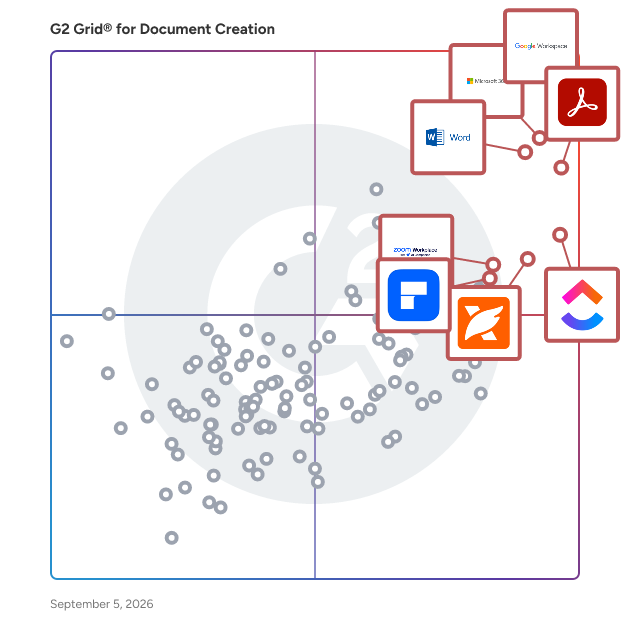
G2 Grid® for Document Creation Software

G2 Grid® for Document Creation Software plotting products by satisfaction and market presence

Highlighted products: Google Workspace, Microsoft 365, Adobe Acrobat, Microsoft Word, ClickUp, Foxit PDF Editor, Zoom Workplace, and Wondershare PDFelement.

Underlying data: [Grid® JSON](https://www.g2.com/categories/document-creation/grids.json?focus%5B%5D=google-workspace&focus%5B%5D=microsoft365&focus%5B%5D=adobe-acrobat&focus%5B%5D=microsoft-word&focus%5B%5D=clickup&focus%5B%5D=foxit-pdf-editor&focus%5B%5D=zoom-workplace&focus%5B%5D=wondershare-wondershare-pdfelement)

Formstack Documents

Formstack Documents is the only document generation solution you need to save time, put a stop to manual entry, and streamline your paperwork process. With Formstack Documents, you can upload, merge, and deliver smart documents in a snap. Start from scratch or upload your own fillable PDF or Word document. Our app allows you to easily customize your document and merge it with data. Once you've created your document, it's time to figure out where you'll be sending it. From emails to Google Drive to a third-party integration via Webhooks, Formstack Documents gives you the control to send your merged files wherever you want. Formstack Documents integrates with over 150 different products, ensuring you'll easily be able to upload, merge, and deliver your documents, no matter what products you're using.

Average Rating: 4.5/5.0

Total Reviews: 148

How Do G2 Users Rate Formstack Documents?

  • Has the product been a good partner in doing business?: 9.0/10 (Category avg: 9.0/10)
  • Quality of Support: 8.7/10 (Category avg: 8.6/10)
  • Ease of Use: 8.2/10 (Category avg: 8.9/10)
  • Ease of Admin: 8.6/10 (Category avg: 8.9/10)

Who Is the Company Behind Formstack Documents?

  • Seller: Formstack, LLC
  • Company Website:
  • Year Founded: 2006
  • HQ Location: Fishers, IN
  • Twitter: @Formstack
    6,392 Twitter followers
  • LinkedIn® Page: www.linkedin.com
    219 employees on LinkedIn®

Who Uses This Product?

  • Who Uses This: Owner
  • Top Industries: Computer Software, Non-Profit Organization Management
  • Company Size: 59% Small, 33% Medium

What Do G2 Reviewers Say About Formstack Documents?

AI-generated summary from verified user reviews

Pros
  • Users value the seamless integration of Formstack Documents, enhancing workflows and saving time across various platforms.
  • Users find automation features in Formstack Documents incredibly time-saving, enhancing overall workflow efficiency and ease of use.
  • Users find Formstack Documents to be very user-friendly, significantly streamlining their document generation process with ease.
  • Users value the easy integrations of Formstack Documents, which streamline workflows and enhance productivity across various platforms.
  • Users love how Formstack Documents provides time-saving automation for document generation, enhancing efficiency and reducing errors.
Cons
  • Users find the learning curve steep for complex document merges, though the new builder simplifies the process.
  • Users find bug issues with Formstack Documents occasionally disrupt their experience, though most are easily resolved.
  • Users find the user interface clunky, leading to a less intuitive experience despite its robust capabilities.
  • Users find the poor documentation inadequate for advanced scenarios, hindering their overall experience with Formstack Documents.
  • Users find the setup difficulty of Formstack Documents challenging initially, but it becomes user-friendly after configuration.

What Are Recent G2 Reviews of Formstack Documents?

What Are G2 Users Discussing About Formstack Documents?

Able2Extract Professional

Able2Extract Professional is an all-in-one PDF converter designed for both business and individual users. Trusted by professionals in finance, accounting, legal, insurance, real estate, and banking industries, it is renowned for its PDF to Excel conversion accuracy and advanced data extraction capabilities. Available on Windows, macOS, and Linux, Able2Extract Professional offers enterprise-level PDF conversion and editing features including: • Selective conversions: convert a single paragraph, specific pages, or entire documents. • Batch upload and convert hundreds of PDF files at once. • Preview table output before converting PDF into XLSX. • Deploy advanced OCR on scanned PDF files and images. • Create custom conversion templates to save valuable time. • Advanced detection for merging Excel rows accurately. • Precise conversion capabilities with European continental settings. • Auto-rotate vertical text in Excel (column headers included). Additional features include PDF creation, electronic and digital signatures, PDF form handling, content editing, side-by-side document comparison, merging and splitting PDFs, secure data redaction, and much more.

Average Rating: 4.7/5.0

Total Reviews: 23

How Do G2 Users Rate Able2Extract Professional?

  • Has the product been a good partner in doing business?: 9.4/10 (Category avg: 9.0/10)
  • Quality of Support: 9.1/10 (Category avg: 8.6/10)
  • Ease of Use: 9.7/10 (Category avg: 8.9/10)
  • Ease of Admin: 9.4/10 (Category avg: 8.9/10)

Who Is the Company Behind Able2Extract Professional?

Who Uses This Product?

  • Company Size: 58% Small, 33% Medium

What Do G2 Reviewers Say About Able2Extract Professional?

AI-generated summary from verified user reviews

Pros
  • Users value the affordability of Able2Extract Professional, appreciating the one-time license without any monthly fees.
  • Users value the automation capabilities of Able2Extract Professional, significantly streamlining their conversion tasks and saving time.
  • Users commend Able2Extract Professional for its exceptional conversion efficiency, automating tasks and delivering precise Excel exports.
  • Users value the ease of use of Able2Extract Professional, appreciating its intuitive setup and seamless automation.
  • Users highly value the easy conversion capabilities of Able2Extract Professional, significantly saving time and effort in data tasks.

What Are Recent G2 Reviews of Able2Extract Professional?

What Are G2 Users Discussing About Able2Extract Professional?

SuiteFiles

SuiteFiles is an intelligent workspace solution specifically designed for professional service firms, aimed at streamlining the way teams manage their documents and client interactions. This comprehensive platform integrates essential functions such as document creation, review, approval, client collaboration, and digital signing into a single, cohesive system. By eliminating the need to juggle multiple folders, emails, and manual follow-ups, SuiteFiles provides a structured environment that enhances productivity and ensures efficient completion of work. The target audience for SuiteFiles encompasses a diverse range of professional service firms, including accounting firms, law firms, and consultancy agencies. These organizations often handle extensive documentation and require effective communication with clients. SuiteFiles addresses these challenges by creating a centralized workspace where all relevant documents, conversations, and approvals are easily accessible. This organization reduces the likelihood of important information being overlooked or lost, ultimately fostering better collaboration among team members and clients. Key features of SuiteFiles include seamless integration with widely-used tools such as Microsoft 365, Xero, Karbon, WorkflowMax, HubSpot, and QuickBooks Online. This compatibility allows firms to enhance their existing tech stack rather than complicate it with additional software. By connecting these tools, SuiteFiles helps create a more efficient workflow, enabling users to manage their tasks and client interactions without the hassle of switching between different applications. The platform’s ability to consolidate various functions into one interface simplifies the user experience and promotes a more streamlined approach to document management. The benefits of using SuiteFiles extend beyond mere organization; it empowers professional service firms to focus on their core competencies by minimizing busy work. With everything living in context, teams can spend less time chasing down documents or coordinating approvals and more time on delivering quality service to their clients. The platform promotes clarity and control, ensuring that all team members are aligned and that client confidence is maintained throughout the process. SuiteFiles is designed for firms that prioritize efficiency and client satisfaction. By providing an intelligent workspace that consolidates essential functions and integrates with existing tools, it enables professional service firms to work smarter, not harder, ultimately leading to more finished work and enhanced client relationships. This solution not only supports the operational needs of these firms but also contributes to a more collaborative and productive work environment.

Average Rating: 4.5/5.0

Total Reviews: 65

How Do G2 Users Rate SuiteFiles?

  • Has the product been a good partner in doing business?: 9.2/10 (Category avg: 9.0/10)
  • Quality of Support: 9.0/10 (Category avg: 8.6/10)
  • Ease of Use: 9.1/10 (Category avg: 8.9/10)
  • Ease of Admin: 9.2/10 (Category avg: 8.9/10)

Who Is the Company Behind SuiteFiles?

  • Seller: SuiteFiles
  • Company Website:
  • Year Founded: 2012
  • HQ Location: Wellington, NZ
  • Twitter: @SuiteFiles
    681 Twitter followers
  • LinkedIn® Page: www.linkedin.com
    28 employees on LinkedIn®

Who Uses This Product?

  • Who Uses This: Director
  • Top Industries: Accounting
  • Company Size: 94% Small, 6% Medium

What Do G2 Reviewers Say About SuiteFiles?

AI-generated summary from verified user reviews

Pros
  • Users find that SuiteFiles enhances document organization, streamlining collaboration and providing easy access to necessary information.
  • Users find SuiteFiles to be incredibly easy to use, streamlining workflows and enhancing collaboration effortlessly.
  • Users appreciate the centralization of documents in SuiteFiles, enhancing collaboration and efficiency for teams and clients.
  • Users value the efficient email filing in SuiteFiles, ensuring important communications are securely organized and easily accessible.
  • Users appreciate the quick and reliable customer support of SuiteFiles, enhancing their overall experience and efficiency.
Cons
  • Users find the accessibility issues of SuiteFiles can make document retrieval somewhat frustrating and cumbersome.
  • Users find the difficult learning curve challenging, impacting their ability to adapt quickly to SuiteFiles.
  • Users find the difficult navigation in SuiteFiles can be cumbersome when accessing documents, affecting overall efficiency.
  • Users find the document access to be a bit chunky, which can hinder their efficiency and ease of use.
  • Users find the access to documents can be a bit chunky, leading to a less smooth experience.

What Are Recent G2 Reviews of SuiteFiles?

AI can help you find the answers. G2 helps you trust them.

Connect G2 to Claude or ChatGPT for answers grounded in G2's trusted reviews, comparisons, and pricing from real user insights.

How it works

Templafy

Templafy is the leading agentic document generation platform, enabling enterprise organizations to create accurate, compliant, and on-brand documents with maximum efficiency and control. Accessible directly within M365, Google Workspace, Salesforce, Claude or any AI agent Templafy simplifies document workflows through AI and automation, to reduce risk and boost productivity. Founded in 2014, Templafy is a global organization with offices across Europe and the US. Trusted by industry leaders like KPMG and BDO, Templafy saves teams over 30% of the time they typically spend on repetitive work like proposals, engagement letters, and audit reports, so they can focus on revenue-driving tasks instead. Join more than 4 million users worldwide who rely on Templafy to accelerate business content creation with AI.

Average Rating: 4.4/5.0

Total Reviews: 59

How Do G2 Users Rate Templafy?

  • Has the product been a good partner in doing business?: 9.3/10 (Category avg: 9.0/10)
  • Quality of Support: 8.5/10 (Category avg: 8.6/10)
  • Ease of Use: 8.9/10 (Category avg: 8.9/10)
  • Ease of Admin: 8.7/10 (Category avg: 8.9/10)

Who Is the Company Behind Templafy?

  • Seller: Templafy
  • Company Website:
  • HQ Location: New York, USA
  • Twitter: @Templafy
    1,082 Twitter followers
  • LinkedIn® Page: www.linkedin.com
    186 employees on LinkedIn®

Who Uses This Product?

  • Top Industries: Accounting, Consulting
  • Company Size: 47% Large, 40% Medium

What Do G2 Reviewers Say About Templafy?

AI-generated summary from verified user reviews

Pros
  • Users find Templafy to be easy to use, streamlining document creation and ensuring brand consistency effortlessly.
  • Users appreciate the seamless integration and automated features of Templafy, enhancing efficiency and brand consistency.
  • Users appreciate the ease of use and integration of Templafy's templates, enhancing efficiency and brand consistency.
  • Users value the time-saving features of Templafy, enabling faster document creation and enhanced productivity.
  • Users appreciate the seamless branding integration in Templafy, ensuring consistency and efficiency across documents and proposals.
Cons
  • Users find the complex usability of Templafy frustrating due to integration issues and challenges with template creation.
  • Users find Templafy quite expensive, especially since many features can be replicated in Word.
  • Users find missing features in Templafy, including limited templates and frustrating file size constraints.
  • Users face technical issues with Templafy, dealing with bugs and integration challenges that hinder their experience.
  • Users find Templafy has adifficult learning curve, especially for newcomers, making full utilization challenging.

What Are Recent G2 Reviews of Templafy?

What Are G2 Users Discussing About Templafy?

Docupilot

Docupilot is a cloud-based document automation platform designed to help businesses streamline the creation of documents. This innovative solution enables users to design custom templates and automatically generate a variety of documents—such as contracts, invoices, reports, and letters—by merging these templates with data sourced from multiple origins. By leveraging technology, Docupilot simplifies the document generation process, making it accessible and efficient for organizations of all sizes. Targeted primarily at businesses and professionals who frequently handle documentation, Docupilot caters to a wide range of industries, including legal, finance, real estate, and marketing. The platform is particularly beneficial for teams that require consistent and accurate document creation, as it minimizes the manual effort involved in generating standard documents. Users can easily create templates that reflect their unique branding and requirements, ensuring that every document produced is not only functional but also visually aligned with the organization's identity. One of the standout features of Docupilot is its template design capability. Users can create and customize document templates using an intuitive editor, or they can upload existing formats from Word, PowerPoint, Excel, and fillable PDF forms. This flexibility allows businesses to maintain their preferred document styles while integrating automation into their workflows. Additionally, the data integration feature enables users to merge templates with information from various sources, such as spreadsheets, databases, and CRM systems, ensuring that documents are populated with accurate and up-to-date information. Docupilot also offers automated workflows, allowing users to set up triggers that generate and distribute documents based on specific events or schedules. This functionality is particularly useful for organizations that need to send out regular reports or invoices, as it reduces the time spent on repetitive tasks. Furthermore, the platform supports integrations with popular applications like Zapier, Salesforce, and Google Sheets, enhancing workflow efficiency and enabling seamless data transfer between systems. Collaboration is another key aspect of Docupilot, as it allows team members to share templates and work together on document creation. This feature fosters a collaborative environment, ensuring that input from various stakeholders can be incorporated into the final documents. By automating repetitive document creation tasks, Docupilot not only helps reduce errors but also saves time and improves overall productivity within an organization, making it a valuable tool for any business looking to optimize its document management processes.

Average Rating: 4.6/5.0

Total Reviews: 72

How Do G2 Users Rate Docupilot?

  • Has the product been a good partner in doing business?: 9.7/10 (Category avg: 9.0/10)
  • Quality of Support: 9.5/10 (Category avg: 8.6/10)
  • Ease of Use: 8.7/10 (Category avg: 8.9/10)
  • Ease of Admin: 9.2/10 (Category avg: 8.9/10)

Who Is the Company Behind Docupilot?

  • Seller: Docupilot, Inc.
  • Company Website:
  • Year Founded: 2018
  • HQ Location: Dover, US
  • Twitter: @docupilot
    34 Twitter followers
  • LinkedIn® Page: www.linkedin.com
    13 employees on LinkedIn®

Who Uses This Product?

  • Top Industries: Marketing and Advertising
  • Company Size: 56% Small, 23% Medium

What Do G2 Reviewers Say About Docupilot?

AI-generated summary from verified user reviews

Pros
  • Users find Docupilot easy to use, enabling quick navigation and seamless document creation integration with other systems.
  • Users appreciate the automations in Docupilot, enhancing document creation speed and collaboration while minimizing errors.
  • Users commend the efficient customer support of Docupilot, swiftly resolving issues and enhancing user experience.
  • Users value the intuitive features of Docupilot, enhancing document automation and streamlining workflows effectively.
  • Users appreciate the time-saving automations of Docupilot, making document creation faster and more efficient.
Cons
  • Users find the pricing to be high relative to the limited features and poor user experience offered by Docupilot.
  • Users find the template limitations occasionally frustrating, especially in niche variety and PDF upload capabilities.
  • Users find Docupilot difficult to use, with issues in support accessibility and complex document token syntax.
  • Users experience formatting issues with templates in Docupilot, requiring careful adjustments for optimal results.
  • Users find the learning curve challenging, though automation speed compensates for initial difficulties.

What Are Recent G2 Reviews of Docupilot?

Soda PDF Anywhere

Soda PDF Anywhere is the first fully functional PDF solution available both as a desktop and a web-based app. Users have the freedom to access features on any device with a web browser, including desktops, laptops, smartphones, and tablets. Switching between both applications is done seamlessly, which is a breakthrough in the software industry. Soda PDF Anywhere also comes equipped with innovative features specifically designed to increase productivity, including PDF conversion, editing, reviewing & security tools, sending documents for e-signature, Bates numbering, cloud storage integration (Dropbox, Box, Onedrive, Google Drive, Sharepoint), and much more.

Average Rating: 4.4/5.0

Total Reviews: 70

How Do G2 Users Rate Soda PDF Anywhere?

  • Has the product been a good partner in doing business?: 6.5/10 (Category avg: 9.0/10)
  • Quality of Support: 8.0/10 (Category avg: 8.6/10)
  • Ease of Use: 8.7/10 (Category avg: 8.9/10)
  • Ease of Admin: 7.7/10 (Category avg: 8.9/10)

Who Is the Company Behind Soda PDF Anywhere?

Who Uses This Product?

  • Who Uses This: Software Engineer
  • Top Industries: Information Technology and Services, Computer Software
  • Company Size: 49% Medium, 41% Small

What Do G2 Reviewers Say About Soda PDF Anywhere?

AI-generated summary from verified user reviews

Pros
  • Users appreciate the ease of use of Soda PDF Anywhere, enjoying its seamless navigation and reliable functionalities.
  • Users love the seamless functionality of Soda PDF Anywhere for effective collaboration and document management.
  • Users value the seamless team collaboration features of Soda PDF Anywhere, enhancing efficiency and communication during projects.
  • Users appreciate the easy editing capabilities of Soda PDF Anywhere, enhancing their document management experience effortlessly.
  • Users emphasize the reliability of Soda PDF Anywhere for quick document generation and secure collaboration.
Cons
  • Users report issues with crashes during large PDF editing, which disrupts their otherwise seamless workflows.
  • Users find the performance issues on the mobile app version less satisfactory compared to the desktop version.

What Are Recent G2 Reviews of Soda PDF Anywhere?

What Are G2 Users Discussing About Soda PDF Anywhere?

MadCap Flare

Empowering teams to create, manage, and deliver exceptional content at scale MadCap Flare is the go-to solution for technical content teams that need to streamline workflows and deliver consistent, high-quality content across every channel. Trusted by documentation, training, and knowledge management professionals worldwide, Flare combines the precision of XML-based authoring with the flexibility of multi-channel publishing—all from a single, centralized platform. Why leading teams rely on Flare: Scalable, topic-based authoring: XML-based structure ensures precision and scalability for complex documentation projects. Single-source publishing: Manage all outputs from one project to eliminate redundancy and simplify updates. Multi-channel delivery: Publish effortlessly to self-service portals, online Help, documentation hubs, and training guides. Advanced content reuse: Reuse variables, snippets, and conditions to save time and maintain accuracy. Real-time collaboration with Flare Online: Co-author, review, and manage content simultaneously in the cloud—no check-in delays or version conflicts. Integrated translation management: Accelerate localization and expand your global reach. Flexible publishing formats: Deliver content in HTML5, PDF, Word, SCORM, and more to meet diverse audience needs. Proven ROI: Cut production costs, speed release cycles, and boost customer satisfaction. What sets Flare apart: Unlike traditional content management tools, Flare is purpose-built for technical content teams—offering unmatched flexibility, control, and scalability. With Flare Online, teams gain cloud-based collaboration and instant publishing capabilities for faster, more connected workflows. Together, they form a unified platform for creating, managing, and delivering knowledge at scale—ensuring efficiency, brand consistency, and an exceptional user experience. That’s why thousands of organizations trust Flare to power their global content strategy.gy."

Average Rating: 4.4/5.0

Total Reviews: 484

How Do G2 Users Rate MadCap Flare?

  • Has the product been a good partner in doing business?: 8.9/10 (Category avg: 9.0/10)
  • Quality of Support: 8.6/10 (Category avg: 8.6/10)
  • Ease of Use: 7.4/10 (Category avg: 8.9/10)
  • Ease of Admin: 8.0/10 (Category avg: 8.9/10)

Who Is the Company Behind MadCap Flare?

  • Seller: MadCap Software
  • Company Website:
  • Year Founded: 2005
  • HQ Location: Denver, CO
  • Twitter: @MadCapSoftware
    1,678 Twitter followers
  • LinkedIn® Page: www.linkedin.com
    124 employees on LinkedIn®

Who Uses This Product?

  • Who Uses This: Technical Writer, Senior Technical Writer
  • Top Industries: Computer Software, Information Technology and Services
  • Company Size: 52% Medium, 29% Large

What Do G2 Reviewers Say About MadCap Flare?

AI-generated summary from verified user reviews

Pros
  • Users appreciate the user-friendly content management of MadCap Flare, enhancing efficiency in documentation and review processes.
  • Users praise MadCap Flare for its exceptional efficiency, allowing for streamlined authoring and documentation tasks with ease.
  • Users value the user-friendly interface of MadCap Flare, enhancing efficiency in both authoring and technical documentation tasks.
  • Users commend the excellent customer support from MadCap Flare, particularly praising their responsive and knowledgeable tech team.
  • Users value the customization options in MadCap Flare, allowing for diverse project applications and ongoing discovery.
Cons
  • Users find the steep learning curve of MadCap Flare challenging, requiring consistent use to retain knowledge and skills.
  • Users find the complexity of MadCap Flare challenging, especially when not using it regularly between jobs.
  • Users find the cost of entry and travel for conferences too high, limiting access for many documentation professionals.
  • Users find learning difficulty with MadCap Flare due to its complexity, making it challenging to remember processes over time.
  • Users report experiencing performance issues with MadCap Flare, particularly slowdowns during large project builds.

What Are Recent G2 Reviews of MadCap Flare?

What Are G2 Users Discussing About MadCap Flare?

Craft Docs

Craft is collaborative workspace where your whole team can come together to take notes, create docs, manage work and ideate together. Craft's Daily Notes offers a paradigm shift in team collaboration. Power your team’s progress with structured daily updates, align on priorities, and remove blockers — all in one place. With a built-in AI assistant, you can quickly generate ideas, summarize longer content or get help with editing your documents.

Average Rating: 4.6/5.0

Total Reviews: 22

How Do G2 Users Rate Craft Docs?

  • Has the product been a good partner in doing business?: 10.0/10 (Category avg: 9.0/10)
  • Quality of Support: 9.3/10 (Category avg: 8.6/10)
  • Ease of Use: 9.3/10 (Category avg: 8.9/10)
  • Ease of Admin: 10.0/10 (Category avg: 8.9/10)

Who Is the Company Behind Craft Docs?

  • Seller: Craft Docs
  • Year Founded: 2019
  • HQ Location: Budapest, Hungary
  • LinkedIn® Page: www.linkedin.com
    26 employees on LinkedIn®

Who Uses This Product?

  • Company Size: 82% Small, 14% Medium

What Do G2 Reviewers Say About Craft Docs?

AI-generated summary from verified user reviews

Pros
  • Users find Craft Docs to be beautifully simple, enhancing their daily note-taking experience with elegance and usability.
  • Users love Craft Docs for its beautiful simplicity, making note-taking an enjoyable and accessible experience for everyone.
  • Users love the efficiency of Craft Docs, making note-taking a fun and effortless experience for everyone.
  • Users admire the beautiful simplicity of Craft Docs, making note-taking easy and enjoyable for everyone.
  • Users love the beautiful simplicity of Craft Docs, making note-taking enjoyable and accessible for everyone.
Cons
  • Users note the lack of features in Craft Docs compared to competitors, but appreciate ongoing updates and improvements.
  • Users note the limited reporting capabilities of Craft Docs, but appreciate the team's commitment to ongoing improvements.
  • Users note the missing features in Craft Docs, yet appreciate the team's efforts to improve and update the software.

What Are Recent G2 Reviews of Craft Docs?

CleverPDF

CleverPDF offers more than 30 PDF tools online for free. Users can convert PDF to Office, iWork, images, Ebooks or create PDF from those formats. Besides PDF conversion, there are dozens of PDF utility tools such as compress, combine, split, encrypt, add watermark or page numbers to PDF and more. It can help you with your daily PDF tasks. The web-based app is completely free, perpetual license for Offline versions (Mac and Windows) are also available.

Average Rating: 4.4/5.0

Total Reviews: 27

How Do G2 Users Rate CleverPDF?

  • Has the product been a good partner in doing business?: 10.0/10 (Category avg: 9.0/10)
  • Quality of Support: 8.2/10 (Category avg: 8.6/10)
  • Ease of Use: 9.4/10 (Category avg: 8.9/10)
  • Ease of Admin: 8.3/10 (Category avg: 8.9/10)

Who Is the Company Behind CleverPDF?

  • Seller: CleverPDF
  • Year Founded: 2017
  • HQ Location: Hong Kong, Hong Kong
  • Twitter: @cleverpdf
    282 Twitter followers
  • LinkedIn® Page: www.linkedin.com
    1 employees on LinkedIn®

Who Uses This Product?

  • Company Size: 44% Small, 41% Medium

What Do G2 Reviewers Say About CleverPDF?

AI-generated summary from verified user reviews

Pros
  • Users find CleverPDF to be easy to use, especially for extracting images and managing reports effortlessly.
  • Users value the easy extraction of high-quality images and consistent auto-page numbering in CleverPDF for reports.

What Are Recent G2 Reviews of CleverPDF?

What Are G2 Users Discussing About CleverPDF?

S-Docs

S-Docs is a document operations platform designed to help users streamline their document creation and signing processes. This solution caters to a wide range of organizations, from small businesses to large global enterprises, enabling them to efficiently manage critical documents through intuitive automation and secure e-signature capabilities. By focusing on both ease of use and robust functionality, S-Docs empowers businesses to enhance their operational efficiency and transform their workflows. The platform is particularly valuable for organizations that handle a high volume of documents, such as contracts, invoices, and compliance forms. Its target audience includes industries like finance, healthcare, legal, and manufacturing, where accurate and timely document management is essential. S-Docs addresses the specific needs of these sectors by providing a comprehensive solution that not only simplifies document workflows but also ensures compliance with industry regulations. Key features of S-Docs include its user-friendly document automation tools, which allow users to create customized templates and generate documents quickly. The e-signature functionality further enhances the platform by enabling users to obtain signatures securely and efficiently, reducing the time spent on manual processes. Additionally, S-Docs integrates seamlessly with existing systems, ensuring that organizations can leverage their current technology investments while enhancing their document operations. The benefits of using S-Docs extend beyond mere efficiency. By automating document processes, organizations can reduce human error, improve accuracy, and accelerate turnaround times. The platform also supports collaboration among team members, allowing multiple users to work on documents simultaneously, which fosters a more agile working environment. Furthermore, S-Docs' commitment to security ensures that sensitive information is protected throughout the document lifecycle, giving users peace of mind. Overall, S-Docs stands out in the document operations category by offering a comprehensive solution that not only simplifies document workflows but also drives significant process transformation. Its focus on automation, security, and integration makes it a valuable tool for organizations looking to enhance their document management capabilities and achieve greater operational efficiency.

Average Rating: 4.7/5.0

Total Reviews: 122

How Do G2 Users Rate S-Docs?

  • Has the product been a good partner in doing business?: 9.4/10 (Category avg: 9.0/10)
  • Quality of Support: 9.2/10 (Category avg: 8.6/10)
  • Ease of Use: 8.9/10 (Category avg: 8.9/10)
  • Ease of Admin: 9.0/10 (Category avg: 8.9/10)

Who Is the Company Behind S-Docs?

  • Seller: S-Docs
  • Year Founded: 2010
  • HQ Location: New York, NY
  • LinkedIn® Page: www.linkedin.com
    53 employees on LinkedIn®

Who Uses This Product?

  • Who Uses This: Salesforce Administrator
  • Top Industries: Non-Profit Organization Management, Information Technology and Services
  • Company Size: 46% Small, 40% Medium

What Do G2 Reviewers Say About S-Docs?

AI-generated summary from verified user reviews

Pros
  • Users appreciate the ease of use of S-Docs, making document generation and e-signature fast and simple.
  • Users commend the excellent customer support of S-Docs, finding their assistance invaluable during technical issues.
  • Users appreciate the seamless integration of S-Docs with Salesforce, enhancing document generation and e-signature efficiency.
  • Users praise the seamless Salesforce integration of S-Docs, enhancing security and simplifying document generation processes.
  • Users value the ease of template creation with S-Docs, enhancing daily operations seamlessly within Salesforce.
Cons
  • Users find the learning curve steep, especially with complex templates and a non-intuitive interface, hindering effective use.
  • Users find the S-Docs interface not intuitive, noting a steep learning curve and complexity for less technical users.
  • Users express concerns about automation difficulty, noting that complex templates require time and troubleshooting expertise.
  • Users find S-Docs too expensive, especially after recent pricing changes and tiered minimum user requirements.
  • Users face formatting issues with S-Docs, including limitations in customization and troublesome DOCX output.

What Are Recent G2 Reviews of S-Docs?

PDF-XChange Editor

Our business began in 1997 as ‘Tracker Software Products Ltd’ to develop document management and imaging-related software. These products included TIFF and PDF digital conversion utilities that enabled the conversion of many document formats to TIFF and PDF for subsequent archiving within document management products. These standalone conversion applications quickly proved their worth and we made the decision to concentrate on the development of these utilities for the end-user and third-party software developer markets. During the intervening years we have become a global leader in the PDF software market. Our offices are located in Canada, the U.K., Bulgaria and Ukraine. Our corporate headquarters relocated to Vancouver Island, British Columbia, in 2008. At 2016 we incorporated PDF-XChange Co Ltd in the U.K. to tie together all of our interests worldwide. In the coming months it is our intention to rebrand all of our sales and marketing under this one common brand worldwide. Our vision is to provide dynamic and powerful software for the creation, editing, manipulation and conversion of PDF documents, and our applications can convert a huge range of document formats to and from PDF. Our dedicated team of developers strive continually to improve the quality and functionality of our products. We aim to create applications that are flexible enough to meet the needs of all practitioners from novice users to professional document creators. Our software creates files that conform to the internationally-recognized ISO PDF standard, which means they are compatible with all major PDF document viewers/editors worldwide.

Average Rating: 4.6/5.0

Total Reviews: 149

How Do G2 Users Rate PDF-XChange Editor?

  • Has the product been a good partner in doing business?: 8.6/10 (Category avg: 9.0/10)
  • Quality of Support: 8.7/10 (Category avg: 8.6/10)
  • Ease of Use: 9.0/10 (Category avg: 8.9/10)
  • Ease of Admin: 8.5/10 (Category avg: 8.9/10)

Who Is the Company Behind PDF-XChange Editor?

Who Uses This Product?

  • Top Industries: Information Technology and Services, Accounting
  • Company Size: 38% Large, 36% Small

What Do G2 Reviewers Say About PDF-XChange Editor?

AI-generated summary from verified user reviews

Pros
  • Users praise the ease of use of PDF-XChange Editor, enabling smooth file viewing, editing, and collaboration effortlessly.
  • Users highlight the easy editing capabilities of PDF-XChange Editor, praising its intuitive tools and efficient workflow.
  • Users praise the document editing capabilities of PDF-XChange Editor for its smooth performance and powerful annotation tools.
  • Users find the easy conversion feature of PDF-XChange Editor to be highly beneficial for managing PDF documents.
  • Users commend the robust feature set of PDF-XChange Editor, facilitating easy editing, annotation, and integration with other tools.
Cons
  • Users find the interface not user friendly, noting it feels outdated and lacks modern design elements.
  • Users feel the UI design is outdated and would greatly benefit from a more modern and appealing interface.
  • Users find user adoption challenging, often requiring additional efforts to gain acceptance of PDF-XChange Editor.
  • Users express frustration over the lack of integration with cloud services, hindering seamless workflow and accessibility.
  • Users find the lack of integrations with popular cloud services limits their workflow and efficiency.

What Are Recent G2 Reviews of PDF-XChange Editor?

What Are G2 Users Discussing About PDF-XChange Editor?

Xodo

Xodo is the all-in-one PDF solution designed to simplify your workflow and save time on processing documents. Easily convert, edit, merge, compare, compress, e-sign, and do much more with 30+ proven document tools in one secure platform. Designed for all users, get more work done with Xodo whether you're on the web, iOS, Android or Windows app.

Average Rating: 4.4/5.0

Total Reviews: 34

How Do G2 Users Rate Xodo?

  • Has the product been a good partner in doing business?: 10.0/10 (Category avg: 9.0/10)
  • Quality of Support: 8.7/10 (Category avg: 8.6/10)
  • Ease of Use: 9.3/10 (Category avg: 8.9/10)
  • Ease of Admin: 10.0/10 (Category avg: 8.9/10)

Who Is the Company Behind Xodo?

  • Seller: Apryse
  • Year Founded: 1998
  • HQ Location: Denver, CO
  • Twitter: @aprysesolutions
    381 Twitter followers
  • LinkedIn® Page: www.linkedin.com
    569 employees on LinkedIn®

Who Uses This Product?

  • Company Size: 57% Small, 30% Medium

What Do G2 Reviewers Say About Xodo?

AI-generated summary from verified user reviews

Pros
  • Users value the easy mastery and advanced editing functions of Xodo, making PDF management efficient and straightforward.
  • Users appreciate the intuitive dashboard of Xodo, which offers quick access to essential PDF editing tools.
  • Users commend Xodo for its user-friendly PDF editing features, enabling quick and efficient document management and annotation.
  • Users value the text highlighting feature of Xodo, enhancing document reviews with ease and clarity.
  • Users appreciate Xodo for its affordable pricing, making it accessible for both individuals and larger teams.

What Are Recent G2 Reviews of Xodo?

What Are G2 Users Discussing About Xodo?

Kotobee Author

Kotobee Author is a comprehensive interactive ebook creator software and EPUB editor, suitable for anyone in the education, training, and publishing industries. Kotobee Author is a winner of multiple international awards including the Academics' Choice Smart Media Award and the Brandon Hall Awards. With Kotobee Author, you may easily create interactive ebooks rich with video, audio, 3D, book widgets, questions, and more. You may also customize the look and feel of your ebook apps, and emulate the result on different platforms and devices. You will also be able to export your ebook to many different formats, such as web apps, desktop apps, Chrome apps, and EPUB3, which can be opened using the free Kotobee Reader app or using any of the popular ebook readers available in the stores. The Free License is free forever, the Basic License is a $150 value, allowing you to entirely customize and brand your ebook apps with your own logo, removing the Kotobee logo watermark. You can find more on our YouTube channel: https://www.youtube.com/watch?v=_YNEdRwJuAo

Average Rating: 4.3/5.0

Total Reviews: 13

How Do G2 Users Rate Kotobee Author?

  • Has the product been a good partner in doing business?: 8.1/10 (Category avg: 9.0/10)
  • Quality of Support: 8.8/10 (Category avg: 8.6/10)
  • Ease of Use: 9.2/10 (Category avg: 8.9/10)
  • Ease of Admin: 7.2/10 (Category avg: 8.9/10)

Who Is the Company Behind Kotobee Author?

  • Seller: Vijua
  • Year Founded: 2011
  • HQ Location: Cairo, Egypt
  • Twitter: @VijuaLabs
    41 Twitter followers
  • LinkedIn® Page: www.linkedin.com
    27 employees on LinkedIn®

Who Uses This Product?

  • Top Industries: Higher Education
  • Company Size: 60% Small, 20% Large

What Are Recent G2 Reviews of Kotobee Author?

PrizmDoc

Founded in 1991, Accusoft is a software development company specializing in content processing, conversion, and automation solutions. From configurable applications to APIs built for developers, Accusoft software enables users to solve their most complex workflow challenges and gain insights from content in any format, on any device. The company's flagship product, PrizmDoc Viewer, is an HTML5 document viewer and collection of content manipulation APIs that help web developers embed document viewing, processing, and conversion into their applications with ease. PrizmDoc Viewer is a browser-based solution that renders and displays 100+ document and image formats without the need to open native applications. Users can view, search, annotate, redact, e-sign, print, and download using one common interface, which increases productivity and saves on licensing costs. Accusoft's zero-footprint viewer is fully customizable, from quick integrations with minimal configuration to complete programmatic control using our extensive Javascript API. Developers can augment and automate their end users’ viewing experience with key features that can be turned on or off depending on your business needs.

Average Rating: 4.6/5.0

Total Reviews: 58

How Do G2 Users Rate PrizmDoc?

  • Has the product been a good partner in doing business?: 9.2/10 (Category avg: 9.0/10)
  • Quality of Support: 8.8/10 (Category avg: 8.6/10)
  • Ease of Use: 9.0/10 (Category avg: 8.9/10)
  • Ease of Admin: 8.3/10 (Category avg: 8.9/10)

Who Is the Company Behind PrizmDoc?

  • Seller: Apryse
  • Year Founded: 1998
  • HQ Location: Denver, CO
  • Twitter: @aprysesolutions
    381 Twitter followers
  • LinkedIn® Page: www.linkedin.com
    569 employees on LinkedIn®

Who Uses This Product?

  • Top Industries: Information Technology and Services, Marketing and Advertising
  • Company Size: 45% Large, 40% Medium

What Are Recent G2 Reviews of PrizmDoc?

What Are G2 Users Discussing About PrizmDoc?

ONLYOFFICE Workspace

ONLYOFFICE Workspace is a web-based open-source business platform for efficient team management and online collaboration, developed by Ascensio System SIA, a Latvian software development company. The solution features online document editors, a platform for document management, corporate communication, mail and project management tools. The ONLYOFFICE online editors allow you to create, edit and collaborate on text documents, spreadsheets, presentations, fillable forms and PDF files. Complete compatibility with Word, Excel and PowerPoint files.

Average Rating: 4.4/5.0

Total Reviews: 63

How Do G2 Users Rate ONLYOFFICE Workspace?

  • Has the product been a good partner in doing business?: 9.2/10 (Category avg: 9.0/10)
  • Quality of Support: 8.6/10 (Category avg: 8.6/10)
  • Ease of Use: 8.9/10 (Category avg: 8.9/10)
  • Ease of Admin: 9.3/10 (Category avg: 8.9/10)

Who Is the Company Behind ONLYOFFICE Workspace?

  • Seller: Ascensio System
  • Year Founded: 2008
  • HQ Location: Riga, LV
  • Twitter: @only_office
    6,700 Twitter followers
  • LinkedIn® Page: www.linkedin.com
    119 employees on LinkedIn®

Who Uses This Product?

  • Top Industries: Computer Software, Higher Education
  • Company Size: 76% Small, 17% Medium

What Do G2 Reviewers Say About ONLYOFFICE Workspace?

AI-generated summary from verified user reviews

Pros
  • Users appreciate the affordability of ONLYOFFICE Workspace, especially with the availability of a free tier.
  • Users appreciate the centralization of documents in ONLYOFFICE Workspace, enhancing organization and ease of access.
  • Users enjoy the intuitive and centralized organization of ONLYOFFICE Workspace, making document management effortless and efficient.
  • Users appreciate the ease of use of ONLYOFFICE Workspace, finding it intuitive and helpful for organization.
  • Users appreciate the easy collaboration of ONLYOFFICE Workspace, enhanced by its intuitive interface and centralized document management.
Cons
  • Users express frustration over billing issues and a lack of effective customer support, impacting their overall experience.
  • Users are frustrated by the incomplete information and lack of responsive customer support in ONLYOFFICE Workspace.
  • Users are frustrated with the insufficient training and lack of customer support for ONLYOFFICE Workspace.
  • Users are frustrated by the limited storage capacity and inadequate customer support when dealing with large documents.
  • Users express disappointment with the poor customer support of ONLYOFFICE Workspace, highlighting the need for improvement in assistance.

What Are Recent G2 Reviews of ONLYOFFICE Workspace?

What Are G2 Users Discussing About ONLYOFFICE Workspace?

Neeraja Prakash
NP
Researched and written by Neeraja Prakash
Updated April 10, 2026