Top Free Document Creation Software - Page 6

How Many Document Creation Software Products Does G2 Track?

Total Products under this Category: 338

Category Stats (Oct 2026)

  • Average Rating: 4.38/5 The average rating of products in this category, based on all submitted ratings
  • Top Trending Product: Lasernet (+0.89%) - Among all products in this category, Lasernet recorded the largest rating increase compared to last month

Last updated: October 13, 2026

How Does G2 Rank Document Creation Software Products?

Why You Can Trust G2's Software Rankings:

  • 30 Analysts and Data Experts
  • 157,200+ Authentic Reviews
  • 338+ Products
  • Unbiased Rankings

G2's software rankings are built on verified user reviews, rigorous moderation, and a consistent research methodology maintained by a team of analysts and data experts. Each product is measured using the same transparent criteria, with no paid placement or vendor influence. While reviews reflect real user experiences, which can be subjective, they offer valuable insight into how software performs in the hands of professionals. Together, these inputs power the G2 Score, a standardized way to compare tools within every category.

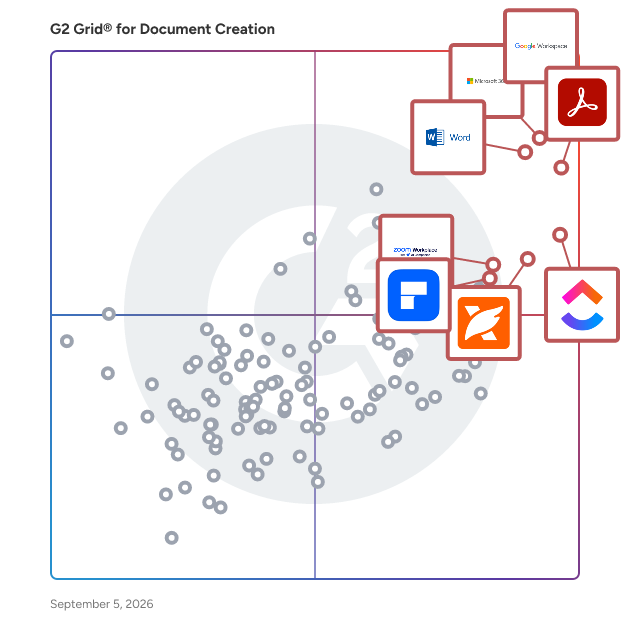
G2 Grid® for Document Creation Software

G2 Grid® for Document Creation Software plotting products by satisfaction and market presence

Highlighted products: Google Workspace, Microsoft 365, Adobe Acrobat, Microsoft Word, ClickUp, Foxit PDF Editor, Zoom Workplace, and Wondershare PDFelement.

Underlying data: [Grid® JSON](https://www.g2.com/categories/document-creation/grids.json?focus%5B%5D=google-workspace&focus%5B%5D=microsoft365&focus%5B%5D=adobe-acrobat&focus%5B%5D=microsoft-word&focus%5B%5D=clickup&focus%5B%5D=foxit-pdf-editor&focus%5B%5D=zoom-workplace&focus%5B%5D=wondershare-wondershare-pdfelement)

AirMason

AirMason is an ever-evolving platform that is designed to help HR teams increase efficiency when it comes to document creation, design, distribution, and collection of signatures - all in real time. AirMason's helps you transform your existing handbook process into a clean & efficient single source of truth that is aligned with your brand and culture and provides automation to save your team time.

Average Rating: 5.0/5.0

Total Reviews: 2

How Do G2 Users Rate AirMason?

  • Has the product been a good partner in doing business?: 10.0/10 (Category avg: 9.0/10)
  • Quality of Support: 10.0/10 (Category avg: 8.6/10)
  • Ease of Use: 10.0/10 (Category avg: 8.9/10)
  • Ease of Admin: 10.0/10 (Category avg: 8.9/10)

Who Is the Company Behind AirMason?

  • Seller: AirMason
  • Year Founded: 2017
  • HQ Location: Toronto, CA
  • LinkedIn® Page: www.linkedin.com
    18 employees on LinkedIn®

Who Uses This Product?

  • Company Size: 50% Large, 50% Medium

What Are Recent G2 Reviews of AirMason?

What Are G2 Users Discussing About AirMason?

KITABOO

KITABOO is an advanced, cloud-based digital publishing platform designed to create, publish, and securely distribute interactive eBooks and digital content worldwide. Developed by HurixDigital, this enterprise platform transforms traditional static files, like PDFs, into mobile-friendly formats embedded with rich interactive multimedia elements. It currently serves over fifteen million users globally across many industries. The infrastructure includes an online authoring tool featuring intuitive drag-and-drop templates. Users can easily embed videos, synchronized audio, interactive quizzes, image galleries, and external hyperlinks without writing any code. This comprehensive authoring tool supports standard open formats like EPUB3, allowing creators to produce responsive layouts that automatically adapt to various mobile and desktop screens. Data security is managed through robust, built-in Digital Rights Management systems. KITABOO protects sensitive intellectual property using custom user access codes, advanced encryption protocols, dynamic watermarking, and remote content revocation. Additionally, it offers detailed learning analytics that track user engagement, reading progress, and quiz performance, giving institutions instant insights into exact content consumption patterns .To ensure consistent corporate branding, KITABOO provides white-labeled reader applications. Organizations can launch customized reading apps across iOS, Android, and Windows systems featuring their logos, brand colors, and themes. The software integrates seamlessly with existing global Learning Management Systems using standard protocols like LTI and OneRoster. The platform primarily serves educational institutions, corporate training divisions, and professional trade publishers. K-12 schools use it to distribute interactive textbooks with shared annotation tools, while corporations utilize it for mobile-first employee compliance training. KITABOO successfully scales secure digital distribution networks while completely preventing online piracy for major publishers.

Average Rating: 4.4/5.0

Total Reviews: 6

How Do G2 Users Rate KITABOO?

  • Has the product been a good partner in doing business?: 9.4/10 (Category avg: 9.0/10)
  • Quality of Support: 9.7/10 (Category avg: 8.6/10)
  • Ease of Use: 9.0/10 (Category avg: 8.9/10)
  • Ease of Admin: 8.9/10 (Category avg: 8.9/10)

Who Is the Company Behind KITABOO?

Who Uses This Product?

  • Company Size: 63% Medium, 38% Small

What Are Recent G2 Reviews of KITABOO?

Nutrient SDK

Nutrient SDK (formerly PSPDFKit and ORPALIS) is a document SDK that provides developers with a set out-of-the-box tools to add advanced functionality like PDF viewing, annotation, signing, form fill, and more to their applications. 1. PDF SDK PRODUCTS Our SDK lets you focus on shipping features and not on building PDF software. Accelerate product innovation by integrating prebuilt solutions like PDF viewing, signing, annotating, and editing directly in your web, mobile or desktop app. 2. PDF SERVER PRODUCTS Embed PDF processing capabilities into your server to redact, fill forms, edit PDFs, convert documents, and more. Choose between a .NET or Java PDF library or add a plug and play headless document processor that integrates into any server environment. 3. AI DOCUMENT PROCESSING XtractFlow combines generative AI with Nutrient's machine vision technology to automatically identify, extract, and process data in unstructured documents. 4. PDF API Use hosted PDF API to generate, convert, and modify PDF documents in your workflows. We manage the development and server administration, letting you focus on what you do best.

Average Rating: 4.7/5.0

Total Reviews: 68

How Do G2 Users Rate Nutrient SDK?

  • Has the product been a good partner in doing business?: 9.4/10 (Category avg: 9.0/10)
  • Quality of Support: 9.4/10 (Category avg: 8.6/10)
  • Ease of Use: 9.1/10 (Category avg: 8.9/10)
  • Ease of Admin: 9.1/10 (Category avg: 8.9/10)

Who Is the Company Behind Nutrient SDK?

  • Seller: Nutrient
  • Company Website:
  • Year Founded: 2011
  • HQ Location: Raleigh, North Carolina USA
  • Twitter: @nutrientdocs
    4,183 Twitter followers
  • LinkedIn® Page: www.linkedin.com
    144 employees on LinkedIn®

Who Uses This Product?

  • Top Industries: Computer Software, Information Technology and Services
  • Company Size: 54% Small, 40% Medium

What Do G2 Reviewers Say About Nutrient SDK?

AI-generated summary from verified user reviews

Pros
  • Users appreciate the ease of use of Nutrient SDK, enjoying seamless integration and excellent support throughout the process.
  • Users value the exceptional reliability of Nutrient SDK, ensuring seamless PDF integration and outstanding support throughout.
  • Users praise the outstanding customer support of Nutrient SDK, noting their attentiveness and problem-solving skills.
  • Users value the exceptional PDF viewing experience and seamless integration of Nutrient SDK across platforms.
  • Users value the intuitive integration of Nutrient SDK, enhancing their PDF viewing and annotating experience effortlessly.
Cons
  • Users note the high cost of Nutrient SDK, making it challenging for smaller teams and budget-conscious projects.
  • Users find the pricing high, which can be a barrier for smaller teams and budget-sensitive projects.
  • Users express concerns about high pricing, which may be prohibitive for smaller teams or budget-conscious projects.
  • Users find the initial learning curve of Nutrient SDK challenging, requiring significant time investment for effective usage.
  • Users feel that while the HTML quality is high, there are still accessibility issues that need addressing.

What Are Recent G2 Reviews of Nutrient SDK?

What Are G2 Users Discussing About Nutrient SDK?

AI can help you find the answers. G2 helps you trust them.

Connect G2 to Claude or ChatGPT for answers grounded in G2's trusted reviews, comparisons, and pricing from real user insights.

How it works

PDFBolt

PDFBolt is a powerful PDF Generation API with an advanced template feature that enables developers and businesses to generate professional PDFs effortlessly. Create reusable templates in our intuitive designer or choose from a ready-made gallery for invoices, certificates, reports, resumes, and more. Then generate unlimited PDFs with simple API calls using a template ID and JSON data. Additionally, PDFBolt allows you to generate PDFs directly from HTML or from any public URL, giving you maximum flexibility in document creation. Key Features: ✅ PDF Templates – Design reusable templates or customize one from our gallery. Generate unlimited PDFs by sending dynamic JSON data and a template ID. ✅ Pixel-perfect PDFs – Chrome-powered, high-quality rendering. ✅ Flexible Source Support – Generate PDFs from templates, HTML, or any URL. ✅ GDPR-compliant and private – No sensitive data stored, auto-delete after 24h. ✅ Easy API integration – Sync and async options, webhooks, direct S3 uploads. ✅ Free Forever Plan – 100 PDFs/month, no credit card required. ✅ Admin Dashboard – Manage templates, track usage, API keys, and detailed logs. ✅ Comprehensive docs, step-by-step guides, and responsive support to assist with integration and troubleshooting. 📌 Who Is PDFBolt For? - Developers – Easily integrate PDF generation into web apps, CRMs, and SaaS platforms. - Businesses – Automate invoices, contracts, reports, and more. - Startups – Reduce development time with reusable templates and a simple API. - Legal & Finance teams – Generate legally compliant PDFs on demand. 🚀 How to Get Started: 1️⃣ Sign Up – Register and get your API key. 2️⃣ Create a Template – Design your own or choose one from the gallery. 3️⃣ Check the Docs – Explore endpoints, parameters, and code samples. 4️⃣ Make Your First API Call – Convert HTML, a URL, or a template + JSON data into a PDF in seconds.

Average Rating: 5.0/5.0

Total Reviews: 3

How Do G2 Users Rate PDFBolt?

  • Has the product been a good partner in doing business?: 10.0/10 (Category avg: 9.0/10)
  • Quality of Support: 10.0/10 (Category avg: 8.6/10)
  • Ease of Use: 10.0/10 (Category avg: 8.9/10)
  • Ease of Admin: 10.0/10 (Category avg: 8.9/10)

Who Is the Company Behind PDFBolt?

Who Uses This Product?

  • Company Size: 133% Small

What Do G2 Reviewers Say About PDFBolt?

AI-generated summary from verified user reviews

Pros
  • Users appreciate the intuitive user interface of PDFBolt, making it easy to use and highly efficient.
  • Users appreciate the high quality output of PDFBolt, making it a standout choice for PDF conversion.
  • Users appreciate the intuitive user interface of PDFBolt, finding it easy to use with excellent support.
  • Users rave about the super fast customer support, highlighting quick responses and prompt implementation of feature requests.
  • Users commend the ease of learning with PDFBolt, thanks to its intuitive interface and excellent documentation.

What Are Recent G2 Reviews of PDFBolt?

Aamu.app

Aamu.app is a suite of productivity and collaboration tools – from tasks, chat and help desk to graphics design, documents and databases. It's like all your favorite tools in one place and everything working with a unified interface. Everything is also encrypted with your team key. So it has super solid privacy – even the host cannot access your sensitive data, only you can.

Average Rating: 4.0/5.0

Total Reviews: 1

How Do G2 Users Rate Aamu.app?

  • Quality of Support: 6.7/10 (Category avg: 8.6/10)
  • Ease of Use: 8.3/10 (Category avg: 8.9/10)

Who Is the Company Behind Aamu.app?

  • Seller: Aamu.app
  • HQ Location: Espoo, FI
  • Twitter: @AamuApp
    18 Twitter followers
  • LinkedIn® Page: www.linkedin.com
    1 employees on LinkedIn®
  • Ownership: Ilkka Huotari

Who Uses This Product?

  • Company Size: 100% Medium

What Do G2 Reviewers Say About Aamu.app?

AI-generated summary from verified user reviews

Pros
  • Users value the easy editing features of Aamu.app, facilitating seamless collaboration and document management across teams.
  • Users appreciate the task management capabilities of Aamu.app, facilitating seamless collaboration across departments with essential tools.
  • Users value the seamless team collaboration in Aamu.app, integrating tasks, chats, and document editing efficiently.
Cons
  • Users find limited customization in Aamu.app, hindering its ability to fit specific work processes effectively.

What Are Recent G2 Reviews of Aamu.app?

empower

The empower® Suite is a software solution integrated into Microsoft 365 that simplifies the creation of presentations, charts, documents, and emails while ensuring consistency and efficiency. It enables companies to produce professional, brand-compliant content with significantly reduced effort. The suite consists of three modules that can be used individually or together. empower® Slide Generation combines artificial intelligence, templates, automation, and shared corporate content to create professional PowerPoint presentations in minutes rather than hours. It eliminates manual formatting and ensures full compliance with corporate design standards. empower® Chart Creation is designed specifically for building complex business charts in PowerPoint and is ideal for data-driven, professional presentations. With more than 40 chart types, including waterfall, Mekko, and Gantt charts, as well as Excel linking, intelligent add-on elements, and automatic layout adjustments, users can create and edit charts approximately 50 percent faster than with standard PowerPoint features. In addition, empower® Chart Creation makes adoption and transition easy. Existing PowerPoint charts and charts from other PowerPoint charting add-ins can be converted into fully editable empower® charts with a single click. empower® Template Management centrally provides up-to-date Office templates, automatically applies them across PowerPoint, Word, Excel, and Outlook, and helps ensure brand and legal compliance in significantly less time.

Average Rating: 4.6/5.0

Total Reviews: 29

How Do G2 Users Rate empower?

  • Has the product been a good partner in doing business?: 8.7/10 (Category avg: 9.0/10)
  • Quality of Support: 8.1/10 (Category avg: 8.6/10)
  • Ease of Use: 8.5/10 (Category avg: 8.9/10)
  • Ease of Admin: 7.1/10 (Category avg: 8.9/10)

Who Is the Company Behind empower?

  • Seller: empower
  • Year Founded: 2005
  • HQ Location: Cologne, DE
  • Twitter: @empower_suite
    37 Twitter followers
  • LinkedIn® Page: www.linkedin.com
    103 employees on LinkedIn®

Who Uses This Product?

  • Company Size: 41% Large, 31% Small

What Do G2 Reviewers Say About empower?

AI-generated summary from verified user reviews

Pros
  • Users love the time-saving tools and seamless integration with PowerPoint, enhancing their productivity and creativity.
  • Users highlight the time-saving tools of Empower, which simplify tasks and enhance productivity significantly.
  • Users love the flexible customization options, easily adapting templates and charts to fit their unique branding needs.
  • Users find Empower's efficiency remarkable, significantly reducing time spent on creating and managing compliant materials.
  • Users value the exceptional customer support from empower, enhancing their experience and optimizing their presentations.
Cons
  • Users experience poor customer support with Empower, facing issues like failed updates and upload errors needing assistance.
  • Users face update issues with Empower, often requiring manual intervention and support for automatic updates.
  • Users occasionally face API issues that can complicate content management and lead to potential overwrites.
  • Users experience error handling issues, particularly with bulk uploads, affecting the overall usability of Empower.
  • Users face challenges with hidden features, as some options require customer support for access and uploads may fail.

What Are Recent G2 Reviews of empower?

Formplus PDF Builder

The Formplus PDF builder is a smart web-based application that allows you to create custom PDF documents with ease. With the intuitive drag and drop functionality, you can easily add form fields and descriptions or text to your document. Bring life to your PDF document by creating eye-catching designs from scratch not with our inbuilt design themes. You can create ebooks, surveys, registration forms, contracts, receipts & invoices, etc., all for free. By using your PDF form online with Formplus, you can also create online forms that auto-populate your responses into your spreadsheet, view analytics, and automatically create custom documents from responses without hassle. Start creating PDF documents for free today.

Average Rating: 4.5/5.0

Total Reviews: 1

How Do G2 Users Rate Formplus PDF Builder?

  • Quality of Support: 10.0/10 (Category avg: 8.6/10)
  • Ease of Use: 10.0/10 (Category avg: 8.9/10)

Who Is the Company Behind Formplus PDF Builder?

  • Seller: Formplus
  • HQ Location: Leeds, GB
  • Twitter: @FormPlusApp
    383 Twitter followers
  • LinkedIn® Page: www.linkedin.com
    9 employees on LinkedIn®

Who Uses This Product?

  • Company Size: 100% Medium

What Are Recent G2 Reviews of Formplus PDF Builder?

Pitchly Documents

Pitchly helps organizations put their data to work. With a focus on automated data-to-document-generation, our platform and apps have been developed around the mission of making every decision and activity data-driven. Pitchly makes it easy to activate your data into content in a matter of seconds - eliminating the burden of repetitive tasks and increasing the quality of your documents.

Average Rating: 4.5/5.0

Total Reviews: 1

How Do G2 Users Rate Pitchly Documents?

  • Quality of Support: 8.3/10 (Category avg: 8.6/10)
  • Ease of Use: 10.0/10 (Category avg: 8.9/10)

Who Is the Company Behind Pitchly Documents?

  • Seller: Pitchly
  • Year Founded: 2014
  • HQ Location: Des Moines, US
  • Twitter: @pitchlyinc
    456 Twitter followers
  • LinkedIn® Page: www.linkedin.com
    12 employees on LinkedIn®

Who Uses This Product?

  • Company Size: 100% Medium

What Are Recent G2 Reviews of Pitchly Documents?

What Are G2 Users Discussing About Pitchly Documents?

ADEx

Purpose-Built Document Automation for the Real Estate Industry. Power business growth and improve profitability. ADEx’s deep industry expertise, pretrained libraries, tools and calculators enable more thorough document automation to meet increases in demand without increasing costs or headcount. Designed to deliver more comprehensive results, accelerating time-to-value and delivering better, faster ROI. Seamlessly plugs into your end-to-end enterprise systems via APIs that automatically consume your documents and push structured data to your enterprise software, replacing manual processes end-to-end.

Who Is the Company Behind ADEx?

Ampler

Ampler is a time-saving add-in for Microsoft Office including PowerPoint, Excel, Word, and Outlook. Features include 'Library' which makes all your content directly available in all the programs, 'Charts' which allows creation of beautiful charts including Gantt and Mekko charts, 'Signature management' to easily distribute brand compliant signatures that adapt to season, time or Active Directory, and a treasure trove of other indispensable, time-saving functions. Ampler is a great PowerPoint add-in for charts and productivity tools and is often evaluated alongside other chart add-ins for PowerPoint and PowerPoint productivity tools.

Average Rating: 5.0/5.0

Total Reviews: 10

How Do G2 Users Rate Ampler?

  • Has the product been a good partner in doing business?: 10.0/10 (Category avg: 9.0/10)
  • Quality of Support: 9.8/10 (Category avg: 8.6/10)
  • Ease of Use: 9.5/10 (Category avg: 8.9/10)
  • Ease of Admin: 9.7/10 (Category avg: 8.9/10)

Who Is the Company Behind Ampler?

  • Seller: Ampler
  • Year Founded: 2015
  • HQ Location: Copenhagen, DK
  • LinkedIn® Page: www.linkedin.com
    18 employees on LinkedIn®

Who Uses This Product?

  • Company Size: 40% Large, 30% Medium

What Do G2 Reviewers Say About Ampler?

AI-generated summary from verified user reviews

Pros
  • Users value the seamless integration of Ampler with Microsoft Office, enhancing productivity and consistency in communications.
  • Users highlight Ampler's cost-effectiveness, benefiting from flexible licensing and a strong return on investment.
  • Users praise the seamless integration of Ampler into workflows, enhancing productivity and user experience significantly.
  • Users love the seamless integration of Ampler with Microsoft Office, enhancing productivity and ensuring consistent branding effortlessly.
  • Users highlight the exceptional quality of Ampler, enhancing productivity and elevating user experience across teams.
Cons
  • Users note a need for improved onboarding experience, especially for first-time users to better navigate the platform.
  • Users feel the unclear instructions can hinder new users from fully utilizing Ampler's features quickly.

What Are Recent G2 Reviews of Ampler?

Continia Document Output

Continia Document Output improves the outgoing document management by automating the entire distribution process directly inside Microsoft Business Central. Instead of manually sending invoices, remittance advices, and statements one by one, you set up smart email templates once, and Document Output handles the rest. Templates are fully customizable per recipient type, language, or dimension, and AI-powered translation means reaching international customers no longer requires a separate process. PDFs can be password-protected, digitally signed, watermarked, and eIDAS eSeal certified to prevent tampering and keep your documents compliant. For more information or to book a free demo, visit: https://www.continia.com/solutions/document-output/

Who Is the Company Behind Continia Document Output?

DocPlace

DocPlace is a cloud-based, holistic software that organizes your paperwork using AI to learn and automatically convert your documents and digital files into one remotely accessible environment, using tools such as eSignature and Forms Creation, saving you time, money, and human resources.

Who Is the Company Behind DocPlace?

Docxpresso

Docxpresso is a software package that greatly simplifies the generation of dynamical documents in a web server.

Who Is the Company Behind Docxpresso?

eformity

eformity is a SaaS platform for template and asset management, headquartered in Alblasserdam, The Netherlands. Established in 2013, eformity provides businesses with a seamless solution for managing corporate templates and automating document workflows. The platform is deeply integrated into the Microsoft 365 suite and is designed to streamline document standardization across organizations. eformity serves a diverse customer base across various industries and is used in over 100 countries. With more than 200,000 active users and over 75,000 templates used daily. The eformity platform enables businesses to centralize template management, automate document generation, and ensure brand consistency across Microsoft Word, Outlook, PowerPoint, Excel, SharePoint, and Teams. The solution supports over 200 languages, allowing users to create multilingual documents from a single template. Additionally, eformity offers a structured asset library where organizations can store and manage images, icons, shapes, and graphs for consistent branding. The platform is available on both the web and desktop version of Microsoft 365, providing flexibility across different devices and work environments. Next to that eformity integrates with various CRM and business applications, enabling seamless data synchronization and reducing the need for manual data entry. By automating document creation and ensuring standardized workflows, eformity helps businesses reduce manual errors, improve efficiency, and maintain compliance with corporate guidelines. Organizations benefit from a streamlined workflow where users can generate professional, branded documents quickly and accurately. The ability to integrate with existing business systems enhances collaboration and ensures that employees always work with up-to-date content. Whether for legal, financial, healthcare, educational, or governmental use, eformity supports companies in enforcing document consistency, reducing administrative overhead, and increasing productivity.

Who Is the Company Behind eformity?

  • Seller: eformity
  • Year Founded: 1997
  • HQ Location: Alblasserdam, NL
  • Twitter: @eformity
    69 Twitter followers
  • LinkedIn® Page: nl.linkedin.com
    8 employees on LinkedIn®

ExactDocs

With ExactDocs, you can centralize and control all your document templates, ensuring perfectly compliant and accurate documents every time. This user-friendly solution seamlessly integrates with your Microsoft productivity tools, including SharePoint, OneDrive, Dynamics 365, Word, and more. As a versatile SaaS product, ExactDocs easily connects with third-party systems. When paired with Microsoft Power Automate and/or the InRule Decisions Platform, it can generate documents based on complex rule sets and workflows. Say goodbye to proposals with wrong amounts or customer names, agreements with incorrect terms and conditions, and employment contracts with outdated company policies. Ensure your brand remains consistent and professional by always providing the most up-to-date versions of your documents.

Average Rating: 5.0/5.0

Total Reviews: 1

How Do G2 Users Rate ExactDocs?

  • Has the product been a good partner in doing business?: 10.0/10 (Category avg: 9.0/10)
  • Quality of Support: 10.0/10 (Category avg: 8.6/10)
  • Ease of Use: 10.0/10 (Category avg: 8.9/10)
  • Ease of Admin: 10.0/10 (Category avg: 8.9/10)

Who Is the Company Behind ExactDocs?

  • Seller: ExactDocs
  • Year Founded: 2018
  • HQ Location: Darlinghurst, AU
  • LinkedIn® Page: www.linkedin.com
    2 employees on LinkedIn®

Who Uses This Product?

  • Company Size: 100% Medium

What Do G2 Reviewers Say About ExactDocs?

AI-generated summary from verified user reviews

Pros
  • Users value the automated document generation feature of ExactDocs, greatly enhancing efficiency and productivity.
  • Users value the reliable customer support of ExactDocs, enhancing their experience with prompt assistance and updates.
  • Users value the customization options of ExactDocs, enhancing branding and streamlining document generation efficiently.
  • Users appreciate the time-saving automated document generation of ExactDocs, which streamlines their workflow effectively.
  • Users appreciate the ease of use of ExactDocs, citing its intuitive interface and quick document generation capabilities.
Cons
  • Users find the lack of integrations limits functionality and requires manual input for updates, impacting efficiency.
  • Users face update issues due to manual input requirements and a lack of third-party platform integrations.

What Are Recent G2 Reviews of ExactDocs?

Neeraja Prakash
NP
Researched and written by Neeraja Prakash
Updated April 10, 2026