Top Free Document Creation Software - Page 4

How Many Document Creation Software Products Does G2 Track?

Total Products under this Category: 338

Category Stats (Nov 2026)

  • Average Rating: 4.38/5 The average rating of products in this category, based on all submitted ratings
  • Top Trending Product: StudioBinder (+1.91%) - Among all products in this category, StudioBinder recorded the largest rating increase compared to last month

Last updated: November 24, 2026

How Does G2 Rank Document Creation Software Products?

Why You Can Trust G2's Software Rankings:

  • 30 Analysts and Data Experts
  • 159,600+ Authentic Reviews
  • 338+ Products
  • Unbiased Rankings

G2's software rankings are built on verified user reviews, rigorous moderation, and a consistent research methodology maintained by a team of analysts and data experts. Each product is measured using the same transparent criteria, with no paid placement or vendor influence. While reviews reflect real user experiences, which can be subjective, they offer valuable insight into how software performs in the hands of professionals. Together, these inputs power the G2 Score, a standardized way to compare tools within every category.

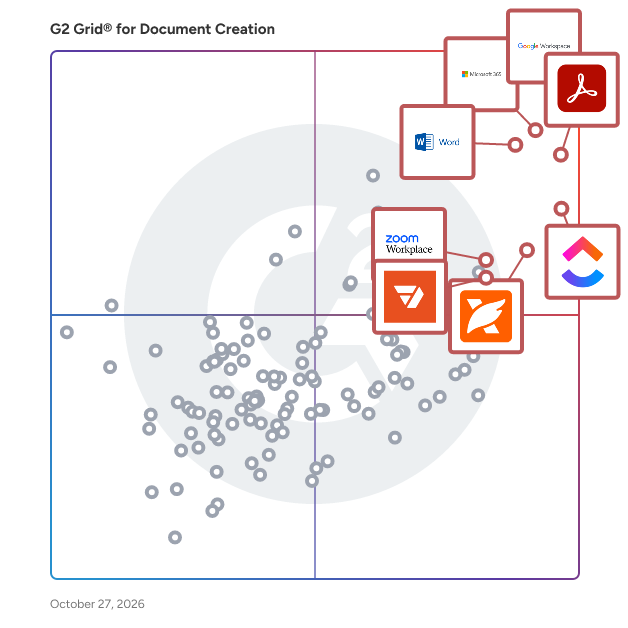
G2 Grid® for Document Creation Software

G2 Grid® for Document Creation Software plotting products by satisfaction and market presence

Highlighted products: Google Workspace, Microsoft 365, Adobe Acrobat, Microsoft Word, ClickUp, Foxit PDF Editor, Zoom Workplace, and pdfFiller.

Underlying data: [Grid® JSON](https://www.g2.com/categories/document-creation/grids.json?focus%5B%5D=google-workspace&focus%5B%5D=microsoft365&focus%5B%5D=adobe-acrobat&focus%5B%5D=microsoft-word&focus%5B%5D=clickup&focus%5B%5D=foxit-pdf-editor&focus%5B%5D=zoom-workplace&focus%5B%5D=pdffiller)

VisibleThread

VisibleThread is a full-lifecycle RFP platform designed to support every stage of the bid and contract process - before, during, and after submission. It fits into existing workflows across sales, capture, proposal, and contracts teams, supporting organizations of all sizes without forcing process change. Manual, repetitive work is replaced with intelligence and automation, helping teams move faster while maintaining control, consistency, and quality across complex documents. All insights in VisibleThread are grounded in evidence and fully traceable back to source content. The platform creates a clear, visible thread between AI-powered outputs and the original documents they come from enabling confident decision-making, defensible compliance, and reliable analysis. From opportunity qualification and document comparison to risk identification and quality checks, teams gain actionable insights without relying on black-box AI or manual interpretation. Security is built in, not bolted on. VisibleThread is trusted with highly sensitive, mission-critical content and supports multiple deployment options including private cloud and on-premise to meet a wide range of security and governance requirements. The result is a single, secure platform that improves speed, quality, collaboration, and outcomes, while reducing risk and enabling teams to win more business with confidence.

Average Rating: 4.4/5.0

Total Reviews: 16

How Do G2 Users Rate VisibleThread?

  • Has the product been a good partner in doing business?: 10.0/10 (Category avg: 9.0/10)
  • Quality of Support: 8.5/10 (Category avg: 8.6/10)
  • Ease of Use: 9.1/10 (Category avg: 8.9/10)
  • Ease of Admin: 10.0/10 (Category avg: 8.9/10)

Who Is the Company Behind VisibleThread?

Who Uses This Product?

  • Top Industries: Information Technology and Services
  • Company Size: 47% Medium, 41% Small

What Do G2 Reviewers Say About VisibleThread?

AI-generated summary from verified user reviews

Pros
  • Users find VisibleThread easy to use, appreciating its approachable documentation and quick document processing features.
  • Users value the tracking capabilities of VisibleThread, enabling efficient document scanning and compliance metric creation.
  • Users find Upload Ease in VisibleThread invaluable, making document scanning and compliance metrics intuitive and efficient.
  • Users value the approachable documentation of VisibleThread, making compliance assessment and document scanning easy and effective.
  • Users find document management features in VisibleThread user-friendly, enhancing compliance and security with impressive visuals.
Cons
  • Users find some functions of VisibleThread not intuitive, requiring time and effort to learn effectively.
  • Users experience bug issues with PDF shredding, resulting in incorrect compliance matrix formatting and multiple rows for single paragraphs.
  • Users note a steep learning curve with complex terminology and navigation that requires significant time investment.
  • Users find the feature usability limited due to lack of ignored word lists and support for additional languages.
  • Users are frustrated by inaccurate responses when generating compliance matrices from PDF documents, leading to multiple rows for one paragraph.

What Are Recent G2 Reviews of VisibleThread?

What Are G2 Users Discussing About VisibleThread?

SoftMaker Office

SoftMaker Office offers office productivity suite for Windows, Linux and Android platforms.

Average Rating: 4.3/5.0

Total Reviews: 12

How Do G2 Users Rate SoftMaker Office?

  • Has the product been a good partner in doing business?: 9.2/10 (Category avg: 9.0/10)
  • Quality of Support: 9.2/10 (Category avg: 8.6/10)
  • Ease of Use: 8.8/10 (Category avg: 8.9/10)
  • Ease of Admin: 9.4/10 (Category avg: 8.9/10)

Who Is the Company Behind SoftMaker Office?

Who Uses This Product?

  • Company Size: 58% Small, 25% Large

What Are Recent G2 Reviews of SoftMaker Office?

What Are G2 Users Discussing About SoftMaker Office?

Proton Workspace

Proton Workspace is a business productivity and collaboration software suite that helps organizations manage communication, scheduling, files, documents, access, and internal collaboration, all with privacy-focused security controls. It is designed for businesses, distributed teams, startups, nonprofits, and regulated organizations seeking a single workspace for email, calendar, cloud storage, document collaboration, video meetings, password management, VPN access, and administrative controls. Proton positions it as an integrated business suite within the broader collaboration and secure workplace software category. Proton Workspace supports everyday business workflows, including company email and calendar management, secure file storage and sharing, document and spreadsheet collaboration, team meetings, credential management, and remote access protection. It can also support IT and operations teams that need centralized user administration, storage allocation, and policy enforcement across multiple workplace tools. According to Proton’s business materials, the suite brings together Proton Mail, Calendar, Drive, Docs, Sheets, Meet, Pass, VPN, and a private AI assistant in one subscription for business users. - Unified workspace for business operations: Combines encrypted email, calendar, cloud storage, document editing, spreadsheets, meetings, password management, and VPN services in one environment. - Privacy-focused architecture: Built around end-to-end encryption and zero-access encryption for core data types, which is relevant for teams handling sensitive communications, files, or credentials. - Team collaboration tools: Supports file sharing, permission controls, password-protected links, real-time document collaboration, spreadsheets, and video meetings for internal and external work. - Business administration features: Includes user management, storage allocation, support for custom email domains, and security settings for organizational deployment. - Use cases across secure work environments: Suitable for companies that need an alternative to standard office suites, especially where data protection, remote work security, and centralized tool management are priorities.

Average Rating: 4.6/5.0

Total Reviews: 32

How Do G2 Users Rate Proton Workspace?

  • Has the product been a good partner in doing business?: 10.0/10 (Category avg: 9.0/10)
  • Quality of Support: 9.1/10 (Category avg: 8.6/10)
  • Ease of Use: 8.9/10 (Category avg: 8.9/10)
  • Ease of Admin: 10.0/10 (Category avg: 8.9/10)

Who Is the Company Behind Proton Workspace?

  • Seller: Proton AG
  • Company Website:
  • Year Founded: 2014
  • HQ Location: Plan-les-Ouates, Geneva, Switzerland
  • LinkedIn® Page: www.linkedin.com
    973 employees on LinkedIn®

Who Uses This Product?

  • Top Industries: Information Technology and Services
  • Company Size: 21% Small, 9% Medium

What Are Recent G2 Reviews of Proton Workspace?

AI can help you find the answers. G2 helps you trust them.

Connect G2 to Claude or ChatGPT for answers grounded in G2's trusted reviews, comparisons, and pricing from real user insights.

How it works

MobiOffice

MobiOffice (formerly OfficeSuite) is a complete office suite by MobiSystems, built for Windows, macOS, Android, and iOS. It helps individuals, businesses, and teams create, edit, and share documents, spreadsheets, presentations, and email in one package. MobiOffice is the new and improved version of OfficeSuite, with a familiar interface that people can start right away, compatible with formats they are already using. MobiSystems is a software company founded in 2001 whose apps have over 550 million users in 195 countries. Four apps for everyday work • MobiDocs: A word processor for creating, editing, and formatting documents, with Track Changes and comments for review. • MobiSheets: Spreadsheet software for organizing and analyzing data with formulas, charts, pivot tables, and conditional formatting. • MobiSlides: Presentation software for building polished slides with themes, animations, and transitions. • MobiMail: An email client with a built-in calendar that brings multiple email accounts into one place. Key benefits • Microsoft Office compatibility: Open, edit, and save Word, Excel, and PowerPoint files (DOCX, XLSX, PPTX), export documents to PDF, and exchange them with clients and colleagues who use Microsoft Office. • Familiar layout: Ribbon menus follow the structure most office users already know, which keeps onboarding short. • Access across devices: Every plan includes MobiDrive cloud storage, so files are available on each device you use. • Lower cost: As a Microsoft 365 alternative, MobiOffice offers the everyday office apps at a lower subscription price, starting at $4.17/month per user, billed annually. Built for business teams Business plans add a web-based admin console where you assign and reassign licenses as your team changes, plus priority support. IT teams can deploy MobiOffice on Windows computers with unattended MSIX packages. For 20 or more seats, volume discounts and corporate payment options are available, and larger teams can get a dedicated customer success manager. Availability MobiDocs, MobiSheets, and MobiSlides run on Windows and macOS and come together in the MobiOffice app on Android and iOS. MobiMail is available on Windows. App availability and features vary by platform and plan. Try MobiOffice! Download MobiOffice for Windows, macOS, Android, or iOS and try MobiOffice Premium free for 7 days. Paid plans come with a 30-day money-back guarantee.

Average Rating: 4.4/5.0

Total Reviews: 52

How Do G2 Users Rate MobiOffice?

  • Has the product been a good partner in doing business?: 10.0/10 (Category avg: 9.0/10)
  • Quality of Support: 8.8/10 (Category avg: 8.6/10)
  • Ease of Use: 8.9/10 (Category avg: 8.9/10)
  • Ease of Admin: 10.0/10 (Category avg: 8.9/10)

Who Is the Company Behind MobiOffice?

  • Seller: MobiSystems
  • Company Website:
  • Year Founded: 2001
  • HQ Location: Sofia, Sofia
  • LinkedIn® Page: www.linkedin.com
    137 employees on LinkedIn®

Who Uses This Product?

  • Top Industries: Education Management, Marketing and Advertising
  • Company Size: 48% Small, 29% Medium

What Do G2 Reviewers Say About MobiOffice?

AI-generated summary from verified user reviews

Pros
  • Users enjoy the seamless communication integration of MobiOffice, enhancing their document management experience with easy updates.
  • Users value the efficient data management in MobiOffice, appreciating its intuitive interface and document history features.
  • Users enjoy the well-organized document editing features of MobiOffice, appreciating the clean interface and adaptable templates.
  • Users benefit from the well-organized document management of MobiOffice, enjoying clean interfaces and adaptable templates.
  • Users love the easy editing features of MobiOffice, benefiting from templates and seamless updates to documents.

What Are Recent G2 Reviews of MobiOffice?

MyDocSafe

Secure client and employee onboarding: forms, ID checks, e-signatures and payments in one branded portal. MyDocSafe is a secure onboarding platform for businesses of any size. Design and run branded client and employee onboarding journeys that combine e-forms, identity verification, legally binding e-signatures and payment collection, without stitching together separate tools.

Average Rating: 3.9/5.0

Total Reviews: 15

How Do G2 Users Rate MyDocSafe?

  • Has the product been a good partner in doing business?: 8.3/10 (Category avg: 9.0/10)
  • Quality of Support: 7.7/10 (Category avg: 8.6/10)
  • Ease of Use: 8.6/10 (Category avg: 8.9/10)
  • Ease of Admin: 7.1/10 (Category avg: 8.9/10)

Who Is the Company Behind MyDocSafe?

Who Uses This Product?

  • Company Size: 88% Small, 13% Medium

What Are Recent G2 Reviews of MyDocSafe?

What Are G2 Users Discussing About MyDocSafe?

ActiveTextbook

- Enrich your books with multimedia content like video, audio, pictures, quizzes, and widgets, and tailor learning material to the needs of a particular group. - Empower and engage your students with the study tools they need: comment threads to discuss a topic right in the book, scribbles and bookmarks. - Integrate and maintain easily with LTI protocol support and through API calls, cross-platform support on mobile devices. - Have your content protected with granular book access control and choice of DRM and Sony URMS.

Average Rating: 4.4/5.0

Total Reviews: 12

How Do G2 Users Rate ActiveTextbook?

  • Has the product been a good partner in doing business?: 9.2/10 (Category avg: 9.0/10)
  • Quality of Support: 9.4/10 (Category avg: 8.6/10)
  • Ease of Use: 8.5/10 (Category avg: 8.9/10)
  • Ease of Admin: 9.2/10 (Category avg: 8.9/10)

Who Is the Company Behind ActiveTextbook?

Who Uses This Product?

  • Company Size: 42% Medium, 33% Small

What Are Recent G2 Reviews of ActiveTextbook?

Final Draft

For over 25 years Final Draft has been the industry standard and market leader in screenwriting software. Used by 95% of film and television productions, Final Draft is the first choice for both professional and aspiring screenwriters, producers, directors, and industry executives. Final Draft was co-founded in 1990 by Marc Madnick and Ben Cahan, who recognized that Hollywood lacked a word-processor capable of automatically formatting a script to the entertainment industry’s stringent standards. This led to the creation of Final Draft, a fully dedicated screenwriting software application that automatically formats your script to Hollywood’s industry standards. Final Draft quickly became an essential tool for the entertainment industry, and in 2013 the program was awarded the prestigious Primetime Emmy Engineering Award. In recent years Final Draft’s mission has extended beyond providing writers with the best screenwriting software on the market. Final Draft also provides free and exclusive educational resources to writers to help them every step of the way on their screenwriting journey. This includes interviews with professional screenwriters, podcasts, tech tips, and how-to articles. Regular live events keep writers connected with industry and each other, and up-to-date on the latest industry trends. Final Draft continues to unearth the best new talent through the Big Break Screenwriting Contest, which every year awards over $100,000 in cash and prizes, and has launched the careers of countless new screenwriters. Final Draft is fully committed to diversity, equity and inclusion. The Big Break Contest offers Diversity categories that ensure underrepresented writers come to the attention of industry professionals. Final Draft also provides invaluable resources and connections to BIPOC, LGBTQIA+, marginalized and differently abled writers, helping them bring their stories to the world. As the needs of these communities grow and change, Final Draft will be there to meet them. In 2016, Final Draft was acquired by Cast & Crew. Based in Burbank, California, and with offices across the U.S. and in Canada, Cast & Crew is a trusted partner to major and independent film and television studios. Cast & Crew provides clients with a robust portfolio of critical services. These include payroll and residuals processing, the industry-leading PSL production accounting software and other digital solutions, as well as financial services such as production incentive consulting, management and financing. Cast & Crew continues to accelerate its investment in technology, supported by majority shareholder EQT, a leading investment firm with portfolio companies in Europe, Asia, and the U.S., which acquired Cast & Crew in early 2019. Under Cast & Crew Final Draft provides a world-class product with world-class service and will continue to listen and respond to the needs of writers everywhere. Final Draft is proud to continue to work with our industry partners to improve the lives and careers of writers, including Hillman Grad, Start with Hollywood, Women of Color Unite, the Geena Davis Institute, Seed & Spark, CAPE Fellowship, The Disruptors, Women in Film & TV and NALIP. Final Draft – It all starts with the script.

Average Rating: 4.5/5.0

Total Reviews: 46

How Do G2 Users Rate Final Draft?

  • Has the product been a good partner in doing business?: 10.0/10 (Category avg: 9.0/10)
  • Quality of Support: 8.3/10 (Category avg: 8.6/10)
  • Ease of Use: 9.1/10 (Category avg: 8.9/10)
  • Ease of Admin: 8.8/10 (Category avg: 8.9/10)

Who Is the Company Behind Final Draft?

Who Uses This Product?

  • Top Industries: Entertainment, Motion Pictures and Film
  • Company Size: 85% Small, 11% Medium

What Do G2 Reviewers Say About Final Draft?

AI-generated summary from verified user reviews

Pros
  • Users value the ease of use of Final Draft, enabling effortless writing and collaboration anytime, anywhere.
  • Users love the intuitive tools and collaboration features of Final Draft, making scriptwriting seamless and efficient.
  • Users love the intuitive tools of Final Draft, making script writing easy and accessible anytime, anywhere.
  • Users appreciate the fast and secure online collaboration features, enhancing their teamwork on group projects seamlessly.
Cons
  • Users often find the upgrade process clunky, particularly when skipping a full version of Final Draft.

What Are Recent G2 Reviews of Final Draft?

What Are G2 Users Discussing About Final Draft?

LawDepot

LawDepot is the most advanced publisher of do-it-yourself legal documents. Using a unique step by step method, LawDepot simplifies the process of creating a customized legal document. LawDepot products cover all facets of the legal industry including: • Estate Planning • Family Law • Real Estate • Business • Financial Established in 2001, LawDepot is a leading publisher of do-it-yourself legal documents around the world. Our mission is to modernize the legal experience for everyday people with efficient, credible, and simple solutions

Average Rating: 2.8/5.0

Total Reviews: 29

How Do G2 Users Rate LawDepot?

  • Has the product been a good partner in doing business?: 6.9/10 (Category avg: 9.0/10)
  • Quality of Support: 5.1/10 (Category avg: 8.6/10)
  • Ease of Use: 7.5/10 (Category avg: 8.9/10)
  • Ease of Admin: 6.9/10 (Category avg: 8.9/10)

Who Is the Company Behind LawDepot?

  • Seller: LawDepot
  • Year Founded: 2002
  • HQ Location: Edmonton, Alberta
  • LinkedIn® Page: www.linkedin.com
    196 employees on LinkedIn®

Who Uses This Product?

  • Company Size: 86% Small, 17% Medium

What Do G2 Reviewers Say About LawDepot?

AI-generated summary from verified user reviews

Pros
  • Users find LawDepot extremely easy to use, benefiting from quick document creation and clear guidance throughout.
  • Users appreciate the easy navigation and quick document creation that LawDepot offers for legal services.
  • Users value the quick and user-friendly billing process of LawDepot, enhancing their overall experience.
  • Users appreciate the ease of navigation and quick contract generation of LawDepot, ensuring legal compliance effortlessly.
  • Users commend the helpful and prompt customer support from LawDepot, enhancing their overall experience with the product.
Cons
  • Users warn about billing issues, facing unexpected charges and difficulties in cancellation, leading to frustration and dissatisfaction.
  • Users warn about subscription issues, being charged unfairly and facing difficulties in cancellation and refunds.
  • Users warn about the expensive subscription fees and difficulty in cancelling, leading to unexpected charges.
  • Users report frustrating add-on costs, facing unexpected subscription charges despite efforts to cancel their accounts.
  • Users report serious access issues with LawDepot, including unexpected recurring charges and unresponsive customer service on cancellations.

What Are Recent G2 Reviews of LawDepot?

What Are G2 Users Discussing About LawDepot?

Fluent by Apryse

Fluent by Apryse (previously Windward Studios) is a unique solution that simplifies the creation of reports and templates on a large scale with minimal coding required. The SDK and Microsoft Office plugin enable developers to meet reporting needs efficiently, while also empowering admins to design and populate data-driven documents from multiple data sources. Fluent offers unlimited formatting capabilities, catering to the diverse needs of multiple teams and end users. Set it and forget it. -Automate reporting with effortless template creation in Microsoft Office applications. -Free your backlog from internal reporting development with an automated solution for reporting and template creation. Empower your end users to independently manage and update their templates with ease. Create, Connect, and Manage Templates. Quick to deploy and flexible enough to meet the organization's needs by easily integrating any data source: -Don't wait on vendor integration to add a new data source or expose sensitive data to a SaaS application. -Make the logic as complex as you want – avoid the limits of off-the-shelf solutions. - Meet the brand compliance expectations for external communications. Infinite Scalability: Regulatory requirements seem to grow in volume and complexity each year. You won’t outgrow a solution built for the organization’s specific needs. -End users can upload or create new templates as requirements change -Quickly integrate new data sources as the business grows -Localize reports for audiences by region, culture, and language. Indisputable productivity impact: Workers spend precious time on manual, repetitive tasks, with email, data collection, and data entry. Apryse drastically reduces time spent on these tasks, minimizing errors and freeing up time for more valuable work. -Minimize the requirements gathering back-and-forth when you put the solution in the hands of the end user. -Say goodbye to the wasted time and errors that come from manual cut and paste For more information visit: https://bit.ly/3tDfzFl

Average Rating: 4.4/5.0

Total Reviews: 77

How Do G2 Users Rate Fluent by Apryse?

  • Has the product been a good partner in doing business?: 9.1/10 (Category avg: 9.0/10)
  • Quality of Support: 9.0/10 (Category avg: 8.6/10)
  • Ease of Use: 8.4/10 (Category avg: 8.9/10)
  • Ease of Admin: 8.9/10 (Category avg: 8.9/10)

Who Is the Company Behind Fluent by Apryse?

  • Seller: Apryse
  • Year Founded: 1998
  • HQ Location: Denver, CO
  • LinkedIn® Page: www.linkedin.com
    569 employees on LinkedIn®

Who Uses This Product?

  • Top Industries: Computer Software, Financial Services
  • Company Size: 52% Medium, 34% Small

What Do G2 Reviewers Say About Fluent by Apryse?

AI-generated summary from verified user reviews

Pros
  • Users find the automation capabilities of Fluent by Apryse exceptionally reliable and efficient for report generation.
  • Users value the easy integrations of Fluent by Apryse, enhancing their reporting capabilities seamlessly within existing systems.
  • Users praise the efficiency of Fluent by Apryse, noting its reliable and high-volume processing capabilities.
  • Users value the flexibility of Fluent by Apryse, allowing seamless integration and customization for diverse reporting needs.
  • Users commend the easy integrations of Fluent by Apryse, enhancing their reporting workflows and system compatibility.

What Are Recent G2 Reviews of Fluent by Apryse?

What Are G2 Users Discussing About Fluent by Apryse?

DocsCloud

DocsCloud is a web-based software platform that helps you create web forms, generate the filled documents from templates, manage & get the documents digitally signed, host the documents & extract the text from the documents & images. DocsCloud helps you automate the various aspects of your routine documentation activities. The platform allows you to create & embed web forms, generate filled documents by mapping them with the forms or integrating them with the API/Plugins, perform end-to-end creation and management of digital signatures, perform the data extraction from documents and allow you to host your documents for easy access. DocsCloud covers wing to wing digitization of documents that are involved at various stages of the business cycle. The most significant advantage is that the users get all these capabilities under a platform. DocsCloud is a form builder + document generation + document hosting + digital signature platform + OCR from documents.

Average Rating: 4.4/5.0

Total Reviews: 20

How Do G2 Users Rate DocsCloud?

  • Has the product been a good partner in doing business?: 9.6/10 (Category avg: 9.0/10)
  • Quality of Support: 9.3/10 (Category avg: 8.6/10)
  • Ease of Use: 8.3/10 (Category avg: 8.9/10)
  • Ease of Admin: 9.6/10 (Category avg: 8.9/10)

Who Is the Company Behind DocsCloud?

Who Uses This Product?

  • Company Size: 75% Small, 15% Medium

What Are Recent G2 Reviews of DocsCloud?

What Are G2 Users Discussing About DocsCloud?

Calculator Studio

Calculator Studio lets you create and publish interactive website calculators using familiar spreadsheet logic. There's no need to code—just build using the skills you already have! Simply connect your existing spreadsheets or create from scratch, and turn your data into stylish, functional tools that engage your audience. Whether it's helping users explore pricing models or showing savings or ROI calculations, Calculator Studio makes it easy. You can also integrate these calculators into your lead-generation process, capture user inputs, and send the results to your CRM. Empower your audience with smart tools that educate and drive conversions.

Average Rating: 4.6/5.0

Total Reviews: 15

How Do G2 Users Rate Calculator Studio?

  • Has the product been a good partner in doing business?: 8.9/10 (Category avg: 9.0/10)
  • Quality of Support: 9.3/10 (Category avg: 8.6/10)
  • Ease of Use: 9.1/10 (Category avg: 8.9/10)
  • Ease of Admin: 7.8/10 (Category avg: 8.9/10)

Who Is the Company Behind Calculator Studio?

Who Uses This Product?

  • Company Size: 47% Small, 40% Medium

What Do G2 Reviewers Say About Calculator Studio?

AI-generated summary from verified user reviews

Pros
  • Users love the ease of use of Calculator Studio, making complex calculations accessible for everyone.
  • Users love the ease of use of Calculator Studio, allowing quick access to a variety of calculation tools.
  • Users love the simplicity of Calculator Studio, finding it easy to use with various functionality integrated seamlessly.
  • Users love the speed and accuracy of Calculator Studio, making calculations quick and effortless across all devices.
  • Users value the time-saving capabilities of Calculator Studio, allowing for quick and efficient calculations across various needs.
Cons
  • Users find the steep learning curve for advanced features challenging, particularly those without a data background.
  • Users find the complex setup of Calculator Studio daunting, particularly regarding advanced calculation menus for beginners.
  • Users find the difficult navigation in Calculator Studio intimidating, especially for those new to the software.
  • Users find the difficult setup challenging, especially those not familiar with software installation.
  • Users find the installation challenging, especially those without a software background, despite the product's overall quality.

What Are Recent G2 Reviews of Calculator Studio?

Celtx

For over twenty years, Celtx has been changing the way people think about creating content. Our all-in-one online solution for writing, planning, and managing media production is the first of its kind and has enjoyed enormous global adoption. Celtx sets the benchmark for collaborative production workflows for professional teams who work in film & television, marketing agencies & in-house teams, and video game production. Unlike our competitors, Celtx is not targeted towards Hollywood. We are for the strivers, the visionaries, the dreamers across the globe - and the professionals who want to make sure their client videos are the best they can be. With over 7,450,000 members in over 140+ countries, Celtx is the world's most popular screenwriting and pre-production software. Collaboration informs everything we do, and we know no skillset is the same. That’s why we back up our clients with passionate, caring Customer Success agents and provide expansive resources for people of any level of expertise to hone their craft and improve their workflow. Our mission has always been to make things easier. We want to empower storytellers from the ground up, which means not only serving industry-leading clients, but partnering with non-profit and educational institutions to help inspire the next generation of creatives. Go ahead and give Celtx a shot by signing up for a free 7-day trial. Have questions? Reach out to our Support Team at support@celtx.com.

Average Rating: 4.2/5.0

Total Reviews: 86

How Do G2 Users Rate Celtx?

  • Has the product been a good partner in doing business?: 8.6/10 (Category avg: 9.0/10)
  • Quality of Support: 8.0/10 (Category avg: 8.6/10)
  • Ease of Use: 8.4/10 (Category avg: 8.9/10)
  • Ease of Admin: 8.3/10 (Category avg: 8.9/10)

Who Is the Company Behind Celtx?

  • Seller: Backlight
  • Company Website:
  • Year Founded: 2021
  • HQ Location: Boston, Massachusetts
  • LinkedIn® Page: www.linkedin.com
    287 employees on LinkedIn®

Who Uses This Product?

  • Top Industries: Motion Pictures and Film, Entertainment
  • Company Size: 91% Small, 7% Medium

What Do G2 Reviewers Say About Celtx?

AI-generated summary from verified user reviews

Pros
  • Users appreciate the ease of use of Celtx, benefiting from its simple interface and time-saving features.
  • Users find Celtx's user-friendly interface invaluable for scheduling, script formatting, and maintaining productivity.
  • Users find Celtx intuitive, with a friendly interface that simplifies screenwriting and enhances productivity.
  • Users love the cloud-based system and automatic formatting that enhance their scriptwriting efficiency and collaboration.
  • Users value the accessible customer service of Celtx, contributing to a smooth and supportive writing experience.
Cons
  • Users find the missing features in Celtx limiting, especially for advanced project management and export flexibility.
  • Users find Celtx to be not intuitive, particularly with the script breakdown and storyboard features being cumbersome to use.
  • Users struggle with data deletion limits, forcing them to discard screenplays they wish to revisit later.
  • Users find the pricing too expensive, especially given the limitations of the free version and subscription model.
  • Users often face difficult navigation between projects on Celtx, impacting their overall efficiency and experience.

What Are Recent G2 Reviews of Celtx?

What Are G2 Users Discussing About Celtx?

ClickHelp

ClickHelp is an AI-powered online documentation tool. Create, translate, and publish your technical documentation in a single portal! Here is how ClickHelp makes your tech writing more effective: * Easy to use WYSIWYG topic editor, as well as HTML source mode. * Simple customization with a block-based Home page editor. * Single-sourcing and content reuse. * AI features (AnswerGenius, WriteAssist, AskYourDocs) * In-depth analytics and reporting. * Readability scores and metrics. * Easy importing and exporting. ClickHelp can import content from Microsoft Word, HTML, Markdown, RTF, CHM, ODT, etc., and export to CHM, HTML5 Web Help, PDF, DOCX, etc. * Translation ecosystem to create multi-language documentation. * Machine translation support. * API features. * Swagger/OpenAPI Definition import. * RTL language support. * Audit trail and IP Allowlist for enhanced security. * Optional block-based editor * Automatic domain management * TwoFactor Authentication * Multi-site setup Integrations: Google Analytics, Google Search Console, Zendesk, Zapier, AddThis, Google Translate, DeepL, YouTube, and much more.

Average Rating: 4.8/5.0

Total Reviews: 66

How Do G2 Users Rate ClickHelp?

  • Has the product been a good partner in doing business?: 9.5/10 (Category avg: 9.0/10)
  • Quality of Support: 9.7/10 (Category avg: 8.6/10)
  • Ease of Use: 9.3/10 (Category avg: 8.9/10)
  • Ease of Admin: 9.4/10 (Category avg: 8.9/10)

Who Is the Company Behind ClickHelp?

  • Seller: ClickHelp
  • Year Founded: 2010
  • HQ Location: Yerevan, Armenia
  • LinkedIn® Page: www.linkedin.com
    20 employees on LinkedIn®

Who Uses This Product?

  • Top Industries: Computer Software, Information Technology and Services
  • Company Size: 60% Small, 33% Medium

What Do G2 Reviewers Say About ClickHelp?

AI-generated summary from verified user reviews

Pros
  • Users love ClickHelp's AI features, which streamline workflows and enhance documentation quality with tools like Answer Genius and Write Assist.
  • Users appreciate the accessibility of ClickHelp, allowing usage from anywhere with just a browser and Internet.
  • Users find ClickHelp's AI features invaluable, significantly enhancing workflow and improving documentation quality.
  • Users value ClickHelp's AI technology, which enhances workflow and improves content quality through helpful tools like Answer Genius and Write Assist.
  • Users appreciate the helpful customer support from ClickHelp, receiving assistance even on weekends for their inquiries.

What Are Recent G2 Reviews of ClickHelp?

What Are G2 Users Discussing About ClickHelp?

Jotform - PDF Editor

Jotform PDF Editor automatically turns collected form responses into professional, secure PDF documents that you can share with colleagues and customers. Easily generate custom PDF files online! Create professional-looking documents with the data you collect. Send PDF invoices to your customers, organize job applications, or prepare proposals for potential clients. Produce any and every type of document you need, to more easily communicate with your clients and colleagues.

Average Rating: 4.3/5.0

Total Reviews: 44

How Do G2 Users Rate Jotform - PDF Editor?

  • Has the product been a good partner in doing business?: 8.1/10 (Category avg: 9.0/10)
  • Quality of Support: 7.9/10 (Category avg: 8.6/10)
  • Ease of Use: 9.1/10 (Category avg: 8.9/10)
  • Ease of Admin: 8.6/10 (Category avg: 8.9/10)

Who Is the Company Behind Jotform - PDF Editor?

  • Seller: Jotform
  • Year Founded: 2006
  • HQ Location: San Francisco, California
  • LinkedIn® Page: www.linkedin.com
    925 employees on LinkedIn®

Who Uses This Product?

  • Company Size: 48% Small, 41% Medium

What Do G2 Reviewers Say About Jotform - PDF Editor?

AI-generated summary from verified user reviews

Pros
  • Users appreciate the customization options in Jotform - PDF Editor, making form creation simple and flexible.
  • Users value the ease of use of Jotform - PDF Editor, finding it simple to create and adjust forms.
  • Users appreciate the easy installation of Jotform - PDF Editor, enabling quick and hassle-free setup for forms.
  • Users praise the easy setup of Jotform - PDF Editor, appreciating its seamless form creation process.
  • Users appreciate the ease of form filling in Jotform - PDF Editor, simplifying their document creation process.
Cons
  • Users find the editor functionality lacking, as elements can be added unintentionally during editing.
  • Users note the unintuitive text usability of Jotform's PDF Editor, leading to unintentional form additions.

What Are Recent G2 Reviews of Jotform - PDF Editor?

What Are G2 Users Discussing About Jotform - PDF Editor?

Docsie

Docsie is an innovative documentation management tool designed for ease of use and efficiency. It stands out with its AI-powered features, enabling automated content creation and updates. Ideal for technical writers, product managers, and developers, Docsie supports multi-language documentation and integrates seamlessly into various workflows. It is particularly popular in the manufacturing sector for its ability to handle extensive product manuals and technical documents. With Docsie, businesses can significantly streamline their documentation processes, improving overall productivity and user experience. You can access Docsie through a SaaS web application to create and edit documentation from any location. Then, you can publish content to a dynamic knowledge portal that end-users and employees can access whenever they need information! Docsie offers a range of powerful business-grade features to help you write and manage product documentation with ease. Onboarding Service: • Free onboarding with Docsie Pilot to import your content and help you get the most value from the platform. • Get help with custom portal design, and an optional training session so your employees can maximize their productivity in Docsie. Knowledge Base and Documentation Portal: • Internal knowledge portals to share self-service knowledge with employees. • External customer knowledge bases to share self-service help documentation and reduce customer support workloads. • Built-in knowledge base statistics and documentation feedback surveys with Docsie Vocally. • Use the default Docsie portal design or deploy a custom knowledge base design based on your brand style and image. • A free custom domain on the free plan for everyone, with additional domains available on paid plans. • Deploy knowledge portals using Docsie hosting, custom deployments, or on-premise instances (Organization plan) Documents and Content Editor: • Support for Markdown syntax and import or export Markdown content. • Docsie Editor allows you to create content in a WYSIWYG editor that supports rich text formatting, emoji symbols, section headers, tables and lists, image and video, iFrame embedded content, tooltip callouts, code snippets, URL hyperlinks • Grammar or spell checking with a configurable rule-based content linter. • Create API documentation, standard operating procedures (SOPs), and technical documents from scratch or with built-in templates. • Create your own snippet and fragment templates to reuse content across your documents with one click. Help Centers and In-App Help Interfaces: • Deploy help centers and in-app support interfaces to share contextual point-in-time help documentation with end-users using a HTML footer script. • Create product and software guided tours to walk end-users through step-by-step workflows. • Add in-app help interfaces to your web application so users can access documentation on the same page. Languages, Versions, and Translations: • Version management allows end-users to view historical documentation in your knowledge base via canonical URLs rather than duplicate pages. • Language management and extended localization helps you automate the deployment of multilingual content without the need for professional translators. • Ghost AI language translation converts source documents automatically to the target language. Docsie AI translation supports these languages: English, French, Spanish, German, Dutch, Norwegian, Portuguese, Danish, Swedish, Arabic, Chinese, and Japanese. Collaboration and Project Management: • Create workspaces for each team, business department, or product and service in your portfolio and organize your content. • Add comments, notes, and tasks to documents and tag team members to assign tasks. • Project management tools based on Agile working methodologies, with Kanban style status indicators for Draft-Review-Approval, per task user assignment, due dates and timelines, and target document or topic selection. • Webhook support enables you to share updates when content is created, edited, deleted, and published in Slack, Mattermost and other business IM tools. Security, Compliance, User Roles, and Data Protection: • Role-based access controls (RBAC) and granular permissions for each workspace. • JWT token authentication with strict and lax options. • Temporary passwords to enable access for contractors and freelancers. • Single sign on via corporate SSO, Google, LinkedIn, or Microsoft logins.

Average Rating: 4.8/5.0

Total Reviews: 115

How Do G2 Users Rate Docsie?

  • Has the product been a good partner in doing business?: 9.7/10 (Category avg: 9.0/10)
  • Quality of Support: 9.9/10 (Category avg: 8.6/10)
  • Ease of Use: 9.5/10 (Category avg: 8.9/10)
  • Ease of Admin: 10.0/10 (Category avg: 8.9/10)

Who Is the Company Behind Docsie?

  • Seller: Docsie
  • Company Website:
  • Year Founded: 2020
  • HQ Location: Austin, US
  • LinkedIn® Page: www.linkedin.com
    17 employees on LinkedIn®

Who Uses This Product?

  • Who Uses This: Technical Writer, Project Manager
  • Top Industries: Information Technology and Services, Management Consulting
  • Company Size: 78% Small, 19% Large

What Do G2 Reviewers Say About Docsie?

AI-generated summary from verified user reviews

Pros
  • Users value the centralization of documentation in Docsie, enhancing collaboration and streamlining the workflow for all teams.
  • Users value the collaboration features of Docsie, enabling simultaneous teamwork and seamless version control.
  • Users value the centralized documentation management in Docsie, enhancing collaboration and usability for diverse teams.
  • Users value the centralized documentation management of Docsie, enhancing collaboration and streamlining the documentation process.
  • Users appreciate the ease of use of Docsie, benefiting from its intuitive interface and collaborative features.
Cons
  • Users find integration issues with Docsie frustrating, particularly due to limited connections with popular tools.
  • Users feel the lack of integrations with tools like Jira and Slack limits Docsie's overall functionality and usability.
  • Users find that there is a steep learning curve with Docsie, particularly for advanced features and UI navigation.
  • Users find a notable learning difficulty with Docsie, particularly when navigating its advanced features and UI.
  • Users experience a steep learning curve with Docsie, particularly with advanced features and less intuitive UI elements.

What Are Recent G2 Reviews of Docsie?

What Are G2 Users Discussing About Docsie?

Neeraja Prakash
NP
Researched and written by Neeraja Prakash
Updated April 10, 2026