# Best Simulation & CAE Software

## How Many Simulation & CAE Software Products Does G2 Track?

**Total Products under this Category:** 357

### Category Stats (Aug 2026)

- **Average Rating:** 4.35/5 The average rating of products in this category, based on all submitted ratings
- **Top Trending Product:** Altair Feko (+1.12%) - Among all products in this category, Altair Feko recorded the largest rating increase compared to last month

_Last updated: August 19, 2026_

## How Does G2 Rank Simulation & CAE Software Products?

**Why You Can Trust G2's Software Rankings:**

- 30 Analysts and Data Experts
- 7,900+ Authentic Reviews
- 357+ Products
- Unbiased Rankings

G2's software rankings are built on verified user reviews, rigorous moderation, and a consistent research methodology maintained by a team of analysts and data experts. Each product is measured using the same transparent criteria, with no paid placement or vendor influence. While reviews reflect real user experiences, which can be subjective, they offer valuable insight into how software performs in the hands of professionals. Together, these inputs power the G2 Score, a standardized way to compare tools within every category.

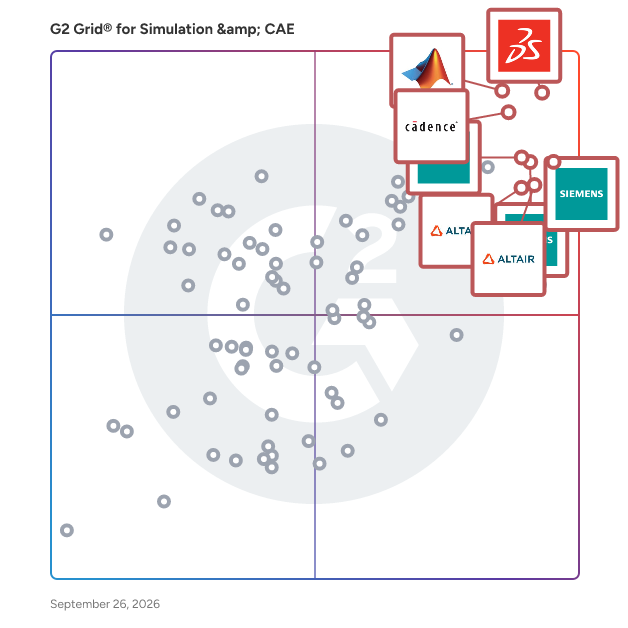
## G2 Grid® for Simulation & CAE Software
 ![G2 Grid® for Simulation & CAE Software plotting products by satisfaction and market presence](https://www.g2.com/categories/simulation-cae/grids.png?focus%5B%5D=24457&focus%5B%5D=169299&focus%5B%5D=97549&focus%5B%5D=1795&focus%5B%5D=1792&focus%5B%5D=49803&focus%5B%5D=58559&focus%5B%5D=107449)

Highlighted products: MATLAB, Fidelity CFD Platform, Capital, SOLIDWORKS, Designcenter Solid Edge, Simcenter STAR-CCM+, Simcenter 3D, and Altair SimSolid.

Underlying data: [Grid® JSON](https://www.g2.com/categories/simulation-cae/grids.json?focus%5B%5D=matlab&focus%5B%5D=cadence-design-systems-fidelity-cfd-platform&focus%5B%5D=capital&focus%5B%5D=solidworks&focus%5B%5D=designcenter-solid-edge&focus%5B%5D=simcenter-star-ccm&focus%5B%5D=simcenter-3d&focus%5B%5D=altair-simsolid)

### [MATLAB](https://www.g2.com/products/matlab/reviews)

MATLAB is a high-level programming and numeric computing environment widely utilized by engineers and scientists for data analysis, algorithm development, and system modeling. It offers a desktop environment optimized for iterative analysis and design processes, coupled with a programming language that directly expresses matrix and array mathematics. The Live Editor feature enables users to create scripts that integrate code, output, and formatted text within an executable notebook. Key Features and Functionality: - Data Analysis: Tools for exploring, modeling, and analyzing data. - Graphics: Functions for visualizing and exploring data through various plots and charts. - Programming: Capabilities to create scripts, functions, and classes for customized workflows. - App Building: Facilities to develop desktop and web applications. - External Language Interfaces: Integration with languages such as Python, C/C++, Fortran, and Java. - Hardware Connectivity: Support for connecting MATLAB to various hardware platforms. - Parallel Computing: Ability to perform large-scale computations and parallelize simulations using multicore desktops, GPUs, clusters, and cloud resources. - Deployment: Options to share MATLAB programs and deploy them to enterprise applications, embedded devices, and cloud environments. Primary Value and User Solutions: MATLAB streamlines complex mathematical computations and data analysis tasks, enabling users to develop algorithms and models efficiently. Its comprehensive toolboxes and interactive apps facilitate rapid prototyping and iterative design, reducing development time. The platform's scalability allows for seamless transition from research to production, supporting deployment on various systems without extensive code modifications. By integrating with multiple programming languages and hardware platforms, MATLAB provides a versatile environment that addresses the diverse needs of engineers and scientists across industries.

**Average Rating:** 4.5/5.0

**Total Reviews:** 753

#### How Do G2 Users Rate MATLAB?

- **Has the product been a good partner in doing business?:** 8.4/10 (Category avg: 8.6/10)
- **Task:** 8.7/10 (Category avg: 8.2/10)
- **Integrate:** 8.4/10 (Category avg: 8.0/10)
- **Continuous event modeling:** 8.9/10 (Category avg: 8.1/10)

#### Who Is the Company Behind MATLAB?

- **Seller:** [MathWorks](https://www.g2.com/sellers/mathworks)
- **Year Founded:** 1984
- **HQ Location:** Natick, MA
- **Twitter:** @MATLAB  
105,142 Twitter followers
- **LinkedIn® Page:** [www.linkedin.com](https://www.g2.com/external_clickthroughs/record?secure%5Bsource_type%5D=product_profile&secure%5Btoken%5D=6dbb518e9679f4f3158244b1c49a1caf60257ab06a669303d999c534715b2674&secure%5Burl%5D=https%3A%2F%2Fwww.linkedin.com%2Fcompany%2F1194036%2F&secure%5Burl_type%5D=linkedin_company_website)  
7,985 employees on LinkedIn®

#### Who Uses This Product?

- **Who Uses This:** Student, Graduate Research Assistant
- **Top Industries:** Higher Education, Research
- **Company Size:** 42% Large, 31% Small

#### What Do G2 Reviewers Say About MATLAB?

_AI-generated summary from verified user reviews_

##### Pros

- Users appreciate the **user-friendly interface** of MATLAB, making data visualization and manipulation easy and efficient.
- Users appreciate the **powerful visualization tools** of MATLAB, enhancing real-time data plotting and image processing capabilities.
- Users appreciate the **powerful and user-friendly data visualization** features of MATLAB for real-time plotting.
- Users appreciate the **variety of tools** in MATLAB, enhancing capabilities in numerical analysis, image processing, and simulations.
- Users appreciate the **ease of simulations** with MATLAB, especially with its seamless integration of Simulink for diverse applications.

##### Cons

- Users find MATLAB to be **expensive** , making it difficult for individuals and small companies to afford.
- Users often experience **slow performance** with MATLAB, especially on less powerful machines or with large datasets.
- Users find MATLAB's **high system requirements** frustrating, often leading to slower performance on less powerful machines.
- Users find the **expensive licensing** of MATLAB a significant barrier, particularly for individuals and small companies.
- Users frequently encounter **lagging performance** with MATLAB, especially during large simulations and with multiple scripts open.

#### What Are Recent G2 Reviews of MATLAB?

**["User-Friendly MATLAB with Top-Tier UI, Tools, and Simulation Performance"](https://www.g2.com/survey_responses/matlab-review-12675291)**

**Rating:** 5.0/5.0 stars

_— Verified User in Higher Education_

[Read full review](https://www.g2.com/survey_responses/matlab-review-12675291)

**["A Robust Powerhouse for Advanced Engineering Simulations and Modeling"](https://www.g2.com/survey_responses/matlab-review-12689149)**

**Rating:** 4.0/5.0 stars

_— Wafa M._

[Read full review](https://www.g2.com/survey_responses/matlab-review-12689149)

#### What Are G2 Users Discussing About MATLAB?

- [What is MATLAB used for?](https://www.g2.com/discussions/what-is-matlab-used-for) - 1 comment
- [Can I use Matlab for free?](https://www.g2.com/discussions/can-i-use-matlab-for-free) - 3 comments
- [What is Matlab written in?](https://www.g2.com/discussions/what-is-matlab-written-in) - 1 comment
- [Is Matlab a programming language or software?](https://www.g2.com/discussions/is-matlab-a-programming-language-or-software) - 1 comment
- [What is Matlab software used for?](https://www.g2.com/discussions/what-is-matlab-software-used-for) - 1 comment

### [Capital](https://www.g2.com/products/capital/reviews)

Siemens Capital is an advanced electrical and electronic (E/E) systems design platform that leverages artificial intelligence to assist industries where precision, speed, and reliability are paramount. This solution is particularly beneficial for sectors such as automotive, aerospace, defense, industrial machinery, and software-defined vehicles, where the complexity of E/E systems continues to grow. Capital empowers engineering teams to design and optimize electrical distribution systems, develop and deploy embedded software for automotive electronic control units (ECUs), and integrate various design data into a single collaborative environment. As industries transition towards electrification and the development of connected vehicles, the need for sophisticated E/E systems becomes increasingly critical. Siemens Capital X, a cloud-based iteration of this platform, enhances the design process by providing organizations with tools that facilitate digital twin and digital thread capabilities. This cloud solution offers numerous advantages, including ease of access, cost-efficient deployment, robust security, and seamless collaboration among global teams. As a software as a service (SaaS) offering, Capital X ensures that sensitive data remains protected while enabling efficient teamwork across various locations. The platform boasts key capabilities that address the challenges of modern E/E systems engineering. These include model-based engineering for complex architectures, automated network implementation, real-time design verification, and embedded software design and testing. Additionally, interactive 3D modeling through mechanical computer-aided design (MCAD) integrations, generative design for harness engineering, and automatic documentation for manufacturing and maintenance streamline the entire design process. Version control and change management features further enhance efficiency by minimizing rework and ensuring that all team members are aligned with the latest updates. Siemens Capital delivers measurable benefits throughout the product lifecycle. By automating repetitive design tasks, it increases efficiency and enhances accuracy by utilizing analytics to catch errors before production. This results in significant cost reductions and faster time-to-market, as design iterations and development cycles are accelerated. Furthermore, real-time insights enable data-driven decisions, guiding engineering teams toward better outcomes. With its comprehensive approach to integrating design, verification, manufacturing, and maintenance processes, Siemens Capital equips organizations to tackle the complexities of contemporary E/E architectures. Whether for next-generation aircraft, high-performance industrial machinery, or innovative connected vehicles, Capital plays a crucial role in reducing risks, controlling costs, and expediting the delivery of cutting-edge products to market. This unified platform not only supports collaboration among mechanical, electrical, and software engineering teams but also ensures that designs comply with industry standards, thereby maintaining a competitive edge in a rapidly evolving technological landscape.

**Average Rating:** 4.4/5.0

**Total Reviews:** 115

#### How Do G2 Users Rate Capital?

- **Has the product been a good partner in doing business?:** 8.3/10 (Category avg: 8.6/10)
- **Task:** 9.2/10 (Category avg: 8.2/10)
- **Integrate:** 9.5/10 (Category avg: 8.0/10)
- **Continuous event modeling:** 10.0/10 (Category avg: 8.1/10)

#### Who Is the Company Behind Capital?

- **Seller:** [Siemens Digital Industries Software](https://www.g2.com/sellers/siemens-digital-industries-software)
- **Company Website:** www.sw.siemens.com
- **Year Founded:** 1980
- **HQ Location:** Plano, Texas
- **Twitter:** @siemenssoftware  
36,972 Twitter followers
- **LinkedIn® Page:** [www.linkedin.com](https://www.g2.com/external_clickthroughs/record?secure%5Bsource_type%5D=product_profile&secure%5Btoken%5D=1dd3753f2277968b1f3c28e3070b9762650d5b5c8485137227b26fcbc85343e0&secure%5Burl%5D=https%3A%2F%2Fwww.linkedin.com%2Fcompany%2F28423178%2F&secure%5Burl_type%5D=linkedin_company_website)  
20,941 employees on LinkedIn®

#### Who Uses This Product?

- **Top Industries:** Aviation & Aerospace, Automotive
- **Company Size:** 44% Large, 42% Medium

#### What Do G2 Reviewers Say About Capital?

_AI-generated summary from verified user reviews_

##### Pros

- Users value the **easy integrations** in Capital, streamlining tasks and enhancing collaboration across tools effectively.
- Users appreciate the **integrations** of Capital, streamlining design and production processes within the Siemens portfolio.
- Users value the **ease of use** of Capital, praising its simple installation and user-friendly interface.
- Users value the **advanced AI-guided design features** of Capital, enhancing system processes and integration flexibility.
- Users praise the **ease of creating components** in Capital, likening it to simple painting techniques.

##### Cons

- Users find **expensive licensing** confusing, with unclear management and the need for better pricing strategies for Capital.
- Users find the **lack of features** in Capital hampers efficiency and complicates revision management and change identification.
- Users are frustrated with the **performance issues** , noting slow response times and delays when opening the application.
- Users find the **difficult learning curve** of Capital challenging, especially with limited online resources available.
- Users face a significant **learning curve** with Capital, requiring time and technical skills for effective use.

#### What Are Recent G2 Reviews of Capital?

**["Effortless Integration for Design Processes"](https://www.g2.com/survey_responses/capital-review-13205680)**

**Rating:** 5.0/5.0 stars

_— Rahul R._

[Read full review](https://www.g2.com/survey_responses/capital-review-13205680)

**["Powerful Integrations and Configurability That Make Capital Stand Out"](https://www.g2.com/survey_responses/capital-review-12833423)**

**Rating:** 4.5/5.0 stars

_— Paulina Q._

[Read full review](https://www.g2.com/survey_responses/capital-review-12833423)

### [Fidelity CFD Platform](https://www.g2.com/products/cadence-design-systems-fidelity-cfd-platform/reviews)

Fidelity CFD Platform provides an easy-to-use end-to-end CFD solution for multidisciplinary design and optimization, in applications such as aerospace, automotive, turbomachinery, and marine industries. The platform, with its streamlined workflows, massively parallel architecture, and state-of-the-art solver technology, provides unprecedented performance and accuracy and increases engineering efficiency for today’s design challenges.

**Average Rating:** 4.3/5.0

**Total Reviews:** 59

#### How Do G2 Users Rate Fidelity CFD Platform?

- **Has the product been a good partner in doing business?:** 8.9/10 (Category avg: 8.6/10)
- **Task:** 9.2/10 (Category avg: 8.2/10)
- **Integrate:** 8.2/10 (Category avg: 8.0/10)
- **Continuous event modeling:** 8.8/10 (Category avg: 8.1/10)

#### Who Is the Company Behind Fidelity CFD Platform?

- **Seller:** [Cadence Design Systems](https://www.g2.com/sellers/cadence-design-systems)
- **Company Website:** www.cadence.com
- **Year Founded:** 1988
- **HQ Location:** San Jose, California
- **Twitter:** @Cadence  
20,302 Twitter followers
- **LinkedIn® Page:** [www.linkedin.com](https://www.g2.com/external_clickthroughs/record?secure%5Bsource_type%5D=product_profile&secure%5Btoken%5D=41cf105bc2848a4552e11365fe32ab64476a82875f72b29206bc299f889c0c4d&secure%5Burl%5D=https%3A%2F%2Fwww.linkedin.com%2Fcompany%2F2157%2F&secure%5Burl_type%5D=linkedin_company_website)  
11,249 employees on LinkedIn®

#### Who Uses This Product?

- **Top Industries:** Information Technology and Services, Computer Software
- **Company Size:** 39% Medium, 37% Small

#### What Do G2 Reviewers Say About Fidelity CFD Platform?

_AI-generated summary from verified user reviews_

##### Pros

- Users value the **time-saving automation** of the Fidelity CFD Platform, streamlining workflows and enhancing trading efficiency.
- Users value the **ease of use** of the Fidelity CFD Platform, praising its smooth interface and efficient performance.
- Users value the **automated meshing tools** of Fidelity CFD Platform, significantly reducing time and effort on complex models.
- Users appreciate the **easy setup** of the Fidelity CFD Platform, enabling a smooth start for trading activities.
- Users value the **GPU solver acceleration** of Fidelity CFD Platform, significantly reducing simulation times for complex models.

##### Cons

- Users encounter a **complex setup** and steep learning curve, making initial usage challenging and time-consuming.
- Users find the **steep learning curve** of the Fidelity CFD Platform frustrating, hindering their ability to efficiently utilize it.
- Users find the **complex interface** of the Fidelity CFD Platform difficult to learn, impacting their overall experience.
- Users find the **lack of advanced features** on Fidelity CFD Platform limits their trading strategy options and customization.
- Users note the **missing features** like advanced tools and detailed analytics, limiting customization for specialized trading strategies.

#### What Are Recent G2 Reviews of Fidelity CFD Platform?

**["Smooth experience with better workflow visibility"](https://www.g2.com/survey_responses/fidelity-cfd-platform-review-13079468)**

**Rating:** 5.0/5.0 stars

_— SADIA ANJUM S._

[Read full review](https://www.g2.com/survey_responses/fidelity-cfd-platform-review-13079468)

**["Helpful platform for managing CFD tasks"](https://www.g2.com/survey_responses/fidelity-cfd-platform-review-13079615)**

**Rating:** 5.0/5.0 stars

_— SHAIK D._

[Read full review](https://www.g2.com/survey_responses/fidelity-cfd-platform-review-13079615)

#### What Are G2 Users Discussing About Fidelity CFD Platform?

- [What is Cadence Omnis CFD Platform used for?](https://www.g2.com/discussions/what-is-cadence-omnis-cfd-platform-used-for)

### [SOLIDWORKS](https://www.g2.com/products/solidworks/reviews)

SOLIDWORKS is the industry-standard 3D CAD solution trusted by more than 8 million engineers and designers worldwide. For over 30 years, it has helped mechanical engineers, product designers and manufacturing firms compress design cycles, control costs and deliver higher-quality products faster. SOLIDWORKS combines parametric 3D modeling, integrated simulation, product data management and direct manufacturing workflows in a single, connected environment—eliminating the need for disconnected point tools. Key Benefits: Parametric 3D Modeling: Design parts, assemblies and production-ready drawings with tools built for large, complex products. Changes ripple automatically across all models, drawings and documentation. Integrated Simulation and FEA: Validate designs early with built-in structural, thermal, motion and flow analysis to reduce physical prototyping costs. Cloud Collaboration and Secure File Management: Share and mark up designs in 3D in a browser—no extra software needed. CAD-aware cloud storage keeps file relationships intact with a single source of truth. PDM and Data Lifecycle Management: Automate workflows, manage revisions and control engineering change orders with full version control. AI Virtual Companions: Reduce repetitive tasks with assistive, predictive and generative AI tools that understand your design intent and keep projects moving. Design-to-Manufacturing Workflows: Take designs from ideation to production with integrated CAM, model-based definition, inspection and costing—all driven by the same 3D data. What Sets SOLIDWORKS Apart Built by engineers, for engineers, SOLIDWORKS delivers an intuitive, customizable interface backed by decades of user-driven development and regular capability updates throughout the year.

**Average Rating:** 4.5/5.0

**Total Reviews:** 631

#### How Do G2 Users Rate SOLIDWORKS?

- **Has the product been a good partner in doing business?:** 8.3/10 (Category avg: 8.6/10)
- **Task:** 8.3/10 (Category avg: 8.2/10)
- **Integrate:** 8.4/10 (Category avg: 8.0/10)
- **Continuous event modeling:** 7.6/10 (Category avg: 8.1/10)

#### Who Is the Company Behind SOLIDWORKS?

- **Seller:** [SOLIDWORKS](https://www.g2.com/sellers/solidworks-2026-08-24)
- **Company Website:** www.3ds.com
- **Year Founded:** 1981
- **HQ Location:** Velizy-Villacoublay
- **Twitter:** @SOLIDWORKS  
74,082 Twitter followers
- **LinkedIn® Page:** [www.linkedin.com](https://www.g2.com/external_clickthroughs/record?secure%5Bsource_type%5D=product_profile&secure%5Btoken%5D=8838610188602d0b0df4ba383dc593bc747572b0dd2109dab9f014de526c6d69&secure%5Burl%5D=https%3A%2F%2Fwww.linkedin.com%2Fshowcase%2Fsolidworks%2F&secure%5Burl_type%5D=linkedin_company_website)  
27,414 employees on LinkedIn®

#### Who Uses This Product?

- **Who Uses This:** Design Engineer, Mechanical Design Engineer
- **Top Industries:** Mechanical or Industrial Engineering, Design
- **Company Size:** 51% Small, 39% Medium

#### What Do G2 Reviewers Say About SOLIDWORKS?

_AI-generated summary from verified user reviews_

##### Pros

- Users appreciate the **user-friendly interface** of SOLIDWORKS, enhancing their design experience across various sectors.
- Users appreciate the **user-friendly interface** and robust tool options in SOLIDWORKS that enhance productivity and flexibility.
- Users find SOLIDWORKS to be **user-friendly and cost-effective** , making it ideal for both beginners and professionals.
- Users value the **user-friendly interface** of SOLIDWORKS, facilitating fast learning and enhancing productivity in design tasks.
- Users value the **CAD integration** of SOLIDWORKS, enhancing design flexibility with comprehensive tools and simulation capabilities.

##### Cons

- Users experience **performance issues** with SOLIDWORKS, especially with large assemblies and complex models, affecting productivity.
- Users experience **slow performance** with large assemblies, affecting productivity and causing occasional crashes during complex modeling.
- Users note the **high system requirements** of SOLIDWORKS, necessitating powerful hardware for optimal performance.
- Users find SOLIDWORKS to be **expensive** , particularly challenging for small businesses to afford and justify.
- Users experience **slow simulation** issues with large assemblies, affecting performance and responsiveness during complex modeling tasks.

#### What Are Recent G2 Reviews of SOLIDWORKS?

**["Efficient and Reliable 3D Design Tool for Product Development"](https://www.g2.com/survey_responses/solidworks-review-13323999)**

**Rating:** 5.0/5.0 stars

_— Ritesh S._

[Read full review](https://www.g2.com/survey_responses/solidworks-review-13323999)

**["Great CAD for 3d modeling and CFD preparation"](https://www.g2.com/survey_responses/solidworks-review-9520299)**

**Rating:** 4.0/5.0 stars

_— Samantha T._

[Read full review](https://www.g2.com/survey_responses/solidworks-review-9520299)

#### What Are G2 Users Discussing About SOLIDWORKS?

- [What is SOLIDWORKS used for?](https://www.g2.com/discussions/what-is-solidworks-used-for) - 3 comments, 1 upvote
- [Where is the Features toolbar in Solidworks?](https://www.g2.com/discussions/where-is-the-features-toolbar-in-solidworks) - 1 comment
- [What is included in solidworks standard?](https://www.g2.com/discussions/what-is-included-in-solidworks-standard)
- [What is solidworks software used for?](https://www.g2.com/discussions/what-is-solidworks-software-used-for)
- [What are features in Solidworks?](https://www.g2.com/discussions/what-are-features-in-solidworks) - 1 comment

## FAQs About Simulation & CAE Software

Generated using AI

Last updated: June 3, 2026

### Which companies integrate simulation software with existing CAD workflows for teams looking to

Based on G2 reviews, several products are repeatedly used when teams need simulation work to fit into established CAD-driven engineering processes.

- [Capital](https://www.g2.com/products/capital) — NX, PLM, and harness workflows.
- [Designcenter Solid Edge](https://www.g2.com/products/designcenter-solid-edge) — edit parts before FEA or CFD.
- [Simcenter 3D](https://www.g2.com/products/simcenter-3d) — unified CAD, meshing, and validation.
- [Simcenter STAR-CCM+](https://www.g2.com/products/simcenter-star-ccm) — CFD with NX-connected design workflows.

### Security and data protection in cloud-based CAE simulation platforms before committing to a multi-year

According to verified users, cloud-based CAE evaluation often centers less on formal security terminology and more on operational confidence. Recent reviews highlight concerns about centralized access, connected data, and sharing across teams, especially when simulation work ties into broader engineering workflows. Users value platforms that keep project information accessible from anywhere, support controlled collaboration, and reduce file handoffs between tools. At the same time, buyers should review how each platform handles shared environments, versioning, and connected design data before a long commitment. In this category, cloud access is often praised for speed and convenience, but teams still want clearer governance around collaboration, model handling, and integration points.

### What are the main challenges when starting CAE simulation for product design software

According to verified users, the biggest startup challenges are usually learning curve, setup complexity, and model preparation rather than the simulation idea itself. Reviews repeatedly mention time spent cleaning geometry, defining contacts or constraints, selecting the right libraries or modules, and understanding which workflow fits the problem. New users also run into hardware limits on large models, confusing interfaces, and difficulty finding the right tutorials for advanced cases. Teams get value fastest when the software reduces manual preprocessing, keeps design and simulation connected, and provides reusable workflows. In recent reviews, buyers also weigh whether the platform helps them test early concepts quickly or requires expert-level effort before useful results appear.

### What are the most important features in cae software

According to verified users, the most important features in cae software are accurate solvers, strong meshing or meshless setup, clear visualization, and workflows that reduce rework between CAD and analysis. Buyers also look for multiphysics support, automation for repetitive studies, optimization tools, and post-processing that makes results easy to interpret. Integration matters a lot in recent reviews, especially when engineering teams need to move between modeling, validation, and reporting without switching tools constantly. Users also value scalable performance on larger assemblies, reusable templates, and collaboration features that keep design data consistent across teams. For many teams, the best platforms shorten setup time while still supporting detailed simulation work.

### How do teams use Simulation & CAE for optimization

According to verified users, teams use simulation and CAE for optimization by testing design alternatives before physical builds, then comparing performance across variables like strength, airflow, thermal behavior, vibration, or manufacturability. Reviews describe workflows where engineers run design exploration, topology studies, what-if scenarios, and parameter sweeps to find lighter, stronger, faster, or easier-to-build options. This is especially useful when projects involve repeated iterations or tight packaging constraints. Recent feedback also shows optimization works best when the platform supports automation, reusable setups, and direct links to CAD or system models. In practice, teams use CAE optimization to reduce prototyping cycles, catch weak points earlier, and make design decisions with more confidence.

### [Designcenter Solid Edge](https://www.g2.com/products/designcenter-solid-edge/reviews)

Designcenter Solid Edge is a portfolio of affordable, easy to deploy, maintain, and use software tools that advance all aspects of the product development process – mechanical and electrical design, simulation, manufacturing, technical documentation, data management, and cloud-based collaboration. Developed on Siemens' industry-leading technologies, Designcenter Solid Edge provides the most innovative and comprehensive approach to product development for the mainstream market.

**Average Rating:** 4.3/5.0

**Total Reviews:** 637

#### G2 Deal: 30% off your first year's subscription of Designcenter Solid Edge

Get 30% off any monthly or annual subscription of Designcenter Solid Edge and accelerate your product development process using best-in-class 3D design tools.

**Price:** ~~$110- $481 /month~~ → $77 - $336.70/month

[View this exclusive G2 deal](https://www.g2.com/deals/offers/2ee40c0e-8cb7-426e-819d-640685cd0ff5?source=categories)

#### How Do G2 Users Rate Designcenter Solid Edge?

- **Has the product been a good partner in doing business?:** 8.8/10 (Category avg: 8.6/10)
- **Task:** 8.0/10 (Category avg: 8.2/10)
- **Integrate:** 8.0/10 (Category avg: 8.0/10)
- **Continuous event modeling:** 7.7/10 (Category avg: 8.1/10)

#### Who Is the Company Behind Designcenter Solid Edge?

- **Seller:** [Siemens Digital Industries Software](https://www.g2.com/sellers/siemens-digital-industries-software)
- **Company Website:** www.sw.siemens.com
- **Year Founded:** 1980
- **HQ Location:** Plano, Texas
- **Twitter:** @siemenssoftware  
36,972 Twitter followers
- **LinkedIn® Page:** [www.linkedin.com](https://www.g2.com/external_clickthroughs/record?secure%5Bsource_type%5D=product_profile&secure%5Btoken%5D=1dd3753f2277968b1f3c28e3070b9762650d5b5c8485137227b26fcbc85343e0&secure%5Burl%5D=https%3A%2F%2Fwww.linkedin.com%2Fcompany%2F28423178%2F&secure%5Burl_type%5D=linkedin_company_website)  
20,941 employees on LinkedIn®

#### Who Uses This Product?

- **Who Uses This:** Design Engineer, Mechanical Engineer
- **Top Industries:** Mechanical or Industrial Engineering, Automotive
- **Company Size:** 53% Small, 29% Medium

#### What Do G2 Reviewers Say About Designcenter Solid Edge?

_AI-generated summary from verified user reviews_

##### Pros

- Users value the **ease of use** of Designcenter Solid Edge, appreciating its practical tools for efficient design and part reuse.
- Users value the **intuitive 3D modeling environment** of Solid Edge, enhancing speed and efficiency in design processes.
- Users appreciate the **synchronous technology** in Solid Edge for its ease of use and efficiency in design tasks.
- Users praise the **efficiency** of Designcenter Solid Edge, streamlining modeling and management of CAD files seamlessly.
- Users value the **ease of use** of Designcenter Solid Edge, enhancing efficiency and collaboration in the design process.

##### Cons

- Users experience a **challenging learning curve** with advanced features, affecting their efficiency and overall user experience.
- Users struggle with the **difficult learning curve** for advanced features, impacting efficiency and overall user experience.
- Users report **performance issues** with Solid Edge, particularly on older hardware and when handling large assemblies, impacting productivity.
- Users experience **slow performance** when handling larger assemblies, impacting workflow and delivery times.
- Users find the interface **not user-friendly** , with a steep learning curve and outdated design hindering efficient use.

#### What Are Recent G2 Reviews of Designcenter Solid Edge?

**["Powerful Synchronous Workflows and Innovative interface."](https://www.g2.com/survey_responses/designcenter-solid-edge-review-13176338)**

**Rating:** 5.0/5.0 stars

_— Ileana B._

[Read full review](https://www.g2.com/survey_responses/designcenter-solid-edge-review-13176338)

**["Solid Edge: A Powerhouse for 3D Engineering with Cloud Collaboration"](https://www.g2.com/survey_responses/designcenter-solid-edge-review-13243291)**

**Rating:** 5.0/5.0 stars

_— H A._

[Read full review](https://www.g2.com/survey_responses/designcenter-solid-edge-review-13243291)

#### What Are G2 Users Discussing About Designcenter Solid Edge?

- [What is Solid Edge used for?](https://www.g2.com/discussions/what-is-solid-edge-used-for) - 2 comments, 1 upvote
- [Is Solidworks or Solid Edge better?](https://www.g2.com/discussions/is-solidworks-or-solid-edge-better) - 6 comments, 2 upvotes
- [Is Solid Edge free?](https://www.g2.com/discussions/is-solid-edge-free) - 3 comments
- [What file type does Solid Edge use?](https://www.g2.com/discussions/what-file-type-does-solid-edge-use) - 2 comments
- [Is Solid Edge good?](https://www.g2.com/discussions/is-solid-edge-good) - 2 comments

### [Simcenter STAR-CCM+](https://www.g2.com/products/simcenter-star-ccm/reviews)

Simcenter™ STAR-CCM+ from Siemens Digital Industries Software is a multiphysics computational fluid dynamics (CFD) software solution designed to assist engineers in modeling complex products and predicting their performance in real-world scenarios. This advanced software integrates various aspects of simulation, allowing users to conduct comprehensive analyses that encompass fluid dynamics, heat transfer, and other physical phenomena. By providing a unified platform for simulation, Simcenter STAR-CCM+ streamlines the engineering process, enabling more efficient product development and optimization. Targeted primarily at engineers and designers across industries such as automotive, aerospace, energy, and manufacturing, Simcenter STAR-CCM+ caters to professionals who require precise simulations to inform their design decisions. The software is particularly useful in scenarios where understanding fluid behavior and thermal performance is critical, such as in the design of vehicles, HVAC systems, or industrial equipment. By leveraging its capabilities, users can gain insights into how their products will perform under various operating conditions, ultimately leading to improved designs and reduced time to market. A standout feature of Simcenter STAR-CCM+ is its high-fidelity CFD simulation, which allows for detailed modeling of fluid flow and heat transfer phenomena. This capability is complemented by automated tailored workflows that facilitate seamless integration from CAD design to post-processing analysis. Users can easily import their CAD models, set up simulations, and visualize results without the need for extensive manual intervention. This automation not only saves time but also reduces the potential for human error, ensuring more reliable outcomes. Furthermore, Simcenter STAR-CCM+ includes robust design exploration and optimization tools that empower engineers to evaluate multiple design iterations efficiently. By utilizing parametric studies and sensitivity analyses, users can identify the most effective design parameters and make informed decisions based on simulation results. This iterative approach to design enhances product performance and fosters innovation by allowing engineers to explore a wider range of design possibilities. The comprehensive integration of multiphysics capabilities, automated workflows, and advanced optimization tools makes Simcenter STAR-CCM+ a valuable resource for engineers. By addressing the complexities of modern engineering challenges within a single simulation environment, it supports professionals in enhancing their product development processes and achieving superior performance outcomes.

**Average Rating:** 4.5/5.0

**Total Reviews:** 189

#### How Do G2 Users Rate Simcenter STAR-CCM+?

- **Has the product been a good partner in doing business?:** 8.7/10 (Category avg: 8.6/10)
- **Task:** 7.9/10 (Category avg: 8.2/10)
- **Integrate:** 7.1/10 (Category avg: 8.0/10)
- **Continuous event modeling:** 7.4/10 (Category avg: 8.1/10)

#### Who Is the Company Behind Simcenter STAR-CCM+?

- **Seller:** [Siemens Digital Industries Software](https://www.g2.com/sellers/siemens-digital-industries-software)
- **Company Website:** www.sw.siemens.com
- **Year Founded:** 1980
- **HQ Location:** Plano, Texas
- **Twitter:** @siemenssoftware  
36,972 Twitter followers
- **LinkedIn® Page:** [www.linkedin.com](https://www.g2.com/external_clickthroughs/record?secure%5Bsource_type%5D=product_profile&secure%5Btoken%5D=1dd3753f2277968b1f3c28e3070b9762650d5b5c8485137227b26fcbc85343e0&secure%5Burl%5D=https%3A%2F%2Fwww.linkedin.com%2Fcompany%2F28423178%2F&secure%5Burl_type%5D=linkedin_company_website)  
20,941 employees on LinkedIn®

#### Who Uses This Product?

- **Top Industries:** Automotive, Aviation & Aerospace
- **Company Size:** 37% Small, 31% Medium

#### What Do G2 Reviewers Say About Simcenter STAR-CCM+?

_AI-generated summary from verified user reviews_

##### Pros

- Users value the **ease of use** in Simcenter STAR-CCM+, enabling efficient simulations across various platforms with a consistent interface.
- Users value the **variety of meshing options** in Simcenter STAR-CCM+, enhancing simulation flexibility and precision.
- Users value the **all-in-one simulation platform** of Simcenter STAR-CCM+, enabling seamless integration and efficiency in workflows.
- Users praise the **high accuracy** of Simcenter STAR-CCM+, delivering precise simulations and improving overall workflow efficiency.
- Users highlight the **efficiency improvement** of Simcenter STAR-CCM+, streamlining workflows with its all-in-one platform.

##### Cons

- Users find the **learning curve steep** , making it challenging for newcomers to master Simcenter STAR-CCM+ effectively.
- Users find the **licensing costs prohibitive** , especially for smaller teams or individual users seeking access to Simcenter STAR-CCM+.
- Users face **meshing issues** that hinder efficiency, requiring additional licenses for project cleanup and causing longer simulation times.
- Users experience **slow performance** with Simcenter STAR-CCM+, particularly with large or complex models affecting efficiency.
- Users find the **licensing options too costly** , impacting the overall value and accessibility of Simcenter STAR-CCM+.

#### What Are Recent G2 Reviews of Simcenter STAR-CCM+?

**["It WAS overwhelming to work with big complex models but it is IMPROVING everyday, in the good track."](https://www.g2.com/survey_responses/simcenter-star-ccm-review-7885295)**

**Rating:** 4.5/5.0 stars

_— Verified User in Automotive_

[Read full review](https://www.g2.com/survey_responses/simcenter-star-ccm-review-7885295)

**["A CFD multiphysics solver that keeps up with new technologies and users' needs."](https://www.g2.com/survey_responses/simcenter-star-ccm-review-7155569)**

**Rating:** 5.0/5.0 stars

_— Julio M._

[Read full review](https://www.g2.com/survey_responses/simcenter-star-ccm-review-7155569)

#### What Are G2 Users Discussing About Simcenter STAR-CCM+?

- [What is Simcenter STAR-CCM+ used for?](https://www.g2.com/discussions/what-is-simcenter-star-ccm-used-for) - 1 comment
- [What does STAR-CCM+ do?](https://www.g2.com/discussions/what-does-star-ccm-do)
- [What is Star CD?](https://www.g2.com/discussions/what-is-star-cd) - 1 comment
- [How do I update my CCM+ STAR?](https://www.g2.com/discussions/how-do-i-update-my-ccm-star)
- [What does CCM+ star mean?](https://www.g2.com/discussions/what-does-ccm-star-mean)

### [Simcenter 3D](https://www.g2.com/products/simcenter-3d/reviews)

Simcenter™ 3D software from Siemens Digital Industries Software is a sophisticated computer-aided engineering (CAE) solution designed to assist users in complex, multidisciplinary product performance engineering. This software enhances simulation efficiency, enabling engineers and analysts to gain deeper insights into their products' performance across various physical domains. By integrating advanced 3D modeling capabilities with a wide array of simulation solvers, Simcenter 3D provides a comprehensive platform for analyzing and optimizing product designs. Primarily targeted at engineers and product development teams in industries such as automotive, aerospace, and manufacturing, Simcenter 3D serves professionals who require a robust tool for performance analysis. The software supports a variety of use cases, including structural analysis, fluid dynamics, thermal management, and more. This versatility allows users to tackle complex engineering challenges and make informed decisions throughout the product development lifecycle, ensuring that performance considerations are integrated from the outset. A notable feature of Simcenter 3D is its fully integrated environment, which facilitates seamless pre-and post-processing of computer-aided design (CAD) data from both Simcenter and third-party solvers. This open architecture streamlines workflows and enhances collaboration among team members, ensuring that all aspects of functional performance are thoroughly evaluated. The software's connection to the digital thread further enhances collaboration, providing a unified platform for real-time data sharing and analysis, which is crucial for modern engineering teams. Simcenter 3D is equipped with advanced simulation solvers that cover a comprehensive range of physics, allowing users to conduct multi-physics simulations with ease. The software also features powerful 3D modeling tools that simplify the creation and manipulation of complex geometries. Its user-friendly interface and customizable workflows enable teams to tailor the software to their specific needs, thereby improving overall productivity and efficiency in the engineering process. By leveraging Simcenter 3D, organizations can significantly reduce the time and resources required for product development while enhancing the accuracy of their simulations. The ability to perform detailed analyses early in the design process helps identify potential issues before they escalate, ultimately leading to improved product quality and performance. This integration of simulation and design not only streamlines engineering processes but also fosters innovation, empowering teams to explore new ideas and solutions with confidence.

**Average Rating:** 4.3/5.0

**Total Reviews:** 207

#### How Do G2 Users Rate Simcenter 3D?

- **Has the product been a good partner in doing business?:** 8.5/10 (Category avg: 8.6/10)
- **Task:** 8.0/10 (Category avg: 8.2/10)
- **Integrate:** 7.9/10 (Category avg: 8.0/10)
- **Continuous event modeling:** 8.0/10 (Category avg: 8.1/10)

#### Who Is the Company Behind Simcenter 3D?

- **Seller:** [Siemens Digital Industries Software](https://www.g2.com/sellers/siemens-digital-industries-software)
- **Year Founded:** 1980
- **HQ Location:** Plano, Texas
- **Twitter:** @siemenssoftware  
36,972 Twitter followers
- **LinkedIn® Page:** [www.linkedin.com](https://www.g2.com/external_clickthroughs/record?secure%5Bsource_type%5D=product_profile&secure%5Btoken%5D=1dd3753f2277968b1f3c28e3070b9762650d5b5c8485137227b26fcbc85343e0&secure%5Burl%5D=https%3A%2F%2Fwww.linkedin.com%2Fcompany%2F28423178%2F&secure%5Burl_type%5D=linkedin_company_website)  
20,941 employees on LinkedIn®

#### Who Uses This Product?

- **Top Industries:** Automotive, Mechanical or Industrial Engineering
- **Company Size:** 48% Small, 27% Medium

#### What Do G2 Reviewers Say About Simcenter 3D?

_AI-generated summary from verified user reviews_

##### Pros

- Users appreciate the **integrated simulation tools** in Simcenter 3D, enabling accurate tracking and improving research efficiency.
- Users appreciate the **smooth handling of complex simulations** in Simcenter 3D, enhancing performance and intuitive design analysis.
- Users find Simcenter 3D to be **fairly easy to use and learn** , enhancing their design optimization experience seamlessly.
- Users value the **high accuracy** of Simcenter 3D, benefiting from reliable simulations and enhanced visualization capabilities.
- Users value the **CAD integration** in Simcenter 3D for seamlessly linking models and enhancing productivity.

##### Cons

- Users find the **learning curve steep** , complicating model setup and requiring significant expertise for effective use.
- Users find the **complexity** of Simcenter 3D challenging, often requiring extensive expertise for effective model setup.
- Users find the **UI complexity** of Simcenter 3D overwhelming, making it difficult for first-time users to navigate.
- Users find the software **expensive** due to high costs for necessary computer upgrades and resources for simulations.
- Users find the **complex interface** of Simcenter 3D challenging, often leading to confusion and frustration for newcomers.

#### What Are Recent G2 Reviews of Simcenter 3D?

**["Strong CAD/CAE Integration and Advanced Meshing That Streamline Engineering Workflows"](https://www.g2.com/survey_responses/simcenter-3d-review-12185159)**

**Rating:** 4.5/5.0 stars

_— Nikhil B._

[Read full review](https://www.g2.com/survey_responses/simcenter-3d-review-12185159)

**["Simulate and Validate product performance by Simcenter 3D"](https://www.g2.com/survey_responses/simcenter-3d-review-10035514)**

**Rating:** 5.0/5.0 stars

_— Vishal S._

[Read full review](https://www.g2.com/survey_responses/simcenter-3d-review-10035514)

#### What Are G2 Users Discussing About Simcenter 3D?

- [What is Simcenter 3D used for?](https://www.g2.com/discussions/what-is-simcenter-3d-used-for) - 1 comment

### [Altair SimSolid](https://www.g2.com/products/altair-simsolid/reviews)

By performing structural analyses on fully-featured CAD assemblies within minutes, SimSolid is the game-changing simulation technology for designers, engineers, and analysts. It eliminates geometry preparation and meshing: the two most time-consuming, expertise-extensive, and error-prone tasks performed in a conventional structural simulation. Multiple design scenarios can be simulated quickly under real-life conditions. Early CAD models, in any common format, can be used. SimSolid tolerance of imprecise geometry means that, unlike CAD-embedded simulation tools, there is no need to simplify complex geometries before analyzing designs. SimSolid supports all typical connections (bolt/nut, bonded, welds, rivets, sliding) and analysis of linear static, modal, thermal properties, along with more complex coupled, nonlinear, transient dynamic effects.

**Average Rating:** 4.3/5.0

**Total Reviews:** 195

#### How Do G2 Users Rate Altair SimSolid?

- **Has the product been a good partner in doing business?:** 8.9/10 (Category avg: 8.6/10)
- **Task:** 7.2/10 (Category avg: 8.2/10)
- **Integrate:** 6.8/10 (Category avg: 8.0/10)
- **Continuous event modeling:** 5.4/10 (Category avg: 8.1/10)

#### Who Is the Company Behind Altair SimSolid?

- **Seller:** [Altair](https://www.g2.com/sellers/altair-186799f5-3238-493f-b3ad-b8cac484afd7)
- **Company Website:** www.altair.com
- **Year Founded:** 1985
- **HQ Location:** Troy, MI
- **LinkedIn® Page:** [www.linkedin.com](https://www.g2.com/external_clickthroughs/record?secure%5Bsource_type%5D=product_profile&secure%5Btoken%5D=bc40bf531df2ca2bbac9a40324b3bf94e73c14f7ec2b90b9b64c29defbdba7b7&secure%5Burl%5D=https%3A%2F%2Fwww.linkedin.com%2Fcompany%2F8323%2F&secure%5Burl_type%5D=linkedin_company_website)  
2,774 employees on LinkedIn®
- **Ownership:** NASDAQ:ALTR

#### Who Uses This Product?

- **Who Uses This:** CAE Engineer
- **Top Industries:** Automotive, Mechanical or Industrial Engineering
- **Company Size:** 49% Small, 28% Medium

#### What Do G2 Reviewers Say About Altair SimSolid?

_AI-generated summary from verified user reviews_

##### Pros

- Users commend the **ease of use** of Altair SimSolid, highlighting its user-friendly interface and simple setup process.
- Users value the **meshless simulation capability** of Altair SimSolid, streamlining the simulation process for various analyses.
- Users commend the **high accuracy** of Altair SimSolid, achieving precise results rapidly and efficiently.
- Users value the **time-saving benefits** of Altair SimSolid, allowing for faster simulations and efficient design focus.
- Users value the **fast analysis of complex assemblies** in Altair SimSolid, enabling quicker design testing and decision-making.

##### Cons

- Users complain about the **high cost** of Altair SimSolid, feeling it doesn't justify its capabilities and limitations.
- Users find the **learning curve steep** , requiring thorough understanding and detailed information to navigate effectively.
- Users find Altair SimSolid to lack **intuitive usability** , making the modeling and licensing process frustrating and complex.
- Users find the **complex interface** challenging, with issues in navigation and limited handling of geometries affecting usability.
- Users express frustration with the **complex modeling limitations** of Altair SimSolid, particularly for larger structures and analyses.

#### What Are Recent G2 Reviews of Altair SimSolid?

**["Ultra-Fast Simulation on Large CAD Models—Perfect for Early-Stage Design"](https://www.g2.com/survey_responses/altair-simsolid-review-12348127)**

**Rating:** 4.5/5.0 stars

_— AJAY S._

[Read full review](https://www.g2.com/survey_responses/altair-simsolid-review-12348127)

**["Fast Simulations, Intuitive GUI, Needs Lower Token Usage"](https://www.g2.com/survey_responses/altair-simsolid-review-13205144)**

**Rating:** 5.0/5.0 stars

_— Verified User_

[Read full review](https://www.g2.com/survey_responses/altair-simsolid-review-13205144)

#### What Are G2 Users Discussing About Altair SimSolid?

- [What is Altair SimSolid used for?](https://www.g2.com/discussions/what-is-altair-simsolid-used-for)

### [Altair Hypermesh](https://www.g2.com/products/altair-hypermesh/reviews)

Altair® HyperMesh® is a powerful simulation solution that redefines CAE design processes across industries with unmatched pre- and post-processing capabilities for finite element modeling. Powered by AI-augmented 3D modeling and visualization tools, next-gen design and optimization workflows, and an open, programmable, user-friendly interface, HyperMesh empowers users to effortlessly manage large and complex models, unveil critical insights, optimize designs, and foster innovation. It revolutionizes engineering workflows with unparalleled precision to enhance productivity and scale operations.

**Average Rating:** 4.4/5.0

**Total Reviews:** 112

#### How Do G2 Users Rate Altair Hypermesh?

- **Has the product been a good partner in doing business?:** 9.5/10 (Category avg: 8.6/10)
- **Task:** 8.2/10 (Category avg: 8.2/10)
- **Integrate:** 8.1/10 (Category avg: 8.0/10)
- **Continuous event modeling:** 8.2/10 (Category avg: 8.1/10)

#### Who Is the Company Behind Altair Hypermesh?

- **Seller:** [Altair](https://www.g2.com/sellers/altair-186799f5-3238-493f-b3ad-b8cac484afd7)
- **Company Website:** www.altair.com
- **Year Founded:** 1985
- **HQ Location:** Troy, MI
- **LinkedIn® Page:** [www.linkedin.com](https://www.g2.com/external_clickthroughs/record?secure%5Bsource_type%5D=product_profile&secure%5Btoken%5D=bc40bf531df2ca2bbac9a40324b3bf94e73c14f7ec2b90b9b64c29defbdba7b7&secure%5Burl%5D=https%3A%2F%2Fwww.linkedin.com%2Fcompany%2F8323%2F&secure%5Burl_type%5D=linkedin_company_website)  
2,774 employees on LinkedIn®
- **Ownership:** NASDAQ:ALTR

#### Who Uses This Product?

- **Who Uses This:** CAE Engineer
- **Top Industries:** Automotive, Mechanical or Industrial Engineering
- **Company Size:** 41% Small, 32% Large

#### What Do G2 Reviewers Say About Altair Hypermesh?

_AI-generated summary from verified user reviews_

##### Pros

- Users value the **ease of use** of Altair Hypermesh, praising its intuitive interface and efficient shortcuts for productivity.
- Users praise the **outstanding meshing capabilities** of Altair Hypermesh, enabling precise and efficient handling of complex geometries.
- Users value the **flexibility and precision** of Altair Hypermesh for creating and modifying complex engineering models efficiently.
- Users appreciate the **ease of setup** of Altair Hypermesh, allowing quick access and efficient workflows.
- Users commend **accuracy** in meshing capabilities, achieving precise results and streamlining their workflow significantly.

##### Cons

- Users find the **learning curve steep** , making it challenging for newcomers to efficiently navigate Altair Hypermesh.
- Users struggle with **meshing issues** in Hypermesh 2025, finding the new features less user-friendly and more problematic.
- Users note numerous **missing features** and bugs, which hinder efficiency and have driven some to alternative software.
- Users find the **complex interface** of Altair Hypermesh overwhelming, especially for beginners struggling to locate tools.
- Users find the **steep learning curve** of Altair Hypermesh overwhelming, complicating basic operations for beginners.

#### What Are Recent G2 Reviews of Altair Hypermesh?

**["Easy-to-Use Interface with Plenty of Helpful Tutorials"](https://www.g2.com/survey_responses/altair-hypermesh-review-13276554)**

**Rating:** 4.5/5.0 stars

_— madan s._

[Read full review](https://www.g2.com/survey_responses/altair-hypermesh-review-13276554)

**["Seamless Workflow and Powerful Mesh Handling"](https://www.g2.com/survey_responses/altair-hypermesh-review-12906949)**

**Rating:** 5.0/5.0 stars

_— Manik K._

[Read full review](https://www.g2.com/survey_responses/altair-hypermesh-review-12906949)

#### What Are G2 Users Discussing About Altair Hypermesh?

- [What is Altair Hypermesh used for?](https://www.g2.com/discussions/what-is-altair-hypermesh-used-for) - 1 comment
- [What is HyperWorks software?](https://www.g2.com/discussions/altair-hypermesh-what-is-hyperworks-software)
- [How much does HyperMesh cost?](https://www.g2.com/discussions/how-much-does-hypermesh-cost)
- [What is the use of HyperMesh software?](https://www.g2.com/discussions/altair-hypermesh-what-is-the-use-of-hypermesh-software)
- [What is Altair HyperMesh?](https://www.g2.com/discussions/what-is-altair-hypermesh)

### [Onshape](https://www.g2.com/products/onshape/reviews)

Onshape by PTC is the leading cloud-native CAD & PDM platform that runs on any device, anywhere-requiring zero IT. Onshape is for product design companies who are fed up with the errors, time waste, and hidden costs of outdated file-based CAD & PDM. Only Onshape: - Eliminates CAD crashes and never loses data - Enables secure, real-time collaboration - Tracks all activity and provides infinite restore - Has built-in PDM with branching and merging

**Average Rating:** 4.7/5.0

**Total Reviews:** 712

#### How Do G2 Users Rate Onshape?

- **Has the product been a good partner in doing business?:** 9.3/10 (Category avg: 8.6/10)
- **Task:** 8.1/10 (Category avg: 8.2/10)
- **Integrate:** 6.8/10 (Category avg: 8.0/10)
- **Continuous event modeling:** 4.4/10 (Category avg: 8.1/10)

#### Who Is the Company Behind Onshape?

- **Seller:** [PTC](https://www.g2.com/sellers/ptc)
- **Company Website:** www.ptc.com
- **Year Founded:** 1985
- **HQ Location:** Boston, Massachusetts
- **Twitter:** @PTC  
37,560 Twitter followers
- **LinkedIn® Page:** [www.linkedin.com](https://www.g2.com/external_clickthroughs/record?secure%5Bsource_type%5D=product_profile&secure%5Btoken%5D=2562b24957155b8473247eb4a4b81fe707ca04fac9fc006da5825ec0a8c5e255&secure%5Burl%5D=https%3A%2F%2Fwww.linkedin.com%2Fcompany%2F1935%2F&secure%5Burl_type%5D=linkedin_company_website)  
8,145 employees on LinkedIn®

#### Who Uses This Product?

- **Who Uses This:** Mechanical Engineer, Owner
- **Top Industries:** Mechanical or Industrial Engineering, Design
- **Company Size:** 78% Small, 17% Medium

#### What Do G2 Reviewers Say About Onshape?

_AI-generated summary from verified user reviews_

##### Pros

- Users praise the **ease of use** in Onshape, finding it simple, fast, and accessible from any device.
- Users value the **collaboration features** of Onshape, enabling seamless communication and real-time document access with their teams.
- Users appreciate the **online accessibility** of Onshape, enabling work from any device without installation concerns.
- Users appreciate the **easy cloud-based access** of Onshape, allowing seamless workflow and organization from any device.
- Users value the **ease of sharing documents** in Onshape, allowing collaboration even with non-CAD users effectively.

##### Cons

- Users note the **missing features** in Onshape compared to established CAD software, specifically in sheet metal and CAM options.
- Users note a **lack of features** compared to Solidworks, impacting usability and collaboration potential.
- Users find **drawing issues** in Onshape, citing limitations in annotation, exporting, and basic drawing functionalities.
- Users experience **internet dependency** issues with Onshape, leading to frustration during slow or unstable connections.
- Users note that Onshape has **limited CAD features** , particularly in sheet metal and drawing environments, affecting usability.

#### What Are Recent G2 Reviews of Onshape?

**["Onshape: Fast, Easy, and Collaborative 3D Modeling"](https://www.g2.com/survey_responses/onshape-review-13129234)**

**Rating:** 5.0/5.0 stars

_— Carl E._

[Read full review](https://www.g2.com/survey_responses/onshape-review-13129234)

**["Onshape’s Cloud Collaboration and Version Tracking Make Design Work Effortless"](https://www.g2.com/survey_responses/onshape-review-13141706)**

**Rating:** 5.0/5.0 stars

_— Benjamin M._

[Read full review](https://www.g2.com/survey_responses/onshape-review-13141706)

#### What Are G2 Users Discussing About Onshape?

- [What is Onshape used for?](https://www.g2.com/discussions/what-is-onshape-used-for) - 1 comment

### [Sigrity X Platform](https://www.g2.com/products/sigrity-x-platform/reviews)

With Sigrity X, you're not just working with another tool; you're unlocking seamless in-design analysis synergy within the Allegro X PCB and IC Package platforms. Dive into a comprehensive suite of SI/PI analysis, in-design interconnect modeling, and PDN analysis tools designed to supercharge your performance, ensuring your projects not only meet but exceed deadlines and budgets.

**Average Rating:** 4.2/5.0

**Total Reviews:** 57

#### How Do G2 Users Rate Sigrity X Platform?

- **Has the product been a good partner in doing business?:** 8.3/10 (Category avg: 8.6/10)
- **Task:** 8.3/10 (Category avg: 8.2/10)
- **Integrate:** 9.6/10 (Category avg: 8.0/10)

#### Who Is the Company Behind Sigrity X Platform?

- **Seller:** [Cadence Design Systems](https://www.g2.com/sellers/cadence-design-systems)
- **Company Website:** www.cadence.com
- **Year Founded:** 1988
- **HQ Location:** San Jose, California
- **Twitter:** @Cadence  
20,302 Twitter followers
- **LinkedIn® Page:** [www.linkedin.com](https://www.g2.com/external_clickthroughs/record?secure%5Bsource_type%5D=product_profile&secure%5Btoken%5D=41cf105bc2848a4552e11365fe32ab64476a82875f72b29206bc299f889c0c4d&secure%5Burl%5D=https%3A%2F%2Fwww.linkedin.com%2Fcompany%2F2157%2F&secure%5Burl_type%5D=linkedin_company_website)  
11,249 employees on LinkedIn®

#### Who Uses This Product?

- **Top Industries:** Automotive
- **Company Size:** 46% Small, 21% Large

#### What Do G2 Reviewers Say About Sigrity X Platform?

_AI-generated summary from verified user reviews_

##### Pros

- Users appreciate the **seamless integration and advanced SI features** of Sigrity X Platform, enhancing their PCB design workflow.
- Users appreciate the **ease of use** of Sigrity X Platform, praising its seamless integration and intuitive UI.
- Users find Sigrity X Platform offers **highly accurate simulations** that enhance workflow and reduce hardware failures effectively.
- Users value the **easy setup** of Sigrity X Platform, enhancing their workflow and productivity from the start.
- Users value the **high-speed simulation tools** of Sigrity X, enhancing real-time design analysis and efficiency.

##### Cons

- Users face a **complex interface** and steep learning curve, making onboarding and usage challenging for newcomers.
- Users note a **steep learning curve** and complex interface that hinder initial productivity and comfort with the platform.
- Users cite the **complex setup** and steep learning curve as major challenges in effectively using the Sigrity X Platform.
- Users find the **high licensing costs** of Sigrity X Platform to be a significant barrier, especially for smaller projects.
- Users find the **high subscription cost** of Sigrity X Platform to be a significant barrier for small projects.

#### What Are Recent G2 Reviews of Sigrity X Platform?

**["Efficient and User-Friendly Simulation Platform"](https://www.g2.com/survey_responses/sigrity-x-platform-review-12963393)**

**Rating:** 4.5/5.0 stars

_— NIRANJANA R._

[Read full review](https://www.g2.com/survey_responses/sigrity-x-platform-review-12963393)

**["Sigrity X Speeds Up SI/PI Analysis with Smooth Layout Workbench Integration"](https://www.g2.com/survey_responses/sigrity-x-platform-review-13291268)**

**Rating:** 4.0/5.0 stars

_— Alexandru F._

[Read full review](https://www.g2.com/survey_responses/sigrity-x-platform-review-13291268)

#### What Are G2 Users Discussing About Sigrity X Platform?

- [What is Sigrity System Explorer used for?](https://www.g2.com/discussions/what-is-sigrity-system-explorer-used-for)
- [What is Sigrity OptimizePI used for?](https://www.g2.com/discussions/what-is-sigrity-optimizepi-used-for)
- [What is Sigrity PowerSI used for?](https://www.g2.com/discussions/what-is-sigrity-powersi-used-for)
- [What is Sigrity PowerDC used for?](https://www.g2.com/discussions/what-is-sigrity-powerdc-used-for)

### [Simcenter HEEDS](https://www.g2.com/products/simcenter-heeds/reviews)

Simcenter™ HEEDS from Siemens Digital Industries Software is a multi-disciplinary design analysis and optimization (MDAO) software solution designed to assist users in automating workflows, conducting design space exploration, and optimizing product designs. This advanced tool is specifically tailored for engineers and designers who seek to improve their product development processes by identifying enhancements in existing designs or discovering innovative solutions that meet performance requirements efficiently. The primary target audience for Simcenter HEEDS encompasses engineers and designers across various sectors, including aerospace, automotive, consumer products, and manufacturing. These professionals frequently face challenges such as tight deadlines, limited resources, and complex design specifications. Simcenter HEEDS effectively addresses these issues by providing a platform that facilitates the exploration of design alternatives and automates repetitive tasks. This allows users to concentrate on higher-level design decisions and creative problem-solving, which is particularly advantageous in fast-paced environments where rapid iterations and adaptability are essential. Key features of Simcenter HEEDS include robust optimization algorithms that enable users to evaluate multiple design variables simultaneously. This capability allows for a thorough analysis of how different factors interact and influence overall performance. Additionally, the software integrates seamlessly with existing simulation tools, enhancing the design workflow through efficient data exchange. Advanced visualization capabilities are also a hallmark of Simcenter HEEDS, enabling users to analyze and interpret results effectively, thus facilitating informed decision-making throughout the design process. Utilizing Simcenter HEEDS can significantly accelerate product development timelines while reducing costs associated with prototyping and testing. The software's ability to quickly identify optimal design solutions leads to improved product performance and innovation. Furthermore, Simcenter HEEDS empowers teams to make data-driven decisions, ensuring that all performance requirements are met without compromising quality or functionality. This combination of features and benefits positions Simcenter HEEDS as a valuable asset for any organization aiming to enhance its design processes and achieve competitive advantages in the marketplace. The software not only streamlines workflows but also fosters a culture of innovation and efficiency, making it an essential tool for modern engineering teams.

**Average Rating:** 4.4/5.0

**Total Reviews:** 86

#### How Do G2 Users Rate Simcenter HEEDS?

- **Has the product been a good partner in doing business?:** 8.1/10 (Category avg: 8.6/10)
- **Task:** 8.0/10 (Category avg: 8.2/10)
- **Integrate:** 8.2/10 (Category avg: 8.0/10)
- **Continuous event modeling:** 7.5/10 (Category avg: 8.1/10)

#### Who Is the Company Behind Simcenter HEEDS?

- **Seller:** [Siemens Digital Industries Software](https://www.g2.com/sellers/siemens-digital-industries-software)
- **Company Website:** www.sw.siemens.com
- **Year Founded:** 1980
- **HQ Location:** Plano, Texas
- **Twitter:** @siemenssoftware  
36,972 Twitter followers
- **LinkedIn® Page:** [www.linkedin.com](https://www.g2.com/external_clickthroughs/record?secure%5Bsource_type%5D=product_profile&secure%5Btoken%5D=1dd3753f2277968b1f3c28e3070b9762650d5b5c8485137227b26fcbc85343e0&secure%5Burl%5D=https%3A%2F%2Fwww.linkedin.com%2Fcompany%2F28423178%2F&secure%5Burl_type%5D=linkedin_company_website)  
20,941 employees on LinkedIn®

#### Who Uses This Product?

- **Top Industries:** Automotive, Mechanical or Industrial Engineering
- **Company Size:** 40% Small, 33% Medium

#### What Do G2 Reviewers Say About Simcenter HEEDS?

_AI-generated summary from verified user reviews_

##### Pros

- Users praise the **AI Simulation Predictor** for drastically reducing optimization study time while maintaining accuracy.
- Users value the **optimization efficiency** of Simcenter HEEDS, significantly enhancing design process and saving time through automation.
- Users value the **accuracy** maintained in simulations, even with significant reductions in optimization study time.
- Users praise the **automation capabilities** of Simcenter HEEDS, streamlining optimization processes and enhancing team collaboration.
- Users praise the **ease of use** of Simcenter HEEDS, highlighting its intuitive interface and effective automation features.

##### Cons

- Users find Simcenter HEEDS **expensive** , which can be a barrier, especially for smaller companies with limited resources.
- Users find the **complexity** of Simcenter HEEDS challenging, coupled with its steep learning curve and high cost.
- Users find a **steep learning curve** with Simcenter HEEDS, making initial setup and integration a bit challenging.
- Users find the **interface of Simcenter HEEDS complex** , indicating a need for improvements to enhance usability.
- Users face **integration challenges** with Simcenter HEEDS, particularly with third-party tools and high costs for small businesses.

#### What Are Recent G2 Reviews of Simcenter HEEDS?

**["Reliable Tool for Design Exploration and Optimization"](https://www.g2.com/survey_responses/simcenter-heeds-review-9458183)**

**Rating:** 5.0/5.0 stars

_— Prasanna G._

[Read full review](https://www.g2.com/survey_responses/simcenter-heeds-review-9458183)

**["Efficient Design Optimization with Easy Setup"](https://www.g2.com/survey_responses/simcenter-heeds-review-13275585)**

**Rating:** 4.5/5.0 stars

_— DineshPrabhu ._

[Read full review](https://www.g2.com/survey_responses/simcenter-heeds-review-13275585)

### [SimScale](https://www.g2.com/products/simscale/reviews)

SimScale is a leading cloud-native CAE platform that provides access to CFD, FEA, electromagnetics and thermodynamics simulation capabilities 100% via a standard web browser. No hardware, installation or licenses required. Try the free Community plan or request a free trial for the Professional account at https://www.simscale.com/

**Average Rating:** 4.6/5.0

**Total Reviews:** 279

#### How Do G2 Users Rate SimScale?

- **Has the product been a good partner in doing business?:** 9.1/10 (Category avg: 8.6/10)
- **Task:** 7.8/10 (Category avg: 8.2/10)
- **Integrate:** 7.6/10 (Category avg: 8.0/10)
- **Continuous event modeling:** 7.2/10 (Category avg: 8.1/10)

#### Who Is the Company Behind SimScale?

- **Seller:** [SimScale GmbH](https://www.g2.com/sellers/simscale-gmbh)
- **Year Founded:** 2012
- **HQ Location:** Munich, Germany
- **Twitter:** @SimScale  
7,071 Twitter followers
- **LinkedIn® Page:** [www.linkedin.com](https://www.g2.com/external_clickthroughs/record?secure%5Bsource_type%5D=product_profile&secure%5Btoken%5D=b2e853f71e2cb02cd11188e92565b58376f4ef116376a954f30ccac34b10af07&secure%5Burl%5D=https%3A%2F%2Fwww.linkedin.com%2Fcompany%2F2864479%2F&secure%5Burl_type%5D=linkedin_company_website)  
142 employees on LinkedIn®

#### Who Uses This Product?

- **Who Uses This:** Mechanical Engineer, Design Engineer
- **Top Industries:** Mechanical or Industrial Engineering, Automotive
- **Company Size:** 58% Small, 29% Medium

#### What Do G2 Reviewers Say About SimScale?

_AI-generated summary from verified user reviews_

##### Pros

- Users find SimScale to be **exceptionally straightforward** , making it easy for anyone, regardless of technical skill, to use.
- Users value the **responsive and helpful customer support** of SimScale, ensuring smooth simulation experiences.
- Users appreciate the **usefulness of simulations** in SimScale for understanding courses and optimizing designs effectively.
- Users appreciate the **cloud-based accessibility** of SimScale, enabling seamless simulation from any device without heavy hardware requirements.
- Users value the **efficiency improvement** of SimScale, enabling rapid simulation processes and responsive support.

##### Cons

- Users experience **slow simulation times** in SimScale, leading to frustration with performance compared to other programs.
- Users experience **meshing issues** in SimScale, finding longer run times and inconsistent predictions for meshing performance.
- Users find the **lack of features** in SimScale limits their ability to effectively post-process and configure models.
- Users face challenges with **complex modeling** , including lengthy loading times, error occurrences, and cumbersome updates.
- Users find the **learning curve steep** , as mastering SimScale's tools and interface requires time and practice.

#### What Are Recent G2 Reviews of SimScale?

**["Engineering Anywhere with Browser-based Freedom"](https://www.g2.com/survey_responses/simscale-review-6894388)**

**Rating:** 5.0/5.0 stars

_— Mahdi F._

[Read full review](https://www.g2.com/survey_responses/simscale-review-6894388)

**["Fantastic Tailored Support: That Makes a Real Difference"](https://www.g2.com/survey_responses/simscale-review-12982660)**

**Rating:** 5.0/5.0 stars

_— Grant M._

[Read full review](https://www.g2.com/survey_responses/simscale-review-12982660)

#### What Are G2 Users Discussing About SimScale?

- [What is your primary use case for SimScale, and how has it impacted your simulation and analysis processes?](https://www.g2.com/discussions/what-is-your-primary-use-case-for-simscale-and-how-has-it-impacted-your-simulation-and-analysis-processes)
- [What is SimScale used for?](https://www.g2.com/discussions/what-is-simscale-used-for) - 1 comment, 1 upvote

### [Ansys Fluent](https://www.g2.com/products/ansys-fluent/reviews)

Ansys Fluent is the industry leading computational fluid dynamics, or CFD software, renowned for its advanced physics modeling capabilities and outstanding accuracy. As a general-purpose CFD software, Fluent can be used to model fluid flow, heat and mass transfer, chemical reactions, and more. Fluent offers a modern, user-friendly interface that streamlines the CFD process from pre- to post-processing within a single window workflow. Fluent is known for its advanced physics modeling capabilities, which include turbulence modeling, single and multiphase flows, combustion, battery modeling, fluid-structure interaction, and much more. Also known for its efficient HPC scaling, large models can easily be solved in Fluent on multiple processors on either CPU or GPU. Multiple solver options are available, including pressure-based and density-based CPU solvers to cover low-speed to hypersonic flows and a pressure-based native GPU solver.

**Average Rating:** 4.5/5.0

**Total Reviews:** 117

#### How Do G2 Users Rate Ansys Fluent?

- **Has the product been a good partner in doing business?:** 9.1/10 (Category avg: 8.6/10)
- **Task:** 8.0/10 (Category avg: 8.2/10)
- **Integrate:** 8.0/10 (Category avg: 8.0/10)
- **Continuous event modeling:** 8.1/10 (Category avg: 8.1/10)

#### Who Is the Company Behind Ansys Fluent?

- **Seller:** [Synopsys](https://www.g2.com/sellers/synopsys-53e76f66-bf39-4c28-b0f2-97178ec8ddfd)
- **Year Founded:** 1986
- **HQ Location:** Mountain View, CA
- **Twitter:** @synopsys  
24,435 Twitter followers
- **LinkedIn® Page:** [www.linkedin.com](https://www.g2.com/external_clickthroughs/record?secure%5Bsource_type%5D=product_profile&secure%5Btoken%5D=fc0f8d4f0cbb1512394b737bf0647e7c0f16746cf5842945777c9332d1905129&secure%5Burl%5D=https%3A%2F%2Fwww.linkedin.com%2Fcompany%2F2457%2F&secure%5Burl_type%5D=linkedin_company_website)  
27,920 employees on LinkedIn®
- **Ownership:** NASDAQ:SNPS

#### Who Uses This Product?

- **Top Industries:** Mechanical or Industrial Engineering, Aviation & Aerospace
- **Company Size:** 41% Small, 33% Medium

#### What Are Recent G2 Reviews of Ansys Fluent?

**["User-Friendly GUI Transforms CFD Simulations"](https://www.g2.com/survey_responses/ansys-fluent-review-12725482)**

**Rating:** 4.5/5.0 stars

_— Abhishek V._

[Read full review](https://www.g2.com/survey_responses/ansys-fluent-review-12725482)

**["Powerful, Flexible CFD Simulations with ANSYS Fluent"](https://www.g2.com/survey_responses/ansys-fluent-review-12700503)**

**Rating:** 4.5/5.0 stars

_— Rafee N._

[Read full review](https://www.g2.com/survey_responses/ansys-fluent-review-12700503)

#### What Are G2 Users Discussing About Ansys Fluent?

- [What is your primary use case for Ansys Fluent, and how has it impacted your CFD simulations?](https://www.g2.com/discussions/what-is-your-primary-use-case-for-ansys-fluent-and-how-has-it-impacted-your-cfd-simulations)
- [What is Ansys Fluent used for?](https://www.g2.com/discussions/what-is-ansys-fluent-used-for) - 2 comments
- [How much does Ansys Fluent cost?](https://www.g2.com/discussions/how-much-does-ansys-fluent-cost)
- [Which is the best CFD software?](https://www.g2.com/discussions/which-is-the-best-cfd-software) - 1 comment
- [Does Ansys student have fluent?](https://www.g2.com/discussions/does-ansys-student-have-fluent) - 1 comment

### [Ansys Mechanical](https://www.g2.com/products/ansys-mechanical/reviews)

ANSYS Mechanical Pro uses the ANSYS Mechanical interface to deliver powerful finite element modeling capabilities in a way that you can use to make real structural engineering decisions. A finite element analysis solution that provides robust, general-purpose stress, thermal, vibration and fatigue simulations for fast and accurate solutions.

**Average Rating:** 4.4/5.0

**Total Reviews:** 90

#### How Do G2 Users Rate Ansys Mechanical?

- **Has the product been a good partner in doing business?:** 9.4/10 (Category avg: 8.6/10)
- **Task:** 8.4/10 (Category avg: 8.2/10)
- **Integrate:** 8.9/10 (Category avg: 8.0/10)
- **Continuous event modeling:** 8.7/10 (Category avg: 8.1/10)

#### Who Is the Company Behind Ansys Mechanical?

- **Seller:** [Synopsys](https://www.g2.com/sellers/synopsys-53e76f66-bf39-4c28-b0f2-97178ec8ddfd)
- **Year Founded:** 1986
- **HQ Location:** Mountain View, CA
- **Twitter:** @synopsys  
24,435 Twitter followers
- **LinkedIn® Page:** [www.linkedin.com](https://www.g2.com/external_clickthroughs/record?secure%5Bsource_type%5D=product_profile&secure%5Btoken%5D=fc0f8d4f0cbb1512394b737bf0647e7c0f16746cf5842945777c9332d1905129&secure%5Burl%5D=https%3A%2F%2Fwww.linkedin.com%2Fcompany%2F2457%2F&secure%5Burl_type%5D=linkedin_company_website)  
27,920 employees on LinkedIn®
- **Ownership:** NASDAQ:SNPS

#### Who Uses This Product?

- **Top Industries:** Mechanical or Industrial Engineering, Automotive
- **Company Size:** 40% Medium, 34% Large

#### What Do G2 Reviewers Say About Ansys Mechanical?

_AI-generated summary from verified user reviews_

##### Pros

- Users find ANSYS Mechanical's **user-friendly interface** and integrated tools enhance the ease of performing mechanical simulations.
- Users value the **easy setup and smooth workflow** in 3D Modeling with Ansys Mechanical for structural simulations.
- Users value the **accuracy** of Ansys Mechanical, finding it ideal for all types of mechanical simulations.
- Users value the **user-friendly interface** of Ansys Mechanical, appreciating its all-in-one pre-processing, solving, and post-processing capabilities.
- Users praise the **quick customer support** of Ansys Mechanical, efficiently resolving issues within a day.

##### Cons

- Users find it challenging to achieve **detailed mesh control** in ANSYS Mechanical compared to other CAE tools.
- Users find the **missing feature of looping GIF animations** frustrating, complicating their presentation needs over the years.
- Users find the **user interface not user-friendly** , requiring small automations for better usability and efficiency.

#### What Are Recent G2 Reviews of Ansys Mechanical?

**["Advanced Interface, Reliable Results"](https://www.g2.com/survey_responses/ansys-mechanical-review-12733784)**

**Rating:** 4.5/5.0 stars

_— Francisco Javier R._

[Read full review](https://www.g2.com/survey_responses/ansys-mechanical-review-12733784)

**["Best-in-Class UI and Surface Pull for Effortless Shell Creation"](https://www.g2.com/survey_responses/ansys-mechanical-review-13247579)**

**Rating:** 5.0/5.0 stars

_— Karan G._

[Read full review](https://www.g2.com/survey_responses/ansys-mechanical-review-13247579)

#### What Are G2 Users Discussing About Ansys Mechanical?

- [What is Ansys ACT used for?](https://www.g2.com/discussions/what-is-ansys-act-used-for)
- [How much is Ansys mechanical?](https://www.g2.com/discussions/ansys-mechanical-how-much-is-ansys-mechanical)
- [How much is Ansys mechanical?](https://www.g2.com/discussions/how-much-is-ansys-mechanical) - 1 comment
- [What is Ansys Mechanical Apdl?](https://www.g2.com/discussions/ansys-mechanical-what-is-ansys-mechanical-apdl) - 2 comments
- [What is Ansys Mechanical Apdl?](https://www.g2.com/discussions/what-is-ansys-mechanical-apdl)

- &lsaquo; Prev ‹ Prev
- 1
- [2](/categories/simulation-cae?order=g2_score&page=2#product-list)
- [3](/categories/simulation-cae?order=g2_score&page=3#product-list)
- [4](/categories/simulation-cae?order=g2_score&page=4#product-list)
- [5](/categories/simulation-cae?order=g2_score&page=5#product-list)
- …
- [23](/categories/simulation-cae?order=g2_score&page=23#product-list)
- [24](/categories/simulation-cae?order=g2_score&page=24#product-list)
- [Next &rsaquo; Next ›](/categories/simulation-cae?order=g2_score&page=2#product-list)

Spotlight Categories

[Network Monitoring Software](https://www.g2.com/categories/network-monitoring)

[Compensation Management Software](https://www.g2.com/categories/compensation-management)

[Help Desk Software](https://www.g2.com/categories/help-desk)

[Electronic Data Interchange (EDI) Software](https://www.g2.com/categories/electronic-data-interchange-edi)

[Webinar Platforms](https://www.g2.com/categories/webinar)

Similar Categories

- [Additive Manufacturing](/categories/additive-manufacturing)
- [BIM Objects](/categories/bim-objects)
- [CAD](/categories/cad)
- [Computer-Aided Manufacturing (CAM)](/categories/computer-aided-manufacturing-cam)

- [Engineering Document Management](/categories/engineering-document-management)
- [GIS](/categories/gis)
- [Photogrammetry](/categories/photogrammetry)
- [Plant Design Management Systems](/categories/plant-design-management-systems)

- [Product Data Management (PDM)](/categories/product-data-management-pdm)
- [Product Lifecycle Management (PLM)](/categories/product-lifecycle-management-plm)
- [Robotic Simulation Software](/categories/robotic-simulation-software)
- [Urban Planning and Design](/categories/urban-planning-and-design)

[Browse Simulation & CAE Themes](/categories/simulation-cae/themes)

 ![Daniel Rivera](/assets/transparent-ad5be28fbcd25b7b08d2cebe1d957125437fb5407d75ee717965ad22c8808791.gif "Daniel Rivera")
DR

Researched and written by [Daniel Rivera](https://research.g2.com/insights/author/daniel-rivera)

Updated April 9, 2026

Simulation and computer-aided engineering (CAE) software supports engineering analysis tasks, encompassing finite element analysis (FEA), computational fluid dynamics (CFD), multibody dynamics (MBD), and optimization capabilities, enabling engineers and analysts to simulate, validate, and optimize products and manufacturing tools before physical production.

### Core Capabilities of Simulation & CAE Software

To qualify for inclusion in the Simulation & CAE category, a product must:

- Enable users to create product and structure simulations through a graphical user interface (GUI)
- Allow users to test and verify components of a simulation with customizable environmental variables
- Help users optimize process or product development

### Common Use Cases for Simulation & CAE Software

Engineers, analysts, and R&D teams across industries use simulation and CAE software to reduce physical prototyping costs and accelerate product development cycles. Common use cases include:

- Simulating structural integrity, fluid behavior, and mechanical performance before manufacturing
- Testing product designs against customizable environmental variables to validate safety and compliance
- Optimizing product and manufacturing tool designs to improve performance and reduce material waste

### How Simulation & CAE Software Differs from Other Tools

Simulation and CAE products are frequently implemented alongside other CAx applications such as [computer-aided design (CAD) software](https://www.g2.com/categories/cad) and [computer-aided manufacturing (CAM) software](https://www.g2.com/categories/computer-aided-manufacturing-cam) to support an organization's full product lifecycle management (PLM) workflow. While CAD focuses on design creation and CAM handles manufacturing instructions, CAE and simulation tools provide the engineering analysis layer that validates and optimizes designs before they move to production.

### Insights from G2 on Simulation & CAE Software

Based on category trends on G2, simulation accuracy and the range of supported analysis types stand out as standout capabilities. These platforms deliver reductions in physical prototyping costs and faster design validation cycles as primary outcomes of adoption.

Top Tools at a Glance

| Product | Best for | User Review |
| --- | --- | --- |
| [![Product Avatar Image](https://images.g2crowd.com/uploads/product/image/large_detail/large_detail_d5738f5e7922b4552c3ba543a2b9dee6/matlab.jpeg "Product Avatar Image")](https://www.g2.com/products/matlab/reviews)[MATLAB](https://www.g2.com/products/matlab/reviews)[4.5/5(773)](https://www.g2.com/products/matlab/reviews) | Matrix-based engineering simulation and algorithm prototyping | "User-Friendly MATLAB with Top-Tier UI, Tools, and Simulation Performance" |
| [![Product Avatar Image](https://images.g2crowd.com/uploads/product/image/large_detail/large_detail_3f9c0906fd6d9b7d077d88bc63dfc5f1/capital.png "Product Avatar Image")](https://www.g2.com/products/capital/reviews)[Capital](https://www.g2.com/products/capital/reviews)[4.4/5(117)](https://www.g2.com/products/capital/reviews) | Electrical harness design with PLM integration | "Powerful Integrations and Configurability That Make Capital Stand Out" |
| [![Product Avatar Image](https://images.g2crowd.com/uploads/product/image/large_detail/large_detail_c38b317ef74dac7a24d9c1e75164d9b5/cadence-design-systems-fidelity-cfd-platform.jpg "Product Avatar Image")](https://www.g2.com/products/cadence-design-systems-fidelity-cfd-platform/reviews)[Fidelity CFD Platform](https://www.g2.com/products/cadence-design-systems-fidelity-cfd-platform/reviews)[4.3/5(59)](https://www.g2.com/products/cadence-design-systems-fidelity-cfd-platform/reviews) | GPU-accelerated CFD with dirty-CAD meshing automation | "Helpful platform for managing CFD tasks" |
| [![Product Avatar Image](https://images.g2crowd.com/uploads/product/image/large_detail/large_detail_3f9c0906fd6d9b7d077d88bc63dfc5f1/designcenter-solid-edge.png "Product Avatar Image")](https://www.g2.com/products/designcenter-solid-edge/reviews)[Designcenter Solid Edge](https://www.g2.com/products/designcenter-solid-edge/reviews)[4.3/5(657)](https://www.g2.com/products/designcenter-solid-edge/reviews) | Synchronous CAD edits with integrated FEA | "Powerful Synchronous Workflows and Innovative interface." |
| [![Product Avatar Image](https://images.g2crowd.com/uploads/product/image/large_detail/large_detail_3f9c0906fd6d9b7d077d88bc63dfc5f1/simcenter-star-ccm.png "Product Avatar Image")](https://www.g2.com/products/simcenter-star-ccm/reviews)[Simcenter STAR-CCM+](https://www.g2.com/products/simcenter-star-ccm/reviews)[4.5/5(205)](https://www.g2.com/products/simcenter-star-ccm/reviews) | Integrated multiphysics CFD with automated meshing | "A CFD multiphysics solver that keeps up with new technologies and users' needs." |
| [![Product Avatar Image](https://images.g2crowd.com/uploads/product/image/large_detail/large_detail_3f9c0906fd6d9b7d077d88bc63dfc5f1/simcenter-3d.png "Product Avatar Image")](https://www.g2.com/products/simcenter-3d/reviews)[Simcenter 3D](https://www.g2.com/products/simcenter-3d/reviews)[4.3/5(210)](https://www.g2.com/products/simcenter-3d/reviews) | CAD-integrated multiphysics simulation with NX | "Strong CAD/CAE Integration and Advanced Meshing That Streamline Engineering Workflows" |
| [![Product Avatar Image](https://images.g2crowd.com/uploads/product/image/large_detail/large_detail_2c121fe438dd8f0e697653a2dab5f3d3/altair-simsolid.jpg "Product Avatar Image")](https://www.g2.com/products/altair-simsolid/reviews)[Altair SimSolid](https://www.g2.com/products/altair-simsolid/reviews)[4.3/5(199)](https://www.g2.com/products/altair-simsolid/reviews) | Meshless structural analysis on complex assemblies | "Fast Simulations, Intuitive GUI, Needs Lower Token Usage" |
| [![Product Avatar Image](https://images.g2crowd.com/uploads/product/image/large_detail/large_detail_2c121fe438dd8f0e697653a2dab5f3d3/altair-hypermesh.jpg "Product Avatar Image")](https://www.g2.com/products/altair-hypermesh/reviews)[Altair Hypermesh](https://www.g2.com/products/altair-hypermesh/reviews)[4.4/5(117)](https://www.g2.com/products/altair-hypermesh/reviews) | FE mesh generation with solver-agnostic preprocessing | "Easy-to-Use Interface with Plenty of Helpful Tutorials" |
| [![Product Avatar Image](https://images.g2crowd.com/uploads/product/image/large_detail/large_detail_ebd20dfe323991e61f69999c66255a10/onshape.png "Product Avatar Image")](https://www.g2.com/products/onshape/reviews)[Onshape](https://www.g2.com/products/onshape/reviews)[4.7/5(725)](https://www.g2.com/products/onshape/reviews) | Cloud CAD with real-time collaborative design | "Onshape’s Cloud Collaboration and Version Tracking Make Design Work Effortless" |

* * *

Show More

### Simulation & CAE Topics

- [What is Simulation & CAE Software?](#what-is-simulation-cae-software)
- [What are the Common Features of Simulation & CAE Software?](#what-are-the-common-features-of-simulation-cae-software)
- [What are the Benefits of Simulation & CAE Software?](#what-are-the-benefits-of-simulation-cae-software)
- [Who uses Simulation & CAE Software?](#who-uses-simulation-cae-software)
- [Challenges with Simulation & CAE Software](#challenges-with-simulation-cae-software)
- [Which companies should buy Simulation & CAE Software?](#which-companies-should-buy-simulation-cae-software)
- [How to Buy Simulation & CAE Software](#how-to-buy-simulation-cae-software)
- [What Does Simulation & CAE Software Cost?](#what-does-simulation-cae-software-cost)
- [Simulation & CAE Software Trends](#simulation-cae-software-trends)
- [Simulation & CAE Software FAQs](#simulation-cae-software-faqs)

[
### Simulation & CAE Topics
 Expand/Collapse ](#)
- [What is Simulation & CAE Software?](#what-is-simulation-cae-software)
- [What are the Common Features of Simulation & CAE Software?](#what-are-the-common-features-of-simulation-cae-software)
- [What are the Benefits of Simulation & CAE Software?](#what-are-the-benefits-of-simulation-cae-software)
- [Who uses Simulation & CAE Software?](#who-uses-simulation-cae-software)
- [Challenges with Simulation & CAE Software](#challenges-with-simulation-cae-software)
- [Which companies should buy Simulation & CAE Software?](#which-companies-should-buy-simulation-cae-software)
- [How to Buy Simulation & CAE Software](#how-to-buy-simulation-cae-software)
- [What Does Simulation & CAE Software Cost?](#what-does-simulation-cae-software-cost)
- [Simulation & CAE Software Trends](#simulation-cae-software-trends)
- [Simulation & CAE Software FAQs](#simulation-cae-software-faqs)

## Learn More About Simulation & CAE Software

### What is Simulation & CAE Software?

Simulation and computer-aided engineering (CAE) software allows engineers, analysts, and designers to perform finite element analysis (FEA), computational fluid dynamics (CFD), multibody dynamics (MDB), and optimization. Simulation software can also be referred to as CAE simulation software due to its association with CAE analysis and its application. Simulation software can create models based on mathematical data and place them in a predefined system. By analyzing these models, engineers study the relationship between model and system and the interactions that happen in a controlled environment. This helps predict performance, defects, and judge the potential product lifespan. CAE software reliability, vendor support, and critical design validation are the three factors buyers weight most heavily when simulation results feed directly into production decisions. Based on G2 reviews, engineering teams evaluate CAE simulation software by comparing solver accuracy against physical test data, the responsiveness of vendor support during setup and troubleshooting, and how early in the design cycle the platform lets them validate concepts before committing to prototypes.

**What Does Simulation & CAE Software Stand For?**

CAE stands for computer-aided engineering. The term computer-aided engineering is used as a technical term for simulation while the term simulation is what is often heard in the market when users refer to engineering simulation.

### What are the Common Features of Simulation & CAE Software?

The following are some core features within simulation software:

- [Computational fluid dynamics (CFD)](https://www.g2.com/categories/simulation-cae/f/computational-fluid-dynamics): One of the main forms of engineering analysis that CAE software performs is CFD. CFD is a way to model the behavior of both fluids and gases. This includes modeling the way they interact with one another as well as surfaces that they come in contact with. This feature can solve problems such as identifying incompressible and compressible fluids, laminar and turbulent flows, as well as multiphase flow problems.
- **Finite element analysis (FEA):** FEA is a numerical method used to solve engineering problems. This process is used to break down one large problem into a handful of smaller ones, called finite elements. Using this method, engineers can break down complex engineering problems into manageable pieces. One of the main ways engineers use FEA is to make model representations in which they can test how objects interact with one another, which provides an understanding of how an actual object would be affected by other physical forces. Examples are bridge modeling, car crash testing, and testing the structural integrity of any given object.
- **Mechanical event simulation:** Mechanical event simulation enables engineers to simulate how objects will react to certain events in real life. A good example of this is a simulation of how a mobile phone will interact with a cement floor in the event that it is accidentally dropped. Within the simulation, the software can indicate if the phone screen will crack or if any other permanent issues will be caused. The software can then suggest changes to be made to the phone to make it more durable and protected in the event of a dropped phone; when considering these changes, users can test the simulation until the product is adjusted to their liking.
- [Electromagnetic simulation](https://www.g2.com/categories/simulation-cae/f/electromagnetic-simulation) **:** Electromagnetic simulation allows users to simulate the electromagnetic properties of components or systems. This allows engineers in industries such as electronics and communications to determine how effective their component design is.
- [Thermal simulation](https://www.g2.com/categories/simulation-cae/f/thermal-simulation) **:** Thermal simulation allows users to simulate how the physical properties of materials change with changes in temperature. Thermal simulation can be used to simulate areas such as electronics cooling, automotive thermal management, heat exchangers, pressure vessels, and other applications where users need to simulate the effect of thermal loads.

Other Features of Simulation & CAE Software: [Structural Simulation](https://www.g2.com/categories/simulation-cae/f/structural-simulation?_gl=1*mgtsj0*_gcl_au*ODc3NjE5NTcxLjE3Nzc5NjE1ODcuMTE4Mzk4OTE3OC4xNzg1MTY4MTQ5LjE3ODUxNjgzNzUuMjA5OTg0OTY2MS4xNzg1MTQzMzUyLjE3ODUxNjgzNzU.*_ga*MzA5NDM5MTU0LjE3NTQyOTg0MzU.*_ga_MFZ5NDXZ5F*czE3ODUyNDU2ODIkbzc1NyRnMSR0MTc4NTI0NTc1NCRqNjAkbDAkaDA.)

### What are the Benefits of Simulation & CAE Software?

**Speeds up design time:** Simulation software speeds up the time it takes engineers to prototype and test how objects will perform in the real world. This allows product engineers to improve design performance well before a product is manufactured. A major example of this is how airplane engineers manufacture an airplane that can withhold the stress of landing on a runway. Within this process, there are so many variables to take into account, including the material, size, and speed of the airplane. Given the perspective of how many factors go into the safety and performance design of an airplane, one would think it would take countless days of manipulating the design to create a reliable product. However, CAE allows engineers to speed up this process by running simulations of plane landings and detailing exact ways in which the engineer can improve the design.

**Saves money:** Simulation software is all virtual and done on the computer, hence the name “computer-aided engineering”. Since these simulations are all conducted virtually, it allows companies to save plenty of money by not having to manufacture countless designs before getting the final product correct. For example, car engineers can simulate how a car crash would occur before they even have to conduct the final experiment. This way, before car crash testing occurs, engineering teams already have a good sense of how the test will go. The result is having to spend less money on testing and trashing actual physical prototypes.

**Improves testing:** When prototypes finally come down to physical testing, simulation software can help analyze what’s occurring during the test and identify any key faults that occurred. For example, if a car was tested for impact and the body of the car wasn’t strong enough to withstand a crash, simulation software can identify exactly what went wrong and suggest what needs to be changed.

### Who uses Simulation & CAE Software?

Simulation and CAE software is used across a variety of industries in the manufacturing and engineering world. Its main functions include simulation, validation, and optimization of products, which can be broadly applied to any business trying to test and improve a manufactured product. With this in mind, here are a couple of industries that use simulation software.

- **Automotive industry:** Historically, automakers spent plenty of time producing physical vehicle models and then testing them for safety by actually crashing them into physical barriers. With advancements in simulation software, however, design and safety testing is all done using computer simulations. Within the virtual simulation, a car can be tested to improve safety, comfort, and vehicle durability. This has saved the automotive industry both time and money by eliminating the need to produce countless physical prototypes.
- **Manufacturers:** Simulation and CAE software can produce simulations of manufacturing assembly lines. This helps manufacturers identify any inefficiencies or issues before they begin construction on expensive production assemblies. By identifying these issues, they can save money and increase the efficiency of their manufacturing systems.
- **Electronic engineers:** Industries that work with developing electronic products can greatly benefit from using simulation software. Some simulation tools offer physics-based electronics design that provides fast and accurate life predictions for electronic hardware at the component, board, and system levels in early-stage design. This can be extremely beneficial to product development.
- **Education:** Simulation and CAE software is also used by educators to teach engineering students. For learning or teaching simulation, several vendors even offer academic or student editions of their software packages, usually at a reduced cost.
- [CAD software](https://www.g2.com/categories/general-purpose-cad) **:** Computer-aided design (CAD) software allows users to design 3D models of physical objects. Before using simulation software, engineers often create a 3D design of whatever they’d like to conduct a simulation on. This can be a building, a mechanical assembly, an engineering plant, etc. Once the design is done, users then upload the product to a simulation software where they can then simulate how the product would react to real-life forces. Some simulation software have robust 3D design capabilities built in, while others are more elementary and are best complemented by a more robust 3D CAD software.

### Challenges with Simulation & CAE Software

As a technically involved software, simulation and CAE software can come with a few major challenges. Some of the most common challenges include:

- **CAD/CAE integration:** CAD files are completely different from CAE files. With this in mind, it’s very difficult to produce a model in CAD software, and hope that it will be suited for FEA within CAE software. However, there are software offerings that allow design and analysis to be tested within an integrated CAD/CAE environment, so to avoid this potential issue, it may be best to find a CAD solution that also offers CAE capabilities.
- **Learning curve:** CAE software comes with a steep learning curve. While there are more products and resources that can help beginners, it will still take a significant amount of time to master all the nuances of the software.
- **Price:** Another major concern for small businesses is the high price of CAE software. Some commercial CAE software can range anywhere from $10,000 to $50,000 per person, which is a hefty price tag for a single user in a company.

### Which companies should buy Simulation & CAE Software?

Simulation and CAE software has applications that span multiple industries as well as multiple company types.

**Structural engineering and automotive engineering companies:** Whether a company engineers planes, cars, or buildings, simulation software can solve a lot of use cases for structural engineering teams. With plenty of tools for stress and impact analysis, users can simulate how their structures or products will react to real-world environmental effects.

**Manufacturing and industrial equipment companies:** It’s critical to test industrial equipment for strength, speed, safety, reliability, and endurance under different operating conditions. Simulation and CAE software can optimize the industrial equipment design early in the design cycle. This ensures the production of high-performance machinery with a shorter time-to-market and lower costs for physical testing. Some of the tools used within typical CAE software include mounting, clamping, adjusting, rotating and other elements.

### How to Buy Simulation & CAE Software

#### Requirements Gathering (RFI/RFP) for Simulation & CAE Software

Requirements gathering for simulation and CAE software is critical to ensure that the business is implementing a product that meets all of their needs. To do so, businesses must evaluate their critical needs.

#### Compare Simulation & CAE Software Products

**Create a long list**

Long lists are created by eliminating software options that do not provide critical functionality. To make a long list for simulation software, a buyer should look at the following functionalities and deem which products provide the necessary functionality:

- Finite element analysis
- Computational fluid dynamics
- Thermal simulation
- Continuous event modeling
- Mechanical event simulation
- Manufacturing process simulation
- 3D design and modeling
- Drawing tools

**Create a short list**

Once a buyer has narrowed down their list from the following functionality above, it’s then important to get even more specific requirements. A buyer may be looking for simulation software that allows for a wide range of CAD integrations, or some buyers may be looking for solutions that specialize specifically in multibody dynamics or electronics simulation. Additionally, CAE is not easy to learn so it may be important to narrow it down to vendors that have great implementation support or additional resources to help learn how to use the simulation software.

**Conduct demos**

Demos are one of the most important stages in the buying journey. This allows a buyer to sit through an actual product demo and see if the product matches all of the requirements. To make sure the demo runs smoothly, users must ensure that the vendor has all of the requirements beforehand so they can showcase their features properly. Some of the use cases that a business should ask the vendor to showcase are:

**Specific simulation features:** Before getting into the demo, a potential buyer needs to hone in on what simulation features are the most important to them. If a buyer is looking for thermal, fluids, or structural simulation then the buyers should make sure that the vendor showcases those specific features.

**Workflows:** Another important feature to showcase is workflow functionality. How does the solution offer better workflow management for CAE projects? Can users share projects easily, are there simple functions for content management?

**Selection of Simulation & CAE Software**

**Choose a selection team**

Simulation and CAE software is going to most often be used by engineers as well as managers who oversee these teams of engineers. As such, a few senior engineers and relevant managers need to be involved in the decision-making process. At a minimum, the selection team should be at least three senior engineers and two members from management. Since simulation software is costly, this will ensure that enough eyes are on the project to make sure the best decision is made.

**Negotiation**

When negotiating during the purchasing stage, it is advisable to always start small in terms of licenses and functionality. Licenses will always be the biggest cost within any purchase, and oftentimes, companies purchase additional licenses or features in a product that they don’t necessarily need. During this negotiation, vendors will try to convince buyers that they can offer discounts on more functionality or licenses if they buy in bulk, but most businesses don’t need this. If businesses end up needing a few more licenses down the road, they can always add as needed.

In addition to this, the selection team should always strive to have implementation and ongoing support fees included in the cost. As stated previously, simulation software is not easy to learn. Before purchasing, buyers must ensure that the vendor offers regular training or even online training options to help new users onboard quickly. This way, if any ongoing support is needed, businesses can always contact their customer success or support representative.

**Final decision**

After the negotiation stage is conducted, the final decision requires buy-in from everyone on the selection team. It’s important to ensure that all requirements are met and the final decision is supported by everyone involved.

### What Does Simulation & CAE Software Cost?

There are a variety of factors that will play into both the upfront and ongoing cost of simulation software. For upfront costs, a business will pay for setup, any custom integrations, and training. The ongoing cost is the subscription cost to actually use the software. Many simulation software options are usually run on a subscription model which means users will pay a monthly or yearly rate to use the software. The subscription model is generally set up as a per-user model and will ultimately be the biggest cost. As stated previously, to limit the upfront cost, it’s important to pay for a limited number of licenses right away as buyers still need to figure out if the software will ultimately be the best choice for their company. In terms of hard numbers, there is simulation software for as little as $30 per user on a monthly basis, whereas some go up to $100 per user per month.

#### Return on Investment (ROI)

Below is the breakdown of the estimated time to ROI according to the review data on G2 as of May 4, 2021:

- 35% of buyers see an ROI in 6 months or less
- 26% of buyers see an ROI in 7-12 months
- 19 % of buyers see an ROI in 13-24 months
- 7% of buyers see an ROI from 24-36 months
- 7% of buyers see an ROI in 48+ months
- 7% of buyers haven’t realized a full payback yet

### Simulation & CAE Software Trends

**Machine learning**

Machine learning can help speed up engineering simulations by enabling highly accurate predictions. With tools like statistical learning, computers are able to learn and develop better data on their own. This can help speed up the optimal design of a product. An example would be data that is extracted from a car crash simulation repeated thousands of times. Within simulations, machine learning tools can understand which changes need to be made to make the car safer without sacrificing the integrity of the design.

### Simulation & CAE Software FAQs

#### Most Popular FAQs

**Which Simulation & CAE software has the best reviews?**

Based on verified user ratings, these platforms consistently earn top marks for overall satisfaction:

- [SimScale](https://www.g2.com/products/simscale): A cloud-native simulation platform covering CFD, FEA, and thermal analysis in the browser, rated highly for support responsiveness and ease of use.
- [SOLIDWORKS](https://www.g2.com/products/solidworks): An integrated CAD platform with built-in simulation, praised for onboarding speed and file-format ubiquity across vendors.
- [Simcenter STAR-CCM+](https://www.g2.com/products/simcenter-star-ccm): A multiphysics CFD platform combining meshing, solving, and post-processing in one environment.
- [Autodesk Fusion](https://www.g2.com/products/autodesk-fusion): A single-subscription platform spanning CAD, CAM, simulation, and PCB design with parametric modeling.

**What is the best CFD simulation software?**

The strongest CFD platforms pair solver accuracy with meshing automation:

- [SimScale](https://www.g2.com/products/simscale): Browser-based CFD with LBM solvers reviewers describe as exceptionally fast, backed by a free Community plan.
- [Ansys Fluent](https://www.g2.com/products/ansys-fluent): A general-purpose CFD solver reviewers validate against wind tunnel data for aerodynamics work.
- [Simcenter STAR-CCM+](https://www.g2.com/products/simcenter-star-ccm): Automated meshing and integrated post-processing, with automotive and EV thermal analysis as flagship use cases.

**How do CAE simulation tools compare to traditional physical prototyping?**

CAE simulation shifts design validation earlier in the development cycle and reduces the number of physical prototype rounds rather than replacing physical testing outright:

- [Ansys Mechanical](https://www.g2.com/products/ansys-mechanical): Reviewers validate varying design systems without prototyping or small-batch manufacturing of precision parts.
- [SimScale](https://www.g2.com/products/simscale): Reviewers identify thermal issues from CAD models and iterate before the first prototype, shortening test cycles ahead of tooling investments.
- [Simcenter STAR-CCM+](https://www.g2.com/products/simcenter-star-ccm): Reviewers reduce physical test runs for airflow and cooling work by checking designs virtually first.

**Which CAE simulation platforms do mechanical engineers trust most?**

- [SOLIDWORKS](https://www.g2.com/products/solidworks): Won a department-level comparison against Fusion 360 and Creo in one reviewing engineering team's evaluation.
- [Simcenter STAR-CCM+](https://www.g2.com/products/simcenter-star-ccm): Reviewers correlate probe points against test-bed setups and cite Siemens support quality.
- [Ansys Mechanical](https://www.g2.com/products/ansys-mechanical): Reviewers describe its solver as an industry standard for structural analysis.

**What is the difference between CAD and CAE software?**

CAD software creates the 3D geometry of a product, while CAE software tests how that geometry behaves under real-world conditions like structural stress, fluid flow, and thermal loads. In practice, engineers design a model in CAD, then import it into CAE software for finite element analysis or computational fluid dynamics. Because CAD and CAE files differ substantially, buyers increasingly favor platforms that integrate both in one environment or offer direct CAD import.

**Which CAE simulation software has the easiest learning curve?**

CAE simulation software with the easiest learning curve is a consistent tradeoff theme in reviews: the most powerful platforms demand the most time. Based on G2 reviews:

- [SimScale](https://www.g2.com/products/simscale): Users describe it as the most approachable entry point, with reviewers who lack formal CFD or FEA backgrounds able to set up simulations independently.
- [Simcenter STAR-CCM+](https://www.g2.com/products/simcenter-star-ccm): Reviewers flag a steep initial learning curve as the most common dislike, though users point to the built-in help guide and forum base as reducing ramp time to about a month.
- [Ansys Fluent](https://www.g2.com/products/ansys-fluent): Reviewers flag the same steep initial learning curve, and [comparing Fluent against SimScale](https://www.g2.com/compare/ansys-fluent-vs-simscale) shows the tradeoff directly.

Reviewers running a vendor comparison mention documentation depth and live support responsiveness as the practical differentiators for teams that can't afford weeks of unproductive onboarding.

**Which CAE simulation platforms do automotive teams compare for structural analysis?**

For automotive structural analysis, engineering teams most often compare Siemens Simcenter STAR-CCM+, Ansys Mechanical, Ansys Fluent, and SOLIDWORKS Simulation, and the vendor comparison typically comes down to solver depth versus workflow integration. Based on G2 reviews:

- [Simcenter STAR-CCM+](https://www.g2.com/products/simcenter-star-ccm): Automotive is the most common reviewer industry, with users describing EV battery thermal runaway prediction, engine and underhood flow analysis, and aerodynamic package development as core use cases, and one reviewer describing test-bed probe correlation.
- [Ansys Mechanical](https://www.g2.com/products/ansys-mechanical): Compared for solver depth in structural analysis, with correlation against physical testing the deciding factor reviewers evaluating CAE simulation accuracy point to.
- [Ansys Fluent](https://www.g2.com/products/ansys-fluent): One user describes wind tunnel validation of Fluent results when evaluating simulation accuracy.
- [SOLIDWORKS](https://www.g2.com/products/solidworks): Reviewers mention running structured internal comparisons before committing, with one engineering department testing [SOLIDWORKS against Fusion 360](https://www.g2.com/compare/autodesk-fusion-vs-solidworks) and Creo before standardizing.

#### Small Business FAQs

**What is the most affordable Simulation & CAE software for SMBs?**

For small businesses navigating a category where commercial licenses can run tens of thousands per seat, these platforms earn recognition from SMB reviewers on cost, and you can compare more options on the [small business Simulation & CAE software](https://www.g2.com/categories/simulation-cae/small-business) page:

- [SOLIDWORKS](https://www.g2.com/products/solidworks): Reviewers describe pricing as competitive and reasonable for paid engineering work compared to alternatives.
- [SimScale](https://www.g2.com/products/simscale): A free Community plan plus cloud computing that removes hardware investment entirely.
- [Autodesk Fusion](https://www.g2.com/products/autodesk-fusion): A single subscription covering CAD, CAM, and simulation instead of separate licenses.

**What is the best CAE software for startups?**

- [SimScale](https://www.g2.com/products/simscale): Startup reviewers describe running parallel simulations without in-house computing and building design validation processes from day one.
- [Autodesk Fusion](https://www.g2.com/products/autodesk-fusion): Reviewers move from concept to fabrication-ready design in one platform, useful for lean teams without dedicated tooling.
- [SOLIDWORKS](https://www.g2.com/products/solidworks): Small engineering teams cite fast onboarding for new hires without formal training.

**Which cloud-based CAE software runs without expensive hardware?**

- [SimScale](https://www.g2.com/products/simscale): Fully browser-based, with reviewers checking simulation status from any device including phones.
- [Autodesk Fusion](https://www.g2.com/products/autodesk-fusion): Cloud saving and collaboration with simulation workloads offloaded from local machines.

**What is the easiest CAE simulation software for small engineering teams?**

The easiest CAE simulation software for small engineering teams tends to be cloud-based platforms that remove hardware and IT overhead entirely. Based on G2 reviews

- [SimScale](https://www.g2.com/products/simscale): Small teams and startups describe the browser-based model as the deciding factor, with founders mentioning parallel simulation runs without in-house computing investment and design validation workflows built before hiring a dedicated analyst.
- [SOLIDWORKS](https://www.g2.com/products/solidworks): Reviewers at small engineering firms note that desktop platforms like [SOLIDWORKS still compete with cloud tools like SimScale](https://www.g2.com/compare/simscale-vs-solidworks) when onboarding speed matters, with one 8-engineer team flagging that new hires get up to speed without formal training as the reason it won their internal vendor comparison.

#### Enterprise FAQs

**What is the best-rated CAE software for tech enterprises?**

Enterprise engineering teams prioritize solver depth and vendor support maturity, and you can compare options on the [enterprise Simulation & CAE software](https://www.g2.com/categories/simulation-cae/enterprise) page:

- [Simcenter STAR-CCM+](https://www.g2.com/products/simcenter-star-ccm): Multiphysics coverage with reviewer-cited Siemens support through setup and troubleshooting.
- [Ansys Fluent](https://www.g2.com/products/ansys-fluent): Extensive physics models reviewers describe as delivering accurate results once mastered.
- [Ansys Mechanical](https://www.g2.com/products/ansys-mechanical): Advanced structural analysis with automated meshing that minimizes manual intervention.

**What is the most reliable CAE simulation tool for enterprises?**

- [Simcenter STAR-CCM+](https://www.g2.com/products/simcenter-star-ccm): Reviewers correlate simulation output against physical test beds and describe accurate, fast processing.
- [Ansys Mechanical](https://www.g2.com/products/ansys-mechanical): Reviewers call its solver an industry standard for stress, thermal, and vibration work.
- [Ansys Fluent](https://www.g2.com/products/ansys-fluent): Reviewers validate CFD output against wind tunnel models with strong agreement.

**Which CAE software integrates best with enterprise design tools?**

- [Simcenter STAR-CCM+](https://www.g2.com/products/simcenter-star-ccm): Reviewers cite direct NX integration for moving data between design and simulation.
- [SOLIDWORKS](https://www.g2.com/products/solidworks): Reviewers describe it as the industry-standard file format that vendors broadly support.
- [SimScale](https://www.g2.com/products/simscale): Direct Onshape import that skips the export and re-import cycle.