Best Cloud Migration Software for Small Business

How Many Cloud Migration Software Products Does G2 Track?

Total Products under this Category: 294

Category Stats (Nov 2026)

  • Average Rating: 4.45/5 The average rating of products in this category, based on all submitted ratings
  • Top Trending Product: CloudFuze Migrate (+0.36%) - Among all products in this category, CloudFuze Migrate recorded the largest rating increase compared to last month

Last updated: November 01, 2026

How Does G2 Rank Cloud Migration Software Products?

Why You Can Trust G2's Software Rankings:

  • 30 Analysts and Data Experts
  • 10,000+ Authentic Reviews
  • 294+ Products
  • Unbiased Rankings

G2's software rankings are built on verified user reviews, rigorous moderation, and a consistent research methodology maintained by a team of analysts and data experts. Each product is measured using the same transparent criteria, with no paid placement or vendor influence. While reviews reflect real user experiences, which can be subjective, they offer valuable insight into how software performs in the hands of professionals. Together, these inputs power the G2 Score, a standardized way to compare tools within every category.

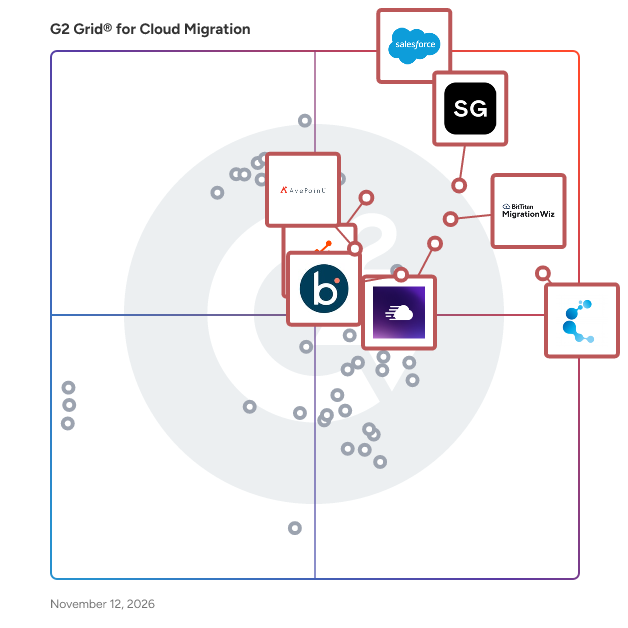
G2 Grid® for Cloud Migration Software

G2 Grid® for Cloud Migration Software plotting products by satisfaction and market presence

Highlighted products: Salesforce Platform, Cloudways, Cloudiway, MigrationWiz, HubSpot Data Hub, ShareGate, Boomi Data Integration, and AvePoint Confidence Platform.

Underlying data: [Grid® JSON](https://www.g2.com/categories/cloud-migration/grids.json?focus%5B%5D=agentforce-360-platform-formerly-salesforce-platform&focus%5B%5D=cloudways&focus%5B%5D=cloudiway&focus%5B%5D=migrationwiz&focus%5B%5D=hubspot-data-hub&focus%5B%5D=sharegate&focus%5B%5D=boomi-data-integration&focus%5B%5D=avepoint-confidence-platform&segment=small-business)

Salesforce Platform

The Salesforce Platform helps IT and security teams innovate fast, deploy securely, and protect their data. With our development and security tools built into the entire agent and app lifecycle on Salesforce, organizations can dive into AI innovation without compromising on security and compliance. And by building on Salesforce, development teams get a head start on AI projects by using the apps, workflows, data streams, and agents they've already built. Developers can develop agents and apps quickly, securely, and reliably, and IT can customize and extend Salesforce across the enterprise. And every customer can protect their data with security and compliance.

Average Rating: 4.5/5.0

Total Reviews: 4,408

How Do G2 Users Rate Salesforce Platform?

  • Quality of Support: 8.5/10 (Category avg: 8.9/10)
  • Data Migration: 9.2/10 (Category avg: 9.2/10)
  • Alerts and Logging: 8.9/10 (Category avg: 8.6/10)
  • Data Replication: 8.6/10 (Category avg: 8.8/10)

Who Is the Company Behind Salesforce Platform?

  • Seller: Salesforce
  • Company Website:
  • Year Founded: 1999
  • HQ Location: San Francisco, CA
  • LinkedIn® Page: www.linkedin.com
    89,711 employees on LinkedIn®
  • Ownership: NYSE:CRM

Who Uses This Product?

  • Who Uses This: Salesforce Developer, Account Executive
  • Top Industries: Information Technology and Services, Computer Software
  • Company Size: 44% Medium, 35% Large

What Do G2 Reviewers Say About Salesforce Platform?

AI-generated summary from verified user reviews

Pros
  • Users appreciate the ease of use of Salesforce Platform, especially its intuitive drag-and-drop interface and ongoing feature updates.
  • Users value the versatile features of Salesforce Platform, enjoying its comprehensive capabilities and smooth onboarding process.
  • Users value the customization capabilities of Salesforce Platform, facilitating integration and enhancing development efficiency.
  • Users value the customizability of Salesforce Platform, enabling tailored applications and seamless integration with external tools.
  • Users value the extensive customization options of Salesforce Platform, enabling seamless integration and tailored applications.
Cons
  • Users find the learning curve steep due to the platform's complexity and overlapping tools, impacting navigation and usage.
  • Users find the complexity of the Salesforce Platform overwhelming, particularly due to its numerous overlapping features and settings.
  • Users find the pricing steep, with high costs for licensing and add-ons, making it hard for small businesses.
  • Users find that the difficult learning curve and complex navigation hinder their efficiency with the Salesforce Platform.
  • Users are frustrated by missing features like limited access to standard objects and reporting on sibling-level records.

What Are Recent G2 Reviews of Salesforce Platform?

What Are G2 Users Discussing About Salesforce Platform?

Cloudways

Cloudways is a managed web hosting provider that frees businesses from hosting & server management with its suite of managed hosting solutions: Cloudways Flexible, Cloudways Autonomous, Cloudways Velocity, and Cloudways Managed AI Agents. Over 120,000 digital agencies, e-commerce businesses, developers, freelancers, and SMBs trust Cloudways to host their websites across 150+ available data center locations worldwide. Cloudways Flexible combines the core benefits of managed hosting, giving you the unique freedom to choose from 5 top cloud providers and deploy any PHP-based app, including a custom PHP, WordPress, Magento, and Laravel. You can also choose server specifications and configure the platform to fit your operational requirements and business processes. With its pay-as-you-go pricing model, you always have the flexibility to pay only for what you need. Built on top of Flexible, you also get access to Cloudways Copilot for server and app-level monitoring with AI-powered SmartFix, plus AI Website Builder for creating ready-to-launch websites. Cloudways Autonomous is a managed WordPress and WooCommerce solution built on Kubernetes with autoscaling to handle traffic surges effortlessly. Powered by Google C2 machines with integrated Enterprise CDN and database caching, it keeps your sites fast and online during traffic spikes, without infrastructure overhead. Cloudways Velocity provides fully managed hosting tailored specifically for high-performance Node.js applications, APIs, and modern JavaScript frameworks. It streamlines application management by connecting directly to Git repositories with automatic framework detection and zero-DevOps deployment workflows. Equipped with integrated Enterprise CDN, DDoS protection, malware defense, and automated backups, Velocity lets developers launch and scale backend services effortlessly. Cloudways Managed AI Agents delivers zero-maintenance hosting for autonomous, open-source AI frameworks like OpenClaw and Hermes. It removes the complex technical overhead of self-hosting by providing isolated infrastructure, pre-validated platform updates, automated backups, and seamless "Bring Your Own Key" (BYOK) integration for leading LLM providers. Businesses and creators can deploy always-on AI assistants to handle background workflows, messaging, and routine tasks around the clock. All solutions are backed by Cloudways' exceptional 24/7 free technical support, which offers prompt assistance with an average response time of 90 seconds whenever needed.

Average Rating: 4.7/5.0

Total Reviews: 1,130

How Do G2 Users Rate Cloudways?

  • Quality of Support: 9.2/10 (Category avg: 8.9/10)

Who Is the Company Behind Cloudways?

  • Seller: DigitalOcean
  • Company Website:
  • Year Founded: 2012
  • HQ Location: New York
  • LinkedIn® Page: www.linkedin.com
    2,476 employees on LinkedIn®
  • Ownership: NYSE: DOCN

Who Uses This Product?

  • Who Uses This: CEO, Owner
  • Top Industries: Marketing and Advertising, Information Technology and Services
  • Company Size: 92% Small, 7% Medium

What Do G2 Reviewers Say About Cloudways?

AI-generated summary from verified user reviews

Pros
  • Users find Cloudways' ease of use enhances website management and project deployment, ensuring a seamless experience.
  • Users commend the excellent customer support of Cloudways, appreciating its reliability and effective communication.
  • Users commend the super easy setup of Cloudways, allowing quick and hassle-free server configurations.
  • Users highlight the reliability of Cloudways, appreciating its consistent uptime and efficient customer support.
  • Users value the excellent support and reliability of Cloudways, enhancing their overall project management experience.
Cons
  • Users find Cloudways to be expensive, particularly for freelancers and small businesses with limited budgets.
  • Users find pricing issues with Cloudways, seeking more affordable options for small businesses and freelancers.
  • Users feel that customer support is lacking, with issues like unresponsive ticket updates and unclear plugin resource information.
  • Users find the email management inadequate, lacking alerts for delivery issues and simpler handling options.
  • Users find the learning curve steep, especially with FTP setup and limited tutorials for beginners on Cloudways.

What Are Recent G2 Reviews of Cloudways?

What Are G2 Users Discussing About Cloudways?

Cloudiway

Cloudiway is a comprehensive Software-as-a-Service (SaaS) platform designed to facilitate seamless cloud migrations and ensure enterprise coexistence. It enables organizations to efficiently transfer data and content across various cloud environments, including Microsoft 365, Google Workspace, and other platforms, while maintaining data integrity and minimizing downtime. Key Features and Functionality: - Mailbox Migration: Transfers emails, calendars, contacts, and tasks between platforms such as Microsoft Exchange, Google Workspace, Lotus Notes, and Zimbra, ensuring no data loss or business disruption. - File and Site Migration: Migrates files and documents from sources like Google Drive, OneDrive, Box, and Dropbox, preserving permissions and metadata. It also handles complex migrations of collaborative sites, such as Google Sites to SharePoint Online. - Teams and Collaboration Migration: Facilitates the migration of Microsoft Teams, Slack, and Google Chat environments, including channels, conversations, files, and memberships. - Enterprise Coexistence: Ensures seamless collaboration between different email platforms during and after migrations through features like Global Address List synchronization (GALSync) and centralized email signature management. - Device Migration: Supports cross-tenant device migration for Windows devices, preserving user profiles, Outlook configurations, Office licenses, and settings during transitions between Microsoft 365 tenants. Primary Value and Solutions Provided: Cloudiway addresses the complexities associated with cloud migrations by offering a unified platform that supports a wide range of migration scenarios, including tenant-to-tenant consolidations, mergers, divestitures, and platform transitions. Its robust security measures, built on Microsoft Azure infrastructure with SOC 2 Type 2 certification, ensure data protection and compliance throughout the migration process. By automating and streamlining migration tasks, Cloudiway minimizes downtime, reduces operational risks, and enables organizations to achieve a smooth transition to their desired cloud environment.

Average Rating: 4.9/5.0

Total Reviews: 270

How Do G2 Users Rate Cloudiway?

  • Quality of Support: 9.7/10 (Category avg: 8.9/10)
  • Data Migration: 9.8/10 (Category avg: 9.2/10)
  • Alerts and Logging: 9.6/10 (Category avg: 8.6/10)
  • Data Replication: 9.5/10 (Category avg: 8.8/10)

Who Is the Company Behind Cloudiway?

  • Seller: Cloudiway
  • Year Founded: 2010
  • HQ Location: Annecy, Auvergne-Rhône-Alpes
  • LinkedIn® Page: www.linkedin.com
    22 employees on LinkedIn®

Who Uses This Product?

  • Who Uses This: Virtual Assistant
  • Top Industries: Information Technology and Services, Accounting
  • Company Size: 58% Small, 30% Medium

What Do G2 Reviewers Say About Cloudiway?

AI-generated summary from verified user reviews

Pros
  • Users praise the migration ease of Cloudiway, experiencing smooth transitions and minimal downtime during extensive migrations.
  • Users appreciate the real-time progress tracking of Cloudiway, ensuring smooth and organized migration processes.
  • Users appreciate the seamless migration capabilities of Cloudiway, enhancing their cloud environment transition effortlessly.
  • Users commend the ease of use of Cloudiway, appreciating its clear process and smooth migration experience.
  • Users appreciate the responsive customer support of Cloudiway, enhancing their migration experience and confidence throughout the process.
Cons
  • Users find the complex setup challenging and time-consuming, needing technical knowledge for proper configuration.
  • Users find the learning difficulty challenging, as initial setup requires significant technical understanding and time investment.
  • Users find the complex usability of Cloudiway challenging, especially for managers requiring easier reporting and support.
  • Users find the poor interface design challenging initially, requiring technical understanding and clearer menu labels for ease of use.
  • Users feel that information deficiency hinders the usability of Cloudiway, especially for first-time users seeking clarity.

What Are Recent G2 Reviews of Cloudiway?

AI can help you find the answers. G2 helps you trust them.

Connect G2 to Claude or ChatGPT for answers grounded in G2's trusted reviews, comparisons, and pricing from real user insights.

How it works

MigrationWiz

All cloud migrations start with MigrationWiz, a fully automated, 100% SaaS migration solution that can be accessed at any time from anywhere. Sign up, configure, and initiate mailbox, document, personal archive, public folder, Microsoft Teams and Active Directory migration projects from a single, centralized user interface. Why MigrationWiz? Easy to Use - 100% SaaS with no special training, installations, or professional services required. One simple UI for all workloads. Fast & Scalable - Quickly move users and data to the Destination at-scale. Migrate as fast as Source bandwidth allows. Secure & Compliant - Data encrypted at rest and in-transit through Azure datacenters. Regional processing options available; we never store user data. Enterprise Reliability - Support migrations with seat counts in the thousands and complex business scenarios like mergers, acquisitions, or divestitures.

Average Rating: 4.7/5.0

Total Reviews: 277

How Do G2 Users Rate MigrationWiz?

  • Quality of Support: 8.9/10 (Category avg: 8.9/10)
  • Data Migration: 9.3/10 (Category avg: 9.2/10)
  • Alerts and Logging: 8.6/10 (Category avg: 8.6/10)
  • Data Replication: 8.9/10 (Category avg: 8.8/10)

Who Is the Company Behind MigrationWiz?

Who Uses This Product?

  • Who Uses This: Cloud Consultant
  • Top Industries: Information Technology and Services, Computer & Network Security
  • Company Size: 41% Medium, 40% Small

What Do G2 Reviewers Say About MigrationWiz?

AI-generated summary from verified user reviews

Pros
  • Users value the migration ease of MigrationWiz, appreciating its intuitive interface and efficient, reliable process.
  • Users highlight the ease of use of MigrationWiz, appreciating its straightforward setup and helpful customer support.
  • Users highlight the responsive and helpful customer support of MigrationWiz, enhancing their overall migration experience.
  • Users find MigrationWiz's implementation ease remarkable, aided by clear documentation and straightforward setup processes.
  • Users appreciate the hassle-free cloud migrations with MigrationWiz, valuing its ease and efficiency with minimal downtime.
Cons
  • Users report slow migration in hybrid environments, with interruptions and insufficient knowledge resources complicating the process.
  • Users find the pricing issues with MigrationWiz too high, especially regarding add-on features requiring separate licenses.
  • Users express frustration over poor customer support, particularly regarding unresponsive billing and slow response times to issues.
  • Users find the complex usability of MigrationWiz challenging during initial setup, though it ultimately offers efficient solutions.
  • Users find MigrationWiz to be relatively expensive, especially with extra features requiring additional licenses, raising costs.

What Are Recent G2 Reviews of MigrationWiz?

What Are G2 Users Discussing About MigrationWiz?

HubSpot Data Hub

Data Hub connects, cleanses, and automates customer data across the HubSpot CRM, providing operations teams with tools to maintain data quality, ensure system integration, and streamline business processes. Core Value Proposition: Data Hub addresses critical operational challenges: disconnected data across applications, manual data entry consuming team time, data quality issues undermining business decisions, and complex automation requirements existing tools cannot handle. The platform offers native integrations with other applications to create a more efficient, aligned, and agile business. Key Capabilities: Data Integration: Data Hub connects contacts, leads, and company data between HubSpot and external applications bidirectionally and in real-time. This creates a unified customer data foundation rather than requiring manual data transfer. Data Quality Management: The platform includes tools that maintain a clean database, allowing operations teams to save hours of manual data validation and correction work. Process Automation: Data Hub enables complex business process automation across systems, connecting trigger events in one application to automated actions in another. This streamlines internal workflows and reduces manual coordination. Unified Customer View: By connecting all customer data sources to the HubSpot CRM platform, Data Hub creates a single source of truth that sales, marketing, and service teams can reference for customer interactions. Data Hub vs. Alternatives: Unlike standalone integration platforms (iPaaS) requiring technical expertise to configure and maintain, Data Hub provides native HubSpot integration with a visual interface designed for operations professionals rather than developers. This reduces implementation time and ongoing maintenance requirements. Data Hub eliminates manual data entry and data validation by automating these workflows. The platform guarantees up-to-date data and maintains a clean database without constant manual intervention. Who Should Use Data Hub: Data Hub serves operations teams managing data across multiple systems, organizations experiencing data quality issues affecting business decisions, and companies needing to automate complex cross-system workflows without extensive technical resources. The platform enables business agility as organizations grow. Outcome: Data Hub supercharges your HubSpot CRM with a complete toolkit to connect, clean, and automate customer data, uniting all customer data into one connected platform that results in a friction-free customer experience.

Average Rating: 4.5/5.0

Total Reviews: 628

How Do G2 Users Rate HubSpot Data Hub?

  • Quality of Support: 8.7/10 (Category avg: 8.9/10)
  • Data Migration: 8.8/10 (Category avg: 9.2/10)
  • Alerts and Logging: 8.1/10 (Category avg: 8.6/10)
  • Data Replication: 9.0/10 (Category avg: 8.8/10)

Who Is the Company Behind HubSpot Data Hub?

  • Seller: HubSpot
  • Company Website:
  • Year Founded: 2006
  • HQ Location: Cambridge, Massachusetts, United States
  • LinkedIn® Page: www.linkedin.com
    17,628 employees on LinkedIn®
  • Ownership: NYSE:HUBS

Who Uses This Product?

  • Who Uses This: CEO, Owner
  • Top Industries: Information Technology and Services, Marketing and Advertising
  • Company Size: 64% Small, 32% Medium

What Do G2 Reviewers Say About HubSpot Data Hub?

AI-generated summary from verified user reviews

Pros
  • Users find HubSpot Data Hub's ease of use instrumental in creating workflows and maintaining clean, contextual records.
  • Users benefit from automation features in HubSpot Data Hub, enhancing data quality and simplifying workflow management.
  • Users value the clean user interface and consistent field logic of HubSpot Data Hub for effective data management.
  • Users value the seamless integrations of HubSpot Data Hub, enhancing data centralization and management across multiple sources effortlessly.
  • Users value the efficiency of HubSpot Data Hub in centralizing and automating data management, resulting in cleaner workflows.
Cons
  • Users find limitations in data mapping flexibility and encounter difficulties with email differentiation, impacting effectiveness.
  • Users express frustration with missing features in HubSpot Data Hub, particularly around data flexibility and customer support limitations.
  • Users find the learning curve steep with HubSpot Data Hub, especially for advanced features and complex configurations.
  • Users find the pricing prohibitive for smaller companies, with limitations on features and support scaling back.
  • Users find the complexity of setup and learning curve of HubSpot Data Hub to be a significant challenge.

What Are Recent G2 Reviews of HubSpot Data Hub?

What Are G2 Users Discussing About HubSpot Data Hub?

ShareGate

ShareGate is a Microsoft 365 migration and governance software platform that helps IT professionals move business data to Microsoft 365 and maintain control of their environments after migration. Trusted by over 100,000 IT pros, ShareGate addresses two distinct operational challenges for IT teams managing Microsoft 365 at scale: executing complex tenant-to-tenant and cross-platform migrations accurately, and maintaining ongoing visibility and governance across collaboration environments. ShareGate Migrate supports organizations moving content between Microsoft 365 tenants and from third-party platforms. Key capabilities include: • Tenant-to-tenant migration for SharePoint, Microsoft Teams, OneDrive, and Exchange Online • Cross-platform migration from Google Workspace, Box, and on-premises file shares • Pre-migration environment analysis covering permissions, ownership, and content structure • Post-migration verification and reporting • Concurrent migration support with workload coverage scaled by plan tier ShareGate Protect supports IT teams managing Microsoft 365 governance on an ongoing basis. Key capabilities include: • Tenant-wide visibility into access, workspace health, guest permissions, and license utilization • Identification of oversharing, inactive workspaces, ownership gaps, and external access drift • Guided remediation tools for fixing access and governance issues without custom scripting • AI and Microsoft Copilot access exposure indicators to support readiness assessments • Cost and license visibility with dollar-value indicators for operational decision-making ShareGate is used by IT professionals and managed service providers across organizations of varying sizes, with particular adoption among teams managing Microsoft 365 environments through mergers, acquisitions, and organizational restructuring. The platform is designed to reduce manual effort and administrative overhead across both migration projects and ongoing governance operations.

Average Rating: 4.6/5.0

Total Reviews: 211

How Do G2 Users Rate ShareGate?

  • Quality of Support: 8.9/10 (Category avg: 8.9/10)
  • Data Migration: 9.6/10 (Category avg: 9.2/10)
  • Alerts and Logging: 8.4/10 (Category avg: 8.6/10)
  • Data Replication: 8.6/10 (Category avg: 8.8/10)

Who Is the Company Behind ShareGate?

  • Seller: Workleap
  • Company Website:
  • Year Founded: 2006
  • HQ Location: Montréal, Québec, Canada
  • LinkedIn® Page: www.linkedin.com
    376 employees on LinkedIn®

Who Uses This Product?

  • Top Industries: Information Technology and Services, Financial Services
  • Company Size: 59% Large, 27% Medium

What Do G2 Reviewers Say About ShareGate?

AI-generated summary from verified user reviews

Pros
  • Users appreciate the ease of use of ShareGate, allowing them to quickly and effectively manage SharePoint environments.
  • Users commend ShareGate for its migration ease, streamlining data transfer and enhancing efficiency in SharePoint environments.
  • Users appreciate the intuitive and easy-to-navigate user interface of ShareGate, making tasks straightforward and efficient.
  • Users find the easy setup of ShareGate intuitive, enabling efficient migrations without requiring extensive skills.
  • Users highlight the efficient reporting features of ShareGate, simplifying management and ensuring faster migrations and governance.
Cons
  • Users find the lack of essential features in ShareGate, such as 1:1 chat migration, frustrating and limiting.
  • Users find ShareGate to be expensive, especially for smaller teams, which affects its accessibility and usage.
  • Users note a poor interface design in ShareGate, leading to frustration with navigation and configuration issues.
  • Users find the slow migration process frustrating, often facing long wait times and incomplete job indications.
  • Users express concerns about the slow loading speeds of migrations, impacting business operations and overall efficiency.

What Are Recent G2 Reviews of ShareGate?

What Are G2 Users Discussing About ShareGate?

AvePoint Confidence Platform

AvePoint is the unifying Trust Layer for AI. AvePoint enables more than 28,000 organizations and 6,000 channel partners to protect, secure, and govern their entire AI estate across data, infrastructure, AI and agents for Microsoft, Google, Salesforce, and other leading cloud environments — so that enterprises can deploy AI with confidence and scale innovation without scaling risk. To learn more, visit www.avepoint.com.

Average Rating: 4.5/5.0

Total Reviews: 123

How Do G2 Users Rate AvePoint Confidence Platform?

  • Quality of Support: 9.0/10 (Category avg: 8.9/10)
  • Data Migration: 9.4/10 (Category avg: 9.2/10)
  • Alerts and Logging: 9.3/10 (Category avg: 8.6/10)
  • Data Replication: 9.7/10 (Category avg: 8.8/10)

Who Is the Company Behind AvePoint Confidence Platform?

  • Seller: AvePoint
  • Company Website:
  • Year Founded: 2001
  • HQ Location: Jersey City, NJ
  • LinkedIn® Page: www.linkedin.com
    2,850 employees on LinkedIn®
  • Ownership: NASDAQ: AVPT

Who Uses This Product?

  • Top Industries: Information Technology and Services, Computer Software
  • Company Size: 40% Medium, 27% Small

What Do G2 Reviewers Say About AvePoint Confidence Platform?

AI-generated summary from verified user reviews

Pros
  • Users appreciate the ease of use of the AvePoint Confidence Platform for seamless implementation and administration.
  • Users value the simplified cloud data protection of AvePoint Confidence Platform, enabling automated backups with ease.
  • Users value the automated backup frequency of AvePoint Confidence Platform, simplifying data protection for cloud environments.
  • Users value the comprehensive security features of AvePoint Confidence Platform, providing effortless data protection and compliance management.
  • Users appreciate the easy setup of AvePoint Confidence Platform, facilitating smooth implementation and ongoing management.
Cons
  • Users find the high cost of AvePoint Confidence Platform challenging, especially compared to similar applications.
  • Users experience backup issues with incomplete completions and limited frequency, leading to frustration in dependability.
  • Users find poor customer support frustrating, lacking proactivity in communication and timely issue notifications.
  • Users struggle with the slow performance of AvePoint Confidence Platform, facing long wait times and frequent timeouts.
  • Users experience technical issues with bugs, delayed enhancements, backup notifications, and frequent timeouts requiring re-logins.

What Are Recent G2 Reviews of AvePoint Confidence Platform?

What Are G2 Users Discussing About AvePoint Confidence Platform?

Boomi Data Integration

Rivery's SaaS platform provides a unified solution for ELT pipelines, workflow orchestration, and data operations. Achieve more with less and create the most efficient, scalable data stack for your organization. Some of Rivery's features and capabilities: - Completely Automated SaaS Platform: Get setup and start connecting data in the Rivery platform in just a few minutes with little to no maintenance required. - Unified Data Ingestion, Transformation, & Orchestration: 100% data source capability, insight-ready data with both SQL and Python transformations, and complete workflow automation. - 200+ Native Connectors: Instantly connect to applications, databases, file storage options, and data warehouses with our fully-managed and always up-to-date connectors, including BigQuery, Redshift, Shopify, Snowflake, Amazon S3, Firebolt, Databricks, Salesforce, MySQL, PostgreSQL, and Rest API to name just a few. - Python Support: Have a data source that requires custom code? With Rivery’s native Python support, you can pull data from any system, no matter how complex the need. - Change Data Capture/Data Replication: Rivery’s best-in-class CDC support provides an easy, reliable and fast solution for replicating data from a database to your data warehouse. - 1-Click Data Apps: With Rivery Kits, deploy complete, production-level workflow templates in minutes with data models, pipelines, transformations, table schemas, and orchestration logic already defined for you based on best practices. - Data Development Lifecycle Support: Separate walled-off environments for each stage of your development, from dev and staging to production, making it easier to move fast without breaking things. Get version control, API, & CLI included. - Data Operations: With Rivery, you get centralized logging & reporting, monitoring & alerts, and data quality as part of a robust data operations layer for your data pipelines. - Solution-Led Support: Consistently rated the best support by G2, receive engineering-led assistance from Rivery to facilitate all your data needs. - Data Security: Industry-leading security and enterprise-grade privacy standards are built into Rivery’s network, product, and policies.

Average Rating: 4.7/5.0

Total Reviews: 120

How Do G2 Users Rate Boomi Data Integration?

  • Quality of Support: 9.4/10 (Category avg: 8.9/10)
  • Data Migration: 9.4/10 (Category avg: 9.2/10)
  • Alerts and Logging: 9.0/10 (Category avg: 8.6/10)
  • Data Replication: 8.8/10 (Category avg: 8.8/10)

Who Is the Company Behind Boomi Data Integration?

  • Seller: Boomi
  • Year Founded: 2000
  • HQ Location: Conshohocken, PA
  • LinkedIn® Page: www.linkedin.com
    3,071 employees on LinkedIn®

Who Uses This Product?

  • Who Uses This: Data Engineer
  • Top Industries: Information Technology and Services, Computer Software
  • Company Size: 42% Medium, 36% Small

What Do G2 Reviewers Say About Boomi Data Integration?

AI-generated summary from verified user reviews

Pros
  • Users appreciate the ease of use of Boomi Data Integration, finding it user-friendly and efficient for their needs.
  • Users commend the excellent customer support of Boomi Data Integration, enhancing their implementation and troubleshooting experiences.
  • Users commend Rivery's comprehensive data connectors, facilitating seamless integration and efficient reporting across platforms.
  • Users greatly value the automation capabilities of Boomi Data Integration, enhancing efficiency in data management processes.
  • Users find implementation easy with Boomi Data Integration, praising its user-friendliness and excellent customer support.
Cons
  • Users face data limitations with Boomi Data Integration, often struggling with missing documentation and incomplete fields.
  • Users often face information deficiency with Boomi Data Integration, leading to challenges in connecting different data sources effectively.
  • Users face insufficient information when connecting to data sources, leading to challenges in accessing necessary fields.
  • Users express concerns over the lack of available features, including missing documentation and limited data field access.
  • Users experience limited features as some data sources lack documentation and necessary report fields, hindering integration efforts.

What Are Recent G2 Reviews of Boomi Data Integration?

What Are G2 Users Discussing About Boomi Data Integration?

CloudFuze Migrate

CloudFuze is a comprehensive cloud office migration solution designed to assist large enterprises, small and medium-sized businesses (SMBs), and managed service providers in securely and efficiently migrating their critical data across various cloud environments. This platform specializes in transferring a wide array of digital assets, including user accounts, files, chat messages, emails, links, digital whiteboards, and cloud tenant data, ensuring a seamless transition from one cloud service to another. The target audience for CloudFuze encompasses organizations of all sizes looking to enhance their cloud capabilities. Whether a business is undergoing a merger, changing cloud providers, or simply optimizing its digital workspace, CloudFuze offers tailored solutions to meet diverse migration needs. The platform is particularly beneficial for those who require a fully managed service, allowing them to focus on their core operations while the migration logistics are handled by experts. Key features of CloudFuze include unlimited migrations, which means that users can transfer an extensive volume of data without the worry of leaving anything behind. The fully managed service covers every aspect of the migration process, from initial assessments to post-migration support, ensuring that businesses can adapt quickly to their new cloud environments. Additionally, the platform supports a variety of use cases, making it versatile enough to cater to specific business requirements. Security and compliance are paramount in CloudFuze’s operations. The platform adheres to industry standards and regulations, such as GDPR and SOC 2 Type 2, ensuring that all data transfers are conducted securely. The seamless integration capabilities with popular cloud services like Microsoft 365, Google Workspace, Slack, and Dropbox further enhance the user experience by providing a cohesive migration process. Moreover, CloudFuze offers scalable solutions that can accommodate the complexities of any migration scenario, making it suitable for businesses of all sizes. Customizable approaches allow organizations to tailor the migration process to their unique requirements, while expert guidance throughout the migration phases ensures that users benefit from deep expertise in cloud solutions. By choosing CloudFuze, organizations can transform their cloud data management and streamline their migration efforts with confidence.

Average Rating: 4.2/5.0

Total Reviews: 56

How Do G2 Users Rate CloudFuze Migrate?

  • Quality of Support: 8.9/10 (Category avg: 8.9/10)
  • Data Migration: 9.3/10 (Category avg: 9.2/10)
  • Alerts and Logging: 7.9/10 (Category avg: 8.6/10)
  • Data Replication: 8.2/10 (Category avg: 8.8/10)

Who Is the Company Behind CloudFuze Migrate?

  • Seller: CloudFuze
  • Company Website:
  • Year Founded: 2013
  • HQ Location: Durham, North Carolina, United States
  • LinkedIn® Page: www.linkedin.com
    73 employees on LinkedIn®

Who Uses This Product?

  • Top Industries: Information Technology and Services
  • Company Size: 52% Medium, 32% Small

What Do G2 Reviewers Say About CloudFuze Migrate?

AI-generated summary from verified user reviews

Pros
  • Users value the migration ease of CloudFuze, facilitating smooth transitions with helpful support and features.
  • Users value the flexibility in migrating data across platforms while appreciating the focus on version history and shared links.
  • Users value the ease of use of CloudFuze Migrate, highlighting its seamless and automated file transfer process.
  • Users appreciate the excellent customer support from CloudFuze Migrate, ensuring a seamless and secure migration experience.
  • Users appreciate the ability to migrate data seamlessly across platforms, including version history and shared links.
Cons
  • Users are frustrated with poor customer support, facing delays, miscommunication, and unmet expectations throughout the migration process.
  • Users find the migration process frustratingly slow, often dragging on for weeks and resulting in missing data and poor communication.
  • Users face storage limitations with CloudFuze Migrate, experiencing slow migrations and missing version histories.
  • Users experience access limitations with CloudFuze Migrate, feeling hindered by dependency on support and communication difficulties.
  • Users face information deficiency in CloudFuze Migrate, struggling with unclear communication and limited file previews during migration.

What Are Recent G2 Reviews of CloudFuze Migrate?

Skyvia

Skyvia is a no-code cloud data integration and data pipeline platform that enables ETL, ELT, Reverse ETL, data migration, one-way and bi-directional data sync, workflow automation, real-time connectivity, and much more. Benefits of Using Skyvia: • Cost efficiency: With affordable, flexible pricing plans for each product, Skyvia suites for businesses of any size. • Ease of Use: Based on extensive customer feedback, ease of use is Skyvia's strongest quality. • Flexibility: Skyvia provides adaptable, no-code integration tools for both basic and advanced business scenarios. • Trust: Skyvia is trusted by thousands of data-driven organizations around the globe. With a vast library of 200+ connectors, Skyvia provides seamless integration among various cloud applications, databases, and data warehouses, including Salesforce, Dynamics CRM, QuickBooks Online, SQL Server, Amazon Redshift, Google BigQuery, and others.

Average Rating: 4.8/5.0

Total Reviews: 327

How Do G2 Users Rate Skyvia?

  • Quality of Support: 9.3/10 (Category avg: 8.9/10)
  • Data Migration: 9.6/10 (Category avg: 9.2/10)
  • Alerts and Logging: 8.5/10 (Category avg: 8.6/10)
  • Data Replication: 9.5/10 (Category avg: 8.8/10)

Who Is the Company Behind Skyvia?

  • Seller: Devart
  • Year Founded: 1997
  • HQ Location: Wilmington, Delaware, USA
  • LinkedIn® Page: www.linkedin.com
    252 employees on LinkedIn®

Who Uses This Product?

  • Who Uses This: CEO, Marketing Specialist
  • Top Industries: Information Technology and Services, Computer Software
  • Company Size: 52% Small, 41% Medium

What Do G2 Reviewers Say About Skyvia?

AI-generated summary from verified user reviews

Pros
  • Users commend the ease of use of Skyvia, enjoying smooth integrations and intuitive setup for data management.
  • Users appreciate the effortless integrations of Skyvia, emphasizing its quick setup and reliability across various tools.
  • Users value the easy setup of Skyvia, finding it quick and intuitive for seamless data integration.
  • Users praise the effortless setup of Skyvia, highlighting its quick and intuitive integration process.
  • Users value the reliability and efficiency of Skyvia for seamless data management and integration across platforms.
Cons
  • Users desire more practical examples and documentation to enhance advanced setups and streamline the onboarding process.
  • Users find the difficult setup of Skyvia challenging, often needing extra time and guidance for configurations.
  • Users note feature limitations in Skyvia, particularly regarding reporting and data insertion speed in Oracle DB.
  • Users experience a significant learning curve with Skyvia, especially for complex setups and advanced features.
  • Users find the poor documentation limiting, wishing for more practical examples to enhance advanced setups.

What Are Recent G2 Reviews of Skyvia?

What Are G2 Users Discussing About Skyvia?

CodeTwo Office 365 Migration

With this powerful tool, migrations to Microsoft 365 (Office 365) from Exchange Server and other platforms supporting IMAP are easier than ever before. You can migrate mailboxes between Microsoft 365 tenants just as easily. The program lets you seamlessly move mail to the Cloud, with the help of easy configuration, status reports and log files for each migrated item. No matter if you are currently on Exchange 2010, 2013, 2016, 2019, Subscription Edition, Zimbra, IBM Notes (formerly Lotus Notes), Zarafa, Google Workspace or another Microsoft 365 tenant, the program will make it possible for you to securely move your users to Microsoft 365.

Average Rating: 4.6/5.0

Total Reviews: 21

How Do G2 Users Rate CodeTwo Office 365 Migration?

  • Quality of Support: 9.0/10 (Category avg: 8.9/10)
  • Data Migration: 8.9/10 (Category avg: 9.2/10)
  • Alerts and Logging: 8.1/10 (Category avg: 8.6/10)
  • Data Replication: 4.2/10 (Category avg: 8.8/10)

Who Is the Company Behind CodeTwo Office 365 Migration?

  • Seller: CodeTwo
  • Year Founded: 2007
  • HQ Location: Jelenia Gora
  • LinkedIn® Page: www.linkedin.com
    83 employees on LinkedIn®

Who Uses This Product?

  • Top Industries: Information Technology and Services
  • Company Size: 56% Small, 33% Medium

What Do G2 Reviewers Say About CodeTwo Office 365 Migration?

AI-generated summary from verified user reviews

Pros
  • Users find CodeTwo Office 365 Migration exceptionally easy to implement, experiencing a smooth transition without issues.
  • Users commend the migration ease of CodeTwo Office 365 Migration, noting a smooth transition from legacy systems.

What Are Recent G2 Reviews of CodeTwo Office 365 Migration?

What Are G2 Users Discussing About CodeTwo Office 365 Migration?

EdbMails Office 365 Migration

EdbMails Office 365 Migration is a secure and user-friendly solution to migrate Office 365 mailboxes, shared mailboxes, archive mailboxes, and public folders between tenants or from on-premises Exchange to Microsoft 365. The software ensures full data preservation, including email attributes, folder hierarchy, and mailbox permissions, with zero downtime. It supports modern authentication (OAuth 2.0), incremental migration to avoid duplicates, and advanced filtering options making it ideal for tenant-to-tenant migration and organizational restructuring.

Average Rating: 4.9/5.0

Total Reviews: 18

How Do G2 Users Rate EdbMails Office 365 Migration?

  • Quality of Support: 9.6/10 (Category avg: 8.9/10)
  • Data Migration: 10.0/10 (Category avg: 9.2/10)
  • Alerts and Logging: 10.0/10 (Category avg: 8.6/10)
  • Data Replication: 9.2/10 (Category avg: 8.8/10)

Who Is the Company Behind EdbMails Office 365 Migration?

  • Seller: EdbMails
  • Year Founded: 2009
  • HQ Location: Delware, US
  • LinkedIn® Page: www.linkedin.com
    8 employees on LinkedIn®

Who Uses This Product?

  • Top Industries: Computer Software
  • Company Size: 61% Small, 44% Medium

What Are Recent G2 Reviews of EdbMails Office 365 Migration?

Help Desk Migration Services

Help Desk Migration by Relokia is a cloud-based, one-click data migration solution that enables secure and fast transfer of customer support data between help desk, ITSM, and knowledge base platforms. The platform supports 100+ integrations, allowing teams to migrate data between systems using a no-code Migration Wizard — without manual exports, scripts, or downtime. Key Features - Data Integrity & Historical Accuracy Help Desk Migration preserves 100% of your historical support data, including tickets and incidents, conversations, users, organizations, agents, knowledge base articles, structures, statuses, priorities, and relationships between records. All data is migrated in a consistent and auditable way, ensuring nothing is lost or altered during the transfer. - Automated Migration Wizard The intuitive Migration Wizard enables fast and accurate data transfer to platforms such as: - Zendesk - Jira Service Management - Jira Customer Service Management - Freshdesk - Freshservice - ServiceNow - Salesforce Service Cloud - HubSpot Service Hub and 100+ other platforms The entire process is automated and requires no engineering resources. - Intuitive Data Mapping Help Desk Migration allows users to map fields between the source and target platforms with full control. You can align default and custom fields, statuses, priorities, users, and other entities to match your existing workflows and reporting structure. - Enterprise-Grade Security Help Desk Migration is built for enterprise use and follows GDPR-, HIPAA-, and SOC-aligned practices. The platform operates using secure API connections and works in close partnership with major help desk vendors to ensure compliance, reliability, and data protection. - Free Demo Migration Run a free Demo Migration to validate results before committing to a full migration. The automated tool transfers up to 20 tickets or incidents from the source to the target platform, allowing you to verify data accuracy, structure, and mappings with zero risk. - Fast Data Transfer Migration speed ranges from a few minutes to several hours, depending on record volume and API rate limits of the target platform. Even large-scale migrations are optimized to complete as quickly and safely as possible. - Zero Downtime with Delta Migration Help Desk Migration supports Delta Migration, enabling teams to migrate newly created or updated records after the initial full migration—without stopping live support operations. Delta Migration captures all changes that occurred during or after the main migration and syncs them to the target system. This ensures: - No ticket freezes - No missed updates - No disruption to agents or customers As a result, teams can switch platforms seamlessly while maintaining continuous support and full data consistency.

Average Rating: 4.9/5.0

Total Reviews: 182

How Do G2 Users Rate Help Desk Migration Services?

  • Quality of Support: 9.8/10 (Category avg: 8.9/10)
  • Data Migration: 9.9/10 (Category avg: 9.2/10)
  • Alerts and Logging: 9.1/10 (Category avg: 8.6/10)
  • Data Replication: 9.2/10 (Category avg: 8.8/10)

Who Is the Company Behind Help Desk Migration Services?

  • Seller: Relokia
  • Company Website:
  • Year Founded: 2015
  • HQ Location: Ternopil, UA
  • LinkedIn® Page: www.linkedin.com
    8 employees on LinkedIn®

Who Uses This Product?

  • Who Uses This: Founder, IT Manager
  • Top Industries: Information Technology and Services, Computer Software
  • Company Size: 52% Small, 37% Medium

What Do G2 Reviewers Say About Help Desk Migration Services?

AI-generated summary from verified user reviews

Pros
  • Users find Help Desk Migration Services intuitive and simple, enabling quick and efficient system transitions effortlessly.
  • Users appreciate the responsive and proactive customer support of Help Desk Migration Services, enhancing their overall experience.
  • Users appreciate the migration ease of Help Desk Migration Services, making transitions straightforward and quick.
  • Users appreciate the easy setup of Help Desk Migration Services, finding the transition smooth and quick.
  • Users find easy integrations with Help Desk Migration services, enjoying a user-friendly setup and responsive support.
Cons
  • Users report slow migration processes, often due to API limits affecting overall efficiency and requiring upgrades.
  • Users find the pricing steep, especially for additional fields, impacting overall value for the service.
  • Users face extra costs due to low API limits and charges for pre-existing folders during migration.
  • Users note a lack of features in Help Desk Migration Services, impacting control and visibility during migration.
  • Users find a limited Jira Service Management migration capability, requiring extra effort post-migration for categorizing tickets.

What Are Recent G2 Reviews of Help Desk Migration Services?

What Are G2 Users Discussing About Help Desk Migration Services?

Movebot

Movebot is the leading next-generation data migration tool. There's a better way to move data between storage platforms. Any platforms. Emails, or files, it doesn’t matter. Move any supported data type into the storage of your choice, with no convoluted pricing or setup. Fully cloud hosted and managed, there is no need manage or run infrastructure or pay per user license. Movebot scales to handle PBs of data and has detailed reporting at every stage of the migration--before, during, and after--providing real-time monitoring with easy and predictive troubleshooting. Movebot is the only migration platform with comprehensive bidirectional support for all major platforms. Move between over 30 platforms including on-prem file servers and NAS devices. There's a better way to move data between storage platforms. Any platforms. Emails, or files, it doesn’t matter. Move any supported data type into the storage of your choice, with no convoluted pricing or setup.

Average Rating: 4.9/5.0

Total Reviews: 22

How Do G2 Users Rate Movebot?

  • Quality of Support: 9.9/10 (Category avg: 8.9/10)
  • Data Migration: 9.5/10 (Category avg: 9.2/10)
  • Alerts and Logging: 8.5/10 (Category avg: 8.6/10)
  • Data Replication: 7.6/10 (Category avg: 8.8/10)

Who Is the Company Behind Movebot?

  • Seller: Couchdrop
  • Year Founded: 2017
  • HQ Location: Christchurch, NZ
  • LinkedIn® Page: www.linkedin.com
    25 employees on LinkedIn®

Who Uses This Product?

  • Top Industries: Information Technology and Services
  • Company Size: 61% Small, 22% Medium

What Do G2 Reviewers Say About Movebot?

AI-generated summary from verified user reviews

Pros
  • Users value the simple connection process of Movebot, appreciating its ease of use for migrations.
  • Users appreciate the responsive customer support of Movebot, receiving personalized assistance and prompt help during migration.
  • Users appreciate the ease of use of Movebot, noting its intuitive interface and straightforward setup process.
  • Users appreciate the migration ease of Movebot, highlighting its intuitive process and helpful support throughout.

What Are Recent G2 Reviews of Movebot?

What Are G2 Users Discussing About Movebot?

Prodly DevOps

Prodly empowers IT and business operations teams with a user-friendly DevOps solution that simplifies the Salesforce change management process. Our platform optimizes data and metadata deployments across all Salesforce applications, ensuring greater speed, efficiency, and security. Salesforce teams are able to increase productivity of their change management processes by 80% while achieving total compliance standards. With Prodly, you get: 1. Flexibility Across the Salesforce Ecosystem - Imagine having the power to manage complex data deployments seamlessly throughout the entire Salesforce application ecosystem. Prodly offers unmatched flexibility, ensuring that your Salesforce processes are as dynamic as your business needs. Experience the convenience of a tool that adapts to every twist and turn of your deployment requirements. 2. Unified Data and Metadata Deployment - Stop using multiple tools to do one job. With Prodly, you can deploy both data and metadata simultaneously, streamlining your operations and saving precious time. Simplify your workflow and maximize efficiency with a solution that does it all in one go. 3. Comprehensive Version Control - Keep your data and metadata changes in check with Prodly's robust version control system. Gain peace of mind knowing you can track and manage every modification with ease, ensuring your deployments are consistent and reliable every step of the way. 4. Custom Sandbox Seeding - Prodly's sandbox seeding feature caters to custom objects, allowing you to test with confidence in lower environments that mirror production. Prepare thoroughly and deploy with assurance, knowing your custom configurations are ready for prime time. 5. Speedy Deployment With Pre-Built Templates - With our pre-built templates, your deployments can move at lightning speed. Empower your team to launch faster and focus on what truly matters—growing your business and delighting your customers. 6. Salesforce Native Innovation - Built on Salesforce, for Salesforce, Prodly is crafted by the visionary behind Salesforce CPQ. Trust in a solution that is inherently aligned with Salesforce, ensuring smooth integration and unparalleled performance tailored to your Salesforce environment. Customers like AmEx GBT, Expedia, Stanley Black & Decker, Cardinal Health, Johnson & Johnson, and Snowflake leverage Prodly DevOps to increase deployment frequency, reduce lead time for changes, minimize change failure rate, and recover from production bugs quickly.

Average Rating: 4.7/5.0

Total Reviews: 172

How Do G2 Users Rate Prodly DevOps?

  • Quality of Support: 9.1/10 (Category avg: 8.9/10)
  • Data Migration: 9.4/10 (Category avg: 9.2/10)
  • Alerts and Logging: 8.7/10 (Category avg: 8.6/10)
  • Data Replication: 9.0/10 (Category avg: 8.8/10)

Who Is the Company Behind Prodly DevOps?

  • Seller: Prodly, Inc.
  • Company Website:
  • Year Founded: 2014
  • HQ Location: Palo Alto, CA
  • LinkedIn® Page: www.linkedin.com
    25 employees on LinkedIn®

Who Uses This Product?

  • Who Uses This: Salesforce Developer
  • Top Industries: Computer Software, Information Technology and Services
  • Company Size: 40% Medium, 34% Large

What Do G2 Reviewers Say About Prodly DevOps?

AI-generated summary from verified user reviews

Pros
  • Users value the streamlined deployment flow in Prodly DevOps, enhancing planning and governance with flexible release features.
  • Users highlight the time-saving benefits of Prodly DevOps, enhancing deployment efficiency and streamlining CI/CD processes.
  • Users value the automation capabilities of Prodly DevOps, significantly speeding up deployments and enhancing accuracy and reliability.
  • Users appreciate the ease of use of Prodly DevOps, facilitating fast and reliable Salesforce CPQ record deployments.
  • Users praise the seamless deployment ease of Prodly DevOps, enhancing collaboration and speeding up release cycles efficiently.
Cons
  • Users experience deployment issues including missed field changes and longer than expected processing times for large data sets.
  • Users experience slow performance during larger deployments and data importing, impacting efficiency in operations.
  • Users find the learning curve steep, particularly for teams new to DevOps practices, impacting initial productivity.
  • Users experience slow deployment times, especially with large datasets, hindering efficiency and effectiveness in their workflow.
  • Users experience delay issues with Prodly DevOps, particularly during large data set deployments that extend timeframe unexpectedly.

What Are Recent G2 Reviews of Prodly DevOps?

What Are G2 Users Discussing About Prodly DevOps?

Rachana Hasyagar
RH
Researched and written by Rachana Hasyagar
Updated