Best Enterprise Cloud Migration Software

How Many Cloud Migration Software Products Does G2 Track?

Total Products under this Category: 294

Category Stats (Nov 2026)

  • Average Rating: 4.45/5 The average rating of products in this category, based on all submitted ratings
  • Top Trending Product: CloudFuze Migrate (+0.36%) - Among all products in this category, CloudFuze Migrate recorded the largest rating increase compared to last month

Last updated: November 01, 2026

How Does G2 Rank Cloud Migration Software Products?

Why You Can Trust G2's Software Rankings:

  • 30 Analysts and Data Experts
  • 10,000+ Authentic Reviews
  • 294+ Products
  • Unbiased Rankings

G2's software rankings are built on verified user reviews, rigorous moderation, and a consistent research methodology maintained by a team of analysts and data experts. Each product is measured using the same transparent criteria, with no paid placement or vendor influence. While reviews reflect real user experiences, which can be subjective, they offer valuable insight into how software performs in the hands of professionals. Together, these inputs power the G2 Score, a standardized way to compare tools within every category.

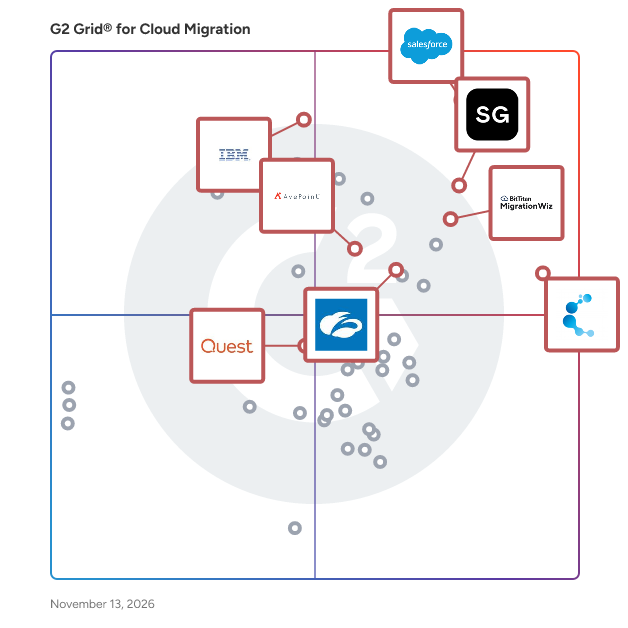
G2 Grid® for Cloud Migration Software

G2 Grid® for Cloud Migration Software plotting products by satisfaction and market presence

Highlighted products: ShareGate, Salesforce Platform, Cloudiway, MigrationWiz, AvePoint Confidence Platform, IBM webMethods Hybrid Integration, Zscaler Zero Trust Cloud, and Quest Migration Manager.

Underlying data: [Grid® JSON](https://www.g2.com/categories/cloud-migration/grids.json?focus%5B%5D=sharegate&focus%5B%5D=agentforce-360-platform-formerly-salesforce-platform&focus%5B%5D=cloudiway&focus%5B%5D=migrationwiz&focus%5B%5D=avepoint-confidence-platform&focus%5B%5D=ibm-webmethods-hybrid-integration-2025-12-05&focus%5B%5D=zscaler-zero-trust-cloud&focus%5B%5D=quest-migration-manager&segment=enterprise)

ShareGate

ShareGate is a Microsoft 365 migration and governance software platform that helps IT professionals move business data to Microsoft 365 and maintain control of their environments after migration. Trusted by over 100,000 IT pros, ShareGate addresses two distinct operational challenges for IT teams managing Microsoft 365 at scale: executing complex tenant-to-tenant and cross-platform migrations accurately, and maintaining ongoing visibility and governance across collaboration environments. ShareGate Migrate supports organizations moving content between Microsoft 365 tenants and from third-party platforms. Key capabilities include: • Tenant-to-tenant migration for SharePoint, Microsoft Teams, OneDrive, and Exchange Online • Cross-platform migration from Google Workspace, Box, and on-premises file shares • Pre-migration environment analysis covering permissions, ownership, and content structure • Post-migration verification and reporting • Concurrent migration support with workload coverage scaled by plan tier ShareGate Protect supports IT teams managing Microsoft 365 governance on an ongoing basis. Key capabilities include: • Tenant-wide visibility into access, workspace health, guest permissions, and license utilization • Identification of oversharing, inactive workspaces, ownership gaps, and external access drift • Guided remediation tools for fixing access and governance issues without custom scripting • AI and Microsoft Copilot access exposure indicators to support readiness assessments • Cost and license visibility with dollar-value indicators for operational decision-making ShareGate is used by IT professionals and managed service providers across organizations of varying sizes, with particular adoption among teams managing Microsoft 365 environments through mergers, acquisitions, and organizational restructuring. The platform is designed to reduce manual effort and administrative overhead across both migration projects and ongoing governance operations.

Average Rating: 4.6/5.0

Total Reviews: 211

How Do G2 Users Rate ShareGate?

  • Quality of Support: 8.9/10 (Category avg: 8.9/10)
  • Data Migration: 9.6/10 (Category avg: 9.2/10)
  • Alerts and Logging: 8.4/10 (Category avg: 8.6/10)
  • Data Replication: 8.6/10 (Category avg: 8.8/10)

Who Is the Company Behind ShareGate?

  • Seller: Workleap
  • Company Website:
  • Year Founded: 2006
  • HQ Location: Montréal, Québec, Canada
  • LinkedIn® Page: www.linkedin.com
    376 employees on LinkedIn®

Who Uses This Product?

  • Top Industries: Information Technology and Services, Financial Services
  • Company Size: 59% Large, 27% Medium

What Do G2 Reviewers Say About ShareGate?

AI-generated summary from verified user reviews

Pros
  • Users appreciate the ease of use of ShareGate, allowing them to quickly and effectively manage SharePoint environments.
  • Users commend ShareGate for its migration ease, streamlining data transfer and enhancing efficiency in SharePoint environments.
  • Users appreciate the intuitive and easy-to-navigate user interface of ShareGate, making tasks straightforward and efficient.
  • Users find the easy setup of ShareGate intuitive, enabling efficient migrations without requiring extensive skills.
  • Users highlight the efficient reporting features of ShareGate, simplifying management and ensuring faster migrations and governance.
Cons
  • Users find the lack of essential features in ShareGate, such as 1:1 chat migration, frustrating and limiting.
  • Users find ShareGate to be expensive, especially for smaller teams, which affects its accessibility and usage.
  • Users note a poor interface design in ShareGate, leading to frustration with navigation and configuration issues.
  • Users find the slow migration process frustrating, often facing long wait times and incomplete job indications.
  • Users express concerns about the slow loading speeds of migrations, impacting business operations and overall efficiency.

What Are Recent G2 Reviews of ShareGate?

What Are G2 Users Discussing About ShareGate?

Salesforce Platform

The Salesforce Platform helps IT and security teams innovate fast, deploy securely, and protect their data. With our development and security tools built into the entire agent and app lifecycle on Salesforce, organizations can dive into AI innovation without compromising on security and compliance. And by building on Salesforce, development teams get a head start on AI projects by using the apps, workflows, data streams, and agents they've already built. Developers can develop agents and apps quickly, securely, and reliably, and IT can customize and extend Salesforce across the enterprise. And every customer can protect their data with security and compliance.

Average Rating: 4.5/5.0

Total Reviews: 4,408

How Do G2 Users Rate Salesforce Platform?

  • Quality of Support: 8.5/10 (Category avg: 8.9/10)
  • Data Migration: 9.2/10 (Category avg: 9.2/10)
  • Alerts and Logging: 8.9/10 (Category avg: 8.6/10)
  • Data Replication: 8.6/10 (Category avg: 8.8/10)

Who Is the Company Behind Salesforce Platform?

  • Seller: Salesforce
  • Company Website:
  • Year Founded: 1999
  • HQ Location: San Francisco, CA
  • LinkedIn® Page: www.linkedin.com
    89,711 employees on LinkedIn®
  • Ownership: NYSE:CRM

Who Uses This Product?

  • Who Uses This: Salesforce Developer, Account Executive
  • Top Industries: Information Technology and Services, Computer Software
  • Company Size: 44% Medium, 35% Large

What Do G2 Reviewers Say About Salesforce Platform?

AI-generated summary from verified user reviews

Pros
  • Users appreciate the ease of use of Salesforce Platform, especially its intuitive drag-and-drop interface and ongoing feature updates.
  • Users value the versatile features of Salesforce Platform, enjoying its comprehensive capabilities and smooth onboarding process.
  • Users value the customization capabilities of Salesforce Platform, facilitating integration and enhancing development efficiency.
  • Users value the customizability of Salesforce Platform, enabling tailored applications and seamless integration with external tools.
  • Users value the extensive customization options of Salesforce Platform, enabling seamless integration and tailored applications.
Cons
  • Users find the learning curve steep due to the platform's complexity and overlapping tools, impacting navigation and usage.
  • Users find the complexity of the Salesforce Platform overwhelming, particularly due to its numerous overlapping features and settings.
  • Users find the pricing steep, with high costs for licensing and add-ons, making it hard for small businesses.
  • Users find that the difficult learning curve and complex navigation hinder their efficiency with the Salesforce Platform.
  • Users are frustrated by missing features like limited access to standard objects and reporting on sibling-level records.

What Are Recent G2 Reviews of Salesforce Platform?

What Are G2 Users Discussing About Salesforce Platform?

Cloudiway

Cloudiway is a comprehensive Software-as-a-Service (SaaS) platform designed to facilitate seamless cloud migrations and ensure enterprise coexistence. It enables organizations to efficiently transfer data and content across various cloud environments, including Microsoft 365, Google Workspace, and other platforms, while maintaining data integrity and minimizing downtime. Key Features and Functionality: - Mailbox Migration: Transfers emails, calendars, contacts, and tasks between platforms such as Microsoft Exchange, Google Workspace, Lotus Notes, and Zimbra, ensuring no data loss or business disruption. - File and Site Migration: Migrates files and documents from sources like Google Drive, OneDrive, Box, and Dropbox, preserving permissions and metadata. It also handles complex migrations of collaborative sites, such as Google Sites to SharePoint Online. - Teams and Collaboration Migration: Facilitates the migration of Microsoft Teams, Slack, and Google Chat environments, including channels, conversations, files, and memberships. - Enterprise Coexistence: Ensures seamless collaboration between different email platforms during and after migrations through features like Global Address List synchronization (GALSync) and centralized email signature management. - Device Migration: Supports cross-tenant device migration for Windows devices, preserving user profiles, Outlook configurations, Office licenses, and settings during transitions between Microsoft 365 tenants. Primary Value and Solutions Provided: Cloudiway addresses the complexities associated with cloud migrations by offering a unified platform that supports a wide range of migration scenarios, including tenant-to-tenant consolidations, mergers, divestitures, and platform transitions. Its robust security measures, built on Microsoft Azure infrastructure with SOC 2 Type 2 certification, ensure data protection and compliance throughout the migration process. By automating and streamlining migration tasks, Cloudiway minimizes downtime, reduces operational risks, and enables organizations to achieve a smooth transition to their desired cloud environment.

Average Rating: 4.9/5.0

Total Reviews: 270

How Do G2 Users Rate Cloudiway?

  • Quality of Support: 9.7/10 (Category avg: 8.9/10)
  • Data Migration: 9.8/10 (Category avg: 9.2/10)
  • Alerts and Logging: 9.6/10 (Category avg: 8.6/10)
  • Data Replication: 9.5/10 (Category avg: 8.8/10)

Who Is the Company Behind Cloudiway?

  • Seller: Cloudiway
  • Year Founded: 2010
  • HQ Location: Annecy, Auvergne-Rhône-Alpes
  • LinkedIn® Page: www.linkedin.com
    22 employees on LinkedIn®

Who Uses This Product?

  • Who Uses This: Virtual Assistant
  • Top Industries: Information Technology and Services, Accounting
  • Company Size: 58% Small, 30% Medium

What Do G2 Reviewers Say About Cloudiway?

AI-generated summary from verified user reviews

Pros
  • Users praise the migration ease of Cloudiway, experiencing smooth transitions and minimal downtime during extensive migrations.
  • Users appreciate the real-time progress tracking of Cloudiway, ensuring smooth and organized migration processes.
  • Users appreciate the seamless migration capabilities of Cloudiway, enhancing their cloud environment transition effortlessly.
  • Users commend the ease of use of Cloudiway, appreciating its clear process and smooth migration experience.
  • Users appreciate the responsive customer support of Cloudiway, enhancing their migration experience and confidence throughout the process.
Cons
  • Users find the complex setup challenging and time-consuming, needing technical knowledge for proper configuration.
  • Users find the learning difficulty challenging, as initial setup requires significant technical understanding and time investment.
  • Users find the complex usability of Cloudiway challenging, especially for managers requiring easier reporting and support.
  • Users find the poor interface design challenging initially, requiring technical understanding and clearer menu labels for ease of use.
  • Users feel that information deficiency hinders the usability of Cloudiway, especially for first-time users seeking clarity.

What Are Recent G2 Reviews of Cloudiway?

AI can help you find the answers. G2 helps you trust them.

Connect G2 to Claude or ChatGPT for answers grounded in G2's trusted reviews, comparisons, and pricing from real user insights.

How it works

MigrationWiz

All cloud migrations start with MigrationWiz, a fully automated, 100% SaaS migration solution that can be accessed at any time from anywhere. Sign up, configure, and initiate mailbox, document, personal archive, public folder, Microsoft Teams and Active Directory migration projects from a single, centralized user interface. Why MigrationWiz? Easy to Use - 100% SaaS with no special training, installations, or professional services required. One simple UI for all workloads. Fast & Scalable - Quickly move users and data to the Destination at-scale. Migrate as fast as Source bandwidth allows. Secure & Compliant - Data encrypted at rest and in-transit through Azure datacenters. Regional processing options available; we never store user data. Enterprise Reliability - Support migrations with seat counts in the thousands and complex business scenarios like mergers, acquisitions, or divestitures.

Average Rating: 4.7/5.0

Total Reviews: 277

How Do G2 Users Rate MigrationWiz?

  • Quality of Support: 8.9/10 (Category avg: 8.9/10)
  • Data Migration: 9.3/10 (Category avg: 9.2/10)
  • Alerts and Logging: 8.6/10 (Category avg: 8.6/10)
  • Data Replication: 8.9/10 (Category avg: 8.8/10)

Who Is the Company Behind MigrationWiz?

Who Uses This Product?

  • Who Uses This: Cloud Consultant
  • Top Industries: Information Technology and Services, Computer & Network Security
  • Company Size: 41% Medium, 40% Small

What Do G2 Reviewers Say About MigrationWiz?

AI-generated summary from verified user reviews

Pros
  • Users value the migration ease of MigrationWiz, appreciating its intuitive interface and efficient, reliable process.
  • Users highlight the ease of use of MigrationWiz, appreciating its straightforward setup and helpful customer support.
  • Users highlight the responsive and helpful customer support of MigrationWiz, enhancing their overall migration experience.
  • Users find MigrationWiz's implementation ease remarkable, aided by clear documentation and straightforward setup processes.
  • Users appreciate the hassle-free cloud migrations with MigrationWiz, valuing its ease and efficiency with minimal downtime.
Cons
  • Users report slow migration in hybrid environments, with interruptions and insufficient knowledge resources complicating the process.
  • Users find the pricing issues with MigrationWiz too high, especially regarding add-on features requiring separate licenses.
  • Users express frustration over poor customer support, particularly regarding unresponsive billing and slow response times to issues.
  • Users find the complex usability of MigrationWiz challenging during initial setup, though it ultimately offers efficient solutions.
  • Users find MigrationWiz to be relatively expensive, especially with extra features requiring additional licenses, raising costs.

What Are Recent G2 Reviews of MigrationWiz?

What Are G2 Users Discussing About MigrationWiz?

AvePoint Confidence Platform

AvePoint is the unifying Trust Layer for AI. AvePoint enables more than 28,000 organizations and 6,000 channel partners to protect, secure, and govern their entire AI estate across data, infrastructure, AI and agents for Microsoft, Google, Salesforce, and other leading cloud environments — so that enterprises can deploy AI with confidence and scale innovation without scaling risk. To learn more, visit www.avepoint.com.

Average Rating: 4.5/5.0

Total Reviews: 123

How Do G2 Users Rate AvePoint Confidence Platform?

  • Quality of Support: 9.0/10 (Category avg: 8.9/10)
  • Data Migration: 9.4/10 (Category avg: 9.2/10)
  • Alerts and Logging: 9.3/10 (Category avg: 8.6/10)
  • Data Replication: 9.7/10 (Category avg: 8.8/10)

Who Is the Company Behind AvePoint Confidence Platform?

  • Seller: AvePoint
  • Company Website:
  • Year Founded: 2001
  • HQ Location: Jersey City, NJ
  • LinkedIn® Page: www.linkedin.com
    2,850 employees on LinkedIn®
  • Ownership: NASDAQ: AVPT

Who Uses This Product?

  • Top Industries: Information Technology and Services, Computer Software
  • Company Size: 40% Medium, 27% Large

What Do G2 Reviewers Say About AvePoint Confidence Platform?

AI-generated summary from verified user reviews

Pros
  • Users appreciate the ease of use of the AvePoint Confidence Platform for seamless implementation and administration.
  • Users value the simplified cloud data protection of AvePoint Confidence Platform, enabling automated backups with ease.
  • Users value the automated backup frequency of AvePoint Confidence Platform, simplifying data protection for cloud environments.
  • Users value the comprehensive security features of AvePoint Confidence Platform, providing effortless data protection and compliance management.
  • Users appreciate the easy setup of AvePoint Confidence Platform, facilitating smooth implementation and ongoing management.
Cons
  • Users find the high cost of AvePoint Confidence Platform challenging, especially compared to similar applications.
  • Users experience backup issues with incomplete completions and limited frequency, leading to frustration in dependability.
  • Users find poor customer support frustrating, lacking proactivity in communication and timely issue notifications.
  • Users struggle with the slow performance of AvePoint Confidence Platform, facing long wait times and frequent timeouts.
  • Users experience technical issues with bugs, delayed enhancements, backup notifications, and frequent timeouts requiring re-logins.

What Are Recent G2 Reviews of AvePoint Confidence Platform?

What Are G2 Users Discussing About AvePoint Confidence Platform?

IBM webMethods Hybrid Integration

IBM webMethods is an enterprise integration platform from IBM, a global technology company headquartered in Armonk, New York, with decades of experience supporting mission‑critical systems for organizations worldwide. Originally developed by webMethods and now part of IBM’s broader software portfolio, webMethods is used by enterprises of all sizes to modernize and connect complex IT ecosystems across on‑premises, cloud, and hybrid environments. webMethods provides a comprehensive set of integration capabilities within a single, unified platform. Key features include application and data integration, API management, event‑driven architecture, B2B and EDI integration, managed file transfer, messaging, and workflow automation. With low‑code and no‑code tooling, prebuilt connectors, and centralized governance and monitoring, teams can design, deploy, and manage integrations efficiently across distributed systems. The primary value of webMethods is enabling organizations to break down data silos, streamline business processes, and accelerate digital transformation. It solves the challenge of integrating diverse applications, partners, and data sources by providing a scalable, secure, and hybrid‑ready integration solution. With webMethods, users gain end‑to‑end visibility, improved operational efficiency, and the flexibility to adapt quickly to changing business and technology needs.

Average Rating: 4.3/5.0

Total Reviews: 259

How Do G2 Users Rate IBM webMethods Hybrid Integration?

  • Quality of Support: 8.1/10 (Category avg: 8.9/10)
  • Data Migration: 8.3/10 (Category avg: 9.2/10)
  • Alerts and Logging: 8.2/10 (Category avg: 8.6/10)
  • Data Replication: 8.0/10 (Category avg: 8.8/10)

Who Is the Company Behind IBM webMethods Hybrid Integration?

  • Seller: IBM
  • Company Website:
  • Year Founded: 1911
  • HQ Location: Armonk, New York, United States
  • LinkedIn® Page: www.linkedin.com
    344,328 employees on LinkedIn®
  • Ownership: SWX:IBM

Who Uses This Product?

  • Who Uses This: Senior Software Engineer, Software Engineer
  • Top Industries: Information Technology and Services, Computer Software
  • Company Size: 62% Large, 23% Medium

What Do G2 Reviewers Say About IBM webMethods Hybrid Integration?

AI-generated summary from verified user reviews

Pros
  • Users value the low-code integration features of IBM webMethods Hybrid Integration for seamless data connectivity and organization.
  • Users appreciate the easy integrations of IBM webMethods Hybrid Integration, facilitating seamless data management and development.
  • Users find IBM webMethods Hybrid Integration to be extremely easy to use, streamlining data integration effortlessly across platforms.
  • Users value the seamless connectivity of IBM webMethods Hybrid Integration, enabling smooth data flow across diverse systems.
  • Users value the unmatched reliability of IBM webMethods Hybrid Integration, ensuring smooth data flow across various systems.
Cons
  • Users notice a steep learning curve with IBM webMethods Hybrid Integration, making initial setup and configurations challenging.
  • Users find the product to be expensive and suggest improvements in pricing and user integration support.
  • Users find the setup complexity of IBM webMethods Hybrid Integration daunting, especially for newcomers, leading to a steep learning curve.
  • Users find the difficult learning curve of IBM webMethods Hybrid Integration challenging, particularly for newcomers to the platform.
  • Users point out a steep learning curve with IBM webMethods Hybrid Integration, often finding the setup process complex and unintuitive.

What Are Recent G2 Reviews of IBM webMethods Hybrid Integration?

What Are G2 Users Discussing About IBM webMethods Hybrid Integration?

Zscaler Zero Trust Cloud

Zscaler global cloud delivers the entire gateway security stack as a service. By securely connecting users to their applications, regardless of device, location, or network, Zscaler is transforming enterprise security.

Average Rating: 4.5/5.0

Total Reviews: 109

How Do G2 Users Rate Zscaler Zero Trust Cloud?

  • Quality of Support: 8.9/10 (Category avg: 8.9/10)
  • Data Migration: 10.0/10 (Category avg: 9.2/10)
  • Alerts and Logging: 9.4/10 (Category avg: 8.6/10)
  • Data Replication: 10.0/10 (Category avg: 8.8/10)

Who Is the Company Behind Zscaler Zero Trust Cloud?

  • Seller: Zscaler
  • Year Founded: 2008
  • HQ Location: San Jose, California
  • LinkedIn® Page: www.linkedin.com
    9,150 employees on LinkedIn®
  • Ownership: NASDAQ:ZS
  • Total Revenue (USD mm): $302

Who Uses This Product?

  • Top Industries: Information Technology and Services, Computer & Network Security
  • Company Size: 50% Large, 30% Medium

What Do G2 Reviewers Say About Zscaler Zero Trust Cloud?

AI-generated summary from verified user reviews

Pros
  • Users value the cloud-native Zero Trust architecture of Zscaler Zero Trust Cloud, enhancing security and user experience.
  • Users value the advanced threat protection features of Zscaler Zero Trust Cloud, ensuring a secure online environment.
  • Users appreciate the ease of use of Zscaler Zero Trust Cloud, enhancing security and streamlining access effortlessly.
  • Users value the comprehensive protection Zscaler offers, enhancing security and simplifying access to private applications.
  • Users value the advanced threat protection of Zscaler, ensuring a secure online environment with comprehensive cybersecurity features.
Cons
  • Users face challenges with initial configuration of Zscaler Zero Trust Cloud, especially when setting granular access policies.
  • Users find the complex configuration of Zscaler Zero Trust Cloud challenging, especially when tailoring access policies.
  • Users find the complexity of initial configuration in Zscaler Zero Trust Cloud can be time-consuming and challenging.
  • Users find the complex setup of Zscaler Zero Trust Cloud time-consuming, especially for customizing access policies.
  • Users find difficult configuration challenging in Zscaler Zero Trust Cloud, particularly when customizing access policies for their needs.

What Are Recent G2 Reviews of Zscaler Zero Trust Cloud?

What Are G2 Users Discussing About Zscaler Zero Trust Cloud?

Quest Migration Manager

Whether upgrading a legacy platform, migrating to a new platform, moving to the cloud or undertaking a merger or acquisition, we can help you easily mitigate risk and eliminate impact on users. Our migration and consolidation solutions efficiently move and restructure user accounts, data and systems without impacting users or business productivity. With years of experience and our proven migration methodology, we’ve established a track record of success, including: - 86 million Active Directory (AD) users migrated - 68 million Exchange and Office 365 mailboxes migrated

Average Rating: 4.5/5.0

Total Reviews: 15

How Do G2 Users Rate Quest Migration Manager?

  • Quality of Support: 8.8/10 (Category avg: 8.9/10)
  • Data Migration: 8.9/10 (Category avg: 9.2/10)
  • Alerts and Logging: 8.0/10 (Category avg: 8.6/10)
  • Data Replication: 8.3/10 (Category avg: 8.8/10)

Who Is the Company Behind Quest Migration Manager?

  • Seller: Quest Software
  • Year Founded: 1987
  • HQ Location: Austin, TX
  • LinkedIn® Page: www.linkedin.com
    3,507 employees on LinkedIn®
  • Ownership: NYSE: DGX

Who Uses This Product?

  • Company Size: 88% Large, 13% Medium

What Are Recent G2 Reviews of Quest Migration Manager?

What Are G2 Users Discussing About Quest Migration Manager?

Help Desk Migration Services

Help Desk Migration by Relokia is a cloud-based, one-click data migration solution that enables secure and fast transfer of customer support data between help desk, ITSM, and knowledge base platforms. The platform supports 100+ integrations, allowing teams to migrate data between systems using a no-code Migration Wizard — without manual exports, scripts, or downtime. Key Features - Data Integrity & Historical Accuracy Help Desk Migration preserves 100% of your historical support data, including tickets and incidents, conversations, users, organizations, agents, knowledge base articles, structures, statuses, priorities, and relationships between records. All data is migrated in a consistent and auditable way, ensuring nothing is lost or altered during the transfer. - Automated Migration Wizard The intuitive Migration Wizard enables fast and accurate data transfer to platforms such as: - Zendesk - Jira Service Management - Jira Customer Service Management - Freshdesk - Freshservice - ServiceNow - Salesforce Service Cloud - HubSpot Service Hub and 100+ other platforms The entire process is automated and requires no engineering resources. - Intuitive Data Mapping Help Desk Migration allows users to map fields between the source and target platforms with full control. You can align default and custom fields, statuses, priorities, users, and other entities to match your existing workflows and reporting structure. - Enterprise-Grade Security Help Desk Migration is built for enterprise use and follows GDPR-, HIPAA-, and SOC-aligned practices. The platform operates using secure API connections and works in close partnership with major help desk vendors to ensure compliance, reliability, and data protection. - Free Demo Migration Run a free Demo Migration to validate results before committing to a full migration. The automated tool transfers up to 20 tickets or incidents from the source to the target platform, allowing you to verify data accuracy, structure, and mappings with zero risk. - Fast Data Transfer Migration speed ranges from a few minutes to several hours, depending on record volume and API rate limits of the target platform. Even large-scale migrations are optimized to complete as quickly and safely as possible. - Zero Downtime with Delta Migration Help Desk Migration supports Delta Migration, enabling teams to migrate newly created or updated records after the initial full migration—without stopping live support operations. Delta Migration captures all changes that occurred during or after the main migration and syncs them to the target system. This ensures: - No ticket freezes - No missed updates - No disruption to agents or customers As a result, teams can switch platforms seamlessly while maintaining continuous support and full data consistency.

Average Rating: 4.9/5.0

Total Reviews: 182

How Do G2 Users Rate Help Desk Migration Services?

  • Quality of Support: 9.8/10 (Category avg: 8.9/10)
  • Data Migration: 9.9/10 (Category avg: 9.2/10)
  • Alerts and Logging: 9.1/10 (Category avg: 8.6/10)
  • Data Replication: 9.2/10 (Category avg: 8.8/10)

Who Is the Company Behind Help Desk Migration Services?

  • Seller: Relokia
  • Company Website:
  • Year Founded: 2015
  • HQ Location: Ternopil, UA
  • LinkedIn® Page: www.linkedin.com
    8 employees on LinkedIn®

Who Uses This Product?

  • Who Uses This: IT Manager, Founder
  • Top Industries: Information Technology and Services, Computer Software
  • Company Size: 52% Small, 37% Medium

What Do G2 Reviewers Say About Help Desk Migration Services?

AI-generated summary from verified user reviews

Pros
  • Users find Help Desk Migration Services intuitive and simple, enabling quick and efficient system transitions effortlessly.
  • Users appreciate the responsive and proactive customer support of Help Desk Migration Services, enhancing their overall experience.
  • Users appreciate the migration ease of Help Desk Migration Services, making transitions straightforward and quick.
  • Users appreciate the easy setup of Help Desk Migration Services, finding the transition smooth and quick.
  • Users find easy integrations with Help Desk Migration services, enjoying a user-friendly setup and responsive support.
Cons
  • Users report slow migration processes, often due to API limits affecting overall efficiency and requiring upgrades.
  • Users find the pricing steep, especially for additional fields, impacting overall value for the service.
  • Users face extra costs due to low API limits and charges for pre-existing folders during migration.
  • Users note a lack of features in Help Desk Migration Services, impacting control and visibility during migration.
  • Users find a limited Jira Service Management migration capability, requiring extra effort post-migration for categorizing tickets.

What Are Recent G2 Reviews of Help Desk Migration Services?

What Are G2 Users Discussing About Help Desk Migration Services?

Quadrotech

Quadrotech offers a comprehensive range of cloud migration services, primarily designed to help enterprise organizations centralize all data in Microsoft Office 365. Our fast, reliable, bespoke solutions guarantee the seamless transfer of live mailboxes and legacy archives – such as Enterprise Vault and PST files – while ensuring end-users retain access to their data throughout. With over 3 million users and 20PB of data migrated since 2011, our expert team can quickly and efficiently upgrade your entire email ecosystem using customizable workflows to suit business needs. Email and Archive Migration • Mailbox Shuttle is an enterprise-class solution for migrating live email systems quickly and safely to Exchange and Microsoft Office 365. The solution uses intelligent automation to minimize end-user disruption. It is highly customizable to ensure a seamless transition, even for more complex enterprise-scale email environments. • Archive Shuttle is advanced email archive and journal migration software, designed to quickly and securely transfer data to Microsoft Office 365, Exchange, or other archiving systems. It is highly customizable, allowing data to be migrated according to business needs, and chain of custody is preserved at all times. Better Together Combined mailbox and archive migrations ensure consistency across schedules, negating the need for extensive manual oversight and reducing project steps by nearly 50%. Our customizable scripting engine allows you to monitor the entire migration workflow from a single interface. PST File Identification, Consolidation and Migration • PST Flight Deck is the industry’s most advanced solution for identifying, migrating and eliminating PST files in enterprises of all sizes. Our market-leading technology ensures all PSTs are located, repaired, processed, and ingested to your chosen platform, while irrelevant and duplicate files are filtered and deleted. This whole process is achieved while the user retains access to their data. Microsoft Office 365 Tenant to Tenant Migration • Cloud Commander is powered by Microsoft Azure and Quadrotech’s AIP (Advanced Ingestion Protocol) technology, can migrate Exchange Online data between tenants at speeds up to 62GB an hour. The solution integrates with our Microsoft 365 SaaS Management platform for pre/post-migration planning and has intelligent custom script engines and workflows to automate complex migrations into repeatable steps.

Average Rating: 4.6/5.0

Total Reviews: 21

How Do G2 Users Rate Quadrotech?

  • Quality of Support: 9.0/10 (Category avg: 8.9/10)
  • Data Migration: 9.0/10 (Category avg: 9.2/10)
  • Alerts and Logging: 9.6/10 (Category avg: 8.6/10)
  • Data Replication: 10.0/10 (Category avg: 8.8/10)

Who Is the Company Behind Quadrotech?

  • Seller: Quest Software
  • Year Founded: 1987
  • HQ Location: Austin, TX
  • LinkedIn® Page: www.linkedin.com
    3,507 employees on LinkedIn®
  • Ownership: NYSE: DGX

Who Uses This Product?

  • Top Industries: Information Technology and Services
  • Company Size: 58% Large, 27% Medium

What Are Recent G2 Reviews of Quadrotech?

What Are G2 Users Discussing About Quadrotech?

Faddom

Faddom is an agentless Application Dependency Mapping (ADM) platform designed for complex hybrid environments. In less than 60 minutes, Faddom automatically discovers and continuously maps infrastructure, business applications, and dependencies across on-premises and cloud environments without deploying agents. By enriching infrastructure visibility with real-time business application context, organizations gain actionable insights into how their environments truly operate. Faddom eliminates the need for outdated spreadsheets, siloed visibility, and complex deployments by creating a continuously updated single source of truth for Security, Cloud, and IT teams. Organizations worldwide use Faddom to simplify change management, accelerate cloud and data center migration planning, strengthen security posture, support compliance initiatives, and improve operational resilience through accurate, real-time infrastructure visibility.

Average Rating: 4.5/5.0

Total Reviews: 108

How Do G2 Users Rate Faddom?

  • Quality of Support: 9.2/10 (Category avg: 8.9/10)
  • Data Migration: 8.7/10 (Category avg: 9.2/10)
  • Alerts and Logging: 8.1/10 (Category avg: 8.6/10)
  • Data Replication: 7.7/10 (Category avg: 8.8/10)

Who Is the Company Behind Faddom?

  • Seller: Faddom
  • Company Website:
  • Year Founded: 2022
  • HQ Location: Tel Aviv
  • LinkedIn® Page: www.linkedin.com
    76 employees on LinkedIn®

Who Uses This Product?

  • Top Industries: Information Technology and Services, Hospital & Health Care
  • Company Size: 44% Large, 41% Medium

What Do G2 Reviewers Say About Faddom?

AI-generated summary from verified user reviews

Pros
  • Users value Faddom for its real-time application mapping, offering detailed insights and governance support effectively.
  • Users commend real-time tracking with Faddom, appreciating its visibility and detailed records for IT environments.
  • Users praise the responsive customer support of Faddom, which greatly enhances their overall experience and satisfaction.
  • Users appreciate the ease of use and intuitive UI of Faddom, enhancing efficiency in IT environment visualization.
  • Users value Faddom's robust integrations that enhance visibility and streamline monitoring of complex infrastructures.
Cons
  • Users find a steep learning curve with Faddom, requiring time to fully utilize its features and capabilities.
  • Users note that Faddom has limited features, particularly when it comes to deep customization and niche tool integrations.
  • Users find Faddom's pricing challenging for smaller organizations, potentially increasing the total cost of ownership.
  • Users report integration issues with Faddom, particularly when dealing with complex environments or automation workflows.
  • Users experience a steep learning curve with Faddom, requiring time and effort to fully utilize the application.

What Are Recent G2 Reviews of Faddom?

What Are G2 Users Discussing About Faddom?

Lotus Notes to Outlook Conversion Software

Windows Desktop based server independent Lotus Notes to Outlook conversion software. That assisted user and many on-premise migration consultants to convert NSF data to PST file format in a minimum time frame (depends on file size). The internal algorithm of the software is highly appreciated because it performs quick conversion without including any technicality. The software perfectly converts transfer all Lotus Notes elements in Outlook PST in bulk with safety and accuracy.

Average Rating: 3.9/5.0

Total Reviews: 50

How Do G2 Users Rate Lotus Notes to Outlook Conversion Software?

  • Quality of Support: 8.1/10 (Category avg: 8.9/10)
  • Data Migration: 10.0/10 (Category avg: 9.2/10)
  • Alerts and Logging: 9.2/10 (Category avg: 8.6/10)
  • Data Replication: 9.4/10 (Category avg: 8.8/10)

Who Is the Company Behind Lotus Notes to Outlook Conversion Software?

Who Uses This Product?

  • Top Industries: Computer Software, Financial Services
  • Company Size: 56% Large, 28% Medium

What Do G2 Reviewers Say About Lotus Notes to Outlook Conversion Software?

AI-generated summary from verified user reviews

Pros
  • Users value the migration ease of Lotus Notes to Outlook, finding the process fast and reliable.
  • Users appreciate the user-friendly design of Lotus Notes to Outlook Conversion Software, making migration accessible for everyone.
  • Users find the user-friendly design of Lotus Notes to Outlook Conversion Software makes migration easy for everyone.
Cons
  • Users criticize the lack of essential features like auto-forwarding, spell check, and AI capabilities in the software.
  • Users face significant limitations such as no auto forwarding, lag, and lack of AI features in the software.
  • Users report slow performance with Lotus Notes to Outlook Conversion Software, impacting efficiency and responsiveness during use.
  • Users experience slow speed with Lotus Notes to Outlook Conversion Software, impacting responsiveness and efficiency.

What Are Recent G2 Reviews of Lotus Notes to Outlook Conversion Software?

What Are G2 Users Discussing About Lotus Notes to Outlook Conversion Software?

Prodly DevOps

Prodly empowers IT and business operations teams with a user-friendly DevOps solution that simplifies the Salesforce change management process. Our platform optimizes data and metadata deployments across all Salesforce applications, ensuring greater speed, efficiency, and security. Salesforce teams are able to increase productivity of their change management processes by 80% while achieving total compliance standards. With Prodly, you get: 1. Flexibility Across the Salesforce Ecosystem - Imagine having the power to manage complex data deployments seamlessly throughout the entire Salesforce application ecosystem. Prodly offers unmatched flexibility, ensuring that your Salesforce processes are as dynamic as your business needs. Experience the convenience of a tool that adapts to every twist and turn of your deployment requirements. 2. Unified Data and Metadata Deployment - Stop using multiple tools to do one job. With Prodly, you can deploy both data and metadata simultaneously, streamlining your operations and saving precious time. Simplify your workflow and maximize efficiency with a solution that does it all in one go. 3. Comprehensive Version Control - Keep your data and metadata changes in check with Prodly's robust version control system. Gain peace of mind knowing you can track and manage every modification with ease, ensuring your deployments are consistent and reliable every step of the way. 4. Custom Sandbox Seeding - Prodly's sandbox seeding feature caters to custom objects, allowing you to test with confidence in lower environments that mirror production. Prepare thoroughly and deploy with assurance, knowing your custom configurations are ready for prime time. 5. Speedy Deployment With Pre-Built Templates - With our pre-built templates, your deployments can move at lightning speed. Empower your team to launch faster and focus on what truly matters—growing your business and delighting your customers. 6. Salesforce Native Innovation - Built on Salesforce, for Salesforce, Prodly is crafted by the visionary behind Salesforce CPQ. Trust in a solution that is inherently aligned with Salesforce, ensuring smooth integration and unparalleled performance tailored to your Salesforce environment. Customers like AmEx GBT, Expedia, Stanley Black & Decker, Cardinal Health, Johnson & Johnson, and Snowflake leverage Prodly DevOps to increase deployment frequency, reduce lead time for changes, minimize change failure rate, and recover from production bugs quickly.

Average Rating: 4.7/5.0

Total Reviews: 172

How Do G2 Users Rate Prodly DevOps?

  • Quality of Support: 9.1/10 (Category avg: 8.9/10)
  • Data Migration: 9.4/10 (Category avg: 9.2/10)
  • Alerts and Logging: 8.7/10 (Category avg: 8.6/10)
  • Data Replication: 9.0/10 (Category avg: 8.8/10)

Who Is the Company Behind Prodly DevOps?

  • Seller: Prodly, Inc.
  • Company Website:
  • Year Founded: 2014
  • HQ Location: Palo Alto, CA
  • LinkedIn® Page: www.linkedin.com
    25 employees on LinkedIn®

Who Uses This Product?

  • Who Uses This: Salesforce Developer
  • Top Industries: Computer Software, Information Technology and Services
  • Company Size: 40% Medium, 34% Large

What Do G2 Reviewers Say About Prodly DevOps?

AI-generated summary from verified user reviews

Pros
  • Users value the streamlined deployment flow in Prodly DevOps, enhancing planning and governance with flexible release features.
  • Users highlight the time-saving benefits of Prodly DevOps, enhancing deployment efficiency and streamlining CI/CD processes.
  • Users value the automation capabilities of Prodly DevOps, significantly speeding up deployments and enhancing accuracy and reliability.
  • Users appreciate the ease of use of Prodly DevOps, facilitating fast and reliable Salesforce CPQ record deployments.
  • Users praise the seamless deployment ease of Prodly DevOps, enhancing collaboration and speeding up release cycles efficiently.
Cons
  • Users experience deployment issues including missed field changes and longer than expected processing times for large data sets.
  • Users experience slow performance during larger deployments and data importing, impacting efficiency in operations.
  • Users find the learning curve steep, particularly for teams new to DevOps practices, impacting initial productivity.
  • Users experience slow deployment times, especially with large datasets, hindering efficiency and effectiveness in their workflow.
  • Users experience delay issues with Prodly DevOps, particularly during large data set deployments that extend timeframe unexpectedly.

What Are Recent G2 Reviews of Prodly DevOps?

What Are G2 Users Discussing About Prodly DevOps?

StarfishETL

StarfishETL for Integration: StarfishETL is an iPaaS (Integration-Platform-as-a-Service) that provides seamless data integration from one database to another - whether hosted, on-premises, or in the Cloud. Connect to more than 400 applications using drag-and-drop low code functionality; AI-enabled mapping, scripting, and SQL query writing; and secure connectivity through on-premises firewalls. StarfishETL for Migration: StarfishETL is loaded with pre-built capabilities, but it's not limited by them. You have the power to set up your project any way you desire to get the data results that fit your business. Add custom fields in our Cloud Cartographer, or use the on-premises tool for more advanced personalization. StarfishETL as an iPaaS: StarfishETL is a Cloud iPaaS solution, which gives it the unique ability to connect virtually any kind of solution to any other kind of solution, as long as both of those applications have an API. This gives StarfishETL customers ultimate control over their data projects, with the ability to build more unique and scalable data connections.

Average Rating: 4.7/5.0

Total Reviews: 75

How Do G2 Users Rate StarfishETL?

  • Quality of Support: 9.5/10 (Category avg: 8.9/10)
  • Data Migration: 9.7/10 (Category avg: 9.2/10)
  • Alerts and Logging: 9.1/10 (Category avg: 8.6/10)
  • Data Replication: 9.6/10 (Category avg: 8.8/10)

Who Is the Company Behind StarfishETL?

Who Uses This Product?

  • Top Industries: Information Technology and Services, Computer Software
  • Company Size: 36% Medium, 36% Large

What Are Recent G2 Reviews of StarfishETL?

What Are G2 Users Discussing About StarfishETL?

Rachana Hasyagar
RH
Researched and written by Rachana Hasyagar
Updated