Best Enterprise Classroom Management Software

How Many Classroom Management Software Products Does G2 Track?

Total Products under this Category: 141

Category Stats (Aug 2026)

  • Average Rating: 4.39/5 The average rating of products in this category, based on all submitted ratings
  • Top Trending Product: iClicker (+5.0%) - Among all products in this category, iClicker recorded the largest rating increase compared to last month

Last updated: August 05, 2026

How Does G2 Rank Classroom Management Software Products?

Why You Can Trust G2's Software Rankings:

  • 30 Analysts and Data Experts
  • 3,700+ Authentic Reviews
  • 141+ Products
  • Unbiased Rankings

G2's software rankings are built on verified user reviews, rigorous moderation, and a consistent research methodology maintained by a team of analysts and data experts. Each product is measured using the same transparent criteria, with no paid placement or vendor influence. While reviews reflect real user experiences, which can be subjective, they offer valuable insight into how software performs in the hands of professionals. Together, these inputs power the G2 Score, a standardized way to compare tools within every category.

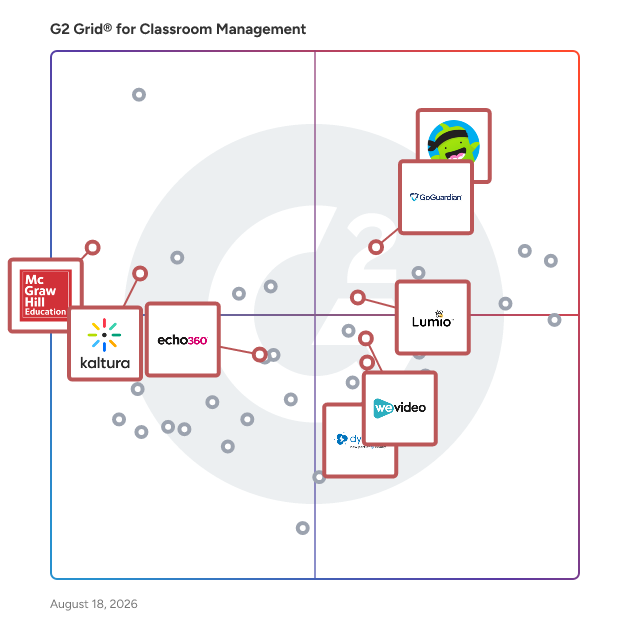
G2 Grid® for Classroom Management Software

G2 Grid® for Classroom Management Software plotting products by satisfaction and market presence

Highlighted products: GoGuardian Teacher, ClassDojo, WeVideo, Lumio, Dyknow Classroom, Echo360, McGraw-Hill Connect, and Kaltura - Agentic Digital Experiences Platform.

Underlying data: [Grid® JSON](https://www.g2.com/categories/classroom-management/grids.json?focus%5B%5D=goguardian-teacher&focus%5B%5D=classdojo&focus%5B%5D=wevideo&focus%5B%5D=smart-technologies-lumio&focus%5B%5D=dyknow-classroom&focus%5B%5D=echo360&focus%5B%5D=mcgraw-hill-connect&focus%5B%5D=kaltura-agentic-digital-experiences-platform&segment=enterprise)

Sponsored

ExamOnline

🔸ExamOnline uses an AI to auto-detect candidates by cross-checking their photos with images collected from registration. It verifies that the person attending the exam is the same who registered. 🔸It is a groundbreaking platform that leverages the power of AI to transform remote proctoring and ensure the integrity of online exams. It's innovative features and robust security measures provide a reliable solution for conducting exams in a remote setting. Here are the key highlights of ExamOnline: » 𝐀𝐈-𝐁𝐚𝐬𝐞𝐝 𝐂𝐚𝐧𝐝𝐢𝐝𝐚𝐭𝐞 𝐕𝐞𝐫𝐢𝐟𝐢𝐜𝐚𝐭𝐢𝐨𝐧: ExamOnline utilizes advanced AI algorithms to auto-detect candidates. It cross-checks their registration photos with a vast database of images, ensuring that the person attending the exam is the same individual who registered. This eliminates the possibility of impersonation or fraudulent activity. » 𝐋𝐢𝐯𝐞 𝐅𝐚𝐜𝐢𝐚𝐥 𝐃𝐞𝐭𝐞𝐜𝐭𝐢𝐨𝐧: The software employs cutting-edge facial detection technology to confirm the presence of candidates during the exam. It continuously monitors the video feed and alerts the administrator if it detects multiple faces or any suspicious behavior. This real-time monitoring ensures that the exam environment remains secure and free from unauthorized assistance. » 𝐀𝐮𝐝𝐢𝐨 𝐕𝐚𝐥𝐢𝐝𝐚𝐭𝐢𝐨𝐧 𝐟𝐨𝐫 𝐀𝐮𝐭𝐡𝐞𝐧𝐭𝐢𝐜𝐢𝐭𝐲: ExamOnline goes beyond visual monitoring and analyzes the audio streams during exams. It compares candidates' audio recordings before the exam to validate the authenticity of their responses. This feature effectively prevents the use of pre-recorded or external assistance, ensuring the integrity of the exam process. » 𝐂𝐨𝐦𝐩𝐫𝐞𝐡𝐞𝐧𝐬𝐢𝐯𝐞 𝐏𝐥𝐚𝐭𝐟𝐨𝐫𝐦: ExamOnline's Remote Proctor platform offers a comprehensive set of tools for managing candidates and assessments. It supports multi-user collaboration, simplifies test creation, enables quiz schedules, provides a question library, and facilitates certifications or licensing processes. This all-in-one platform streamlines exam administration and ensures a seamless experience for administrators and candidates. » 𝐃𝐞𝐭𝐚𝐢𝐥𝐞𝐝 𝐚𝐧𝐝 𝐂𝐮𝐬𝐭𝐨𝐦𝐢𝐳𝐚𝐛𝐥𝐞 𝐑𝐞𝐩𝐨𝐫𝐭𝐬: ExamOnline collects and stores detailed reports, providing valuable insights into candidate performance. These reports can be customized and white-labeled, allowing organizations to brand them according to their requirements. The comprehensive reports offer a clear overview of each candidate's performance, enabling effective evaluation and analysis. » 𝐒𝐞𝐜𝐮𝐫𝐞 𝐂𝐥𝐨𝐮𝐝 𝐒𝐭𝐨𝐫𝐚𝐠𝐞: ExamOnline securely stores exam audio and video files in the cloud for a specified period. This feature allows invigilators to review the recordings later, ensuring the integrity of the exam and providing concrete evidence if any suspicious activity is identified. The secure cloud storage guarantees the safety and accessibility of exam files whenever needed. 🔸ExamOnline revolutionizes remote proctoring by incorporating advanced AI-powered security measures and a comprehensive platform for exam management. With its cutting-edge technology and customizable features, ExamOnline ensures the integrity of online exams, promotes fair assessment, and provides a seamless experience for both administrators and candidates.

Visit website

GoGuardian Teacher

Engage students, manage your classroom, gather insights, and adapt instruction to create more powerful learning moments for every student, every day. GoGuardian Teacher allows teachers to walk the room, engage with students, while still receiving the info they need to keep students focused and on-task.

Average Rating: 4.7/5.0

Total Reviews: 100

How Do G2 Users Rate GoGuardian Teacher?

  • Ease of Use: 9.0/10 (Category avg: 8.6/10)
  • Student Assignment Distribution: 8.6/10 (Category avg: 8.1/10)
  • Student Assignment Collection: 7.6/10 (Category avg: 8.0/10)
  • Progress Reporting: 8.5/10 (Category avg: 8.3/10)

Who Is the Company Behind GoGuardian Teacher?

  • Seller: GoGuardian
  • Year Founded: 2014
  • HQ Location: El Segundo, California
  • Twitter: @goguardian
    8,707 Twitter followers
  • LinkedIn® Page: www.linkedin.com
    541 employees on LinkedIn®

Who Uses This Product?

  • Who Uses This: Teacher
  • Top Industries: Education Management, Primary/Secondary Education
  • Company Size: 57% Medium, 26% Small

What Do G2 Reviewers Say About GoGuardian Teacher?

AI-generated summary from verified user reviews

Pros
  • Users find GoGuardian Teacher easy to use, appreciating automation and detailed reports on student activity.
  • Users appreciate the detailed reporting of GoGuardian Teacher, enhancing their understanding of student activity and engagement.
Cons
  • Users report concerning access restrictions as students can bypass GoGuardian by manipulating screen sizes to view unmonitored content.

What Are Recent G2 Reviews of GoGuardian Teacher?

What Are G2 Users Discussing About GoGuardian Teacher?

ClassDojo

ClassDojo is a educational technology platform designed to enhance communication and collaboration among K-8 teachers, students, and families. By providing a suite of tools that facilitate real-time messaging, photo and video sharing, and positive behavior reinforcement, ClassDojo fosters a connected and supportive classroom environment. Trusted by educators worldwide, it is utilized in 95% of pre-kindergarten through eighth-grade schools across the United States and in over 180 countries globally. Key Features and Functionality: - Real-Time Communication: Enables seamless, two-way messaging between teachers and families, with instant translation available in over 130 languages, ensuring inclusivity and effective communication. - Classroom Stories: Allows teachers to share photos, videos, and announcements, providing families with a window into their child's daily learning experiences. - Positive Behavior Reinforcement: Offers tools for recognizing and rewarding positive student behaviors, promoting a constructive classroom culture. - Student Portfolios: Empowers students to showcase their work through digital portfolios, fostering student engagement and enabling parents to track academic progress. - Event Reminders: Keeps families informed about upcoming events and important dates, enhancing participation and community involvement. Primary Value and Solutions Provided: ClassDojo addresses the critical need for effective communication and engagement in the educational ecosystem. By bridging the gap between classrooms and homes, it ensures that families are actively involved in their children's education. The platform's emphasis on positive reinforcement and real-time updates cultivates a supportive learning environment, leading to improved student behavior and academic outcomes. Additionally, its user-friendly interface and commitment to privacy and security make it a trusted choice for educators and families alike.

Average Rating: 4.5/5.0

Total Reviews: 354

How Do G2 Users Rate ClassDojo?

  • Ease of Use: 9.3/10 (Category avg: 8.6/10)
  • Student Assignment Distribution: 8.2/10 (Category avg: 8.1/10)
  • Student Assignment Collection: 8.0/10 (Category avg: 8.0/10)
  • Progress Reporting: 9.1/10 (Category avg: 8.3/10)

Who Is the Company Behind ClassDojo?

  • Seller: ClassDojo
  • Year Founded: 2011
  • HQ Location: San Francisco, CA
  • Twitter: @ClassDojo
    85,934 Twitter followers
  • LinkedIn® Page: www.linkedin.com
    503 employees on LinkedIn®

Who Uses This Product?

  • Who Uses This: Teacher, Teacher
  • Top Industries: Education Management, Primary/Secondary Education
  • Company Size: 43% Medium, 38% Small

What Do G2 Reviewers Say About ClassDojo?

AI-generated summary from verified user reviews

Pros
  • Users value the effective communication features of ClassDojo, fostering engagement between parents, teachers, and students.
  • Users appreciate the high level of parent engagement offered by ClassDojo, fostering communication and student motivation.
  • Users find ClassDojo to be very easy to use, simplifying communication with students and parents while managing attendance.
  • Parents appreciate the real-time updates from ClassDojo, enhancing communication and engagement with their child's school activities.
  • Users find the customer support helpful for onboarding and resolving issues efficiently with ClassDojo.
Cons
  • Users find the difficult setup of ClassDojo challenging initially, but it improves with frequent use.
  • Users find the costly read receipt feature frustrating, impacting their ability to track message engagement effectively.
  • Users find integration difficult initially, but gain better understanding with frequent usage over time.
  • Users find the customer service for technical issues lacking, which affects their overall experience with ClassDojo.

What Are Recent G2 Reviews of ClassDojo?

What Are G2 Users Discussing About ClassDojo?

WeVideo

WeVideo is a powerful, full-cycle video learning platform built for schools, universities, and businesses. Founded in 2011 on the principle that everyone should have the power to create and communicate through video, we have evolved into a globally recognized solution that helps organizations save time while significantly increasing learner engagement. Transform Passive Content into Active Learning WeVideo empowers educators and trainers to turn standard video viewing into a dynamic, multi-dimensional experience. Users can go beyond simple multimedia creation by embedding diverse assessments, such as multiple choice questions, free response items, and moderated discussions, directly into video content. With features like branched learning scenarios and real-time polls, the platform allows for the creation of flexible, differentiated learning pathways that meet today's learners where they are. A Complete Suite for the Video Lifecycle The platform provides a robust set of cloud-based tools that facilitate every stage of the learning and creation process: Create and Edit: Access intuitive editing tools, a screen recorder, green screen capabilities, and a library of over 2 million royalty-free media assets. Engage and Collaborate: Enable real-time collaboration on projects and utilize shared libraries for team-based content creation. Analyze: Leverage real-time analytics to measure learner engagement, track completion performance, and inform pedagogical or training strategies. Enterprise-Grade Integration and Proven Results Built for professional and academic workflows, WeVideo features a robust LTI 1.3 standard integration. This ensures seamless compatibility with major Learning Management Systems (LMS) such as Canvas and Blackboard, supporting single sign-on (SSO), streamlined assignment creation, and secure grade passback. These tools allow institutions to scale online programs with academic integrity at their core, resulting in measurable impacts, including a validated 208% ROI as documented in a Forrester Total Economic Impact™ study.

Average Rating: 4.6/5.0

Total Reviews: 92

How Do G2 Users Rate WeVideo?

  • Ease of Use: 9.1/10 (Category avg: 8.6/10)
  • Student Assignment Distribution: 8.6/10 (Category avg: 8.1/10)
  • Student Assignment Collection: 9.2/10 (Category avg: 8.0/10)
  • Progress Reporting: 8.9/10 (Category avg: 8.3/10)

Who Is the Company Behind WeVideo?

  • Seller: WeVideo
  • Year Founded: 2011
  • HQ Location: Lake Forest, US
  • Twitter: @WeVideo
    14,686 Twitter followers
  • LinkedIn® Page: www.linkedin.com
    108 employees on LinkedIn®

Who Uses This Product?

  • Who Uses This: Teacher
  • Top Industries: Primary/Secondary Education, Education Management
  • Company Size: 39% Medium, 32% Small

What Do G2 Reviewers Say About WeVideo?

AI-generated summary from verified user reviews

Pros
  • Users appreciate the creativity options in WeVideo, enabling them to engage students interactively and vividly with content.
  • Users love the ease of use of WeVideo, appreciating its intuitive interface and seamless integration with other platforms.
  • Users value the seamless integration of WeVideo with educational platforms, enhancing engagement and interactivity in online courses.
  • Users praise the intuitive user interface of WeVideo, enhancing engagement and creativity in their video projects.
  • Users appreciate the outstanding customer support of WeVideo, which enhances their overall experience and satisfaction.
Cons
  • Users feel restricted by the limitations of the free version, missing out on key features like the video archive.
  • Users are frustrated by the tiered output limitations in WeVideo, which restricts quality to 720p at their school.
  • Users often experience software bugs that prevent critical features from functioning correctly, impacting student learning.

What Are Recent G2 Reviews of WeVideo?

What Are G2 Users Discussing About WeVideo?

Lumio

Lumio is a web-based instructional platform that offers more ways to effortlessly make learning fun and engaging on student devices. Teachers can start from scratch, or import existing content like PDFs, Google Slides, PowerPoints, and Canva designs and transform them into dynamic, engaging learning experiences on any device. Within Lumio, they can mix and match file types and add interactive elements like games, collaborative whiteboards, handouts, and assessments, all from a single place. Teachers can even share content with colleagues through shared libraries and co-edit lessons in real-time to leverage one another’s classroom experiences. Tools like instructional audio, activity dashboards, and the ability to offer real-time feedback make Lumio a one-stop tool for teachers. It allows them to personalize learning, enable student creation, and gain insight into learning while providing engaging, active lessons. Lumio inspires and supports curriculum with EdTech partners teachers already know and trust, like Desmos, PhET, Epic!, Tynker, and more. All while integrating with common LMS platforms Canvas and Schoology. Not only does Lumio offer more ways to engage students, it’s also specifically designed to improve outcomes – it’s not just fun, it works! Lumio is developed and updated based on an extensive logic model, ensuring that product improvements lead to desired learning outcomes. With the Research-Based Design Certification from Digital Promise, educators and administrators can feel confident in the benefits of using Lumio. With three available plan options (Free, Standard, and Spark), there’s a Lumio plan, and price, that’s right for everyone. Note: Lumio was formerly known as SMART Learning Suite Online (SLSO)

Average Rating: 4.8/5.0

Total Reviews: 165

How Do G2 Users Rate Lumio?

  • Ease of Use: 9.5/10 (Category avg: 8.6/10)
  • Student Assignment Distribution: 9.2/10 (Category avg: 8.1/10)
  • Student Assignment Collection: 8.7/10 (Category avg: 8.0/10)
  • Progress Reporting: 8.3/10 (Category avg: 8.3/10)

Who Is the Company Behind Lumio?

Who Uses This Product?

  • Who Uses This: Teacher, Instructional Technology Specialist
  • Top Industries: Primary/Secondary Education, Education Management
  • Company Size: 45% Medium, 28% Large

What Do G2 Reviewers Say About Lumio?

AI-generated summary from verified user reviews

Pros
  • Users love Lumio for its easy-to-use interactive templates, enhancing student engagement and creativity in lessons.
  • Users love the customization options in Lumio, enabling unique and interactive educational experiences tailored to their students.
  • Users find Lumio's ease of use invaluable for creating engaging and interactive lessons effortlessly.
  • Users love the easy-to-create engaging content with Lumio, enhancing student interaction and learning experiences effectively.
  • Users love Lumio for its ease of creating interactive lessons, enhancing student engagement through various formats.
Cons
  • Users find the extra costs for tiered components frustrating, limiting access for teachers under budget constraints.
  • Users find the extra costs for tiered components frustrating, particularly with budget constraints affecting access for teachers.
  • Users are frustrated with the lack of integration with Canvas grade passback, affecting usability in educational settings.
  • Users are frustrated with the lack of Canvas grade passback integration, affecting usability in educational settings.
  • Users find the subscription costs for tiered components frustrating, particularly under tight school budgets affecting access.

What Are Recent G2 Reviews of Lumio?

What Are G2 Users Discussing About Lumio?

Dyknow Classroom

Dyknow is the best monitoring solution for K-12 schools and districts with school-issued devices. Dyknow Classroom Management empowers teachers to defeat distractions, increase student engagement, and teach confidently with technology. With Dyknow, teachers can view all student thumbnails in real-time, block websites & apps, engage students, and review student activity history after class. Dyknow also helps K-12 Administrators and Tech Coaches get complete device usage data to identify wasted funds by measuring how school-issued devices and technology tools are actually used. Dyknow supports Chromebook, PC, and Mac devices, and integrates directly with leading Student Information Systems for seamless implementation. In March 2022, Dyknow joined Securly, creating an alliance between two education technology leaders dedicated to K-12 student success. Securly and Dyknow’s partnership was born out of our shared mission to help students reach their full potential through the power of technology.

Average Rating: 4.6/5.0

Total Reviews: 500

How Do G2 Users Rate Dyknow Classroom?

  • Ease of Use: 9.0/10 (Category avg: 8.6/10)
  • Student Assignment Distribution: 8.2/10 (Category avg: 8.1/10)
  • Progress Reporting: 8.3/10 (Category avg: 8.3/10)

Who Is the Company Behind Dyknow Classroom?

Who Uses This Product?

  • Who Uses This: Teacher, teacher
  • Top Industries: Education Management, Primary/Secondary Education
  • Company Size: 57% Medium, 25% Large

What Are Recent G2 Reviews of Dyknow Classroom?

What Are G2 Users Discussing About Dyknow Classroom?

Echo360

Echo360 coinvolge ogni studente, ovunque, con le soluzioni più complete per la registrazione e lo streaming video, la gestione dei contenuti video, il coinvolgimento del pubblico, la creazione di contenuti e le valutazioni. Forniamo i nostri servizi attraverso l'EchoSystem, un portafoglio di soluzioni meticolosamente progettato e implementato per promuovere il coinvolgimento e guidare risultati di apprendimento basati su evidenze per i nostri clienti. Miriamo a garantire un accesso equo a esperienze di apprendimento e formazione di alta qualità, indipendentemente dall'ambiente di apprendimento.

Average Rating: 4.6/5.0

Total Reviews: 446

How Do G2 Users Rate Echo360?

  • Facilità d'uso: 8.9/10 (Category avg: 8.6/10)
  • Distribuzione dei compiti agli studenti: 8.3/10 (Category avg: 8.1/10)
  • Raccolta di Compiti degli Studenti: 10.0/10 (Category avg: 8.0/10)
  • Rapporto di avanzamento: 9.6/10 (Category avg: 8.3/10)

Who Is the Company Behind Echo360?

  • Venditore: Echo360
  • Sito web dell'azienda:
  • Sede centrale: Youngstown, OH
  • Twitter: @echo360
    12,767 follower su Twitter
  • Pagina LinkedIn®: www.linkedin.com
    166 dipendenti su LinkedIn®

Who Uses This Product?

  • Who Uses This: Teacher, Assistant Professor
  • Top Industries: Istruzione superiore, Gestione dell'istruzione
  • Company Size: 38% Small, 31% Medium

What Do G2 Reviewers Say About Echo360?

AI-generated summary from verified user reviews

Pros
  • Gli utenti apprezzano Echo360 per le sue funzionalità di comunicazione senza interruzioni che migliorano l'insegnamento e l'apprendimento attraverso un'integrazione facile.
  • Gli utenti apprezzano la facile creazione di contenuti con Echo360, che consente un design intuitivo e un'aderenza costante al marchio.
  • Gli utenti apprezzano gli strumenti di design intuitivi di Echo360, migliorando la coerenza e facilitando un feedback multimediale efficace.
  • Gli utenti trovano l'interfaccia intuitiva di Echo360 facile da navigare, migliorando la creazione di contenuti con uno strumento di design semplice.
  • Gli utenti apprezzano l'interfaccia user-friendly di Echo360, che semplifica la creazione di contenuti per tutti.
Cons
  • Gli utenti provano frustrazione a causa di problemi di accesso a Internet che interrompono il flusso dell'uso efficace di Echo360.
  • Anche se Echo360 tende ad essere instabile a volte, spesso funziona senza problemi per gli utenti.
  • Gli utenti sperimentano occasionalmente problemi di glitch con Echo360, ma la funzionalità complessiva è spesso soddisfacente.
  • Gli utenti trovano la complessità d'uso di Echo360 impegnativa a causa delle funzionalità limitate e dei processi di integrazione difficili.
  • Gli utenti trovano la mancanza di una libreria di contenuti unificata su Echo360 limitante per le esigenze avanzate di progettazione multimediale.

What Are Recent G2 Reviews of Echo360?

What Are G2 Users Discussing About Echo360?

Kaltura - Agentic Digital Experiences Platform

Kaltura provides both live and on-demand video solutions that boost engagement, maximize ROI, and foster closer connections between brands and audiences. From virtual and hybrid events to webinars and video hubs, Kaltura’s AI-enhanced off-the-shelf products offer unparalleled flexibility, modularity, and ease of integration. Our products empower any size business to create personalized digital experiences and end-to-end video workflows that are enterprise-grade, immensely scalable, and 100% on-brand.

Average Rating: 4.3/5.0

Total Reviews: 117

How Do G2 Users Rate Kaltura - Agentic Digital Experiences Platform?

  • Ease of Use: 8.6/10 (Category avg: 8.6/10)
  • Student Assignment Distribution: 7.1/10 (Category avg: 8.1/10)
  • Student Assignment Collection: 8.3/10 (Category avg: 8.0/10)
  • Progress Reporting: 8.5/10 (Category avg: 8.3/10)

Who Is the Company Behind Kaltura - Agentic Digital Experiences Platform?

  • Seller: Kaltura
  • Company Website:
  • Year Founded: 2006
  • HQ Location: New York, NY
  • Twitter: @Kaltura
    8,954 Twitter followers
  • LinkedIn® Page: www.linkedin.com
    726 employees on LinkedIn®

Who Uses This Product?

  • Top Industries: Higher Education, Education Management
  • Company Size: 42% Medium, 33% Large

What Do G2 Reviewers Say About Kaltura - Agentic Digital Experiences Platform?

AI-generated summary from verified user reviews

Pros
  • Users find the ease of use of Kaltura Video Cloud makes creating and managing business videos seamless and efficient.
  • Users appreciate Kaltura's robust features for video creation, including seamless integration, analytics, and superb customer support.
  • Users value the seamless integrations of Kaltura, enhancing video solutions for diverse business applications effortlessly.
  • Users praise Kaltura for its excellent features, allowing seamless video creation for various business purposes and needs.
  • Users highlight the reliability of Kaltura, with smooth performance and consistent functionality boosting their experience.
Cons
  • Users find the reporting system lacking customization, making it difficult to access detailed insights efficiently.
  • Users find the difficult setup process cumbersome, requiring internal readiness before implementing Kaltura's platform.
  • Users experience integration issues with Kaltura’s PATH tool, though support helps resolve some problems quickly.
  • Users report technical issues with Kaltura involving slow uploads, high bandwidth needs, and integration challenges.
  • Users find Kaltura's setup process complex and requiring developer assistance, making updates challenging and unintuitive.

What Are Recent G2 Reviews of Kaltura - Agentic Digital Experiences Platform?

What Are G2 Users Discussing About Kaltura - Agentic Digital Experiences Platform?

McGraw-Hill Connect

McGraw-Hill Education Connect è un robusto kit di strumenti di risorse didattiche progettato con la flessibilità di cui gli istruttori hanno bisogno, per sbloccare il potenziale di una popolazione studentesca diversificata. Connect offre opportunità sia per la valutazione formativa che sommativa. La nostra tecnologia adattiva fornisce agli studenti un luogo sicuro per commettere errori, incoraggiando la pratica deliberata e permettendo loro di avvicinarsi un passo alla volta alla padronanza. AUTO-VALUTAZIONE Il tuo tempo prezioso e la tua esperienza dovrebbero essere dedicati all'insegnamento, non alla valutazione. Connect valuterà automaticamente compiti e quiz, fornendoti report facili da leggere in modo che tu sappia quali studenti hanno bisogno di maggiore guida. RISORSE CONSOLIDATE Chi ha il tempo di setacciare più file, cartelle e cliccare su vari siti web? Non tu. Tutto ciò di cui hai bisogno per essere un educatore efficace è a portata di mano; consolida tutti i tuoi materiali del corso con Connect. OBIETTIVI DI APPRENDIMENTO ETICHETTATI Concentrati su ciò che è importante: i risultati dell'apprendimento. All'interno di Connect, puoi creare compiti e generare report per valutare rapidamente se gli studenti stanno apprendendo i contenuti cruciali del corso. SMARTBOOK SmartBook è una versione digitale del tuo libro di testo del corso. Contiene lo stesso contenuto del libro di testo, ma a differenza di un tipico eBook, SmartBook adatta attivamente quel contenuto alle tue esigenze individuali come studente. SmartBook può essere accessibile online tramite il tuo laptop. E molti SmartBook sono disponibili anche su tablet!

Average Rating: 3.6/5.0

Total Reviews: 167

How Do G2 Users Rate McGraw-Hill Connect?

  • Facilità d'uso: 7.3/10 (Category avg: 8.6/10)
  • Distribuzione dei compiti agli studenti: 8.1/10 (Category avg: 8.1/10)
  • Raccolta di Compiti degli Studenti: 8.0/10 (Category avg: 8.0/10)
  • Rapporto di avanzamento: 8.2/10 (Category avg: 8.3/10)

Who Is the Company Behind McGraw-Hill Connect?

Who Uses This Product?

  • Who Uses This: Teacher, Associate Professor
  • Top Industries: Istruzione superiore, Gestione dell'istruzione
  • Company Size: 42% Large, 36% Medium

What Are Recent G2 Reviews of McGraw-Hill Connect?

What Are G2 Users Discussing About McGraw-Hill Connect?

LanSchool

Backed by Lenovo, LanSchool has placed purposeful technology in the hands of passionate educators for over 30 years. LanSchool’s classroom management, filtering, and student safety solutions guide learning, promote collaboration, and maximize teaching time – all while keeping students and school networks safe. With LanSchool, teachers can support student learning both in the classroom and remotely. Available as a cloud-based or locally–hosted solution, LanSchool is compatible with Windows, Mac, and Chrome operating systems. LanSchool also supports mixed device environments and makes it easy for schools and districts to scale their 1:1 programs. Additionally, easy installation and on-boarding saves time for both IT teams and teaching staff. Popular classroom management features include Screen Monitoring, Limit Web, Blank Screen, Messaging, Share Screen, Push Website, Snapshot, and Battery Status. LanSchool also includes a free student safety solution as well as a best-in-class filtering solution. The student safety solution provides student account monitoring with AI and human threat detection, image removal, and a parent portal, while the filtering solution offers content filtering and threat protection with one-click CIPA compliance and an easy-to-use dashboard.

Average Rating: 4.2/5.0

Total Reviews: 113

How Do G2 Users Rate LanSchool?

  • Ease of Use: 7.9/10 (Category avg: 8.6/10)
  • Student Assignment Distribution: 8.1/10 (Category avg: 8.1/10)
  • Student Assignment Collection: 8.0/10 (Category avg: 8.0/10)
  • Progress Reporting: 7.8/10 (Category avg: 8.3/10)

Who Is the Company Behind LanSchool?

  • Seller: Lenovo
  • Year Founded: 1984
  • HQ Location: Beijing
  • Twitter: @Lenovo_in
    231,470 Twitter followers
  • LinkedIn® Page: www.linkedin.com
    47,512 employees on LinkedIn®
  • Ownership: HKG:0992

Who Uses This Product?

  • Who Uses This: Teacher
  • Top Industries: Education Management, Primary/Secondary Education
  • Company Size: 58% Medium, 22% Large

What Are Recent G2 Reviews of LanSchool?

What Are G2 Users Discussing About LanSchool?

Nearpod

Nearpod offre una piattaforma didattica interattiva che unisce la valutazione formativa in tempo reale e i media dinamici per esperienze di apprendimento dal vivo e autogestite dentro e fuori dall'aula. Nearpod funziona con qualsiasi tecnologia in classe, dai tablet e smartphone ai laptop e Chromebook. La piattaforma aiuta a coinvolgere gli studenti con oltre 15.000 lezioni interattive pronte all'uso, video e attività create in collaborazione con organizzazioni leader come Common Sense Education e Smithsonian. Nel 2019, Nearpod ha acquisito Flocabulary, una piattaforma di apprendimento che coinvolge gli studenti in concetti accademicamente rigorosi K–12 promuovendo l'alfabetizzazione attraverso video hip-hop. Insieme, Nearpod e Flocabulary raggiungono educatori in 100 dei più grandi distretti scolastici degli Stati Uniti. Nel 2018, Nearpod è stata nominata Azienda dell'Anno da EdTech Digest.

Average Rating: 4.6/5.0

Total Reviews: 118

How Do G2 Users Rate Nearpod?

  • Facilità d'uso: 8.6/10 (Category avg: 8.6/10)
  • Distribuzione dei compiti agli studenti: 8.6/10 (Category avg: 8.1/10)
  • Raccolta di Compiti degli Studenti: 8.9/10 (Category avg: 8.0/10)
  • Rapporto di avanzamento: 8.7/10 (Category avg: 8.3/10)

Who Is the Company Behind Nearpod?

  • Venditore: Renaissance Learning
  • Anno di Fondazione: 1986
  • Sede centrale: Wisconsin Rapids, Wisconsin, United States
  • Twitter: @RenLearnUS
    5,796 follower su Twitter
  • Pagina LinkedIn®: www.linkedin.com
    2,192 dipendenti su LinkedIn®

Who Uses This Product?

  • Who Uses This: Teacher
  • Top Industries: Istruzione primaria/secondaria, Gestione dell'istruzione
  • Company Size: 45% Medium, 29% Small

What Do G2 Reviewers Say About Nearpod?

AI-generated summary from verified user reviews

Pros
  • Gli utenti apprezzano le funzionalità di controllo accessi migliorate di Nearpod, migliorando notevolmente il coinvolgimento e la partecipazione nelle aule.
  • Gli utenti amano la integrazione senza soluzione di continuità dell'app di Nearpod, migliorando l'accessibilità e la facilità di condivisione dei contenuti con gli studenti.
  • Gli utenti apprezzano le valutazioni in tempo reale in Nearpod, che migliorano il coinvolgimento degli studenti e tracciano il progresso in modo efficace.
  • Gli utenti apprezzano le capacità di archiviazione cloud di Nearpod per un facile accesso e condivisione dei contenuti educativi.
  • Gli utenti apprezzano le capacità di comunicazione in tempo reale di Nearpod, migliorando il coinvolgimento e l'interazione in classe.
Cons
  • Gli utenti affrontano problemi di complessità con Nearpod, specialmente per i nuovi utenti e nella gestione delle lezioni in tempo reale.
  • Gli utenti trovano Nearpod costoso, poiché le funzionalità avanzate richiedono un pagamento che mette a dura prova i bilanci scolastici.
  • Gli utenti trovano la curva di apprendimento impegnativa, richiedendo tempo per esplorare tutte le funzionalità e gestire le lezioni in modo efficace.
  • Gli utenti trovano che la personalizzazione limitata di Nearpod limiti le opzioni di utilizzo e potrebbe non soddisfare tutte le esigenze didattiche.
  • Gli utenti trovano che Nearpod abbia funzionalità limitate nella sua versione gratuita, portando a potenziali costi aggiuntivi per gli aggiornamenti.

What Are Recent G2 Reviews of Nearpod?

What Are G2 Users Discussing About Nearpod?

Hāpara

The Hāpara Instructional Management Suite enables educators to create visible, differentiated and focused learning experiences with Google Workspace for Education. Our tools help teachers see student efforts across Google Workspace applications, support collaborative assignments, encourage real-time engagement and highlight student browsing while empowering students to take control of their digital learning experience in a responsible and secure way. Regardless of whether students use iPads, Android tablets, desktop computers, laptops or mobile phones, Hāpara tools give teachers the management capability and insight into student efforts they need to deliver a 21st century education.

Average Rating: 4.6/5.0

Total Reviews: 94

How Do G2 Users Rate Hāpara?

  • Ease of Use: 8.6/10 (Category avg: 8.6/10)
  • Student Assignment Distribution: 8.4/10 (Category avg: 8.1/10)
  • Student Assignment Collection: 7.2/10 (Category avg: 8.0/10)
  • Progress Reporting: 7.1/10 (Category avg: 8.3/10)

Who Is the Company Behind Hāpara?

  • Seller: Hapara
  • Year Founded: 2008
  • HQ Location: Redwood City, CA
  • Twitter: @hapara_team
    4,128 Twitter followers
  • LinkedIn® Page: www.linkedin.com
    54 employees on LinkedIn®

Who Uses This Product?

  • Who Uses This: Teacher
  • Top Industries: Primary/Secondary Education, Education Management
  • Company Size: 51% Medium, 28% Small

What Do G2 Reviewers Say About Hāpara?

AI-generated summary from verified user reviews

Pros
  • Users value the effective communication capabilities of Hāpara, enhancing engagement and interaction with students.
  • Users value the efficiency of Hāpara in managing student engagement and streamlining interactions during lessons.
  • Users appreciate the real-time engagement features of Hāpara, facilitating better interactions and focused learning moments.
  • Users appreciate the quick communication capabilities of Hāpara, enabling instant engagement and effective classroom interactions.
  • Users appreciate the real-time monitoring and tracking feature, enabling instant engagement and effective classroom management.

What Are Recent G2 Reviews of Hāpara?

What Are G2 Users Discussing About Hāpara?

Socrative

Your classroom app for fun, effective engagement and on-the-fly assessments. Immediate feedback is a vital part of the learning process. Socrative gives you just that for the classroom or office – an efficient way to monitor and evaluate learning that saves time for educators while delivering fun and engaging interactions for learners. Quickly and easily create a library of personalized activities from quizzes to polls, to on-the-fly questions or whatever type of activity you need to quickly assess student understanding. Launch activities in secure and easy to create rooms to keep your class engaged, whether you're teaching in-person, remotely, or both. When activities are complete, quiz results can be distributed to learners with just a few clicks. Socrative quizzes are automatically graded in real time providing you with instant feedback. Socrative quiz reports allow to quickly identify where you need to adjust your teaching based on the results so you spend less time grading assignments and more time engaging your learners. Socrative is 100% free for students to use, on all devices.

Average Rating: 4.5/5.0

Total Reviews: 98

How Do G2 Users Rate Socrative?

  • Ease of Use: 9.1/10 (Category avg: 8.6/10)
  • Student Assignment Distribution: 8.5/10 (Category avg: 8.1/10)
  • Student Assignment Collection: 8.9/10 (Category avg: 8.0/10)
  • Progress Reporting: 9.1/10 (Category avg: 8.3/10)

Who Is the Company Behind Socrative?

  • Seller: Showbie
  • Year Founded: 2012
  • HQ Location: Edmonton, CA
  • Twitter: @Showbie
    11,656 Twitter followers
  • LinkedIn® Page: www.linkedin.com
    56 employees on LinkedIn®

Who Uses This Product?

  • Who Uses This: Teacher
  • Top Industries: Primary/Secondary Education, Education Management
  • Company Size: 46% Medium, 40% Small

What Are Recent G2 Reviews of Socrative?

What Are G2 Users Discussing About Socrative?