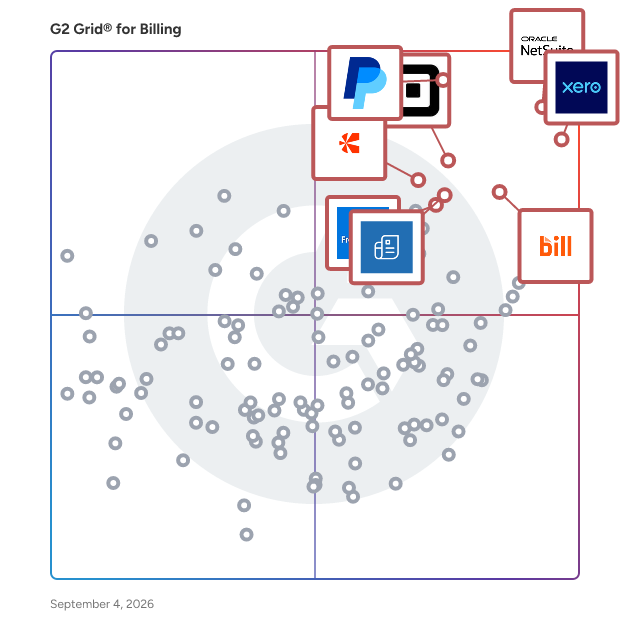
# Best Billing Software - Page 28

  *By [Nathan Calabrese](https://research.g2.com/insights/author/nathan-calabrese)*

   Billing software enables companies to create and send invoices to customers for products and services delivered, reducing the time and effort required to manage invoicing, improving billing accuracy, and supporting diverse billing models including project billing and recurring billing.

### Core Capabilities of Billing Software

To qualify for inclusion in the Billing software category, a product must:

- Provide features to create multiple types of invoices
- Be able to consolidate multiple invoices into one or split an invoice
- Include templates for invoices and other documents
- Allow users to send invoices in different formats (PDF, MS Word) through various communication channels such as email and e-fax
- Offer reports and analytics on the status of each invoice
- Include payment alert notifications
- Integrate with software solutions such as ERP, CRM, and accounting packages

### Common Use Cases for Billing Software

Accounting professionals, salespeople, and project managers use billing software to manage invoicing across different business models and customer types. Common use cases include:

- Generating and sending invoices for project-based professional services engagements
- Managing recurring billing cycles for subscription-based or utility services
- Providing customers with estimates or pro forma invoices ahead of final billing

### How Billing Software Differs from Other Tools

Billing software focuses on invoice creation and distribution, while the final stage of the billing process, receiving and reconciling payments, is typically handled by [accounting software](https://www.g2.com/categories/accounting) or a module within a larger [ERP system](https://www.g2.com/categories/erp-systems). Billing software integrates with these platforms, as well as [CRM software](https://www.g2.com/categories/crm), to pull in customer and product data for accurate invoice generation.

### Insights from G2 on Billing Software

Based on category trends on G2, invoice template flexibility and integration with accounting platforms stand out as top strengths. These platforms deliver reductions in manual billing effort and improved on-time payment rates as core benefits of adoption.


## Category Overview

**Total Products under this Category:** 750


## Trust & Credibility Stats

**Why You Can Trust G2's Software Rankings:**

- 30 Analysts and Data Experts
- 30,900+ Authentic Reviews
- 750+ Products
- Unbiased Rankings

G2's software rankings are built on verified user reviews, rigorous moderation, and a consistent research methodology maintained by a team of analysts and data experts. Each product is measured using the same transparent criteria, with no paid placement or vendor influence. While reviews reflect real user experiences, which can be subjective, they offer valuable insight into how software performs in the hands of professionals. Together, these inputs power the G2 Score, a standardized way to compare tools within every category.


## Best Billing Software At A Glance

- **Leader:** [NetSuite](https://www.g2.com/products/netsuite/reviews)
- **Highest Performer:** [Assembly](https://www.g2.com/products/assemblysoftware/reviews)
- **Easiest to Use:** [Anchor](https://www.g2.com/products/anchor-anchor/reviews)
- **Top Trending:** [Tabs](https://www.g2.com/products/tabs/reviews)
- **Best Free Software:** [QuickBooks Desktop Pro](https://www.g2.com/products/quickbooks-desktop-pro/reviews)


---

**Sponsored**

### Tabs

Tabs is the AI-native revenue automation platform built for modern finance teams.Tabs pulls data directly from the signed PDF to automate workflows including billing, collections, payments, revenue recognition, and reporting all in one place. Tabs integrates with your tech stack - including CRMs like Salesforce and HubSpot, ERPs like NetSuite, Quickbooks, and Rillet, and more - to automatically sync all data across your systems, ensuring consistency with your contract as the source of truth. Hundreds of businesses - including Statsig, Cursor, and Anrok - have been able to scale and supercharge their finance teams, closing books 5x faster, reducing DSO by 50% and scaling revenue without scaling headcount.


[Visit website](https://www.g2.com/external_clickthroughs/record?secure%5Bad_program%5D=ppc&amp;secure%5Bad_slot%5D=category_product_list&amp;secure%5Bcategory_id%5D=90&amp;secure%5Bdisplayable_resource_id%5D=90&amp;secure%5Bdisplayable_resource_type%5D=Category&amp;secure%5Bmedium%5D=sponsored&amp;secure%5Bplacement_reason%5D=page_category&amp;secure%5Bplacement_resource_ids%5D%5B%5D=90&amp;secure%5Bprioritized%5D=false&amp;secure%5Bproduct_id%5D=1404547&amp;secure%5Bresource_id%5D=90&amp;secure%5Bresource_type%5D=Category&amp;secure%5Bsource_type%5D=category_page&amp;secure%5Bsource_url%5D=https%3A%2F%2Fwww.g2.com%2Fcategories%2Fbilling%3Fpage%3D15&amp;secure%5Btoken%5D=db32a84eff574cacc304f0def695654fe5166c4a41e7f9a0ebeddd712a86602f&amp;secure%5Burl%5D=https%3A%2F%2Fwww.tabs.com%2Fdemo-pm-nb-billing%3Futm_source%3DG2%26utm_medium%3DDirectories%26utm_campaign%3DG2_Directories&amp;secure%5Burl_type%5D=custom_url&amp;secure%5Bvisitor_segment%5D=180)

---

## Top-Rated Products (Ranked by G2 Score)
### 1. [Simplicate](https://www.g2.com/products/simplicate/reviews)
  At Simplicate, we help professional services firms thrive—by keeping things simple. Our unique approach strips away the unnecessary complexity from everyday processes, giving you a clear view of your projects and real-time insight into your financial performance. By combining powerful business software with hands-on advice, we make a real impact for over 1,600 clients across seven different industries. We are Simplicate. Your flow to success.


  **Average Rating:** 4.5/5.0
  **Total Reviews:** 1


**Seller Details:**

- **Seller:** [Simplicate Software B.V.](https://www.g2.com/sellers/simplicate-software-b-v)
- **Year Founded:** 2010
- **HQ Location:** Groningen, NL
- **LinkedIn® Page:** https://www.linkedin.com/company/simplicate/ (91 employees on LinkedIn®)

**Reviewer Demographics:**
  - **Company Size:** 60% Small-Business, 40% Mid-Market


#### Pros & Cons

**Pros:**

- All-in-one Solutions (1 reviews)
- Collaborative Efforts (1 reviews)
- Ease of Learning (1 reviews)
- Ease of Use (1 reviews)
- Easy Tracking (1 reviews)

**Cons:**

- Slow Loading (1 reviews)
- Slow Performance (1 reviews)

### 2. [SImplybill](https://www.g2.com/products/simplybill/reviews)
  The simple way to send and track good-looking invoices, so you can focus on your business.


**Seller Details:**

- **Seller:** [SImplybill](https://www.g2.com/sellers/simplybill-62178ed6-5179-488a-b723-4a5cf1ef69e1)
- **HQ Location:** N/A
- **Twitter:** @simplybillApp (15 Twitter followers)
- **LinkedIn® Page:** https://www.linkedin.com/company/No-Linkedin-Presence-Added-Intentionally-By-DataOps (1 employees on LinkedIn®)


### 3. [Simply Easier Payments](https://www.g2.com/products/simply-easier-payments/reviews)
  Simply Easier Payments helps agents, brokers, carriers, MGAs, and premium finance companies save time and accelerate their billing and invoicing so they can get paid faster.


**Seller Details:**

- **Seller:** [Simply Easier Payments](https://www.g2.com/sellers/simply-easier-payments)
- **Year Founded:** 2006
- **HQ Location:** Durham, US
- **LinkedIn® Page:** http://www.linkedin.com/company/simply-easier-payments (15 employees on LinkedIn®)


### 4. [Simply Invoice](https://www.g2.com/products/simply-invoice/reviews)
  Simply Invoice V2 and Simply Invoice SE are professional invoice software packages for your small, medium or large sized business. You simply purchase Simply V2 and it&#39;s yours for life. You can use this link to download a free time limited trial version of the Simply Invoice software, or click here to view more information.


**Seller Details:**

- **Seller:** [Simplyinvoice](https://www.g2.com/sellers/simplyinvoice)
- **HQ Location:** N/A
- **LinkedIn® Page:** https://www.linkedin.com/company/No-Linkedin-Presence-Added-Intentionally-By-DataOps (1 employees on LinkedIn®)


### 5. [Siwapp](https://www.g2.com/products/siwapp/reviews)
  Siwapp is an open source web application that provides automatic invoices generation on a periodic basis, rectification invoices management.


**Seller Details:**

- **Seller:** [Siwapp](https://www.g2.com/sellers/siwapp)
- **HQ Location:** N/A
- **LinkedIn® Page:** https://www.linkedin.com/company/No-Linkedin-Presence-Added-Intentionally-By-DataOps (1 employees on LinkedIn®)


### 6. [Skydo](https://www.g2.com/products/skydo/reviews)
  Skydo helps Indian exporters receive cross-border payments effortlessly and at low-cost.


  **Average Rating:** 5.0/5.0
  **Total Reviews:** 2


**Seller Details:**

- **Seller:** [Skydo](https://www.g2.com/sellers/skydo)
- **Year Founded:** 2022
- **HQ Location:** Bengaluru, IN
- **LinkedIn® Page:** https://in.linkedin.com/company/skydo-official (99 employees on LinkedIn®)

**Reviewer Demographics:**
  - **Company Size:** 100% Small-Business


### 7. [Sliptree](https://www.g2.com/products/sliptree/reviews)
  Sliptree is a multilingual invoice app to simplify your bookkeeping through templates, tracking, and more.


**Seller Details:**

- **Seller:** [Sliptree](https://www.g2.com/sellers/sliptree)
- **Year Founded:** 2011
- **HQ Location:** Tallinn, EE
- **LinkedIn® Page:** https://www.linkedin.com/company/sliptree/about/ (1 employees on LinkedIn®)


### 8. [Smart Admin](https://www.g2.com/products/smart-admin/reviews)
  SMART ADMIN is an integrated Project Management, Time sheet, Payroll and Invoice web app shared on subscription basis. The project management and Payroll tools can be customized for any geography. SMART ADMINencourages greater Collaboration @Work Place, and seek consistency in project execution with reduced operational risks. We are open to accommodate all configuration requests and act quickly to ensure easy implementation. SMART ADMIN can be configured for users across multiple countries and time-zones. It accommodates combination of currencies. and with Its customizable salary, leave and holiday packages SMART ADMIN is ideal for any organization, culture, and country. Overall, SMART ADMIN helps to digitize business operations with minimal investment. Here are the highlights. • Real Time Project /Program Progress • Assigning Task To Team Members • Time Sheet Entry Against Assigned Tasks • Option to approve timesheet entries by Manager • Task Monitoring against Completion of Hours • Calculation of Hours for Each Task • Option To Add Billable/Non- Billable Projects/Programs • Invoice Option for Completed Tasks • Time sheet mapping with project, compensation and invoice • Quick setup for employee roles • Encryption of all personally identifiable information • Zero installation, maintenance, and ownership cost • Integration of SMART ADMIN with web domain similar to www.your-website.com/manager • Customization Support for Configuration and Maintenance In addition to the project management option, the app can be used for generating payroll and invoice. All users need to update timesheet on daily basis and the same data points can be mapped for generating payroll and invoice; but optional. Prior to that the pay structure and Leave or Time off needs to be defined. Similarly, there is an option to add clients for each project and the same tasks can be used to generate invoice.


**Seller Details:**

- **Seller:** [Smart Admin](https://www.g2.com/sellers/smart-admin)
- **Year Founded:** 2016
- **HQ Location:** Bengaluru, IN
- **LinkedIn® Page:** https://www.linkedin.com/company/smart-admin-manager/ (11 employees on LinkedIn®)


### 9. [smoice](https://www.g2.com/products/smoice/reviews)
  SMOICE is the invoicing program with which service providers can generate invoices at the push of a button. They offer a fluent process of service entry, practice invoicing at the push of a button and automatic posting of open items from the bank account.


**Seller Details:**

- **Seller:** [smoice](https://www.g2.com/sellers/smoice)
- **Year Founded:** 2012
- **HQ Location:** Michendorf, DE
- **Twitter:** @Smoice (687 Twitter followers)
- **LinkedIn® Page:** https://www.linkedin.com/company/6381213 (1 employees on LinkedIn®)


### 10. [Sofacto](https://www.g2.com/products/sofacto/reviews)
  Sofacto is your daily billing solution. With just a few clicks, you can easily, quickly and efficiently manage your invoicing, from document editing to monitoring payments. Fully conceived and developed from Salesforce, Sofacto leverages the power, security and performance of the global leader in Cloud CRM. You benefit from a complete and optimized CRM experience, and set your business strategy free thanks to a 360° vision of your customers.


**Seller Details:**

- **Seller:** [Sofacto](https://www.g2.com/sellers/sofacto)
- **Year Founded:** 2022
- **HQ Location:** Woodridge, US
- **LinkedIn® Page:** https://www.linkedin.com/company/ip-sofacto-docketing-llc/ (1 employees on LinkedIn®)


### 11. [SoftCo Procure-to-Pay](https://www.g2.com/products/softco-procure-to-pay/reviews)
  AI-Native AP Automation Tailored to Perfection. SoftCoP2P is a SaaS financial process automation platform built for midsize to large organizations operating complex, multi-entity environments. It delivers AI-native Procure-to-Pay automation across procurement, invoice processing, payments, analytics and compliance within a single scalable ecosystem. SoftCoP2P enables controlled requisitioning, catalog management and purchase order generation for indirect spend. Its embedded AP automation module, SoftCoAP, processes all PO, non-PO and recurring invoices from AI Capture and AI Match through to approval and payment. AI Match supports two-way and three-way reconciliation against purchase orders and goods receipt notes, continuously learning from every transaction to improve accuracy and straight-through processing. Non-PO invoices are coded automatically to the correct general ledger accounts and cost centers using AI Coding, while AI Routing progresses invoices to the appropriate approvers based on confidence thresholds and controls. Recurring invoices such as rent, utilities and subscriptions are validated against underlying POs and routed through automated workflows. Mobile and email-based approvals with real-time notifications accelerate processing. SoftCoAI+ powers AI Coding, AI Routing and a built-in AI Assistant that enables users to interact with live finance data using natural language. Teams can access real-time insights instantly without relying on static reports or filters. SoftCo SmartConnect enables secure integration with over 200 ERP systems, including Microsoft, Oracle, SAP, Infor and Sage, supporting API-based and secure file-based data exchange. SoftCoPay transforms payments into a controlled, optimized workflow by reducing costs, capturing rebates and consolidating all outbound payment types, including card, ACH and check, into a single secure process. SoftCoP2P includes advanced analytics with role-based dashboards and automated reporting for CFOs, AP teams and finance leaders, delivering full visibility across spend, performance and compliance. SoftCo is trusted by over one million users globally, including organizations such as PwC, Logitech, Primark, Volkswagen, Sunny Delight and the Finnish Government. We are SOC 1 and SOC 2 compliant, ISO 27001 certified, integrate with more than 200 ERP systems and maintain a 100 percent project success rate.


  **Average Rating:** 5.0/5.0
  **Total Reviews:** 1


**Seller Details:**

- **Seller:** [Softco](https://www.g2.com/sellers/softco)
- **Year Founded:** 1990
- **HQ Location:** Leopardstown, IE
- **Twitter:** @SoftCoGroup (2,300 Twitter followers)
- **LinkedIn® Page:** https://www.linkedin.com/company/softco/ (171 employees on LinkedIn®)

**Reviewer Demographics:**
  - **Company Size:** 200% Enterprise


### 12. [Solna](https://www.g2.com/products/invoice-template-solna/reviews)
  Free invoice template


**Seller Details:**

- **Seller:** [Invoice Template](https://www.g2.com/sellers/invoice-template)
- **Year Founded:** 2017
- **HQ Location:** London, GB
- **LinkedIn® Page:** https://www.linkedin.com/company/solna/ (2 employees on LinkedIn®)


### 13. [Solo](https://www.g2.com/products/betao-ab-solo/reviews)
  Solo est une solution tout-en-un concue pour préparer les auto-entrepreneurs et indépendants à la facturation électronique. Plateforme Agréée (ex PDP), Solo s&#39;adresse aux indépendants en phase de lancement ou déjà en activité, quel que soit leur secteur d&#39;activité (bâtiment, services, e-commerce, conseil ou métiers créatifs), et peut être utilisé sans ouverture de compte bancaire imposée. Principales fonctionnalités : - Facturation conforme : création de devis et factures personnalisables, incluant toutes les mentions légales obligatoires, avec une compatibilité prévue pour la réforme de la facturation électronique en vigueur à partir de septembre 2026. - Déclaration Urssaf simplifiée : Solo calcule le montant exact à déclarer à partir des données de facturation, permettant une validation en un clic à chaque échéance. - Connexion bancaire et suivi de trésorerie : synchronisation des transactions, mise à jour du livre de recettes, encaissement en ligne et relances clients. - Gestion de la TVA : suivi en franchise de base, avec alertes à l&#39;approche des seuils réglementaires. - Tableau de bord et pilotage : vue d&#39;ensemble sur le chiffre d&#39;affaires, les cotisations, les impôts et les seuils clés pour faciliter la prise de décision. La plateforme est accessible sur ordinateur, tablette et mobile, sans installation requise. Solo est certifié en tant que Plateforme Agréée (anciennement PDP) pour répondre aux obligations de la facturation électronique dès 2026. Essai gratuit - sans carte bancaire - sans engagement - sans compte bancaire imposé


**Seller Details:**

- **Seller:** [Betao AB](https://www.g2.com/sellers/betao-ab)
- **Year Founded:** 2013
- **HQ Location:** Stockholm, SE
- **LinkedIn® Page:** https://www.linkedin.com/company/betao-ab/ (95 employees on LinkedIn®)


### 14. [Sonic Software](https://www.g2.com/products/sonic-software/reviews)
  The Sonic brand offers an offline accounting and billing software that is highly customizable and designed to cater to the needs of various industries, including building contractors, grocery stores, small businesses, textile manufacturers, and more. With this software, users can easily manage their finances, track inventory, generate invoices, and perform a range of other accounting and billing tasks. It is an ideal solution for businesses looking to streamline their accounting processes and improve their overall financial management.


  **Average Rating:** 5.0/5.0
  **Total Reviews:** 1


**Seller Details:**

- **Seller:** [Yew Technologies](https://www.g2.com/sellers/yew-technologies)
- **HQ Location:** N/A
- **LinkedIn® Page:** https://www.linkedin.com/company/No-Linkedin-Presence-Added-Intentionally-By-DataOps (1 employees on LinkedIn®)

**Reviewer Demographics:**
  - **Company Size:** 100% Enterprise


### 15. [Sovos Magnify](https://www.g2.com/products/sovos-magnify/reviews)
  With Magnify, get the most of your bill value and all its touchpoint potential. Quickly personalize your bill and provide a user experience that makes the difference.


**Seller Details:**

- **Seller:** [Sovos Saphety](https://www.g2.com/sellers/sovos-saphety)
- **Year Founded:** 2000
- **HQ Location:** Lisboa, PT
- **LinkedIn® Page:** https://www.linkedin.com/company/saphety (55 employees on LinkedIn®)


### 16. [SPLITTABLE](https://www.g2.com/products/splittable/reviews)
  Set up and sort out your utilities in less than 3 minutes. Green energy. Super fast broadband. It like logging in to your home.


**Seller Details:**

- **Seller:** [acasa](https://www.g2.com/sellers/acasa)
- **Year Founded:** 2017
- **HQ Location:** London, GB
- **Twitter:** @helloacasa (2,317 Twitter followers)
- **LinkedIn® Page:** https://www.linkedin.com/company/helloacasa/?originalSubdomain=uk (56 employees on LinkedIn®)


### 17. [Sproom](https://www.g2.com/products/sproom/reviews)
  Sproom is the fastest growing trading platform in Scandinavia enabling thousands of companies to send and receive their business documents electronically. From placing the order to sending and paying the invoice, Sproom ensures trading is simple, secure and accessible for large and small companies alike. By providing an open business network, we break down barriers and create accessibility for all. We believe that technical skills should not be an obstacle, so when using Sproom you do not have to deal with different formats and other formalities. With Sproom you are ensured superior data quality, minimisation of delayed or missing payments, and you save time on tedious and messy paper processing and tiresome scanning solutions. Start benefitting from the Sproom electronic trading platform today. Sign up on our website or simply enter your first invoice right away or check out our supplier activation programme under Products and Services. Sproom - simplifying complexity.


**Seller Details:**

- **Seller:** [Sproom](https://www.g2.com/sellers/sproom)
- **Year Founded:** 2010
- **HQ Location:** Copenhagen, DK
- **LinkedIn® Page:** https://www.linkedin.com/company/sproom/?originalSubdomain=dk (2 employees on LinkedIn®)


### 18. [Sprout Invoices](https://www.g2.com/products/sprout-invoices/reviews)
  Sproutapps offers WordPress apps for small businesses.


**Seller Details:**

- **Seller:** [Sproutapps](https://www.g2.com/sellers/sproutapps)
- **HQ Location:** N/A
- **LinkedIn® Page:** https://www.linkedin.com/company/No-Linkedin-Presence-Added-Intentionally-By-DataOps (1 employees on LinkedIn®)


### 19. [SQUAVA](https://www.g2.com/products/squava/reviews)
  Simple &amp; smart online business management software for consultants built to provide vision to anticipate opportunity rather than react to demands.


**Seller Details:**

- **Seller:** [SQUAVA](https://www.g2.com/sellers/squava)
- **Year Founded:** 2013
- **HQ Location:** Taylorsville, US
- **Twitter:** @SquavaWare (7 Twitter followers)
- **LinkedIn® Page:** https://www.linkedin.com/company/squava/ (6 employees on LinkedIn®)


### 20. [SSP Solution](https://www.g2.com/products/ssp-solution/reviews)
  Social Service &amp; Special Education Management software


**Seller Details:**

- **Seller:** [Saddleback Software](https://www.g2.com/sellers/saddleback-software)
- **Year Founded:** 2000
- **HQ Location:** N/A
- **LinkedIn® Page:** http://www.linkedin.com/company/saddleback-software-llc (2 employees on LinkedIn®)


### 21. [Start Invoicing](https://www.g2.com/products/start-invoicing/reviews)
  Create, modify and send invoices, estimates and quotes to your clients.


**Seller Details:**

- **Seller:** [Start Invoicing](https://www.g2.com/sellers/start-invoicing)
- **Year Founded:** 2008
- **HQ Location:** N/A
- **LinkedIn® Page:** https://www.linkedin.com/company/No-Linkedin-Presence-Added-Intentionally-By-DataOps (1 employees on LinkedIn®)


### 22. [STORECOVE](https://www.g2.com/products/storecove/reviews)
  Sending e-invoices brings efficincy. They connect companies to the European Peppol network and offer disruptive pricing. Storecove is an online service that specializes in facilitating (e) invoicing.


**Seller Details:**

- **Seller:** [Storecove](https://www.g2.com/sellers/storecove)
- **Year Founded:** 2014
- **HQ Location:** Hilversum, NL
- **LinkedIn® Page:** https://www.linkedin.com/company/storecove/ (12 employees on LinkedIn®)


### 23. [Street Invoice](https://www.g2.com/products/street-invoice/reviews)
  Street Invoice is the easiest way to invoice on-the-go, in real time.


  **Average Rating:** 5.0/5.0
  **Total Reviews:** 1

**User Satisfaction Scores:**

- **Has the product been a good partner in doing business?:** 8.3/10 (Category avg: 8.9/10)


**Seller Details:**

- **Seller:** [Street Invoice](https://www.g2.com/sellers/street-invoice)
- **HQ Location:** N/A
- **LinkedIn® Page:** https://www.linkedin.com/company/street-invoice/about/ (2 employees on LinkedIn®)

**Reviewer Demographics:**
  - **Company Size:** 100% Small-Business


### 24. [Stub](https://www.g2.com/products/stub/reviews)
  Financial software for small businesses. stub helps micro and small businesses in South Africa simplify their finances. It’s a single platform that integrates and embeds all the key services that small and micro businesses use to run their everyday hustle.


**Seller Details:**

- **Seller:** [Stub](https://www.g2.com/sellers/stub)
- **HQ Location:** Johanesburg, ZA
- **LinkedIn® Page:** https://www.linkedin.com/company/stubafrica/ (9 employees on LinkedIn®)


### 25. [Surf Accounts India](https://www.g2.com/products/surf-accounts-india/reviews)
  Relate Infotech Private Limited is the maker of Surf Accounts India, a cloud-based accounting and CRM software which enables small and medium-sized businesses take charge of their accounts.


**Seller Details:**

- **Seller:** [Relate Infotech](https://www.g2.com/sellers/relate-infotech)
- **HQ Location:** N/A
- **LinkedIn® Page:** https://www.linkedin.com/company/No-Linkedin-Presence-Added-Intentionally-By-DataOps (1 employees on LinkedIn®)


## Parent Category

[Accounting &amp; Finance Software](https://www.g2.com/categories/accounting-finance)


## Related Categories

- [Invoice Management Software](https://www.g2.com/categories/invoice-management)
- [Accounts Receivable Software](https://www.g2.com/categories/accounts-receivable)
- [Subscription Billing Software](https://www.g2.com/categories/subscription-billing)


---

## Buyer Guide

### What You Should Know About Billing Software

### What is Billing Software?

Billing and invoicing software provides a range of functionality that is critical to collecting revenue, the end goal for all successful businesses. These billing solutions may vary in breadth of capabilities or target different professions and business sizes, but each offers the ability to streamline and automate the invoice and billing workflow. Collecting payments from customers can be a struggle, so improving the billing process and increasing the ease of collection to help ensure timely payments is always beneficial.

Billing software allows users to build an invoice that will eventually be sent to a customer to collect payment. Often, billing solutions offer pre-built invoice templates for users who are looking for basic, straightforward invoice layouts. They may also offer an invoice creator for companies interested in building out custom invoices, which can be branded and personalized to fit a company’s criteria. Once the invoice is built, users may choose to print and mail the invoice; however, online invoicing is more widely used in today’s business world.

Users can set invoice reminders that alert the customer that a payment due date is approaching, making sure that they are aware of what they owe and helping get ahead of the collection process. Customers can reply to payment requests on the spot, either through a payment gateway or directly through the invoice, with a variety of different payment methods. This includes credit card or other forms of electronic payments, which can be set up to recur monthly or on a subscription basis.

For project- and service-based companies, time tracking functionality is offered to record hours worked and to bill for those hours accordingly. Hourly rates can be adjusted based on the project or employee; expenses associated with said project and employee can be documented as well. Once that information is recorded, invoices can be sent and payments collected.

Billing fits into the overall accounting software ecosystem, and is just one aspect of financial management. These solutions generally integrate with other accounting, ERP, or CRM tools for greater insights and transparency into business processes. As a business grows its customer base, billing software provides one central location for all invoice and collection needs, allowing businesses to stay organized and on top of their finances and overall revenue management.

### Why Use Billing Software?

The reasons for using billing software appear simple at first; in actuality, billing solutions provide a breadth of advantages for accounting departments and businesses. The business problems that billing and invoice software solve range from basic organization of invoices, to automated collection, simpler record keeping and tracking, and even improved customer relations.

**Improved Organization –** When a business has multiple customers, it can be challenging to keep track of all invoices. That’s where billing and invoice software comes in to play. Billing solutions provide one central location for all invoices, so accountants are never scrambling to find documentation surrounding paid or unpaid bills. This billing hub ensures that businesses can better keep track of all customers and where they stand with their payments. This helps businesses improve customer relationships through the ability to routinely follow up and request payments when they are due. It also helps accounts receivable departments track all incoming finances for better overall accounting. If a business is not using a payment management system, such as a billing and invoicing software, then accounting departments will be spending hours just attempting to organize invoices, let alone make sense of them.

**Billing Automation –** Before billing automation, businesses would usually have to create invoices in a basic document creation software (such as Microsoft Word), print the invoice, and mail it to a customer. That customer would usually have to write a check and mail it back to the business. However, billing and invoice software allows users to automate this process from start to finish. Users can create invoices online and send them to customers instantly via email or a client portal. This online invoicing allows customers to then pay instantly through the application, and the business receives its money instantly. This automation saves businesses time and effort, and allows for increased tracking capabilities. The biggest business problem being solved with billing automation is attempting to eliminate late or missed payments by customers. By doing so, businesses can collect money on time and help improve revenue growth month over month, quarter over quarter, and year over year for increased valuation.

**Easier Record Keeping and Tracking –** By integrating billing and invoice software with accounting software, users can easily keep track of end-to-end accounting records. Billing software specifically tracks all expenses and records from invoice creation to the payment by the customer. This provides more transparency for businesses and allows for accurate accounting through the end of the billing cycle. These solutions also provide insights into the financial standing of customers, which is a huge benefit when customers are set up for subscription billing.

**Improved Customer Relations –** Sending prompt alerts for customers with outstanding balances is not only a good way to ensure timely payments; it is also a way to reach out and build customer relationships. One might believe that these notifications are agitating, but in reality, customers want to pay on time, so being proactive in this scenario is helpful. Additionally, client portals offer a way for accountants on both sides of the invoice to quickly converse as well as a way for companies to provide quick customer service. By staying on top of billing inquiries, businesses can maintain positive relationships with customers and receive timely payments.

### Who Uses Billing Software?

Billing and invoicing software is used by a number of different employees within an organization. The main role that utilizes billing solutions are accountants. An accountant is a broad title, but often in-house accountants are in charge of accounts payable and accounts receivable, meaning they are required to collect payments from customers. Those specifically tasked with collection may be considered billing coordinators or collection specialists. Some larger enterprises may employ billing analysts to help forecast and budget based on billing and revenue history.

For professional services, a project manager may be in charge of invoicing customers. This is done based on specific projects, how much time was spent on a project, and the hourly cost for the customer. The project manager may be tasked with working with the customer and ensuring timely payments come in, regardless of the progress of the project.

In the health care world, medical billers and coders are in charge of collected outstanding payments. This is a much more complex and regulated form of billing collection due to insurance claims and the complications included with that side of the business. For smaller, private practices, the doctor or the office administrator may be in charge of filing insurance claims and collecting payments. Other practices may outsource to medical billing services.

Small-business owners may be the ones in charge of collecting payments if the company is not large enough to have its own accounting team. Often, these users will have a small-business accounting tool that offers online invoicing and invoice templates. These solutions are built for those that do not have the expertise of accountants or collection specialists.

### Kinds of Billing Software

**Medical billing software –** [Medical billing software](https://www.g2.com/categories/medical-billing) is used by hospitals, physicians’ offices, home health care facilities, and other medical institutions to create, distribute, and manage bills and invoices for the services they provide to patients.

Due to the unique industry requirements of the medical industry, and to encourage compliance with medical privacy regulations, such as the Health Insurance Portability and Accountability Act (HIPAA), it is recommended that medical institutions utilize [medical billing software solution](https://www.g2.com/categories/medical-billing) rather than more general billing and invoicing software that can be used across any industry. These tools offer specific functionality that is especially helpful to medical billers and coders, who need to code patient charts following treatment and initiate insurance claims.

Medical billing tools are often set up to easily integrate with other tools that are fundamental to running a hospital or medical practice, such as [EHR tools](https://www.g2.com/categories/ehr) and [medical practice management software](https://www.g2.com/categories/medical-practice-management). Medical practice management tools also often include native billing and invoicing features, eliminating the need for a standalone medical billing tool. The decision of whether to use a standalone medical billing product or a medical practice management tool depends largely on the number of physicians, patients, and procedures conducted within the practice, with mid- to large-scale offices or practices being at the level of maturity to consider a more all-encompassing tool.

**Legal billing software –** [Legal billing software](https://www.g2.com/categories/legal-billing) is a critical and foundational tool for any law firm. This software enables attorneys to calculate billable hours and generate invoices to ensure payment is being requested for services provided. Legal billing software can be used by lawyers working independently, entire law firms, or by legal departments within a larger organization.

Law firms typically bill hourly, and as such time tracking features are important to look out for in this type of billing and invoicing software. These tools provide legal-focused billing features such as retainer-fee and split-fee functionality as well as the ability to create user standards based on the job role of the person whose time is being billed. Additionally, they provide native activity coding features that align directly with the American Bar Association’s uniform task-based activity codes. Automating the uniformity of billing information helps to more easily serve clients and companies who want to track legal cost benchmarks or more closely track legal expenses. What would have been a largely manual administrative task in the past, or with more general billing tools, becomes streamlined and automated with legal billing software.

The type of legal billing software that is right for you or your business will largely depend on the type of legal operation you run. Solo practitioners, small firms, and large firms will all have varying needs when it comes to the features of legal billing and invoicing software. Legal billing features are often included in [legal practice management software](https://www.g2.com/categories/legal-practice-management), which provide tools to manage the daily operations of a law firm (including functionality for case management and client management, among other features) in addition to legal billing.

**Billing software for small businesses –** In a small business, time is one of the most valuable resources, and accounting teams could always use more of it. Small businesses often rely on a single accountant, or small team, to manage billing and invoicing, accounts payable and receivable, and balancing the company’s general ledger, among myriad other tasks to keep finances in order. [Invoicing software for small business](https://www.g2.com/categories/billing?segment=small-business)can help ease some of the strain when it comes to streamlining billing and collection processes.

To keep a small business afloat, efficient, closely monitored billing practices are a must. These tools frequently offer features for time tracking, invoice due dates and reminders, tax calculators, and more. These automations, templatized tasks, and reminders help a busy accountant who is potentially stretched thin. Invoicing software for small businesses is typically a point solution (a tool that only provides billing features), but there are also [small-business accounting tools](https://www.g2.com/categories/small-business-accounting) which introduce automations into a small business’ end-to-end financial management process, including the billing and collections process.

There are a number of free invoicing software products, or products which offer a free trial, that can be beneficial to a smaller company that is just starting out and either doesn’t know the extent of tools needed or is looking to limit expenses. These offerings are typically stripped-down versions with a heavy focus on simplicity and ease of use.

**Inventory-based billing software –** Companies that sell physical goods may want to consider purchasing an inventory-based billing software tool. As mentioned above, many billing software products are geared toward billing hours or for services. However, companies that maintain an inventory and sell goods may want to consider an inventory-based billing tool with features specific to their use case.

### Billing Software Features

Billing and invoicing software features have many benefits; however, most tie back to the simple solution that these products help minimize late or missed payments, as well as optimize and automate the overall collection process. The following are all reasons why businesses should adopt billing software:

**Invoice creation –** Billing software offers users easy and simple invoice creation, whereas prior to billing software, users were required to build out each invoice manually. Instead of this labor-intensive process, invoice templates in billing software enable fast and streamlined invoice creation. By providing pre-built invoice templates, users can quickly create an invoice to be sent off to a customer.

If one wishes to customize an invoice, they can include a variety of personalized information, such as a logo, business address, company branded colors, and any other necessary information required in the form. Additional invoice information may include receipts to prove expenses and tax rates, among other fields. Each of these customizations helps make sure a business receives all the formal information required to bill a customer.

**Online invoicing –** Prior to billing software, businesses had to not only manually create their invoices, but also send them through the mail. This would take a considerable amount of time and make collections for end of month, end of quarter, and end of year time consuming. If a business prefers to print out invoices and mail them, many products offer the ability to print; with the use of billing software, companies can instantly send over an invoice to a customer via online invoicing. This allows simultaneous invoicing to customers all over the world. Businesses can rapidly collect, because customers can submit payment directly through the invoice, no matter their location. This is particularly convenient for global businesses because billing software can record finance records in all currencies and convert to an overall total. The streamlining of the billing process is a major benefit for businesses and a key reason why companies choose billing software.

**Automated reminders –** If a lawyer or a project manager has one client, it might not be a burden to call said client and inquire about paying bills every month; for businesses with hundreds or thousands of clients, it can be a major hassle. Billing software allows users to set up automated alerts that send reminders to customers before their payments are overdue. By setting up these automated alerts for all customers, the accounting team at a company never has to worry about remembering who they have or have not bugged to pay their bills. Additionally, no one has to take the time out of their day to call up and pester a customer for money. These automated reminders help ensure that a business misses less payments from its customers.

**Estimates –** Similar to building invoices, many billing solutions allow users to build estimates through the use of pre-built templates and many customization options. The benefit of creating estimates inside billing software is that if the customer accepts the estimate, the user can turn the estimate into an invoice quickly and seamlessly, without having to recreate all the information on the invoice. By recording estimate history, businesses can track rates of acceptance and re-evaluate pricing and discounting tactics to optimize landing new business.

**Recurring billing –** For long-term customers, businesses can use billing software to set up recurring payments that automatically charge customers in an agreed-upon cadence. If customers have submitted a credit card as preferred payment, it will automatically be run by the business at each correct date. This makes it easier for both the business and customer, since they can worry less about making and receiving the payment and rely on the software to do the work for them. For businesses that use a subscription-based revenue model, these solutions are often considered subscription management software; however, there is some overlap between the two.

**Billable time tracking –** Instead of requiring users to record their billable hours in a spreadsheet or complementary solution, billing software often offers time tracking capabilities. This enables employees to record the exact hours that they work on specific projects and then bill at the rate appropriate to that service. This allows high-level insight into the project as a whole and how much it is costing the client. This functionality is used in PSA software, but offers additional project and resource management capabilities.

**Flexible billing options –** The subscription management features within billing software enhance these solutions by easily offering different pricing package for certain customers and unique billing structures. These flexible pricing options make life easier on sales teams and accountants by providing reasoning, one-off value details, and the level of discount they are providing to customers as a whole.

For professional services or project-based companies, these flexible billing options are very important. Administrators can set billing rates for specific employees or projects instead of having one standard rate across all business units. Additionally, businesses can opt to bill at certain milestones within the project, even if it is not complete. This is particularly convenient when expensing materials for the client. This flexible functionality is prevalent in PSA software.

**Payment tracking and reporting –** When a business has alerted a customer of a required payment and they still do not follow through with their contractual agreements, billing software makes it easy to understand who is lapsing. Instead of digging through spreadsheets or books to know who has and has not paid during that payment period, billing software offers payment reports to get a quick view into customers at fault. Also, these payment reports can provide insights into who has possibly overpaid their invoice and has earned a credit, or which customers require a refund.

**Revenue reporting –** Billing software can help businesses record and track revenue. Often, these solutions integrate with a CRM or accounting tool that helps track end-to-end financial details. By knowing which accounts have paid their bills and the overall financial standing of the company, businesses can build budgets, forecast, and give clear pictures into their revenue status. Billing data can feed into corporate performance management (CPM) tools to help conduct such projections.

**Client portals –** Some billing solutions offer a client portal or a forum for accountants from both parties to communicate with each other to solve problems. Different departments are also provided a centralized location to view and understand billing details. Companies can make payment information and options clear to customers through the methods indicated by the billing software product. In addition to basic communication, a client portal provides a location for customers to see their entire transaction history and any outstanding payments. If a customer needs a copy of a particular invoice or receipt, instead of submitting a request for that document, they can simply download it from their portal. This saves time for both the business and customer. This transparency is also particularly beneficial for project managers who are billing a client for specific tasks or milestones, as well as tracking expenses. The client can have exact insight into the progress of the project and what they are being charged for.

**Mobile billing –** Many billing solutions offer a mobile application so that users can send and receive invoices on the go. This is particularly helpful for service businesses, so that when a project or job is completed the employee can send an invoice immediately upon completion. By sending it from a mobile phone, the employee does not need to record the information after the fact; instead, they send the invoice and receive it on the spot. This is an invaluable time-saver for small businesses.

### Billing Software Trends

The billing software industry has not taken many progressive steps in terms of innovation in recent years; however, some basic trends in the entire software world are relative to billing and invoicing software, including cloud-based and mobile applications, as well as integrations.

In the future, billing solutions may include blockchain technology. Blockchain ledgers would help improve the speed of transactions from business to business. In addition, it would help security concerns by keeping the terms of a contract encrypted, as well as the amount of the transaction private. Blockchain may help billing users optimize ledger recordings by automating the step between billing and general ledger. The payment would be automatically put into a blockchain ledger and the information recorded. This would help improve financial close and make the life of accountants much easier at the end of months, quarters, and years.

### Potential Issues with Billing Software

Any time a company is making transactions, there also runs a risk of error. For billing and invoicing software, these errors may come in a variety of different ways.

**Failed Transactions –** One error may be a failed transaction, where the customer provides a payment but it does not go through. This may happen when the customer is light on cash or something much less concerning occurs, such as an expired credit card. Regardless, this can cause difficulties for accounting teams because they are not receiving the correct amount of funds on time.

**Discounts and Promotions –** Many billing solutions provide flexible payment options, but if these are not communicated properly, customers may pay an incorrect amount. If a sales representative has given an incorrect discount, then this may cause errors. Fortunately, billing solutions usually display how much credit a customer has in the event of overpaying.

**Automatic Billing Issues –** This is more likely to be a concern with subscription management software, but it is relevant to billing solutions as well. If a customer is signed up for automatic billing each month, but for some reason has insufficient funds in their account, then the automatic transaction would be rejected. This again becomes problematic when trying to collect funds by a certain date. Additionally, if a customer is unaware that they are enrolled in recurring billing and is subsequently charged, then they may be unhappy.

### Software and Services Related to Billing Software

There are a number of related software categories that integrate and work in tandem with billing and invoice software. [Accounting software](https://www.g2.com/categories/accounting) is the most obvious of all billing integrations. By connecting billing and accounting software, companies can improve tracking and recording practices and further automate tedious accounting tasks. Smaller companies may choose to utilize [small-business accounting software](https://www.g2.com/categories/small-business-accounting) that offers all necessary accounting functionality for smaller shops, including invoice creation and online invoicing. Additionally, [ERP systems](https://www.g2.com/categories/erp-systems) may provide billing modules within the accounting solutions offered.

[CRM](https://www.g2.com/categories/crm) systems can connect to billing solutions to provide insight into exact accounts and their billing history, as well as denote any outstanding payments they may have. This is convenient because it provides transparency across business units, aligning sales and accounting teams. Sales may also utilize [CPQ software](https://www.g2.com/categories/cpq), which can be impacted by billing in the sense that the quotes provided from a CPQ solution can be turned into an invoice. Again, this helps optimize processes for sales and accounting.

For professional service companies, connecting [time tracking](https://www.g2.com/categories/time-tracking) and billing is critical because they frequently bill hourly. Providing insights into the amount of time an employee put into a specific project and how much they earned for the company based on that time tracking is a crucial business process. Often, time and billing capabilities are combined in [professional services automation (PSA) software](https://www.g2.com/categories/professional-services-automation), which can send invoices directly from the tool.

Subscription management software offers recurring billing functionality for businesses that use a subscription model for revenue. These payments will be processed automatically. This is particularly convenient for e-commerce businesses that rely on yearly or monthly subscriptions.