Best Application Performance Monitoring (APM) Tools for Medium-Sized Businesses - Page 2

How Many Application Performance Monitoring (APM) Tools Products Does G2 Track?

Total Products under this Category: 227

Category Stats (Sep 2026)

  • Average Rating: 4.44/5 The average rating of products in this category, based on all submitted ratings
  • Top Trending Product: BMC Helix Operations Management with AIOps (+10.34%) - Among all products in this category, BMC Helix Operations Management with AIOps recorded the largest rating increase compared to last month

Last updated: September 01, 2026

How Does G2 Rank Application Performance Monitoring (APM) Tools Products?

Why You Can Trust G2's Software Rankings:

  • 30 Analysts and Data Experts
  • 16,600+ Authentic Reviews
  • 227+ Products
  • Unbiased Rankings

G2's software rankings are built on verified user reviews, rigorous moderation, and a consistent research methodology maintained by a team of analysts and data experts. Each product is measured using the same transparent criteria, with no paid placement or vendor influence. While reviews reflect real user experiences, which can be subjective, they offer valuable insight into how software performs in the hands of professionals. Together, these inputs power the G2 Score, a standardized way to compare tools within every category.

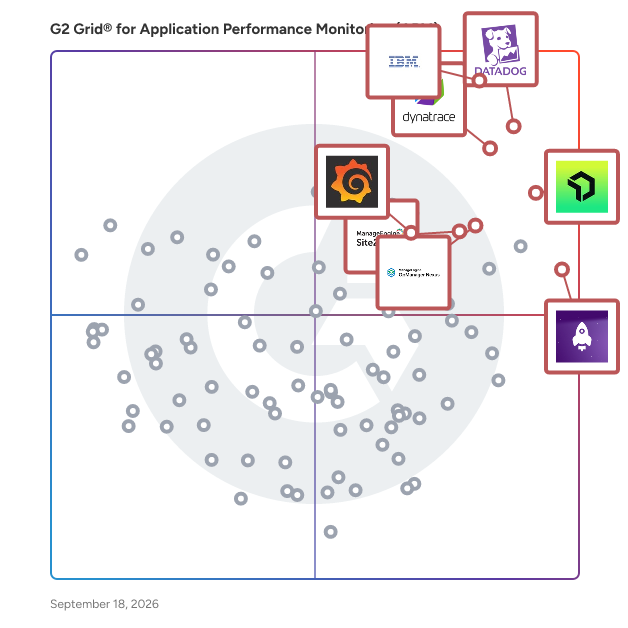
G2 Grid® for Application Performance Monitoring (APM) Tools

G2 Grid® for Application Performance Monitoring (APM) Tools plotting products by satisfaction and market presence

Highlighted products: Datadog, IBM Instana, New Relic, LogRocket, OpManager Nexus, Grafana Labs, Site24x7, and Dynatrace.

Underlying data: [Grid® JSON](https://www.g2.com/categories/application-performance-monitoring-apm/grids.json?focus%5B%5D=datadog&focus%5B%5D=ibm-instana&focus%5B%5D=new-relic&focus%5B%5D=logrocket&focus%5B%5D=opmanager-nexus&focus%5B%5D=grafana-labs&focus%5B%5D=site24x7&focus%5B%5D=dynatrace&segment=mid-market)

ServiceNow IT Operations Management

ServiceNow IT Operations Management (ITOM) is a comprehensive solution designed to enhance the visibility, health, and optimization of an organization's IT infrastructure. By integrating advanced automation and artificial intelligence, ITOM enables proactive management of IT operations, reducing downtime and improving service delivery. Key Features and Functionality: - ITOM Visibility: Automates the discovery of IT assets across on-premises, cloud, and hybrid environments, providing a unified view of the infrastructure. Service Mapping identifies dependencies between IT components, facilitating impact analysis and change management. - ITOM Health: Consolidates and correlates events from various monitoring tools, enabling IT teams to prioritize and respond to critical incidents promptly. Operational Intelligence leverages AI and machine learning to detect patterns and anomalies, allowing for proactive issue resolution. - ITOM Optimization: Manages cloud resources effectively by providing visibility and control over public, private, and hybrid cloud environments. Automates provisioning, lifecycle management, and cost optimization of IT resources supporting application services. Primary Value and Solutions Provided: ServiceNow ITOM addresses the challenges of managing complex IT environments by offering a unified platform that enhances operational efficiency and service reliability. It enables organizations to transition from reactive to proactive operations, minimizing the risk of outages and optimizing resource utilization. By automating routine tasks and providing real-time insights, ITOM empowers IT teams to focus on strategic initiatives, ultimately driving business growth and resilience.

Average Rating: 4.4/5.0

Total Reviews: 464

How Do G2 Users Rate ServiceNow IT Operations Management?

  • Performance Metrics: 8.5/10 (Category avg: 8.3/10)
  • Root Cause Analysis (RCA): 8.5/10 (Category avg: 8.4/10)
  • Real User Monitoring (RUM): 8.6/10 (Category avg: 8.3/10)
  • Has the product been a good partner in doing business?: 8.8/10 (Category avg: 8.9/10)

Who Is the Company Behind ServiceNow IT Operations Management?

  • Seller: ServiceNow
  • Company Website:
  • Year Founded: 2004
  • HQ Location: Santa Clara, CA
  • Twitter: @servicenow
    55,548 Twitter followers
  • LinkedIn® Page: www.linkedin.com
    35,078 employees on LinkedIn®

Who Uses This Product?

  • Top Industries: Information Technology and Services, Financial Services
  • Company Size: 50% Large, 20% Medium

What Do G2 Reviewers Say About ServiceNow IT Operations Management?

AI-generated summary from verified user reviews

Pros
  • Users appreciate the ease of use of ServiceNow IT Operations Management, enhancing customer support and operational efficiency.
  • Users value the visibility provided by ServiceNow IT Operations Management, enhancing transparency and driving productivity across the organization.
  • Users value the visibility and insights provided by ServiceNow IT Operations Management, enhancing infrastructure and application management.
  • Users value the time-saving automation in ServiceNow IT Operations Management, enhancing transparency and operational control.
  • Users praise the exceptional flexibility of ServiceNow IT Operations Management, enhancing case resolution and documentation efficiency.
Cons
  • Users face a steep learning curve with ServiceNow IT Operations Management due to its complexity and numerous features.
  • Users find the complexity of ServiceNow IT Operations Management to be a significant barrier, hindering effective setup and usage.
  • Users find the setup complexity to be a challenge, requiring significant effort and expertise to navigate effectively.
  • Users find ServiceNow IT Operations Management to be expensive, which may limit accessibility for smaller organizations.
  • Users face a steep learning curve with ServiceNow IT Operations Management, making effective use challenging and time-consuming.

What Are Recent G2 Reviews of ServiceNow IT Operations Management?

What Are G2 Users Discussing About ServiceNow IT Operations Management?

Sumo Logic

Sumo Logic, Inc. unifies and analyzes enterprise data, translating it into actionable insights through one AI-powered cloud-native log analytics platform. This single source of truth enables Dev, Sec and Ops teams to simplify complexity, collaborate efficiently and accelerate data-driven decisions that drive business value. Customers around the world rely on the Sumo Logic SaaS Log Analytics Platform for trusted insights to ensure application reliability, secure and protect against modern security threats, and gain insights into their cloud infrastructures. For more information, visit: SUMOLOGIC.COM

Average Rating: 4.3/5.0

Total Reviews: 396

How Do G2 Users Rate Sumo Logic?

  • Performance Metrics: 8.4/10 (Category avg: 8.3/10)
  • Root Cause Analysis (RCA): 8.3/10 (Category avg: 8.4/10)
  • Real User Monitoring (RUM): 8.3/10 (Category avg: 8.3/10)
  • Has the product been a good partner in doing business?: 8.8/10 (Category avg: 8.9/10)

Who Is the Company Behind Sumo Logic?

  • Seller: Sumo Logic
  • Company Website:
  • Year Founded: 2010
  • HQ Location: Redwood City, CA
  • Twitter: @SumoLogic
    6,542 Twitter followers
  • LinkedIn® Page: www.linkedin.com
    824 employees on LinkedIn®

Who Uses This Product?

  • Who Uses This: Software Engineer, Senior Software Engineer
  • Top Industries: Information Technology and Services, Computer Software
  • Company Size: 48% Medium, 38% Large

What Do G2 Reviewers Say About Sumo Logic?

AI-generated summary from verified user reviews

Pros
  • Users highlight the ease of use in Sumo Logic, citing its simple query language and intuitive configurations.
  • Users value the ease of searching and configuring logs with Sumo Logic, enhancing their monitoring and tracing efficiency.
  • Users appreciate the Comprehensive Continuous Intelligence feature of Sumo Logic for transforming data into actionable insights quickly.
  • Users value the powerful visual insights and efficient log management capabilities of Sumo Logic for fast resolution.
  • Users value the real-time monitoring capabilities of Sumo Logic, enjoying swift insights and effective data management.
Cons
  • Users find Sumo Logic expensive, prompting concerns about whether its value justifies the high pricing.
  • Users find the difficult learning curve of Sumo Logic challenging, requiring significant time to become proficient.
  • Users face a steep learning curve with Sumo Logic, requiring significant time to master its features and query language.
  • Users face a steep learning curve with Sumo Logic, requiring significant time to master complex features and queries.
  • Users experience slow performance with Sumo Logic, facing delays in alerting and a cumbersome user interface.

What Are Recent G2 Reviews of Sumo Logic?

What Are G2 Users Discussing About Sumo Logic?

Paessler PRTG

Your infrastructure is complex. Your monitoring tool shouldn't be. Paessler PRTG delivers mission-critical visibility across IT and OT environments, deploying in minutes, not months. Whether you're managing servers, switches, virtual machines, cloud services, or industrial systems, PRTG monitors everything from a single platform, so your team always knows what's running, what's struggling, and what needs attention, before users do. Fast to deploy. Easy to run. Auto-discovery finds devices on your network automatically, and 300+ pre-configured sensors cover the most common infrastructure components out of the box. Support for all major protocols (SNMP, WMI, REST APIs, SSH, NetFlow, and more) means PRTG fits into your existing environment without forcing changes to it. Built for lean teams under real pressure. Customizable dashboards give instant visibility across your entire landscape. Flexible alerting (via email, SMS, push notification, or third-party integrations) ensures the right people are notified the moment something goes wrong. Historical trend data helps you spot patterns and plan ahead, not just react. Scales on your terms. From a single site to distributed multi-location environments, PRTG grows with your organization. Available as an on-premises installation or a hosted solution, it adapts to your infrastructure and your IT policies, no rip-and-replace required. Trusted by more than 500,000 users across 190+ countries since 1997, Paessler PRTG is the monitoring standard for IT professionals who need results, not complexity.

Average Rating: 4.7/5.0

Total Reviews: 207

How Do G2 Users Rate Paessler PRTG?

  • Performance Metrics: 8.3/10 (Category avg: 8.3/10)
  • Root Cause Analysis (RCA): 8.5/10 (Category avg: 8.4/10)
  • Real User Monitoring (RUM): 8.7/10 (Category avg: 8.3/10)
  • Has the product been a good partner in doing business?: 8.8/10 (Category avg: 8.9/10)

Who Is the Company Behind Paessler PRTG?

  • Seller: Paessler GmbH
  • Company Website:
  • Year Founded: 1997
  • HQ Location: Nuremberg, Germany
  • LinkedIn® Page: www.linkedin.com
    400 employees on LinkedIn®

Who Uses This Product?

  • Who Uses This: Software Engineer, Network Administrator
  • Top Industries: Information Technology and Services, Telecommunications
  • Company Size: 52% Medium, 35% Large

What Do G2 Reviewers Say About Paessler PRTG?

AI-generated summary from verified user reviews

Pros
  • Users find Paessler PRTG's ease of use impressive, enjoying intuitive setup and customizable features for effective monitoring.
  • Users value the reliable monitoring capabilities of PRTG, enjoying its customizable sensors and mobile accessibility.
  • Users highlight the reliable monitoring capabilities of PRTG, enabling efficient tracking of critical network infrastructure.
  • Users value the robust alerting system of PRTG, ensuring immediate notifications for any network disruptions or issues.
  • Users find the easy setup of Paessler PRTG efficient, enabling quick monitoring of their network infrastructure.
Cons
  • Users find the high acquisition cost problematic, complicating the decision to monitor additional metrics and services.
  • Users report slow performance with large reports and dashboards, affecting usability during peak access times.
  • Users report user interface issues with PRTG, finding the web interface dated and the mobile app lacking polish.
  • Users find the learning curve for advanced features of PRTG to be steeper than expected, especially for new users.
  • Users find the complex setup of PRTG challenging, requiring extensive experimentation and fine-tuning for optimal performance.

What Are Recent G2 Reviews of Paessler PRTG?

What Are G2 Users Discussing About Paessler PRTG?

CubeAPM

CubeAPM is an OpenTelemetry-native observability and application performance monitoring (APM) platform that helps engineering and DevOps teams monitor applications, infrastructure, logs, and metrics from a single unified dashboard. Built for modern cloud and on-prem environments, CubeAPM offers full-stack visibility without sacrificing data control. It can be self-hosted inside your own cloud or data center, making it ideal for teams that need enterprise-grade observability while maintaining compliance with ISO 27001 standards. Most teams face a trade-off in observability — cloud SaaS tools are easy to run but send sensitive data outside your cloud, while open-source stacks demand heavy operations. CubeAPM removes this compromise by combining the control of self-hosting with the simplicity of SaaS. With flat usage-based pricing at $0.15 per GB, smart sampling, and unlimited retention, CubeAPM delivers predictable, affordable observability for organizations of any scale. Dashboards load instantly, data queries run fast, and teams can monitor microservices, Kubernetes clusters, APIs, and distributed systems in real time. Key Highlights OpenTelemetry-native: Ingest data from any stack with full compatibility. Self-hosted but managed: Runs in your environment while upgrades and maintenance are handled by CubeAPM. Unlimited retention: Store logs, traces, and metrics as long as you need. Transparent pricing: $0.15 / GB with no host-based fees or hidden charges. ISO 27001 compliant: Ensures quality, reliability, and operational excellence. CubeAPM is the ideal observability solution for teams seeking performance insights, compliance readiness, and total control — without the high costs or operational complexity of traditional APM tools.

Average Rating: 4.9/5.0

Total Reviews: 26

How Do G2 Users Rate CubeAPM?

  • Performance Metrics: 9.2/10 (Category avg: 8.3/10)
  • Root Cause Analysis (RCA): 9.2/10 (Category avg: 8.4/10)
  • Real User Monitoring (RUM): 8.9/10 (Category avg: 8.3/10)
  • Has the product been a good partner in doing business?: 10.0/10 (Category avg: 8.9/10)

Who Is the Company Behind CubeAPM?

Who Uses This Product?

  • Top Industries: Information Technology and Services
  • Company Size: 54% Small, 46% Medium

What Do G2 Reviewers Say About CubeAPM?

AI-generated summary from verified user reviews

Pros
  • Users highlight the responsive customer support of CubeAPM, appreciating quick assistance and availability on Slack.
  • Users value the cost optimization of CubeAPM, appreciating its affordability compared to other observability tools.
  • Users value the effective monitoring capabilities of CubeAPM, noting quick data integration and responsive support.
  • Users appreciate the affordable and predictable pricing of CubeAPM, making it a cost-effective observability solution.
  • Users commend the real-time monitoring capabilities of CubeAPM, enhancing visibility into performance and reducing downtime.
Cons
  • Users find CubeAPM has inadequate monitoring capabilities, particularly for mobile apps and advanced AI observability.
  • Users find the absence of mobile and security monitoring features in CubeAPM limits its overall capabilities.
  • Users note the limited mobile app monitoring capabilities of CubeAPM, particularly for iOS, affecting overall effectiveness.
  • Users note the limited features of CubeAPM, especially in AI-driven observability and mobile app monitoring.
  • Users highlight the feature limitations of CubeAPM, particularly in mobile app monitoring and dashboard effectiveness.

What Are Recent G2 Reviews of CubeAPM?

Sauce Labs

In a world that relies on code, Sauce Labs strives to make it work for everyone, everywhere and every time. This is digital confidence. Sauce Labs is the leading provider of continuous test and error reporting solutions that gives companies confidence to deliver a trusted digital brand experience to their customers. The Sauce Labs Continuous Testing Cloud identifies quality signals in development and production, accelerating the ability to release and update web and mobile applications that look, function and perform exactly as they should on every browser, operating system and device, every single time. For more information, please visit https://saucelabs.com.

Average Rating: 4.3/5.0

Total Reviews: 171

How Do G2 Users Rate Sauce Labs?

  • Performance Metrics: 8.3/10 (Category avg: 8.3/10)
  • Root Cause Analysis (RCA): 8.7/10 (Category avg: 8.4/10)
  • Real User Monitoring (RUM): 8.0/10 (Category avg: 8.3/10)
  • Has the product been a good partner in doing business?: 8.4/10 (Category avg: 8.9/10)

Who Is the Company Behind Sauce Labs?

  • Seller: Sauce Labs
  • Year Founded: 2008
  • HQ Location: San Francisco, CA
  • Twitter: @saucelabs
    12,590 Twitter followers
  • LinkedIn® Page: www.linkedin.com
    334 employees on LinkedIn®

Who Uses This Product?

  • Who Uses This: Software Engineer, Senior Software Engineer
  • Top Industries: Information Technology and Services, Computer Software
  • Company Size: 48% Large, 40% Medium

What Do G2 Reviewers Say About Sauce Labs?

AI-generated summary from verified user reviews

Pros
  • Users appreciate the ease of use of Sauce Labs, simplifying testing processes across various browsers and devices.
  • Users value the seamless automation of Sauce Labs, enhancing cross-browser testing and speeding up feedback significantly.
  • Users value the seamless cross-browser testing of Sauce Labs, enhancing efficiency with automated and live testing features.
  • Users appreciate the real-time testing capabilities of Sauce Labs, enhancing collaboration and speeding up the feedback process.
  • Users value the real device testing of Sauce Labs, enhancing the accuracy and effectiveness of their testing processes.
Cons
  • Users find the learning curve steep for Sauce Labs, requiring significant time to adapt and configure settings effectively.
  • Users find the setup complexity challenging, requiring significant time investment and adaptation for effective use.
  • Users find the difficult setup process overwhelming, especially for new users and smaller teams adapting to it.
  • Users find Sauce Labs to be expensive, especially when compared to other platforms, affecting budget considerations.
  • Users find the learning difficulty of Sauce Labs challenging, especially for new users navigating advanced features.

What Are Recent G2 Reviews of Sauce Labs?

What Are G2 Users Discussing About Sauce Labs?

Better Stack

Better Stack is an eBPF-based, AI SRE observability tool. It helps engineers ship high-quality software faster and be the hero of their engineering teams.

Average Rating: 4.8/5.0

Total Reviews: 341

How Do G2 Users Rate Better Stack?

  • Has the product been a good partner in doing business?: 9.5/10 (Category avg: 8.9/10)

Who Is the Company Behind Better Stack?

  • Seller: Better Stack
  • Year Founded: 2021
  • HQ Location: San Francisco, CA
  • Twitter: @BetterStackHQ
    10,698 Twitter followers
  • LinkedIn® Page: www.linkedin.com
    27 employees on LinkedIn®

Who Uses This Product?

  • Who Uses This: CEO, Founder
  • Top Industries: Computer Software, Information Technology and Services
  • Company Size: 88% Small, 8% Medium

What Do G2 Reviewers Say About Better Stack?

AI-generated summary from verified user reviews

Pros
  • Users love the ease of use of Better Stack, praising its simple setup and excellent integration capabilities.
  • Users commend the easy setup of Better Stack, emphasizing its straightforward implementation and user-friendly interface.
  • Users praise the excellent user interface of Better Stack, which enhances workflow and simplifies monitoring tasks.
  • Users find the setup ease of Better Stack remarkable, achieving quick configurations and monitoring within minutes.
  • Users value the independent alerting system of Better Stack, ensuring timely notifications even during downtime for proactive responses.
Cons
  • Users find Better Stack's pricing expensive after exceeding free tier limits, affecting scalability for larger projects.
  • Users express frustration over the lack of features in Better Stack, such as missing integrations and limited site management.
  • Users note pricing issues with Better Stack, especially after exceeding free tier limits, making advanced features costly.
  • Users find the limited features in Better Stack may restrict growth and flexibility for larger projects.
  • Users find the log management process challenging and experience inconsistencies with the UI and data aggregation.

What Are Recent G2 Reviews of Better Stack?

What Are G2 Users Discussing About Better Stack?

Last9

Last9 is the preferred single pane of observability for Logs, Traces, Metrics, built for modern engineering teams and high cardinality environments. — OpenTelemetry native, Cloud Native and Prometheus compatible, with support for 100+ integrations — Simple pricing model with a predictable “pay for what you use” plan, no per host or per user billing ——— Application developers, infrastructure engineers, DevOps & SREs, and business users send their Logs, Traces, and Metrics to Last9’s telemetry warehouse to monitor their services and systems and run alerting with anomaly algorithms for changes in patterns and behavior. Users are provided a Control Plane, as a first-class developer experience, to manage their telemetry data, its lifecycle, and its associated costs. Pre-Ingestion Workflows to filter, drop, and enrich data even before it’s stored don’t require instrumentation or code changes, and also enable engineering teams to not sacrifice visibility for cost optimizations. With Last9 built for high cardinality in mind — a generous 20M active time series per metric per day is supported, and tools like Cardinality Explorer & Streaming Aggregations allow identifying and handling telemetry with large cardinality. With correlated telemetry, Last9’s native explorer for Logs, Traces, and Metrics empowers users to quickly debug issues and not change context by allowing to jump between telemetry data, teams have the flexibility to use any tool that they’re comfortable with — either the embedded Grafana dashboard that Last9 comes with, or use Last9 as a data source for their preferred visualization tool. Organizations can choose between a SaaS or a BYOC/on-prem deployment model. Last9 is available on both AWS and GCP marketplaces. ——— Customers include Replit, Disney+ Hotstar, Clevertap, Circle, Probo, and Quickwork. Last9 is backed by Sequoia India (now called Peak XV) and Better Capital, along with a handful of prominent angels and advisors from Hashicorp, GoJek, Razorpay, Sendbird, and more.

Average Rating: 4.7/5.0

Total Reviews: 51

How Do G2 Users Rate Last9?

  • Performance Metrics: 9.0/10 (Category avg: 8.3/10)
  • Root Cause Analysis (RCA): 9.1/10 (Category avg: 8.4/10)
  • Real User Monitoring (RUM): 8.8/10 (Category avg: 8.3/10)
  • Has the product been a good partner in doing business?: 9.5/10 (Category avg: 8.9/10)

Who Is the Company Behind Last9?

  • Seller: Last9
  • Year Founded: 2020
  • HQ Location: San Francisco, California
  • Twitter: @last9io
    3,031 Twitter followers
  • LinkedIn® Page: www.linkedin.com
    27 employees on LinkedIn®

Who Uses This Product?

  • Who Uses This: Software Engineer, Senior Software Engineer
  • Top Industries: Computer Software, Financial Services
  • Company Size: 67% Medium, 31% Small

What Do G2 Reviewers Say About Last9?

AI-generated summary from verified user reviews

Pros
  • Users value the ease of use of Last9, finding it simplifies monitoring with minimal setup and clear navigation.
  • Users praise Last9 for its responsive and helpful customer support, facilitating smooth platform adoption and effective troubleshooting.
  • Users value the high reliability of Last9, noting its effectiveness in streamlining observability and incident response.
  • Users appreciate the easy integration and debugging features of Last9, enhancing their overall experience and efficiency.
  • Users commend Last9's intuitive monitoring features, enabling efficient incident investigation and reducing response times significantly.
Cons
  • Users experience dashboard issues with data logging and UI unresponsiveness, complicating their troubleshooting tasks.
  • Users note a steep learning curve with Last9's rapid advancements, though the support team is helpful.
  • Users find the difficult learning curve in Last9 challenging, particularly with SLOs and documentation clarity.
  • Users find the initial learning curve steep with Last9, though support from the team helps ease the transition.
  • Users note insufficient documentation, suggesting that clearer guidance would significantly improve usability and productivity.

What Are Recent G2 Reviews of Last9?

Progress WhatsUp Gold

WhatsUp Gold is an IT infrastructure monitoring software designed to help users identify and resolve network issues swiftly, often before they impact end users. This solution provides comprehensive visibility into network performance and availability, enabling IT professionals to maintain optimal operations across their infrastructure. With its interactive mapping interface, WhatsUp Gold allows users to visualize the status of all devices connected to their network, making it easier to monitor both on-premise and cloud-based resources. Targeted primarily at IT administrators and network engineers, WhatsUp Gold is particularly beneficial for organizations that rely heavily on network performance for their daily operations. Its user-friendly design caters to both seasoned professionals and those new to network management, offering a range of features that streamline the monitoring process. The software is designed to support various use cases, from small businesses needing basic monitoring capabilities to large enterprises requiring advanced network management solutions. One of the standout features of WhatsUp Gold is its customizable drag-and-drop dashboards, which provide users with the flexibility to tailor their monitoring experience according to specific needs. These dashboards present real-time data on device status and performance, allowing users to quickly assess the health of their network. Additionally, the software’s automatic discovery and mapping capabilities enable users to visualize their entire network topology, ensuring that no device goes unnoticed during monitoring. WhatsUp Gold also emphasizes optimization, helping users manage network traffic and bandwidth utilization effectively. By providing actionable insights and unified views of network performance, the software empowers IT teams to troubleshoot issues efficiently. The ability to identify and resolve network and server problems proactively not only enhances operational efficiency but also improves overall user satisfaction by minimizing downtime. In summary, WhatsUp Gold offers a robust and interactive solution for IT infrastructure monitoring, combining ease of use with powerful features. Its focus on real-time visibility, customization, and proactive troubleshooting makes it a valuable tool for organizations looking to enhance their network management capabilities.

Average Rating: 4.4/5.0

Total Reviews: 379

How Do G2 Users Rate Progress WhatsUp Gold?

  • Performance Metrics: 8.5/10 (Category avg: 8.3/10)
  • Root Cause Analysis (RCA): 8.6/10 (Category avg: 8.4/10)
  • Real User Monitoring (RUM): 8.4/10 (Category avg: 8.3/10)
  • Has the product been a good partner in doing business?: 8.8/10 (Category avg: 8.9/10)

Who Is the Company Behind Progress WhatsUp Gold?

  • Seller: Progress Software
  • Company Website:
  • Year Founded: 1981
  • HQ Location: Burlington, MA.
  • Twitter: @ProgressSW
    48,773 Twitter followers
  • LinkedIn® Page: www.linkedin.com
    4,242 employees on LinkedIn®

Who Uses This Product?

  • Who Uses This: Network Engineer, Network Administrator
  • Top Industries: Information Technology and Services, Education Management
  • Company Size: 58% Medium, 27% Large

What Do G2 Reviewers Say About Progress WhatsUp Gold?

AI-generated summary from verified user reviews

Pros
  • Users value the ease of use of Progress WhatsUp Gold, appreciating its intuitive interface and simple setup process.
  • Users love the real-time visibility provided by WhatsUp Gold’s interactive network maps and intuitive dashboards.
  • Users value the real-time visibility and ease of use provided by Progress WhatsUp Gold for network performance monitoring.
  • Users value the timely and proactive alert notifications of Progress WhatsUp Gold, enhancing issue detection and network reliability.
  • Users appreciate the intuitive user interface of Progress WhatsUp Gold, enhancing real-time network monitoring and management.
Cons
  • Users find the cost of Progress WhatsUp Gold to be high, especially for smaller organizations and add-ons.
  • Users find the poor interface design of Progress WhatsUp Gold can be clunky and outdated in complex setups.
  • Users find the complex setup process of Progress WhatsUp Gold to be cumbersome and challenging, especially for advanced configurations.
  • Users note a steep learning curve with Progress WhatsUp Gold, particularly for advanced configuration and initial setup.
  • Users find the interface outdated, especially when managing complex environments, impacting overall user experience.

What Are Recent G2 Reviews of Progress WhatsUp Gold?

What Are G2 Users Discussing About Progress WhatsUp Gold?

Elastic Observability

OpenTelemetry-native observability for fast, AI-driven root cause analysis Search, analyze, and act with logs, metrics, and traces. SRE leaders aim to proactively prevent downtime, simplify tool stacks, and reduce toil, but multi-cloud complexity and fragmented toolsets create visibility gaps that make it hard to stay ahead. OTel-native and AI-powered, Elastic Observability ingests and correlates petabytes of telemetry across your applications, services, and infrastructure, in real-time. Accelerate troubleshooting with built-in agentic workflows and an AI Assistant that goes well beyond chat to bolster team expertise and guide investigations, grounded with context from your organizational knowledge-bases. More data, more problems? Not anymore. Most observability and logging solutions weren’t built for today’s scale. Elastic is. Our architecture is designed to handle petabytes of logs with indexing, compression, and efficient searchable storage so you can keep all the telemetry you need, without breaking the bank. Store more, spend less, and resolve issues faster with a scalable, open, and extensible platform that unifies visibility across your entire environment.

Average Rating: 4.3/5.0

Total Reviews: 103

How Do G2 Users Rate Elastic Observability?

  • Performance Metrics: 8.3/10 (Category avg: 8.3/10)
  • Root Cause Analysis (RCA): 9.8/10 (Category avg: 8.4/10)
  • Real User Monitoring (RUM): 8.7/10 (Category avg: 8.3/10)
  • Has the product been a good partner in doing business?: 8.3/10 (Category avg: 8.9/10)

Who Is the Company Behind Elastic Observability?

  • Seller: Elastic
  • Company Website:
  • Year Founded: 2012
  • HQ Location: San Francisco, CA
  • Twitter: @elastic
    65,200 Twitter followers
  • LinkedIn® Page: www.linkedin.com
    10,457 employees on LinkedIn®

Who Uses This Product?

  • Who Uses This: Software Engineer, Senior Software Engineer
  • Top Industries: Information Technology and Services, Computer Software
  • Company Size: 50% Large, 43% Medium

What Do G2 Reviewers Say About Elastic Observability?

AI-generated summary from verified user reviews

Pros
  • Users find Elastic Observability to be intuitively easy to use, facilitating effortless integration and quick setup for various needs.
  • Users value the real-time alerting capabilities of Elastic Observability, enhancing proactive monitoring and issue resolution.
  • Users value the excellent log collection and monitoring capabilities of Elastic Observability for efficient server management.
  • Users appreciate the excellent monitoring capabilities of Elastic Observability for comprehensive insights into their applications and infrastructure.
  • Users value the flexibility and unified view of Elastic Observability, enhancing troubleshooting and operational visibility.
Cons
  • Users face a steep learning curve with Elastic Observability, requiring extensive knowledge and training for effective use.
  • Users find the difficult learning curve for Elastic Observability challenging, particularly for teams unfamiliar with the Elastic Stack.
  • Users struggle with the lack of log integration and find log generation with APM challenging without ELK knowledge.
  • Users find the learning difficulty frustrating, particularly due to overwhelming logs and advanced feature navigation.
  • Users struggle with log management issues, from hardware corruption to lack of integration with existing log files.

What Are Recent G2 Reviews of Elastic Observability?

What Are G2 Users Discussing About Elastic Observability?

Pandora FMS

Pandora FMS is a unified monitoring and observability platform designed to consolidate visibility, alerting, reporting, and automation across heterogeneous IT environments. Instead of combining multiple point tools for networks, servers, applications, and cloud services, Pandora FMS centralizes data collection and operational workflows in a single console, reducing integration effort and operational complexity in on-premise, hybrid, and multi-cloud architectures. The platform collects telemetry using multiple methods, including agents, remote checks, standard protocols (e.g., SNMP/WMI), APIs, and log/event ingestion. This enables teams to monitor infrastructure and services end-to-end, correlate signals, and maintain consistent alerting policies and dashboards across distributed estates. Pandora FMS also supports capacity and trend analysis to anticipate resource constraints and identify recurring patterns, and includes AI-assisted capabilities for anomaly detection and automated thresholds to surface hard-to-spot operational signals. Pandora FMS is extensible through a large plugin ecosystem (500+ plugins and integrations), covering a wide range of enterprise and infrastructure technologies such as SAP, Oracle, Citrix, JBoss, VMware, AWS, SQL Server, Red Hat, and WebSphere. This extensibility helps organizations standardize monitoring across legacy and modern stacks without redesigning their monitoring approach per technology. Core capabilities: -Unified monitoring for networks, servers, applications, cloud services, endpoints, and logs -Centralized alerting, event correlation, dashboards, and scheduled reporting -Flexible data collection via agents, remote checks, APIs, and plugins -Scalability for distributed environments and large numbers of monitored elements -Analytics for trend/capacity planning plus AI-assisted anomaly detection and dynamic thresholds -A key differentiator is direct vendor support, which simplifies escalation and ensures continuity of expertise for deployment, tuning, and ongoing operations.

Average Rating: 4.6/5.0

Total Reviews: 212

How Do G2 Users Rate Pandora FMS?

  • Performance Metrics: 9.1/10 (Category avg: 8.3/10)
  • Root Cause Analysis (RCA): 9.0/10 (Category avg: 8.4/10)
  • Real User Monitoring (RUM): 8.8/10 (Category avg: 8.3/10)
  • Has the product been a good partner in doing business?: 9.0/10 (Category avg: 8.9/10)

Who Is the Company Behind Pandora FMS?

  • Seller: Pandora FMS
  • Company Website:
  • Year Founded: 2004
  • HQ Location: Madrid, Spain
  • Twitter: @pandorafms
    5,458 Twitter followers
  • LinkedIn® Page: www.linkedin.com
    56 employees on LinkedIn®

Who Uses This Product?

  • Who Uses This: Data Analyst
  • Top Industries: Information Technology and Services, Telecommunications
  • Company Size: 50% Medium, 37% Small

What Do G2 Reviewers Say About Pandora FMS?

AI-generated summary from verified user reviews

Pros
  • Users value the reliable remote monitoring capabilities of Pandora FMS, ensuring seamless oversight of their systems.
  • Users enjoy the ease of use of Pandora FMS, appreciating its intuitive interface and reliable support.
  • Users value the real-time monitoring capabilities of Pandora FMS, enhancing visibility of all network devices effortlessly.
  • Users value the flexibility and adaptability of Pandora FMS, making it suitable for diverse IT monitoring needs.
  • Users value the versatility of network monitoring in Pandora FMS, effectively managing diverse devices and environments.
Cons
  • Users find the learning curve steep, particularly with initial setup and complex functionalities of Pandora FMS.
  • Users find the complex setup of Pandora FMS challenging, particularly due to compatibility issues and steep learning curves.
  • Users note the learning difficulty with Pandora FMS, especially for those lacking technical expertise for setup and configuration.
  • Users find the complex configuration of Pandora FMS challenging, especially without extensive technical expertise.
  • Users face a difficult learning curve with Pandora FMS, which can hinder effective usage for beginners.

What Are Recent G2 Reviews of Pandora FMS?

What Are G2 Users Discussing About Pandora FMS?

LogicMonitor

LogicMonitor is an AI-first observability platform that helps enterprises protect revenue, brand reputation, and customer experience in a digital-first world. As every customer interaction depends on application and infrastructure performance, downtime is more than an IT issue—it is a business risk. LogicMonitor eliminates blind spots across cloud, infrastructure, applications, and the Internet, giving IT teams unified visibility from user experience to code-level performance. With AI-powered insights, intelligent alerting, and automation, LogicMonitor helps organizations detect, prioritize, and prevent issues before they impact customers. By enabling teams to move from reactive incident response to autonomous IT operations, LogicMonitor helps modern enterprises reduce disruption, operate efficiently at scale, and keep digital services performing reliably. For more information, visit  www.logicmonitor.com and our blog, or follow us on LinkedIn, X, Facebook, and YouTube.

Average Rating: 4.5/5.0

Total Reviews: 587

How Do G2 Users Rate LogicMonitor?

  • Performance Metrics: 8.5/10 (Category avg: 8.3/10)
  • Root Cause Analysis (RCA): 8.1/10 (Category avg: 8.4/10)
  • Real User Monitoring (RUM): 8.7/10 (Category avg: 8.3/10)
  • Has the product been a good partner in doing business?: 9.0/10 (Category avg: 8.9/10)

Who Is the Company Behind LogicMonitor?

  • Seller: LogicMonitor
  • Company Website:
  • Year Founded: 2007
  • HQ Location: Santa Barbara, CA
  • Twitter: @logicmonitor
    12,430 Twitter followers
  • LinkedIn® Page: www.linkedin.com
    1,258 employees on LinkedIn®

Who Uses This Product?

  • Who Uses This: Infrastructure Manager, IT Manager
  • Top Industries: Information Technology and Services, Computer Software
  • Company Size: 52% Medium, 30% Large

What Do G2 Reviewers Say About LogicMonitor?

AI-generated summary from verified user reviews

Pros
  • Users value the ease of use in LogicMonitor, benefiting from its intuitive navigation and simple management features.
  • Users praise the implementation ease of LogicMonitor, appreciating its fast setup and intuitive platform navigation.
  • Users value the broad range of monitoring features in LogicMonitor, enhancing both infrastructure and application oversight.
  • Users value the comprehensive monitoring of LogicMonitor, providing deep insights into applications and infrastructure effortlessly.
  • Users commend the excellent customer support of LogicMonitor, facilitating enhanced monitoring and problem management effortlessly.
Cons
  • Users find the steep learning curve challenging due to the need for advanced skills and internet reliance.
  • Users note limited features, facing challenges like integrations, training needs, and an expensive licensing model.
  • Users find LogicMonitor to be expensive, especially for small teams without a free tier or affordable licenses.
  • Users find the inadequate monitoring capabilities of LogicMonitor frustrating, especially with traditional server workloads and configuration demands.
  • Users find the complexity of integrations and setup challenging, often requiring external tools and training for effective use.

What Are Recent G2 Reviews of LogicMonitor?

What Are G2 Users Discussing About LogicMonitor?

Netdata

Netdata is an AI-driven real-time observability platform that monitors systems, containers, applications, and infrastructure across servers, cloud environments, Kubernetes clusters, and IoT devices. With zero-configuration deployment, Netdata installs instantly, automatically discovers metrics, builds dashboards, and begins monitoring without setup. Netdata AI serves as an intelligent on-call assistant, automatically investigating alerts, correlating anomalies across thousands of metrics, identifying root causes, and explaining incidents with clear, actionable recommendations. By transforming raw telemetry into AI-guided insights, Netdata helps engineering teams move from alert to resolution in minutes instead of hours. The platform collects per-second metrics through 800+ integrations across operating systems, containers, databases, applications, OpenMetrics exporters, StatsD, and logs. Its distributed architecture processes data at the edge, enabling high-resolution monitoring and visibility into short-lived performance issues that traditional monitoring tools often miss. Netdata is available as a scalable SaaS platform with Netdata Cloud or as a private deployment within your own infrastructure, supporting on-prem, private cloud, and air-gapped environments while delivering automated dashboards, ML-based anomaly detection, and real-time troubleshooting.

Average Rating: 4.6/5.0

Total Reviews: 51

How Do G2 Users Rate Netdata?

  • Performance Metrics: 9.2/10 (Category avg: 8.3/10)
  • Root Cause Analysis (RCA): 9.0/10 (Category avg: 8.4/10)
  • Real User Monitoring (RUM): 9.2/10 (Category avg: 8.3/10)
  • Has the product been a good partner in doing business?: 9.4/10 (Category avg: 8.9/10)

Who Is the Company Behind Netdata?

  • Seller: Netdata
  • Year Founded: 2018
  • HQ Location: San Francisco, US
  • Twitter: @netdatahq
    4,040 Twitter followers
  • LinkedIn® Page: www.linkedin.com
    79 employees on LinkedIn®

Who Uses This Product?

  • Top Industries: Information Technology and Services, Computer Software
  • Company Size: 44% Small, 43% Medium

What Do G2 Reviewers Say About Netdata?

AI-generated summary from verified user reviews

Pros
  • Users highlight the ease of use of Netdata, praising its quick setup and intuitive dashboard for monitoring.
  • Users praise the easy setup of Netdata, experiencing quick implementation and immediate access to detailed metrics.
  • Users praise the ease of setup and detailed real-time monitoring provided by Netdata, enabling efficient system management.
  • Users value the real-time monitoring of Netdata, appreciating its detail and immediacy for swift decision-making.
  • Users find the easy installation and user-friendly dashboard of Netdata to be highly beneficial for monitoring systems.
Cons
  • Users note missing APM features and limited documentation, which affect usability and long-term data retention.
  • Users find the insufficient documentation on best practices limits their ability to fully optimize Netdata's capabilities.
  • Users note the limited compatibility with Windows and lack of integrations, impacting their monitoring experience.
  • Users find the limited functionality of Netdata frustrating, especially with scalability and third-party dependencies affecting performance.
  • Users highlight resource limitations in Netdata, struggling with data volume and scalability challenges on their systems.

What Are Recent G2 Reviews of Netdata?

OpsPilot

OpsPilot OpsPilot is an AI-powered observability and autonomous reliability platform with an AI Site Reliability Engineering (SRE) teammate that helps engineering and operations teams detect, understand, and resolve incidents faster — and increasingly prevent them from happening at all. Your 24/7 stack expert Modern production systems — microservices, distributed architectures, cloud and hybrid environments — generate enormous volumes of telemetry. Your existing tools surface that data. But they still leave engineers responsible for interpreting signals, finding root causes, and deciding what to do next. OpsPilot closes that gap. It continuously analyzes telemetry across your applications, infrastructure, and services — then tells your team what is happening, why it is happening, and what to do about it. From dashboards to autonomous reliability OpsPilot goes beyond alerting and visualization. It correlates signals across metrics, logs, traces, and deployment events to identify abnormal behavior, explain root causes, and guide teams toward faster resolution — dramatically reducing time spent on incident investigation and operational troubleshooting. Over time, it evolves from reactive investigation toward proactive and autonomous operations. Your AI SRE teammate OpsPilot acts as an AI SRE teammate — augmenting your operations team by answering the questions engineers face during incidents: What changed? Where is the failure occurring? Which service is responsible? What should we investigate next? Three core capabilities Observability — collects and correlates telemetry across metrics, logs, traces, JVM data, and application-level diagnostics for a complete picture of system behavior. Operational Intelligence — applies AI-driven analysis to surface what changed, what is causing the issue, which components are involved, and what actions may resolve it. Foundational capabilities include anomaly detection, alert reduction, telemetry correlation, and root cause analysis. Action and Automation — supports guided incident response, runbook generation, automated remediation, and continuous operational learning — moving teams progressively toward autonomous reliability. OpenTelemetry-native. No new agents required. OpsPilot ingests telemetry via OTLP over gRPC or HTTP — no proprietary agent required. It works with your existing OpenTelemetry instrumentation across Kubernetes, microservices, cloud services, and serverless platforms. Prometheus-compatible metrics, Loki log ingestion, and Jaeger/Zipkin trace formats are also supported. For teams needing deep JVM or ColdFusion diagnostics, the optional FusionReactor APM agent provides additional application-level telemetry. Built for DevOps, SRE, and platform engineering teams OpsPilot is designed for organizations running modern production systems that require high reliability and operational efficiency — particularly teams moving toward SRE or platform engineering models who need deeper operational insight without increasing headcount. Deployed as SaaS, hybrid, or agentless via OpenTelemetry.

Average Rating: 4.8/5.0

Total Reviews: 174

How Do G2 Users Rate OpsPilot?

  • Performance Metrics: 9.2/10 (Category avg: 8.3/10)
  • Root Cause Analysis (RCA): 9.2/10 (Category avg: 8.4/10)
  • Real User Monitoring (RUM): 8.9/10 (Category avg: 8.3/10)
  • Has the product been a good partner in doing business?: 9.5/10 (Category avg: 8.9/10)

Who Is the Company Behind OpsPilot?

  • Seller: Intergral
  • Company Website:
  • Year Founded: 1998
  • HQ Location: Boeblingen, DE
  • Twitter: @Fusion_Reactor
    9,345 Twitter followers
  • LinkedIn® Page: www.linkedin.com

Who Uses This Product?

  • Who Uses This: CTO, Developer
  • Top Industries: Information Technology and Services, Computer Software
  • Company Size: 61% Small, 29% Medium

What Do G2 Reviewers Say About OpsPilot?

AI-generated summary from verified user reviews

Pros
  • Users value the ease of use of OpsPilot, facilitating quick access to crucial metrics and troubleshooting insights.
  • Users find the real-time web metrics invaluable, enabling quick insights and identification of performance issues in their applications.
  • Users appreciate the real-time visibility and detailed insights provided by FusionReactor APM for effective monitoring.
  • Users value the real-time monitoring of OpsPilot, enabling effective performance management and quick issue resolution.
  • Users praise the responsive and friendly customer support of OpsPilot, making troubleshooting and assistance seamless.
Cons
  • Users find the learning curve challenging, as advanced features require careful configuration and can be overwhelming.
  • Users face difficult configuration challenges, leading to confusion and potentially missing out on important insights.
  • Users find the learning difficulty of OpsPilot challenging initially, requiring some research before effective use.
  • Users find the UI confusing, especially the Cloud version, despite ongoing improvements for clarity and usability.
  • Users find the UI design confusing, noting that it can complicate the initial experience with OpsPilot.

What Are Recent G2 Reviews of OpsPilot?

What Are G2 Users Discussing About OpsPilot?

Honeycomb

Honeycomb is the observability platform that enables engineering teams to find and solve problems they couldn't before. Honeycomb’s approach is fundamentally different from other tools that claim observability, and is built to help teams answer novel questions about their ever-evolving cloud applications. Honeycomb is a modern observability platform built to help engineering teams quickly find and fix issues, including the ones they didn’t know to look for. Teams use Honeycomb to understand how their systems behave in production, get full context around every request, and resolve problems before customers notice. Where traditional tools separate logs, metrics, and traces, Honeycomb combines all telemetry into a single, unified event model. This enables fast, interactive querying across high-cardinality and high-dimensional data, so engineers can ask new questions without hitting limits or waiting minutes for results. Powered by a trace-first data store and designed for real-time exploration, Honeycomb makes it easy to pinpoint what’s broken, why it’s happening, and who is affected. It’s observability designed for modern, complex systems—simple to adopt, fast to query, and built to scale.

Average Rating: 4.5/5.0

Total Reviews: 36

How Do G2 Users Rate Honeycomb?

  • Performance Metrics: 8.3/10 (Category avg: 8.3/10)
  • Root Cause Analysis (RCA): 9.0/10 (Category avg: 8.4/10)
  • Real User Monitoring (RUM): 9.7/10 (Category avg: 8.3/10)
  • Has the product been a good partner in doing business?: 9.3/10 (Category avg: 8.9/10)

Who Is the Company Behind Honeycomb?

  • Seller: Honeycomb.io
  • Company Website:
  • Year Founded: 2016
  • HQ Location: San Francisco, US
  • Twitter: @honeycombio
    14,830 Twitter followers
  • LinkedIn® Page: www.linkedin.com
    296 employees on LinkedIn®

Who Uses This Product?

  • Top Industries: Information Technology and Services, Computer Software
  • Company Size: 49% Medium, 41% Large

What Do G2 Reviewers Say About Honeycomb?

AI-generated summary from verified user reviews

Pros
  • Users find Honeycomb easy to use, enhancing system monitoring and alerting with intuitive visuals and extensive support.
  • Users value the efficient data insights provided by Honeycomb, enhancing their understanding of production systems significantly.
  • Users commend the efficiency of analytics in Honeycomb, transforming data understanding and enhancing production system insights.
  • Users commend the exceptional customer support of Honeycomb, fostering confidence and effective implementation for improved observability.
  • Users value the flexibility of Honeycomb, expertly handling arbitrary data for both prototyping and production systems.
Cons
  • Users find the difficult learning curve due to poor documentation and the need for self-learning, especially for beginners.
  • Users find Honeycomb expensive, but acknowledge that the value justifies the cost for application observability.
  • Users find the learning curve steep due to challenging documentation and the need for self-learning and external tools.
  • Users find the learning difficulty with Honeycomb frustrating due to unclear documentation and a steep learning curve.
  • Users face limitations in tracking payloads and history duration, necessitating supplementary tools for comprehensive analytics.

What Are Recent G2 Reviews of Honeycomb?

Catchpoint

The Internet relies on Catchpoint Global 5000 companies, top online retailers, financial services, cloud infrastructure and services companies, and xSPs trust Catchpoint’s Internet Performance Monitoring (IPM) to detect and resolve internal or external issues across the Internet stack before they impact customers, employees, or digital experiences. Offering Internet Synthetics, RUM, BGP, Heartbeat Monitoring, Distributed Tracing, and performance optimization with high-fidelity data and flexible visualizations, Catchpoint is powered by the world’s largest active agent network to provide real-world user experience visibility and internet stack insights that complement Application Performance Monitoring (APM) to give IT Ops team instant awareness of incidents, root cause insights, and quick resolution.

Average Rating: 4.5/5.0

Total Reviews: 109

How Do G2 Users Rate Catchpoint?

  • Performance Metrics: 7.9/10 (Category avg: 8.3/10)
  • Root Cause Analysis (RCA): 8.3/10 (Category avg: 8.4/10)
  • Real User Monitoring (RUM): 7.8/10 (Category avg: 8.3/10)
  • Has the product been a good partner in doing business?: 9.3/10 (Category avg: 8.9/10)

Who Is the Company Behind Catchpoint?

  • Seller: LogicMonitor
  • Company Website:
  • Year Founded: 2007
  • HQ Location: Santa Barbara, CA
  • Twitter: @logicmonitor
    12,430 Twitter followers
  • LinkedIn® Page: www.linkedin.com
    1,258 employees on LinkedIn®

Who Uses This Product?

  • Who Uses This: Software Engineer
  • Top Industries: Information Technology and Services, Financial Services
  • Company Size: 65% Large, 22% Medium

What Do G2 Reviewers Say About Catchpoint?

AI-generated summary from verified user reviews

Pros
  • Users value Catchpoint for its real-time issue detection, enhancing performance monitoring and speeding up resolution times.
  • Users value Catchpoint for its effective monitoring capabilities, providing real-time insights and proactive issue detection.
  • Users appreciate the real-time alerting features of Catchpoint, enabling quick issue detection and seamless user experience.
  • Users value the real-time alerts from Catchpoint that enhance issue detection and improve system performance monitoring.
  • Users value the real-time alert notifications from Catchpoint, enabling swift issue resolution and enhanced performance monitoring.
Cons
  • Users feel that the pricing is too high and lacks transparency, making it less accessible for smaller teams.
  • Users find the complex configuration challenging initially, as it requires time to learn and master the features.
  • Users find the complex setup of Catchpoint challenging initially, requiring time to learn and configure its features.
  • Users report data inaccuracy with Catchpoint, noting false alerts that misrepresent test case failures during manual checks.
  • Users find the difficult learning curve of Catchpoint challenging initially, though it becomes easier with time.

What Are Recent G2 Reviews of Catchpoint?

What Are G2 Users Discussing About Catchpoint?

Tian Lin
TL
Researched and written by Tian Lin
Updated