

Compare this with other toolsSave it to your board and evaluate your options side by side.
Save to board

Zoho WorkDrive Reviews & Product Details

Profile Status

This profile is currently managed by Zoho WorkDrive but has limited features.

Are you part of the Zoho WorkDrive team? Upgrade your plan to enhance your branding and engage with visitors to your profile!

Value at a Glance

Averages based on real user reviews.

Time to Implement

2 months

Return on Investment

10 months

Zoho WorkDrive Media

Zoho WorkDrive Demo - team-folders
team-folders
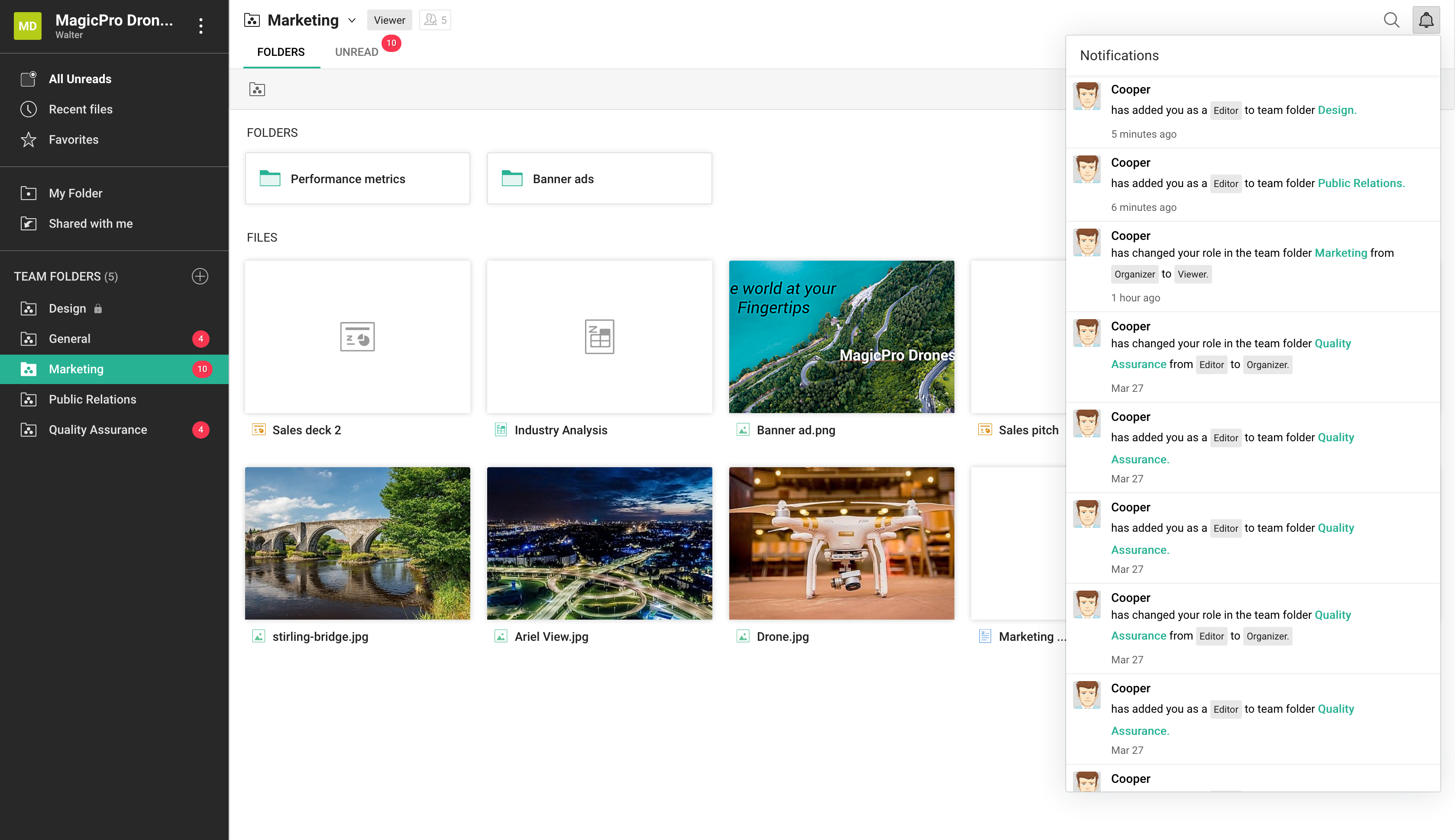
Zoho WorkDrive Demo - notifications
notifications
Zoho WorkDrive Demo - Screen-Shot
Screen-Shot
Zoho WorkDrive Demo - draft
draft
Zoho WorkDrive Demo - work-in-own-space
work-in-own-space
Product Avatar Image

Have you used Zoho WorkDrive before?

Answer a few questions to help the Zoho WorkDrive community

Zoho WorkDrive Reviews (703)

View 3 Video Reviews
Reviews

Zoho WorkDrive Reviews (703)

View 3 Video Reviews
4.4
703 reviews

Review Summary

Generated using AI from real user reviews
Users consistently praise the ease of use and real-time collaboration features of Zoho WorkDrive, which streamline teamwork and file management. The intuitive interface and seamless integration with other Zoho applications enhance productivity, making it a reliable choice for teams. However, some users note that syncing large files can be slow, which may hinder performance during busy periods.

Pros & Cons

Generated from real user reviews
View All Pros and Cons
Search reviews
Filter Reviews
Clear Results
G2 reviews are authentic and verified.
Ishan S.
IS
Manager and Dietician at Chaitanya Homoeo Clinic, Medical Store Owner, Content Creator
Hospital & Health Care
Small-Business (50 or fewer emp.)
"Keeps My Clinic and Work Files Organized and Easy to Manage"
What do you like best about Zoho WorkDrive?

I work as a Dietician & Nutritionist, I also manage a homeopathy clinic and create health education content. Zoho WorkDrive keeps all my work files in one place and makes things easy in daily routine. In my work I handle patient case files, consultation records, lab reports, diet plans and also some content files. Earlier things was little scattered but here I can keep everything arranged properly, so during clinic time I don’t get confused.

It is easy to use, I did not need much time to understand it. Uploading files, making folders and finding documents is simple. I just started adding my work and arranged it in my own way, like separating patient records, reports and content related files, which helps me in daily work.

I use it regularly. It has useful features like file sharing and access from different devices. I can share diet plans or reports with patients easily through link, so no need to send again and again.

Performance is also good for my daily use. Files open without much delay and uploading is smooth most of the time. Even when I handle multiple folders, it works fine and does not slow down my work. Overall it helps me manage my clinic work and content work in simple way and keeps everything organised. Review collected by and hosted on G2.com.

What do you dislike about Zoho WorkDrive?

there is not much to dislike, but in my use I noticed a few small things. When I work with many folders and subfolders, sometimes it takes a little extra time to find a specific file if naming is not clear. It is not a big issue, but during busy clinic time it can slow things slightly.

Also, when uploading larger files like videos or heavy reports, upload speed depends on internet and sometimes it feels a bit slow. For normal files it works fine, but with bigger files it takes more time. Review collected by and hosted on G2.com.

Aman J.
AJ
Founder
Marketing and Advertising
Small-Business (50 or fewer emp.)
"Team-First Collaboration and Seamless In-Browser Editing with Zoho WorkDrive"
What do you like best about Zoho WorkDrive?

What I like best about Zoho WorkDrive is that it’s built specifically for team-first collaboration rather than just being a personal cloud locker. Unlike other drives where files belong to individuals, the Team Folder architecture ensures that files belong to the project or department; if someone leaves the team, the data stays exactly where it belongs without any "permission hunting." I’m also a huge fan of the integrated Zoho Office Suite, which lets me edit docs, sheets, and presentations directly in the browser with real-time collaboration that feels just as snappy as Google Workspace. Review collected by and hosted on G2.com.

What do you dislike about Zoho WorkDrive?

What I dislike about Zoho WorkDrive is the clunky mobile experience; the app often feels like a stripped-down version of the desktop site, making it frustrating to organize folders or manage permissions when I'm away from my desk. The syncing speed can also be inconsistent, especially with larger files, where I've noticed a significant lag compared to the near instant performance of Dropbox or Google Drive. Review collected by and hosted on G2.com.

Darshan P.
DP
Student/Trainee
Small-Business (50 or fewer emp.)
"Simple and Secure Cloud Storage for Team Collaboration"
What do you like best about Zoho WorkDrive?

Zoho WorkDrive is very helpful for managing and organizing files in cloud environment.The interface is easy to understand which makes it simple for teams to collaborate on documents and sharing of files securely.I like the folder structure and permission control features that allow different access levels for team members.Integration with other Zoho apps like Zoho Docs and Zoho Mail also makes workflow smoother and more productive. Review collected by and hosted on G2.com.

What do you dislike about Zoho WorkDrive?

One thing that could be improved in Zoho WorkDrive is the speed of uploading very large files, which sometimes takes longer times,depending on the internet connection.Mobile App is useful but could include more advanced editing and file management features similar to the desktop version. Apart from these small issues,overall experience is good. Review collected by and hosted on G2.com.

Sagar K.
SK
SEO Analyst
Marketing and Advertising
Mid-Market (51-1000 emp.)
"Simple Team File Sharing with Smooth Collaboration"
What do you like best about Zoho WorkDrive?

What I like most about Zoho WorkDrive is how simple it is to organize and share files with a team. The Team Folders setup keeps everything structured and avoids confusion when people join or leave. Real-time editing and collaboration work smoothly without switching tools. It also fits well if you already use other Zoho apps, since everything connects easily. Review collected by and hosted on G2.com.

What do you dislike about Zoho WorkDrive?

From my personal experience, syncing can be slow or unreliable, especially with large files, which sometimes interrupts work. Search and navigation can also feel a bit inconsistent at times. Review collected by and hosted on G2.com.

Lebugang K.
LK
Marketing Manager
Small-Business (50 or fewer emp.)
"Zoho WorkDrive: More Than Cloud Storage—A True Content Orchestration Engine"
What do you like best about Zoho WorkDrive?

As a Technical Architect who’s spent plenty of time optimizing digital workflows, what I like best about Zoho WorkDrive is how it moves beyond simple "cloud storage" to become a legitimate content orchestration engine Review collected by and hosted on G2.com.

What do you dislike about Zoho WorkDrive?

The "Syncing..." Purgatory

This is my biggest gripe. The desktop sync (especially with large folders over 5GB) can be incredibly temperamental compared to OneDrive or Dropbox.

The Issue: I’ve seen it get stuck in a "Syncing" loop for days. Sometimes a file shows a green "synced" tick on my desktop, but it’s nowhere to be found on the web app. It forces me to constantly double-check my work in a browser, which defeats the whole purpose of a desktop sync tool. Review collected by and hosted on G2.com.

MA
Network Engineer
Mid-Market (51-1000 emp.)
"All-in-one Platform for Easy File Sharing and Collaboration"
What do you like best about Zoho WorkDrive?

What i like best about Zoho WorkDrive is its smooth collaboration and team-focused design. It makes sharing files, managing team folders, and controlling access rally simple without needing technical knowledge. Another strong point is its tight integration with other Zoho apps like Zoho Writer, Sheet, and Show, which allows you to create, edit, and collaborate on documents in real time without switching platforms. Review collected by and hosted on G2.com.

What do you dislike about Zoho WorkDrive?

Here are a few common drawbacks of Zoho WorkDrive that users often point out:

1. Limited offline access.

2. Search functionality can be slow or inaccurate.

3. Limited third-party integrations outside Zoho ecosystem.

4. File preview not supported for all formats.

5. Editing features are basic compared to advanced tools.

6. Slow performance with large files or bulk data.

7. Mobile app experience is not very user-friendly. Review collected by and hosted on G2.com.

Mostafa A.
MA
founder of (EL-DocToOoR-66 ) company for creat applictions (Innovation for The Future)
Pharmaceuticals
Small-Business (50 or fewer emp.)
"Zoho One: Unbeatable Value with Deep All-in-One Integration"
What do you like best about Zoho WorkDrive?

Zoho is a powerhouse in the cloud software space, known for its "all-in-one" ecosystem. Zoho is a massive suite of 50+ applications (CRM, Mail, Projects, Books, etc.) that can run an entire business.

Here is the 2026 report on the advantages and disadvantages of the Zoho Cloud ecosystem:

🟢 Advantages (Pros)

1. Unbeatable Value for Money

Zoho’s "Zoho One" bundle is often called the "Operating System for Business." For a single flat fee per employee, you get access to nearly every app they make. Compared to buying Salesforce, Slack, and QuickBooks separately, Zoho can save companies 50% to 70% in software costs.

2. Deep Native Integration

Because all apps are built by the same company, data flows seamlessly.

Example: When a lead is closed in Zoho CRM, an invoice can be automatically generated in Zoho Books, and a project folder created in Zoho WorkDrive.

3. Zia: The Unified AI Assistant

Zoho’s AI, Zia, works across the entire cloud. She can predict sales trends, suggest the best time to contact a customer, and even help you write emails or code custom functions. By 2026, Zia has become highly adept at natural language queries (e.g., "Show me sales by region for last month").

4. Extreme Customization

Zoho is incredibly flexible. With its Canvas design tool, you can completely redesign the user interface of your CRM to look exactly how you want. For more technical users, their scripting language (Deluge) allows you to build complex, custom automations.

5. Privacy & Ad-Free Culture

Unlike some competitors, Zoho owns its entire tech stack (down to the data centers) and has a strict policy against selling user data or showing ads, even on their free plans. Review collected by and hosted on G2.com.

What do you dislike about Zoho WorkDrive?

1. Steep Learning Curve

Because Zoho does everything, the interface can feel cluttered and overwhelming. New users often complain that it takes significantly longer to set up and master compared to "single-purpose" apps like Trello or HubSpot.

2. "Jack of All Trades, Master of Some"

While Zoho CRM and Zoho Books are industry leaders, some of their smaller apps (like Zoho Meetings or Zoho Social) may feel less "polished" or feature-rich than best Review collected by and hosted on G2.com.

LOKESH G.
LG
Engineer.SGB TCS-FS CORE BANKING,Production
Information Technology and Services
Enterprise (> 1000 emp.)
"Reliable cloud collaboration tool with strong team features"
What do you like best about Zoho WorkDrive?

Zoho WorkDrive is very easy to use and works well for team collaboration. I especially like the way files are organized through Team Folders, which makes it simple to share documents while keeping things secure. The real-time collaboration tools, version history, and permission controls are strong features that help teams stay efficient and work without confusion. It also integrates smoothly with other Zoho apps, which is a big plus for keeping everything connected. Review collected by and hosted on G2.com.

What do you dislike about Zoho WorkDrive?

The interface can feel a bit slow when I’m working with large files, and the search function isn’t always as accurate as I’d like. Some of the more advanced features also aren’t very intuitive for first-time users, so there’s a small learning curve before everything feels natural. And compared to competitors like Google Drive, the available third-party integrations seem somewhat limited. Review collected by and hosted on G2.com.

Tinu C.
TC
Founder
Media Production
Small-Business (50 or fewer emp.)
"Clean, Intuitive, and Effortless Document Management with Zoho WorkDrive"
What do you like best about Zoho WorkDrive?

I really appreciate how clean and easy-to-use Zoho WorkDrive is. The interface feels intuitive, so I can quickly organize files, create folders, and colleborate with my team without any confusion. The real-time collaboration fetures are smooth, and I love that everything stays synced across devices. It’s reliable, simple, and makes document management feel effortless. Review collected by and hosted on G2.com.

What do you dislike about Zoho WorkDrive?

One thing I find a bit frustrating is that the synking can feel slower than expected, especially when handling large files or switching between devices. Some of the advanced setings also take a little time to figure out, and the navigation not always as smooth. These aren’t deal‑breakers, but they do interrupt the workflow now and then. Review collected by and hosted on G2.com.

Lucas V.
LV
IT Manager
Small-Business (50 or fewer emp.)
""

Questions about Zoho WorkDrive? Ask real users or explore answers from the community

Get practical answers, real workflows, and honest pros and cons from the G2 community or share your insights.

GU
Guest User
Last activity 11 months ago

What is Zoho platform?

GU
Guest User
Last activity 3 months ago

What is Zoho Docs used for?

Pricing Insights

Averages based on real user reviews.

Time to Implement

2 months

Return on Investment

10 months

Average Discount

9%

Zoho WorkDrive Comparisons
Zoho WorkDrive Features
Device Syncing
Web Interface
File Type Support
File following
File Sharing
Simultaneously Editing
User and Role Management
Policies and Controls
Device Management
Product Avatar Image
Zoho WorkDrive