


Compara esto con otras herramientasGuárdalo en tu tablero y evalúa tus opciones lado a lado.
Guardar en el tablero

Adobe Acrobat Reseñas y Detalles del Producto

Precios

Precios proporcionados por Adobe Acrobat.

Acrobat Studio for teams

A partir de $29.99
2 License Por mes

Contenido Multimedia de Adobe Acrobat

Demo Adobe Acrobat - Fill & Sign Feature
Easily fill and sign PDF forms from anywhere and on any device. You can also collect signatures, digitally track progress, and automatically archive the signed document.
Demo Adobe Acrobat - Liquid Mode for Acrobat
With Liquid Mode in Adobe Acrobat Reader mobile app, you can effortlessly read PDFs on phones and tablets without having to pinch and zoom. Quickly navigate lengthy documents with intelligent outline and search tools, while maximizing readability and comfort with font size and line spacing that ...
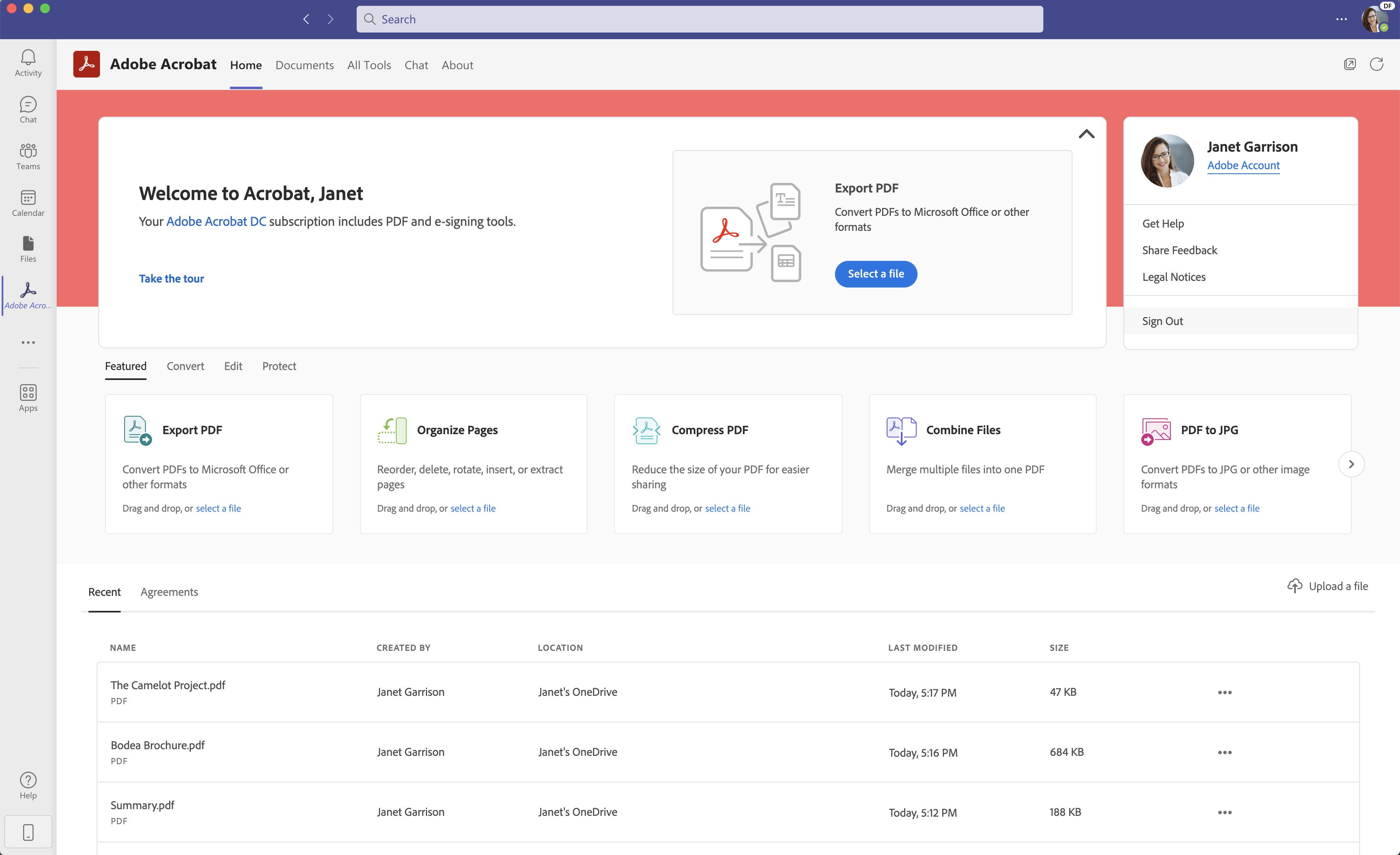
Demo Adobe Acrobat - Acrobat for Microsoft Teams
Seamlessly create, edit, convert, and share PDF files all from within Microsoft Teams – as part of Acrobat integrations with Microsoft 365 apps.
Demo Adobe Acrobat - Adobe Scan
With Adobe Scan mobile app, easily capture and convert documents into high-quality, interactive PDF documents you can fill out, sign, and share. Eliminate the hassle of finding a printer, filling a form by hand, and scanning it again.
Get faster insights with AI, create standout content with Adobe Express, and use the PDF tools you trust, all in one place.
Reproducir vídeo de Adobe Acrobat
Get faster insights with AI, create standout content with Adobe Express, and use the PDF tools you trust, all in one place.
Imagen del Avatar del Producto

¿Has utilizado Adobe Acrobat antes?

Responde algunas preguntas para ayudar a la comunidad de Adobe Acrobat

Reseñas de Adobe Acrobat (5,073)

Ver reseñas en video de 5
Reseñas

Reseñas de Adobe Acrobat (5,073)

Ver reseñas en video de 5
4.5
Reseñas de 5,074

Resumen de Revisión

Generado usando IA a partir de reseñas reales de usuarios
Los usuarios elogian constantemente a Adobe Acrobat por su facilidad de uso y sus robustas funciones de edición, que agilizan tareas de gestión de documentos como la edición, firma y conversión de PDFs. Muchos aprecian su capacidad para manejar documentos complejos manteniendo la integridad del formato, lo que lo convierte en una opción confiable para profesionales. Sin embargo, algunos usuarios señalan que el software puede parecer caro y consumir muchos recursos, especialmente en dispositivos más antiguos.

Pros y Contras

Generado a partir de reseñas de usuarios reales
Ver Todos los Pros y Contras
Buscar reseñas
Filtrar Reseñas
Borrar resultados
Las reseñas de G2 son auténticas y verificadas.
Sarvesh P.
SP
Senior Diagnostic Author
Empresa (> 1000 empleados)
"Feature-Rich Adobe Acrobat: AI Summaries, E-Sign, OCR, and Effortless PDF Editing"
¿Qué es lo que más te gusta de Adobe Acrobat?

I personally like Adobe Acrobat, and I use it every day for my office work. It includes many useful features, such as exporting and editing PDFs, and one of the best recent additions is the AI assistant, which can summarize a document in no time. The e-sign feature is especially helpful for billing and other reports. I also find it really convenient to add comments, highlights, and notes when I’m reviewing or working through any document. Lastly, the OCR feature is very useful because it converts text into an editable format. In todays world this is one of the finest applications Reseña recopilada por y alojada en G2.com.

¿Qué es lo que no te gusta de Adobe Acrobat?

So far, everything looks good and works fine for me. Reseña recopilada por y alojada en G2.com.

Kaleem A.
KA
Software Developer
Tecnología de la información y servicios
Mediana Empresa (51-1000 empleados)
Usuarios invitados o usuarios no comerciales del software, no incluidos en las puntuaciones de G2.
"OCR and Page Management Are Genuinely Useful, Performance Could Be Better"
¿Qué es lo que más te gusta de Adobe Acrobat?

The OCR is what I keep coming back to. With scanned vendor contracts, printed spec sheets, and old sign-off pages, I can just drop them in and get searchable text back that’s actually usable. Page organization is underrated, too also merging files, pulling out specific pages, and reordering everything before sharing. Having all of that in one place, without jumping between tools, saves me real time. Reseña recopilada por y alojada en G2.com.

¿Qué es lo que no te gusta de Adobe Acrobat?

Anything with heavy embedded content or lots of scanned pages makes the app feel like it’s dragging. Scrolling becomes sluggish, and sometimes it freezes for a few seconds, which is pretty annoying in the middle of a workflow. The other issue is that real-time collaboration still feels underdeveloped. When you’re constantly sharing specs and getting feedback from other people, that extra friction adds up more than you’d expect. Reseña recopilada por y alojada en G2.com.

Adam H.
AH
Digital Marketing & Ecommerce EMEA, LATAM & APAC
Mediana Empresa (51-1000 empleados)
"Adobe Acrobat: Powerful AI Tools and Seamless Integrations for Secure, Compliant PDFs."
¿Qué es lo que más te gusta de Adobe Acrobat?

Adobe Acrobat remains the industry benchmark because it successfully balances deep technical power with modern, AI-driven efficiency. The UI/UX has seen a significant shift toward "Acrobat Studio," a streamlined home base that simplifies navigation, though power users may find some advanced tools are now tucked away. Where it truly excels is in Integrations; it lives natively inside Microsoft 365, Slack, and Salesforce, allowing you to sign contracts or edit text without ever leaving your email or browser. While its Performance can still feel a bit "heavy" on older machines due to its massive feature set, the AI Intelligence tools like the new AI Assistant and "PDF Spaces" provide a massive ROI by cutting document analysis time by nearly 50%. Despite the premium Pricing, the value is solidified by a robust Onboarding ecosystem, including the "Accessibility Wizard" and specialized HR/Finance workflows, making it an indispensable tool for anyone who needs their digital documents to be secure, compliant, and interactive. Reseña recopilada por y alojada en G2.com.

¿Qué es lo que no te gusta de Adobe Acrobat?

The most significant drawback of Adobe Acrobat is undoubtedly the "bloat" that comes with being an all-in-one powerhouse. The software has become incredibly resource-intensive, often leading to sluggish startup times and high RAM usage that can slow down the rest of your computer. For a user who simply needs to read or lightly annotate a document, the sheer volume of background processes and features can feel like overkill, making the entire experience feel clunky compared to lightweight, modern alternatives.

Furthermore, the pricing structure remains a major pain point for many. Adobe’s shift to a strict subscription model means that you never truly "own" your software, and the costs can be prohibitive for individuals or small businesses. This frustration is often compounded by the "UI whiplash" caused by frequent interface redesigns. Long-time users often find that their muscle memory is rendered useless when Adobe moves essential tools into new sub-menus or hides them behind a "simplified" layout that actually requires more clicks to navigate.

Finally, the aggressive upselling and integration prompts within the app can be a distraction in a professional environment. Even with a paid subscription, the interface often feels cluttered with advertisements for Adobe’s other cloud services or AI add-ons. While the AI features themselves are impressive, they are often locked behind additional paywalls or require a constant internet connection, which limits their utility for power users who frequently work offline or in high-security environments where data privacy is the top priority. Reseña recopilada por y alojada en G2.com.

Brendan G.
BG
Senior Technology Risk Analyst
Pequeña Empresa (50 o menos empleados)
"User-Friendly and Feature-Rich Adobe Acrobat"
¿Qué es lo que más te gusta de Adobe Acrobat?

What I like best about Adobe Acrobat is how intuitive and user-friendly it is, even when I’m working with more advanced features. The layout feels very logical, so I can quickly find tools for viewing, commenting, editing, or signing documents without wasting time. I also really appreciate the wide range of features included in one single platform—being able to view, combine, convert, edit, and secure PDFs all in the same place is extremely convenient. Tools like text and image editing, form filling, e-signatures, and OCR for scanned documents help streamline my work and reduce the need for multiple different programs. Overall, it feels like a complete solution for handling PDFs from start to finish, which makes my daily workflow much more efficient and organized. Reseña recopilada por y alojada en G2.com.

¿Qué es lo que no te gusta de Adobe Acrobat?

The main drawback I experience with Adobe Acrobat is that it can be slow to start up and sometimes lags, especially when opening large files or working with several documents at once. On devices with limited memory or processing power, this performance issue can be noticeable and occasionally breaks my workflow when I’m trying to move quickly. There are times when switching between tools or saving changes takes longer than I would expect, which can be a bit frustrating during busy workdays. I feel that if the software were more lightweight or optimized to run faster, especially on standard office machines, it would significantly improve the overall user experience and make the powerful features it offers even more enjoyable to use. Reseña recopilada por y alojada en G2.com.

Raghuram K.
RK
Student
Software de Computadora
Pequeña Empresa (50 o menos empleados)
"Advanced Editing with AI, Needs UI & Performance Boost"
¿Qué es lo que más te gusta de Adobe Acrobat?

I use Adobe Acrobat for editing my PDF documents for college projects and assignments. I like how it is an all-in-one PDF management software with advanced editing, AI capabilities, and seamless integration across devices. The advanced editing and AI allow me to chat with documents, generate summaries, ask questions, and extract key takeaways from long reports, saving hours of manual reading. The AI can transform document summaries into engaging podcast-style audio overviews and create editable presentation decks in seconds. Its smart document conversion and scan feature is quite useful. It's very simple to set up and use. Many of my friends have switched to Adobe Acrobat from WPS Office, and they appreciate features like AI integration and on-site summaries, which are very useful to us students. Adobe Acrobat has deep integration with Microsoft 365, allowing me to stay within the workflow without switching apps. Reseña recopilada por y alojada en G2.com.

¿Qué es lo que no te gusta de Adobe Acrobat?

As for challenges there is a need for improvement in addressing sluggish performance, simplifying user interface and reevaluating the subscription based model. Reseña recopilada por y alojada en G2.com.

Lucas H.
LH
Project Manager
Mediana Empresa (51-1000 empleados)
"The silver standard for PDF editing if you're in the Adobe system"
¿Qué es lo que más te gusta de Adobe Acrobat?

Acrobat is featureful, and, since it's the industry standard, tends to be compatible with most files. I used to dislike the recent UI changes, but they've grown on me.

In my experience, the three best aspects of Acrobat are the abilities to reorder PDFs, to edit page contents, and to extract images. Reseña recopilada por y alojada en G2.com.

¿Qué es lo que no te gusta de Adobe Acrobat?

Where do I begin? Biggest knocks against Acrobat in no particular order: 1) The price: It's part of my Creative Cloud subscription, which is why I use it, but the subscription really is too expensive. 2) Compatibility: In spite of what I said above, there are not infrequent instances when PDFs don't display correctly. Page background colors, for instance, don't display. 3) UI: This can feel bloated and trying-to-be-modern without being as streamlined as it ought. Reseña recopilada por y alojada en G2.com.

CE
Business Administrator & Graphic Designer
Pequeña Empresa (50 o menos empleados)
"Powerful PDF Editing with Adobe"
¿Qué es lo que más te gusta de Adobe Acrobat?

Unsurprisingly, Adobe makes a good PDF viewer and editor (they defined the format). Love the ability to add watermark letterhead to generated letters to donors, to edit scanned files, and otherwise tweak before passing on to others. Also often use Reduce PDF file size to prepare files for upload. Reseña recopilada por y alojada en G2.com.

¿Qué es lo que no te gusta de Adobe Acrobat?

Expensive compared to other products, although it is included in a full CC subscription (which is also expensive). The U/I can be clunky at times, particularly around saving files/folder selection, and location of menu items can change between versions, requiring a re-learn. Reduce file size is inconsistent in its results. Reseña recopilada por y alojada en G2.com.

AS
Senior Product Software Engineer
Empresa (> 1000 empleados)
"Reliable PDF Editing with Intuitive Workflows, E-Signatures, and Smart AI Tools"
¿Qué es lo que más te gusta de Adobe Acrobat?

Adobe Acrobat stands out for its reliable PDF editing and annotation tools that preserve formatting, which saves a lot of rework. Features like e-signatures and form creation streamline document workflows, especially for approvals. The UI is clean and intuitive, and integrations with cloud storage make sharing and collaboration easy. It performs well even with large files, and overall delivers strong ROI by reducing manual effort. Onboarding is straightforward with helpful guides, and support is generally responsive. The AI-powered features, like summarizing and extracting key information from documents, are a useful addition that speeds up document review. Reseña recopilada por y alojada en G2.com.

¿Qué es lo que no te gusta de Adobe Acrobat?

While Adobe Acrobat is powerful, it can feel heavy and slow at times, especially when opening large files or running multiple features together. The pricing is also on the higher side compared to alternatives, which can be a concern for smaller teams. Some advanced features are not very intuitive and require extra clicks or digging through menus, which can slow down workflows. Additionally, occasional glitches during editing or form handling can disrupt the experience. Improving performance, simplifying navigation for advanced tools, and offering more flexible pricing tiers would make it even better. Reseña recopilada por y alojada en G2.com.

Ishita S.
IS
Student
Pequeña Empresa (50 o menos empleados)
Usuarios invitados o usuarios no comerciales del software, no incluidos en las puntuaciones de G2.
"Powerful, Reliable PDF Editing and Conversion with Built-In E-Signatures"
¿Qué es lo que más te gusta de Adobe Acrobat?

1. Powerful PDF editing

Allows editing text, images, and formatting directly inside PDFs.

2. Easy document conversion

Convert PDFs to Word, Excel, PowerPoint and vice versa with good accuracy.

3. E-signature support

Built-in tools to sign documents digitally and request signatures.

4. Annotation and collaboration

Add comments, highlights, and notes for reviewing documents.

5. Reliable and widely used

Industry standard for PDF handling, trusted across organizations. Reseña recopilada por y alojada en G2.com.

¿Qué es lo que no te gusta de Adobe Acrobat?

1. Expensive subscription

Full features require a paid plan, which can be costly for students.

2. Heavy software

Can be slow or resource-intensive, especially on low-end devices.

3. Complex interface

Too many features can make it overwhelming for beginners.

4. Limited free version

Basic version has restricted functionality.

5. OCR limitations sometimes

Text recognition in scanned documents may not always be perfectly accurate. Reseña recopilada por y alojada en G2.com.

Yash A.
YA
Sr. Designer and Software Tester
Producción de medios
Pequeña Empresa (50 o menos empleados)
Usuarios invitados o usuarios no comerciales del software, no incluidos en las puntuaciones de G2.
"Solución PDF todo en uno eficiente con IA, OCR y firmas electrónicas"
¿Qué es lo que más te gusta de Adobe Acrobat?

Lo que más valoro de Adobe Acrobat es su funcionalidad todo en uno y su interfaz intuitiva, lo que facilita la creación y gestión de PDFs profesionales. El Asistente de IA es una gran ventaja, ayudándome a resumir rápidamente documentos largos, mientras que el OCR convierte con precisión archivos escaneados en texto editable. Su integración perfecta con Microsoft 365 y Google Drive mejora nuestro flujo de trabajo, especialmente para las firmas electrónicas, ahorrando tiempo y aumentando el ROI. El rendimiento es fiable incluso con archivos pesados, y la plataforma es fácil de usar con una mínima capacitación. Reseña recopilada por y alojada en G2.com.

¿Qué es lo que no te gusta de Adobe Acrobat?

Aunque Acrobat es el estándar de la industria, su precio de suscripción puede ser bastante caro para pequeñas empresas o usuarios individuales, especialmente en comparación con alternativas gratuitas o más asequibles. Además, acceder al soporte directo al cliente puede ser un desafío; aunque la documentación de ayuda es extensa, obtener asistencia personalizada con problemas específicos de facturación o errores técnicos a menudo lleva más tiempo del esperado. Reseña recopilada por y alojada en G2.com.

¿Preguntas sobre Adobe Acrobat? Pregunta a usuarios reales o explora respuestas de la comunidad

Obtén respuestas prácticas, flujos de trabajo reales y pros y contras honestos de la comunidad de G2 o comparte tus ideas.

GU
Guest User
Última actividad hace 1 día

¿Cómo está Adobe Acrobat redefiniendo la forma en que los profesionales trabajan con PDFs para documentación y colaboración?

7 Votos positivos
5
Únete a la conversación
GU
Guest User
Última actividad hace aproximadamente 4 horas

¿Cuál es la diferencia entre Adobe Acrobat DC y Adobe Acrobat Reader DC?

4 Votos positivos
4
Únete a la conversación

Opciones de precios

Precios proporcionados por Adobe Acrobat.

Acrobat Studio for teams

A partir de $29.99
2 License Por mes

Acrobat Pro for teams

A partir de $23.99
2 License Por mes

Acrobat Studio for Individuals

$24.99
1 Single User Por mes
Adobe Acrobat Comparaciones
Características de Adobe Acrobat
Firma de documentos
Proteger
Gestión Documental
Escaneo de documentos
Tamaño
Editar campos
Nuevo PDF
Historial de revisiones
Editor de documentos
Imagen del Avatar del Producto
Adobe Acrobat