Best Unified Endpoint Management (UEM) Solutions

How Many Unified Endpoint Management (UEM) Software Products Does G2 Track?

Total Products under this Category: 78

Category Stats (Sep 2026)

  • Average Rating: 4.47/5 The average rating of products in this category, based on all submitted ratings
  • Top Trending Product: Swif.ai (+0.75%) - Among all products in this category, Swif.ai recorded the largest rating increase compared to last month

Last updated: September 01, 2026

How Does G2 Rank Unified Endpoint Management (UEM) Software Products?

Why You Can Trust G2's Software Rankings:

  • 30 Analysts and Data Experts
  • 22,500+ Authentic Reviews
  • 78+ Products
  • Unbiased Rankings

G2's software rankings are built on verified user reviews, rigorous moderation, and a consistent research methodology maintained by a team of analysts and data experts. Each product is measured using the same transparent criteria, with no paid placement or vendor influence. While reviews reflect real user experiences, which can be subjective, they offer valuable insight into how software performs in the hands of professionals. Together, these inputs power the G2 Score, a standardized way to compare tools within every category.

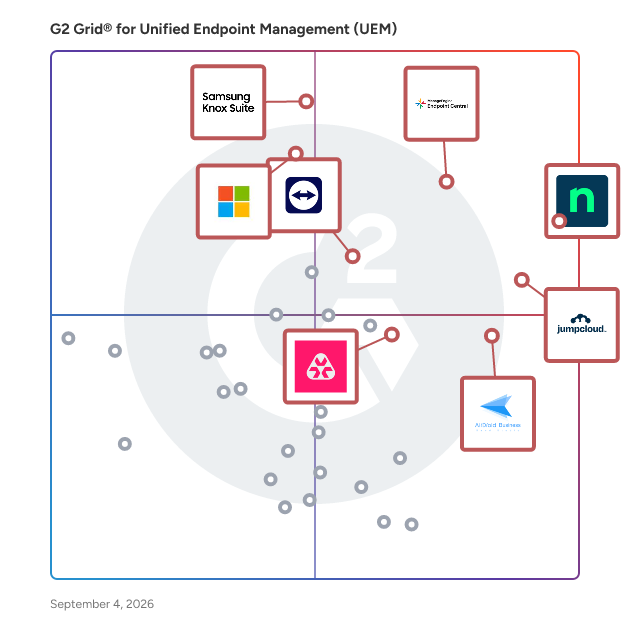
G2 Grid® for Unified Endpoint Management (UEM) Software

G2 Grid® for Unified Endpoint Management (UEM) Software plotting products by satisfaction and market presence

Highlighted products: NinjaOne, ManageEngine Endpoint Central, JumpCloud, Samsung Knox Suite, AirDroid Business, Microsoft Intune Enterprise Application Management, TeamViewer, and Atera.

Underlying data: [Grid® JSON](https://www.g2.com/categories/unified-endpoint-management-uem/grids.json?focus%5B%5D=ninjaone&focus%5B%5D=manageengine-endpoint-central&focus%5B%5D=jumpcloud&focus%5B%5D=samsung-knox-suite&focus%5B%5D=airdroid-business&focus%5B%5D=microsoft-intune-enterprise-application-management&focus%5B%5D=teamviewer&focus%5B%5D=atera)

Sponsored

Kitecyber

Kitecyber: The Security Agent for the AI Endpoint Era Kitecyber is a next-gen cybersecurity company built to protect sensitive data at its source: the endpoint, where work actually happens. In the age of AI agents, your most sensitive data - source code, customer records, credentials, financials, and IP - now moves through GenAI prompts, SaaS uploads, browser activity, private apps, and autonomous AI agents acting on a user's behalf. Kitecyber puts data security at the center, giving teams real-time visibility and control over where that data goes and who (or what) is moving it. Kitecyber is servicing hundreds of customers from SMBs to mid market enterprises like Policy Bazaar, Instavision, Duplocloud, Kloudfuse, AI4Process, Lily.ai, Sarvam.ai, Antino, Kiwico, origin63, Agnext, Tynor, Shoonya to secure their data and Gen AI usage. We also help customer meet compliance requirements for SOC2, ISO27001, GDPR, HIPAA, DPDP act, PCI DSS and others. Our customers span across technology, SaaS, Gen AI, Fintech, BFSI, Manufacturing, health tech and other regulated industries. AI has changed the endpoint threat model. AI copilots and agents can read, summarize, copy, and upload sensitive information at machine speed, often without clear security boundaries. Traditional tools weren't built for this: endpoint tools detect malware, network tools inspect traffic, legacy DLP enforced static policies, and VPNs trusted networks -- but none understand a world where an AI agent can exfiltrate data faster than a human can review it. Kitecyber closes that gap by making the endpoint the real-time decision point for data protection. At its core, Kitecyber delivers data security at the endpoint by understanding device posture, seeing user activity, data activity, classifying sensitive data, Operating system activity and network activity. This broad coverage provides much better security as compared to point solutions that see only part of the activity. It tracks data lineage and movement in real time, classifies data using document context in addition to pattern matching, and enforces the right action -- allow, block, warn, coach, log, or isolate -- at the exact point of risk. Around this data-security core, Kitecyber unifies the controls modern teams need into one lightweight agent and a shared trust engine, so there's nothing to stitch together and no blind spots between tools: 1) Endpoint & network DLP - protect sensitive data across files, clipboard, browser, GenAI, SaaS, and removable media 2) GenAI & AI agent security - control how users, copilots, and AI agents interact with sensitive data and external AI services 3) Secure Web Gateway - endpoint-based protection against phishing, risky destinations, and unsafe downloads, with URL filtering for SaaS and GenAI apps 4) SaaS app protection - govern access and data movement across sanctioned and unsanctioned SaaS apps 5) Zero Trust Network Access (ZTNA) - replace legacy VPNs with context-aware access to private apps and AWS, Azure, and GCP, based on identity, device posture, and least privilege 6) Unified endpoint management & compliance automation - manage devices, automate onboarding/offboarding, and enforce policy across Windows, macOS, and Linux Kitecyber follows a simple model: See, Decide, Enforce - continuously. The agent observes endpoint posture, user activity, browser behavior, data movement, SaaS access, AI interactions, and private app sessions; evaluates each action in context (who is acting, what device, what data, where it's going); and enforces the right control at the moment of action. Kitecyber also uses Gen AI to cut false-positive alerts, classify data by context, analyze suspicious process activity, and generate incident reports with root causes and remediations, significantly reducing the triage burden on SOC and NOC teams. Kitecyber is built for organizations that need enterprise-grade data protection without enterprise complexity. It's used by IT teams (fast deployment, device management, automation), security teams (visibility and control over data movement, AI usage, and insider risk), MSPs and MSSPs (modern DLP, SWG, SaaS, and ZTNA through one platform), and business leaders (protect data, reduce breach risk, and support AI adoption without slowing productivity). By consolidating device, data, web, SaaS, AI, and access security into a single endpoint-native agent, Kitecyber reduces tool sprawl and cost while strengthening protection - so teams can adopt AI confidently, knowing their sensitive data stays secure wherever work happens.

Visit website

NinjaOne

NinjaOne is the unified IT operations platform that helps IT teams and managed service providers manage, secure, and support every endpoint from a single cloud-native console. Nearly 40,000 customers across 140+ countries use NinjaOne to replace fragmented point tools with one platform built to scale. The platform brings together the core work of modern IT operations: endpoint management, autonomous patch management, vulnerability management, endpoint and SaaS backup, remote access, and IT service desk. Teams monitor and control Windows, macOS, Linux, mobile, and virtual devices in one place, automate routine work with policy-based automation and human-centered AI, and cut the cost and risk that come from running many disconnected tools. NinjaOne serves internal IT teams and MSPs alike, from lean IT departments to mid-market and large enterprise organizations managing distributed, multi-site environments. Common uses include consolidating IT tooling, automating patching for security and compliance, managing distributed and hybrid workforces, improving endpoint visibility, and strengthening backup and ransomware readiness. NinjaOne has maintained a 98 percent customer satisfaction score for more than five years, backed by free unlimited onboarding and 24/7 support in seven languages. Organizations that move to NinjaOne report replacing four or more separate tools with the single platform. NinjaOne is FedRAMP Moderate Authorized and SOC 2 Type II and Type III compliant, and supports audit-ready compliance evidence across frameworks including CMMC, ISO 27001, and HIPAA. The mission behind the platform is simple: unify IT to simplify work, giving IT teams better tools and employees a great technology experience at work.

Average Rating: 4.7/5.0

Total Reviews: 4,988

How Do G2 Users Rate NinjaOne?

  • Has the product been a good partner in doing business?: 9.4/10 (Category avg: 8.9/10)
  • Device Compliance: 8.8/10 (Category avg: 9.1/10)
  • Data Separation: 7.8/10 (Category avg: 8.6/10)
  • Endpoint Protection: 8.5/10 (Category avg: 9.0/10)

Who Is the Company Behind NinjaOne?

  • Seller: NinjaOne
  • Company Website:
  • Year Founded: 2013
  • HQ Location: Austin, Texas
  • Twitter: @NinjaOne
    3,607 Twitter followers
  • LinkedIn® Page: www.linkedin.com
    2,376 employees on LinkedIn®

Who Uses This Product?

  • Who Uses This: IT Manager, Owner
  • Top Industries: Information Technology and Services, Computer & Network Security
  • Company Size: 47% Medium, 45% Small

What Do G2 Reviewers Say About NinjaOne?

AI-generated summary from verified user reviews

Pros
  • Users value the ease of use of NinjaOne, highlighting its seamless implementation and effective support for MSPs.
  • Users praise NinjaOne for its easy-to-navigate remote access and full visibility, enhancing IT support efficiency.
  • Users appreciate the ongoing feature enhancements of NinjaOne, ensuring the platform continuously evolves to meet our needs.
  • Users praise the powerful automation features of NinjaOne, enhancing efficiency and simplifying management tasks.
  • Users appreciate the exceptional customer support of NinjaOne, which simplifies learning and enhances overall usability.
Cons
  • Users notice the missing features in NinjaOne, specifically regarding client and customer portal capabilities.
  • Users find the limited features of NinjaOne frustrating, especially regarding user management and third-party software automation.
  • Users find the search function lacking and struggle with visibility and usability issues in NinjaOne.
  • Users feel the search function needs improvement and find the visibility of the NinjaOne icon inconsistent.
  • Users express concerns about feature issues, including confusion over roles, auto-installations, and OS compatibility challenges.

What Are Recent G2 Reviews of NinjaOne?

What Are G2 Users Discussing About NinjaOne?

ManageEngine Endpoint Central

ManageEngine Endpoint Central is an all-in-one unified endpoint management and security (UEMS) solution that delivers end-to-end life cycle management and endpoint protection. From automated multi-OS patching and software deployment to asset intelligence and mobile device management, it unifies the core workflows IT teams rely on every day. On the security side, its next-generation antivirus (NGAV) uses behavioral detection, AI, and real-time analytics to detect and stop advanced threats, while built-in attack surface management, browser security, and data loss prevention keep sensitive data protected across office, remote, and frontline endpoints alike. Endpoint Central also prioritizes productivity through digital employee experience (DEX) monitoring, delivering real-time insights into device health, application performance, and endpoint telemetry so IT teams can resolve issues before they impact employees. Recognized as a leader by Gartner®, IDC, and Forrester, Endpoint Central is trusted by over 31, 000 enterprises worldwide and available in both on-premises and SaaS editions. This solution streamlines the complex landscape of endpoint management, empowering IT and security teams to manage more with less, delivering intelligent automation and AI-powered threat mitigation through one unified platform. Business benefits and ROI A commissioned Forrester Total Economic Impact™ study found that organizations deploying Endpoint Central achieved several significant business benefits, including: - 442% return on investment over three years, driven by tool consolidation, automation, and reduced operational overhead. - $4.5 million in total quantified economic benefits (present value), a net present value of $3.7 million, and a payback period of under six months. - 95% reduction in manual patching time, as well as cut licensing and insurance costs through improved security posture and compliance. - Significant reductions in compliance violations and security-related disruptions driven by Endpoint Central’s capability to convert endpoint stability and risk reduction into measurable business outcomes.

Average Rating: 4.5/5.0

Total Reviews: 1,124

How Do G2 Users Rate ManageEngine Endpoint Central?

  • Has the product been a good partner in doing business?: 8.9/10 (Category avg: 8.9/10)
  • Device Compliance: 8.8/10 (Category avg: 9.1/10)
  • Data Separation: 8.1/10 (Category avg: 8.6/10)
  • Endpoint Protection: 8.3/10 (Category avg: 9.0/10)

Who Is the Company Behind ManageEngine Endpoint Central?

  • Seller: Zoho
  • Year Founded: 1996
  • HQ Location: Austin, TX
  • Twitter: @Zoho
    137,880 Twitter followers
  • LinkedIn® Page: www.linkedin.com
    30,766 employees on LinkedIn®
  • Phone: +1 (888) 900-9646

Who Uses This Product?

  • Who Uses This: IT Manager, System Administrator
  • Top Industries: Information Technology and Services, Financial Services
  • Company Size: 64% Medium, 24% Large

What Do G2 Reviewers Say About ManageEngine Endpoint Central?

AI-generated summary from verified user reviews

Pros
  • Users find the ease of use of ManageEngine Endpoint Central invaluable for efficient IT operations and streamlined management.
  • Users value the efficient patch management in ManageEngine Endpoint Central, simplifying endpoint updates and enhancing security.
  • Users appreciate the extensive features of ManageEngine Endpoint Central, enabling efficient endpoint and security management in one platform.
  • Users value the software deployment capabilities of ManageEngine Endpoint Central for efficient and streamlined management of endpoints.
  • Users value the comprehensive endpoint management features of ManageEngine Endpoint Central for efficient security and asset management.
Cons
  • Users feel the product lacks reporting functionality and dynamic group settings, which limits flexibility for managed service providers.
  • Users experience feature issues with Endpoint Central, particularly regarding Active Directory updates and unclear deployment remarks.
  • Users face patching issues with ManageEngine Endpoint Central, experiencing problems with updates and continuous review popups.
  • Users find the initial complexity of Endpoint Central challenging due to numerous features and unclear documentation.
  • Users find the learning curve and limited customization challenging, requiring time and training for effective use.

What Are Recent G2 Reviews of ManageEngine Endpoint Central?

What Are G2 Users Discussing About ManageEngine Endpoint Central?

JumpCloud

JumpCloud® is the AI-powered identity infrastructure that unifies lifecycle management for humans, devices, and autonomous agents. JumpCloud gives IT teams complete visibility and control over every identity and every access point. JumpCloud helps organizations cut complexity, automate secure workflows, and put AI to work safely. Secure every identity. Human or not. Intelligent, secure IT for the agentic era.

Average Rating: 4.5/5.0

Total Reviews: 3,937

How Do G2 Users Rate JumpCloud?

  • Has the product been a good partner in doing business?: 9.1/10 (Category avg: 8.9/10)
  • Device Compliance: 9.0/10 (Category avg: 9.1/10)
  • Data Separation: 8.1/10 (Category avg: 8.6/10)
  • Endpoint Protection: 8.3/10 (Category avg: 9.0/10)

Who Is the Company Behind JumpCloud?

  • Seller: JumpCloud Inc.
  • Company Website:
  • Year Founded: 2012
  • HQ Location: Louisville, CO
  • Twitter: @JumpCloud
    36,368 Twitter followers
  • LinkedIn® Page: www.linkedin.com
    974 employees on LinkedIn®

Who Uses This Product?

  • Who Uses This: IT Manager, System Administrator
  • Top Industries: Information Technology and Services, Computer Software
  • Company Size: 54% Medium, 35% Small

What Do G2 Reviewers Say About JumpCloud?

AI-generated summary from verified user reviews

Pros
  • Users value the ease of use of JumpCloud, simplifying user management across diverse systems and enhancing productivity.
  • Users value JumpCloud's straightforward device management, enabling seamless user management across various systems with intuitive controls.
  • Users value the enhanced security provided by JumpCloud's passwordless login and MFA enforcement features.
  • Users appreciate the seamless integrations with popular apps, simplifying user management across platforms effortlessly.
  • Users find JumpCloud's intuitive user management and responsive support invaluable for seamless integration and enhanced security.
Cons
  • Users report missing features such as better macOS controls and advanced reporting capabilities, limiting overall effectiveness.
  • Users find that improvement is needed in navigation and feature clarity, particularly for beginners navigating JumpCloud.
  • Users note the limited features of JumpCloud, especially in SSO app catalog and Linux device management capabilities.
  • Users face deployment challenges and lack of advanced endpoint controls, impacting their overall experience with JumpCloud.
  • Users feel the user interface needs improvement, as it should be more user-friendly and interactive.

What Are Recent G2 Reviews of JumpCloud?

What Are G2 Users Discussing About JumpCloud?

Samsung Knox Suite

Knox Suite is an all-in-one solution designed to manage and secure work devices, optimized for Samsung Galaxy. It streamlines the mobile journey for IT admins, from setup to use and management, offering comprehensive UEM capabilities. It enhances the use and oversight of Galaxy devices, even alongside existing third-party UEM solutions. Built on the Samsung Knox Platform, Knox Suite ensures corporate data and devices are protected effortlessly. Key features include the Security Center, which provides detailed insights into device fleet security and enables quick security patch rollouts and remote device health attestations. Knox Suite simplifies device setup and deployment, allowing employees to use new devices securely right out of the box. It ensures consistent IT policies across device fleets and offers robust control over OS and app updates. Its intuitive dashboard delivers deep insights into device performance, helping IT admins identify and address potential issues proactively. Remote support tools enable troubleshooting and issue resolution regardless of device location, minimizing business disruptions. Additionally, Knox Suite maximizes productivity by customizing Galaxy devices for specific work needs, such as barcode scanning and hardware key remapping. As a leader in unified endpoint management (IDC MarketScape 2022), Knox Suite provides essential tools in one comprehensive package for a secure and efficient mobile experience for businesses.

Average Rating: 4.4/5.0

Total Reviews: 95

How Do G2 Users Rate Samsung Knox Suite?

  • Has the product been a good partner in doing business?: 9.1/10 (Category avg: 8.9/10)
  • Device Compliance: 9.7/10 (Category avg: 9.1/10)
  • Data Separation: 9.4/10 (Category avg: 8.6/10)
  • Endpoint Protection: 9.5/10 (Category avg: 9.0/10)

Who Is the Company Behind Samsung Knox Suite?

  • Seller: Samsung Electronics
  • Year Founded: 1969
  • HQ Location: Suwon, Korea
  • Twitter: @Samsung
    754,964 Twitter followers
  • LinkedIn® Page: www.linkedin.com
    10,050 employees on LinkedIn®
  • Ownership: KRX: 018260

Who Uses This Product?

  • Top Industries: Information Technology and Services, Computer & Network Security
  • Company Size: 55% Medium, 24% Small

What Do G2 Reviewers Say About Samsung Knox Suite?

AI-generated summary from verified user reviews

Pros
  • Users appreciate the ease of use of Samsung Knox Suite, highlighting its simple enrollment and customization features.
  • Users value the strong end-to-end security of Samsung Knox Suite, ensuring peace of mind for enterprise protection.
  • Users appreciate the easy-to-use device management features of Samsung Knox Suite, enhancing security and customization options.
  • Users value the reliable enterprise protection offered by Samsung Knox Suite, ensuring secure device management and peace of mind.
  • Users appreciate the implementation ease of Samsung Knox Suite, which simplifies large-scale device management in corporate settings.
Cons
  • Users find the missing features in Knox Suite, particularly in smartwatch support and complex configurations, frustrating.
  • Users feel the price is a bit high, which may be a barrier for some organizations considering the solution.
  • Users find the learning curve steep with Samsung Knox Suite, particularly challenging for beginners and smaller IT teams.
  • Users face login issues with frequent prompts and complications due to security measures, impacting overall usability.
  • Users experience poor customer support with Samsung Knox Suite, finding issue resolution slow and assistance lacking.

What Are Recent G2 Reviews of Samsung Knox Suite?

AirDroid Business

AirDroid Business, developed by Singapore-based SandStudio, is a comprehensive mobile device management (MDM) solution designed to help businesses manage and control fleets of Android and Windows devices from a central dashboard. With AirDroid Business, businesses can easily monitor device usage, deploy apps and updates, and remotely troubleshoot issues. It offers features such as kiosk mode, security policy, alerts & notifications, location tracking, file transfer in bulk, and more. It aims to simplify the device management process, increase productivity and efficiency, and reduce management costs. AirDroid Business MDM Highlights: *Multiple enrollment options - For Android: Zero-Touch, Android Enterprise(AE), Knox Mobile Enrollment(KME), Device Owner, and Regular Enrollment. For Windows: Regular Enrollment. *Unattended remote access *Batch operations *Tasks & Action logs *Patch management *Limit incoming & outgoing calls *Kiosk mode & Policy *Remote control with Black Screen security mode *Location tracking *Application management service(AMS):custom apps, Google Play Store apps and web apps *Content management service *Whitelisting and blocklisting browsers & apps *Remote monitor devices’ status *Real-time alerts & notifications *Supports all Android-based endpoints *Devices fleet management from a centralized dashboard AirDroid Business's acclaimed MDM solution currently empowers organizations across 100+ countries. Our expertise spans various vertical markets such as retail, healthcare, digital signage, transportation & logistics, IT & MSP services, and education. We offer free trial, online demos, and email & call support to all prospects and customers, contact us for more information today!

Average Rating: 4.9/5.0

Total Reviews: 430

How Do G2 Users Rate AirDroid Business?

  • Has the product been a good partner in doing business?: 9.8/10 (Category avg: 8.9/10)
  • Device Compliance: 9.4/10 (Category avg: 9.1/10)
  • Data Separation: 8.4/10 (Category avg: 8.6/10)
  • Endpoint Protection: 9.1/10 (Category avg: 9.0/10)

Who Is the Company Behind AirDroid Business?

  • Seller: Sand Studio
  • Company Website:
  • Year Founded: 2011
  • HQ Location: Singapore, SG
  • Twitter: @AirDroidB
    184 Twitter followers
  • LinkedIn® Page: www.linkedin.com
    90 employees on LinkedIn®

Who Uses This Product?

  • Who Uses This: IT Manager, IT Consultant
  • Top Industries: Information Technology and Services, Renewables & Environment
  • Company Size: 67% Medium, 42% Small

What Do G2 Reviewers Say About AirDroid Business?

AI-generated summary from verified user reviews

Pros
  • Users appreciate the ease of use of AirDroid Business, enjoying its simple setup and effective management features.
  • Users value the efficient device management in AirDroid Business, especially for its real-time tracking and automated alerts.
  • Users value the comprehensive remote access tools of AirDroid Business, enabling efficient device management from anywhere.
  • Users appreciate the extensive features of AirDroid Business, especially for efficient app management and kiosk mode functionality.
  • Users value the effective remote management of AirDroid Business, enabling effortless control over devices from anywhere.
Cons
  • Users find AirDroid Business expensive for smaller teams, particularly due to its bundled pricing model.
  • Users believe that improvements are needed in pricing, language options, and mobile dashboard settings for better functionality.
  • Users note pricing issues with AirDroid Business, especially for startups adding multiple one-off devices.
  • Users are disappointed by the missing features in AirDroid Business, particularly automation and workflow trigger options.
  • Users note a difficult learning curve due to the platform's extensive features, requiring time to become proficient.

What Are Recent G2 Reviews of AirDroid Business?

What Are G2 Users Discussing About AirDroid Business?

Microsoft Intune Enterprise Application Management

Microsoft Intune Enterprise Application Management ist eine cloudbasierte Lösung, die darauf ausgelegt ist, die Entdeckung, Bereitstellung und Aktualisierung von Anwendungen innerhalb einer Organisation zu vereinfachen. Durch die Bereitstellung eines sicher gehosteten Katalogs vorverpackter Microsoft- und Drittanbieteranwendungen reduziert es den Zeit- und Arbeitsaufwand, den IT-Administratoren für das App-Management aufwenden. Dieser Dienst stellt sicher, dass Anwendungen aktuell und sicher bleiben, wodurch potenzielle Sicherheitsrisiken im Zusammenhang mit veralteter Software gemindert werden. Hauptmerkmale und Funktionalität: - Unternehmens-App-Katalog: Greifen Sie direkt über die Intune-Konsole auf eine umfassende Sammlung vorverpackter Anwendungen zu, einschließlich sowohl Microsoft- als auch Drittanbieter-Apps. - Vereinfachte Bereitstellung: Entdecken, verpacken und bereitstellen von Anwendungen mit Leichtigkeit, wodurch die Komplexität reduziert und Zeit für IT-Administratoren gespart wird. - Automatisierte Updates: Halten Sie Anwendungen auf dem neuesten Stand, indem Sie eine geführte Upgrade-Erfahrung nutzen, die veraltete Apps proaktiv identifiziert und aktualisiert. - Sicherheitsrisikominderung: Stellen Sie App-Fixes sofort bereit, wenn Sicherheitslücken entdeckt werden, um potenzielle Risiken zu reduzieren und die Einhaltung der Vorschriften sicherzustellen. - Integration mit Windows Autopilot: Unterstützung für Windows Autopilot ermöglicht eine nahtlose Integration, indem die Auswahl von blockierenden Apps aus dem Unternehmens-App-Katalog in den Profilen der Enrollment Status Page (ESP) und Device Preparation Page (DPP) ermöglicht wird. Primärer Wert und gelöstes Problem: Microsoft Intune Enterprise Application Management adressiert die Herausforderungen, denen Organisationen bei der Verwaltung des Lebenszyklus von Anwendungen über verschiedene Endpunkte hinweg gegenüberstehen. Durch die Bereitstellung einer zentralisierten, cloudbasierten Plattform vereinfacht es die Prozesse der App-Entdeckung, Bereitstellung und Wartung. Dies verbessert nicht nur die betriebliche Effizienz, sondern stärkt auch die Sicherheit, indem sichergestellt wird, dass Anwendungen konsequent aktualisiert und mit den organisatorischen Richtlinien konform sind. Letztendlich befähigt es IT-Teams, sich auf strategische Initiativen zu konzentrieren, anstatt auf routinemäßige App-Management-Aufgaben.

Average Rating: 4.5/5.0

Total Reviews: 255

How Do G2 Users Rate Microsoft Intune Enterprise Application Management?

  • War the product ein guter Geschäftspartner?: 8.9/10 (Category avg: 8.9/10)
  • Geräte-Konformität: 8.9/10 (Category avg: 9.1/10)
  • Datentrennung: 8.5/10 (Category avg: 8.6/10)
  • Endpunktschutz: 8.9/10 (Category avg: 9.0/10)

Who Is the Company Behind Microsoft Intune Enterprise Application Management?

  • Verkäufer: Microsoft
  • Gründungsjahr: 1975
  • Hauptsitz: Redmond, Washington
  • Twitter: @microsoft
    13,091,739 Twitter-Follower
  • LinkedIn®-Seite: www.linkedin.com
    231,632 Mitarbeiter*innen auf LinkedIn®
  • Eigentum: MSFT

Who Uses This Product?

  • Who Uses This: Systemadministrator, Systemingenieur
  • Top Industries: Informationstechnologie und Dienstleistungen, Computer- und Netzwerksicherheit
  • Company Size: 41% Medium, 40% Large

What Do G2 Reviewers Say About Microsoft Intune Enterprise Application Management?

AI-generated summary from verified user reviews

Pros
  • Benutzer schätzen das zentralisierte Management von Microsoft Intune, das die Verwaltung des App-Lebenszyklus vereinfacht und die Sicherheit mühelos verbessert.
  • Benutzer schätzen die verbesserte Sicherheit und die Compliance-Fähigkeiten des Microsoft Intune Enterprise Application Management für IT-Operationen.
  • Benutzer schätzen die Benutzerfreundlichkeit von Microsoft Intune, die ein nahtloses App-Lifecycle-Management und die Einrichtung von Geräten ermöglicht.
  • Benutzer schätzen das zentralisierte App-Lebenszyklusmanagement von Microsoft Intune, das die Sicherheit erhöht und IT-Operationen vereinfacht.
  • Benutzer schätzen die vereinfachten Softwarebereitstellungsfähigkeiten von Microsoft Intune, die die Sicherheit und Compliance für alle Geräte verbessern.
Cons
  • Benutzer finden die Einrichtungskomplexität herausfordernd, mit einer steilen Lernkurve und unklaren Aktivierungszeiten für Funktionen.
  • Benutzer stehen oft vor Komplexität bei der Richtlinienintegration mit Intune, was die Einrichtung und Verwaltung für neue Administratoren herausfordernd macht.
  • Benutzer finden die Lernkurve steil, da die Einrichtung und die Konfiguration von Richtlinien für Anfänger komplex sein können.
  • Benutzer bemerken die fehlenden Funktionen in Microsoft Intune, insbesondere in Bezug auf plattformübergreifende Konsistenz und den Schutz von Nicht-Microsoft-Apps.
  • Benutzer finden die plattformübergreifende Konsistenz mangelhaft in Intune, was die Benutzerfreundlichkeit beeinträchtigt und die Verwaltung für neue Administratoren erschwert.

What Are Recent G2 Reviews of Microsoft Intune Enterprise Application Management?

What Are G2 Users Discussing About Microsoft Intune Enterprise Application Management?

TeamViewer

TeamViewer is a leading provider of remote connectivity software for individuals and businesses of all sizes. Our remote software enables companies across various industries to enhance their efficiency and achieve their business goals by digitally transforming their processes. We offer a selection of bespoke solutions: TeamViewer Tensor, our enterprise remote connectivity solution, enables businesses to connect, manage, and protect computers, mobile devices, and embedded platforms – on site and around the globe. TeamViewer Remote, our remote access and support solution, enables secure access to devices for remote support in small and medium-sized businesses. A free version of TeamViewer Remote is available for personal use. TeamViewer is actively working to shape the digital revolution by innovating in the fields of augmented reality (AR) and the Internet of Things (IoT). Our AR platform, Frontline, brings digital technology onto the shop floor with industrial AR solutions designed to optimize manual processes. Strategic partnerships and software integrations with other industry leaders such as SAP, Google, and Microsoft let us provide our customers with a seamless experience, regardless of their device or operating system. Since TeamViewer was founded in Göppingen, Germany, in 2005, our solutions have been installed on more than 2.5 billion devices worldwide. For more information, visit www.teamviewer.com.

Average Rating: 4.5/5.0

Total Reviews: 4,076

How Do G2 Users Rate TeamViewer?

  • Has the product been a good partner in doing business?: 8.6/10 (Category avg: 8.9/10)
  • Device Compliance: 9.7/10 (Category avg: 9.1/10)
  • Data Separation: 10.0/10 (Category avg: 8.6/10)
  • Endpoint Protection: 9.3/10 (Category avg: 9.0/10)

Who Is the Company Behind TeamViewer?

  • Seller: TeamViewer
  • Company Website:
  • Year Founded: 2005
  • HQ Location: Goppingen
  • Twitter: @TeamViewer
    48,070 Twitter followers
  • LinkedIn® Page: www.linkedin.com
    2,769 employees on LinkedIn®

Who Uses This Product?

  • Who Uses This: Software Engineer, IT Manager
  • Top Industries: Information Technology and Services, Computer Software
  • Company Size: 41% Small, 34% Medium

What Do G2 Reviewers Say About TeamViewer?

AI-generated summary from verified user reviews

Pros
  • Users appreciate the ease of use of TeamViewer, enjoying a smooth experience for remote access and support.
  • Users appreciate the easy remote access provided by TeamViewer, simplifying connections and enhancing productivity.
  • Users value the easy remote access with TeamViewer, simplifying connections and control over devices effortlessly.
  • Users love the Easy Access feature of TeamViewer, making remote connections seamless and efficient.
  • Users appreciate the seamless remote access of TeamViewer, enhancing productivity through easy connections and cross-platform compatibility.
Cons
  • Users face significant connection issues with TeamViewer, impacting performance during slow or unstable internet conditions.
  • Users experience connectivity issues with TeamViewer, leading to poor performance during slow or bad connections.
  • Users find TeamViewer expensive in South Africa due to high subscription fees and limited performance on slow connections.
  • Users experience slow performance with TeamViewer, particularly during weak internet connections and after network disruptions.
  • Users often face remote access issues with TeamViewer, including connection failures and confusing control panel interfaces.

What Are Recent G2 Reviews of TeamViewer?

What Are G2 Users Discussing About TeamViewer?

Atera

Atera is defining the category of Autonomous IT, where AI agents resolve technical incidents end to end, without a technician in the loop. Atera's AI-native IT management platform consolidates RMM, helpdesk, ticketing, advanced reporting, and automation, empowering IT teams and MSPs to manage and protect infrastructure, automate tasks, and boost service quality by reducing downtime and improving SLAs. Atera’s autonomous AI agent, Robin, detects, diagnoses, remediates, and verifies incidents by taking action directly on devices, servers, networks, and mainframes, resolving Tier-1 and complex Tier-2 incidents in full. 1) Resolution without the wait. Robin doesn't just suggest or assist, it acts and resolves, on its own, instantly. 2) Always-on coverage, day and night. Robin extends your team's reach around the clock, resolving issues at 2am just as reliably as at 2pm, so your team isn't the only line of defense when it comes to fighting downtime. 3) A personal IT tech for every employee. An intelligent, context-aware AI agent that understands your environment, adapts to each user, and responds instantly. Built on a patented architecture, Robin operates as a system of action within your existing enterprise environment, adhering to the highest enterprise-grade security and compliance standards. It's governed by configurable guardrails, a complete audit trail, and approval workflows, so autonomy never comes at the cost of control. More than 13,000 organizations across 120+ countries rely on Atera to keep their people working, uninterrupted. Discover how Atera can help you achieve unparalleled organizational efficiency at www.atera.com.

Average Rating: 4.6/5.0

Total Reviews: 1,245

How Do G2 Users Rate Atera?

  • Has the product been a good partner in doing business?: 9.2/10 (Category avg: 8.9/10)
  • Device Compliance: 7.5/10 (Category avg: 9.1/10)
  • Data Separation: 6.1/10 (Category avg: 8.6/10)
  • Endpoint Protection: 7.3/10 (Category avg: 9.0/10)

Who Is the Company Behind Atera?

  • Seller: Atera
  • Company Website:
  • Year Founded: 2011
  • HQ Location: Tel Aviv
  • Twitter: @AteraCloud
    1,675 Twitter followers
  • LinkedIn® Page: www.linkedin.com
    416 employees on LinkedIn®

Who Uses This Product?

  • Who Uses This: Owner, IT Manager
  • Top Industries: Information Technology and Services, Computer & Network Security
  • Company Size: 55% Small, 31% Medium

What Do G2 Reviewers Say About Atera?

AI-generated summary from verified user reviews

Pros
  • Users find Atera's ease of use exceptional, streamlining management and enhancing efficiency across various tasks.
  • Users appreciate the powerful automation tools of Atera, enabling efficient management and consistent setup for new employees.
  • Users appreciate the all-in-one dashboard of Atera, enhancing efficiency with seamless access to various tools and features.
  • Users praise Atera for its efficiency, streamlining processes and enhancing remote management of devices.
  • Users value the proactive monitoring and all-in-one platform of Atera, significantly enhancing productivity and efficiency.
Cons
  • Users find missing features in Atera, such as insufficient alert context and lack of essential ticketing tools.
  • Users find the limited features of Atera, especially in the mobile app, restrict overall functionality for freelancers.
  • Users find improvement needed in Atera's interface changes and agent installation process, along with remote access reliability.
  • Users note that report loading times and limited customization can hinder efficiency, revealing areas for improvement.
  • Users express concerns about feature issues in Atera, citing limitations and disruptions affecting their workflow.

What Are Recent G2 Reviews of Atera?

What Are G2 Users Discussing About Atera?

IBM MaaS360

IBM MaaS360 is an easy to use, unified endpoint management (UEM) solution that transforms the way that organizations support users, apps, content, and data across essentially every type of device. Its open, cloud-based platform integrates with preferred security and productivity tools. You can protect your workforce with evolved Threat Management, Mobile Security, Device management features and your analytics will be powered by watsonx AI capabilities, helping you to set up a good security posture. IBM MaaS360 is available for purchase on ibm.com and AWS Marketplace.

Average Rating: 4.2/5.0

Total Reviews: 193

G2 Deal: Buy today for 30% off

Manage and protect your mobile workforce with AI-driven unified endpoint management (UEM). Choose IBM Maas360 and get 30% off your first annual subscription. Offer ends 15 April 2026.

Price: ~~5.00 USD~~ → 3.50 USD

View this exclusive G2 deal

How Do G2 Users Rate IBM MaaS360?

  • Has the product been a good partner in doing business?: 8.0/10 (Category avg: 8.9/10)
  • Device Compliance: 8.4/10 (Category avg: 9.1/10)
  • Data Separation: 7.9/10 (Category avg: 8.6/10)
  • Endpoint Protection: 8.3/10 (Category avg: 9.0/10)

Who Is the Company Behind IBM MaaS360?

  • Seller: IBM
  • Company Website:
  • Year Founded: 1911
  • HQ Location: Armonk, New York, United States
  • Twitter: @IBMSecurity
    74,660 Twitter followers
  • LinkedIn® Page: www.linkedin.com
    328,202 employees on LinkedIn®

Who Uses This Product?

  • Who Uses This: IT Manager, Software Engineer
  • Top Industries: Information Technology and Services, Computer Software
  • Company Size: 44% Medium, 33% Large

What Do G2 Reviewers Say About IBM MaaS360?

AI-generated summary from verified user reviews

Pros
  • Users appreciate the advanced threat management and user-friendly integration of IBM MaaS360 for enhanced security.
  • Users appreciate the security features of IBM MaaS360, effectively safeguarding their tools against various cyber threats.
  • Users value the unified device management of IBM MaaS360, effectively enhancing security across all devices.
  • Users value the ease of use in IBM MaaS360, highlighting its intuitive onboarding and management features.
  • Users value the robust protection offered by IBM MaaS360, ensuring security and management for enterprise tools.
Cons
  • Users find the learning curve steep, as advanced configurations and outdated interface complicate intuitive usage.
  • Users find the interface design poor, describing it as outdated and occasionally overwhelming for new users.
  • Users find the UI outdated and clunky, making navigation and usability less enjoyable on IBM MaaS360.
  • Users experience slow performance with IBM MaaS360 due to outdated interface and occasional sync delays.
  • Users find the interface outdated, making navigation and usage less intuitive compared to modern applications.

What Are Recent G2 Reviews of IBM MaaS360?

What Are G2 Users Discussing About IBM MaaS360?

Sophos Mobile

Sophos Mobile ist eine Unified Endpoint Management (UEM) Lösung, die Unternehmen dabei hilft, weniger Zeit und Aufwand für die Verwaltung und Sicherung traditioneller und mobiler Endpunkte zu investieren. Die einzige UEM-Lösung, die sich nativ mit einer führenden Next-Gen Endpoint-Sicherheitsplattform integriert, verwaltet und sichert Sophos Mobile Windows 10, macOS, Android und iOS Geräte in der benutzerfreundlichen, einheitlichen Sophos Central Admin-Oberfläche neben anderen Sicherheitsprodukten von Sophos. Mit branchenführender mobiler Bedrohungsabwehr (MTD) unter Nutzung von Intercept X for Mobile und erstklassigem Datenschutz ist Sophos Mobile der beste Weg, um das Endpoint-Management für konsistente Richtlinien, umfassende Sicherheit und die Produktivität der Benutzer auf den von ihnen bevorzugten Geräten zu konsolidieren.

Average Rating: 4.4/5.0

Total Reviews: 30

How Do G2 Users Rate Sophos Mobile?

  • War the product ein guter Geschäftspartner?: 9.0/10 (Category avg: 8.9/10)
  • Geräte-Konformität: 9.6/10 (Category avg: 9.1/10)
  • Datentrennung: 9.4/10 (Category avg: 8.6/10)
  • Endpunktschutz: 9.8/10 (Category avg: 9.0/10)

Who Is the Company Behind Sophos Mobile?

  • Verkäufer: Sophos
  • Gründungsjahr: 1985
  • Hauptsitz: Oxfordshire
  • Twitter: @Sophos
    36,759 Twitter-Follower
  • LinkedIn®-Seite: www.linkedin.com
    5,500 Mitarbeiter*innen auf LinkedIn®
  • Eigentum: LSE:SOPH

Who Uses This Product?

  • Top Industries: Informationstechnologie und Dienstleistungen
  • Company Size: 56% Medium, 39% Small

What Do G2 Reviewers Say About Sophos Mobile?

AI-generated summary from verified user reviews

Pros
  • Benutzer schätzen die starken Sicherheitsfunktionen von Sophos Mobile, die einen umfassenden Schutz gegen verschiedene Bedrohungen gewährleisten.
  • Benutzer schätzen das einfache Management von Sophos Mobile und loben die intuitive Einrichtung sowie die umfassende Geräteübersicht.
  • Benutzer schätzen die starke Sicherheit und einfache Verwaltung von Sophos Mobile, die eine nahtlose Geräteüberwachung und -konformität gewährleistet.
  • Benutzer schätzen die starke Sicherheit und einfache Verwaltung von Sophos Mobile, die eine effektive Geräteüberwachung und Einhaltung der Vorschriften gewährleistet.
  • Benutzer schätzen das effektive Richtlinienmanagement in Sophos Mobile, das Sicherheit und Compliance mit minimalem Aufwand gewährleistet.
Cons
  • Benutzer finden die Einrichtungskomplexität von Sophos Mobile herausfordernd, insbesondere für Erstbenutzer und kleine Unternehmen.
  • Benutzer finden die Lernkurve steil für einige fortgeschrittene Konfigurationen, was die anfängliche Einrichtung für neue Benutzer zeitaufwändig macht.
  • Benutzer finden die komplexe Einrichtung von Sophos Mobile herausfordernd, mit verwirrenden Optionen und zeitaufwändigen Konfigurationen.
  • Benutzer finden anfängliche Konfigurationsprobleme herausfordernd, insbesondere bei komplexen Setups, aber es läuft reibungslos nach der Einrichtung.
  • Benutzer finden die schwierige Einrichtung von Sophos Mobile verwirrend und zeitaufwändig, insbesondere bei der Erstkonfiguration und Geräteverknüpfung.

What Are Recent G2 Reviews of Sophos Mobile?

Ivanti Neurons for Unified Endpoint Management

Ivanti Neurons for UEM vereint das Management und die Sicherheit aller Geräte im gesamten Unternehmen – Windows, macOS, Linux, mobile Geräte, robuste Geräte, IoT und VR/XR-Headsets – auf einer einzigen Plattform. Angetrieben von KI automatisiert es das Patchen, die Compliance, das Onboarding und die Behebung von Problemen, wodurch manuelle Anstrengungen eliminiert werden, während der Schutz des gesamten Gerätebestands gestärkt wird. Mit Ivanti Neurons for UEM erhalten Organisationen risikobasiertes Patchen, Zero-Touch-Onboarding, selbstheilende Gerätefähigkeiten, proaktive Optimierung der digitalen Erfahrung und kontinuierliche Compliance, alles unterstützt durch automatisierte KI-Einblicke, die Probleme aufdecken, bevor sie die Produktivität beeinträchtigen. Ivanti Neurons for UEM bietet vollständige Sichtbarkeit über Ihre Umgebung, beseitigt blinde Flecken und ermöglicht es IT- und Sicherheitsteams, von reaktiver Brandbekämpfung zu strategischem Handeln überzugehen. Seine nativen Integrationen rationalisieren Arbeitsabläufe, verbessern die teamübergreifende Abstimmung und helfen, die allgemeine Sicherheitslage einer Organisation zu stärken. Das Ergebnis: Organisationen reduzieren Risiken, steigern die IT-Effizienz und bieten nahtlose, widerstandsfähige und sichere digitale Erlebnisse für jeden Benutzer.

Average Rating: 4.3/5.0

Total Reviews: 383

How Do G2 Users Rate Ivanti Neurons for Unified Endpoint Management?

  • War the product ein guter Geschäftspartner?: 8.4/10 (Category avg: 8.9/10)
  • Geräte-Konformität: 8.7/10 (Category avg: 9.1/10)
  • Datentrennung: 7.8/10 (Category avg: 8.6/10)
  • Endpunktschutz: 8.8/10 (Category avg: 9.0/10)

Who Is the Company Behind Ivanti Neurons for Unified Endpoint Management?

  • Verkäufer: Ivanti
  • Unternehmenswebsite:
  • Gründungsjahr: 1985
  • Hauptsitz: South Jordan, UT
  • Twitter: @GoIvanti
    6,761 Twitter-Follower
  • LinkedIn®-Seite: www.linkedin.com
    3,023 Mitarbeiter*innen auf LinkedIn®

Who Uses This Product?

  • Who Uses This: Software-Ingenieur
  • Top Industries: Informationstechnologie und Dienstleistungen, Computer- und Netzwerksicherheit
  • Company Size: 48% Large, 34% Medium

What Do G2 Reviewers Say About Ivanti Neurons for Unified Endpoint Management?

AI-generated summary from verified user reviews

Pros
  • Benutzer schätzen die starken Automatisierungsfunktionen von Ivanti Neurons, die das Endpunktmanagement nahtlos und effizient machen.
  • Benutzer schätzen die starken Automatisierungs- und Selbstheilungsfunktionen von Ivanti Neurons, die das Gerätemanagement und die Sichtbarkeit verbessern.
  • Benutzer schätzen die starken Automatisierungs- und KI-gesteuerten Funktionen von Ivanti Neurons, die das Gerätemanagement rationalisieren und die Produktivität steigern.
  • Benutzer finden die Benutzerfreundlichkeit von Ivanti Neurons unschätzbar für nahtloses Management und effiziente Abläufe in verschiedenen Umgebungen.
  • Benutzer finden, dass die einfache Implementierung von Ivanti Neurons für Unified Endpoint Management ihre Verwaltungsprozesse erheblich vereinfacht.
Cons
  • Benutzer erleben schlechten Kundensupport, wobei inkonsistente Antwortzeiten die Fehlersuche bei kritischen Vorfällen behindern.
  • Benutzer erleben Kommunikationsverzögerungen bei der Reaktionsfähigkeit des Supports, was die kritische Fehlersuche bei Vorfällen mit hoher Priorität beeinträchtigt.
  • Benutzer berichten von Funktionsproblemen wie einer überladenen Benutzeroberfläche und langsamer Leistung bei einer großen Anzahl von Geräten.
  • Benutzer finden die steile Lernkurve herausfordernd, insbesondere bei der Einrichtung und der unübersichtlichen Benutzeroberfläche, die die Benutzerfreundlichkeit beeinträchtigt.
  • Benutzer stehen vor Patch-Problemen mit inkonsistenten Bereitstellungszeitplänen und langsamer Leistung während kritischer Updates und Verwaltungsaufgaben.

What Are Recent G2 Reviews of Ivanti Neurons for Unified Endpoint Management?

What Are G2 Users Discussing About Ivanti Neurons for Unified Endpoint Management?

HCL BigFix

HCL BigFix is an enterprise-grade Unified Endpoint Management (UEM) and automation platform. Built to deliver Secure Resilient Operations, HCL BigFix enables IT and security teams to manage, secure, and remediate endpoints and infrastructure across on-premises, hybrid, and multi-cloud environments at enterprise scale. HCL BigFix is an enterprise-grade Unified Endpoint Management (UEM) and automation platform. Built to deliver Secure Resilient Operations in the AI-driven threat era, HCL BigFix enables IT and security teams to manage, secure, and remediate endpoints and infrastructure across on-premises, hybrid, and multi-cloud environments at enterprise scale. As frontier AI models such as Mythos accelerate vulnerability discovery and compress exploitation timelines, BigFix helps organizations reduce exposure through near real-time remediation, continuous compliance, and intelligent automation. Enterprises choose HCL BigFix for: A single-agent, unified platform for endpoint and infrastructure management Centralized visibility and control across 155M+ endpoints and 120+ operating system variants Automated patching, continuous compliance, and real-time vulnerability remediation with >98% first-pass patch success AI-driven automation and agentic workflows powered by AEX to enable proactive self-healing and improved Digital Employee Experience (DEX)

Average Rating: 4.4/5.0

Total Reviews: 91

How Do G2 Users Rate HCL BigFix?

  • Has the product been a good partner in doing business?: 8.9/10 (Category avg: 8.9/10)
  • Device Compliance: 10.0/10 (Category avg: 9.1/10)
  • Data Separation: 10.0/10 (Category avg: 8.6/10)
  • Endpoint Protection: 10.0/10 (Category avg: 9.0/10)

Who Is the Company Behind HCL BigFix?

  • Seller: HCL Technologies
  • Company Website:
  • Year Founded: 1999
  • HQ Location: Noida, Uttar Pradesh
  • Twitter: @hcltech
    425,043 Twitter followers
  • LinkedIn® Page: www.linkedin.com
    246,058 employees on LinkedIn®

Who Uses This Product?

  • Top Industries: Information Technology and Services, Computer & Network Security
  • Company Size: 36% Medium, 35% Large

What Do G2 Reviewers Say About HCL BigFix?

AI-generated summary from verified user reviews

Pros
  • Users value the automation capabilities of HCL BigFix, enhancing security and reducing operational effort through effective management.
  • Users value the centralized endpoint management of HCL BigFix, enhancing efficiency and security across numerous devices.
  • Users value the ease of use of HCL BigFix, simplifying endpoint management with centralized control and real-time visibility.
  • Users value the real-time visibility and centralized management of HCL BigFix, enhancing security and operational efficiency.
  • Users appreciate the automated patching efficiency of HCL BigFix, drastically reducing operational effort and enhancing security.
Cons
  • Users find the complex UI of HCL BigFix challenging, leading to a steep learning curve and time-consuming tasks.
  • Users find the complex UI of HCL BigFix increases the learning curve, complicating initial usability and experience.
  • Users find the poor interface design of HCL BigFix makes it complex and challenging, especially for newcomers.
  • Users find the poor reporting feature of HCL BigFix frustrating, needing extra effort for clearer insights.
  • Users find the poor UI of HCL BigFix complex and less intuitive, leading to a challenging learning curve.

What Are Recent G2 Reviews of HCL BigFix?

What Are G2 Users Discussing About HCL BigFix?

LogMeIn Resolve

LogMeIn Resolve is a unified endpoint management (UEM) platform that helps IT teams and managed service providers (MSPs) centrally manage, secure, and support every device across their organization — from a single intelligent console, without the complexity of disconnected tools. Designed for IT professionals facing growing device diversity, escalating security demands, and relentless pressure to do more with less, Resolve combines proactive endpoint management with AI-driven automation to shift IT from constant firefighting to predictive, outcome-driven support. Whether managing a lean SMB environment or a multi-tenant MSP operation, Resolve scales to fit your team and your workflows. Built on a zero-trust security architecture, Resolve verifies every identity, device, and action before access is granted — making enterprise-grade security a built-in default, not an afterthought. Key capabilities include: -Remote Monitoring & Management (RMM): Automated patch management, IT alerting, and scheduled background maintenance keep endpoints healthy and compliant without technician intervention or end-user disruption -Mobile Device Management (MDM): Enforce security policies, application controls, and remote lock/wipe capabilities across iOS, Android, and BYOD environments to minimize data exposure -AI-driven automation & reporting: Codeless automation, AI-generated scripts, on-demand fleet reporting, and an AI Virtual Technician handle repeatable tasks so technicians can focus on higher-impact work -Integrated helpdesk & knowledge management: AI-powered ticket classification, automated knowledge base article creation, and session summaries capture institutional knowledge and accelerate time-to-resolution -Asset management: Real-time software discovery, license tracking, lifecycle monitoring, and asset-to-ticket correlation give IT full visibility across their environment -Cross-platform remote support: Seamless access and control across Windows, macOS, iOS, Android, and Chrome OS from a single console Resolve integrates with the tools IT teams already rely on — including Microsoft Teams, Microsoft Intune, ServiceNow, Acronis, SentinelOne, Jira Service Desk, ConnectWise PSA, HaloPSA, Logitech, and more — reducing stack complexity and streamlining workflows end-to-end.

Average Rating: 4.3/5.0

Total Reviews: 467

How Do G2 Users Rate LogMeIn Resolve?

  • Has the product been a good partner in doing business?: 8.7/10 (Category avg: 8.9/10)

Who Is the Company Behind LogMeIn Resolve?

  • Seller: GoTo
  • Company Website:
  • Year Founded: 2003
  • HQ Location: Boston, MA
  • Twitter: @goto
    41,211 Twitter followers
  • LinkedIn® Page: www.linkedin.com
    993 employees on LinkedIn®

Who Uses This Product?

  • Who Uses This: IT Manager, IT Director
  • Top Industries: Information Technology and Services, Computer Software
  • Company Size: 43% Medium, 36% Small

What Do G2 Reviewers Say About LogMeIn Resolve?

AI-generated summary from verified user reviews

Pros
  • Users find LogMeIn Resolve to be very easy to use, facilitating seamless connections with clients across multiple platforms.
  • Users love the easy remote control of LogMeIn Resolve, allowing seamless access for effective tech support anytime, anywhere.
  • Users love the ease of remote access with LogMeIn Resolve, facilitating efficient technical support across various platforms.
  • Users value the convenience and effectiveness of LogMeIn Resolve for efficient remote support and seamless HelpDesk workflows.
  • Users praise the active and authentic customer support of LogMeIn Resolve, enhancing remote assistance experiences.
Cons
  • Users face remote access issues with connection drops and limitations on features like printing documents remotely.
  • Users find LogMeIn Resolve to be expensive compared to alternatives, especially with limited features in the free version.
  • Users experience slow performance during heavy usage, leading to lag in video calls and file transfers.
  • Users experience technical issues on Mac, making it challenging, especially under high load conditions.
  • Users experience connection issues with LogMeIn Resolve, causing occasional lags and affecting performance during use.

What Are Recent G2 Reviews of LogMeIn Resolve?

What Are G2 Users Discussing About LogMeIn Resolve?

N-able N-central

Join the thousands of MSPs and IT professionals who use N-able™ N-central® to remotely monitor and manage devices and complex networks. Built with security in mind, N-central provides the visibility and efficiency you need to monitor more, provide great customer service, and scale your business. Key features include: • Monitor almost any device, including support for Windows, Linux, and macOS • Gain complete insight across your network and cloud services without the need for extra network monitoring software • Create automated patch management policies to ensure devices are up to date • Streamline your workflow with drag-and-drop scripting in automation manager—no need to write a line of code • Provide remote support across devices and platforms with the integrated Take Control feature • Integrate your existing PSA software or use N-able MSP Manager to manage tickets and billing • Manage security with integrated backup, EDR, AV, and disk encryption • Available as an on-premises or hosted cloud solution to fit your business N-central is designed to help you run your managed services business or internal IT department more efficiently, so you can focus on scaling operations.

Average Rating: 4.4/5.0

Total Reviews: 541

How Do G2 Users Rate N-able N-central?

  • Has the product been a good partner in doing business?: 8.6/10 (Category avg: 8.9/10)

Who Is the Company Behind N-able N-central?

  • Seller: N-able
  • Company Website:
  • HQ Location: Morrisville, North Carolina
  • Twitter: @Nable
    15,859 Twitter followers
  • LinkedIn® Page: www.linkedin.com
    2,287 employees on LinkedIn®
  • Ownership: NYSE: NABL

Who Uses This Product?

  • Who Uses This: Director, Operations Manager
  • Top Industries: Information Technology and Services, Computer & Network Security
  • Company Size: 60% Small, 33% Medium

What Do G2 Reviewers Say About N-able N-central?

AI-generated summary from verified user reviews

Pros
  • Users appreciate the ease of use of N-able N-central, finding it intuitive for managing systems seamlessly.
  • Users value the customizable automation features of N-able N-central, enhancing control and efficiency in IT management.
  • Users value the customizable scripting options in N-able N-central, enhancing control and flexibility for IT management.
  • Users appreciate the solid remote access features of N-able N-central, enhancing system monitoring and management efficiency.
  • Users value the proactive monitoring capabilities of N-able N-central, enhancing efficiency without disrupting clients.
Cons
  • Users find the missing features, like chat and credential management, hinder efficiency and user experience.
  • Users often face feature issues that hinder efficiency, including bugs, connection problems, and inconsistent filtering.
  • Users express frustration over filter editing limitations and the cumbersome patching process in N-able N-central.
  • Users find the steep learning curve due to scattered documentation and lack of comprehensive guides challenging.
  • Users find the interface confusing, struggling with a steep learning curve and unwieldy settings management.

What Are Recent G2 Reviews of N-able N-central?

What Are G2 Users Discussing About N-able N-central?

Hexnode UEM

Hexnode is a comprehensive unified endpoint management tool used by IT professionals to deploy and secure corporate devices. It enables businesses to handle mobility concerns by providing a simple, effective way to view and control devices from a single administrative platform. Hexnode ensures a total separation of corporate and personal data on devices, ensuring the security of the data and the privacy of employees. Supported Operating Systems - Android, Fire OS, iOS, macOS, Linux, ChromeOS, visionOS, tvOS, Windows. Integrations: -Android Enterprise -Apple Business Manager (ABM) -Apple School Manager (ASM) -Azure AD Integration -G Suite (now Google Workspace) -Freshservice -LG, Kyocera and Samsun Knox Enterprise Solution -Microsoft AD -Okta -SCCM -Zendesk Here're the best features of Hexnode UEM: -Android Enterprise program. -Apple Business Manager and Apple School Manager Integrations. -Automated device management. -Web Content Filtering. -BYOD Deployment. -WPCO - Enrollment for Android -Bypass Activation Lock on Apple devices. -Co-managing Windows devices. -Enrollment Profiles for Android, iOS and Windows -Compliance management across the entire device fleet. -Custom Roles for technicians. -Digital Signage -Custom Reports -Different Device Encryption and Security Strategies. -Over-the-air deployment of endpoints using Samsung's Knox Mobile -Enrollment and Google's Zero Touch Enrollment. -Enable Account and Network Configuration. -Enroll using Apple Configurator and other quick enrollment options. -Enterprise application installation using IPA, APK, XAPK, MSI, DMG or PKG files for different platforms. -AI based Scripting with the help of Hexnode Genie. -Automate routine device management tasks with Deployments -Hexnode browser to enable multi-tabbed browsing on mobile devices. -Kiosk mode with a wide range of functionalities. -Unattended Remote Access -Account driven enrollment for Apple devices -Patch management. -Manage any number of devices within a single centralized console. -Monitor and track everything from an intuitive dashboard. -Out-of-the-box devices management. -Out-of-bound product management with REST-based API. -Precisely document security and compliance through a wide array of reports. -Provision, deploy and manage mobile applications. -Remotely set up device configurations on the user devices. -Remote view and control help admins troubleshoot the devices remotely. -ROM Enrollment for Android. -Seamless User Provision. -Selectively restrict device functionalities. -Incidents tab -Compliance policy -LAPS for Windows Security -Self Service device management for macOS and Windows -ChromeOS Managed Guest Sessions -Okta Device Trust -Conditional Access using Entra ID -Android SCEP Solutions we offer: -Unified Endpoint Management -Application Management -Bring Your Own Device -Cross-Platform Support -Enterprise Mobility Management -Identity and Access Management -IoT Device Management -Mobile Device Management -Mobile Application Management -Mobile Content Management -Mobile Expense Management -Mobile Security Management -Mobile Threat Defense -Kiosk Software -Remote Monitoring and Management -Rugged Device Management -Patch Management Trusted by SMBs to Fortune 100 Companies around the world. Check out these case studies: AudiçãoActiva - https://www.hexnode.com/mobile-device-management/mdm-case-study-audicaoactiva/ Andalusia Hospitals - https://www.hexnode.com/mobile-device-management/mdm-case-study-andalusia-hospitals/ Choyce - https://www.hexnode.com/mobile-device-management/mdm-case-study-choyce/ Condé Nast - https://www.hexnode.com/mobile-device-management/mdm-case-study-conde-nast/ DigitalMint - https://www.hexnode.com/mobile-device-management/mdm-case-study-digitalmint/ DKT Philippines - https://www.hexnode.com/mobile-device-management/mdm-case-study-dkt-international/ Hartley ISD - https://www.hexnode.com/mobile-device-management/mdm-case-study-hartley-isd/ Ur & Penn - https://www.hexnode.com/mobile-device-management/mdm-case-study-ur-penn/ Western Airways - https://www.hexnode.com/mobile-device-management/mdm-case-study-western-airways/

Average Rating: 4.6/5.0

Total Reviews: 272

How Do G2 Users Rate Hexnode UEM?

  • Has the product been a good partner in doing business?: 9.1/10 (Category avg: 8.9/10)
  • Device Compliance: 9.4/10 (Category avg: 9.1/10)
  • Data Separation: 9.1/10 (Category avg: 8.6/10)
  • Endpoint Protection: 9.2/10 (Category avg: 9.0/10)

Who Is the Company Behind Hexnode UEM?

  • Seller: Mitsogo Inc.
  • Company Website:
  • Year Founded: 2013
  • HQ Location: San Francisco, CA
  • Twitter: @thehexnode
    17,615 Twitter followers
  • LinkedIn® Page: www.linkedin.com
    532 employees on LinkedIn®

Who Uses This Product?

  • Who Uses This: Business Analyst, IT Manager
  • Top Industries: Information Technology and Services, Computer Software
  • Company Size: 54% Medium, 35% Small

What Do G2 Reviewers Say About Hexnode UEM?

AI-generated summary from verified user reviews

Pros
  • Users find Hexnode UEM's ease of use exceptional, especially praising the helpful support for resolving issues.
  • Users value the user-friendly interface and smooth navigation of Hexnode UEM, enhancing configuration and management tasks.
  • Users appreciate the ability to manage devices across different OS, making setup and profile management seamless.
  • Users appreciate the stellar customer support from Hexnode UEM, making issue resolution easy and effective.
  • Users find the intuitive user interface of Hexnode UEM makes it easy to manage and deploy devices effectively.
Cons
  • Users experience missing features, such as end-user management and app switching in Kiosk mode, hindering usability.
  • Users express frustration with the inefficient MFA process that slows down bulk device removal and clutters inboxes.
  • Users find Hexnode UEM lacking features in reporting and management, particularly for Windows environments and advanced automation.
  • Users find the limited features of Hexnode UEM restrictive, particularly in user management and Windows environments.
  • Users find the pricing to be quite expensive, particularly impacting smaller teams looking for flexible plans.

What Are Recent G2 Reviews of Hexnode UEM?

What Are G2 Users Discussing About Hexnode UEM?

Tian Lin
TL
Researched and written by Tian Lin
Updated October 31, 2024