# Best Video Translation Software

  *By [Shalaka Joshi](https://research.g2.com/insights/author/shalaka-joshi)*

   Video translation software, also known as dubbing software, facilitates the dubbing process by translating the source language of a video and generating new speech in a target language, using AI voice cloning, lip-sync tools, and synchronization features to produce high-quality dubbed video with natural-sounding multilingual output.

### Core Capabilities of Video Translation Software

To qualify for inclusion in the Video Translation category, a product must:

- Support different input formats for videos and languages
- Have lip-syncing tools to synchronize dubbed dialogues
- Be able to adjust timing, translation, accent, and tone
- Have real-time monitoring of dubbing and other automation features

### Common Use Cases for Video Translation Software

Content creators, media companies, and global marketing teams use video translation software to make video content accessible across languages and regions. Common use cases include:

- Dubbing marketing videos, explainer content, and training materials into multiple languages at scale
- Cloning a speaker&#39;s voice to generate natural-sounding dubbed audio in target languages
- Automating the translation and synchronization pipeline for pre-recorded video libraries

### How Video Translation Software Differs from Other Tools

Video translation software replaces the original audio track with a different language, distinguishing it from [localization software](https://www.g2.com/categories/localization), which adapts content more broadly for different languages and cultures, accounting for dialects, cultural references, and context rather than simply swapping audio. AI video generation software also differs by generating the entire video from scratch using machine learning models, whereas video translation works with existing video content to produce a dubbed version.

### Insights from G2 on Video Translation Software

Based on category trends on G2, lip-sync accuracy and voice cloning quality stand out as standout capabilities. Faster multilingual content delivery and reduced professional dubbing costs stand out as primary outcomes of adoption.


## Category Overview

**Total Products under this Category:** 121


## Trust & Credibility Stats

**Why You Can Trust G2's Software Rankings:**

- 30 Analysts and Data Experts
- 16,200+ Authentic Reviews
- 121+ Products
- Unbiased Rankings

G2's software rankings are built on verified user reviews, rigorous moderation, and a consistent research methodology maintained by a team of analysts and data experts. Each product is measured using the same transparent criteria, with no paid placement or vendor influence. While reviews reflect real user experiences, which can be subjective, they offer valuable insight into how software performs in the hands of professionals. Together, these inputs power the G2 Score, a standardized way to compare tools within every category.


## Best Video Translation Software At A Glance

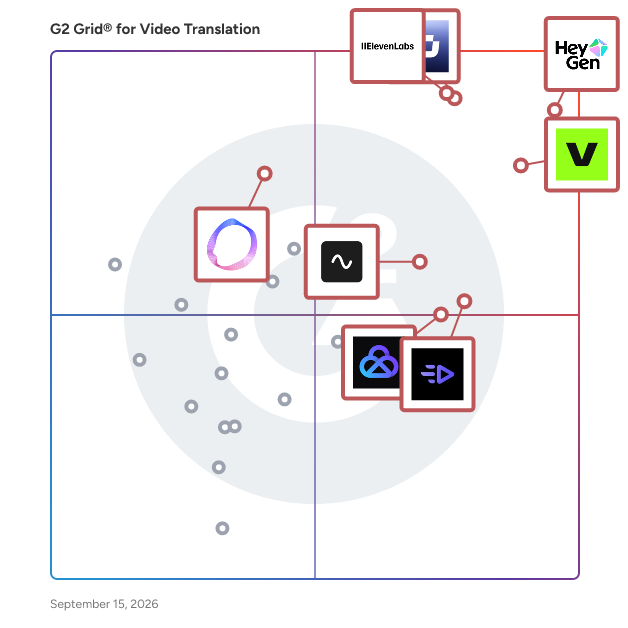
- **Leader:** [HeyGen](https://www.g2.com/products/heygen/reviews)
- **Highest Performer:** [Creatify AI](https://www.g2.com/products/creatify-labs-inc-creatify-ai/reviews)
- **Easiest to Use:** [Creatify AI](https://www.g2.com/products/creatify-labs-inc-creatify-ai/reviews)
- **Top Trending:** [ElevenLabs](https://www.g2.com/products/elevenlabsio/reviews)
- **Best Free Software:** [HeyGen](https://www.g2.com/products/heygen/reviews)


---

**Sponsored**

### Vyond

Vyond is an all-in-one AI video platform designed to empower organizations in creating secure, compliant, and engaging business content at scale. With a history spanning over 15 years, Vyond has established itself as a trusted solution for more than 20,000 companies, including 65% of the Fortune 500. Vyond is particularly suited for enterprises looking to enhance their internal communications, training programs, sales enablement, and marketing efforts through high-quality video content. Vyond serves a diverse range of use cases. It is particularly beneficial for companies aiming to streamline onboarding processes, improve training completion rates, and enhance compliance training. By integrating seamlessly with existing tools such as Slack, Learning Management Systems (LMS), and Customer Relationship Management (CRM) systems, Vyond allows employees to create brand-safe content without the need to switch between multiple applications. This integration not only fosters a more efficient workflow but also ensures that video content aligns with organizational branding and compliance standards. Key features of Vyond include AI avatars, AI-assisted scripting, instant translation, and text-to-speech capabilities, which collectively enhance the video creation process. Users can develop custom characters and utilize various animation styles, including animated, photorealistic, mixed-media, and live-action formats, all within a single platform. This versatility allows organizations to cater to different audience preferences and learning styles, making their content more engaging and effective. Additionally, Vyond’s SCORM-compliant LMS integration ensures that training materials can be easily tracked and measured, providing valuable insights into employee engagement and learning outcomes. Vyond stands out in the market by simplifying the technology stack for enterprises while expanding their creative capabilities. The platform’s focus on measurable outcomes—such as faster onboarding, higher training completion, and improved sales enablement—enables organizations to track return on investment (ROI) within their existing systems of record. This emphasis on data-driven results allows businesses to make informed decisions about their video content strategies and optimize their communication efforts. With a commitment to ongoing innovation and customer trust, Vyond is dedicated to evolving its platform to meet the needs of modern enterprises. By bringing next-generation AI capabilities into a compliant and governed environment, Vyond enables organizations to create content more efficiently, communicate more effectively, and reduce their reliance on fragmented solutions. This positions Vyond as a comprehensive tool for any organization looking to leverage video as a key component of their business strategy.


[Visit website](https://www.g2.com/external_clickthroughs/record?secure%5Bad_program%5D=ppc&amp;secure%5Bad_slot%5D=category_product_list&amp;secure%5Bcategory_id%5D=1008899&amp;secure%5Bdisplayable_resource_id%5D=582&amp;secure%5Bdisplayable_resource_type%5D=Category&amp;secure%5Bmedium%5D=sponsored&amp;secure%5Bplacement_reason%5D=neighbor_category&amp;secure%5Bplacement_resource_ids%5D%5B%5D=1558&amp;secure%5Bplacement_resource_ids%5D%5B%5D=1006582&amp;secure%5Bplacement_resource_ids%5D%5B%5D=2391&amp;secure%5Bprioritized%5D=false&amp;secure%5Bproduct_id%5D=7533&amp;secure%5Bresource_id%5D=1008899&amp;secure%5Bresource_type%5D=Category&amp;secure%5Bsource_type%5D=category_page&amp;secure%5Bsource_url%5D=https%3A%2F%2Fwww.g2.com%2Fcategories%2Fvideo-translation-software&amp;secure%5Btoken%5D=ba988fb012dde264ba8e65ef34cafd160999e41a7cfc89a64ce867519252a4f8&amp;secure%5Burl%5D=https%3A%2F%2Fthink.vyond.com%2Fsignup%3Futm_source%3Dg2%26utm_medium%3Dppc%26utm_campaign%3Dfree_trial&amp;secure%5Burl_type%5D=free_trial&amp;secure%5Bvisitor_segment%5D=180)

---

## Top-Rated Products (Ranked by G2 Score)
### 1. [HeyGen](https://www.g2.com/products/heygen/reviews)
  HeyGen is the leading AI video generation platform designed to assist users in creating visually engaging videos effortlessly. This innovative solution caters to a wide range of users, from small business owners to large corporations, enabling them to produce high-quality videos without the need for extensive technical skills or expensive production resources. By simplifying the video creation process, HeyGen empowers users to effectively communicate their messages and enhance their brand presence, without the traditional bottlenecks. The platform is particularly beneficial for marketers, L&amp;D professionals, soloprenuers, and content creators who seek to engage their audiences through dynamic visual storytelling. HeyGen simplifies the video creation process in several key ways. Users can generate professional, polished videos from just a single prompt, making it suitable for various applications such as marketing campaigns, sales presentations, and internal communications. Additionally, the platform allows users to transform written content, such as blogs and articles, into vibrant videos, significantly reducing the time spent on content creation. This feature enables users to share their messages more efficiently, maximizing their outreach. Another standout feature of HeyGen is its ability to turn scripts into lifelike videos featuring realistic AI avatars and authentic voiceovers. This capability not only captivates audiences but also enhances the overall viewing experience. Furthermore, HeyGen breaks down language barriers by offering localization options in over 175 languages and dialects, allowing users to connect with global audiences in a meaningful way. With a user-friendly interface and a robust set of features, HeyGen stands out as a comprehensive solution for video creation. It has already garnered the trust of over 90,000 businesses, including renowned brands like OpenAI, HubSpot, and Ogilvy. By leveraging HeyGen&#39;s capabilities, users can produce a wide array of videos, from marketing promotions to educational content, all while ensuring their stories are told in a compelling and memorable way. Your story matters. Make it unforgettable with HeyGen.


  **Average Rating:** 4.8/5.0
  **Total Reviews:** 1,575


**Seller Details:**

- **Seller:** [HeyGen](https://www.g2.com/sellers/heygen)
- **Company Website:** https://www.heygen.com/
- **Year Founded:** 2020
- **HQ Location:** Los Angeles, California
- **LinkedIn® Page:** https://www.linkedin.com/company/heygen/ (320 employees on LinkedIn®)

**Reviewer Demographics:**
  - **Who Uses This:** CEO, Owner
  - **Top Industries:** Marketing and Advertising, Consulting
  - **Company Size:** 88% Small-Business, 8% Mid-Market


#### Pros & Cons

**Pros:**

- Ease of Use (693 reviews)
- Quality (513 reviews)
- Realistic Avatars (486 reviews)
- Video Creation (456 reviews)
- Easy Creation (346 reviews)

**Cons:**

- Expensive (210 reviews)
- Pricing Issues (190 reviews)
- Expensive Cost (172 reviews)
- Cost Issue (153 reviews)
- Avatar Limitations (152 reviews)

### 2. [VEED](https://www.g2.com/products/veed/reviews)
  VEED is an AI-powered video creation and editing platform that helps creators, marketers, teams and enterprises generate and edit video content at scale. The platform combines advanced AI video generation with simple but powerful editing tools, allowing users to produce professional videos without technical expertise or expensive equipment. From Idea to Video in One Unified Workflow VEED brings video generation and editing together in a single platform so users can create original content through AI video generation, then refine it with professional editing features—all in one workspace. Users no longer need to juggle tools, struggle with editing skills, or deal with production bottlenecks. This integrated approach helps teams scale content production, localize videos across markets, and maintain brand consistency across campaigns. The platform is designed for content creators producing social media and educational videos, marketing teams developing campaign assets, small business owners creating promotional content, and enterprises managing video content at scale. VEED&#39;s browser-based interface requires no downloads or installations, making professional video creation accessible from any device with an internet connection. Teams can collaborate on projects in real-time, share feedback, and manage multiple video projects simultaneously. AI Video Generation VEED&#39;s video generation capabilities are powered by industry-leading AI from OpenAI, Google, and ElevenLabs and integrated with the latest releases, including Sora and Veo. The platform also features Fabric 1.0, VEED&#39;s proprietary AI video model that delivers natural lip-sync synchronization between generated avatars and audio, creating more realistic and engaging video content. Users can: • Transform text scripts into complete videos with AI avatars and dynamic scenes • Generate professional voiceovers in multiple languages and voices using neural text-to-speech technology • Create talking videos with precise lip-sync accuracy using Fabric 1.0 • Create custom visuals, animations, and motion graphics from text prompts • Produce multiple video variations optimized for different platforms and target audiences The video generation workflow allows users to start from scratch with just a text prompt, eliminating the need for filming equipment, studios, or professional on-camera skills. Videos can be customized with brand colors, logos, and style preferences to maintain visual consistency across content. AI-Powered Editing Tools The platform lets creators automate complex editing tasks traditionally requiring professional skills and software expertise. Key editing capabilities include: • Generate and translate automatic subtitles in over 125 languages, with fully customizable styling • Translate spoken audio into multiple languages using AI dubbing. • Intuitive background removal for videos and images—no green screen needed • Detect and remove filler words for cleaner, more professional dialogue • Automatically trim scenes, improve pacing, and remove dead space with Magic Cut • Clean audio and reduce background noise in one click These editing features work alongside traditional video editing tools like timeline editing, transitions, text overlays, and color correction, giving users both AI-powered automation and manual creative control.


  **Average Rating:** 4.6/5.0
  **Total Reviews:** 1,963


**Seller Details:**

- **Seller:** [VEED](https://www.g2.com/sellers/veed-bdac6289-d6d6-4f09-b842-7bac70643e49)
- **Company Website:** https://www.veed.io/
- **Year Founded:** 2018
- **HQ Location:** London, GB
- **Twitter:** @veedstudio (22,120 Twitter followers)
- **LinkedIn® Page:** https://www.linkedin.com/company/veedhq/ (189 employees on LinkedIn®)

**Reviewer Demographics:**
  - **Who Uses This:** Founder, Owner
  - **Top Industries:** Marketing and Advertising, Computer Software
  - **Company Size:** 80% Small-Business, 9% Mid-Market


#### Pros & Cons

**Pros:**

- Ease of Use (1256 reviews)
- Features (839 reviews)
- Easy Editing (763 reviews)
- Video Editing (737 reviews)
- Easy Creation (670 reviews)

**Cons:**

- Slow Performance (280 reviews)
- Limited Features (267 reviews)
- Expensive (232 reviews)
- AI Limitations (215 reviews)
- Limited Options (204 reviews)

### 3. [Synthesia](https://www.g2.com/products/synthesia/reviews)
  Synthesia is the best AI video generation platform for business. By turning text into professional AI-generated videos in minutes, Synthesia replaces static documents and slide decks with dynamic, human-like communication that drives engagement, understanding, and results. 🚀 Create at the speed of change Traditional video production is slow, costly, and hard to scale. With Synthesia, anyone can create studio-quality videos fast, right in their browser. When your products, policies, or messages change, your videos can too — no cameras, actors, or editing software required. 🧍‍♂️ Bring your message to life with AI Avatars Add a human touch to every message with 240+ diverse, realistic AI avatars, representing different ages, ethnicities, and styles. Choose a brand-aligned avatar or create your own custom digital twin for a consistent on-screen identity. 🌍 Communicate globally with ease Reach every audience with a click. Synthesia supports 160+ languages and accents with built-in AI translation and dubbing, making global rollouts effortless. Deliver consistent, localized content to every team and market — without losing your brand’s voice. 💡 Engage and educate through interactivity Keep your audience involved with interactive videos that go beyond passive viewing. Add clickable elements, branching paths, or quizzes to improve learning outcomes and drive action across training, onboarding, and customer education. 📊 Measure impact, not just output Synthesia’s built-in analytics let you see how your videos perform — who’s watching, where they drop off, and how they engage. Use data-driven insights to refine content and maximize ROI on every communication. 🔒 Built for enterprise trust and security Synthesia is trusted by the world’s leading organizations for its enterprise-grade security and compliance standards, including SOC 2 Type II, GDPR, and ISO 27001. Your data, avatars, and videos are always protected with role-based access, watermarking, and private deployment options. 🤝 Empower everyone to be a communicator From HR and L&amp;D to Marketing and Sales, Synthesia enables every team to create on-brand, on-message videos at scale — turning communication into a competitive advantage.


  **Average Rating:** 4.6/5.0
  **Total Reviews:** 2,716


**Seller Details:**

- **Seller:** [Synthesia](https://www.g2.com/sellers/synthesia)
- **Company Website:** https://www.synthesia.io/
- **Year Founded:** 2017
- **HQ Location:** London
- **Twitter:** @synthesiaIO (28,356 Twitter followers)
- **LinkedIn® Page:** https://www.linkedin.com/company/synthesia-technologies/ (662 employees on LinkedIn®)

**Reviewer Demographics:**
  - **Who Uses This:** CEO, Owner
  - **Top Industries:** Computer Software, E-Learning
  - **Company Size:** 67% Small-Business, 18% Mid-Market


#### Pros & Cons

**Pros:**

- Ease of Use (1306 reviews)
- Quality (809 reviews)
- Realistic Avatars (788 reviews)
- Easy Creation (756 reviews)
- Video Creation (664 reviews)

**Cons:**

- Avatar Limitations (443 reviews)
- Limited Avatars (384 reviews)
- AI Limitations (372 reviews)
- Avatar Quality (358 reviews)
- Limited Customization (308 reviews)

### 4. [ElevenLabs](https://www.g2.com/products/elevenlabsio/reviews)
  ElevenLabs is the world’s most advanced generative media and voice AI company, powering creation, localization, and intelligent interaction across every medium. Built around two core platforms—Creative and Agents—ElevenLabs combines state-of-the-art speech, sound, image, and video technologies to make digital expression instant, human, and scalable. The Creative Platform provides everything teams need to generate, transform, and produce media at studio quality. It includes Voice v3 (the most expressive text-to-speech model on the market), Scribe v2 for industry-leading speech-to-text, Voice Design and Voice Cloning for personalized character creation, Voice Isolator and Voice Changer for transformation, and Realtime Speech-to-Text for dynamic use cases. Users can also generate AI Sound Effects (SFX), AI Music, and create visuals through Image and Video generation. Production tools like Studio, Dubbing, Voice Library, and Productions enable full-scale localization and content workflows—all in one seamless environment. The Agents Platform extends ElevenLabs’ technology into real-time interaction. It allows developers and enterprises to deploy voice-native AI agents that can reason, converse, and complete tasks. Through built-in Workflows, agents can act on context, access information, and deliver personalized customer experiences across sales, support, and education—all powered by ElevenLabs’ expressive voice technology. Enterprises integrate via SOC 2-compliant APIs, SDKs, and on-prem deployments to build secure, scalable, and multilingual solutions. Ethical guardrails such as Speech Classifier, watermarking, and granular voice usage controls ensure trust and transparency across every product. From content creation and localization to intelligent automation, ElevenLabs unites creativity and communication—empowering the world to create, converse, and connect in any language, medium, or voice.


  **Average Rating:** 4.5/5.0
  **Total Reviews:** 1,138


**Seller Details:**

- **Seller:** [Eleven Labs](https://www.g2.com/sellers/eleven-labs-1235fa78-9455-4719-b9e0-9bae6a18eb20)
- **Company Website:** https://elevenlabs.io/
- **Year Founded:** 2022
- **HQ Location:** New York, US
- **LinkedIn® Page:** https://www.linkedin.com/company/elevenlabsio/ (693 employees on LinkedIn®)

**Reviewer Demographics:**
  - **Who Uses This:** CEO, Founder
  - **Top Industries:** Marketing and Advertising, Entertainment
  - **Company Size:** 71% Small-Business, 6% Mid-Market


#### Pros & Cons

**Pros:**

- Ease of Use (470 reviews)
- Quality (318 reviews)
- Speed (289 reviews)
- Features (239 reviews)
- Easy Setup (218 reviews)

**Cons:**

- Expensive (171 reviews)
- Needs Improvement (163 reviews)
- Pricing Issues (148 reviews)
- Missing Features (129 reviews)
- Pronunciation Issues (109 reviews)

### 5. [AKOOL](https://www.g2.com/products/akool/reviews)
  AKOOL is a complete AI Video Generation Suite, transforming how professional video content is created. Our multimodal platform combines cutting-edge generation tools with enterprise-grade production infrastructure to deliver studio-quality results at scale. We believe exceptional video content should be effortless to produce. That&#39;s why we&#39;ve reimagined traditional workflows with intuitive AI tools that empower teams—from marketing, sales to HR, e-commerce and more—to create professional videos in minutes, not weeks. Create with Unmatched Ease 🎥 AI-Generated Avatars &amp; Voices – Bring stories to life with diverse presenters or custom avatars in 175+ languages ✂️ Smart Editing Tools – Automatically generate scenes, transitions and polished edits in seconds 🚀 Hyper-Personalization – Dynamically tailor videos with names, offers and localized messaging More than just a tool, AKOOL is your partner in visual storytelling. Whether launching your first campaign or scaling global content, we give you the power to create without limits—faster, smarter and with greater impact. Join 40,000+ businesses transforming their video strategy with AKOOL.


  **Average Rating:** 4.8/5.0
  **Total Reviews:** 545


**Seller Details:**

- **Seller:** [Akool Inc.](https://www.g2.com/sellers/akool-inc-c7e693d5-e4f3-4237-908f-7a667403d511)
- **Company Website:** https://akool.com/
- **HQ Location:** 471 Emerson St Palo Alto, CA 94301
- **Twitter:** @AkoolInc (55,980 Twitter followers)
- **LinkedIn® Page:** https://www.linkedin.com/company/akool/ (105 employees on LinkedIn®)

**Reviewer Demographics:**
  - **Who Uses This:** Marketing Manager, Manager
  - **Top Industries:** Marketing and Advertising, Information Technology and Services
  - **Company Size:** 82% Small-Business, 16% Mid-Market


#### Pros & Cons

**Pros:**

- Ease of Use (264 reviews)
- Quality (240 reviews)
- Video Creation (230 reviews)
- Features (202 reviews)
- High Quality (151 reviews)

**Cons:**

- Slow Performance (69 reviews)
- Slow Rendering (62 reviews)
- Expensive (61 reviews)
- AI Limitations (60 reviews)
- Expensive Cost (54 reviews)

### 6. [Creatify AI](https://www.g2.com/products/creatify-labs-inc-creatify-ai/reviews)
  Creatify — Fast, Simple AI Video Content Creation That Works Forget juggling multiple tools. Creatify is the all-in-one AI video generator and content creation platform that helps you create, test, and scale video ads that actually perform. With Creatify, you build #AIAdsThatWin. Create Video Ads Quickly and Easily Turn product images or URLs into video and static ads in minutes Auto-extract key hooks and selling points for your videos Choose from 1250+ hyper-realistic, diverse AI avatars — or upload your own Support for 29 languages and 140+ realistic voices and accents Add music, B-roll, and customize scenes with easy controls “Creatify cuts our ad production time in half without losing quality.” — Max Unicorn, Founder &amp; CEO Get Inspired and Make Smarter Ads with AdMax Build mood boards from competitor and category trends Recreate and customize proven templates Use smart reports to find your best hooks and angles Test and optimize ads with AI guidance “AdMax helped us move from guessing to testing with confidence.” — Max Unicorn, Founder &amp; CEO Scale Your Ads Across All Platforms Export once, run everywhere — Meta, YouTube, TikTok, LinkedIn, CTV Download in all the formats you need Repurpose your best ads across channels Keep improving with built-in performance feedback “We cut our customer acquisition cost by 38% in 30 days using Creatify.” — Max Unicorn, Founder &amp; CEO Who Creatify Is For Creative Leads &amp; Founders: Cut time and cost creating video ads that convert. Video Teams: Turn static images into dynamic videos with customizable scenes and avatars. Growth &amp; Strategy Teams: Find winning ideas, track performance, and scale your best ads easily. Creatify is a simple, powerful AI video content creation platform and generator to help you make ads that work — fast.


  **Average Rating:** 4.8/5.0
  **Total Reviews:** 1,372


**Seller Details:**

- **Seller:** [Creatify Labs Inc](https://www.g2.com/sellers/creatify-labs-inc)
- **Company Website:** https://creatify.ai/
- **Year Founded:** 2023
- **HQ Location:** Mountain View, California
- **LinkedIn® Page:** https://www.linkedin.com/company/creatify-ai/ (40 employees on LinkedIn®)

**Reviewer Demographics:**
  - **Who Uses This:** Owner, CEO
  - **Top Industries:** Marketing and Advertising, Health, Wellness and Fitness
  - **Company Size:** 77% Small-Business, 3% Mid-Market


#### Pros & Cons

**Pros:**

- Ease of Use (647 reviews)
- Quality (316 reviews)
- Time-Saving (305 reviews)
- Realistic Avatars (284 reviews)
- Speed (244 reviews)

**Cons:**

- Credit Issues (76 reviews)
- Credit Limitations (76 reviews)
- Expensive (71 reviews)
- Needs Improvement (68 reviews)
- Insufficient Credits (65 reviews)

### 7. [Descript](https://www.g2.com/products/descript/reviews)
  In Descript you can make any video you want, any way you want. All you need is an idea; it helps if you know how to type. With the world’s first only AI co-editor, Underlord, you can make a video just by describing your vision. It will create, edit, and design your video—all under your direction. It’s got the taste and judgment you want in a creative partner and the expertise you need from a video editor. And it’s tireless—so you can stay focused on getting the result you’re after while it does all the dirty work. And when you want to get dirty, you don’t need special knowledge or skills. If you can edit text, you can edit video with Descript. It’s loaded with automated design tools, plus the friendliest timeline editor you’ve ever seen, a built-in recorder, and hosted publishing that makes collaboration as easy as sending a link. Create product demos, training videos, screen recordings, video messages, podcasts, or social clips. Join the 7 million+ creators and businesses using Descript, and create something impressive—something you can be proud of.


  **Average Rating:** 4.6/5.0
  **Total Reviews:** 866


**Seller Details:**

- **Seller:** [Descript](https://www.g2.com/sellers/descript)
- **Company Website:** https://descript.com
- **Year Founded:** 2017
- **HQ Location:** San Francisco, CA
- **LinkedIn® Page:** https://www.linkedin.com/company/descript/ (187 employees on LinkedIn®)

**Reviewer Demographics:**
  - **Who Uses This:** Founder, Owner
  - **Top Industries:** Marketing and Advertising, Media Production
  - **Company Size:** 87% Small-Business, 8% Mid-Market


#### Pros & Cons

**Pros:**

- Easy Editing (280 reviews)
- Ease of Use (271 reviews)
- Video Editing (194 reviews)
- Features (192 reviews)
- Editing Features (189 reviews)

**Cons:**

- Learning Curve (81 reviews)
- Learning Difficulty (71 reviews)
- Difficulty/Complexity (69 reviews)
- Slow Performance (68 reviews)
- Editing Issues (65 reviews)

### 8. [Vyond](https://www.g2.com/products/vyond/reviews)
  Vyond is an all-in-one AI video platform designed to empower organizations in creating secure, compliant, and engaging business content at scale. With a history spanning over 15 years, Vyond has established itself as a trusted solution for more than 20,000 companies, including 65% of the Fortune 500. Vyond is particularly suited for enterprises looking to enhance their internal communications, training programs, sales enablement, and marketing efforts through high-quality video content. Vyond serves a diverse range of use cases. It is particularly beneficial for companies aiming to streamline onboarding processes, improve training completion rates, and enhance compliance training. By integrating seamlessly with existing tools such as Slack, Learning Management Systems (LMS), and Customer Relationship Management (CRM) systems, Vyond allows employees to create brand-safe content without the need to switch between multiple applications. This integration not only fosters a more efficient workflow but also ensures that video content aligns with organizational branding and compliance standards. Key features of Vyond include AI avatars, AI-assisted scripting, instant translation, and text-to-speech capabilities, which collectively enhance the video creation process. Users can develop custom characters and utilize various animation styles, including animated, photorealistic, mixed-media, and live-action formats, all within a single platform. This versatility allows organizations to cater to different audience preferences and learning styles, making their content more engaging and effective. Additionally, Vyond’s SCORM-compliant LMS integration ensures that training materials can be easily tracked and measured, providing valuable insights into employee engagement and learning outcomes. Vyond stands out in the market by simplifying the technology stack for enterprises while expanding their creative capabilities. The platform’s focus on measurable outcomes—such as faster onboarding, higher training completion, and improved sales enablement—enables organizations to track return on investment (ROI) within their existing systems of record. This emphasis on data-driven results allows businesses to make informed decisions about their video content strategies and optimize their communication efforts. With a commitment to ongoing innovation and customer trust, Vyond is dedicated to evolving its platform to meet the needs of modern enterprises. By bringing next-generation AI capabilities into a compliant and governed environment, Vyond enables organizations to create content more efficiently, communicate more effectively, and reduce their reliance on fragmented solutions. This positions Vyond as a comprehensive tool for any organization looking to leverage video as a key component of their business strategy.


  **Average Rating:** 4.8/5.0
  **Total Reviews:** 489


**Seller Details:**

- **Seller:** [Vyond](https://www.g2.com/sellers/vyond)
- **Company Website:** https://www.vyond.com/
- **Year Founded:** 2007
- **HQ Location:** San Mateo, California
- **Twitter:** @VyondVideo (134 Twitter followers)
- **LinkedIn® Page:** https://www.linkedin.com/company/vyond/ (270 employees on LinkedIn®)

**Reviewer Demographics:**
  - **Who Uses This:** Instructional Designer, Senior Instructional Designer
  - **Top Industries:** E-Learning, Hospital &amp; Health Care
  - **Company Size:** 51% Enterprise, 26% Small-Business


#### Pros & Cons

**Pros:**

- Ease of Use (185 reviews)
- Video Creation (124 reviews)
- Features (111 reviews)
- Easy Creation (107 reviews)
- Versatility (92 reviews)

**Cons:**

- Limited Customization (45 reviews)
- Limited Features (33 reviews)
- Limited Options (32 reviews)
- Limited Selection (27 reviews)
- Learning Curve (26 reviews)

### 9. [Murf.ai](https://www.g2.com/products/murf-ai/reviews)
  Murf AI is a cloud-based realistic text-to-speech platform that can be used to create voiceovers for their content (YouTube videos, podcasts, advertisements/ commercials, e-learning content, presentations, audiobooks, etc.). We harness AI and deep machine learning technology to generate these ultra-realistic voiceovers across a range of 120+ voices in 20+ languages. Voiceover production traditionally is a time-consuming and complicated process that involves hiring a voice actor, getting a script ready, recording in a studio, editing, adding music, images, or videos, and finally, syncing them all together. This is where Murf steps in to simplify the entire process and reduce the overall cost and time by leveraging AI. Murf serves as an all-in-one platform where content creators/users can not only easily convert their script into natural-sounding audio within minutes but also add images, music, and video to their voice-over and sync them all in one place. Try out the Murf AI studio now - https://murf.ai


  **Average Rating:** 4.7/5.0
  **Total Reviews:** 1,405


**Seller Details:**

- **Seller:** [Murf Inc.](https://www.g2.com/sellers/murf-inc)
- **Company Website:** https://murf.ai/
- **Year Founded:** 2020
- **HQ Location:** Salt Lake City, US
- **Twitter:** @MURFAISTUDIO (3,983 Twitter followers)
- **LinkedIn® Page:** https://www.linkedin.com/company/murf-ai/ (126 employees on LinkedIn®)

**Reviewer Demographics:**
  - **Who Uses This:** CEO
  - **Top Industries:** E-Learning, Marketing and Advertising
  - **Company Size:** 77% Small-Business, 14% Mid-Market


#### Pros & Cons

**Pros:**

- Ease of Use (169 reviews)
- Natural Sound (125 reviews)
- Natural Voices (124 reviews)
- Voice Customization (117 reviews)
- Quality (109 reviews)

**Cons:**

- Expensive (59 reviews)
- Pricing Issues (54 reviews)
- Limited Voices (53 reviews)
- Voice Quality (48 reviews)
- Pronunciation Issues (42 reviews)

### 10. [Perso AI](https://www.g2.com/products/perso-ai/reviews)
  ### What is Perso AI? Perso AI is an AI-powered video dubbing platform that automatically translates and localizes videos into 33 languages — preserving the original speaker&#39;s voice, tone, and emotion through voice cloning and lip sync technology. Trusted by 100+ leading creators with a combined 30 million subscribers, Perso AI cuts global video production costs by up to 98% compared to traditional dubbing studios. Where conventional localization takes days and thousands of dollars per language, Perso AI delivers studio-quality dubbed video in minutes — with human-in-the-loop script editing so teams never lose control of brand voice or cultural accuracy. Designed for marketing teams, content creators, educators, and enterprises that need to scale multilingual video production without scaling headcount or budget. --- ### How to Use Perso AI? Dubbing a video with Perso AI takes less than 5 minutes: Step 1 — Upload your video or audio file. Supported formats: mp4, mov, webm, mp3, wav (up to 2GB per file, from 5 seconds to 60 minutes). Step 2 — Select Language from 33 supported languages. Perso AI automatically detects and separates multiple speakers, applying culturally-aware translations to each voice individually. Step 3 — Review &amp; Edit Script in real-time. Adjust translations to match brand tone, fix terminology, or adapt cultural references — before dubbing is rendered. Step 4 — Export the final video with AI lip sync and cloned voice audio, ready to publish across any platform or channel. This review-before-render workflow is what separates Perso AI from fully automated alternatives: production speed without sacrificing editorial control. --- ### Perso AI&#39;s Core Features - AI Dubbing — Multi-speaker detection with individual voice cloning per speaker; preserves each speaker&#39;s original identity across all 33 languages - AI Lip Sync — Advanced lip movement synchronization that works even when faces are partially covered by glasses, masks, or hands - Voice Separation — Precisely isolates voices from background audio to enhance dubbing clarity and quality - 33 Language Support — Culturally-adapted localization covering major global markets: English, Japanese, Spanish, French, German, Korean, Portuguese, and more - Real-Time Script Editor — Review, refine, and approve translations before final dubbing; no costly post-production revisions - Flexible Export — Output clean audio tracks, subtitles, or lip-synced video in multiple formats --- ### Perso AI&#39;s Primary Use Cases - Global Marketing Teams — Localize brand and campaign videos into 33 languages without re-shooting; reduce localization costs by up to 98% vs. traditional dubbing studios - YouTube &amp; Podcast Creators — Expand your audience globally while preserving your original voice identity through AI voice cloning — trusted by 100+ creators with 30M+ subscribers - L&amp;D and Training Teams — Translate compliance, onboarding, and e-learning videos for global workforces in hours, not weeks - Enterprise Communications — Align multilingual, distributed teams with localized executive briefings, product demos, and town halls - Marketing Agencies — Scale multilingual video production for clients without adding headcount, studio time, or per-language overhead --- ### Frequently Asked Questions Q: How many languages does Perso AI support? Perso AI supports 33 languages including English, Japanese, Spanish, French, German, Korean, and Portuguese — covering major global markets for enterprise teams and individual creators. Q: Does Perso AI preserve the original speaker&#39;s voice? Yes. Perso AI uses AI voice cloning to replicate the original speaker&#39;s tone, pitch, and emotional nuance in the target language — not a generic TTS voice. In multi-speaker videos, each speaker is cloned and dubbed individually. Q: What file formats and sizes does Perso AI support? Perso AI accepts mp4, mov, webm, mp3, and wav files up to 2GB per upload. Content from 5 seconds to 60 minutes in length is supported in a single workflow. Q: Can I edit the translation before dubbing is finalized? Yes. Perso AI includes a real-time script editor that lets users review and modify translations before the final dubbing is rendered — ensuring brand voice, terminology, and cultural context are accurate before export. Q: How much does AI dubbing cost compared to traditional studios? Perso AI reduces video localization costs by up to 98% compared to traditional dubbing studios, which typically charge thousands of dollars per language per video. Perso AI processes the same content in minutes at a fraction of the cost. Q: How is Perso AI different from HeyGen or ElevenLabs? Perso AI is purpose-built for video dubbing workflows: multi-speaker detection, AI lip sync, voice separation, and pre-render script editing in one platform — optimized for teams localizing real video content, not single-speaker avatar or TTS generation.


  **Average Rating:** 3.7/5.0
  **Total Reviews:** 28


**Seller Details:**

- **Seller:** [ESTsoft](https://www.g2.com/sellers/estsoft)
- **Company Website:** https://perso.ai/
- **Year Founded:** 1993
- **HQ Location:** Seoul, KR
- **Twitter:** @EST_soft (532 Twitter followers)
- **LinkedIn® Page:** https://www.linkedin.com/company/estsoft-corp/ (390 employees on LinkedIn®)

**Reviewer Demographics:**
  - **Company Size:** 86% Small-Business, 10% Mid-Market


#### Pros & Cons

**Pros:**

- Quality (15 reviews)
- Dubbing (11 reviews)
- Ease of Use (10 reviews)
- Translation Efficiency (7 reviews)
- Language Support (6 reviews)

**Cons:**

- Limitations (8 reviews)
- Limited Features (8 reviews)
- Slow Performance (8 reviews)
- Time Delays (7 reviews)
- Expensive (6 reviews)

### 11. [VMEG.AI](https://www.g2.com/products/vmeg-ai/reviews)
  VMEG is an AI video localization platform that brings your content to life in 170+ languages, featuring voice cloning, lip-sync, subtitles, and a complete all-in-one editing studio. VMEG.AI offers a complete localization workflow. We provide precise video translation with multi-speaker recognition, and one of the market&#39;s most natural lip-sync technology, which has earned high praise from broadcasters and online education platforms. This commitment to technical excellence is why over 1,000,000 users trust VMEG. We deliver this best-in-class solution at a reasonable and value-driven price point.


  **Average Rating:** 4.5/5.0
  **Total Reviews:** 39


**Seller Details:**

- **Seller:** [Pixripple Technology](https://www.g2.com/sellers/pixripple-technology)
- **Company Website:** https://www.vmeg.ai/
- **HQ Location:** N/A
- **LinkedIn® Page:** https://www.linkedin.com/company/No-Linkedin-Presence-Added-Intentionally-By-DataOps (1 employees on LinkedIn®)

**Reviewer Demographics:**
  - **Company Size:** 97% Small-Business, 3% Enterprise


#### Pros & Cons

**Pros:**

- Accuracy (5 reviews)
- Language Support (5 reviews)
- Video Creation (5 reviews)
- Text to Speech (4 reviews)
- Video Production (4 reviews)

**Cons:**

- Expensive (4 reviews)
- Credit Limitations (3 reviews)
- Credit Issues (2 reviews)
- Credit System (2 reviews)
- Lack of Free Credits (2 reviews)

### 12. [D-ID](https://www.g2.com/products/d-id/reviews)
  D-ID is a sophisticated software solution that specializes in creating advanced Interactive Visual Agents, which are hyper-realistic, AI-powered digital humans designed to facilitate real-time, face-to-face conversations at scale. This innovative technology allows organizations to enhance their customer interactions by integrating these digital agents into various platforms, including enterprise websites, mobile applications, and internal systems. The primary use cases for D-ID&#39;s technology include automating customer service, onboarding new users, guiding product selection, and delivering information in a more natural and human-centered manner. Targeted at a diverse audience, D-ID serves organizations across multiple sectors, including Fortune 500 companies, financial institutions, public sector entities, media networks, and rapidly growing digital platforms. The versatility of D-ID&#39;s solutions makes it suitable for businesses looking to improve customer engagement and streamline communication processes. By deploying these digital agents, organizations can ensure that they provide timely and relevant information to their users, thereby enhancing the overall user experience. One of the standout features of D-ID is its AI video generation platform, which allows users to convert text, audio, or cloned voice inputs into high-quality videos featuring lifelike talking avatars. This capability is particularly beneficial for creating engaging content that can be used in various contexts, such as marketing, training, and internal communications. Users can also create personalized digital avatars directly within the platform, enabling a more tailored approach to video content creation. Furthermore, D-ID&#39;s recent acquisition of simpleshow enhances its offerings by incorporating a widely adopted explainer video creation tool. This integration provides users with a seamless workflow for producing informative and engaging explainer videos, which can be particularly useful for training and compliance purposes. Supporting over 120 languages, D-ID enables enterprises to create personalized, multilingual content without the traditional costs and constraints associated with video production. D-ID also offers flexible deployment options, including API integration, self-service creation tools, and mobile applications, allowing organizations to scale their intelligent communication efforts efficiently and securely. By adding a human, interactive layer to digital experiences, D-ID empowers businesses to leverage conversational AI and localized video content, ultimately transforming the way they engage with their customers and stakeholders.


  **Average Rating:** 4.6/5.0
  **Total Reviews:** 114


**Seller Details:**

- **Seller:** [D-ID ](https://www.g2.com/sellers/d-id)
- **Company Website:** https://www.d-id.com/
- **Year Founded:** 2017
- **HQ Location:** Tel Aviv
- **Twitter:** @D_ID_ (15,557 Twitter followers)
- **LinkedIn® Page:** https://www.linkedin.com/company/deidentification/ (139 employees on LinkedIn®)

**Reviewer Demographics:**
  - **Who Uses This:** CEO
  - **Top Industries:** Marketing and Advertising, Consulting
  - **Company Size:** 84% Small-Business, 9% Mid-Market


#### Pros & Cons

**Pros:**

- Ease of Use (38 reviews)
- Realistic Avatars (25 reviews)
- Quality (22 reviews)
- Avatars (15 reviews)
- Content Creation (14 reviews)

**Cons:**

- Avatar Limitations (9 reviews)
- Expensive Cost (9 reviews)
- Pricing Issues (9 reviews)
- AI Limitations (8 reviews)
- Expensive (8 reviews)

### 13. [Wavel.ai](https://www.g2.com/products/dolce-lte-ltd-wavel-ai/reviews)
  Wavel is a complete Video Translation Platform, where video creators can dub, voiceover or subtitle their videos seamlessly. Users can create voice clones to get video translation in the desired voice with perfect emotion, expressions and sync.


  **Average Rating:** 4.3/5.0
  **Total Reviews:** 50


**Seller Details:**

- **Seller:** [Dolce lte ltd](https://www.g2.com/sellers/dolce-lte-ltd)
- **Year Founded:** 2019
- **HQ Location:** New York, US
- **LinkedIn® Page:** https://www.linkedin.com/company/wavel/people/ (36 employees on LinkedIn®)

**Reviewer Demographics:**
  - **Top Industries:** Automotive, Information Technology and Services
  - **Company Size:** 53% Small-Business, 33% Mid-Market


#### Pros & Cons

**Pros:**

- AI Technology (7 reviews)
- Ease of Use (6 reviews)
- Quality (6 reviews)
- AI Voices (5 reviews)
- Quick (5 reviews)

**Cons:**

- Pronunciation Issues (5 reviews)
- Artificiality (4 reviews)
- Expensive (3 reviews)
- Pricing Issues (3 reviews)
- Robotic Voice (3 reviews)

### 14. [Animaker](https://www.g2.com/products/animaker/reviews)
  Animaker is a power-packed, AI-powered video creation platform built to transform the way creators and teams easily produce videos for training, communication, and marketing. Trusted by 30 million users and 80% of Fortune 500 companies, Animaker empowers anyone to create professional videos in minutes, with no editing experience required. Animaker’s toolkit comes loaded with advanced AI tools that simplify every stage of video creation. ● AI Whiteboard Video - Create engaging videos in a hand-drawn whiteboard style from prompts. ● AI Clip Generator - Generate professional-looking clips from prompts or uploaded media. ● AI Video Generator - Produce full-length, studio-quality Gen AI videos from simple prompts. ● AI Infographic Maker - Convert data and reports into visually stunning animated infographic videos. ● AI Video Trainers - Build personalized, on-demand training videos at scale. ● AI Video Quiz - Make training videos engaging and interactive by adding quizzes within the content. ● AI Video Editor - Edit, enhance, and polish videos automatically with our AI Assistant Max. ● Subtitle Generator - Add accurate, multilingual subtitles in seconds with one click! ● AI Translate - Auto-translate animaker-made videos into 100+ languages to connect with the audience worldwide ● AI Voice Generator - Create realistic, human-like voiceovers from 180+ voices across 2000+ languages and accents. Our other powerful features include - ● Avatar Maker - Build unique, customizable characters that represent your brand and audience. ● Animaker Deck - Create animated presentations with characters for engagement and retention! ● 1000+ ready-to-use templates - Quickly make videos for any purpose from training and onboarding to marketing and internal communication. Since 2015, Animaker has powered over 50 million video creations, helping L&amp;D teams, educators, and enterprises revolutionize how they train, communicate, and grow through the power of AI-driven video creation.


  **Average Rating:** 4.7/5.0
  **Total Reviews:** 1,020


**Seller Details:**

- **Seller:** [Animaker, Inc](https://www.g2.com/sellers/animaker-inc)
- **Company Website:** https://www.animaker.com
- **Year Founded:** 2015
- **HQ Location:** San Francisco, California
- **Twitter:** @animakerhq (4,071 Twitter followers)
- **LinkedIn® Page:** https://www.linkedin.com/company/3579051/ (207 employees on LinkedIn®)

**Reviewer Demographics:**
  - **Who Uses This:** Student, Teacher
  - **Top Industries:** Animation, Higher Education
  - **Company Size:** 78% Small-Business, 13% Mid-Market


#### Pros & Cons

**Pros:**

- Ease of Use (426 reviews)
- Video Creation (280 reviews)
- Features (142 reviews)
- Animation Features (139 reviews)
- Characters (129 reviews)

**Cons:**

- Not Free (86 reviews)
- Expensive (80 reviews)
- Lack of Free Access (78 reviews)
- Plan Limitations (65 reviews)
- Slow Rendering (62 reviews)

### 15. [Rask AI](https://www.g2.com/products/rask-ai/reviews)
  Meet Rask AI – a one-stop-shop localization tool that allows content creators and companies to translate their videos into 130+ languages quickly and efficiently. With &quot;Text-to-Voice&quot; and &quot;Voice Cloning&quot; technologies, they can add a professional-quality voiceover to videos without the need for recording or hiring a voice actor. And now you can keep your own voice or your voiceover tone when dubbing. Check it out here for free: https://www.rask.ai/


  **Average Rating:** 4.7/5.0
  **Total Reviews:** 269


**Seller Details:**

- **Seller:** [Rask AI](https://www.g2.com/sellers/rask-ai)
- **Year Founded:** 2023
- **HQ Location:** Dover, DE
- **Twitter:** @rask_ai (8,126 Twitter followers)
- **LinkedIn® Page:** https://www.linkedin.com/company/rask-ai/ (24 employees on LinkedIn®)

**Reviewer Demographics:**
  - **Top Industries:** Marketing and Advertising, Education Management
  - **Company Size:** 86% Small-Business, 9% Mid-Market


#### Pros & Cons

**Pros:**

- Ease of Use (1 reviews)
- Intuitive (1 reviews)
- Language Diversity (1 reviews)
- Language Support (1 reviews)
- Multilingual Support (1 reviews)

**Cons:**

- Cost Issue (1 reviews)
- Expensive (1 reviews)
- Not User-Friendly (1 reviews)
- Poor Customer Support (1 reviews)
- Pricing Issues (1 reviews)

### 16. [Elai.io](https://www.g2.com/products/elai-io/reviews)
  Panopto&#39;s AI video studio, Elai, extends the platform&#39;s capabilities with an all-in-one solution for AI-generated video content. Trusted by over 2,000 clients, Elai enables organizations to produce professional, interactive videos narrated by digital human presenters—in minutes, and without a camera, studio, or green screen. Its intuitive editor supports instant video creation from text, PowerPoint, and PDF files; translation into 75+ languages; and interactive elements including buttons, quizzing, and branching scenarios—making scalable content creation accessible to everyone.


  **Average Rating:** 4.6/5.0
  **Total Reviews:** 123


**Seller Details:**

- **Seller:** [Panopto](https://www.g2.com/sellers/panopto)
- **Company Website:** https://www.panopto.com
- **Year Founded:** 2007
- **HQ Location:** 600 River Avenue Suite 100 Pittsburgh, PA 15212
- **Twitter:** @Panopto (2,841 Twitter followers)
- **LinkedIn® Page:** https://www.linkedin.com/company/956754/ (190 employees on LinkedIn®)

**Reviewer Demographics:**
  - **Top Industries:** E-Learning, Computer Software
  - **Company Size:** 68% Small-Business, 23% Mid-Market


#### Pros & Cons

**Pros:**

- Ease of Use (55 reviews)
- Realistic Avatars (36 reviews)
- Features (34 reviews)
- Customer Support (29 reviews)
- Video Production (29 reviews)

**Cons:**

- Avatar Limitations (18 reviews)
- Slow Rendering (14 reviews)
- AI Limitations (13 reviews)
- Limited Avatars (13 reviews)
- Avatar Quality (12 reviews)

### 17. [Dubverse](https://www.g2.com/products/dubverse/reviews)
  Dubverse SUB is an AI-powered subtitle generator designed to enhance video accessibility and global reach by providing accurate, time-coded subtitles in over 30 languages. With a single click, users can generate customized subtitles for long-form videos, significantly improving SEO and viewer engagement. The platform supports seamless integration with social media channels, allowing direct uploads to platforms like YouTube, Facebook, and Twitter. Dubverse SUB also offers features such as subtitle editing, resynchronization for perfect alignment, and the ability to embed subtitles permanently into videos. By automating the subtitle creation process, Dubverse SUB enables content creators to connect with diverse audiences worldwide, ensuring their messages are understood across different languages and regions. Key Features: - Accurate, Time-Coded Subtitles: Automatically generates 99% accurate, time-stamped subtitles, reducing manual effort. - Multilingual Support: Provides subtitles in over 30 languages, facilitating global audience engagement. - Seamless Integration: Allows direct sharing of subtitled videos to social media platforms like YouTube, Facebook, and Twitter. - Subtitle Editing and Resynchronization: Offers tools to edit subtitles and adjust synchronization for perfect alignment. - Permanent Subtitle Embedding: Enables embedding of subtitles directly into videos, enhancing accessibility and watch time. Primary Value: Dubverse SUB addresses the challenge of making video content accessible and understandable to a global audience. By automating the creation of accurate, multilingual subtitles, it saves time and resources for content creators, improves SEO rankings, and increases viewer engagement. This ensures that messages resonate across different languages and cultures, expanding the reach and impact of video content.


  **Average Rating:** 4.6/5.0
  **Total Reviews:** 20


**Seller Details:**

- **Seller:** [Dubverse](https://www.g2.com/sellers/dubverse)
- **Year Founded:** 2021
- **HQ Location:** Gurugram, Haryana
- **Twitter:** @dubverse_ai (775 Twitter followers)
- **LinkedIn® Page:** https://www.linkedin.com/company/dubverse/ (10 employees on LinkedIn®)

**Reviewer Demographics:**
  - **Company Size:** 80% Small-Business, 20% Mid-Market


#### Pros & Cons

**Pros:**

- Ease of Use (2 reviews)
- Accuracy (1 reviews)
- Affordable (1 reviews)
- Dubbing (1 reviews)
- Impressive Results (1 reviews)

**Cons:**

- Character Limit (1 reviews)
- Difficulty/Complexity (1 reviews)
- Learning Curve (1 reviews)
- Limited Features (1 reviews)
- Recording Issues (1 reviews)

### 18. [Gotalk.ai](https://www.g2.com/products/gotalk-ai/reviews)
  Gotalk.ai leverages advanced AI and neural network technology to transform written content into lifelike, natural-sounding voices. This AI voice generator simplifies creating voiceovers for various applications, from YouTube and podcasts to e-learning and phone system greetings. Whether for personal or commercial use, Gotalk.ai offers a straightforward interface that allows customization of voice characteristics like tone, pitch, and pace, ensuring each voiceover meets specific user needs. Continuation: As you explore our company&#39;s narrative on this page, we invite you to learn about the innovations and technological advancements that power our products. Our commitment to excellence is reflected in our continual updates and enhancements, ensuring that our solutions not only meet but exceed industry standards. This dedication is pivotal in providing our customers with a reliable and cutting-edge tool that enhances their digital content across multiple platforms and languages. Discover how Gotalk.ai can revolutionize your content creation process, making it more efficient and impactful.


  **Average Rating:** 4.8/5.0
  **Total Reviews:** 17


**Seller Details:**

- **Seller:** [Gobig Online Ltd](https://www.g2.com/sellers/gobig-online-ltd)
- **Year Founded:** 2024
- **HQ Location:** Southampton, Hampshire
- **LinkedIn® Page:** https://www.linkedin.com/company/gobig-online/ (3 employees on LinkedIn®)

**Reviewer Demographics:**
  - **Top Industries:** Telecommunications
  - **Company Size:** 65% Small-Business, 29% Mid-Market


#### Pros & Cons

**Pros:**

- Customer Support (2 reviews)
- Ease of Use (2 reviews)
- Natural Voices (2 reviews)
- Quality (2 reviews)
- Speed (2 reviews)

**Cons:**

- Limited Customization (2 reviews)
- Limited Language Options (1 reviews)
- Limited Options (1 reviews)
- Needs Improvement (1 reviews)
- Slow Performance (1 reviews)

### 19. [Vidyard](https://www.g2.com/products/vidyard/reviews)
  Vidyard is an AI-powered video platform built for modern revenue teams to personalize buyer engagement at scale. It helps sales, marketing, and customer success teams create, automate, and deliver personalized video messages across the entire customer journey without adding manual work or headcount. In a world of crowded inboxes and declining response rates, Vidyard turns key revenue moments into meaningful, human interactions. From prospecting and meeting follow-ups to onboarding and renewals, teams use Vidyard to engage buyers more effectively, build trust faster, and keep deals moving forward. Unlike traditional video tools, Vidyard goes beyond recording. With automation, CRM-native workflows, and AI-generated video, teams can trigger personalized videos based on real buyer actions such as booking a meeting, downloading content, or reaching a deal stage. This ensures every touchpoint feels timely, relevant, and personal. Vidyard also makes it easy to get started with AI-powered video by creating your own AI Avatar for free. With a single recording, users can generate personalized, on-brand videos without needing to record every message manually. AI Avatars help revenue teams save time, stay consistent, and scale personalized video across prospecting, follow-ups, onboarding, and customer communications, while still delivering a human, face-to-face experience. Key capabilities include: • Video messaging and hosting: Record, host, and share personal video messages across email, LinkedIn, and the web, with secure playback and branded viewing experiences. • AI Avatars and personalized video: Create realistic, on-brand videos using your own AI Avatar, allowing you to record once and reuse personalized messages at scale. • Video Agent (AI automation): Automatically generate and send personalized videos in response to buyer actions across your CRM, sales engagement, or marketing automation tools. • Campaigns and bulk personalization: Launch proven video plays for prospecting, nurturing, onboarding, and renewals using dynamic variables. • Video analytics and buyer intent signals: Track views, engagement, and drop-off, with activity logged directly into your CRM to prioritize follow-up. • Native integrations: Connect seamlessly with HubSpot, Salesforce, Salesloft, Marketo, Zapier, and more. With Vidyard, revenue teams can: • Break through crowded inboxes with personalized video outreach that drives higher reply rates and more meetings booked • Prioritize high-intent buyers using real engagement data • Reduce no-shows and stalled deals with timely, automated follow-ups • Build trust and relationships with multiple stakeholders even without live meetings • Scale best-performing behavior across the entire team Vidyard is trusted by thousands of B2B revenue teams to turn video into a repeatable, measurable growth lever that helps sellers engage more buyers, close deals faster, and drive revenue more efficiently.


  **Average Rating:** 4.5/5.0
  **Total Reviews:** 790


**Seller Details:**

- **Seller:** [Vidyard](https://www.g2.com/sellers/vidyard)
- **Company Website:** https://www.vidyard.com
- **Year Founded:** 2011
- **HQ Location:** Kitchener, Ontario
- **Twitter:** @vidyard (11,807 Twitter followers)
- **LinkedIn® Page:** https://www.linkedin.com/company/2086508/ (161 employees on LinkedIn®)

**Reviewer Demographics:**
  - **Who Uses This:** Account Executive, Customer Success Manager
  - **Top Industries:** Computer Software, Marketing and Advertising
  - **Company Size:** 44% Mid-Market, 35% Small-Business


#### Pros & Cons

**Pros:**

- Ease of Use (62 reviews)
- Easy Sharing (41 reviews)
- Features (32 reviews)
- Personalization (30 reviews)
- Communication (28 reviews)

**Cons:**

- Limited Features (19 reviews)
- Limited Editing (16 reviews)
- Limited Options (16 reviews)
- Video Issues (14 reviews)
- Difficult Editing (12 reviews)

### 20. [Vozo AI](https://www.g2.com/products/vozo-ai/reviews)
  Vozo is an AI video localization platform designed to help creators, marketers, educators, and enterprise teams translate and adapt video content for global audiences at scale. This innovative solution integrates various functionalities such as AI video translation, dubbing, subtitle translation, voice cloning, lip sync, and on-screen text translation into a single workflow. By streamlining the localization process, Vozo allows teams to effectively localize videos without the need to rebuild them from scratch, thereby saving time and resources. Targeted at a diverse audience, Vozo serves creators, marketers, and educators who require efficient video localization to reach international markets. With support for video translation in over 110 languages, the platform is particularly beneficial for those producing content that needs to resonate with multilingual audiences. Vozo has gained the trust of more than 7 million creators and companies across 40 countries, showcasing its widespread adoption and reliability in the field of video localization. One of Vozo&#39;s standout features is its Visual Translation capability, which allows the platform to detect, remove, translate, and rebuild on-screen text while maintaining the original layout and style. This feature is particularly advantageous for various types of video content, including product demonstrations, tutorials, presentations, training videos, and social media content. Additionally, Vozo offers subtitle translation with semantic line breaks and style customization, providing teams with enhanced control over the appearance of localized captions. Vozo further distinguishes itself with proprietary technologies such as VoiceREAL™ and LipREAL™, which enhance the localization workflow. VoiceREAL™ identifies speakers and clones their voices for dubbing, ensuring that the voice identity, tone, and emotion are preserved across different languages. Complementing this, LipREAL™ aligns the translated speech with the video through realistic lip sync, resulting in dubbed videos that feel natural and immersive. These capabilities are particularly valuable for multilingual dubbing and speaker-led content, where authenticity and presentation quality are crucial. In essence, Vozo is designed for teams seeking an all-in-one video localization solution that combines translation, dubbing, lip sync, subtitles, and visual text adaptation. By offering a comprehensive suite of features, Vozo enables users to efficiently create localized video content that meets the demands of a global audience while maintaining high standards of quality and engagement.


  **Average Rating:** 4.6/5.0
  **Total Reviews:** 8


**Seller Details:**

- **Seller:** [Honeybee Technology](https://www.g2.com/sellers/honeybee-technology)
- **Company Website:** https://www.vozo.ai
- **Year Founded:** 2024
- **HQ Location:** Sunnyvale, US
- **Twitter:** @vozoai (1,080 Twitter followers)
- **LinkedIn® Page:** https://www.linkedin.com/company/vozo-ai (6 employees on LinkedIn®)

**Reviewer Demographics:**
  - **Top Industries:** Marketing and Advertising
  - **Company Size:** 75% Small-Business, 13% Mid-Market


#### Pros & Cons

**Pros:**

- AI Excellence (12 reviews)
- Quality (12 reviews)
- Video Editing (11 reviews)
- AI Features (10 reviews)
- AI Summary (10 reviews)

**Cons:**

- AI Limitations (4 reviews)
- Limited Customization (4 reviews)
- Limited Templates (4 reviews)
- Slow Rendering (4 reviews)
- Missing Features (2 reviews)

### 21. [Phrase Localization Platform](https://www.g2.com/products/phrase-localization-platform/reviews)
  Phrase is a leader in Language Intelligence. Its enterprise platform automates, manages, and delivers multilingual content, helping organizations build deeper customer connections and accelerate business growth. Thousands of global brands use Phrase across hundreds of languages to reduce time to market and deliver consistent brand experiences worldwide. The Phrase Platform brings together translation management, software localization, multimedia localization, machine translation, workflow automation, and language AI in a single integrated environment. From marketing campaigns and product interfaces to apps, audio and video, customer support, and technical documentation, teams manage multilingual content in a single platform. Phrase enables organizations to operationalize AI across multilingual content workflows while maintaining governance, quality control, and brand consistency. Built for complex and fast-moving organizations, Phrase connects directly to the systems where content is created and published. Marketing teams launch global campaigns faster, product teams deliver localized software continuously within development workflows, and customer experience teams provide consistent multilingual support across channels. This open ecosystem architecture allows localization to operate as part of broader content, product, and customer experience workflows. Core capabilities of the Phrase Platform include: - AI-powered translation workflows with secure large language model integrations and adaptive machine translation - Multimedia localization with AI-powered subtitling, dubbing, transcription, AI voice generation, and captioning - AI agent orchestration for context-aware translation and automated post-editing - A broad integration ecosystem connecting CMS platforms including Contentful and Optimizely, customer support platforms including Salesforce, marketing automation systems, developer tools, and design environments including Figma - Native integrations with repositories including GitHub, GitLab, Bitbucket, and Azure DevOps - Over-the-air localization and SDKs for iOS and Android applications - Translation Memory and terminology management to maintain linguistic and brand consistency - Automated quality evaluation and quality performance scoring - In-context preview and visual review tools for faster review cycles - Advanced workflow automation with Phrase Orchestrator, a no-code interface for building and managing approval processes - Vendor management for in-house teams, language service providers, and marketplace partners - Open API, CLI, and webhooks for extensibility and automation - Reporting and analytics to monitor quality, cost efficiency, and performance - Scalable architecture designed for enterprise content volumes Phrase supports global organizations across industries including technology, gaming, retail, manufacturing, automotive, travel, and life sciences. These organizations use Phrase to accelerate global product launches, scale international marketing, and deliver consistent multilingual customer experiences across every market. Enterprise readiness sits at the core of the Phrase Platform. Phrase is ISO 27001 certified and provides robust security, governance, and compliance capabilities including SSO, role-based permissions, granular access controls, and secure cloud infrastructure designed for global organizations. Trusted by leading global brands including Uber, AWS, Volkswagen, and Zendesk, Phrase ensures multilingual content is delivered at scale while maintaining quality, consistency, and control. Learn more at phrase.com.


  **Average Rating:** 4.5/5.0
  **Total Reviews:** 1,250


**Seller Details:**

- **Seller:** [Phrase](https://www.g2.com/sellers/phrase)
- **Company Website:** https://phrase.com/
- **Year Founded:** 2010
- **HQ Location:** Prague 1, CZ
- **LinkedIn® Page:** https://www.linkedin.com/company/phraseplatform/ (403 employees on LinkedIn®)

**Reviewer Demographics:**
  - **Who Uses This:** Translator, Freelance Translator
  - **Top Industries:** Translation and Localization, Computer Software
  - **Company Size:** 59% Small-Business, 26% Mid-Market


#### Pros & Cons

**Pros:**

- Ease of Use (114 reviews)
- Intuitive (58 reviews)
- Features (53 reviews)
- User Interface (53 reviews)
- Translation Efficiency (47 reviews)

**Cons:**

- Translation Issues (41 reviews)
- Interface Issues (23 reviews)
- Expensive (19 reviews)
- Poor Interface Design (19 reviews)
- Poor Usability (18 reviews)

### 22. [Synthesis AI](https://www.g2.com/products/synthesis-ai/reviews)
  Synthesis AI is a pioneering synthetic data technology which builds more capable AI


  **Average Rating:** 4.2/5.0
  **Total Reviews:** 11


**Seller Details:**

- **Seller:** [Synthesis](https://www.g2.com/sellers/synthesis-863e5e7a-d8da-42fd-a274-f85882c524af)
- **Year Founded:** 2019
- **HQ Location:** San Francisco, CA
- **Twitter:** @SynthesisAI_ (650 Twitter followers)
- **LinkedIn® Page:** https://www.linkedin.com/company/synthesis-ai (14 employees on LinkedIn®)

**Reviewer Demographics:**
  - **Company Size:** 73% Small-Business, 27% Mid-Market


### 23. [Unscript](https://www.g2.com/products/unscript/reviews)
  We help content and marketing teams who invest in diverse types of videos extensively with studio quality videos with realistic expressions and head movements videos in minutes. Best for individuals, small and mid-marketing teams and corporate trainers to create high quality personalized videos and fully generated AI videos.


  **Average Rating:** 4.8/5.0
  **Total Reviews:** 27


**Seller Details:**

- **Seller:** [Unscript](https://www.g2.com/sellers/unscript)
- **Year Founded:** 2021
- **HQ Location:** San Francisco, IN
- **LinkedIn® Page:** https://www.linkedin.com/company/unscriptai/?originalSubdomain=in (16 employees on LinkedIn®)

**Reviewer Demographics:**
  - **Top Industries:** Information Technology and Services, Computer Software
  - **Company Size:** 56% Small-Business, 41% Mid-Market


#### Pros & Cons

**Pros:**

- Easy Creation (2 reviews)
- Quality (2 reviews)
- Video Production (2 reviews)
- AI Excellence (1 reviews)
- AI Features (1 reviews)

**Cons:**

- AI Limitations (1 reviews)
- Lack of Video Features (1 reviews)
- Learning Curve (1 reviews)
- Learning Difficulty (1 reviews)
- Limited Credits (1 reviews)

### 24. [Vmaker AI](https://www.g2.com/products/vmaker-ai/reviews)
  What is Vmaker AI? Vmaker AI is an advanced AI powered video editor designed to simplify and accelerate video creation for businesses and individuals. With minimal expertise required, anyone can produce high quality videos are scale Built for Learning &amp; Development, content teams, sales, and marketing, Vmaker AI brings together AI powered video creation and editing capabilities. AI Avatar Video Generator Generate perfectly lip-synced avatar videos in 120+ languages. Ideal for training, onboarding, explainers, and multilingual global training. Pick from 100+ Avatars representing 15+ ethnicities Doc to Video Converter Convert PDFs, PPTs, Docs and slides into videos with an AI presenter. Auto interprets complex tables and graphs through narration for simplified knowledge delivery. AI Video Dubbing Localize existing videos with emotion-aware voiceovers in multiple languages, without the need for re-recording. Generate videos and edit them with a robust AI video editing suite that streamlines production: Edit with AI: One-click enhancement that adds B-rolls, music, transitions, subtitles, intro / outro, gifs to your video. Short Clip Generator: Generate bite-sized clips from long-form videos Highlights Maker: Extracts key moments to create highlights, teaser of your video. Powerful Manual Editor: Offers full control for advanced edits when needed Tools included Screen + Webcam Recorder: Record screen, webcam or both together. Ideal for tutorials, walkthroughs, and product demos AI Background Remover: Easily remove or change video backgrounds Audio Noise Remover: Eliminate background noise for clear, professional sound Subtitle generator: Generate subtitles in 150+ language with 99.9% accuracy


  **Average Rating:** 4.7/5.0
  **Total Reviews:** 103


**Seller Details:**

- **Seller:** [Animaker, Inc](https://www.g2.com/sellers/animaker-inc)
- **Year Founded:** 2015
- **HQ Location:** San Francisco, California
- **Twitter:** @animakerhq (4,071 Twitter followers)
- **LinkedIn® Page:** https://www.linkedin.com/company/3579051/ (207 employees on LinkedIn®)

**Reviewer Demographics:**
  - **Who Uses This:** CEO, Founder
  - **Top Industries:** Marketing and Advertising, Computer Software
  - **Company Size:** 79% Small-Business, 9% Mid-Market


#### Pros & Cons

**Pros:**

- Ease of Use (20 reviews)
- Screen Recording (15 reviews)
- Easy Creation (12 reviews)
- Easy Editing (12 reviews)
- Video Editing (11 reviews)

**Cons:**

- Slow Loading (5 reviews)
- Slow Rendering (5 reviews)
- Software Bugs (5 reviews)
- Editing Issues (4 reviews)
- Slow Performance (4 reviews)

### 25. [Papercup](https://www.g2.com/products/papercup/reviews)
  Papercup was founded in 2017 with a mission to make all the world’s videos watchable in any language. Using state-of-the-art machine learning, Papercup has created an AI system capable of translating people’s voices into other languages. The delivery is indistinguishable from human speech and can also retain characteristics of the speaker&#39;s voice. Papercup helps global content owners unlock revenue by localizing videos faster and more affordably than traditional methods. Our native-speaking translators ensure perfect translation accuracy and emotional dubbing. We stand out by creating proprietary voices with voice actors, powered by our own speech engines and trained on licensed data. The London-based startup has raised over $33.2 million in funding to date, with backers including leading venture funds Octopus Ventures, LocalGlobe, Sands Capital Ventures, Guardian Media Group Ventures, Entrepreneur First and BDMI as well as media leader Sky (now owned by Comcast).


  **Average Rating:** 4.3/5.0
  **Total Reviews:** 3


**Seller Details:**

- **Seller:** [Papercup Technologies Ltd](https://www.g2.com/sellers/papercup-technologies-ltd)
- **Year Founded:** 2017
- **HQ Location:** London, GB
- **LinkedIn® Page:** https://www.linkedin.com/company/papercupai (88 employees on LinkedIn®)

**Reviewer Demographics:**
  - **Company Size:** 67% Enterprise, 33% Small-Business


#### Pros & Cons

**Pros:**

- Ease of Use (1 reviews)
- Features (1 reviews)
- Intuitive (1 reviews)
- Natural Voices (1 reviews)
- Pricing (1 reviews)


## Parent Category

[Artificial Intelligence Software](https://www.g2.com/categories/artificial-intelligence)


## Related Categories

- [Content Creation Software](https://www.g2.com/categories/content-creation)
- [Text to Speech Software](https://www.g2.com/categories/text-to-speech)
- [AI Video Generators](https://www.g2.com/categories/ai-video-generators)


---

## Buyer Guide

### What You Should Know About Video Translation Software

Video translation software, often powered by [artificial intelligence (AI) technologies](https://www.g2.com/articles/what-is-artificial-intelligence), converts audio and visual content into multiple languages, making it accessible to a wider audience. It is commonly used for creating multilingual marketing campaigns, localizing educational videos, and enhancing international communication during virtual events.&amp;nbsp;

With the growing popularity of video as a medium for communication, education, and entertainment, businesses, content creators, educators, and event organizers use this software to adapt their content for global viewers.&amp;nbsp;

### What are the common features of AI video translators?

Video translation software has several features that make it a powerful tool for adapting content to an international audience. Here are some of the key functionalities that the best video translators often have:

- **Audio translation:** Video translators convert spoken words in videos into text or other languages. This feature is essential for creating [voiceovers](https://www.g2.com/glossary/voiceover-definition) and subtitles, enabling seamless communication across different languages.
- **Subtitles and captions:** Many video translating software automatically generates subtitles and captions and ensures accessibility for viewers.
- **Multilingual support:** The best video translation software auto-translates audio into multiple languages like English, Spanish, Mandarin Chinese, and Hindi. It allows businesses to cater to diverse markets without requiring separate tools for each language.
- **Voice dubbing:** Most video translation software includes a voice dubbing feature that adds translated audio tracks matching the tone and delivery of the original speaker. Advanced tools include voice cloning to replicate the original speaker&#39;s voice in the translated audio and AI voice synthesis for natural-sounding voiceovers and dubbing.
- **Integration with video editing tools:** Many AI video translators sync with popular [video editing software](https://www.g2.com/categories/video-editing), making it easy to add and edit translations within existing projects.

### What types of video translation software exist?&amp;nbsp;

Video translation software comes in different types, each designed to address specific needs and use cases. Here are the main types:

1. **Subtitling software:** Auto subtitle generators automatically generate subtitles for videos and audio in multiple languages. They are ideal for translating dialogue or narration into text that appears on the screen. It makes videos inclusive for viewers who are deaf or hard of hearing or for those watching without sound.
2. **Dubbing and voiceover software:** Video dubbing tools replace the original audio with translated versions or overlay voiceovers in the target language. This is commonly used in the media and entertainment industries to localize movies, TV shows, and marketing videos.
3. **Automatic speech recognition (ASR) and translation software:** ASR-based tools, also called [voice recognition software](https://www.g2.com/articles/free-voice-recognition-software), transcribe spoken words from video into text and then translate the text into other languages. These are particularly useful for live events, meetings, webinars, and real-time applications where quick and accurate transcription and translation are essential.

### How to translate a video into any language using AI video translators&amp;nbsp;

Translating a video into any language using video translation software is a straightforward process. Here&#39;s a step-by-step guide:

**Upload the video:** Start by uploading the video file to the video translation software. You can either upload directly from the device or paste the link from a [cloud storage](https://learn.g2.com/cloud-storage) account like Google Drive or Dropbox. Most platforms support popular formats like MP4, MOV, and AVI.&amp;nbsp;

**Select the source and target languages:** Choose the language your video is currently in and the desired language you want to translate to. Many tools support over 50 languages.

**Choose the translation method**

- **Subtitles:** Generate subtitles in the target language, which can be auto-synced to the video.
- **Voiceovers:** Replace or overlay the original audio with translated voiceovers.
- **Dubbing:** Create audio tracks in the target language, mimicking the original tone and delivery.
- **AI-powered translation:** Use AI to process the video, transcribe audio, and translate it into the selected language.&amp;nbsp;

**Customize and edit:** Review the translated text, adjust timing for subtitles, and fine-tune voiceover synchronization to ensure the translation aligns perfectly with the visuals.

**Export the final video:** Once satisfied with the translation, export the video in your preferred format. Some software even offers direct integration with[video hosting platforms](https://www.g2.com/categories/video-hosting-platforms) for easy sharing.

### Benefits of automatic video translation software

Businesses, online video content creators, social media influencers, educators, and marketers aiming to expand their reach get great benefits from video translation software. Here are the key benefits:

- **Enhanced accessibility:** By adding subtitles and multilingual voiceovers, video translation software ensures that content is inclusive for viewers with different language preferences and those with hearing impairments.
- **Increased revenue opportunities:** Expanding into international markets by translating content can unlock new revenue streams, especially for businesses using platforms like [e-commerce sites](https://www.g2.com/categories/e-commerce-platforms), video-on-demand services, and digital marketing.
- **Improved viewer engagement:** Localized content resonates better with viewers and can lead to higher engagement on [social media platforms](https://www.g2.com/categories/social-networks) like Instagram, TikTok, and YouTube, where personalized experiences drive performance.
- **SEO and discoverability optimization** : Adding multilingual subtitles, captions, and metadata improves video rankings on search engines. Moreover, it ensures content is discoverable on platforms like Google, YouTube, and Vimeo.
- **Enhanced learning and training:** Educational videos and corporate training materials can be localized to reach learners in different regions, improving learning outcomes and participation.
- **Real-time translation for live events:** For live events, meetings, and webinars, real-time translation ensures unbroken interactions with multilingual audiences.
- **Time and cost efficiency:** Unlike traditional methods of manual subtitling and dubbing, AI-powered video translation provides precise results in a fraction of the time. Translated videos can be posted anywhere within minutes and a few clicks, which significantly reduces turnaround times.

### Who uses video translators?

From digital content creators to multinational businesses, video translation software empowers professionals across industries to break linguistic barriers and connect with global audiences. Here are some of the key users:

- **Content creators and social media marketers** like YouTubers, vloggers, and streamers use video translation apps to localize their videos and [vlogs](https://www.g2.com/glossary/vlog-definition), reaching non-native speakers and multiplying their viewership.
- **Game developers** use video translation software to make their content accessible to players worldwide. By localizing in-game dialogues, cutscenes, and promotional videos, they ensure their game resonates with audiences across different cultures and markets.
- **Businesses,** specifically marketing teams, use video translation to adapt promotional materials and create localized campaigns that connect with customers in new markets. Corporate training teams also use it to produce training materials and ensure consistent communication among employees across regions.
- **Online event organizers** hosting webinars, virtual conferences, or live events use video translation software to provide real-time translations or localized recordings.
- **Educational institutions** , such as [e-learning platforms](https://www.g2.com/categories/online-learning-platform) and universities, use video translation to make instructional videos and course materials accessible to international students. This ensures diverse learners can access educational content without language barriers.
- **Translators** use video translation software to manage large-scale projects and adapt video content into multiple languages efficiently, ensuring accuracy and consistency in their work.

### How much does it cost to translate a video?

The cost of video translation depends on factors like the translation method, video length, language pair, and content complexity.&amp;nbsp;

Manual [video translation services](https://www.g2.com/categories/video-translation), such as translation, subtitling, voiceover, and dubbing services, are typically charged on a per-word, per-minute, or per-hour basis.&amp;nbsp;

Translation services start from $0.07 per word and can go higher depending on the language pair and content complexity. Subtitling, voiceover, and dubbing involve higher costs due to the additional resources and expertise needed.

AI video translators provide an affordable alternative, automating the process at a fraction of the cost. Here are the common pricing models for video translation software:&amp;nbsp;

- **Pay-per-minute or pay-per-hour model:&amp;nbsp;** This model charges based on the duration of the video content being translated. It’s cost-effective for short-term or occasional projects, as payment is required only for the specific amount of content processed.&amp;nbsp;
- **Subscription-based model:** Designed for ongoing translation needs, this model involves a monthly or annual fee in exchange for access to features and usage limits. The subscription model provides predictable costs, making it suitable for consistent workloads. Plans start at around $20 per month for individual or small business use. Mid-tier plans offer additional minutes and advanced features like application programming interface (API) access or premium voices, with costs ranging from $100 to $750 per month. Enterprise options are customizable and include unlimited video duration and 4K quality for businesses with large-scale projects.&amp;nbsp;

Many AI video translators offer free tiers within their subscription models, allowing users to explore basic features with some limitations like restricted output length or limited monthly usage.&amp;nbsp;&amp;nbsp;

- **Credits-based pricing model** :&amp;nbsp;In this flexible system, users purchase credits to access various services within the software. Each translation task deducts a certain number of credits, depending on factors like video length and complexity. This model is scalable and works well for fluctuating translation needs, as credits can be bought as required.

### What are the alternatives to AI video translators?

While video translation software offers a comprehensive solution for translating and localizing video content, there are other tools that can fulfill similar needs, depending on your requirements:

- **Subtitling and captioning software:** These tools specialize in adding subtitles or captions to videos, either manually or through automated processes. While they don&#39;t directly translate video content, many support importing translations for subtitles, which makes them useful for multilingual audiences.
- [Audio and speech recognition software](https://www.g2.com/categories/voice-recognition) **:** This type of software converts spoken language in videos into text, often as a transcription. The transcriptions can then be translated using separate translation tools. It’s a helpful option when you need accurate speech-to-text conversion as a first step.
- [Machine translation software](https://www.g2.com/categories/machine-translation) **:** Machine translation tools focus on translating text-based content, which can include video transcriptions or subtitles. While they lack the video-specific features of translation software, integrating them with subtitling or transcription tools can optimize the translation process for videos.

### Software and services related to video translation solutions

Several software and services complement video translation software by addressing specific aspects of the video localization process. Here are some key categories:

- [Transcription software](https://www.g2.com/categories/transcription) **:** This tool is designed to convert audio from interviews, conversations, dictations, video footage, and more into text. This text serves as a foundation for translation and subtitling, enabling video translation software to focus on adapting the content into multiple languages.&amp;nbsp;Many transcription tools come with automated speech recognition features, speeding up the process and reducing manual effort.
- [Subtitling and captioning services](https://www.g2.com/categories/closed-captioning-services): These services help create and embed subtitles or captions into videos. Some subtitling software also supports importing translations, enabling you to add subtitles in multiple languages efficiently.
- **Speech-to-text (STT) and**[](https://www.g2.com/categories/text-to-speech)[text-to-speech (TTS) software](https://www.g2.com/categories/text-to-speech) **:** STT software transforms spoken language into text, which can then be translated or captioned. On the other hand, TTS software converts translated text back into spoken language, helping localize voiceovers or audio tracks in different languages. These tools are often integrated into video translation workflows to handle both audio and text localization needs.

### Challenges with AI video translators&amp;nbsp;

Using video translation software can significantly simplify the localization process, but it also comes with its own set of challenges that users need to navigate:

- **Maintaining translation accuracy and context:** Ensuring that translations convey the original message accurately can be tricky, especially with idiomatic expressions or industry-specific terminology. Poorly translated content risks miscommunication or confusion for the audience.
- **Handling regional and cultural nuances:** Language variations and cultural differences across regions can complicate the translation process. For example, words or phrases may have different meanings or cultural significance in different areas and might require careful adaptation to resonate with the target audience.
- **Accuracy in speech recognition:** For online video translation software that relies on speech recognition, capturing spoken content accurately can be challenging, especially with background noise, overlapping speakers, or heavy accents. Errors in transcription can lead to flawed translations.
- **Syncing subtitles and voiceover timing:** Properly timing subtitles or translated voiceovers with the video content is crucial for a smooth viewing experience. Even minor misalignments can distract viewers and reduce the impact of the localized content.

Overcoming these challenges often requires a mix of software capabilities and human oversight to ensure high-quality results.

### Which companies should buy online video translator apps?

Companies that should consider investing in such software include:

- **Media and entertainment companies:** Film studios, television networks, and streaming platforms can use video translation software to localize content, making it accessible to viewers worldwide.
- **Educational institutions:** Universities and online learning platforms can translate lectures and educational materials, broadening their reach to non-native speakers and international students.
- **Marketing and advertising agencies:** These agencies can create multilingual campaigns to effectively target diverse markets, ensuring messages resonate across different languages and cultures.
- **Corporate training departments:** Multinational corporations can translate training videos and internal communications to ensure all employees, regardless of location, receive consistent information.
- **Healthcare organizations:** Hospitals and medical institutions can translate informational videos to better serve patients from various linguistic backgrounds, improving patient care and communication.
- **E-commerce businesses:** Online retailers can translate product videos and tutorials to cater to international customers, enhancing user experience and potentially increasing sales.

### Video translation software trends

The video translation software market is rapidly evolving, driven by advancements in technology and growing global demand for localized content. Here are some notable trends shaping the industry:

- **Increased use of AI and machine learning:** [Generative AI](https://www.g2.com/articles/what-is-generative-ai) has significantly influenced the video translation software landscape by introducing advanced capabilities that enhance the quality and efficiency of translations. Tools powered by generative AI can create more natural-sounding voiceovers, mimic original speaker tones through voice cloning, and generate subtitles with improved context awareness. These innovations reduce the dependency on manual adjustments.
- **Adoption of real-time translation:** Real-time translation is becoming a game-changer for live events, webinars, and virtual meetings. It allows businesses to engage multilingual audiences instantly, a feature especially valuable in an increasingly globalized and remote-first world.
- **Emphasis on regional dialects and cultural nuances:** With businesses prioritizing localized content, the demand for software that supports regional dialects and culturally sensitive translations is rising. This trend ensures that messages resonate with diverse audiences while maintaining authenticity.

**Researched and written by** [Shalaka Joshi](https://research.g2.com/insights/author/shalaka-joshi)

**Edited by** [Monishka Agrawal](https://learn.g2.com/author/monishka-agrawal)