Best Screen Sharing Software - Page 5

How Many Screen Sharing Software Products Does G2 Track?

Total Products under this Category: 97

Category Stats (Nov 2026)

  • Average Rating: 4.42/5 The average rating of products in this category, based on all submitted ratings
  • Top Trending Product: Arvia (+0.56%) - Among all products in this category, Arvia recorded the largest rating increase compared to last month

Last updated: November 12, 2026

How Does G2 Rank Screen Sharing Software Products?

Why You Can Trust G2's Software Rankings:

  • 30 Analysts and Data Experts
  • 159,800+ Authentic Reviews
  • 97+ Products
  • Unbiased Rankings

G2's software rankings are built on verified user reviews, rigorous moderation, and a consistent research methodology maintained by a team of analysts and data experts. Each product is measured using the same transparent criteria, with no paid placement or vendor influence. While reviews reflect real user experiences, which can be subjective, they offer valuable insight into how software performs in the hands of professionals. Together, these inputs power the G2 Score, a standardized way to compare tools within every category.

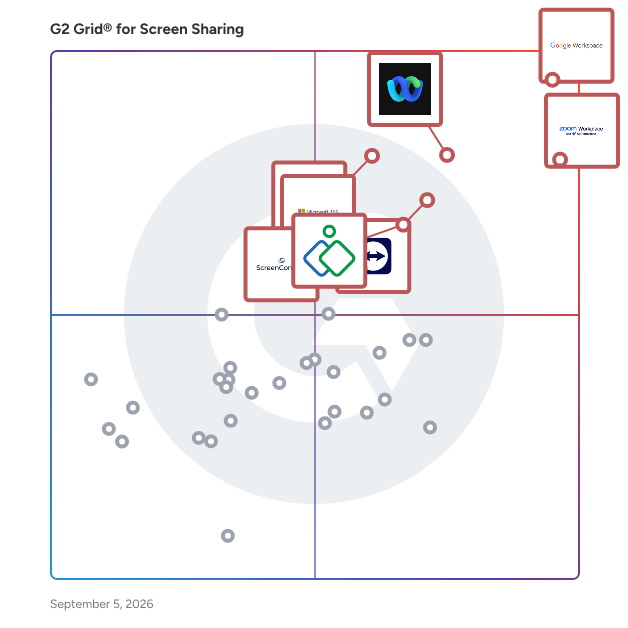
G2 Grid® for Screen Sharing Software

G2 Grid® for Screen Sharing Software plotting products by satisfaction and market presence

Highlighted products: Google Workspace, Zoom Workplace, Webex Suite, TeamViewer, Microsoft 365, Zoho Assist, GoTo Meeting, and ScreenConnect.

Underlying data: [Grid® JSON](https://www.g2.com/categories/screen-sharing/grids.json?focus%5B%5D=google-workspace&focus%5B%5D=zoom-workplace&focus%5B%5D=cisco-webex-suite&focus%5B%5D=teamviewer&focus%5B%5D=microsoft365&focus%5B%5D=zoho-assist&focus%5B%5D=goto-meeting&focus%5B%5D=screenconnect)

Alpemix

Alpemix: Fast, Secure and Cost-Effective Remote Desktop Software Alpemix is a reliable, high-performance remote desktop application designed for IT support teams, software vendors, system administrators, and businesses. Built as a cost-effective alternative to AnyDesk and TeamViewer, Alpemix delivers fast connections, bank-grade security, and flexible team management at a fraction of the cost of mainstream tools. Weighing under 10 MB, the Alpemix portable desktop client launches with a single click. Remote clients can connect immediately without navigating complex setup wizards or needing administrative rights. For servers and unattended office machines, Alpemix provides a dependable background service for permanent access. Why Support Teams and Businesses Choose Alpemix: • Cost-Effective & Account-Based Licensing: Licenses are tied directly to your user account, not locked to specific hardware or computers. Log in from any machine and start working without dealing with license keys or sudden price spikes. • Centralized Team Management (No Separate Registrations): Your support personnel do not need to register on the website individually. You can create, organize, and manage your entire technical staff directly under 1 master company account. • Automatic Shared Client Directory: Your technicians don't need to manually exchange address books. All authorized team members can access the same centralized client list automatically. • Flexible Connection Methods: Connect without asking clients for IDs and passwords. Customers can appear online directly in your company list, or initiate 1-click remote support directly through your website chat. • Smart Web-Technology Firewall Traversal: While standard remote software relies only on TCP ports that get blocked by strict enterprise firewalls, Alpemix can communicate via web protocols when needed. It works out of the box even in heavily restricted corporate networks without manual port forwarding. • Enterprise Security & Two-Factor Authentication (2FA): Every session is protected with end-to-end 256-bit AES encryption and 1024-bit RSA key exchange. Accounts are safeguarded with Two-Factor Authentication (2FA) login support, technician black-screen privacy, and corporate IP restrictions. • Comprehensive IT Toolkit: Includes high-speed compressed file transfer, unattended access, remote reboot with auto-reconnect, multi-monitor display, and session video recording. Supported Platforms: Windows, macOS, Linux, Raspberry Pi, iOS, and Android.

Who Is the Company Behind Alpemix?

Amazon Chime

Amazon Chime is a communications service that lets you meet, chat, and place business calls inside and outside your organization, all using a single application. With Amazon Chime, you have the flexibility to choose the features that you need for online meetings, video conferencing, and business calling, and pay only when you use them. Amazon Chime Voice Connector is a service that carries your voice traffic over the internet and elastically scales to meet your capacity needs. This lets you save money by eliminating fixed telephone network costs and simplifies your voice network administration by transitioning it to the AWS Cloud. Choose how you communicate Amazon Chime lets you choose the communication options that are best suited for your business. You have the option to choose from meetings, chat, and business calling or use Voice Connector to direct your voice traffic over the internet. With Chime, you have the flexibility to choose the communication option that fits with your business needs, and the freedom to scale up or down as needed. Use one app for all your communication Amazon Chime lets you meet, chat, and place business phone calls with a single, secure application. You don’t need to switch between applications to collaborate and can instantly go from a chat to a call, share your screen, and even invite more people to join your meeting. When it’s time for your meeting, Amazon Chime will call you on all your devices to ensure you are never late and your meetings start on time. Pay only for what you use Amazon Chime offers pay-per-use pricing which lets you pay for features you use, on the days that you use them. With pay-per-use pricing there’s no upfront investment or long-term contracts. You can switch between Basic features that don’t include a charge, and Pro features that do include a charge. You can use the right features for your business without worrying about overspending. Online Meetings • Simplified join experience: Join with a simple tap, and avoid the need for lengthy passcodes, or choose “Running Late” to let everyone know they’re running behind schedule. • Join Meetings with Alexa: You can simply say “Alexa, start my meeting”, and Alexa gets your meeting started. Learn more about Alexa for Business • Amazon Chime call me: With Amazon Chime call me, you simply enter your phone number in the web application and answer the incoming call to join a meeting. • Dial-in: Amazon Chime offers dial-in numbers in over 70 countries and low per minute rates. • Personalized meeting links: Create and use personalized meeting URLs for your online meetings. • Record your meetings: Amazon Chime allows you to record your meetings. • Screen share: You can share your screen or present information, without requesting permission. You can also allow remote control of a screen share for richer collaboration. Video Conferencing • Conference room video systems: Amazon Chime supports most Session Initiation Protocol (SIP) and H.323 video conferencing systems, and meeting participants can join meetings by simply entering the meeting ID into the device console. • Video conferencing: You can use high-quality wideband audio and high-definition video conferencing for up to 16 people on your desktop, or 8 people on mobile devices. • High quality audio and HD video: Amazon Chime uses noise-cancelling wideband technology and High-definition video. Team Collaboration • Visual roster: The visual roster lets you see who has joined or declined the meeting, is running late, currently speaking, and lets you see where background noise is coming from so you mute that line. • Easy to schedule: Use your Outlook calendar, or add meet@chime.aws to your meeting invite. • Smart Presence: Amazon Chime uses smart presence to indicate your status, where green means you’re available, and red means you’re busy. You can also manually set your presence to indicate that you’re not available, or hide your presence status entirely. • Incoming Web Hooks: Developers can configure their applications to use incoming webhooks to post messages into Amazon Chime chat rooms as soon as application updates occur. Security • Built on AWS Cloud: Amazon Chime is an AWS service, which means you benefit from a data center and network architecture built to meet the requirements of the most security-sensitive organizations. In addition, Amazon Chime features security capabilities built directly into the service. • Encryption: Messages, voice, video, and content are encrypted using AES 256-bit encryption. • AWS CoudTrail Integration: You can log, continuously monitor, and record account activity related to actions taken in the Amazon Chime console, using AWS CloudTrail. • Single Sign On: Use Active Directory or SSO to authenticate and manage users. Users can use existing credentials to log in to Amazon Chime.

Average Rating: 4.3/5.0

Total Reviews: 641

How Do G2 Users Rate Amazon Chime?

  • Has the product been a good partner in doing business?: 8.7/10 (Category avg: 9.0/10)

Who Is the Company Behind Amazon Chime?

Who Uses This Product?

  • Who Uses This: Software Engineer, Student
  • Top Industries: Information Technology and Services, Computer Software
  • Company Size: 35% Large, 32% Small

What Do G2 Reviewers Say About Amazon Chime?

AI-generated summary from verified user reviews

Pros
  • Users appreciate the ease of use of Amazon Chime, facilitating seamless communication and efficient meeting setups.
  • Users praise the easy setup of Amazon Chime, facilitating quick access for both new and seasoned users.
  • Users commend the high audio and video quality of Amazon Chime, enhancing overall meeting productivity and reliability.
  • Users value the reliable audio and video quality of Amazon Chime, ensuring smooth and efficient meetings every time.
  • Users love the high-quality video of Amazon Chime, enhancing effective communication for meetings and collaboration.
Cons
  • Users find the user interface outdated, lacking modern features and smooth performance compared to other collaboration tools.
  • Users find Amazon Chime has limited features, lacking advanced collaboration tools compared to more competitive platforms.
  • Users criticize the missing features in Amazon Chime, including outdated interface, limited collaboration tools, and no breakout rooms.
  • Users report connectivity issues with Amazon Chime, including lag and unexpected disconnections during meetings.
  • Users find Amazon Chime's limited integrations restrict collaboration compared to more robust platforms like Slack or Teams.

What Are Recent G2 Reviews of Amazon Chime?

What Are G2 Users Discussing About Amazon Chime?
AnyRec Phone Mirror

AnyRec Phone Mirror has many features that other similar software does not have. Users can cast multiple mobile phone screen video and audio to a PC via Wi-Fi, USB connection, or QR code smoothly and stably. Moreover, the program provides a built-in screen recorder for all users. Key Features: 1. Mirror Mobile Games You can mirror your mobile games to the computer, so you will no longer be annoyed by the small screen. And there is no lag or delay when you play the game on your computer screen. And you can also use the microphone when you play the game, which is also could be recorded when you play the game. 2. Live Stream AnyRec Phone Mirror is suitable for game streaming and other entertainment. By casting your phone screen video and audio to a PC. Teachers and students can share phone screens with the computer for better interaction. Just draw lines and type critical points on your phone. If you are on a business trip or work from home, you can start remotely meeting with colleagues. 3. Record the Screen You can get an excellent phone screen recorder, a larger display screen, and more. You will find that using AnyRec Phone Mirror to record your phone screen will have a smoother effect. The recorder will not make your phone heat and run slower. Moreover, there is a larger space to store your HD screen videos. So, you can record a long video about the games, courses, meetings, and so on.

Who Is the Company Behind AnyRec Phone Mirror?

AI can help you find the answers. G2 helps you trust them.

Connect G2 to Claude or ChatGPT for answers grounded in G2's trusted reviews, comparisons, and pricing from real user insights.

How it works

Blastream

Blastream is a startup that offers an all-in-one SaaS B2B video livestreaming solution, and allows to produce and broadcast a professional quality livestream from a simple web interface. With Blastream : - Produce your own TV show from our simplified video control - Bring together several thousand participants on Blastream and -via the web services of your choice - Integrate Blastream in white label with your colors on your website

Who Is the Company Behind Blastream?

Bluescape

Bluescape is the platform for creative collaboration. Streamline workflows with all your ideas, assets, iterations, and entire projects into one secure virtual workspace. With built-in voice and video calling, simply gather your team in Bluescape and make quicker decisions. Reduce meetings and finish projects faster in a secure platform trusted by Fortune 100 companies, government agencies, and the world’s largest movie studios.

Average Rating: 4.2/5.0

Total Reviews: 29

How Do G2 Users Rate Bluescape?

  • Has the product been a good partner in doing business?: 8.7/10 (Category avg: 9.0/10)

Who Is the Company Behind Bluescape?

  • Seller: Bluescape
  • Year Founded: 2012
  • HQ Location: Redwood City, California
  • LinkedIn® Page: www.linkedin.com
    66 employees on LinkedIn®

Who Uses This Product?

  • Top Industries: Furniture
  • Company Size: 45% Small, 29% Large

What Are Recent G2 Reviews of Bluescape?

What Are G2 Users Discussing About Bluescape?

ClickMeeting

ClickMeeting is a feature-rich, browser-based webinar and online meeting platform, chosen and loved by thousands of marketers, salespeople, teachers, trainers, and managers worldwide. ClickMeeting is suitable for freelancers and organizations of all types: from micro-businesses to international enterprises. It proves its worth as a multi-purpose application dedicated to managing and running various types of online events: • Online meetings – where up to 25 attendees can see, hear and talk to each other in one virtual conference room. • Live webinars – to present your content to a broader audience of up to 1000 attendees in real-time. • Automated webinars – to put your webinars on autopilot and win back your time in the process. • On-demand webinars – to let your audience watch your webinar recordings whenever they want. • Paid webinars – to sell access to your online courses and training sessions and to transform your expertise into a primary or additional source of revenue. • Huge virtual events – to scale up and stream your content to thousands of attendees with webcast technology. By choosing ClickMeeting, you don't have to worry about your and your users' data and privacy. As a European entity, ClickMeeting is required to act in accordance with GDPR - the most comprehensive catalog of information processing rules.

Average Rating: 4.2/5.0

Total Reviews: 273

How Do G2 Users Rate ClickMeeting?

  • Has the product been a good partner in doing business?: 8.3/10 (Category avg: 9.0/10)

Who Is the Company Behind ClickMeeting?

Who Uses This Product?

  • Who Uses This: Owner, CEO
  • Top Industries: E-Learning, Non-Profit Organization Management
  • Company Size: 67% Small, 25% Medium

What Do G2 Reviewers Say About ClickMeeting?

AI-generated summary from verified user reviews

Pros
  • Users appreciate the ease of use of ClickMeeting, as it simplifies event management and enhances accessibility for all.
  • Users appreciate the all-in-one solution of ClickMeeting, streamlining webinars and meetings while enhancing efficiency and professionalism.
  • Users find ClickMeeting intuitive and user-friendly, making it easy to host webinars and engage participants effortlessly.
  • Users appreciate the reliability of ClickMeeting, noting its smooth operation and professionalism for webinars and online trainings.
  • Users highlight ClickMeeting's outstanding customer support, appreciating the prompt and helpful assistance provided throughout their experience.
Cons
  • Users experience connection issues occasionally, which complicate meetings, though it's generally due to individual user conditions.
  • Users experience connectivity issues occasionally, complicating the use of ClickMeeting's features and event management.
  • Users find ClickMeeting to have high pricing that may not suit smaller businesses needing fewer advanced features.
  • Users desire more customization options for branding and registration, as current flexibility is somewhat limited.
  • Users note the missing features in the mobile version, limiting some functionalities compared to desktop usage.

What Are Recent G2 Reviews of ClickMeeting?

What Are G2 Users Discussing About ClickMeeting?

ClonaDesk

Clonadesk is a remote access software that allows users to interact with computer systems in other locations as though they were local. It empowers businesses to provide remote customer service and technical support with its advanced remote desktop capabilities. A seamless experience is provided by Clonadesk, which allows the support persons to troubleshoot technical issues easily and provide high-quality technical support to their customers, even from miles away.

Who Is the Company Behind ClonaDesk?

Diabolocom

Diabolocom is a leading European provider of AI-first cloud contact center and customer experience solutions. Our platform helps organizations manage omnichannel customer interactions at scale while improving service quality, agent productivity, and operational efficiency. Built on proprietary AI technologies, native telecom infrastructure, and advanced CRM integrations, Diabolocom helps customer service and sales teams deliver faster, smarter, and more personalized interactions. Our all-in-one platform supports inbound and outbound communications, high-volume call management, auto-dialing, workflow automation, real-time monitoring, and AI-powered assistance for agents and supervisors. It helps teams manage every customer interaction more efficiently, from first contact to final resolution. Diabolocom provides the essential features businesses need to manage customer interactions effectively, while continuously innovating with sovereign AI solutions designed for customer service and sales teams. Our AI-powered solutions include: - Interactive Virtual Agent, - Agent Assist, - Augmented Quality Monitoring. Interactive Virtual Agent helps businesses provide 24/7 customer support. It answers customer requests automatically and can be configured easily through Diabolocom’s interface. When human assistance is needed, the interaction can be transferred smoothly to an agent. Agent Assist supports agents in real time during customer conversations. It combines conversation analytics, automated call summaries, next-best-action recommendations, form completion, knowledge base access, and automated workflows. This helps agents save time, reduce manual work, and provide more accurate answers. Augmented Quality Monitoring helps supervisors evaluate customer interactions at scale. With AI, teams can review far more calls than would be possible manually. They can identify coaching opportunities, detect quality trends, and monitor performance through clear dashboards. Together, these capabilities help businesses automate repetitive tasks, improve quality management, strengthen customer engagement, and make faster, data-driven decisions. Diabolocom’s innovation has been recognized by Frost & Sullivan with the 2024 Product Leadership Award and the 2026 European Technology Innovation Leadership Award. For over 20 years, Diabolocom has supported more than 400 clients and now operates in over 60 countries, with 175+ employees across 8 global offices.

Average Rating: 4.2/5.0

Total Reviews: 62

How Do G2 Users Rate Diabolocom?

  • Has the product been a good partner in doing business?: 8.6/10 (Category avg: 9.0/10)

Who Is the Company Behind Diabolocom?

  • Seller: Diabolocom
  • Company Website:
  • Year Founded: 2005
  • HQ Location: Paris, FR
  • LinkedIn® Page: www.linkedin.com
    179 employees on LinkedIn®

Who Uses This Product?

  • Top Industries: Consumer Services
  • Company Size: 67% Medium, 24% Small

What Do G2 Reviewers Say About Diabolocom?

AI-generated summary from verified user reviews

Pros
  • Users commend the ease of use of Diabolocom, enjoying swift deployment and seamless integration throughout their operations.
  • Users praise the exceptional customer support of Diabolocom, ensuring swift implementation and valuable guidance throughout setup.
  • Users value the customization options of Diabolocom, allowing tailored integrations and enhancing their operational efficiency.
  • Users appreciate the easy implementation of Diabolocom, enhanced by responsive support and seamless CRM integration.
  • Users praise Diabolocom's efficiency in managing multichannel communications, saving time and ensuring smooth operations.
Cons
  • Users note the missing features like live call records and deeper integration, limiting their operational efficiency.
  • Users find it challenging to reach support, leading to issues with customer service responsiveness and flexibility in workflows.
  • Users experience delays with service interruptions and slow data updates, impacting their workflow and productivity.
  • Users find the rigid workflows of Diabolocom limit customization, affecting their customer service processes and functionality.
  • Users find the limited customization of Diabolocom restrictive, as it doesn't align perfectly with their specific processes.

What Are Recent G2 Reviews of Diabolocom?

Droplr

Droplr is effortless visual collaboration for everyone. While industry incumbents are mired in folder-based architecture, email attachments, FTP, or ad-hoc hacks, Droplr is changing the industry though its simple, secure platform: in one single step Droplr converts any file into a URL that can be sent via any communication platform. Droplr is focused on being deeply integrated into the tools that creative teams use. Graphic designers, UI/UX designers, developers, consultants, and others all run into walls. Some of these walls are: 1) File formats and compatibility across devices 2) Remote teams 3) Collaboration and Feedback is out of context 4) there is a lack of workflow integration 5) the file transfer process for visual assets is slow and clumsy. Droplr is a technology company based in Bend, Oregon. We founded the company in 2012 and are backed by an incredible group of investors and advisors. We spend all our time on two things: 1) Making the best tech products that we can imagine - products that are a joy to use, we strive to hear our customers to say “This is how it was meant to be” 2) Listening to our customers, we’re playing the long game and we believe that if we can help you send an important file, make a faster iteration, or just have one less headache during the day then together we’ve made the world a better place - so we invite you into a conversation with us! WHY DROPLR? It's 2016. Sending a visual asset or file from A to B shouldn't be hard. Droplr has 4 key areas of focus. Simplicity: transfer files in a single step. Security: password protect uploads, links auto-expire, end-to-end encryption. Ease of use: uploads convert to HTML5 to flow seamlessly between devices, no file-type roadblocks. Integration: native apps for Mac, Windows, and iOS integrate with the tools designers are already using for a perfect fit into the collaborative workflow.

Average Rating: 4.5/5.0

Total Reviews: 396

How Do G2 Users Rate Droplr?

  • Has the product been a good partner in doing business?: 9.2/10 (Category avg: 9.0/10)

Who Is the Company Behind Droplr?

  • Seller: Droplr
  • Year Founded: 2012
  • HQ Location: Denver, Colorado
  • LinkedIn® Page: www.linkedin.com
    4 employees on LinkedIn®

Who Uses This Product?

  • Who Uses This: Founder, Owner
  • Top Industries: Computer Software, Internet
  • Company Size: 65% Small, 26% Medium

What Are Recent G2 Reviews of Droplr?

What Are G2 Users Discussing About Droplr?

Drovio

Drovio is a team collaboration and remote pair programming tool designed for remote and distributed teams.

Who Is the Company Behind Drovio?

  • Seller: Drovio
  • Year Founded: 2016
  • HQ Location: Reims, FR
  • LinkedIn® Page: www.linkedin.com
    6 employees on LinkedIn®

Evercast

Evercast is the first real-time collaboration platform built for creatives by creatives. It combines video conferencing, HD live-streaming, and full-spectrum audio in a single web-based platform. Because Evercast requires only a computer and software to stream, it is easily adopted across all stages of production, among teams large and small. No matter where in the world they are, users can securely stream any creative workflow (live cameras on set, Avid, Premiere, Maya, Pro Tools, etc.) with ultra low latency and uncompromising quality. With features made specifically to facilitate creative collaboration, Evercast offers a digital experience that mirrors the ease and productivity of a team sitting shoulder-to-shoulder. To date, Evercast has been used on hundreds of productions by all of the major film/television studios and OTT providers -- as well as by industry-leading gaming companies and advertising agencies.

Average Rating: 4.4/5.0

Total Reviews: 10

How Do G2 Users Rate Evercast?

  • Has the product been a good partner in doing business?: 8.3/10 (Category avg: 9.0/10)

Who Is the Company Behind Evercast?

  • Seller: Evercast
  • Year Founded: 2015
  • HQ Location: United States
  • LinkedIn® Page: www.linkedin.com
    56 employees on LinkedIn®

Who Uses This Product?

  • Company Size: 60% Medium, 30% Small

What Are Recent G2 Reviews of Evercast?

What Are G2 Users Discussing About Evercast?

Fade In

Fade In is a professional screenwriting software.

Average Rating: 3.7/5.0

Total Reviews: 3

How Do G2 Users Rate Fade In?

  • Has the product been a good partner in doing business?: 10.0/10 (Category avg: 9.0/10)

Who Is the Company Behind Fade In?

Who Uses This Product?

  • Company Size: 100% Small

What Are Recent G2 Reviews of Fade In?

GoBrunch

GoBrunch helps bringing back the face-to-face culture to the remote space. If you’re tired of traditional videoconferencing tools, join GoBrunch and start reimaging your virtual workspace. You can customize your rooms, add your own branding, and enjoy each day a different scenario. Moreover, you can use the rooms permanently and you don’t need to install anything. Get started today with the free version.

Average Rating: 4.9/5.0

Total Reviews: 59

How Do G2 Users Rate GoBrunch?

  • Has the product been a good partner in doing business?: 9.4/10 (Category avg: 9.0/10)

Who Is the Company Behind GoBrunch?

  • Seller: GoBrunch
  • Year Founded: 2017
  • HQ Location: Orlando, Florida
  • LinkedIn® Page: www.linkedin.com
    10 employees on LinkedIn®

Who Uses This Product?

  • Top Industries: Professional Training & Coaching, Consulting
  • Company Size: 97% Small, 2% Large

What Do G2 Reviewers Say About GoBrunch?

AI-generated summary from verified user reviews

Pros
  • Users enjoy the creative and customizable approach of GoBrunch, making meetings and events fun and engaging.
  • Users love the customization options of GoBrunch, making virtual events fun and uniquely tailored to their needs.
  • Users love the ease of use of GoBrunch, enjoying its fun and customizable features for hosting online events.
  • Users love the creative meeting experiences GoBrunch provides, enhancing events with easy-to-use embedding options.
  • Users love the fun and customizable experience of GoBrunch for hosting engaging virtual meetings and events.
Cons
  • Users find the limited customization options frustrating, making it difficult to upload logos and images smoothly.
  • Users find limited functionality in GoBrunch due to the restriction of one conversation per room.
  • Users report a clunky mobile experience with cramped video feeds and challenging image uploads that hinder usability.

What Are Recent G2 Reviews of GoBrunch?

What Are G2 Users Discussing About GoBrunch?

GreetDock

GreetDock is website chat for B2B teams. Visitors see who's online, and a real person can turn the chat into a call or a consent-based co-browse.

Who Is the Company Behind GreetDock?

Neeraja Prakash
NP
Researched and written by Neeraja Prakash
Updated October 3, 2024