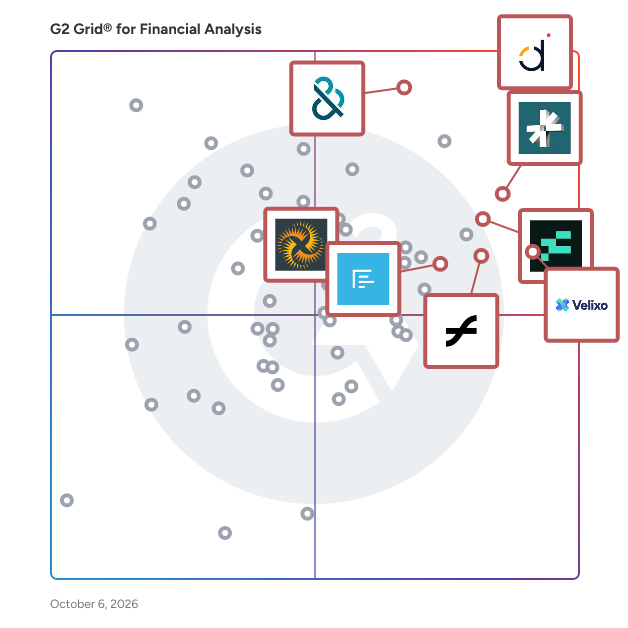
# Best Financial Analysis Software for Small Business

*By [Nathan Calabrese](https://research.g2.com/insights/author/nathan-calabrese)*


Products classified in the overall Financial Analysis category are similar in many regards and help companies of all sizes solve their business problems. However, small business features, pricing, setup, and installation differ from businesses of other sizes, which is why we match buyers to the right Small Business Financial Analysis to fit their needs. Compare product ratings based on reviews from enterprise users or connect with one of G2&#39;s buying advisors to find the right solutions within the Small Business Financial Analysis category.

In addition to qualifying for inclusion in the Financial Analysis Software category, to qualify for inclusion in the Small Business Financial Analysis Software category, a product must have at least 10 reviews left by a reviewer from a small business.


## Top Financial Analysis Software at a Glance
| # | Product | Rating | Best For | What Users Say |
|---|---------|--------|----------|----------------|
| 1 | [Datarails](https://www.g2.com/products/datarails/reviews) | 4.6/5.0 (353 reviews) | Excel-native consolidation with live ERP drill-down | "[Datarails -- Now an AI-Ready FinanceOS, Still On the Rails of Your FP&amp;A](https://www.g2.com/survey_responses/datarails-review-8920294)" |
| 2 | [D&amp;B Finance Analytics Credit Intelligence](https://www.g2.com/products/d-b-finance-analytics-credit-intelligence/reviews) | 4.5/5.0 (98 reviews) | Credit decisioning with cross-company payment intelligence | "[Makes Complex Credit Risk Data Clear and Actionable](https://www.g2.com/survey_responses/d-b-finance-analytics-credit-intelligence-review-12373496)" |
| 3 | [DualEntry](https://www.g2.com/products/dualentry/reviews) | 4.9/5.0 (122 reviews) | — | "[Accurate + Convenience](https://www.g2.com/survey_responses/dualentry-review-11367056)" |
| 4 | [Vena](https://www.g2.com/products/vena/reviews) | 4.5/5.0 (469 reviews) | Excel-native budgeting with multi-entity consolidation | "[Revolutionized Budgeting and Reporting with Vena](https://www.g2.com/survey_responses/vena-review-12854573)" |
| 5 | [Velixo](https://www.g2.com/products/velixo/reviews) | 4.7/5.0 (252 reviews) | Excel-native ERP reporting with live refresh | "[Transforms Acumatica into a Dynamic Solution](https://www.g2.com/survey_responses/velixo-review-10438038)" |
| 6 | [LiveFlow](https://www.g2.com/products/liveflow/reviews) | 4.9/5.0 (332 reviews) | QuickBooks-native multi-entity consolidation and live reporting | "[Real-Time Data Sync Revolutionizes Financial Reporting](https://www.g2.com/survey_responses/liveflow-review-12166608)" |
| 7 | [Aleph](https://www.g2.com/products/getaleph/reviews) | 4.9/5.0 (98 reviews) | Excel-native actuals refresh across multi-source financials | "[Replaced Colossal Excel Files and Pivot Tables with Easy-to-Use Templates](https://www.g2.com/survey_responses/aleph-review-12658189)" |
| 8 | [Fathom](https://www.g2.com/products/fathom/reviews) | 4.7/5.0 (94 reviews) | — | "[Powerful Assumptions and Sub-Department KPI Tracking Made Easy](https://www.g2.com/survey_responses/fathom-review-12847237)" |
| 9 | [Coefficient](https://www.g2.com/products/coefficient/reviews) | 4.7/5.0 (189 reviews) | Live CRM-to-Sheets reporting with auto-refresh | "[Effortless Scheduled Refreshes. Eliminates Manual Exports and Makes Revenue Data Actionable](https://www.g2.com/survey_responses/coefficient-review-12318636)" |
| 10 | [Prophix Software](https://www.g2.com/products/prophix-software/reviews) | 4.4/5.0 (218 reviews) | Multi-ERP consolidation with Excel-like budgeting | "[Automated Workflows and Clear, Timely Reporting Insights](https://www.g2.com/survey_responses/prophix-software-review-12835971)" |

---
## What Are the Most Common Questions About Financial Analysis Software?
*AI-generated · Last updated: May 26, 2026*
### What best tools for real-time financial performance tracking?
Based on G2 reviews, buyers looking for financial analysis software for real-time performance tracking consistently mention fast data refreshes, centralized reporting, and easier access to current numbers. According to verified users, tools in this category help teams reduce manual updates, monitor budget versus actuals, and surface trends faster for leadership. G2 reviewers mention that strong options are especially useful when organizations want one place to review dashboards, KPIs, and reporting across multiple systems or entities. Recent feedback also shows that users value products that shorten reporting cycles, improve visibility into financial performance, and make it easier to answer ad hoc questions without relying on static spreadsheets.

**Here are some of the top-rated products on G2:**

- [Datarails](https://www.g2.com/products/datarails/reviews) – frequently used for automated reporting, dashboard visibility, and faster budget-versus-actual analysis inside Excel-based workflows
- [Vena](https://www.g2.com/products/vena/reviews) – commonly praised for centralized planning, real-time collaboration, and reporting that helps finance teams track performance across departments
- [Fathom](https://www.g2.com/products/fathom/reviews) – often highlighted for clear KPI dashboards, visual reporting, and faster monthly reporting for management and board discussions


### Which platform is best for financial ratio analysis?
Based on G2 reviews, [Datarails](https://www.g2.com/products/datarails/reviews) stands out most often for financial ratio analysis because reviewers repeatedly highlight its ability to centralize financial data, automate reporting, and support deeper analysis without forcing teams out of familiar spreadsheet workflows. According to verified users, the combination of Excel integration, dashboards, and drill-down reporting helps finance teams evaluate trends, compare actuals to budgets, and investigate drivers behind performance. G2 reviewers mention that a strong platform for ratio analysis should make financial data easier to structure, refresh, and interpret while reducing manual consolidation work. Recent reviews also emphasize the value of quick reporting cycles and consistent data visibility when analyzing company performance.


### Which financial analysis software offers the best visualization tools?
Based on G2 reviews, visualization quality in financial analysis software is most closely tied to how easily teams can turn financial data into dashboards, charts, and presentation-ready reports. According to verified users, the best options help finance teams explain performance clearly to executives, board members, and non-financial stakeholders. G2 reviewers mention that buyers often look for tools that pair financial reporting with customizable visuals, KPI dashboards, and cleaner ways to present trends across departments or entities. Recent reviews also show that users value software that reduces the time spent building reports manually while still making key performance insights easy to understand. Visual clarity is especially important when teams need to communicate budget, forecast, and variance results quickly.

**Here are some of the top-rated products on G2:**

- [Fathom](https://www.g2.com/products/fathom/reviews) – widely used for visual reporting, KPI dashboards, and client-friendly financial presentations that are easy for non-finance audiences to follow
- [Datarails](https://www.g2.com/products/datarails/reviews) – frequently noted for dashboards, storyboards, and reporting outputs that improve visibility for management and stakeholders
- [Aleph](https://www.g2.com/products/aleph/reviews) – praised for flexible dashboards, Excel-connected reporting, and fast refreshes that support leadership-ready variance and performance visuals


### Which financial analysis tool offers AI-powered forecasting?
Based on G2 reviews, AI-powered forecasting in this category is described as a way to accelerate analysis, surface trends, and support scenario planning rather than replace finance judgment. According to verified users, products with AI features help teams ask natural-language questions, generate commentary, or speed up forecasting workflows alongside budgeting and reporting. G2 reviewers mention that these capabilities are most valuable when paired with strong underlying reporting, centralized data, and familiar finance workflows. Recent reviews show that buyers should look for tools that combine forecasting support with solid visibility into actuals, plans, and variances. Users also note that some AI features are still evolving, so implementation quality and workflow fit matter as much as the AI label itself.


### Which is the best financial analysis software for corporate finance teams?
Based on G2 reviews, [Datarails](https://www.g2.com/products/datarails/reviews) is the strongest fit for corporate finance teams because reviewers consistently describe it as a centralized environment for reporting, consolidation, budgeting, and analysis while preserving familiar Excel-based workflows. According to verified users, it helps finance teams reduce manual consolidation, improve version control, and create faster reporting cycles for leadership and management. G2 reviewers mention that corporate finance teams especially value software that supports multiple data sources, recurring reporting, and clearer financial visibility without adding unnecessary friction. Recent feedback also highlights its usefulness for month-end work, board reporting, and helping teams spend less time on data prep and more time on analysis.


### What best software for scenario planning in financial analysis?
Based on G2 reviews, scenario planning is one of the most important use cases for financial analysis software because it helps teams test assumptions, compare outcomes, and respond faster to changing conditions. According to verified users, buyers value tools that make it easier to model budget changes, hiring plans, revenue shifts, and operational decisions without rebuilding spreadsheets from scratch. G2 reviewers mention that effective scenario planning software also improves collaboration by giving finance and leadership a shared view of forecasts and tradeoffs. Recent reviews highlight strong demand for products that combine scenario modeling with centralized reporting, version control, and quicker refresh cycles. For many finance teams, the best solutions are the ones that turn planning into an ongoing process instead of a static spreadsheet exercise.

**Here are some of the top-rated products on G2:**

- [Vena](https://www.g2.com/products/vena/reviews) – often used for scenario modeling, budgeting, and variance analysis while keeping teams in an Excel-familiar planning environment
- [Parallel](https://www.g2.com/products/parallel-parallel/reviews) – frequently praised for helping founders and operators build fast scenarios around spend, runway, hiring, and growth decisions
- [Drivetrain](https://www.g2.com/products/drivetrain-drivetrain/reviews) – commonly highlighted for scenario modeling, forecasting, and comparing assumptions in one centralized FP&amp;A workflow


### What top tools for analyzing company financial performance?
Based on G2 reviews, top tools for analyzing company financial performance are usually the ones that centralize data, speed up reporting, and make it easier to drill into variances and trends. According to verified users, finance teams want software that reduces manual spreadsheet work while improving access to budget, forecast, and actual performance in one place. G2 reviewers mention that these tools are especially valuable when organizations need to compare departments, entities, or time periods without rebuilding reports every cycle. Recent feedback also points to demand for dashboards, visual reporting, and easier collaboration with non-finance stakeholders. The strongest products help teams move from collecting numbers to actually interpreting what is driving performance and where action is needed.

**Here are some of the top-rated products on G2:**

- [Datarails](https://www.g2.com/products/datarails/reviews) – widely used to centralize financial data, automate recurring reports, and support faster performance analysis across multiple sources
- [Fathom](https://www.g2.com/products/fathom/reviews) – known for KPI reporting, visual summaries, and management reporting that helps teams interpret business performance more clearly
- [Aleph](https://www.g2.com/products/aleph/reviews) – valued for consolidating finance data, supporting ad hoc analysis, and helping teams answer leadership questions quickly with refreshed reporting


### What top platforms for multi-currency financial analysis?
Based on G2 reviews, multi-currency financial analysis is a critical need for teams managing international entities, group reporting, or cross-border operations. According to verified users, the best platforms simplify consolidation, support reporting across different currencies, and reduce the manual effort previously required in spreadsheets. G2 reviewers mention that buyers in this use case often look for tools that can combine multiple entities into a single reporting view while preserving drill-down access and clearer performance comparisons. Recent reviews also show that users value platforms that improve month-end reporting and help finance teams monitor group-level results more efficiently. For organizations with complex structures, strong multi-currency support can make reporting faster, cleaner, and easier to trust.

**Here are some of the top-rated products on G2:**

- [Joiin](https://www.g2.com/products/joiin/reviews) – repeatedly praised for multi-entity consolidation, multi-currency reporting, and faster management reporting across Xero-connected businesses
- [Vena](https://www.g2.com/products/vena/reviews) – noted for supporting complex planning and analysis across multi-entity and evolving organizational structures
- [Fathom](https://www.g2.com/products/fathom/reviews) – highlighted for consolidations across many entities and easier analytics for organizations operating in different countries and currencies


### What top-rated financial analysis platforms for large enterprises?
Based on G2 reviews, large enterprises typically need financial analysis software that can centralize data, automate reporting, and support more complex planning and governance requirements. According to verified users, the top-rated platforms in this category help finance teams work across multiple systems, business units, and reporting needs without relying on disconnected spreadsheets. G2 reviewers mention that large organizations also value stronger controls, repeatable reporting, and tools that make scenario modeling and executive reporting faster. Recent feedback shows that scalability matters not just in data volume, but also in how well a platform supports collaboration across finance, operations, and leadership. The best enterprise-fit tools tend to pair flexible analysis with stronger process consistency and visibility.

**Here are some of the top-rated products on G2:**

- [Prophix Software](https://www.g2.com/products/prophix-software/reviews) – often used to centralize planning, budgeting, and reporting while reducing manual work in larger finance environments
- [Pigment](https://www.g2.com/products/pigment-2024-01-19/reviews) – recognized for scalable planning, scenario analysis, and consolidating reporting needs across organizations into one platform
- [Drivetrain](https://www.g2.com/products/drivetrain-drivetrain/reviews) – praised for unifying data from multiple systems and supporting centralized forecasting, reporting, and scenario planning


### What best platforms for integrating financial analysis with ERP systems?
Based on G2 reviews, ERP integration is one of the most important requirements when evaluating financial analysis software because it affects both reporting speed and data trust. According to verified users, the best platforms connect financial data from ERP and adjacent systems into one environment so teams can avoid manual exports, reduce reconciliation work, and analyze results faster. G2 reviewers mention that buyers often prioritize software that works well with systems like QuickBooks, NetSuite, Sage, Acumatica, SAP, or Microsoft environments while still keeping workflows accessible to finance users. Recent reviews also emphasize the value of easy setup, recurring refreshes, and cleaner reporting outputs when integrating ERP data into planning and performance analysis processes.

**Here are some of the top-rated products on G2:**

- [Datarails](https://www.g2.com/products/datarails/reviews) – frequently used to integrate accounting and ERP-adjacent data sources for faster reporting, consolidation, and analysis in Excel-centered workflows
- [Velixo](https://www.g2.com/products/velixo/reviews) – commonly praised for direct ERP-to-Excel connectivity, real-time refreshes, and customizable reporting with systems such as Acumatica and Sage Intacct
- [LiveFlow](https://www.g2.com/products/liveflow/reviews) – often highlighted for pulling live accounting data into spreadsheets to automate reporting and reduce manual export work


## How Many Financial Analysis Software Products Does G2 Track?
**Total Products under this Category:** 199

### Category Stats (Jun 2026)
- **Average Rating**: 4.54/5 (↑0.01 vs May 2026) The average rating of products in this category, based on all submitted ratings
- **Top Trending Product**: Autymate (+12.5%) - Among all products in this category, Autymate recorded the largest rating increase compared to last month
*Last updated: June 09, 2026*


## How Does G2 Rank Financial Analysis Software Products?

**Why You Can Trust G2's Software Rankings:**

- 30 Analysts and Data Experts
- 8,600+ Authentic Reviews
- 199+ Products
- Unbiased Rankings

G2's software rankings are built on verified user reviews, rigorous moderation, and a consistent research methodology maintained by a team of analysts and data experts. Each product is measured using the same transparent criteria, with no paid placement or vendor influence. While reviews reflect real user experiences, which can be subjective, they offer valuable insight into how software performs in the hands of professionals. Together, these inputs power the G2 Score, a standardized way to compare tools within every category.


---

**Sponsored**

### Abacum

Abacum is an AI-native Financial Planning and Analysis (FP&amp;A) platform designed to enhance business performance through clarity, speed, and impactful decision-making. This innovative solution provides users with instant access to essential operational and financial key performance indicators (KPIs) all in one centralized location. With just a single click, users can automate management reporting, forecast revenue, plan headcount, budget operational expenditures (OPEX), and run multiple scenarios, all seamlessly integrated within the Abacum environment. Targeted primarily at mid-market companies, Abacum caters to finance teams seeking a robust yet user-friendly solution for their planning and analysis needs. The platform stands out by combining intuitive workflows with enterprise-grade flexibility, allowing users to create collaborative plans, analyze performance in real time, and share valuable insights that drive business progress. Its ability to integrate with over 700 systems, including ERP, CRM, HRIS, and data warehouses, ensures that all data is automatically synced, cleaned, structured, and consistently up to date, thus eliminating the need for manual data handling. One of the key features of Abacum is its multi-dimensional modeling engine, which empowers finance teams to conduct complex analyses and scenario planning with ease. This capability, coupled with collaborative workflows, facilitates seamless business partnering across various functions within an organization. As a result, finance teams can plan and report up to 75% faster, significantly improving efficiency and allowing them to focus on strategic initiatives rather than time-consuming manual processes. Abacum is designed to support fast-growing companies and industry leaders, including names such as Strava, Dish Networks, JG Wentworth, BetterUp, Factorial, Kajabi, Abridge, and Aiven. By providing a scalable FP&amp;A solution that balances power with simplicity, Abacum enables organizations to navigate the complexities of financial planning and analysis confidently.


[Visit website](https://www.g2.com/external_clickthroughs/record?secure%5Bad_program%5D=ppc&amp;secure%5Bad_slot%5D=category_product_list&amp;secure%5Bcategory_id%5D=1550&amp;secure%5Bdisplayable_resource_id%5D=1550&amp;secure%5Bdisplayable_resource_type%5D=Category&amp;secure%5Bmedium%5D=sponsored&amp;secure%5Bplacement_reason%5D=page_category&amp;secure%5Bplacement_resource_ids%5D%5B%5D=1550&amp;secure%5Bprioritized%5D=false&amp;secure%5Bproduct_id%5D=154807&amp;secure%5Bresource_id%5D=1550&amp;secure%5Bresource_type%5D=Category&amp;secure%5Bsource_type%5D=category_page&amp;secure%5Bsource_url%5D=https%3A%2F%2Fwww.g2.com%2Fcategories%2Ffinancial-analysis%2Fsmall-business&amp;secure%5Btoken%5D=db89447a2fc30ac3e25a18982198cecaa94ccf3d5be4ad8d431a45a9efe40139&amp;secure%5Burl%5D=https%3A%2F%2Fwww.abacum.ai%2F%3Futm_source%3Dg2%26utm_medium%3Dcpc%26utm_campaign%3Dg2_paid&amp;secure%5Burl_type%5D=custom_url)

---

## What Are the Top-Rated Financial Analysis Software Products in 2026?
### 1. [LiveFlow](https://www.g2.com/products/liveflow/reviews)
LiveFlow is the #1 platform for multi-entity finance. LiveFlow transforms how accounting and finance teams work. Flow: AI-Native ERP Flow is an AI-native ERP that brings Accounting, AP/AR, and FP&amp;A together in one place. - Built with multi-entity in mind. Manage intercompany workflows, shared accounts, and eliminations across all entities, all in one place. - Reports the way you want them. Build and customize reports in real time, with the flexibility to match how your business actually runs. - Built-in AI to accelerate your workflows. Automate routine tasks and surface insights faster with AI that you control. LiveFlow FP&amp;A Platform Transform Excel and Google Sheets into your financial command center. - Effortless Reporting in spreadsheets:&amp;nbsp;Import QuickBooks data in seconds to create shareable dashboards that automatically update. Drill down, build visualizations, and create impactful, always-current reporting. - Consolidation in Under 3 Minutes:&amp;nbsp;Consolidate financials from multi-entity businesses in seconds. - Pre-built Financial Models:&amp;nbsp;Choose from 100+ report templates to completely customize foryour business or clients, all while being supported by our Customer Success Team staffed byfinancial experts.


**Average Rating:** 4.9/5.0
**Total Reviews:** 332
**How Do G2 Users Rate LiveFlow?**

- **Custom Reports:** 9.2/10 (Category avg: 8.7/10)
- **Report Types:** 9.3/10 (Category avg: 8.8/10)
- **Has the product been a good partner in doing business?:** 9.6/10 (Category avg: 9.2/10)
- **Custom KPIs:** 8.8/10 (Category avg: 8.6/10)

**Who Is the Company Behind LiveFlow?**

- **Seller:** [LiveFlow](https://www.g2.com/sellers/liveflow)
- **Company Website:** https://www.liveflow.com
- **Year Founded:** 2021
- **HQ Location:** New York, US
- **LinkedIn® Page:** https://www.linkedin.com/company/liveflow (62 employees on LinkedIn®)

**Who Uses This Product?**
- **Who Uses This:** Accounting Manager, CEO
- **Top Industries:** Accounting, Financial Services
- **Company Size:** 75% Small-Business, 20% Mid-Market


#### What Are LiveFlow's Pros and Cons?

**Pros:**

- Ease of Use (80 reviews)
- Time-Saving (72 reviews)
- Time-saving (70 reviews)
- Reporting Efficiency (66 reviews)
- Efficiency (57 reviews)

**Cons:**

- Missing Features (22 reviews)
- Inefficient Reporting (11 reviews)
- Limited Customization (11 reviews)
- Refresh Issues (11 reviews)
- Expensive (10 reviews)


### What Do G2 Reviewers Say About LiveFlow?
*AI-generated summary from verified user reviews*

**Pros:**

- Users find LiveFlow&#39;s **ease of use** remarkable, streamlining financial reporting and minimizing manual work effortlessly.
- Users find LiveFlow to be a **time-saving tool** that significantly speeds up month-end review processes.
- Users highlight the **time-saving benefits** of LiveFlow, significantly reducing hours spent on month-end processes and reporting.
- Users highlight the **reporting efficiency** of LiveFlow, saving time and enhancing report quality significantly.
- Users benefit greatly from LiveFlow&#39;s **efficiency** , dramatically reducing time spent on financial reporting and data updates.

**Cons:**

- Users note the **missing features** in LiveFlow, especially regarding third-party integration and budget pulling from QuickBooks.
- Users find the **inefficient reporting** in LiveFlow cumbersome, as it requires manual adjustments and lacks direct report replication.
- Users find **limited customization** options in LiveFlow, making tailored reporting and integrations challenging.
- Users face **refresh issues** with version history in LiveFlow, making navigation and report management challenging over time.
- Users feel that LiveFlow&#39;s features are **expensive** , particularly for early-stage businesses, despite their long-term value.

#### What Are Recent G2 Reviews of LiveFlow?

**"[Real-Time Data Sync Revolutionizes Financial Reporting](https://www.g2.com/survey_responses/liveflow-review-12166608)"**

**Rating:** 5.0/5.0 stars
*— Jessica E.*

[Read full review](https://www.g2.com/survey_responses/liveflow-review-12166608)

---

**"[Reliable, Fast, and Supportive – Liveflow Is a Game-Changer for Financial Reporting](https://www.g2.com/survey_responses/liveflow-review-11110255)"**

**Rating:** 4.5/5.0 stars
*— Zaid N.*

[Read full review](https://www.g2.com/survey_responses/liveflow-review-11110255)

---


#### What Are G2 Users Discussing About LiveFlow?

- [What is LiveFlow Google Sheets Add-On used for?](https://www.g2.com/discussions/what-is-liveflow-google-sheets-add-on-used-for)

### 2. [Datarails](https://www.g2.com/products/datarails/reviews)
Datarails is an AI-powered, Excel-connected platform for financial reporting and insights that brings FP&amp;A, cash management, spend control, and month-end close into one flexible, scalable workspace. With 600+ integrations across accounting, ERP, CRM, banking, and HRIS systems, it automatically consolidates data into a single source of truth so finance teams can spend less time collecting information and more time analyzing it. Easy to use and built to fit the way finance teams work, Datarails supports existing workflows while strengthening visibility, controls, and collaboration. By removing manual tasks and unifying financial operations, it helps the CFO’s office deliver faster reporting, more accurate insights, and confident, data-driven decisions.


**Average Rating:** 4.6/5.0
**Total Reviews:** 353
**How Do G2 Users Rate Datarails?**

- **Custom Reports:** 8.8/10 (Category avg: 8.7/10)
- **Report Types:** 8.4/10 (Category avg: 8.8/10)
- **Has the product been a good partner in doing business?:** 9.2/10 (Category avg: 9.2/10)
- **Custom KPIs:** 8.5/10 (Category avg: 8.6/10)

**Who Is the Company Behind Datarails?**

- **Seller:** [Datarails](https://www.g2.com/sellers/datarails)
- **Company Website:** https://www.Datarails.com
- **Year Founded:** 2015
- **HQ Location:** New York
- **Twitter:** @datarails (1,139 Twitter followers)
- **LinkedIn® Page:** https://www.linkedin.com/company/10519133/ (423 employees on LinkedIn®)

**Who Uses This Product?**
- **Who Uses This:** CFO, Chief Financial Officer
- **Top Industries:** Financial Services, Hospital &amp; Health Care
- **Company Size:** 71% Mid-Market, 21% Small-Business


#### What Are Datarails's Pros and Cons?

**Pros:**

- Ease of Use (92 reviews)
- Reporting Efficiency (53 reviews)
- Excel Integration (51 reviews)
- Data Management (49 reviews)
- Efficiency (46 reviews)

**Cons:**

- Learning Difficulty (36 reviews)
- Learning Curve (26 reviews)
- Missing Features (24 reviews)
- Steep Learning Curve (23 reviews)
- Complexity (21 reviews)


### What Do G2 Reviewers Say About Datarails?
*AI-generated summary from verified user reviews*

**Pros:**

- Users praise the **ease of use** of Datarails, particularly appreciating its intuitive structure and seamless Excel integration.
- Users appreciate the **reporting efficiency** of Datarails, which streamlines financial processes and enhances data management.
- Users appreciate the **Excel integration** of Datarails, allowing seamless use of familiar tools for advanced data management.
- Users value Datarails for its **efficient data management** , simplifying financial reporting and enhancing accuracy across multiple sources.
- Users highlight Datarails&#39; **remarkable efficiency** in automating data processes, greatly simplifying their workflows and enhancing productivity.

**Cons:**

- Users find the **learning difficulty** in Datarails challenging, especially for those not tech savvy.
- Users often face a **steep learning curve** with Datarails, requiring significant time to master its complex functionalities.
- Users find the **missing features** like exporting to Excel and custom column functionality frustrating and limiting.
- Users find the **steep learning curve** challenging, requiring dedicated time and training to master Datarails effectively.
- Users experience **complexity in data input** , making troubleshooting and tracing data points a challenging task initially.

#### What Are Recent G2 Reviews of Datarails?

**"[Datarails -- Now an AI-Ready FinanceOS, Still On the Rails of Your FP&amp;A](https://www.g2.com/survey_responses/datarails-review-8920294)"**

**Rating:** 5.0/5.0 stars
*— Skip K.*

[Read full review](https://www.g2.com/survey_responses/datarails-review-8920294)

---

**"[Intuitive, High-Performing Tool with Easy NetSuite Integration and Great Support](https://www.g2.com/survey_responses/datarails-review-12876184)"**

**Rating:** 5.0/5.0 stars
*— Elizabeth W.*

[Read full review](https://www.g2.com/survey_responses/datarails-review-12876184)

---


#### What Are G2 Users Discussing About Datarails?

- [What do you like most about Datarails for financial planning, and what features do you find most valuable?](https://www.g2.com/discussions/what-do-you-like-most-about-datarails-for-financial-planning-and-what-features-do-you-find-most-valuable)

### 3. [DualEntry](https://www.g2.com/products/dualentry/reviews)
DualEntry is the AI-native ERP that helps finance teams achieve more in less time. With powerful automations, it takes manual work out of everything from everyday accounting, AR/AP, and revenue management to tax handling, financial reporting, and audit prep. DualEntry is built for global, multi-entity, multi-currency operations. It’s designed to scale with business from mid-market to IPO and beyond, adapting to a company’s specific needs – no matter how complex. 𝗕𝘂𝗶𝗹𝘁 𝗯𝘆 𝗮𝗰𝗰𝗼𝘂𝗻𝘁𝗮𝗻𝘁𝘀, 𝗳𝗼𝗿 𝗮𝗰𝗰𝗼𝘂𝗻𝘁𝗮𝗻𝘁𝘀, 𝗗𝘂𝗮𝗹𝗘𝗻𝘁𝗿𝘆 𝗼𝗳𝗳𝗲𝗿𝘀: • Multi-entity consolidation across global subsidiaries • Multi-currency support, covering 180 local currencies in 240 countries, with live FX rates • Automated intercompany eliminations and journal-entry posting • Custom workflows and granular access controls • Role-based, real-time dashboards • Audit-ready financials with SOX, SOC 2, and GDPR compliance • A flexible, complete GL that you can tailor to you with unlimited nestable classifications and custom feeds • Real-time insights and drillable, multi-dimensional reporting across entities • 13,000+ bank connections covering 60+ countries • 200+ free, seamless integrations across CRM, AP, AR, and more Automate your workflows end-to-end with DualEntry, and grow your business without adding to your headcount. Schedule a personalized demo now.


**Average Rating:** 4.9/5.0
**Total Reviews:** 122
**How Do G2 Users Rate DualEntry?**

- **Has the product been a good partner in doing business?:** 9.5/10 (Category avg: 9.2/10)

**Who Is the Company Behind DualEntry?**

- **Seller:** [DualEntry](https://www.g2.com/sellers/dualentry)
- **Company Website:** https://www.dualentry.com
- **Year Founded:** 2024
- **HQ Location:** New York, US
- **Twitter:** @dualentry (765 Twitter followers)
- **LinkedIn® Page:** https://www.linkedin.com/company/dualentry/ (71 employees on LinkedIn®)

**Who Uses This Product?**
- **Who Uses This:** Accountant
- **Top Industries:** Accounting, Manufacturing
- **Company Size:** 48% Mid-Market, 34% Small-Business


#### What Are DualEntry's Pros and Cons?

**Pros:**

- Ease of Use (318 reviews)
- Features (272 reviews)
- Efficiency (256 reviews)
- Integrations (235 reviews)
- Time-saving (231 reviews)

**Cons:**

- Improvement Needed (116 reviews)
- Missing Features (92 reviews)
- Limited Customization (91 reviews)
- Not User-Friendly (84 reviews)
- Learning Difficulty (83 reviews)


### What Do G2 Reviewers Say About DualEntry?
*AI-generated summary from verified user reviews*

**Pros:**

- Users appreciate the **ease of use** of DualEntry, thanks to its intuitive tools and streamlined automation.
- Users appreciate the **smooth handling of high-volume transactions** , keeping performance fast and reliable for growing businesses.
- Users praise the **efficiency** of DualEntry, appreciating its ability to handle high transaction volumes seamlessly.
- Users value the **powerful integrations** of DualEntry, enhancing efficiency and accuracy in financial tracking for their businesses.
- Users value the **time-saving automation** of DualEntry, allowing teams to focus on strategic decision-making.

**Cons:**

- Users find the interface impressive but feel **improvement is needed** in onboarding and guidance for better usability.
- Users find the **lack of a mobile app** and inadequate onboarding assistance to be significant drawbacks of DualEntry.
- Users find the **limited customization** options for reporting and interface color preferences somewhat restrictive in DualEntry.
- Users find DualEntry to be **not user-friendly** , as it lacks sufficient guidance for new users to get started.
- Users find the **learning difficulty** of DualEntry noticeable due to inadequate guidance and a steep initial setup process.

#### What Are Recent G2 Reviews of DualEntry?

**"[Accurate + Convenience](https://www.g2.com/survey_responses/dualentry-review-11367056)"**

**Rating:** 5.0/5.0 stars
*— John Rey C.*

[Read full review](https://www.g2.com/survey_responses/dualentry-review-11367056)

---

**"[DualEntry Makes Data Entry Smoother and More Efficient](https://www.g2.com/survey_responses/dualentry-review-11897989)"**

**Rating:** 5.0/5.0 stars
*— Verified User in Construction*

[Read full review](https://www.g2.com/survey_responses/dualentry-review-11897989)

---


### 4. [D&amp;B Finance Analytics Credit Intelligence](https://www.g2.com/products/d-b-finance-analytics-credit-intelligence/reviews)
D&amp;B Finance Analytics is a global credit-to-cash solution that provides Dun &amp; Bradstreet data, analytics, and technology to help improve cash flow, increase operational efficiency, and mitigate risk. This AI-driven solution comprises two platforms – D&amp;B Credit Intelligence and D&amp;B Receivables Intelligence powered by GETPAID – that together help finance teams transform their operations and reduce cost through insight, automation, and enhanced customer experience.


**Average Rating:** 4.5/5.0
**Total Reviews:** 98
**How Do G2 Users Rate D&amp;B Finance Analytics Credit Intelligence?**

- **Custom Reports:** 6.9/10 (Category avg: 8.7/10)
- **Report Types:** 7.6/10 (Category avg: 8.8/10)
- **Has the product been a good partner in doing business?:** 8.6/10 (Category avg: 9.2/10)
- **Custom KPIs:** 7.3/10 (Category avg: 8.6/10)

**Who Is the Company Behind D&amp;B Finance Analytics Credit Intelligence?**

- **Seller:** [Dun &amp; Bradstreet](https://www.g2.com/sellers/dun-bradstreet)
- **Company Website:** https://www.dnb.com
- **HQ Location:** Short Hills, NJ
- **Twitter:** @DunBradstreet (22,541 Twitter followers)
- **LinkedIn® Page:** https://www.linkedin.com/company/2385/ (5,747 employees on LinkedIn®)
- **Ownership:** NYSE: DNB

**Who Uses This Product?**
- **Top Industries:** Manufacturing, Accounting
- **Company Size:** 49% Mid-Market, 29% Small-Business


#### What Are D&amp;B Finance Analytics Credit Intelligence's Pros and Cons?

**Pros:**

- Ease of Use (43 reviews)
- Insights (22 reviews)
- Analytics (16 reviews)
- Features (16 reviews)
- Visibility (14 reviews)

**Cons:**

- Inaccuracy (20 reviews)
- Data Inaccuracy (14 reviews)
- Reporting Issues (14 reviews)
- Data Management (11 reviews)
- Complexity (8 reviews)


### What Do G2 Reviewers Say About D&amp;B Finance Analytics Credit Intelligence?
*AI-generated summary from verified user reviews*

**Pros:**

- Users appreciate the **ease of use** of D&amp;B Finance Analytics Credit Intelligence, facilitating quick and informed credit decisions.
- Users value the **insightful estimates and visual data** from D&amp;B Finance Analytics, enhancing decision-making and credit assessment.
- Users find D&amp;B Finance Analytics **essential for insightful credit assessments** , facilitating informed decisions and minimizing financial risk.
- Users value the **user-friendly tools** of D&amp;B Finance Analytics, facilitating efficient credit monitoring and risk assessment.
- Users value the **real-time visibility** into credit risks, enhancing decision-making and efficiency in accounts receivable processes.

**Cons:**

- Users express concern over the **inaccuracy of data** , impacting confidence in quick decision-making and ratings consistency.
- Users express concern over **data inaccuracy** , impacting trust in the reliability and recency of information provided.
- Users experience **reporting issues** with outdated data, impacting reliability for timely financial decisions.
- Users experience **overwhelming data management** in D&amp;B Finance Analytics, complicating navigation and requiring a steep learning curve.
- Users find the **complexity of data and terminology** in D&amp;B Finance Analytics Credit Intelligence to be overwhelming.

#### What Are Recent G2 Reviews of D&amp;B Finance Analytics Credit Intelligence?

**"[Makes Complex Credit Risk Data Clear and Actionable](https://www.g2.com/survey_responses/d-b-finance-analytics-credit-intelligence-review-12373496)"**

**Rating:** 4.5/5.0 stars
*— Rafael H.*

[Read full review](https://www.g2.com/survey_responses/d-b-finance-analytics-credit-intelligence-review-12373496)

---

**"[Clear, Actionable Data for Smarter Credit Management](https://www.g2.com/survey_responses/d-b-finance-analytics-credit-intelligence-review-12343199)"**

**Rating:** 4.5/5.0 stars
*— Emily S.*

[Read full review](https://www.g2.com/survey_responses/d-b-finance-analytics-credit-intelligence-review-12343199)

---


#### What Are G2 Users Discussing About D&amp;B Finance Analytics Credit Intelligence?

- [What is D&amp;B Finance Analytics used for?](https://www.g2.com/discussions/what-is-d-b-finance-analytics-used-for)

### 5. [Reach Reporting](https://www.g2.com/products/reach-reporting/reviews)
Upgrade to Reach Reporting. AI-Enhanced Financial Reporting Automated reports, deep analysis, and visualized data in seconds, making you indispensable. Data auto-updates to deliver insights instantly. Simplify complex analysis with AI-enhanced reporting. 3-Way Budgeting &amp; Forecasting Our familiar spreadsheet environment lets you easily create budgets &amp; forecasts with minimal learning curve. Leverage automatic Balance Sheet &amp; Cash Flow projections with our 3-Way FP&amp;A feature. Consolidation &amp; Currency Conversion Save time with automated multi-company &amp; multi-currency consolidation. Easy eliminations deliver professional insights at a consolidated level. Filter by company, class, or department. Financial managers, accountants, and advisors estimate that 48% of their time is spent preparing financial reports and dashboards. Reports and dashboards dynamically update as data flows through each month. Visualize data in just a few clicks.


**Average Rating:** 4.8/5.0
**Total Reviews:** 51
**How Do G2 Users Rate Reach Reporting?**

- **Custom Reports:** 9.1/10 (Category avg: 8.7/10)
- **Report Types:** 9.9/10 (Category avg: 8.8/10)
- **Has the product been a good partner in doing business?:** 9.3/10 (Category avg: 9.2/10)
- **Custom KPIs:** 9.6/10 (Category avg: 8.6/10)

**Who Is the Company Behind Reach Reporting?**

- **Seller:** [Reach Reporting](https://www.g2.com/sellers/reach-reporting)
- **Year Founded:** 2015
- **HQ Location:** Springville, US
- **Twitter:** @ReachReporting (148 Twitter followers)
- **LinkedIn® Page:** https://www.linkedin.com/company/reach-reporting (27 employees on LinkedIn®)

**Who Uses This Product?**
- **Top Industries:** Accounting
- **Company Size:** 72% Small-Business, 23% Mid-Market


#### What Are Reach Reporting's Pros and Cons?

**Pros:**

- Ease of Use (12 reviews)
- Reporting (12 reviews)
- Reporting Efficiency (10 reviews)
- Time-saving (9 reviews)
- Customer Support (8 reviews)

**Cons:**

- Missing Features (4 reviews)
- Complexity (2 reviews)
- Connectivity Issues (2 reviews)
- Dashboard Limitations (2 reviews)
- Implementation Issues (2 reviews)


### What Do G2 Reviewers Say About Reach Reporting?
*AI-generated summary from verified user reviews*

**Pros:**

- Users appreciate the **ease of use** of Reach Reporting, allowing efficient report creation and customization without finance expertise.
- Users find that **Reach Reporting enhances decision-making** with clear visuals and live integration, revolutionizing report presentation.
- Users value the **reporting efficiency** of Reach Reporting, enabling quick, customizable financial insights without complexity.
- Users highlight the **time-saving features** of Reach Reporting, enabling efficient financial management with minimal effort.
- Users praise the **responsive customer support** of Reach Reporting, enhancing their overall experience and satisfaction.

**Cons:**

- Users note **missing features** like improved UI, budget builders, and better integration for enhanced usability.
- Users find the **complexity of the system** initially challenging, needing time to become familiar with its features.
- Users experience **connectivity issues** with Reach Reporting, noting delays and difficulties in syncing with various systems.
- Users find the **dashboard limitations** restrictive, preferring better organization and enhanced reporting capabilities for efficiency.
- Users find the **implementation issues** in Reach Reporting to hinder smooth financial data consolidation and budgeting efficiency.

#### What Are Recent G2 Reviews of Reach Reporting?

**"[Flexible, Customizable Reporting That Elevates Client Insights](https://www.g2.com/survey_responses/reach-reporting-review-12949573)"**

**Rating:** 5.0/5.0 stars
*— Vinoth J.*

[Read full review](https://www.g2.com/survey_responses/reach-reporting-review-12949573)

---

**"[Financial Reporting Simplified](https://www.g2.com/survey_responses/reach-reporting-review-11683520)"**

**Rating:** 5.0/5.0 stars
*— Jonaline G.*

[Read full review](https://www.g2.com/survey_responses/reach-reporting-review-11683520)

---


### 6. [Fathom](https://www.g2.com/products/fathom/reviews)
Fathom provides a suite of in-depth analysis tools and metrics which help you see exactly how well your business is performing. These tools and metrics help to assess profitability, cash flow, growth and other key performance indicators (KPIs). Fathom seamlessly integrates with Xero, QuickBooks Online/Desktop, Sage and MYOB; or import data via Excel &amp; Google Sheets. Create beautiful reports and dashboards: Whether presenting to a client, reporting to investors, or updating your management team, you&#39;ll always be prepared with Fathom. Confidently plan with Cash Flow Forecasting: Fathom combines business planning with powerfully simple three-way cash flow forecasting software. Consolidated reporting... made easy: Fathom enables you to group your related companies together to create consolidated reports for an organisation. In addition to reporting for an individual company, you can easily track and monitor the performance of a group to which a company belongs. On-the-fly benchmarking: Fathom helps you easily compare, rank and benchmark your companies, clients or franchisees. Get a clear view with the Insights Dashboard: If you&#39;re managing a portfolio of clients or multiple business entities, the Insights Dashboard comprises key financial metrics to help you monitor performance and spot opportunities at a glance.


**Average Rating:** 4.7/5.0
**Total Reviews:** 94
**How Do G2 Users Rate Fathom?**

- **Custom Reports:** 8.8/10 (Category avg: 8.7/10)
- **Report Types:** 8.9/10 (Category avg: 8.8/10)
- **Has the product been a good partner in doing business?:** 9.4/10 (Category avg: 9.2/10)
- **Custom KPIs:** 8.6/10 (Category avg: 8.6/10)

**Who Is the Company Behind Fathom?**

- **Seller:** [Fathom Applications](https://www.g2.com/sellers/fathom-applications)
- **Company Website:** https://www.fathomhq.com
- **Year Founded:** 2010
- **HQ Location:** Brisbane, QLD
- **Twitter:** @fathomhq (7,396 Twitter followers)
- **LinkedIn® Page:** https://www.linkedin.com/company/2631592/ (72 employees on LinkedIn®)

**Who Uses This Product?**
- **Top Industries:** Accounting, Information Technology and Services
- **Company Size:** 54% Small-Business, 35% Mid-Market


#### What Are Fathom's Pros and Cons?

**Pros:**

- Features (15 reviews)
- Reporting (15 reviews)
- Ease of Use (14 reviews)
- Reporting Efficiency (14 reviews)
- Customer Support (11 reviews)

**Cons:**

- Missing Features (6 reviews)
- Upload Issues (5 reviews)
- Customization Difficulties (4 reviews)
- Import Issues (4 reviews)
- Improvements Needed (4 reviews)


### What Do G2 Reviewers Say About Fathom?
*AI-generated summary from verified user reviews*

**Pros:**

- Users appreciate Fathom&#39;s **intuitive automation features** and excellent customer support, enhancing reporting and customer understanding.
- Users praise the **excellent reporting capabilities** of Fathom, which enhance understanding and save significant time.
- Users praise Fathom for its **ease of use** , enabling effortless financial reporting and quick integration with ERP systems.
- Users value Fathom&#39;s **reporting efficiency** , highlighting its automation and easy-to-understand reports that save valuable time.
- Users praise Fathom&#39;s **exceptional customer support** , noting quick responses and detailed assistance that enhance their experience.

**Cons:**

- Users find Fathom has **missing features** that limit customization, leading to reliance on workarounds for reporting.
- Users find **upload issues** tedious, desiring a more seamless and automated integration with QuickBooks.
- Users face **customization difficulties** with Fathom&#39;s rigid reporting tools and the need for separate KPI additions per client.
- Users experience **import issues** that complicate data uploads and hinder budget management effectively.
- Users feel that **improvements are needed** in Fathom&#39;s handling of multi-company structures and accrual forecasting.

#### What Are Recent G2 Reviews of Fathom?

**"[Powerful Assumptions and Sub-Department KPI Tracking Made Easy](https://www.g2.com/survey_responses/fathom-review-12847237)"**

**Rating:** 4.0/5.0 stars
*— Amy F.*

[Read full review](https://www.g2.com/survey_responses/fathom-review-12847237)

---

**"[Easy QuickBooks Integration with Exceptional Reporting and KPI Tracking](https://www.g2.com/survey_responses/fathom-review-12952998)"**

**Rating:** 5.0/5.0 stars
*— Nancy L.*

[Read full review](https://www.g2.com/survey_responses/fathom-review-12952998)

---


### 7. [Joiin](https://www.g2.com/products/joiin/reviews)
Smarter Financial Reporting &amp; Consolidation Across Leading Accounting Platforms and Spreadsheets Joiin is a financial reporting and consolidation platform built for businesses and accountants that need fast, accurate, and scalable reporting across single entities and complex multi-entity groups. By connecting to platforms like QuickBooks, Xero, Sage, and more, Joiin replaces spreadsheet-heavy processes with structured, automated reporting. Finance teams can move from delayed, manual workflows to real-time, decision-ready insight. Smarter Financial Reporting Automate management reports, dashboards, and board packs in one platform. Standardise reporting across entities and systems, reduce manual effort, and reuse reporting structures every cycle. Multi-Entity Consolidation, Built for Scale Consolidate multiple entities, currencies, and charts of accounts with precision. Handle intercompany eliminations, multi-currency reporting, and complex group structures without the need for an ERP. Board-Ready Report Packs Create professional, branded report packs with custom layouts, visuals, and automated delivery. Tailor reports for leadership teams, investors, lenders, or clients. AI-Powered Insight and Agents (Joiin Intelligence) Go beyond static reporting with AI-driven analysis. Surface key trends, variances, and performance signals automatically, and generate commentary directly within your reports using Joiin Intelligence. Connect Claude, GPT and leading AI platforms with Joiin&#39;s MCP. Live Dashboards &amp; Drill-Down Track performance in real time with live dashboards and KPIs. Drill down from consolidated results to underlying transactions across entities and data sources. Flexible Integrations &amp; Data Access Connect to QuickBooks, Xero, Sage, spreadsheets, and more. Extend reporting into Excel, Power BI, and other tools using Joiin Connect (API) and integrations like Zapier. Transparent, Scalable Pricing All features included on every plan. Unlimited users, no reporting limits, and pricing that scales with your organisation. Security &amp; Governance Enterprise-grade security with encrypted connections, role-based access, audit trails, and strict data controls, ensuring reliable, governed reporting.


**Average Rating:** 4.7/5.0
**Total Reviews:** 83
**How Do G2 Users Rate Joiin?**

- **Custom Reports:** 8.7/10 (Category avg: 8.7/10)
- **Report Types:** 8.8/10 (Category avg: 8.8/10)
- **Has the product been a good partner in doing business?:** 9.5/10 (Category avg: 9.2/10)
- **Custom KPIs:** 7.8/10 (Category avg: 8.6/10)

**Who Is the Company Behind Joiin?**

- **Seller:** [Joiin](https://www.g2.com/sellers/joiin)
- **Company Website:** https://www.joiin.co/
- **Year Founded:** 2018
- **HQ Location:** Exeter, UK
- **Twitter:** @joiinreporting (199 Twitter followers)
- **LinkedIn® Page:** https://www.linkedin.com/company/joiin (15 employees on LinkedIn®)

**Who Uses This Product?**
- **Who Uses This:** CFO, Finance Director
- **Top Industries:** Accounting, Computer Software
- **Company Size:** 63% Small-Business, 35% Mid-Market


#### What Are Joiin's Pros and Cons?

**Pros:**

- Ease of Use (24 reviews)
- Reporting (17 reviews)
- Reporting Efficiency (15 reviews)
- Customer Support (14 reviews)
- Report Creation (14 reviews)

**Cons:**

- Inefficient Reporting (10 reviews)
- Missing Features (10 reviews)
- Reporting Issues (9 reviews)
- Limited Reporting (8 reviews)
- Formatting Issues (5 reviews)


### What Do G2 Reviewers Say About Joiin?
*AI-generated summary from verified user reviews*

**Pros:**

- Users find Joiin&#39;s **ease of use** ideal for quick and efficient consolidation reporting and template generation.
- Users find the **ease of consolidation reporting** with Joiin enhances data preparation for management accounts efficiently.
- Users find **reporting efficiency** in Joiin exceptional, effortlessly consolidating data for management accounts with ease.
- Users appreciate the **speedy and useful customer support** of Joiin, enhancing their report generation experience significantly.
- Users love the **ease of report creation** , highlighting quick customizations and seamless integration with Xero for management accounts.

**Cons:**

- Users find **inefficient reporting** in Joiin due to limited filtering options and cumbersome export and formatting processes.
- Users note the **limited chart types** and desire for additional features like multi-account reports and forecasting.
- Users face **reporting issues** with filtering, customization, and export formatting, complicating their overall experience with Joiin.
- Users find the **limited reporting features** of Joiin frustrating, especially regarding formatting and filtering options.
- Users note **formatting issues** with reports and exports, requiring additional cleanup before sharing for optimal presentation.

#### What Are Recent G2 Reviews of Joiin?

**"[Seamless Consolidation with Stellar Support](https://www.g2.com/survey_responses/joiin-review-12624731)"**

**Rating:** 5.0/5.0 stars
*— Jonothon .*

[Read full review](https://www.g2.com/survey_responses/joiin-review-12624731)

---

**"[Excellent Value for Xero Consolidation with Fast, Responsive Support](https://www.g2.com/survey_responses/joiin-review-12620997)"**

**Rating:** 4.5/5.0 stars
*— Verified User in Financial Services*

[Read full review](https://www.g2.com/survey_responses/joiin-review-12620997)

---


#### What Are G2 Users Discussing About Joiin?

- [What is Joiin used for?](https://www.g2.com/discussions/what-is-joiin-used-for) - 1 comment

### 8. [Velixo](https://www.g2.com/products/velixo/reviews)
Velixo is Excel that knows what your ERP knows. Velixo is the real-time reporting, budgeting, and data automation layer that lives inside Excel and connects directly to your cloud ERP. No data warehouse. No nightly refresh. No BI consultant on retainer. The number in your cell is the number in your ERP. Finance teams spend roughly 60% of their time getting data out of systems. Velixo makes that 0%. Velixo connects bidirectionally to Acumatica, Sage Intacct, Microsoft Dynamics 365 Business Central, MYOB Acumatica, Cegid XRP Flex, and Haufe X360. You build reports, analyze financial and operational data, and push journals, budgets, and forecasts back to the ERP from the same workbook. Excel stays Excel. Your ERP stays your ERP. Velixo is the wire between them. What finance teams do with it Hampton Enterprises saves 24 to 32 hours per month across six project managers on the Cost-to-Complete report alone. Yardnique saves 2 to 3 hours every time they hit refresh, on 20+ years of existing Excel reports. Mid-States Companies cut estimate and proposal manhours in half. Cornell Cooperative Extension took their budgeting cycle from days to hours using bulk writeback. A family office reporting practice cut bi-annual client prep from two weeks to 5 to 6 days. Velixo Intelligence AI for finance, built by people who know finance. Ask why operating margin dropped in March and get the answer with the source rows highlighted in your sheet. Right-click a cell to troubleshoot a formula or analyze a variance. Use VX.ANALYSIS to drop refreshable, in-cell commentary next to the numbers it explains. Three orchestrated agents (Guide, Analyst, Report Builder) work behind the scenes. No checklist of agents to learn. No menu to navigate. You type the question. Velixo routes it. AI Credits are governed, opt-out is available for organizations with strict AI policies, and Velixo Intelligence is not available on free evaluations. Use cases - Financial reporting and analysis. - Consolidation across entities. - Allocations. - Operational and project reporting. - Budgeting and planning with live writeback. - Project accounting and forecasting. - Construction reporting (WIP, Cost-to-Complete, committed costs). - Bulk data input. - Fixing data quality issues at the source. Key capabilities: - Real-time reporting and budgeting against the live ERP - Purpose-built Accelerator functions for GL, AR, AP, projects, and inventory - Velixo Intelligence, an AI analyst that lives inside Excel (Private Preview) - Smart drilldown from any cell into the underlying ERP transactions - Live writeback of journals, budgets, and project forecasts - Bulk data push to any ERP entity - Pre-built report templates - SSO and synchronized ERP role-based security - Automated report distribution and scheduling - Report embedding - Microsoft 365 integrations Why teams pick Velixo: 3,400 customers across 25 countries. 150+ partners globally. 97% retention. #1 Momentum Leader on G2 Financial Analysis with 4.7/5 over 200+ reviews. Best-selling app on the Acumatica, Sage, and MYOB marketplaces. Three-time Acumatica ISV Partner of the Year. SOC 2 Type II. ISO 27001. Microsoft&#39;s key Excel technology partner. If you know Excel, you know Velixo.


**Average Rating:** 4.7/5.0
**Total Reviews:** 252
**How Do G2 Users Rate Velixo?**

- **Custom Reports:** 8.9/10 (Category avg: 8.7/10)
- **Report Types:** 8.8/10 (Category avg: 8.8/10)
- **Has the product been a good partner in doing business?:** 9.4/10 (Category avg: 9.2/10)
- **Custom KPIs:** 8.4/10 (Category avg: 8.6/10)

**Who Is the Company Behind Velixo?**

- **Seller:** [Velixo](https://www.g2.com/sellers/velixo)
- **Company Website:** https://www.velixo.com/
- **Year Founded:** 2017
- **HQ Location:** Montreal, QC
- **Twitter:** @VelixoSolutions (90 Twitter followers)
- **LinkedIn® Page:** https://www.linkedin.com/company/velixo/ (63 employees on LinkedIn®)

**Who Uses This Product?**
- **Who Uses This:** CFO, Controller
- **Top Industries:** Construction, Accounting
- **Company Size:** 61% Mid-Market, 27% Small-Business


#### What Are Velixo's Pros and Cons?

**Pros:**

- Ease of Use (66 reviews)
- Excel Integration (57 reviews)
- Reporting Efficiency (35 reviews)
- Excel Functionality (31 reviews)
- Time-saving (30 reviews)

**Cons:**

- Excel Integration Issues (15 reviews)
- Learning Curve (15 reviews)
- Formula Issues (12 reviews)
- Refresh Issues (12 reviews)
- Slow Performance (12 reviews)


### What Do G2 Reviewers Say About Velixo?
*AI-generated summary from verified user reviews*

**Pros:**

- Users find Velixo&#39;s **ease of use** exceptional, thanks to its familiar Excel format and direct data connectivity.
- Users value the **seamless Excel integration** of Velixo, enhancing real-time data access and report efficiency with ease.
- Users value the **reporting efficiency** of Velixo, enabling quick access to up-to-date data for better decision-making.
- Users appreciate Velixo&#39;s **seamless Excel integration** , enabling fast, accurate, and real-time data reporting from Acumatica.
- Users highlight the **time-saving capabilities** of Velixo, enabling instant report creation and data updates.

**Cons:**

- Users often face **Excel integration issues** with Velixo, complicating usage and causing connectivity problems.
- Users note a **steep learning curve** with Velixo, particularly for those unfamiliar with Excel and ERP systems.
- Users find the **formula issues** in Velixo challenging, especially with complex reporting and hardcoded references.
- Users often struggle with **refresh issues** in Velixo, experiencing slow performance and technical errors regularly.
- Users report **slow performance** with Velixo, especially when multiple users access data simultaneously, impacting Excel&#39;s efficiency.

#### What Are Recent G2 Reviews of Velixo?

**"[Streamlined Budgeting &amp; Data Analysis](https://www.g2.com/survey_responses/velixo-review-11544025)"**

**Rating:** 5.0/5.0 stars
*— Kelly M.*

[Read full review](https://www.g2.com/survey_responses/velixo-review-11544025)

---

**"[Transforms Acumatica into a Dynamic Solution](https://www.g2.com/survey_responses/velixo-review-10438038)"**

**Rating:** 5.0/5.0 stars
*— Johanna K.*

[Read full review](https://www.g2.com/survey_responses/velixo-review-10438038)

---


#### What Are G2 Users Discussing About Velixo?

- [What is Velixo used for?](https://www.g2.com/discussions/what-is-velixo-used-for) - 1 comment, 1 upvote

### 9. [Parallel](https://www.g2.com/products/parallel-parallel/reviews)
Parallel is financial planning software built for early-stage startups. Connect your accounting and Parallel automatically builds a live financial model — so you can track runway and burn, forecast revenue, plan hires, and see the impact of every decision, without building or maintaining a spreadsheet.


**Average Rating:** 4.9/5.0
**Total Reviews:** 30
**How Do G2 Users Rate Parallel?**

- **Custom Reports:** 8.6/10 (Category avg: 8.7/10)
- **Report Types:** 9.0/10 (Category avg: 8.8/10)
- **Has the product been a good partner in doing business?:** 10.0/10 (Category avg: 9.2/10)
- **Custom KPIs:** 9.4/10 (Category avg: 8.6/10)

**Who Is the Company Behind Parallel?**

- **Seller:** [Parallel](https://www.g2.com/sellers/parallel-358eee3b-08ce-4dc8-829d-71bcacf56e39)
- **Company Website:** https://getparallel.com/
- **HQ Location:** Lehi, US
- **LinkedIn® Page:** https://www.linkedin.com/company/getparallel/ (9 employees on LinkedIn®)

**Who Uses This Product?**
- **Who Uses This:** CEO
- **Top Industries:** Computer Software
- **Company Size:** 83% Small-Business, 7% Mid-Market


#### What Are Parallel's Pros and Cons?

**Pros:**

- Forecasting (6 reviews)
- Customer Support (4 reviews)
- Ease of Use (4 reviews)
- Efficiency (4 reviews)
- Easy Setup (3 reviews)

**Cons:**

- Software Bugs (2 reviews)
- Download Issues (1 reviews)
- Learning Curve (1 reviews)
- Limited Visualization (1 reviews)
- Missing Features (1 reviews)


### What Do G2 Reviewers Say About Parallel?
*AI-generated summary from verified user reviews*

**Pros:**

- User reviews highlight the **effective forecasting capabilities** of Parallel, enabling data-driven decision making and financial confidence.
- Users rave about the **outstanding customer support** from Parallel, enhancing the overall experience and effectiveness of the tool.
- Users appreciate the **ease of use** of Parallel, praising its intuitive design and seamless integration with existing systems.
- Users value the **efficiency** of Parallel, enabling quick decision-making and streamlined financial planning for their businesses.
- Users appreciate the **easy setup** of Parallel, enabling quick onboarding and immediate decision-making support for their financial models.

**Cons:**

- Users have faced occasional **software bugs** , especially early on, but issues have diminished over time.
- Users face **download issues** when exporting views, although feedback is welcomed and addressed by the team efficiently.
- Users experience a **steep learning curve** with Parallel, especially those lacking a strong finance background.
- Users experience a **limited visualization** of financial data, making it challenging to understand their finances initially.
- Users wish Parallel had more **features** to operate as a complete accounting system for their needs.

#### What Are Recent G2 Reviews of Parallel?

**"[Solid Financial Management Tool with Responsive Support](https://www.g2.com/survey_responses/parallel-review-12872915)"**

**Rating:** 4.5/5.0 stars
*— Zach B.*

[Read full review](https://www.g2.com/survey_responses/parallel-review-12872915)

---

**"[Easiest Financial Modeling Tool to Stress Test Big Decisions](https://www.g2.com/survey_responses/parallel-review-12298809)"**

**Rating:** 5.0/5.0 stars
*— Mason S.*

[Read full review](https://www.g2.com/survey_responses/parallel-review-12298809)

---


### 10. [G-Accon](https://www.g2.com/products/g-accon/reviews)
All-in-One Reporting, Consolidation, and Data Automation Platform for Accountants and CFO—Built Directly in Google Sheets. G-Accon is an award-winning software built for finance teams who need more than just reporting. With seamless two-way integration to Xero, QuickBooks Online, FreshBooks, and Sage, G-Accon goes beyond dashboards—giving you full control to analyze, edit, and automate your accounting data in real time. Unlike basic reporting tools, G-Accon lets you: Sync data both ways—pull reports and push updates back to your ledger Consolidate multiple entities with intercompany eliminations Automate workflows like scheduled reports, alerts, and email delivery Clean up and bulk-edit transactions directly in spreadsheets. Build live KPI dashboards with branded templates From faster month-end closes to management reporting and multi-entity consolidation, G-Accon empowers firms to move beyond static dashboards and take full control of their financial data—right from Google Sheets. Power, flexibility, and automation—without ever leaving Google Sheets.


**Average Rating:** 4.7/5.0
**Total Reviews:** 199
**How Do G2 Users Rate G-Accon?**

- **Custom Reports:** 8.1/10 (Category avg: 8.7/10)
- **Report Types:** 8.1/10 (Category avg: 8.8/10)
- **Has the product been a good partner in doing business?:** 9.1/10 (Category avg: 9.2/10)
- **Custom KPIs:** 7.3/10 (Category avg: 8.6/10)

**Who Is the Company Behind G-Accon?**

- **Seller:** [G-Accon](https://www.g2.com/sellers/g-accon)
- **Company Website:** https://g-accon.com/
- **Year Founded:** 2017
- **HQ Location:** Novi, MI
- **Twitter:** @G_AcconServices (1,409 Twitter followers)
- **LinkedIn® Page:** https://www.linkedin.com/company/g-accon (12 employees on LinkedIn®)

**Who Uses This Product?**
- **Who Uses This:** Owner, CFO
- **Top Industries:** Accounting, Financial Services
- **Company Size:** 65% Small-Business, 33% Mid-Market


#### What Are G-Accon's Pros and Cons?

**Pros:**

- Ease of Use (50 reviews)
- Automation (29 reviews)
- Time-Saving (28 reviews)
- Integrations (25 reviews)
- Time-saving (24 reviews)

**Cons:**

- Reporting Issues (13 reviews)
- Inefficient Reporting (10 reviews)
- Poor Navigation (8 reviews)
- UX Improvement (8 reviews)
- Learning Curve (7 reviews)


### What Do G2 Reviewers Say About G-Accon?
*AI-generated summary from verified user reviews*

**Pros:**

- Users praise G-Accon for its **ease of use** , dramatically reducing reporting time from days to mere minutes.
- Users love the **automation capabilities** of G-Accon, significantly saving time on reporting tasks for their businesses.
- Users value the **time-saving automation** of G-Accon, drastically reducing the time needed for financial reporting tasks.
- Users value the **seamless integration** of G-Accon, enhancing data analysis from Xero to Google Sheets effortlessly.
- Users value the **time-saving automation** of G-Accon, drastically reducing report generation from days to minutes.

**Cons:**

- Users find the **custom reports feature lacking** , wishing for easier connectivity and improved functionality.
- Users find the **inefficient reporting** in G-Accon limits the effectiveness of custom and general ledger reports across currencies.
- Users find **navigation challenging** , often struggling with confusing terms and a complicated interface for advanced tasks.
- Users find the **dated interface** of G-Accon less appealing and hope for a more modern design.
- Users find the **steep learning curve** of G-Accon challenging, particularly for those unfamiliar with QuickBooks and custom queries.

#### What Are Recent G2 Reviews of G-Accon?

**"[User-Friendly Way to Make the Xero API Accessible](https://www.g2.com/survey_responses/g-accon-review-12922876)"**

**Rating:** 5.0/5.0 stars
*— Clarize P.*

[Read full review](https://www.g2.com/survey_responses/g-accon-review-12922876)

---

**"[Love G-Accon.  Low maintenance and high reliability!](https://www.g2.com/survey_responses/g-accon-review-12296509)"**

**Rating:** 5.0/5.0 stars
*— Tracy C.*

[Read full review](https://www.g2.com/survey_responses/g-accon-review-12296509)

---


#### What Are G2 Users Discussing About G-Accon?

- [How has G-Accon integrated with your Google Sheets workflows, and what features do you find most beneficial?](https://www.g2.com/discussions/how-has-g-accon-integrated-with-your-google-sheets-workflows-and-what-features-do-you-find-most-beneficial)
- [What is G-Accon for XERO for G Suite used for?](https://www.g2.com/discussions/what-is-g-accon-for-xero-for-g-suite-used-for) - 1 comment

### 11. [Martus](https://www.g2.com/products/martus/reviews)
Martus Solutions is a cloud-based financial management and budgeting software designed to help organizations streamline budgeting, forecasting, and reporting with greater speed, accuracy, and collaboration. Built to replace complex, disconnected and error-prone spreadsheets, Martus enables finance teams to collaboratively create, manage, and analyze budgets in up to 50% less time, while improving visibility into real-time financial performance. Purpose-built for scaling organizations like nonprofits, churches and faith-based organizations, and small to mid-sized businesses that need a more efficient and collaborative budgeting process. The platform supports multi-user budget creation with role-based permissions, structured approval workflows, and centralized data all designed to make it easier for finance leaders and department managers to work together with confidence. Martus offers seamless integration with more than 20 ERP and accounting systems, including Sage Intacct, QuickBooks, Blackbaud Financial Edge, Microsoft Dynamics 365 Business Central, Acumatica, Xero, NetSuite, and legacy systems like Sage 100. These integrations reduce manual data entry, improve data accuracy, and ensure budgets and forecasts are always aligned with actuals from your core financial systems. Organizations using Martus report faster budgeting cycles, improved forecasting accuracy, and real-time budget-to-actual reporting that supports informed decision-making. Built-in scenario planning and forecasting tools allow teams to model multiple financial outcomes, helping organizations plan proactively for growth, uncertainty, and changing funding conditions. Martus is known for its rapid implementation and fast time to value. Customers can begin using the platform in as little as one hour, with full implementation typically completed in approximately three weeks. Martus also provides best-in-class customer support, including hands-on onboarding, on-demand training resources, live webinars, and ongoing education to ensure long-term success. As a modern budget management solution, Martus empowers organizations to move beyond spreadsheets, improve collaboration across teams, and gain the financial clarity needed achieve their mission.


**Average Rating:** 4.7/5.0
**Total Reviews:** 71
**How Do G2 Users Rate Martus?**

- **Custom Reports:** 7.7/10 (Category avg: 8.7/10)
- **Report Types:** 8.6/10 (Category avg: 8.8/10)
- **Has the product been a good partner in doing business?:** 9.7/10 (Category avg: 9.2/10)
- **Custom KPIs:** 6.8/10 (Category avg: 8.6/10)

**Who Is the Company Behind Martus?**

- **Seller:** [Martus Solutions](https://www.g2.com/sellers/martus-solutions)
- **Company Website:** https://www.martussolutions.com/
- **Year Founded:** 2007
- **HQ Location:** Greenville, US
- **LinkedIn® Page:** https://www.linkedin.com/company/1140270 (46 employees on LinkedIn®)

**Who Uses This Product?**
- **Top Industries:** Non-Profit Organization Management, Religious Institutions
- **Company Size:** 44% Mid-Market, 27% Small-Business


#### What Are Martus's Pros and Cons?

**Pros:**

- Ease of Use (36 reviews)
- Customer Support (19 reviews)
- Integrations (19 reviews)
- Budgeting Management (18 reviews)
- Budgeting Efficiency (16 reviews)

**Cons:**

- Learning Curve (9 reviews)
- Steep Learning Curve (6 reviews)
- Complexity (5 reviews)
- Confusion (5 reviews)
- Learning Difficulty (5 reviews)


### What Do G2 Reviewers Say About Martus?
*AI-generated summary from verified user reviews*

**Pros:**

- Users appreciate the **ease of use** of Martus, enjoying straightforward integration and excellent customer support.
- Users praise the **excellent customer service and support** from Martus, enhancing their overall experience and satisfaction.
- Users appreciate the **seamless integrations** of Martus, enhancing financial transparency and streamlining budgeting processes.
- Users commend Martus for its **streamlined budgeting process** , significantly reducing time spent on budgeting tasks and improving accessibility.
- Users highlight the **budgeting efficiency** of Martus, significantly reducing time and simplifying financial reporting processes.

**Cons:**

- Users find the **learning curve steep** , requiring time and effort to effectively utilize Martus&#39;s features.
- Users find a **steep learning curve** with Martus, needing time to understand data pulling and reporting functionalities.
- Users find Martus fairly **complex to use** , particularly regarding the UI and numerous filters that can confuse them.
- Users find the **interface confusing** due to non-intuitive features and difficulty navigating worksheets and filters.
- Users find Martus has a **learning difficulty** , needing time to adapt and understand data reporting and payroll modules.

#### What Are Recent G2 Reviews of Martus?

**"[Affordable, Feature-Rich Budgeting for Multi-Campus Ministries](https://www.g2.com/survey_responses/martus-review-12973608)"**

**Rating:** 5.0/5.0 stars
*— Verified User in Non-Profit Organization Management*

[Read full review](https://www.g2.com/survey_responses/martus-review-12973608)

---

**"[Smooth Transition, Enhanced Budget Efficiency](https://www.g2.com/survey_responses/martus-review-12999137)"**

**Rating:** 5.0/5.0 stars
*— Ben K.*

[Read full review](https://www.g2.com/survey_responses/martus-review-12999137)

---


#### What Are G2 Users Discussing About Martus?

- [What is MartusTools used for?](https://www.g2.com/discussions/what-is-martustools-used-for)

### 12. [Clockwork.ai](https://www.g2.com/products/clockwork-ai/reviews)
The AI FP&amp;A Analyst built for growing businesses Meet Mira, your AI-Powered FP&amp;A Analyst leveraging the only standalone platform to deliver sophisticated AI modeling with zero delays, no implementation, no specialized teams - just industry-transforming results.


**Average Rating:** 4.9/5.0
**Total Reviews:** 46
**How Do G2 Users Rate Clockwork.ai?**

- **Custom Reports:** 9.7/10 (Category avg: 8.7/10)
- **Report Types:** 9.7/10 (Category avg: 8.8/10)
- **Has the product been a good partner in doing business?:** 9.9/10 (Category avg: 9.2/10)
- **Custom KPIs:** 9.7/10 (Category avg: 8.6/10)

**Who Is the Company Behind Clockwork.ai?**

- **Seller:** [Clockwork](https://www.g2.com/sellers/clockwork-4b6e5885-3074-455a-ada0-cb5a0a0d1fca)
- **Company Website:** https://www.clockwork.ai/about
- **Year Founded:** 2018
- **HQ Location:** Chicago, US
- **Twitter:** @Clockwork_AI (118 Twitter followers)
- **LinkedIn® Page:** http://www.linkedin.com/company/clockworkai (13 employees on LinkedIn®)

**Who Uses This Product?**
- **Top Industries:** Accounting
- **Company Size:** 91% Small-Business, 9% Mid-Market


#### What Are Clockwork.ai's Pros and Cons?

**Pros:**

- Customer Support (5 reviews)
- Ease of Use (5 reviews)
- Ease of Implementation (4 reviews)
- Implementation Ease (3 reviews)
- Automation (2 reviews)

**Cons:**

- Slow Loading (2 reviews)
- Slow Performance (2 reviews)
- Performance Issues (1 reviews)
- Update Issues (1 reviews)


### What Do G2 Reviewers Say About Clockwork.ai?
*AI-generated summary from verified user reviews*

**Pros:**

- Users praise the **outstanding customer support** from Clockwork.ai, making implementation smooth and ensuring satisfaction.
- Users find Clockwork.ai to have **exceptional ease of use** , streamlining implementation and management effortlessly.
- Users praise the **ease of implementation** with Clockwork.ai, highlighting quick setup and responsive support from the team.
- Users find **implementation effortless** with Clockwork.ai, praising the quick setup and responsive customer support.
- Users highlight the **ease of automation** with Clockwork.ai, enabling seamless management and scalability for their businesses.

**Cons:**

- Users notice that Clockwork.ai has a **slow loading** time, which can slightly affect their experience during use.
- Users find that **Clockwork.ai&#39;s slow performance** can sometimes disrupt the user experience despite minimal load times.
- Users note some **performance issues** , with load times of 1-3 seconds being a minor concern for data processing.
- Users note that **update issues** can lead to slight delays, but find it manageable given the data processing involved.

#### What Are Recent G2 Reviews of Clockwork.ai?

**"[Clockwork&#39;s Magic](https://www.g2.com/survey_responses/clockwork-ai-review-11311387)"**

**Rating:** 5.0/5.0 stars
*— Cassie C.*

[Read full review](https://www.g2.com/survey_responses/clockwork-ai-review-11311387)

---

**"[Seamless Onboarding and Outstanding Support](https://www.g2.com/survey_responses/clockwork-ai-review-11203335)"**

**Rating:** 5.0/5.0 stars
*— Rebecca S.*

[Read full review](https://www.g2.com/survey_responses/clockwork-ai-review-11203335)

---


### 13. [Coefficient](https://www.g2.com/products/coefficient/reviews)
Coefficient is a new way to work with your company data better, faster, and more accurately without ever leaving your spreadsheet, integrating with the tools you already use. Install the Coefficient Excel or Google Sheets extension and use it in a new or existing sheet in seconds. Once installed, Coefficient lives as a sidebar companion so your company data is only a couple of clicks away at any time. Any data source that you work with is available directly in your Coefficient sidebar – such as Salesforce, HubSpot, Snowflake, NetSuite, QuickBooks, MySQL, and Looker – with the ability to consolidate your data from multiple systems into one spreadsheet. Use Coefficient filters to easily customize your imports to only work with the data you need, keeping your spreadsheets performant. Quickly go back anytime to add more data in the same report. Never rebuild the same analysis twice by keeping your data up to date with scheduled updates. And, use Coefficient alerts to trigger Slack or email messages anytime your spreadsheet updates. Now, you can turn your spreadsheet into the most flexible, powerful monitoring system across all of your company data. Say “goodbye” to manual data workflows and “hello” to connected spreadsheets.


**Average Rating:** 4.7/5.0
**Total Reviews:** 189
**How Do G2 Users Rate Coefficient?**

- **Custom Reports:** 10.0/10 (Category avg: 8.7/10)
- **Has the product been a good partner in doing business?:** 9.0/10 (Category avg: 9.2/10)

**Who Is the Company Behind Coefficient?**

- **Seller:** [Coefficient](https://www.g2.com/sellers/coefficient)
- **Company Website:** https://coefficient.io/
- **Year Founded:** 2020
- **HQ Location:** Palo Alto, CA
- **Twitter:** @coefficient_io (346 Twitter followers)
- **LinkedIn® Page:** https://www.linkedin.com/company/coefficientworks/ (71 employees on LinkedIn®)

**Who Uses This Product?**
- **Top Industries:** Computer Software, Information Technology and Services
- **Company Size:** 47% Mid-Market, 35% Small-Business


#### What Are Coefficient's Pros and Cons?

**Pros:**

- Ease of Use (72 reviews)
- Automation (42 reviews)
- Integrations (42 reviews)
- Time-saving (36 reviews)
- Easy Integrations (31 reviews)

**Cons:**

- Limited Features (18 reviews)
- Feature Limitations (17 reviews)
- Limitations (13 reviews)
- Missing Features (12 reviews)
- Integration Issues (11 reviews)


### What Do G2 Reviewers Say About Coefficient?
*AI-generated summary from verified user reviews*

**Pros:**

- Users appreciate the **ease of use** of Coefficient, enjoying its seamless integration and user-friendly setup.
- Users appreciate the **seamless automation** of Coefficient, enhancing efficiency with effortless data integration and refreshing.
- Users value the **seamless integrations** provided by Coefficient, enhancing efficiency and ease of use.
- Users value the **time-saving features** of Coefficient, enabling quick data import and effortless refresh in one click.
- Users love the **easy integrations** of Coefficient, simplifying data connections and enhancing productivity effortlessly.

**Cons:**

- Users find the **limited features** of Coefficient restrict functionality, especially concerning filtering and integration needs.
- Users note the **feature limitations** of Coefficient, particularly the lack of bulk updates and multiple filter options.
- Users face a **limitation on data processing** , as not all rows may be included in reports, affecting usability.
- Users note the **missing features** in Coefficient, particularly the lack of certain connectors and bulk update options.
- Users experience **integration issues** with Coefficient, particularly with Salesforce and data pulling, affecting overall efficiency.

#### What Are Recent G2 Reviews of Coefficient?

**"[Effortless Salesforce to Sheets Integration](https://www.g2.com/survey_responses/coefficient-review-12701723)"**

**Rating:** 5.0/5.0 stars
*— Ellen Dericks C.*

[Read full review](https://www.g2.com/survey_responses/coefficient-review-12701723)

---

**"[Effortless Scheduled Refreshes. Eliminates Manual Exports and Makes Revenue Data Actionable](https://www.g2.com/survey_responses/coefficient-review-12318636)"**

**Rating:** 5.0/5.0 stars
*— Jacob R.*

[Read full review](https://www.g2.com/survey_responses/coefficient-review-12318636)

---


### 14. [Jirav](https://www.g2.com/products/jirav/reviews)
Jirav is the all-in-one, driver-based FP&amp;A software designed to help FP&amp;A teams, CFO and Accounting Advisory Firms scale their services and streamline financial planning. As a preferred solution provider of CPA.com, Jirav is trusted by firms to deliver accurate budgeting, forecasting, and reporting in one platform, serving businesses with 5 to 500 employees. With seamless integrations to accounting systems like QuickBooks, Xero, NetSuite, and Intacct, as well as HCM providers like ADP, Paychex, Gusto and more, Jirav offers a complete financial view. Our intuitive setup and low implementation cost make it easy to replace spreadsheets and unlock powerful forecasting potential. Built for firms and teams looking to grow, Jirav empowers you to deliver exceptional insights, improve client outcomes, and embrace the future of modern finance.


**Average Rating:** 4.7/5.0
**Total Reviews:** 191
**How Do G2 Users Rate Jirav?**

- **Custom Reports:** 8.6/10 (Category avg: 8.7/10)
- **Report Types:** 8.8/10 (Category avg: 8.8/10)
- **Has the product been a good partner in doing business?:** 9.7/10 (Category avg: 9.2/10)
- **Custom KPIs:** 8.7/10 (Category avg: 8.6/10)

**Who Is the Company Behind Jirav?**

- **Seller:** [Jirav](https://www.g2.com/sellers/jirav)
- **Company Website:** https://www.jirav.com
- **Year Founded:** 2015
- **HQ Location:** Seattle, WA
- **Twitter:** @GoJirav (1,111 Twitter followers)
- **LinkedIn® Page:** https://www.linkedin.com/company/10079130/ (48 employees on LinkedIn®)

**Who Uses This Product?**
- **Who Uses This:** CFO, Controller
- **Top Industries:** Accounting, Computer Software
- **Company Size:** 64% Small-Business, 34% Mid-Market


#### What Are Jirav's Pros and Cons?

**Pros:**

- Ease of Use (6 reviews)
- Customer Support (5 reviews)
- Dashboards (4 reviews)
- Easy Setup (4 reviews)
- Financial Management (4 reviews)

**Cons:**

- Steep Learning Curve (4 reviews)
- Learning Curve (3 reviews)
- Learning Difficulty (2 reviews)
- Limited Reporting (2 reviews)
- Missing Features (2 reviews)


### What Do G2 Reviewers Say About Jirav?
*AI-generated summary from verified user reviews*

**Pros:**

- Users appreciate the **ease of use** of Jirav, marveling at its intuitive setup and customizable features.
- Users praise Jirav&#39;s **exceptional customer support** for its quick response times and effective onboarding assistance.
- Users appreciate the **robust dashboards** of Jirav for their visual summaries, enhancing understanding and efficiency in financial reporting.
- Users find the **easy setup** of Jirav invaluable, enhancing efficiency with quick onboarding and seamless integrations.
- Users highlight Jirav’s **robust financial management** , praising its flexibility and real-time KPI tracking for better decision-making.

**Cons:**

- Users note a **steep learning curve** , particularly for those transitioning from traditional spreadsheets, requiring time to adapt.
- Users experience a noticeable **learning curve** initially, but it becomes manageable with time and support.
- Users face a **learning difficulty** transitioning from Excel to Jirav, despite helpful customer support and onboarding assistance.
- Users face **limited reporting capabilities** in Jirav, hindering data presentation and customization options for management needs.
- Users desire the **missing features** in Jirav, including support for multiple entities and advanced conditional statements.

#### What Are Recent G2 Reviews of Jirav?

**"[Beyond Spreadsheets: Forecasting That Drives Better Decisions](https://www.g2.com/survey_responses/jirav-review-12945554)"**

**Rating:** 5.0/5.0 stars
*— Teresa T.*

[Read full review](https://www.g2.com/survey_responses/jirav-review-12945554)

---

**"[A Powerful FP&amp;A Platform That Grows With You](https://www.g2.com/survey_responses/jirav-review-11934368)"**

**Rating:** 5.0/5.0 stars
*— Alex L.*

[Read full review](https://www.g2.com/survey_responses/jirav-review-11934368)

---


#### What Are G2 Users Discussing About Jirav?

- [How do you use Jirav?](https://www.g2.com/discussions/how-do-you-use-jirav) - 1 comment
- [What does FP &amp; A mean?](https://www.g2.com/discussions/what-does-fp-a-mean) - 1 comment
- [What is FP&amp;A software?](https://www.g2.com/discussions/what-is-fp-a-software) - 1 comment
- [What does Jirav do?](https://www.g2.com/discussions/what-does-jirav-do) - 1 comment, 1 upvote

### 15. [Causal](https://www.g2.com/products/lucanet-ag-causal/reviews)
Causal lets you build financial models effortlessly and share them with interactive, visual dashboards that everyone will understand. In Causal, you build your models out of variables, which you can then link together in simple plain-English formulae. This makes your models easy to understand and quick to build, so you can spend minutes, not days, on your models. When you&#39;re done, you can share the link to your model with stakeholders. They&#39;ll be able to view your model&#39;s outputs in a visual dashboard, rather than a jumble of tabs and complex formulae. Causal makes it simple to incorporate advanced modelling techniques like scenario analysis, sensitivity analysis, and uncertainty in your inputs. You can also integrate all of your most important data sources, from spreadsheet software like Sheets and Excel, to accounting platforms like Xero and Quickbooks.


**Average Rating:** 4.6/5.0
**Total Reviews:** 251
**How Do G2 Users Rate Causal?**

- **Custom Reports:** 8.9/10 (Category avg: 8.7/10)
- **Report Types:** 8.2/10 (Category avg: 8.8/10)
- **Has the product been a good partner in doing business?:** 9.1/10 (Category avg: 9.2/10)
- **Custom KPIs:** 9.0/10 (Category avg: 8.6/10)

**Who Is the Company Behind Causal?**

- **Seller:** [Lucanet AG](https://www.g2.com/sellers/lucanet-ag)
- **Year Founded:** 1999
- **HQ Location:** Berlin, Germany
- **Twitter:** @LucaNet (721 Twitter followers)
- **LinkedIn® Page:** https://www.linkedin.com/company/lucanet-ag/about (902 employees on LinkedIn®)

**Who Uses This Product?**
- **Who Uses This:** CEO, Founder
- **Top Industries:** Computer Software, Financial Services
- **Company Size:** 66% Small-Business, 30% Mid-Market


#### What Are Causal's Pros and Cons?

**Pros:**

- Automation (1 reviews)
- Budgeting (1 reviews)
- Collaboration (1 reviews)
- Data Analysis (1 reviews)
- Ease of Implementation (1 reviews)

**Cons:**

- Difficult Learning (1 reviews)
- Insufficient Training (1 reviews)
- Integration Issues (1 reviews)
- Learning Curve (1 reviews)
- Learning Difficulty (1 reviews)


### What Do G2 Reviewers Say About Causal?
*AI-generated summary from verified user reviews*

**Pros:**

- Users commend the **automation capabilities** of Causal, noting its simplicity and quick integration for effective planning.
- Users value the **ease of use and flexibility** in Causal for effective budgeting and planning processes.
- Users appreciate the **collaboration features** of Causal, enabling effective sharing and flexibility in budgeting and planning.
- Users appreciate the **robust data analysis** of Causal, valuing its seamless integration of actual and forecasted values.
- Users appreciate the **ease of implementation** of Causal, enabling quick integration and efficient results during budgeting.

**Cons:**

- Users find the **difficult learning curve** of Causal challenging, often requiring external help to navigate effectively.
- Users find the **insufficient training** on Causal challenging, often needing external help to navigate effectively.
- Users feel there&#39;s potential for more, but currently experience **integration issues** affecting overall usability.
- Users find the **learning curve challenging** , necessitating external help to fully grasp Causal&#39;s functionality.
- Users find the initial setup of Causal to be **challenging** , often requiring external assistance for better understanding.

#### What Are Recent G2 Reviews of Causal?

**"[A very high quality FP&amp;A tool](https://www.g2.com/survey_responses/causal-review-10841500)"**

**Rating:** 5.0/5.0 stars
*— Ben L.*

[Read full review](https://www.g2.com/survey_responses/causal-review-10841500)

---

**"[Best in class financial tool](https://www.g2.com/survey_responses/causal-review-9666197)"**

**Rating:** 5.0/5.0 stars
*— Sebastian S.*

[Read full review](https://www.g2.com/survey_responses/causal-review-9666197)

---


### 16. [Upmetrics](https://www.g2.com/products/upmetrics/reviews)
Upmetrics is a business plan software revolutionizing business planning with AI, helping entrepreneurs and small business owners find success in their business planning processes and growth strategies. Writing a business plan is easier than ever with Upmetrics AI Assistant! It can help you generate text, rewrite content, shorten or expand it, and also allows you to adjust the tone. The tool simplifies writing a business plan with step-by-step guidance, 400+ sample business plans, and automated financials. Using Upmetrics to create a polished and comprehensive business plan will attract investors and encourage them to invest in your idea. Planning to expand your business? Forecast financials, prepare a budget, and make confident financial decisions with Upmetrics. Upmetrics is used by over 110K+ entrepreneurs worldwide to plan their businesses and collaborate with remote teams, working on creating growth strategies. That’s not it—the software makes it easier to keep track of your projects and customize your plans, so you spend less time planning and more focusing on your primary business objectives.


**Average Rating:** 4.7/5.0
**Total Reviews:** 29
**How Do G2 Users Rate Upmetrics?**

- **Custom Reports:** 9.3/10 (Category avg: 8.7/10)
- **Report Types:** 10.0/10 (Category avg: 8.8/10)
- **Has the product been a good partner in doing business?:** 10.0/10 (Category avg: 9.2/10)
- **Custom KPIs:** 9.7/10 (Category avg: 8.6/10)

**Who Is the Company Behind Upmetrics?**

- **Seller:** [Upmetrics](https://www.g2.com/sellers/upmetrics)
- **Year Founded:** 2019
- **HQ Location:** 1301 N Broadway STE 32302 Los Angeles, CA 90012
- **Twitter:** @upmetrics (186 Twitter followers)
- **LinkedIn® Page:** https://www.linkedin.com/company/upmetrics-co (35 employees on LinkedIn®)

**Who Uses This Product?**
- **Top Industries:** Computer Software
- **Company Size:** 86% Small-Business, 14% Mid-Market


#### What Are Upmetrics's Pros and Cons?

**Pros:**

- Ease of Use (8 reviews)
- Forecasting (8 reviews)
- Time-saving (4 reviews)
- Customer Support (3 reviews)
- Financial Management (3 reviews)

**Cons:**

- Limited Templates (3 reviews)
- Affordability Issues (1 reviews)
- Integration Issues (1 reviews)
- Limited Integration (1 reviews)
- Poor Documentation (1 reviews)


### What Do G2 Reviewers Say About Upmetrics?
*AI-generated summary from verified user reviews*

**Pros:**

- Users value the **ease of use** provided by Upmetrics, streamlining business planning with AI-driven support and tools.
- Users value the **advanced forecasting tools** in Upmetrics, simplifying financials and enhancing decision-making with accurate insights.
- Users value the **time-saving features** of Upmetrics, allowing them to focus on other critical business aspects.
- Users commend Upmetrics for its **exceptional customer support** , providing quick and effective assistance throughout their planning process.
- Users value the **financial management features** of Upmetrics, which streamline planning and enhance goal organization.

**Cons:**

- Users desire more **business templates** and customizable options for enhanced user experience and documentation.
- Users find **affordability issues** with Upmetrics due to the limited features available for non-premium users.
- Users desire better **integration with Quickbooks** for improved financial data accuracy and forecasting capabilities.
- Users desire **more integrations** with accounting software to enhance the usability of Upmetrics.
- Users desire **better documentation** for Upmetrics, wishing for more clarity and guidance when using the product.

#### What Are Recent G2 Reviews of Upmetrics?

**"[Great tool for class projects](https://www.g2.com/survey_responses/upmetrics-review-11781895)"**

**Rating:** 5.0/5.0 stars
*— Verified User in Human Resources*

[Read full review](https://www.g2.com/survey_responses/upmetrics-review-11781895)

---

**"[Made planning quick and easy](https://www.g2.com/survey_responses/upmetrics-review-11733224)"**

**Rating:** 4.5/5.0 stars
*— Bhavik B.*

[Read full review](https://www.g2.com/survey_responses/upmetrics-review-11733224)

---


#### What Are G2 Users Discussing About Upmetrics?

- [What is Upmetrics used for?](https://www.g2.com/discussions/what-is-upmetrics-used-for)

### 17. [Syft](https://www.g2.com/products/syft-analytics-syft/reviews)
Syft Analytics is an award-winning financial reporting and analytics software. Accountants and businesses use Syft to create financial reports, build consolidations, forecast performance, enhance reporting with non-financial information, and review data. With Syft’s AI-powered insights across every graph and report, you can go from data to decisions in no time. Get peace of mind with access to our Security Center including SOC 2 and GDPR accreditations. Up-skill your team quickly with live onboarding sessions and develop your knowledge with Syft Campus. 9 out of 10 users say Syft is easier to use than other reporting solutions. Join 100,000+ businesses that choose Syft with a 14-day free trial.


**Average Rating:** 4.8/5.0
**Total Reviews:** 76
**How Do G2 Users Rate Syft?**

- **Custom Reports:** 8.7/10 (Category avg: 8.7/10)
- **Report Types:** 9.1/10 (Category avg: 8.8/10)
- **Has the product been a good partner in doing business?:** 9.0/10 (Category avg: 9.2/10)
- **Custom KPIs:** 8.5/10 (Category avg: 8.6/10)

**Who Is the Company Behind Syft?**

- **Seller:** [Syft Analytics](https://www.g2.com/sellers/syft-analytics)
- **Year Founded:** 2016
- **HQ Location:** Wilmington, US
- **Twitter:** @Syft_Analytics (511 Twitter followers)
- **LinkedIn® Page:** https://www.linkedin.com/company/17981719 (97 employees on LinkedIn®)

**Who Uses This Product?**
- **Top Industries:** Accounting
- **Company Size:** 70% Small-Business, 28% Mid-Market


#### What Are Syft's Pros and Cons?

**Pros:**

- Reporting (9 reviews)
- Easy Integrations (8 reviews)
- Financial Management (8 reviews)
- Integrations (7 reviews)
- Reporting Efficiency (7 reviews)

**Cons:**

- Connectivity Issues (2 reviews)
- Customization Difficulties (2 reviews)
- Excel Integration Issues (2 reviews)
- Expensive (2 reviews)
- Learning Curve (2 reviews)


### What Do G2 Reviewers Say About Syft?
*AI-generated summary from verified user reviews*

**Pros:**

- Users value the **versatile reporting capabilities** of Syft, simplifying decision-making and saving significant time in report creation.
- Users praise the **easy integrations** of Syft, streamlining workflows and enhancing productivity across various platforms.
- Users love the **easy integration with Quickbooks** , enhancing their financial management and reporting capabilities seamlessly.
- Users value the **seamless integrations** of Syft, enhancing efficiency for accountants and simplifying financial management.
- Users commend Syft for its **reporting efficiency** , streamlining month-end processes and facilitating global data consolidation.

**Cons:**

- Users experience **connectivity issues** due to limited data options and syncing challenges, though support is accessible.
- Users find the **customization difficulties** in Syft limiting, especially for reports and column settings.
- Users face **Excel integration issues** , as limited data connection options hinder custom analytics capabilities.
- Users find Syft to be **expensive** , as costs increase significantly with necessary upgrades for full functionality.
- Users note a significant **learning curve** with Syft, especially for mastering advanced analytics tools despite helpful resources.

#### What Are Recent G2 Reviews of Syft?

**"[Great-Looking Reports, Easy to Use, and Fast-Moving AI Innovation](https://www.g2.com/survey_responses/syft-review-12724312)"**

**Rating:** 4.0/5.0 stars
*— Verified User in Accounting*

[Read full review](https://www.g2.com/survey_responses/syft-review-12724312)

---

**"[Easy-to-create reports based on financial data to provide clear insights.](https://www.g2.com/survey_responses/syft-review-10454041)"**

**Rating:** 4.5/5.0 stars
*— Vaibhav L.*

[Read full review](https://www.g2.com/survey_responses/syft-review-10454041)

---


#### What Are G2 Users Discussing About Syft?

- [Is Syft free?](https://www.g2.com/discussions/is-syft-free)
- [Who created SYFT?](https://www.g2.com/discussions/who-created-syft)
- [How much does SYFT cost?](https://www.g2.com/discussions/how-much-does-syft-cost)

### 18. [Runway Financial](https://www.g2.com/products/runway-financial/reviews)
Runway is the modern and intuitive way to model, plan, and align your business for everyone on your team. High-growth companies, including Superhuman, AngelList, and 818 Tequila trust Runway to manage their financial operations and drive strategic decision-making with confidence.


**Average Rating:** 4.8/5.0
**Total Reviews:** 38
**How Do G2 Users Rate Runway Financial?**

- **Custom Reports:** 9.4/10 (Category avg: 8.7/10)
- **Report Types:** 8.7/10 (Category avg: 8.8/10)
- **Has the product been a good partner in doing business?:** 9.8/10 (Category avg: 9.2/10)
- **Custom KPIs:** 9.4/10 (Category avg: 8.6/10)

**Who Is the Company Behind Runway Financial?**

- **Seller:** [Runway Financial](https://www.g2.com/sellers/runway-financial)
- **Company Website:** https://runway.com
- **Year Founded:** 2020
- **HQ Location:** San Francisco, CA
- **Twitter:** @runwayco (8,010 Twitter followers)
- **LinkedIn® Page:** https://www.linkedin.com/company/runway/ (69 employees on LinkedIn®)

**Who Uses This Product?**
- **Top Industries:** Computer Software, Information Technology and Services
- **Company Size:** 53% Small-Business, 47% Mid-Market


#### What Are Runway Financial's Pros and Cons?

**Pros:**

- Ease of Use (11 reviews)
- Customer Support (10 reviews)
- Easy Integrations (10 reviews)
- Planning (9 reviews)
- Automation (8 reviews)

**Cons:**

- Difficult Learning (5 reviews)
- Learning Curve (5 reviews)
- Learning Difficulty (5 reviews)
- Complexity (4 reviews)
- Steep Learning Curve (4 reviews)


### What Do G2 Reviewers Say About Runway Financial?
*AI-generated summary from verified user reviews*

**Pros:**

- Users value the **ease of use** of Runway Financial, enjoying a unified dashboard that simplifies financial operations.
- Users highlight the **outstanding customer support** from Runway Financial, known for quick responses and effective problem-solving.
- Users value the **easy integrations** of Runway Financial, allowing seamless connections to various essential systems for real-time data.
- Users value the **ease of planning** with Runway Financial, enabling detailed analysis and real-time cash flow tracking.
- Users appreciate the **automation capabilities** of Runway Financial, enhancing efficiency and streamlining financial data management.

**Cons:**

- Users note a **difficult learning curve** with Runway Financial, especially for those unfamiliar with SQL and complex setups.
- Users note a **significant learning curve** with Runway Financial, especially for those unfamiliar with SQL or finance tools.
- Users face a significant **learning difficulty** with Runway Financial, especially if unfamiliar with SQL and setup processes.
- Users find the **complex onboarding process** of Runway Financial challenging, requiring support and a steep learning curve.
- Users note a **steep learning curve** with Runway Financial, particularly for those unfamiliar with SQL and advanced setups.

#### What Are Recent G2 Reviews of Runway Financial?

**"[Incredibly Flexible and Fun Finance Copilot](https://www.g2.com/survey_responses/runway-financial-review-10872438)"**

**Rating:** 4.0/5.0 stars
*— Brian L.*

[Read full review](https://www.g2.com/survey_responses/runway-financial-review-10872438)

---

**"[From Sheets to Real-Time Insights](https://www.g2.com/survey_responses/runway-financial-review-11242357)"**

**Rating:** 4.5/5.0 stars
*— Steven S.*

[Read full review](https://www.g2.com/survey_responses/runway-financial-review-11242357)

---


### 19. [Global Database Risk Intelligence](https://www.g2.com/products/global-database-risk-intelligence/reviews)
When it comes to making informed business decisions, the integrity and comprehensiveness of your data sources matter. Global Database presents its Business Credit Reports - an unparalleled tool designed to offer businesses a comprehensive insight into the financial stability and creditworthiness of companies worldwide. Key Features: Comprehensive Financial Data: Gain access to detailed financial histories, including income statements, balance sheets, cash flow statements, and key financial ratios. Credit Risk Insights: Evaluate potential risks with our credit scores and ratings, allowing you to make well-informed decisions, minimize bad debts, and optimize credit terms. Global Coverage: Our database covers businesses from numerous sectors and countries, ensuring you have a global perspective regardless of where you operate. Real-time Updates: Stay ahead of the curve. Our reports are updated in real-time, ensuring that you have the most recent data at your fingertips. User-friendly Interface: Access information seamlessly with our intuitive interface, making it easier for businesses of all sizes to gather insights and analytics. Advanced Analytics: Beyond raw data, benefit from in-depth analytics that help in identifying trends, growth rates, and predicting future financial health.


**Average Rating:** 4.7/5.0
**Total Reviews:** 39
**How Do G2 Users Rate Global Database Risk Intelligence?**

- **Custom Reports:** 10.0/10 (Category avg: 8.7/10)
- **Report Types:** 10.0/10 (Category avg: 8.8/10)
- **Has the product been a good partner in doing business?:** 10.0/10 (Category avg: 9.2/10)
- **Custom KPIs:** 10.0/10 (Category avg: 8.6/10)

**Who Is the Company Behind Global Database Risk Intelligence?**

- **Seller:** [Global Data Intelligence Limited](https://www.g2.com/sellers/global-data-intelligence-limited)
- **Year Founded:** 2015
- **HQ Location:** Northampton, UK
- **Twitter:** @Global_Database (1,594 Twitter followers)
- **LinkedIn® Page:** https://www.linkedin.com/company/global-database/ (40 employees on LinkedIn®)

**Who Uses This Product?**
- **Top Industries:** Information Technology and Services, Transportation/Trucking/Railroad
- **Company Size:** 108% Small-Business, 49% Mid-Market


#### What Are Global Database Risk Intelligence's Pros and Cons?

**Pros:**

- Ease of Use (20 reviews)
- Integrations (19 reviews)
- Dashboards (12 reviews)
- Insights (10 reviews)
- Dashboard Customization (9 reviews)

**Cons:**

- Limited Customization (8 reviews)
- Slow Performance (8 reviews)
- Customization Difficulties (6 reviews)
- Slow Loading (5 reviews)
- Complex Setup (4 reviews)


### What Do G2 Reviewers Say About Global Database Risk Intelligence?
*AI-generated summary from verified user reviews*

**Pros:**

- Users appreciate the **ease of use** of Global Database Risk Intelligence, facilitating quick onboarding and daily tasks.
- Users value the **seamless integration** with existing systems, enhancing usability and monitoring capabilities effectively.
- Users value the **intuitive dashboard** for its quick credit risk flagging and seamless integration with existing systems.
- Users value the **clarity and depth of insights** provided by Global Database Risk Intelligence, enhancing their financial analysis capabilities.
- Users value the **intuitive dashboard customization** of Global Database Risk Intelligence, enhancing usability for all staff levels.

**Cons:**

- Users find **limited customization options** in the Global Database Risk Intelligence product, affecting tailored departmental reporting.
- Users experience **slow performance** during peak times, with delays in loading advanced filters and mobile interface.
- Users find the **customization difficulties** somewhat limiting, wishing for more flexibility in report and analytics features.
- Users experience **slow loading times** for reports and filters, impacting efficiency during data access.
- Users find the **complex setup** process for configuring risk scores and integrations time-consuming but valuable once completed.

#### What Are Recent G2 Reviews of Global Database Risk Intelligence?

**"[Enabling rapid partner onboarding with confidence](https://www.g2.com/survey_responses/global-database-risk-intelligence-review-11919314)"**

**Rating:** 5.0/5.0 stars
*— Debarshi  M.*

[Read full review](https://www.g2.com/survey_responses/global-database-risk-intelligence-review-11919314)

---

**"[Comprehensive Risk Intelligence That Elevates SME Lending portfolio](https://www.g2.com/survey_responses/global-database-risk-intelligence-review-11919415)"**

**Rating:** 5.0/5.0 stars
*— Jim  Y.*

[Read full review](https://www.g2.com/survey_responses/global-database-risk-intelligence-review-11919415)

---


### 20. [HiBob HRIS](https://www.g2.com/products/hibob-hris/reviews)
Bob is the HR platform that simplifies people management and modernizes the work experience for every employee—driving engagement, culture, and productivity. Bob is configurable for the way you operate—onsite, remote, or hybrid work. It empowers HR and managers to increase performance and retention, leading to healthier and more productive teams. With Bob, you can streamline your core HR processes such as onboarding, performance management, and compensation management using automated workflows to increase your efficiency, cover all touchpoints, and save precious time. Bob provides real-time quantifiable data that can inform strategic decisions that impact the bottom line. Bob helps dynamic companies bring out the best in their employees. HiBob’s dedicated teams across the US, UK, Europe, Israel, and Australia are working every day to serve over 1,400 modern, fast-growing, mid-sized businesses.


**Average Rating:** 4.5/5.0
**Total Reviews:** 2,477
**How Do G2 Users Rate HiBob HRIS?**

- **Custom Reports:** 8.3/10 (Category avg: 8.7/10)
- **Report Types:** 8.8/10 (Category avg: 8.8/10)
- **Has the product been a good partner in doing business?:** 8.9/10 (Category avg: 9.2/10)
- **Custom KPIs:** 8.2/10 (Category avg: 8.6/10)

**Who Is the Company Behind HiBob HRIS?**

- **Seller:** [HiBob](https://www.g2.com/sellers/hibob)
- **Company Website:** https://www.hibob.com
- **Year Founded:** 2015
- **HQ Location:** New York
- **Twitter:** @HiBob_HR (4,192 Twitter followers)
- **LinkedIn® Page:** https://www.linkedin.com/company/7586104/ (2,088 employees on LinkedIn®)

**Who Uses This Product?**
- **Who Uses This:** HR Manager, Head of People
- **Top Industries:** Information Technology and Services, Computer Software
- **Company Size:** 76% Mid-Market, 16% Small-Business


#### What Are HiBob HRIS's Pros and Cons?

**Pros:**

- Ease of Use (1186 reviews)
- User Interface (661 reviews)
- Intuitive (646 reviews)
- Helpful (548 reviews)
- Simple (530 reviews)

**Cons:**

- Limited Features (379 reviews)
- Missing Features (350 reviews)
- Limited Customization (332 reviews)
- Integration Issues (241 reviews)
- Feature Absence (172 reviews)


### What Do G2 Reviewers Say About HiBob HRIS?
*AI-generated summary from verified user reviews*

**Pros:**

- Users value the **intuitive design** of HiBob HRIS, which simplifies navigation and enhances overall efficiency in HR tasks.
- Users love the **intuitive user interface** of HiBob HRIS, making HR management easy and efficient.
- Users find HiBob HRIS **intuitive and easy to navigate** , enhancing both user experience and HR operations efficiency.
- Users value the **helpful support and detailed instructions** provided by HiBob HRIS, enhancing their overall experience.
- Users love the **customizable and user-friendly** nature of HiBob HRIS, making HR management effortless and efficient.

**Cons:**

- Users find the **limited features** of HiBob HRIS hinder effective reporting and integration with time management tools.
- Users face challenges due to **missing features** like limited automation options and lack of I9 verification.
- Users find **limited customization** options in HiBob HRIS, hindering their ability to tailor the system effectively.
- Users experience **integration issues** , finding it challenging to connect HiBob HRIS with third-party software effectively.
- Users find the **missing features** in HiBob HRIS limit flexibility and overall usability of the system.

#### What Are Recent G2 Reviews of HiBob HRIS?

**"[HR Consultant](https://www.g2.com/survey_responses/hibob-hris-review-11760897)"**

**Rating:** 4.5/5.0 stars
*— Jaya D.*

[Read full review](https://www.g2.com/survey_responses/hibob-hris-review-11760897)

---

**"[Hibob Empowers Employees with Easy Leave, Team Updates, and Smart Integrations](https://www.g2.com/survey_responses/hibob-hris-review-12701093)"**

**Rating:** 4.5/5.0 stars
*— Noxy P.*

[Read full review](https://www.g2.com/survey_responses/hibob-hris-review-12701093)

---


#### What Are G2 Users Discussing About HiBob HRIS?

- [What is Hibob HRIS used for?](https://www.g2.com/discussions/what-is-hibob-hris-used-for)

### 21. [Fuelfinance](https://www.g2.com/products/fuelfinance/reviews)
Fuelfinance is the #1 financial planning and analysis solution for SaaS businesses and professional services. 1) No chaos in finance — all your financial and operational data in one place (including CRMs, accounting systems, HR, etc.). 2) Dashboards with different access levels for you, your executives, investors, and board members. 3) Gain insights about your ideal customers — see which ones bring you the most profits and how much you spend to acquire each one. 4) Consolidate data from multiple legal entities in one place. 5) Save hundreds of thousands of dollars by tracking the efficiency of your marketing budget. 6) Stop spending time collecting data and creating reports in spreadsheets — invest that time in making game-changing decisions for your business.


**Average Rating:** 4.9/5.0
**Total Reviews:** 37
**How Do G2 Users Rate Fuelfinance?**

- **Custom Reports:** 9.9/10 (Category avg: 8.7/10)
- **Report Types:** 9.9/10 (Category avg: 8.8/10)
- **Has the product been a good partner in doing business?:** 10.0/10 (Category avg: 9.2/10)
- **Custom KPIs:** 9.9/10 (Category avg: 8.6/10)

**Who Is the Company Behind Fuelfinance?**

- **Seller:** [Fuelfinance](https://www.g2.com/sellers/fuelfinance)
- **Year Founded:** 2019
- **HQ Location:** Delaware, IA
- **Twitter:** @fuelfinance_ (333 Twitter followers)
- **LinkedIn® Page:** https://www.linkedin.com/company/fuelfinance (46 employees on LinkedIn®)

**Who Uses This Product?**
- **Top Industries:** Computer Software, Marketing and Advertising
- **Company Size:** 54% Small-Business, 46% Mid-Market


#### What Are Fuelfinance's Pros and Cons?

**Pros:**

- Financial Management (14 reviews)
- Insights (9 reviews)
- Budgeting Management (6 reviews)
- Insights Analysis (6 reviews)
- Ease of Use (5 reviews)

**Cons:**

- Limited Integration (2 reviews)
- Limited Integrations (2 reviews)
- Customization Difficulties (1 reviews)
- Difficult Customization (1 reviews)
- Downtime Issues (1 reviews)


### What Do G2 Reviewers Say About Fuelfinance?
*AI-generated summary from verified user reviews*

**Pros:**

- Users value the **incredible financial visibility** of Fuelfinance, which enhances decision-making and saves significant time.
- Users value the **financial visibility** Fuelfinance provides, transforming decision-making and enhancing project profitability.
- Users celebrate the **user-friendly budgeting tools** of FuelFinance, which enhance financial stability and optimize budgeting efforts.
- Users value the **insightful financial analysis** from Fuelfinance, leading to better decision-making and significant time savings.
- Users value the **ease of use** of Fuelfinance, which simplifies financial management and enhances business focus.

**Cons:**

- Users desire **better out-of-the-box integrations** , facing occasional challenges that require additional support and troubleshooting.
- Users desire more **out-of-the-box integrations** with Fuelfinance, though custom solutions are available upon request.
- Users often face **customization difficulties** with Fuelfinance, hindering alignment with unique business structures.
- Users experience **difficulties in customization** of Fuelfinance, struggling to tailor the software to their business needs.
- Users occasionally face **downtime issues** with Fuelfinance, affecting accessibility and overall usability of the software.

#### What Are Recent G2 Reviews of Fuelfinance?

**"[A must-have for any service company](https://www.g2.com/survey_responses/fuelfinance-review-11855515)"**

**Rating:** 5.0/5.0 stars
*— Max V.*

[Read full review](https://www.g2.com/survey_responses/fuelfinance-review-11855515)

---

**"[Fuelfinance Is a Must-Have for Founders](https://www.g2.com/survey_responses/fuelfinance-review-11371016)"**

**Rating:** 5.0/5.0 stars
*— Verified User in Information Technology and Services*

[Read full review](https://www.g2.com/survey_responses/fuelfinance-review-11371016)

---


### 22. [Drivetrain](https://www.g2.com/products/drivetrain-drivetrain/reviews)
Drivetrain is an AI-native business planning platform that accelerates your budgeting, reporting, and forecasting with Autonomous FP&amp;A. Mid-market and enterprise finance teams choose Drivetrain when they need a financial planning and analysis software that scales with complexity while remaining intuitive for users. Finance teams use Drivetrain to support core FP&amp;A workflows such as 3-statement modeling, board and investor reporting, headcount and workforce planning, sales planning, cash flow and revenue forecasting, scenario modeling, budgeting, and variance analysis. By unifying these use cases into a single platform, finance leaders plan with greater accuracy, collaborate more effectively, and deliver timely insights for better decision-making. Drivetrain natively integrates with 800+ business systems including Salesforce, NetSuite, QuickBooks, Xero, Hubspot, Salesforce, Rippling, Excel and Looker. These integrations create a single source of truth that reduces manual data preparation and reconciliation. The platform supports flexible, multi-dimensional modeling. And, these models can be built using plain-English formulas, allowing finance teams to handle complexity without relying on rigid templates or specialized technical expertise. Drivetrain also has intuitive reporting and visualization capabilities, combining drag-and-drop report building with charts and dashboards for clear communication of performance. Robust role-based access controls allow finance leaders to manage permissions at a granular level, ensuring stakeholders receive secure, relevant access to metrics, models, and reports. AI is embedded throughout the platform to support data transformation, anomaly detection, model building, insight generation, and more. These capabilities help automate manual work so that finance teams can focus on analysis and decision-making. Finance teams in more than 20 countries and 13 verticals use Drivetrain for their FP&amp;A needs. Customers include category-leading companies such as Postman, Javvy Coffee, Graham Allen, Matillion, Spinnaker Support, and Jumia Group.


**Average Rating:** 4.8/5.0
**Total Reviews:** 113
**How Do G2 Users Rate Drivetrain?**

- **Custom Reports:** 9.5/10 (Category avg: 8.7/10)
- **Report Types:** 9.3/10 (Category avg: 8.8/10)
- **Has the product been a good partner in doing business?:** 9.7/10 (Category avg: 9.2/10)
- **Custom KPIs:** 9.5/10 (Category avg: 8.6/10)

**Who Is the Company Behind Drivetrain?**

- **Seller:** [Drivetrain](https://www.g2.com/sellers/drivetrain)
- **Company Website:** https://www.drivetrain.ai
- **Year Founded:** 2021
- **HQ Location:** Sunnyvale, US
- **Twitter:** @DrivetrainAI (55 Twitter followers)
- **LinkedIn® Page:** https://in.linkedin.com/company/drivetrainai (97 employees on LinkedIn®)

**Who Uses This Product?**
- **Who Uses This:** Finance Manager, CFO
- **Top Industries:** Computer Software, Information Technology and Services
- **Company Size:** 83% Mid-Market, 14% Small-Business


#### What Are Drivetrain's Pros and Cons?

**Pros:**

- Ease of Use (48 reviews)
- Report Creation (33 reviews)
- Reporting Efficiency (33 reviews)
- Customer Support (32 reviews)
- Easy Integrations (23 reviews)

**Cons:**

- Learning Curve (13 reviews)
- Missing Features (13 reviews)
- Learning Difficulty (12 reviews)
- Steep Learning Curve (11 reviews)
- Difficult Learning (6 reviews)


### What Do G2 Reviewers Say About Drivetrain?
*AI-generated summary from verified user reviews*

**Pros:**

- Users value the **ease of use** of Drivetrain, praising its intuitive interface and seamless collaboration features.
- Users value the **flexibility in report creation** with Drivetrain, benefiting from custom metrics and fast calculations.
- Users value the **reporting efficiency** of DriveTrain, enabling quick report generation and streamlined data management.
- Users commend the **excellent customer support** from Drivetrain, enhancing their overall experience and satisfaction.
- Users value the **easy integrations** of Drivetrain, enabling direct data connections and seamless workflow across platforms.

**Cons:**

- Users experience a notable **learning curve** initially, which requires time but has potential rewards with further use.
- Users find the **missing features** in Drivetrain, such as conditional formatting and flexible report building, limiting their experience.
- Users note a significant **learning difficulty** with Drivetrain, requiring time and effort to master its features.
- Users face a **steep learning curve** initially, particularly when transitioning from traditional spreadsheet workflows.
- Users face a **difficult learning curve** with advanced features, particularly if lacking FP&amp;A experience.

#### What Are Recent G2 Reviews of Drivetrain?

**"[Happy Drivetrain User](https://www.g2.com/survey_responses/drivetrain-review-12242899)"**

**Rating:** 5.0/5.0 stars
*— Kevin B.*

[Read full review](https://www.g2.com/survey_responses/drivetrain-review-12242899)

---

**"[Drivetrain Replaced Excel and Automated Our Reporting with Actionable Insights](https://www.g2.com/survey_responses/drivetrain-review-12273623)"**

**Rating:** 5.0/5.0 stars
*— Jean-Thomas C.*

[Read full review](https://www.g2.com/survey_responses/drivetrain-review-12273623)

---


### 23. [Celonis](https://www.g2.com/products/celonis/reviews)
Celonis makes processes work — for people, companies, and the planet. Powered by process mining and AI, the Celonis Process Intelligence Platform integrates process data and business context to create a living digital twin of business operations. We enable thousands of companies worldwide to understand how their business actually runs and, together with their partners, build intelligent solutions that transform and continuously improve the way they operate — unlocking billions in value. Celonis is headquartered in Munich, Germany, and New York City, USA, with more than 20 offices worldwide. © 2026 Celonis SE. All rights reserved. Celonis and the Celonis “droplet” logo are trademarks or registered trademarks of Celonis SE in Germany and other jurisdictions. All other product and company names are trademarks or registered trademarks of their respective owners.


**Average Rating:** 4.5/5.0
**Total Reviews:** 286
**How Do G2 Users Rate Celonis?**

- **Custom Reports:** 8.5/10 (Category avg: 8.7/10)
- **Report Types:** 8.3/10 (Category avg: 8.8/10)
- **Has the product been a good partner in doing business?:** 8.8/10 (Category avg: 9.2/10)
- **Custom KPIs:** 8.9/10 (Category avg: 8.6/10)

**Who Is the Company Behind Celonis?**

- **Seller:** [Celonis](https://www.g2.com/sellers/celonis)
- **Company Website:** https://www.celonis.com
- **Year Founded:** 2011
- **HQ Location:** New York
- **Twitter:** @Celonis (17,449 Twitter followers)
- **LinkedIn® Page:** https://www.linkedin.com/company/3118913/ (3,848 employees on LinkedIn®)

**Who Uses This Product?**
- **Who Uses This:** Senior Consultant, Analyst
- **Top Industries:** Information Technology and Services, Oil &amp; Energy
- **Company Size:** 63% Enterprise, 20% Small-Business


#### What Are Celonis's Pros and Cons?

**Pros:**

- Ease of Use (23 reviews)
- Efficiency (17 reviews)
- Insights (15 reviews)
- User Interface (15 reviews)
- Features (14 reviews)

**Cons:**

- Learning Curve (15 reviews)
- Complexity (13 reviews)
- Missing Features (10 reviews)
- Limited Features (9 reviews)
- Slow Performance (8 reviews)


### What Do G2 Reviewers Say About Celonis?
*AI-generated summary from verified user reviews*

**Pros:**

- Users appreciate the **ease of use** of Celonis, making complex data accessible for everyone on the team.
- Users value the **efficiency** of Celonis in illuminating hidden process issues, enhancing decision-making with actionable insights.
- Users value the **exceptional visibility** Celonis provides into processes, enhancing decision-making and driving operational improvements.
- Users value the **user-friendly interface** of Celonis, enhancing their experience with smooth navigation and powerful insights.
- Users value the **user-friendly environment** of Celonis, appreciating its accessibility and powerful data-driven insights.

**Cons:**

- Users find the **learning curve steep** , necessitating significant time and effort to fully utilize Celonis effectively.
- Users find the **initial setup and complexity** of Celonis challenging, especially for new users and smaller organizations.
- Users find several **missing features** in Celonis, citing issues with licensing, customer support, and interface complexity.
- Users find the **limited features** of Celonis hinder flexibility and efficiency in data handling and visualizations.
- Users experience **slow performance** intermittently, affecting processing speed and causing frustration with occasional bugs in the application.

#### What Are Recent G2 Reviews of Celonis?

**"[Celonis process mining](https://www.g2.com/survey_responses/celonis-review-8129344)"**

**Rating:** 5.0/5.0 stars
*— Gulshan M.*

[Read full review](https://www.g2.com/survey_responses/celonis-review-8129344)

---

**"[A complete toolset to build a real digital twin of the organization](https://www.g2.com/survey_responses/celonis-review-4528582)"**

**Rating:** 5.0/5.0 stars
*— Joaquim N.*

[Read full review](https://www.g2.com/survey_responses/celonis-review-4528582)

---


#### What Are G2 Users Discussing About Celonis?

- [What is Celonis used for?](https://www.g2.com/discussions/what-is-celonis-used-for) - 1 comment
- [How much does Celonis cost?](https://www.g2.com/discussions/how-much-does-celonis-cost) - 1 comment
- [What is SAP Celonis?](https://www.g2.com/discussions/what-is-sap-celonis) - 2 comments
- [What does Celonis do?](https://www.g2.com/discussions/what-does-celonis-do)
- [What is Celonis software?](https://www.g2.com/discussions/what-is-celonis-software) - 1 comment

### 24. [Finmark](https://www.g2.com/products/finmark/reviews)
Finmark, a BILL financial planning and cash flow insights software. BILL (NYSE: BILL) is a leader in financial automation software for small and midsize businesses. We are dedicated to automating the future of finance so businesses can thrive.


**Average Rating:** 4.6/5.0
**Total Reviews:** 16
**How Do G2 Users Rate Finmark?**

- **Custom Reports:** 8.9/10 (Category avg: 8.7/10)
- **Report Types:** 8.3/10 (Category avg: 8.8/10)
- **Has the product been a good partner in doing business?:** 10.0/10 (Category avg: 9.2/10)
- **Custom KPIs:** 7.8/10 (Category avg: 8.6/10)

**Who Is the Company Behind Finmark?**

- **Seller:** [BILL (previously Bill.com)](https://www.g2.com/sellers/bill-previously-bill-com)
- **Year Founded:** 2006
- **HQ Location:** San Jose, CA
- **Twitter:** @billcom (17,263 Twitter followers)
- **LinkedIn® Page:** https://www.linkedin.com/company/bill/ (3,407 employees on LinkedIn®)
- **Ownership:** NYSE: BILL

**Who Uses This Product?**
- **Company Size:** 94% Small-Business


#### What Are Recent G2 Reviews of Finmark?

**"[Powerful projecting software](https://www.g2.com/survey_responses/finmark-review-7384304)"**

**Rating:** 5.0/5.0 stars
*— Verified User in Automotive*

[Read full review](https://www.g2.com/survey_responses/finmark-review-7384304)

---

**"[We absolutely love the Finmark product and so do our clients!](https://www.g2.com/survey_responses/finmark-review-6946864)"**

**Rating:** 5.0/5.0 stars
*— Frank M.*

[Read full review](https://www.g2.com/survey_responses/finmark-review-6946864)

---


### 25. [Vena](https://www.g2.com/products/vena/reviews)
Vena is an agentic AI-powered Complete FP&amp;A platform that fully amplifies the Microsoft technology ecosystem with native integrations and product innovation to make it easy for anyone to independently access FP&amp;A capabilities, expertise and insights within their natural flow of work. Over 2,000 companies of all sizes use Vena&#39;s award-winning platform to accelerate budget cycles, planning processes, financial and business-wide reporting and more. Vena is perfect for finance and accounting teams looking for flexible and easy-to-use Excel-based FP&amp;A platform that can be implemented quickly. Try an interactive product tour: https://www.venasolutions.com/product-tours-hub Get a free demo: https://www.venasolutions.com/request-a-demo G2 categories include: Corporate Performance Management (CPM) Software, Budgeting and Forecasting Software, Financial Close Software, Sales Performance Management Software and more.


**Average Rating:** 4.5/5.0
**Total Reviews:** 469
**How Do G2 Users Rate Vena?**

- **Custom Reports:** 8.8/10 (Category avg: 8.7/10)
- **Report Types:** 8.7/10 (Category avg: 8.8/10)
- **Has the product been a good partner in doing business?:** 9.1/10 (Category avg: 9.2/10)
- **Custom KPIs:** 8.4/10 (Category avg: 8.6/10)

**Who Is the Company Behind Vena?**

- **Seller:** [Vena Solutions](https://www.g2.com/sellers/vena-solutions)
- **Company Website:** https://www.venasolutions.com
- **Year Founded:** 2011
- **HQ Location:** Toronto
- **Twitter:** @venasolutions (1,347 Twitter followers)
- **LinkedIn® Page:** https://www.linkedin.com/company/2281490/ (687 employees on LinkedIn®)

**Who Uses This Product?**
- **Who Uses This:** Senior Financial Analyst, Financial Analyst
- **Top Industries:** Information Technology and Services, Accounting
- **Company Size:** 64% Mid-Market, 20% Enterprise


#### What Are Vena's Pros and Cons?

**Pros:**

- Ease of Use (113 reviews)
- Excel Integration (60 reviews)
- Features (52 reviews)
- User Interface (50 reviews)
- Reporting (49 reviews)

**Cons:**

- Learning Difficulty (29 reviews)
- Learning Curve (27 reviews)
- Steep Learning Curve (25 reviews)
- Difficult Learning (18 reviews)
- Setup Difficulty (18 reviews)


### What Do G2 Reviewers Say About Vena?
*AI-generated summary from verified user reviews*

**Pros:**

- Users appreciate the **user-friendly interface** of Vena, making planning and forecasting tasks effortless and efficient.
- Users find Vena&#39;s **seamless Excel integration** enhances efficiency, enabling easy report generation and management across various tasks.
- Users value Vena for its **easy integration with Microsoft Excel** , enhancing financial planning and data management.
- Users value the **familiarity and reliability** of Vena&#39;s interface, enhancing the overall experience for financial tasks.
- Users appreciate the **excel-based reporting** capabilities of Vena, simplifying report creation and integration with various tools.

**Cons:**

- Users find the **learning difficulty** quite high, making initial setup complex and less intuitive for new users.
- Users report a significant **learning curve** with Vena, making initial setup and navigation challenging for newcomers.
- Users face a **steep learning curve** with Vena, leading to frustration and underutilization of the system.
- Users find the **difficult learning** curve challenging, especially with complex features and limited time for training.
- Users experience **setup difficulties** with Vena, facing a steep learning curve and lengthy implementation processes.

#### What Are Recent G2 Reviews of Vena?

**"[Revolutionized Budgeting and Reporting with Vena](https://www.g2.com/survey_responses/vena-review-12854573)"**

**Rating:** 4.5/5.0 stars
*— Akshit M.*

[Read full review](https://www.g2.com/survey_responses/vena-review-12854573)

---

**"[Endless Solution for Finance professionals](https://www.g2.com/survey_responses/vena-review-9663699)"**

**Rating:** 5.0/5.0 stars
*— Mohamed S.*

[Read full review](https://www.g2.com/survey_responses/vena-review-9663699)

---


## What Is Financial Analysis Software?

[Accounting &amp; Finance Software](https://www.g2.com/categories/accounting-finance)

## What Software Categories Are Similar to Financial Analysis Software?

- [Data Visualization Tools](https://www.g2.com/categories/data-visualization-tools)
- [FP&amp;A Software](https://www.g2.com/categories/fp-a-financial-planning-analysis)
- [Financial Close Software](https://www.g2.com/categories/financial-close)
- [Budgeting and Forecasting Software](https://www.g2.com/categories/budgeting-and-forecasting)
- [Cash Flow Management Software](https://www.g2.com/categories/cash-flow-management)
- [Sales Planning Software](https://www.g2.com/categories/sales-planning)
- [Financial Reconciliation Software](https://www.g2.com/categories/financial-reconciliation)


---

## How Do You Choose the Right Financial Analysis Software?

### What You Should Know About Financial Analysis Software

### What is Financial Analysis Software?

Financial analysis software helps businesses of all sizes track and monitor their company&#39;s financial performance. Using reports and metrics from current and historical data, companies can see how they are currently operating, better plan their financial direction, and identify growth or improvement areas.&amp;nbsp;

This software can convert large, complex data sets into more straightforward reports that allow management to make data-driven decisions.

Financial analysis software is often integrated with accounting software or other similar financial platforms that help gather, analyze, and report financial data. It is often used by financial analysts, accountants, finance managers, auditors, and consultants.

### What are the Common Features of Financial Analysis Software?

The following are some core features within financial analysis software that can help users make smart decisions and draw conclusions from data analysis.

**Financial reports:** This software can take complicated financial data and convert it into organized financial statements and reports, such as income statements, balance sheets, and cash flow statements, which give analysts a more digestible view of an organization&#39;s financial health and performance.

**Budgeting and forecasting:** The software may include budgeting and forecasting modules, allowing users to create financial projections based on historical data and performance.

**Compliance reporting:** Financial analysis software may assist with compliance reporting, ensuring financial data meets regulatory requirements.

**Integrations:** This software often integrates with several data sources to compile an accurate view of an organization’s financial status. These sources include accounting or ERP software, spreadsheets, and financial databases.

**Metrics:** Financial analysis software can calculate and display various financial ratios and metrics, such as profitability ratios, liquidity ratios, and efficiency ratios, aiding in financial performance evaluation.

### What are the Benefits of Financial Analysis Software?

Financial analysis software has many benefits that can help all users with reporting, planning, and company-wide decision making.

**Forecasting:** Forecasting modules allow companies to use past financial data to predict better future revenues, expenses, and other costs of doing business. This software helps companies to make educated guesses on several metrics, as forecasting is not an exact science.

**Data visualization:** Financial analysis tools often include visualization features that can intake complex number sets and convert them into graphs and charts that are easier to understand and interpret.

**Customization:** Financial analysis software often allows customization, such as reports, dashboards, and analysis parameters, to meet specific needs and scales according to the size and complexity of an organization&#39;s financial operations.

**Data accuracy:** Financial analysis software automates data collection and processing, reducing the risk of manual errors often occurring in manual financial analysis. This ensures greater accuracy and reliability in financial reporting and decision-making.

### Who Uses Financial Analysis Software?

A wide range of users throughout a company can use financial analysis software to benefit from its insights and analysis.

**Finance professionals:** Financial analysts, accountants, and CFOs are examples of users who use financial analysis tools to analyze financial data by generating financial reports for decision-making, budgeting, and forecasting.

**Managers:** Managers from any department within an organization can benefit from utilizing dashboards and reports that provide details on the financial performance of their teams. Financial analysis software can also give more insight into their department that they usually wouldn’t have access to, such as profitability and loss data, market trends, or financially wasteful activities.

**Treasurers:** Corporate treasurers utilize this software to manage cash flow, liquidity, and risk exposure, ensuring financial stability and optimizing cash management.

**Compliance professionals:** Professionals in regulatory compliance use financial analysis solutions to ensure adherence to financial regulations and prepare financial statements and reports required by regulatory organizations.

**Auditors:** Auditors can use financial analysis tools to analyze financial records, transactions, and activities to ensure accuracy and compliance during the auditing process.

### Challenges with Financial Analysis Software

While financial analysis software offers numerous benefits, it also has challenges. Some common challenges with this software include:

**Data volume and processing:** Handling large volumes of financial data for analysis can be resource-intensive. Slower processing times or system performance issues may occur when dealing with big data sets.

**Compliance:** Ensuring that the software&#39;s analysis and reporting adhere to financial regulations and standards is crucial, especially in regulated industries.

### How to Buy Financial Analysis Software

#### Requirements Gathering (RFI/RFP) for Financial Analysis Software

When selecting financial analysis software, it’s essential to first look at how the business operates and then become familiar with the different types of software available.&amp;nbsp;

There are many options for financial analysis products, including those designed for the business needs of small and medium-sized companies.&amp;nbsp;

Some things to consider include its ability to integrate with accounting systems and provide cash flow analysis, trend analysis, and risk analysis, to name a few.

#### Compare Financial Analysis Software Products

**Create a long list**

Depending on the industry, the buyer will want to create a long list of software products designed to help businesses in their particular industry.&amp;nbsp;

For example, there are platforms built explicitly for enterprises, while others have flexibility with the number of users and allow additional seats as a company grows.

**Create a short list**

After reviewing and researching the software on the long list, the buyer can whittle it down based on their budget. Financial analysis software is available for all budgets, and some general applications may be downloaded for free or bought at a lower price.

However, buyers must remember that the more specialized and customized a software is, the more expensive it gets. This is because the user base for specialized software is relatively small. The company should be prepared to pay a premium if it wants something specific to its industry or customized for its business.

**Conduct demos**

As a rule of thumb, companies should demo all products on their short list. During demos, buyers should ask specific questions about the functionalities they care about most.&amp;nbsp;

For example, one might ask to be walked through any features for managing cash flow analysis, reporting, or comparative analysis.

#### Selection of Financial Analysis Software

**Choose a selection team**

The managers from departments such as accounting, finance, sales, IT, and procurement should be involved in the selection process. Every business is different, and frequent users are in the best position to offer an educated opinion on the business&#39;s particular needs. Some users may even be able to help the company install and set up the software of their choice.

After choosing the software, buyers must remember that they don’t have to be stuck with this selection forever; most platforms allow for add-ons or modifications. However, the company shouldn’t make this decision lightly because no matter what software is chosen, it will involve a considerable commitment of time and money.&amp;nbsp;

Therefore, it is also essential to check the scalability of the software solution and vendor capability (from reviews, vendor background, and historical performance in the market). To see a return on investment (ROI), buyers cannot change their minds in a few months and switch software.

**Negotiation**

Negotiating a software contract is vital to minimize risk, whether in terms of performance protection, security protection, or simply ensuring that both parties agree on what to expect from the other.&amp;nbsp;

If a business has the cash flow, it could ask for a discount in return for an annual upfront payment, and many software providers are happy to make that deal. A software provider may offer unlimited usage if the buyer pays upfront instead of a monthly or quarterly package price.&amp;nbsp;

Buyers should also determine if they need help implementing or integrating the software with other systems. Usually, a software provider&#39;s first offer will include some implementation services in a given timeframe. Buyers can ask for these services to be removed if they can manage it themselves or if a third party can do it for cheaper.&amp;nbsp;

Buyers also need to decide for how long they will need this software. If the company uses the software for years, the buyer can negotiate for a long-term offering, sometimes resulting in more favorable pricing.

**Final decision**

The final decision should be based on all the information gathered previously. Businesses should prioritize needs and select the solution that meets most, if not all, of their requirements. Companies must remember that there isn&#39;t a perfect software, but there is one that is best for their business.&amp;nbsp;

If possible, buyers should try to conduct a pilot program with a smaller sample size of users to gauge how well the software is received, integrated, and implemented. If the platform receives high marks, then they can buy with confidence. If the tool is inefficient or not performing as expected, it might be time to test another tool.


