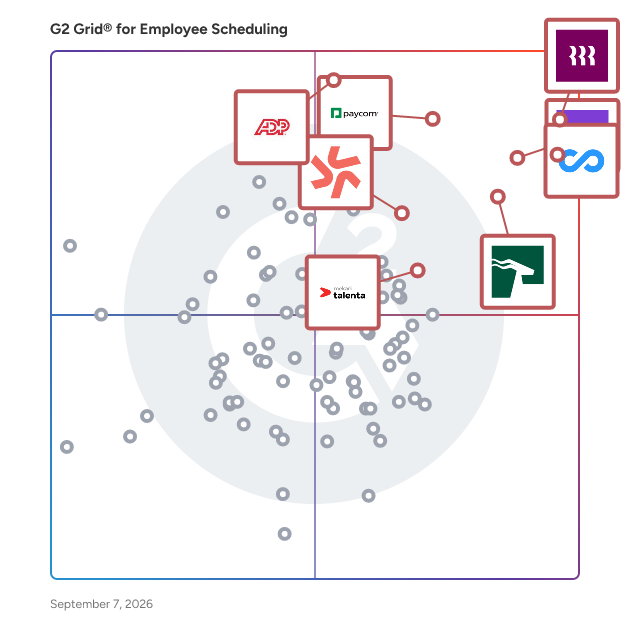
# Best Enterprise Employee Scheduling Software

  *By [Jeffrey Lin](https://research.g2.com/insights/author/jeffrey-lin)*

   Products classified in the overall Employee Scheduling category are similar in many regards and help companies of all sizes solve their business problems. However, enterprise business features, pricing, setup, and installation differ from businesses of other sizes, which is why we match buyers to the right Enterprise Business Employee Scheduling to fit their needs. Compare product ratings based on reviews from enterprise users or connect with one of G2&#39;s buying advisors to find the right solutions within the Enterprise Business Employee Scheduling category.

In addition to qualifying for inclusion in the Employee Scheduling Software category, to qualify for inclusion in the Enterprise Business Employee Scheduling Software category, a product must have at least 10 reviews left by a reviewer from an enterprise business.


## How Many Employee Scheduling Software Products Does G2 Track?
**Total Products under this Category:** 294

### Category Stats (May 2026)
- **Average Rating**: 4.44/5
- **New Reviews This Quarter**: 433
- **Buyer Segments**: Small-Business 55% │ Mid-Market 38% │ Enterprise 8%
- **Top Trending Product**: Synerion Enterprise (+0.25)
*Last updated: May 18, 2026*

  
## How Does G2 Rank Employee Scheduling Software Products?

**Why You Can Trust G2's Software Rankings:**

- 30 Analysts and Data Experts
- 42,600+ Authentic Reviews
- 294+ Products
- Unbiased Rankings

G2's software rankings are built on verified user reviews, rigorous moderation, and a consistent research methodology maintained by a team of analysts and data experts. Each product is measured using the same transparent criteria, with no paid placement or vendor influence. While reviews reflect real user experiences, which can be subjective, they offer valuable insight into how software performs in the hands of professionals. Together, these inputs power the G2 Score, a standardized way to compare tools within every category.

  
## Top Employee Scheduling Software at a Glance
| # | Product | Rating | Best For | What Users Say |
|---|---------|--------|----------|----------------|
| 1 | [Rippling](https://www.g2.com/products/rippling/reviews) | 4.8/5.0 (11,273 reviews) | Unified HR, payroll, and scheduling administration | "[Organized and Efficient Platform for Hiring and Employee Management](https://www.g2.com/survey_responses/rippling-review-12876145)" |
| 2 | [Connecteam](https://www.g2.com/products/connecteam/reviews) | 4.6/5.0 (3,491 reviews) | Mobile workforce scheduling and communication | "[Reducing Manual Coordination Through Smarter Workforce Tools](https://www.g2.com/survey_responses/connecteam-review-12867558)" |
| 3 | [Homebase](https://www.g2.com/products/homebase/reviews) | 4.5/5.0 (491 reviews) | Hourly team scheduling and time tracking | "[Fast, Reliable Scheduling and Payroll That Streamlines My Workflow](https://www.g2.com/survey_responses/homebase-review-12865843)" |
| 4 | [HROne](https://www.g2.com/products/uneecops-hrone/reviews) | 4.8/5.0 (2,054 reviews) | Centralized HR and attendance automation | "[Efficient, User-Friendly HR Management with HROne](https://www.g2.com/survey_responses/hrone-review-12781485)" |
| 5 | [ADP Time and Labor Management](https://www.g2.com/products/adp-adp-time-and-labor-management/reviews) | 4.4/5.0 (154 reviews) | Time tracking with labor rule enforcement | "[Efficient and reliable solution for time and work management](https://www.g2.com/survey_responses/adp-time-and-labor-management-review-12515197)" |
| 6 | [Paycom](https://www.g2.com/products/paycom/reviews) | 4.5/5.0 (4,331 reviews) | Employee self-service time and payroll access | "[Accurate Time Tracking with Clear PTO and Payroll Visibility](https://www.g2.com/survey_responses/paycom-review-12702665)" |
| 7 | [Deputy](https://www.g2.com/products/deputy/reviews) | 4.6/5.0 (646 reviews) | Shift scheduling and timecard management | "[Seamless Scheduling, Multi-Business Support](https://www.g2.com/survey_responses/deputy-review-11854030)" |
| 8 | [Hubstaff](https://www.g2.com/products/hubstaff/reviews) | 4.4/5.0 (2,229 reviews) | Remote time tracking and activity visibility | "[Makes Daily Workflow and Time Tracking Much Easier](https://www.g2.com/survey_responses/hubstaff-review-12845811)" |
| 9 | [Mekari Talenta](https://www.g2.com/products/mekari-talenta/reviews) | 4.8/5.0 (23 reviews) | HR operations automation | "[Talenta Streamlined Our Attendance with Seamless Migration and Outstanding Performance](https://www.g2.com/survey_responses/mekari-talenta-review-12761527)" |
| 10 | [Viventium Software](https://www.g2.com/products/viventium-software/reviews) | 4.7/5.0 (77 reviews) | Healthcare HR and payroll support | "[User-Friendly Payroll Software with Room for Support Improvement](https://www.g2.com/survey_responses/viventium-software-review-8669656)" |


## Which Type of Employee Scheduling Software Tools Are You Looking For?
  - [Employee Scheduling Software](https://www.g2.com/categories/employee-scheduling-software) *(current)*
  - [Workforce Management Software](https://www.g2.com/categories/workforce-management)
  - [Time Tracking Software](https://www.g2.com/categories/time-tracking-software)
  - [Time &amp; Attendance Software](https://www.g2.com/categories/time-attendance)

  
---

**Sponsored**

### Insightful

Insightful is workforce analytics software that shows how work actually happens across your teams. When work is spread across people, locations, and tools, small gaps add up fast. Time goes missing. Work slows down. Problems surface late. Insightful makes this visible. You can see where time is going, how teams are performing, and where work is breaking down — without relying on manual tracking or guesswork. With Insightful, you can: - See how time is spent across teams - Spot drops in utilization and output early - Understand where work slows down or gets stuck - Compare performance across teams, roles, or locations - Use real activity data to review work and resolve disputes This is not just another monitoring tool. Insightful helps you run better operations. You get clear data you can use in weekly reviews, planning, and day-to-day decisions. It combines automatic time tracking, activity data, and reporting in one place — so you can improve performance without adding overhead. Teams choose Insightful because it delivers strong visibility and control without the cost or complexity of heavier tools.


[Visit website](https://www.g2.com/external_clickthroughs/record?secure%5Bad_program%5D=ppc&amp;secure%5Bad_slot%5D=category_product_list&amp;secure%5Bcategory_id%5D=1129&amp;secure%5Bdisplayable_resource_id%5D=1129&amp;secure%5Bdisplayable_resource_type%5D=Category&amp;secure%5Bmedium%5D=sponsored&amp;secure%5Bplacement_reason%5D=page_category&amp;secure%5Bplacement_resource_ids%5D%5B%5D=1129&amp;secure%5Bprioritized%5D=false&amp;secure%5Bproduct_id%5D=37386&amp;secure%5Bresource_id%5D=1129&amp;secure%5Bresource_type%5D=Category&amp;secure%5Bsource_type%5D=category_page&amp;secure%5Bsource_url%5D=https%3A%2F%2Fwww.g2.com%2Fcategories%2Femployee-scheduling-software%3Fpage%3D5&amp;secure%5Btoken%5D=db985bd8fd8feeb708337a0c897e989b8c8a2d9efc714b265d9d43025ec346c4&amp;secure%5Burl%5D=https%3A%2F%2Fwww.insightful.io%2Fworkforce-analytics-enterprise%3Futm_source%3Dg2%26utm_medium%3Dreferral%26utm_campaign%3Ddirectories_paid%26utm_content%3Dpaid%26utm_term%3Dppc2026&amp;secure%5Burl_type%5D=custom_url)

---

  
## Buyer Guide: Key Questions for Choosing Employee Scheduling Software Software
  ### What does Employee Scheduling do?
  When I explain employee scheduling software, I frame it as a system that helps businesses organize who works when, where, and in what role. These platforms bring shift planning, availability, time clocks, attendance, payroll connections, team communication, and mobile access into one workflow. Instead of managing schedules through spreadsheets, messages, or manual updates, teams can create, share, and adjust schedules while keeping managers and employees aligned.


  ### Why do businesses use Employee Scheduling?
  From the G2 reviewer patterns I evaluated, businesses use Employee Scheduling software because manual schedule work creates missed updates, payroll errors, unclear availability, and extra manager follow-up. Users want faster schedule creation, simpler shift changes, and a shared place for time-related work.

Common benefits reviewers highlight include:

- Easier shift planning and schedule updates.
- Less manual time spent on timesheets and payroll prep.
- Better communication between managers and employees.
- Clearer visibility into availability, attendance, and hours.
- Faster access through mobile apps.
- More organized records for labor, compliance, and reporting.


  ### Who uses Employee Scheduling primarily?
  I found that G2 reviewers most often come from roles responsible for people, shifts, operations, or time tracking:

- **Managers and supervisors** who build schedules and approve changes.
- **HR teams** that manage employee records, leave, and attendance.
- **Operations leaders** who need labor visibility across locations.
- **Payroll and finance users** who rely on accurate hours.
- **Owners and administrators** at small and mid-sized businesses.
- **Employees** who check schedules, clock in, request time off, or trade shifts.

Reviewer industry patterns point to hospitality, healthcare, retail, food and beverage, restaurants, construction, fitness, education, consumer services, nonprofits, and professional services.


  ### What types of Employee Scheduling should I consider?
  From the G2 feedback I evaluated, buyers should consider:

- **Shift scheduling tools** for creating schedules, handling availability, and managing swaps.
- **Time clock and attendance tools** for clock-ins, timesheets, breaks, and approvals.
- **Workforce management platforms** for labor planning, compliance, and reporting.
- **HR suites with scheduling** for teams that also need onboarding, payroll, and employee records.
- **Mobile-first team apps** for deskless employees who need schedule access and quick communication.


  ### What are the core features to look for in Employee Scheduling?
  G2 reviewer sentiment points to practical features that affect daily use:

- Employee availability, time-off requests, and shift swap controls that help teams reduce scheduling conflicts.
- Mobile access for schedule checks, alerts, and clock-ins that helps employees stay updated from anywhere.
- Time clock, attendance, and timesheet approval workflows that help connect scheduled hours with actual hours worked.
- Payroll and HR integrations that help reduce manual handoffs between scheduling, time tracking, and pay processes.
- Labor cost, hours, and attendance reports that help managers understand coverage, staffing costs, and workforce patterns.
- Team messaging and notification tools that help keep employees informed about changes, reminders, and open shifts.
- Multi-location or department support that helps growing teams manage schedules across different sites, roles, or groups.
- Easy setup, clear navigation, and responsive support that help teams adopt the software with fewer delays.


  ### What trends are shaping Employee Scheduling right now?
  I found several emerging patterns in G2 reviewer sentiment:

- **Connected workforce workflows** are bringing scheduling, time tracking, payroll, and team communication into one system.
- **Mobile-first scheduling** is becoming essential as employees need to check shifts, swap availability, and receive updates away from a desk.
- **Automation** is helping managers reduce manual work around reminders, approvals, recurring schedules, and shift changes.
- **Easier onboarding** is becoming a priority as buyers look for tools that employees and managers can adopt quickly.
- **Labor visibility and reporting** are helping growing teams understand coverage, hours, costs, and staffing patterns.
- **Compliance support** is becoming more important for teams managing labor rules, attendance policies, and multi-location scheduling.


  ### How should I choose Employee Scheduling?
  For me, the strongest employee scheduling software is the kind that reduces schedule confusion without adding unnecessary admin work. When shift planning, mobile access, payroll integrations, reporting, availability, and team communication align with the way employees work, employee scheduling software becomes a dependable system for keeping schedules clear and teams covered.


---

  ## What Are the Top-Rated Employee Scheduling Software Products in 2026?
### 1. [ADP Time and Labor Management](https://www.g2.com/products/adp-adp-time-and-labor-management/reviews)
  **Average Rating:** 4.4/5.0
  **Total Reviews:** 154
  **Why buyers love it?:** ADP Time and Labor Management appeared as a dedicated time and attendance tool in the review set. When I reviewed the available feedback, users connect it with collecting employee time, tracking labor activity, manager self-service, and rule-based time management. Reviewers also associate it with workforce oversight in mid-market and enterprise environments. I found that it fits teams that need employee time tracking tied to established HR and payroll processes. The available feedback was more limited than for several other products, so I kept the description focused on the supported time and labor workflow.


### What Do G2 Reviewers Say About ADP Time and Labor Management?
*AI-generated summary from verified user reviews*

**Pros:**

- Users appreciate the **ease of use** of ADP Time and Labor Management, facilitating seamless tracking and monitoring of work hours.
- Users appreciate the **easy paycheck access and payroll features** of ADP Time and Labor Management, enhancing convenience.
- Users value the **easy time tracking** features of ADP, enhancing employee management and flexibility with remote clock-in options.
- Users appreciate the **organized and reliable attendance management** of ADP, enhancing accuracy and reducing manual effort.
- Users value how ADP **saves time** by simplifying HR tasks and streamlining payroll and attendance management.

**Cons:**

- Users find the **complexity of ADP Time and Labor Management** discouraging, struggling with its navigation and setup challenges.
- Users often face **login problems** due to strict password requirements and glitches, complicating access to the system.
- Users find the **poor interface design** confusing and challenging to navigate, impacting their overall experience with the tool.
- Users feel that ADP Time and Labor Management needs **improvement** in terms of usability and speed, particularly for new users.
- Users find the pricing of ADP Time and Labor Management to be **expensive** compared to other alternatives, impacting value perception.

#### Key Features
  - Reporting
  - Automation
  - Integrations
  #### What Are Recent G2 Reviews of ADP Time and Labor Management?

**"[ADP Makes Payroll and Workforce Management Easy](https://www.g2.com/survey_responses/adp-time-and-labor-management-review-12722127)"**

**Rating:** 5.0/5.0 stars
*— Jagdish D.*

[Read full review](https://www.g2.com/survey_responses/adp-time-and-labor-management-review-12722127)

---

**"[Efficient and reliable solution for time and work management](https://www.g2.com/survey_responses/adp-time-and-labor-management-review-12515197)"**

**Rating:** 5.0/5.0 stars
*— Shalini R.*

[Read full review](https://www.g2.com/survey_responses/adp-time-and-labor-management-review-12515197)

---

  #### What Are G2 Users Discussing About ADP Time and Labor Management?

- [What is ADP Time and Labor Management used for?](https://www.g2.com/discussions/what-is-adp-time-and-labor-management-used-for) - 1 comment
### 2. [Rippling](https://www.g2.com/products/rippling/reviews)
  **Average Rating:** 4.8/5.0
  **Total Reviews:** 11,273
  **Why buyers love it?:** Rippling came through as an all-in-one workforce platform in the feedback I evaluated. When I reviewed G2 sentiment, users highlight the user-friendly interface, easy navigation, payroll automation, onboarding, and benefits management. Reviewers often connect it with reducing manual HR work and keeping employee-related processes in one system. I found that it fits teams that want scheduling connected to broader HR and payroll workflows. Users also mention mobile app limitations, frequent interface changes, reporting difficulties, and leave request friction.


### What Do G2 Reviewers Say About Rippling?
*AI-generated summary from verified user reviews*

**Pros:**

- Users appreciate the **ease of use** of Rippling, benefiting from a streamlined platform with single login access.
- Users appreciate the **intuitive interface** of Rippling, making it easy to navigate and quickly accomplish tasks.
- Users find Rippling **easy to use and intuitive** , streamlining payroll and saving time with efficient processes.
- Users appreciate the **intuitive and user-friendly interface** of Rippling, making navigation effortless even for newcomers.
- Users commend Rippling for its **easy access** to essential functions like pay, benefits, and PTO requests.

**Cons:**

- Users find the **missing features** in reporting and analytics create significant challenges, complicating simple data requests.
- Users find the **learning curve challenging** , especially during setup and navigating time off functionalities.
- Users find Rippling&#39;s features **limited and outdated** , impacting the overall user experience and navigation.
- Users find the **interface not user-friendly** , facing challenges with navigation and login processes that hinder efficiency.
- Users find **navigation difficult** , often feeling scattered and taking longer to locate documents or settings in Rippling.

#### Key Features
  - Expense Management
  - Integration APIs
  - Approvals
  - Tax Calculation
  - Time Tracking Integration
  #### What Are Recent G2 Reviews of Rippling?

**"[Organized and Efficient Platform for Hiring and Employee Management](https://www.g2.com/survey_responses/rippling-review-12876145)"**

**Rating:** 5.0/5.0 stars
*— Melanie B.*

[Read full review](https://www.g2.com/survey_responses/rippling-review-12876145)

---

**"[Efficient Payment Tracking, Needs MFA Improvement](https://www.g2.com/survey_responses/rippling-review-12868905)"**

**Rating:** 4.0/5.0 stars
*— Aparajita B.*

[Read full review](https://www.g2.com/survey_responses/rippling-review-12868905)

---

  #### What Are G2 Users Discussing About Rippling?

- [How is Rippling innovating in the field of HR and IT management for businesses?](https://www.g2.com/discussions/how-is-rippling-innovating-in-the-field-of-hr-and-it-management-for-businesses) - 5 comments, 6 upvotes
- [What is Rippling used for?](https://www.g2.com/discussions/what-is-rippling-used-for) - 6 comments, 3 upvotes
### 3. [HROne](https://www.g2.com/products/uneecops-hrone/reviews)
  **Average Rating:** 4.8/5.0
  **Total Reviews:** 2,054
  **Why buyers love it?:** HROne showed a clear pattern around consolidated HR work. When I reviewed G2 feedback, users highlight having HR tasks in one place, ease of use, attendance tracking, payroll processing, and process automation. Reviewers often connect it with simplifying HR administration for employee records, attendance, and pay-related workflows. I found that it fits teams that want scheduling and attendance tied to a broader HCM suite. Users also mention limited customization, restrictions around deleting data, third-party integration issues, and occasional performance concerns.


### What Do G2 Reviewers Say About HROne?
*AI-generated summary from verified user reviews*

**Pros:**

- Users love the **ease of use** of HROne, finding it user-friendly and accessible for various tasks.
- Users value the **cooperative support team** of HROne during payroll, significantly saving time and enhancing efficiency.
- Users appreciate the **helpful reminders** in HROne, ensuring timely task completion and enhancing HR efficiency.
- Users value the **exceptional customer support** from HROne, noting the cooperative and timely assistance provided by the team.
- Users value the **automation features** of HROne, enhancing efficiency with reminders and automated calculations.

**Cons:**

- Users experience **slow loading** times during peak access, impacting efficiency and overall user satisfaction.
- Users often face **limited features** in HROne, affecting functionality and user experience, especially for mobile access.
- Users find the **limited customization** options of HROne restrict their ability to tailor the system to their needs.
- Users note the absence of **key features** like an overtime planner and mobile app usability in HROne.
- Users experience **slow performance** with HROne, including laggy app responsiveness and delayed attendance marking.

#### Key Features
  - Time, Attendance, and PTO
  - Integration APIs
  - Billable Time Rate Management
  - Project Accounting / Revenue Recognition
  - Workflow
  #### What Are Recent G2 Reviews of HROne?

**"[Feature-Rich and Cost-Effective HR Tool That Keeps Teams Engaged](https://www.g2.com/survey_responses/hrone-review-12468514)"**

**Rating:** 5.0/5.0 stars
*— Abhishek  K.*

[Read full review](https://www.g2.com/survey_responses/hrone-review-12468514)

---

**"[Efficient, User-Friendly HR Management with HROne](https://www.g2.com/survey_responses/hrone-review-12781485)"**

**Rating:** 4.0/5.0 stars
*— Pratyush S.*

[Read full review](https://www.g2.com/survey_responses/hrone-review-12781485)

---

  #### What Are G2 Users Discussing About HROne?

- [What does Hr-One do?](https://www.g2.com/discussions/what-does-hr-one-do) - 2 comments
- [How do I use HR one app?](https://www.g2.com/discussions/how-do-i-use-hr-one-app) - 2 comments
- [What software is used in HR?](https://www.g2.com/discussions/what-software-is-used-in-hr) - 2 comments
### 4. [Hubstaff](https://www.g2.com/products/hubstaff/reviews)
  **Average Rating:** 4.4/5.0
  **Total Reviews:** 2,229
  **Why buyers love it?:** Hubstaff came through as a time tracking platform for distributed work. From the reviewer patterns I evaluated, users highlight easy setup, a user-friendly interface, transparency, team performance visibility, and task assignment support. Reviewers often connect it with tracking hours, managing remote teams, and understanding work activity. I found that it fits teams that need schedule-related visibility through time tracking and productivity data. Users also mention issues with newer time and activity reports, missing HRIS functions, timing mismatches, idle-time sensitivity, and mobile app limitations.


### What Do G2 Reviewers Say About Hubstaff?
*AI-generated summary from verified user reviews*

**Pros:**

- Users appreciate the **ease of use** of Hubstaff, finding it simple to navigate and set up effectively.
- Users find Hubstaff&#39;s **time tracking** incredibly easy, streamlining management of remote teams and enhancing productivity.
- Users find **time tracking remarkably easy** with Hubstaff, making remote management effortless and efficient.
- Users appreciate the **intuitive time tracking** of Hubstaff, making it easy to manage and review activities.
- Users appreciate the **effective productivity tracking** , finding it essential for monitoring work performance and task management.

**Cons:**

- Users experience **inconsistent time tracking** with Hubstaff, noting automatic stops and sensitivity affecting productivity insights.
- Users report **inaccurate tracking** of work percentages, leading to concerns about reliability and trust in the platform.
- Users find Hubstaff has **limited features** that necessitate additional payments, impacting its overall utility and cost-effectiveness.
- Users express concerns over **time tracking issues** , noting limitations on project hours and privacy intrusions from monitoring.
- Users find the **slow loading** of Hubstaff’s app and tasks to be noticeable, especially when on the go.

#### Key Features
  - Internationalization
  - Invoice Creation and Delivery
  - Time Tracking
  - Automated Reminders
  - Mobile
  #### What Are Recent G2 Reviews of Hubstaff?

**"[Makes Daily Workflow and Time Tracking Much Easier](https://www.g2.com/survey_responses/hubstaff-review-12845811)"**

**Rating:** 4.5/5.0 stars
*— Ishan S.*

[Read full review](https://www.g2.com/survey_responses/hubstaff-review-12845811)

---

**"[Helpful Monitoring, Analytics, and Smart Notifications for Remote Teams](https://www.g2.com/survey_responses/hubstaff-review-12824000)"**

**Rating:** 5.0/5.0 stars
*— Kate | Account Manager R.*

[Read full review](https://www.g2.com/survey_responses/hubstaff-review-12824000)

---

  #### What Are G2 Users Discussing About Hubstaff?

- [What is Hubstaff used for?](https://www.g2.com/discussions/hubstaff-what-is-hubstaff-used-for) - 4 comments
- [How do you use the Hubstaff app?](https://www.g2.com/discussions/how-do-you-use-the-hubstaff-app)
- [Is Hubstaff legal?](https://www.g2.com/discussions/is-hubstaff-legal) - 5 comments, 2 upvotes
### 5. [Quinyx](https://www.g2.com/products/quinyx/reviews)
  **Average Rating:** 4.3/5.0
  **Total Reviews:** 499
  **Why buyers love it?:** Quinyx showed a strong pattern around frontline scheduling and shift oversight. When I reviewed G2 feedback, users highlight ease of use, a user-friendly interface, scheduling, shift management, work-hour tracking, and helpful support. Reviewers often connect it with retail and healthcare teams that need simpler coordination for shift-based employees. I found that it fits organizations that need scheduling and hours tracking across frontline teams. Users also mention bugs, crashes, automatic logouts, customization difficulty, and features that could feel more intuitive or robust.


### What Do G2 Reviewers Say About Quinyx?
*AI-generated summary from verified user reviews*

**Pros:**

- Users find Quinyx to be an **extremely easy system to use** , enhancing their scheduling experience significantly.
- Users appreciate how **intuitive and user-friendly** Quinyx is, making management and usage seamless and enjoyable.
- Users value Quinyx for its **effective staff timing management** and user-friendly interface, making scheduling effortless.
- Users appreciate the **navigation ease** of Quinyx, enabling quick configuration and effective shift management.
- Users love how Quinyx simplifies **scheduling and shift management** , making it easy to oversee team schedules.

**Cons:**

- Users face **scheduling issues** with glitches, outdated employee lists, and confusing time representations in Quinyx.
- Users note the **missing features** like intuitive reports and lead management, which hinder their experience with Quinyx.
- Users find Quinyx to be **not user-friendly** , with navigation challenges and inconsistent features between mobile and web platforms.
- Users note the **limited features** in Quinyx, particularly in reporting and lead management, hindering usability.
- Users find Quinyx **not intuitive** , noting difficulties in navigation and accessing features across platforms.

#### Key Features
  - User, Role, and Access Management
  - Labor Forecasting
  - Schedule Creation Tools
  - Reporting &amp; Dashboards
  - Employee Segmenting
  #### What Are Recent G2 Reviews of Quinyx?

**"[Effortlessly Manages Large Workforce](https://www.g2.com/survey_responses/quinyx-review-7184284)"**

**Rating:** 5.0/5.0 stars
*— Muhammad I.*

[Read full review](https://www.g2.com/survey_responses/quinyx-review-7184284)

---

**"[Effortless Scheduling, Precision Tracking](https://www.g2.com/survey_responses/quinyx-review-12442907)"**

**Rating:** 5.0/5.0 stars
*— Daniela F.*

[Read full review](https://www.g2.com/survey_responses/quinyx-review-12442907)

---

  #### What Are G2 Users Discussing About Quinyx?

- [What is Quinyx used for?](https://www.g2.com/discussions/quinyx-what-is-quinyx-used-for) - 1 comment
- [What is Quinyx used for?](https://www.g2.com/discussions/what-is-quinyx-used-for) - 1 comment
### 6. [Dayforce](https://www.g2.com/products/dayforce/reviews)
  **Average Rating:** 4.2/5.0
  **Total Reviews:** 943
  **Product Description:** Dayforce is the global people platform for the modern workforce. An enterprise HCM solution, Dayforce combines payroll, HR, benefits, talent management, workforce management, and more in a single cloud application to power today’s boundless workforce. Dayforce helps deliver experiences that help organizations unlock their full workforce potential and operate with confidence no matter where they operate in the world. Dayforce is headquartered in Toronto, Ontario and Minneapolis, Minnesota with operations across the globe. The company’s brand promise to make work life better is the commitment it makes not only to customers, but to its own people and the communities Dayforce operates in. Key product areas: · HRIS · Global payroll, on-demand pay · Benefits · Workforce management, including time and attendance and task management · Talent acquisition, including recruiting and onboarding · Talent management, including performance management, succession planning, compensation management, engagement surveys, and an integrated learning management system · Advanced reporting, analytics, and dashboards · HR self service via the Dayforce mobile app


### What Do G2 Reviewers Say About Dayforce?
*AI-generated summary from verified user reviews*

**Pros:**

- Users find Dayforce&#39;s **ease of use** beneficial, with customizable options and helpful guides enhancing their experience.
- Users appreciate the **seamless integration of features** in Dayforce for time card, payroll, and employee profiles.
- Users appreciate the **quick support** provided by Dayforce, which effectively addresses finance-related challenges for organizations.
- Users appreciate the **comprehensive features** of Dayforce, enhancing payroll, time tracking, and employee management experiences.
- Users appreciate the **ease of payroll management** with Dayforce, enjoying seamless access to pay, time off, and schedules.

**Cons:**

- Users experience challenges with **poor customer support** , often facing confusion and frustration during system upgrades and configurations.
- Users find **missing features** in Dayforce, including outdated help articles and limited reporting tools, hindering usability.
- Users find the **limited customization** in Dayforce frustrating, hindering basic setup and delaying implementation of improvements.
- Users find Dayforce has **limited features** like outdated help articles and restricted reporting capabilities.
- Users find the **reporting issues** in Dayforce overly complex, causing confusion and impacting their efficiency.
  #### What Are Recent G2 Reviews of Dayforce?

**"[Streamlined HR Management with Unified System](https://www.g2.com/survey_responses/dayforce-review-12736676)"**

**Rating:** 4.5/5.0 stars
*— Matthew S.*

[Read full review](https://www.g2.com/survey_responses/dayforce-review-12736676)

---

**"[Easy Mobile Clock-In with Scheduling, Time-Off, Pay &amp; Benefits at Your Fingertips](https://www.g2.com/survey_responses/dayforce-review-12410597)"**

**Rating:** 5.0/5.0 stars
*— Kerry D.*

[Read full review](https://www.g2.com/survey_responses/dayforce-review-12410597)

---

  #### What Are G2 Users Discussing About Dayforce?

- [What is Ceridian Dayforce used for?](https://www.g2.com/discussions/what-is-ceridian-dayforce-used-for) - 1 comment
- [What is eloomi used for?](https://www.g2.com/discussions/what-is-eloomi-used-for)
- [How do you create a dayforce account?](https://www.g2.com/discussions/how-do-you-create-a-dayforce-account)
### 7. [Deputy](https://www.g2.com/products/deputy/reviews)
  **Average Rating:** 4.6/5.0
  **Total Reviews:** 646
  **Why buyers love it?:** Deputy showed a strong scheduling pattern for shift-based teams. From the reviewer sentiment I evaluated, users highlight the intuitive dashboard, schedule management, timecards, integrations, and reduced manual scheduling work. Reviewers often connect it with hospitality, retail, and other frontline operations that need clear shift coverage. I found that it fits businesses that need schedules, employee hours, and timecards managed together. Users also mention search bar lag, complexity for new users, and frustration with schedule loading or notifications.


### What Do G2 Reviewers Say About Deputy?
*AI-generated summary from verified user reviews*

**Pros:**

- Users find Deputy to be **extremely user friendly** , making it effortless to manage shifts and availabilities.
- Users appreciate Deputy for its **user-friendly scheduling** , simplifying employee management and enhancing reliability.
- Users appreciate the **easy scheduling** with Deputy, enjoying reliable shift tracking and a user-friendly interface.
- Users appreciate the **intuitive setup** of Deputy, making shift management effortless and efficient from any device.
- Users find the **intuitive user interface** of Deputy easy to navigate, enhancing their shift management experience significantly.

**Cons:**

- Users find **scheduling issues** problematic, citing difficulties with long schedules and lack of search functionality.
- Users find it **tedious to manage unavailability and rostering** , complicating shift management and transparency in scheduling.
- Users face **clocking issues** due to location pin changes and app loading delays, affecting timely shift starts.
- Users express concern over **missing features** like search options and inadequate mobile support, affecting efficiency significantly.
- Users report **slow loading** times and glitches that hinder effective clock-ins and overall app performance.

#### Key Features
  - User, Role, and Access Management
  - Ease of Completing Timesheets
  - Labor Forecasting
  - Employee Leave Management
  - Compliance Monitoring
  #### What Are Recent G2 Reviews of Deputy?

**"[Seamless Scheduling, Multi-Business Support](https://www.g2.com/survey_responses/deputy-review-11854030)"**

**Rating:** 5.0/5.0 stars
*— Christina D.*

[Read full review](https://www.g2.com/survey_responses/deputy-review-11854030)

---

**"[Simple, User-Friendly Interface for Time-Off Requests and Weekly Timecards](https://www.g2.com/survey_responses/deputy-review-12630419)"**

**Rating:** 4.0/5.0 stars
*— Verified User in Automotive*

[Read full review](https://www.g2.com/survey_responses/deputy-review-12630419)

---

  #### What Are G2 Users Discussing About Deputy?

- [What is Deputy used for?](https://www.g2.com/discussions/what-is-deputy-used-for) - 1 comment
- [How do I change my availability on deputy?](https://www.g2.com/discussions/how-do-i-change-my-availability-on-deputy)
- [How much does Deputy app cost?](https://www.g2.com/discussions/how-much-does-deputy-app-cost)
### 8. [Legion WFM](https://www.g2.com/products/legion-wfm/reviews)
  **Average Rating:** 4.3/5.0
  **Total Reviews:** 70
  **Product Description:** Legion Technologies is a workforce management platform designed to help businesses enhance labor efficiency while simultaneously boosting employee engagement. This innovative solution leverages advanced technology to streamline various aspects of workforce management, making it easier for organizations to optimize their operations and improve overall productivity. The Legion WFM platform stands out due to its intelligent automation and employee-centric approach, ensuring that both management and staff benefit from its features. The target audience for Legion Technologies includes businesses with 1000+ employees looking to improve their workforce management practices. Industries such as retail, hospitality, restaurants and convenience stores can particularly benefit from the platform&#39;s capabilities. By providing tools for strategic insights, labor budgeting, and demand forecasting, Legion enables organizations to make informed decisions that align workforce capabilities with business needs. Legion AI is crucial for optimizing labor costs and ensuring that the right number of employees are scheduled at the right times. Key features of the Legion WFM platform include labor optimization, automated scheduling, and time and attendance tracking. These functionalities work together to create a seamless execution process that maximizes operational efficiency. Automated scheduling reduces the time managers spend on creating shifts, while labor optimization ensures that businesses are not overstaffed or understaffed. The time and attendance feature simplifies tracking employee hours, allowing for accurate payroll processing and compliance with labor regulations. In addition to operational features, Legion Technologies places a strong emphasis on employee empowerment. The platform includes tools for frontline communications, enabling team members to stay informed and connected. Legion InstantPay is another notable feature that allows employees to access their earned wages before the traditional payday, enhancing financial flexibility. Furthermore, the platform includes performance and rewards tracking, which helps organizations recognize and incentivize employee contributions, fostering a positive workplace culture. Overall, Legion Technologies provides a comprehensive workforce management solution that not only enhances operational efficiency but also prioritizes employee satisfaction. By integrating advanced technology with user-friendly interfaces, the Legion WFM platform positions itself as a valuable asset for businesses aiming to thrive in a competitive landscape.


### What Do G2 Reviewers Say About Legion WFM?
*AI-generated summary from verified user reviews*

**Pros:**

- Users value the **ease of use** of Legion WFM, enhancing communication and schedule management effortlessly.
- Users value the **easy scheduling** capabilities of Legion WFM, enhancing communication and efficiency with team members.
- Users appreciate the **scheduling ease** of Legion WFM, facilitating quick communication and seamless shift management.
- Users appreciate the **access ease** of Legion WFM, allowing quick insights into onsite staff and schedules.
- Users value the **automation capabilities** of Legion WFM for efficiently managing location open hours across platforms.

**Cons:**

- Users face challenges with **holiday management** , especially regarding clocking in and out during holidays.
- Users find **inadequate tracking** of paid time off complicates scheduling and monitoring their hours effectively.
- Users find the **limited features** of Legion WFM make tracking paid time off and hours challenging.
- Users find the **paid time off tracking** cumbersome, making it difficult to manage hours and estimated pay effectively.
- Users find the **PTO issues** challenging, struggling to track hours and estimated pay effectively in their schedules.
  #### What Are Recent G2 Reviews of Legion WFM?

**"[Efficient Scheduling and Real-Time Insights](https://www.g2.com/survey_responses/legion-wfm-review-12545507)"**

**Rating:** 5.0/5.0 stars
*— Carl J.*

[Read full review](https://www.g2.com/survey_responses/legion-wfm-review-12545507)

---

**"[Optimizes Strategy with Intuitive Employee Engagement](https://www.g2.com/survey_responses/legion-wfm-review-12642349)"**

**Rating:** 4.0/5.0 stars
*— Tim C.*

[Read full review](https://www.g2.com/survey_responses/legion-wfm-review-12642349)

---

  #### What Are G2 Users Discussing About Legion WFM?

- [What is Legion WFM used for?](https://www.g2.com/discussions/what-is-legion-wfm-used-for)
### 9. [Paycom](https://www.g2.com/products/paycom/reviews)
  **Average Rating:** 4.5/5.0
  **Total Reviews:** 4,331
  **Why buyers love it?:** Paycom registered as a broad HR and payroll platform with scheduling-adjacent time access. When I assessed reviewer feedback, users highlight ease of use, paycheck transparency, centralized employee information, and convenient clock-in and clock-out functions. Reviewers often connect it with tracking work information and improving employee access to HR and pay details. I found that it fits organizations that want time management tied closely to payroll and employee self-service. Users also mention an initial learning curve, slow network periods, confusion around punch corrections, and limited advance paycheck options.


### What Do G2 Reviewers Say About Paycom?
*AI-generated summary from verified user reviews*

**Pros:**

- Users appreciate the **ease of use** of Paycom, noting its intuitive interface and straightforward setup process.
- Users find Paycom&#39;s **user-friendly technology** simplifies payroll processing and enhances accessibility for employees.
- Users value the **knowledgeable customer support** of Paycom, appreciating their quick and thorough assistance.
- Users appreciate the **streamlined payroll processes** of Paycom, greatly enhancing accessibility and user experience for employees.
- Users value the **user-friendly technology** of Paycom, which simplifies payroll and time tracking processes significantly.

**Cons:**

- Users express frustration with **poor customer support** from Paycom, often feeling their concerns are not adequately addressed.
- Users find the **learning curve steep** , struggling with an unintuitive UI and inadequate support for their needs.
- Users find Paycom&#39;s **interface unintuitive** , often requiring excessive steps to complete simple tasks, hindering overall efficiency.
- Users experience **limited features** with Paycom, leading to frustration and unmet needs compared to modern alternatives.
- Users often face **navigation difficulty** with Paycom, making it harder to find necessary features quickly.

#### Key Features
  - User, Role, and Access Management
  - Time Off Accrual
  - Tax Calculation
  - Time Tracking Integration
  - E-Forms
  #### What Are Recent G2 Reviews of Paycom?

**"[Accurate Time Tracking with Clear PTO and Payroll Visibility](https://www.g2.com/survey_responses/paycom-review-12702665)"**

**Rating:** 5.0/5.0 stars
*— Christine G.*

[Read full review](https://www.g2.com/survey_responses/paycom-review-12702665)

---

**"[Comprehensive, Easy-to-Access HR Solution with Helpful AI Support](https://www.g2.com/survey_responses/paycom-review-12625703)"**

**Rating:** 4.5/5.0 stars
*— Jeremy H.*

[Read full review](https://www.g2.com/survey_responses/paycom-review-12625703)

---

### 10. [Assembled WFM](https://www.g2.com/products/assembled-wfm/reviews)
  **Average Rating:** 4.6/5.0
  **Total Reviews:** 167
  **Product Description:** Assembled is an all-in-one support platform designed to enhance customer service operations by integrating AI agents with intelligent workforce management. This solution aims to help companies deliver exceptional support experiences while efficiently managing their resources. By leveraging advanced technology, Assembled enables organizations to streamline their support processes, ensuring that both AI and human agents work in harmony to meet customer needs. The platform primarily targets customer support teams across various industries that seek to improve their operational efficiency and service quality. Assembled is particularly beneficial for businesses that handle high volumes of customer interactions and require precise forecasting and staffing solutions. With its capabilities, teams can automate a significant portion of customer interactions, allowing human agents to focus on more complex inquiries, thereby enhancing overall productivity and customer satisfaction. Key features of Assembled include fast and intuitive scheduling, which allows teams to create customized work schedules that adapt to fluctuating demand. This flexibility is crucial for organizations that experience varying levels of customer inquiries throughout the day or week. Additionally, the platform offers human-in-the-loop AI-powered automation, which ensures that AI agents can seamlessly collaborate with human staff, providing a balanced approach to customer support. This unique feature helps to maintain a personal touch in customer interactions while benefiting from the efficiency of automation. Another standout aspect of Assembled is its powerful forecasting capabilities, which boast over 90% accuracy. This feature enables teams to predict customer demand accurately, allowing for optimal staffing decisions that align with anticipated workload. Furthermore, the platform provides meaningful cross-team visibility, ensuring that all stakeholders have access to relevant information and insights, fostering collaboration and informed decision-making. Assembled also excels in reporting, offering centralized and robust analytics that deliver actionable insights. This comprehensive reporting functionality empowers teams to track performance metrics, identify trends, and make data-driven adjustments to their support strategies. By utilizing Assembled, organizations can scale their support operations intelligently, balancing the strengths of AI with the irreplaceable value of human interaction, ultimately leading to enhanced customer experiences and operational success.


### What Do G2 Reviewers Say About Assembled WFM?
*AI-generated summary from verified user reviews*

**Pros:**

- Users find Assembled WFM to be **extremely user-friendly** , allowing quick navigation and effective workforce management for all backgrounds.
- Users value the **real-time scheduling capabilities** of Assembled WFM, enhancing agent management and operational efficiency.
- Users appreciate the **scheduling ease** of Assembled WFM, enjoying effortless schedule creation and real-time updates.
- Users value the **intuitive design** of Assembled WFM, enabling quick understanding and effective workforce management for all.
- Users value the **efficiency** of Assembled WFM, facilitating seamless scheduling and insightful forecasting for optimal workforce management.

**Cons:**

- Users report **scheduling issues** that hinder functionality, complicate schedule management, and reduce efficiency in Assembled WFM.
- Users find the **missing features** in Assembled WFM challenging, particularly regarding custom reports and schedule management.
- Users find Assembled WFM has **limited features** , necessitating workarounds that hinder overall efficiency and effectiveness.
- Users face challenges with **poor reporting** , struggling with limited flexibility and delayed adherence data affecting decision-making.
- Users report **slow loading** times, hindering task completion and making updates difficult in Assembled WFM.
  #### What Are Recent G2 Reviews of Assembled WFM?

**"[Simple UI, Helpful Support, and Reliable Performance at a Great Price](https://www.g2.com/survey_responses/assembled-wfm-review-12705530)"**

**Rating:** 4.5/5.0 stars
*— Verified User in Package/Freight Delivery*

[Read full review](https://www.g2.com/survey_responses/assembled-wfm-review-12705530)

---

**"[Drag-and-Drop Interface That Saves Hours Each Week](https://www.g2.com/survey_responses/assembled-wfm-review-12668769)"**

**Rating:** 4.5/5.0 stars
*— Thomas M.*

[Read full review](https://www.g2.com/survey_responses/assembled-wfm-review-12668769)

---

  #### What Are G2 Users Discussing About Assembled WFM?

- [What is your primary use case for Assembled in workforce management, and how has it impacted your team&#39;s efficiency?](https://www.g2.com/discussions/what-is-your-primary-use-case-for-assembled-in-workforce-management-and-how-has-it-impacted-your-team-s-efficiency)
- [What is Assembled used for?](https://www.g2.com/discussions/what-is-assembled-used-for)
### 11. [WorkJam](https://www.g2.com/products/workjam/reviews)
  **Average Rating:** 4.5/5.0
  **Total Reviews:** 58
  **Why buyers love it?:** WorkJam surfaced as a frontline workplace tool in the feedback I evaluated. When I reviewed G2 sentiment, users highlight the user-friendly interface, streamlined work processes, customer support, scheduling, task management, learning, and communication. Reviewers often connect it with retail teams that need employees to access work information in one place. I found that it fits organizations that want scheduling paired with frontline communication and task execution. Users also mention module-based feature limits, messaging gaps, and slow reporting with bulky outputs.


### What Do G2 Reviewers Say About WorkJam?
*AI-generated summary from verified user reviews*

**Pros:**

- Users love the **ease of use** of WorkJam, streamlining tasks and enhancing communication effectively.
- Users value the **communication efficiency** of WorkJam, making it easier to know tasks and stay connected.
- Users appreciate the **streamlined communication** features of WorkJam, significantly enhancing productivity and employee engagement.
- Users appreciate the **self-service scheduling** features of WorkJam, enhancing flexibility and boosting team morale and productivity.
- Users value WorkJam for its **intuitive design** , enhancing scheduling, communication, and overall team productivity effortlessly.

**Cons:**

- Users report **app glitches** like lagging videos and frequent login issues that disrupt their workflow.
- Users face **scheduling issues** as tasks often can&#39;t be completed off the clock, complicating daily management.
- Users face **integration issues** with WorkJam, requiring significant efforts to adapt and optimize for their business needs.
- Users experience a **steep learning curve** with WorkJam, impacting initial adoption and integration with existing systems.
- Users report **complexity** in understanding WorkJam, especially during initial adoption and integration with existing systems.

#### Key Features
  - Customization 
  - Employee Pulse Surveys
  - Goal and Challenge Creation
  - News Feed
  - Employee Generated Content
  #### What Are Recent G2 Reviews of WorkJam?

**"[WorkJam Improved Corporate/Field Communication, but has not been a One Stop Shop for us](https://www.g2.com/survey_responses/workjam-review-12791997)"**

**Rating:** 4.0/5.0 stars
*— Verified User in Retail*

[Read full review](https://www.g2.com/survey_responses/workjam-review-12791997)

---

**"[Centralizes Communication Efficiently, Needs Messaging Enhancements](https://www.g2.com/survey_responses/workjam-review-12562357)"**

**Rating:** 4.0/5.0 stars
*— Jeff K.*

[Read full review](https://www.g2.com/survey_responses/workjam-review-12562357)

---

  #### What Are G2 Users Discussing About WorkJam?

- [Who owns WorkJam?](https://www.g2.com/discussions/who-owns-workjam)
- [How much does WorkJam cost?](https://www.g2.com/discussions/how-much-does-workjam-cost)
- [How does work jam work?](https://www.g2.com/discussions/how-does-work-jam-work)
### 12. [Humanity Schedule by TCP](https://www.g2.com/products/humanity-schedule-by-tcp/reviews)
  **Average Rating:** 4.3/5.0
  **Total Reviews:** 1,053
  **Product Description:** Humanity Schedule by TCP provides a flexible approach to employee scheduling, no matter where your teams work or what device they use. Humanity Schedule automates dynamic scheduling and shift planning to eliminate over-scheduling issues and staffing errors, reduces unexpected labor costs, and mitigates compliance concerns to create an efficient, stress-free scheduling experience for managers and employees alike.  With Humanity Schedule, you easily fill coverage gaps with AI-driven demand forecasting, avoid scheduling conflicts with adaptive scheduling capabilities, and eliminate manual tasks and overspending — all in one solution that ensures compliance and clarity for every employee.


### What Do G2 Reviewers Say About Humanity Schedule by TCP?
*AI-generated summary from verified user reviews*

**Pros:**

- Users appreciate the **intuitive and user-friendly design** of Humanity Schedule, enhancing team coordination and ease of access.
- Users appreciate the **intuitive scheduling ease** of Humanity Schedule, enabling clear, real-time updates and smooth team coordination.
- Users value the **intuitive scheduling** of Humanity Schedule, enabling clear updates and smooth team coordination.
- Users find Humanity Schedule by TCP to be **exceptionally easy to use** , streamlining shift management and team communication effectively.
- Users value the **comprehensive features** of Humanity Schedule, finding it scalable and easy to use for operations.

**Cons:**

- Users often face **scheduling issues** with Humanity, including disappearing schedules and confusion for novices.
- Users feel that the **missing features** like better reporting and department compartmentalization hinder the overall experience with Humanity Schedule.
- Users face **integration issues** with Humanity Schedule by TCP, leading to manual checks and time-consuming tasks.
- Users note the **limited features** of Humanity Schedule, wishing for improved usability and additional tracking options.
- Users notice the **slow loading** times of the Humanity Schedule app, especially during bulk updates and approvals.
  #### What Are Recent G2 Reviews of Humanity Schedule by TCP?

**"[Easy-to-View Scheduling That Keeps the Whole Team Connected](https://www.g2.com/survey_responses/humanity-schedule-by-tcp-review-12724270)"**

**Rating:** 4.0/5.0 stars
*— Suzette K.*

[Read full review](https://www.g2.com/survey_responses/humanity-schedule-by-tcp-review-12724270)

---

**"[The Backbone of Our Scheduling Workflow](https://www.g2.com/survey_responses/humanity-schedule-by-tcp-review-12516294)"**

**Rating:** 4.5/5.0 stars
*— Lorraine P.*

[Read full review](https://www.g2.com/survey_responses/humanity-schedule-by-tcp-review-12516294)

---

  #### What Are G2 Users Discussing About Humanity Schedule by TCP?

- [What is TCP Humanity Scheduling used for?](https://www.g2.com/discussions/what-is-tcp-humanity-scheduling-used-for)
- [How do you use humanity scheduling?](https://www.g2.com/discussions/how-do-you-use-humanity-scheduling) - 1 comment
- [How much does humanity cost?](https://www.g2.com/discussions/how-much-does-humanity-cost) - 1 comment
### 13. [Playvox WFM](https://www.g2.com/products/playvox-wfm/reviews)
  **Average Rating:** 4.7/5.0
  **Total Reviews:** 122
  **Product Description:** Playvox by NICE Workforce Management (WFM) uses AI for efficient capacity planning, forecasting, scheduling, and intraday planning, accessible via the cloud. It provides real-time visibility into staff allocation, supports shift swaps and time-off requests, and enhances employee engagement. Its interactive dashboard focuses on key KPIs like shrinkage and service levels. Designed for digital, omnichannel contact centers, Playvox WFM handles complex interactions and concurrent work for chat, email, and social media. Its intuitive design simplifies workforce management, allowing quick training and improved customer experiences.


### What Do G2 Reviewers Say About Playvox WFM?
*AI-generated summary from verified user reviews*

**Pros:**

- Users find Playvox WFM to be **incredibly user-friendly** , enjoying its intuitive interface and easy navigation.
- Users appreciate the **easy team scheduling** in Playvox WFM, simplifying management and reducing stress significantly.
- Users appreciate the **easy scheduling access** of Playvox WFM, enhancing their ability to manage time effectively.
- Users value the **efficiency** of Playvox WFM, enhancing their scheduling and time management during work hours.
- Users value the **time management** features of Playvox WFM, helping them stay on schedule effortlessly.

**Cons:**

- Users report **missing key features** in Playvox WFM, impacting scheduling and overall functionality expectations.
- Users experience **limited features** in Playvox WFM, including inadequate mobile functionality and missing essential tools for efficiency.
- Users are frustrated by **display issues** such as limited calendar views and unsupported icons/images affecting usability.
- Users express frustration with **inefficient reporting** in Playvox WFM, noting slow performance and inconsistent data issues.
- Users find the **poor interface design** of Playvox WFM to be frustrating despite overall functionality being satisfactory.
  #### What Are Recent G2 Reviews of Playvox WFM?

**"[Great reporting and time tracking tool](https://www.g2.com/survey_responses/playvox-wfm-review-11419098)"**

**Rating:** 5.0/5.0 stars
*— Alberto L.*

[Read full review](https://www.g2.com/survey_responses/playvox-wfm-review-11419098)

---

**"[Effortless Team Management, Smooth Operations](https://www.g2.com/survey_responses/playvox-wfm-review-12229198)"**

**Rating:** 4.5/5.0 stars
*— Felipe B.*

[Read full review](https://www.g2.com/survey_responses/playvox-wfm-review-12229198)

---

  #### What Are G2 Users Discussing About Playvox WFM?

- [What is Playvox WFM used for?](https://www.g2.com/discussions/what-is-playvox-wfm-used-for)
### 14. [When I Work](https://www.g2.com/products/when-i-work/reviews)
  **Average Rating:** 4.4/5.0
  **Total Reviews:** 376
  **Product Description:** When I Work is an easy way for businesses to schedule, track time and attendance, and communicate with their hourly employees. Put the schedule and time clock in every employee&#39;s pocket with free iOS and Android apps. Keep track of time off, employee availability, and manage shift swaps with just a few clicks. Integrate with your payroll provider to streamline the process and avoid human error. Get started with a 14-day free trial now.


### What Do G2 Reviewers Say About When I Work?
*AI-generated summary from verified user reviews*

**Pros:**

- Users find When I Work to be incredibly **easy to use** , simplifying scheduling and availability tracking significantly.
- Users appreciate the **ease of scheduling** with When I Work, benefiting from clear visibility into availability and task assignments.
- Users enjoy the **scheduling ease** of When I Work, appreciating its clarity and user-friendly interface for managing availability.
- Users value the **time-saving features** of When I Work, which simplify scheduling and enhance organization for effortless management.
- Users value the **easy shift management** features of When I Work, enhancing convenience and user-friendliness in scheduling.

**Cons:**

- Users face **scheduling issues** with When I Work, including high costs and a lack of customization for monthly views.
- Users experience **missing features** in When I Work, such as laggy clock-ins and limited app functionality.
- Users often experience **software bugs** , including loading delays and clash issues that hinder effective scheduling.
- Users express frustration over **limited features** , impacting scheduling flexibility and overall efficiency in managing workforce needs.
- Users find **notifications poor** and lacking customization, leading to information overload and missed reminders.
  #### What Are Recent G2 Reviews of When I Work?

**"[Effortless Setup, Budget-Friendly but Needs Better Gusto Integration](https://www.g2.com/survey_responses/when-i-work-review-12759265)"**

**Rating:** 4.0/5.0 stars
*— Kurt G.*

[Read full review](https://www.g2.com/survey_responses/when-i-work-review-12759265)

---

**"[Streamlined Scheduling with Seamless Payroll Integration](https://www.g2.com/survey_responses/when-i-work-review-11014132)"**

**Rating:** 4.0/5.0 stars
*— Bree N.*

[Read full review](https://www.g2.com/survey_responses/when-i-work-review-11014132)

---

  #### What Are G2 Users Discussing About When I Work?

- [What is When I Work used for?](https://www.g2.com/discussions/when-i-work-what-is-when-i-work-used-for)
- [What is When I Work used for?](https://www.g2.com/discussions/what-is-when-i-work-used-for) - 1 comment
- [How do you work as an employee?](https://www.g2.com/discussions/how-do-you-work-as-an-employee)
### 15. [MakeShift](https://www.g2.com/products/makeshift/reviews)
  **Average Rating:** 4.3/5.0
  **Total Reviews:** 290
  **Product Description:** MakeShift is the only people first cloud scheduling solution that improves the scheduling experience for managers and employees alike. It&#39;s easy to set up and even easier to use. You&#39;ll create schedules faster, track attendance more accurately, and communicate with staff in real time regardless of the size of your team. Our customers experience fewer unfilled shifts, better work-life balance, happier employees, and a healthier bottom line. It&#39;s People First scheduling and businesses love it! Sign up today to save time, reduce labor costs, and increase employee engagement --\&gt; makeshift.ca MakeShift offers a free 14-day trial.


### What Do G2 Reviewers Say About MakeShift?
*AI-generated summary from verified user reviews*

**Pros:**

- Users love the **easy scheduling** features of MakeShift, enhancing their ability to manage and view work schedules efficiently.
- Users find **Scheduling Ease** with MakeShift exceptional, enjoying the straightforward access to schedules and simple edits.
- Users find MakeShift to be **easy to use** , enjoying its user-friendly interface and convenient features.
- Users appreciate the **ease of shift management** with intuitive scheduling and important notifications readily available.
- Users find MakeShift **easy to use** , enjoying its user-friendly design and simple scheduling capabilities.

**Cons:**

- Users find the **scheduling issues** inconvenient, particularly regarding manual time selection and small display size.
- Users find the **missing features** in MakeShift challenging, as it complicates scheduling and staff management.
- Users desire more **reporting options** and features, noting limitations that hinder efficient management and tracking.
- Users find **shift management tedious** , wishing for better options for recurring availability and bulk shift additions.
- Users find **display issues** with Makeshift, particularly the small size of the scheduling interface on desktop.
  #### What Are Recent G2 Reviews of MakeShift?

**"[Effortless Shift Management and Real-Time Updates](https://www.g2.com/survey_responses/makeshift-review-11973956)"**

**Rating:** 4.5/5.0 stars
*— Xia Y.*

[Read full review](https://www.g2.com/survey_responses/makeshift-review-11973956)

---

**"[Efficiency and reliability](https://www.g2.com/survey_responses/makeshift-review-9401922)"**

**Rating:** 5.0/5.0 stars
*— Kenechukwu U.*

[Read full review](https://www.g2.com/survey_responses/makeshift-review-9401922)

---

  #### What Are G2 Users Discussing About MakeShift?

- [What is MakeShift used for?](https://www.g2.com/discussions/what-is-makeshift-used-for) - 1 comment
### 16. [WorkInSync](https://www.g2.com/products/workinsync/reviews)
  **Average Rating:** 4.6/5.0
  **Total Reviews:** 236
  **Product Description:** WorkInSync is an AI-powered SaaS solution designed to help companies manage hybrid workplaces while optimising CRE Costs and improving Employee experience. This innovative platform addresses the evolving needs of modern work environments by facilitating seamless transitions between remote and in-office work. At its core, WorkInSync serves as a comprehensive workplace management solution that addresses the evolving needs of modern organizations transitioning to flexible work models. The platform&#39;s foundation rests on its intelligent workspace management capabilities. Through features like employee scheduling, hotdesking, and workspace reservations, WorkInSync enables organizations to efficiently allocate office resources. The system extends beyond basic space management to encompass desk booking, meeting room management, parking facilities, visitor management, employee commute and cafeteria services, creating an integrated ecosystem that handles all aspects of workplace operations. Central to WorkInSync&#39;s functionality are its Team Calendar and Floor Plan layout features. These tools provide employees with real-time visibility into their colleagues&#39; schedules and seating arrangements, fostering spontaneous collaboration and strengthening team dynamics in hybrid work environments. The platform&#39;s integration capabilities connect with over 45 popular workplace tools, including Microsoft Teams, Outlook, Google Workspace, and various HRMS systems through Active Directory, ensuring seamless incorporation into existing organizational workflows. WorkInSync maintains enterprise-grade security standards with ISO 27001, ISO 27701, and SOC 2 Type 2 certifications, protecting sensitive organizational data. Available on both web browsers and mobile devices (iOS and Android), the platform offers extensive customization options with over 1,800 configurations to accommodate unique enterprise requirements. Organizations can expect rapid deployment with a 15-day implementation timeline for standard setups, supported by 24/7 customer service and dedicated account management. With a user base of over 600,000 employees across more than 300 companies globally(including 79 Fortune 500 Companies), WorkInSync is positioned as a robust solution for organizations looking to adapt to the future of work. By prioritizing flexibility, collaboration, and data-driven decision-making, WorkInSync stands out as a comprehensive tool that meets the demands of modern workplaces while supporting employee well-being and productivity.


### What Do G2 Reviewers Say About WorkInSync?
*AI-generated summary from verified user reviews*

**Pros:**

- Users appreciate the **easy booking** process of WorkInSync, making their workday more efficient and hassle-free.
- Users appreciate the **convenience** of WorkInSync&#39;s desk booking system, simplifying office visits and saving valuable time.
- Users appreciate the **ease of use** of WorkInSync, finding desk and meeting room booking extremely convenient.
- Users value the **reservation ease** of WorkInSync, as it saves time and simplifies office attendance management.
- Users find the **desk booking system** in WorkInSync incredibly convenient and easy to use, enhancing their office experience.

**Cons:**

- Users face **booking issues** with WorkInSync, struggling with seamless transitions and limited swapping capabilities.
- Users desire **automatic check-in** when connecting to the office Wi-Fi for a seamless experience.
- Users often experience **slow loading** times with WorkInSync, which can hinder productivity during peak usage.
- Users find **user interface issues** with WorkInSync, as navigation between options can be confusing for new users.
- Users express frustration over **booking limitations** , wishing for features like recurring bookings and saved seat selections.
  #### What Are Recent G2 Reviews of WorkInSync?

**"[Convenient tool, helps plan office days better](https://www.g2.com/survey_responses/workinsync-review-12664405)"**

**Rating:** 5.0/5.0 stars
*— Neha T.*

[Read full review](https://www.g2.com/survey_responses/workinsync-review-12664405)

---

**"[Quickly Find and Book Free Meeting Rooms When You Need Them Most](https://www.g2.com/survey_responses/workinsync-review-12690859)"**

**Rating:** 5.0/5.0 stars
*— Suchitra  S.*

[Read full review](https://www.g2.com/survey_responses/workinsync-review-12690859)

---

  #### What Are G2 Users Discussing About WorkInSync?

- [What is WorkInSync used for?](https://www.g2.com/discussions/what-is-workinsync-used-for) - 1 comment
### 17. [HotSchedules](https://www.g2.com/products/hotschedules/reviews)
  **Average Rating:** 4.3/5.0
  **Total Reviews:** 102
  **Product Description:** HotSchedules is the #1-rated workforce management platform built for restaurants. With HotSchedules, you hire, schedule, and pay your team…al l from one integrated platform. Restaurant operators are up against high turnover, complex labor laws, manager overload, and disconnected systems — all while trying to protect profits. HotSchedules solves this by bringing together everything from hiring and onboarding to scheduling and payroll into one simple platform built for restaurants. You can hire faster, schedule smarter, pay accurately, stay compliant, and improve sales — all while giving staff, managers, and guests a better experience.


### What Do G2 Reviewers Say About HotSchedules?
*AI-generated summary from verified user reviews*

**Pros:**

- Users appreciate the **ease of use** in HotSchedules, particularly for creating schedules and trends effortlessly.
- Users appreciate the **shortcuts and ease of use** in creating schedules and analyzing trends with HotSchedules.
- Users value the **scheduling ease** of HotSchedules, benefiting from shortcuts that simplify creating schedules and trends.

**Cons:**

- Users report **labor analysis issues** due to programming shifts, particularly with incorrect close of day settings.
  #### What Are Recent G2 Reviews of HotSchedules?

**"[Affordable, Real-Time Scheduling and Forecasting with Easy Support](https://www.g2.com/survey_responses/hotschedules-review-12615518)"**

**Rating:** 5.0/5.0 stars
*— Matthew H.*

[Read full review](https://www.g2.com/survey_responses/hotschedules-review-12615518)

---

**"[Great Schedule system for restaurants](https://www.g2.com/survey_responses/hotschedules-review-10638824)"**

**Rating:** 4.0/5.0 stars
*— Verified User in Restaurants*

[Read full review](https://www.g2.com/survey_responses/hotschedules-review-10638824)

---

  #### What Are G2 Users Discussing About HotSchedules?

- [What are the benefits and challenges of using HotSchedules for employee scheduling?](https://www.g2.com/discussions/what-are-the-benefits-and-challenges-of-using-hotschedules-for-employee-scheduling)
- [What is HotSchedules used for?](https://www.g2.com/discussions/what-is-hotschedules-used-for)
### 18. [WhenToWork by TCP](https://www.g2.com/products/whentowork-by-tcp/reviews)
  **Average Rating:** 4.4/5.0
  **Total Reviews:** 98
  **Product Description:** Tired of paper schedules and software that does far more than you need? WhenToWork is simple to use, built for how your team already works, and priced right for seasonal and small teams. From templates to work preferences to mobile shift trading and reminders, it gives managers the control they need and employees the flexibility they expect. No learning curve and no big software price tag. With WhenToWork, you can: Build the best schedule fast: Create and adjust shifts in minutes using drag-and-drop tools, schedule templates, and auto-fill. Improve coverage and avoid last-minute scrambles: View availability and staffing gaps at a glance to stay ahead of no-shows and overtime. Empower your team with more flexibility: Let employees trade shifts, pick up open slots, and request time off with built-in manager approval. Keep everyone in the loop: Send automatic shift reminders and updates via email, text, and in the app so no one misses a change. Manage multiple teams with ease: Create and view schedules by role, department, or location all in one place. No tab toggling required. Whether you&#39;re managing a small business, seasonal crew, or large department, WhenToWork gets scheduling done fast without slowing down your day.


### What Do G2 Reviewers Say About WhenToWork by TCP?
*AI-generated summary from verified user reviews*

**Pros:**

- Users appreciate the **clear and easy scheduling** of WhenToWork, making off-site access convenient and efficient.
- Users appreciate the **comprehensive features** of WhenToWork, finding it clear and easy for organizing schedules effectively.
- Users appreciate the **ease of use** of WhenToWork, finding it clear and well-organized for scheduling shifts.
- Users love the **off-site access to schedules** , appreciating the modern convenience it brings to their workflow.

**Cons:**

- Users find the **overly complicated features** of WhenToWork unnecessary for their small business needs.
- Users find the **limited features** of WhenToWork hinder effective use for small business needs.
- Users dislike the **separate account and pin requirement** , finding it cumbersome to manage multiple facilities in WhenToWork.
  #### What Are Recent G2 Reviews of WhenToWork by TCP?

**"[Efficient Shifts with Easy Setup](https://www.g2.com/survey_responses/whentowork-by-tcp-review-12596059)"**

**Rating:** 5.0/5.0 stars
*— Evelyn S.*

[Read full review](https://www.g2.com/survey_responses/whentowork-by-tcp-review-12596059)

---

**"[Easy Shift Scheduling with Weekly Copy and Built-In Availability](https://www.g2.com/survey_responses/whentowork-by-tcp-review-12477715)"**

**Rating:** 4.5/5.0 stars
*— Verified User in Higher Education*

[Read full review](https://www.g2.com/survey_responses/whentowork-by-tcp-review-12477715)

---

  #### What Are G2 Users Discussing About WhenToWork by TCP?

- [What are the benefits and challenges of using WhenToWork for employee scheduling, and what features do you find most valuable?](https://www.g2.com/discussions/what-are-the-benefits-and-challenges-of-using-whentowork-for-employee-scheduling-and-what-features-do-you-find-most-valuable)
- [What is WhenToWork used for?](https://www.g2.com/discussions/what-is-whentowork-used-for)
- [How much does when I work app cost?](https://www.g2.com/discussions/whentowork-how-much-does-when-i-work-app-cost)
### 19. [Rotageek](https://www.g2.com/products/rotageek/reviews)
  **Average Rating:** 4.6/5.0
  **Total Reviews:** 27
  **Product Description:** Put simply, we provide app-based workforce management and scheduling solutions that help you plan labour to demand more efficiently. Whether you&#39;re scheduling staff on the shop floor or rostering doctors, we’ll help you create the perfect workforce schedule every time, broadcast it to your employees, fill and mitigate shift gaps, improve your labour to demand match and increase your sales or patient care. Our workforce management solutions range from intuitive digital schedules to AI optimised rotas using forecasts from data points at your locations. And with tools to book leave, track time and attendance, clock in and out for shifts, a self-serve employee app and integrations into HR &amp; Payroll integration, we can provide an all-in-one workforce management solution.


  #### What Are Recent G2 Reviews of Rotageek?

**"[Rotageek very easy to use](https://www.g2.com/survey_responses/rotageek-review-9653000)"**

**Rating:** 5.0/5.0 stars
*— Verified User in Facilities Services*

[Read full review](https://www.g2.com/survey_responses/rotageek-review-9653000)

---

**"[Rotageek is an intuitive scheduling service that is fast and easy to use](https://www.g2.com/survey_responses/rotageek-review-9659008)"**

**Rating:** 5.0/5.0 stars
*— sarah O.*

[Read full review](https://www.g2.com/survey_responses/rotageek-review-9659008)

---

  #### What Are G2 Users Discussing About Rotageek?

- [What is Rotageek used for?](https://www.g2.com/discussions/what-is-rotageek-used-for)
### 20. [Gaia WFM Suite](https://www.g2.com/products/gaia-wfm-suite/reviews)
  **Average Rating:** 4.4/5.0
  **Total Reviews:** 25
  **Product Description:** GaiaDigits is a professional workforce management solution company in Ontario Canada. Gaia WFM Suite is a cloud-based workforce management suite built to help businesses manage employee time and attendance. This solution includes workforce analytics that provides access to real-time data reports and metrics that intend to improve workforce efficiency. Additionally, the Gaia WFM Smart Scheduler feature helps businesses create effective team schedules with the use of forecasting and scheduling algorithms. Gaia WFM Suite offers an intelligent mobile app that uses Blue Tooth, WiFi, Geo-Fence (GPS) to clock in and out. The app gives employees access to live schedules, shift swap requests, mobile punch in/out methods, available shifts, overtime requests, and company announcements. Managers can use the Gaia WFM mobile app to view and approve requests as needed. Please contact info@gaiadigits.com to book a demo.


  #### What Are Recent G2 Reviews of Gaia WFM Suite?

**"[Data Innovation and Transformation](https://www.g2.com/survey_responses/gaia-wfm-suite-review-4575028)"**

**Rating:** 4.5/5.0 stars
*— Verified User in Facilities Services*

[Read full review](https://www.g2.com/survey_responses/gaia-wfm-suite-review-4575028)

---

**"[As a Sr. HR Officer mainly responsible for GAIA system management in company.](https://www.g2.com/survey_responses/gaia-wfm-suite-review-4613752)"**

**Rating:** 5.0/5.0 stars
*— Catherine G.*

[Read full review](https://www.g2.com/survey_responses/gaia-wfm-suite-review-4613752)

---

  #### What Are G2 Users Discussing About Gaia WFM Suite?

- [What is Gaia WFM Suite used for?](https://www.g2.com/discussions/what-is-gaia-wfm-suite-used-for)

    ## What Is Employee Scheduling Software?
  [HR Software](https://www.g2.com/categories/hr)
  ## What Software Categories Are Similar to Employee Scheduling Software?
    - [Workforce Management Software](https://www.g2.com/categories/workforce-management)
    - [Time Tracking Software](https://www.g2.com/categories/time-tracking-software)
    - [Time &amp; Attendance Software](https://www.g2.com/categories/time-attendance)

  
---

## How Do You Choose the Right Employee Scheduling Software?

### What You Should Know About Employee Scheduling Software

### Employee Scheduling Software software buying insights at a glance

[Employee Scheduling Software](https://www.g2.com/categories/employee-scheduling-software) helps businesses build, update, and communicate employee schedules without relying on spreadsheets, group texts, or manual manager oversight. On G2, the category centers on tools that automate schedule creation and maintenance, give visibility into employee tasks, and let workers access schedules with self-service features such as messaging and shift swapping. As labor costs stay under scrutiny and teams become more distributed, this software is increasingly essential for organizations that need tighter [staffing](https://www.g2.com/categories/staffing) control, faster schedule changes, and better coordination across locations.

Common use cases include building recurring shift plans, handling time-off requests, giving employees mobile schedule access, coordinating shift swaps, reducing scheduling conflicts, and linking labor planning more closely to attendance and payroll workflows. Businesses benefit most when they use these tools to cut manual admin, respond faster to callouts or staffing changes, and give frontline teams one place to check shifts, punch in, and communicate.

Pricing is usually shaped by employee count, number of locations, and whether the product bundles broader [HR](https://www.g2.com/categories/core-hr) **,** [payroll](https://www.g2.com/categories/payroll) **,** or [workforce management](https://www.g2.com/categories/workforce-management) capabilities. On the category page, G2 shows both free-entry options and products with published pricing, which matches what I see in the review file: buyers are comparing everything from lighter-weight scheduling tools to broader workforce suites. In practice, total cost depends less on the schedule builder alone and more on whether a team needs compliance controls, reporting depth, mobile workflows, and integration with adjacent systems.

### Top 5 FAQs from software buyers:

- How do employee scheduling systems improve workforce coordination and staffing efficiency?
- What features should teams evaluate when choosing the best employee scheduling software?
- How well do employee scheduling tools integrate with payroll, HR, and time tracking systems?
- What level of automation do employee scheduling platforms offer for shifts, availability, and approvals?
- How scalable is employee scheduling software for businesses managing multiple locations or distributed teams?

G2’s top-rated Employee Scheduling software, based on verified reviews, includes [Rippling](https://www.g2.com/products/rippling/reviews) **,** [Connecteam](https://www.g2.com/products/connecteam/reviews) **,** [HROne](https://www.g2.com/products/uneecops-hrone/reviews) **,** and [Deputy](https://www.g2.com/products/deputy/reviews).

### What are the top-reviewed Employee Scheduling Software on G2?

[Rippling](https://www.g2.com/products/rippling/reviews)

- Number of Reviews: ​​761
- Satisfaction: 98
- Market Score: 90
- G2 score: 94

[Connecteam](https://www.g2.com/products/connecteam/reviews)

- Number of Reviews: 1,911
- Satisfaction: 99
- Market Score: 84
- G2 score: 92

[HROne](https://www.g2.com/products/uneecops-hrone/reviews)

- Number of Reviews: 933
- Satisfaction: 91
- Market Score: 76
- G2 score: 84

[Deputy](https://www.g2.com/products/deputy/reviews)

- Number of Reviews: 319
- Satisfaction: 72
- Market Score: 74
- G2 score: 73

[Homebase](https://www.g2.com/products/homebase/reviews)

- Number of Reviews: 210
- Satisfaction: 58
- Market Score: 81
- G2 score: 70

Satisfaction reflects user-reported ratings across factors such as ease of use, feature fit, and support quality. ([Source 2](https://www.g2.com/reports))

Market Presence scores are calculated based on review volume, third-party signals, and overall market visibility. ([Source 2](https://www.g2.com/reports))

G2 Score is a weighted composite of Satisfaction and Market Presence. ([Source 2](https://www.g2.com/reports))

Learn how G2 scores products. ([Source 1](https://documentation.g2.com/docs/research-scoring-methodologies?_gl=1*5vlk6s*_gcl_au*MTAwMzU5MzUxLjE3NjM0MTg0NzYuNjY0NTIxMTY0LjE3NjQ2MTc0NzcuMTc2NDYxNzQ3Nw..*_ga*NzY1MDU0NjE3LjE3NjM0NzQ3ODM.*_ga_MFZ5NDXZ5F*czE3NjYwODk1MTMkbzY3JGcxJHQxNzY2MDkyMjQyJGo1NyRsMCRoMA..))

### What I Often See in Employee Scheduling Software

#### Feedback Pros: What Users Consistently Appreciate

- **Seamless global payroll and compliance management for distributed teams**
- “_Rippling makes global employment feel simple and reliable. I work remotely in Asia for a U.S.-based company, and Rippling helps ensure I’m paid accurately and on time. Having payroll, HR, and global employment management in one system makes the whole process more transparent and much easier to manage. It’s particularly helpful for international employees because it streamlines cross-border payroll and compliance, providing both the company and employees with peace of mind. Overall, the platform is intuitive, efficient, and dependable.”_ - [Jeannie W.](https://www.g2.com/products/rippling/reviews/rippling-review-12491553), Rippling review
- **Cost-effective HR platform with engaging employee-centric features and recruitment tools**
- “_The best part of HROne is that it’s less costly and still provides all the features that other tools charge more for. This tool helps keep my organisation’s HR processes smooth. I’m currently using it, and one of the best things is that the team always stays up to date with trends. For example, during the India T20 World Cup, they created a scorecard you could play to earn rewards. This kind of activity makes employees feel more comfortable and motivated. Also, the recruitment portal in this tool is good.”_ - [Abhishek K.](https://www.g2.com/products/uneecops-hrone/reviews/hrone-review-12468514), HROne review
- **All-in-one workforce management with easy setup and daily operational efficiency**
- “_There are so many features to Homebase. Scheduling, onboarding, timesheets, and reporting. All very helpful for operations and labor reporting in a business. Was easy to set up, and is easy to use but thorough. Pricing for it is also very competitive to other systems. We use it daily, and it works exactly for what we need without major headaches. Also easy for employees on their end. Communication, scheduling, etc.”_ - [Emily E.](https://www.g2.com/products/homebase/reviews/homebase-review-12341315), Homebase review

#### Cons: Where Many Platforms Fall Short

- **Delayed task loading and grouped notifications can cause missed updates**
- “_When I open a task to update it, it takes a moment longer to load before I can type anything. One thing I have noticed is that notifications sometimes come in groups rather than one by one. If multiple tasks are updated close to each other, the alerts show together, and it is easy to miss a small detail unless I open the app and check properly.”_ - [Ishan S.](https://www.g2.com/products/connecteam/reviews/connecteam-review-12423368), Connecteam review
- **Limited mobile admin capabilities for complex scheduling and compliance tasks**
- “_What I dislike with Rippling&#39;s mobile apps is the lack of advanced administrative capabilities; currently, to resolve complex schedule management conflicts or compliance audits still require for a desktop version of the platform._” - [Imanda I.](https://www.g2.com/products/rippling/reviews/rippling-review-12489225), Rippling review
- **Extra navigation steps and learning curve for accessing settings and reports**
- “_Some workflows take a few extra clicks to complete, especially when navigating between modules. While the system is powerful, new users may need a short learning period to understand where certain settings or reports are located.”_ - [Priyanka T.](https://www.g2.com/products/uneecops-hrone/reviews/hrone-review-12356840), HROne review

### My Expert Takeaway on Employee Scheduling Software

Employee scheduling software delivers the most value when organizations treat it as a workforce coordination and operations system rather than just a scheduling tool. The strongest platforms combine schedule creation with availability management, time tracking, and mobile communication, allowing teams to manage staffing while maintaining visibility into day-to-day operations.

Review sentiment across the category is strong. In this dataset, employee scheduling software has an average star rating of 4.56, with strong usability signals including 6.41 Ease of Use, 6.36 Ease of Setup, and 6.36 Quality of Support. Likelihood to recommend is also high at 9.11 out of 10, indicating that buyers consistently see value once these tools are embedded into daily workflows.

Friction tends to appear as organizations scale usage or introduce more complex scheduling rules. Teams that struggle often underestimate the effort required to standardize availability, define permissions, and align scheduling with payroll and attendance workflows. High-performing teams approach employee scheduling with clear processes and consistent usage across managers and locations.

The best employee scheduling software balances simplicity with operational control. Strong platforms make it easy for employees to access schedules, swap shifts, and manage time off, while giving managers clear visibility into staffing coverage and workforce activity. As distributed teams and dynamic staffing models grow, employee scheduling software is becoming core operational infrastructure.

### Employee Scheduling Software FAQs

#### **What is the best employee scheduling software?**

The best employee scheduling software depends on whether you need lightweight shift planning or a broader workforce platform. On G2, tools like [Rippling](https://www.g2.com/products/rippling/reviews) **,** [Connecteam](https://www.g2.com/products/connecteam/reviews) **,** [HROne](https://www.g2.com/products/uneecops-hrone/reviews), [Buddy Punch](https://www.g2.com/products/buddy-punch/reviews), and [Homebase](https://www.g2.com/products/homebase/reviews) stand out because buyers consistently compare usability, mobile access, and scheduling flexibility.

#### **What is the best employee scheduling software for shift-based businesses?**

For shift-based businesses, tools like [Homebase](https://www.g2.com/products/homebase/reviews) **,** [Connecteam](https://www.g2.com/products/connecteam/reviews) **,** [Buddy Punch](https://www.g2.com/products/buddy-punch/reviews) **,** [7shifts](https://www.g2.com/products/7shifts/reviews) **,** and [Deputy](https://www.g2.com/products/deputy/reviews) are commonly evaluated because they combine recurring schedule creation, shift swaps, mobile alerts, and time-off handling while reducing manual scheduling work for managers.

#### **How to choose an employee scheduling software?**

Start with your scheduling complexity, number of locations, hourly staff volume, approval flows, and payroll dependencies. Then compare products like [Rippling](https://www.g2.com/products/rippling/reviews) **,** [Deputy](https://www.g2.com/products/deputy/reviews) **,** [Homebase](https://www.g2.com/products/homebase/reviews) **,** and [Connecteam](https://www.g2.com/products/connecteam/reviews) based on mobile usability, setup effort, reporting depth, and support quality, key drivers of adoption in your dataset.

#### **What are the top tools for managing staff rosters?**

The top tools for managing staff rosters are usually those that balance fast schedule creation with employee self-service. G2 leaders such as [Rippling](https://www.g2.com/products/rippling/reviews) **,** [Buddy Punch](https://www.g2.com/products/buddy-punch/reviews) **,** [HROne](https://www.g2.com/products/uneecops-hrone/reviews) **,** [Connecteam](https://www.g2.com/products/connecteam/reviews) **,** [Homebase](https://www.g2.com/products/homebase/reviews) **,** and [Deputy](https://www.g2.com/products/deputy/reviews) are frequently considered for their ability to streamline roster management.

#### **Which software is best for mobile workforce scheduling?**

For mobile-first teams, products like [Connecteam](https://www.g2.com/products/connecteam/reviews) **,** [Homebase](https://www.g2.com/products/homebase/reviews) **,** [Buddy Punch](https://www.g2.com/products/buddy-punch/reviews) **,** and [Deputy](https://www.g2.com/products/deputy/reviews) are strong options because they prioritize mobile apps for scheduling, clocking in, requesting time off, and receiving real-time updates, without relying on desktop access.

#### **Which is the best employee scheduling software for shift-based work?**

For shift-based work, solutions like [7shifts](https://www.g2.com/products/7shifts/reviews) **,** [Deputy](https://www.g2.com/products/deputy/reviews) **,** [Homebase](https://www.g2.com/products/homebase/reviews) **,** and [Connecteam](https://www.g2.com/products/connecteam/reviews) are often shortlisted because they handle high-volume roster changes, shift visibility, and swap workflows while keeping employee actions simple through mobile-friendly interfaces.

### Sources

1. [G2 Scoring Methodologies](https://documentation.g2.com/docs/research-scoring-methodologies?_gl=1*5ky9es*_gcl_au*MTY2NDg2MDY3Ny4xNzU1MDQxMDU4*_ga*MTMwMTMzNzE1MS4xNzQ5MjMyMzg1*_ga_MFZ5NDXZ5F*czE3NTUwOTkzMjgkbzQkZzEkdDE3NTUwOTk3NzYkajU3JGwwJGgw)
2. [G2 Winter 2026 Reports](https://company.g2.com/news/g2-winter-2026-reports)

Researched By: [Jeffrey Lin](https://research.g2.com/insights/author/jeffrey-lin)

**Last updated on March 18, 2026**


---
## What Are the Most Common Questions About Employee Scheduling Software?

### How do employee scheduling tools handle compliance with labor laws?

Employee scheduling tools typically incorporate features that help ensure compliance with labor laws by automating scheduling based on regulations such as overtime, breaks, and maximum working hours. For instance, products like Deputy and When I Work allow users to set rules that automatically alert managers when schedules conflict with labor laws. Additionally, tools like Homebase and TSheets provide compliance tracking features that help businesses adhere to local labor regulations, ensuring that employees are scheduled within legal limits. These functionalities are frequently highlighted in user reviews, emphasizing their importance in maintaining compliance.


### How do employee scheduling tools improve workforce management efficiency?

Employee scheduling tools enhance workforce management efficiency by automating scheduling processes, reducing manual errors, and improving communication. Users report that tools like Deputy and When I Work streamline shift assignments and allow for real-time updates, which minimizes scheduling conflicts. Additionally, platforms such as TSheets and Humanity provide analytics that help managers optimize labor costs and employee productivity. Overall, these tools significantly decrease administrative workload, enabling managers to focus on strategic tasks.


### How does pricing vary across different employee scheduling solutions?

Pricing for employee scheduling solutions varies significantly. For instance, Deputy offers plans starting at $2 per user per month, while When I Work starts at $2.50 per user per month. On the higher end, Shiftboard&#39;s pricing can reach up to $5 per user per month, depending on features. Additionally, Homebase provides a free tier, with premium features available at $20 per month for unlimited users. Overall, the pricing structure reflects differences in features, user limits, and target markets.


### How do user reviews reflect the reliability of employee scheduling solutions?

User reviews indicate that reliability in employee scheduling solutions is often assessed through factors such as uptime, ease of use, and customer support. For instance, products like Deputy and When I Work receive high ratings for their dependable performance and user-friendly interfaces, with users frequently highlighting their consistent scheduling capabilities. Additionally, solutions like Shiftboard and TSheets are noted for their robust features that enhance reliability, such as real-time updates and mobile accessibility, which contribute to positive user experiences and trust in the software.


### How scalable are employee scheduling solutions for growing businesses?

Employee scheduling solutions are generally scalable for growing businesses, with many products offering features that support expansion. For instance, solutions like Deputy and When I Work are noted for their ability to handle increased user loads and complex scheduling needs as businesses grow. Users frequently highlight the flexibility of these platforms, allowing for easy adjustments to accommodate more employees and varied scheduling requirements. Additionally, tools like Shiftboard and Humanity provide robust integrations and automation features that enhance scalability, making them suitable for businesses anticipating growth.


### How user-friendly are the top employee scheduling platforms?

The top employee scheduling platforms exhibit varying degrees of user-friendliness. For instance, When I Work scores 8.7 for ease of use, while Deputy has a score of 8.5. Homebase follows closely with an 8.4 rating. Shiftboard, however, has a lower ease of use rating at 7.5. Overall, platforms like When I Work and Deputy are noted for their intuitive interfaces and straightforward navigation, making them favorable choices for users seeking user-friendly solutions.


### What are common implementation challenges with employee scheduling software?

Common implementation challenges with employee scheduling software include integration issues with existing systems, which can lead to data inconsistencies, as noted by users of products like Deputy and When I Work. Additionally, users often face a steep learning curve, particularly with complex features in software such as Shiftboard and Humanity, which can hinder adoption. Resistance to change among staff is another frequent concern, impacting the overall effectiveness of the software during the transition period.


### What are the best practices for using employee scheduling software effectively?

To effectively use employee scheduling software, prioritize clear communication of schedules to all team members, utilize automated notifications for shift changes, and leverage reporting features to analyze labor trends. Regularly gather employee feedback to refine scheduling practices and ensure compliance with labor laws. Additionally, integrate the software with other HR tools for seamless operations. Popular tools in this category include When I Work, Deputy, and Homebase, which are noted for their user-friendly interfaces and robust features that enhance scheduling efficiency.


### What are the key features to look for in employee scheduling software?

Key features to look for in employee scheduling software include user-friendly interfaces, mobile accessibility, automated scheduling, real-time updates, integration capabilities with other HR tools, and reporting analytics. High user satisfaction ratings highlight the importance of mobile access and automation, as these features significantly enhance efficiency and flexibility. Additionally, robust integration options are frequently mentioned as essential for seamless operations across various platforms, while reporting tools help in analyzing workforce productivity and scheduling effectiveness.


### What integrations should I consider for employee scheduling tools?

When considering integrations for employee scheduling tools, focus on those that enhance functionality and streamline operations. Key integrations include payroll systems like ADP and QuickBooks, communication platforms such as Slack and Microsoft Teams, and HR management systems like BambooHR and Workday. Additionally, time tracking tools like TSheets and Clockify are frequently mentioned as valuable integrations. These connections help improve data accuracy and facilitate seamless workflows, which are critical for effective employee scheduling.


### What reporting features should I expect from employee scheduling software?

Employee scheduling software typically includes reporting features such as labor cost analysis, employee attendance tracking, and scheduling efficiency metrics. Users often expect customizable reports that provide insights into overtime hours, shift coverage, and employee availability. Additionally, many solutions offer visual dashboards for real-time data monitoring and historical reporting capabilities to analyze trends over time. Popular products in this category, like Deputy, When I Work, and Homebase, frequently highlight these reporting functionalities in user reviews, emphasizing their importance for effective workforce management.


### What support options are typically available with employee scheduling software?

Employee scheduling software typically offers various support options, including live chat support, email support, and phone support. For instance, products like Deputy and When I Work provide 24/7 customer support, while others like Homebase and Shiftboard offer extensive help centers and community forums. Additionally, many solutions feature onboarding assistance and training resources to help users maximize their software experience. The availability of these support options can significantly enhance user satisfaction and ease of use.