# Best Employee Scheduling Software - Page 11

*By [Jeffrey Lin](https://research.g2.com/insights/author/jeffrey-lin)*


Employee scheduling software automates the creation, maintenance, and tracking of employee schedules, improving productivity, team coordination, and company-wide visibility into workforce bandwidth, while managing vacations, sick days, and shift conflicts.

### Core Capabilities of Employee Scheduling Software

To qualify for inclusion in the Employee Scheduling category, a product must:

- Automate the creation and maintenance of schedules
- Help manage and provide visibility into employee tasks
- Include self-service functionality for employees, such as messaging and shift swapping

### Common Use Cases for Employee Scheduling Software

Employee scheduling software is widely used in retail, hospitality, and service industries to manage shift-based workforces. Common use cases include:

- Automating shift assignments and preventing scheduling conflicts
- Enabling employees to view, swap, and request changes to their schedules
- Feeding scheduling data into [payroll software](https://www.g2.com/categories/payroll) for accurate compensation processing

### How Employee Scheduling Software Differs from Other Tools

Employee scheduling software is more targeted than [workforce management software](https://www.g2.com/categories/workforce-management), which provides a broader set of capabilities typically found within larger [HRMS and HCM platforms](https://www.g2.com/categories/hcm-software) or [core HR software](https://www.g2.com/categories/core-hr). Scheduling tools focus specifically on shift planning and employee self-service, rather than full workforce optimization.

### Insights from G2 on Employee Scheduling Software

Based on category trends on G2, automated conflict detection and employee self-service features stand out as top strengths. Improved schedule visibility and reduced manual coordination stand out as core benefits.


## Top Employee Scheduling Software at a Glance
| # | Product | Rating | Best For | What Users Say |
|---|---------|--------|----------|----------------|
| 1 | [Rippling](https://www.g2.com/products/rippling/reviews) | 4.8/5.0 (11,510 reviews) | Unified HR, payroll, and scheduling administration | "[Secure, Reliable, and Easy-to-Navigate Hub for Internship Documents and Information](https://www.g2.com/survey_responses/rippling-review-13061927)" |
| 2 | [Connecteam](https://www.g2.com/products/connecteam/reviews) | 4.6/5.0 (3,491 reviews) | Mobile workforce scheduling and communication | "[Connecteam Review](https://www.g2.com/survey_responses/connecteam-review-10735494)" |
| 3 | [Homebase](https://www.g2.com/products/homebase/reviews) | 4.6/5.0 (533 reviews) | Hourly team scheduling and time tracking | "[Gorgeous Scheduling and Secure Team Communication That Boosts Efficiency](https://www.g2.com/survey_responses/homebase-review-13067764)" |
| 4 | [HROne](https://www.g2.com/products/uneecops-hrone/reviews) | 4.8/5.0 (2,060 reviews) | Centralized HR and attendance automation | "[On-time support &amp; easy access, email pay-slip automation can be improved](https://www.g2.com/survey_responses/hrone-review-10898412)" |
| 5 | [ADP Time and Labor Management](https://www.g2.com/products/adp-adp-time-and-labor-management/reviews) | 4.4/5.0 (156 reviews) | Time tracking with labor rule enforcement | "[ADP Makes Payroll and Workforce Management Easy](https://www.g2.com/survey_responses/adp-time-and-labor-management-review-12722127)" |
| 6 | [Paycom](https://www.g2.com/products/paycom/reviews) | 4.5/5.0 (4,554 reviews) | Employee self-service time and payroll access | "[Paycom Review 06.26.2026](https://www.g2.com/survey_responses/paycom-review-13036323)" |
| 7 | [Deputy](https://www.g2.com/products/deputy/reviews) | 4.6/5.0 (647 reviews) | Shift scheduling and timecard management | "[Simple, User-Friendly Interface for Time-Off Requests and Weekly Timecards](https://www.g2.com/survey_responses/deputy-review-12630419)" |
| 8 | [Mekari Talenta](https://www.g2.com/products/mekari-talenta/reviews) | 4.8/5.0 (29 reviews) | HR operations automation | "[Reliable Compliance and Seamless Attendance-to-Payroll Integration](https://www.g2.com/survey_responses/mekari-talenta-review-12606077)" |
| 9 | [Hubstaff](https://www.g2.com/products/hubstaff/reviews) | 4.4/5.0 (2,251 reviews) | Remote time tracking and activity visibility | "[Easy Time Tracking and Clear Productivity Visibility for Remote Teams](https://www.g2.com/survey_responses/hubstaff-review-12970854)" |
| 10 | [Viventium Software](https://www.g2.com/products/viventium-software/reviews) | 4.7/5.0 (77 reviews) | Healthcare HR and payroll support | "[has made our payroll  and compliance tasks faster, easier, and more accurate saving time.](https://www.g2.com/survey_responses/viventium-software-review-11401924)" |

---
## What Are the Most Common Questions About Employee Scheduling Software?
*AI-generated · Last updated: May 26, 2026*
### What employee scheduling tools provide drag-and-drop shift planning?
Based on G2 reviews, employee scheduling buyers often look for tools that make schedule creation and edits feel quick and visual. Verified users mention that products in this category help managers assign, move, and update shifts without relying on spreadsheets or back-and-forth messages. Across recent reviews, common themes include easier schedule adjustments, better visibility into staff availability, and simpler communication when changes happen. According to verified users, these tools are especially useful when managers need to respond to callouts, overtime issues, or changing coverage needs while keeping teams informed through web and mobile access.


### How to choose a scheduling tool for hourly and part-time teams?
Based on G2 reviews, buyers choosing employee scheduling software for hourly and part-time teams should focus on tools that make availability, time tracking, and shift communication easy for both managers and staff. G2 reviewers mention that products work best when employees can quickly view schedules, request time off, swap shifts, and receive updates on mobile devices. According to verified users, useful platforms also reduce manual tracking by keeping hours, attendance, and payroll-related data in one place. Reviews also point to ease of setup, intuitive interfaces, and clear visibility into who is working when as important factors for teams with changing schedules and varied availability.


### Which platforms support compliance with labor laws and overtime rules?
Based on G2 reviews, several employee scheduling platforms are described by users as helping organizations manage overtime, labor rules, and scheduling compliance more consistently. Reviewers commonly mention alerts for overtime risk, visibility into worked hours, and scheduling controls that help reduce overstaffing or missed break issues. According to verified users, these tools are especially valuable when managers need to monitor attendance, approve timecards, and keep payroll data aligned with worked time. G2 reviewers also mention that some platforms are used to support compliance across multiple locations or more complex scheduling environments where labor policies and staffing rules are harder to manage manually.


### How to compare scheduling features across hospitality and healthcare sectors?
Based on G2 reviews, comparing scheduling tools across hospitality and healthcare starts with understanding how each environment handles coverage, shift changes, and employee communication. G2 reviewers in hospitality often mention labor cost visibility, shift swaps, and schedule updates for fast-changing demand. According to verified users in healthcare, buyers may need stronger support for role-specific staffing, more complex schedules, and reliable visibility into who is on duty. Reviews across both sectors consistently mention mobile access, attendance tracking, and easier coordination as important. G2 reviewers also point to setup simplicity and the ability to keep schedules, hours, and time-off requests organized in one place.


### Where to find scheduling software with labor cost forecasting?
Based on G2 reviews, buyers looking for scheduling software with labor cost forecasting often evaluate products that connect scheduling decisions with hours worked, staffing coverage, and budget visibility. Verified users mention tools that help managers compare schedules against labor goals, monitor staffing levels during peak periods, and make quicker adjustments when costs rise. G2 reviewers mention that forecasting features are especially useful in environments with changing demand, such as hospitality, retail, and service teams. According to verified users, products in this category can also help surface overtime trends, coverage gaps, and planned labor before payroll is finalized.


### Best employee scheduling software with mobile notifications and reminders?
Based on G2 reviews, Rippling stands out in this dataset because reviewers frequently mention mobile-friendly access to schedules, time tracking, approvals, and reminders in one place. According to verified users, employee scheduling software with mobile notifications and reminders is most valuable when staff can quickly see shifts, request changes, and stay updated without extra follow-up from managers. G2 reviewers mention that strong mobile access helps reduce missed shifts, improves visibility into schedule changes, and keeps employees informed in real time. Across recent reviews, buyers also look for simple navigation, reliable alerts, and the ability to manage hours, PTO, and attendance directly from a mobile device.

**Here are some of the top-rated products on G2:**

- [Rippling](https://www.g2.com/products/rippling/reviews) – used for viewing schedules, tracking hours, and handling time-off and approvals in one place
- [Homebase](https://www.g2.com/products/homebase/reviews) – helps teams get instant schedule updates, shift reminders, and mobile access for swaps and requests
- [Connecteam](https://www.g2.com/products/connecteam/reviews) – supports mobile-first scheduling, updates, forms, and communication for distributed teams


### Best scheduling tools for managing multiple locations and teams?
Based on G2 reviews, buyers managing multiple locations and teams often prioritize software that centralizes schedules, communication, and staffing visibility. Verified users mention that the best tools help managers see coverage across sites, coordinate updates quickly, and reduce the confusion that comes from juggling separate spreadsheets or apps. G2 reviewers mention benefits such as easier staff deployment, better visibility into who is working where, and stronger control over time tracking and labor planning. According to verified users, these platforms are especially helpful when organizations need one system to support scheduling, attendance, and day-to-day team coordination across dispersed workforces.

**Here are some of the top-rated products on G2:**

- [Rippling](https://www.g2.com/products/rippling/reviews) – used to manage employee schedules, availability, time tracking, and HR workflows across teams
- [Connecteam](https://www.g2.com/products/connecteam/reviews) – helps coordinate schedules, tasks, communication, and attendance across multiple locations
- [Homebase](https://www.g2.com/products/homebase/reviews) – supports schedule sharing, shift coverage, payroll-linked hours, and team communication in one system


### Where to buy employee scheduling software with attendance tracking?
Based on G2 reviews, buyers can evaluate employee scheduling software with attendance tracking directly through products reviewed on G2, where recent users describe how these tools combine schedules, clock-ins, worked hours, and time-off management. G2 reviewers mention that attendance tracking is especially helpful for reducing manual timesheets, correcting missed punches, and keeping payroll inputs more accurate. According to verified users, platforms in this category often bring together scheduling, clock-in and clock-out workflows, and attendance visibility in one place. Reviews also highlight the value of mobile access, easier manager approvals, and clearer records for daily workforce management.


### Who offers scheduling platforms with payroll integration?
Based on G2 reviews, a range of vendors in this category offer scheduling platforms that connect scheduling with payroll-related workflows. G2 reviewers mention that these tools help reduce duplicate entry by linking worked hours, timesheets, approvals, and payroll processing more closely. According to verified users, payroll integration is most valuable when managers can move from scheduling and attendance tracking into payroll preparation without relying on spreadsheets or manual exports. Reviews also mention that products with stronger payroll connections help improve accuracy, reduce time spent on corrections, and keep employees, managers, and payroll teams working from the same information.


### Which employee scheduling platforms support shift swaps and availability tracking?
Based on G2 reviews, employee scheduling platforms that support shift swaps and availability tracking are often valued for reducing manager back-and-forth while giving employees more control over their schedules. Verified users mention that the strongest tools make it easy to post availability, request time off, trade shifts, and keep schedule updates visible in real time. G2 reviewers mention that these capabilities are especially useful for hourly, part-time, and multi-location teams where coverage changes often. According to verified users, platforms with clear mobile access and intuitive schedule views help prevent confusion and make it easier to maintain appropriate staffing levels.


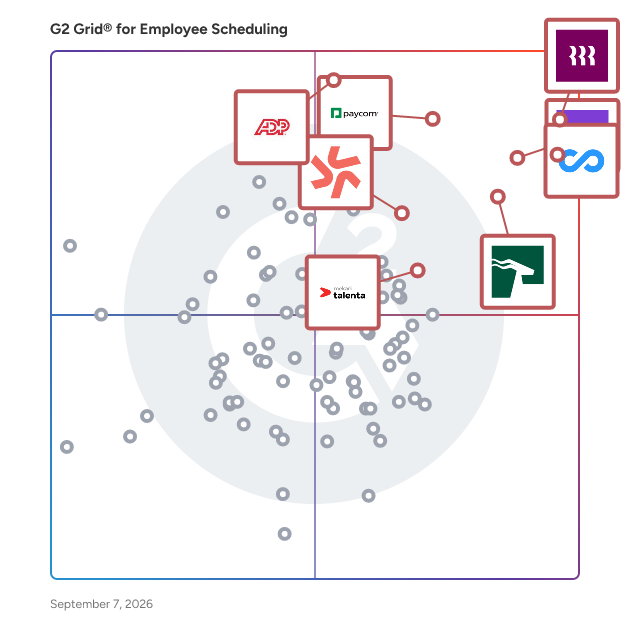
## G2 Grid® for Employee Scheduling Software
![G2 Grid® for Employee Scheduling Software plotting products by satisfaction and market presence](https://www.g2.com/categories/employee-scheduling-software/grids.png?focus%5B%5D=53090&focus%5B%5D=20433&focus%5B%5D=19474&focus%5B%5D=15988&focus%5B%5D=133052&focus%5B%5D=14860&focus%5B%5D=15680&focus%5B%5D=164728)
Highlighted products: Rippling, Connecteam, Homebase, HROne, ADP Time and Labor Management, Paycom, Deputy, and Mekari Talenta.
Underlying data: [Grid® JSON](https://www.g2.com/categories/employee-scheduling-software/grids.json?focus%5B%5D=rippling&amp;focus%5B%5D=connecteam&amp;focus%5B%5D=homebase&amp;focus%5B%5D=uneecops-hrone&amp;focus%5B%5D=adp-adp-time-and-labor-management&amp;focus%5B%5D=paycom&amp;focus%5B%5D=deputy&amp;focus%5B%5D=mekari-talenta)


## How Many Employee Scheduling Software Products Does G2 Track?
**Total Products under this Category:** 306

### Category Stats (Jul 2026)
- **Average Rating**: 4.45/5 (↑0.01 vs Jun 2026) The average rating of products in this category, based on all submitted ratings
- **Top Trending Product**: G&amp;A Partners (+9.9%) - Among all products in this category, G&amp;A Partners recorded the largest rating increase compared to last month
*Last updated: July 08, 2026*


## How Does G2 Rank Employee Scheduling Software Products?

**Why You Can Trust G2's Software Rankings:**

- 30 Analysts and Data Experts
- 43,500+ Authentic Reviews
- 306+ Products
- Unbiased Rankings

G2's software rankings are built on verified user reviews, rigorous moderation, and a consistent research methodology maintained by a team of analysts and data experts. Each product is measured using the same transparent criteria, with no paid placement or vendor influence. While reviews reflect real user experiences, which can be subjective, they offer valuable insight into how software performs in the hands of professionals. Together, these inputs power the G2 Score, a standardized way to compare tools within every category.


## Which Employee Scheduling Software Is Best for Your Use Case?

- **Leader:** [Rippling](https://www.g2.com/products/rippling/reviews)
- **Highest Performer:** [Buddy Punch](https://www.g2.com/products/buddy-punch/reviews)
- **Easiest to Use:** [HROne](https://www.g2.com/products/uneecops-hrone/reviews)
- **Top Trending:** [ADP Time and Labor Management](https://www.g2.com/products/adp-adp-time-and-labor-management/reviews)
- **Best Free Software:** [Connecteam](https://www.g2.com/products/connecteam/reviews)


---

**Sponsored**

### When I Work

When I Work is an easy way for businesses to schedule, track time and attendance, and communicate with their hourly employees. Put the schedule and time clock in every employee&#39;s pocket with free iOS and Android apps. Keep track of time off, employee availability, and manage shift swaps with just a few clicks. Integrate with your payroll provider to streamline the process and avoid human error. Get started with a 14-day free trial now.


[Visit website](https://www.g2.com/external_clickthroughs/record?secure%5Bad_program%5D=ppc&amp;secure%5Bad_slot%5D=category_product_list&amp;secure%5Bcategory_id%5D=1129&amp;secure%5Bchosen_at%5D=2026-07-09T08%3A11%3A46Z&amp;secure%5Bdisplayable_resource_id%5D=1129&amp;secure%5Bdisplayable_resource_type%5D=Category&amp;secure%5Bmedium%5D=sponsored&amp;secure%5Bplacement_reason%5D=page_category&amp;secure%5Bplacement_resource_ids%5D%5B%5D=1129&amp;secure%5Bprioritized%5D=false&amp;secure%5Bproduct_id%5D=13810&amp;secure%5Bresource_id%5D=1129&amp;secure%5Bresource_type%5D=Category&amp;secure%5Bsource_type%5D=category_page&amp;secure%5Bsource_url%5D=https%3A%2F%2Fwww.g2.com%2Fcategories%2Femployee-scheduling-software%3Fpage%3D11&amp;secure%5Btoken%5D=cf51d7b2d6990ef7bbd9ff283a1831d5c1306a945df44f46e72f1d288fd4e991&amp;secure%5Burl%5D=https%3A%2F%2Fwheniwork.com%2Fl%2Fcap%2Fscheduling%3Futm_source%3DG2%26utm_medium%3Daffiliate%26utm_campaign%3Demployeescheduling&amp;secure%5Burl_type%5D=free_trial)

---

## What Are the Top-Rated Employee Scheduling Software Products in 2026?
### 1. [Scheduling for Restaurants](https://www.g2.com/products/scheduling-for-restaurants/reviews)
Scheduling for Restaurants employee scheduling software allows you to adjust the scheduler to fit the needs of your business. It allows restaurants to sets up custom rules, analyzes labor costs and makes scheduling easy for you and your employees.


**Who Is the Company Behind Scheduling for Restaurants?**

- **Seller:** [Push Operations](https://www.g2.com/sellers/push-operations)
- **HQ Location:** Vancouver, Canada
- **Twitter:** @pushoperations (309 Twitter followers)
- **LinkedIn® Page:** https://www.linkedin.com/company/3710179/ (155 employees on LinkedIn®)


### 2. [Scheduling (Plan)](https://www.g2.com/products/scheduling-plan/reviews)
Schedule staff, assets, and equipment against projects, jobs, or shifts with drag-and-drop simplicity. View workforce availability, skillsets, and certifications in one place to optimise resource allocation. Built-in alerts prevent double-booking and non-compliant scheduling.


**Who Is the Company Behind Scheduling (Plan)?**

- **Seller:** [Kynection](https://www.g2.com/sellers/kynection)
- **Year Founded:** 2006
- **HQ Location:** Seaford, AU
- **LinkedIn® Page:** https://www.linkedin.com/company/kynection/ (36 employees on LinkedIn®)


### 3. [ShiftArmor](https://www.g2.com/products/shiftarmor/reviews)
ShiftArmor is a workforce safety and scheduling software platform designed for manufacturing, warehousing, and industrial operations. It combines employee shift scheduling, time tracking with clock in/out, leave and PTO management, OSHA-compliant incident tracking, risk assessment, and training management into a single cloud-hosted application. Founded in 2025 and built on AWS infrastructure, ShiftArmor serves safety managers, plant operators, and operations leaders who need to manage workforce scheduling alongside workplace safety compliance. The platform addresses a common challenge in industrial environments: scheduling tools, time clocks, time-off tracking, and safety management systems typically exist as separate products, forcing organizations to maintain disconnected spreadsheets, paper-based incident reports, and standalone compliance tools. ShiftArmor consolidates these workflows so that scheduling decisions, time and attendance data, leave balances, and safety records exist within the same system. Key capabilities include: Shift scheduling — Drag-and-drop shift builder with overtime tracking, shift swap management, coverage gap detection, and one-click schedule publishing with employee notifications. Time tracking and attendance — Kiosk-based and employee portal clock in/out with PIN or employee number identification, break tracking, GPS coordinate capture, optional selfie verification, configurable time rounding, and late arrival detection. Managers can review, approve, or reject time entries individually or in bulk. A real-time attendance dashboard displays who is currently clocked in, on break, late, or absent, broken down by department. Time entries can be exported as CSV for payroll processing. Leave and PTO management — Leave request submission and approval workflows, configurable accrual policies (annual grant, per pay period, per hour worked, and manual), real-time balance tracking, coverage impact analysis for staffing decisions, FMLA eligibility checks, and payroll-ready PTO export. Employees can submit and track their own time-off requests through a self-service portal. Incident management — Guided incident entry with OSHA recordability classification, near-miss reporting including QR-code-based reporting stations, corrective action tracking, and witness documentation. OSHA compliance reporting — Automatic generation of OSHA 300 logs, 301 incident reports, and 300A annual summaries based on recorded incident data. All records are maintained in an immutable audit trail. Risk assessment engine — A deterministic scoring system that evaluates 18 risk factors across four categories (incident history, workforce patterns, compliance status, and operational metrics) to produce per-department and per-organization risk scores. Training and certification tracking — Training program creation, session scheduling, completion tracking, certification management with expiration alerts, and compliance status dashboards. AI safety assistant — A conversational assistant that answers safety-related questions, generates corrective action recommendations, and provides guidance on OSHA regulations using the organization&#39;s own incident and scheduling data as context. ShiftArmor is intended for small to mid-size manufacturers and industrial operations with 50 to 250 employees. The platform uses role-based access control to manage permissions across administrators, safety managers, supervisors, and standard users. All data is scoped to individual organizations with multi-tenant isolation. The software is accessed through a web browser and does not require on-premises installation. It is hosted on AWS using containerized infrastructure with encrypted data storage and automated backups. Authentication is handled through AWS Cognito with JWT-based session management.


**Who Is the Company Behind ShiftArmor?**

- **Seller:** [AIIT Secure](https://www.g2.com/sellers/aiit-secure)
- **Year Founded:** 2025
- **HQ Location:** Lancaster , US
- **LinkedIn® Page:** https://www.linkedin.com/company/aiit-secure-llc/ (1 employees on LinkedIn®)


### 4. [Shifthound RMC](https://www.g2.com/products/shifthound-rmc/reviews)
ShiftHound delivers unrivaled scheduling and open shift management features utilizing the latest Web 2.0 technologies


**Who Is the Company Behind Shifthound RMC?**

- **Seller:** [Rapid Modeling](https://www.g2.com/sellers/rapid-modeling-4457962e-34b3-40b4-954b-d0aadb958ac4)
- **HQ Location:** N/A
- **LinkedIn® Page:** https://www.linkedin.com/company/No-Linkedin-Presence-Added-Intentionally-By-DataOps (1 employees on LinkedIn®)


### 5. [Shiftie](https://www.g2.com/products/shiftie/reviews)
Shiftie is scheduling and HR software built with with a focus on the user experience. Core features within the system include shift and schedule templates, open shifts, visitor number integrations, and integrated time clocks with automated timesheet creation. This ties in with HR management tools allowing for the tracking of employee availability, absences, and assigned documents. Availability and leave records feed through to the schedule, allowing for intelligent scheduling, and the system provides a range of options for filtering and colour-coding the rota to make shift management easier. Integrations with online ticketing provider DigiTickets allow users to view pre-booked visitor numbers on their schedule, aiding intelligent schedule planning and minimising over or understaffing. The system is a cloud-based progressive web app hosted on AWS.


**Who Is the Company Behind Shiftie?**

- **Seller:** [Shiftie](https://www.g2.com/sellers/shiftie)
- **Year Founded:** 2019
- **HQ Location:** Exeter, GB
- **LinkedIn® Page:** https://linkedin.com/company/shiftie/ (3 employees on LinkedIn®)


### 6. [Shiftmeapp - Planning &amp; Team Mangement](https://www.g2.com/products/shiftmeapp-planning-team-mangement/reviews)
Help teams build a culture of collaboration in real time, allowing everyone to accomplish their role and be happier in their job.


**Who Is the Company Behind Shiftmeapp - Planning &amp; Team Mangement?**

- **Seller:** [Shiftmeapp](https://www.g2.com/sellers/shiftmeapp)
- **HQ Location:** Brussels, Belgium
- **Twitter:** @shiftmeapp (26 Twitter followers)
- **LinkedIn® Page:** https://www.linkedin.com/company/No-Linkedin-Presence-Added-Intentionally-By-DataOps (1 employees on LinkedIn®)


### 7. [Shiftn](https://www.g2.com/products/shiftn/reviews)
Shiftn is smart scheduling and shift coverage software that takes the chaos out of managing frontline teams. Instead of managers scrambling with calls and group texts, Shiftn detects sick call-ins, checks availability, sends offers, and updates the schedule automatically. Everyone stays informed, and shifts get filled without burnout or stress. Built around 6-week scheduling cycles for union compliance, Shiftn adapts to the way real teams work. Whether you’re running a hospital department, a retail store, a security company, or a busy hospitality venue, Shiftn streamlines coverage and keeps your workforce balanced. Key features include automated sick-call detection, instant shift offers, Google Calendar sync, payroll-ready timesheets, and simple availability management. Shiftn helps organizations of all sizes reclaim hours each week, reduce turnover, and keep schedules running smoothly — no extra apps required.


**Who Is the Company Behind Shiftn?**

- **Seller:** [Shiftn](https://www.g2.com/sellers/shiftn)
- **Year Founded:** 2017
- **HQ Location:** Minneapolis, US
- **LinkedIn® Page:** https://www.linkedin.com/company/No-Linkedin-Presence-Added-Intentionally-By-DataOps (3 employees on LinkedIn®)


### 8. [ShiftSchedules](https://www.g2.com/products/shiftschedules-shiftschedules/reviews)
Power your ATS with Cauldron. Hire 3x Faster. Cauldron overlays your ATS and allows you to pre-screen candidates with quick tasks as they apply.


**Who Is the Company Behind ShiftSchedules?**

- **Seller:** [Ability](https://www.g2.com/sellers/ability)
- **HQ Location:** Tel Aviv-Yafo, Israel
- **LinkedIn® Page:** https://www.linkedin.com/company/No-Linkedin-Presence-Added-Intentionally-By-DataOps (1 employees on LinkedIn®)


### 9. [shiftswork](https://www.g2.com/products/shiftswork/reviews)
ShiftsWork helps businesses simplify employee scheduling and time tracking. Designed for retail, hospitality, service, and other industries with hourly or part-time staff, it allows managers to: Features: Create and assign shifts in minutes Track employee hours with optional GPS or photo verification Handle leave requests and shift swaps smoothly Export payroll-ready timesheets and reports Benefits: Ensure accurate, on-time employee pay Reduce administrative errors and payroll fines Save managers hours every week


**Who Is the Company Behind shiftswork?**

- **Seller:** [Shifts Work](https://www.g2.com/sellers/shifts-work)
- **HQ Location:** N/A
- **LinkedIn® Page:** https://www.linkedin.com/company/No-Linkedin-Presence-Added-Intentionally-By-DataOps (1 employees on LinkedIn®)


### 10. [ShiftTime](https://www.g2.com/products/shifttime/reviews)
ShiftTime is an online employee scheduling and time tracking software. It keeps track of employee costs, schedule occupation, absence and overtime all in one easy-to-use application and access your data anytime and anywhere.


**Who Is the Company Behind ShiftTime?**

- **Seller:** [DifferentLab](https://www.g2.com/sellers/differentlab)
- **Year Founded:** 2011
- **HQ Location:** Zoetermeer, NL
- **LinkedIn® Page:** https://www.linkedin.com/company/9240176/ (77 employees on LinkedIn®)


### 11. [ShiftWerx](https://www.g2.com/products/shiftwerx/reviews)
ShiftWerx is a cloud-based employee scheduling and workforce management platform for businesses that schedule shift-based staff, across industries such as hospitality, retail, healthcare, manufacturing, logistics, and field services. Managers build schedules with a point-based algorithm that distributes shifts according to availability, role requirements, and fairness rules, rather than manual spreadsheets. The platform includes four core modules: ShiftLogic for automated schedule generation, ShiftMarket for employee-driven shift trading and open-shift pickup, ShiftMessage for team communication, and ShiftLeague, which lets groups of affiliated companies share employees across a common staffing pool. ShiftWerx is available as a web application and as native iOS and Android apps with push notifications. Pricing is per location, across Spark, Professional, and Enterprise plans.


**Who Is the Company Behind ShiftWerx?**

- **Seller:** [ShiftWerx](https://www.g2.com/sellers/shiftwerx)
- **Year Founded:** 2026
- **HQ Location:** N/A
- **LinkedIn® Page:** https://www.linkedin.com/company/shiftwerx (2 employees on LinkedIn®)


### 12. [Shiftworkz](https://www.g2.com/products/shiftworkz/reviews)
Shiftworkz is an online staff scheduling system for managers combined with mobile apps for staff to view their schedules.


**Who Is the Company Behind Shiftworkz?**

- **Seller:** [Voce Vancouver Creative](https://www.g2.com/sellers/voce-vancouver-creative)
- **HQ Location:** N/A
- **LinkedIn® Page:** https://www.linkedin.com/company/No-Linkedin-Presence-Added-Intentionally-By-DataOps (1 employees on LinkedIn®)


### 13. [Skello](https://www.g2.com/products/skello/reviews)
Skello is a European company with one mission: to reinvent shifted work through a collaborative solution which enables the whole team to better anticipate, organize and communicate. In short, Skello is a workforce management solution for shift based workplaces that enables teams to tackle the hassle of complex scheduling. For managers, Skello optimizes work organization by helping them to make the best decisions in managing their staff costs. For employees, the tool facilitates easy and open communication and simplifies daily life. Skello’s ambition is to be the number one solution for shifted work teams in Europe. To achieve this, Skello raised a €40M Series B round of financing from expert funds in the field (Partech, Aglaé Ventures &amp; XAnge) in order to bring ever more value to our clients through new features and to open up new markets, beyond our historic industries such as hospitality, retail and health.


**Who Is the Company Behind Skello?**

- **Seller:** [skello](https://www.g2.com/sellers/skello)
- **Year Founded:** 2016
- **HQ Location:** Paris, FR
- **Twitter:** @Skelloapp (501 Twitter followers)
- **LinkedIn® Page:** https://www.linkedin.com/company/skello/ (385 employees on LinkedIn®)


### 14. [Smarteaming](https://www.g2.com/products/smarteaming/reviews)
Smarteaming is a staff scheduling and time tracking tool for businesses that run on shifts — restaurants, retail, healthcare and services. Managers build weekly schedules on a table-based calendar where rows are employees and columns are days. Shifts can be assigned with drag and drop, recurring templates, or bulk edits. Conflict detection flags double-bookings before the schedule is published. When a schedule is published, employees receive a notification and confirm or decline each shift from the mobile app. Managers see a live dashboard showing who confirmed, who declined, and who hasn&#39;t responded. Employees clock in and out from their phone (iOS and Android) or from a shared tablet in time clock mode. The system compares actual hours to scheduled hours and calculates breaks, overtime, and 8 supplement rate types (day, night, weekend, holiday combinations). Hours can be exported to Excel, PDF, or CSV for payroll. Overtime rules with custom thresholds and multipliers are applied automatically. Employees can also request time off (with manager approval and leave balance tracking), submit their availability, request shift swaps, and generate personal invoices from the app. Multi-location management is available for teams with more than one site. Pricing is per scheduled employee per month (€1, €3, or €5 depending on the plan). Employees who are not scheduled in a given month are not charged. 90-day free trial, no credit card required. Available in English, French, and Dutch. EU hosted. GDPR compliant.


**Who Is the Company Behind Smarteaming?**

- **Seller:** [MBP Enterprises](https://www.g2.com/sellers/mbp-enterprises)
- **HQ Location:** N/A
- **LinkedIn® Page:** https://www.linkedin.com/company/No-Linkedin-Presence-Added-Intentionally-By-DataOps (1 employees on LinkedIn®)


### 15. [SmartShifts](https://www.g2.com/products/smartshifts/reviews)
COMPANY DESCRIPTION SmartShifts was built for the operators, managers, and frontline teams who run shift-based businesses — restaurants, hotels, retail stores, and any organization where the schedule directly determines the guest experience, the labor cost, and whether the team shows up ready to work. We built SmartShifts because the scheduling tools that existed were either too simple for complex operations or too expensive and complicated for growing businesses. PRODUCT DESCRIPTION SmartShifts is a full-featured workforce scheduling and management platform built for restaurants, hospitality, retail, and shift-based teams. We combine AI-powered scheduling, geofencing time clocks, dual-logic tip management, 50-state labor law compliance, 13-plus POS integrations, and an employee engagement system — including achievements, rewards, and post-shift surveys — in one platform with separate desktop-optimized admin and mobile-first employee portals connected via real-time WebSocket sync. WHAT WE DO SmartShifts replaces the manual scheduling, text-chain shift coordination, spreadsheet tip calculations, and paper timesheets that cost shift-based businesses thousands of dollars per year in labor inefficiency, compliance exposure, and management time. Our AI labor forecasting panel connects to your POS to predict sales and recommend optimal staffing before you publish the schedule. Our geofencing clock-in verifies employees are physically on-site. Our tip management module automates FOH and BOH pool distribution. And our achievements and rewards system gives managers a built-in retention tool beyond a verbal thank-you. KEY FEATURES Admin Portal — Scheduling and Workforce Management Visual drag-and-drop schedule builder with conflict detection and double-booking alerts. AI Shift Suggestions that recommend optimal assignments based on employee availability and labor needs. Open Shift Management for posting, tracking interest, and assigning uncovered shifts without phone calls. Shift Swap Approval workflows where employees propose swaps and managers approve or reject with one tap. Overtime Tracking with real-time weekly hour totals and overtime warnings as shifts are assigned. Schedule Publishing with automatic push, email, and SMS notifications to the entire team. Admin Portal — Labor and Financial AI Labor Forecasting Panel that connects to your POS and predicts sales, labor cost, and labor percentage by daypart before you build the schedule. Tip Management with configurable pool rules, FOH and BOH dual-logic distribution, and full payment history. Payroll Export to ADP, Gusto, and Paychex — one click to send approved timesheets to your payroll provider without manual reconciliation. Admin Portal — HR and Hiring Hiring Pipeline with application tracking and AI resume analysis that ranks candidates automatically. Employee Directory with full profiles, role assignments, and employment records. Time-Off Approvals for reviewing and approving PTO requests with balance visibility. Performance Management with Custom Achievement Builder — create POS-linked performance goals and award badges tied to real sales metrics. Admin Portal — Compliance and Reporting 50-State Labor Law Compliance with automatic break alerts, overtime thresholds, and minor work hour restrictions enforced by jurisdiction. Custom Report Builder for exporting labor cost, attendance, tip, and compliance data in PDF, Excel, or CSV format. Audit Logs tracking all system activity for accountability and compliance documentation. Employee Portal — Mobile-First One-Tap Mobile Clock In/Out with 30-minute pre-shift window and geofencing location verification. Shift Acknowledgment so employees confirm they have seen their schedule. Open Shift Browsing and claiming, filtered by position. Shift Swap Requests to propose and track peer swaps with full status visibility. Tips Dashboard with weekly and period summaries, collected and pooled breakdowns, and acknowledgment. Achievements and Rewards Gallery with earned badges, gift card and bonus redemption, and progress tracking toward new achievements. Post-Shift Surveys with emoji-based satisfaction feedback and anonymous submission option. Team Messaging with direct messages, group chats by position, and company-wide announcements. Real-Time WebSocket Sync Both portals operate on a real-time WebSocket connection — managers see clock-ins the instant they happen, employees receive schedule notifications the moment a schedule is published, and swap approvals update immediately for all parties. No refresh required, no lag. INDUSTRIES SERVED Restaurants and Food Service | Hospitality and Hotels | Retail Stores and Chains | Healthcare and Senior Care | Quick Service and Fast Casual | Fitness and Gyms | Entertainment and Events | Cleaning and Janitorial | Security Services | Salons and Spas | Warehousing and Logistics | Property Management WHAT MAKES US DIFFERENT SmartShifts is the only scheduling platform that combines AI labor forecasting with geofencing clock-in, FOH/BOH dual-logic tip management, a full employee achievement and rewards system, post-shift satisfaction surveys, a hiring pipeline with AI resume analysis, and real-time WebSocket sync — all in a single platform with separate, purpose-built portals for administrators and frontline employees. Most scheduling tools stop at the schedule. SmartShifts covers the entire shift-based workforce lifecycle from hiring through payroll export.


**Who Is the Company Behind SmartShifts?**

- **Seller:** [SmartShifts](https://www.g2.com/sellers/smartshifts)
- **HQ Location:** N/A
- **LinkedIn® Page:** https://www.linkedin.com/company/smart-shifts/ (1 employees on LinkedIn®)


### 16. [Snap Schedule](https://www.g2.com/products/snap-schedule/reviews)
Snap Schedule&#39;s employee scheduling software helps create and publish work schedules that also runs on mobiles and tablets.


**Who Is the Company Behind Snap Schedule?**

- **Seller:** [Snapschedule](https://www.g2.com/sellers/snapschedule)
- **Year Founded:** 2006
- **HQ Location:** N/A
- **LinkedIn® Page:** http://www.linkedin.com/company/snap-schedule (4 employees on LinkedIn®)


### 17. [StaffAny](https://www.g2.com/products/staffany/reviews)
At StaffAny, we help many of our favourite brick-and-mortar stores optimize their scheduling and HR administration through our integrated scheduling and time tracking SaaS with our mobile and web application. In addition to managing hourly workers, StaffAny tracks staff performance and automates end-of-month timesheet consolidations. Our job today is to connect the HR and Operations department internally within organizations. With StaffAny, businesses can better performance, cut operating costs, and make time to do what matters to them the most.


**Who Is the Company Behind StaffAny?**

- **Seller:** [StaffAny](https://www.g2.com/sellers/staffany)
- **Year Founded:** 2018
- **HQ Location:** Singapore, SG
- **LinkedIn® Page:** http://www.linkedin.com/company/staffany (47 employees on LinkedIn®)


### 18. [Stafferin](https://www.g2.com/products/stafferin/reviews)
Stafferin is a sophisticated software product designed to revolutionize the way businesses approach shift scheduling and workforce management. With its user-friendly interface and robust feature set, Stafferin simplifies the complex task of managing employee shifts, availability, and preferences, ensuring that businesses can run smoothly and efficiently. The platform&#39;s innovative tools allow managers to create and communicate schedules promptly, respond to staffing changes in real-time, and reduce the time spent on administrative tasks. Stafferin is more than just a scheduling tool; it&#39;s a comprehensive solution that supports businesses in fostering a more organized, satisfied, and productive workforce. Whether for small local operations or large-scale enterprises, Stafferin is poised to be an indispensable asset for dynamic staffing and optimized labor management.


**Who Is the Company Behind Stafferin?**

- **Seller:** [Stafferin](https://www.g2.com/sellers/stafferin)
- **Year Founded:** 2021
- **HQ Location:** toronto , ontario
- **Twitter:** @poorna80239
- **LinkedIn® Page:** https://www.linkedin.com/company/101341993 (1 employees on LinkedIn®)


### 19. [StaffHub](https://www.g2.com/products/staffhub/reviews)
StaffHub is a staff training and announcements platform for retailers and retail teams, including Shopify merchants. Managers create training modules and onboarding checklists, assign them to specific staff or whole teams, publish announcements, and see read receipts that confirm who has seen each update. Staff get a clear, prioritized list of what to read and complete, on any device. StaffHub also includes lightweight rotas and time-off requests. It runs inside the Shopify admin and as a standalone web app. A free 1-seat plan is available, with paid plans that include a 14-day trial.


**Who Is the Company Behind StaffHub?**

- **Seller:** [JMS Dev Lab](https://www.g2.com/sellers/jms-dev-lab)
- **HQ Location:** N/A
- **LinkedIn® Page:** https://www.linkedin.com/company/No-Linkedin-Presence-Added-Intentionally-By-DataOps (1 employees on LinkedIn®)


### 20. [Staffpoint](https://www.g2.com/products/staffpoint/reviews)
The operating system for staffing.


**Who Is the Company Behind Staffpoint?**

- **Seller:** [Staffpoint](https://www.g2.com/sellers/staffpoint)
- **Year Founded:** 2003
- **HQ Location:** N/A
- **LinkedIn® Page:** http://www.linkedin.com/company/delo-logic-inc (3 employees on LinkedIn®)


### 21. [StaffRoster Suite](https://www.g2.com/products/staffroster-suite/reviews)
The platform for managing the shifts that you were looking for


**Who Is the Company Behind StaffRoster Suite?**

- **Seller:** [StaffRoster Suite](https://www.g2.com/sellers/staffroster-suite)
- **Year Founded:** 2003
- **HQ Location:** Firenze, IT
- **LinkedIn® Page:** https://www.linkedin.com/company/11149160 (5 employees on LinkedIn®)


### 22. [StaffSchedule.io](https://www.g2.com/products/staffschedule-io/reviews)
StaffSchedule.io is a modern employee scheduling and workforce management platform that helps businesses create staff schedules, manage employee availability, assign shifts, and improve team productivity. Designed for restaurants, retail stores, healthcare organizations, hospitality businesses, and growing teams, it simplifies workforce planning with an intuitive interface, real-time updates, and flexible scheduling tools. StaffSchedule.io reduces scheduling conflicts, saves valuable management time, and helps businesses keep their operations running efficiently.


**Who Is the Company Behind StaffSchedule.io?**

- **Seller:** [StaffSchedule](https://www.g2.com/sellers/staffschedule)
- **HQ Location:** N/A
- **LinkedIn® Page:** https://www.linkedin.com/company/staffscheduleio (1 employees on LinkedIn®)


### 23. [SumoShift](https://www.g2.com/products/sumoshift/reviews)
SumoShift instantly connects employers and workers seeking flexible employment opportunities. Shifters are able to make their own decisions about where and when to take up a shift - becoming their own agents.


**Who Is the Company Behind SumoShift?**

- **Seller:** [Persona Jobs](https://www.g2.com/sellers/persona-jobs)
- **HQ Location:** N/A
- **Twitter:** @sumoshift (146 Twitter followers)
- **LinkedIn® Page:** https://www.linkedin.com/company/No-Linkedin-Presence-Added-Intentionally-By-DataOps (1 employees on LinkedIn®)


### 24. [Surfboard WFM](https://www.g2.com/products/surfboard-wfm/reviews)
Meet Surfboard, the home of your customer support strategy. Leading brands teams like Ruggable, Beauty Pie, and Grow Therapy use Surfboard’s workforce management platform to manage the growth and evolution of their support teams internationally. Surfboard offers a smart, modern WFM to streamline and consolidate operations from forecasting to capacity planning, scheduling and performance analytics. Identify hidden costs and inefficiencies across your entire support function. Unlock the profit-driving opportunity of proactive customer care alongside human and AI service resourcing.


**Who Is the Company Behind Surfboard WFM?**

- **Seller:** [Dialpad](https://www.g2.com/sellers/dialpad)
- **Year Founded:** 2011
- **HQ Location:** San Ramon, California
- **Twitter:** @DialpadHQ (60 Twitter followers)
- **LinkedIn® Page:** https://www.linkedin.com/company/3967399/ (1,491 employees on LinkedIn®)

**Who Uses This Product?**
- **Top Industries:** Financial Services, Computer Software
- **Company Size:** 18% Small-Business, 9% Mid-Market


### 25. [Symphona](https://www.g2.com/products/symphona/reviews)
Orchestra Scheduling Software for clear call times and easy to read schedules.


**Who Is the Company Behind Symphona?**

- **Seller:** [Symphona](https://www.g2.com/sellers/symphona-db2f0589-a10b-444a-bc57-b7c263f48f5b)
- **Year Founded:** 2021
- **HQ Location:** Toronto, CA
- **LinkedIn® Page:** https://www.linkedin.com/company/symphona-hybrid (2 employees on LinkedIn®)


## What Is Employee Scheduling Software?

[HR Software](https://www.g2.com/categories/hr)

## What Software Categories Are Similar to Employee Scheduling Software?

- [Workforce Management Software](https://www.g2.com/categories/workforce-management)
- [Time Tracking Software](https://www.g2.com/categories/time-tracking-software)
- [Time &amp; Attendance Software](https://www.g2.com/categories/time-attendance)


---

## How Do You Choose the Right Employee Scheduling Software?

### What You Should Know About Employee Scheduling Software

### Employee Scheduling Software software buying insights at a glance

[Employee Scheduling Software](https://www.g2.com/categories/employee-scheduling-software) helps businesses build, update, and communicate employee schedules without relying on spreadsheets, group texts, or manual manager oversight. On G2, the category centers on tools that automate schedule creation and maintenance, give visibility into employee tasks, and let workers access schedules with self-service features such as messaging and shift swapping. As labor costs stay under scrutiny and teams become more distributed, this software is increasingly essential for organizations that need tighter [staffing](https://www.g2.com/categories/staffing) control, faster schedule changes, and better coordination across locations.

Common use cases include building recurring shift plans, handling time-off requests, giving employees mobile schedule access, coordinating shift swaps, reducing scheduling conflicts, and linking labor planning more closely to attendance and payroll workflows. Businesses benefit most when they use these tools to cut manual admin, respond faster to callouts or staffing changes, and give frontline teams one place to check shifts, punch in, and communicate.

Pricing is usually shaped by employee count, number of locations, and whether the product bundles broader [HR](https://www.g2.com/categories/core-hr) **,** [payroll](https://www.g2.com/categories/payroll) **,** or [workforce management](https://www.g2.com/categories/workforce-management) capabilities. On the category page, G2 shows both free-entry options and products with published pricing, which matches what I see in the review file: buyers are comparing everything from lighter-weight scheduling tools to broader workforce suites. In practice, total cost depends less on the schedule builder alone and more on whether a team needs compliance controls, reporting depth, mobile workflows, and integration with adjacent systems.

### Top 5 FAQs from software buyers:

- How do employee scheduling systems improve workforce coordination and staffing efficiency?
- What features should teams evaluate when choosing the best employee scheduling software?
- How well do employee scheduling tools integrate with payroll, HR, and time tracking systems?
- What level of automation do employee scheduling platforms offer for shifts, availability, and approvals?
- How scalable is employee scheduling software for businesses managing multiple locations or distributed teams?

G2’s top-rated Employee Scheduling software, based on verified reviews, includes [Rippling](https://www.g2.com/products/rippling/reviews) **,** [Connecteam](https://www.g2.com/products/connecteam/reviews) **,** [HROne](https://www.g2.com/products/uneecops-hrone/reviews) **,** and [Deputy](https://www.g2.com/products/deputy/reviews).

### What are the top-reviewed Employee Scheduling Software on G2?

[Rippling](https://www.g2.com/products/rippling/reviews)

- Number of Reviews: ​​761
- Satisfaction: 98
- Market Score: 90
- G2 score: 94

[Connecteam](https://www.g2.com/products/connecteam/reviews)

- Number of Reviews: 1,911
- Satisfaction: 99
- Market Score: 84
- G2 score: 92

[HROne](https://www.g2.com/products/uneecops-hrone/reviews)

- Number of Reviews: 933
- Satisfaction: 91
- Market Score: 76
- G2 score: 84

[Deputy](https://www.g2.com/products/deputy/reviews)

- Number of Reviews: 319
- Satisfaction: 72
- Market Score: 74
- G2 score: 73

[Homebase](https://www.g2.com/products/homebase/reviews)

- Number of Reviews: 210
- Satisfaction: 58
- Market Score: 81
- G2 score: 70

Satisfaction reflects user-reported ratings across factors such as ease of use, feature fit, and support quality. ([Source 2](https://www.g2.com/reports))

Market Presence scores are calculated based on review volume, third-party signals, and overall market visibility. ([Source 2](https://www.g2.com/reports))

G2 Score is a weighted composite of Satisfaction and Market Presence. ([Source 2](https://www.g2.com/reports))

Learn how G2 scores products. ([Source 1](https://documentation.g2.com/docs/research-scoring-methodologies?_gl=1*5vlk6s*_gcl_au*MTAwMzU5MzUxLjE3NjM0MTg0NzYuNjY0NTIxMTY0LjE3NjQ2MTc0NzcuMTc2NDYxNzQ3Nw..*_ga*NzY1MDU0NjE3LjE3NjM0NzQ3ODM.*_ga_MFZ5NDXZ5F*czE3NjYwODk1MTMkbzY3JGcxJHQxNzY2MDkyMjQyJGo1NyRsMCRoMA..))

### What I Often See in Employee Scheduling Software

#### Feedback Pros: What Users Consistently Appreciate

- **Seamless global payroll and compliance management for distributed teams**
- “_Rippling makes global employment feel simple and reliable. I work remotely in Asia for a U.S.-based company, and Rippling helps ensure I’m paid accurately and on time. Having payroll, HR, and global employment management in one system makes the whole process more transparent and much easier to manage. It’s particularly helpful for international employees because it streamlines cross-border payroll and compliance, providing both the company and employees with peace of mind. Overall, the platform is intuitive, efficient, and dependable.”_ - [Jeannie W.](https://www.g2.com/products/rippling/reviews/rippling-review-12491553), Rippling review
- **Cost-effective HR platform with engaging employee-centric features and recruitment tools**
- “_The best part of HROne is that it’s less costly and still provides all the features that other tools charge more for. This tool helps keep my organisation’s HR processes smooth. I’m currently using it, and one of the best things is that the team always stays up to date with trends. For example, during the India T20 World Cup, they created a scorecard you could play to earn rewards. This kind of activity makes employees feel more comfortable and motivated. Also, the recruitment portal in this tool is good.”_ - [Abhishek K.](https://www.g2.com/products/uneecops-hrone/reviews/hrone-review-12468514), HROne review
- **All-in-one workforce management with easy setup and daily operational efficiency**
- “_There are so many features to Homebase. Scheduling, onboarding, timesheets, and reporting. All very helpful for operations and labor reporting in a business. Was easy to set up, and is easy to use but thorough. Pricing for it is also very competitive to other systems. We use it daily, and it works exactly for what we need without major headaches. Also easy for employees on their end. Communication, scheduling, etc.”_ - [Emily E.](https://www.g2.com/products/homebase/reviews/homebase-review-12341315), Homebase review

#### Cons: Where Many Platforms Fall Short

- **Delayed task loading and grouped notifications can cause missed updates**
- “_When I open a task to update it, it takes a moment longer to load before I can type anything. One thing I have noticed is that notifications sometimes come in groups rather than one by one. If multiple tasks are updated close to each other, the alerts show together, and it is easy to miss a small detail unless I open the app and check properly.”_ - [Ishan S.](https://www.g2.com/products/connecteam/reviews/connecteam-review-12423368), Connecteam review
- **Limited mobile admin capabilities for complex scheduling and compliance tasks**
- “_What I dislike with Rippling&#39;s mobile apps is the lack of advanced administrative capabilities; currently, to resolve complex schedule management conflicts or compliance audits still require for a desktop version of the platform._” - [Imanda I.](https://www.g2.com/products/rippling/reviews/rippling-review-12489225), Rippling review
- **Extra navigation steps and learning curve for accessing settings and reports**
- “_Some workflows take a few extra clicks to complete, especially when navigating between modules. While the system is powerful, new users may need a short learning period to understand where certain settings or reports are located.”_ - [Priyanka T.](https://www.g2.com/products/uneecops-hrone/reviews/hrone-review-12356840), HROne review

### My Expert Takeaway on Employee Scheduling Software

Employee scheduling software delivers the most value when organizations treat it as a workforce coordination and operations system rather than just a scheduling tool. The strongest platforms combine schedule creation with availability management, time tracking, and mobile communication, allowing teams to manage staffing while maintaining visibility into day-to-day operations.

Review sentiment across the category is strong. In this dataset, employee scheduling software has an average star rating of 4.56, with strong usability signals including 6.41 Ease of Use, 6.36 Ease of Setup, and 6.36 Quality of Support. Likelihood to recommend is also high at 9.11 out of 10, indicating that buyers consistently see value once these tools are embedded into daily workflows.

Friction tends to appear as organizations scale usage or introduce more complex scheduling rules. Teams that struggle often underestimate the effort required to standardize availability, define permissions, and align scheduling with payroll and attendance workflows. High-performing teams approach employee scheduling with clear processes and consistent usage across managers and locations.

The best employee scheduling software balances simplicity with operational control. Strong platforms make it easy for employees to access schedules, swap shifts, and manage time off, while giving managers clear visibility into staffing coverage and workforce activity. As distributed teams and dynamic staffing models grow, employee scheduling software is becoming core operational infrastructure.

### Employee Scheduling Software FAQs

#### **What is the best employee scheduling software?**

The best employee scheduling software depends on whether you need lightweight shift planning or a broader workforce platform. On G2, tools like [Rippling](https://www.g2.com/products/rippling/reviews) **,** [Connecteam](https://www.g2.com/products/connecteam/reviews) **,** [HROne](https://www.g2.com/products/uneecops-hrone/reviews), [Buddy Punch](https://www.g2.com/products/buddy-punch/reviews), and [Homebase](https://www.g2.com/products/homebase/reviews) stand out because buyers consistently compare usability, mobile access, and scheduling flexibility.

#### **What is the best employee scheduling software for shift-based businesses?**

For shift-based businesses, tools like [Homebase](https://www.g2.com/products/homebase/reviews) **,** [Connecteam](https://www.g2.com/products/connecteam/reviews) **,** [Buddy Punch](https://www.g2.com/products/buddy-punch/reviews) **,** [7shifts](https://www.g2.com/products/7shifts/reviews) **,** and [Deputy](https://www.g2.com/products/deputy/reviews) are commonly evaluated because they combine recurring schedule creation, shift swaps, mobile alerts, and time-off handling while reducing manual scheduling work for managers.

#### **How to choose an employee scheduling software?**

Start with your scheduling complexity, number of locations, hourly staff volume, approval flows, and payroll dependencies. Then compare products like [Rippling](https://www.g2.com/products/rippling/reviews) **,** [Deputy](https://www.g2.com/products/deputy/reviews) **,** [Homebase](https://www.g2.com/products/homebase/reviews) **,** and [Connecteam](https://www.g2.com/products/connecteam/reviews) based on mobile usability, setup effort, reporting depth, and support quality, key drivers of adoption in your dataset.

#### **What are the top tools for managing staff rosters?**

The top tools for managing staff rosters are usually those that balance fast schedule creation with employee self-service. G2 leaders such as [Rippling](https://www.g2.com/products/rippling/reviews) **,** [Buddy Punch](https://www.g2.com/products/buddy-punch/reviews) **,** [HROne](https://www.g2.com/products/uneecops-hrone/reviews) **,** [Connecteam](https://www.g2.com/products/connecteam/reviews) **,** [Homebase](https://www.g2.com/products/homebase/reviews) **,** and [Deputy](https://www.g2.com/products/deputy/reviews) are frequently considered for their ability to streamline roster management.

#### **Which software is best for mobile workforce scheduling?**

For mobile-first teams, products like [Connecteam](https://www.g2.com/products/connecteam/reviews) **,** [Homebase](https://www.g2.com/products/homebase/reviews) **,** [Buddy Punch](https://www.g2.com/products/buddy-punch/reviews) **,** and [Deputy](https://www.g2.com/products/deputy/reviews) are strong options because they prioritize mobile apps for scheduling, clocking in, requesting time off, and receiving real-time updates, without relying on desktop access.

#### **Which is the best employee scheduling software for shift-based work?**

For shift-based work, solutions like [7shifts](https://www.g2.com/products/7shifts/reviews) **,** [Deputy](https://www.g2.com/products/deputy/reviews) **,** [Homebase](https://www.g2.com/products/homebase/reviews) **,** and [Connecteam](https://www.g2.com/products/connecteam/reviews) are often shortlisted because they handle high-volume roster changes, shift visibility, and swap workflows while keeping employee actions simple through mobile-friendly interfaces.

### Sources

1. [G2 Scoring Methodologies](https://documentation.g2.com/docs/research-scoring-methodologies?_gl=1*5ky9es*_gcl_au*MTY2NDg2MDY3Ny4xNzU1MDQxMDU4*_ga*MTMwMTMzNzE1MS4xNzQ5MjMyMzg1*_ga_MFZ5NDXZ5F*czE3NTUwOTkzMjgkbzQkZzEkdDE3NTUwOTk3NzYkajU3JGwwJGgw)
2. [G2 Winter 2026 Reports](https://company.g2.com/news/g2-winter-2026-reports)

Researched By: [Jeffrey Lin](https://research.g2.com/insights/author/jeffrey-lin)

**Last updated on March 18, 2026**


