# Best Employee Scheduling Software for Small Business - Page 3

## How Many Employee Scheduling Software Products Does G2 Track?

**Total Products under this Category:** 311

### Category Stats (Jul 2026)

- **Average Rating:** 4.45/5 (↑0.01 vs Jun 2026) The average rating of products in this category, based on all submitted ratings
- **Top Trending Product:** G&A Partners (+2.37%) - Among all products in this category, G&A Partners recorded the largest rating increase compared to last month

_Last updated: July 25, 2026_

## How Does G2 Rank Employee Scheduling Software Products?

**Why You Can Trust G2's Software Rankings:**

- 30 Analysts and Data Experts
- 44,000+ Authentic Reviews
- 311+ Products
- Unbiased Rankings

G2's software rankings are built on verified user reviews, rigorous moderation, and a consistent research methodology maintained by a team of analysts and data experts. Each product is measured using the same transparent criteria, with no paid placement or vendor influence. While reviews reflect real user experiences, which can be subjective, they offer valuable insight into how software performs in the hands of professionals. Together, these inputs power the G2 Score, a standardized way to compare tools within every category.

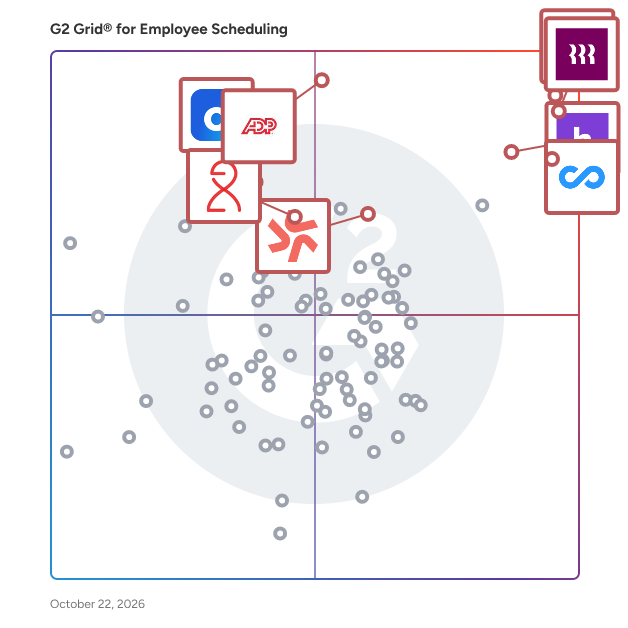
## G2 Grid® for Employee Scheduling Software
 ![G2 Grid® for Employee Scheduling Software plotting products by satisfaction and market presence](https://www.g2.com/categories/employee-scheduling-software/grids.png?focus%5B%5D=20433&focus%5B%5D=19474&focus%5B%5D=53090&focus%5B%5D=15680&focus%5B%5D=15988&focus%5B%5D=4663&focus%5B%5D=133052&focus%5B%5D=27593)

Highlighted products: Connecteam, Homebase, Rippling, Deputy, HROne, Dayforce, ADP Time and Labor Management, and Viventium Software.

Underlying data: [Grid® JSON](https://www.g2.com/categories/employee-scheduling-software/grids.json?focus%5B%5D=connecteam&focus%5B%5D=homebase&focus%5B%5D=rippling&focus%5B%5D=deputy&focus%5B%5D=uneecops-hrone&focus%5B%5D=dayforce&focus%5B%5D=adp-adp-time-and-labor-management&focus%5B%5D=viventium-software&segment=small-business)

**Sponsored**

### SAP Fieldglass

Drive better business outcomes with a robust Vendor Management System (VMS) to find, engage, and manage your global external workforce – including temporary workers, freelancers, contractors, consultants, and service workers. Since 1999, organizations have been using innovative digital SAP Fieldglass solutions to transform how they get work done. Offered in 190 countries and 21 languages, our open cloud-based applications let you simplify and streamline the procurement and management of your external workforce. You can: • Connect in real time to a global network of qualified service providers and contingent workers so you can find the right talent more quickly. • Track and manage key metrics to accurately manage performance and enhance outcomes and productivity over time. • Improve process efficiency, total workforce results, and spend management savings through integration with ERP, HR, and procurement solutions. • Reduce risk through security features that support global-regulations compliance, permissions and access tracking, and asset protection through proper on- and offboarding. • Increase productivity and strengthen competitive advantage by creating and maintaining a dynamic, responsive workforce.

[Visit website](https://www.g2.com/external_clickthroughs/record?secure%5Bad_program%5D=ppc&secure%5Bad_slot%5D=category_product_list_llm&secure%5Bcategory_id%5D=1129&secure%5Bchosen_at%5D=2026-07-31T15%3A24%3A35Z&secure%5Bdisplayable_resource_id%5D=133&secure%5Bdisplayable_resource_type%5D=Category&secure%5Bmedium%5D=sponsored&secure%5Bplacement_reason%5D=retargeted_product&secure%5Bplacement_resource_ids%5D%5B%5D=38217&secure%5Bprioritized%5D=false&secure%5Bproduct_id%5D=38217&secure%5Bresource_id%5D=1129&secure%5Bresource_type%5D=Category&secure%5Bsource_type%5D=category_page&secure%5Bsource_url%5D=https%3A%2F%2Fwww.g2.com%2Fcategories%2Femployee-scheduling-software%2Fsmall-business%3Fpage%3D3&secure%5Btoken%5D=bf5d05b3ab70c0625f9c36c2e7f729c7e3fd58a70029a47d85031ee38da0c5c3&secure%5Burl%5D=https%3A%2F%2Fwww.sap.com%2Fdocuments%2F2025%2F03%2Fc4519407-fc7e-0010-bca6-c68f7e60039b.html%3Fcampaigncode%3DCRM-YD25-ISM-408601%26source%3DFG-click-campaign-G2&secure%5Burl_type%5D=custom_url)

### [EasyShifts](https://www.g2.com/products/easyshifts/reviews)

The original scheduling program built for healthcare. Created 15 years ago by an RN, EasyShifts has continued to grow and adapt to the unique scheduling needs found in healthcare. Create your own float pool, incorporate self scheduling and keep your staff happy. Do this and more with EasyShifts! Live Schedules at your Employees’ Fingertips Give employees 24/7 access to the schedule and improve work/life balance. They will be able to pick up full or partial shifts, trade shifts with coworkers, request time off, manage availability and more! Designed from a caregiver’s perspective, it's easy to use by managers and staff alike. Improve employee retention by boosting engagement and satisfaction! Schedulers’ Dreams Come True Create weekly schedules based on a custom template with just a click! You have full control over highly customizable templates and weekly schedules designed for healthcare. Handle last minute call-ins with instant notifications, easily control overtime, keep track of all activity, and run reports to your heart’s content. Features: - Comply with union and workforce law - Produce payroll, attendance and other reports easily. - Track PTO, attendance, absences - In-app communication tools - Built-in integrations for ADP, PointClickCare, Eldermark and more - Built in GPS time clock - Track certification and license information - Self scheduling and hybrid scheduling tools included

**Average Rating:** 4.8/5.0

**Total Reviews:** 40

#### How Do G2 Users Rate EasyShifts?

- **Has the product been a good partner in doing business?:** 9.8/10 (Category avg: 9.0/10)
- **Reporting:** 8.9/10 (Category avg: 8.5/10)
- **Portal:** 8.8/10 (Category avg: 8.4/10)
- **Automation:** 9.2/10 (Category avg: 8.5/10)

#### Who Is the Company Behind EasyShifts?

- **Seller:** [EasyShifts, LLC](https://www.g2.com/sellers/easyshifts-llc)
- **Year Founded:** 2007
- **HQ Location:** Appleton, US
- **Twitter:** @easyshifts  
11 Twitter followers
- **LinkedIn® Page:** [www.linkedin.com](https://www.g2.com/external_clickthroughs/record?secure%5Bsource_type%5D=product_profile&secure%5Btoken%5D=7b5567aedf988f718662613d64eeb91ddd5aeb3e589ce296fd99541e8a301b77&secure%5Burl%5D=https%3A%2F%2Fwww.linkedin.com%2Fcompany%2F1783827&secure%5Burl_type%5D=linkedin_company_website)  
9 employees on LinkedIn®

#### Who Uses This Product?

- **Top Industries:** Hospital & Health Care
- **Company Size:** 48% Small, 40% Medium

#### What Do G2 Reviewers Say About EasyShifts?

_AI-generated summary from verified user reviews_

##### Pros

- Users find EasyShifts offers **scheduling ease** , empowering employees with user-friendly access to their shifts and locations.
- Users find EasyShifts remarkably **easy to use** , facilitating seamless shift entry and scheduling for all staff.
- Users find EasyShifts **incredibly intuitive** , making scheduling and communication simple for everyone, including new hires.
- Users value the **communication efficiency** of EasyShifts, enhancing scheduling and empowering employees effectively.
- Users love the **mobile access** of EasyShifts, making shift management convenient and user-friendly for all team members.

##### Cons

- Users experience **mobile app issues** that hinder composing notes and updating call-ins during calls.
- Users find the **difficult setup** for adding new hires frustrating, requiring tedious manual adjustments to schedules.
- Users find the **new hire integration process cumbersome** , leading to scheduling difficulties and manual adjustments.
- Users experience **frequent login problems** with EasyShifts, as the system often logs them out unexpectedly.
- Users face **scheduling issues** that complicate adding new hires and require repeated edits to existing schedules.

#### What Are Recent G2 Reviews of EasyShifts?

**["Scheduling made easier"](https://www.g2.com/survey_responses/easyshifts-review-12487864)**

**Rating:** 5.0/5.0 stars

_— Katie H._

[Read full review](https://www.g2.com/survey_responses/easyshifts-review-12487864)

**["Effortless Scheduling with Top-Notch Support"](https://www.g2.com/survey_responses/easyshifts-review-13122639)**

**Rating:** 5.0/5.0 stars

_— Melanie K._

[Read full review](https://www.g2.com/survey_responses/easyshifts-review-13122639)

### [Aladtec by TCP](https://www.g2.com/products/aladtec-by-tcp/reviews)

Aladtec is a specialized employee scheduling software solution designed specifically for public safety organizations, such as fire departments, police departments, and emergency medical services. This innovative platform streamlines the complex process of scheduling personnel around the clock, allowing agencies to focus on their critical mission of serving the community rather than getting bogged down in administrative tasks. By automating scheduling, Aladtec helps organizations manage their workforce more effectively, ensuring that they have the right number of staff available at all times. The target audience for Aladtec includes public safety administrators, human resources personnel, and operational managers who are responsible for maintaining compliance with labor laws and union agreements while also managing budgets and overtime costs. The software is particularly beneficial for organizations that operate on unique rotation patterns and require adherence to specific staffing policies. By providing a centralized platform for scheduling, Aladtec enhances communication and collaboration among team members, ultimately leading to improved employee satisfaction and retention. Key features of Aladtec include real-time data access, which allows administrators to monitor staffing levels, budget allocations, and overtime usage effectively. This insight is crucial for making informed decisions that can help mitigate unnecessary costs. Additionally, the software offers self-service tools for employees, granting them the flexibility to manage their schedules according to their preferences. This includes the ability to trade shifts, bid for open shifts, and view their schedules at any time, fostering a sense of ownership and accountability among staff. Aladtec stands out in the public safety scheduling software category by providing tailored solutions that align with the specific needs of emergency service organizations. Its focus on compliance tracking and adherence to labor rules helps mitigate risks associated with scheduling errors. Furthermore, the platform’s user-friendly interface ensures that both administrators and employees can navigate the system with ease, enhancing overall productivity. By automating routine scheduling tasks, Aladtec empowers public safety personnel to devote more time to their core responsibilities, ultimately benefiting the communities they serve.

**Average Rating:** 4.5/5.0

**Total Reviews:** 115

#### How Do G2 Users Rate Aladtec by TCP?

- **Has the product been a good partner in doing business?:** 9.1/10 (Category avg: 9.0/10)
- **Reporting:** 9.0/10 (Category avg: 8.5/10)
- **Portal:** 8.7/10 (Category avg: 8.4/10)
- **Automation:** 8.9/10 (Category avg: 8.5/10)

#### Who Is the Company Behind Aladtec by TCP?

- **Seller:** [TCP Software](https://www.g2.com/sellers/tcp-software)
- **Company Website:** www.tcpsoftware.com
- **Year Founded:** 1988
- **HQ Location:** Plano, US
- **Twitter:** @tcpsoftware  
450 Twitter followers
- **LinkedIn® Page:** [www.linkedin.com](https://www.g2.com/external_clickthroughs/record?secure%5Bsource_type%5D=product_profile&secure%5Btoken%5D=33bd438590c5b53f44717f5d90f48ed5337323fe8d39f40cc95b567e551e2b5b&secure%5Burl%5D=https%3A%2F%2Fwww.linkedin.com%2Fcompany%2F2644323%2F&secure%5Burl_type%5D=linkedin_company_website)  
1,341 employees on LinkedIn®

#### Who Uses This Product?

- **Top Industries:** Public Safety, Hospital & Health Care
- **Company Size:** 51% Small, 45% Medium

#### What Do G2 Reviewers Say About Aladtec by TCP?

_AI-generated summary from verified user reviews_

##### Pros

- Users find Aladtec remarkably **easy to use** , with helpful tech support for any questions or issues.
- Users value the **scheduling ease** of Aladtec, which greatly simplifies shift management and time tracking.
- Users find Aladtec's **helpful support** team fantastic, enhancing their experience with responsive assistance for any inquiries.
- Users value the **automated scheduling process** of Aladtec, significantly improving efficiency and simplifying management tasks.
- Users commend Aladtec's **excellent customer support** , noting its helpfulness and responsiveness to inquiries.

##### Cons

- Users face **scheduling issues** with blocked publishing privileges and overtime conflicts that complicate the scheduling process.
- Users are frustrated by the **inability to edit schedules while unpublished schedules are blocked** , complicating shift management.
- Users find the **difficult setup** of Aladtec challenging initially, but rewards come with time and support.
- Users find a **steep learning curve** with Aladtec, requiring time and effort to master its features effectively.
- Users find the **mobile app limited** , lacking features available on the desktop version, which affects overall usability.

#### What Are Recent G2 Reviews of Aladtec by TCP?

**["Adaptable Scheduling for FT/PT/Volunteers—A Great Fit for 24/7 Operations"](https://www.g2.com/survey_responses/aladtec-by-tcp-review-13086195)**

**Rating:** 4.5/5.0 stars

_— John F._

[Read full review](https://www.g2.com/survey_responses/aladtec-by-tcp-review-13086195)

**["Powerful Scheduling and Reporting with Responsive Customer Support"](https://www.g2.com/survey_responses/aladtec-by-tcp-review-13116938)**

**Rating:** 4.5/5.0 stars

_— Verified User in Public Safety_

[Read full review](https://www.g2.com/survey_responses/aladtec-by-tcp-review-13116938)

### [Clockify](https://www.g2.com/products/clockify/reviews)

Clockify is a time tracking and workforce management software solution that helps users monitor work hours, track billable and non-billable time, and analyze productivity across projects and teams. Clockify is used by freelancers, small businesses, and enterprise organizations that need visibility into time usage for operational, financial, and reporting purposes. It supports use cases such as timesheet management, project tracking, budgeting, invoicing, payroll preparation, and performance analysis. Users can track time using a timer, manual entry, or weekly timesheets, and categorize them by project, client, or task.This helps teams to better understand how time is allocated, identify inefficiencies, and maintain consistent records across workflows. The platform includes reporting tools that allow users to generate summary, detailed, and visual reports based on tracked time data. These reports can be filtered, shared, and exported for use in billing, client reporting, or internal analysis. Clockify also supports cost and revenue tracking by allowing users to define hourly rates, calculate billable amounts, and compare estimated versus actual time spent on tasks and projects. These capabilities help organizations maintain financial oversight and improve project planning accuracy. Clockify also provides features for managing teams, including user roles, permissions, and approval workflows. Managers can review and approve timesheets, monitor team activity, and control access to data. The software is available on web, desktop, and mobile platforms supporting time tracking across different devices and work environments. Integrations with project management and communication tools support more connected time tracking with broader business processes. Clockify can be used across industries to support productivity tracking, resource planning, and operational reporting. Its structured approach to time tracking helps teams improve accountability and maintain visibility into work processes. Track time using timers, manual entries, and timesheets across projects and tasks. Provides reporting and analytics for project tracking, budgeting, and productivity insights. Supports billing and cost tracking with configurable rates and exportable reports. Enables team management with roles, permissions, and approval workflows. Offers cross-platform access with web, desktop, and mobile applications and integrations with other business tools.

**Average Rating:** 4.5/5.0

**Total Reviews:** 200

#### How Do G2 Users Rate Clockify?

- **Has the product been a good partner in doing business?:** 9.1/10 (Category avg: 9.0/10)
- **Reporting:** 7.1/10 (Category avg: 8.5/10)
- **Portal:** 8.9/10 (Category avg: 8.4/10)
- **Automation:** 8.0/10 (Category avg: 8.5/10)

#### Who Is the Company Behind Clockify?

- **Seller:** [CAKE.com](https://www.g2.com/sellers/cake-com)
- **Year Founded:** 2017
- **HQ Location:** Palo Alto, California
- **Twitter:** @cake\_dot\_com  
837 Twitter followers
- **LinkedIn® Page:** [www.linkedin.com](https://www.g2.com/external_clickthroughs/record?secure%5Bsource_type%5D=product_profile&secure%5Btoken%5D=ae72f86a080d7b2ad45e2d2be0d07baa76247ac3a11a8d216834c31ef693ee96&secure%5Burl%5D=https%3A%2F%2Fwww.linkedin.com%2Fcompany%2Fcake-dot-com%2Fmycompany&secure%5Burl_type%5D=linkedin_company_website)  
441 employees on LinkedIn®

#### Who Uses This Product?

- **Who Uses This:** Project Manager, Software Engineer
- **Top Industries:** Computer Software, Marketing and Advertising
- **Company Size:** 66% Small, 28% Medium

#### What Do G2 Reviewers Say About Clockify?

_AI-generated summary from verified user reviews_

##### Pros

- Users value the **easy and intuitive time tracking** of Clockify, appreciating its accessibility across devices and project management capabilities.
- Users value the **ease of use** of Clockify, finding it intuitive for tracking and managing time efficiently.
- Users appreciate the **time-saving features** of Clockify, simplifying time tracking and project management efficiently.
- Users highlight the **efficiency** of Clockify, appreciating its simple time-tracking and effective reporting features.
- Users highlight the **simple and user-friendly design** of Clockify, making time tracking accessible for everyone.

##### Cons

- Users experience **limited features** with Clockify, particularly in reporting and advanced customization for larger teams.
- Users find the **limited customization options** in Clockify restrict their ability to tailor reports and dashboards effectively.
- Users find the **poor interface design** can be cluttered and confusing, especially when managing multiple projects.
- Users experience **app performance issues** like freezing and syncing delays which can hinder their overall experience.
- Users find the **cluttered interface** challenging, especially when managing multiple projects, impacting usability and efficiency.

#### What Are Recent G2 Reviews of Clockify?

**["Effortless Time Tracking With Room for Growth"](https://www.g2.com/survey_responses/clockify-review-12714736)**

**Rating:** 4.0/5.0 stars

_— Kurt G._

[Read full review](https://www.g2.com/survey_responses/clockify-review-12714736)

**["Intuitive and Efficient Time Management Tool"](https://www.g2.com/survey_responses/clockify-review-7025578)**

**Rating:** 5.0/5.0 stars

_— Mariano B._

[Read full review](https://www.g2.com/survey_responses/clockify-review-7025578)

#### What Are G2 Users Discussing About Clockify?

- [What is Clockify used for?](https://www.g2.com/discussions/what-is-clockify-used-for) - 1 comment
- [Does Clockify take screenshots?](https://www.g2.com/discussions/does-clockify-take-screenshots) - 2 comments
- [Is Clockify really free?](https://www.g2.com/discussions/is-clockify-really-free) - 1 comment
- [What are the main features of tracking?](https://www.g2.com/discussions/what-are-the-main-features-of-tracking) - 1 comment
- [What is Clockify?](https://www.g2.com/discussions/what-is-clockify) - 2 comments

### [Sling](https://www.g2.com/products/sling/reviews)

Sling is a scheduling, time tracking and communication software for companies where employees work in shifts. Sling incorporates scheduling, messaging, time tracking, task management and reporting functionalities and allows managers and employees alike to organize all aspects of their work on a single platform.

**Average Rating:** 4.4/5.0

**Total Reviews:** 88

#### How Do G2 Users Rate Sling?

- **Has the product been a good partner in doing business?:** 9.1/10 (Category avg: 9.0/10)
- **Reporting:** 8.5/10 (Category avg: 8.5/10)
- **Portal:** 8.5/10 (Category avg: 8.4/10)
- **Automation:** 8.2/10 (Category avg: 8.5/10)

#### Who Is the Company Behind Sling?

- **Seller:** [Sling](https://www.g2.com/sellers/sling)
- **Year Founded:** 2015
- **HQ Location:** Brooklyn, NY
- **Twitter:** @Sling  
53,626 Twitter followers
- **LinkedIn® Page:** [www.linkedin.com](https://www.g2.com/external_clickthroughs/record?secure%5Bsource_type%5D=product_profile&secure%5Btoken%5D=ca02a3338176490a1b02945036d0db6775d82a65d0c1c48cdc4b24aacd9205a6&secure%5Burl%5D=https%3A%2F%2Fwww.linkedin.com%2Fcompany%2F9258361%2F&secure%5Burl_type%5D=linkedin_company_website)  
22 employees on LinkedIn®

#### Who Uses This Product?

- **Top Industries:** Hospital & Health Care, Education Management
- **Company Size:** 61% Small, 30% Medium

#### What Do G2 Reviewers Say About Sling?

_AI-generated summary from verified user reviews_

##### Pros

- Users appreciate the **communication efficiency** of Sling, which enhances clarity and collaboration among team members.
- Users find Sling to be **easy to use** , appreciating its quick interface and flexible scheduling features.
- Users praise Sling for its **efficiency** in managing schedules and improving communication, enhancing overall productivity.
- Users appreciate the **ease of use** in Sling for managing schedules and enhancing communication efficiently.
- Users appreciate the **ease of scheduling** with Sling, finding it simple and efficient for managing workloads.

##### Cons

- Users feel the app lacks **team building features** , with limited options beyond scheduling functionality.
- Users frequently find Sling's **cumbersome interface design** frustrating, particularly struggling with navigation on mobile devices.
- Users find Sling's **difficult navigation** frustrating, leading to a less user-friendly experience, particularly on mobile devices.
- Users often find Sling's **cumbersome interface** difficult to navigate, especially on the mobile version compared to desktop.
- Users often find Sling's **mobile app interface cumbersome** , making navigation difficult and less user-friendly than expected.

#### What Are Recent G2 Reviews of Sling?

**["Effortless Scheduling That Simplifies My Work"](https://www.g2.com/survey_responses/sling-review-12077913)**

**Rating:** 5.0/5.0 stars

_— Zoe W._

[Read full review](https://www.g2.com/survey_responses/sling-review-12077913)

**["tool designed for businesses to simplify employee scheduling"](https://www.g2.com/survey_responses/sling-review-11514042)**

**Rating:** 4.5/5.0 stars

_— djanna a._

[Read full review](https://www.g2.com/survey_responses/sling-review-11514042)

#### What Are G2 Users Discussing About Sling?

- [How do you use scheduling sling?](https://www.g2.com/discussions/how-do-you-use-scheduling-sling)
- [Is Sling scheduling app free?](https://www.g2.com/discussions/is-sling-scheduling-app-free) - 1 comment
- [How does sling work app?](https://www.g2.com/discussions/how-does-sling-work-app) - 2 comments
- [What is Sling software?](https://www.g2.com/discussions/what-is-sling-software)

### [Workfeed](https://www.g2.com/products/workfeed/reviews)

Employers and managers use Workfeed to create schedules that strike the perfect balance between the needs of their workforce and the demands of their business. By doing so, they pave the way towards optimized labor costs, a best-in-class work environment, and outstanding business results. Bottom line, Workfeed's customers save up to 80% time and thousands of $, while increasing employee satisfaction, flexibility, and retention.

**Average Rating:** 4.8/5.0

**Total Reviews:** 34

#### How Do G2 Users Rate Workfeed?

- **Has the product been a good partner in doing business?:** 9.8/10 (Category avg: 9.0/10)
- **Reporting:** 9.0/10 (Category avg: 8.5/10)
- **Portal:** 8.6/10 (Category avg: 8.4/10)
- **Automation:** 9.2/10 (Category avg: 8.5/10)

#### Who Is the Company Behind Workfeed?

- **Seller:** [Workfeed](https://www.g2.com/sellers/workfeed)
- **Year Founded:** 2017
- **HQ Location:** Aarhus, Denmark
- **LinkedIn® Page:** [www.linkedin.com](https://www.g2.com/external_clickthroughs/record?secure%5Bsource_type%5D=product_profile&secure%5Btoken%5D=a0a5e162278a4bb7494fc59887929df5d1103d618abe45eef8aefe2360608d23&secure%5Burl%5D=https%3A%2F%2Fwww.linkedin.com%2Fcompany%2Fworkfeed-app%2F&secure%5Burl_type%5D=linkedin_company_website)  
13 employees on LinkedIn®

#### Who Uses This Product?

- **Top Industries:** Restaurants
- **Company Size:** 76% Small, 24% Medium

#### What Do G2 Reviewers Say About Workfeed?

_AI-generated summary from verified user reviews_

##### Pros

- Users find Workfeed to be **incredibly user-friendly** , greatly enhancing scheduling and team management for their organizations.
- Users commend Workfeed for its **easy access and user-friendly design** , making scheduling a breeze for all team members.
- Users appreciate the **easy management** of Workfeed, which enhances scheduling and team coordination for better business growth.
- Users value the **flexibility** of Workfeed, enabling efficient scheduling and empowering young employees in their roles.
- Users value the **ease of scheduling** with Workfeed, enhancing team management and flexibility for all employees.

#### What Are Recent G2 Reviews of Workfeed?

**["Straightforward Scheduling and Shift Planning in One Place"](https://www.g2.com/survey_responses/workfeed-review-12948531)**

**Rating:** 5.0/5.0 stars

_— Valdemar R._

[Read full review](https://www.g2.com/survey_responses/workfeed-review-12948531)

**["Legacy-system power without the legacy-system hassle — scheduled workforce across 23 days"](https://www.g2.com/survey_responses/workfeed-review-13119806)**

**Rating:** 5.0/5.0 stars

_— Marc K._

[Read full review](https://www.g2.com/survey_responses/workfeed-review-13119806)

### [Cavu HCM](https://www.g2.com/products/cavu-hcm/reviews)

CAVU HCM by IRIS is a comprehensive Human Capital Management solution offering services designed to streamline payroll and HR processes for US-based businesses. With an intuitive platform, CAVU HCM automates payroll, manages employee data, and simplifies compliance with regulatory requirements. Tailored for small to mid-sized companies, the solution integrates seamlessly with HR workflows, offering tools for workforce management, time and attendance tracking, and employee self-service. By choosing CAVU HCM by IRIS, businesses can reduce administrative burdens, ensure accurate payroll processing, and focus more on strategic growth.

**Average Rating:** 4.9/5.0

**Total Reviews:** 137

#### How Do G2 Users Rate Cavu HCM?

- **Has the product been a good partner in doing business?:** 9.8/10 (Category avg: 9.0/10)

#### Who Is the Company Behind Cavu HCM?

- **Seller:** [IRIS Software Group](https://www.g2.com/sellers/iris-software-group)
- **Company Website:** www.IRISglobal.com
- **Year Founded:** 1978
- **HQ Location:** Alpharetta, GA
- **Twitter:** @IRISSoftwareGrp  
1,340 Twitter followers
- **LinkedIn® Page:** [www.linkedin.com](https://www.g2.com/external_clickthroughs/record?secure%5Bsource_type%5D=product_profile&secure%5Btoken%5D=9d5cae0c04e3a3725e4b2abe05f501de055991b7a0fdef1439dd569e550e8fb5&secure%5Burl%5D=https%3A%2F%2Fwww.linkedin.com%2Fcompany%2Firis-software-group%2F&secure%5Burl_type%5D=linkedin_company_website)  
3,042 employees on LinkedIn®

#### Who Uses This Product?

- **Who Uses This:** Owner, President
- **Top Industries:** Construction, Hospital & Health Care
- **Company Size:** 82% Small, 18% Medium

#### What Do G2 Reviewers Say About Cavu HCM?

_AI-generated summary from verified user reviews_

##### Pros

- Users praise Cavu HCM for its **outstanding customer support** , noting helpfulness and efficiency in resolving queries.
- Users value the **user-friendly payroll management** of Cavu HCM, appreciating its minimal human intervention and excellent support.
- Users appreciate the **efficient communication** and support from Cavu HCM, making management seamless and stress-free.
- Users appreciate the **ease of use** of Cavu HCM, praising its streamlined processes and quick support response.
- Users appreciate the **prompt response time** of Cavu HCM, highlighting excellent communication and support throughout the process.

##### Cons

- Users experience **slow loading** times, particularly when running reports or performing multiple operations simultaneously.
- Users report experiencing **payroll issues** such as double payments and technical errors that hinder efficiency.
- Users report occasional **account management issues** , like double payments when paying employees outside the usual schedule.
- Users experience occasional **billing issues** , such as double payments when not adhering to the regular payment schedule.
- Users find the **report function confusing** for first-time use, impacting their overall experience with Cavu HCM.

#### What Are Recent G2 Reviews of Cavu HCM?

**["5 Stars – Excellent Payroll Service!"](https://www.g2.com/survey_responses/cavu-hcm-review-10872831)**

**Rating:** 5.0/5.0 stars

_— Davon M._

[Read full review](https://www.g2.com/survey_responses/cavu-hcm-review-10872831)

**["Streamlined and Efficient, Perfect for Mid-Sized Teams"](https://www.g2.com/survey_responses/cavu-hcm-review-12955625)**

**Rating:** 4.0/5.0 stars

_— Verified User in Information Technology and Services_

[Read full review](https://www.g2.com/survey_responses/cavu-hcm-review-12955625)

#### What Are G2 Users Discussing About Cavu HCM?

- [What is CAVU HCM used for?](https://www.g2.com/discussions/what-is-cavu-hcm-used-for)

### [Aplano](https://www.g2.com/products/aplano/reviews)

Aplano is a cloud-based employee scheduling and time tracking software that helps businesses manage their workforce more efficiently. It allows you to create and manage shift plans digitally, track working hours via app or punch clock, handle absences and vacation requests, and communicate with your team—all in one platform.

**Average Rating:** 4.8/5.0

**Total Reviews:** 42

#### How Do G2 Users Rate Aplano?

- **Has the product been a good partner in doing business?:** 9.4/10 (Category avg: 9.0/10)
- **Reporting:** 6.7/10 (Category avg: 8.5/10)
- **Portal:** 8.3/10 (Category avg: 8.4/10)
- **Automation:** 9.2/10 (Category avg: 8.5/10)

#### Who Is the Company Behind Aplano?

- **Seller:** [Aplano](https://www.g2.com/sellers/aplano)
- **Company Website:** www.aplano.de
- **Year Founded:** 2020
- **HQ Location:** Berlin, DE
- **Twitter:** @aplano\_app  
10 Twitter followers
- **LinkedIn® Page:** [www.linkedin.com](https://www.g2.com/external_clickthroughs/record?secure%5Bsource_type%5D=product_profile&secure%5Btoken%5D=f6b52266a089f1463824ef6ccf6e7ed5d70f3041d7c198ae853a9ab7bfd5e423&secure%5Burl%5D=https%3A%2F%2Fwww.linkedin.com%2Fcompany%2Faplano%2F&secure%5Burl_type%5D=linkedin_company_website)  
5 employees on LinkedIn®

#### Who Uses This Product?

- **Company Size:** 70% Small, 23% Medium

#### What Are Recent G2 Reviews of Aplano?

**["Efficient scheduling with Aplano, Highly Recommended!"](https://www.g2.com/survey_responses/aplano-review-12719252)**

**Rating:** 5.0/5.0 stars

_— Hasan H._

[Read full review](https://www.g2.com/survey_responses/aplano-review-12719252)

**["Aplano: Self-explanatory, clear, and vacation approvals directly in the app"](https://www.g2.com/survey_responses/aplano-review-12727954)**

**Rating:** 5.0/5.0 stars

_— Andreas D._

[Read full review](https://www.g2.com/survey_responses/aplano-review-12727954)

#### What Are G2 Users Discussing About Aplano?

- [What is Aplano used for?](https://www.g2.com/discussions/what-is-aplano-used-for)

### [Sloneek](https://www.g2.com/products/sloneek/reviews)

Sloneek is a cloud-based HR system designed to streamline human resource management for hybrid teams operating across various countries. This innovative solution leverages advanced technology, including an AI assistant, to significantly reduce the time spent on HR-related tasks and paperwork, potentially saving users up to 20 hours each week. By automating essential HR functions, Sloneek aims to alleviate administrative burdens and enhance overall productivity within organizations. Targeted primarily at businesses with remote or hybrid workforces, Sloneek caters to the needs of HR professionals and team leaders who require efficient tools to manage employee records, attendance, absence management, and time tracking. The platform is particularly beneficial for organizations that operate in multiple countries, as it provides features that accommodate diverse work environments and cultural differences. For instance, Sloneek offers insights into public holidays based on each user’s location, ensuring that teams remain informed and connected despite geographical barriers. Key features of Sloneek include comprehensive worker records management, streamlined onboarding and offboarding processes, and the ability to supervise work tools and documents. The platform’s automation capabilities simplify HR workflows, allowing users to focus on strategic initiatives rather than getting bogged down by administrative tasks. Additionally, Sloneek integrates seamlessly with popular collaboration tools such as Slack and JIRA, facilitating a cohesive work experience and enhancing communication across teams. Another significant advantage of Sloneek is its people analytics functionality, which provides valuable insights into employee engagement and performance. By enabling HR professionals to monitor trends and identify potential issues early on, Sloneek empowers organizations to foster a positive work environment and address challenges proactively. Furthermore, the platform encourages social interaction among colleagues by connecting team members based on shared interests, making the workplace more enjoyable and collaborative. Overall, Sloneek stands out in the HR software category by offering a comprehensive, user-friendly solution that addresses the unique challenges faced by hybrid teams. Its focus on automation, integration, and analytics positions it as a valuable tool for organizations looking to enhance their HR processes and improve employee satisfaction.

**Average Rating:** 4.7/5.0

**Total Reviews:** 85

#### How Do G2 Users Rate Sloneek?

- **Has the product been a good partner in doing business?:** 9.6/10 (Category avg: 9.0/10)
- **Reporting:** 9.5/10 (Category avg: 8.5/10)
- **Portal:** 9.7/10 (Category avg: 8.4/10)
- **Automation:** 9.6/10 (Category avg: 8.5/10)

#### Who Is the Company Behind Sloneek?

- **Seller:** [Sloneek Europe](https://www.g2.com/sellers/sloneek-europe)
- **Company Website:** sloneek.com
- **Year Founded:** 2016
- **HQ Location:** London, England
- **Twitter:** @SloneekHR  
7 Twitter followers
- **LinkedIn® Page:** [www.linkedin.com](https://www.g2.com/external_clickthroughs/record?secure%5Bsource_type%5D=product_profile&secure%5Btoken%5D=8d01798b15ba4b33459b6a7a8c4e958475bdc6ba6e93caa3efac80313dabe075&secure%5Burl%5D=https%3A%2F%2Fwww.linkedin.com%2Fcompany%2Fsloneek-eu%2F&secure%5Burl_type%5D=linkedin_company_website)  
39 employees on LinkedIn®

#### Who Uses This Product?

- **Top Industries:** Computer Software, Information Technology and Services
- **Company Size:** 71% Small, 29% Medium

#### What Do G2 Reviewers Say About Sloneek?

_AI-generated summary from verified user reviews_

##### Pros

- Users find Sloneek **extremely user-friendly** , appreciating its intuitive design and responsive customer support.
- Users highlight the **user-friendly design** and excellent customer support as key benefits of Sloneek.
- Users praise Sloneek for its **comprehensive features** , effortlessly managing HR tasks and providing crucial insights for teams.
- Users appreciate Sloneek's **user-friendly interface and extensive features** , simplifying HR tasks and enhancing operational efficiency.
- Users praise the **intuitive design** of Sloneek, finding it user-friendly and effective for HR tracking needs.

##### Cons

- Users wish for more **missing features** , such as comprehensive AI tools and enhanced customization options in Sloneek.
- Users express a desire for more **comprehensive features** in Sloneek, emphasizing the need for improved customization and clarity.
- Users desire more **customization options** within Sloneek, finding current personalization limitations frustrating and restrictive.
- Users experience **occasional software bugs** , but they appreciate the swift support and resolution process.
- Users find the **learning curve challenging** , particularly for older employees and complex setup requirements in some countries.

#### What Are Recent G2 Reviews of Sloneek?

**["All-in-One HR Platform with Built-In ATS for Seamless Recruiting"](https://www.g2.com/survey_responses/sloneek-review-12279045)**

**Rating:** 5.0/5.0 stars

_— Tamara I._

[Read full review](https://www.g2.com/survey_responses/sloneek-review-12279045)

**["Efficient HR Management, Needs Enhanced Appraisals"](https://www.g2.com/survey_responses/sloneek-review-12951975)**

**Rating:** 4.0/5.0 stars

_— Verified User in Information Technology and Services_

[Read full review](https://www.g2.com/survey_responses/sloneek-review-12951975)

### [Time Clock Wizard](https://www.g2.com/products/time-clock-wizard/reviews)

Time Clock Wizard is a comprehensive online platform designed to streamline employee time tracking, scheduling, task management, and payroll reporting for businesses of all sizes. By offering a user-friendly interface accessible via web and mobile applications, it enables organizations to efficiently monitor work hours, manage employee schedules, and generate accurate payroll reports, thereby enhancing overall workforce management and operational efficiency. Key Features and Functionality: - Employee Time Tracking: Accurately records employee clock-ins and clock-outs, with options to control where, when, and on which devices employees can log their time. Managers can edit entries and receive real-time notifications for unscheduled activities. - Scheduling: Allows managers to create daily, weekly, or monthly schedules quickly. Employees can request shift changes and view their schedules through their dashboards. - Task Management: Enables assignment of tasks to individuals or groups, with features for setting due dates, uploading files, and tracking progress. - Mobile Applications: Provides iOS and Android apps that support GPS-based clock-ins and clock-outs, allowing employees to manage timesheets and schedules on the go. - Payroll Reporting: Generates customizable payroll reports, including timesheets, paid time off (PTO), and schedules, which can be exported in various formats for integration with accounting systems. - Security: Incorporates user verification features such as passwords, two-factor authentication, and photo capture to ensure data security. Primary Value and Solutions Provided: Time Clock Wizard addresses the challenges of manual time tracking and scheduling by offering an automated, all-in-one solution that reduces administrative workload and minimizes errors. Its real-time notifications and GPS tracking enhance accountability and transparency within the workforce. The platform's integration capabilities with payroll systems streamline payroll processing, ensuring accuracy and compliance with labor regulations. By centralizing these functions, Time Clock Wizard empowers businesses to manage their employees more effectively, leading to improved productivity and operational efficiency.

**Average Rating:** 4.6/5.0

**Total Reviews:** 49

#### How Do G2 Users Rate Time Clock Wizard?

- **Has the product been a good partner in doing business?:** 8.7/10 (Category avg: 9.0/10)

#### Who Is the Company Behind Time Clock Wizard?

- **Seller:** [Time Clock Wizard](https://www.g2.com/sellers/time-clock-wizard)
- **Year Founded:** 2014
- **HQ Location:** New York, NY
- **Twitter:** @TimeClockWizard  
600 Twitter followers
- **LinkedIn® Page:** [www.linkedin.com](https://www.g2.com/external_clickthroughs/record?secure%5Bsource_type%5D=product_profile&secure%5Btoken%5D=60a58a61b70992d706051fb4a70ad4ed582ac2f3de19e4f5adbfee1bacf07e68&secure%5Burl%5D=https%3A%2F%2Fwww.linkedin.com%2Fcompany%2Ftime-clock-wizard-inc%2Fabout&secure%5Burl_type%5D=linkedin_company_website)  
6 employees on LinkedIn®

#### Who Uses This Product?

- **Who Uses This:** Office Manager
- **Top Industries:** Medical Practice, Marketing and Advertising
- **Company Size:** 93% Small, 7% Medium

#### What Do G2 Reviewers Say About Time Clock Wizard?

_AI-generated summary from verified user reviews_

##### Pros

- New employees find the **ease of learning** Time Clock Wizard intuitive and user-friendly, enhancing their onboarding experience.
- Users find the **ease of use** of Time Clock Wizard great, allowing new employees to adapt effortlessly.
- Users find the **intuitive design** of Time Clock Wizard makes it simple for new employees to use effectively.
- Users find Time Clock Wizard **time-saving** , as it efficiently meets essential timekeeping needs for small businesses.
- Users value the **affordability** of Time Clock Wizard, meeting basic time tracking needs effectively for small companies.

##### Cons

- Users find the **additional costs for every feature** of Time Clock Wizard to be quite expensive.

#### What Are Recent G2 Reviews of Time Clock Wizard?

**["Time Clock Wizard does what it's designed to do and does it very well"](https://www.g2.com/survey_responses/time-clock-wizard-review-2362423)**

**Rating:** 5.0/5.0 stars

_— Ashley S._

[Read full review](https://www.g2.com/survey_responses/time-clock-wizard-review-2362423)

**["Exceptionally Easy to Use for New Employees"](https://www.g2.com/survey_responses/time-clock-wizard-review-12037445)**

**Rating:** 5.0/5.0 stars

_— selena g._

[Read full review](https://www.g2.com/survey_responses/time-clock-wizard-review-12037445)

#### What Are G2 Users Discussing About Time Clock Wizard?

- [What is Time Clock Wizard used for?](https://www.g2.com/discussions/what-is-time-clock-wizard-used-for)

### [Timeero](https://www.g2.com/products/timeero/reviews)

Timeero is more than just a GPS time & mileage tracking software. It is a powerful solution for field businesses and teams of all sizes who want to streamline their processes and save time and money. Timeero lets you easily track your team’s mileage, hours, and location from any device. You can quickly approve employees’ timesheets and mileage costs, view their real-time GPS locations, and replay their routes retrospectively. Plus, you can easily manage schedules, PTO, and breaks, generate customizable reports, run your payroll with just a few clicks, and do much more. Timeero helps you improve your productivity, efficiency, and profitability while ensuring compliance with relevant legislation. MILEAGE TRACKING SOFTWARE If you need to track your employees’ mileage, you don’t need to use two separate apps for time and mileage tracking. Timeero does it all in one app! Just set up your custom rates and rules for reimbursement. Tiimeero will automate the mileage tracking and reporting process so that you can reimburse your employees accurately for each business mile. With additional functionalities like Commuter Mileage, Shortest Distance, and Suggested Route, Timeero will help you save time and money on mileage tracking and reporting. GPS LOCATION TRACKING Do you still rely on paper and trust to keep track of your team’s time and location? If so, you are missing out on a better way. With our GPS tracking app, you can see where each team member is in real time. GPS tracking also records the path accurately, along with the time stamps of where each person has been, so you can replay it retrospectively. For even more possibilities, combine it with geofencing. So, no more guessing or wondering about your team’s whereabouts. SEGMENTED TRACKING SOFTWARE Wondering how your field employees spend their working hours? Segmented Tracking gives you a visual timeline with all the essential details in one dashboard. You can see each business trip, including the mileage and distance, and the time and location of each stop your employee makes. You can also see how long they stay on-site for each job. The best part is that it works automatically: your employees only need to clock in and out once for their shift, and Segmented Tracking will do the rest. Segmented Tracking helps you monitor and optimize your field operations with ease. TIME TRACKING SOFTWARE Are you still using paper or spreadsheets to track the hours worked by your team? If so, you are wasting both money and time. Timeero is a tracking software that helps you save time by eliminating the hassle of chasing timecards. Time cards are created automatically as soon as your employee clocks in, and it's available for your approval as soon as they clock out. Plus, with accurate time tracking, you can prevent time theft and ensure fair pay. Timeero also helps you log breaks, calculate overtime, and comply with labor laws such as DOL, DCAA, and FLSA. CALIFORNIA BREAKS TRACKING SOFTWARE Complying with California meal and labor laws can be a headache for employers and those in charge of manually tracking employees’ compliance. Timeero’s California Breaks Tracking software lets you track your employees’ breaks and meals hassle-free. The Daily Sign-off form requires your employees to attest to their breaks, giving proof for any lawsuits or litigation cases and safeguarding you from hefty penalties and fines. When an employee is non-compliant, you will get alerts so that you can take action right away. EMPLOYEE SCHEDULING SOFTWARE We are serious about getting rid of paper and time-consuming processes. Let’s say paper forms, spreadsheets, and inefficient processes are our archenemies, and we can help you eliminate them for good. Timeero’s Employee Scheduling software lets you easily create and manage your team’s schedules and prevent potential scheduling conflicts. You can assign jobs and tasks to your employees and see their progress in real time. When there is a new schedule or a change, your employees will be notified immediately so they can view all necessary job information in one place. STELLAR CUSTOMER SUPPORT - Always There For You Timeero has some of the finest customer support people you’ll meet. And yes, you’ve read that right - people! A real person is always ready to answer your questions and queries via phone, email, or a scheduled consultation: no bots, scripts, or waiting. Just put us to the test and see for yourself.

**Average Rating:** 4.8/5.0

**Total Reviews:** 50

#### How Do G2 Users Rate Timeero?

- **Has the product been a good partner in doing business?:** 9.7/10 (Category avg: 9.0/10)
- **Reporting:** 10.0/10 (Category avg: 8.5/10)
- **Portal:** 9.6/10 (Category avg: 8.4/10)
- **Automation:** 9.6/10 (Category avg: 8.5/10)

#### Who Is the Company Behind Timeero?

- **Seller:** [Timeero](https://www.g2.com/sellers/timeero)
- **Year Founded:** 2019
- **HQ Location:** Chandler, Arizona
- **Twitter:** @TimeeroApp  
23 Twitter followers
- **LinkedIn® Page:** [www.linkedin.com](https://www.g2.com/external_clickthroughs/record?secure%5Bsource_type%5D=product_profile&secure%5Btoken%5D=db5fec5a323b5fd50475aef6f16bf12a56e078307c05b7d9fe0e6796b4ed1811&secure%5Burl%5D=https%3A%2F%2Fwww.linkedin.com%2Fcompany%2Ftimeeroapp%2F&secure%5Burl_type%5D=linkedin_company_website)  
25 employees on LinkedIn®

#### Who Uses This Product?

- **Top Industries:** Construction, Automotive
- **Company Size:** 84% Small, 14% Medium

#### What Do G2 Reviewers Say About Timeero?

_AI-generated summary from verified user reviews_

##### Pros

- Users commend Timeero's **excellent customer support** , noting fast responses and a helpful, friendly team.
- Users find Timeero's **ease of use** and outstanding customer service to be invaluable for their tracking needs.
- Users commend the **excellent customer service** and comprehensive features, enhancing their overall experience with Timeero.
- Users find Timeero to be **incredibly intuitive** , allowing for quick onboarding and ease of use right from the start.
- Users appreciate the **comprehensive features** of Timeero, enhancing their experience and streamlining their workflow effectively.

##### Cons

- Users find the requirement of the **expensive Pro version** for address access frustrating and limiting.
- Users express frustration over the **limited features** in Timeero's basic version, requiring Pro for essential location access.
- Users are frustrated by the lack of access to address locations without the **Pro version** of Timeero.
- Users experience **login issues** with Timeero, facing unexpected logouts that disrupt their workflow and convenience.
- Users experience **login problems** with Timeero, as the app frequently logs them out unexpectedly and disrupts usage.

#### What Are Recent G2 Reviews of Timeero?

**["Timeero: Intuitive, Ultra-Accurate Tracking with Excellent Customer Service"](https://www.g2.com/survey_responses/timeero-review-12232461)**

**Rating:** 5.0/5.0 stars

_— Karrie D._

[Read full review](https://www.g2.com/survey_responses/timeero-review-12232461)

**["Helpful, Accurate, and Easy to Use with Quick Setup"](https://www.g2.com/survey_responses/timeero-review-13090865)**

**Rating:** 5.0/5.0 stars

_— Everett C._

[Read full review](https://www.g2.com/survey_responses/timeero-review-13090865)

#### What Are G2 Users Discussing About Timeero?
- [What is Timeero used for?](https://www.g2.com/discussions/what-is-timeero-used-for)

### [Paycom](https://www.g2.com/products/paycom/reviews)

Paycom is the most automated HCM platform and the only HR and payroll software built on a truly single, unique database that automates the entire employee life cycle. Designed as a unified system, Paycom eliminates inefficiencies and errors caused by integrating multiple platforms by using command driven AI and full solution automation. Built on a single data source, Paycom enables uninterrupted data flow across HR and payroll, streamlining performance, communication and compliance. Frequently recognized by third party reviewers as one of the best payroll and HR software solutions, Paycom is used by organizations of all sizes across the U.S. and internationally to simplify workforce management and free HR teams to focus on strategic initiatives.

**Average Rating:** 4.5/5.0

**Total Reviews:** 4,646

#### How Do G2 Users Rate Paycom?

- **Has the product been a good partner in doing business?:** 8.3/10 (Category avg: 9.0/10)
- **Reporting:** 8.5/10 (Category avg: 8.5/10)
- **Portal:** 9.7/10 (Category avg: 8.4/10)
- **Automation:** 8.7/10 (Category avg: 8.5/10)

#### Who Is the Company Behind Paycom?

- **Seller:** [Paycom](https://www.g2.com/sellers/paycom)
- **Company Website:** www.paycom.com
- **Year Founded:** 1998
- **HQ Location:** Oklahoma City, OK
- **Twitter:** @Paycom  
33,252 Twitter followers
- **LinkedIn® Page:** [www.linkedin.com](https://www.g2.com/external_clickthroughs/record?secure%5Bsource_type%5D=product_profile&secure%5Btoken%5D=6bb221681d2453947d021efae1a9889d8afdf95689bd77dc8d8c3100351d7735&secure%5Burl%5D=https%3A%2F%2Fwww.linkedin.com%2Fcompany%2F37759%2F&secure%5Burl_type%5D=linkedin_company_website)  
5,844 employees on LinkedIn®

#### Who Uses This Product?

- **Who Uses This:** HR Manager, Human Resources Manager
- **Top Industries:** Hospital & Health Care, Non-Profit Organization Management
- **Company Size:** 18% Medium, 4% Small

#### What Do G2 Reviewers Say About Paycom?

_AI-generated summary from verified user reviews_

##### Pros

- Users appreciate the **ease of use** of Paycom, finding it simple to set up and navigate for tracking hours.
- Users appreciate the **user-friendly technology** of Paycom, making payroll processing and time tracking seamless and efficient.
- Users commend the **knowledgeable and responsive customer support** of Paycom, enhancing their overall experience and satisfaction.
- Users love the **streamlined payroll management** of Paycom, simplifying processes and enhancing efficiency for everyone involved.
- Users find Paycom's **user-friendly technology** simplifies payroll and time tracking, increasing accuracy and reducing errors.

##### Cons

- Users express disappointment with Paycom's **poor customer support** , indicating unresponsiveness and a lack of effective solutions.
- Users experience a **steep learning curve** with Paycom, finding it unintuitive and frustratingly complex to navigate.
- Users find the **UI unintuitive** , making navigation and task completion unnecessarily complicated and time-consuming.
- Users find Paycom's **limited features** inadequate for modern needs, causing significant frustration and operational inefficiencies.
- Users find Paycom **not user-friendly** , struggling with its unintuitive interface and complicated processes that hinder productivity.

#### What Are Recent G2 Reviews of Paycom?

**["Efficient Payroll and HR with Beti AI, Great Integrations, and Top-Notch Support"](https://www.g2.com/survey_responses/paycom-review-13043985)**

**Rating:** 4.0/5.0 stars

_— Andrew H._

[Read full review](https://www.g2.com/survey_responses/paycom-review-13043985)

**["Paycom Review 06.26.2026"](https://www.g2.com/survey_responses/paycom-review-13036323)**

**Rating:** 4.0/5.0 stars

_— Mia J._

[Read full review](https://www.g2.com/survey_responses/paycom-review-13036323)

### [DeskTime](https://www.g2.com/products/desktime-desktime/reviews)

Founded in 2011 and headquartered in Riga, Latvia, DeskTime is an automatic time tracking and workforce management solution under the Draugiem Group ecosystem. Serving over 730,000 users across 6,000+ teams globally, this growth-focused software company specializes in delivering data insights designed for small-to-medium businesses. The platform operates silently in the background, offering 100% automated time tracking without requiring manual employee entry. Its robust feature set includes URL, app, and document-level tracking, real-time productivity percentages, project tracking linked to billable rates, team shift scheduling, and an absence calendar. For organizations requiring deeper oversight, it delivers customizable admin dashboards, third-party integrations, and automated screenshots with optional blurring capabilities to balance accountability with personal privacy. DeskTime addresses the core friction of modern hybrid and remote work setups by replacing error-prone manual timesheets with objective data. It solves widespread workplace challenges like administrative time drain, misallocated resources, and hidden employee burnout. By highlighting workflow bottlenecks and isolating unproductive habits, DeskTime empowers teams to optimize project profitability, streamline payroll processing, and build workplace cultures rooted in trust and operational efficiency. DeskTime officially supports the following languages within its user software interface: English, Spanish, and Latvian.

**Average Rating:** 4.5/5.0

**Total Reviews:** 396

#### How Do G2 Users Rate DeskTime?

- **Has the product been a good partner in doing business?:** 9.0/10 (Category avg: 9.0/10)
- **Reporting:** 8.7/10 (Category avg: 8.5/10)
- **Portal:** 8.2/10 (Category avg: 8.4/10)
- **Automation:** 7.8/10 (Category avg: 8.5/10)

#### Who Is the Company Behind DeskTime?

- **Seller:** [Draugiem Group](https://www.g2.com/sellers/draugiem-group)
- **Company Website:** www.draugiemgroup.com
- **Year Founded:** 2004
- **HQ Location:** Rīga, Rīgas rajons
- **LinkedIn® Page:** [www.linkedin.com](https://www.g2.com/external_clickthroughs/record?secure%5Bsource_type%5D=product_profile&secure%5Btoken%5D=5d6f9f9f830500f8bed265ad9d7ee531fc5c46ed1a63ba32390384efbce2ea5d&secure%5Burl%5D=https%3A%2F%2Fwww.linkedin.com%2Fcompany%2F1223470%2F&secure%5Burl_type%5D=linkedin_company_website)  
48 employees on LinkedIn®

#### Who Uses This Product?

- **Who Uses This:** CEO, Software Engineer
- **Top Industries:** Information Technology and Services, Computer Software
- **Company Size:** 66% Small, 32% Medium

#### What Do G2 Reviewers Say About DeskTime?

_AI-generated summary from verified user reviews_

##### Pros

- Users appreciate the **automatic time tracking** features of DeskTime, which enhance productivity and provide valuable insights.
- Users value the **time-saving automatic tracking** of DeskTime, enhancing productivity with minimal manual effort.
- Users value the **ease of use** of DeskTime, appreciating its simplicity and seamless integration into workflows.
- Users value the **effortless time tracking** of DeskTime, as it automates the process for enhanced productivity.
- Users appreciate the **efficiency** of DeskTime, gaining valuable insights into time management and productivity improvement.

##### Cons

- Users express frustration with **missing features** in DeskTime, particularly regarding reporting and leave management options.
- Users find the **limited features** of DeskTime require manual adjustments, hindering the overall automation experience.
- Users express frustration over DeskTime's **expensive pricing structure** and lack of transparency in billing practices.
- Users are frustrated with the **limited customization** options in DeskTime, hindering their experience and tailored usage.
- Users express concerns regarding **inaccurate tracking** that can lead to discomfort and feelings of being micromanaged.

#### What Are Recent G2 Reviews of DeskTime?

**["Useful Boards and Accurate Tracking, Although Connection Could Be Improved"](https://www.g2.com/survey_responses/desktime-review-11846890)**

**Rating:** 5.0/5.0 stars

_— Jeremy B._

[Read full review](https://www.g2.com/survey_responses/desktime-review-11846890)

**["Desktime"](https://www.g2.com/survey_responses/desktime-review-12702427)**

**Rating:** 4.5/5.0 stars

_— César M._

[Read full review](https://www.g2.com/survey_responses/desktime-review-12702427)

#### What Are G2 Users Discussing About DeskTime?

- [Does DeskTime record screen?](https://www.g2.com/discussions/does-desktime-record-screen) - 1 comment
- [What can be tracked with DeskTime?](https://www.g2.com/discussions/what-can-be-tracked-with-desktime) - 2 comments
- [What are the main features of employee tracking software?](https://www.g2.com/discussions/desktime-what-are-the-main-features-of-employee-tracking-software) - 2 comments
- [What is the use of DeskTime app?](https://www.g2.com/discussions/what-is-the-use-of-desktime-app) - 2 comments

### [Planday](https://www.g2.com/products/planday/reviews)

Planday is a workforce management platform that enables shift-based businesses of almost any size and vertical to manage their workforce all in one web-based system. Manage employee schedules, working hours, shift-swaps, vacation requests and payroll all in one place. Planday also has a fully integrated employee communication function, so managers can text or email employees quickly.

**Average Rating:** 4.5/5.0

**Total Reviews:** 87

#### How Do G2 Users Rate Planday?

- **Has the product been a good partner in doing business?:** 9.0/10 (Category avg: 9.0/10)
- **Reporting:** 8.8/10 (Category avg: 8.5/10)
- **Portal:** 8.6/10 (Category avg: 8.4/10)
- **Automation:** 8.8/10 (Category avg: 8.5/10)

#### Who Is the Company Behind Planday?

- **Seller:** [Planday](https://www.g2.com/sellers/planday)
- **Year Founded:** 2005
- **HQ Location:** Copenhagen, Denmark
- **Twitter:** @Planday  
3,432 Twitter followers
- **LinkedIn® Page:** [www.linkedin.com](https://www.g2.com/external_clickthroughs/record?secure%5Bsource_type%5D=product_profile&secure%5Btoken%5D=30025c6f571b67bb126196821911f229b226008093bd809e00e6e07830847ad6&secure%5Burl%5D=https%3A%2F%2Fwww.linkedin.com%2Fcompany%2Fplanday&secure%5Burl_type%5D=linkedin_company_website)  
252 employees on LinkedIn®

#### Who Uses This Product?

- **Top Industries:** Hospitality, Restaurants
- **Company Size:** 51% Medium, 40% Small

#### What Do G2 Reviewers Say About Planday?

_AI-generated summary from verified user reviews_

##### Pros

- Users find the **ease of use** in Planday beneficial for efficiently managing and scheduling shifts collaboratively.
- Users find Planday's interface **intuitive** , making it easy to view and manage shifts for all employees.
- Users appreciate the **navigation ease** of Planday, finding it simple to view and manage employee shifts efficiently.
- Users value the **easy shift management** in Planday, enabling straightforward scheduling and changes for all employees.
- Users value the **scheduling ease** of Planday, finding it convenient to manage shifts for all employees.

##### Cons

- Users find the **payroll system tricky to implement** when using Planday with Xero, leading to complications.
- Users find the **payroll processing issues** with Planday tricky, particularly when integrating with Xero.

#### What Are Recent G2 Reviews of Planday?

**["Planday usage review as a user"](https://www.g2.com/survey_responses/planday-review-10871533)**

**Rating:** 4.0/5.0 stars

_— Aimen M._

[Read full review](https://www.g2.com/survey_responses/planday-review-10871533)

**["Complete schedule tracker"](https://www.g2.com/survey_responses/planday-review-7631236)**

**Rating:** 4.5/5.0 stars

_— Verified User in Marketing and Advertising_

[Read full review](https://www.g2.com/survey_responses/planday-review-7631236)

### [Playvox WFM](https://www.g2.com/products/playvox-wfm/reviews)

Playvox by NICE Workforce Management (WFM) uses AI for efficient capacity planning, forecasting, scheduling, and intraday planning, accessible via the cloud. It provides real-time visibility into staff allocation, supports shift swaps and time-off requests, and enhances employee engagement. Its interactive dashboard focuses on key KPIs like shrinkage and service levels. Designed for digital, omnichannel contact centers, Playvox WFM handles complex interactions and concurrent work for chat, email, and social media. Its intuitive design simplifies workforce management, allowing quick training and improved customer experiences.

**Average Rating:** 4.7/5.0

**Total Reviews:** 122

#### How Do G2 Users Rate Playvox WFM?

- **Has the product been a good partner in doing business?:** 9.4/10 (Category avg: 9.0/10)
- **Reporting:** 9.6/10 (Category avg: 8.5/10)
- **Portal:** 9.8/10 (Category avg: 8.4/10)
- **Automation:** 9.6/10 (Category avg: 8.5/10)

#### Who Is the Company Behind Playvox WFM?

- **Seller:** [Playvox](https://www.g2.com/sellers/playvox)
- **Year Founded:** 2012
- **HQ Location:** Sunnyvale, CA
- **Twitter:** @PlayVoxCX  
1,675 Twitter followers
- **LinkedIn® Page:** [www.linkedin.com](https://www.g2.com/external_clickthroughs/record?secure%5Bsource_type%5D=product_profile&secure%5Btoken%5D=b15d2d64fa41a2a03018f7055c1e37412e5d9b77d93fa2331fb66bae1c080c2e&secure%5Burl%5D=https%3A%2F%2Fwww.linkedin.com%2Fcompany%2F1085709%2F&secure%5Burl_type%5D=linkedin_company_website)  
43 employees on LinkedIn®

#### Who Uses This Product?

- **Who Uses This:** Customer Service Representative
- **Top Industries:** Consumer Services, Retail
- **Company Size:** 49% Medium, 33% Large

#### What Do G2 Reviewers Say About Playvox WFM?

_AI-generated summary from verified user reviews_

##### Pros

- Users value the **ease of use** of Playvox WFM, simplifying team management and enhancing organization effortlessly.
- Users appreciate the **easy scheduling** features of Playvox WFM, making team management stress-free and organized.
- Users appreciate the **scheduling ease** of Playvox WFM, making team management stress-free and organized.
- Users value the **efficiency** of Playvox WFM, simplifying team management and ensuring smooth operations without stress.
- Users appreciate the **time management** features of Playvox WFM, enabling them to stay organized and punctual effortlessly.

##### Cons

- Users criticize the **missing features** in Playvox WFM, including inadequate shift swaps and limited mobile access.
- Users experience **limited features** with Playvox WFM, particularly missing key tools for scheduling and performance tracking.
- Users experience **display issues** with calendar formats and unsupported icons that hinder usability and customization.
- Users experience **inefficient reporting** in Playvox WFM, struggling with slow performance and inconsistent data retrieval.
- Users find the **poor interface design** of Playvox WFM hampers usability, despite some overall positive aspects.

#### What Are Recent G2 Reviews of Playvox WFM?

**["Great reporting and time tracking tool"](https://www.g2.com/survey_responses/playvox-wfm-review-11419098)**

**Rating:** 5.0/5.0 stars

_— Alberto L._

[Read full review](https://www.g2.com/survey_responses/playvox-wfm-review-11419098)

**["Effortless Team Management, Smooth Operations"](https://www.g2.com/survey_responses/playvox-wfm-review-12229198)**

**Rating:** 4.5/5.0 stars

_— Felipe B._

[Read full review](https://www.g2.com/survey_responses/playvox-wfm-review-12229198)

#### What Are G2 Users Discussing About Playvox WFM?

- [What is Playvox WFM used for?](https://www.g2.com/discussions/what-is-playvox-wfm-used-for)

### [AttendanceBot](https://www.g2.com/products/attendancebot/reviews)

AttendanceBot is the complete Slack & Microsoft 365 solution to time off, hybrid work, time tracking, and schedules. From powerful menus to quick command shortcuts, AttendanceBot optimizes all of your workflows in your native environment to keep operations humming. Leave, PTO, Vacation, Absence, Sick Time, and Holidays Instantly callout sick, plan time off, build holiday calendars, create approval flows, notify your team, notify project managers, and sync schedules with your personal calendar. Admins are equipped with full control over leave types, rules, limits, and accruals, as well as organizational holidays and blackout dates - configure domestic or international policies for any regional regulation, from floating holidays and parental leave to FMLA and bereavement. Teams are empowered with instant access to balances, approvals, schedules, CSV exports, and a dashboard with calendars and statuses. Time Tracking, Timesheets, Overtime, and Approvals Simple ‘in’ and 'out' elections are all you need to punch your clock and improve timesheet accuracy. Use ‘lunch’ or ‘break’ buttons to stay timesheet compliant, or set flexible overtime rules, alerts, and controls to get a handle on extra hours. Managers get access to a powerful approval dashboard to review timesheets and flag concerns, while keeping the full team in the know with automatic statusing, channel updates, alerts, and a live status board showing who’s in, who’s out, who’s wfh, who’s on break or lunch, and who’s sick or on vacation. Project and Client Tracking For even deeper understanding of time use, track time to projects, clients, or tasks, calculate project rates and billables, monitor milestones and thresholds, and fully analyze time spent using excel or our powerful visualization dashboards. Easily map and manage which employees go with which projects and tasks, and for Atlassian users you can integrate with Jira to track time spent on Jira projects and issues from within Slack or Teams. Shift Rosters, Sign-ups, and Schedules Schedule your employees’ shifts with our sleek shift planning interface, while keeping your team in the know using Slack or Teams. Admins save time with custom alerts, quick-assign templates, and shift criteria, along with access to the master calendar and instant reporting on shift and timesheet data. Meanwhile AttendanceBot simplifies for employees by automatically notifying when shifts are assigned, sending reminders for upcoming shifts, and enabling shift swaps when availability changes. Hybrid Work, WFH, WFO, and Location Planning Manage hybrid policies like office capacity or expected WFO each week, then empower your team to plan their own time in the office, at home, on the road, on site, or in the field with simple bookings like “WFH next friday” or “ito Monday.” Create recurring weekly schedules or let employees plan daily, and activate intelligent reminders where you need them. Keep everyone’s status synced, visible on a status board, and organized on the calendar. Onboarding and Remote Culture Your culture runs on Slack & Teams! Level up remote and in-person onboarding with robust tasklist assignment - keep both joinees and task owners updated real-time, while viewing progress across new hires and tasks so nothing falls through the cracks. And reinforce cohesive remote teams with automatic birthday shoutouts, workaversary announcements, and daily, weekly, or monthly custom reminders. Start your two-week free trial today or visit https://www.attendancebot.com for more info. Contact hi@harmonizehq.com for non-profit discounts, feedback and suggestions, or for questions about payroll integrations like Gusto, BambooHR, and JustWorks.

**Average Rating:** 4.6/5.0

**Total Reviews:** 114

#### How Do G2 Users Rate AttendanceBot?

- **Has the product been a good partner in doing business?:** 9.2/10 (Category avg: 9.0/10)
- **Reporting:** 9.4/10 (Category avg: 8.5/10)
- **Portal:** 8.3/10 (Category avg: 8.4/10)
- **Automation:** 9.3/10 (Category avg: 8.5/10)

#### Who Is the Company Behind AttendanceBot?

- **Seller:** [Harmonize](https://www.g2.com/sellers/harmonize)
- **Year Founded:** 2017
- **HQ Location:** New York
- **Twitter:** @harmonizehq  
645 Twitter followers
- **LinkedIn® Page:** [www.linkedin.com](https://www.g2.com/external_clickthroughs/record?secure%5Bsource_type%5D=product_profile&secure%5Btoken%5D=58b8adf1eea9ccb93075ca0528a5df802a69bce211b8d24f7a3710e20bf6d760&secure%5Burl%5D=https%3A%2F%2Fwww.linkedin.com%2Fcompany%2Fharmonizehq&secure%5Burl_type%5D=linkedin_company_website)  
15 employees on LinkedIn®

#### Who Uses This Product?

- **Who Uses This:** CEO
- **Top Industries:** Computer Software, Information Technology and Services
- **Company Size:** 67% Small, 24% Medium

#### What Do G2 Reviewers Say About AttendanceBot?

_AI-generated summary from verified user reviews_

##### Pros

- Users love the **ease of use** of AttendanceBot, finding it simple and efficient for daily operations.
- Users value the **easy Slack integration** , which streamlines time-off requests and enhances team workflow efficiency.
- Users love the **Slack integration** of AttendanceBot, making time tracking and leave requests effortless and efficient.
- Users praise AttendanceBot for its **seamless integrations** and user-friendly interface, enhancing attendance management efficiency significantly.
- Users find **easy integrations** with Slack enhance workflow, making setup and time tracking smooth and efficient.

##### Cons

- Users find the **difficult setup** of AttendanceBot challenging, particularly when managing reports and customizing options.
- Users find the **complexity of the leave application process** through Slack to be laggy and confusing at times.
- Users find the **inefficient reporting** limitations challenging, needing to create alternative tools for their needs.
- Users find the **leave application process confusing and laggy** , leading to missed approvals and delays in requests.
- Users face **scheduling issues** with AttendanceBot, especially with complex schedules and initial setup challenges.

#### What Are Recent G2 Reviews of AttendanceBot?

**["Seamless Integration and Time-Saving Features"](https://www.g2.com/survey_responses/attendancebot-review-12234300)**

**Rating:** 5.0/5.0 stars

_— Alex P._

[Read full review](https://www.g2.com/survey_responses/attendancebot-review-12234300)

**["Seamless Slack Integration and Clear Team Calendar Visibility"](https://www.g2.com/survey_responses/attendancebot-review-12260962)**

**Rating:** 4.0/5.0 stars

_— Kylie D._

[Read full review](https://www.g2.com/survey_responses/attendancebot-review-12260962)

#### What Are G2 Users Discussing About AttendanceBot?

- [What is AttendanceBot used for?](https://www.g2.com/discussions/what-is-attendancebot-used-for)

- [&lsaquo; Prev‹ Prev](/categories/employee-scheduling-software/small-business?order=g2_score&page=2#product-list)
- [1](/categories/employee-scheduling-software/small-business?order=g2_score#product-list)
- [2](/categories/employee-scheduling-software/small-business?order=g2_score&page=2#product-list)
- 3
- [4](/categories/employee-scheduling-software/small-business?order=g2_score&page=4#product-list)
- [Next &rsaquo;Next ›](/categories/employee-scheduling-software/small-business?order=g2_score&page=4#product-list)

Spotlight Categories

[Outbound Call Tracking Software](https://www.g2.com/categories/outbound-call-tracking)

[Auto Dialer Software](https://www.g2.com/categories/auto-dialer)

[Attribution Software](https://www.g2.com/categories/attribution)

[Applicant Tracking Systems (ATS)](https://www.g2.com/categories/applicant-tracking-systems-ats)

[Sales Tax and VAT Compliance Software](https://www.g2.com/categories/sales-tax-and-vat-compliance)

Similar Categories

- [HCM Software](/categories/hcm-software)
- [Recruiting](/categories/recruiting)
- [Talent Management](/categories/talent-management)
- [Core HR](/categories/core-hr)
- [Benefits Administration](/categories/benefits-administration)

- [Workforce Management](/categories/workforce-management)
- [Time Tracking](/categories/time-tracking-software)
- [Freelance Platforms](/categories/freelance-platforms)
- [Staffing](/categories/staffing)
- [Other HR](/categories/other-hr)

- [401(k)](/categories/401-k)
- [Absence Management](/categories/absence-management-software)
- [ACA Compliance](/categories/aca-compliance)
- [Benefits Support](/categories/benefits-support)
- [Compensation Planning](/categories/compensation-planning)

[Browse Employee Scheduling Themes](/categories/employee-scheduling-software/themes)

 ![Jeffrey Lin](/assets/transparent-ad5be28fbcd25b7b08d2cebe1d957125437fb5407d75ee717965ad22c8808791.gif "Jeffrey Lin")
JL

Researched and written by [Jeffrey Lin](https://research.g2.com/insights/author/jeffrey-lin)

Updated 

Products classified in the overall Employee Scheduling category are similar in many regards and help companies of all sizes solve their business problems. However, small business features, pricing, setup, and installation differ from businesses of other sizes, which is why we match buyers to the right Small Business Employee Scheduling to fit their needs. Compare product ratings based on reviews from enterprise users or connect with one of G2's buying advisors to find the right solutions within the Small Business Employee Scheduling category.

In addition to qualifying for inclusion in the Employee Scheduling Software category, to qualify for inclusion in the Small Business Employee Scheduling Software category, a product must have at least 10 reviews left by a reviewer from a small business.

Show More

* * *

## How Do You Choose the Right Employee Scheduling Software?

### What You Should Know About Employee Scheduling Software

### Employee Scheduling Software buying insights at a glance

Employee Scheduling Software helps businesses build, update, and communicate employee schedules without relying on spreadsheets, group texts, or manual manager oversight. On G2, the category centers on tools that automate schedule creation and maintenance, give visibility into employee tasks, and let workers access schedules with self-service features such as messaging and shift swapping. As labor costs stay under scrutiny and teams become more distributed, this software is increasingly essential for organizations that need tighter [staffing](https://www.g2.com/categories/staffing) control, faster schedule changes, and better coordination across locations.

Common use cases include building recurring shift plans, handling time-off requests, giving employees mobile schedule access, coordinating shift swaps, reducing scheduling conflicts, and linking labor planning more closely to attendance and payroll workflows. Businesses benefit most when they use these tools to cut manual admin, respond faster to callouts or staffing changes, and give frontline teams one place to check shifts, punch in, and communicate. The best employee scheduling software pairs quick implementation with day-one usability, so teams see value before the first schedule cycle ends. Based on G2 reviews, managers and business owners evaluate employee scheduling software by comparing how fast employees adopt the mobile app, how much manual coordination the automation removes, and whether attendance and payroll data flow without rework.

Pricing is usually shaped by employee count, number of locations, and whether the product bundles broader [HR](https://www.g2.com/categories/core-hr), [payroll](https://www.g2.com/categories/payroll), or [workforce management](https://www.g2.com/categories/workforce-management) capabilities. On the category page, G2 shows both free-entry options and products with published pricing, which matches what I see in the review file: buyers are comparing everything from lighter-weight scheduling tools to broader workforce suites. In practice, total cost depends less on the schedule builder alone and more on whether a team needs compliance controls, reporting depth, mobile workflows, and integration with adjacent systems.

Top 5 FAQs from software buyers:

1. How do employee scheduling systems improve workforce coordination and staffing efficiency?
2. What features should teams evaluate when choosing the best employee scheduling software?
3. How well do employee scheduling tools integrate with payroll, HR, and time tracking systems?
4. What level of automation do employee scheduling platforms offer for shifts, availability, and approvals?
5. How scalable is employee scheduling software for businesses managing multiple locations or distributed teams?

G2's top-rated Employee Scheduling software, based on verified reviews, includes [Rippling](https://www.g2.com/products/rippling/reviews), [Connecteam](https://www.g2.com/products/connecteam/reviews), [HROne](https://www.g2.com/products/uneecops-hrone/reviews), and [Deputy](https://www.g2.com/products/deputy/reviews).

### What are the top-reviewed Employee Scheduling Software on G2?

[Rippling](https://www.g2.com/products/rippling)

- Number of Reviews: 761
- Satisfaction: 98
- Market Score: 90
- G2 score: 94

[Connecteam](https://www.g2.com/products/connecteam)

- Number of Reviews: 1,911
- Satisfaction: 99
- Market Score: 84
- G2 score: 92

[HROne](https://www.g2.com/products/hrone)

- Number of Reviews: 933
- Satisfaction: 91
- Market Score: 76
- G2 score: 84

[Deputy](https://www.g2.com/products/deputy)

- Number of Reviews: 319
- Satisfaction: 72
- Market Score: 74
- G2 score: 73

[Homebase](https://www.g2.com/products/homebase)

- Number of Reviews: 210
- Satisfaction: 58
- Market Score: 81
- G2 score: 70

Satisfaction reflects user-reported ratings across factors such as ease of use, feature fit, and support quality. ([Source 2](https://www.g2.com/reports))

Market Presence scores are calculated based on review volume, third-party signals, and overall market visibility. ([Source 2](https://www.g2.com/reports))

G2 Score is a weighted composite of Satisfaction and Market Presence. ([Source 2](https://www.g2.com/reports))

Learn how G2 scores products. [(Source 1](https://documentation.g2.com/docs/research-scoring-methodologies?_gl=1*5vlk6s*_gcl_au*MTAwMzU5MzUxLjE3NjM0MTg0NzYuNjY0NTIxMTY0LjE3NjQ2MTc0NzcuMTc2NDYxNzQ3Nw..*_ga*NzY1MDU0NjE3LjE3NjM0NzQ3ODM.*_ga_MFZ5NDXZ5F*czE3NjYwODk1MTMkbzY3JGcxJHQxNzY2MDkyMjQyJGo1NyRsMCRoMA..))

### What I Often See in Employee Scheduling Software

#### Feedback Pros: What Users Consistently Appreciate

**Seamless global payroll and compliance management for distributed teams**

"Rippling makes global employment feel simple and reliable. I work remotely in Asia for a U.S.-based company, and Rippling helps ensure I'm paid accurately and on time. Having payroll, HR, and global employment management in one system makes the whole process more transparent and much easier to manage. It's particularly helpful for international employees because it streamlines cross-border payroll and compliance, providing both the company and employees with peace of mind. Overall, the platform is intuitive, efficient, and dependable." - [Jeannie W.](https://www.g2.com/products/rippling/reviews/rippling-review-12491553), Rippling review

**Cost-effective HR platform with engaging employee-centric features and recruitment tools**

"The best part of HROne is that it's less costly and still provides all the features that other tools charge more for. This tool helps keep my organisation's HR processes smooth. I'm currently using it, and one of the best things is that the team always stays up to date with trends. For example, during the India T20 World Cup, they created a scorecard you could play to earn rewards. This kind of activity makes employees feel more comfortable and motivated. Also, the recruitment portal in this tool is good." - [Abhishek K.](https://www.g2.com/products/uneecops-hrone/reviews/hrone-review-12468514), HROne review

**All-in-one workforce management with easy setup and daily operational efficiency**

"There are so many features to Homebase. Scheduling, onboarding, timesheets, and reporting. All very helpful for operations and labor reporting in a business. Was easy to set up, and is easy to use but thorough. Pricing for it is also very competitive to other systems. We use it daily, and it works exactly for what we need without major headaches. Also easy for employees on their end. Communication, scheduling, etc." - [Emily E.](https://www.g2.com/products/homebase/reviews/homebase-review-12341315), Homebase review

#### Cons: Where Many Platforms Fall Short

**Delayed task loading and grouped notifications can cause missed updates**

"When I open a task to update it, it takes a moment longer to load before I can type anything. One thing I have noticed is that notifications sometimes come in groups rather than one by one. If multiple tasks are updated close to each other, the alerts show together, and it is easy to miss a small detail unless I open the app and check properly." - [Ishan S.](https://www.g2.com/products/connecteam/reviews/connecteam-review-12423368), Connecteam review

**Limited mobile admin capabilities for complex scheduling and compliance tasks**

"What I dislike with Rippling's mobile apps is the lack of advanced administrative capabilities; currently, to resolve complex schedule management conflicts or compliance audits still require for a desktop version of the platform." - [Imanda I.](https://www.g2.com/products/rippling/reviews/rippling-review-12489225), Rippling review

**Extra navigation steps and learning curve for accessing settings and reports**

"Some workflows take a few extra clicks to complete, especially when navigating between modules. While the system is powerful, new users may need a short learning period to understand where certain settings or reports are located." - [Priyanka T.](https://www.g2.com/products/uneecops-hrone/reviews/hrone-review-12356840), HROne review

### My Expert Takeaway on Employee Scheduling Software

Employee scheduling software delivers the most value when organizations treat it as a workforce coordination and operations system rather than just a scheduling tool. The strongest platforms combine schedule creation with availability management, time tracking, and mobile communication, allowing teams to manage staffing while maintaining visibility into day-to-day operations.

Review sentiment across the category is strong. In this dataset, employee scheduling software has an average star rating of 4.56, with strong usability signals including 6.41 Ease of Use, 6.36 Ease of Setup, and 6.36 Quality of Support. Likelihood to recommend is also high at 9.11 out of 10, indicating that buyers consistently see value once these tools are embedded into daily workflows.

Friction tends to appear as organizations scale usage or introduce more complex scheduling rules. Teams that struggle often underestimate the effort required to standardize availability, define permissions, and align scheduling with payroll and attendance workflows. High-performing teams approach employee scheduling with clear processes and consistent usage across managers and locations.

The best employee scheduling software balances simplicity with operational control. Strong platforms make it easy for employees to access schedules, swap shifts, and manage time off, while giving managers clear visibility into staffing coverage and workforce activity. As distributed teams and dynamic staffing models grow, employee scheduling software is becoming core operational infrastructure.

### Employee Scheduling Software FAQs

#### Most Popular FAQs

**What is the best employee scheduling software?**

The best employee scheduling software depends on whether you need lightweight shift planning or a broader workforce platform. On G2, tools like [Rippling](https://www.g2.com/products/rippling), [Connecteam](https://www.g2.com/products/connecteam), [HROne](https://www.g2.com/products/hrone), [Buddy Punch](https://www.g2.com/products/buddy-punch), and [Homebase](https://www.g2.com/products/homebase) stand out because buyers consistently compare usability, mobile access, and scheduling flexibility.

**What is the best employee scheduling software for shift-based businesses?**

For shift-based businesses, the best employee scheduling software for shift-based work combines recurring schedule creation, shift swaps, mobile alerts, and time-off handling while reducing manual scheduling work for managers. Based on G2 reviews, these tools are commonly evaluated:

- [Homebase](https://www.g2.com/products/homebase): One place for schedules, swaps, and messaging for hourly teams.
- [Connecteam](https://www.g2.com/products/connecteam): Shift visibility and confirmations that keep high-volume roster changes coordinated.
- [Buddy Punch](https://www.g2.com/products/buddy-punch): Mobile schedule access with punch tracking that catches attendance gaps early.
- [7shifts](https://www.g2.com/products/7shifts): Shortlisted for swap workflows that keep employee actions simple through mobile-friendly interfaces.
- [Deputy](https://www.g2.com/products/deputy): Employees post shifts they cannot work and teammates claim them.

**How to choose an employee scheduling software?**

Start with your scheduling complexity, number of locations, hourly staff volume, approval flows, and payroll dependencies. Then compare products like [Rippling](https://www.g2.com/products/rippling), [Deputy](https://www.g2.com/products/deputy), [Homebase](https://www.g2.com/products/homebase), and [Connecteam](https://www.g2.com/products/connecteam) based on mobile usability, setup effort, reporting depth, and support quality, key drivers of adoption in your dataset.

**What are the top tools for managing staff rosters?**

The top tools for managing staff rosters are usually those that balance fast schedule creation with employee self-service. G2 leaders such as [Rippling](https://www.g2.com/products/rippling), [Buddy Punch](https://www.g2.com/products/buddy-punch), [HROne](https://www.g2.com/products/hrone), [Connecteam](https://www.g2.com/products/connecteam), [Homebase](https://www.g2.com/products/homebase), and [Deputy](https://www.g2.com/products/deputy) are frequently considered for their ability to simplify roster management.

**Which software is best for mobile workforce scheduling?**

For mobile-first teams, products like [Connecteam](https://www.g2.com/products/connecteam), [Homebase](https://www.g2.com/products/homebase), [Buddy Punch](https://www.g2.com/products/buddy-punch), and [Deputy](https://www.g2.com/products/deputy) are strong options because they prioritize mobile apps for scheduling, clocking in, requesting time off, and receiving real-time updates, without relying on desktop access.

**What is the best free employee scheduling software?**

- [Connecteam](https://www.g2.com/products/connecteam): Free for teams of up to 10 users with full feature access, which reviewers at new small businesses call a game changer, though costs step up once headcount passes the free threshold.
- [Homebase](https://www.g2.com/products/homebase): A free tier reviewers describe as generous for single-location small businesses, with reporting and advanced tools reserved for paid plans.

**What are the best employee scheduling platforms for compliance with labor laws?**

- [Homebase](https://www.g2.com/products/homebase): Built-in alerts reviewers say flag state-specific law checks before schedule and break changes, catching compliance details managers would not think of right away.
- [Deputy](https://www.g2.com/products/deputy): Meal break premiums tied to attestation questions and overnight shift handling that reviewers use to stay compliant with state laws in California and New York.

**What are the best tools for automating shift swaps and approvals?**

- [Deputy](https://www.g2.com/products/deputy): Employees post shifts they cannot work and teammates claim them, removing the manager from the swap negotiation entirely.
- [Homebase](https://www.g2.com/products/homebase): Formal shift trade requests replace endless texting, with PTO requests auto-deducting from balances once approved.
- [Connecteam](https://www.g2.com/products/connecteam): Shift confirmations give managers proof employees have seen their schedules before the shift starts.

**What is the difference between employee scheduling software and workforce management software?**

Employee scheduling software focuses on building shift schedules, managing availability and time-off requests, and communicating changes to employees. Workforce management software is the broader suite: it typically wraps scheduling together with time and attendance, labor forecasting, compliance, and payroll preparation. Most products on G2's Employee Scheduling category sit somewhere on that spectrum, from focused schedule builders to full workforce platforms, which is why buyers should decide early whether they need scheduling alone or the surrounding labor operations stack.

**Which employee scheduling platforms handle shift notifications and attendance tracking best?**

Employee scheduling platforms handle shift notifications and attendance tracking best when confirmations, reminders, and clock-in data live in the same app employees already check. Based on G2 reviews:

- [Connecteam](https://www.g2.com/products/connecteam): Managers describe seeing whether employees have confirmed their shifts, eliminating the "I didn't know I was scheduled" excuses that follow group-text scheduling.
- [Homebase](https://www.g2.com/products/homebase): Gives managers real-time visibility into attendance and labor alongside the schedule, with reviewers crediting it for preventing early clock-ins and tracking hours without manual follow-up.
- [Buddy Punch](https://www.g2.com/products/buddy-punch): Users point to forgotten punch-in and punch-out tracking as the attendance detail that saves the follow-up conversation, with employees checking schedules from home to stay on time.

The honest caveat from reviews: notification behavior needs configuring, with some Connecteam administrators noting that alerts can group together or overwhelm employees on multiple projects if left on defaults.

**Which are the highest-rated employee scheduling platforms for fast implementation, fastest setup, and best support?**

The highest rated employee scheduling software for fast implementation and user adoption gets teams scheduling in days, not weeks, and the employee scheduling platforms with the fastest setup and best support show it in reviews. Based on G2 reviews:

- [Buddy Punch](https://www.g2.com/products/buddy-punch): Users report full setup in less than a week, with customer service that reviewers describe as consistently finding answers and addressing issues promptly.
- [Connecteam](https://www.g2.com/products/connecteam): Administrators credit onboarding videos and responsive support for making setup straightforward, with the app fitting into daily workflows immediately and reviewers describing employees at every experience level using it without training friction.
- [Homebase](https://www.g2.com/products/homebase): Reviewers, including business owners with no software background, describe getting scheduling running quickly and note the platform stays easy for employees on their end.
- [Deputy](https://www.g2.com/products/deputy): Earns adoption evidence from the employee side, with reviewers calling it easy whether you are a manager, a casual worker, or a full-time user. Some Deputy reviewers note support response can run slow even if issues do get resolved.

**What is the best employee scheduling software according to user reviews in 2026?**

The best employee scheduling software in 2026, according to user reviews on G2, pairs high satisfaction with proven adoption at scale. Based on G2 reviews:

- [Connecteam](https://www.g2.com/products/connecteam): Holds a 99 Satisfaction score in the category alongside the largest recent review volume, with 2026 reviewers highlighting mobile-first coordination for frontline and multi-location teams.
- [Rippling](https://www.g2.com/products/rippling): Posts a 98 Satisfaction score, with reviewers valuing scheduling inside a broader payroll and HR platform for distributed workforces.
- [Homebase](https://www.g2.com/products/homebase): [Comparing Connecteam against Homebase](https://www.g2.com/compare/connecteam-vs-homebase), reviewers weigh Connecteam's breadth for deskless teams against Homebase's simplicity for hourly small-business teams, where 2026 reviewers report multi-year reliability and generous free-tier value.
- [Buddy Punch](https://www.g2.com/products/buddy-punch): Rounds out the user-review leaders with a 4.8 star average, driven by setup speed and support quality in recent reviews.

#### Small Business FAQs

For smaller teams, you can compare options on the [small business Employee Scheduling software](https://www.g2.com/categories/employee-scheduling-software/small-business) page.

**What is the most affordable employee scheduling software for SMBs?**

- [Homebase](https://www.g2.com/products/homebase): Pricing reviewers call very competitive against other systems, with a free tier covering core scheduling for single locations.
- [Connecteam](https://www.g2.com/products/connecteam): Free for up to 10 users, with reviewers noting the full-feature access at that size.
- [Buddy Punch](https://www.g2.com/products/buddy-punch): Feature set reviewers describe as exactly what a small team needs without paying for extras.

**What is the best employee scheduling software for startups?**

- [Connecteam](https://www.g2.com/products/connecteam): Reviewers at new businesses describe the free small-team plan as the reason they could adopt real scheduling from day one.
- [Homebase](https://www.g2.com/products/homebase): Accessible for business owners of any experience level, with setup reviewers describe as easy.
- [Buddy Punch](https://www.g2.com/products/buddy-punch): Fully set up and understood in under a week, per small-team reviewers.

**Which employee scheduling software is the most user-friendly?**

- [Homebase](https://www.g2.com/products/homebase): An interface reviewers call intuitive for both managers and employees across five-plus years of use.
- [Deputy](https://www.g2.com/products/deputy): Easy for everyone per reviewers, whether manager, casual worker, or full-time user.
- [Connecteam](https://www.g2.com/products/connecteam): Straightforward setup backed by helpful videos and support, fitting daily workflows immediately.

**Which employee scheduling app is easiest for hourly teams to clock in and out?**

- [Homebase](https://www.g2.com/products/homebase): Employees clock in from phones or a tablet, with managers preventing early clock-ins.
- [Connecteam](https://www.g2.com/products/connecteam): Clock in and out on the go, with hours tracked from mobile devices.
- [Buddy Punch](https://www.g2.com/products/buddy-punch): Punch in from a desk or phone, with past timecards and PTO totals always accessible.

**Which employee scheduling tools help small businesses prevent missed shifts?**

- [Connecteam](https://www.g2.com/products/connecteam): Shift confirmation visibility that reviewers say ended "I didn't know I was scheduled" disputes.
- [Buddy Punch](https://www.g2.com/products/buddy-punch): Schedule access from home plus forgotten-punch tracking that catches attendance gaps early.
- [Homebase](https://www.g2.com/products/homebase): One place for schedules, swaps, and messaging so changes reach employees where they already check.

#### Enterprise FAQs

For larger deployments, you can compare options on the [enterprise Employee Scheduling software](https://www.g2.com/categories/employee-scheduling-software/enterprise) page.

**What is the top-rated employee scheduling platform for enterprises?**

- [Rippling](https://www.g2.com/products/rippling): The category's top G2 Score, with reviewers crediting payroll, HR, and global employment management in one system for distributed teams.
- [Connecteam](https://www.g2.com/products/connecteam): Multi-location coordination that account managers use to keep scheduling, tasks, and communication in one platform.
- [Deputy](https://www.g2.com/products/deputy): Shift-based workforce depth with compliance controls reviewers apply across state lines.

**What is the most reliable employee scheduling software for enterprises?**

The most reliable employee scheduling software at large scale, according to user reviews, is the platform that keeps working unchanged as locations, shift volume, and headcount grow. Based on G2 reviews:

- [Homebase](https://www.g2.com/products/homebase): Draws the strongest longevity evidence, with multi-site reviewers describing multi-year use where scheduling, time tracking, and team communication have run without issue.
- [Deputy](https://www.g2.com/products/deputy): Administrators running shift-based teams across many locations credit availability visibility and claimable open shifts with holding rosters together at volume, and reviewers running it across multiple businesses report never hitting an issue requiring support. Deputy reviewers flag that managing large numbers of locations across time zones can require structuring workarounds, a useful honest signal for buyers evaluating at true large scale.
- [Connecteam](https://www.g2.com/products/connecteam): Reviewers managing teams across different locations describe it keeping scheduling, task assignments, and communication coordinated in one place so nothing falls through the cracks, and teams managing distributed field workforces call it reliable for day-to-day operations.

**What is the best-reviewed employee scheduling software for enterprise app integration?**

- [Homebase](https://www.g2.com/products/homebase): Integrations with payroll providers and POS systems that reviewers say remove manual data entry.
- [Rippling](https://www.g2.com/products/rippling): Scheduling connected to payroll, HR, and compliance in a single platform per reviewers managing international employees.

**Which employee scheduling platforms manage schedules across many locations and time zones?**

- [Connecteam](https://www.g2.com/products/connecteam): Managing employees across different locations and schedules is the core strength account managers cite.
- [Homebase](https://www.g2.com/products/homebase): Announcement tracking and communication reviewers use to manage multiple sites.
- [Deputy](https://www.g2.com/products/deputy): Runs nationwide multi-timezone operations, though reviewers note location structures need planning at higher site counts.

**Which employee scheduling software supports overnight and complex shift patterns?**

- [Deputy](https://www.g2.com/products/deputy): Overnight shift timekeeping that reviewers say their payroll system could not handle, with automated hour calculations.
- [Homebase](https://www.g2.com/products/homebase): Break tracking configured to state-specific rules with built-in legal guideline reminders.

#### Sources

1. [G2 Scoring Methodologies](https://documentation.g2.com/docs/research-scoring-methodologies?_gl=1*5ky9es*_gcl_au*MTY2NDg2MDY3Ny4xNzU1MDQxMDU4*_ga*MTMwMTMzNzE1MS4xNzQ5MjMyMzg1*_ga_MFZ5NDXZ5F*czE3NTUwOTkzMjgkbzQkZzEkdDE3NTUwOTk3NzYkajU3JGwwJGgw)
2. [G2 Winter 2026 Reports](https://company.g2.com/news/g2-winter-2026-reports)

Researched By: [Jeffrey Lin](https://research.g2.com/insights/author/jeffrey-lin)