Best E-Signature Software for Medium-Sized Businesses

How Many E-Signature Software Products Does G2 Track?

Total Products under this Category: 434

Category Stats (Aug 2026)

  • Average Rating: 4.59/5 (↑0.01 vs Jul 2026) The average rating of products in this category, based on all submitted ratings
  • Top Trending Product: Kinective SignPlus (+8.33%) - Among all products in this category, Kinective SignPlus recorded the largest rating increase compared to last month

Last updated: August 04, 2026

How Does G2 Rank E-Signature Software Products?

Why You Can Trust G2's Software Rankings:

  • 30 Analysts and Data Experts
  • 56,500+ Authentic Reviews
  • 434+ Products
  • Unbiased Rankings

G2's software rankings are built on verified user reviews, rigorous moderation, and a consistent research methodology maintained by a team of analysts and data experts. Each product is measured using the same transparent criteria, with no paid placement or vendor influence. While reviews reflect real user experiences, which can be subjective, they offer valuable insight into how software performs in the hands of professionals. Together, these inputs power the G2 Score, a standardized way to compare tools within every category.

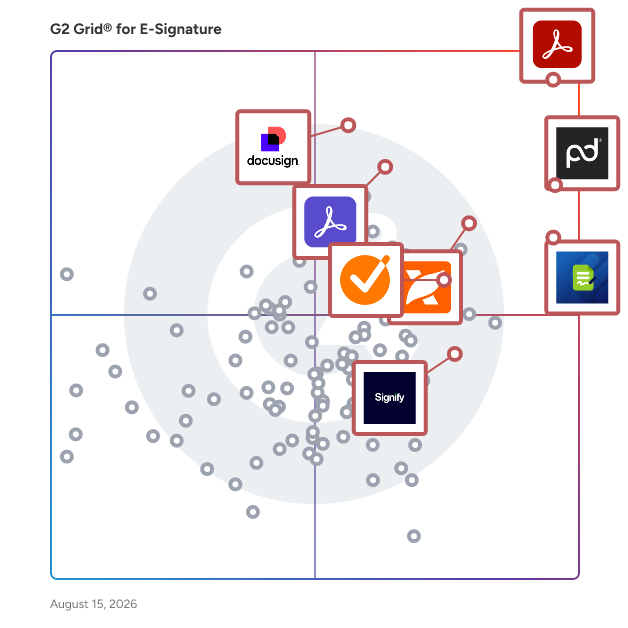
G2 Grid® for E-Signature Software

G2 Grid® for E-Signature Software plotting products by satisfaction and market presence

Highlighted products: Adobe Acrobat, PandaDoc, Docusign, Adobe Acrobat Sign, GetAccept, Jotform Sign, Foxit PDF Editor, and Signify.

Underlying data: [Grid® JSON](https://www.g2.com/categories/e-signature/grids.json?focus%5B%5D=adobe-acrobat&focus%5B%5D=pandadoc&focus%5B%5D=docusign&focus%5B%5D=adobe-acrobat-sign&focus%5B%5D=getaccept&focus%5B%5D=jotform-sign&focus%5B%5D=foxit-pdf-editor&focus%5B%5D=signify-signify&segment=mid-market)

Sponsored

Levvy

Levvy is a next-gen Practice Management Platform built for accounting & CAS firms, connecting teams with everything they need to do work- all in one place. It eliminates digital friction to improve team collaboration, boost productivity, and enhance client service delivery with features like: Real-time capacity management, • Dynamic Workspace that lets teams view, schedule, and track progress on all work in one seamless space • Embedded chat and document sharing for seamless team communication • All-in-one view of task details, instructions, files, and comments to eliminate switching between apps. • Automated workflows for enhanced operations

Visit website

Adobe Acrobat

Acrobat: Trusted for documents. Now built for how work really happens. For more than 30 years, Acrobat has been the trusted name in document workflow — helping businesses create, sign, and share with confidence. As one of the leading enterprise document platforms that scales for global teams, Acrobat has evolved beyond the PDF. Now with Acrobat Studio, it has been reimagined for how modern teams work: smarter, more collaborative, and powered by AI. Acrobat Studio builds on everything professionals know from Acrobat Pro — powerful PDF editing, signing, and reviewing — and expands it into a connected workspace where teams can create, collaborate, and communicate in entirely new ways. While Acrobat Pro focuses on the PDF itself, Acrobat Studio connects the full document journey, from insight to action. With PDF Spaces, teams can bring related documents together, chat with AI Assistants that summarize content or surface key takeaways, and keep everyone aligned without endless versions or email threads. Express Premium tools make it easy to remix or reuse that same content into branded presentations, visuals, or reports — helping teams communicate ideas faster and more confidently. Security remains a constant. Acrobat follows Adobe's Secure Product Lifecycle to safeguard data at every stage, with encryption, access controls, and enterprise-grade compliance. For organizations evaluating document automation tools suitable for multi-region, multi-team deployments, Acrobat Studio delivers the scale, security, and integrations to support it. From small teams to large enterprises, it turns everyday PDFs into powerful, intelligent workspaces — helping people move ideas forward and communicate with greater clarity and impact.

Average Rating: 4.5/5.0

Total Reviews: 4,673

How Do G2 Users Rate Adobe Acrobat?

  • Has the product been a good partner in doing business?: 8.9/10 (Category avg: 9.2/10)
  • Performance and Reliability: 8.9/10 (Category avg: 9.0/10)
  • Enterprise Scalability: 8.7/10 (Category avg: 8.9/10)
  • Signature Document Creation: 9.0/10 (Category avg: 9.1/10)

Who Is the Company Behind Adobe Acrobat?

  • Seller: Adobe
  • Company Website:
  • Year Founded: 1982
  • HQ Location: San Jose, CA
  • Twitter: @Adobe
    956,842 Twitter followers
  • LinkedIn® Page: www.linkedin.com
    42,087 employees on LinkedIn®

Who Uses This Product?

  • Who Uses This: Graphic Designer, Software Engineer
  • Top Industries: Information Technology and Services, Computer Software
  • Company Size: 42% Small, 31% Medium

What Do G2 Reviewers Say About Adobe Acrobat?

AI-generated summary from verified user reviews

Pros
  • Users appreciate the ease of use of Adobe Acrobat, making PDF management simple and efficient across devices.
  • Users appreciate the easy editing capabilities of Adobe Acrobat, which simplifies document management and enhances productivity.
  • Users value the PDF editing capabilities of Adobe Acrobat, enhancing productivity and collaboration at work.
  • Users appreciate the editing capabilities of Adobe Acrobat, finding it essential for seamless PDF document management and collaboration.
  • Users appreciate the all-in-one PDF management capabilities of Adobe Acrobat, enhancing productivity and document security.
Cons
  • Users find Adobe Acrobat expensive due to many features being locked behind a premium subscription.
  • Users often face slow performance with Adobe Acrobat, experiencing lags and delays, particularly on slower devices.
  • Users often face performance issues with PDFs, experiencing lag and slow opening times with large documents.
  • Users find Adobe Acrobat's interface not user friendly, with complex features that can overwhelm those less technical.
  • Users find the learning curve steep, particularly with advanced tools and features that can be hard to navigate.

What Are Recent G2 Reviews of Adobe Acrobat?

What Are G2 Users Discussing About Adobe Acrobat?

PandaDoc

PandaDoc is an all-in-one document management platform trusted by 68,000+ sales, legal, and operations teams to create, send, e-sign, and manage documents faster and with less manual work. Teams using PandaDoc close deals 30% faster and cut document turnaround time by up to 50%. Customers like Autodesk, Rakuten, and Sysco use PandaDoc to streamline their entire document process, from proposal to signed contract, and everything in between. PandaDoc helps your team: - Build and send professional proposals, contracts, and agreements using customizable templates and a drag-and-drop editor - Collect legally binding e-signatures from any device, anywhere, with no printing, scanning, or delays - Collaborate in real time with internal stakeholders and external signers simultaneously - Automate repetitive document tasks so reps and ops teams spend less time on admin and more time closing - Track document performance with analytics that show how recipients engage with every page PandaDoc integrates natively with the tools your team already uses, including Salesforce, HubSpot, Pipedrive, Stripe, and 30+ other CRM and payment platforms — keeping document processes inside your existing stack without adding friction or extra logins. Whether you're in sales, legal, HR, or finance, PandaDoc is especially popular with growing businesses that need enterprise-grade document processes without the added complexity or price tag. From first draft to final approval, PandaDoc centralizes the full document lifecycle with the compliance, security, and audit trail your team needs to operate with confidence. PandaDoc also supports notarization, payment collection, and document analytics in a single platform, reducing the need to manage multiple tools across your document process.

Average Rating: 4.7/5.0

Total Reviews: 3,519

How Do G2 Users Rate PandaDoc?

  • Has the product been a good partner in doing business?: 9.3/10 (Category avg: 9.2/10)
  • Performance and Reliability: 9.2/10 (Category avg: 9.0/10)
  • Enterprise Scalability: 9.0/10 (Category avg: 8.9/10)
  • Signature Document Creation: 9.3/10 (Category avg: 9.1/10)

Who Is the Company Behind PandaDoc?

  • Seller: PandaDoc
  • Company Website:
  • Year Founded: 2011
  • HQ Location: San Francisco, CA
  • Twitter: @pandadoc
    18,428 Twitter followers
  • LinkedIn® Page: www.linkedin.com
    883 employees on LinkedIn®

Who Uses This Product?

  • Who Uses This: CEO, Owner
  • Top Industries: Computer Software, Marketing and Advertising
  • Company Size: 68% Small, 26% Medium

What Do G2 Reviewers Say About PandaDoc?

AI-generated summary from verified user reviews

Pros
  • Users love the ease of use of PandaDoc, finding it simple to navigate and set up for online signing.
  • Users value PandaDoc's intuitive document management tools, enhancing workflow efficiency and streamlining approvals seamlessly.
  • Users love the intuitive editing tools of PandaDoc, enhancing their workflow and document customization.
  • Users find PandaDoc to be highly intuitive, making document management and e-signatures easy and efficient.
  • Users appreciate the simplicity and efficiency of PandaDoc for obtaining e-signatures, enhancing their workflow significantly.
Cons
  • Users are frustrated by the missing features in PandaDoc, such as document expiration controls and dynamic dates.
  • Users find PandaDoc expensive, especially for small teams needing affordable solutions for online form submissions.
  • Users find signature issues in PandaDoc, struggling with personal signature use and other document formatting challenges.
  • Users find difficult editing frustrating due to issues with document navigation and limited edit capabilities during collaboration.
  • Users find the editing difficulty in PandaDoc frustrating, especially with table formatting and live document changes.

What Are Recent G2 Reviews of PandaDoc?

What Are G2 Users Discussing About PandaDoc?

Docusign

Docusign helps organizations connect and automate how they prepare, sign, act on and manage agreements. As part of the Docusign's Intelligent Agreement Mangement (IAM), Docusign offers eSignature, the world's #1 way to sign electronically on practically any device, from almost anywhere, at any time. Today, over a million customers and more than a billion users in over 180 countries use the Docusign Intelligent Agreement Management (IAM) to accelerate the process of doing business and simplify people's lives. Docusign helps your business: * Send, sign and track agreements quickly and easily * Boost customer satisfaction by providing a superior signing experience * Standardize the agreement process * Save time by reducing manual work * Increase accuracy of agreements * Integrate with your existing business systems But don’t just take our word for it. Check out these customer stories now to see why Docusign is the leading eSignature provider: https://www.docusign.com/customer-stories Why companies everywhere choose Docusign: * Trusted by over a million customers and more than a billion users * 80% of agreements completed in 24 hours (44% in < 15 minutes) *Saves an average of $36 per document compared to traditional paper processes * 24/7 customer support * 350+ integrations and APIs *Docusign eSignature has the most 5-star reviews of any electronic signature product on Apple App Store, Google Play Store and Salesforce AppExchange * Docusign eSignatures are secure, lawful and court-admissible

Average Rating: 4.5/5.0

Total Reviews: 2,523

How Do G2 Users Rate Docusign?

  • Has the product been a good partner in doing business?: 8.3/10 (Category avg: 9.2/10)
  • Performance and Reliability: 8.9/10 (Category avg: 9.0/10)
  • Enterprise Scalability: 9.0/10 (Category avg: 8.9/10)
  • Signature Document Creation: 8.9/10 (Category avg: 9.1/10)

Who Is the Company Behind Docusign?

  • Seller: Docusign
  • Company Website:
  • Year Founded: 2003
  • HQ Location: San Francisco, CA
  • Twitter: @Docusign
    143,953 Twitter followers
  • LinkedIn® Page: www.linkedin.com
    8,433 employees on LinkedIn®

Who Uses This Product?

  • Who Uses This: Account Executive, Owner
  • Top Industries: Computer Software, Real Estate
  • Company Size: 40% Small, 38% Medium

What Do G2 Reviewers Say About Docusign?

AI-generated summary from verified user reviews

Pros
  • Users highlight the user-friendly interface of DocuSign, making document signing quick and convenient for everyone.
  • Users appreciate the user-friendly electronic signing of DocuSign, finding it efficient and reliable for transactions.
  • Users appreciate the user-friendly and customizable signature options of DocuSign, enhancing efficiency in their processes.
  • Users appreciate the seamless and reliable signing process of Docusign, which significantly enhances efficiency and ease of use.
  • Users appreciate the time-saving efficiency of Docusign, making document signing quick and hassle-free.
Cons
  • Users criticize DocuSign for being expensive, especially regarding extra features and insufficient support for small businesses.
  • Users find pricing issues with Docusign frustrating due to rigid terms and unresponsive customer service.
  • Users experience poor customer support with Docusign, especially after signing the contract and needing assistance.
  • Users find limited customization options frustrating, as essential features and support are difficult to manage effectively.
  • Users dislike the missing features in Docusign, such as limited envelope options and occasional document loss.

What Are Recent G2 Reviews of Docusign?

What Are G2 Users Discussing About Docusign?

Adobe Acrobat Sign

At Adobe, we believe that documents are more than just a collection of information and proof. They are foundational to connecting people and ideas, pushing business forward. Adobe Acrobat Sign helps your business move faster. Acrobat Sign is the only intuitive e-signature solution that combines simple and secure e-signatures with the power of Adobe Acrobat. With Acrobat Sign, you can create, sign, send for signature, manage, and track documents – all from one Adobe platform. You can create delightful signing experiences for your customers and teams by enabling them to sign documents on any device or browser – anytime, anywhere. No additional software download or accounts are needed. As Microsoft’s preferred e-signature solution, Acrobat Sign seamlessly integrates with your favorite Microsoft apps. Save time by signing and requesting signatures – all right from Microsoft 365, Teams, Outlook, and more. Plus, you can access smart integrations for Salesforce, Workday, and many more apps you use every day. Minimize legal and compliance risks by choosing Acrobat Sign, designed to be globally compliant and legally-binding in nearly every country in the world.

Average Rating: 4.4/5.0

Total Reviews: 1,017

How Do G2 Users Rate Adobe Acrobat Sign?

  • Has the product been a good partner in doing business?: 8.1/10 (Category avg: 9.2/10)
  • Performance and Reliability: 8.7/10 (Category avg: 9.0/10)
  • Enterprise Scalability: 8.8/10 (Category avg: 8.9/10)
  • Signature Document Creation: 8.6/10 (Category avg: 9.1/10)

Who Is the Company Behind Adobe Acrobat Sign?

  • Seller: Adobe
  • Year Founded: 1982
  • HQ Location: San Jose, CA
  • Twitter: @Adobe
    956,842 Twitter followers
  • LinkedIn® Page: www.linkedin.com
    42,087 employees on LinkedIn®
  • Ownership: NASDAQ:ADBE

Who Uses This Product?

  • Who Uses This: Owner, President
  • Top Industries: Information Technology and Services, Computer Software
  • Company Size: 40% Small, 38% Medium

What Do G2 Reviewers Say About Adobe Acrobat Sign?

AI-generated summary from verified user reviews

Pros
  • Users value the ease of use of Adobe Acrobat Sign, appreciating its convenience and seamless integration with other Adobe software.
  • Users value the seamless integration of Adobe Acrobat Sign with other Adobe products, enhancing document management efficiency.
  • Users praise the easy setup of Adobe Acrobat Sign, allowing for quick document signing without technical issues.
  • Users admire the effortless document tracking of Adobe Acrobat Sign, streamlining the signing process and enhancing organization.
  • Users value the ease of tracking signatures in Adobe Acrobat Sign, making the signing process efficient and organized.
Cons
  • Users find the pricing of Adobe Acrobat Sign to be too high, especially for smaller teams and organizations.
  • Users struggle with a steep learning curve, particularly for advanced features and complex workflows in Adobe Acrobat Sign.
  • Users often face signature access issues, making it difficult to complete their signing process efficiently.
  • Users find the app not intuitive, particularly on mobile, making navigation and feature accessibility challenging.
  • Users find Adobe Acrobat Sign not user-friendly, often causing confusion and requiring repeated document resending.

What Are Recent G2 Reviews of Adobe Acrobat Sign?

What Are G2 Users Discussing About Adobe Acrobat Sign?

GetAccept

GetAccept is the #1 AI Digital Sales Room, built to help revenue teams run every deal like their best sales rep. It replaces scattered emails and static attachments with an AI-native workspace, bringing content, proposals, e-signing, and buyer communication together so sellers, buyers, and every stakeholder stay aligned on the latest documents, timelines, and next steps across the full sales cycle. GetAccept's AI analyses your meetings, calls, emails, CRM data, internal content, and publicly available data, and is trained to take action, building and updating personalized Digital Sales Rooms in minutes and keeping every rep on track with your sales process and methodology. Real-time tracking shows exactly how buyers engage with each deal, and native CRM integrations keep everything synced in the tools reps already use. GetAccept solves the problem of deals stalling between meetings in scattered email threads, static attachments, and manual admin. By giving sellers and buyers a single, trackable space to collaborate from first touch to signature, it helps revenue teams of every size to work smarter, close faster, and win more. Why revenue teams choose GetAccept  ↳ AI-powered enablement: auto-generate and surface the right content for each deal, stage, and stakeholder, grounded in your meetings, CRM, and internal knowledge.  ↳ AI-built sales rooms: spin up a personalized, interactive Digital Sales Room in minutes that keeps conversations, materials, and actions aligned.  ↳ Deal intelligence: turn buyer engagement signals into clear visibility and AI-guided next steps.  ↳ Proposals and e-signing built in: create, send, track, and close documents without leaving the room.  ↳ Connected to your stack: #1-rated native integrations with Salesforce, HubSpot, and Slack, plus 100+ more, keep activity synced everywhere automatically. Trusted by 5,000+ revenue teams, including Dealfront, ScaleWise, Samsung, and Chargebee. "This is a way for you to control the narrative, to make sure your reps are sticking to the process and helping your customers experience value instead of just product pitching." Remi Aaagaard Mørken, SVP of Sales, SalesScreen (100% increase in win rate) "Since I started using GetAccept, my sales process and communication with my prospects are way more project- and solution-oriented. They know where to find the content they need, and I can focus on providing solutions." Carolina Bräuninger, Senior Strategic Account Executive, Dealfront (67% decrease in sales cycle time) "If you haven't got something like GetAccept from a contracts perspective, but equally from a Deal Room perspective, then you're behind." Gavin Summer, Co-Founder, ScaleWise (51% increase in proposal-to-close rate) (edited)

Average Rating: 4.6/5.0

Total Reviews: 1,252

How Do G2 Users Rate GetAccept?

  • Has the product been a good partner in doing business?: 9.3/10 (Category avg: 9.2/10)
  • Performance and Reliability: 8.8/10 (Category avg: 9.0/10)
  • Enterprise Scalability: 8.7/10 (Category avg: 8.9/10)
  • Signature Document Creation: 8.7/10 (Category avg: 9.1/10)

Who Is the Company Behind GetAccept?

  • Seller: GetAccept Inc.
  • Company Website:
  • Year Founded: 2015
  • HQ Location: Palo Alto, CA
  • Twitter: @getaccept
    1,433 Twitter followers
  • LinkedIn® Page: www.linkedin.com
    154 employees on LinkedIn®

Who Uses This Product?

  • Who Uses This: Sales Manager, Account Manager
  • Top Industries: Computer Software, Information Technology and Services
  • Company Size: 50% Small, 43% Medium

What Do G2 Reviewers Say About GetAccept?

AI-generated summary from verified user reviews

Pros
  • Users value the ease of use of GetAccept, highlighting its supportive environment and user-friendly setup.
  • Users value the great customer support from GetAccept, consistently highlighting its responsiveness and helpfulness.
  • Users find GetAccept to be intuitive and easy to edit, making document management seamless for everyone.
  • Users value the great customer service from GetAccept, which enhances their overall experience and satisfaction.
  • Users appreciate the time-saving features of GetAccept, benefiting from centralized accessibility and efficient automation.
Cons
  • Users feel the lack of dark mode is an eyestrain issue and struggle with visual representation of multiple signees.
  • Users find limited customization with GetAccept, leading to frustrations and complex processes due to inflexible templates.
  • Users experience poor integration issues with GetAccept, often facing troubleshooting and error messages that hinder usability.
  • Users find template issues in GetAccept frustrating, as they complicate contract management and increase internal friction.
  • Users find the difficult editing experience in GetAccept limits their ability to make necessary adjustments efficiently.
What Are Recent G2 Reviews of GetAccept?

Jotform Sign

Jotform Sign is a powerful e-signature platform that combines digital signatures with built-in automation to streamline document workflows. Easily create, share, and collect legally binding e-signatures on any device — without writing a single line of code. Upload an existing PDF, choose from 800+ professionally designed templates, or build a custom document from scratch using Jotform’s intuitive drag-and-drop document builder. Designed for maximum flexibility, Jotform Sign is ideal for waivers, consent forms, lease agreements, sales contracts, onboarding documents, and any workflow that requires secure signatures. Customize every part of your document to match your brand by uploading your logo, selecting fonts and colors, and adjusting layout elements. You can also add multiple signers, define a step-by-step automated signing order, set access permissions, and personalize your email notifications. These automation tools help reduce manual tasks, prevent bottlenecks, and accelerate approval cycles. Jotform Sign works seamlessly across devices, so recipients can review and sign documents from their phone, tablet, or laptop with a smooth, user-friendly experience. Each document includes a detailed audit trail, ensuring compliance, transparency, and trustworthy record-keeping. Whether you’re handling waivers, agreements, contracts, consent forms, or internal approvals, Jotform Sign automates repetitive tasks and eliminates the slow, outdated steps of paper-based processes. All signed documents are securely stored and can be easily exported, organized, shared, or integrated with your existing workflows. By combining digital signatures with automation, Jotform Sign helps businesses reduce turnaround times, improve accuracy, and enhance the signing experience for clients, employees, and partners. Say goodbye to scanning, printing, and manual follow-ups — and manage your entire signature workflow online with a fast, modern, and reliable e-signature platform.

Average Rating: 4.7/5.0

Total Reviews: 1,694

How Do G2 Users Rate Jotform Sign?

  • Has the product been a good partner in doing business?: 9.2/10 (Category avg: 9.2/10)
  • Performance and Reliability: 9.1/10 (Category avg: 9.0/10)
  • Enterprise Scalability: 8.7/10 (Category avg: 8.9/10)
  • Signature Document Creation: 9.0/10 (Category avg: 9.1/10)

Who Is the Company Behind Jotform Sign?

  • Seller: Jotform
  • Company Website:
  • Year Founded: 2006
  • HQ Location: San Francisco, California
  • Twitter: @Jotform
    39,289 Twitter followers
  • LinkedIn® Page: www.linkedin.com
    901 employees on LinkedIn®

Who Uses This Product?

  • Who Uses This: Owner, CEO
  • Top Industries: Non-Profit Organization Management, Health, Wellness and Fitness
  • Company Size: 73% Small, 16% Medium

What Do G2 Reviewers Say About Jotform Sign?

AI-generated summary from verified user reviews

Pros
  • Users value the frictionless ease of use with Jotform Sign, enhancing speed and streamlining document-signing processes.
  • Users love the easy setup of Jotform Sign, making form creation and signature management a breeze.
  • Users find Jotform Sign to be simple and intuitive, making document signing and management effortless for everyone.
  • Users love the frictionless signing process of Jotform Sign, which boosts efficiency and simplifies document management.
  • Users appreciate the easy creation of forms on Jotform Sign, finding it user-friendly and efficient for their needs.
Cons
  • Users find the signature limitations frustrating, especially with the restrictive submission limits affecting usability.
  • Users find Jotform Sign to be somewhat expensive, limiting access to essential features without a paid upgrade.
  • Users find the limited customization options frustrating, wishing for more flexibility in design and functionality.
  • Users report form access issues and limited options, complicating their experience and needing improvements for efficiency.
  • Users find Jotform Sign lacks flexibility in features, limiting options for payments, discounts, and product variations.

What Are Recent G2 Reviews of Jotform Sign?

Foxit PDF Editor

Founded in 2001, Foxit is a leading provider of innovative PDF and eSignature products and services, helping knowledge workers increase productivity and do more with documents. Foxit combines easy-to-use desktop software, mobile apps, and cloud services in one powerful solution: The Foxit PDF Editor. This intelligent document solution allows users to create, edit, fill, and sign documents through their integrated PDF Editor and eSign offerings – from anywhere and on any device. Most editing tools focus only on creating and modifying documents, leaving storage, organization, and control to other systems. Foxit Document Management System (DMS) is included in Foxit PDF Editor, so every document is securely stored, organized, governed, and connected from the moment it's edited. As the first to market with AI-powered PDF editing solutions, Foxit enhances productivity with smart document editing and workflow automation. Winner of numerous awards, Foxit has over 700 million users and has sold to over 528,000 customers, ranging from SMBs to global enterprises worldwide. Foxit products are ISO 32000-1/PDF 1.7 standard compliant, therefore, compatible with your existing PDF documents and forms.

Average Rating: 4.6/5.0

Total Reviews: 3,470

How Do G2 Users Rate Foxit PDF Editor?

  • Has the product been a good partner in doing business?: 9.0/10 (Category avg: 9.2/10)
  • Performance and Reliability: 8.9/10 (Category avg: 9.0/10)
  • Enterprise Scalability: 8.4/10 (Category avg: 8.9/10)
  • Signature Document Creation: 8.8/10 (Category avg: 9.1/10)

Who Is the Company Behind Foxit PDF Editor?

  • Seller: Foxit
  • Company Website:
  • Year Founded: 2001
  • HQ Location: Fremont, CA
  • Twitter: @foxitsoftware
    6,226 Twitter followers
  • LinkedIn® Page: www.linkedin.com
    569 employees on LinkedIn®

Who Uses This Product?

  • Who Uses This: Owner, President
  • Top Industries: Construction, Accounting
  • Company Size: 63% Small, 24% Medium

What Do G2 Reviewers Say About Foxit PDF Editor?

AI-generated summary from verified user reviews

Pros
  • Users highlight the ease of use in Foxit PDF Editor, making PDF editing fast and user-friendly for everyone.
  • Users value the user-friendly PDF editing features of Foxit PDF Editor, enjoying its intuitive layout and ease of use.
  • Users enjoy the easy editing features of Foxit PDF Editor, finding it fast and intuitive for all PDF tasks.
  • Users commend Foxit PDF Editor for its lightweight and fast performance, enhancing efficiency in PDF editing and management.
  • Users love the user-friendly interface of Foxit PDF Editor, appreciating its speed and editing capabilities for various tasks.
Cons
  • Users find the learning curve steep, with advanced features difficult to discover and complex initial setup challenges.
  • Users find the initial setup and advanced feature discovery overly complicated, impacting their overall experience with Foxit PDF Editor.
  • Users note that the cost and limited features of Foxit PDF Editor make it less accessible for beginners.
  • Users note the missing features in Foxit PDF Editor, particularly in the free version and Mac compatibility.
  • Users feel the limited features in the free version hinder full functionality and professional use of Foxit PDF Editor.

What Are Recent G2 Reviews of Foxit PDF Editor?

What Are G2 Users Discussing About Foxit PDF Editor?

Signify

Signify is a digital contracting platform that helps teams manage, automate, and track documents in one place. From sending and signing to organizing and archiving, it supports the full document workflow. Signify combines e-signatures, workflow automation, a team workspace, and a searchable archive. Set signing order and recipient roles, assign documents to folders with team-based permissions, and use structured templates to keep processes consistent across the company. You can see exactly what’s signed, pending, or in progress - and who’s involved. Permissions are clear, templates are shared with built-in rules, and folder access is controlled by team roles. Over 4.5 million documents have been sent through Signify, with 80% finalized in under 24 hours. Signify is built to support both the people who manage documents and those who sign them - making the entire process simple and efficient.

Average Rating: 4.9/5.0

Total Reviews: 118

How Do G2 Users Rate Signify?

  • Has the product been a good partner in doing business?: 10.0/10 (Category avg: 9.2/10)
  • Performance and Reliability: 9.6/10 (Category avg: 9.0/10)
  • Enterprise Scalability: 9.5/10 (Category avg: 8.9/10)
  • Signature Document Creation: 9.6/10 (Category avg: 9.1/10)

Who Is the Company Behind Signify?

  • Seller: Signify
  • Company Website:
  • Year Founded: 2021
  • HQ Location: Tbilisi, GE
  • LinkedIn® Page: www.linkedin.com
    36 employees on LinkedIn®

Who Uses This Product?

  • Who Uses This: Lawyer
  • Top Industries: Computer Software, Banking
  • Company Size: 41% Medium, 33% Small

What Do G2 Reviewers Say About Signify?

AI-generated summary from verified user reviews

Pros
  • Users find Signify to be exceptionally user-friendly and intuitive, significantly enhancing their workflow and document management.
  • Users love how Signify offers time-saving features, making document management quick and efficient for their workflow.
  • Users appreciate the time-saving features of Signify, enhancing their document management efficiency and workflow integration.
  • Users appreciate the convenience of Signify, which centralizes document management and simplifies the onboarding process.
  • Users value the efficient document management of Signify, fostering seamless workflows and reducing paperwork stress.
Cons
  • Users face challenges with document visibility and limitations on commenting and resubmitting rejected documents.
  • Users experience slow loading times that hinder efficiency, particularly with document opening and file uploads.
  • Users experience slow performance with Signify, noting delays in navigation and document access that hinder workflow.
  • Users express frustration over difficult editing, wishing for more flexibility to modify documents post-upload.
  • Users face challenges with signature process limitations, including difficulties with document uploads and recipient email updates.

What Are Recent G2 Reviews of Signify?

Juro

Juro embeds AI contract automation in the tools business teams use every day, so they can agree and manage contracts end-to-end - while legal stays in control. Collaborative, flexible and data-rich, Juro works with some of the world's leading companies like Deliveroo, Pfizer, and Trustpilot to accelerate legal workflow, automate routine contract tasks and gain better visibility into contract data. Juro is backed with $32m in venture capital from Fidelity, USV and the founders of Indeed, Wise and Gumtree.

Average Rating: 4.5/5.0

Total Reviews: 242

How Do G2 Users Rate Juro?

  • Has the product been a good partner in doing business?: 9.4/10 (Category avg: 9.2/10)
  • Performance and Reliability: 8.9/10 (Category avg: 9.0/10)
  • Enterprise Scalability: 8.9/10 (Category avg: 8.9/10)
  • Signature Document Creation: 8.7/10 (Category avg: 9.1/10)

Who Is the Company Behind Juro?

  • Seller: Juro
  • Company Website:
  • Year Founded: 2016
  • HQ Location: London, United Kingdom
  • Twitter: @GetJuro
    1,854 Twitter followers
  • LinkedIn® Page: www.linkedin.com
    120 employees on LinkedIn®

Who Uses This Product?

  • Who Uses This: Legal Counsel, Head of Legal
  • Top Industries: Computer Software, Information Technology and Services
  • Company Size: 77% Medium, 18% Small

What Do G2 Reviewers Say About Juro?

AI-generated summary from verified user reviews

Pros
  • Users highlight the ease of use of Juro, appreciating its intuitive interface for contract management.
  • Users find excellent customer support invaluable for efficiently managing contracts and utilizing features effectively.
  • Users find Juro's intuitive interface enhances usability, driving adoption and collaboration across various departments seamlessly.
  • Users appreciate the easy setup of Juro, making contract management efficient and seamless across teams.
  • Users highlight the powerful template functionality of Juro, which streamlines contract management and enhances team collaboration.
Cons
  • Users find Juro's user-friendliness lacking, with limited redlining options and unclear negotiation flows hindering efficiency.
  • Users find Juro's missing advanced features limits their capability compared to traditional document platforms.
  • Users find document management limitations in Juro, including issues with approvals and notification responses.
  • Users find template limitations in Juro frustrating, particularly with time-consuming updates and lack of search functionality for clauses.
  • Users find improvement needed in Juro's auto-numbering, editing features, and integration reliability, impacting their workflow efficiency.

What Are Recent G2 Reviews of Juro?

What Are G2 Users Discussing About Juro?

BoldSign

BoldSign® by Syncfusion® is an easy-to-use and secure electronic signature solution. With BoldSign you can quickly sign documents or send them out for signature, complete contracts, fill out forms, approve invoices, confirm service appointments, onboard new employees, and more. Its easy set-up, user-friendly interface, and intuitive auto-reminder settings smooth the way for the quick turnarounds you're looking for. BoldSign is a top alternative to DocuSign, offering flexible month-to-month plans and budget-friendly pricing options tailored to your needs. Key features: - Use a solution that meets U.S. ESIGN and EU eIDAS eSignature standards, is SOC 2® Type 2 certified, and fully compliant with HIPAA and GDPR. - No hidden document limits, feature restrictions, or surprise overage fees. - Intuitive, easy-to-use web interface. - Comprehensive, highly responsive API available, to easily embed the entire eSignature process within your apps. - Create reusable templates to streamline recurring document workflows. - Request signatures via both email and SMS. - Add your company’s branding to eSignature requests. - Effortlessly send documents to multiple recipients using bulk sending and bulk links. - Instantly generate signing links for easy sharing and faster completion. - Ensure signer authenticity with identity verification options. - Embed sending and signing directly into your applications. - Get real-time document status updates through webhooks. - Enjoy dedicated customer care, even for free-plan users in email, chat, and the ticketing system. - Securely store and retrieve documents with automatic cloud backups. Syncfusion, the company behind BoldSign, has been helping developers worldwide to build powerful line-of-business software for over 20 years. Syncfusion serves a wide spectrum of customers, empowering individual developers and Fortune 500 companies alike to build high-impact line-of-business software.

Average Rating: 4.7/5.0

Total Reviews: 376

How Do G2 Users Rate BoldSign?

  • Has the product been a good partner in doing business?: 9.4/10 (Category avg: 9.2/10)
  • Performance and Reliability: 9.2/10 (Category avg: 9.0/10)
  • Enterprise Scalability: 8.8/10 (Category avg: 8.9/10)
  • Signature Document Creation: 9.3/10 (Category avg: 9.1/10)

Who Is the Company Behind BoldSign?

  • Seller: Syncfusion
  • Company Website:
  • Year Founded: 2001
  • HQ Location: Morrisville, North Carolina
  • Twitter: @Syncfusion
    11,907 Twitter followers
  • LinkedIn® Page: www.linkedin.com
    2,709 employees on LinkedIn®

Who Uses This Product?

  • Who Uses This: CEO, Owner
  • Top Industries: Computer Software, Accounting
  • Company Size: 81% Small, 18% Medium

What Do G2 Reviewers Say About BoldSign?

AI-generated summary from verified user reviews

Pros
  • Users love the intuitive and user-friendly interface of BoldSign, appreciating its simplicity and ease of use.
  • Users value the affordability of BoldSign, finding it a cost-effective solution for their business needs.
  • Users commend the excellent customer support from BoldSign, appreciating quick responses and thorough assistance with inquiries.
  • Users love BoldSign's intuitive design, which simplifies e-signatures with a user-friendly interface and clear documentation.
  • Users value the time-saving features of BoldSign, enabling efficient document management and easy signature collection.
Cons
  • Users find the local signing feature unintuitive and experience issues like downtime and complexity in usage.
  • Users find BoldSign expensive due to misleading service offerings and inadequate customer support affecting their experience.
  • Users face issues with excessive email notifications and limitations on recipient identification and tracking in BoldSign.
  • Users note a challenging learning curve but appreciate available staff support for assistance and troubleshooting.
  • Users express frustration with BoldSign's poor customer support, citing slow responses and lack of contextual understanding.

What Are Recent G2 Reviews of BoldSign?

What Are G2 Users Discussing About BoldSign?

pdfFiller

pdfFiller is a cloud-based platform with a comprehensive digital toolkit that makes handling PDFs easy. Edit, sign, store, manage, and collaborate on documents all in one place — no downloads, switching apps, or paying for multiple subscriptions needed. All your documents are safely stored in the cloud, so you can access them anytime, anywhere, without worrying about losing your data.

Average Rating: 4.6/5.0

Total Reviews: 876

How Do G2 Users Rate pdfFiller?

  • Has the product been a good partner in doing business?: 9.5/10 (Category avg: 9.2/10)
  • Performance and Reliability: 9.3/10 (Category avg: 9.0/10)
  • Enterprise Scalability: 9.4/10 (Category avg: 8.9/10)
  • Signature Document Creation: 9.3/10 (Category avg: 9.1/10)

Who Is the Company Behind pdfFiller?

  • Seller: airSlate
  • Company Website:
  • Year Founded: 2006
  • HQ Location: Brookline, Massachusetts
  • Twitter: @airSlate
    1,234 Twitter followers
  • LinkedIn® Page: www.linkedin.com
    798 employees on LinkedIn®

Who Uses This Product?

  • Who Uses This: Owner, President
  • Top Industries: Real Estate, Insurance
  • Company Size: 82% Small, 13% Medium

What Do G2 Reviewers Say About pdfFiller?

AI-generated summary from verified user reviews

Pros
  • Users find pdfFiller to be user-friendly and convenient, greatly simplifying document management and saving time.
  • Users find easy editing with pdfFiller especially beneficial, allowing seamless modifications and swift document handling.
  • Users find the Form Filling feature essential for efficiently managing and completing various important documents.
  • Users value the editing capabilities of pdfFiller, which enhance productivity and streamline document management efficiently.
  • Users appreciate the efficient e-signing features of pdfFiller, enhancing document processing and timely approvals.
Cons
  • Users are disappointed by missing advanced editing features and the lack of convenient notary options in pdfFiller.
  • Users find the product expensive for its offerings, noting bugs and limited features in the free trial.
  • Users find pdfFiller's interface not user-friendly, as the multitude of tools can confuse first-time users.
  • Users find feature limitations frustrating, especially when essential tools are only available in paid plans or slow loading times occur.
  • Users experience slow performance with large documents and confusion regarding e-signing navigation, impacting their workflow.

What Are Recent G2 Reviews of pdfFiller?

What Are G2 Users Discussing About pdfFiller?

Mekari Sign

Mekari Sign is a provider of electronic signature (eSignature) and electronic seal (eMeterai), based in Indonesia. Built on a SaaS model, Mekari Sign helps businesses to create, sign, seal, and manage electronic documents easily through any device. We offer an end-to-end solution for electronic document signing, allowing businesses to sign their documents anytime and anywhere digitally without the hassle of direct appointments. With a centralized cloud-based platform, Mekari Sign gives businesses the ability to share documents in seconds, sign them in a few clicks, and monitor every stage of the signing process with the audit trails feature. Mekari Sign helps businesses to: - Speed up business process: Easily send, sign, and monitor the signing process. - Reduce administrative time, costs, and mobility: Purchase eMeterai online, anytime 24/7. - Categorize documents based on their purpose: Organize contracts and agreements. - Prevent missing or damaged documents: Store any documents in a cloud-based system. With AATL (Adobe Approved Trust List), Global Sign CA (Certification Authority), and in compliance with the Indonesian Ministry of Communication and Informatics, Mekari Sign is trusted by businesses across Indonesia and worldwide to simplify their business process. Accelerate your business administrative process now.

Average Rating: 4.7/5.0

Total Reviews: 29

How Do G2 Users Rate Mekari Sign?

  • Has the product been a good partner in doing business?: 9.6/10 (Category avg: 9.2/10)
  • Performance and Reliability: 9.3/10 (Category avg: 9.0/10)
  • Enterprise Scalability: 9.3/10 (Category avg: 8.9/10)
  • Signature Document Creation: 9.6/10 (Category avg: 9.1/10)

Who Is the Company Behind Mekari Sign?

  • Seller: Mekari
  • Year Founded: 2015
  • HQ Location: Jakarta Pusat, ID
  • Twitter: @mekaricom
    168 Twitter followers
  • LinkedIn® Page: www.linkedin.com
    1,688 employees on LinkedIn®

Who Uses This Product?

  • Company Size: 60% Medium, 27% Small

What Do G2 Reviewers Say About Mekari Sign?

AI-generated summary from verified user reviews

Pros
  • Users value the ease of use of Mekari Sign, enhancing document processing and inter-department collaboration seamlessly.
  • Users value the flexible e-signature workflow that streamlines approvals across multiple teams and locations.
  • Users value the time-saving onboarding process of Mekari Sign, making digital agreements fast and efficient to implement.
  • Users highlight Mekari Sign's efficiency in digital signing, streamlining processes and enhancing client onboarding effortlessly.
  • Users value the flexibility of Mekari Sign, which enhances collaboration across various teams and streamlines processes.
Cons
  • Users experience email issues with Mekari Sign, including undelivered notifications and confusion over document actions.
  • Users find the limited customization of Mekari Sign frustrating, wishing for a more flexible UI and integration options.
  • Users face mobile issues with Mekari Sign, such as limited functionality and email delivery problems that hinder signing.
  • Users desire more advanced settings on mobile, such as editing signer roles and adjusting fields for better functionality.
  • Users often face slow performance, especially during peak times, impacting their document preparation efficiency.

What Are Recent G2 Reviews of Mekari Sign?

Xodo Sign

Xodo Sign, formerly known as eversign, is a secure and affordable electronic signature solution built to support both small businesses and enterprise users in managing contracts, agreements, and approvals online. Powered by Apryse technology, it offers powerful features such as legally binding and compliant e-signatures, advanced PDF editing, real-time audit trails, team collaboration tools, reusable templates, and smooth integration with popular business apps. Try Xodo Sign today to close deals faster, cut operational costs, and streamline document editing and e-signing, all within one secure platform. For teams and developers, Xodo Sign also provides a flexible eSignature API to embed digital signing directly into existing systems and workflows.

Average Rating: 4.8/5.0

Total Reviews: 2,739

How Do G2 Users Rate Xodo Sign?

  • Has the product been a good partner in doing business?: 9.6/10 (Category avg: 9.2/10)
  • Performance and Reliability: 9.5/10 (Category avg: 9.0/10)
  • Enterprise Scalability: 9.4/10 (Category avg: 8.9/10)
  • Signature Document Creation: 9.3/10 (Category avg: 9.1/10)

Who Is the Company Behind Xodo Sign?

  • Seller: Apryse
  • Company Website:
  • Year Founded: 1998
  • HQ Location: Denver, CO
  • Twitter: @aprysesolutions
    381 Twitter followers
  • LinkedIn® Page: www.linkedin.com
    552 employees on LinkedIn®

Who Uses This Product?

  • Who Uses This: Owner, CEO
  • Top Industries: Marketing and Advertising, Real Estate
  • Company Size: 90% Small, 6% Medium

What Do G2 Reviewers Say About Xodo Sign?

AI-generated summary from verified user reviews

Pros
  • Users find Xodo Sign to be simple and fast, making document handling effortless and efficient for everyone.
  • Users emphasize the time-saving convenience of Xodo Sign, streamlining document signing for both businesses and clients.
  • Users value the consistency and affordability of Xodo Sign, making document signing seamless and efficient.
  • Users enjoy the ease of use of Xodo Sign, appreciating its simplicity and efficiency for various signing tasks.
  • Users appreciate the user-friendly interface of Xodo Sign, making document signing and management effortless.
Cons
  • Users find the signature configuration cumbersome, taking too much time for repetitive documents and requiring manual adjustments.
  • Users note the limited customization in Xodo Sign, as contracts can't be easily edited or resent without cancellation.
  • Users find the confusing name change and contract update process challenging, impacting client experience and clarity.
  • Users find the pricing plans inflexible for small businesses, making Xodo Sign seem expensive for their needs.
  • Users experience clunky interface usability with Xodo Sign, especially when editing or updating contracts, causing confusion.

What Are Recent G2 Reviews of Xodo Sign?

What Are G2 Users Discussing About Xodo Sign?

dotloop

On average, every month, over 150 real estate brokerages and teams switch to dotloop's transaction management software. Currently supporting more than 10,000 brokerages and teams across the U.S. and Canada, dotloop touches more than 50% of all U.S. real estate transactions and has earned a near-perfect 98% Retention Rate. Not to mention a top-rated mobile app - 4.8/5 stars with over 45,000 reviews.

Average Rating: 4.3/5.0

Total Reviews: 172

How Do G2 Users Rate dotloop?

  • Has the product been a good partner in doing business?: 7.9/10 (Category avg: 9.2/10)
  • Performance and Reliability: 8.9/10 (Category avg: 9.0/10)
  • Enterprise Scalability: 9.0/10 (Category avg: 8.9/10)
  • Signature Document Creation: 8.6/10 (Category avg: 9.1/10)

Who Is the Company Behind dotloop?

  • Seller: Zillow
  • Year Founded: 2006
  • HQ Location: Seattle, WA
  • Twitter: @zillow
    346,354 Twitter followers
  • LinkedIn® Page: www.linkedin.com
    10,254 employees on LinkedIn®
  • Ownership: NASDAQ

Who Uses This Product?

  • Who Uses This: Realtor, Real Estate Agent
  • Top Industries: Real Estate
  • Company Size: 46% Small, 33% Medium

What Do G2 Reviewers Say About dotloop?

AI-generated summary from verified user reviews

Pros
  • Users find Dotloop very easy to use, appreciating its intuitive interface and efficient contract management features.
  • Users praise the ease of use and great interface of dotloop, making contract writing incredibly straightforward.
  • Users appreciate the responsive customer support of dotloop, consistently receiving timely assistance for their inquiries.
  • Users find easy navigation in Dotloop's features enhances their experience when writing real estate contracts.
  • Users appreciate the easy sharing feature of dotloop, facilitating quick document signatures for teams and individuals.
Cons
  • Users often face functionality issues with dotloop, experiencing lost progress while typing, leading to frustration.
  • Users often experience app glitches that can cause loss of entered data, impacting their workflow negatively.
  • Users often face client difficulties when integrating other users, leading to frustrating experiences with dotloop.
  • Users often face integration issues that hinder collaboration and complicate their experience in dotloop.
  • Users often experience saving issues, leading to loss of work due to unreliable saving functionality.

What Are Recent G2 Reviews of dotloop?

What Are G2 Users Discussing About dotloop?

SignWell

SignWell is a secure electronic signature and document workflow platform trusted by tens of thousands of businesses worldwide. We help teams sign documents online, automate approvals, and reduce paperwork with legally binding eSignatures, SOC 2 Type II compliance, and support for GDPR, HIPAA, and NOM-151 requirements. With an easy-to-use interface, a powerful eSignature API, and best-in-class customer support included on every plan, SignWell makes it simple to sign PDFs, manage agreements, and move business forward—without the enterprise price tag.

Average Rating: 4.8/5.0

Total Reviews: 417

How Do G2 Users Rate SignWell?

  • Has the product been a good partner in doing business?: 9.6/10 (Category avg: 9.2/10)
  • Performance and Reliability: 9.5/10 (Category avg: 9.0/10)
  • Enterprise Scalability: 8.5/10 (Category avg: 8.9/10)
  • Signature Document Creation: 9.4/10 (Category avg: 9.1/10)

Who Is the Company Behind SignWell?

  • Seller: SignWell
  • Year Founded: 2010
  • HQ Location: Portland, OR
  • Twitter: @SignWellApp
    300 Twitter followers
  • LinkedIn® Page: www.linkedin.com
    17 employees on LinkedIn®

Who Uses This Product?

  • Who Uses This: CEO, Founder
  • Top Industries: Real Estate, Marketing and Advertising
  • Company Size: 87% Small, 5% Medium

What Do G2 Reviewers Say About SignWell?

AI-generated summary from verified user reviews

Pros
  • Users appreciate the ease of use of SignWell, enabling quick document setup and effortless signing experiences.
  • Users appreciate the time-saving efficiency of SignWell, significantly speeding up their contract signing process.
  • Users find SignWell intuitive, appreciating its user-friendly design and seamless setup for effortless document signing.
  • Users find SignWell's user-friendly interface intuitive and easy, streamlining document management and e-signature tasks effectively.
  • Users commend SignWell for its easy setup, allowing quick integration and immediate use without training.
Cons
  • Users find the signature management cumbersome, forcing them to restart and lose progress with signer changes.
  • Users feel the pricing is too high, suggesting improvements for the service's affordability and value.
  • Users experience email issues, including missed notifications and limitations on sending signature links in the free version.
  • Users find the limited customization options frustrating, wishing for more flexibility in signatures and templates.
  • Users find the limited features of SignWell restrictive, particularly with integrations and free plan document limits.

What Are Recent G2 Reviews of SignWell?

What Are G2 Users Discussing About SignWell?