Best Enterprise Data Visualization Tools

How Many Data Visualization Tools Products Does G2 Track?

Total Products under this Category: 762

Category Stats (Nov 2026)

  • Average Rating: 4.44/5 The average rating of products in this category, based on all submitted ratings
  • Top Trending Product: Upsolve AI (+1.75%) - Among all products in this category, Upsolve AI recorded the largest rating increase compared to last month

Last updated: November 01, 2026

How Does G2 Rank Data Visualization Tools Products?

Why You Can Trust G2's Software Rankings:

  • 30 Analysts and Data Experts
  • 22,900+ Authentic Reviews
  • 762+ Products
  • Unbiased Rankings

G2's software rankings are built on verified user reviews, rigorous moderation, and a consistent research methodology maintained by a team of analysts and data experts. Each product is measured using the same transparent criteria, with no paid placement or vendor influence. While reviews reflect real user experiences, which can be subjective, they offer valuable insight into how software performs in the hands of professionals. Together, these inputs power the G2 Score, a standardized way to compare tools within every category.

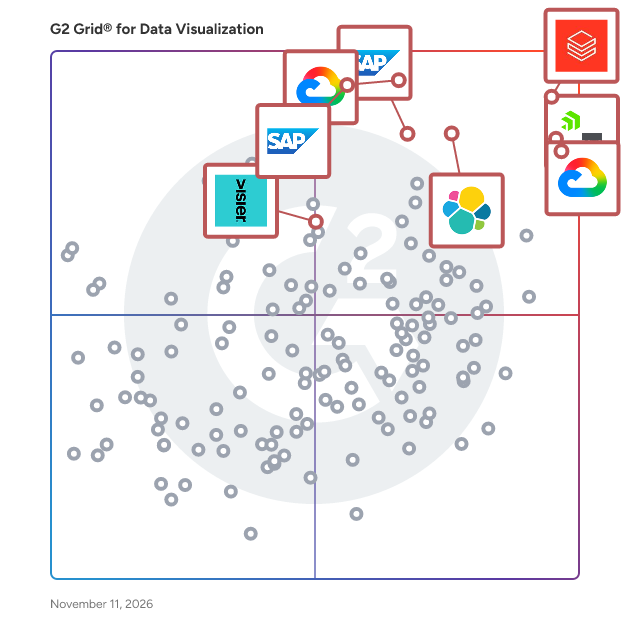
G2 Grid® for Data Visualization Tools

G2 Grid® for Data Visualization Tools plotting products by satisfaction and market presence

Highlighted products: Databricks, Domo, Looker, SAP HANA Cloud, SAP Analytics Cloud, Data Studio, Visier, and Elastic Stack.

Underlying data: [Grid® JSON](https://www.g2.com/categories/data-visualization-tools/grids.json?focus%5B%5D=databricks&focus%5B%5D=domo&focus%5B%5D=looker&focus%5B%5D=sap-hana-cloud-2025-10-01&focus%5B%5D=sap-analytics-cloud&focus%5B%5D=data-studio&focus%5B%5D=visier&focus%5B%5D=elastic-stack&segment=enterprise)

Databricks

Databricks is the Data and AI company. More than 20,000 organizations worldwide — including adidas, AT&T, Bayer, Block, Mastercard, Rivian, Unilever, and 70% of the Fortune 500 — rely on the Databricks Data + AI Platform to build and scale data and AI apps, analytics, and agents. Headquartered in San Francisco with 30+ offices around the globe, Databricks offers a unified platform that includes Genie, Lakebase, Agent Bricks, Lakeflow, Lakehouse, and Unity Catalog. Founded in 2013 by the original creators of Apache Spark™, Delta Lake, MLflow and Unity Catalog, Databricks is built on an open lakehouse architecture that brings data, analytics and AI together. The platform is used by data engineers, data scientists, analysts, developers, machine learning teams, AI teams and business users to collaborate across the full data and AI lifecycle. Key Databricks capabilities include: - Data engineering: Build, automate and manage reliable batch, streaming and real-time data pipelines. - Analytics and business intelligence: Run SQL analytics, create dashboards and enable business teams to explore data. - Data governance: Discover, secure and manage data and AI assets across teams, clouds and workloads. - Machine learning and AI: Develop models, build generative AI applications and create production-grade AI agents. - Data applications: Build and deploy data-driven applications using governed enterprise data. Available across AWS, Azure and Google Cloud, Databricks helps organizations work across clouds, reduce data silos and simplify collaboration across teams and tools. Customers use Databricks for use cases such as customer personalization, fraud detection, predictive maintenance, real-time analytics, cybersecurity, healthcare research, financial risk management, supply chain optimization and AI-powered decision-making. Databricks is used across industries including financial services, healthcare and life sciences, retail, manufacturing, energy and the public sector. Organizations use the platform to modernize data infrastructure, accelerate AI adoption and turn enterprise data into business value.

Average Rating: 4.6/5.0

Total Reviews: 1,374

How Do G2 Users Rate Databricks?

  • Has the product been a good partner in doing business?: 8.9/10 (Category avg: 9.0/10)

Who Is the Company Behind Databricks?

  • Seller: Databricks Inc.
  • Company Website:
  • Year Founded: 2013
  • HQ Location: San Francisco, CA
  • LinkedIn® Page: www.linkedin.com
    14,336 employees on LinkedIn®

Who Uses This Product?

  • Who Uses This: Data Engineer, Data Analyst
  • Top Industries: Information Technology and Services, Financial Services
  • Company Size: 46% Large, 39% Medium

What Do G2 Reviewers Say About Databricks?

AI-generated summary from verified user reviews

Pros
  • Users appreciate the seamless integration of big data and AI in Databricks, enhancing collaboration and performance.
  • Users appreciate the ease of use of Databricks, valuing its seamless integration and fast performance.
  • Users appreciate the seamless integration of Databricks with big data processing and AI, enhancing collaboration and performance.
  • Users value the seamless collaboration features of Databricks, enhancing teamwork and data analysis across departments.
  • Users appreciate the seamless integration of big data processing and AI in Databricks, enhancing collaboration and efficiency.
Cons
  • Users find the learning curve steep with Databricks, requiring time and skills to adapt effectively.
  • Users note that the cost can scale quickly, making cost monitoring and control a significant challenge.
  • Users find the steep learning curve of Databricks challenging, requiring considerable effort to adapt for business use cases.
  • Users find the inadequate ingestion options for non-standard data sources a limitation in Databricks' functionality.
  • Users find Databricks' complexity challenging, especially for beginners and smaller teams trying to fine-tune the system.

What Are Recent G2 Reviews of Databricks?

What Are G2 Users Discussing About Databricks?

Domo

Domo’s AI and data platform business is now part of Progress Software. Domo's cloud-native AI data readiness platform complements and significantly broadens Progress' data platform offerings, creating powerful synergies to deliver innovative, secure and scalable AI data readiness solutions worldwide. Together, these capabilities will help customers turn fragmented enterprise data and knowledge into governed, AI-ready intelligence, improving the security, governance and cost of AI-powered initiatives. Domo is the agentic platform for the intelligent enterprise, helping organizations connect, govern, activate, and distribute data and AI across their business. Built for enterprises, Domo works with existing cloud data platforms such as Snowflake, BigQuery, and Databricks to help teams turn governed data into AI-powered agents, apps, workflows, and analytics. Domo is built on three layers. The data foundation connects and governs data across cloud data platforms and business systems. The activation layer enables organizations to build AI agents, apps, workflows, automations, and dashboards on top of that foundation. The distribution layer delivers intelligence where work happens through embedded apps, mobile, dashboards, and AI assistants using Model Context Protocol (MCP). Governance underpins every layer, helping organizations scale AI and data products with security and trust. Key capabilities include: • Connecting and governing data across cloud data platforms and enterprise applications. • Building AI agents, apps, workflows, automations, dashboards, and analytics. • Delivering data and AI through dashboards, embedded apps, AI assistants, and AI agents. • Supporting both low-code and pro-code development for business and technical teams. • Applying governance, security, and access controls across data and AI. Organizations use Domo for AI agents, apps, and workflows, as well as business intelligence, operational analytics, embedded analytics, and executive reporting. By combining governed data, AI activation, app development, and distribution in a single platform, Domo helps organizations build and scale trusted data products across the enterprise.

Average Rating: 4.3/5.0

Total Reviews: 1,078

How Do G2 Users Rate Domo?

  • Has the product been a good partner in doing business?: 8.8/10 (Category avg: 9.0/10)
  • Dashboards: 8.3/10 (Category avg: 9.0/10)
  • Steps to Answer: 8.1/10 (Category avg: 8.6/10)
  • Formats: 8.5/10 (Category avg: 8.6/10)

Who Is the Company Behind Domo?

  • Seller: Domo
  • Company Website:
  • Year Founded: 2010
  • HQ Location: American Fork, UT
  • LinkedIn® Page: www.linkedin.com
    1,288 employees on LinkedIn®
  • Ownership: NASDAQ: DOMO

Who Uses This Product?

  • Who Uses This: Data Analyst, Business Analyst
  • Top Industries: Computer Software, Information Technology and Services
  • Company Size: 50% Medium, 28% Large

What Do G2 Reviewers Say About Domo?

AI-generated summary from verified user reviews

Pros
  • Users value the ease of use of Domo, appreciating its intuitive interface and straightforward data integration capabilities.
  • Users love Domo for its intuitive data visualization, making it easy to create dashboards and extract insights efficiently.
  • Users find Domo extremely intuitive, enabling quick dashboard creation and seamless integration of diverse data sources.
  • Users value the easy integrations of Domo, allowing seamless connection to numerous data sources for insightful analytics.
  • Users praise Domo's seamless integrations, enabling easy connections to various data sources for effective analytics and monitoring.
Cons
  • Users find the steep learning curve of Domo challenging, impacting onboarding and productivity for some staff.
  • Users find it challenging to keep up with missing features and updates, necessitating dedicated resources for tracking.
  • Users face significant data management issues, finding it challenging to secure, clean, and efficiently manage datasets in Domo.
  • Users find Domo's pricing to be expensive and confusing, especially as usage and storage requirements increase.
  • Users find Domo's complexity challenging, citing issues in data management and a lack of support for troubleshooting.

What Are Recent G2 Reviews of Domo?

What Are G2 Users Discussing About Domo?

Looker

Looker, Google Cloud’s business intelligence platform, enables you to chat with your data. Organizations turn to Looker for self-service and governed BI, to build custom applications with trusted metrics, or to bring Looker modeling to their existing environment. The result is improved data engineering efficiency and true business transformation.

Average Rating: 4.4/5.0

Total Reviews: 1,670

How Do G2 Users Rate Looker?

  • Has the product been a good partner in doing business?: 8.9/10 (Category avg: 9.0/10)
  • Dashboards: 8.7/10 (Category avg: 9.0/10)
  • Steps to Answer: 8.1/10 (Category avg: 8.6/10)
  • Formats: 8.3/10 (Category avg: 8.6/10)

Who Is the Company Behind Looker?

  • Seller: Google
  • Year Founded: 1998
  • HQ Location: Mountain View, CA
  • LinkedIn® Page: www.linkedin.com
    301,144 employees on LinkedIn®
  • Ownership: NASDAQ:GOOG
  • Phone: +1 (650) 253-0000

Who Uses This Product?

  • Who Uses This: Data Analyst, Data Engineer
  • Top Industries: Computer Software, Information Technology and Services
  • Company Size: 59% Medium, 21% Small

What Do G2 Reviewers Say About Looker?

AI-generated summary from verified user reviews

Pros
  • Users appreciate the ease of use with Looker, facilitating real-time reporting and seamless integration for effective analytics.
  • Users value Looker's real-time dashboards and powerful data modeling, enhancing self-service analytics and consistent reporting across teams.
  • Users enjoy the easy integrations of Looker, facilitating seamless connection with data warehouses for efficient analytics.
  • Users appreciate the seamless integrations of Looker, enhancing data management and analytics accessibility across their platforms.
  • Users value Looker's real-time data visualization, enabling clear, interactive dashboards that drive informed decision-making.
Cons
  • Users find the learning curve steep, especially non-technical users who may struggle with LookML and dashboard customization.
  • Users find the learning difficulty of Looker's LookML challenging, especially for those without technical expertise.
  • Users often face slow loading times, especially with large data sets, impacting their overall experience with Looker.
  • Users often experience slow performance with Looker, particularly when handling large datasets and complex dashboards.
  • Users find the complexity of Looker challenging, especially due to the steep learning curve and limited customizations.

What Are Recent G2 Reviews of Looker?

What Are G2 Users Discussing About Looker?

AI can help you find the answers. G2 helps you trust them.

Connect G2 to Claude or ChatGPT for answers grounded in G2's trusted reviews, comparisons, and pricing from real user insights.

How it works

SAP HANA Cloud

SAP HANA Cloud is a modern database-as-a-service (DBaaS) powering the next generation of intelligent data applications. SAP HANA Cloud offers a competitive edge by incorporating advanced machine learning and predictive tools grounded in modern data science. Its powerful in-memory performance safeguards efficient data processing. By securely storing vast amounts of data with its integrated multitier storage and handling various types on a single copy in its native multi-model database, SAP HANA Cloud simplifies data management and connects to other data sources. The seamless integration of these capabilities in a reliable, unified foundation makes it easier for developers to build high-demand intelligent data apps.

Average Rating: 4.3/5.0

Total Reviews: 522

How Do G2 Users Rate SAP HANA Cloud?

  • Has the product been a good partner in doing business?: 8.5/10 (Category avg: 9.0/10)
  • Dashboards: 8.9/10 (Category avg: 9.0/10)
  • Steps to Answer: 8.0/10 (Category avg: 8.6/10)
  • Formats: 8.5/10 (Category avg: 8.6/10)

Who Is the Company Behind SAP HANA Cloud?

  • Seller: SAP
  • Year Founded: 1972
  • HQ Location: Walldorf
  • LinkedIn® Page: www.linkedin.com
    149,349 employees on LinkedIn®
  • Ownership: NYSE:SAP
  • Phone: +1 (800) 872-1727

Who Uses This Product?

  • Who Uses This: Consultant, SAP Consultant
  • Top Industries: Information Technology and Services, Computer Software
  • Company Size: 61% Large, 26% Medium

What Do G2 Reviewers Say About SAP HANA Cloud?

AI-generated summary from verified user reviews

Pros
  • Users value the ease of use of SAP HANA Cloud, benefiting from its seamless integration and efficient data management.
  • Users appreciate the easy integrations of SAP HANA Cloud, enhancing efficiency in reporting and decision-making across modules.
  • Users value the seamless integrations of SAP HANA Cloud, enhancing efficiency in reporting and decision-making processes.
  • Users value the exceptional processing speed of SAP HANA Cloud, enhancing real-time insights and decision-making capabilities.
  • Users value the scalability of SAP HANA Cloud, enabling efficient growth and flexibility aligned with business needs.
Cons
  • Users often face complexity in initial setup and configuration that complicates the effective use of SAP HANA Cloud.
  • Users are concerned about the high costs associated with SAP HANA Cloud, especially when managing workloads improperly.
  • Users often struggle with the learning curve and initial setup complexity, hindering efficient onboarding for new users.
  • Users find the difficult learning curve of SAP HANA Cloud hinders onboarding and requires significant technical expertise.
  • Users find the complex setup of SAP HANA Cloud challenging, particularly for new users and specialized features.

What Are Recent G2 Reviews of SAP HANA Cloud?

SAP Analytics Cloud

With the SAP Analytics Cloud solution, you can bring together analytics and planning with unique integration to SAP applications and smooth access to heterogenous data sources. As the analytics and planning solution within SAP Business Technology Platform, SAP Analytics Cloud supports trusted insights and integrated planning processes enterprise-wide to help you make decisions without doubt.

Average Rating: 4.2/5.0

Total Reviews: 763

How Do G2 Users Rate SAP Analytics Cloud?

  • Has the product been a good partner in doing business?: 8.3/10 (Category avg: 9.0/10)
  • Dashboards: 8.7/10 (Category avg: 9.0/10)
  • Steps to Answer: 7.9/10 (Category avg: 8.6/10)
  • Formats: 8.7/10 (Category avg: 8.6/10)

Who Is the Company Behind SAP Analytics Cloud?

  • Seller: SAP
  • Year Founded: 1972
  • HQ Location: Walldorf
  • LinkedIn® Page: www.linkedin.com
    149,349 employees on LinkedIn®
  • Ownership: NYSE:SAP
  • Phone: +1 (800) 872-1727

Who Uses This Product?

  • Who Uses This: Senior Consultant, Consultant
  • Top Industries: Information Technology and Services, Computer Software
  • Company Size: 48% Large, 28% Medium

What Do G2 Reviewers Say About SAP Analytics Cloud?

AI-generated summary from verified user reviews

Pros
  • Users value the ease of use of SAP Analytics Cloud, facilitating smooth training and effective data management.
  • Users value the integrated data analysis capabilities of SAP Analytics Cloud for seamless reporting and real-time insights.
  • Users appreciate the clean and effective data visualizations in SAP Analytics Cloud that enhance storytelling and reporting.
  • Users value the easy integrations of SAP Analytics Cloud, enhancing data flow and streamlining dashboard creation across teams.
  • Users value the integrated platform of SAP Analytics Cloud, combining BI, planning, and predictive analytics seamlessly.
Cons
  • Users experience slow performance during uploads and when handling large datasets, affecting usability and efficiency.
  • Users find the learning curve steep for SAP Analytics Cloud, particularly for non-technical users needing extra training.
  • Users find the learning difficulty high for SAP Analytics Cloud, requiring technical knowledge and external support for setup.
  • Users often experience performance issues, particularly with slow load times and complexity when handling large datasets.
  • Users often face performance lags with large datasets, making their experience less efficient and frustrating.

What Are Recent G2 Reviews of SAP Analytics Cloud?

What Are G2 Users Discussing About SAP Analytics Cloud?

Data Studio

Data Studio offers self-service business intelligence with unmatched flexibility for smarter business decisions. Featuring connections to more than 1,000+ data sources, you can create highly visual, intuitive reports and share them with your team with consistent metrics. Data Studio helps you tell impactful stories by creating and sharing engaging reports and data visualization, showcasing your business metrics and dimensions with intuitive smart reports, with automatic sharing for informed collaboation. Create meaningful, shareable, customizable, charts and graphs with just a few clicks, and now, with Gemini in Looker, automatically generate reports, visualizations and slides and save countless hours."

Average Rating: 4.4/5.0

Total Reviews: 457

How Do G2 Users Rate Data Studio?

  • Has the product been a good partner in doing business?: 8.2/10 (Category avg: 9.0/10)
  • Dashboards: 9.1/10 (Category avg: 9.0/10)
  • Steps to Answer: 8.1/10 (Category avg: 8.6/10)
  • Formats: 8.5/10 (Category avg: 8.6/10)

Who Is the Company Behind Data Studio?

  • Seller: Google
  • Year Founded: 1998
  • HQ Location: Mountain View, CA
  • LinkedIn® Page: www.linkedin.com
    301,144 employees on LinkedIn®
  • Ownership: NASDAQ:GOOG
  • Phone: +1 (650) 253-0000

Who Uses This Product?

  • Who Uses This: Digital Marketing Specialist, Marketing Manager
  • Top Industries: Marketing and Advertising, Computer Software
  • Company Size: 45% Small, 37% Medium

What Do G2 Reviewers Say About Data Studio?

AI-generated summary from verified user reviews

Pros
  • Users appreciate the ease of setup in Data Studio, which allows for quick, flexible dashboard creation.
  • Users love the flexible visualization capabilities of Looker Studio, making data insights easily accessible and actionable.
  • Users value the easy integrations in Looker Studio, enhancing their ability to visualize and share data effectively.
  • Users appreciate the ease of data visualization with Data Studio, making complex data clear and accessible for insights.
  • Users love the collaborative sharing capabilities of Looker Studio, making it easy to present data visually to teams and clients.
Cons
  • Users find Looker Studio's limited customization frustrating, especially when needing more advanced visualisation options.
  • Users often experience slow performance when connected to multiple data sources or working with larger datasets.
  • Users often find Looker Studio's slow loading times frustrating, especially with large datasets or numerous charts.
  • Users often face connectivity issues with Looker Studio, leading to frustrating experiences with unreliable connectors and slow performance.
  • Users find limitations in storage, as performance slows with large datasets and advanced customizations are restricted.

What Are Recent G2 Reviews of Data Studio?

What Are G2 Users Discussing About Data Studio?

Visier

Visier gives organizations a Workforce AI Edge: a set of AI-powered capabilities that help leaders understand the relationship between people and work, elevate employee productivity, and win by adapting to change faster. The company is the global leader in AI-powered people analytics, workforce planning, and compensation allocation. All Visier technology is underpinned by its Real-time People Data Platform, which uses AI to unlock the business-transforming potential of people data, work data, and the fusion of both. Founded in 2010 by the pioneers of business intelligence, Visier has over 60,000 customers in 75 countries—including enterprises like BASF, Panasonic, Experian, Amgen, eBay, Ford Motor Company, and more. To learn more about Visier, visit www.visier.com.

Average Rating: 4.6/5.0

Total Reviews: 219

How Do G2 Users Rate Visier?

  • Has the product been a good partner in doing business?: 9.2/10 (Category avg: 9.0/10)
  • Dashboards: 8.6/10 (Category avg: 9.0/10)
  • Steps to Answer: 7.9/10 (Category avg: 8.6/10)
  • Formats: 8.2/10 (Category avg: 8.6/10)

Who Is the Company Behind Visier?

  • Seller: Visier
  • Year Founded: 2010
  • HQ Location: Vancouver, British Columbia
  • LinkedIn® Page: www.linkedin.com
    532 employees on LinkedIn®

Who Uses This Product?

  • Top Industries: Hospital & Health Care, Information Technology and Services
  • Company Size: 82% Large, 17% Medium

What Do G2 Reviewers Say About Visier?

AI-generated summary from verified user reviews

Pros
  • Users value the ease of use of Visier, simplifying data analysis and making insights accessible for everyone.
  • Users value the data breakdown capabilities of Visier, making analytics accessible and effective for decision-making.
  • Users appreciate user-friendly data breakdowns in Visier, facilitating clear communication of insights to leadership.
  • Users value the powerful data visualization capabilities of Visier, enabling clear insights and effective communication with leadership.
  • Users value the time-saving integration of multiple data sources in Visier, streamlining analytics and decision-making processes.
Cons
  • Users find the learning difficulty in Visier challenging, requiring considerable time and assistance to navigate effectively.
  • Users find the high costs associated with Visier's integration and modules to be a significant barrier.
  • Users note a steep learning curve with Visier, requiring time and support to master the tool effectively.
  • Users find Visier’s complexity challenging, particularly with customization and a lack of adequate customer support.
  • Users find limited customization options in Visier frustrating, hindering flexibility compared to other analytics tools like Tableau or Power BI.

What Are Recent G2 Reviews of Visier?

What Are G2 Users Discussing About Visier?

Elastic Stack

The Elastic Stack, commonly known as the ELK Stack, is a comprehensive suite of open-source tools designed for ingesting, storing, analyzing, and visualizing data in real-time. It comprises Elasticsearch, Kibana, Beats, and Logstash, enabling users to handle data from any source and in any format efficiently. Key Features and Functionality: - Elasticsearch: A distributed, JSON-based search and analytics engine that allows for rapid storage, search, and analysis of large volumes of data. - Kibana: An extensible user interface that provides powerful visualizations, dashboards, and management tools to interpret and present data effectively. - Beats and Logstash: Data ingestion tools that collect and process data from various sources, transforming and forwarding it to Elasticsearch for indexing. - Integrations: A multitude of pre-built integrations that facilitate seamless data collection and connection with the Elastic Stack, enabling quick insights. Primary Value and User Solutions: The Elastic Stack empowers organizations to harness the full potential of their data by providing a scalable and resilient platform for real-time search and analytics. It addresses challenges such as managing large datasets, ensuring high availability, and delivering relevant search results swiftly. By offering a unified solution for data ingestion, storage, analysis, and visualization, the Elastic Stack enables users to gain actionable insights, enhance operational efficiency, and make informed decisions based on their data.

Average Rating: 4.5/5.0

Total Reviews: 106

How Do G2 Users Rate Elastic Stack?

  • Has the product been a good partner in doing business?: 8.3/10 (Category avg: 9.0/10)
  • Dashboards: 9.0/10 (Category avg: 9.0/10)
  • Steps to Answer: 8.3/10 (Category avg: 8.6/10)
  • Formats: 8.7/10 (Category avg: 8.6/10)

Who Is the Company Behind Elastic Stack?

  • Seller: Elastic
  • Year Founded: 2012
  • HQ Location: San Francisco, CA
  • LinkedIn® Page: www.linkedin.com
    10,457 employees on LinkedIn®
  • Ownership: NYSE: ESTC

Who Uses This Product?

  • Who Uses This: Software Engineer, Senior Software Engineer
  • Top Industries: Information Technology and Services, Computer Software
  • Company Size: 46% Medium, 35% Large

What Do G2 Reviewers Say About Elastic Stack?

AI-generated summary from verified user reviews

Pros
  • Users value the ease of use of Elastic Stack, simplifying real-time monitoring and analysis across diverse systems.
  • Users appreciate the flexibility of Elastic Stack, enabling customization and integration with various tools and formats.
  • Users value the unified log management of Elastic Stack, enabling quick issue correlation and comprehensive system insights.
  • Users appreciate the search efficiency of Elastic Stack, enabling quick issue correlation and insightful system behavior analysis.
  • Users appreciate the versatility of Elastic Stack, allowing seamless integration and customization across various deployment models and data types.
Cons
  • Users find that resource management challenges in Elastic Stack require extensive expertise and ongoing attention to maintain performance.
  • Users find the complexity issues of Elastic Stack challenging, requiring expertise for optimal management and performance.
  • Users find the Elastic Stack to be expensive at scale, especially due to high resource and licensing costs.
  • Users report that Elastic Stack's high memory usage can lead to increased costs and requires extensive resources at scale.
  • Users find the learning curve steep for Elastic Stack, requiring significant expertise for optimal performance and management.

What Are Recent G2 Reviews of Elastic Stack?

What Are G2 Users Discussing About Elastic Stack?

JMP

JMP, data analysis software for Mac and Windows, combines the strength of interactive visualization with powerful statistics. Importing and processing data is easy. The drag-and-drop interface, dynamically linked graphs, libraries of advanced analytic functionality, scripting language and ways of sharing findings with others, allows users to dig deeply into their data, with greater ease and speed. Originally developed in the 1980’s to capture the new value in GUI for personal computers, JMP remains dedicated to adding cutting-edge statistical methods and special analysis techniques from a variety of industries to the software’s functionality with each release. The organization's founder, John Sall, still serves as Chief Architect. To see a full list of data connectors please visit https://www.jmp.com/en/software/analytic-workflow/data-connectors

Average Rating: 4.5/5.0

Total Reviews: 206

How Do G2 Users Rate JMP?

  • Has the product been a good partner in doing business?: 8.9/10 (Category avg: 9.0/10)
  • Dashboards: 8.4/10 (Category avg: 9.0/10)
  • Steps to Answer: 8.4/10 (Category avg: 8.6/10)
  • Formats: 8.1/10 (Category avg: 8.6/10)

Who Is the Company Behind JMP?

Who Uses This Product?

  • Who Uses This: Student
  • Top Industries: Higher Education, Information Technology and Services
  • Company Size: 42% Large, 33% Small

What Do G2 Reviewers Say About JMP?

AI-generated summary from verified user reviews

Pros
  • Users praise JMP for its ease of use, enabling effortless data exploration and visualization without complicated coding.
  • Users appreciate the ease of data visualization in JMP, facilitating clear insights and effective analysis without coding.
  • Users appreciate the ease of statistical analysis with JMP, allowing straightforward exploration and visualization of data.
  • Users appreciate the intuitive data visualization in JMP, allowing easy exploration and insight without complex coding.
  • Users praise the intuitive and interactive user interface of JMP, making data analysis and visualization effortless.
Cons
  • Users find JMP to be expensive, making it a challenge for individuals and small organizations with tight budgets.
  • Users find the learning curve steep, especially those less familiar with statistical analysis or coding-based tools.
  • Users find JMP offers limited flexibility in integrations and available models, restricting their analytical capabilities.
  • Users find JMP has a steep learning difficulty, requiring time and effort to master its advanced features.
  • Users experience limitations in storage with JMP, facing challenges in model availability and integration with other tools.

What Are Recent G2 Reviews of JMP?

What Are G2 Users Discussing About JMP?

Pigment

Pigment is an AI business planning and performance management platform. Built for the complexity of modern enterprises, Pigment combines dynamic modeling with autonomous AI agents and an intuitive UX, to help teams make intelligent decisions with speed and clarity. Across finance, sales, supply chain, and other business functions, teams at companies like Unilever, Snowflake, Siemens, and Anthropic use Pigment every day to anticipate change, plan ahead, and act with confidence.

Average Rating: 4.6/5.0

Total Reviews: 124

How Do G2 Users Rate Pigment?

  • Has the product been a good partner in doing business?: 9.5/10 (Category avg: 9.0/10)
  • Dashboards: 8.8/10 (Category avg: 9.0/10)
  • Steps to Answer: 8.6/10 (Category avg: 8.6/10)
  • Formats: 7.5/10 (Category avg: 8.6/10)

Who Is the Company Behind Pigment?

  • Seller: Pigment
  • Company Website:
  • Year Founded: 2019
  • HQ Location: Paris, FR
  • LinkedIn® Page: www.linkedin.com
    773 employees on LinkedIn®

Who Uses This Product?

  • Who Uses This: FP&A Manager
  • Top Industries: Computer Software, Information Technology and Services
  • Company Size: 71% Medium, 21% Large

What Do G2 Reviewers Say About Pigment?

AI-generated summary from verified user reviews

Pros
  • Users praise the flexibility of Pigment, enabling seamless adjustments and tailored financial planning as needs evolve.
  • Users love the flexibility and AI features in Pigment, enhancing planning and reporting capabilities effectively.
  • Users commend the stellar customer support from Pigment, enhancing their experience and ensuring seamless implementations.
  • Users appreciate the ease of use of Pigment, allowing for quick setup and effective collaboration in financial planning.
  • Users praise Pigment for its powerful automation, seamlessly integrating data and enhancing forecasting capabilities with minimal errors.
Cons
  • Users experience data inaccuracy due to missing fields for reporting, causing bottlenecks for analysts and report builders.
  • Users find the formulas and calculations complicated, impacting their ability to efficiently use Pigment.
  • Users find the setup process complex, noting complicated formulas and a lack of easy API management options.
  • Users face connectivity issues with Pigment, often experiencing slow calculations and performance challenges on large datasets.
  • Users find the formula limitations somewhat tricky, complicating calculations and slowing down forecasts.

What Are Recent G2 Reviews of Pigment?

Infogram

Infogram is a data visualization company that helps people create infographics, reports, dashboards, maps, charts and social media assets. We show people how to communicate with data in a clear and engaging way. Launched in 2012, Infogram rapidly became the web’s favorite data visualization tool thanks to its simplicity, functionality and strong design aesthetic. We serve a wide range of customers including marketers, educators, journalists, consultants, and business professionals. We support people who see data as a powerful communication tool when visualized effectively. Infogram is used and loved by millions of people around the globe

Average Rating: 4.7/5.0

Total Reviews: 178

How Do G2 Users Rate Infogram?

  • Has the product been a good partner in doing business?: 9.0/10 (Category avg: 9.0/10)
  • Dashboards: 9.2/10 (Category avg: 9.0/10)
  • Steps to Answer: 8.4/10 (Category avg: 8.6/10)
  • Formats: 9.3/10 (Category avg: 8.6/10)

Who Is the Company Behind Infogram?

  • Seller: Prezi
  • Year Founded: 2009
  • HQ Location: Oakland, California
  • LinkedIn® Page: www.linkedin.com
    202 employees on LinkedIn®

Who Uses This Product?

  • Top Industries: Education Management, Marketing and Advertising
  • Company Size: 51% Small, 31% Medium

What Do G2 Reviewers Say About Infogram?

AI-generated summary from verified user reviews

Pros
  • Users appreciate the ease of use of Infogram, making data visualization quick and efficient for various tasks.
  • Users commend the easy visualization and variety of graph types in Infogram, enhancing their interactive graphic creation experience.
  • Users value the AI integration in Infogram, finding data upload and chart suggestions highly beneficial for efficiency.
  • Users find automation features in Infogram to significantly enhance their productivity and streamline data-related tasks.
  • Users appreciate the exceptional customer satisfaction with Infogram, highlighting efficient support and smooth payment processes.
Cons
  • Users experience poor visualization with Infogram, noting occasional glitches and inconsistent AI graph outputs.
  • Users desire more free templates in Infogram, feeling limited by the current selection available.

What Are Recent G2 Reviews of Infogram?

What Are G2 Users Discussing About Infogram?

SAP Crystal Reports

SAP Crystal Reports software is the worldwide de facto standard in desktop reporting. With SAP Crystal Reports, you can create powerful, richly formatted, dynamic reports from virtually any data source – delivered in dozens of formats, in up to 24 languages. A robust production reporting tool, SAP Crystal Reports turns almost any data source into interactive, actionable information that can be accessed offline or online, from applications, portals and mobile devices. SAP Crystal Server enables self-service access to reports, dashboards, and data exploration within a secure infrastructure.

Average Rating: 4.2/5.0

Total Reviews: 202

How Do G2 Users Rate SAP Crystal Reports?

  • Has the product been a good partner in doing business?: 7.8/10 (Category avg: 9.0/10)
  • Dashboards: 8.6/10 (Category avg: 9.0/10)
  • Steps to Answer: 8.3/10 (Category avg: 8.6/10)
  • Formats: 8.1/10 (Category avg: 8.6/10)

Who Is the Company Behind SAP Crystal Reports?

  • Seller: SAP
  • Year Founded: 1972
  • HQ Location: Walldorf
  • LinkedIn® Page: www.linkedin.com
    149,349 employees on LinkedIn®
  • Ownership: NYSE:SAP
  • Phone: +1 (800) 872-1727

Who Uses This Product?

  • Who Uses This: President
  • Top Industries: Information Technology and Services, Computer Software
  • Company Size: 39% Medium, 33% Large

What Do G2 Reviewers Say About SAP Crystal Reports?

AI-generated summary from verified user reviews

Pros
  • Users value the clear and interactive data visualizations of SAP Crystal Reports, enhancing their reporting experience significantly.
  • Users value the ease of use of SAP Crystal Reports, enjoying clear, interactive reports with a friendly GUI.
  • Users value the easy integrations of SAP Crystal Reports, allowing access to multiple databases seamlessly.
  • Users value the endless reporting capabilities and numerous integrations of SAP Crystal Reports for diverse needs.
  • Users find the intuitive design of SAP Crystal Reports enhances their reporting experience across multiple databases.
Cons
  • Users face compatibility issues with version requirements and platform limitations, complicating the deployment process of SAP Crystal Reports.
  • Users find the software has a steep learning curve, requiring additional training to master its features.
  • Users find SAP Crystal Reports to have a learning difficulty, requiring additional training for effective use.
  • Users find the limited customization in SAP Crystal Reports restricts their ability to modify and personalize reports effectively.
  • Users find the limited options of SAP Crystal Reports restrict their ability to customize and edit reports effectively.

What Are Recent G2 Reviews of SAP Crystal Reports?

What Are G2 Users Discussing About SAP Crystal Reports?

MongoDB Atlas

MongoDB Atlas is a developer data platform that provides a tightly integrated collection of data and application infrastructure building blocks to enable enterprises to quickly deploy bespoke architectures to address any application need. Atlas supports transactional, full-text search, vector search, time series and stream processing application use cases across mobile, distributed, event-driven, and serverless architectures.

Average Rating: 4.5/5.0

Total Reviews: 857

How Do G2 Users Rate MongoDB Atlas?

  • Has the product been a good partner in doing business?: 8.6/10 (Category avg: 9.0/10)
  • Dashboards: 9.2/10 (Category avg: 9.0/10)
  • Steps to Answer: 7.9/10 (Category avg: 8.6/10)
  • Formats: 8.5/10 (Category avg: 8.6/10)

Who Is the Company Behind MongoDB Atlas?

  • Seller: MongoDB
  • Year Founded: 2007
  • HQ Location: New York
  • LinkedIn® Page: www.linkedin.com
    8,041 employees on LinkedIn®
  • Ownership: NASDAQ: MDB

Who Uses This Product?

  • Who Uses This: Software Engineer, Senior Software Engineer
  • Top Industries: Computer Software, Information Technology and Services
  • Company Size: 45% Small, 29% Large

What Do G2 Reviewers Say About MongoDB Atlas?

AI-generated summary from verified user reviews

Pros
  • Users appreciate the ease of use of MongoDB Atlas, enjoying its intuitive UI and seamless setup process.
  • Users appreciate the intuitive user interface of MongoDB Atlas, highlighting its ease of use and helpful documentation.
  • Users appreciate the fast response and easy search features of MongoDB Atlas, enhancing their overall experience.
  • Users appreciate the scalability of MongoDB Atlas, benefiting from intuitive tools that simplify performance and management.
  • Users commend MongoDB Atlas for its exceptional reliability, ensuring consistent uptime and seamless database management experiences.
Cons
  • Users criticize expensive pricing of MongoDB Atlas, feeling forced into higher tiers with insufficient support and performance.
  • Users find the unclear pricing of MongoDB Atlas frustrating, resulting in unexpected costs and poor support experiences.
  • Users find MongoDB Atlas to be overpriced for its performance, leading to frustration and recommendation to switch services.
  • Users express frustration over high memory usage leading to unnecessary costs and performance issues in MongoDB Atlas.
  • Users experience latency issues with MongoDB Atlas, including slow data deletion and performance degradation during critical processes.

What Are Recent G2 Reviews of MongoDB Atlas?

What Are G2 Users Discussing About MongoDB Atlas?

Minitab Connect

Minitab Connect is a data integration and analytics workflow platform that helps organizations collect, prepare, monitor, and share data from multiple sources. It provides connectors, automated data pipelines, tables, forms, dashboards, and alerts so teams can use current data for reporting and further analysis. Users can bring in data from files, databases, cloud services, and operational systems. They can organize it in tables and views, apply repeatable preparation steps, and schedule flows that refresh data without rebuilding the same report manually. Dashboards display trends, key performance indicators, and statistical charts as data changes. Monitors can notify users when defined conditions are met. Key capabilities include: - Connections to databases, cloud storage, spreadsheets, APIs, and other data sources. - Automated flows for importing, preparing, and exporting data. - Data preparation tools for cleaning, combining, and transforming datasets. - Shareable dashboards, charts, and data entry forms. - Alerts delivered in the application, by email or text, or through external requests. Minitab Connect supports business analysts, data teams, quality professionals, and operations groups that need a consistent path from scattered data to usable information. A quality team might monitor process measurements across sites; an operations group might update recurring performance reports; an analyst might prepare a dataset for statistical work. The platform can also collect new data through forms and streaming endpoints. Connect works with other Minitab products. Prepared data can be sent to Minitab Statistical Software for deeper analysis, and Connect has direct integrations with Real-Time SPC and Minitab Model Ops. Access can be managed through single sign-on, roles, user groups, and individual permissions. Minitab lists encryption in transit and at rest, multifactor authentication, and an audit log for record changes. Together, these features help teams manage recurring data workflows while controlling access to shared information.

Average Rating: 4.5/5.0

Total Reviews: 30

How Do G2 Users Rate Minitab Connect?

  • Has the product been a good partner in doing business?: 9.2/10 (Category avg: 9.0/10)
  • Dashboards: 9.0/10 (Category avg: 9.0/10)
  • Steps to Answer: 9.0/10 (Category avg: 8.6/10)
  • Formats: 9.1/10 (Category avg: 8.6/10)

Who Is the Company Behind Minitab Connect?

  • Seller: Minitab
  • Company Website:
  • Year Founded: 1972
  • HQ Location: State College, Pennsylvania, United States
  • LinkedIn® Page: www.linkedin.com
    732 employees on LinkedIn®

Who Uses This Product?

  • Top Industries: Information Technology and Services
  • Company Size: 57% Large, 33% Medium

What Do G2 Reviewers Say About Minitab Connect?

AI-generated summary from verified user reviews

Pros
  • Users appreciate the ease of use of Minitab Connect, finding data integration and analysis incredibly straightforward.
  • Users value the efficient data integration capabilities of Minitab Connect, enhancing accessibility and streamlining analysis seamlessly.
  • Users appreciate the easy integrations of Minitab Connect, enhancing data accessibility and streamlining analysis seamlessly.
  • Users value the seamless data integration and versatility of Minitab Connect, enhancing their analysis capabilities effortlessly.
  • Users appreciate the seamless data integration offered by Minitab Connect, enhancing accessibility and enabling efficient analysis.
Cons
  • Users find the high learning curve of Minitab Connect challenging, requiring time, patience, and additional resources to navigate effectively.
  • Users note a high learning difficulty with Minitab Connect, requiring patience and time to master its features.
  • Users face challenges with poor visualization in Minitab Connect, especially when handling large datasets and complex transformations.
  • Users find visualization limitations in Minitab Connect, particularly with large datasets and complex transformations.
  • Users find the complexity of data transformations in Minitab Connect to be slow and challenging, with high costs.

What Are Recent G2 Reviews of Minitab Connect?

What Are G2 Users Discussing About Minitab Connect?

SAP Crystal Server

SAP Crystal Server is a comprehensive business intelligence (BI solution designed to empower organizations with self-service reporting and data exploration capabilities. It enables businesses to automate report distribution, provide secure access to reports from desktops or mobile devices, and manage user administration efficiently. By offering a centralized platform for report scheduling, data-driven publishing, and robust security options, SAP Crystal Server helps decision-makers access timely, accurate information, facilitating informed decision-making and operational efficiency. Key Features and Functionality: - Report Scheduling: Automate the generation and distribution of standard reports on a flexible schedule, reducing repetitive database queries and ensuring timely information delivery. - Data-Driven Publishing: Customize and distribute reports tailored to individual recipients, such as personalized invoices or statements, enhancing communication and engagement. - Security Management: Control access to reports and dashboards at user, group, object, and folder levels, ensuring that sensitive data is accessible only to authorized personnel. - Administrator Interface: Utilize a web-based central management console to configure security settings, manage user roles, and oversee the entire reporting system efficiently. Primary Value and User Solutions: SAP Crystal Server addresses the critical need for timely and accurate business information by automating report distribution and providing secure, self-service access to reports. This reduces the reporting backlog for IT departments and empowers business users to make informed decisions based on up-to-date data. The platform's robust security features ensure that sensitive information is protected, while its scalability allows organizations to manage reporting needs for a growing user base effectively. By streamlining reporting processes and enhancing data accessibility, SAP Crystal Server helps organizations improve operational efficiency and drive business success.

Average Rating: 4.5/5.0

Total Reviews: 30

How Do G2 Users Rate SAP Crystal Server?

  • Has the product been a good partner in doing business?: 8.3/10 (Category avg: 9.0/10)
  • Dashboards: 9.1/10 (Category avg: 9.0/10)
  • Steps to Answer: 8.8/10 (Category avg: 8.6/10)
  • Formats: 9.0/10 (Category avg: 8.6/10)

Who Is the Company Behind SAP Crystal Server?

  • Seller: SAP
  • Year Founded: 1972
  • HQ Location: Walldorf
  • LinkedIn® Page: www.linkedin.com
    149,349 employees on LinkedIn®
  • Ownership: NYSE:SAP
  • Phone: +1 (800) 872-1727

Who Uses This Product?

  • Top Industries: Information Technology and Services, Computer Software
  • Company Size: 40% Large, 37% Medium

What Are Recent G2 Reviews of SAP Crystal Server?

Bijou Barry
BB
Researched and written by Bijou Barry
Updated