# Best Construction Project Management Software for Small Business

*By [Neya Kumaresan](https://research.g2.com/insights/author/neya-kumaresan)*


Products classified in the overall Construction Project Management category are similar in many regards and help companies of all sizes solve their business problems. However, small business features, pricing, setup, and installation differ from businesses of other sizes, which is why we match buyers to the right Small Business Construction Project Management to fit their needs. Compare product ratings based on reviews from enterprise users or connect with one of G2&#39;s buying advisors to find the right solutions within the Small Business Construction Project Management category.

In addition to qualifying for inclusion in the Construction Project Management Software category, to qualify for inclusion in the Small Business Construction Project Management Software category, a product must have at least 10 reviews left by a reviewer from a small business.


## Top Construction Project Management Software at a Glance
| # | Product | Rating | Best For | What Users Say |
|---|---------|--------|----------|----------------|
| 1 | [Autodesk Forma (formerly Autodesk Construction Cloud)](https://www.g2.com/products/autodesk-forma-formerly-autodesk-construction-cloud/reviews) | 4.4/5.0 (5,200 reviews) | Revit-native BIM coordination and field-to-office document control | "[Forma empowers Site Planning with Global 3D Modeling and simulation .](https://www.g2.com/survey_responses/autodesk-forma-formerly-autodesk-construction-cloud-review-13113249)" |
| 2 | [Procore](https://www.g2.com/products/procore/reviews) | 4.6/5.0 (4,162 reviews) | Field-to-office construction document control | "[A Game-Changer for Construction—Organized and Built to Perform](https://www.g2.com/survey_responses/procore-review-13115075)" |
| 3 | [Fieldwire by Hilti](https://www.g2.com/products/fieldwire-by-hilti/reviews) | 4.5/5.0 (576 reviews) | Field-to-office drawing markup and task tracking | "[Fieldwire’s Real-Time Mobile Updates Keep Everyone Aligned](https://www.g2.com/survey_responses/fieldwire-by-hilti-review-13055946)" |
| 4 | [RDash](https://www.g2.com/products/rdash/reviews) | 4.6/5.0 (57 reviews) | Construction procurement-to-PO visibility and control | "[Effortless TrackingMade Design Coordination Much Smoother of Drawings, Approvals, and Design Tasks](https://www.g2.com/survey_responses/rdash-review-13102272)" |
| 5 | [Buildertrend](https://www.g2.com/products/buildertrend/reviews) | 4.3/5.0 (227 reviews) | End-to-end residential construction job coordination | "[Scheduling, Notifications, and Document Sharing We Rely On](https://www.g2.com/survey_responses/buildertrend-review-13032648)" |
| 6 | [HCSS](https://www.g2.com/products/hcss/reviews) | 4.6/5.0 (257 reviews) | Bid-to-field cost tracking for heavy construction | "[Sargent Project Accounting Review](https://www.g2.com/survey_responses/hcss-review-13068451)" |
| 7 | [JobNimbus](https://www.g2.com/products/jobnimbus/reviews) | 4.6/5.0 (117 reviews) | — | "[The Benchmark CRM for Roofing and Exterior Remodeling](https://www.g2.com/survey_responses/jobnimbus-review-12933596)" |
| 8 | [Oracle Primavera](https://www.g2.com/products/oracle-primavera/reviews) | 4.4/5.0 (344 reviews) | CPM scheduling with resource-loaded baseline control | "[Promising Tool with Scope for Enhancements](https://www.g2.com/survey_responses/oracle-primavera-review-12906556)" |
| 9 | [Houzz Pro](https://www.g2.com/products/houzz-pro/reviews) | 4.0/5.0 (47 reviews) | Design-build project lifecycle with integrated CRM | "[Professional Invoices and Strong Purchasing &amp; Procurement Tracking](https://www.g2.com/survey_responses/houzz-pro-review-13088207)" |
| 10 | [Oracle Aconex](https://www.g2.com/products/oracle-aconex/reviews) | 4.5/5.0 (198 reviews) | Multi-stakeholder construction document control and transmittals | "[Role of Oracle Aconex in project management](https://www.g2.com/survey_responses/oracle-aconex-review-9164527)" |


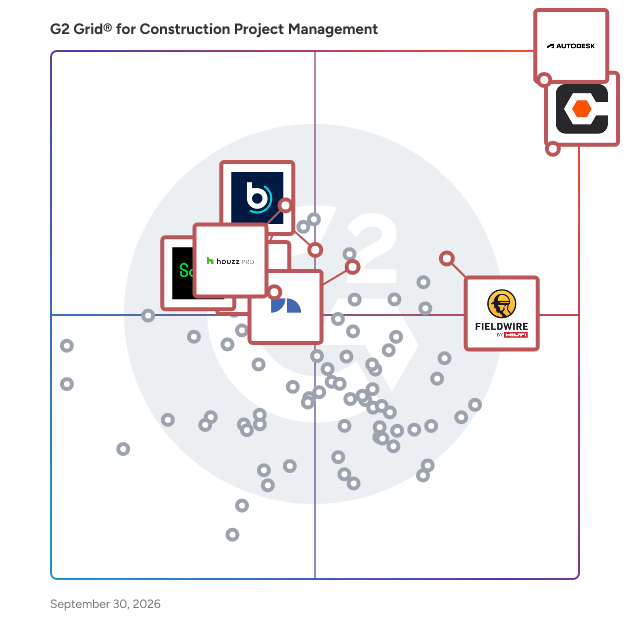
## G2 Grid® for Construction Project Management Software
![G2 Grid® for Construction Project Management Software plotting products by satisfaction and market presence](https://www.g2.com/categories/construction-project-management/grids.png?focus%5B%5D=9508&focus%5B%5D=34336&focus%5B%5D=15364&focus%5B%5D=9412&focus%5B%5D=1787&focus%5B%5D=123424&focus%5B%5D=1045&focus%5B%5D=9237)
Highlighted products: Procore, Autodesk Forma (formerly Autodesk Construction Cloud), Fieldwire by Hilti, Buildertrend, JobNimbus, Houzz Pro, Oracle Primavera, and Sage Construction Management (formerly Corecon).
Underlying data: [Grid® JSON](https://www.g2.com/categories/construction-project-management/grids.json?focus%5B%5D=procore&amp;focus%5B%5D=autodesk-forma-formerly-autodesk-construction-cloud&amp;focus%5B%5D=fieldwire-by-hilti&amp;focus%5B%5D=buildertrend&amp;focus%5B%5D=jobnimbus&amp;focus%5B%5D=houzz-pro&amp;focus%5B%5D=oracle-primavera&amp;focus%5B%5D=sage-construction-management-formerly-corecon&amp;segment=small-business)


## How Many Construction Project Management Software Products Does G2 Track?
**Total Products under this Category:** 511

### Category Stats (Jul 2026)
- **Average Rating**: 4.39/5 (↑0.01 vs Jun 2026) The average rating of products in this category, based on all submitted ratings
- **Top Trending Product**: Buildertrend (+1.48%) - Among all products in this category, Buildertrend recorded the largest rating increase compared to last month
*Last updated: July 21, 2026*


## How Does G2 Rank Construction Project Management Software Products?

**Why You Can Trust G2's Software Rankings:**

- 30 Analysts and Data Experts
- 18,400+ Authentic Reviews
- 511+ Products
- Unbiased Rankings

G2's software rankings are built on verified user reviews, rigorous moderation, and a consistent research methodology maintained by a team of analysts and data experts. Each product is measured using the same transparent criteria, with no paid placement or vendor influence. While reviews reflect real user experiences, which can be subjective, they offer valuable insight into how software performs in the hands of professionals. Together, these inputs power the G2 Score, a standardized way to compare tools within every category.


## Which Construction Project Management Software Is Best for Your Use Case?

- **Best for Small Businesses:** [Procore](https://www.g2.com/products/procore/reviews)
- **Best for Mid-Market:** [Autodesk Forma (formerly Autodesk Construction Cloud)](https://www.g2.com/products/autodesk-forma-formerly-autodesk-construction-cloud/reviews)
- **Best for Enterprise:** [Autodesk Forma (formerly Autodesk Construction Cloud)](https://www.g2.com/products/autodesk-forma-formerly-autodesk-construction-cloud/reviews)
- **Highest User Satisfaction:** [Procore](https://www.g2.com/products/procore/reviews)
- **Best Free Software:** [Autodesk Forma (formerly Autodesk Construction Cloud)](https://www.g2.com/products/autodesk-forma-formerly-autodesk-construction-cloud/reviews)


---

**Sponsored**

### InEight

InEight offers integrated project controls software built for capital construction. The modular platform is integrated to support flexible implementation and is architected for scalability. Purpose-built applications manage all project phases, from accurate pre-planning to predictable execution and completion. By connecting cost, schedule, contracts, and project information in one platform, teams gain real-time visibility and advanced analytics to make smarter decisions. Trusted by 850+ companies and used to manage over $1 trillion in projects worldwide, InEight supports industries including infrastructure, transportation, mining, water, power and renewables, nuclear, oil, gas, and chemical. With InEight, teams can improve project delivery, modernize operations, standardize best practices, manage budgets and forecasts, control scope changes, enhance collaboration, and gain the clarity to keep even the most complex capital projects on track.


[Visit website](https://www.g2.com/external_clickthroughs/record?secure%5Bad_program%5D=ppc&amp;secure%5Bad_slot%5D=category_product_list&amp;secure%5Bcategory_id%5D=2355&amp;secure%5Bchosen_at%5D=2026-07-22T00%3A08%3A07Z&amp;secure%5Bdisplayable_resource_id%5D=2355&amp;secure%5Bdisplayable_resource_type%5D=Category&amp;secure%5Bmedium%5D=sponsored&amp;secure%5Bplacement_reason%5D=page_category&amp;secure%5Bplacement_resource_ids%5D%5B%5D=2355&amp;secure%5Bprioritized%5D=false&amp;secure%5Bproduct_id%5D=12967&amp;secure%5Bresource_id%5D=2355&amp;secure%5Bresource_type%5D=Category&amp;secure%5Bsource_type%5D=category_page&amp;secure%5Bsource_url%5D=https%3A%2F%2Fwww.g2.com%2Fcategories%2Fconstruction-project-management%2Fsmall-business%3Fpage%3D2&amp;secure%5Btoken%5D=7a868e23460d2101ff3c103c458ad09f1a96badc840e8f18abccefae94650d80&amp;secure%5Burl%5D=https%3A%2F%2Fineight.com%2Frequest-a-demo-g2%2F%3Futm_source%3DG2%26utm_medium%3DReview_Sites%26utm_campaign%3D2601-GL-RS-G2-CPC-RAD-GN&amp;secure%5Burl_type%5D=custom_url)

---

## What Are the Top-Rated Construction Project Management Software Products in 2026?
### 1. [Procore](https://www.g2.com/products/procore/reviews)
Procore construction software manages your construction projects, resources and financials from planning to closeout. The platform connects every project contributor to solutions built specifically for the industry for the owner, the general contractor and the specialty contractor. The ability to communicate across teams makes it easier to work together by establishing a single source of truth. This is how Procore gives your team easy access to everything they need to know to get the job done.


**Average Rating:** 4.6/5.0
**Total Reviews:** 4,162
**How Do G2 Users Rate Procore?**

- **Has the product been a good partner in doing business?:** 8.9/10 (Category avg: 8.7/10)
- **Construction Workforce Management Tool Integration:** 8.1/10 (Category avg: 8.1/10)
- **Workforce Scheduling:** 7.9/10 (Category avg: 7.7/10)
- **Information Management:** 9.0/10 (Category avg: 8.8/10)

**Who Is the Company Behind Procore?**

- **Seller:** [Procore Technologies](https://www.g2.com/sellers/procore-technologies)
- **Company Website:** https://www.procore.com
- **Year Founded:** 2003
- **HQ Location:** Carpinteria, CA
- **Twitter:** @procoretech (16,491 Twitter followers)
- **LinkedIn® Page:** https://www.linkedin.com/company/1912597/ (4,788 employees on LinkedIn®)

**Who Uses This Product?**
- **Who Uses This:** Project Manager, Project Engineer
- **Top Industries:** Construction, Architecture &amp; Planning
- **Company Size:** 49% Mid-Market, 39% Small-Business


#### What Are Procore's Pros and Cons?

**Pros:**

- Ease of Use (670 reviews)
- Project Management (355 reviews)
- Centralization (343 reviews)
- Intuitive (292 reviews)
- Organization (250 reviews)

**Cons:**

- Missing Features (231 reviews)
- Learning Curve (156 reviews)
- Difficult Learning (148 reviews)
- Improvement Needed (144 reviews)
- Complexity (119 reviews)


### What Do G2 Reviewers Say About Procore?
*AI-generated summary from verified user reviews*

**Pros:**

- Users value the **ease of use** in Procore, simplifying complex tasks and enhancing overall efficiency on construction sites.
- Users find Procore to be an excellent tool for **organized project management** , keeping teams in sync and efficient.
- Users value the **centralization of project data** in Procore, enhancing efficiency and reducing reliance on physical documents.
- Users appreciate the **intuitive design** of Procore, enhancing collaboration and simplifying daily construction management tasks.
- Users appreciate the **effective organization** of Procore, which keeps teams in sync and centralizes project data.

**Cons:**

- Users criticize Procore for its **missing features** , notably limited reporting flexibility and communication issues without internet access.
- Users find the **learning curve steep** , particularly when importing budgets from Excel, which complicates the onboarding process.
- Users find Procore&#39;s learning curve to be **difficult** , often feeling overwhelmed by its complexity and extensive features.
- Users feel that Procore’s **financial tools require improvement** , lacking necessary features and timely updates for efficiency.
- Users find Procore&#39;s interface to be **complex and intimidating** , particularly for new or small contractors trying to adapt.

#### What Are Recent G2 Reviews of Procore?

**"[A Game-Changer for Construction—Organized and Built to Perform](https://www.g2.com/survey_responses/procore-review-13115075)"**

**Rating:** 4.5/5.0 stars
*— Alec H.*

[Read full review](https://www.g2.com/survey_responses/procore-review-13115075)

---

**"[Procore Makes Collaboration and Project Documentation Seamless](https://www.g2.com/survey_responses/procore-review-12975375)"**

**Rating:** 5.0/5.0 stars
*— Maria Silveria S.*

[Read full review](https://www.g2.com/survey_responses/procore-review-12975375)

---


#### What Are G2 Users Discussing About Procore?

- [What makes Procore a leading solution in construction project management software?](https://www.g2.com/discussions/what-makes-procore-a-leading-solution-in-construction-project-management-software) - 3 comments
- [What is Procore used for?](https://www.g2.com/discussions/procore-what-is-procore-used-for) - 1 comment
- [Does procore have estimating software?](https://www.g2.com/discussions/does-procore-have-estimating-software) - 2 comments
- [What does procore software cost?](https://www.g2.com/discussions/what-does-procore-software-cost) - 2 comments
- [What is procore software?](https://www.g2.com/discussions/what-is-procore-software) - 2 comments

### 2. [Autodesk Forma (formerly Autodesk Construction Cloud)](https://www.g2.com/products/autodesk-forma-formerly-autodesk-construction-cloud/reviews)
Autodesk Forma (formerly Autodesk Construction Cloud) connects workflows, teams and data at every stage of construction to reduce risk, maximize efficiency, and increase profits. Autodesk Build is part of Autodesk Forma (formerly Autodesk Construction Cloud)&#39;s newest set of products that further connect data, workflows, and teams throughout the entire building lifecycle. Build delivers a broad, deep, and connected set of field execution and project management tools for builders in a single software platform that is easy to deploy, adopt and use. Autodesk Build delivers the unification of best-in-class technology from PlanGrid and BIM 360, along with new functionality, to connect construction data and workflows across the headquarters, office, and jobsite. It offers tools for project management, quality, safety, cost, document management and project closeout workflows in a single application that is purpose-built for what you do and where you are working. -Supports integrated &amp; digitized processes for the build phase of a project in a platform that is easy to deploy, adopt and use, while ensuring information sharing and workflows are tightly controlled and highly-configurable. -Standardized and centralized data collection from design through operations enables data-driven decision making, and predictive analytics provide visibility into high-risk issues that can impact project cost, schedule, quality, and safety. -Cloud-based document management provides a single source of truth for all project documentation for the owner, GCs and subs. Autodesk Takeoff empowers estimators to create fast, accurate takeoffs in a cloud-based solution that combines 2D and 3D workflows. Autodesk Takeoff is part of Autodesk Forma (formerly Autodesk Construction Cloud)&#39;s newest set of products that further connect data, workflows, and teams throughout the entire building lifecycle. Autodesk Takeoff allows estimators to perform more accurate 2D takeoffs and generate automated quantities from 3D models in a single online solution. Preconstruction teams are empowered to win more work with integrated takeoffs and quantities that help produce quality estimates for faster, more accurate bidding. -Manage sheets and models in one data environment with Autodesk Docs -Easily capture project scope with linear, count and area takeoff -Generate multiple quantities and use custom formulas -Get instant access to quantities from models for automated 3D takeoffs -Access aggregated quantities from drawings and models Autodesk BIM Collaborate is part of Autodesk Forma (formerly Autodesk Construction Cloud)&#39;s newest set of products that further connect data, workflows, and teams throughout the entire building lifecycle. BIM Collaborate empowers project teams to align and execute on design intent and constructability by managing the entire design collaboration and coordination workflow. Autodesk BIM Collaborate empowers design and construction teams to align and execute on design intent and constructability in a single online solution. By allowing teams to manage the entire design collaboration and coordination process in a single common data environment, BIM Collaborate reduces rework and improves overall design quality. -No limits on projects or file storage -Subscribe once and use on any project you are working on -Flexible subscription offerings for users, projects and businesses -Easily add subscribers and models as your business grows -Keep the same central administration and user login when adding new products


**Average Rating:** 4.4/5.0
**Total Reviews:** 5,200
**How Do G2 Users Rate Autodesk Forma (formerly Autodesk Construction Cloud)?**

- **Has the product been a good partner in doing business?:** 8.3/10 (Category avg: 8.7/10)
- **Construction Workforce Management Tool Integration:** 7.2/10 (Category avg: 8.1/10)
- **Workforce Scheduling:** 6.7/10 (Category avg: 7.7/10)
- **Information Management:** 8.6/10 (Category avg: 8.8/10)

**Who Is the Company Behind Autodesk Forma (formerly Autodesk Construction Cloud)?**

- **Seller:** [Autodesk](https://www.g2.com/sellers/autodesk)
- **Company Website:** https://www.autodesk.com
- **Year Founded:** 1982
- **HQ Location:** San Francisco
- **Twitter:** @autodesk (273,215 Twitter followers)
- **LinkedIn® Page:** https://www.linkedin.com/company/autodesk/ (15,352 employees on LinkedIn®)

**Who Uses This Product?**
- **Who Uses This:** BIM Manager, Project Manager
- **Top Industries:** Construction, Architecture &amp; Planning
- **Company Size:** 45% Mid-Market, 31% Enterprise


#### What Are Autodesk Forma (formerly Autodesk Construction Cloud)'s Pros and Cons?

**Pros:**

- Ease of Use (556 reviews)
- Collaboration (493 reviews)
- Team Collaboration (429 reviews)
- Sharing (345 reviews)
- Document Management (335 reviews)

**Cons:**

- Missing Features (299 reviews)
- Limitations (226 reviews)
- Access Limitations (183 reviews)
- Improvement Needed (176 reviews)
- Learning Curve (169 reviews)


### What Do G2 Reviewers Say About Autodesk Forma (formerly Autodesk Construction Cloud)?
*AI-generated summary from verified user reviews*

**Pros:**

- Users value the **ease of access** to files and collaboration, enhancing coordination and understanding among teams.
- Users value the **effective collaboration** features of Autodesk Forma, enhancing coordination among team members and stakeholders.
- Users appreciate the **real-time collaboration** features of Autodesk Forma, enhancing coordination among team members and stakeholders.
- Users value the **seamless collaboration** in Autodesk Forma, enhancing teamwork with real-time data and connectivity.
- Users value the **accessible large CAD file capabilities** of Autodesk Forma, ensuring seamless project management from anywhere.

**Cons:**

- Users express frustration over **missing features** like limited access to iProperties, and a lack of undo functionality.
- Users face **limitations in collaboration** and repetitive tasks, hindering efficiency and user experience in Autodesk Forma.
- Users face **access limitations** with no admin tools for user management or merging Hubs in Autodesk Forma.
- Users feel that Autodesk Forma requires **significant improvements** in file management and data extraction capabilities.
- Users find the **steep learning curve** of Autodesk Forma challenging, especially for smaller teams and simpler projects.

#### What Are Recent G2 Reviews of Autodesk Forma (formerly Autodesk Construction Cloud)?

**"[Forma empowers Site Planning with Global 3D Modeling and simulation .](https://www.g2.com/survey_responses/autodesk-forma-formerly-autodesk-construction-cloud-review-13113249)"**

**Rating:** 5.0/5.0 stars
*— Katelyn H.*

[Read full review](https://www.g2.com/survey_responses/autodesk-forma-formerly-autodesk-construction-cloud-review-13113249)

---

**"[A Connected Platform That Improves Construction Project Collaboration and Control](https://www.g2.com/survey_responses/autodesk-forma-formerly-autodesk-construction-cloud-review-12844228)"**

**Rating:** 5.0/5.0 stars
*— G I.*

[Read full review](https://www.g2.com/survey_responses/autodesk-forma-formerly-autodesk-construction-cloud-review-12844228)

---


#### What Are G2 Users Discussing About Autodesk Forma (formerly Autodesk Construction Cloud)?

- [How is Autodesk Construction Cloud facilitating collaboration and efficiency in the construction industry?](https://www.g2.com/discussions/how-is-autodesk-construction-cloud-facilitating-collaboration-and-efficiency-in-the-construction-industry) - 3 comments, 1 upvote
- [What is Autodesk Construction Cloud used for?](https://www.g2.com/discussions/what-is-autodesk-construction-cloud-used-for) - 2 comments, 1 upvote
- [What is Autodesk 360 used for?](https://www.g2.com/discussions/what-is-autodesk-360-used-for) - 1 comment
- [What does Autodesk BIM 360 do?](https://www.g2.com/discussions/what-does-autodesk-bim-360-do) - 2 comments, 1 upvote
- [Does BIM 360 work with AutoCAD?](https://www.g2.com/discussions/does-bim-360-work-with-autocad) - 5 comments, 1 upvote

### 3. [Fieldwire by Hilti](https://www.g2.com/products/fieldwire-by-hilti/reviews)
The field-first construction platform for less busywork and more building. Trusted on 4M+ projects worldwide, Fieldwire by Hilti connects the field and office in one simple, powerful platform so teams can move faster, stay aligned, and navigate projects with confidence from start to finish. Construction demands clear information, reliable coordination, and tools that perform where the work happens. Fieldwire brings plans, tasks, and updates into one transparent source of truth, giving everyone – from CEO to installer – access to the information they need, whether in the office or on the jobsite. Built for contractors across every trade, Fieldwire keeps teams aligned with up-to-date information and no surprises. Designed for easy adoption in the field, teams gain real-time visibility into progress, clear ownership of work, and the context to make confident decisions. Automated workflows and streamlined reporting reduce manual work, improve accountability, and help projects stay on schedule and on budget. As part of the Hilti Group, Fieldwire combines deep construction expertise with modern digital innovation to deliver better outcomes on every job. Learn more at Fieldwire.com.


**Average Rating:** 4.5/5.0
**Total Reviews:** 576
**How Do G2 Users Rate Fieldwire by Hilti?**

- **Has the product been a good partner in doing business?:** 8.9/10 (Category avg: 8.7/10)
- **Construction Workforce Management Tool Integration:** 6.9/10 (Category avg: 8.1/10)
- **Workforce Scheduling:** 6.9/10 (Category avg: 7.7/10)
- **Information Management:** 8.4/10 (Category avg: 8.8/10)

**Who Is the Company Behind Fieldwire by Hilti?**

- **Seller:** [Fieldwire](https://www.g2.com/sellers/fieldwire)
- **Company Website:** https://www.fieldwire.com
- **Year Founded:** 2013
- **HQ Location:** San Francisco, CA
- **LinkedIn® Page:** https://www.linkedin.com/company/3078180/ (353 employees on LinkedIn®)

**Who Uses This Product?**
- **Who Uses This:** Project Manager, Project Engineer
- **Top Industries:** Construction, Architecture &amp; Planning
- **Company Size:** 56% Small-Business, 32% Mid-Market


#### What Are Fieldwire by Hilti's Pros and Cons?

**Pros:**

- Ease of Use (92 reviews)
- Project Management (38 reviews)
- Team Collaboration (34 reviews)
- Easy Access (33 reviews)
- Intuitive (30 reviews)

**Cons:**

- Limited Customization (18 reviews)
- Limited Functionality (16 reviews)
- Slow Performance (14 reviews)
- Missing Features (12 reviews)
- Update Issues (11 reviews)


### What Do G2 Reviewers Say About Fieldwire by Hilti?
*AI-generated summary from verified user reviews*

**Pros:**

- Users love the **ease of use** of Fieldwire, appreciating its user-friendly interface and accessibility across teams.
- Users highlight the **short learning curve** of Fieldwire, enabling quick adoption and efficient project management.
- Users value the **efficient team collaboration** features of Fieldwire, enabling seamless communication and updates across all devices.
- Users appreciate the **easy access** to files and project management features, enhancing collaboration and workflow efficiency.
- Users find Fieldwire to be **intuitive and easy to use** , enhancing productivity and organization on the job site.

**Cons:**

- Users find **limited customization** frustrating, as it restricts functionality for specific business needs and workflows.
- Users find the **limited functionality** of Fieldwire particularly frustrating, affecting project visibility and drawing accuracy.
- Users experience **slow performance** of Fieldwire, especially on mobile and desktop, hindering efficient project management.
- Users find the **missing features** frustrating, particularly with checklists, uploads, and report customization limitations.
- Users experience **update issues** with limits on outside access and concerns over excessive auto emails from Fieldwire.

#### What Are Recent G2 Reviews of Fieldwire by Hilti?

**"[Fieldwire’s Real-Time Mobile Updates Keep Everyone Aligned](https://www.g2.com/survey_responses/fieldwire-by-hilti-review-13055946)"**

**Rating:** 5.0/5.0 stars
*— Russell P.*

[Read full review](https://www.g2.com/survey_responses/fieldwire-by-hilti-review-13055946)

---

**"[Essential Field Management for Commercial Construction](https://www.g2.com/survey_responses/fieldwire-by-hilti-review-13051751)"**

**Rating:** 5.0/5.0 stars
*— Scott  P.*

[Read full review](https://www.g2.com/survey_responses/fieldwire-by-hilti-review-13051751)

---


#### What Are G2 Users Discussing About Fieldwire by Hilti?

- [What is Fieldwire used for?](https://www.g2.com/discussions/what-is-fieldwire-used-for)
- [What does Fieldwire do?](https://www.g2.com/discussions/what-does-fieldwire-do)
- [How do you use a field wire?](https://www.g2.com/discussions/how-do-you-use-a-field-wire)
- [How much does Fieldwire cost?](https://www.g2.com/discussions/how-much-does-fieldwire-cost)
- [What is Fieldwire app?](https://www.g2.com/discussions/what-is-fieldwire-app) - 2 comments

### 4. [Buildertrend](https://www.g2.com/products/buildertrend/reviews)
Buildertrend is the industry’s leading all-in-one construction management platform built for home builders, remodelers, specialty trades and commercial contractors managing projects with the complexity, collaboration and client involvement of a residential build. Trusted by more than 20,000 contractors – and used on over half of all new home builds in the U.S. – it brings your projects, people, clients and financials into one unified system, so you can operate with clarity, confidence and control. Unlike disconnected tools or surface-level integrations, Buildertrend connects every part of your business – from scheduling and communication to job costing and client experience – creating a single source of truth and a system built to reflect how real construction businesses actually operate and grow. With Buildertrend, you can: • Run your entire business on one truly unified platform • Scale with confidence – without outgrowing your systems • Gain real-time financial visibility with built-in job costing and forecasting • Streamline operations and eliminate gaps between teams and workflows • Put your data to work with AI built into your workflows, automating the busywork and surfacing insights you can actually act on But Buildertrend goes beyond software. It’s a long-term partner in your success, equipping you with: • A proven platform trusted by the industry’s top builders • Buildertrend Community – an online hub connecting you with peers and real-world best practices • Exclusive virtual and in-person opportunities to learn, connect and grow Buildertrend isn’t a tool you piece together or outgrow. It’s the system builders move to when they’re ready to run a more connected, more disciplined and more profitable business – where every part of the operation works together, and every decision is backed by real data.


**Average Rating:** 4.3/5.0
**Total Reviews:** 227
**How Do G2 Users Rate Buildertrend?**

- **Has the product been a good partner in doing business?:** 8.5/10 (Category avg: 8.7/10)
- **Construction Workforce Management Tool Integration:** 8.2/10 (Category avg: 8.1/10)
- **Workforce Scheduling:** 8.6/10 (Category avg: 7.7/10)
- **Information Management:** 9.1/10 (Category avg: 8.8/10)

**Who Is the Company Behind Buildertrend?**

- **Seller:** [Buildertrend Solutions](https://www.g2.com/sellers/buildertrend-solutions)
- **Company Website:** https://www.buildertrend.com
- **Year Founded:** 2006
- **HQ Location:** Omaha, NE
- **Twitter:** @Buildertrend (3,903 Twitter followers)
- **LinkedIn® Page:** https://www.linkedin.com/company/1828205/ (738 employees on LinkedIn®)

**Who Uses This Product?**
- **Who Uses This:** Project Manager, Owner
- **Top Industries:** Construction, Building Materials
- **Company Size:** 87% Small-Business, 11% Mid-Market


#### What Are Buildertrend's Pros and Cons?

**Pros:**

- Ease of Use (10 reviews)
- Document Management (6 reviews)
- Project Management (6 reviews)
- Scheduling (5 reviews)
- Budget Management (4 reviews)

**Cons:**

- Expensive (4 reviews)
- Complexity (3 reviews)
- Learning Curve (2 reviews)
- Update Issues (2 reviews)
- File Organization (1 reviews)


### What Do G2 Reviewers Say About Buildertrend?
*AI-generated summary from verified user reviews*

**Pros:**

- Users find Buildertrend to be **intuitive and user-friendly** , making project management straightforward and efficient for everyone.
- Users value the **effective document management** of Buildertrend, enhancing organization and streamlining project workflows.
- Users value the **effective project management capabilities** of Buildertrend, enhancing communication, scheduling, and budget tracking.
- Users appreciate the **efficient scheduling** features of Buildertrend, which streamline project timelines and enhance communication among trades.
- Users value Buildertrend for its **effective budget management** , enabling precise cost tracking and maintaining project budgets successfully.

**Cons:**

- Users find Buildertrend **expensive** , especially smaller teams, despite its powerful features and industry reputation.
- Users find the **complexity** of Buildertrend challenging, noting a steep learning curve and overwhelming features.
- Users find the **learning curve challenging** , requiring time and effort to fully grasp Buildertrend&#39;s extensive features.
- Users experience **update issues** with Buildertrend, as frequent changes disrupt established workflows and require relearning.
- Users face challenges with **file organization** , as miscategorized photos in the generic category lead to difficulties in locating them.

#### What Are Recent G2 Reviews of Buildertrend?

**"[Scheduling, Notifications, and Document Sharing We Rely On](https://www.g2.com/survey_responses/buildertrend-review-13032648)"**

**Rating:** 4.5/5.0 stars
*— Steve B.*

[Read full review](https://www.g2.com/survey_responses/buildertrend-review-13032648)

---

**"[Buildertrend Daily Logs Keep Site Updates, Photos, and Tasks Effortless](https://www.g2.com/survey_responses/buildertrend-review-13034495)"**

**Rating:** 5.0/5.0 stars
*— Trilby W.*

[Read full review](https://www.g2.com/survey_responses/buildertrend-review-13034495)

---


#### What Are G2 Users Discussing About Buildertrend?

- [What is Buildertrend used for?](https://www.g2.com/discussions/what-is-buildertrend-used-for) - 2 comments
- [Who uses Buildertrend?](https://www.g2.com/discussions/who-uses-buildertrend) - 1 comment
- [Is Buildertrend a CRM?](https://www.g2.com/discussions/is-buildertrend-a-crm)
- [How much does Buildertrend really cost?](https://www.g2.com/discussions/how-much-does-buildertrend-really-cost)
- [What is Buildertrend software?](https://www.g2.com/discussions/what-is-buildertrend-software)

### 5. [JobNimbus](https://www.g2.com/products/jobnimbus/reviews)
JobNimbus is an all-in-one roofing CRM and contractor management software built for roofing, fencing, and exterior contractors who need a system that can grow with their business. It helps contractors get found, manage leads, win jobs, run production, and get paid—on a single, flexible platform designed for how contractors actually work. Unlike generic CRM tools or point solutions that only handle part of the workflow, JobNimbus brings together marketing, estimating, job management, production, communication, reporting, and payments into one connected CRM system. Sales teams, production managers, field crews, and office staff all work from the same source of truth, reducing handoff errors, duplicate entry, and missed steps. JobNimbus is built to adapt as contractor businesses scale. Users can configure workflows, boards, automation, permissions, and visibility by role, allowing owners to maintain control while empowering teams to move quickly. This flexibility eliminates the need to replatform as companies add crews, locations, or service lines. JobNimbus supports the full contractor lifecycle, from the first touch to final payment: 1. Generate leads and manage marketing: Capture and track leads from websites, calls, forms, ads, and referrals. See where leads come from, respond faster with mobile notifications, and improve conversion without manual data entry. 2. Estimate and win jobs: Build professional estimates and proposals with customizable templates, Good / Better / Best pricing, financing options, e-signatures, and proposal tracking. Know when proposals are sent, viewed, and approved so follow-up happens at the right time. 3. Manage jobs and production: Track every job using customizable Boards and Workflows. Keep tasks, documents, photos, notes, and timelines connected so sales, production, and office teams stay aligned. 4. Order materials and coordinate work: Create work orders, manage job details, and connect to supplier integrations with real-time pricing. Reduce ordering errors, improve coordination, and protect margins as volume grows. 5. Communicate and automate: Automate repeatable steps like customer updates, reminders, internal handoffs, and follow-ups so nothing slips through the cracks while teams focus on high-value work. 6. Invoice and get paid: Generate invoices directly from completed work, accept online payments by credit card or ACH, send automated reminders, and improve cash flow without chasing payments. Field execution is a core strength. The mobile app is built for real jobsite conditions, allowing crews to upload photos, complete forms, update job status, communicate, collect signatures, and accept payments from the field. JobNimbus integrates with the tools contractors already rely on, including measurement providers, suppliers, accounting systems, and marketing platforms—reducing tool sprawl while maintaining flexibility. Contractors retain full data ownership and can export their data at any time. With a 4.8★ mobile app rating and live onboarding, training, and human support, JobNimbus is built to be a long-term operating partner—not just another contractor software tool.


**Average Rating:** 4.6/5.0
**Total Reviews:** 117
**How Do G2 Users Rate JobNimbus?**

- **Has the product been a good partner in doing business?:** 8.9/10 (Category avg: 8.7/10)
- **Construction Workforce Management Tool Integration:** 8.6/10 (Category avg: 8.1/10)
- **Workforce Scheduling:** 8.6/10 (Category avg: 7.7/10)
- **Information Management:** 9.7/10 (Category avg: 8.8/10)

**Who Is the Company Behind JobNimbus?**

- **Seller:** [JobNimbus](https://www.g2.com/sellers/jobnimbus)
- **Company Website:** https://www.jobnimbus.com
- **Year Founded:** 2011
- **HQ Location:** Lehi, Utah
- **Twitter:** @JobNimbus (1,868 Twitter followers)
- **LinkedIn® Page:** https://www.linkedin.com/company/2455555/ (295 employees on LinkedIn®)

**Who Uses This Product?**
- **Who Uses This:** Office Manager, Owner
- **Top Industries:** Construction
- **Company Size:** 90% Small-Business, 10% Mid-Market


#### What Are JobNimbus's Pros and Cons?

**Pros:**

- Ease of Use (2 reviews)
- Centralized Management (1 reviews)
- Document Management (1 reviews)
- Easy Access (1 reviews)
- Estimating (1 reviews)

**Cons:**

- Poor Functionality (1 reviews)


### What Do G2 Reviewers Say About JobNimbus?
*AI-generated summary from verified user reviews*

**Pros:**

- Users appreciate the **ease of use** of JobNimbus, noting its convenient features and straightforward setup process.
- Users appreciate the **centralized management** of JobNimbus, enjoying convenient access to all jobs in one platform.
- Users love the **user-friendly document management** in JobNimbus, appreciating its numerous features and efficient payment collection.
- Users value the **easy access** to jobs and simple invoicing with JobNimbus, enhancing their overall convenience.
- Users love the **easy-to-use estimating software** that simplifies documentation and payment collection for better efficiency.

**Cons:**

- Users find **poor functionality** in some settings, which detracts from their overall experience with JobNimbus.

#### What Are Recent G2 Reviews of JobNimbus?

**"[The Benchmark CRM for Roofing and Exterior Remodeling](https://www.g2.com/survey_responses/jobnimbus-review-12933596)"**

**Rating:** 5.0/5.0 stars
*— Brian V.*

[Read full review](https://www.g2.com/survey_responses/jobnimbus-review-12933596)

---

**"[Affordable CRM with Strong Integrations and Time-Saving Automations](https://www.g2.com/survey_responses/jobnimbus-review-12935280)"**

**Rating:** 4.5/5.0 stars
*— Tara S.*

[Read full review](https://www.g2.com/survey_responses/jobnimbus-review-12935280)

---


#### What Are G2 Users Discussing About JobNimbus?

- [What does Jobnimbus do?](https://www.g2.com/discussions/what-does-jobnimbus-do)
- [Does JobNimbus integrate with xactimate?](https://www.g2.com/discussions/does-jobnimbus-integrate-with-xactimate) - 1 comment
- [Is JobNimbus free?](https://www.g2.com/discussions/is-jobnimbus-free) - 1 comment
- [Is JobNimbus a CRM?](https://www.g2.com/discussions/is-jobnimbus-a-crm) - 3 comments

### 6. [Houzz Pro](https://www.g2.com/products/houzz-pro/reviews)
Houzz Pro, the leading platform for construction and design, empowers industry professionals and homeowners with the tools they need to make every project a success. Used by more than 3 million construction and design industry professionals and over 70 million homeowners and home design enthusiasts around the world, our AI-powered project management and design software helps pros win projects, collaborate with clients and teams, and run their businesses efficiently and profitably. It’s an all-in-one solution that spans the full customer lifecycle, CRM and Email Marketing tools, Estimates &amp; Proposals, 3D Floor Plans, Schedule, Selections, financial tools, Invoicing &amp; Payments, QuickBooks integration, and a client portal.


**Average Rating:** 4.0/5.0
**Total Reviews:** 47
**How Do G2 Users Rate Houzz Pro?**

- **Has the product been a good partner in doing business?:** 8.5/10 (Category avg: 8.7/10)
- **Construction Workforce Management Tool Integration:** 5.7/10 (Category avg: 8.1/10)
- **Workforce Scheduling:** 6.2/10 (Category avg: 7.7/10)
- **Information Management:** 7.7/10 (Category avg: 8.8/10)

**Who Is the Company Behind Houzz Pro?**

- **Seller:** [Houzz](https://www.g2.com/sellers/houzz)
- **Company Website:** https://www.houzz.com/
- **Year Founded:** 2009
- **HQ Location:** Palo Alto, CA
- **Twitter:** @houzz (293,583 Twitter followers)
- **LinkedIn® Page:** https://www.linkedin.com/company/houzz/ (1,387 employees on LinkedIn®)

**Who Uses This Product?**
- **Top Industries:** Construction, Design
- **Company Size:** 89% Small-Business, 2% Mid-Market


#### What Are Houzz Pro's Pros and Cons?

**Pros:**

- Ease of Use (11 reviews)
- Features (9 reviews)
- Integrations (5 reviews)
- Project Management (5 reviews)
- Business Integration (4 reviews)

**Cons:**

- Expensive (3 reviews)
- Improvement Needed (3 reviews)
- Integration Issues (3 reviews)
- Pricing Issues (3 reviews)
- Billing Issues (2 reviews)


### What Do G2 Reviewers Say About Houzz Pro?
*AI-generated summary from verified user reviews*

**Pros:**

- Users highlight the **ease of use** of Houzz Pro, streamlining various aspects of construction management effortlessly.
- Users value the **integrated functionality** of Houzz Pro, enhancing efficiency and streamlining construction project management.
- Users value the **integrated features** of Houzz Pro for streamlining project management and enhancing client communication.
- Users value the **unified project management tools** of Houzz Pro, enhancing efficiency and organization in construction projects.
- Users value the **seamless business integration** of Houzz Pro, enhancing efficiency and streamlining project management activities.

**Cons:**

- Users find the **subscription cost too high** , alongside delays and extra client fees that hinder overall satisfaction.
- Users express frustration over the **lack of filtering functions** , cumbersome onboarding, and limited refund options in Houzz Pro.
- Users face **integration issues** with QuickBooks and device limitations, hindering their overall usability and efficiency.
- Users express concern over **high pricing and fees** associated with Houzz Pro, which affects overall satisfaction.
- Users report **billing issues** with Houzz Pro, including slow processing, high fees, and inconvenient refund procedures.

#### What Are Recent G2 Reviews of Houzz Pro?

**"[Professional Invoices and Strong Purchasing &amp; Procurement Tracking](https://www.g2.com/survey_responses/houzz-pro-review-13088207)"**

**Rating:** 4.0/5.0 stars
*— Bryan L.*

[Read full review](https://www.g2.com/survey_responses/houzz-pro-review-13088207)

---

**"[Houzz Pro Keeps Our Projects Organized and Professional—Great Value and Easy for Clients](https://www.g2.com/survey_responses/houzz-pro-review-12981604)"**

**Rating:** 5.0/5.0 stars
*— Tiffany C.*

[Read full review](https://www.g2.com/survey_responses/houzz-pro-review-12981604)

---


#### What Are G2 Users Discussing About Houzz Pro?

- [What is Houzz Pro used for?](https://www.g2.com/discussions/what-is-houzz-pro-used-for)

### 7. [Oracle Primavera](https://www.g2.com/products/oracle-primavera/reviews)
For more than 30 years, successful projects around the world have relied on Oracle Construction and Engineering&#39;s Primavera solutions to plan, build, and operate critical assets. It is the only solution that integrates project and portfolio planning and delivery teams for planning, resourcing, risk mitigation, scheduling, and program management. Manage projects of any size. Robust and easy-to-use. Key Benefits - Cloud-based, delivering fast time to value - One platform for planning, prioritizing, executing, and monitoring projects and programs - Optimization and oversight of capital spend to maximize return and align with strategies - Enhanced risk mitigation; better visibility of project and portfolio health - Comprehensive, integrated planning - critical path method (CPM) and Lean scheduling, plus upstream portfolio planning and downstream risk mitigation - Total resource management – maintain optimal staffing levels to improve delivery efficiency - Collaboration and control across teams – drive efficiency and quality, reduce waste - Connect teams with access from any device, create and update activities and tasks, and view portfolios and files with offline support - Risk mitigation – avoid delays and cost overruns


**Average Rating:** 4.4/5.0
**Total Reviews:** 344
**How Do G2 Users Rate Oracle Primavera?**

- **Has the product been a good partner in doing business?:** 8.0/10 (Category avg: 8.7/10)
- **Construction Workforce Management Tool Integration:** 8.1/10 (Category avg: 8.1/10)
- **Workforce Scheduling:** 8.6/10 (Category avg: 7.7/10)
- **Information Management:** 8.2/10 (Category avg: 8.8/10)

**Who Is the Company Behind Oracle Primavera?**

- **Seller:** [Oracle](https://www.g2.com/sellers/oracle)
- **Year Founded:** 1977
- **HQ Location:** Austin, TX
- **Twitter:** @Oracle (827,997 Twitter followers)
- **LinkedIn® Page:** https://www.linkedin.com/company/1028/ (208,078 employees on LinkedIn®)
- **Ownership:** NYSE:ORCL

**Who Uses This Product?**
- **Who Uses This:** Planning Engineer, Project Manager
- **Top Industries:** Construction, Oil &amp; Energy
- **Company Size:** 38% Mid-Market, 38% Enterprise


#### What Are Oracle Primavera's Pros and Cons?

**Pros:**

- Project Management (2 reviews)
- Centralization (1 reviews)
- Comprehensive Coverage (1 reviews)
- Comprehensive Features (1 reviews)
- Organization (1 reviews)

**Cons:**

- Complex Setup (1 reviews)
- Cost Issues (1 reviews)
- Expensive (1 reviews)
- Limited Features (1 reviews)
- Limited Functionality (1 reviews)


### What Do G2 Reviewers Say About Oracle Primavera?
*AI-generated summary from verified user reviews*

**Pros:**

- Users find Oracle Primavera&#39;s **project management capabilities** crucial for organizing and tracking large, high-stakes projects effectively.
- Users value the **centralization** of Oracle Primavera, effectively managing large, high-stakes projects with ease and organization.
- Users appreciate the **comprehensive coverage** of Oracle Primavera, facilitating effective project management from start to finish.
- Users value the **comprehensive features** of Oracle Primavera that streamline project planning, scheduling, execution, and monitoring.
- Users find Oracle Primavera essential for **keeping projects organized** and on track, especially in high-stakes situations.

**Cons:**

- Users face a **complex setup** with a steep learning curve and an outdated interface, hindering user experience.
- Users find Oracle Primavera **costly** , with extensive features that may overwhelm smaller or simpler projects.
- Users find Oracle Primavera **expensive** and believe its features may overwhelm smaller projects or simpler needs.
- Users find the **limited features** of Oracle Primavera insufficient for straightforward project needs.
- Users find the **limited functionality** of Oracle Primavera excessive for small or straightforward projects, making it costly.

#### What Are Recent G2 Reviews of Oracle Primavera?

**"[Powerful Project Planning and Scheduling for Large-Scale Projects](https://www.g2.com/survey_responses/oracle-primavera-review-13109116)"**

**Rating:** 4.0/5.0 stars
*— Verified User in Utilities*

[Read full review](https://www.g2.com/survey_responses/oracle-primavera-review-13109116)

---

**"[Promising Tool with Scope for Enhancements](https://www.g2.com/survey_responses/oracle-primavera-review-12906556)"**

**Rating:** 4.5/5.0 stars
*— Valli K.*

[Read full review](https://www.g2.com/survey_responses/oracle-primavera-review-12906556)

---


#### What Are G2 Users Discussing About Oracle Primavera?

- [What is Oracle Primavera used for?](https://www.g2.com/discussions/oracle-primavera-what-is-oracle-primavera-used-for) - 1 comment
- [Is Primavera better than Microsoft Project?](https://www.g2.com/discussions/is-primavera-better-than-microsoft-project)
- [What are the features and applications of Primavera?](https://www.g2.com/discussions/what-are-the-features-and-applications-of-primavera) - 1 comment
- [What is Primavera p6 software used for?](https://www.g2.com/discussions/what-is-primavera-p6-software-used-for) - 1 comment
- [What is Oracle Primavera used for?](https://www.g2.com/discussions/what-is-oracle-primavera-used-for) - 1 comment

### 8. [Sage Construction Management (formerly Corecon)](https://www.g2.com/products/sage-construction-management-formerly-corecon/reviews)
Sage Construction Management (Formerly Corecon)’s cloud based software suite helps engineering and construction firms manage their projects more efficiently. The software helps people with different roles and responsibilities work together regardless if they are at the office or jobsite. The software suite includes modules for estimating, vendor bid management, contract administration, procurement, time tracking, correspondence, documentation, quality control, safety and scheduling. Being cloud based, contracting firms will have the ability to access their project information anytime anywhere and make quick and informed decisions. With its built-in wizards that automate complex tasks or comprehensive executive dashboards to analyze project budgets, Sage Construction Management (Formerly Corecon) provides cutting-edge technology to maximize the profitability of one’s projects and make all departments work more efficiently


**Average Rating:** 3.9/5.0
**Total Reviews:** 42
**How Do G2 Users Rate Sage Construction Management (formerly Corecon)?**

- **Has the product been a good partner in doing business?:** 8.5/10 (Category avg: 8.7/10)
- **Construction Workforce Management Tool Integration:** 10.0/10 (Category avg: 8.1/10)
- **Workforce Scheduling:** 7.3/10 (Category avg: 7.7/10)
- **Information Management:** 8.1/10 (Category avg: 8.8/10)

**Who Is the Company Behind Sage Construction Management (formerly Corecon)?**

- **Seller:** [Sage Software](https://www.g2.com/sellers/sage-software-d61a780c-4fb3-4781-9519-baa772f5ea91)
- **Year Founded:** 1981
- **HQ Location:** Newcastle
- **LinkedIn® Page:** https://www.linkedin.com/company/2802/ (15,579 employees on LinkedIn®)
- **Ownership:** SGE.L
- **Phone:** +1 (866) 996-7243

**Who Uses This Product?**
- **Who Uses This:** Project Manager
- **Top Industries:** Construction
- **Company Size:** 79% Small-Business, 19% Mid-Market


#### What Are Sage Construction Management (formerly Corecon)'s Pros and Cons?

**Pros:**

- Ease of Use (2 reviews)
- Construction Industry (1 reviews)
- Construction Management (1 reviews)
- Productivity (1 reviews)
- Setup Ease (1 reviews)

**Cons:**

- Access Limitations (1 reviews)
- Compatibility Issues (1 reviews)
- Complexity (1 reviews)
- Lack of Customization (1 reviews)
- Limitations (1 reviews)


### What Do G2 Reviewers Say About Sage Construction Management (formerly Corecon)?
*AI-generated summary from verified user reviews*

**Pros:**

- Users find Sage Construction Management&#39;s **ease of use** beneficial for creating POs and tracking resources efficiently.
- Users highlight the **potential for improvement** in Sage Construction Management, recognizing its capabilities if functionalities are fixed.
- Users highlight the **potential for greatness** in Sage Construction Management but face significant usability challenges.
- Users find Sage Construction Management highly **productive** for making POs and efficiently tracking man hours.
- Users find the **setup ease** of Sage Construction Management intuitive, facilitating quicker project startup and team onboarding.

**Cons:**

- Users find the **access limitations** of Sage Construction Management restrictive when trying to extend functionalities beyond POs.
- Users face significant **compatibility issues** with job synchronization, causing frustration and hindering effective use of Sage Construction Management.
- Users find the **complexity** of Sage Construction Management limits flexibility beyond basic purchase orders.
- Users find the **lack of customization** limiting when trying to extend functionalities beyond purchase orders.
- Users feel Sage Construction Management has **limited flexibility** , especially when trying to extend beyond purchase orders.

#### What Are Recent G2 Reviews of Sage Construction Management (formerly Corecon)?

**"[Great experience and I am able to get the help needed for any questions I have.](https://www.g2.com/survey_responses/sage-construction-management-formerly-corecon-review-11385961)"**

**Rating:** 5.0/5.0 stars
*— Tammy T.*

[Read full review](https://www.g2.com/survey_responses/sage-construction-management-formerly-corecon-review-11385961)

---

**"[Great for POs and Tracking, But Limited Beyond That](https://www.g2.com/survey_responses/sage-construction-management-formerly-corecon-review-11844652)"**

**Rating:** 4.5/5.0 stars
*— Srinidhi S.*

[Read full review](https://www.g2.com/survey_responses/sage-construction-management-formerly-corecon-review-11844652)

---


### 9. [Contractor Foreman](https://www.g2.com/products/contractor-foreman/reviews)
NOW: Starting @ $49/m for the WHOLE company, Contractor Foreman is the most affordable all-in-one solution for managing construction projects. Free Trial + 100 day Guarantee Quickly and easily create Estimates, Schedules, Daily Logs, Time Cards (w/GPS), Online Signatures, Invoices, Submittals, Change Orders, PO&#39;s, Bid Management, Client Portal, safety topics and more. Integrates with QuickBooks, Zapier, and more. There are NO PER-PROJECT FEES. Save thousands compared to other systems. Use it on the phone, tablet, and computer.


**Average Rating:** 4.5/5.0
**Total Reviews:** 375
**How Do G2 Users Rate Contractor Foreman?**

- **Has the product been a good partner in doing business?:** 9.1/10 (Category avg: 8.7/10)
- **Construction Workforce Management Tool Integration:** 8.2/10 (Category avg: 8.1/10)
- **Workforce Scheduling:** 8.3/10 (Category avg: 7.7/10)
- **Information Management:** 8.7/10 (Category avg: 8.8/10)

**Who Is the Company Behind Contractor Foreman?**

- **Seller:** [Contractor Foreman](https://www.g2.com/sellers/contractor-foreman)
- **Company Website:** https://contractorforeman.com
- **Year Founded:** 2017
- **HQ Location:** North Carolina, USA
- **Twitter:** @contractorapps (32 Twitter followers)
- **LinkedIn® Page:** https://www.linkedin.com/company/contractor-foreman/ (92 employees on LinkedIn®)

**Who Uses This Product?**
- **Who Uses This:** Owner, Project Manager
- **Top Industries:** Construction, Electrical/Electronic Manufacturing
- **Company Size:** 88% Small-Business, 8% Mid-Market


#### What Are Contractor Foreman's Pros and Cons?

**Pros:**

- Ease of Use (61 reviews)
- Project Management (42 reviews)
- Customer Support (40 reviews)
- Features (37 reviews)
- Helpful (29 reviews)

**Cons:**

- Limited Customization (17 reviews)
- Integration Issues (12 reviews)
- Missing Features (12 reviews)
- Update Issues (11 reviews)
- Limited Features (10 reviews)


### What Do G2 Reviewers Say About Contractor Foreman?
*AI-generated summary from verified user reviews*

**Pros:**

- Users commend the **ease of use** of Contractor Foreman, appreciating its straightforward interface and mobile accessibility.
- Users value the **user-friendly project management features** of Contractor Foreman for efficient tracking and organization.
- Users value the **responsive customer support** of Contractor Foreman, enhancing the overall user experience and satisfaction.
- Users value the **extensive features** of Contractor Foreman, noting it meets diverse project needs effectively.
- Users find Contractor Foreman **incredibly helpful** due to its comprehensive support and ease of use, enhancing project management.

**Cons:**

- Users face **limited customization** options in Contractor Foreman, challenging the software&#39;s adoption and integration with unique workflows.
- Users face **integration issues** with Contractor Foreman, experiencing inefficiencies and glitches that disrupt workflow.
- Users find **missing features** in Contractor Foreman, with limited customization and some tasks requiring unnecessary steps.
- Users often face **update issues** , struggling to navigate the app after updates while stability could be prioritized.
- Users find the **limited features** of Contractor Foreman restrict its usability and customization options for their needs.

#### What Are Recent G2 Reviews of Contractor Foreman?

**"[Foreman Software: User-Friendly, Real-Time Project Tracking That Boosts Construction Productivity](https://www.g2.com/survey_responses/contractor-foreman-review-12830601)"**

**Rating:** 5.0/5.0 stars
*— Nandini D.*

[Read full review](https://www.g2.com/survey_responses/contractor-foreman-review-12830601)

---

**"[A powerfull and reliable plataform to manage the projects](https://www.g2.com/survey_responses/contractor-foreman-review-12642847)"**

**Rating:** 5.0/5.0 stars
*— Victoria M.*

[Read full review](https://www.g2.com/survey_responses/contractor-foreman-review-12642847)

---


#### What Are G2 Users Discussing About Contractor Foreman?

- [Does contractor foreman integrate with QuickBooks?](https://www.g2.com/discussions/does-contractor-foreman-integrate-with-quickbooks)
- [What is a contractor software?](https://www.g2.com/discussions/what-is-a-contractor-software) - 2 comments
- [What does a construction Foreman do?](https://www.g2.com/discussions/what-does-a-construction-foreman-do) - 2 comments
- [What is foreman and contractor?](https://www.g2.com/discussions/what-is-foreman-and-contractor)

### 10. [Oracle Aconex](https://www.g2.com/products/oracle-aconex/reviews)
Owners and delivery teams trust Oracle Aconex for visibility, control, reduced risk, and connected teams. Drive efficiency in design and construction coordination, project controls and cost management, document management, and field management. Get fast time to value with construction management software that is easy to use and deploys in days. The Aconex Difference: - A trusted platform and rock-solid audit trail drives adoption, visibility, a single source of truth and minimizes disputes. - Connected processes and data drives performance, insights, continuous learning and control. - Set up flexible processes based on how you work, and change as your processes develop. - Secure and compliant, meeting the highest international security standards. - Unparalleled service and support get your projects off to the best possible start and helps keep them running smoothly. Key Business Benefits of Oracle Aconex include: - Control, insights, effortless handover, and fast ROI - Process management across the entire lifecycle - Connected project team enhances collaboration - Common data environment (CDE) connects all project and model information - Configurable platform - enable specific processes - Single source of truth improves data management, reduces errors - Data-driven intelligence fuels continuous improvement Product Features: - Secure Document Management - Advanced Communications and Forms - Model Coordination in a Common Data Environment - Integrated Cost Management - Quality and Safety Processes - Unparalleled Service and Support “Using the review process, workflows and the online viewer have removed work duplication due to easy collaboration between all parties.” Nisha Khetani, Head of Document Control, Multiplex


**Average Rating:** 4.5/5.0
**Total Reviews:** 198
**How Do G2 Users Rate Oracle Aconex?**

- **Has the product been a good partner in doing business?:** 8.5/10 (Category avg: 8.7/10)
- **Construction Workforce Management Tool Integration:** 8.8/10 (Category avg: 8.1/10)
- **Workforce Scheduling:** 9.2/10 (Category avg: 7.7/10)
- **Information Management:** 9.4/10 (Category avg: 8.8/10)

**Who Is the Company Behind Oracle Aconex?**

- **Seller:** [Oracle](https://www.g2.com/sellers/oracle)
- **Year Founded:** 1977
- **HQ Location:** Austin, TX
- **Twitter:** @Oracle (827,997 Twitter followers)
- **LinkedIn® Page:** https://www.linkedin.com/company/1028/ (208,078 employees on LinkedIn®)
- **Ownership:** NYSE:ORCL

**Who Uses This Product?**
- **Who Uses This:** Document Controller, Senior Document Controller
- **Top Industries:** Construction, Civil Engineering
- **Company Size:** 54% Mid-Market, 30% Enterprise


#### What Are Oracle Aconex's Pros and Cons?


**Cons:**

- File Organization (1 reviews)
- Missing Features (1 reviews)


### What Do G2 Reviewers Say About Oracle Aconex?
*AI-generated summary from verified user reviews*


**Cons:**

- Users find the **missing hierarchy in file organization** problematic, affecting both document and email management.
- Users find the **missing features** concerning, particularly the lack of folder hierarchy and document attributes.

#### What Are Recent G2 Reviews of Oracle Aconex?

**"[Streamlines Project Management and Communication](https://www.g2.com/survey_responses/oracle-aconex-review-12541171)"**

**Rating:** 5.0/5.0 stars
*— Umer I.*

[Read full review](https://www.g2.com/survey_responses/oracle-aconex-review-12541171)

---

**"[Role of Oracle Aconex in project management](https://www.g2.com/survey_responses/oracle-aconex-review-9164527)"**

**Rating:** 4.0/5.0 stars
*— Aaron S.*

[Read full review](https://www.g2.com/survey_responses/oracle-aconex-review-9164527)

---


#### What Are G2 Users Discussing About Oracle Aconex?

- [What is Oracle Aconex used for?](https://www.g2.com/discussions/what-is-oracle-aconex-used-for)
- [Is aconex free?](https://www.g2.com/discussions/is-aconex-free) - 1 comment
- [What is the main purpose of the Aconex Software?](https://www.g2.com/discussions/oracle-aconex-what-is-the-main-purpose-of-the-aconex-software)
- [What is Oracle aconex?](https://www.g2.com/discussions/what-is-oracle-aconex) - 1 comment

### 11. [JobTread](https://www.g2.com/products/jobtread/reviews)
JobTread provides end-to-end construction management software that helps jobs-based businesses manage all of their processes, from pre-construction to project completion. The platform serves as a central location to manage jobs, teams, documents, photos, finances, customers, vendors, sub-contractors, and more. Its budget-first approach creates financial transparency at every stage of a project. Through JobTread, you will have access to an extensive list of Sales and Estimating features ranging from a construction CRM and budgeting to contracts and eSignitures. The Project Management features cover purchase orders, daily logs, tasks and scheduling and more. Its Finance and Cashflow features offer Change Orders, invoices, billing, job costing, and payment processing. With the Business Intelligence features the user has custom fields, reporting, dashboards, and performance insights. JobTread has integrations with Quickbooks Online, Stripe Payments, Slack, and Zapier.


**Average Rating:** 5.0/5.0
**Total Reviews:** 93
**How Do G2 Users Rate JobTread?**

- **Has the product been a good partner in doing business?:** 10.0/10 (Category avg: 8.7/10)
- **Construction Workforce Management Tool Integration:** 9.5/10 (Category avg: 8.1/10)
- **Workforce Scheduling:** 9.6/10 (Category avg: 7.7/10)
- **Information Management:** 9.6/10 (Category avg: 8.8/10)

**Who Is the Company Behind JobTread?**

- **Seller:** [JobTread](https://www.g2.com/sellers/jobtread)
- **Company Website:** https://www.jobtread.com
- **Year Founded:** 2019
- **HQ Location:** Dallas, US
- **Twitter:** @jobtread (225 Twitter followers)
- **LinkedIn® Page:** https://www.linkedin.com/company/28920856 (62 employees on LinkedIn®)

**Who Uses This Product?**
- **Who Uses This:** Owner
- **Top Industries:** Construction
- **Company Size:** 96% Small-Business, 3% Enterprise


#### What Are JobTread's Pros and Cons?

**Pros:**

- Customer Support (5 reviews)
- Ease of Use (5 reviews)
- Efficiency Improvement (4 reviews)
- Affordable (3 reviews)
- Efficiency (3 reviews)

**Cons:**

- Missing Features (4 reviews)
- Access Limitations (2 reviews)
- Editing Difficulties (2 reviews)
- Update Issues (2 reviews)
- Access Restrictions (1 reviews)


### What Do G2 Reviewers Say About JobTread?
*AI-generated summary from verified user reviews*

**Pros:**

- Users value the **amazing customer support** of JobTread, highlighting the exceptional assistance from their support team.
- Users commend the **ease of use** of JobTread, appreciating its intuitive design and exceptional support.
- Users appreciate the **efficiency improvements** JobTread offers, allowing fast project management and seamless integration.
- Users find JobTread **affordable** , enabling smoother operations and access to powerful features for their business needs.
- Users appreciate the **increased efficiency** JobTread offers, streamlining processes and enhancing daily task management seamlessly.

**Cons:**

- Users note the **missing features** in JobTread, particularly the lack of takeoff functionality and limited contract options.
- Users face **access limitations** with JobTread, as spreadsheets must be edited externally before uploading to the platform.
- Users face **editing difficulties** with spreadsheets in JobTread, requiring external edits before re-uploading, which is inconvenient.
- Users occasionally face **update issues** that challenge adaptability as JobTread continues to evolve with new features.
- Users face **access restrictions** with JobTread when handling fixed-price contracts, limiting approval workflows for client selections.

#### What Are Recent G2 Reviews of JobTread?

**"[Simple, Streamlined, and Easy to Work With](https://www.g2.com/survey_responses/jobtread-review-13056042)"**

**Rating:** 5.0/5.0 stars
*— Jessica J.*

[Read full review](https://www.g2.com/survey_responses/jobtread-review-13056042)

---

**"[Robust and Comprehensive, Yet Streamlined for Construction Management](https://www.g2.com/survey_responses/jobtread-review-12913656)"**

**Rating:** 5.0/5.0 stars
*— Polly M.*

[Read full review](https://www.g2.com/survey_responses/jobtread-review-12913656)

---


#### What Are G2 Users Discussing About JobTread?

- [What is JobTread used for?](https://www.g2.com/discussions/what-is-jobtread-used-for)

### 12. [Knowify](https://www.g2.com/products/knowify/reviews)
\*\*NEW\*\* - Knowify now connects directly to AI platforms like Claude and ChatGPT. No generic AI advice. No reports to build. No analyst to hire. Just the insights you need to grow with confidence. ✅ “What jobs need my attention this week?” ✅ “What’s my WIP this month?” ✅ “Who’s making me the most money on commercial work?” Every job. Every number. Everything that drives profitability. Any question you’ve every had about your business. Now all you have to do is ask. ------------------------------------------------- Knowify is job management software built for trade contractors. Founded in New York City, with team members across the U.S. and Canada, Knowify supports growing subcontractors with teams ranging from 2 to 200. The platform is trusted by contractors across trades like electrical, plumbing, HVAC, drywall, and remodeling. Knowify brings estimating, job costing, scheduling, time tracking, and invoicing together in one platform. It supports construction-specific workflows including AIA billing, change orders, certified payroll, and prevailing wage tracking. Mobile tools keep field teams connected to the office, and everything stays in sync with QuickBooks Online, QuickBooks Payroll, QuickBooks time, QuickBooks Payments, and Intuit Enterprise Suite through a best-in-class two-way integration. Knowify helps contractors stay organized, on schedule, and profitable. With real-time visibility into costs and progress, contractors can manage every job more efficiently and make confident financial decisions. Knowify replaces spreadsheets and disconnected tools with one system built to support growing construction businesses. Most importantly - our fully U.S.-based support team is full of real people ready to talk and help you solve the challenges in your business. We&#39;re proud partners of the trades - and proud of our commitment to top quality software and service.


**Average Rating:** 4.5/5.0
**Total Reviews:** 101
**How Do G2 Users Rate Knowify?**

- **Has the product been a good partner in doing business?:** 9.1/10 (Category avg: 8.7/10)
- **Construction Workforce Management Tool Integration:** 7.5/10 (Category avg: 8.1/10)
- **Workforce Scheduling:** 7.3/10 (Category avg: 7.7/10)
- **Information Management:** 8.8/10 (Category avg: 8.8/10)

**Who Is the Company Behind Knowify?**

- **Seller:** [Knowify](https://www.g2.com/sellers/knowify)
- **Company Website:** https://www.knowify.com
- **Year Founded:** 2012
- **HQ Location:** New York, NY
- **Twitter:** @knowify (970 Twitter followers)
- **LinkedIn® Page:** https://www.linkedin.com/company/knowify-llc (51 employees on LinkedIn®)

**Who Uses This Product?**
- **Who Uses This:** Owner
- **Top Industries:** Construction
- **Company Size:** 85% Small-Business, 12% Mid-Market


#### What Are Knowify's Pros and Cons?

**Pros:**

- Ease of Use (37 reviews)
- Customer Support (19 reviews)
- Data Management (19 reviews)
- Efficiency Improvement (17 reviews)
- Helpful (17 reviews)

**Cons:**

- Improvement Needed (25 reviews)
- Missing Features (16 reviews)
- Access Limitations (11 reviews)
- Invoicing Issues (10 reviews)
- Limited Customization (8 reviews)


### What Do G2 Reviewers Say About Knowify?
*AI-generated summary from verified user reviews*

**Pros:**

- Users love the **user-friendly interface** of Knowify, making navigation intuitive and enhancing overall efficiency.
- Users praise the **superior customer support** of Knowify, highlighting responsiveness and effective one-on-one trainings.
- Users appreciate the **seamless data management** of Knowify, enhancing efficiency and integration across platforms.
- Users appreciate the **efficient improvements** in Knowify, enhancing business management with robust features and seamless integrations.
- Users value the **user-friendly interface and exceptional customer service** provided by Knowify, enhancing their overall experience.

**Cons:**

- Users note the **improvement needed** in commission calculations and service reports for better invoicing support.
- Users find the **missing features** in Knowify limit functionality, particularly with contract job management and client communication.
- Users face **access limitations** , complicating clock-in processes and restricting essential functions for staff efficiency.
- Users struggle with **invoicing issues** , including tax discrepancies and a lack of customization in templates and proposal revisions.
- Users express frustration with **limited customization** in Knowify, especially regarding reporting and invoicing features.

#### What Are Recent G2 Reviews of Knowify?

**"[Knowify is a Game-Changer!](https://www.g2.com/survey_responses/knowify-review-9093333)"**

**Rating:** 5.0/5.0 stars
*— Sully S.*

[Read full review](https://www.g2.com/survey_responses/knowify-review-9093333)

---

**"[User-Friendly Workflow Automation with Responsive Support](https://www.g2.com/survey_responses/knowify-review-12384702)"**

**Rating:** 4.0/5.0 stars
*— Vic T.*

[Read full review](https://www.g2.com/survey_responses/knowify-review-12384702)

---


#### What Are G2 Users Discussing About Knowify?

- [What is AIA billing?](https://www.g2.com/discussions/knowify-what-is-aia-billing)
- [What is AIA billing?](https://www.g2.com/discussions/what-is-aia-billing)
- [Does Knowify work with QuickBooks desktop?](https://www.g2.com/discussions/knowify-does-knowify-work-with-quickbooks-desktop)
- [Does Knowify work with QuickBooks desktop?](https://www.g2.com/discussions/does-knowify-work-with-quickbooks-desktop)
- [What does Builder trend do?](https://www.g2.com/discussions/knowify-what-does-builder-trend-do)

### 13. [Raken](https://www.g2.com/products/raken/reviews)
Raken is an all-in-one field management app built for the construction industry. Use our streamlined web and mobile tools to quickly collect accurate data from the field and share it with the office in real time. Featuring digital daily reports, time and production tracking, safety and quality management, document management, and more, you’ll have everything you need to keep projects on track in one convenient location. We replace disorganized documentation with real-time visibility and actionable insights. All the data you capture with Raken is automatically organized into professional reports and dashboards securely stored on the cloud in an easily accessible format. You’ll have more accurate records to better protect your business from litigation and reduce risks. Thousands of construction companies use Raken to seamlessly connect the field and office. Try it today and empower your crews to work more efficiently and effectively. \* FEATURES (Includes offline mode and automatic sync) + Daily progress reports + Production tracking + Time tracking + Safety and quality management + Document management + Photo capture + Integrations + Remote collaboration


**Average Rating:** 4.6/5.0
**Total Reviews:** 105
**How Do G2 Users Rate Raken?**

- **Has the product been a good partner in doing business?:** 9.3/10 (Category avg: 8.7/10)
- **Construction Workforce Management Tool Integration:** 8.0/10 (Category avg: 8.1/10)
- **Workforce Scheduling:** 7.4/10 (Category avg: 7.7/10)
- **Information Management:** 9.0/10 (Category avg: 8.8/10)

**Who Is the Company Behind Raken?**

- **Seller:** [Raken, Inc](https://www.g2.com/sellers/raken-inc)
- **Company Website:** https://www.rakenapp.com
- **Year Founded:** 2012
- **HQ Location:** Carlsbad, California
- **Twitter:** @RakenApp (1,690 Twitter followers)
- **LinkedIn® Page:** https://www.linkedin.com/company/3602908/ (151 employees on LinkedIn®)

**Who Uses This Product?**
- **Who Uses This:** Project Manager
- **Top Industries:** Construction
- **Company Size:** 58% Small-Business, 37% Mid-Market


#### What Are Raken's Pros and Cons?

**Pros:**

- Ease of Use (11 reviews)
- Customer Support (7 reviews)
- Features (7 reviews)
- Photo Management (6 reviews)
- Organization (5 reviews)

**Cons:**

- Missing Features (5 reviews)
- Difficult Navigation (3 reviews)
- Inefficient Processes (3 reviews)
- Learning Curve (3 reviews)
- Technical Issues (3 reviews)


### What Do G2 Reviewers Say About Raken?
*AI-generated summary from verified user reviews*

**Pros:**

- Users appreciate Raken&#39;s **intuitive interface** , making setup and daily tasks exceptionally easy for technicians.
- Users appreciate the **top-notch customer support** from Raken, which effectively addresses their needs and requests.
- Users value the **streamlined features** of Raken, enhancing productivity and simplifying job management on-site.
- Users appreciate the **photo management** feature of Raken, which enhances project organization and visual documentation.
- Users value Raken for its **ability to organize project data** , improving communication and efficiency on work sites.

**Cons:**

- Users highlight the **missing features** in Raken, which limits customization and affects usability for specific project needs.
- Users find the **difficult navigation** of Raken frustrating, particularly when locating features and managing functions efficiently.
- Users experience **inefficient processes** with Raken, hindered by limited customization, reporting issues, and complex budgeting setup.
- Users face a challenging **learning curve** with Raken, especially in training field crews on its features.
- Users frequently experience **technical issues** with Raken, including sign-in annoyances and glitches in functionality.

#### What Are Recent G2 Reviews of Raken?

**"[Raken Streamlined Our Daily Reporting and Field-to-Office Communication](https://www.g2.com/survey_responses/raken-review-13037742)"**

**Rating:** 5.0/5.0 stars
*— Alex V.*

[Read full review](https://www.g2.com/survey_responses/raken-review-13037742)

---

**"[Easy, Handy Mobile Reporting and Signing—No Computer Needed](https://www.g2.com/survey_responses/raken-review-13037945)"**

**Rating:** 5.0/5.0 stars
*— Mitesh P.*

[Read full review](https://www.g2.com/survey_responses/raken-review-13037945)

---


#### What Are G2 Users Discussing About Raken?

- [What is Raken used for?](https://www.g2.com/discussions/what-is-raken-used-for)
- [What does Raken do?](https://www.g2.com/discussions/what-does-raken-do)
- [How much does Raken cost?](https://www.g2.com/discussions/how-much-does-raken-cost)
- [How do I use Raken app?](https://www.g2.com/discussions/how-do-i-use-raken-app)
- [What is Raken app?](https://www.g2.com/discussions/what-is-raken-app)

### 14. [Simpro](https://www.g2.com/products/simpro/reviews)
Simpro is a global, AI-driven field service management software platform for residential and commercial trade businesses. Simpro provides field service management, job management, project management, asset maintenance, reporting, invoicing, scheduling, dispatching, and operational tools for trade contractors and field service businesses. Simpro serves residential and commercial trade businesses, including electrical, fire protection, HVAC, plumbing, security, and other field service industries. The platform helps contractors manage people, jobs, projects, assets, customers, cash flow, reporting, inventory, and field operations from one connected system. Simpro was founded in 2002 after an electrical business owner and a software engineering student set out to build software that worked for the trades in the field and in the office. Today, Simpro is positioned as a global AI-first operating system for residential and commercial trades. Simpro exists to help trade contractors run stronger, more profitable businesses. Its mission is to double contractor profitability by giving the trades better tools, better margins, and more operational visibility. Simpro helps field service and trade businesses manage the full job lifecycle, from estimating, quoting, scheduling, dispatching, mobile work, job documentation, asset maintenance, invoicing, payments, reporting, and business intelligence through to customer engagement and operational growth. Simpro serves residential and commercial trade businesses, including electrical, fire protection, HVAC, plumbing, security, and other field service industries. The platform helps contractors manage people, jobs, projects, assets, customers, cash flow, reporting, inventory, and field operations from one connected system. Simpro serves the following industries: electrical fire protection HVAC plumbing security and many others The platform helps contractors manage people, jobs, projects, assets, customers, cash flow, reporting, inventory, and field operations from one connected system. Simpro employees work on technology that supports the people who keep homes, buildings, infrastructure, and essential services running. The company’s teams build software for real-world field operations, helping contractors save time, improve profitability, support technicians, and grow sustainable businesses. Simpro works across multiple regions, including Australia, New Zealand, the United Kingdom, Ireland, the United States, and Canada. Official office locations include Brisbane, Auckland, Reading, Broomfield, Miami, and Red Bank. Simpro is part of the Simpro Group portfolio, which includes Simpro, AroFlo, BigChange, and ClockShark. Primary topics: Field service management software; job management software; trade contractor software;business management software for trades; AI for field service; scheduling and dispatch software; asset maintenance software; contractor profitability; electrical contractor software; HVAC software; plumbing software; security contractor software.


**Average Rating:** 4.2/5.0
**Total Reviews:** 428
**How Do G2 Users Rate Simpro?**

- **Has the product been a good partner in doing business?:** 8.0/10 (Category avg: 8.7/10)
- **Construction Workforce Management Tool Integration:** 7.4/10 (Category avg: 8.1/10)
- **Workforce Scheduling:** 7.6/10 (Category avg: 7.7/10)
- **Information Management:** 8.3/10 (Category avg: 8.8/10)

**Who Is the Company Behind Simpro?**

- **Seller:** [Simpro](https://www.g2.com/sellers/simpro-c4e20f44-dd13-4446-a6d1-be0961c8defb)
- **Company Website:** https://www.simprogroup.com/
- **Year Founded:** 2002
- **HQ Location:** Brisbane, QLD
- **Twitter:** @simprosoftware (2,426 Twitter followers)
- **LinkedIn® Page:** https://www.linkedin.com/company/simpro-software/ (668 employees on LinkedIn®)

**Who Uses This Product?**
- **Who Uses This:** Office Manager, Director
- **Top Industries:** Construction, Electrical/Electronic Manufacturing
- **Company Size:** 76% Small-Business, 24% Mid-Market


#### What Are Simpro's Pros and Cons?

**Pros:**

- Ease of Use (7 reviews)
- Data Management (5 reviews)
- Features (5 reviews)
- Efficiency (4 reviews)
- Centralization (3 reviews)

**Cons:**

- Complexity (3 reviews)
- Complex Setup (3 reviews)
- Difficult Learning (3 reviews)
- Learning Curve (3 reviews)
- Setup Difficulties (3 reviews)


### What Do G2 Reviewers Say About Simpro?
*AI-generated summary from verified user reviews*

**Pros:**

- Users appreciate the **ease of use** of Simpro, highlighting its seamless workflow and efficient asset management.
- Users value the **comprehensive data management** in Simpro, enabling streamlined asset maintenance and workflows.
- Users appreciate the **streamlined data collection** and comprehensive features of Simpro, enhancing workflow efficiency and accuracy.
- Users commend Simpro for its **efficiency** in asset management, streamlining workflows and reducing errors effectively.
- Users benefit from the **centralized system** of Simpro, enabling efficient management of assets and workflows in one place.

**Cons:**

- Users find simPRO&#39;s **complexity** challenging, noting it requires significant setup and training for effective use.
- Users find the **complex setup** of Simpro challenging, leading to difficulties in onboarding and workflow integration.
- Users find the **difficult learning curve** of Simpro daunting, especially when adapting to numerous features and functions.
- Users find the **learning curve steep** , feeling overwhelmed by the complexity and extensive setup required for Simpro.
- Users find the **setup difficulties** of Simpro challenging, impacting onboarding and staff training for effective use.

#### What Are Recent G2 Reviews of Simpro?

**"[Simpro Brings End-to-End Accountability from Quote to Final Payment](https://www.g2.com/survey_responses/simpro-review-13118004)"**

**Rating:** 4.0/5.0 stars
*— Mike B.*

[Read full review](https://www.g2.com/survey_responses/simpro-review-13118004)

---

**"[Simpro Really Takes the Cake for User-Friendly Design](https://www.g2.com/survey_responses/simpro-review-13024816)"**

**Rating:** 4.5/5.0 stars
*— Theo .*

[Read full review](https://www.g2.com/survey_responses/simpro-review-13024816)

---


#### What Are G2 Users Discussing About Simpro?

- [What is simPRO used for?](https://www.g2.com/discussions/what-is-simpro-used-for)

### 15. [Methvin](https://www.g2.com/products/methvin/reviews)
Construction estimators don&#39;t lose bids because they priced too high. They lose because their numbers weren&#39;t built on solid ground. Methvin is the only platform that calculates costs from first principles. While other tools rely on historical averages that no longer reflect the market, Methvin builds every figure from scratch, labor, plant, and materials. One miscalculation on a tight-margin project doesn&#39;t just hurt the job; it can wipe out the profit from three others. Stop guessing. Start winning bids you can actually deliver on. --- WHY TOP FIRMS CHOOSE METHVIN --- ACCURACY: Automate heavy lifting and turn around accurate tenders faster without cutting corners. SCALABILITY: From small fitouts to large civil infrastructure, the platform scales without breaking your process. FLEXIBILITY: Configure workflows to match how your team actually estimates. Methvin adapts to you, not the other way around. REAL-TIME COLLABORATION: Everyone works from the same numbers, from anywhere, in real time. --- THE FULL PROJECT LIFECYCLE --- Beyond estimating, Methvin handles the heavy lifting of project management: Takeoff tools to measure quantities directly from plans. Gantt scheduling to keep timelines and dependencies visible. Job costing to track spend as it happens. Cost-vs-Allowable reporting to flag variances before they become problems. --- THE INTELLIGENT RECORD --- Most platforms miss the biggest risk: the &quot;he-said, she-said&quot; of site disputes. Methvin’s Correspondence module brings every contract, RFI, site instruction, and variation into one place. You can ask it questions in plain language: &quot;What was agreed on the structural steel spec?&quot; or &quot;Has the client signed off on the drainage scope?&quot; The answer comes straight from your documents instantly. In construction, a missed instruction can cost more than the original estimate. An intelligent, searchable record isn&#39;t a luxury, it is how professional teams protect their margins. Methvin is purpose-built for construction. If your current tools feel like you&#39;re working around them, it&#39;s time to see what a platform built for this industry actually feels like.


**Average Rating:** 4.6/5.0
**Total Reviews:** 105
**How Do G2 Users Rate Methvin?**

- **Has the product been a good partner in doing business?:** 8.9/10 (Category avg: 8.7/10)
- **Construction Workforce Management Tool Integration:** 9.8/10 (Category avg: 8.1/10)
- **Workforce Scheduling:** 9.9/10 (Category avg: 7.7/10)
- **Information Management:** 9.9/10 (Category avg: 8.8/10)

**Who Is the Company Behind Methvin?**

- **Seller:** [Methvin](https://www.g2.com/sellers/methvin)
- **Company Website:** https://www.methvin.org
- **Year Founded:** 2018
- **HQ Location:** Albany, Auckland
- **Twitter:** @Methvin (15 Twitter followers)
- **LinkedIn® Page:** https://www.linkedin.com/company/methvin (8 employees on LinkedIn®)

**Who Uses This Product?**
- **Top Industries:** Construction, Civil Engineering
- **Company Size:** 56% Small-Business, 30% Enterprise


#### What Are Methvin's Pros and Cons?

**Pros:**

- Estimating (28 reviews)
- Ease of Use (23 reviews)
- Estimating Tools (21 reviews)
- Project Management (21 reviews)
- Collaboration (19 reviews)

**Cons:**

- Learning Curve (20 reviews)
- Steep Learning Curve (16 reviews)
- Difficult Learning (15 reviews)
- Poor Interface Design (13 reviews)
- Difficult Learning Curve (11 reviews)


### What Do G2 Reviewers Say About Methvin?
*AI-generated summary from verified user reviews*

**Pros:**

- Users value Methvin&#39;s **first-principles estimating** , enhancing accuracy and transparency, which builds client confidence effectively.
- Users appreciate the **ease of use** of Methvin, enabling efficient collaboration and streamlined processes across teams.
- Users value the **first-principles estimating** tool of Methvin, enhancing accuracy and client confidence in project budgeting.
- Users value the **time-saving project management features** of Methvin, enhancing bid preparation and team coordination significantly.
- Users commend **strong collaboration** features in Methvin, enabling real-time teamwork and seamless project management across departments.

**Cons:**

- Users find the **learning curve steep** , requiring significant training and setup time for effective use of Methvin.
- Users find the **steep learning curve** of Methvin challenging, needing time and training to fully adapt.
- Users find the **difficult learning curve** challenging, requiring significant training and setup time for effective usage.
- Users find the **interface dense** and overwhelming initially, requiring time to adapt and fully utilize Methvin&#39;s capabilities.
- Users find the **difficult learning curve** of Methvin challenging, requiring training for effective use and adaptation.

#### What Are Recent G2 Reviews of Methvin?

**"[Precision Estimating Meets Practical Project Control](https://www.g2.com/survey_responses/methvin-review-12935598)"**

**Rating:** 5.0/5.0 stars
*— Razia M.*

[Read full review](https://www.g2.com/survey_responses/methvin-review-12935598)

---

**"[Methvin Helps Turn Estimating Accuracy into Better Project Outcomes](https://www.g2.com/survey_responses/methvin-review-12566537)"**

**Rating:** 4.0/5.0 stars
*— Nathan  G.*

[Read full review](https://www.g2.com/survey_responses/methvin-review-12566537)

---


#### What Are G2 Users Discussing About Methvin?

- [What is Methvin used for?](https://www.g2.com/discussions/what-is-methvin-used-for)

### 16. [Deltek Project Information Management](https://www.g2.com/products/deltek-project-information-management/reviews)
Deltek Project Information Management (PIM) is a comprehensive solution designed to centralize and streamline the management of project-related information for architecture, engineering, and construction (AEC) firms. By consolidating emails, documents, drawings, and other critical data into a single, accessible location, Deltek PIM enhances collaboration, improves efficiency, and reduces the risks associated with disorganized information. Key Features and Functionality: - Centralized Document Management: Store and manage all project files, including emails, drawings, and contracts, in one secure location, ensuring easy access and version control. - Email Management: Capture and organize project-related emails to maintain a complete communication history, reducing time spent searching for information. - Advanced Search Capabilities: Quickly locate critical project data using powerful search tools, saving time and enhancing productivity. - Collaboration Tools: Facilitate teamwork with features that allow document discussions, external sharing, and integration with platforms like Microsoft Teams. - Mobile Accessibility: Empower field teams with mobile tools to take photos, annotate documents, and manage tasks directly from their devices. - Risk Mitigation: Maintain comprehensive audit trails and ensure compliance with industry standards, protecting the firm from potential disputes and liabilities. Primary Value and User Solutions: Deltek PIM addresses the common challenges faced by AEC firms in managing vast amounts of project information scattered across various platforms. By providing a centralized system, it eliminates inefficiencies caused by duplicated data and disjointed communication channels. Users benefit from streamlined workflows, enhanced collaboration, and the ability to make informed decisions based on accurate, up-to-date information. Ultimately, Deltek PIM helps firms deliver projects on time and within budget while safeguarding against risks associated with mismanaged information.


**Average Rating:** 4.1/5.0
**Total Reviews:** 30
**How Do G2 Users Rate Deltek Project Information Management?**

- **Has the product been a good partner in doing business?:** 7.9/10 (Category avg: 8.7/10)
- **Construction Workforce Management Tool Integration:** 7.3/10 (Category avg: 8.1/10)
- **Workforce Scheduling:** 4.7/10 (Category avg: 7.7/10)
- **Information Management:** 8.3/10 (Category avg: 8.8/10)

**Who Is the Company Behind Deltek Project Information Management?**

- **Seller:** [Deltek](https://www.g2.com/sellers/deltek)
- **Year Founded:** 1983
- **HQ Location:** Herndon, VA
- **Twitter:** @Deltek (6,574 Twitter followers)
- **LinkedIn® Page:** https://www.linkedin.com/company/163414/ (4,828 employees on LinkedIn®)

**Who Uses This Product?**
- **Top Industries:** Construction, Architecture &amp; Planning
- **Company Size:** 53% Mid-Market, 47% Small-Business


#### What Are Deltek Project Information Management's Pros and Cons?

**Pros:**

- Data Centralization (1 reviews)
- Ease of Use (1 reviews)
- Easy Access (1 reviews)
- Features (1 reviews)
- Organization (1 reviews)

**Cons:**

- Compatibility Issues (1 reviews)
- Technical Issues (1 reviews)


### What Do G2 Reviewers Say About Deltek Project Information Management?
*AI-generated summary from verified user reviews*

**Pros:**

- Users value the **data centralization** in Deltek Project Information Management, appreciating its role as a one-stop shop.
- Users find Deltek PIM&#39;s **ease of use** allows for secure access to information whenever required.
- Users appreciate the **easy access** of Deltek PIM, enjoying safe and convenient availability of information when needed.
- Users appreciate the **organized vault and strong search features** of Deltek Project Information Management for efficient email management.
- Users value the **organized vault** for emails and the strong search features of Deltek Project Information Management.

**Cons:**

- Users often face **compatibility issues** with Outlook, leading to frequent drops and excessive administrative effort.
- Users often face **technical issues** with Deltek Project Information Management, requiring excessive admin attention and experiencing add-on failures.

#### What Are Recent G2 Reviews of Deltek Project Information Management?

**"[Deltek PIM](https://www.g2.com/survey_responses/deltek-project-information-management-review-11330599)"**

**Rating:** 4.5/5.0 stars
*— Harold F.*

[Read full review](https://www.g2.com/survey_responses/deltek-project-information-management-review-11330599)

---

**"[A Game Changer for Our Project Workflows](https://www.g2.com/survey_responses/deltek-project-information-management-review-11329551)"**

**Rating:** 4.0/5.0 stars
*— Verified User in Construction*

[Read full review](https://www.g2.com/survey_responses/deltek-project-information-management-review-11329551)

---


#### What Are G2 Users Discussing About Deltek Project Information Management?

- [What is Deltek Project Information Management used for?](https://www.g2.com/discussions/what-is-deltek-project-information-management-used-for)

### 17. [Quickbase](https://www.g2.com/products/quickbase/reviews)
Quickbase is an AI-driven platform designed to help businesses streamline their operations by adapting to their unique workflows and processes. Unlike traditional off-the-shelf software, which often requires users to conform to predefined structures, Quickbase empowers organizations to create customized solutions that align with their specific needs. This flexibility is crucial for companies seeking to eliminate inefficiencies and reduce the burden of &#39;Gray Work&#39; - what we call the time-consuming tasks and manual processes that arise from using rigid software systems. The target audience for Quickbase includes businesses of all sizes across various industries that are looking to enhance their operational efficiency. Whether it&#39;s a 50 person small business or a large enterprise, organizations can benefit from a platform that allows them to connect disparate data sources, automate repetitive tasks, and scale their competitive advantages. Quickbase is particularly valuable for teams that rely on collaboration and data-driven decision-making, as it fosters an environment where information flows seamlessly and processes are optimized. Key features of Quickbase include its intuitive interface, which allows users to build custom applications without extensive coding knowledge. This user-friendly design enables teams to quickly adapt the platform to their specific workflows, ensuring that they can address unique challenges without the need for extensive IT support. Additionally, Quickbase offers powerful automation capabilities, allowing users to set up triggers and workflows that reduce manual effort and streamline operations. The platform also supports integration with various data sources, enabling businesses to consolidate their information and gain valuable insights. One of the standout benefits of Quickbase is its ability to scale with your business. As organizations grow and evolve, their processes often become more complex. Quickbase&#39;s adaptable nature ensures that users can modify their applications and workflows as needed, without the constraints typically associated with traditional software. This flexibility not only saves time but also fosters innovation, as teams can experiment with new processes and tools that enhance their productivity. By prioritizing user-centric design and adaptability, Quickbase stands out in the crowded landscape of business software solutions. It provides organizations with the tools they need to optimize their operations, reduce inefficiencies, and ultimately drive growth. With Quickbase, businesses can focus on what truly matters—leveraging their unique processes to gain a competitive edge in their respective markets.


**Average Rating:** 4.5/5.0
**Total Reviews:** 1,523
**How Do G2 Users Rate Quickbase?**

- **Has the product been a good partner in doing business?:** 8.8/10 (Category avg: 8.7/10)
- **Information Management:** 10.0/10 (Category avg: 8.8/10)

**Who Is the Company Behind Quickbase?**

- **Seller:** [Quickbase](https://www.g2.com/sellers/quickbase)
- **Company Website:** https://quickbase.com/
- **Year Founded:** 2012
- **HQ Location:** Boston, MA
- **Twitter:** @quickbase (5,146 Twitter followers)
- **LinkedIn® Page:** https://www.linkedin.com/company/2845325/ (816 employees on LinkedIn®)

**Who Uses This Product?**
- **Who Uses This:** Project Manager, Project Coordinator
- **Top Industries:** Information Technology and Services, Construction
- **Company Size:** 42% Mid-Market, 31% Small-Business


#### What Are Quickbase's Pros and Cons?

**Pros:**

- Ease of Use (314 reviews)
- Customization (216 reviews)
- Customizability (182 reviews)
- Flexibility (156 reviews)
- Customization Options (146 reviews)

**Cons:**

- Learning Curve (121 reviews)
- Missing Features (93 reviews)
- Not Intuitive (91 reviews)
- Limited Features (90 reviews)
- Limited Customization (74 reviews)


### What Do G2 Reviewers Say About Quickbase?
*AI-generated summary from verified user reviews*

**Pros:**

- Users love the **ease of use** of Quickbase, praising its user-friendly interface and low-code app creation.
- Users appreciate the **customization options** in Quickbase, enabling tailored databases that enhance workflow and efficiency.
- Users love the **customizability** of Quickbase, enabling tailored applications to meet specific business needs efficiently.
- Users value the **high degree of customization** in Quickbase, allowing tailored solutions for diverse business needs.
- Users value the **customization options** of Quickbase, tailoring databases to fit specific business needs and workflows.

**Cons:**

- Users find the **learning curve steep** due to enforced changes and a need for better individualized training.
- Users find the **missing features** in Quickbase, like document upload and flexible forms, limit its overall effectiveness.
- Users find Quickbase **not intuitive** , leading to accidental clicks and a frustrating user experience on mobile.
- Users note **limited features** in Quickbase, such as integration challenges and mobile app limitations, affecting overall usability.
- Users find **limited customization** options can hinder their ability to fully utilize Quickbase&#39;s capabilities effectively.

#### What Are Recent G2 Reviews of Quickbase?

**"[Flexible, Custom Workflows That Grow With Us](https://www.g2.com/survey_responses/quickbase-review-13119808)"**

**Rating:** 5.0/5.0 stars
*— Michael S.*

[Read full review](https://www.g2.com/survey_responses/quickbase-review-13119808)

---

**"[How We Built a Custom E-Signature Workflow on Top of Quickbase](https://www.g2.com/survey_responses/quickbase-review-13125581)"**

**Rating:** 4.5/5.0 stars
*— Roxana C.*

[Read full review](https://www.g2.com/survey_responses/quickbase-review-13125581)

---


#### What Are G2 Users Discussing About Quickbase?

- [How much is quick base?](https://www.g2.com/discussions/how-much-is-quick-base) - 3 comments, 1 upvote
- [Is quick base free?](https://www.g2.com/discussions/is-quick-base-free) - 3 comments
- [What is the use of Intuit quick base?](https://www.g2.com/discussions/what-is-the-use-of-intuit-quick-base)
- [What is quick base software?](https://www.g2.com/discussions/what-is-quick-base-software) - 1 comment, 1 upvote

### 18. [UDA ConstructionOnline](https://www.g2.com/products/uda-constructiononline/reviews)
ConstructionOnline is a cloud-based construction project management software developed by UDA Technologies. Founded in 1999, UDA Technologies has provided construction management solutions to residential builders, commercial contractors, multifamily developers, and specialty contractors for more than 25 years. Today, ConstructionOnline supports over 950,000 construction professionals worldwide, helping businesses of all sizes improve collaboration, control costs, and deliver successful projects. ConstructionOnline provides an all-in-one construction management platform designed to streamline the full project lifecycle. Contractors use the system to manage estimates, schedules, job costs, documents, and communication in a centralized environment. Available on the web and through mobile apps for iOS and Android, ConstructionOnline gives teams real-time visibility into project performance, financial health, and field progress across every phase of construction. Key features and functionality include: - Construction Estimating Software &amp; Takeoff Tools: Create accurate cost estimates, perform digital takeoffs, manage budgets, and track job costs with integrated financial reporting. - Construction Scheduling Software: Build interactive Gantt charts, assign resources, track baselines, and monitor critical paths to keep projects on schedule. Includes advanced multi-project scheduling tools. - Document &amp; File Management: Store and share drawings, specifications, RFIs, submittals, photos, and change orders in one secure, accessible platform. - Field-to-Office Communication: Streamline collaboration with daily logs, punch lists, client portals - including industry-leading client selections sheets, meeting minutes, and messaging tools that connect teams and stakeholders. - Integrations &amp; Mobile Access: Connect with top platforms like QuickBooks, Docusign, Planswift, Dropbox, and Google Drive while extending access through iOS and Android mobile apps. The primary value of ConstructionOnline lies in its ability to help contractors organize their operations, reduce risk, and deliver projects more efficiently. By uniting financial data, schedules, and communication in one system, ConstructionOnline supports better collaboration among project managers, estimators, superintendents, and subcontractors. Users rely on the platform to improve accuracy in project estimates, maintain accountability across teams, and track profitability with greater clarity. With comprehensive reporting and real-time updates, ConstructionOnline equips construction businesses to make informed decisions, manage resources effectively, and complete projects on time and on budget.


**Average Rating:** 4.5/5.0
**Total Reviews:** 68
**How Do G2 Users Rate UDA ConstructionOnline?**

- **Has the product been a good partner in doing business?:** 8.7/10 (Category avg: 8.7/10)
- **Construction Workforce Management Tool Integration:** 7.4/10 (Category avg: 8.1/10)
- **Workforce Scheduling:** 7.6/10 (Category avg: 7.7/10)
- **Information Management:** 8.7/10 (Category avg: 8.8/10)

**Who Is the Company Behind UDA ConstructionOnline?**

- **Seller:** [UDA Technologies](https://www.g2.com/sellers/uda-technologies)
- **Company Website:** https://us.constructiononline.com/
- **Year Founded:** 1999
- **HQ Location:** Auburn, AL
- **Twitter:** @UDATechnologies (719 Twitter followers)
- **LinkedIn® Page:** https://www.linkedin.com/company/2289902/ (68 employees on LinkedIn®)

**Who Uses This Product?**
- **Top Industries:** Construction
- **Company Size:** 78% Small-Business, 10% Mid-Market


#### What Are UDA ConstructionOnline's Pros and Cons?

**Pros:**

- Ease of Use (32 reviews)
- Customer Support (19 reviews)
- Construction Management (17 reviews)
- Project Management (16 reviews)
- Features (15 reviews)

**Cons:**

- Expensive (7 reviews)
- Learning Curve (6 reviews)
- Update Issues (6 reviews)
- Lack of Features (5 reviews)
- Limited Features (5 reviews)


### What Do G2 Reviewers Say About UDA ConstructionOnline?
*AI-generated summary from verified user reviews*

**Pros:**

- Users find UDA ConstructionOnline&#39;s **ease of use** beneficial for seamless project management and effective communication.
- Users praise the **exceptional customer support** of UDA ConstructionOnline, highlighting quick responses and knowledgeable assistance.
- Users find UDA ConstructionOnline to be a **powerful project management tool** that streamlines workflows and enhances organization.
- Users value the **effective project management capabilities** of Construction Online, enhancing organization and workflow efficiency.
- Users highlight the **ease of use and integration** of UDA ConstructionOnline, making project management smooth and efficient.

**Cons:**

- Users note that UDA ConstructionOnline is **expensive** , especially with conversion rates, despite its valuable features.
- Users face a **large learning curve** with UDA ConstructionOnline, requiring time to adapt to new functionalities.
- Users find **update issues** with UDA ConstructionOnline, as real-time information updates are lacking and challenging to manage.
- Users express frustration over the **lack of features** in UDA ConstructionOnline compared to other platforms, hindering efficiency.
- Users critique UDA ConstructionOnline for its **limited features** , causing inefficiencies in document uploads and billing processes.

#### What Are Recent G2 Reviews of UDA ConstructionOnline?

**"[UDA Construction Online Keeps the Entire Construction Workflow in One Place](https://www.g2.com/survey_responses/uda-constructiononline-review-12910015)"**

**Rating:** 5.0/5.0 stars
*— Daniel M.*

[Read full review](https://www.g2.com/survey_responses/uda-constructiononline-review-12910015)

---

**"[Essential for Accessibility, Needs Live Updates](https://www.g2.com/survey_responses/uda-constructiononline-review-12925969)"**

**Rating:** 5.0/5.0 stars
*— Bryan H.*

[Read full review](https://www.g2.com/survey_responses/uda-constructiononline-review-12925969)

---


#### What Are G2 Users Discussing About UDA ConstructionOnline?

- [What is UDA ConstructionOnline used for?](https://www.g2.com/discussions/what-is-uda-constructiononline-used-for)

### 19. [Buildxact](https://www.g2.com/products/buildxact/reviews)
Never miss the right job opportunity again. AI-powered estimating built for the busy builder who does it all. Designed for residential builders and remodelers, Buildxact helps you manage every stage of your project with one simple, online platform. From takeoffs to quotes to scheduling to invoicing, everything works together to save you time and stress. Meet Blu - your digital building assistant. Blu uses real-world project data and AI to automate your estimating workflow — so you can get accurate estimates done faster, spot mistakes before they happen, and feel more confident from the start. Talk to Blu like you talk to your crew — it gets it. Here’s how Blu’s tools help you move faster: Assembly Assistant – Use real-time pricing and templates to build smarter estimates Estimate Reviewer – Catch missing items and common errors before they cost you Takeoff Assistant – Measure and scale digital plans in minutes Estimate Generator – Create full estimates from simple prompts With live supplier pricing, drag-and-drop scheduling, and a built-in Client Portal, Buildxact keeps your jobs running smoothly — on time, on budget, and in sync. 👉 Join thousands of builders worldwide using Buildxact to power their growth.


**Average Rating:** 4.3/5.0
**Total Reviews:** 65
**How Do G2 Users Rate Buildxact?**

- **Has the product been a good partner in doing business?:** 7.5/10 (Category avg: 8.7/10)
- **Construction Workforce Management Tool Integration:** 7.6/10 (Category avg: 8.1/10)
- **Workforce Scheduling:** 5.6/10 (Category avg: 7.7/10)
- **Information Management:** 7.4/10 (Category avg: 8.8/10)

**Who Is the Company Behind Buildxact?**

- **Seller:** [Buildxact](https://www.g2.com/sellers/buildxact)
- **Company Website:** https://www.buildxact.com/
- **Year Founded:** 2007
- **HQ Location:** Melbourne, Australia
- **Twitter:** @buildxact (669 Twitter followers)
- **LinkedIn® Page:** https://www.linkedin.com/company/3726545 (89 employees on LinkedIn®)

**Who Uses This Product?**
- **Who Uses This:** Director
- **Top Industries:** Construction
- **Company Size:** 97% Small-Business, 3% Enterprise


#### What Are Buildxact's Pros and Cons?

**Pros:**

- Ease of Use (8 reviews)
- Efficiency Improvement (6 reviews)
- Organization (6 reviews)
- Estimating (4 reviews)
- Estimating Tools (4 reviews)

**Cons:**

- Expensive (2 reviews)
- Improvement Needed (2 reviews)
- Limitations (2 reviews)
- Access Limitations (1 reviews)
- Business Size Limitations (1 reviews)


### What Do G2 Reviewers Say About Buildxact?
*AI-generated summary from verified user reviews*

**Pros:**

- Users appreciate the **ease of use** of Buildxact, keeping everything organized and reducing errors efficiently.
- Users value the **efficiency improvement** of Buildxact, streamlining the entire project management process with ease.
- Users value the **organization capabilities** of Buildxact, streamlining project and financial management in one platform.
- Users love the **ease of estimating** with Buildxact, streamlining project management and enhancing collaboration among team members.
- Users love the **estimating tools** in Buildxact for their ease and efficiency throughout the project lifecycle.

**Cons:**

- Users find the **cost to be high** , noting it has increased over time and is less competitive now.
- Users feel that Buildxact needs **improvement in mobile app usability** and enhanced reporting features for complex projects.
- Users find **limitations in reporting features and mobile app experience** , especially for larger, complex construction projects.
- Users find that **access limitations** hinder Buildxact&#39;s effectiveness for larger projects, impacting reporting and mobile app usability.
- Users find the **business size limitations** of Buildxact restrict its effectiveness for larger, more complex projects.

#### What Are Recent G2 Reviews of Buildxact?

**"[All-in-One Tool at an Unbeatable Price](https://www.g2.com/survey_responses/buildxact-review-11488655)"**

**Rating:** 5.0/5.0 stars
*— Verified User in Construction*

[Read full review](https://www.g2.com/survey_responses/buildxact-review-11488655)

---

**"[Easy-to-Use Estimating Program](https://www.g2.com/survey_responses/buildxact-review-13081067)"**

**Rating:** 4.0/5.0 stars
*— Paul H.*

[Read full review](https://www.g2.com/survey_responses/buildxact-review-13081067)

---


#### What Are G2 Users Discussing About Buildxact?

- [What is Buildxact used for?](https://www.g2.com/discussions/what-is-buildxact-used-for)

### 20. [Deltek ComputerEase](https://www.g2.com/products/deltek-computerease/reviews)
Deltek ComputerEase is construction accounting software that helps contractors protect job margins and get paid faster. Built for the construction industry, it combines real-time job costing, WIP reporting, construction billing, and payroll compliance in one connected system — so owners and finance teams see where money is made or lost and can act before a job slips. Best for: Small to mid-size contractors — including general, specialty, and trade businesses — running multiple concurrent jobs with thin margins, outgrowing generic accounting tools that can&#39;t handle construction-specific cost structures, billing, or payroll. Use cases:  Track real-time job profitability by job, phase, and cost code  Generate AIA and unit billing to speed up invoicing and improve cash flow  Manage union payroll, prevailing wage, and multistate tax compliance  Monitor committed costs from POs and subcontracts before invoices hit  Submit field costs, daily logs, and receipts from the job site via mobile Key Features:  Real-time job costing and Work in Progress (WIP) reporting  AIA billing, unit billing, and retainage management  Construction payroll with local, state, and federal tax compliance  Committed cost tracking across POs and subcontracts  Field app with Intelligent Character Recognition (ICR) and Dela AI orchestrator  Accounts payable and receivable with routing and approval workflows  Cloud hosting with 24/7 monitoring and FIPS 140-2 certified encryption Why construction firms choose ComputerEase:  Real-time margin visibility — not month-end surprises. WIP reporting and committed cost tracking surface overruns while work is happening, so you can act before a job slips.  Billing built for how contractors actually bill. AIA billing, unit billing, and retainage are native to the system — not workarounds bolted onto generic accounting.  Audit-ready payroll without the stress. Union payroll, prevailing wage, and multistate tax rules are handled by construction payroll experts, with free weekly office hours three days a week.  Built by construction pros for construction pros. The ComputerEase team brings 43+ years of industry focus and over 1,000 years of combined in- house construction accounting experience — reflected in a 96% customer renewal rate. Used by: General contractors, specialty contractors, and trade businesses across commercial and residential construction. Owners, finance leaders, and operations teams rely on ComputerEase to manage job costing, billing, and payroll. More than 4,000 contractors trust ComputerEase, backed by 43+ years serving the construction industry.


**Average Rating:** 4.2/5.0
**Total Reviews:** 252
**How Do G2 Users Rate Deltek ComputerEase?**

- **Has the product been a good partner in doing business?:** 8.7/10 (Category avg: 8.7/10)
- **Construction Workforce Management Tool Integration:** 6.7/10 (Category avg: 8.1/10)
- **Workforce Scheduling:** 5.8/10 (Category avg: 7.7/10)
- **Information Management:** 7.9/10 (Category avg: 8.8/10)

**Who Is the Company Behind Deltek ComputerEase?**

- **Seller:** [Deltek](https://www.g2.com/sellers/deltek)
- **Company Website:** https://www.deltek.com/
- **Year Founded:** 1983
- **HQ Location:** Herndon, VA
- **Twitter:** @Deltek (6,574 Twitter followers)
- **LinkedIn® Page:** https://www.linkedin.com/company/163414/ (4,828 employees on LinkedIn®)

**Who Uses This Product?**
- **Who Uses This:** Controller, Office Manager
- **Top Industries:** Construction, Accounting
- **Company Size:** 52% Small-Business, 47% Mid-Market


#### What Are Deltek ComputerEase's Pros and Cons?

**Pros:**

- Ease of Use (17 reviews)
- Customer Support (16 reviews)
- Helpful (9 reviews)
- Reporting (9 reviews)
- Ease of Learning (7 reviews)

**Cons:**

- Learning Curve (7 reviews)
- Missing Features (6 reviews)
- Not User-Friendly (6 reviews)
- Poor Customer Support (4 reviews)
- Difficulty (3 reviews)


### What Do G2 Reviewers Say About Deltek ComputerEase?
*AI-generated summary from verified user reviews*

**Pros:**

- Users appreciate the **ease of use** in Deltek ComputerEase, finding it user-friendly and customizable for their needs.
- Users appreciate the **excellent customer support** of Deltek ComputerEase, noting their knowledge and responsiveness in every interaction.
- Users value the **helpful customer support** of Deltek ComputerEase, ensuring efficient problem resolution and user satisfaction.
- Users value the **flexible reporting capabilities** of Deltek ComputerEase, making custom report generation simple and efficient.
- Users find Deltek ComputerEase to have a **simple and easy learning curve** , aided by its familiar UI and great support.

**Cons:**

- Users find the **learning curve steep** , indicating a need for better training and user-friendly features.
- Users find Deltek ComputerEase has **missing HR and onboarding features** , limiting its overall functionality compared to competitors.
- Users find Deltek ComputerEase to be **not user-friendly** , struggling with navigation and support issues frequently.
- Users often face **poor customer support** , finding it difficult to get needed training and assistance promptly.
- Users face **difficulty in setup** and find the software less user-friendly, impacting overall usability.

#### What Are Recent G2 Reviews of Deltek ComputerEase?

**"[20 year user; but frustrated with cloud migration](https://www.g2.com/survey_responses/deltek-computerease-review-8572060)"**

**Rating:** 4.0/5.0 stars
*— Verified User in Construction*

[Read full review](https://www.g2.com/survey_responses/deltek-computerease-review-8572060)

---

**"[A Reliable Tool for Keeping Projects and Finances Aligned](https://www.g2.com/survey_responses/deltek-computerease-review-12702569)"**

**Rating:** 4.0/5.0 stars
*— Dave A.*

[Read full review](https://www.g2.com/survey_responses/deltek-computerease-review-12702569)

---


#### What Are G2 Users Discussing About Deltek ComputerEase?

- [What are the primary use cases for Deltek ComputerEase in your construction projects, and what improvements would you recommend?](https://www.g2.com/discussions/what-are-the-primary-use-cases-for-deltek-computerease-in-your-construction-projects-and-what-improvements-would-you-recommend)
- [What does Deltek Computerease do?](https://www.g2.com/discussions/what-does-deltek-computerease-do) - 1 comment
- [How do I update my PC ease?](https://www.g2.com/discussions/how-do-i-update-my-pc-ease)
- [Who owns ComputerEase?](https://www.g2.com/discussions/who-owns-computerease) - 1 comment
- [Did Deltek buy ComputerEase?](https://www.g2.com/discussions/did-deltek-buy-computerease) - 1 comment

### 21. [PlanHub](https://www.g2.com/products/planhub/reviews)
PlanHub is an all-in-one digital preconstruction platform built for general contractors, subcontractors, and suppliers to grow their business, connect with qualified partners, and simplify the bidding process. Whether posting a project, searching for jobs, or supplying materials, PlanHub brings the entire construction bidding workflow into one easy-to-use platform. With a nationwide network of 500,000+ construction professionals, PlanHub helps general contractors find reliable subcontractors, improve bid coverage, and collaborate efficiently using tools like Project Finder, bid management, integrated takeoff and estimation, and a comprehensive Sub and Supplier Directory. Subcontractors use PlanHub to discover commercial projects in their trade and region, receive targeted ITBs, and manage bids in one centralized workspace. Suppliers gain early access to planning-stage projects, keyword and spec alerts, and tools to submit quotes directly to subcontractors and general contractors.


**Average Rating:** 4.5/5.0
**Total Reviews:** 77
**How Do G2 Users Rate PlanHub?**

- **Has the product been a good partner in doing business?:** 9.4/10 (Category avg: 8.7/10)

**Who Is the Company Behind PlanHub?**

- **Seller:** [PlanHub](https://www.g2.com/sellers/planhub)
- **Year Founded:** 2008
- **HQ Location:** West Palm Beach, FL
- **Twitter:** @planhub (457 Twitter followers)
- **LinkedIn® Page:** https://www.linkedin.com/company/planhub (187 employees on LinkedIn®)

**Who Uses This Product?**
- **Top Industries:** Construction
- **Company Size:** 81% Small-Business, 18% Mid-Market


#### What Are PlanHub's Pros and Cons?

**Pros:**

- Ease of Use (24 reviews)
- Sharing (10 reviews)
- Easy Access (9 reviews)
- Customer Support (6 reviews)
- Productivity (6 reviews)

**Cons:**

- Expensive (5 reviews)
- File Organization (4 reviews)
- Inefficient Processes (2 reviews)
- Navigation Difficulty (2 reviews)
- Access Restrictions (1 reviews)


### What Do G2 Reviewers Say About PlanHub?
*AI-generated summary from verified user reviews*

**Pros:**

- Users appreciate the **ease of use** of PlanHub, finding the platform seamless for posting projects and communication.
- Users enjoy the **seamless sharing** of bid information through PlanHub, enhancing connectivity and project engagement.
- Users appreciate the **easy access** to numerous projects, enhancing usability and overall experience.
- Users commend the **excellent customer support** of PlanHub, appreciating quick resolutions and helpful service throughout their experience.
- Users appreciate the **ease of use** of PlanHub, making project sourcing and bidding a seamless experience.

**Cons:**

- Users feel the **pricing is excessive** , especially for beginners and small subcontractors who struggle with costs.
- Users find the **file organization inadequate** , as uploaded documents lose their folder structure, leading to disarray.
- Users find the **inefficient processes** in PlanHub frustrating, especially regarding job tracking and plan inputs.
- Users find the **navigation difficult** , especially with poorly titled files and numerous projects, complicating the search process.
- Users find **access restrictions** challenging, as small subcontractors struggle to afford PlanHub and connect with GCs.

#### What Are Recent G2 Reviews of PlanHub?

**"[PlanHub&#39;s relationship to efficiency](https://www.g2.com/survey_responses/planhub-review-10936494)"**

**Rating:** 5.0/5.0 stars
*— Scott W.*

[Read full review](https://www.g2.com/survey_responses/planhub-review-10936494)

---

**"[Great Platform To Source Projects!](https://www.g2.com/survey_responses/planhub-review-10935994)"**

**Rating:** 5.0/5.0 stars
*— Mitchell H.*

[Read full review](https://www.g2.com/survey_responses/planhub-review-10935994)

---


#### What Are G2 Users Discussing About PlanHub?

- [What is PlanHub used for?](https://www.g2.com/discussions/what-is-planhub-used-for)

### 22. [Bolster](https://www.g2.com/products/costcertified-bolster/reviews)
Meet Bolster, a trailblazer in construction management software, revolutionizing the way residential construction is bought, sold and managed. Bolster enables contractors to save more time, win more jobs, enhance project oversight, and elevate the homeowner experience using one end-to-end platform. As we rapidly expand, Bolster is committed to delivering new products and features to meet the evolving needs of our customers and the industry. From our patented interactive estimating solution to robust capabilities in scheduling, project management, payments, and dedicated support, Bolster is the essential tool for success in residential construction. From first click to final payment, Bolster is building better solutions that make building as enjoyable as buying and selling online for both contractors and homeowners.


**Average Rating:** 4.7/5.0
**Total Reviews:** 44
**How Do G2 Users Rate Bolster?**

- **Has the product been a good partner in doing business?:** 8.3/10 (Category avg: 8.7/10)
- **Construction Workforce Management Tool Integration:** 9.2/10 (Category avg: 8.1/10)
- **Workforce Scheduling:** 10.0/10 (Category avg: 7.7/10)
- **Information Management:** 10.0/10 (Category avg: 8.8/10)

**Who Is the Company Behind Bolster?**

- **Seller:** [Bolster](https://www.g2.com/sellers/bolster-fac5c434-f54e-4a01-ab30-5dea96db6ee8)
- **Year Founded:** 2016
- **HQ Location:** Calgary, CA
- **LinkedIn® Page:** https://www.linkedin.com/company/bolsterbuilt (50 employees on LinkedIn®)

**Who Uses This Product?**
- **Who Uses This:** Owner
- **Top Industries:** Construction
- **Company Size:** 89% Small-Business


#### What Are Bolster's Pros and Cons?

**Pros:**

- Ease of Use (28 reviews)
- Efficiency Improvement (25 reviews)
- Estimating Tools (25 reviews)
- Estimation (24 reviews)
- Time-saving (22 reviews)

**Cons:**

- Learning Curve (14 reviews)
- Setup Difficulty (10 reviews)
- Difficult Setup (9 reviews)
- Complex Setup (7 reviews)
- Learning Difficulty (7 reviews)


### What Do G2 Reviewers Say About Bolster?
*AI-generated summary from verified user reviews*

**Pros:**

- Users find Bolster to be **extremely easy to use** , enhancing efficiency and organization in project management.
- Users commend Bolster for its **exceptional efficiency improvements** , significantly speeding up the estimation and quoting process.
- Users love the **estimating tools** in Bolster, which streamline project budgeting and enhance proposal efficiency.
- Users appreciate the **time-saving estimation capabilities** of Bolster, which enhances efficiency and professionalism in construction quotes.
- Users praise Bolster for its **epic time-saving** features, enabling quicker estimates and boosting overall business efficiency.

**Cons:**

- Users experience a **steep learning curve** initially, but support helps them ease into using Bolster effectively.
- Users find the **setup difficulty** notable, often mentioning lengthy build times and initial support issues.
- Users find the **difficult setup** of Bolster frustrating, despite experiencing helpful support during the process.
- Users find the **complex setup** process time-consuming, despite helpful support and eventual resolution of issues.
- Users find **learning difficulty** with Bolster initially challenging, requiring guidance, but it improves with time and practice.

#### What Are Recent G2 Reviews of Bolster?

**"[The juice is worth the squeeze!](https://www.g2.com/survey_responses/bolster-review-12377167)"**

**Rating:** 4.0/5.0 stars
*— Tanner C.*

[Read full review](https://www.g2.com/survey_responses/bolster-review-12377167)

---

**"[Bolster has changed the way I do business for the better!](https://www.g2.com/survey_responses/bolster-review-12345503)"**

**Rating:** 5.0/5.0 stars
*— Zane C.*

[Read full review](https://www.g2.com/survey_responses/bolster-review-12345503)

---


### 23. [Buildr](https://www.g2.com/products/buildr/reviews)
Buildr is the AI preconstruction workspace for general contractors. It enables leading builders to run estimating, pursuit tracking, business development, bid leveling, bidding, workforce planning, financial forecasting, and more—within a single connected workflow. Built for the modern GC, Buildr is construction’s first collaborative, AI-powered environment where teams move faster, make smarter decisions, and dramatically increase precon output. Leverage Buildr to expand your precon capacity, win smarter, and reduce risk with unprecedented efficiency.


**Average Rating:** 4.8/5.0
**Total Reviews:** 73
**How Do G2 Users Rate Buildr?**

- **Has the product been a good partner in doing business?:** 9.9/10 (Category avg: 8.7/10)
- **Construction Workforce Management Tool Integration:** 9.4/10 (Category avg: 8.1/10)
- **Information Management:** 9.8/10 (Category avg: 8.8/10)

**Who Is the Company Behind Buildr?**

- **Seller:** [Buildr](https://www.g2.com/sellers/buildr)
- **Year Founded:** 2018
- **HQ Location:** Irvine, California
- **Twitter:** @buildr (158 Twitter followers)
- **LinkedIn® Page:** https://www.linkedin.com/company/18629890/ (35 employees on LinkedIn®)

**Who Uses This Product?**
- **Who Uses This:** Project Manager
- **Top Industries:** Construction
- **Company Size:** 47% Small-Business, 41% Mid-Market


#### What Are Buildr's Pros and Cons?

**Pros:**

- Ease of Use (21 reviews)
- Centralization (11 reviews)
- Project Management (9 reviews)
- Setup Ease (9 reviews)
- Tracking (9 reviews)

**Cons:**

- Missing Features (10 reviews)
- Improvement Needed (9 reviews)
- Complexity (5 reviews)
- Difficult Navigation (5 reviews)
- Lack of Customization (5 reviews)


### What Do G2 Reviewers Say About Buildr?
*AI-generated summary from verified user reviews*

**Pros:**

- Users value the **ease of use** of Buildr, which streamlines communication and improves project organization significantly.
- Users value the **centralization of all project functions** in Buildr, streamlining processes and improving team collaboration.
- Users find BUILDR&#39;s **project management features** excellent for organization, tracking commitments, and streamlining communication with teams and clients.
- Users find the **setup easy** with Buildr, enjoying a straightforward process that enhances their overall experience.
- Users value the **efficient job tracking** through Buildr&#39;s CRM that enhances project organization and team alignment.

**Cons:**

- Users find the **missing features** in Buildr limit project tracking and reporting, affecting overall workflow and organization.
- Users feel that **improvement is needed** in tracking re-bids and reporting features for better organization and functionality.
- Users find Buildr&#39;s interface to be **overwhelming and confusing** , especially when trying to manage multiple projects and re-bids.
- Users find **difficult navigation** a challenge, especially for new users trying to locate specific features quickly.
- Users find the **lack of customization** in Buildr limits organization and flexibility in tracking projects effectively.

#### What Are Recent G2 Reviews of Buildr?

**"[Streamlined Pre-Construction Management Experience](https://www.g2.com/survey_responses/buildr-review-12332849)"**

**Rating:** 5.0/5.0 stars
*— Kevin O.*

[Read full review](https://www.g2.com/survey_responses/buildr-review-12332849)

---

**"[Easy Setup, Collaborative Views, and Seamless Procore Integration](https://www.g2.com/survey_responses/buildr-review-12333511)"**

**Rating:** 4.5/5.0 stars
*— Jason A.*

[Read full review](https://www.g2.com/survey_responses/buildr-review-12333511)

---


#### What Are G2 Users Discussing About Buildr?

- [What is Buildr used for?](https://www.g2.com/discussions/what-is-buildr-used-for)

### 24. [Contractor+](https://www.g2.com/products/contractor/reviews)
Contractor+ is more than just software; it&#39;s a comprehensive operating system tailored specifically for home service contractors. At its core, Contractor+ is designed to be the digital backbone of a contracting business, enabling seamless operations and driving growth. Our platform provides an all-encompassing suite of tools that empowers contractors to unify their teams, ensuring everyone is aligned and working efficiently. With Contractor+, impressing clients becomes second nature, thanks to professional and precise estimating capabilities that utilize real-time, localized data for labor, materials, equipment, and assemblies. This ensures that quotes are not only competitive but also accurate, reducing overhead and increasing your margins on every job. But the benefits don&#39;t stop there. Our streamlined scheduling and followup reminders ensure that no job or appointment falls through the cracks, while our simplified invoicing system makes billing and payments a breeze. In essence, Contractor+ is more than just another CRM or app for contractors; it&#39;s a transformative solution that redefines how contractors operate, save time, and expand their businesses. It&#39;s the silent partner every home service contractor needs, offering unparalleled support, insights, and efficiency at every step - at a very fair price that won&#39;t break the bank.


**Average Rating:** 4.6/5.0
**Total Reviews:** 148
**How Do G2 Users Rate Contractor+?**

- **Has the product been a good partner in doing business?:** 9.3/10 (Category avg: 8.7/10)
- **Construction Workforce Management Tool Integration:** 8.0/10 (Category avg: 8.1/10)
- **Workforce Scheduling:** 7.9/10 (Category avg: 7.7/10)
- **Information Management:** 8.4/10 (Category avg: 8.8/10)

**Who Is the Company Behind Contractor+?**

- **Seller:** [Contractor Plus, Inc.](https://www.g2.com/sellers/contractor-plus-inc)
- **Year Founded:** 2020
- **HQ Location:** Orlando, US
- **Twitter:** @cplusapp (1,840 Twitter followers)
- **LinkedIn® Page:** https://linkedin.com/company/contractorplus (665 employees on LinkedIn®)

**Who Uses This Product?**
- **Who Uses This:** Owner
- **Top Industries:** Construction
- **Company Size:** 91% Small-Business


#### What Are Contractor+'s Pros and Cons?

**Pros:**

- Ease of Use (37 reviews)
- Features (26 reviews)
- Easy Setup (18 reviews)
- Estimating (16 reviews)
- Invoicing (13 reviews)

**Cons:**

- Improvement Needed (6 reviews)
- Cost Issues (5 reviews)
- Expensive (5 reviews)
- Learning Curve (5 reviews)
- Feature Limitations (4 reviews)


### What Do G2 Reviewers Say About Contractor+?
*AI-generated summary from verified user reviews*

**Pros:**

- Users value the **ease of use** of Contractor+, appreciating its intuitive setup and integrated functionalities for project management.
- Users appreciate the **versatile features** of Contractor+, enabling efficient project management and seamless invoicing.
- Users find the **easy setup** of Contractor+ to be hassle-free, enhancing overall efficiency and management.
- Users love the **easy estimating process** with Contractor+, which simplifies bidding and project management efficiently.
- Users appreciate the **professional invoicing feature** of Contractor+, which simplifies payments and enhances business efficiency.

**Cons:**

- Users find that **integration and pricing improvements** are needed for a smoother transition and overall satisfaction.
- Users feel that the **cost of Contractor+** is high, especially for necessary upgrades and additional features.
- Users find the **pricing of Contractor+** a bit high and hope for improvements on upgrade costs.
- Users find the **learning curve steep** initially, especially with many features, but it improves with practice.
- Users express frustration over the **feature limitations** of Contractor+, noting the lack of essential integrations and functionalities.

#### What Are Recent G2 Reviews of Contractor+?

**"[Great for small home improvement businesses!](https://www.g2.com/survey_responses/contractor-review-11776690)"**

**Rating:** 4.0/5.0 stars
*— Thomas P.*

[Read full review](https://www.g2.com/survey_responses/contractor-review-11776690)

---

**"[Contractor+ | How Contractor+ is helping our construction service business](https://www.g2.com/survey_responses/contractor-review-12171797)"**

**Rating:** 4.5/5.0 stars
*— Jon L.*

[Read full review](https://www.g2.com/survey_responses/contractor-review-12171797)

---


### 25. [RDash](https://www.g2.com/products/rdash/reviews)
RDash is an AI-powered construction management software that unifies site teams, procurement, design and finance – out of the box. RDash is easy to deploy and integrates with all of the major ERPs


**Average Rating:** 4.6/5.0
**Total Reviews:** 57
**How Do G2 Users Rate RDash?**

- **Has the product been a good partner in doing business?:** 9.1/10 (Category avg: 8.7/10)
- **Construction Workforce Management Tool Integration:** 9.5/10 (Category avg: 8.1/10)
- **Workforce Scheduling:** 9.6/10 (Category avg: 7.7/10)
- **Information Management:** 9.9/10 (Category avg: 8.8/10)

**Who Is the Company Behind RDash?**

- **Seller:** [RDash](https://www.g2.com/sellers/rdash)
- **Company Website:** https://rdash.ai/
- **Year Founded:** 2022
- **HQ Location:** Gurugram, IN
- **LinkedIn® Page:** https://www.linkedin.com/company/r-dash (103 employees on LinkedIn®)

**Who Uses This Product?**
- **Top Industries:** Construction, Architecture &amp; Planning
- **Company Size:** 82% Mid-Market, 17% Small-Business


#### What Are Recent G2 Reviews of RDash?

**"[RDash Keeps All Project Files and Updates Organized in One Place](https://www.g2.com/survey_responses/rdash-review-12980520)"**

**Rating:** 5.0/5.0 stars
*— Mansi S.*

[Read full review](https://www.g2.com/survey_responses/rdash-review-12980520)

---

**"[Effortless TrackingMade Design Coordination Much Smoother of Drawings, Approvals, and Design Tasks](https://www.g2.com/survey_responses/rdash-review-13102272)"**

**Rating:** 5.0/5.0 stars
*— PRITHVI G.*

[Read full review](https://www.g2.com/survey_responses/rdash-review-13102272)

---


## What Is Construction Project Management Software?

[Construction Management Software](https://www.g2.com/categories/construction-management)

## What Software Categories Are Similar to Construction Project Management Software?

- [Construction Estimating Software](https://www.g2.com/categories/construction-estimating-software)
- [Construction Accounting Software](https://www.g2.com/categories/construction-accounting-software)
- [Bid Management Software](https://www.g2.com/categories/bid-management)
- [Construction Data Analytics Software](https://www.g2.com/categories/construction-data-analytics)
- [Jobsite Management Software](https://www.g2.com/categories/jobsite-management)
- [Construction ERP Software](https://www.g2.com/categories/construction-erp)
- [Construction Scheduling Software](https://www.g2.com/categories/construction-scheduling)


---

## How Do You Choose the Right Construction Project Management Software?

### What You Should Know About Construction Project Management Software

### Construction Project Management Software FAQs

### Most Popular FAQs

#### Which construction project management software has the best reviews?

Autodesk Forma (formerly Autodesk Construction Cloud), Procore, and Fieldwire by Hilti lead the Construction Project Management category, with field teams and project managers citing real-time document access, subcontractor coordination, and mobile-first workflows as the defining features of strong construction PM tools. Here’s why these four stand out across customer satisfaction and market presence:

- [Autodesk Forma (formerly Autodesk Construction Cloud)](https://www.g2.com/products/autodesk-construction-cloud/reviews): The most reviewed platform in the category, rated for centralized model coordination, asset tracking, and project controls across the full construction lifecycle.
- [Procore](https://www.g2.com/products/procore/reviews): A comprehensive construction management platform praised for connecting finance, operations, and field teams in one system with strong plan markup, photo tagging, and document linking capabilities.
- [Fieldwire by Hilti](https://www.g2.com/products/fieldwire/reviews): A field-first platform rated for flexible task and blueprint management, live dashboard reporting via API, and a simple format that field teams pick up quickly.
- [Contractor Foreman](https://www.g2.com/products/contractor-foreman/reviews): An all-in-one construction management tool rated for combining financial tracking, change orders, scheduling, and contracts in a single affordable platform with QuickBooks integration.

#### What are the best tools for managing subcontractor performance in construction?

Subcontractor coordination is where most construction project margin is gained or lost. These platforms give general contractors visibility into subcontractor scheduling, change orders, RFIs, and field productivity without managing them through email and spreadsheets:

- [Procore](https://www.g2.com/products/procore/reviews): Includes a dedicated subcontractor management module covering bid invitations, contracts, change orders, and compliance documentation, with a free Procore tier for subcontractors that keeps everyone working in one system.
- [Buildertrend](https://www.g2.com/products/buildertrend/reviews): Provides subcontractor scheduling, document sharing, and payment tracking with a dedicated subcontractor portal, rated by residential and light commercial contractors for keeping trade partners aligned with the master schedule.
- [Autodesk Forma (formerly Autodesk Construction Cloud)](https://www.g2.com/products/autodesk-construction-cloud/reviews): Connects subcontractor coordination with BIM-based design data, RFI workflows, and submittals, used by general contractors managing complex commercial and infrastructure projects with multiple specialty trades.

#### Which construction PM software offers mobile site access?

Field teams need construction PM tools with reliable mobile apps that support plan markups, task updates, and real-time communication directly from the job site. Here are the top PM software tools that offer mobile site access:

- [Contractor Foreman](https://www.g2.com/products/contractor-foreman/reviews): An all-in-one construction PM platform with strong mobile field access for daily logs, time tracking, and document management, rated for combining office and field workflows in a single mobile-friendly app.
- [Dalux](https://www.g2.com/products/dalux/reviews): A construction management platform trusted by over one million users in 147 countries, rated for its mobile-first field access, BIM model viewing, and real-time issue tracking that keeps site teams and project managers aligned.
- [Methvin](https://www.g2.com/products/methvin/reviews): A construction estimating and PM platform with mobile field tools for site updates, RFI handling, and project progress tracking that field engineers can manage directly from their phones.

#### Which construction PM software offers the best reporting tools?

Construction teams managing multiple projects and stakeholders need reporting tools that surface cost performance, schedule variance, and project health in real time without manual data aggregation. These construction PM options offer the best reporting tools:&amp;nbsp;&amp;nbsp;

- [Buildertrend](https://www.g2.com/products/buildertrend/reviews): A residential construction PM platform with robust reporting across budget, schedule, and client communication, rated by home builders for delivering clear project performance data to owners without requiring a data analyst.
- [Methvin](https://www.g2.com/products/methvin/reviews): A cost estimating and project management platform that earns perfect ease-of-doing-business scores (7.0/7.0), praised for first-principles estimating, collaborative cost reporting, and senior management visibility into project financial performance.
- [Fieldwire by Hilti](https://www.g2.com/products/fieldwire/reviews): Supports API-connected dashboards that display live project data as it happens on site, giving project controls teams real-time visibility into task completion and field progress.

#### What is the difference between construction project management software and general project management software?

General project management software handles task assignment, scheduling, and team collaboration across industries. Construction PM software adds industry-specific capabilities, including plan and drawing management, RFI and submittal workflows, field reporting, change order tracking, subcontractor coordination, and compliance documentation.&amp;nbsp;

Construction-specific tools are also built for mixed office and field workforces, with mobile apps designed for crews working without consistent desk access, and integrations tailored to construction accounting, estimating, and BIM platforms.

### Small Business FAQs

#### What is the most affordable construction project management software for SMBs?

Smaller contractors do not need every feature in a construction ERP. [Construction project management software for SMBs](https://www.g2.com/categories/construction-project-management/small-business) typically cover job costing, scheduling, and document management at a price point that fits a lean operation and a billing structure that does not punish growth. Here are some of the most affordable options:

- [Contractor Foreman](https://www.g2.com/products/contractor-foreman/reviews): Consistently rated by SMB reviewers as one of the most affordable all-in-one construction management platforms, covering financials, change orders, scheduling, and contracts with QuickBooks integration at a competitive price point.
- [Fieldwire by Hilti](https://www.g2.com/products/fieldwire/reviews): Offers transparent per-user pricing with a free starter tier, giving small field teams access to task management, blueprint viewing, and daily reporting without a heavy upfront commitment.
- [Knowify](https://www.g2.com/products/knowify/reviews): A construction management and job costing platform built for small contractors, rated by SMB reviewers for combining project tracking, time cards, and invoicing in a single accessible tool.

#### What is the best construction project management software for startups?

A new construction business needs software that earns its keep from day one, not one that requires a consultant to implement. These platforms are ready to use quickly and cover the essentials from estimate through closeout:

- [Buildertrend](https://www.g2.com/products/buildertrend/reviews): Popular with residential startup contractors for fast setup, client portal, and scheduling tools that replace manual coordination without construction software experience.
- [HCSS](https://www.g2.com/products/hcss/reviews): A construction management suite rated by growing contractors for intuitive setup, consistent performance, and 24/7 customer support that helps small teams transition from spreadsheets to structured job cost and project tracking.
- [UDA ConstructionOnline](https://www.g2.com/products/uda-constructiononline/reviews): A construction management platform rated for covering estimating, scheduling, and project communication in a single tool suited to small residential and commercial contractors building out their first formal PM workflow.

#### Which construction project management software is most user-friendly for startups?

Construction crews are not going to adopt software that slows them down. These tools are consistently cited by field teams for interfaces that make sense without training and mobile apps that actually work on site:

- [Dalux](https://www.g2.com/products/dalux/reviews): Rated for its self-explanatory interface and ease of field adoption, with reviewers noting that construction crews learn the platform quickly without formal training or IT support.
- [Procore](https://www.g2.com/products/procore/reviews): Rated by small construction teams for its intuitive navigation and fast onboarding, with a free trial covering plan management, field clock-in, and document control tools before committing to a paid plan.
- [HCSS](https://www.g2.com/products/hcss/reviews): Earns top marks for user-friendliness and quality of support, with reviewers consistently describing the platform as approachable for non-technical construction teams backed by highly responsive implementation help.

#### What construction PM software works best for residential contractors managing multiple jobs?

Running three to fifteen residential projects concurrently without a system creates scheduling conflicts, missed change orders, and gaps in client communication. These tools close those gaps:

- [Buildertrend](https://www.g2.com/products/buildertrend/reviews): The leading residential construction PM platform rated by home builders and remodelers for combining estimate-to-completion workflows, subcontractor scheduling, and homeowner communication tools in a purpose-built environment.
- [UDA ConstructionOnline](https://www.g2.com/products/uda-constructiononline/reviews): A residential-focused construction management platform rated for combining estimating, scheduling, and client-facing communication tools that keep multiple projects organized from bid through closeout.
- [Knowify](https://www.g2.com/products/knowify/reviews): A construction management and job costing platform rated by residential contractors for combining project tracking, scheduling, change orders, and client billing in a single accessible tool suited to smaller multi-job operations.

#### What is the best free construction project management software for small teams?

Some contractors need to test software before they commit to a budget. These platforms offer genuine free access or trials with enough functionality to evaluate whether the tool fits before signing up:

- [Fieldwire by Hilti](https://www.g2.com/products/fieldwire/reviews): Offers a free plan with task management, blueprint viewing, and basic reporting for up to five users, giving small field teams a practical introduction to digital construction coordination without upfront cost.
- [Contractor Foreman](https://www.g2.com/products/contractor-foreman/reviews): Provides a free trial covering its full feature set, allowing small contractors to evaluate financials, scheduling, and document management before committing to a subscription.
- [Procore](https://www.g2.com/products/procore/reviews): Offers a free trial period and flexible pricing tiers, giving small construction teams access to plan markups, field clock-in, and document management capabilities before committing to a paid plan.

### Enterprise FAQs&amp;nbsp;

#### What is the best-rated construction project management software for tech enterprises?

General contractors and engineering firms running hundreds of projects simultaneously need enterprise construction project management software&amp;nbsp; -&amp;nbsp; with role-based access, robust integrations, and the reporting depth to manage at scale. Here are the best-rated options:

- [Autodesk Forma (formerly Autodesk Construction Cloud)](https://www.g2.com/products/autodesk-construction-cloud/reviews): The most reviewed enterprise construction platform, rated for centralized model coordination, cross-discipline access control, and project controls spanning the full construction and infrastructure lifecycle.
- [Procore](https://www.g2.com/products/procore/reviews): Rated by enterprise reviewers for connecting finance, operations, and field management in a single system with AI-powered risk insights through Procore Helix and scalable workflow automation.
- [Revizto](https://www.g2.com/products/revizto/reviews): A BIM coordination and issue-tracking platform rated by enterprise architecture and engineering teams for real-time 3D model collaboration, clash detection, and cross-discipline project visibility.

#### What is the most reliable construction project management tool for enterprises?

On a billion-dollar construction program, software downtime and data loss are not abstract risks. These platforms have the implementation infrastructure and long-term customer relationships to back enterprise-scale deployments:

- [Procore](https://www.g2.com/products/procore/reviews): Earns strong ease-of-doing-business scores among enterprise reviewers, with dedicated implementation support and a partner ecosystem that reduces deployment risk across large, multi-site construction programs.
- [Autodesk Forma (formerly Autodesk Construction Cloud)](https://www.g2.com/products/autodesk-construction-cloud/reviews): Backed by Autodesk&#39;s global infrastructure, rated for consistent performance at scale across complex capital programs and large GC organizations managing multiple concurrent projects.
- [Newforma Project Center](https://www.g2.com/products/newforma-project-center/reviews): An enterprise project information management platform rated by architecture and engineering firms for reliable document control, email management, and cross-team coordination on large, long-duration projects.

#### What is the best-reviewed construction PM software for enterprise app integration?

A construction PM platform that cannot talk to the project accounting system, the BIM model, or the scheduling tool creates manual work that undermines the entire investment. These [enterprise construction PM tools](https://www.g2.com/categories/construction-project-management/enterprise) have the required integration depth:

- [Buildertrend](https://www.g2.com/products/buildertrend/reviews): Provides open API and native integrations with accounting platforms and ERP systems, rated by enterprise residential contractors for connecting project data across the back-office systems that drive large-scale home building.
- [Revizto](https://www.g2.com/products/revizto/reviews): Rated by enterprise teams for deep BIM integration, clash coordination, and issue tracking that connects design data with field workflows, giving large organizations a single coordination layer across their PM and design ecosystems.
- [InEight](https://www.g2.com/products/ineight/reviews): Provides REST APIs and pre-built connectors to ERP, scheduling, and cost management systems, rated by enterprise construction organizations for integrating field cost data and contract workflows across complex program ecosystems.

#### Which construction PM platform is best for enterprises managing large capital programs?

Multi-year capital programs involve owner oversight, multiple prime contractors, earned value tracking, and reporting chains that feed into lender covenants and board dashboards. These platforms are designed for that level of operational complexity:

- [HCSS](https://www.g2.com/products/hcss/reviews): A heavy civil construction platform rated for managing large capital program workflows, including bid management, field operations, and project controls across enterprise GC organizations running multiple concurrent large-scale projects.
- [InEight](https://www.g2.com/products/ineight/reviews): An enterprise capital project management platform rated for cost control, schedule forecasting, and risk management across large program portfolios, used by major infrastructure owners and ENR top contractors.
- [Oracle Primavera Unifier](https://www.g2.com/products/oracle-primavera-unifier/reviews): An Oracle capital project management platform rated for multi-contractor cost control, contract lifecycle management, and earned value tracking across large infrastructure programs and ENR-ranked contractors.

#### Which enterprise construction PM software has the strongest compliance and audit trail features?

Government contracts, regulated infrastructure programs, and publicly funded construction projects all require document trails that withstand audits. These platforms make that documentation systematic rather than manual:

- [Newforma Project Center](https://www.g2.com/products/newforma-project-center/reviews): An enterprise construction PM platform rated for structured document control, RFI management, and audit-ready project records that support compliance requirements of regulated and publicly funded construction programs.
- [Dalux](https://www.g2.com/products/dalux/reviews): Trusted by enterprise project owners for BIM-enabled compliance documentation, issue tracking, and handover management that meets the quality and audit requirements of large public infrastructure and commercial construction programs.
- [HCSS](https://www.g2.com/products/hcss/reviews): Rated for compliance-grade time card management, equipment tracking, and job cost reporting, with 24/7 customer support and audit-ready records that meet the accountability requirements of government and regulated construction contracts.

Last updated on April 27, 2026


