Best Construction Estimating Software for Small Business

How Many Construction Estimating Software Products Does G2 Track?

Total Products under this Category: 772

Category Stats (Nov 2026)

  • Average Rating: 4.4/5 (↑0.04 vs Oct 2026) The average rating of products in this category, based on all submitted ratings
  • Top Trending Product: ScopeTakeoff (+0.71%) - Among all products in this category, ScopeTakeoff recorded the largest rating increase compared to last month

Last updated: November 01, 2026

How Does G2 Rank Construction Estimating Software Products?

Why You Can Trust G2's Software Rankings:

  • 30 Analysts and Data Experts
  • 17,000+ Authentic Reviews
  • 772+ Products
  • Unbiased Rankings

G2's software rankings are built on verified user reviews, rigorous moderation, and a consistent research methodology maintained by a team of analysts and data experts. Each product is measured using the same transparent criteria, with no paid placement or vendor influence. While reviews reflect real user experiences, which can be subjective, they offer valuable insight into how software performs in the hands of professionals. Together, these inputs power the G2 Score, a standardized way to compare tools within every category.

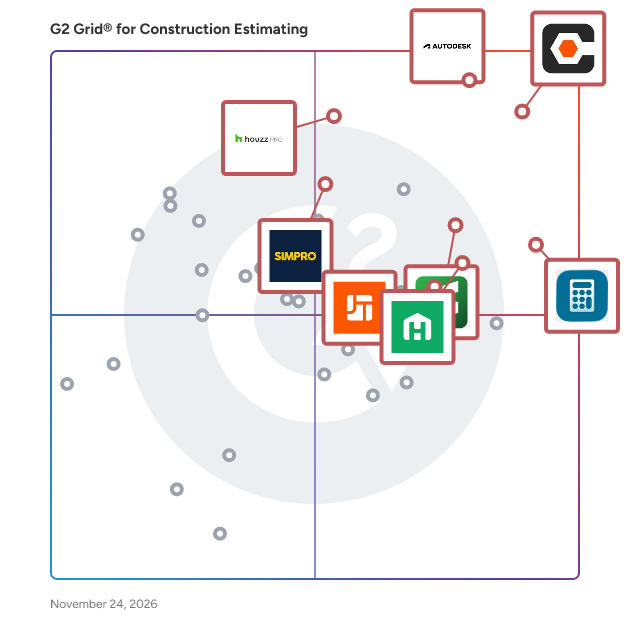
G2 Grid® for Construction Estimating Software

G2 Grid® for Construction Estimating Software plotting products by satisfaction and market presence

Highlighted products: Procore, SimplyWise Cost Estimator, Houzz Pro, Handoff, STACK Takeoff & Estimate, Autodesk Forma (formerly Autodesk Construction Cloud), JobTread, and Simpro.

Underlying data: [Grid® JSON](https://www.g2.com/categories/construction-estimating-software/grids.json?focus%5B%5D=procore&focus%5B%5D=simplywise-cost-estimator&focus%5B%5D=houzz-pro&focus%5B%5D=handoff&focus%5B%5D=stack-takeoff-estimate&focus%5B%5D=autodesk-forma-formerly-autodesk-construction-cloud&focus%5B%5D=jobtread&focus%5B%5D=simpro&segment=small-business)

Procore

Procore construction software manages your construction projects, resources and financials from planning to closeout. The platform connects every project contributor to solutions built specifically for the industry for the owner, the general contractor and the specialty contractor. The ability to communicate across teams makes it easier to work together by establishing a single source of truth. This is how Procore gives your team easy access to everything they need to know to get the job done.

Average Rating: 4.6/5.0

Total Reviews: 4,650

How Do G2 Users Rate Procore?

  • Has the product been a good partner in doing business?: 8.9/10 (Category avg: 9.1/10)
  • Work Breakdown Structure (WBS): 8.1/10 (Category avg: 8.4/10)
  • Integrations: 8.1/10 (Category avg: 8.2/10)
  • Digitizing Quantities: 8.1/10 (Category avg: 8.6/10)

Who Is the Company Behind Procore?

  • Seller: Procore Technologies
  • Company Website:
  • Year Founded: 2003
  • HQ Location: Carpinteria, CA
  • LinkedIn® Page: www.linkedin.com
    4,950 employees on LinkedIn®
  • Ownership: NYSE: PCOR

Who Uses This Product?

  • Who Uses This: Project Manager, Project Engineer
  • Top Industries: Construction, Architecture & Planning
  • Company Size: 48% Medium, 40% Small

What Do G2 Reviewers Say About Procore?

AI-generated summary from verified user reviews

Pros
  • Users find the interface intuitive and easy to navigate, helping them move through daily tasks with ease.
  • Users value its clear communication and collaboration, which help field and office teams stay aligned and coordinate project work.
  • Users value having project information and documents centralized in one shared place, making them easy to access across teams.
  • Users find setup straightforward and easy, helping teams implement and adopt the platform smoothly.
  • Users value the breadth of construction and project-management tools in one platform, avoiding the need for separate products.
Cons
  • Users find the interface and navigation confusing, making tools and information difficult to locate.
  • Users find the platform takes substantial time and training to learn, especially for new or occasional users.
  • Users find the high cost difficult to justify, especially for small teams, with add-ons and licensing further increasing expenses.
  • Users find training insufficiently hands-on, with limited or outdated learning materials and lessons that can be overly long.
  • Users find the tools insufficiently customizable, with limited control over fields, reports, workflows, templates, and project-specific settings.

What Are Recent G2 Reviews of Procore?

What Are G2 Users Discussing About Procore?

SimplyWise Cost Estimator

SimplyWise Cost Estimator is a mobile construction estimating app that turns job site photos into detailed, professional estimates in seconds. Powered by AI, it breaks down every project into material and labor costs, generates polished bids you can send on the spot, and even suggests upsells to increase your revenue. Trusted by 10,000+ contractors with a 4.8-star rating. Stop guessing on project costs. Whether you need a construction estimate for a kitchen renovation, a roofing job, or a full home remodel, SimplyWise is the fastest way to create accurate contractor estimates and send them to clients right from the job site. KEY FEATURES • AI-Powered Estimates — Snap a photo and get a detailed cost breakdown with materials and labor in seconds • Before & After Visualization — Show clients exactly what their renovation will look like with AI-generated renderings • 3D Room Scanning — Use your phone's LIDAR to capture accurate room measurements • Professional Bid Creation — Generate and send polished, branded estimates as PDF • Smart Upsell Suggestions — AI recommends upgrades and add-ons to increase your job value and profit margins • Built-In Markups — Automatically apply your profit margins and overhead to every estimate • Invoicing — Bill clients directly from the app once the job is done • Work Order Management — Track every project from estimate to completion • Project Organization — Keep estimates organized by room, job type, or client in custom folders WHO IS SIMPLYWISE COST ESTIMATOR BEST FOR? SimplyWise is the best construction estimating app for professionals who need fast, accurate estimates without complex enterprise software: • General Contractors managing renovation and building projects • Roofers and Siding Contractors pricing jobs on-site • Remodeling Contractors estimating kitchen, bath, and home renovation work • Painters and Flooring Specialists creating material and labor breakdowns • Plumbers quoting residential and commercial jobs • Small Construction Business Owners who want professional bids without the overhead WHY CONTRACTORS CHOOSE SIMPLYWISE Unlike spreadsheets or desktop construction estimating software that takes weeks to learn, SimplyWise lets you create professional estimates in minutes right from your phone: • Photo to Estimate: No manual data entry. Point, shoot, get your cost estimate • Win More Jobs: Before/after visualizations help clients say yes faster • Increase Revenue: AI-powered upsell suggestions find add-on opportunities you might miss • Work From Anywhere: Create and send estimates from the job site, no office required • Save Hours Every Week: Automate the estimating process so you can focus on the work that pays WHAT YOU CAN ESTIMATE SimplyWise handles cost estimation for all types of construction and renovation projects: • Kitchen and bathroom renovations • Roofing and siding • Interior and exterior painting • Flooring installation and repair • Plumbing work • Fencing and decking • General home remodeling and renovation • New construction and building projects • Demolition and cleanup WHAT CONTRACTORS ARE SAYING "SimplyWise has transformed the way I manage my construction projects. It's even helped me improve my profit margins by automating markups. I love how easy it is to generate professional bids — honestly, I couldn't run my business without it." — Jennifer M., General Contractor "As a small business owner, SimplyWise has been a lifesaver! I can instantly generate estimates and bids on-site and send them to clients in minutes. It's made managing multiple projects so much easier and saved me countless hours." — Alex R., Roofer To learn more, visit our Terms of Service at https://www.simplywise.com/terms.

Average Rating: 4.7/5.0

Total Reviews: 164

How Do G2 Users Rate SimplyWise Cost Estimator?

  • Has the product been a good partner in doing business?: 9.1/10 (Category avg: 9.1/10)
  • Work Breakdown Structure (WBS): 10.0/10 (Category avg: 8.4/10)
  • Integrations: 8.3/10 (Category avg: 8.2/10)
  • Digitizing Quantities: 8.0/10 (Category avg: 8.6/10)

Who Is the Company Behind SimplyWise Cost Estimator?

  • Seller: SimplyWise
  • Year Founded: 2020
  • HQ Location: New York, NY, United States
  • LinkedIn® Page: www.linkedin.com
    9 employees on LinkedIn®

Who Uses This Product?

  • Who Uses This: Owner
  • Top Industries: Construction
  • Company Size: 99% Small, 1% Medium

What Are Recent G2 Reviews of SimplyWise Cost Estimator?

Houzz Pro

Houzz Pro, the leading platform for construction and design, empowers industry professionals and homeowners with the tools they need to make every project a success. Used by more than 3 million construction and design industry professionals and over 70 million homeowners and home design enthusiasts around the world, our AI-powered project management and design software helps pros win projects, collaborate with clients and teams, and run their businesses efficiently and profitably. It’s an all-in-one solution that spans the full customer lifecycle, CRM and Email Marketing tools, Estimates & Proposals, 3D Floor Plans, Schedule, Selections, financial tools, Invoicing & Payments, QuickBooks integration, and a client portal.

Average Rating: 4.2/5.0

Total Reviews: 80

How Do G2 Users Rate Houzz Pro?

  • Has the product been a good partner in doing business?: 8.2/10 (Category avg: 9.1/10)
  • Work Breakdown Structure (WBS): 9.6/10 (Category avg: 8.4/10)
  • Integrations: 8.3/10 (Category avg: 8.2/10)
  • Digitizing Quantities: 9.2/10 (Category avg: 8.6/10)

Who Is the Company Behind Houzz Pro?

  • Seller: Houzz
  • Company Website:
  • Year Founded: 2009
  • HQ Location: Palo Alto, CA
  • LinkedIn® Page: www.linkedin.com
    1,380 employees on LinkedIn®

Who Uses This Product?

  • Who Uses This: Owner
  • Top Industries: Construction, Design
  • Company Size: 94% Small, 1% Medium

What Do G2 Reviewers Say About Houzz Pro?

AI-generated summary from verified user reviews

Pros
  • Users appreciate the ease of use of Houzz Pro, highlighting its straightforward setup and integration of essential tools.
  • Users value the expanding services and catalog features in Houzz Pro, enhancing efficiency and client engagement.
  • Users value the seamless integrations of Houzz Pro, enhancing project management and client communication effortlessly.
  • Users appreciate the comprehensive project management features of Houzz Pro, simplifying organization and enhancing collaboration.
  • Users value the integrated functionality of Houzz Pro, enhancing efficiency and streamlining business operations effectively.
Cons
  • Users find the subscription cost and fees for Houzz Pro to be excessively high and frustrating.
  • Users are frustrated by the lack of essential features in Houzz Pro, hindering efficient management and onboarding processes.
  • Users face significant integration issues with Houzz Pro, affecting seamless workflow and access to features across devices.
  • Users find pricing issues with Houzz Pro, including high subscription costs and credit card fees, frustrating.
  • Users experience billing issues with Houzz Pro, including slow processing and inconvenient refund methods.

What Are Recent G2 Reviews of Houzz Pro?

What Are G2 Users Discussing About Houzz Pro?

AI can help you find the answers. G2 helps you trust them.

Connect G2 to Claude or ChatGPT for answers grounded in G2's trusted reviews, comparisons, and pricing from real user insights.

How it works

STACK Takeoff & Estimate

From project evaluation to completion, contractors use STACK’s cloud-based software to help run their business and maximize their profits. Save time with STACK's powerful, time-saving AI features. Accelerated by AI. Driven by You. STACK Takeoff & Estimate allow you to bid more projects in less time with comprehensive takeoff and construction cost estimating software. With best-in-class cloud-based tools, you can see 10X faster bids and up to 35% more opportunities to win. STACK provides enterprise-grade security & reliability that construction teams are looking for. Protect project data, ensure uptime, and keep your teams working without disruption. For more information on how STACK software is helping teams gain visibility, insight, and alignment throughout the bid process and in the field, visit stackct.com.

Average Rating: 4.5/5.0

Total Reviews: 95

How Do G2 Users Rate STACK Takeoff & Estimate?

  • Has the product been a good partner in doing business?: 9.5/10 (Category avg: 9.1/10)
  • Work Breakdown Structure (WBS): 7.2/10 (Category avg: 8.4/10)
  • Integrations: 7.0/10 (Category avg: 8.2/10)
  • Digitizing Quantities: 7.9/10 (Category avg: 8.6/10)

Who Is the Company Behind STACK Takeoff & Estimate?

Who Uses This Product?

  • Who Uses This: Estimator
  • Top Industries: Construction
  • Company Size: 79% Small, 9% Medium

What Do G2 Reviewers Say About STACK Takeoff & Estimate?

AI-generated summary from verified user reviews

Pros
  • Users find STACK Takeoff & Estimate to be extremely easy to use, enhancing their overall efficiency and productivity.
  • Users love the customizability and ease of use in STACK Takeoff & Estimate, enhancing their project efficiency significantly.
  • Users praise the intuitive interface of STACK Takeoff & Estimate, making navigation and usage effortless and efficient.
  • Users commend the easy setup of STACK Takeoff & Estimate, facilitating a smooth transition for various projects.
  • Users appreciate the efficiency improvement of STACK Takeoff & Estimate, enjoying quick measures and easy estimates.
Cons
  • Users express a need for missing features like improved export options and additional takeoff types for better functionality.
  • Users feel that improvement is needed in measurement speed and custom formatting options for estimates.
  • Users face access limitations with STACK Takeoff & Estimate, making it challenging to manage takeoffs on multiple devices.
  • Users find mobile limitations a challenge, struggling to access information and perform tasks effectively on-site.
  • Users find the costly pricing of STACK Takeoff & Estimate to be a concern, especially with multiple users.

What Are Recent G2 Reviews of STACK Takeoff & Estimate?

What Are G2 Users Discussing About STACK Takeoff & Estimate?

Handoff

Handoff is an AI-powered estimating software that helps residential remodeling contractors create accurate estimates, send professional proposals, and get paid with digital invoices quickly. The mobile and web-based application utilizes generative AI technology and localized construction cost data to automate the estimating process for remodeling projects. Key features and benefits include: Instant AI Estimates: Generate detailed construction estimates in minutes using artificial intelligence and local pricing data. Automated Proposals: Convert estimates into professional proposals with AI. Client Management: Integrated CRM system to organize client information, estimates, and proposals. Digital Signatures: Collect legally binding signatures on proposals and contracts. File Attachments: Share project photos, videos, and documents alongside proposals. Digital Payments: Accept credit card and ACH payments from clients within the app. Progress Payments: Manage deposits and payment schedules for ongoing projects. Handoff is designed for residential remodeling contractors and handymen working on projects like kitchen, bathroom, and basement renovations. Handoff saves time, increases win rates, ensures competitive pricing, and streamlines client management for contractors. The software is suitable for established remodeling businesses looking to automate back-office tasks, as well as new and small remodeling companies aiming to scale their operations. By providing fast, accurate estimates and professional proposals, Handoff enables contractors to align project cost expectations with clients efficiently, potentially increasing their chances of winning projects and improving overall business profitability.

Average Rating: 4.7/5.0

Total Reviews: 116

How Do G2 Users Rate Handoff?

  • Has the product been a good partner in doing business?: 9.7/10 (Category avg: 9.1/10)
  • Work Breakdown Structure (WBS): 8.6/10 (Category avg: 8.4/10)
  • Integrations: 8.2/10 (Category avg: 8.2/10)
  • Digitizing Quantities: 8.7/10 (Category avg: 8.6/10)

Who Is the Company Behind Handoff?

Who Uses This Product?

  • Who Uses This: Owner, Project Manager
  • Top Industries: Construction
  • Company Size: 97% Small, 2% Medium

What Do G2 Reviewers Say About Handoff?

AI-generated summary from verified user reviews

Pros
  • Users value the accurate estimates from Handoff, enhancing their project management and competitive pricing strategies.
  • Users find Handoff to be user-friendly and intuitive, enhancing daily project management and improving efficiency.
  • Users love how Handoff offers time-saving benefits, significantly reducing hours spent on estimates and proposals.
  • Users find Handoff to be fantastic for managing projects, enhancing workflow and providing valuable resources for self-employed professionals.
  • Users praise Handoff for its cost-effective pricing and time-saving capabilities, enhancing their estimating process significantly.
Cons
  • Users find the change order process confusing, with issues affecting efficiency and clarity in job tracking.
  • Users are disappointed by the missing features in Handoff, including limited file support and lack of itemized invoicing.
  • Users find limited customization frustrating, wishing for more flexibility in templates and formatting options for proposals.
  • Users experience upload issues with Handoff, as converting estimates and uploading files often fails or is incomplete.
  • Users express frustration with access limitations in Handoff, as it restricts collaboration for larger teams.

What Are Recent G2 Reviews of Handoff?

Autodesk Forma (formerly Autodesk Construction Cloud)

Autodesk Forma (formerly Autodesk Construction Cloud) connects workflows, teams and data at every stage of construction to reduce risk, maximize efficiency, and increase profits. Autodesk Build is part of Autodesk Forma (formerly Autodesk Construction Cloud)'s newest set of products that further connect data, workflows, and teams throughout the entire building lifecycle. Build delivers a broad, deep, and connected set of field execution and project management tools for builders in a single software platform that is easy to deploy, adopt and use. Autodesk Build delivers the unification of best-in-class technology from PlanGrid and BIM 360, along with new functionality, to connect construction data and workflows across the headquarters, office, and jobsite. It offers tools for project management, quality, safety, cost, document management and project closeout workflows in a single application that is purpose-built for what you do and where you are working. -Supports integrated & digitized processes for the build phase of a project in a platform that is easy to deploy, adopt and use, while ensuring information sharing and workflows are tightly controlled and highly-configurable. -Standardized and centralized data collection from design through operations enables data-driven decision making, and predictive analytics provide visibility into high-risk issues that can impact project cost, schedule, quality, and safety. -Cloud-based document management provides a single source of truth for all project documentation for the owner, GCs and subs. Autodesk Takeoff empowers estimators to create fast, accurate takeoffs in a cloud-based solution that combines 2D and 3D workflows. Autodesk Takeoff is part of Autodesk Forma (formerly Autodesk Construction Cloud)'s newest set of products that further connect data, workflows, and teams throughout the entire building lifecycle. Autodesk Takeoff allows estimators to perform more accurate 2D takeoffs and generate automated quantities from 3D models in a single online solution. Preconstruction teams are empowered to win more work with integrated takeoffs and quantities that help produce quality estimates for faster, more accurate bidding. -Manage sheets and models in one data environment with Autodesk Docs -Easily capture project scope with linear, count and area takeoff -Generate multiple quantities and use custom formulas -Get instant access to quantities from models for automated 3D takeoffs -Access aggregated quantities from drawings and models Autodesk BIM Collaborate is part of Autodesk Forma (formerly Autodesk Construction Cloud)'s newest set of products that further connect data, workflows, and teams throughout the entire building lifecycle. BIM Collaborate empowers project teams to align and execute on design intent and constructability by managing the entire design collaboration and coordination workflow. Autodesk BIM Collaborate empowers design and construction teams to align and execute on design intent and constructability in a single online solution. By allowing teams to manage the entire design collaboration and coordination process in a single common data environment, BIM Collaborate reduces rework and improves overall design quality. -No limits on projects or file storage -Subscribe once and use on any project you are working on -Flexible subscription offerings for users, projects and businesses -Easily add subscribers and models as your business grows -Keep the same central administration and user login when adding new products

Average Rating: 4.4/5.0

Total Reviews: 5,481

How Do G2 Users Rate Autodesk Forma (formerly Autodesk Construction Cloud)?

  • Has the product been a good partner in doing business?: 8.3/10 (Category avg: 9.1/10)
  • Work Breakdown Structure (WBS): 7.1/10 (Category avg: 8.4/10)
  • Integrations: 7.7/10 (Category avg: 8.2/10)
  • Digitizing Quantities: 7.5/10 (Category avg: 8.6/10)

Who Is the Company Behind Autodesk Forma (formerly Autodesk Construction Cloud)?

  • Seller: Autodesk
  • Company Website:
  • Year Founded: 1982
  • HQ Location: San Francisco
  • LinkedIn® Page: www.linkedin.com
    15,757 employees on LinkedIn®
  • Ownership: NASDAQ:ADSK

Who Uses This Product?

  • Who Uses This: BIM Manager, Project Manager
  • Top Industries: Construction, Architecture & Planning
  • Company Size: 45% Medium, 31% Large

What Do G2 Reviewers Say About Autodesk Forma (formerly Autodesk Construction Cloud)?

AI-generated summary from verified user reviews

Pros
  • Users value the ease of use in Autodesk Forma, enabling efficient collaboration and streamlined project management.
  • Users appreciate the seamless collaboration offered by Autodesk Forma, providing a centralized platform for effective project coordination.
  • Users value the enhanced team collaboration in Autodesk Forma, simplifying project coordination and ensuring everyone stays informed.
  • Users appreciate the collaboration capabilities of Autodesk Forma, enabling seamless coordination and visibility across project teams.
  • Users appreciate the easy access to Autodesk Forma's centralized platform, enhancing collaboration across teams and disciplines.
Cons
  • Users highlight the missing features of Autodesk Forma, such as limited customization and lack of essential PMO functionality.
  • Users face challenges with cost, usability, and flexibility, impacting their overall experience with Autodesk Forma.
  • Users face access limitations due to poor permission customization, complicating management and leading to user confusion.
  • Users find the lack of features in Autodesk Forma limiting customization and essential project management options.
  • Users find improvement needed in cost, usability, reliability, and flexibility of Autodesk Construction Cloud.

What Are Recent G2 Reviews of Autodesk Forma (formerly Autodesk Construction Cloud)?

What Are G2 Users Discussing About Autodesk Forma (formerly Autodesk Construction Cloud)?

JobTread

JobTread provides end-to-end construction management software that helps jobs-based businesses manage all of their processes, from pre-construction to project completion. The platform serves as a central location to manage jobs, teams, documents, photos, finances, customers, vendors, sub-contractors, and more. Its budget-first approach creates financial transparency at every stage of a project. Through JobTread, you will have access to an extensive list of Sales and Estimating features ranging from a construction CRM and budgeting to contracts and eSignitures. The Project Management features cover purchase orders, daily logs, tasks and scheduling and more. Its Finance and Cashflow features offer Change Orders, invoices, billing, job costing, and payment processing. With the Business Intelligence features the user has custom fields, reporting, dashboards, and performance insights. JobTread has integrations with Quickbooks Online, Stripe Payments, Slack, and Zapier.

Average Rating: 4.9/5.0

Total Reviews: 120

How Do G2 Users Rate JobTread?

  • Has the product been a good partner in doing business?: 9.8/10 (Category avg: 9.1/10)
  • Work Breakdown Structure (WBS): 9.2/10 (Category avg: 8.4/10)
  • Integrations: 9.3/10 (Category avg: 8.2/10)
  • Digitizing Quantities: 9.3/10 (Category avg: 8.6/10)

Who Is the Company Behind JobTread?

  • Seller: JobTread
  • Company Website:
  • Year Founded: 2019
  • HQ Location: Dallas, US
  • LinkedIn® Page: www.linkedin.com
    70 employees on LinkedIn®

Who Uses This Product?

  • Who Uses This: Owner, President
  • Top Industries: Construction
  • Company Size: 97% Small, 3% Large

What Do G2 Reviewers Say About JobTread?

AI-generated summary from verified user reviews

Pros
  • Users appreciate the ease of use of JobTread, noting its intuitive design and excellent support for seamless integration.
  • Users value the exceptional customer support that ensures smooth implementation and successful utilization of JobTread.
  • Users value the efficiency improvement brought by JobTread, enjoying streamlined project management and exceptional customer support.
  • Users love the intuitive platform and exceptional customer support, making project management seamless and efficient.
  • Users highly value the exceptional customer support from JobTread, ensuring successful integration and ongoing assistance.
Cons
  • Users note the missing features of JobTread, such as limited invoice editing and lack of an integrated takeoff tool.
  • Users face access limitations as spreadsheets require external edits and the platform is not optimized for fixed-price contracts.
  • Users face editing difficulties with JobTread, particularly with spreadsheet updates requiring external adjustments before re-uploading.
  • Users note that JobTread requires improvement in handling invoicing issues to enhance user experience and functionality.
  • Users find it challenging to keep up with update issues as JobTread evolves, despite strong support resources.

What Are Recent G2 Reviews of JobTread?

What Are G2 Users Discussing About JobTread?

Simpro

Simpro is field service management software for trade and service contractors. It handles job management from the first call through quoting, scheduling, the work order, the invoice and the payment, so the office, the field and finance work from the same records. More than 250,000 users worldwide run their work in Simpro. Simpro Lightning, Simpro's AI-First Operating Platform, brings AI field service management into the field service software contractors already run. Cooper, the AI at its center, powers JustAsk and a digital workforce of role-based AI agents for training, job preparation, documentation and customer summaries. • JustAsk answers business questions in plain language. Ask for margins by technician or overdue invoices and get the answer without building a report. • FieldReady supports technician training, JobReady prepares each job before dispatch, JobScribe structures on-site documentation, and JobBrief writes customer summaries for technicians to review. • JustDo is the AI office assistant. Tell it what needs doing, or hand it an email, PDF, photo or spreadsheet, and it drafts the job, customer or quote in Simpro for your team to approve. It brings field service automation to the data entry that fills an office team's day. • Pulse is the AI receptionist, a digital worker on the Simpro Lightning digital workforce. It answers inbound calls 24/7, recognizes callers from their Simpro record, qualifies the job and places a provisional hold on the schedule for your team to confirm. Safety-critical calls such as gas leaks or flooding go straight to your on-call technician. • Two-Way Messaging and GPS Time Tracking handle customer communication and time capture. Delight, the AI customer marketing agent, is a digital worker for customer follow-up. It reads each customer's Simpro job history and assets and writes them personal messages about maintenance reminders, quotes that went quiet and seasonal campaigns. You can preview each message 24 hours before it goes out. Simtrac 360 adds GPS fleet tracking hardware that is built into Simpro. The AX300 tracker plugs into a vehicle's OBD port, and a hardwired AK300 is available for covert installs. Simpro sites act as geofences, so each site visit becomes labor hours on the matching job. Odometer readings and engine hours update the vehicle's asset record. The core platform covers the full job lifecycle: • Win and plan work: Customer and site history, estimates and quotes live in one field service CRM. When a quote is accepted, the office schedules and dispatches the right technician from the same system. • Complete work in the field: Technicians get mobile work orders, digital forms, job notes and asset records. Preventive maintenance contracts run on the same records, so work order management and maintenance management stay in one place. • Protect margin and cash flow: Job costing, inventory, invoicing, payment options and dashboards show what each job made, from quote to cash. Simpro is built for trade contractors running residential and commercial service calls, maintenance, installations and projects: • HVAC: Emergency no-heat and no-cool calls, seasonal maintenance contracts and full system replacements share one schedule. Estimates use live supplier pricing for equipment and refrigerant, and job costing tracks estimated against actual cost as the work happens. • Plumbing: Burst pipe call-outs, backflow and gas maintenance agreements and hot water system replacements all compete for the same plumbers. The office schedules them from a drag-and-drop dispatch board, and fittings costs stay tied to supplier price files. • Electrical: Reactive callouts, scheduled maintenance and multi-stage projects run on one platform. Estimates cover labor, materials and large cable runs, and job costing shows where each project stands before the final invoice. • Pool service: Recurring cleaning and maintenance visits can be bulk-scheduled by route, zone and preferred technician, and field staff clock in and out from the Simpro Mobile app. Fire protection and security contractors run on the same platform. It works for small teams and grows with the business.

Average Rating: 4.1/5.0

Total Reviews: 533

How Do G2 Users Rate Simpro?

  • Has the product been a good partner in doing business?: 7.9/10 (Category avg: 9.1/10)
  • Work Breakdown Structure (WBS): 7.9/10 (Category avg: 8.4/10)
  • Integrations: 7.5/10 (Category avg: 8.2/10)
  • Digitizing Quantities: 8.4/10 (Category avg: 8.6/10)

Who Is the Company Behind Simpro?

  • Seller: Simpro
  • Company Website:
  • Year Founded: 2002
  • HQ Location: Miami, FL
  • LinkedIn® Page: www.linkedin.com
    719 employees on LinkedIn®

Who Uses This Product?

  • Who Uses This: Director, Office Manager
  • Top Industries: Construction, Electrical/Electronic Manufacturing
  • Company Size: 78% Small, 22% Medium

What Do G2 Reviewers Say About Simpro?

AI-generated summary from verified user reviews

Pros
  • Users find Simpro to be incredibly easy to use, thanks to its user-friendly interface and customizable options.
  • Users value the streamlined data collection capabilities of Simpro, enhancing workflow and asset management efficiency.
  • Users value the user-friendly interface and wide range of features in Simpro, enhancing productivity and customization.
  • Users find the responsive customer support of Simpro quick and effective, enhancing overall satisfaction and usability.
  • Users value the efficiency of Simpro, streamlining everything from quotes to invoicing seamlessly in one system.
Cons
  • Users find the complexity of setup in Simpro overwhelming, making it challenging to utilize its features effectively.
  • Users find the complex setup of Simpro challenging, resulting in a steep learning curve and slower workflows.
  • Users find the difficult learning curve challenging due to complexity and extensive setup requirements in Simpro.
  • Users face difficult onboarding and complexity with Simpro, making the transition and training challenging for staff.
  • Users find the learning curve challenging due to the complexity and extensive setup required for effective use.

What Are Recent G2 Reviews of Simpro?

What Are G2 Users Discussing About Simpro?

HCSS

Heavy Construction Systems Specialists (HCSS) is the leading provider of construction management software for heavy civil and infrastructure projects. Since 1986, HCSS has helped contractors work smarter, faster, and safer with innovative software designed hand in hand with the people who use it. What began with HeavyBid, the industry standard in estimating, has grown into a powerful, user-friendly platform spanning the entire project lifecycle. The HCSS platform—HeavyBid, HeavyJob, and HCSS Fleet—centralizes data across the office, field, and shop to deliver real-time insights and streamlined workflows so contractors can bid, build, and deliver with confidence. Recognized as both a pioneer and an industry leader, HCSS continues to innovate with customer-centric solutions and award-winning 24/7/365 support. The target audience for HCSS includes contractors engaged in heavy civil and infrastructure projects. These users face unique challenges, such as managing complex projects with multiple crews, coordinating multiple project phases, and ensuring compliance with safety regulations. HCSS addresses these challenges by offering tools that encompass the entire project lifecycle. From estimating costs with HeavyBid to managing daily job operations with HeavyJob, the platform provides an integrated approach that enhances productivity and minimizes errors. Key features of HCSS include rapid and precise estimating capabilities, real-time field management, and comprehensive fleet maintenance. HeavyBid allows users to generate accurate estimates quickly, while HeavyJob provides real-time insights into job performance and costs. Additionally, the platform offers offline-capable safety and compliance tracking, ensuring that contractors can maintain regulatory standards even in remote locations. The unified dashboard for fleet maintenance integrates mixed-fleet telematics, allowing users to monitor equipment performance and maintenance needs seamlessly. By centralizing estimating, production quantities, and equipment data, HCSS effectively eliminates the issues associated with disconnected spreadsheets and delayed reporting. This centralized approach provides contractors with the real-time clarity needed to make informed decisions and proactively address production issues. As a result, HCSS empowers contractors to scale their operations confidently, ensuring that they can meet project demands while maintaining profitability. The platform stands out in its category by offering a holistic solution that not only streamlines processes but also enhances overall project visibility and control.

Average Rating: 4.6/5.0

Total Reviews: 264

How Do G2 Users Rate HCSS?

  • Has the product been a good partner in doing business?: 9.1/10 (Category avg: 9.1/10)
  • Work Breakdown Structure (WBS): 8.0/10 (Category avg: 8.4/10)
  • Integrations: 8.1/10 (Category avg: 8.2/10)
  • Digitizing Quantities: 8.0/10 (Category avg: 8.6/10)

Who Is the Company Behind HCSS?

  • Seller: HCSS
  • Company Website:
  • Year Founded: 1986
  • HQ Location: Sugar Land, TX
  • LinkedIn® Page: www.linkedin.com
    689 employees on LinkedIn®

Who Uses This Product?

  • Who Uses This: Estimator, Senior Estimator
  • Top Industries: Construction, Civil Engineering
  • Company Size: 58% Medium, 30% Small

What Do G2 Reviewers Say About HCSS?

AI-generated summary from verified user reviews

Pros
  • Users appreciate the ease of use of HCSS, benefiting from its intuitive setup and adaptable features for efficiency.
  • Users praise HCSS's exceptional customer support, highlighting its 24/7 availability and responsiveness to user suggestions.
  • Users value the intuitive setup and exceptional support of HCSS, enhancing ease of use and navigation.
  • Users appreciate the efficiency improvement HCSS offers, enhancing accuracy and consistency in bidding and job management.
  • Users value the consistency and efficiency HCSS provides in estimating and time management, enhancing overall productivity.
Cons
  • Users feel HCSS requires significant improvements in user experience, reporting capabilities, and a smoother setup process.
  • Users feel that HCSS has lost its user-friendly experience, lacking essential features and customization options for reports.
  • Users find that the cost of licenses can be expensive, especially for larger organizations with fluctuating personnel needs.
  • Users struggle with inefficient processes in HCSS, particularly in reporting and implementation, affecting overall effectiveness.
  • Users frequently experience integration issues with HCSS, impacting connectivity and overall functionality across systems.

What Are Recent G2 Reviews of HCSS?

What Are G2 Users Discussing About HCSS?

Sage Construction Management (formerly Corecon)

Sage Construction Management (Formerly Corecon)’s cloud based software suite helps engineering and construction firms manage their projects more efficiently. The software helps people with different roles and responsibilities work together regardless if they are at the office or jobsite. The software suite includes modules for estimating, vendor bid management, contract administration, procurement, time tracking, correspondence, documentation, quality control, safety and scheduling. Being cloud based, contracting firms will have the ability to access their project information anytime anywhere and make quick and informed decisions. With its built-in wizards that automate complex tasks or comprehensive executive dashboards to analyze project budgets, Sage Construction Management (Formerly Corecon) provides cutting-edge technology to maximize the profitability of one’s projects and make all departments work more efficiently

Average Rating: 3.9/5.0

Total Reviews: 42

How Do G2 Users Rate Sage Construction Management (formerly Corecon)?

  • Has the product been a good partner in doing business?: 8.5/10 (Category avg: 9.1/10)
  • Work Breakdown Structure (WBS): 10.0/10 (Category avg: 8.4/10)
  • Integrations: 9.2/10 (Category avg: 8.2/10)
  • Digitizing Quantities: 10.0/10 (Category avg: 8.6/10)

Who Is the Company Behind Sage Construction Management (formerly Corecon)?

  • Seller: Sage Software
  • Year Founded: 1981
  • HQ Location: Newcastle
  • LinkedIn® Page: www.linkedin.com
    15,833 employees on LinkedIn®
  • Ownership: SGE.L
  • Phone: +1 (866) 996-7243

Who Uses This Product?

  • Who Uses This: Project Manager
  • Top Industries: Construction
  • Company Size: 79% Small, 19% Medium

What Do G2 Reviewers Say About Sage Construction Management (formerly Corecon)?

AI-generated summary from verified user reviews

Pros
  • Users find Sage Construction Management easy to use, enhancing efficiency in tracking POs and man hours.
  • Users find potential in Sage Construction Management but are frustrated by its syncing issues and usability challenges.
  • Users note the potential for improvement in Sage Construction Management, highlighting features that could enhance usability if fixed.
  • Users find Sage Construction Management's productivity tools helpful for creating POs and tracking man hours effectively.
  • Users find the setup process easy, enabling a quick start with Sage Construction Management's features.
Cons
  • Users feel the software has access limitations, hindering actions beyond purchase orders and restricting functionality.
  • Users experience compatibility issues with job syncing, leading to frustration and inefficiencies in Sage Construction Management.
  • Users find the complexity of Sage Construction Management limits flexibility in actions beyond purchase orders.
  • Users find the lack of customization limiting when trying to go beyond basic purchase orders.
  • Users find the closed-ended nature of Sage Construction Management limits flexibility for tasks beyond purchase orders.

What Are Recent G2 Reviews of Sage Construction Management (formerly Corecon)?

UDA ConstructionOnline

ConstructionOnline is a cloud-based construction project management software developed by UDA Technologies, specifically designed to assist construction professionals in managing various aspects of their projects. With over 25 years of experience in providing construction management solutions, UDA Technologies has established a robust platform that supports residential builders, commercial contractors, multifamily developers, and specialty contractors. Currently, ConstructionOnline serves more than 950,000 construction professionals globally, enabling them to enhance collaboration, control costs, and successfully deliver projects. This all-in-one construction management platform streamlines the entire project lifecycle, allowing contractors to efficiently manage estimates, schedules, job costs, documents, and communication within a centralized environment. Accessible via web and mobile applications for both iOS and Android, ConstructionOnline offers teams real-time visibility into project performance, financial health, and field progress throughout every phase of construction. This capability is particularly beneficial for organizations looking to improve operational efficiency and ensure timely project completion. ConstructionOnline features a comprehensive suite of tools tailored to meet the needs of construction professionals. Its construction estimating software and takeoff tools enable users to create precise cost estimates, perform digital takeoffs, manage budgets, and track job costs with integrated financial reporting. The construction scheduling software allows for the creation of interactive Gantt charts, resource assignment, and critical path monitoring, ensuring that projects remain on schedule. Additionally, the platform includes robust document and file management capabilities, allowing users to securely store and share essential project documents such as drawings, specifications, RFIs, and change orders. The platform also enhances field-to-office communication through tools like daily logs, punch lists, and client portals, which facilitate collaboration among teams and stakeholders. Its ability to integrate with popular platforms such as QuickBooks, Docusign, Planswift, Dropbox, and Google Drive further extends its functionality, making it a versatile solution for construction management. With mobile access, teams can stay connected and informed, regardless of their location. The primary value of ConstructionOnline lies in its capacity to help contractors organize their operations, mitigate risks, and execute projects more efficiently. By consolidating financial data, schedules, and communication within a single system, ConstructionOnline fosters improved collaboration among project managers, estimators, superintendents, and subcontractors. Users benefit from enhanced accuracy in project estimates, increased accountability across teams, and clearer tracking of profitability. With comprehensive reporting and real-time updates, ConstructionOnline empowers construction businesses to make informed decisions, manage resources effectively, and achieve project goals on time and within budget.

Average Rating: 4.6/5.0

Total Reviews: 83

How Do G2 Users Rate UDA ConstructionOnline?

  • Has the product been a good partner in doing business?: 8.9/10 (Category avg: 9.1/10)
  • Work Breakdown Structure (WBS): 10.0/10 (Category avg: 8.4/10)
  • Integrations: 7.5/10 (Category avg: 8.2/10)
  • Digitizing Quantities: 8.5/10 (Category avg: 8.6/10)

Who Is the Company Behind UDA ConstructionOnline?

  • Seller: UDA Technologies
  • Company Website:
  • Year Founded: 1999
  • HQ Location: Auburn, US
  • LinkedIn® Page: www.linkedin.com
    63 employees on LinkedIn®

Who Uses This Product?

  • Who Uses This: Owner, President
  • Top Industries: Construction
  • Company Size: 80% Small, 11% Medium

What Do G2 Reviewers Say About UDA ConstructionOnline?

AI-generated summary from verified user reviews

Pros
  • Users value the easy navigation and quick access to features, enhancing their overall experience with UDA ConstructionOnline.
  • Users commend the responsive customer support of UDA ConstructionOnline, appreciating quick assistance through chat and emails.
  • Users praise the ease of use and responsiveness of UDA ConstructionOnline, enhancing project management efficiency significantly.
  • Users appreciate the ease of use and comprehensive project management features of UDA ConstructionOnline, enhancing convenience and efficiency.
  • Users appreciate the user-friendly interface and seamless integration of UDA ConstructionOnline for effective project management.
Cons
  • Users find UDA ConstructionOnline expensive and face challenges with its slow upload speeds and learning curve.
  • Users experience a steep learning curve with UDA ConstructionOnline, making initial use challenging despite effective training support.
  • Users experience update issues with UDA ConstructionOnline, particularly with live updates and site functionality during critical tasks.
  • Users highlight the lack of features in UDA ConstructionOnline, noting critical tools are missing for effective billing.
  • Users find limited features frustrating, including slow uploads and constraints on job numbers with extra costs.

What Are Recent G2 Reviews of UDA ConstructionOnline?

What Are G2 Users Discussing About UDA ConstructionOnline?

Bolster

Meet Bolster, a trailblazer in construction management software, revolutionizing the way residential construction is bought, sold and managed. Bolster enables contractors to save more time, win more jobs, enhance project oversight, and elevate the homeowner experience using one end-to-end platform. As we rapidly expand, Bolster is committed to delivering new products and features to meet the evolving needs of our customers and the industry. From our patented interactive estimating solution to robust capabilities in scheduling, project management, payments, and dedicated support, Bolster is the essential tool for success in residential construction. From first click to final payment, Bolster is building better solutions that make building as enjoyable as buying and selling online for both contractors and homeowners.

Average Rating: 4.6/5.0

Total Reviews: 48

How Do G2 Users Rate Bolster?

  • Has the product been a good partner in doing business?: 8.8/10 (Category avg: 9.1/10)
  • Work Breakdown Structure (WBS): 8.6/10 (Category avg: 8.4/10)
  • Integrations: 8.3/10 (Category avg: 8.2/10)
  • Digitizing Quantities: 9.2/10 (Category avg: 8.6/10)

Who Is the Company Behind Bolster?

  • Seller: Bolster
  • Year Founded: 2016
  • HQ Location: Calgary, CA
  • LinkedIn® Page: www.linkedin.com
    49 employees on LinkedIn®

Who Uses This Product?

  • Who Uses This: Owner
  • Top Industries: Construction
  • Company Size: 90% Small

What Do G2 Reviewers Say About Bolster?

AI-generated summary from verified user reviews

Pros
  • Users find Bolster easy to use, enhancing workflow and organization while significantly reducing manual tasks.
  • Users appreciate the efficiency improvements of Bolster, enhancing productivity and organization in their daily tasks.
  • Users value Bolster's powerful estimating tools, which streamline the quoting process and enhance team organization.
  • Users find Bolster's powerful estimation feature pivotal for streamlining quoting and enhancing team productivity.
  • Users appreciate the time-saving features of Bolster, enabling faster workflows and more time for important tasks.
Cons
  • Users find a steep learning curve with Bolster, especially older users who take longer to adapt.
  • Users find the setup difficulty of Bolster to be lengthy, though support is commendable in facilitating the process.
  • Users find the difficult setup process lengthens onboarding, though support is commendable in assisting with it.
  • Users find the complex setup process time-consuming, despite helpful support from the Bolster team.
  • Users find Bolster to have a learning difficulty that requires time to master for optimal use.

What Are Recent G2 Reviews of Bolster?

Methvin

Construction estimators don't lose bids because they priced too high. They lose because their numbers weren't built on solid ground. Methvin is the only platform that calculates costs from first principles. While other tools rely on historical averages that no longer reflect the market, Methvin builds every figure from scratch, labor, plant, and materials. One miscalculation on a tight-margin project doesn't just hurt the job; it can wipe out the profit from three others. Stop guessing. Start winning bids you can actually deliver on. --- WHY TOP FIRMS CHOOSE METHVIN --- ACCURACY: Automate heavy lifting and turn around accurate tenders faster without cutting corners. SCALABILITY: From small fitouts to large civil infrastructure, the platform scales without breaking your process. FLEXIBILITY: Configure workflows to match how your team actually estimates. Methvin adapts to you, not the other way around. REAL-TIME COLLABORATION: Everyone works from the same numbers, from anywhere, in real time. --- THE FULL PROJECT LIFECYCLE --- Beyond estimating, Methvin handles the heavy lifting of project management: Takeoff tools to measure quantities directly from plans. Gantt scheduling to keep timelines and dependencies visible. Job costing to track spend as it happens. Cost-vs-Allowable reporting to flag variances before they become problems. --- THE INTELLIGENT RECORD --- Most platforms miss the biggest risk: the "he-said, she-said" of site disputes. Methvin’s Correspondence module brings every contract, RFI, site instruction, and variation into one place. You can ask it questions in plain language: "What was agreed on the structural steel spec?" or "Has the client signed off on the drainage scope?" The answer comes straight from your documents instantly. In construction, a missed instruction can cost more than the original estimate. An intelligent, searchable record isn't a luxury, it is how professional teams protect their margins. Methvin is purpose-built for construction. If your current tools feel like you're working around them, it's time to see what a platform built for this industry actually feels like.

Average Rating: 4.6/5.0

Total Reviews: 117

How Do G2 Users Rate Methvin?

  • Has the product been a good partner in doing business?: 8.9/10 (Category avg: 9.1/10)
  • Work Breakdown Structure (WBS): 9.8/10 (Category avg: 8.4/10)
  • Integrations: 9.7/10 (Category avg: 8.2/10)
  • Digitizing Quantities: 9.9/10 (Category avg: 8.6/10)

Who Is the Company Behind Methvin?

  • Seller: Methvin
  • Company Website:
  • Year Founded: 2018
  • HQ Location: Albany, Auckland
  • LinkedIn® Page: www.linkedin.com
    7 employees on LinkedIn®

Who Uses This Product?

  • Top Industries: Construction, Civil Engineering
  • Company Size: 54% Small, 32% Large

What Do G2 Reviewers Say About Methvin?

AI-generated summary from verified user reviews

Pros
  • Users value the strong collaboration features of Methvin, facilitating real-time teamwork across different roles and locations.
  • Users find Methvin to be easy to use, facilitating collaboration and standardization across varied workflows effortlessly.
  • Users value the strong collaboration features of Methvin, enabling real-time teamwork across various project roles.
  • Users value the integrated project management tools in Methvin for effective budget control and collaboration across teams.
  • Users value the strong collaboration enabled by Methvin's cloud access, enhancing teamwork and real-time data sharing.
Cons
  • Users note a steep learning curve with Methvin, requiring significant configuration and training for effective use.
  • Users note a steep learning curve with Methvin, requiring significant time for training and configuration.
  • Users find the difficult learning curve challenging, requiring significant training and planning for effective use of Methvin.
  • Users find the poor interface design of Methvin overwhelming, affecting usability and initial engagement.
  • Users note a difficult learning curve, especially for teams transitioning from traditional estimating tools or without prior training.

What Are Recent G2 Reviews of Methvin?

What Are G2 Users Discussing About Methvin?

Knowify

**NEW** - Knowify now connects directly to AI platforms like Claude and ChatGPT. No generic AI advice. No reports to build. No analyst to hire. Just the insights you need to grow with confidence. ✅ “What jobs need my attention this week?” ✅ “What’s my WIP this month?” ✅ “Who’s making me the most money on commercial work?” Every job. Every number. Everything that drives profitability. Any question you’ve every had about your business. Now all you have to do is ask. ------------------------------------------------- Knowify is job management software built for trade contractors. Founded in New York City, with team members across the U.S. and Canada, Knowify supports growing subcontractors with teams ranging from 2 to 200. The platform is trusted by contractors across trades like electrical, plumbing, HVAC, drywall, and remodeling. Knowify brings estimating, job costing, scheduling, time tracking, and invoicing together in one platform. It supports construction-specific workflows including AIA billing, change orders, certified payroll, and prevailing wage tracking. Mobile tools keep field teams connected to the office, and everything stays in sync with QuickBooks Online, QuickBooks Payroll, QuickBooks time, QuickBooks Payments, and Intuit Enterprise Suite through a best-in-class two-way integration. Knowify helps contractors stay organized, on schedule, and profitable. With real-time visibility into costs and progress, contractors can manage every job more efficiently and make confident financial decisions. Knowify replaces spreadsheets and disconnected tools with one system built to support growing construction businesses. Most importantly - our fully U.S.-based support team is full of real people ready to talk and help you solve the challenges in your business. We're proud partners of the trades - and proud of our commitment to top quality software and service.

Average Rating: 4.5/5.0

Total Reviews: 103

How Do G2 Users Rate Knowify?

  • Has the product been a good partner in doing business?: 9.1/10 (Category avg: 9.1/10)
  • Work Breakdown Structure (WBS): 8.1/10 (Category avg: 8.4/10)
  • Integrations: 8.2/10 (Category avg: 8.2/10)
  • Digitizing Quantities: 8.0/10 (Category avg: 8.6/10)

Who Is the Company Behind Knowify?

  • Seller: Knowify
  • Company Website:
  • Year Founded: 2012
  • HQ Location: New York, NY
  • LinkedIn® Page: www.linkedin.com
    53 employees on LinkedIn®

Who Uses This Product?

  • Who Uses This: Owner
  • Top Industries: Construction
  • Company Size: 85% Small, 12% Medium

What Do G2 Reviewers Say About Knowify?

AI-generated summary from verified user reviews

Pros
  • Users find Knowify to be incredibly easy to use, benefiting from its quick implementation and responsive support team.
  • Users praise the responsive customer support of Knowify, enhancing their overall experience and satisfaction.
  • Users appreciate the convenient data management features of Knowify, enabling effortless tracking and impressive reporting capabilities.
  • Users commend Knowify for its efficient implementation and automation features, greatly enhancing productivity and job management.
  • Users value the responsive support team and appreciate the quick implementation of Knowify, enhancing their experience.
Cons
  • Users highlight a desperate need for improvements in Knowify, particularly in inventory sync, reporting, and payroll management.
  • Users express a desperate need for missing features in Knowify, impacting inventory, reporting, and payroll functionalities.
  • Users face access limitations with Knowify, impacting stability, mobile usability, and invoicing processes.
  • Users face significant invoicing issues due to challenges with reports, tax mismatches, and commission calculations.
  • Users express frustration over limited customization options, especially regarding templates and reporting capabilities in Knowify.

What Are Recent G2 Reviews of Knowify?

What Are G2 Users Discussing About Knowify?

Buildxact

Never miss the right job opportunity again. AI-powered estimating built for the busy builder who does it all. Designed for residential builders and remodelers, Buildxact helps you manage every stage of your project with one simple, online platform. From takeoffs to quotes to scheduling to invoicing, everything works together to save you time and stress. Meet Blu - your digital building assistant. Blu uses real-world project data and AI to automate your estimating workflow — so you can get accurate estimates done faster, spot mistakes before they happen, and feel more confident from the start. Talk to Blu like you talk to your crew — it gets it. Here’s how Blu’s tools help you move faster: Assembly Assistant – Use real-time pricing and templates to build smarter estimates Estimate Reviewer – Catch missing items and common errors before they cost you Takeoff Assistant – Measure and scale digital plans in minutes Estimate Generator – Create full estimates from simple prompts With live supplier pricing, drag-and-drop scheduling, and a built-in Client Portal, Buildxact keeps your jobs running smoothly — on time, on budget, and in sync. 👉 Join thousands of builders worldwide using Buildxact to power their growth.

Average Rating: 4.3/5.0

Total Reviews: 65

How Do G2 Users Rate Buildxact?

  • Has the product been a good partner in doing business?: 7.5/10 (Category avg: 9.1/10)
  • Work Breakdown Structure (WBS): 8.1/10 (Category avg: 8.4/10)
  • Integrations: 7.5/10 (Category avg: 8.2/10)
  • Digitizing Quantities: 8.4/10 (Category avg: 8.6/10)

Who Is the Company Behind Buildxact?

  • Seller: Buildxact
  • Company Website:
  • Year Founded: 2007
  • HQ Location: Melbourne, Australia
  • LinkedIn® Page: www.linkedin.com
    84 employees on LinkedIn®

Who Uses This Product?

  • Who Uses This: Director
  • Top Industries: Construction
  • Company Size: 95% Small, 3% Large

What Do G2 Reviewers Say About Buildxact?

AI-generated summary from verified user reviews

Pros
  • Users find Buildxact to be exceptionally easy to use, enhancing efficiency and collaboration across all projects.
  • Users value the efficiency improvement of Buildxact, streamlining project management and boosting teamwork through web accessibility.
  • Users value how Buildxact enhances organization, effectively managing leads and live projects with ease.
  • Users love the ease of use and efficiency of Buildxact's estimating module, streamlining project management and saving time.
  • Users value the ease of use in estimating tools, enhancing project efficiency and collaboration in the field.
Cons
  • Users note the high subscription costs of Buildxact, which have risen over time and may be a concern.
  • Users find improvement needed in Buildxact's reporting features and mobile app experience for better usability.
  • Users find Buildxact has limitations in handling complex projects and suggest improvements for reporting and mobile usability.
  • Users note access limitations in Buildxact, particularly for larger projects and mobile app functionality.
  • Users find business size limitations in Buildxact, especially with larger, complex projects and inadequate reporting features.

What Are Recent G2 Reviews of Buildxact?

What Are G2 Users Discussing About Buildxact?

Reviews of Construction Estimating products
Neya Kumaresan
NK
Researched and written by Neya Kumaresan
Updated