  # Best Calendar Software - Page 8

  *By [Nana Serwah Nkrahene](https://research.g2.com/insights/author/nana-nkrahene)*

   Calendar software is intended to organize a user’s tasks, meetings, and goals in a visually simplistic way, which helps streamline the internal activities of an entire business. Calendar software facilitates the creation of electronic agendas that can be accessed, edited, and shared with employees company-wide. This software can also be used to schedule tasks for teams, share community-wide events, as well as notify team members about their peers’ paid time off, birthdays, etc.

Calendar software can be sold as a standalone product but is often included as part of a larger office suite. If it is part of a larger suite, calendar software is an integration that works with other standard office products such as [email](https://www.g2.com/categories/email), [digital business card](https://www.g2.com/categories/digital-business-card), and [video conferencing](https://www.g2.com/categories/video-conferencing) tools. Calendar software differs from [Online appointment scheduling software](https://www.g2.com/categories/online-appointment-scheduling). The [best calendar software](https://learn.g2.com/best-calendar-app) is focused primarily on organizing meetings, tasks, and events in a visual format that can be shared team-wide. On the other hand, online appointment scheduling tools focus on scheduling appointments for external users, taking payments for appointments, and communicating with clients. Buyers may consider solutions that provide both calendar and online appointment scheduling functionalities in the same product, but they ultimately have different use cases.

To qualify for inclusion in the Calendar category, a product must:

- Allow scheduling from individual or collaborating users
- Enable users to share collaborative calendars
- Feature customizable viewing options (e.g., day, week, month, year)
- Facilitate scheduling of tasks, meetings, appointments, or events


## How Many Calendar Software Products Does G2 Track?
**Total Products under this Category:** 116

### Category Stats (May 2026)
- **Average Rating**: 4.46/5
- **New Reviews This Quarter**: 522
- **Buyer Segments**: Small-Business 56% │ Mid-Market 32% │ Enterprise 12%
- **Top Trending Product**: OneCal (+0.031)
*Last updated: May 19, 2026*

  
## How Does G2 Rank Calendar Software Products?

**Why You Can Trust G2's Software Rankings:**

- 30 Analysts and Data Experts
- 147,400+ Authentic Reviews
- 116+ Products
- Unbiased Rankings

G2's software rankings are built on verified user reviews, rigorous moderation, and a consistent research methodology maintained by a team of analysts and data experts. Each product is measured using the same transparent criteria, with no paid placement or vendor influence. While reviews reflect real user experiences, which can be subjective, they offer valuable insight into how software performs in the hands of professionals. Together, these inputs power the G2 Score, a standardized way to compare tools within every category.

  
## Which Calendar Software Is Best for Your Use Case?

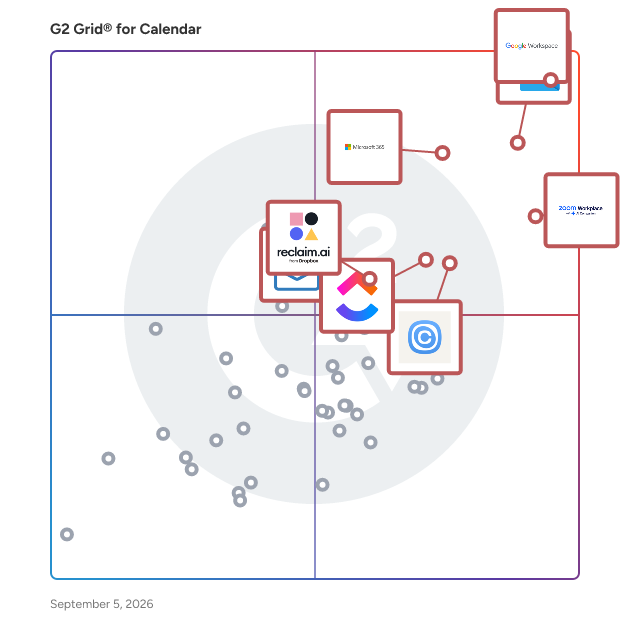
- **Leader:** [Google Workspace](https://www.g2.com/products/google-workspace/reviews)
- **Highest Performer:** [Acuity Scheduling](https://www.g2.com/products/acuity-scheduling/reviews)
- **Easiest to Use:** [Google Workspace](https://www.g2.com/products/google-workspace/reviews)
- **Top Trending:** [Google Workspace](https://www.g2.com/products/google-workspace/reviews)
- **Best Free Software:** [Zoom Workplace](https://www.g2.com/products/zoom-workplace/reviews)

  
---

**Sponsored**

### Conga Composer

Flexible. Scalable. Embedded. Conga Composer transforms how businesses generate documents Disconnected systems and manual workflows make document generation slow, error-prone, and costly. Conga Composer streamlines this by embedding automated document creation into your existing tools. It supports multiple formats, merges data from any source, and scales effortlessly, empowering teams to deliver accurate, beautifully branded documents faster, with less effort and greater control. Conga Composer excels in document generation with key advantages: Launch Anywhere – Trigger document generation from buttons, flows, Apex, or external systems- no custom code needed. Multi-Format Support – Create Word, PDF, Excel, PowerPoint, and HTML email templates. Dynamic Content – Use conditional logic, charts, dashboards, rich text, and global currencies. High-Volume Ready – Supports large templates (25MB), merged outputs (250MB), and batch processing. Enterprise Scalability – Reusable templates and behaviors across departments and use cases. eSignature Integration – Seamless pairing with Conga Sign for end-to-end agreement workflows. Revenue Lifecycle Alignment – Only vendor that integrates doc gen into CLM, CPQ, and full revenue processes. Admin-Friendly Setup – Built for Salesforce admins and business users—no developer dependency. Proven Performance – Trusted by 8,000+ businesses; millions of documents generated monthly. Future-Ready – Monitoring AI trends to invest when enterprise-grade reliability is guaranteed. With these strengths, Conga Composer delivers a scalable, flexible, and automated solution for efficient document generation.


[Visit website](https://www.g2.com/external_clickthroughs/record?secure%5Bad_program%5D=ppc&amp;secure%5Bad_slot%5D=category_product_list&amp;secure%5Bcategory_id%5D=147&amp;secure%5Bdisplayable_resource_id%5D=1120&amp;secure%5Bdisplayable_resource_type%5D=Category&amp;secure%5Bmedium%5D=sponsored&amp;secure%5Bplacement_reason%5D=neighbor_category&amp;secure%5Bplacement_resource_ids%5D%5B%5D=237&amp;secure%5Bprioritized%5D=false&amp;secure%5Bproduct_id%5D=274&amp;secure%5Bresource_id%5D=147&amp;secure%5Bresource_type%5D=Category&amp;secure%5Bsource_type%5D=category_page&amp;secure%5Bsource_url%5D=https%3A%2F%2Fwww.g2.com%2Fcategories%2Fcalendar-software%3Fpage%3D7&amp;secure%5Btoken%5D=3e8b9100a40c1701e2e6b1587181084d455248c9532f4f693efc31acbdb7f36d&amp;secure%5Burl%5D=https%3A%2F%2Fconga.com%2Fdemo%3Futm_campaign%3Dg2clickcampaign-composer-demo%26utm_source%3Dg2%26utm_medium%3Dreview-site%26utm_content%3D&amp;secure%5Burl_type%5D=book_demo)

---

  
    ## What Is Calendar Software?
  [Collaboration &amp; Productivity Software](https://www.g2.com/categories/collaboration-productivity)
  ## What Software Categories Are Similar to Calendar Software?
    - [Document Creation Software](https://www.g2.com/categories/document-creation)
    - [Online Appointment Scheduling Software](https://www.g2.com/categories/online-appointment-scheduling)
    - [Business Scheduling Software](https://www.g2.com/categories/business-scheduling)

  
---

## How Do You Choose the Right Calendar Software?

### What You Should Know About Calendar Software

### What is Calendar Software?

Calendar software is ultimately defined by its user interface and ease of accessibility. Overall, it is meant to seamlessly transition from a traditional physical agenda, as well as provide additional collaborative benefits. Customizable viewing options allow users to observe a daily, weekly, monthly, or yearly view of upcoming tasks and events. Ease of collaboration is a common benefit that is integral for events and tasks involving large groups. Other customization options include ongoing calendar event scheduling and adjustable event notifications.

### Why Use Calendar Software?

Since operating efficiently relies heavily on organization and productive collaboration, businesses will primarily benefit from a calendar’s scheduling feature. It’s common for plans to change, considerably more often within a large team. With calendar software, miniscule appointment changes can be adjusted very simply. Many calendars offer alerting functionality, so guests are notified when appointments change. In addition, the availability and capacity sharing features within calendar software facilitate transparency and allow team members to work around everyone’s personal schedule.

Task management is also a key benefit to calendar software. Along with a visually simple interface, a calendar can double as a reminder tool for short-term and long-term professional responsibilities. With clear due dates and reminders, assigned tasks don’t go unnoticed.

An appealing aspect of calendar software is its affordability. In most cases, basic versions are free to use. Free options allow businesses to choose a calendar software that fits perfectly with their team without the risk of immediate cost. Once a business identifies the perfect fit, it can consider premium editions for added benefits. Premium benefits are typically part of a larger software suite and can include features such as additional storage, increased user capacity, and user activity tracking.

Additionally, utilizing calendar software is an example of [working smarter, not harder](https://learn.g2crowd.com/work-smarter-not-harder? __hstc=171774463.71aa7467ba29034ef139e95f7e426396.1609780029190.1610644079203.1610684980335.37&amp;__ hssc=171774463.133.1610684980335&amp;__hsfp=669407890). Being aware of your availability leaves room for free time, which in turn can be an opportunity to organize other aspects of your work or just take a breather. Employees have the freedom to decline invitations, a time-saving feature that prevents unneeded back and forth between manager and employee. Plus, calendar software is easy and intuitive enough to introduce to a team without formalized training.

Key Benefits of Calendar Software

- Cloud-based scheduling
- Third-party application integration
- Availability and capacity sharing 
- Appointment reminders
- Address book
- Cross-device capability
- Customizable calendar views

### Who Uses Calendar Software?

Calendar software is built to serve the masses, and everyone has the option to use digital calendars to enhance their daily lifestyle. For business users, the benefits are invaluable. These are the main groups that benefit from calendar software:

**Businesses –** Calendar software is ideal for businesses of all sizes and especially useful for companies with employees who are often remote or out of the office. Internal planning of all types is easily scheduled with minimal effort.

**Individuals –** An individual user is likely to use a basic calendar app for mobile devices to plan their day-to-day tasks assigned at work and in their personal life. A calendar is more approachable than a normal to-do list, but also gives a sense of a deadline.

### Kinds of Calendar Software

Calendar software will typically appeal to either a casual user or business user depending on its key capabilities and interface. While both users are looking for basic scheduling, a casual user will gravitate toward free, aesthetically pleasing, and easy-to-use software that works well on a mobile device. A business user will get more use out of calendar software that facilitates easy collaboration and includes customization options.

**Suite Calendars –** Collaborative teams benefit greatly from calendars that are a part of a larger suite of applications. With internal integrations, general sharing is straightforward and simple. Common suite integrations include [email software](https://www.g2.com/categories/email) and [business content management software](https://www.g2.com/categories/business-content-management).

**Standalone Calendars –** Appealing to casual users, standalone calendar applications are a great choice for people who just want a basic calendar for personal scheduling. The interface is typically straightforward and will not have many added features or enhancements beyond its basic format. Standalone calendars are clean and ideal for those who don’t have numerous appointments or tasks to keep track of.

**Client Scheduling Calendars –** Calendar software used specifically for client bookings ensures organized appointment scheduling and will oftentimes allow clients to take the reins and schedule their own appointments. Real-time availability shows the open timeslots a business has, making it simple for a client to schedule around unavailable times. For health care providers, [medical scheduling software](https://www.g2.com/categories/medical-scheduling) facilitates easy scheduling for patient examinations.

### Calendar Software Features

**Scheduling –** Scheduling is the primary benefit of calendar software. Users have plenty of customizable options to choose from when creating an appointment invitation, whether its for a large event or for a quick one-on-one meeting.

**Collaboration –** Calendars allow you to see other team calendars within your own calendar to get a better idea of team availability. Users can toggle their view based on the calendar(s) of interest.

**Organization –** A calendar’s interface allows a user to visualize their own availability and customize their view to their personal needs. Users can also choose to download third-party calendar templates or task templates for further customization.

**Tasks –** Both personal and collaborative tasks can be in the spotlight on calendars. Set up personal reminders for tasks, organize your own tasks, or view collaborator tasks.

**Integration –** A notable feature is the option to interact with other software in an effort to enhance the key features of the basic calendar. Common integrations include enhanced to-do lists, [video conferencing software](https://www.g2.com/categories/video-conferencing), and [internal communications software](https://www.g2.com/categories/internal-communications). Calendars that are part of a suite feature their own internal integrations.

### Trends Related to Calendar Software

**Machine Learning –** A deeper understanding of a user’s availability goes hand in hand with heavy usage of calendar software on a daily basis. AI has the capability to automate scheduling on the behalf of the user based on their record of past commitments. In other forms, AI can also be used as a personal assistant for easy scheduling, which becomes more accurate and useful as AI becomes more developed.

### Potential Issues with Calendar Software

While calendar software has proven to be an essential tool for any business, it still has its potential issues:

**Sharing Setbacks –** With a large variety of calendar software available, it’s common for employees to favor one calendar software over another. If employees choose to stray from the company’s choice of calendar software, sharing calendar data between multiple calendar applications can prove to be a challenge. Many calendars do not allow sharing with competitor applications. To prevent any mishaps, ensure the entire company sticks to one platform.

**Appointment Time Restrictions –** Calendars will typically only offer 15–30-minute time spans for invitations, making it difficult to plan meetings that are fewer than 15 minutes long. This can muddy up calendars for people that have packed schedules and prefer to schedule meetings or appointments with intricate time spans.

### Software and Services Related to Calendar Software

[**Email Software**](https://www.g2.com/categories/email) **–** Email software and calendar software go hand in hand when working together to handle calendar invitations. When a user receives an invitation, an email holding all of the appointment details will be within it. The user can accept, decline, or mark the invitation decision as pending within the email. Users can also be notified via email if an invitation has been changed or canceled.

[**Meeting Room Booking System**](https://www.g2.com/categories/meeting-room-booking-system) **–** Video conferencing software with booking features that can integrate with calendar software allows a user to reserve meeting rooms within the office based on room availability.

[**Online Appointment Scheduler**](https://www.g2.com/categories/online-appointment-scheduling) **–** A business can implement a calendar on its website to allow consumers to schedule appointments on their own. Businesses can customize the consumer’s view of the calendar to prevent appointments being scheduled during unavailable hours.

[**Project Management Software**](https://www.g2.com/categories/project-management) **–** Teams can coordinate on group projects or individual tasks in an effort to allocate resources and ensure deadlines are reached. Calendar software is an ideal tool for project management, since it allows users to visually scope the progress of a team or individual. Additionally, it’s a simple way to keep track of assigned tasks.


