# Best Mobile Device Management (MDM) Software

*By [Adam Crivello](https://research.g2.com/insights/author/adam-crivello)*


Mobile device management (MDM) software enables IT departments to monitor, secure, and manage mobile devices, including smartphones and tablets, across various providers and operating systems, applying custom policies to prevent data loss, restrict unauthorized software installs, and maintain control over corporate data access.

### Core Capabilities of MDM Software

To qualify for inclusion in the Mobile Device Management category, a product must:

- Be compatible with all common or company-issued mobile devices and support necessary operating systems and platforms
- Function through and with multiple service providers
- Customize device settings and policies according to company requirements
- Integrate with existing IT, administrative, and application systems
- Enable the remote configuration, locking, wiping, detection, and encryption of devices
- Report on device activity

### Common Use Cases for MDM Software

IT and security teams use MDM software to maintain control and compliance across mobile device fleets in increasingly distributed work environments. Common use cases include:

- Provisioning and configuring company-issued or BYOD devices with corporate policies and security settings
- Remotely wiping or locking lost or compromised devices to prevent unauthorized data access
- Enforcing app management policies to prevent unauthorized software installs and maintain compliance

### How MDM Software Differs from Other Tools

MDM software focuses specifically on the management and security of mobile endpoints, smartphones and tablets, distinguishing it from broader endpoint management platforms that cover desktops, servers, and IoT devices. While MDM addresses device-level provisioning and policy enforcement, it is often used alongside identity and access management tools to provide a complete mobile security posture for the enterprise.

### Insights from G2 on MDM Software

Based on category trends on G2, remote device management capabilities and cross-platform compatibility stand out as the most valued features. Improved security posture and reduced time spent on device provisioning stand out as primary outcomes of adoption.


## Top Mobile Device Management (MDM) Software at a Glance
| # | Product | Rating | Best For | What Users Say |
|---|---------|--------|----------|----------------|
| 1 | [Jamf](https://www.g2.com/products/jamf/reviews) | 4.7/5.0 (2,231 reviews) | Enterprise Apple device management with zero-touch enrollment | "[Jamf Cloud Makes Apple Environment Setup and Migration Seamless](https://www.g2.com/survey_responses/jamf-review-12704988)" |
| 2 | [NinjaOne](https://www.g2.com/products/ninjaone/reviews) | 4.7/5.0 (4,439 reviews) | Unified RMM with patching and remote access for MSPs | "[Turning Endpoint Management Into a Competitive Advantage](https://www.g2.com/survey_responses/ninjaone-review-8769111)" |
| 3 | [JumpCloud](https://www.g2.com/products/jumpcloud/reviews) | 4.5/5.0 (3,891 reviews) | Cloud directory for identity, devices, and SSO | "[All-in-One Access and Device Management That Saves Time](https://www.g2.com/survey_responses/jumpcloud-review-12977315)" |
| 4 | [Admin](https://www.g2.com/products/google-admin/reviews) | 4.4/5.0 (108 reviews) | Centralized Google Workspace user and policy administration | "[Unified Management Simplified, Needs More Control](https://www.g2.com/survey_responses/admin-review-12661072)" |
| 5 | [Iru](https://www.g2.com/products/iru/reviews) | 4.7/5.0 (818 reviews) | Apple MDM with blueprint provisioning for growing teams | "[Intuitive, Powerful Endpoint Management That Is Getting Better](https://www.g2.com/survey_responses/iru-review-13067999)" |
| 6 | [AirDroid Business](https://www.g2.com/products/airdroid-business/reviews) | 4.9/5.0 (426 reviews) | Remote Android device management for distributed fleets | "[AirDroid Business Makes Remote Support, Updates, and Monitoring Effortless](https://www.g2.com/survey_responses/airdroid-business-review-13088861)" |
| 7 | [Rippling IT](https://www.g2.com/products/rippling-it/reviews) | 4.7/5.0 (1,050 reviews) | HR-triggered device and access provisioning | "[IT provisioning and app access made completely painless for everyday employees.](https://www.g2.com/survey_responses/rippling-it-review-13035351)" |
| 8 | [IBM MaaS360](https://www.g2.com/products/ibm-maas360/reviews) | 4.2/5.0 (193 reviews) | — | "[Efficient and Secure Management for Remote Teams](https://www.g2.com/survey_responses/ibm-maas360-review-12996280)" |
| 9 | [TeamViewer](https://www.g2.com/products/teamviewer/reviews) | 4.5/5.0 (3,942 reviews) | Cross-platform remote access and IT support at scale | "[TeamViewer’s Global Culture and Expanding Digital Workplace Vision](https://www.g2.com/survey_responses/teamviewer-review-13087488)" |
| 10 | [Jamf Now](https://www.g2.com/products/jamf-now/reviews) | 4.4/5.0 (51 reviews) | Simple Apple MDM for small teams with blueprint configuration | "[Easy MDM That Just Works](https://www.g2.com/survey_responses/jamf-now-review-11931306)" |


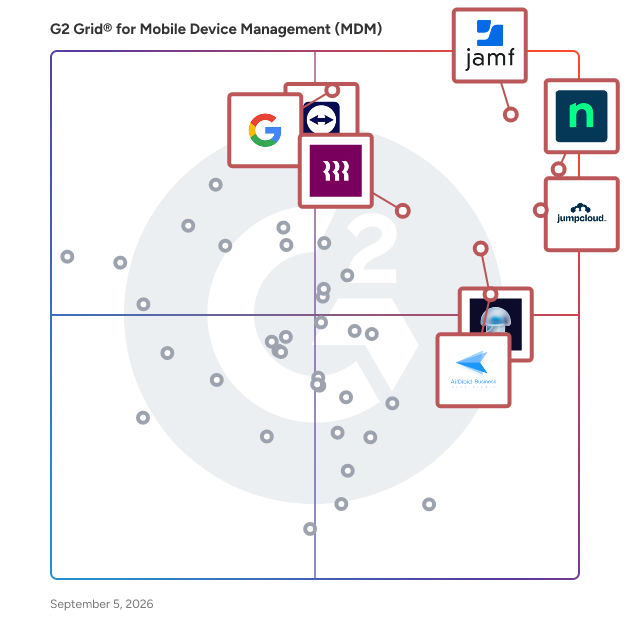
## G2 Grid® for Mobile Device Management (MDM) Software
![G2 Grid® for Mobile Device Management (MDM) Software plotting products by satisfaction and market presence](https://www.g2.com/categories/mobile-device-management-mdm/grids.png?focus%5B%5D=20054&focus%5B%5D=25671&focus%5B%5D=36316&focus%5B%5D=55466&focus%5B%5D=87326&focus%5B%5D=135204&focus%5B%5D=1640029&focus%5B%5D=1146)
Highlighted products: Jamf, NinjaOne, JumpCloud, Admin, Iru, AirDroid Business, Rippling IT, and IBM MaaS360.
Underlying data: [Grid® JSON](https://www.g2.com/categories/mobile-device-management-mdm/grids.json?focus%5B%5D=jamf&amp;focus%5B%5D=ninjaone&amp;focus%5B%5D=jumpcloud&amp;focus%5B%5D=google-admin&amp;focus%5B%5D=iru&amp;focus%5B%5D=airdroid-business&amp;focus%5B%5D=rippling-it&amp;focus%5B%5D=ibm-maas360)


## How Many Mobile Device Management (MDM) Software Products Does G2 Track?
**Total Products under this Category:** 107

### Category Stats (Jul 2026)
- **Average Rating**: 4.53/5 The average rating of products in this category, based on all submitted ratings
- **Top Trending Product**: Ivanti Neurons for Unified Endpoint Management (+0.71%) - Among all products in this category, Ivanti Neurons for Unified Endpoint Management recorded the largest rating increase compared to last month
*Last updated: July 16, 2026*


## How Does G2 Rank Mobile Device Management (MDM) Software Products?

**Why You Can Trust G2's Software Rankings:**

- 30 Analysts and Data Experts
- 22,700+ Authentic Reviews
- 107+ Products
- Unbiased Rankings

G2's software rankings are built on verified user reviews, rigorous moderation, and a consistent research methodology maintained by a team of analysts and data experts. Each product is measured using the same transparent criteria, with no paid placement or vendor influence. While reviews reflect real user experiences, which can be subjective, they offer valuable insight into how software performs in the hands of professionals. Together, these inputs power the G2 Score, a standardized way to compare tools within every category.


## Which Mobile Device Management (MDM) Software Is Best for Your Use Case?

- **Leader:** [Jamf](https://www.g2.com/products/jamf/reviews)
- **Highest Performer:** [SureMDM by 42Gears](https://www.g2.com/products/suremdm-by-42gears/reviews)
- **Easiest to Use:** [AirDroid Business](https://www.g2.com/products/airdroid-business/reviews)
- **Top Trending:** [Rippling IT](https://www.g2.com/products/rippling-it/reviews)
- **Best Free Software:** [TeamViewer](https://www.g2.com/products/teamviewer/reviews)


---

**Sponsored**

### JumpCloud

JumpCloud® delivers a unified identity, device, and access management platform that makes it easy to securely manage identities, devices, and access across your organization. With JumpCloud, IT teams and MSPs enable users to work securely from anywhere and manage their Windows, Apple, Linux, and Android devices from a single platform.


[Visit website](https://www.g2.com/external_clickthroughs/record?secure%5Bad_program%5D=ppc&amp;secure%5Bad_slot%5D=category_product_list&amp;secure%5Bcategory_id%5D=161&amp;secure%5Bchosen_at%5D=2026-07-17T15%3A11%3A23Z&amp;secure%5Bdisplayable_resource_id%5D=161&amp;secure%5Bdisplayable_resource_type%5D=Category&amp;secure%5Bmedium%5D=sponsored&amp;secure%5Bplacement_reason%5D=page_category&amp;secure%5Bplacement_resource_ids%5D%5B%5D=161&amp;secure%5Bprioritized%5D=false&amp;secure%5Bproduct_id%5D=36316&amp;secure%5Bresource_id%5D=161&amp;secure%5Bresource_type%5D=Category&amp;secure%5Bsource_type%5D=category_page&amp;secure%5Bsource_url%5D=https%3A%2F%2Fwww.g2.com%2Fcategories%2Fmobile-device-management-mdm&amp;secure%5Btoken%5D=4ad76e6fc22c28461bd8ffa67f9747bc105abc619dc3dc392500f43d828d2e63&amp;secure%5Burl%5D=https%3A%2F%2Fjumpcloud.com%2Flp%2Funified-enpoint-management-g2%3Futm_source%3DG2-Paid%26utm_medium%3DPaid-Directory%26utm_content%3DMDM%26utm_campaign%3DG2Clicks&amp;secure%5Burl_type%5D=custom_url)

---

## What Are the Top-Rated Mobile Device Management (MDM) Software Products in 2026?
### 1. [Jamf](https://www.g2.com/products/jamf/reviews)
Jamf gives organizations a dedicated platform for managing, securing and onboarding Apple devices at scale, including iPhone, iPad, Mac, Apple Watch and Apple TV. It fits seamlessly into Windows-centric environments and also supports Android to unify mixed-fleet mobility. IT teams gain powerful automation, accurate Apple endpoint telemetry and continuous compliance monitoring, while users enjoy a fast, native Apple experience. Jamf also enables mobility and industry workflows across healthcare, retail and education, providing secure identity, access and purpose-built frontline experiences. Jamf delivers the Apple-specific management, security and compliance capabilities organizations need without adding complexity.


**Average Rating:** 4.7/5.0
**Total Reviews:** 2,231
**How Do G2 Users Rate Jamf?**

- **Has the product been a good partner in doing business?:** 9.3/10 (Category avg: 9.0/10)
- **Whitelist:** 8.5/10 (Category avg: 8.9/10)
- **Remote Wipe:** 9.2/10 (Category avg: 9.2/10)
- **Blacklist:** 8.6/10 (Category avg: 8.9/10)

**Who Is the Company Behind Jamf?**

- **Seller:** [Jamf](https://www.g2.com/sellers/jamf)
- **Company Website:** https://www.jamf.com/
- **Year Founded:** 2002
- **HQ Location:** Minneapolis, MN
- **Twitter:** @JAMFSoftware (11,069 Twitter followers)
- **LinkedIn® Page:** https://www.linkedin.com/company/717074/ (2,521 employees on LinkedIn®)

**Who Uses This Product?**
- **Who Uses This:** Systems Administrator, IT Manager
- **Top Industries:** Higher Education, Education Management
- **Company Size:** 50% Enterprise, 41% Mid-Market


#### What Are Jamf's Pros and Cons?

**Pros:**

- Device Management (98 reviews)
- Ease of Use (93 reviews)
- Features (61 reviews)
- Customer Support (54 reviews)
- Apple Device Management (53 reviews)

**Cons:**

- Complexity (30 reviews)
- Difficult Learning (27 reviews)
- Learning Curve (21 reviews)
- Improvement Needed (20 reviews)
- Expensive (16 reviews)


### What Do G2 Reviewers Say About Jamf?
*AI-generated summary from verified user reviews*

**Pros:**

- Users value the **powerful device management capabilities** of Jamf Pro, enhancing compliance and control across Apple devices.
- Users value the **ease of use** of Jamf, enhancing their management of Apple devices effortlessly.
- Users value the **deep integrations and comprehensive management** capabilities of Jamf, enhancing security and user efficiency.
- Users highly value the **excellent customer support** of Jamf, which significantly enhances their management experience.
- Users find Jamf Pro makes **managing Apple devices incredibly simple** , providing powerful tools for extensive device fleets.

**Cons:**

- Users find Jamf to be **complex** , with unintuitive tools and challenging support hindering their overall experience.
- Users find that the **difficult learning** curve with Jamf hinders efficient use of the system and support accessibility.
- Users experience a **steep learning curve** with Jamf, finding it complex and challenging to navigate effectively.
- Users indicate that **improvements are needed** in Jamf&#39;s UI/UX and log visibility for better performance and usability.
- Users note that the **cost of Jamf** can be prohibitive, especially without built-in remote support options.

#### What Are Recent G2 Reviews of Jamf?

**"[Top Rated  MDM Software](https://www.g2.com/survey_responses/jamf-review-837848)"**

**Rating:** 5.0/5.0 stars
*— Kim T.*

[Read full review](https://www.g2.com/survey_responses/jamf-review-837848)

---

**"[Jamf Cloud Makes Apple Environment Setup and Migration Seamless](https://www.g2.com/survey_responses/jamf-review-12704988)"**

**Rating:** 4.5/5.0 stars
*— Victor P.*

[Read full review](https://www.g2.com/survey_responses/jamf-review-12704988)

---


#### What Are G2 Users Discussing About Jamf?

- [What do you recommend for those looking to replace Jamf Connect with another identity management solution?](https://www.g2.com/discussions/what-do-you-recommend-for-those-looking-to-replace-jamf-connect-with-another-identity-management-solution)
- [How can a new IT administrator best utilize Jamf Pro for managing a fleet of Apple devices in an organization?](https://www.g2.com/discussions/how-can-a-new-it-administrator-best-utilize-jamf-pro-for-managing-a-fleet-of-apple-devices-in-an-organization)
- [What is Jamf Pro used for?](https://www.g2.com/discussions/what-is-jamf-pro-used-for)
- [Who uses Jamf?](https://www.g2.com/discussions/who-uses-jamf) - 3 comments
- [What is the difference between Jamf now and Jamf pro?](https://www.g2.com/discussions/what-is-the-difference-between-jamf-now-and-jamf-pro) - 4 comments

### 2. [NinjaOne](https://www.g2.com/products/ninjaone/reviews)
NinjaOne is the unified IT operations platform that helps IT teams and managed service providers manage, secure, and support every endpoint from a single cloud-native console. Nearly 40,000 customers across 140+ countries use NinjaOne to replace fragmented point tools with one platform built to scale. The platform brings together the core work of modern IT operations: endpoint management, autonomous patch management, vulnerability management, endpoint and SaaS backup, remote access, and IT service desk. Teams monitor and control Windows, macOS, Linux, mobile, and virtual devices in one place, automate routine work with policy-based automation and human-centered AI, and cut the cost and risk that come from running many disconnected tools. NinjaOne serves internal IT teams and MSPs alike, from lean IT departments to mid-market and large enterprise organizations managing distributed, multi-site environments. Common uses include consolidating IT tooling, automating patching for security and compliance, managing distributed and hybrid workforces, improving endpoint visibility, and strengthening backup and ransomware readiness. NinjaOne has maintained a 98 percent customer satisfaction score for more than five years, backed by free unlimited onboarding and 24/7 support in seven languages. Organizations that move to NinjaOne report replacing four or more separate tools with the single platform. NinjaOne is FedRAMP Moderate Authorized and SOC 2 Type II and Type III compliant, and supports audit-ready compliance evidence across frameworks including CMMC, ISO 27001, and HIPAA. The mission behind the platform is simple: unify IT to simplify work, giving IT teams better tools and employees a great technology experience at work.


**Average Rating:** 4.7/5.0
**Total Reviews:** 4,439
**How Do G2 Users Rate NinjaOne?**

- **Has the product been a good partner in doing business?:** 9.4/10 (Category avg: 9.0/10)
- **Whitelist:** 8.4/10 (Category avg: 8.9/10)
- **Remote Wipe:** 8.6/10 (Category avg: 9.2/10)
- **Blacklist:** 8.3/10 (Category avg: 8.9/10)

**Who Is the Company Behind NinjaOne?**

- **Seller:** [NinjaOne](https://www.g2.com/sellers/ninjaone)
- **Company Website:** https://www.ninjaone.com/
- **Year Founded:** 2013
- **HQ Location:** Austin, Texas
- **Twitter:** @NinjaOne (3,607 Twitter followers)
- **LinkedIn® Page:** https://www.linkedin.com/company/6436301/ (2,376 employees on LinkedIn®)

**Who Uses This Product?**
- **Who Uses This:** IT Manager, Owner
- **Top Industries:** Information Technology and Services, Computer &amp; Network Security
- **Company Size:** 48% Mid-Market, 44% Small-Business


#### What Are NinjaOne's Pros and Cons?

**Pros:**

- Ease of Use (1373 reviews)
- Automation (909 reviews)
- Remote Access (867 reviews)
- Features (852 reviews)
- Customer Support (733 reviews)

**Cons:**

- Missing Features (792 reviews)
- Improvement Needed (424 reviews)
- Limited Features (396 reviews)
- Needs Improvement (362 reviews)
- Feature Issues (306 reviews)


### What Do G2 Reviewers Say About NinjaOne?
*AI-generated summary from verified user reviews*

**Pros:**

- Users appreciate the **ease of use** of NinjaOne, streamlining asset management and automating essential tasks effortlessly.
- Users praise the **powerful automation** capabilities of NinjaOne, enhancing efficiency and simplifying device management.
- Users appreciate the **easy navigation and dashboard** of NinjaOne, facilitating quick device management and monitoring.
- Users praise NinjaOne for its **automated updates and efficient alerts** , significantly simplifying server management and saving time.
- Users value the **excellent customer support** from NinjaOne, noting quick access to knowledgeable staff and practical solutions.

**Cons:**

- Users feel the **missing features** limit functionality, particularly lacking client and customer portal capabilities.
- Users find the **search function lacking** , and the interface can confuse end users with unclear icons.
- Users find NinjaOne has **limited features** , especially in mobile app functionality and device management options.
- Users find that NinjaOne needs **improvement in search functionality** and a better ticketing dashboard for efficiency tracking.
- Users report facing **feature issues** with function settings and a lack of adequate role-based controls in NinjaOne.

#### What Are Recent G2 Reviews of NinjaOne?

**"[Turning Endpoint Management Into a Competitive Advantage](https://www.g2.com/survey_responses/ninjaone-review-8769111)"**

**Rating:** 5.0/5.0 stars
*— Randy R.*

[Read full review](https://www.g2.com/survey_responses/ninjaone-review-8769111)

---

**"[Centralized Endpoint Management That Boosts Efficiency and Security](https://www.g2.com/survey_responses/ninjaone-review-13118823)"**

**Rating:** 4.5/5.0 stars
*— John V.*

[Read full review](https://www.g2.com/survey_responses/ninjaone-review-13118823)

---


#### What Are G2 Users Discussing About NinjaOne?

- [What is NinjaOne (formerly NinjaRMM) used for?](https://www.g2.com/discussions/what-is-ninjaone-formerly-ninjarmm-used-for) - 2 comments
- [Does Office 365 Backup your data?](https://www.g2.com/discussions/does-office-365-backup-your-data) - 3 comments
- [What does Dropsuite Backup?](https://www.g2.com/discussions/what-does-dropsuite-backup) - 1 comment

### 3. [JumpCloud](https://www.g2.com/products/jumpcloud/reviews)
JumpCloud® delivers a unified identity, device, and access management platform that makes it easy to securely manage identities, devices, and access across your organization. With JumpCloud, IT teams and MSPs enable users to work securely from anywhere and manage their Windows, Apple, Linux, and Android devices from a single platform.


**Average Rating:** 4.5/5.0
**Total Reviews:** 3,891
**How Do G2 Users Rate JumpCloud?**

- **Has the product been a good partner in doing business?:** 9.0/10 (Category avg: 9.0/10)
- **Whitelist:** 8.4/10 (Category avg: 8.9/10)
- **Remote Wipe:** 8.8/10 (Category avg: 9.2/10)
- **Blacklist:** 8.2/10 (Category avg: 8.9/10)

**Who Is the Company Behind JumpCloud?**

- **Seller:** [JumpCloud Inc.](https://www.g2.com/sellers/jumpcloud-inc)
- **Company Website:** https://jumpcloud.com/
- **Year Founded:** 2012
- **HQ Location:** Louisville, CO
- **Twitter:** @JumpCloud (36,368 Twitter followers)
- **LinkedIn® Page:** https://www.linkedin.com/company/jumpcloud/ (974 employees on LinkedIn®)

**Who Uses This Product?**
- **Who Uses This:** IT Manager, System Administrator
- **Top Industries:** Information Technology and Services, Computer Software
- **Company Size:** 53% Mid-Market, 35% Small-Business


#### What Are JumpCloud's Pros and Cons?

**Pros:**

- Ease of Use (881 reviews)
- Device Management (588 reviews)
- Security (519 reviews)
- Integrations (482 reviews)
- User Management (426 reviews)

**Cons:**

- Missing Features (382 reviews)
- Improvement Needed (301 reviews)
- Limited Features (199 reviews)
- Limitations (177 reviews)
- UX Improvement (150 reviews)


### What Do G2 Reviewers Say About JumpCloud?
*AI-generated summary from verified user reviews*

**Pros:**

- Users appreciate the **ease of use** of JumpCloud, enjoying seamless management of users and devices in one platform.
- Users appreciate the **unified device management** of JumpCloud, simplifying user and device oversight effectively in one platform.
- Users value the **robust security features** of JumpCloud, enhancing protection with zero trust and MFA capabilities.
- Users appreciate the **sophisticated integrations** offered by JumpCloud, streamlining user and device management across platforms effortlessly.
- Users value the **efficient user management** features of JumpCloud, simplifying access control across multiple platforms seamlessly.

**Cons:**

- Users note **missing features** such as advanced endpoint controls and improved reporting, impacting overall functionality and ease of use.
- Users find that **improvements are needed** in macOS deployments, integrations, and overall reporting capabilities of JumpCloud.
- Users note the **limited features** of JumpCloud, especially regarding the app catalog and Linux device management capabilities.
- Users face **deployment challenges** on macOS, indicating a need for enhanced controls and improved reporting capabilities.
- Users find the **UX improvement necessary** as the interface and settings can be confusing and unclear.

#### What Are Recent G2 Reviews of JumpCloud?

**"[Easy Setup and Strong Security for Password Management](https://www.g2.com/survey_responses/jumpcloud-review-12976011)"**

**Rating:** 4.5/5.0 stars
*— Siddharth V.*

[Read full review](https://www.g2.com/survey_responses/jumpcloud-review-12976011)

---

**"[All-in-One Access and Device Management That Saves Time](https://www.g2.com/survey_responses/jumpcloud-review-12977315)"**

**Rating:** 4.5/5.0 stars
*— AK J.*

[Read full review](https://www.g2.com/survey_responses/jumpcloud-review-12977315)

---


#### What Are G2 Users Discussing About JumpCloud?

- [How is JumpCloud redefining identity and access management in hybrid IT environments for tech companies?](https://www.g2.com/discussions/how-is-jumpcloud-redefining-identity-and-access-management-in-hybrid-it-environments-for-tech-companies) - 1 comment, 4 upvotes
- [What is JumpCloud used for?](https://www.g2.com/discussions/jumpcloud-what-is-jumpcloud-used-for) - 3 comments, 4 upvotes
- [Can JumpCloud replace Active Directory?](https://www.g2.com/discussions/jumpcloud-can-jumpcloud-replace-active-directory) - 3 comments, 1 upvote
- [Is JumpCloud secure?](https://www.g2.com/discussions/is-jumpcloud-secure) - 2 comments, 3 upvotes
- [What is JumpCloud?](https://www.g2.com/discussions/what-is-jumpcloud) - 1 comment

### 4. [Admin](https://www.g2.com/products/google-admin/reviews)
Google Workspace Admin is a centralized management console designed to streamline the administration of Google Workspace services within an organization. It enables administrators to efficiently manage users, devices, and security settings, ensuring data protection and compliance without the need for extensive technical expertise. Key Features and Functionality: - User Management: Easily add, remove, and manage user accounts, assign roles, and control access to various Google Workspace services. - Device Management: Monitor and manage company-owned and personal devices accessing organizational data, enforce security policies, and remotely wipe data from lost or compromised devices. - Security Controls: Implement robust security measures such as two-step verification, security keys, and manage password policies to safeguard organizational data. - Data Regions and Compliance: Specify the geographical location for data storage to meet regulatory requirements and gain visibility into actions taken by Google staff related to your data. - Reporting and Insights: Access detailed reports and audit logs to monitor usage, track security incidents, and ensure compliance with organizational policies. Primary Value and Solutions Provided: Google Workspace Admin simplifies the complex task of managing an organization&#39;s digital environment by providing a unified platform for user and device management, security enforcement, and compliance monitoring. It addresses the need for efficient administration, enhances data security, and ensures that organizations can meet regulatory requirements with ease. By offering intuitive tools and comprehensive controls, it empowers administrators to maintain a secure and productive workspace without requiring extensive technical knowledge.


**Average Rating:** 4.4/5.0
**Total Reviews:** 108
**How Do G2 Users Rate Admin?**

- **Has the product been a good partner in doing business?:** 8.7/10 (Category avg: 9.0/10)
- **Whitelist:** 8.9/10 (Category avg: 8.9/10)
- **Remote Wipe:** 8.8/10 (Category avg: 9.2/10)
- **Blacklist:** 8.8/10 (Category avg: 8.9/10)

**Who Is the Company Behind Admin?**

- **Seller:** [Google](https://www.g2.com/sellers/google)
- **Year Founded:** 1998
- **HQ Location:** Mountain View, CA
- **Twitter:** @google (31,899,995 Twitter followers)
- **LinkedIn® Page:** https://www.linkedin.com/company/1441/ (341,888 employees on LinkedIn®)
- **Ownership:** NASDAQ:GOOG

**Who Uses This Product?**
- **Top Industries:** Information Technology and Services, Computer Software
- **Company Size:** 45% Small-Business, 39% Mid-Market


#### What Are Admin's Pros and Cons?

**Pros:**

- Ease of Use (43 reviews)
- Security (22 reviews)
- Management (16 reviews)
- Integrations (13 reviews)
- Simple (13 reviews)

**Cons:**

- Poor Navigation (14 reviews)
- Learning Curve (11 reviews)
- Improvement Needed (9 reviews)
- Expensive (6 reviews)
- Poor Reporting (5 reviews)


### What Do G2 Reviewers Say About Admin?
*AI-generated summary from verified user reviews*

**Pros:**

- Users highlight the **ease of use** of Admin, benefiting from its intuitive interface and streamlined management processes.
- Users value the **superb security** of Google Admin, ensuring centralized and adaptable management for their organizations.
- Users value the **centralized management** in Admin, making user and settings control efficient and time-saving.
- Users love the **effortless integration** of Google Admin with other Google Workspace tools, streamlining management and enhancing productivity.
- Users find Admin incredibly **easy to use** , significantly enhancing office management and simplifying workflows for everyone.

**Cons:**

- Users struggle with **poor navigation** in Admin, finding configuration settings and documentation complex and difficult to access.
- Users experience a **steep learning curve** with Admin, making it challenging to navigate and utilize effectively.
- Users find that **improvement is needed** in efficiency and ease of access to settings in Google Admin.
- Users find the product **expensive** due to high costs and unclear pricing, complicating subscription management and cancellations.
- Users find the **poor reporting** in Admin detrimental, as analytics lack depth and require external tools for adequacy.

#### What Are Recent G2 Reviews of Admin?

**"[Unified Management Simplified, Needs More Control](https://www.g2.com/survey_responses/admin-review-12661072)"**

**Rating:** 4.0/5.0 stars
*— Chad P.*

[Read full review](https://www.g2.com/survey_responses/admin-review-12661072)

---

**"[Versatile Admin Console with Robust Features](https://www.g2.com/survey_responses/admin-review-12375405)"**

**Rating:** 4.5/5.0 stars
*— Vikas V.*

[Read full review](https://www.g2.com/survey_responses/admin-review-12375405)

---


### 5. [Iru](https://www.g2.com/products/iru/reviews)
Iru is an AI-powered IT and security platform designed to help organizations secure their users, applications, and devices in an increasingly complex digital landscape. Tailored for the AI era, Iru integrates identity and access management, endpoint security, and compliance automation into a single cohesive solution. This unification streamlines operations, allowing IT and security teams to regain control and allocate their time more effectively. Targeted at fast-growing companies, Iru addresses the challenges faced by IT and security professionals who often juggle multiple tools and systems. The platform is particularly beneficial for organizations that require robust security measures while maintaining agility and efficiency. Use cases include managing user access across various applications, ensuring device security, and automating compliance processes, all of which are critical in today’s fast-paced business environment. At the heart of Iru is the Iru Context Model, which provides a dynamic overview of the organization’s environment by continuously monitoring users, devices, and applications in real-time. Complementing this model is Iru AI, an intelligent layer that transforms live data signals into actionable insights, orchestrates necessary actions, and maintains a comprehensive audit trail. This integration enhances policy enforcement, automates response mechanisms, and simplifies compliance, making it easier for organizations to adhere to regulatory requirements. One of Iru&#39;s standout features is its single endpoint agent, which manages and secures every device within an organization’s fleet. By implementing passwordless access through device-bound passkeys linked to device posture, Iru creates a trust fabric that strengthens security between users and devices. Additionally, compliance is continuously monitored with customized controls and an Adaptive Evidence Map that updates automatically, reducing the burden on IT teams and minimizing the risk of oversight. Iru aims to bring clarity and control back to overwhelmed IT and security teams by consolidating disparate tools into one unified platform. This shift allows teams to transition from reactive firefighting to proactive strategic initiatives that drive business success. The result is a more robust security posture, simplified workflows, and outcomes that align with organizational goals, ultimately fostering a safer and more efficient operational environment.


**Average Rating:** 4.7/5.0
**Total Reviews:** 818
**How Do G2 Users Rate Iru?**

- **Has the product been a good partner in doing business?:** 9.4/10 (Category avg: 9.0/10)
- **Whitelist:** 8.7/10 (Category avg: 8.9/10)
- **Remote Wipe:** 9.5/10 (Category avg: 9.2/10)
- **Blacklist:** 8.6/10 (Category avg: 8.9/10)

**Who Is the Company Behind Iru?**

- **Seller:** [Iru](https://www.g2.com/sellers/iru)
- **Year Founded:** 2018
- **HQ Location:** Miami, FL
- **Twitter:** @officiallyiru (2,021 Twitter followers)
- **LinkedIn® Page:** https://linkedin.com/company/officiallyiru (379 employees on LinkedIn®)

**Who Uses This Product?**
- **Who Uses This:** IT Manager, CTO
- **Top Industries:** Computer Software, Information Technology and Services
- **Company Size:** 71% Mid-Market, 23% Small-Business


#### What Are Iru's Pros and Cons?

**Pros:**

- Ease of Use (339 reviews)
- Customer Support (251 reviews)
- Device Management (173 reviews)
- Easy Setup (150 reviews)
- Apple Device Management (148 reviews)

**Cons:**

- Missing Features (71 reviews)
- Lacking Features (55 reviews)
- Device Management (53 reviews)
- Limited Compatibility (51 reviews)
- Expensive (46 reviews)


### What Do G2 Reviewers Say About Iru?
*AI-generated summary from verified user reviews*

**Pros:**

- Users find Kandji&#39;s **ease of use** exceptional, appreciating its friendly UI and efficient device management.
- Users highlight the **top-notch customer support** of Iru, appreciating the dedicated assistance and custom solutions offered.
- Users love the **user-friendly device management** of Iru, which simplifies managing Apple devices for all employees.
- Users praise the **easy setup** of Iru, enhanced by blueprints and supportive customer assistance throughout the process.
- Users value the **reliable platform** of Iru for effortless Apple device management and excellent support responsiveness.

**Cons:**

- Users desire **missing features** like advanced EDR capabilities and better reporting options for improved functionality.
- Users identify **lacking features** in Iru, finding design limitations and missing integrations that hinder their experience.
- Users face **device management limitations** with Kandji, particularly for non-Apple devices and offboarding challenges.
- Users express frustration over **limited compatibility** with Iru, particularly regarding support for non-Mac OS devices.
- Users find the **pricing steep** for smaller teams, making budgeting and cost management challenging.

#### What Are Recent G2 Reviews of Iru?

**"[Intuitive, Powerful Endpoint Management That Is Getting Better](https://www.g2.com/survey_responses/iru-review-13067999)"**

**Rating:** 4.0/5.0 stars
*— Eli M.*

[Read full review](https://www.g2.com/survey_responses/iru-review-13067999)

---

**"[Mac management without the Jamf effort](https://www.g2.com/survey_responses/iru-review-12969987)"**

**Rating:** 5.0/5.0 stars
*— Kay N.*

[Read full review](https://www.g2.com/survey_responses/iru-review-12969987)

---


#### What Are G2 Users Discussing About Iru?

- [How much does Addigy cost?](https://www.g2.com/discussions/how-much-does-addigy-cost)
- [What is Macos MDM?](https://www.g2.com/discussions/what-is-macos-mdm) - 2 comments, 1 upvote
- [Why Kandji?](https://www.g2.com/discussions/why-kandji) - 4 comments, 1 upvote
- [Is kandji a SaaS?](https://www.g2.com/discussions/is-kandji-a-saas) - 6 comments, 1 upvote

### 6. [AirDroid Business](https://www.g2.com/products/airdroid-business/reviews)
AirDroid Business, developed by Singapore-based SandStudio, is a comprehensive mobile device management (MDM) solution designed to help businesses manage and control fleets of Android and Windows devices from a central dashboard. With AirDroid Business, businesses can easily monitor device usage, deploy apps and updates, and remotely troubleshoot issues. It offers features such as kiosk mode, security policy, alerts &amp; notifications, location tracking, file transfer in bulk, and more. It aims to simplify the device management process, increase productivity and efficiency, and reduce management costs. AirDroid Business MDM Highlights: \*Multiple enrollment options - For Android: Zero-Touch, Android Enterprise(AE), Knox Mobile Enrollment(KME), Device Owner, and Regular Enrollment. For Windows: Regular Enrollment. \*Unattended remote access \*Batch operations \*Tasks &amp; Action logs \*Patch management \*Limit incoming &amp; outgoing calls \*Kiosk mode &amp; Policy \*Remote control with Black Screen security mode \*Location tracking \*Application management service(AMS):custom apps, Google Play Store apps and web apps \*Content management service \*Whitelisting and blocklisting browsers &amp; apps \*Remote monitor devices’ status \*Real-time alerts &amp; notifications \*Supports all Android-based endpoints \*Devices fleet management from a centralized dashboard AirDroid Business&#39;s acclaimed MDM solution currently empowers organizations across 100+ countries. Our expertise spans various vertical markets such as retail, healthcare, digital signage, transportation &amp; logistics, IT &amp; MSP services, and education. We offer free trial, online demos, and email &amp; call support to all prospects and customers, contact us for more information today!


**Average Rating:** 4.9/5.0
**Total Reviews:** 426
**How Do G2 Users Rate AirDroid Business?**

- **Has the product been a good partner in doing business?:** 9.8/10 (Category avg: 9.0/10)
- **Whitelist:** 9.7/10 (Category avg: 8.9/10)
- **Remote Wipe:** 9.6/10 (Category avg: 9.2/10)
- **Blacklist:** 9.7/10 (Category avg: 8.9/10)

**Who Is the Company Behind AirDroid Business?**

- **Seller:** [Sand Studio](https://www.g2.com/sellers/sand-studio)
- **Company Website:** https://www.airdroid.com/
- **Year Founded:** 2011
- **HQ Location:** Singapore, SG
- **Twitter:** @AirDroidB (184 Twitter followers)
- **LinkedIn® Page:** https://www.linkedin.com/company/airdroidbusiness/about (90 employees on LinkedIn®)

**Who Uses This Product?**
- **Who Uses This:** IT Manager, IT Consultant
- **Top Industries:** Information Technology and Services, Renewables &amp; Environment
- **Company Size:** 69% Mid-Market, 41% Small-Business


#### What Are AirDroid Business's Pros and Cons?

**Pros:**

- Ease of Use (93 reviews)
- Device Management (89 reviews)
- Remote Access (88 reviews)
- Features (65 reviews)
- Customer Support (49 reviews)

**Cons:**

- Expensive (17 reviews)
- Improvement Needed (11 reviews)
- Missing Features (8 reviews)
- Pricing Issues (8 reviews)
- Difficult Learning (6 reviews)


### What Do G2 Reviewers Say About AirDroid Business?
*AI-generated summary from verified user reviews*

**Pros:**

- Users appreciate the **ease of use** with AirDroid Business, highlighting its simple console and straightforward setup.
- Users value the **efficient device management** of AirDroid Business, enhancing control and service accuracy for company devices.
- Users value the **robust remote access capabilities** of AirDroid Business, enabling effortless management from anywhere globally.
- Users value the **user-friendly features** of AirDroid Business, highlighting its efficiency and reliability in device management.
- Users praise the **responsive customer support** of AirDroid Business, ensuring a smooth and effective experience.

**Cons:**

- Users find AirDroid Business **expensive** for multiple devices, especially startups facing rising costs.
- Users suggest that AirDroid Business needs **improved pricing and more language options** for a better overall experience.
- Users note **missing features** in AirDroid Business, particularly in automation options and advanced workflow triggers.
- Users note that the **pricing issues** can escalate quickly, especially with numerous one-off devices included.
- Users note a **difficult learning** curve in navigating AirDroid Business, requiring time to become fully comfortable with its features.

#### What Are Recent G2 Reviews of AirDroid Business?

**"[AirDroid Business Makes Remote Support, Updates, and Monitoring Effortless](https://www.g2.com/survey_responses/airdroid-business-review-13088861)"**

**Rating:** 4.0/5.0 stars
*— Evan K.*

[Read full review](https://www.g2.com/survey_responses/airdroid-business-review-13088861)

---

**"[Clear Insights and a Straightforward Interface That Speeds Up Work](https://www.g2.com/survey_responses/airdroid-business-review-13041539)"**

**Rating:** 4.5/5.0 stars
*— Franco D.*

[Read full review](https://www.g2.com/survey_responses/airdroid-business-review-13041539)

---


#### What Are G2 Users Discussing About AirDroid Business?

- [Is AirDroid a good app?](https://www.g2.com/discussions/is-airdroid-a-good-app)
- [What is the use of AirDroid?](https://www.g2.com/discussions/what-is-the-use-of-airdroid)
- [Is AirDroid completely free?](https://www.g2.com/discussions/is-airdroid-completely-free)
- [Can AirDroid be trusted?](https://www.g2.com/discussions/can-airdroid-be-trusted) - 5 comments

### 7. [Rippling IT](https://www.g2.com/products/rippling-it/reviews)
Transform your organization’s IT operations with Rippling’s unified platform for identity, device, access, and security management. Centralize every IT workflow, from provisioning apps and laptops to enforcing security policies, in a single dashboard. Seamlessly manage the entire employee lifecycle, automatically granting and revoking app access, configuring devices, and maintaining least-privilege controls. Enforce compliance with real-time monitoring, automated patching, and integrated endpoint protection. Streamline offboarding with instant lockouts and secure device recovery. Gain full visibility across hardware, software, and user risk without the complexity of multiple tools. Rippling helps your business cut costs, eliminate manual work, and strengthen security, so your team can move faster. Experience the power of unified IT management with Rippling today.


**Average Rating:** 4.7/5.0
**Total Reviews:** 1,050
**How Do G2 Users Rate Rippling IT?**

- **Has the product been a good partner in doing business?:** 8.9/10 (Category avg: 9.0/10)
- **Whitelist:** 8.9/10 (Category avg: 8.9/10)
- **Remote Wipe:** 9.5/10 (Category avg: 9.2/10)
- **Blacklist:** 8.8/10 (Category avg: 8.9/10)

**Who Is the Company Behind Rippling IT?**

- **Seller:** [Rippling](https://www.g2.com/sellers/rippling)
- **Company Website:** https://www.rippling.com
- **Year Founded:** 2016
- **HQ Location:** San Francisco, CA
- **Twitter:** @Rippling (12,402 Twitter followers)
- **LinkedIn® Page:** https://www.linkedin.com/company/17988315/ (7,523 employees on LinkedIn®)

**Who Uses This Product?**
- **Who Uses This:** Software Engineer, CEO
- **Top Industries:** Computer Software, Information Technology and Services
- **Company Size:** 59% Mid-Market, 27% Small-Business


#### What Are Rippling IT's Pros and Cons?

**Pros:**

- Ease of Use (675 reviews)
- Intuitive (467 reviews)
- Simple (413 reviews)
- Easy Access (374 reviews)
- User Interface (363 reviews)

**Cons:**

- Missing Features (164 reviews)
- Limited Features (112 reviews)
- Improvement Needed (89 reviews)
- Learning Curve (74 reviews)
- Poor Customer Support (73 reviews)


### What Do G2 Reviewers Say About Rippling IT?
*AI-generated summary from verified user reviews*

**Pros:**

- Users find Rippling IT&#39;s **ease of use** exceptional, allowing quick access to tasks and streamlined management of work processes.
- Users find Rippling to be **highly intuitive** , making it easy to navigate and manage essential tasks efficiently.
- Users love the **user-friendly interface** of Rippling IT, making navigation and processes easy and intuitive.
- Users appreciate the **easy access** provided by Rippling, streamlining login and enhancing organizational efficiency.
- Users appreciate the **simple and intuitive interface** of Rippling IT, making navigation and organization effortless.

**Cons:**

- Users are disappointed with the **missing features** in Rippling IT, especially regarding integration and credential management.
- Users find the **limited features** of Rippling IT frustrating, as navigation and support could be improved.
- Users suggest that **improvement is needed** in Rippling IT&#39;s menu organization and feature set functionality for better usability.
- Users find the **learning curve steep** , especially for those who aren&#39;t tech-savvy, making setup tedious at times.
- Users experience **poor customer support** from Rippling, with friendly but ineffective assistance during critical implementation phases.

#### What Are Recent G2 Reviews of Rippling IT?

**"[IT provisioning and app access made completely painless for everyday employees.](https://www.g2.com/survey_responses/rippling-it-review-13035351)"**

**Rating:** 5.0/5.0 stars
*— Kupeshanth K.*

[Read full review](https://www.g2.com/survey_responses/rippling-it-review-13035351)

---

**"[Focus on Centralized Management, Focus on Ease of Use &amp; Visibility](https://www.g2.com/survey_responses/rippling-it-review-13062629)"**

**Rating:** 5.0/5.0 stars
*— Mihir M.*

[Read full review](https://www.g2.com/survey_responses/rippling-it-review-13062629)

---


### 8. [IBM MaaS360](https://www.g2.com/products/ibm-maas360/reviews)
IBM MaaS360 is an easy to use, unified endpoint management (UEM) solution that transforms the way that organizations support users, apps, content, and data across essentially every type of device. Its open, cloud-based platform integrates with preferred security and productivity tools. You can protect your workforce with evolved Threat Management, Mobile Security, Device management features and your analytics will be powered by watsonx AI capabilities, helping you to set up a good security posture. IBM MaaS360 is available for purchase on ibm.com and AWS Marketplace.


**Average Rating:** 4.2/5.0
**Total Reviews:** 193
**How Do G2 Users Rate IBM MaaS360?**

- **Has the product been a good partner in doing business?:** 8.0/10 (Category avg: 9.0/10)
- **Whitelist:** 8.6/10 (Category avg: 8.9/10)
- **Remote Wipe:** 8.9/10 (Category avg: 9.2/10)
- **Blacklist:** 8.9/10 (Category avg: 8.9/10)

**Who Is the Company Behind IBM MaaS360?**

- **Seller:** [IBM](https://www.g2.com/sellers/ibm)
- **Company Website:** https://www.ibm.com
- **Year Founded:** 1911
- **HQ Location:** Armonk, New York, United States
- **Twitter:** @IBMSecurity (74,660 Twitter followers)
- **LinkedIn® Page:** https://www.linkedin.com/company/1009/ (328,202 employees on LinkedIn®)

**Who Uses This Product?**
- **Who Uses This:** IT Manager, Software Engineer
- **Top Industries:** Information Technology and Services, Computer Software
- **Company Size:** 44% Mid-Market, 33% Enterprise


#### What Are IBM MaaS360's Pros and Cons?

**Pros:**

- Features (48 reviews)
- Security (46 reviews)
- Device Management (38 reviews)
- Ease of Use (37 reviews)
- Protection (24 reviews)

**Cons:**

- Learning Curve (24 reviews)
- Poor Interface Design (17 reviews)
- Poor UI (17 reviews)
- Slow Performance (17 reviews)
- Outdated Interface (13 reviews)


### What Do G2 Reviewers Say About IBM MaaS360?
*AI-generated summary from verified user reviews*

**Pros:**

- Users appreciate the **comprehensive control and user-friendly features** of IBM MaaS360 for managing diverse devices effectively.
- Users value the **strong security features** of IBM MaaS360, ensuring comprehensive protection across various devices and platforms.
- Users value the **comprehensive control** that IBM MaaS360 offers for managing diverse devices and ensuring compliance.
- Users appreciate the **ease of use** of IBM MaaS360, highlighting its intuitive platform and seamless integration.
- Users value the **robust protection** offered by IBM MaaS360, enhancing security and management across multiple devices.

**Cons:**

- Users find the **learning curve challenging** , particularly for newcomers navigating IBM MaaS360&#39;s advanced features and interface.
- Users feel that the **poor interface design** of IBM MaaS360 hinders usability and complicates user experience.
- Users find the **poor UI** of IBM MaaS360 frustrating, especially for clients struggling to navigate the system.
- Users notice **slow performance** in IBM MaaS360, which can hinder productivity and frustrate those seeking efficiency.
- Users find the **outdated interface** of IBM MaaS360 cumbersome, hindering their ability to navigate efficiently.

#### What Are Recent G2 Reviews of IBM MaaS360?

**"[Efficient and Secure Management for Remote Teams](https://www.g2.com/survey_responses/ibm-maas360-review-12996280)"**

**Rating:** 5.0/5.0 stars
*— Juen Hui C.*

[Read full review](https://www.g2.com/survey_responses/ibm-maas360-review-12996280)

---

**"[Seamless Security and Device Management with IBM MaaS360](https://www.g2.com/survey_responses/ibm-maas360-review-12998220)"**

**Rating:** 4.0/5.0 stars
*— Soumyadip H.*

[Read full review](https://www.g2.com/survey_responses/ibm-maas360-review-12998220)

---


#### What Are G2 Users Discussing About IBM MaaS360?

- [What is IBM Security MaaS360 with Watson used for?](https://www.g2.com/discussions/what-is-ibm-security-maas360-with-watson-used-for)
- [Can MaaS360 read text messages?](https://www.g2.com/discussions/can-maas360-read-text-messages)
- [Can IBM MaaS360 track your location?](https://www.g2.com/discussions/can-ibm-maas360-track-your-location)
- [What does IBM MaaS360 do?](https://www.g2.com/discussions/what-does-ibm-maas360-do)
- [What is IBM MaaS360 with Watson?](https://www.g2.com/discussions/what-is-ibm-maas360-with-watson) - 2 comments

### 9. [TeamViewer](https://www.g2.com/products/teamviewer/reviews)
TeamViewer is a leading provider of remote connectivity software for individuals and businesses of all sizes. Our remote software enables companies across various industries to enhance their efficiency and achieve their business goals by digitally transforming their processes. We offer a selection of bespoke solutions: TeamViewer Tensor, our enterprise remote connectivity solution, enables businesses to connect, manage, and protect computers, mobile devices, and embedded platforms – on site and around the globe. TeamViewer Remote, our remote access and support solution, enables secure access to devices for remote support in small and medium-sized businesses. A free version of TeamViewer Remote is available for personal use. TeamViewer is actively working to shape the digital revolution by innovating in the fields of augmented reality (AR) and the Internet of Things (IoT). Our AR platform, Frontline, brings digital technology onto the shop floor with industrial AR solutions designed to optimize manual processes. Strategic partnerships and software integrations with other industry leaders such as SAP, Google, and Microsoft let us provide our customers with a seamless experience, regardless of their device or operating system. Since TeamViewer was founded in Göppingen, Germany, in 2005, our solutions have been installed on more than 2.5 billion devices worldwide. For more information, visit www.teamviewer.com.


**Average Rating:** 4.5/5.0
**Total Reviews:** 3,942
**How Do G2 Users Rate TeamViewer?**

- **Has the product been a good partner in doing business?:** 8.6/10 (Category avg: 9.0/10)
- **Whitelist:** 8.9/10 (Category avg: 8.9/10)
- **Remote Wipe:** 8.7/10 (Category avg: 9.2/10)
- **Blacklist:** 8.5/10 (Category avg: 8.9/10)

**Who Is the Company Behind TeamViewer?**

- **Seller:** [TeamViewer](https://www.g2.com/sellers/teamviewer)
- **Company Website:** https://www.teamviewer.com
- **Year Founded:** 2005
- **HQ Location:** Goppingen
- **Twitter:** @TeamViewer (48,070 Twitter followers)
- **LinkedIn® Page:** https://www.linkedin.com/company/3479536/ (2,769 employees on LinkedIn®)

**Who Uses This Product?**
- **Who Uses This:** Software Engineer, IT Manager
- **Top Industries:** Information Technology and Services, Computer Software
- **Company Size:** 41% Small-Business, 35% Mid-Market


#### What Are TeamViewer's Pros and Cons?

**Pros:**

- Ease of Use (518 reviews)
- Remote Access (428 reviews)
- Remote Control (343 reviews)
- Easy Access (278 reviews)
- Remote Work (277 reviews)

**Cons:**

- Connection Issues (181 reviews)
- Connectivity Issues (147 reviews)
- Expensive (138 reviews)
- Slow Performance (134 reviews)
- Remote Access Issues (122 reviews)


### What Do G2 Reviewers Say About TeamViewer?
*AI-generated summary from verified user reviews*

**Pros:**

- Users enjoy the **ease of use** of TeamViewer, appreciating its flexible interface and accessible features for collaboration.
- Users appreciate the **ease of use** and reliable connections TeamViewer offers, making remote access seamless and effective.
- Users value the **ease of use** of TeamViewer for reliable remote access and seamless technical support.
- Users appreciate the **easy access** of TeamViewer, enabling seamless control and support across all devices.
- Users find TeamViewer&#39;s **remote access capabilities** invaluable for virtual meetings and seamless collaboration without platform limitations.

**Cons:**

- Users often face **connection issues** with TeamViewer, leading to frustrations in maintaining stable connections during use.
- Users experience **connectivity issues** with TeamViewer, leading to difficulties during connections and affecting performance.
- Users find TeamViewer&#39;s pricing to be **quite steep** , especially when considered against its competitors&#39; offerings.
- Users often experience **slow performance** during screenshare, particularly with weak internet connections affecting usability.
- Users find **remote access issues** with TeamViewer frustrating, often struggling with connectivity and confusing control panels.

#### What Are Recent G2 Reviews of TeamViewer?

**"[TeamViewer’s Global Culture and Expanding Digital Workplace Vision](https://www.g2.com/survey_responses/teamviewer-review-13087488)"**

**Rating:** 4.5/5.0 stars
*— Vrinda M.*

[Read full review](https://www.g2.com/survey_responses/teamviewer-review-13087488)

---

**"[Reliable Tool for Remote Support and Collaboration](https://www.g2.com/survey_responses/teamviewer-review-13109863)"**

**Rating:** 4.5/5.0 stars
*— Ayush J.*

[Read full review](https://www.g2.com/survey_responses/teamviewer-review-13109863)

---


#### What Are G2 Users Discussing About TeamViewer?

- [What are the unique benefits of using TeamViewer Remote for remote access and support?](https://www.g2.com/discussions/what-are-the-unique-benefits-of-using-teamviewer-remote-for-remote-access-and-support) - 2 comments, 1 upvote
- [How is TeamViewer Remote being used to enhance operational efficiency and user experience in its specific field?](https://www.g2.com/discussions/how-is-teamviewer-remote-being-used-to-enhance-operational-efficiency-and-user-experience-in-its-specific-field) - 1 comment
- [What is TeamViewer used for?](https://www.g2.com/discussions/what-is-teamviewer-used-for) - 2 comments
- [Do hackers use TeamViewer?](https://www.g2.com/discussions/teamviewer-do-hackers-use-teamviewer) - 2 comments
- [What is TeamViewer tensor?](https://www.g2.com/discussions/teamviewer-engage-what-is-teamviewer-tensor)

### 10. [Jamf Now](https://www.g2.com/products/jamf-now/reviews)
Jamf Now, a cloud-based Mobile Device Management (MDM) solution, is the easiest way to manage iPads, iPhones, Macs and Apple TVs devices for growing small and medium-sized businesses. With Jamf Now you can set up, manage and secure Apple devices in minutes. Jamf Now helps configure settings on your Apple devices quickly and consistently and allows you to manage your devices by centrally deploying apps anytime from anywhere. Jamf Now helps ensure the sensitive company information your employees access on their Apple devices remains secure. Enforce passcodes and encryption and even remotely lock or wipe a device.


**Average Rating:** 4.4/5.0
**Total Reviews:** 51
**How Do G2 Users Rate Jamf Now?**

- **Has the product been a good partner in doing business?:** 9.6/10 (Category avg: 9.0/10)
- **Whitelist:** 8.9/10 (Category avg: 8.9/10)
- **Remote Wipe:** 9.7/10 (Category avg: 9.2/10)
- **Blacklist:** 10.0/10 (Category avg: 8.9/10)

**Who Is the Company Behind Jamf Now?**

- **Seller:** [Jamf](https://www.g2.com/sellers/jamf)
- **Year Founded:** 2002
- **HQ Location:** Minneapolis, MN
- **Twitter:** @JAMFSoftware (11,069 Twitter followers)
- **LinkedIn® Page:** https://www.linkedin.com/company/717074/ (2,521 employees on LinkedIn®)
- **Ownership:** NASDAQ: JAMF

**Who Uses This Product?**
- **Top Industries:** Information Technology and Services, Computer Software
- **Company Size:** 53% Mid-Market, 34% Small-Business


#### What Are Jamf Now's Pros and Cons?

**Pros:**

- Ease of Use (5 reviews)
- Device Management (4 reviews)
- Security (3 reviews)
- Cross-platform (2 reviews)
- Deployment Ease (2 reviews)

**Cons:**

- System Limitations (3 reviews)
- Missing Features (2 reviews)
- Compatibility Issues (1 reviews)
- Device Management (1 reviews)
- Expensive (1 reviews)


### What Do G2 Reviewers Say About Jamf Now?
*AI-generated summary from verified user reviews*

**Pros:**

- Users highlight the **ease of use** of Jamf Now, making Apple device management simple and intuitive for all.
- Users appreciate the **simplicity and intuitiveness** of Jamf Now for effortless Apple device management, even without IT expertise.
- Users value the **robust security features** of Jamf Now, making device management and protection effortless and efficient.
- Users love the **cross-platform support** of Jamf Now, making it easy to manage multiple Apple devices seamlessly.
- Users find **deployment ease** with Jamf Now remarkable, enjoying its intuitive setup and remote management capabilities.

**Cons:**

- Users find **system limitations** in Jamf Now, particularly with mixed environments and advanced customization needs.
- Users find Jamf Now has **missing features** and limitations, especially for larger organizations needing advanced options.
- Users face **compatibility issues** due to lack of support for mixed environments and directory binding problems.
- Users note the **limited device management** capabilities for non-Apple platforms, highlighting challenges with Android integration.
- Users find the pricing of Jamf Now to be **expensive** , often needing extra staff for support and management.

#### What Are Recent G2 Reviews of Jamf Now?

**"[Easy MDM That Just Works](https://www.g2.com/survey_responses/jamf-now-review-11931306)"**

**Rating:** 4.5/5.0 stars
*— Ahsan Y.*

[Read full review](https://www.g2.com/survey_responses/jamf-now-review-11931306)

---

**"[Proactive Protection Against Phishing](https://www.g2.com/survey_responses/jamf-now-review-11788437)"**

**Rating:** 5.0/5.0 stars
*— abril z.*

[Read full review](https://www.g2.com/survey_responses/jamf-now-review-11788437)

---


#### What Are G2 Users Discussing About Jamf Now?

- [What kind of software is Jamf?](https://www.g2.com/discussions/jamf-now-what-kind-of-software-is-jamf)
- [What is a reason a customer would transition from Jamf now to Jamf pro?](https://www.g2.com/discussions/what-is-a-reason-a-customer-would-transition-from-jamf-now-to-jamf-pro)
- [What is the difference between Jamf now and Jamf now plus?](https://www.g2.com/discussions/what-is-the-difference-between-jamf-now-and-jamf-now-plus) - 1 comment, 1 upvote
- [What can you do with Jamf now?](https://www.g2.com/discussions/what-can-you-do-with-jamf-now) - 1 comment

### 11. [Deel IT](https://www.g2.com/products/deel-it/reviews)
Deel IT is a global IT management platform that helps organizations provision, secure, support, and recover employee devices and software across distributed teams. It enables IT teams to manage the full device and access lifecycle for remote and international employees, with onboarding and offboarding actions triggered automatically through connected HR systems. Devices arrive ready to use with predefined security, applications, and access controls, and are recovered and secured when employees leave. Deel IT supports operations in more than 130 countries and replaces manual coordination across vendors, regions, and tools with centralized workflows and shared visibility across IT and HR. Key capabilities and value include: - Device lifecycle management: Centralized ordering, shipping, tracking, repairs, recovery, storage, and reuse of laptops and accessories with real-time inventory visibility, supported by a 99.1% on-time delivery rate. - Global device recovery: Coordinated collection, wiping, storage, and redeployment of devices worldwide, with a 96% global device recovery rate. - Mobile device management (MDM): Automated enrollment, policy enforcement, remote locking, and device wiping to maintain compliance and consistency across all company-owned devices. - Security and endpoint protection: Built-in endpoint monitoring, encryption, and threat prevention help protect company data across distributed environments. - Access and identity management: Single sign-on, multi-factor authentication, and automated access provisioning and revocation ensure employees have appropriate access throughout their lifecycle. - Software and app provisioning: Applications and licenses are assigned, updated, and removed automatically based on employee status. - Global IT support: 24/7 employee-facing support provides troubleshooting and device assistance across regions and time zones. - HR-connected automation: Onboarding and offboarding workflows sync with HR systems to reduce handoffs and manual work. Deel IT is used by IT managers, system administrators, and People Ops teams who need centralized control, security, and visibility as their workforce scales globally.


**Average Rating:** 4.8/5.0
**Total Reviews:** 272
**How Do G2 Users Rate Deel IT?**

- **Has the product been a good partner in doing business?:** 9.5/10 (Category avg: 9.0/10)
- **Whitelist:** 10.0/10 (Category avg: 8.9/10)
- **Remote Wipe:** 10.0/10 (Category avg: 9.2/10)

**Who Is the Company Behind Deel IT?**

- **Seller:** [Deel](https://www.g2.com/sellers/deel)
- **Company Website:** https://www.deel.com/
- **Year Founded:** 2019
- **HQ Location:** San Francisco, California
- **Twitter:** @deel (30,540 Twitter followers)
- **LinkedIn® Page:** https://www.linkedin.com/company/deel/ (9,619 employees on LinkedIn®)

**Who Uses This Product?**
- **Who Uses This:** Interpreter
- **Top Industries:** Computer Software, Information Technology and Services
- **Company Size:** 45% Mid-Market, 44% Small-Business


#### What Are Deel IT's Pros and Cons?

**Pros:**

- Ease of Use (294 reviews)
- Simple (100 reviews)
- Intuitive (97 reviews)
- Customer Support (58 reviews)
- User Interface (50 reviews)

**Cons:**

- Expensive (46 reviews)
- Improvement Needed (44 reviews)
- Insufficient Information (37 reviews)
- Missing Features (37 reviews)
- Slow Performance (33 reviews)


### What Do G2 Reviewers Say About Deel IT?
*AI-generated summary from verified user reviews*

**Pros:**

- Users appreciate the **ease of use** of Deel IT, finding it simplifies tracking hours and invoicing.
- Users appreciate the **user-friendly interface** of Deel IT, finding it easy to navigate and manage funds effortlessly.
- Users find Deel IT to be **intuitive and easy to navigate** , making management and tracking a breeze.
- Users commend Deel IT for its **attentive and responsive customer support** , ensuring quick and effective solutions throughout their experience.
- Users praise the **clean and responsive interface** of Deel IT, enhancing their overall experience and productivity.

**Cons:**

- Users find Deel IT to be **too expensive** due to high withdrawal and conversion fees impacting their experience.
- Users find the **insights tab lacking accuracy** , leading to confusion in expenses and payment categorization.
- Users find the **insufficient information** in the insights tab and taxation guidance frustrating and unhelpful.
- Users find the **missing features** frustrating, noting lack of options and confusing functionality for their specific needs.
- Users experience **slow performance** with Deel IT, noting long load times and occasional delays in responses.

#### What Are Recent G2 Reviews of Deel IT?

**"[Easy Setup, Responsive UI, and Great Integrations for Invoicing](https://www.g2.com/survey_responses/deel-it-review-13117463)"**

**Rating:** 5.0/5.0 stars
*— Verified User in Computer Software*

[Read full review](https://www.g2.com/survey_responses/deel-it-review-13117463)

---

**"[Streamlined Global Payments with Exceptional Security](https://www.g2.com/survey_responses/deel-it-review-12644513)"**

**Rating:** 5.0/5.0 stars
*— Sofia A.*

[Read full review](https://www.g2.com/survey_responses/deel-it-review-12644513)

---


### 12. [Palo Alto Networks GlobalProtect](https://www.g2.com/products/palo-alto-networks-globalprotect/reviews)
Palo Alto Networks&#39; GlobalProtect is a comprehensive network security solution designed to extend the protection of the Next-Generation Security Platform to mobile users, regardless of their location. By establishing a secure connection between remote devices and the corporate network, GlobalProtect ensures consistent enforcement of security policies, safeguarding sensitive data and applications from potential threats. Key Features and Functionality: - Identity-Based Access Control: GlobalProtect simplifies remote access management by implementing identity-aware authentication, allowing organizations to enforce access policies based on user identity and device posture. - Device Trust Enforcement: Before granting network access, GlobalProtect assesses the health and security posture of devices, ensuring compliance with organizational security standards and supporting Zero Trust Network Access principles. - Consistent Security Policies: The solution extends industry-leading security controls across all mobile application traffic, regardless of the user&#39;s location or connection method, providing seamless protection against threats. - Comprehensive Security: GlobalProtect delivers transparent, risk-free access to sensitive data through an always-on, secure connection, ensuring that remote users are protected without compromising performance. - Full Visibility: By eliminating blind spots, GlobalProtect offers complete visibility into remote workforce traffic across all applications, ports, and protocols, enabling organizations to monitor and manage network activity effectively. Primary Value and Problem Solved: GlobalProtect addresses the challenges associated with securing a hybrid workforce by providing a robust solution that ensures secure remote access to corporate resources. It mitigates increased security risks associated with remote work by enforcing consistent security policies and maintaining visibility into network traffic. By integrating identity-based access control and device trust enforcement, GlobalProtect supports organizations in implementing Zero Trust principles, thereby reducing the attack surface and enhancing overall security posture. This comprehensive approach enables businesses to maintain productivity and performance without compromising on security, effectively protecting against advanced threats targeting remote users.


**Average Rating:** 4.5/5.0
**Total Reviews:** 72
**How Do G2 Users Rate Palo Alto Networks GlobalProtect?**

- **Has the product been a good partner in doing business?:** 8.6/10 (Category avg: 9.0/10)
- **Whitelist:** 9.6/10 (Category avg: 8.9/10)
- **Remote Wipe:** 9.0/10 (Category avg: 9.2/10)
- **Blacklist:** 9.6/10 (Category avg: 8.9/10)

**Who Is the Company Behind Palo Alto Networks GlobalProtect?**

- **Seller:** [Palo Alto Networks](https://www.g2.com/sellers/palo-alto-networks)
- **Year Founded:** 2005
- **HQ Location:** Santa Clara, CA
- **Twitter:** @PaloAltoNtwks (128,951 Twitter followers)
- **LinkedIn® Page:** https://www.linkedin.com/company/30086/ (22,313 employees on LinkedIn®)
- **Ownership:** NYSE: PANW

**Who Uses This Product?**
- **Top Industries:** Information Technology and Services, Computer Software
- **Company Size:** 55% Enterprise, 40% Mid-Market


#### What Are Palo Alto Networks GlobalProtect's Pros and Cons?

**Pros:**

- Ease of Use (4 reviews)
- Remote Access (3 reviews)
- Security (3 reviews)
- Easy Integrations (2 reviews)
- Integrations (2 reviews)

**Cons:**

- Slow Performance (3 reviews)
- Technical Difficulties (3 reviews)
- Poor Connectivity (2 reviews)
- Compatibility Issues (1 reviews)
- Complexity (1 reviews)


### What Do G2 Reviewers Say About Palo Alto Networks GlobalProtect?
*AI-generated summary from verified user reviews*

**Pros:**

- Users find GlobalProtect **easy to use** , ensuring a smooth experience for secure remote access and reliable connectivity.
- Users value **easy remote access** with Palo Alto Networks GlobalProtect, ensuring secure connections to networks and applications.
- Users appreciate the **strong security integration** of GlobalProtect, which enhances their confidence in online safety.
- Users value the **easy integrations** of GlobalProtect with existing tools, ensuring a seamless experience and effective management.
- Users appreciate the **smooth integrations** of GlobalProtect, enhancing security and access control with ease of use.

**Cons:**

- Users experience **slow performance** with GlobalProtect, impacting internet speed and complicating their workload management.
- Users experience **technical difficulties** including crashes, slow internet speed, and challenges with VPN connectivity and setup.
- Users often face **poor connectivity** with Palo Alto Networks GlobalProtect, experiencing slow speeds and unexpected disconnections.
- Users face **compatibility issues** with GlobalProtect, affecting updates and overall connection stability during use.
- Users find the **initial setup process complex** , alongside issues like resource usage and connection stability concerns.

#### What Are Recent G2 Reviews of Palo Alto Networks GlobalProtect?

**"[Identity-Aware VPN with Seamless Zero Trust Integration](https://www.g2.com/survey_responses/palo-alto-networks-globalprotect-review-12845098)"**

**Rating:** 5.0/5.0 stars
*— Asutosh N.*

[Read full review](https://www.g2.com/survey_responses/palo-alto-networks-globalprotect-review-12845098)

---

**"[Reliable and Secure Enterprise VPN for Daily Business Use](https://www.g2.com/survey_responses/palo-alto-networks-globalprotect-review-11592555)"**

**Rating:** 5.0/5.0 stars
*— VInay B.*

[Read full review](https://www.g2.com/survey_responses/palo-alto-networks-globalprotect-review-11592555)

---


#### What Are G2 Users Discussing About Palo Alto Networks GlobalProtect?

- [What kind of VPN is Palo Alto GlobalProtect?](https://www.g2.com/discussions/what-kind-of-vpn-is-palo-alto-globalprotect)
- [How do I install GlobalProtect in Palo Alto?](https://www.g2.com/discussions/how-do-i-install-globalprotect-in-palo-alto)
- [How does GlobalProtect work in Palo Alto?](https://www.g2.com/discussions/how-does-globalprotect-work-in-palo-alto)
- [What is Palo Alto Networks GlobalProtect?](https://www.g2.com/discussions/what-is-palo-alto-networks-globalprotect)

### 13. [Microsoft Enterprise Mobility and Security](https://www.g2.com/products/microsoft-enterprise-mobility-and-security/reviews)
Microsoft Enterprise Mobility + Security (EMS) is a comprehensive suite designed to enhance organizational security and productivity in today&#39;s mobile and cloud-centric environment. It integrates advanced identity and access management, device and application management, information protection, and threat detection capabilities to safeguard corporate assets while enabling employees to work efficiently from any location. Key Features and Functionality: - Microsoft Entra ID: Provides identity and access management solutions, ensuring secure connections between users and the applications they need. - Microsoft Intune: Offers cloud-based unified endpoint management, facilitating the management of user access and simplifying app and device management across various platforms. - Azure Information Protection: Delivers data classification, tracking, protection, and encryption to secure sensitive information. - Microsoft Defender for Cloud Apps: Acts as a cloud access security broker, offering discovery, behavioral analytics, risk assessment, data protection, and threat protection. - Microsoft Advanced Threat Analytics: Provides on-premises protection against advanced targeted cyber attacks and insider threats. Primary Value and Solutions Provided: EMS addresses the critical need for organizations to protect their data and resources in an increasingly mobile and cloud-based world. By integrating identity management, device and application control, and advanced threat protection, EMS enables businesses to: - Enhance Security: Safeguard user credentials, devices, and sensitive data against unauthorized access and cyber threats. - Improve Productivity: Allow employees to work securely from any device and location, accessing necessary applications and data without compromising security. - Simplify Management: Streamline the administration of users, devices, and applications through a unified platform, reducing complexity and operational costs. By implementing EMS, organizations can confidently embrace digital transformation, knowing their assets are protected while empowering their workforce to perform at their best.


**Average Rating:** 4.5/5.0
**Total Reviews:** 33
**How Do G2 Users Rate Microsoft Enterprise Mobility and Security?**

- **Has the product been a good partner in doing business?:** 8.0/10 (Category avg: 9.0/10)

**Who Is the Company Behind Microsoft Enterprise Mobility and Security?**

- **Seller:** [Microsoft](https://www.g2.com/sellers/microsoft)
- **Year Founded:** 1975
- **HQ Location:** Redmond, Washington
- **Twitter:** @microsoft (13,091,739 Twitter followers)
- **LinkedIn® Page:** https://www.linkedin.com/company/microsoft/ (231,632 employees on LinkedIn®)
- **Ownership:** MSFT

**Who Uses This Product?**
- **Top Industries:** Information Technology and Services, Computer Software
- **Company Size:** 43% Enterprise, 34% Mid-Market


#### What Are Microsoft Enterprise Mobility and Security's Pros and Cons?

**Pros:**

- Security (13 reviews)
- Device Management (8 reviews)
- Features (6 reviews)
- Integration Capabilities (6 reviews)
- Integrations (5 reviews)

**Cons:**

- Complexity (6 reviews)
- Integration Issues (6 reviews)
- Complex Setup (5 reviews)
- Expensive (5 reviews)
- Lacking Features (4 reviews)


### What Do G2 Reviewers Say About Microsoft Enterprise Mobility and Security?
*AI-generated summary from verified user reviews*

**Pros:**

- Users commend the **effective security features** of Microsoft Enterprise Mobility and Security, ensuring protection for M365 environments.
- Users value the **easy device management** that enhances security and integrates smoothly with Microsoft 365 for organizations.
- Users appreciate the **seamless integration** of Microsoft EMS with Intune and other Microsoft products for enhanced security.
- Users appreciate the **seamless integration** capabilities of Microsoft Enterprise Mobility and Security, enhancing overall device and data management.
- Users value the **seamless integration** of Microsoft Enterprise Mobility and Security with other Microsoft services for a unified experience.

**Cons:**

- Users have experienced **complexity in licensing** and integration, particularly when not using the Microsoft ecosystem.
- Users find **integration with non-Microsoft tools complex** , causing implementation delays and management challenges with Microsoft Enterprise Mobility and Security.
- Users find the **complex setup** of Microsoft Enterprise Mobility and Security challenging, complicating integration and management processes.
- Users find Microsoft Enterprise Mobility and Security **expensive** , especially when compared to other security solutions available.
- Users find the **lack of essential features** in Microsoft Enterprise Mobility and Security limits its overall usability and functionality.

#### What Are Recent G2 Reviews of Microsoft Enterprise Mobility and Security?

**"[Unified Security Ecosystem That Simplifies Daily Management](https://www.g2.com/survey_responses/microsoft-enterprise-mobility-and-security-review-12207415)"**

**Rating:** 5.0/5.0 stars
*— Avnish P.*

[Read full review](https://www.g2.com/survey_responses/microsoft-enterprise-mobility-and-security-review-12207415)

---

**"[Powerful Security Suite with a Steep Learning Curve](https://www.g2.com/survey_responses/microsoft-enterprise-mobility-and-security-review-12698359)"**

**Rating:** 4.5/5.0 stars
*— Riham E.*

[Read full review](https://www.g2.com/survey_responses/microsoft-enterprise-mobility-and-security-review-12698359)

---


### 14. [SureMDM by 42Gears](https://www.g2.com/products/suremdm-by-42gears/reviews)
SureMDM is an intuitive and powerful Unified Endpoint Management (UEM) solution that supports Android, iOS/iPadOS, Windows, Linux, macOS, Wear OS, Chrome OS, VR, and IoT platforms. It also enables management of rugged handhelds and mobile computing devices from various OEMs, along with Peripheral or Things Management capabilities through plugins. In addition, SureMDM has built in Mobile Threat Defense to protect Android devices from cyberthreats, Zero Trust Network Access through SureAccess, and Identity and Access Management via SureIdP.


**Average Rating:** 4.8/5.0
**Total Reviews:** 96
**How Do G2 Users Rate SureMDM by 42Gears?**

- **Has the product been a good partner in doing business?:** 9.4/10 (Category avg: 9.0/10)
- **Whitelist:** 8.9/10 (Category avg: 8.9/10)
- **Remote Wipe:** 9.2/10 (Category avg: 9.2/10)
- **Blacklist:** 8.8/10 (Category avg: 8.9/10)

**Who Is the Company Behind SureMDM by 42Gears?**

- **Seller:** [42Gears Mobility Systems](https://www.g2.com/sellers/42gears-mobility-systems)
- **Year Founded:** 2009
- **HQ Location:** Bangalore, Karnataka
- **Twitter:** @42gears (4,934 Twitter followers)
- **LinkedIn® Page:** https://www.linkedin.com/company/42gears (574 employees on LinkedIn®)

**Who Uses This Product?**
- **Top Industries:** Information Technology and Services, Financial Services
- **Company Size:** 48% Mid-Market, 33% Enterprise


#### What Are SureMDM by 42Gears's Pros and Cons?

**Pros:**

- Ease of Use (39 reviews)
- Customer Support (35 reviews)
- Device Management (25 reviews)
- Features (23 reviews)
- Remote Access (18 reviews)

**Cons:**

- Device Management (7 reviews)
- Improvement Needed (7 reviews)
- Poor UI (6 reviews)
- Slow Performance (6 reviews)
- Learning Curve (5 reviews)


### What Do G2 Reviewers Say About SureMDM by 42Gears?
*AI-generated summary from verified user reviews*

**Pros:**

- Users find SureMDM by 42Gears to be **easy to use** , enabling quick implementation and effective mobile device management.
- Users commend the **exceptional customer support** of SureMDM, praising its speed, knowledge, and efficiency.
- Users value the **remote device management** of SureMDM, praising its simplicity and efficiency in daily operations.
- Users commend the **robust features** of SureMDM, enhancing their experience with excellent support and easy setup.
- Users appreciate the **ease of remote device management** with SureMDM, praising its intuitive interface for hassle-free monitoring.

**Cons:**

- Users find the **device enrollment process cumbersome** , often facing complications that delay setup and access.
- Users feel that **profile and policy management is inflexible** , complicating scalability and creating unnecessary duplication.
- Users find the **poor UI** challenging and feel it hinders the experience for new users.
- Users experience **slow performance** with SureMDM, facing lag and delays in console operation and remote sessions.
- Users find the **learning curve steep** , with initial complexity and a need for better support and examples.

#### What Are Recent G2 Reviews of SureMDM by 42Gears?

**"[SureMDM: The MDM Solution That Keeps Your Endpoints in Check](https://www.g2.com/survey_responses/suremdm-by-42gears-review-12963592)"**

**Rating:** 5.0/5.0 stars
*— Ansh B.*

[Read full review](https://www.g2.com/survey_responses/suremdm-by-42gears-review-12963592)

---

**"[Managing 206 locations was chaos before this - SureMDM changed how our whole IT operation woks](https://www.g2.com/survey_responses/suremdm-by-42gears-review-12952616)"**

**Rating:** 5.0/5.0 stars
*— Shibu K.*

[Read full review](https://www.g2.com/survey_responses/suremdm-by-42gears-review-12952616)

---


#### What Are G2 Users Discussing About SureMDM by 42Gears?

- [What is Android for enterprise?](https://www.g2.com/discussions/suremdm-what-is-android-for-enterprise) - 1 comment
- [What is Android for enterprise?](https://www.g2.com/discussions/what-is-android-for-enterprise)
- [What are device management apps?](https://www.g2.com/discussions/what-are-device-management-apps) - 1 comment
- [What is SureMDM Nix used for?](https://www.g2.com/discussions/what-is-suremdm-nix-used-for) - 2 comments, 1 upvote
- [What is a common feature of MDM software?](https://www.g2.com/discussions/what-is-a-common-feature-of-mdm-software) - 1 comment

### 15. [Ivanti Neurons for Unified Endpoint Management](https://www.g2.com/products/ivanti-neurons-for-unified-endpoint-management/reviews)
Ivanti Neurons for UEM unifies the management and security of every device across the enterprise—Windows, macOS, Linux, mobile, rugged, IoT, and VR/XR headsets—within a single platform. Powered by AI, it automates patching, compliance, onboarding, and remediation, eliminating manual effort while strengthening protection across the entire device estate. With Ivanti Neurons for UEM, organizations gain risk based patching, zero touch onboarding, self healing device capabilities, proactive digital experience optimization, and continuous compliance, all reinforced by automated AI insights that surface issues before they impact productivity. Ivanti Neurons for UEM delivers full visibility across your environment, eliminating blind spots and enabling IT and Security teams to shift from reactive firefighting to strategic action. Its native integrations streamline workflows, enhance cross team alignment, and help strengthen an organization’s overall security posture. The result: organizations reduce risk, scale IT efficiency, and deliver seamless, resilient, and secure digital experiences for every user.


**Average Rating:** 4.3/5.0
**Total Reviews:** 146
**How Do G2 Users Rate Ivanti Neurons for Unified Endpoint Management?**

- **Has the product been a good partner in doing business?:** 8.4/10 (Category avg: 9.0/10)
- **Whitelist:** 8.6/10 (Category avg: 8.9/10)
- **Remote Wipe:** 8.6/10 (Category avg: 9.2/10)
- **Blacklist:** 8.5/10 (Category avg: 8.9/10)

**Who Is the Company Behind Ivanti Neurons for Unified Endpoint Management?**

- **Seller:** [Ivanti](https://www.g2.com/sellers/ivanti)
- **Company Website:** https://www.ivanti.com/
- **Year Founded:** 1985
- **HQ Location:** South Jordan, UT
- **Twitter:** @GoIvanti (6,761 Twitter followers)
- **LinkedIn® Page:** https://www.linkedin.com/company/15224185/ (3,023 employees on LinkedIn®)

**Who Uses This Product?**
- **Top Industries:** Information Technology and Services, Computer &amp; Network Security
- **Company Size:** 35% Mid-Market, 34% Enterprise


#### What Are Ivanti Neurons for Unified Endpoint Management's Pros and Cons?

**Pros:**

- Automation (4 reviews)
- Features (4 reviews)
- Device Management (3 reviews)
- Ease of Use (3 reviews)
- Easy Implementation (2 reviews)

**Cons:**

- Poor Customer Support (3 reviews)
- Communication Delays (2 reviews)
- Feature Issues (2 reviews)
- Learning Curve (2 reviews)
- Patching Issues (2 reviews)


### What Do G2 Reviewers Say About Ivanti Neurons for Unified Endpoint Management?
*AI-generated summary from verified user reviews*

**Pros:**

- Users value the **strong automation and centralized control** of Ivanti Neurons, simplifying endpoint management in distributed environments.
- Users value the **strong automation and comprehensive visibility** offered by Ivanti Neurons for effective endpoint management.
- Users value the **robust automation and AI-driven features** of Ivanti Neurons, enhancing efficiency in device management.
- Users highlight the **user-friendly interface** of Ivanti Neurons, making endpoint management and security effortless and efficient.
- Users commend the **easy implementation** of Ivanti Neurons, enhancing management and integration across diverse environments.

**Cons:**

- Users experience **poor customer support** , with slow response times affecting issue resolution during critical incidents.
- Users experience **communication delays** impacting troubleshooting and responsiveness, particularly during critical incidents and complex configurations.
- Users face **feature issues** with a cluttered UI and slow performance, complicating navigation and customization.
- Users find the **steep learning curve** of Ivanti Neurons for UEM challenging, hindering their overall user experience.
- Users experience **inconsistent patch deployment** timelines and delays in support, impacting their overall efficiency and productivity.

#### What Are Recent G2 Reviews of Ivanti Neurons for Unified Endpoint Management?

**"[Ivanti Neurons: Massive ROI, Fast Performance, and Seamless Cross-Platform Management](https://www.g2.com/survey_responses/ivanti-neurons-for-unified-endpoint-management-review-13047936)"**

**Rating:** 5.0/5.0 stars
*— Angelique C.*

[Read full review](https://www.g2.com/survey_responses/ivanti-neurons-for-unified-endpoint-management-review-13047936)

---

**"[Self-Healing Bots That Cut Helpdesk Tickets and Save Hours Weekly](https://www.g2.com/survey_responses/ivanti-neurons-for-unified-endpoint-management-review-13024817)"**

**Rating:** 5.0/5.0 stars
*— Kyle Jonathan D.*

[Read full review](https://www.g2.com/survey_responses/ivanti-neurons-for-unified-endpoint-management-review-13024817)

---


### 16. [Sophos Mobile](https://www.g2.com/products/sophos-mobile/reviews)
Sophos Mobile is a Unified Endpoint Management (UEM) solution that helps businesses spend less time and effort to manage and secure traditional and mobile endpoints. The only UEM solution that integrates natively with a leading next-gen endpoint security platform, Sophos Mobile manages and secures Windows 10, macOS, Android and iOS and devices in the easy-to-use unified Sophos Central admin interface alongside other security products from Sophos. With industry leading mobile threat defense (MTD) utilizing Intercept X for Mobile and best-in-class data protection, Sophos Mobile is the best way to consolidate endpoint management for consistent policies, comprehensive security, and letting users be productive on the devices they prefer.


**Average Rating:** 4.4/5.0
**Total Reviews:** 30
**How Do G2 Users Rate Sophos Mobile?**

- **Has the product been a good partner in doing business?:** 9.0/10 (Category avg: 9.0/10)
- **Whitelist:** 8.9/10 (Category avg: 8.9/10)
- **Remote Wipe:** 9.0/10 (Category avg: 9.2/10)
- **Blacklist:** 10.0/10 (Category avg: 8.9/10)

**Who Is the Company Behind Sophos Mobile?**

- **Seller:** [Sophos](https://www.g2.com/sellers/sophos)
- **Year Founded:** 1985
- **HQ Location:** Oxfordshire
- **Twitter:** @Sophos (36,759 Twitter followers)
- **LinkedIn® Page:** https://www.linkedin.com/company/5053/ (5,500 employees on LinkedIn®)
- **Ownership:** LSE:SOPH

**Who Uses This Product?**
- **Top Industries:** Information Technology and Services
- **Company Size:** 51% Mid-Market, 40% Small-Business


#### What Are Sophos Mobile's Pros and Cons?

**Pros:**

- Security (10 reviews)
- Ease of Use (7 reviews)
- Device Management (6 reviews)
- Product Quality (6 reviews)
- Policy Management (4 reviews)

**Cons:**

- Complexity (4 reviews)
- Learning Curve (4 reviews)
- Complex Setup (3 reviews)
- Configuration Issues (3 reviews)
- Difficult Setup (3 reviews)


### What Do G2 Reviewers Say About Sophos Mobile?
*AI-generated summary from verified user reviews*

**Pros:**

- Users value the **strong security** and effortless management of Sophos Mobile, ensuring both protection and user satisfaction.
- Users appreciate the **ease of use** of Sophos Mobile, which simplifies device management without complicating workflows.
- Users appreciate the **intuitive device management** of Sophos Mobile, making security seamless and user-friendly.
- Users appreciate the **strong security and easy management** of Sophos Mobile, ensuring compliance without complicating workflows.
- Users appreciate the **sophisticated policy management** of Sophos Mobile, enabling seamless security without disrupting user experience.

**Cons:**

- Users often find the **complexity** of Sophos Mobile daunting, especially during initial setup and configuration.
- Users find the **learning curve steep** , with initial setup being time-consuming and options hard to locate.
- Users find the **complex setup** of Sophos Mobile frustrating, leading to a time-consuming and confusing experience.
- Users find **initial configuration issues** with Sophos Mobile, especially when managing complex groups and devices.
- Users find the **difficult setup** of Sophos Mobile to be time-consuming and confusing for new users.

#### What Are Recent G2 Reviews of Sophos Mobile?

**"[Practical Device Control Without Micromanagement](https://www.g2.com/survey_responses/sophos-mobile-review-12117511)"**

**Rating:** 5.0/5.0 stars
*— Santosh K.*

[Read full review](https://www.g2.com/survey_responses/sophos-mobile-review-12117511)

---

**"[Seamless Sophos Central Integration for Simple, Strong Mobile Management](https://www.g2.com/survey_responses/sophos-mobile-review-11772205)"**

**Rating:** 5.0/5.0 stars
*— Rafael L.*

[Read full review](https://www.g2.com/survey_responses/sophos-mobile-review-11772205)

---


### 17. [LogMeIn Resolve](https://www.g2.com/products/logmein-resolve/reviews)
LogMeIn Resolve is a unified endpoint management (UEM) platform that helps IT teams and managed service providers (MSPs) centrally manage, secure, and support every device across their organization — from a single intelligent console, without the complexity of disconnected tools. Designed for IT professionals facing growing device diversity, escalating security demands, and relentless pressure to do more with less, Resolve combines proactive endpoint management with AI-driven automation to shift IT from constant firefighting to predictive, outcome-driven support. Whether managing a lean SMB environment or a multi-tenant MSP operation, Resolve scales to fit your team and your workflows. Built on a zero-trust security architecture, Resolve verifies every identity, device, and action before access is granted — making enterprise-grade security a built-in default, not an afterthought. Key capabilities include: -Remote Monitoring &amp; Management (RMM): Automated patch management, IT alerting, and scheduled background maintenance keep endpoints healthy and compliant without technician intervention or end-user disruption -Mobile Device Management (MDM): Enforce security policies, application controls, and remote lock/wipe capabilities across iOS, Android, and BYOD environments to minimize data exposure -AI-driven automation &amp; reporting: Codeless automation, AI-generated scripts, on-demand fleet reporting, and an AI Virtual Technician handle repeatable tasks so technicians can focus on higher-impact work -Integrated helpdesk &amp; knowledge management: AI-powered ticket classification, automated knowledge base article creation, and session summaries capture institutional knowledge and accelerate time-to-resolution -Asset management: Real-time software discovery, license tracking, lifecycle monitoring, and asset-to-ticket correlation give IT full visibility across their environment -Cross-platform remote support: Seamless access and control across Windows, macOS, iOS, Android, and Chrome OS from a single console Resolve integrates with the tools IT teams already rely on — including Microsoft Teams, Microsoft Intune, ServiceNow, Acronis, SentinelOne, Jira Service Desk, ConnectWise PSA, HaloPSA, Logitech, and more — reducing stack complexity and streamlining workflows end-to-end.


**Average Rating:** 4.3/5.0
**Total Reviews:** 467
**How Do G2 Users Rate LogMeIn Resolve?**

- **Has the product been a good partner in doing business?:** 8.7/10 (Category avg: 9.0/10)
- **Whitelist:** 8.1/10 (Category avg: 8.9/10)
- **Remote Wipe:** 8.6/10 (Category avg: 9.2/10)
- **Blacklist:** 8.1/10 (Category avg: 8.9/10)

**Who Is the Company Behind LogMeIn Resolve?**

- **Seller:** [GoTo](https://www.g2.com/sellers/goto-e9cfa0d5-5de0-41fa-9bc6-a0e0ce54cb86)
- **Company Website:** https://www.goto.com
- **Year Founded:** 2003
- **HQ Location:** Boston, MA
- **Twitter:** @goto (41,211 Twitter followers)
- **LinkedIn® Page:** https://www.linkedin.com/company/37788/ (994 employees on LinkedIn®)

**Who Uses This Product?**
- **Who Uses This:** IT Manager, IT Director
- **Top Industries:** Information Technology and Services, Computer Software
- **Company Size:** 43% Mid-Market, 36% Small-Business


#### What Are LogMeIn Resolve's Pros and Cons?

**Pros:**

- Ease of Use (54 reviews)
- Remote Control (29 reviews)
- Remote Access (26 reviews)
- Remote Support (25 reviews)
- Customer Support (23 reviews)

**Cons:**

- Remote Access Issues (13 reviews)
- Expensive (12 reviews)
- Slow Performance (12 reviews)
- Technical Issues (10 reviews)
- Connection Issues (9 reviews)


### What Do G2 Reviewers Say About LogMeIn Resolve?
*AI-generated summary from verified user reviews*

**Pros:**

- Users praise the **ease of use** of LogMeIn Resolve, making remote support seamless across various platforms.
- Users love the **easy remote access** of LogMeIn Resolve, allowing support without user presence on the other end.
- Users appreciate the **easy remote access** for support, enabling efficient assistance without user presence on the other side.
- Users commend the **convenience and efficiency** of LogMeIn Resolve, enhancing their HelpDesk workflows with simple connectivity.
- Users commend the **responsive customer support** of LogMeIn Resolve, enhancing their remote assistance experience.

**Cons:**

- Users report **remote access issues** , including connection drops and limitations on printing from remote PCs.
- Users find LogMeIn Resolve **bit pricey** , especially when compared to alternatives, limiting access to features.
- Users report **slow performance** during high load usage and poor internet, affecting video quality and file transfers.
- Users experience **technical issues** on Mac and face challenges with monitoring during high usage and MDM functionality.
- Users experience **connection issues** with LogMeIn Resolve, impacting performance and leading to occasional failures in connecting to PCs.

#### What Are Recent G2 Reviews of LogMeIn Resolve?

**"[Efficient Remote Access, Frustrating Support](https://www.g2.com/survey_responses/logmein-resolve-review-12800737)"**

**Rating:** 4.0/5.0 stars
*— David K.*

[Read full review](https://www.g2.com/survey_responses/logmein-resolve-review-12800737)

---

**"[Strong MSP Toolset with Room to Smooth Out Large-Scale Onboarding](https://www.g2.com/survey_responses/logmein-resolve-review-12873985)"**

**Rating:** 4.0/5.0 stars
*— Steve K.*

[Read full review](https://www.g2.com/survey_responses/logmein-resolve-review-12873985)

---


#### What Are G2 Users Discussing About LogMeIn Resolve?

- [How much does LogMeIn Resolve cost?](https://www.g2.com/discussions/how-much-does-logmein-resolve-cost)
- [How do I use LogMeIn Resolve remote?](https://www.g2.com/discussions/how-do-i-use-logmein-resolve-remote) - 1 comment
- [What is LogMeIn Resolve remote support?](https://www.g2.com/discussions/what-is-logmein-resolve-remote-support)
- [Is LogMeIn Resolve legitimate?](https://www.g2.com/discussions/is-logmein-resolve-legitimate) - 3 comments

### 18. [Scalefusion](https://www.g2.com/products/scalefusion/reviews)
Scalefusion builds software for managing devices, access, and security. The unique advantage Scalefusion customers benefit from is the one platform, one agent solution that lets IT admins manage endpoints, secure access, and security in one dashboard. The powerful product lineup includes: ➠ Scalefusion Endpoint Management: Manage and secure smartphones, tablets, laptops, rugged devices, POS systems, and digital signage across operating systems, from a single dashboard. ➠ OneIdP | Zero Trust Access: Conditional access built on real-time device posture, ensuring only trusted users on compliant devices can access business emails and apps. ➠ Veltar | Endpoint Security &amp; Compliance: Endpoint security with automated compliance, secure web gateway, and endpoint DLP to keep devices aligned with security standards. Together, they run on a single platform, powered by a single agent. With Scalefusion, businesses globally ensure their devices are configured, secure user access is enforced, and security is continuous. Trusted by 12,000+ businesses across 120+ countries, with a global partner network of 200+ partners.


**Average Rating:** 4.7/5.0
**Total Reviews:** 389
**How Do G2 Users Rate Scalefusion?**

- **Has the product been a good partner in doing business?:** 9.3/10 (Category avg: 9.0/10)
- **Whitelist:** 9.0/10 (Category avg: 8.9/10)
- **Remote Wipe:** 8.8/10 (Category avg: 9.2/10)
- **Blacklist:** 8.7/10 (Category avg: 8.9/10)

**Who Is the Company Behind Scalefusion?**

- **Seller:** [ProMobi Technologies](https://www.g2.com/sellers/promobi-technologies)
- **Company Website:** https://scalefusion.com/
- **Year Founded:** 2014
- **HQ Location:** Pune
- **Twitter:** @scalefusion (5,101 Twitter followers)
- **LinkedIn® Page:** https://www.linkedin.com/company/scalefusion/ (134 employees on LinkedIn®)

**Who Uses This Product?**
- **Who Uses This:** CEO, IT Manager
- **Top Industries:** Computer Software, Information Technology and Services
- **Company Size:** 49% Mid-Market, 45% Small-Business


#### What Are Scalefusion's Pros and Cons?

**Pros:**

- Customer Support (25 reviews)
- Device Management (16 reviews)
- Features (13 reviews)
- Ease of Use (12 reviews)
- Problem Resolution (10 reviews)

**Cons:**

- Learning Curve (5 reviews)
- Complex Setup (4 reviews)
- Difficult Learning (4 reviews)
- Improvement Needed (4 reviews)
- Limited Compatibility (4 reviews)


### What Do G2 Reviewers Say About Scalefusion?
*AI-generated summary from verified user reviews*

**Pros:**

- Users commend the **responsive customer support** of Scalefusion, appreciating quick and effective assistance whenever needed.
- Users praise Scalefusion&#39;s **amazing support team** for their responsiveness and assistance with device management tasks.
- Users highlight Scalefusion&#39;s **robust feature set** that efficiently manages diverse mobile and desktop operating systems.
- Users appreciate the **ease of use** of Scalefusion, enjoying its elegant UI and effortless device management capabilities.
- Users commend Scalefusion for its **exceptional problem resolution** , highlighting the prompt and professional support from the team.

**Cons:**

- Users find the **learning curve steep** when setting up profiles, particularly due to complex configurations and limited documentation.
- Users face **complex setup** issues with Scalefusion, particularly when managing multiple profiles across various devices.
- Users find the **difficult learning process** challenging, particularly during initial setup and due to lack of clear documentation.
- Users note that there is **room for improvements** in Scalefusion, particularly in setup complexity and profile management.
- Users face **limited compatibility** with Scalefusion, lacking support for Linux, ChromeOS, and mobile app management.

#### What Are Recent G2 Reviews of Scalefusion?

**"[Effortless Device Management with a alot of features](https://www.g2.com/survey_responses/scalefusion-review-12853527)"**

**Rating:** 5.0/5.0 stars
*— Jahangeer W.*

[Read full review](https://www.g2.com/survey_responses/scalefusion-review-12853527)

---

**"[Scalefusion Makes APK Deployment and Device Management Effortless](https://www.g2.com/survey_responses/scalefusion-review-12964984)"**

**Rating:** 5.0/5.0 stars
*— Kago M.*

[Read full review](https://www.g2.com/survey_responses/scalefusion-review-12964984)

---


#### What Are G2 Users Discussing About Scalefusion?

- [What is Scalefusion used for?](https://www.g2.com/discussions/what-is-scalefusion-used-for) - 1 comment

### 19. [ManageEngine Mobile Device Manager Plus](https://www.g2.com/products/manageengine-mobile-device-manager-plus/reviews)
ManageEngine Mobile Device Manager Plus is an Enterprise Mobility Management (EMM) solution that gives enterprises the ability to harness the power of mobility. Improve employee productivity without compromising on enterprise security with features like mobile device management, application management, email management and device containerization. Available as both an on premise as well as a cloud offering, MDM has been developed keeping user demands and IT security requirements in mind.


**Average Rating:** 4.5/5.0
**Total Reviews:** 251
**How Do G2 Users Rate ManageEngine Mobile Device Manager Plus?**

- **Has the product been a good partner in doing business?:** 8.8/10 (Category avg: 9.0/10)
- **Whitelist:** 8.8/10 (Category avg: 8.9/10)
- **Remote Wipe:** 9.1/10 (Category avg: 9.2/10)
- **Blacklist:** 8.7/10 (Category avg: 8.9/10)

**Who Is the Company Behind ManageEngine Mobile Device Manager Plus?**

- **Seller:** [Zoho](https://www.g2.com/sellers/zoho-b00ca9d5-bca8-41b5-a8ad-275480841704)
- **Year Founded:** 1996
- **HQ Location:** Austin, TX
- **Twitter:** @Zoho (137,880 Twitter followers)
- **LinkedIn® Page:** https://www.linkedin.com/company/38373/ (30,766 employees on LinkedIn®)
- **Phone:** +1 (888) 900-9646 

**Who Uses This Product?**
- **Who Uses This:** IT Manager, System Administrator
- **Top Industries:** Information Technology and Services, Hospital &amp; Health Care
- **Company Size:** 58% Mid-Market, 28% Small-Business


#### What Are ManageEngine Mobile Device Manager Plus's Pros and Cons?

**Pros:**

- Ease of Use (6 reviews)
- Device Management (4 reviews)
- Easy Setup (3 reviews)
- Features (3 reviews)
- Setup Ease (3 reviews)

**Cons:**

- Feature Dysfunction (3 reviews)
- Limited Compatibility (3 reviews)
- Limited Integration (3 reviews)
- Platform Compatibility (3 reviews)
- Improvement Needed (2 reviews)


### What Do G2 Reviewers Say About ManageEngine Mobile Device Manager Plus?
*AI-generated summary from verified user reviews*

**Pros:**

- Users value the **ease of use** of ManageEngine Mobile Device Manager Plus, facilitating quick setup and efficient organization.
- Users value the **user-friendly device management** features of ManageEngine Mobile Device Manager Plus, enhancing efficiency and organization.
- Users find the **easy setup** process of ManageEngine Mobile Device Manager Plus smooth and efficient for quick deployment.
- Users value the **user-friendly organization** and **versatile device management** features of ManageEngine Mobile Device Manager Plus.
- Users appreciate the **easy setup process** of ManageEngine Mobile Device Manager Plus, facilitating quick and hassle-free deployment.

**Cons:**

- Users face **feature dysfunction** , struggling with cumbersome Apple enrollment and buggy MDM client issues, impacting usability.
- Users experience **limited compatibility** on tablets and with Apple devices, hindering overall functionality and usability.
- Users face significant **limited integration** issues, particularly with the Apple Ecosystem and third-party applications.
- Users find **limited platform compatibility** , especially for tablets and Apple devices, hindering functionality and user experience.
- Users find the **improvement needed** in Apple enrollment, third-party integration, and application loading time frustrating.

#### What Are Recent G2 Reviews of ManageEngine Mobile Device Manager Plus?

**"[ManageEngine: Reliable Mobile Device Management That Just Works](https://www.g2.com/survey_responses/manageengine-mobile-device-manager-plus-review-12852705)"**

**Rating:** 4.0/5.0 stars
*— Ashwin A.*

[Read full review](https://www.g2.com/survey_responses/manageengine-mobile-device-manager-plus-review-12852705)

---

**"[Streamlines Endpoint Security, but UI Needs Modernizingform Device Management](https://www.g2.com/survey_responses/manageengine-mobile-device-manager-plus-review-12810170)"**

**Rating:** 4.5/5.0 stars
*— surya k.*

[Read full review](https://www.g2.com/survey_responses/manageengine-mobile-device-manager-plus-review-12810170)

---


#### What Are G2 Users Discussing About ManageEngine Mobile Device Manager Plus?

- [What is ManageEngine Mobile Device Manager Plus used for?](https://www.g2.com/discussions/what-is-manageengine-mobile-device-manager-plus-used-for) - 1 comment

### 20. [Prey](https://www.g2.com/products/prey/reviews)
Prey is a comprehensive, cross-platform solution designed to help IT teams maintain full visibility and control over their entire fleet of laptops, tablets, and smartphones. By providing a lightweight and easy-to-deploy agent, Prey empowers organizations to protect their assets, secure sensitive data, and ensure compliance, regardless of the devices&#39; locations. With over 8 million devices trusted globally, Prey stands as a reliable choice for organizations seeking robust device management and security. The primary target audience for Prey includes IT departments across various sectors, including education, healthcare, and corporate environments, where device security and management are critical. Organizations that handle sensitive data or operate in regulated industries will find Prey particularly beneficial due to its compliance features. Specific use cases range from tracking lost or stolen devices to managing a diverse fleet of devices used by remote employees. The platform&#39;s capabilities extend beyond mere tracking; it offers a comprehensive approach to device security and management. One of the standout features of Prey is its asset tracking and recovery capabilities. Users can locate any device in real-time through a combination of GPS, Wi-Fi triangulation, and GeoIP technology. This functionality allows IT teams to review location history, create dynamic geofenced zones that trigger security actions, and generate actionable evidence reports. These reports can include camera shots, network data, and screenshots, providing essential support for law enforcement in recovering missing devices. This level of control not only aids in asset recovery but also enhances overall organizational security. Prey also prioritizes the protection of sensitive data and compliance with various regulations. The platform enables immediate actions to prevent data breaches, such as remote file wiping, screen locks, and device alarms. With SOC 2 certification and alignment with GDPR and HIPAA/FERPA standards, Prey offers audit-ready logs and automated compliance alerts. Features like selective data retrieval further ensure that organizations can maintain compliance without the risk of data exposure, making it an invaluable tool for businesses that require stringent data protection measures. Finally, Prey simplifies fleet management through a user-friendly dashboard that allows IT teams to manage their entire device fleet efficiently. Administrators can easily assign devices to employees, group them by usage or location, and monitor hardware changes. This streamlined approach reduces operational overhead, facilitating off-boarding processes and loaner device programs. By consolidating device management into a single platform, Prey enhances productivity and operational efficiency for IT teams, making it a vital component of modern device management strategies.


**Average Rating:** 4.7/5.0
**Total Reviews:** 54
**How Do G2 Users Rate Prey?**

- **Has the product been a good partner in doing business?:** 9.6/10 (Category avg: 9.0/10)
- **Whitelist:** 6.5/10 (Category avg: 8.9/10)
- **Remote Wipe:** 9.8/10 (Category avg: 9.2/10)
- **Blacklist:** 6.5/10 (Category avg: 8.9/10)

**Who Is the Company Behind Prey?**

- **Seller:** [Prey Project](https://www.g2.com/sellers/prey-project)
- **Company Website:** https://preyproject.com
- **Year Founded:** 2010
- **HQ Location:** Santiago, Santiago
- **Twitter:** @preyproject (9,376 Twitter followers)
- **LinkedIn® Page:** https://www.linkedin.com/company/931433/ (36 employees on LinkedIn®)

**Who Uses This Product?**
- **Top Industries:** Information Technology and Services
- **Company Size:** 51% Small-Business, 40% Mid-Market


#### What Are Prey's Pros and Cons?

**Pros:**

- Tracking (6 reviews)
- Device Management (5 reviews)
- Device Monitoring (5 reviews)
- Ease of Use (4 reviews)
- Asset Management (3 reviews)

**Cons:**

- Connection Issues (2 reviews)
- Improvement Needed (2 reviews)
- Lack of Remote Access (2 reviews)
- Remote Access Issues (2 reviews)
- Update Issues (2 reviews)


### What Do G2 Reviewers Say About Prey?
*AI-generated summary from verified user reviews*

**Pros:**

- Users praise the **instant and accurate tracking** of devices with Prey, enhancing security and recovery efforts.
- Users appreciate the **effective device tracking** features of Prey, enhancing security and peace of mind across multiple devices.
- Users highlight the **instant device location tracking** of Prey, making recovery and monitoring straightforward and effective.
- Users value the **ease of use** of Prey, enjoying efficient tracking and management of multiple devices effortlessly.
- Users value the **enhanced search capabilities** of Prey, making device tracking and management efficient and effective.

**Cons:**

- Users face **connection issues** with Prey, making it hard to locate devices when they lack an internet connection.
- Users note that **improvement needed** in Prey&#39;s functionality can complicate device location when offline or during setup.
- Users lament the **lack of remote access** with Prey, as tracking hinges on an active internet connection.
- Users report **remote access issues** with Prey, especially when devices are offline or not receiving updates.
- Users face challenges with **update issues** , as device tracking relies on an internet connection for effective recovery.

#### What Are Recent G2 Reviews of Prey?

**"[PREY excellent tool for the mobile teams of our organization](https://www.g2.com/survey_responses/prey-review-11698265)"**

**Rating:** 5.0/5.0 stars
*— Alex P.*

[Read full review](https://www.g2.com/survey_responses/prey-review-11698265)

---

**"[Essential Asset Tracking and Security Features](https://www.g2.com/survey_responses/prey-review-12457778)"**

**Rating:** 5.0/5.0 stars
*— Avery M.*

[Read full review](https://www.g2.com/survey_responses/prey-review-12457778)

---


#### What Are G2 Users Discussing About Prey?

- [How do you use prey app?](https://www.g2.com/discussions/how-do-you-use-prey-app)
- [What is Android prey?](https://www.g2.com/discussions/what-is-android-prey)
- [What is prey computer?](https://www.g2.com/discussions/what-is-prey-computer)
- [What is Prey software used for?](https://www.g2.com/discussions/what-is-prey-software-used-for)

### 21. [Hexnode UEM](https://www.g2.com/products/hexnode-uem/reviews)
Hexnode is a comprehensive unified endpoint management tool used by IT professionals to deploy and secure corporate devices. It enables businesses to handle mobility concerns by providing a simple, effective way to view and control devices from a single administrative platform. Hexnode ensures a total separation of corporate and personal data on devices, ensuring the security of the data and the privacy of employees. Supported Operating Systems - Android, Fire OS, iOS, macOS, Linux, ChromeOS, visionOS, tvOS, Windows. Integrations: -Android Enterprise -Apple Business Manager (ABM) -Apple School Manager (ASM) -Azure AD Integration -G Suite (now Google Workspace) -Freshservice -LG, Kyocera and Samsun Knox Enterprise Solution -Microsoft AD -Okta -SCCM -Zendesk Here&#39;re the best features of Hexnode UEM: -Android Enterprise program. -Apple Business Manager and Apple School Manager Integrations. -Automated device management. -Web Content Filtering. -BYOD Deployment. -WPCO - Enrollment for Android -Bypass Activation Lock on Apple devices. -Co-managing Windows devices. -Enrollment Profiles for Android, iOS and Windows -Compliance management across the entire device fleet. -Custom Roles for technicians. -Digital Signage -Custom Reports -Different Device Encryption and Security Strategies. -Over-the-air deployment of endpoints using Samsung&#39;s Knox Mobile -Enrollment and Google&#39;s Zero Touch Enrollment. -Enable Account and Network Configuration. -Enroll using Apple Configurator and other quick enrollment options. -Enterprise application installation using IPA, APK, XAPK, MSI, DMG or PKG files for different platforms. -AI based Scripting with the help of Hexnode Genie. -Automate routine device management tasks with Deployments -Hexnode browser to enable multi-tabbed browsing on mobile devices. -Kiosk mode with a wide range of functionalities. -Unattended Remote Access -Account driven enrollment for Apple devices -Patch management. -Manage any number of devices within a single centralized console. -Monitor and track everything from an intuitive dashboard. -Out-of-the-box devices management. -Out-of-bound product management with REST-based API. -Precisely document security and compliance through a wide array of reports. -Provision, deploy and manage mobile applications. -Remotely set up device configurations on the user devices. -Remote view and control help admins troubleshoot the devices remotely. -ROM Enrollment for Android. -Seamless User Provision. -Selectively restrict device functionalities. -Incidents tab -Compliance policy -LAPS for Windows Security -Self Service device management for macOS and Windows -ChromeOS Managed Guest Sessions -Okta Device Trust -Conditional Access using Entra ID -Android SCEP Solutions we offer: -Unified Endpoint Management -Application Management -Bring Your Own Device -Cross-Platform Support -Enterprise Mobility Management -Identity and Access Management -IoT Device Management -Mobile Device Management -Mobile Application Management -Mobile Content Management -Mobile Expense Management -Mobile Security Management -Mobile Threat Defense -Kiosk Software -Remote Monitoring and Management -Rugged Device Management -Patch Management Trusted by SMBs to Fortune 100 Companies around the world. Check out these case studies: AudiçãoActiva - https://www.hexnode.com/mobile-device-management/mdm-case-study-audicaoactiva/ Andalusia Hospitals - https://www.hexnode.com/mobile-device-management/mdm-case-study-andalusia-hospitals/ Choyce - https://www.hexnode.com/mobile-device-management/mdm-case-study-choyce/ Condé Nast - https://www.hexnode.com/mobile-device-management/mdm-case-study-conde-nast/ DigitalMint - https://www.hexnode.com/mobile-device-management/mdm-case-study-digitalmint/ DKT Philippines - https://www.hexnode.com/mobile-device-management/mdm-case-study-dkt-international/ Hartley ISD - https://www.hexnode.com/mobile-device-management/mdm-case-study-hartley-isd/ Ur &amp; Penn - https://www.hexnode.com/mobile-device-management/mdm-case-study-ur-penn/ Western Airways - https://www.hexnode.com/mobile-device-management/mdm-case-study-western-airways/


**Average Rating:** 4.5/5.0
**Total Reviews:** 249
**How Do G2 Users Rate Hexnode UEM?**

- **Has the product been a good partner in doing business?:** 9.1/10 (Category avg: 9.0/10)
- **Whitelist:** 9.1/10 (Category avg: 8.9/10)
- **Remote Wipe:** 9.4/10 (Category avg: 9.2/10)
- **Blacklist:** 9.0/10 (Category avg: 8.9/10)

**Who Is the Company Behind Hexnode UEM?**

- **Seller:** [Mitsogo Inc.](https://www.g2.com/sellers/mitsogo-inc)
- **Company Website:** https://www.mitsogo.com/
- **Year Founded:** 2013
- **HQ Location:** San Francisco, CA
- **Twitter:** @thehexnode (17,615 Twitter followers)
- **LinkedIn® Page:** https://www.linkedin.com/company/4823816/ (497 employees on LinkedIn®)

**Who Uses This Product?**
- **Who Uses This:** Business Analyst, IT Manager
- **Top Industries:** Information Technology and Services, Computer Software
- **Company Size:** 53% Mid-Market, 35% Small-Business


#### What Are Hexnode UEM's Pros and Cons?

**Pros:**

- Features (29 reviews)
- Device Management (24 reviews)
- Ease of Use (22 reviews)
- Customer Support (17 reviews)
- App Management (11 reviews)

**Cons:**

- Missing Features (12 reviews)
- Device Management (9 reviews)
- Limited Features (9 reviews)
- Expensive (8 reviews)
- Lacking Features (8 reviews)


### What Do G2 Reviewers Say About Hexnode UEM?
*AI-generated summary from verified user reviews*

**Pros:**

- Users appreciate the **intuitive interface** of Hexnode UEM, enhancing their ability to manage and configure features effortlessly.
- Users appreciate the **cross-platform device management** of Hexnode UEM, simplifying setup and profile management for everyone.
- Users appreciate the **ease of use** of Hexnode UEM, praising its simplicity and responsive 24/7 support.
- Users appreciate the **stellar customer support** of Hexnode UEM, which provides excellent assistance when needed.
- Users value the **easy app management** features of Hexnode UEM, enhancing control and navigation for administrators.

**Cons:**

- Users find the **missing features** in Hexnode UEM frustrating, particularly for user management and Kiosk mode functionality.
- Users are frustrated with the **cumbersome MFA process** for bulk device removal, leading to time waste and inbox clutter.
- Users are disappointed that Hexnode UEM has **limited features** , particularly for end-user management and Windows support.
- Users find the **pricing to be quite expensive** , especially for smaller teams seeking flexibility in plans.
- Users are frustrated by the **lack of advanced features** , which limits customization and insights in Hexnode UEM.

#### What Are Recent G2 Reviews of Hexnode UEM?

**"[Clean, Intuitive Device Management That Just Works](https://www.g2.com/survey_responses/hexnode-uem-review-12917877)"**

**Rating:** 5.0/5.0 stars
*— Armand S.*

[Read full review](https://www.g2.com/survey_responses/hexnode-uem-review-12917877)

---

**"[Easy, Discreet Device Management with Great Value for Charities](https://www.g2.com/survey_responses/hexnode-uem-review-12981023)"**

**Rating:** 5.0/5.0 stars
*— James F.*

[Read full review](https://www.g2.com/survey_responses/hexnode-uem-review-12981023)

---


#### What Are G2 Users Discussing About Hexnode UEM?

- [What is Hexnode UEM used for?](https://www.g2.com/discussions/what-is-hexnode-uem-used-for) - 1 comment
- [What is the best MDM solution?](https://www.g2.com/discussions/what-is-the-best-mdm-solution)
- [What does MDM software do?](https://www.g2.com/discussions/what-does-mdm-software-do)
- [How do you use Hexnode MDM?](https://www.g2.com/discussions/how-do-you-use-hexnode-mdm) - 1 comment
- [What is Hexnode MDM?](https://www.g2.com/discussions/what-is-hexnode-mdm)

### 22. [Mobile](https://www.g2.com/products/google-mobile/reviews)
Keep employees happy and data secure with easy to set-up mobile management for Android, iOS, Windows and other smartphones.


**Average Rating:** 4.5/5.0
**Total Reviews:** 19
**How Do G2 Users Rate Mobile?**

- **Has the product been a good partner in doing business?:** 10.0/10 (Category avg: 9.0/10)
- **Whitelist:** 7.8/10 (Category avg: 8.9/10)
- **Remote Wipe:** 8.8/10 (Category avg: 9.2/10)
- **Blacklist:** 7.1/10 (Category avg: 8.9/10)

**Who Is the Company Behind Mobile?**

- **Seller:** [Google](https://www.g2.com/sellers/google)
- **Year Founded:** 1998
- **HQ Location:** Mountain View, CA
- **Twitter:** @google (31,899,995 Twitter followers)
- **LinkedIn® Page:** https://www.linkedin.com/company/1441/ (341,888 employees on LinkedIn®)
- **Ownership:** NASDAQ:GOOG

**Who Uses This Product?**
- **Company Size:** 53% Small-Business, 26% Mid-Market


#### What Are Recent G2 Reviews of Mobile?

**"[Google Mobile has become an inseparable part of our lives](https://www.g2.com/survey_responses/mobile-review-5209961)"**

**Rating:** 5.0/5.0 stars
*— Verified User in Information Technology and Services*

[Read full review](https://www.g2.com/survey_responses/mobile-review-5209961)

---

**"[Google Mobile is a Game Changer.](https://www.g2.com/survey_responses/mobile-review-1501373)"**

**Rating:** 4.5/5.0 stars
*— Dawn Marie W.*

[Read full review](https://www.g2.com/survey_responses/mobile-review-1501373)

---


### 23. [Esper](https://www.g2.com/products/esper/reviews)
Esper is an enterprise-grade, OS-agnostic device orchestration solution purpose-built to manage and scale fleets of dedicated devices in complex, high-stakes environments—like restaurants, retail, hospitality, logistics, and healthcare Esper supports Android, Linux, Windows, and iOS/iPadOS devices, offering a single, unified platform to provision, monitor, update, and secure devices at scale. Whether you&#39;re managing kiosks, digital signage, POS systems, handhelds, or edge AI devices, Esper provides the tools to ensure uptime, enforce policy, and automate updates—without the need for fragile scripting or manual intervention. By using Esper’s device management solution, organizations can: - Eliminate tool sprawl and vendor lock-in with a single platform that manages every device, legacy and modern, across diverse form factors and operating systems. - Scale device fleets, without over-burdening IT, with Esper’s standardized processes and workflows, plus developer-friendly tools and automation that reduce siloes and put the focus back on high-value work. - Deliver consistent, reliable device experiences at every location with unified onboarding, compliance, telemetry, and troubleshooting that protect uptime and reduce fire drills. Through advanced capabilities, such as remote control and debugging, Pipelines for software deployment, Esper device SDK and APIs, Blueprints for dynamic configuration, and Seamless Provisioning, Esper is leading the market beyond standard MDM practices into the modern era of DevOps for devices and beyond.


**Average Rating:** 4.5/5.0
**Total Reviews:** 233
**How Do G2 Users Rate Esper?**

- **Has the product been a good partner in doing business?:** 9.1/10 (Category avg: 9.0/10)
- **Whitelist:** 8.7/10 (Category avg: 8.9/10)
- **Remote Wipe:** 9.4/10 (Category avg: 9.2/10)
- **Blacklist:** 8.5/10 (Category avg: 8.9/10)

**Who Is the Company Behind Esper?**

- **Seller:** [Esper](https://www.g2.com/sellers/esper)
- **Year Founded:** 2018
- **HQ Location:** Bellevue, Washington
- **Twitter:** @esperdev (2,464 Twitter followers)
- **LinkedIn® Page:** https://www.linkedin.com/company/esperdev/ (205 employees on LinkedIn®)

**Who Uses This Product?**
- **Who Uses This:** IT Manager
- **Top Industries:** Information Technology and Services, Computer Software
- **Company Size:** 49% Small-Business, 45% Mid-Market


#### What Are Esper's Pros and Cons?

**Pros:**

- Ease of Use (14 reviews)
- Remote Access (10 reviews)
- Customer Support (9 reviews)
- Features (9 reviews)
- User Interface (9 reviews)

**Cons:**

- Missing Features (5 reviews)
- Expensive (4 reviews)
- Connection Issues (3 reviews)
- Delays (3 reviews)
- Limited Compatibility (3 reviews)


### What Do G2 Reviewers Say About Esper?
*AI-generated summary from verified user reviews*

**Pros:**

- Users praise Esper for its **ease of use** , facilitating quick updates and seamless provisioning for device management.
- Users appreciate the **easy remote access** of Esper, enabling quick updates and real-time troubleshooting effortlessly.
- Users value the **exceptional customer support** , particularly the helpful one-on-one assistance from Sudeep.
- Users love the **ease of use** of Esper, appreciating quick updates and a straightforward setup process.
- Users find the **intuitive dashboard** of Esper easy to use, streamlining device management for their teams.

**Cons:**

- Users report **missing features** like WiFi credential issues and lack of detailed activity logs, impacting their deployment experience.
- Users find Esper **too expensive** , especially with additional charges for features and minimum license requirements.
- Users report **connection issues** with Esper, requiring manual setup for enterprise WiFi networks and causing frustration.
- Users express frustration over **deployment delays** caused by queued commands, impacting overall efficiency and user experience.
- Users face **limited compatibility** with enterprise networks, requiring on-site assistance for WiFi setup and initial provisioning.

#### What Are Recent G2 Reviews of Esper?

**"[Effortless Device Management with Esper](https://www.g2.com/survey_responses/esper-review-12251169)"**

**Rating:** 4.5/5.0 stars
*— Chad P.*

[Read full review](https://www.g2.com/survey_responses/esper-review-12251169)

---

**"[Seamless Device Management with Stellar Support](https://www.g2.com/survey_responses/esper-review-12260386)"**

**Rating:** 4.5/5.0 stars
*— Tomas P.*

[Read full review](https://www.g2.com/survey_responses/esper-review-12260386)

---


### 24. [ManageEngine Mobile Device Manager Plus MSP](https://www.g2.com/products/manageengine-mobile-device-manager-plus-msp/reviews)
The true MDM solution for MSPs and VARs managing multiple enterprises.


**Average Rating:** 4.4/5.0
**Total Reviews:** 20
**How Do G2 Users Rate ManageEngine Mobile Device Manager Plus MSP?**

- **Has the product been a good partner in doing business?:** 8.7/10 (Category avg: 9.0/10)
- **Whitelist:** 8.6/10 (Category avg: 8.9/10)
- **Remote Wipe:** 9.3/10 (Category avg: 9.2/10)
- **Blacklist:** 8.3/10 (Category avg: 8.9/10)

**Who Is the Company Behind ManageEngine Mobile Device Manager Plus MSP?**

- **Seller:** [Zoho](https://www.g2.com/sellers/zoho-b00ca9d5-bca8-41b5-a8ad-275480841704)
- **Year Founded:** 1996
- **HQ Location:** Austin, TX
- **Twitter:** @Zoho (137,880 Twitter followers)
- **LinkedIn® Page:** https://www.linkedin.com/company/38373/ (30,766 employees on LinkedIn®)
- **Phone:** +1 (888) 900-9646 

**Who Uses This Product?**
- **Top Industries:** Information Technology and Services
- **Company Size:** 62% Small-Business, 38% Mid-Market


#### What Are ManageEngine Mobile Device Manager Plus MSP's Pros and Cons?

**Pros:**

- Device Management (2 reviews)
- Ease of Use (2 reviews)
- Easy Setup (1 reviews)
- Reliability (1 reviews)
- Remote Control (1 reviews)

**Cons:**

- Compatibility Issues (1 reviews)
- Feature Dysfunction (1 reviews)
- Lack of Customization (1 reviews)
- Limited Compatibility (1 reviews)
- Outdated Interface (1 reviews)


### What Do G2 Reviewers Say About ManageEngine Mobile Device Manager Plus MSP?
*AI-generated summary from verified user reviews*

**Pros:**

- Users appreciate the **flexible device management** capabilities, especially for enforcing kiosk mode on iOS and Android tablets.
- Users appreciate the **ease of use** of ManageEngine Mobile Device Manager Plus MSP, simplifying device management with a user-friendly interface.
- Users value the **quick and easy setup** of ManageEngine Mobile Device Manager Plus MSP, making device management efficient.
- Users value the **reliability** of ManageEngine Mobile Device Manager Plus MSP, enhancing productivity through swift provisioning.
- Users appreciate the **remote control capabilities** for managing company-owned devices efficiently with ease.

**Cons:**

- Users find **compatibility issues** arise with various devices, particularly struggling with non-Samsung tablets and Android settings.
- Users often face **feature dysfunction** with selected applications not appearing on the kiosk as expected.
- Users find the **lack of customization in role management** to be a limitation, despite its functionality.
- Users find the **limited compatibility** with certain devices affects performance and stability of the software.
- Users find the **installer outdated** , preferring a more modern single MSI installer for convenience.

#### What Are Recent G2 Reviews of ManageEngine Mobile Device Manager Plus MSP?

**"[Easy Management APP](https://www.g2.com/survey_responses/manageengine-mobile-device-manager-plus-msp-review-9766908)"**

**Rating:** 5.0/5.0 stars
*— Jenry R.*

[Read full review](https://www.g2.com/survey_responses/manageengine-mobile-device-manager-plus-msp-review-9766908)

---

**"[Quick and easy tablet management](https://www.g2.com/survey_responses/manageengine-mobile-device-manager-plus-msp-review-9341127)"**

**Rating:** 4.0/5.0 stars
*— Luca S.*

[Read full review](https://www.g2.com/survey_responses/manageengine-mobile-device-manager-plus-msp-review-9341127)

---


#### What Are G2 Users Discussing About ManageEngine Mobile Device Manager Plus MSP?

- [What is the purpose of Mobile Device Management MDM software?](https://www.g2.com/discussions/manageengine-mobile-device-manager-plus-msp-what-is-the-purpose-of-mobile-device-management-mdm-software)
- [What is device plus used for?](https://www.g2.com/discussions/what-is-device-plus-used-for)
- [What are the set of features MDM offer?](https://www.g2.com/discussions/what-are-the-set-of-features-mdm-offer)
- [What are features of MDM?](https://www.g2.com/discussions/what-are-features-of-mdm)

### 25. [Addigy](https://www.g2.com/products/addigy/reviews)
Addigy is the only Apple Device Management platform that lets IT admins manage Apple devices in real-time, including macOS, iOS, iPadOS and tvOS devices. Our cloud-based multi-tenant platform combines MDM with live agent capabilities to manage and secure your Apple ecosystem — whether you’re managing 100 devices or 10,000. Addigy Guarantees Your Apple Success! How? Let us show you: • Real-time monitoring and management of all your Apple devices. • Secure user onboarding, fully automated. Deploy a new Mac in less than 5 minutes. • Custom compliance support to enforce policies for both groups and individual devices. • Easy software updates. Report, configure, and deploy all OS and third-party software updates. • Instant remote access to macOS devices for fast troubleshooting and issue resolution. Everything your team needs for optimal Apple management—and nothing you don’t. Addigy also integrates with other leading IT solutions, including ConnectWise Manage, Datto/Autotask, BrightGauge, Liongard, ITGlue, Malwarebytes, Zapier, Zendesk, Freshdesk, Augmentt, CloudRadial, and Splashtop.


**Average Rating:** 4.5/5.0
**Total Reviews:** 210
**How Do G2 Users Rate Addigy?**

- **Has the product been a good partner in doing business?:** 9.3/10 (Category avg: 9.0/10)
- **Whitelist:** 8.6/10 (Category avg: 8.9/10)
- **Remote Wipe:** 9.2/10 (Category avg: 9.2/10)
- **Blacklist:** 8.4/10 (Category avg: 8.9/10)

**Who Is the Company Behind Addigy?**

- **Seller:** [Addigy](https://www.g2.com/sellers/addigy)
- **Company Website:** https://www.addigy.com
- **Year Founded:** 2013
- **HQ Location:** Miami, FL
- **Twitter:** @addigy (478 Twitter followers)
- **LinkedIn® Page:** https://www.linkedin.com/company/3738632/ (79 employees on LinkedIn®)

**Who Uses This Product?**
- **Who Uses This:** Owner, President
- **Top Industries:** Information Technology and Services, Computer &amp; Network Security
- **Company Size:** 60% Small-Business, 34% Mid-Market


#### What Are Addigy's Pros and Cons?

**Pros:**

- Ease of Use (33 reviews)
- Features (27 reviews)
- Customer Support (26 reviews)
- Device Management (23 reviews)
- Apple Device Management (22 reviews)

**Cons:**

- Missing Features (11 reviews)
- Improvement Needed (9 reviews)
- Feature Issues (7 reviews)
- UX Improvement (7 reviews)
- Device Management (5 reviews)


### What Do G2 Reviewers Say About Addigy?
*AI-generated summary from verified user reviews*

**Pros:**

- Users appreciate the **ease of use** of Addigy, benefiting from intuitive design and excellent support resources.
- Users value the **versatile feature set** of Addigy, enhancing Mac support and simplifying management tasks efficiently.
- Users praise the **responsive customer support** of Addigy, enhancing their experience and ensuring effective problem resolution.
- Users find Addigy’s **device management** intuitive and efficient, enhancing productivity for busy IT departments and MSPs.
- Users highlight the **streamlined Apple device management** of Addigy, enabling easy deployment and efficient policy management.

**Cons:**

- Users express concerns about **missing features** , including inconsistent macOS patching and lack of support for other operating systems.
- Users find that **improvement is needed** in app management and community script sharing, affecting the overall user experience.
- Users report **feature issues** with Addigy, citing a clunky UI and unresponsive elements that hinder usability.
- Users find the **UI clunky and unresponsive** , which hampers usability and affects the overall experience with Addigy.
- Users face **device management challenges** with Addigy, especially when connecting Windows machines and needing additional MDM solutions.

#### What Are Recent G2 Reviews of Addigy?

**"[Stable and powerful. Their’s does what Brand J does for less](https://www.g2.com/survey_responses/addigy-review-8980562)"**

**Rating:** 4.5/5.0 stars
*— Vincent H.*

[Read full review](https://www.g2.com/survey_responses/addigy-review-8980562)

---

**"[Strong macOS Management Backed by an A+ Team](https://www.g2.com/survey_responses/addigy-review-11960968)"**

**Rating:** 5.0/5.0 stars
*— Hector D.*

[Read full review](https://www.g2.com/survey_responses/addigy-review-11960968)

---


#### What Are G2 Users Discussing About Addigy?

- [What is Addigy used for?](https://www.g2.com/discussions/what-is-addigy-used-for)


## What Is Mobile Device Management (MDM) Software?

[IT Management Software](https://www.g2.com/categories/it-management)

## What Software Categories Are Similar to Mobile Device Management (MDM) Software?

- [Mobile Application Management Software](https://www.g2.com/categories/mobile-application-management)
- [Enterprise Mobility Management Software](https://www.g2.com/categories/enterprise-mobility-management)
- [Unified Endpoint Management (UEM) Software](https://www.g2.com/categories/unified-endpoint-management-uem)


---

## How Do You Choose the Right Mobile Device Management (MDM) Software?

### What You Should Know About Mobile Device Management (MDM) Software

### What is mobile device management software?

Mobile devices like smartphones and tablets have become indispensable assets, often rivaling or surpassing the significance of laptops or desktop computers in specific roles. Navigating this landscape is complex, but MDM solutions can help you out.&amp;nbsp;

MDM tools are designed to help businesses overcome the challenges of keeping track of mobile endpoints across organizations. Companies can oversee crucial mobile devices and applications with features like device detection and integration, adherence to policy rules, and application deployment.&amp;nbsp;

MDM solutions also play a pivotal role in securing the corporate data on the devices, allowing businesses to control access to confidential information or take more drastic measures such as locking or wiping the device remotely.&amp;nbsp;

### What are the standard features of mobile device management software?

Mobile device management software offers a range of core features that users find highly beneficial, including:

- **Device identification:** MDM solutions make it possible to create a comprehensive directory of company-owned mobile assets and bring your own devices (BYOD). It includes device ownership, age, and maintenance history.
- **Device configuration:** A significant advantage of MDM solutions lies in their capacity to configure company devices uniformly according to specified requirements. Particularly valuable for ensuring regulatory compliance, MDM tools assist in meeting data security regulations applicable to mobile devices.
- **Device activity tracking:** MDM software allows businesses to monitor the use of corporate mobile devices to gain insights into proper handling. Tracking usage helps justify the need for corporate mobile devices and optimizes their use.
- [Data security](https://www.g2.com/glossary/data-security-definition) **:** Specific MDM solutions incorporate robust data security measures in device configuration. These may include additional anti-malware solutions, heightened identity verification, or data encryption to support overall [data protection](https://learn.g2.com/data-protection).
- **Remote security actions:** In the event of a compromised device, many MDM solutions can take control of the device remotely by locking the device, purging all business data, or initiating a complete wipe.

### What are the benefits of mobile device management software?

The benefits of using a mobile device management software include:

- **Control over corporate mobile devices:** MDM software provides comprehensive visibility into varying devices and operating systems. MDM facilitates control over a device’s entire lifecycle, supporting remote configuration, timely replacements, and prompt updates. It also swiftly restricts access to business information when an employee leaves the company.
- **Cost reduction, increased productivity, and efficiency:** MDM centralizes the management of multiple devices. Automation capabilities streamline device management tasks, saving time, minimizing errors, and expediting device setup.&amp;nbsp;
- **Compliance management:** MDM simplifies adherence to IT guidelines and standards by handling compliance initiatives from a unified console.&amp;nbsp;
- **Device and data security:** MDM focuses on enriching data security in an era when mobile devices are susceptible to cyber threats. It employs various restriction options and configurations to safeguard against cyberattacks to properly address the vulnerability of smartphones and tablets.
- **Remote management:** Organizations can centrally manage devices from any location, which provides flexibility and control. This includes the installation of required software and the assurance that devices are appropriately configured.&amp;nbsp;
- **Policy enforcement:** MDM allows employers to employ app restrictions and passcode enforcement policies. This secures organizational information; it is particularly valuable for shared devices for personal and work purposes.

### Who uses mobile device management software?

The following professionals most commonly use mobile device management software:

- **Internal IT Teams** use MDM for advanced supervision and integrate it into security strategies to prevent unauthorized access.
- **Healthcare professionals** turn to MDM to secure devices for in-home health aides and patient monitoring and to ensure compliance with regulations like HIPAA.
- **Transportation and logistics sector employees** rely on MDM for rapid device enrollment to guarantee adherence to standards like the electronic logging device (ELD) rule.
- **Educational institutions** utilize MDM for remote configuration, app installation, and a secure learning environment with usage restrictions.
- **Retail and service industries** securely deploy mobile devices for various roles, like Single-App Kiosk mode and customization options for brand consistency.
- **Government employees** use MDM to secure devices and data, enhancing operational efficiency while meeting stringent standards.
- **Small businesses** opt for cloud-based MDM tools for device tracking and remote management, enhancing efficiency without needing in-house IT specialists.
- **Managed service provider** institute automated and secure processes using MDM. They proactively manage customer devices through a centralized portal for enhanced service delivery.

### Mobile device management software pricing

Mobile device management software providers offer pricing plans to cater to the diverse needs of businesses. While specific details vary among providers, here are common pricing plans associated with MDM software.

- **Per-device pricing:** Charges are based on the number of devices the MDM software manages. This suits businesses with a predictable number of devices that require management.
- **User-based pricing:** Costs are determined by the number of users or employees who require device management. User-based works for businesses with a fluctuating number of devices per user or multiple devices per user.
- **Cloud-based vs. on-premises:** Cloud-based MDM solutions often follow a subscription model with pricing based on the number of devices or users. On-premises solutions may involve a one-time licensing fee or annual maintenance costs.
- **Trial periods:** Some providers offer free trial periods for businesses that want to test the MDM software before committing to a paid plan.

### Software and services related to mobile device management software

Related solutions and services that can be used alongside mobile device management software include:

- **Mobile application management (MAM) software****:** [Mobile application management (MAM) solutions](https://www.g2.com/categories/mobile-application-management) pair well with MDM tools and focus on the actual device applications instead of the overall device. They let companies deliver and manage necessary applications to mobile devices, helping secure any company data that might flow through them.
- [Enterprise mobility management (EMM) software](https://www.g2.com/categories/enterprise-mobility-management) **:** The summary of MDM and MAM enterprise mobility management (EMM) solutions cover the basic needs of organizing and tracking a company&#39;s mobile devices. These tools function particularly nicely for smaller businesses that might not have many endpoints but heavily utilize mobile devices in their workflow.
- **Endpoint management software**** :** Another valuable partner to MDM tools, [endpoint management solutions](https://www.g2.com/categories/endpoint-management) help companies secure mobile devices and other endpoints. Businesses use them together to view their mobile devices comprehensively.
- [Unified endpoint management (UEM) software](https://www.g2.com/categories/unified-endpoint-management-uem) **:&amp;nbsp;** UEM encompasses all of MAM, MDM, and endpoint management functions under a single platform. These products are typically employed at the enterprise level, where the number of individual endpoints is in the thousands.

### Challenges with mobile device management software

Some common challenges with mobile device management software are:

- **Device compatibility:** Not all MDM solutions cover every mobile [OS](https://www.g2.com/glossary/operating-system-definition) or device hardware. To prevent compatibility issues, ensure that the selected MDM software supports specific mobile OS and devices used by the company.
- **Provider compatibility:** Compatibility challenges extend to data providers like ISPs or telecom companies. Ensuring compatibility with all potential vendors can prove to be cumbersome.
- **Data security and privacy:** Transmitting sensitive corporate data via personal mobile devices raises security and privacy concerns. Some MDM solutions may not fully safeguard against breaches.
- **Vendor lock-in:** MDM solutions from major tech companies may lead to vendor lock-in, limiting flexibility when supporting third-party applications. This restriction hinders the organization&#39;s software choices and may require integration-specific APIs.
- **Complexity:** MDM solutions can be intricate and pose challenges in setup and maintenance. Technical expertise is often necessary, which may be lacking. Investing in training or dedicated IT support becomes essential to overcome these difficulties.
- **Cost:** Implementing and maintaining an MDM solution incurs a notable cost, typically involving monthly or annual fees based on the number of managed devices.&amp;nbsp;

### Which companies should buy mobile device management software?

Industries across various sectors can benefit from implementing mobile device management software. Here are a few sectors where [MDM](https://www.g2.com/glossary/mobile-device-management-definition) is particularly advantageous.

- **Healthcare:** Healthcare providers use mobile devices extensively to access and update patient records, monitor recovery, and deliver treatment. The privacy and security of this sensitive data are paramount, necessitating MDM platforms.&amp;nbsp;
- **Retail sector:** Mobile devices serve diverse purposes, from information kiosks to mPOS systems and inventory tools. MDM solutions offer real-time information for better efficiency and coordination. They simplify tasks, track inventory, and improve decision-making. MDM ensures security by protecting sensitive retail data.
- **Education:** The education sector employs many mobile devices for students and teachers, including tablets and smartphones. MDM software creates a safe learning environment by giving educators control over user activity, limiting access to approved websites and apps, and preventing exposure to inappropriate online content.&amp;nbsp;
- **Warehousing and logistics:** Mobile devices like rugged tablets, handheld scanners, and wearable devices are integral to warehouse operations. MDM platforms efficiently manage these devices to ensure workers get updates, patches, and monitoring capabilities.&amp;nbsp;
- **Transportation:** In transportation, mobile devices are used for navigation, communication, and remote operations. MDM software becomes essential for configuring, updating, and managing these devices remotely. It helps troubleshoot issues, locate devices, and ensure secure communication, mainly when devices go offline or encounter technical problems.

### How to choose mobile device management software

Choosing a mobile device management software depends on the business needs, preferences, and work type. The following explains the step-by-step process buyers can use to find a suitable mobile device management software:

#### Identify business needs and priorities

Consider whether the focus is safeguarding sensitive data, enhancing productivity, or achieving a balance between the two. For instance, an effective MDM solution can increase productivity by limiting employee access to specific distracting applications.&amp;nbsp;

Simultaneously, establishing robust password requirements and encryption features fortifies defense against unauthorized access, further safeguarding sensitive data. The company must frame goals to address specific challenges that have measurable outcomes.

#### Choose the necessary technology and features

Selecting the essential technology, MDM involves careful consideration of four indispensable&amp;nbsp;factors:

- **Remote device management:** AnMDM solution must empower administrators to efficiently oversee and control devices remotely to guarantee uninterrupted functionality and quick issue resolution.
- **User experience and ease of use:** An effective MDM solution should prioritize a user-friendly interface to facilitate straightforward navigation and configuration.
- **Multi-platform support for BYOD Policies:** An MDM solution must be versatile enough to accommodate various operating systems and device types to maintain compatibility with different devices.
- **Application management:** The organization ought to be able to more easily enforce policies, roll out updates, and optimize application usage with a comprehensive MDM solution.
- **Reporting and analytics:** To enable proactive measures and strategic planning, an MDM solution should provide full insight into device usage, security metrics, and performance data.

In addition to these core features, the value of integrations cannot be overstated. Smooth integration with third-party tools and services enhances the MDM solution&#39;s capacity to extend beyond traditional device management and fosters a comprehensive and cohesive IT ecosystem.

#### Review vendor vision, roadmap, viability, and support

Evaluating an MDM vendor involves meticulously examining its vision and roadmap to ensure it matches the organization&#39;s trajectory and can adapt to evolving technological landscapes. Prioritizing these aspects ensures effective deployment and ongoing adaptability to dynamic needs.

A vendor who offers comprehensive support from onboarding to setup assistance contributes to an easy integration process. Furthermore, an extensive knowledge base and community empower users to find context-specific solutions.&amp;nbsp;

#### Evaluate the deployment and purchasing model

It&#39;s imperative to understand the organization&#39;s budget constraints and the IT team&#39;s capabilities in terms of initial setup and ongoing maintenance.

Whether on-premise or cloud-based, the deployment model should align with the organization&#39;s preferences and requirements. An on-premise solution may offer greater control but could demand more resources. On the other hand, a cloud-based solution often provides flexibility and scalability, which reduces the burden on internal IT departments.&amp;nbsp;

The purchasing model should also be transparent and meet the budgetary constraints. Whether it&#39;s a subscription-based model, perpetual licensing, or a combination of both, the finance team must understand the total cost of ownership and the scalability of the pricing structure.&amp;nbsp;

#### Put it all together

Choose an MDM solution prioritizing data security, user-friendly design, and multi-platform support. Evaluate vendors based on alignment, support, and integration options and consider on-premise tools for control or cloud-based for flexibility. For a comprehensive solution, align the purchasing model with budget and scalability needs.

### Implementation of mobile device management software

#### How is mobile device management software implemented?

The team responsible for implementation needs a comprehensive communication plan to set up the MDM platform successfully. They must Initiate the communication plan early and emphasize transparency and overcommunication to clarify what MDM is and how teams will use it.

Address potential hesitation by offering alternatives, such as giving them corporate devices or financial incentives for compliance. Make sure to discuss the requirements for a password, rules for password complexity, device encryption, and the limits of corporate access.

Additionally, differentiate between Android and iOS. For Android, use the Android Enterprise framework during provisioning to convert phones into business-ready devices with a focus on preventing data leakage. For Apple devices, register on the Apple ABM portal to obtain an ABM organization ID to prepare all supervised devices for MDM enrollment.&amp;nbsp;

### Mobile device management software trends

- **Rising mobility:** The pervasiveness of mobile devices continues to grow, especially in the corporate world. Mobile endpoints are on the rise, and with them, the need for effective tracking and management strategies.
- **Privacy and security emphasis:** With increasing scrutiny on data privacy and security, MDM software is a crucial layer of protection for corporate and individual user data. The evolving regulatory landscape underscores the importance of full [mobile data security](https://www.g2.com/glossary/mobile-data-security-definition) measures.
- **BYOD evolution:** The sudden shift to remote work due to the COVID-19 pandemic led to the inevitable rise of bring your own device (BYOD). While IT policies may have become more flexible, well-ordered MDM has become paramount for managing personal devices.
- **Integration with virtual reality (VR) and augmented reality (AR):** The integration of MDM with VR is revolutionizing industries like field service and maintenance. [Augmented reality AR](https://www.g2.com/glossary/augmented-reality-definition) tools, facilitated by MDM, allow technicians to overlay digital information on physical equipment to enhance precision and collaboration. These technologies require high performance, high bandwidth, and high-security management to support immersive experiences in various business applications.
- **AI-driven innovation:** Artificial intelligence (AI) is steering innovation in MDM, enabling automation, optimization, and personalization. AI-powered MDM analyzes device usage patterns, identifies threats, optimizes performance, and provides proactive support.
- **Zero-trust security model:** Adopting a zero-trust security model in MDM assumes that every device, network, or user is inherently suspicious. Along with continuous monitoring and verification, this model uses the principle of least privilege to prevent data breaches and reduce the risk of insider threats.

_Researched and written by_ [_Tian Lin_](https://research.g2.com/insights/author/tian-lin)

_Edited and reviewed by_ [_Aisha West_](https://www.linkedin.com/in/westeawest/)


---
## What Are the Most Common Questions About Mobile Device Management (MDM) Software?
*AI-generated · Last updated: June  3, 2026*
### Best MDM platform for BYOD policies
Based on G2 reviews, these products are most often mentioned for managing personal and company-owned devices with policy control.

- [JumpCloud](https://www.g2.com/products/jumpcloud) — cross-platform device and identity management.
- [NinjaOne](https://www.g2.com/products/ninjaone) — centralized endpoint visibility and patching.
- [Microsoft Enterprise Mobility and Security](https://www.g2.com/products/microsoft-enterprise-mobility-and-security) — app protection for BYOD access.
- [IBM MaaS360](https://www.g2.com/products/ibm-maas360) — policy enforcement in BYOD environments.


### Leading mobile device management solutions for mid-sized companies
Based on G2 reviews, these products are frequently described as strong fits for mid-sized teams balancing deployment speed, visibility, and control.

- [JumpCloud](https://www.g2.com/products/jumpcloud) — centralized management for mixed fleets.
- [NinjaOne](https://www.g2.com/products/ninjaone) — remote support and patch automation.
- [IBM MaaS360](https://www.g2.com/products/ibm-maas360) — centralized policy and compliance controls.
- [AirDroid Business](https://www.g2.com/products/airdroid-business) — remote device control and monitoring.


### Highly recommended mobile device management software
Based on G2 reviews, buyers most often recommend products that combine centralized control, remote support, app deployment, and policy enforcement for distributed device fleets.

- [NinjaOne](https://www.g2.com/products/ninjaone) — endpoint management with remote support.
- [Jamf](https://www.g2.com/products/jamf) — Apple device deployment and compliance.
- [JumpCloud](https://www.g2.com/products/jumpcloud) — unified identity and device management.
- [AirDroid Business](https://www.g2.com/products/airdroid-business) — Android and Windows remote management.


### What are the most important features in mobile device management software
According to verified users, the most important capabilities in mobile device management software are centralized device visibility, remote troubleshooting, policy enforcement, app deployment, and update management. Reviews also point to value in zero-touch or simplified enrollment, kiosk controls, location tracking, compliance monitoring, and the ability to lock, wipe, or restrict devices remotely. Buyers consistently describe strong platforms as the ones that reduce manual setup, keep fleets standardized, and let small IT teams manage many devices from one console. Cross-platform coverage matters too, especially for teams supporting combinations of Android, iOS, Windows, macOS, or shared-device environments.


### How do teams use Mobile Device Management (MDM) for remote troubleshooting
According to verified users, teams use Mobile Device Management (MDM) for remote troubleshooting by connecting to devices without waiting for in-person access. Reviews frequently mention remote control, screen viewing, background scripting, policy updates, app pushes, and quick configuration changes as core support workflows. This is especially valuable for distributed workforces, field teams, shared devices, and small IT departments supporting many endpoints at once. Users describe faster issue resolution when they can inspect device status, verify compliance, restart services, or push fixes from a central dashboard. Across recent reviews, remote troubleshooting is tied closely to less downtime, fewer manual steps, and more consistent support for end users.