# Best Restaurant POS Systems - Page 2

*By [Neya Kumaresan](https://research.g2.com/insights/author/neya-kumaresan)*


Restaurant point of sale (POS) software provides restaurant and bar servers an easy way to take orders and process payment for multiple checks simultaneously.

With POS software, restaurant managers and owners can meet many of their practical business needs, from managing daily service all the way up to high-level analytics. Orders can be entered either at touchscreen stations or tableside with mobile devices, and servers can easily keep track of their tables, edit orders, easily split checks, and apply discounts. Some products allow communication between servers and the kitchen, allowing them to be aware of inventory shortages and delays. By empowering servers with software that can provide myriad services, they can be more efficient and accommodating for customers.

Many products are meant to be used on mounted tablets or other handheld devices, and can include ticket printers or cash drawers. Managers can also keep track of profits, inventory, menu trends, and other analytics. Certain products will also integrate food-delivery services, so you can either set up your own online ordering platform or work with another provider. POS software is often implemented along with other restaurant management systems like staffing management, inventory management, and finance platforms. Many products can integrate with these systems directly to create a streamlined experience.

To qualify in the restaurant POS category, a product must:

- Take orders from a menu and submit those orders to the kitchen for multiple guests or tables
- Process payments using various methods such as cash, credit or debit card, etc. as well as split checks and add discounts
- Offer secure data access and functionality to protect sensitive data such as customer information and credit card numbers
- Include reporting and analytics to monitor sales indicators for each location, as well as order cancellations


## Top Restaurant POS Systems at a Glance
| # | Product | Rating | Best For | What Users Say |
|---|---------|--------|----------|----------------|
| 1 | [SpotOn](https://www.g2.com/products/spoton/reviews) | 4.4/5.0 (236 reviews) | High-speed order flow during peak service | "[Outstanding POS Support—Efficient, Knowledgeable, and Proactive](https://www.g2.com/survey_responses/spoton-review-12794124)" |
| 2 | [Toast](https://www.g2.com/products/toast/reviews) | 4.2/5.0 (352 reviews) | Full-service restaurants needing tight FOH–BOH coordination | "[Easy Tableside Payments That Just Work but a host of issues that remain unaddressed after a year](https://www.g2.com/survey_responses/toast-review-12908666)" |
| 3 | [Petpooja POSS](https://www.g2.com/products/petpooja-poss/reviews) | 4.7/5.0 (283 reviews) | Unified restaurant operations with multi-channel ordering | "[A lifesaver for daily operations, KOTs, and inventory tracking](https://www.g2.com/survey_responses/petpooja-poss-review-12865035)" |
| 4 | [Restroworks Restaurant POS](https://www.g2.com/products/restroworks-restaurant-pos/reviews) | 4.8/5.0 (1,297 reviews) | Centralized control across multi-location chains | "[Restroworks: Auto-Settle &amp; Instant KOT from Kiosk to POS](https://www.g2.com/survey_responses/restroworks-restaurant-pos-review-13050909)" |
| 5 | [Aloha Cloud](https://www.g2.com/products/aloha-cloud/reviews) | 3.9/5.0 (328 reviews) | Hybrid service models (table + counter) | "[Aloha Cloud: Reliable, Versatile, Needs Slight Tuning](https://www.g2.com/survey_responses/aloha-cloud-review-12253668)" |
| 6 | [Square Point of Sale](https://www.g2.com/products/square-point-of-sale/reviews) | 4.6/5.0 (1,182 reviews) | Simple, flexible POS setups for small-format dining | "[Square Point of Sale: Simple, Flexible, and Easy for Staff to Learn](https://www.g2.com/survey_responses/square-point-of-sale-review-12726472)" |
| 7 | [Foodics](https://www.g2.com/products/foodics/reviews) | 4.6/5.0 (49 reviews) | Ingredient-level inventory and cost-focused operations | "[Great product that allows me to concentrate on what I need to see](https://www.g2.com/survey_responses/foodics-review-6922410)" |
| 8 | [Chowbus POS](https://www.g2.com/products/chowbus-pos/reviews) | 4.9/5.0 (12 reviews) | Delivery-heavy restaurants with multiple order channels | "[This POS company truly offers the best service](https://www.g2.com/survey_responses/chowbus-pos-review-10405974)" |
| 9 | [Clover](https://www.g2.com/products/clover/reviews) | 3.8/5.0 (106 reviews) | Modular POS workflows with hardware flexibility | "[Seamless Integration, Real-Time Reports, and Helpful Support](https://www.g2.com/survey_responses/clover-review-12694770)" |
| 10 | [Lightspeed Restaurant](https://www.g2.com/products/lightspeed-restaurant/reviews) | 4.3/5.0 (51 reviews) | — | "[Fantastic POS](https://www.g2.com/survey_responses/lightspeed-restaurant-review-7700431)" |


## How Many Restaurant POS Systems Products Does G2 Track?
**Total Products under this Category:** 482

### Category Stats (Jul 2026)
- **Average Rating**: 4.12/5 The average rating of products in this category, based on all submitted ratings
- **Top Trending Product**: SpotOn (+0.05%) - Among all products in this category, SpotOn recorded the largest rating increase compared to last month
*Last updated: July 05, 2026*


## How Does G2 Rank Restaurant POS Systems Products?

**Why You Can Trust G2's Software Rankings:**

- 30 Analysts and Data Experts
- 5,100+ Authentic Reviews
- 482+ Products
- Unbiased Rankings

G2's software rankings are built on verified user reviews, rigorous moderation, and a consistent research methodology maintained by a team of analysts and data experts. Each product is measured using the same transparent criteria, with no paid placement or vendor influence. While reviews reflect real user experiences, which can be subjective, they offer valuable insight into how software performs in the hands of professionals. Together, these inputs power the G2 Score, a standardized way to compare tools within every category.


## Which Restaurant POS Systems Is Best for Your Use Case?

- **Leader:** [SpotOn](https://www.g2.com/products/spoton/reviews)
- **Highest Performer:** [Foodics](https://www.g2.com/products/foodics/reviews)
- **Easiest to Use:** [Restroworks Restaurant POS](https://www.g2.com/products/restroworks-restaurant-pos/reviews)
- **Top Trending:** [Restroworks Restaurant POS](https://www.g2.com/products/restroworks-restaurant-pos/reviews)
- **Best Free Software:** [Square Point of Sale](https://www.g2.com/products/square-point-of-sale/reviews)


---

**Sponsored**

### Rezku POS

Rezku is a powerful restaurant POS solution designed to simplify front-of house and back-of-house operations, boosting growth and enhancing the guest experience. Easily manage online ordering, inventory, and reporting—plus get built-in tools for delivery, loyalty programs, gift cards, and more. Rezku makes restaurant operations smoother with seamless integrations and flexible tools. Whether you run a bar, café, food truck, or full-service restaurant, Rezku’s POS system delivers dependable hardware and adaptable software to match your unique needs.


[Visit website](https://www.g2.com/external_clickthroughs/record?secure%5Bad_program%5D=ppc&amp;secure%5Bad_slot%5D=category_product_list&amp;secure%5Bcategory_id%5D=1112&amp;secure%5Bchosen_at%5D=2026-07-05T18%3A22%3A54Z&amp;secure%5Bdisplayable_resource_id%5D=1112&amp;secure%5Bdisplayable_resource_type%5D=Category&amp;secure%5Bmedium%5D=sponsored&amp;secure%5Bplacement_reason%5D=page_category&amp;secure%5Bplacement_resource_ids%5D%5B%5D=1112&amp;secure%5Bprioritized%5D=false&amp;secure%5Bproduct_id%5D=49847&amp;secure%5Bresource_id%5D=1112&amp;secure%5Bresource_type%5D=Category&amp;secure%5Bsource_type%5D=category_page&amp;secure%5Bsource_url%5D=https%3A%2F%2Fwww.g2.com%2Fcategories%2Frestaurant-pos&amp;secure%5Btoken%5D=65812ff2e562dacf102e1517c3873f62275389dee477320b2e9d3e0760c56828&amp;secure%5Burl%5D=https%3A%2F%2Frezku.com%2Fconversion%2Fg2&amp;secure%5Burl_type%5D=custom_url)

---

## What Are the Top-Rated Restaurant POS Systems Products in 2026?
### 1. [Silverware](https://www.g2.com/products/silverware/reviews)
Trusted by the most notable brands around the globe, Silverware is a leading developer of advanced technologies for the Hospitality Industry. We aim to drive efficiency and improve the profitability of its clients by relentlessly delivering the most innovative solutions on the market. Silverware works to enhance every aspect of the guest experience, from when the first customer walks in, until the last one walks out. Silverware helps its customers bring more to the table.


**Average Rating:** 3.8/5.0
**Total Reviews:** 58
**How Do G2 Users Rate Silverware?**

- **Ease of Use:** 8.0/10 (Category avg: 8.6/10)
- **Takeout &amp; Delivery:** 6.7/10 (Category avg: 8.5/10)
- **Accounting:** 7.4/10 (Category avg: 8.0/10)
- **Payment Gateway:** 6.8/10 (Category avg: 8.6/10)

**Who Is the Company Behind Silverware?**

- **Seller:** [Silverware POS](https://www.g2.com/sellers/silverware-pos)
- **Year Founded:** 1988
- **HQ Location:** Ontario, Canada
- **Twitter:** @SilverwarePOS (1,597 Twitter followers)
- **LinkedIn® Page:** https://www.linkedin.com/company/890194/ (87 employees on LinkedIn®)

**Who Uses This Product?**
- **Who Uses This:** Owner
- **Top Industries:** Restaurants, Hospitality
- **Company Size:** 55% Small-Business, 37% Mid-Market


#### What Are Recent G2 Reviews of Silverware?

**"[Great system overall](https://www.g2.com/survey_responses/silverware-review-9347645)"**

**Rating:** 4.0/5.0 stars
*— Verified User in Food &amp; Beverages*

[Read full review](https://www.g2.com/survey_responses/silverware-review-9347645)

---

**"[Silverware for Small Business](https://www.g2.com/survey_responses/silverware-review-3276774)"**

**Rating:** 5.0/5.0 stars
*— Ned M.*

[Read full review](https://www.g2.com/survey_responses/silverware-review-3276774)

---


#### What Are G2 Users Discussing About Silverware?

- [What is Silverware used for?](https://www.g2.com/discussions/what-is-silverware-used-for)

### 2. [Maitre&#39;D](https://www.g2.com/products/maitre-d/reviews)
Maitre’D is an enterprise-grade POS and Back-Office platform built for multi-location restaurant groups, franchises, hotels and high-volume foodservice operations. Designed for corporate and operational leaders, it provides centralized control over menus, pricing, reporting and workflows across all sites. With a robust API ecosystem and extensive third-party integrations (payments, loyalty, delivery platforms, PMS systems, accounting tools, kitchen technology and more) Maitre’D fits seamlessly into complex hospitality environments. Its architecture supports secure data flows between store-level systems and head office infrastructure, ensuring consistency and real-time visibility across the organization. Cloud-enabled dashboards and mobile management apps deliver instant access to sales, labor, and operational KPIs, while the Back-Office suite provides deep controls for inventory, forecasting, and multi-unit broadcasting. Built on reliable on-premise infrastructure with strong data security, granular user permissions, and strict compliance standards, Maitre’D ensures business continuity even during network outages. The system is fully scalable, supports multiple languages and currencies, and works with a wide range of industry-standard POS hardware. Ideal for organizations seeking a configurable, secure, integrated POS platform that supports long-term growth and complex operational requirements.


**Average Rating:** 3.8/5.0
**Total Reviews:** 14
**How Do G2 Users Rate Maitre&#39;D?**

- **Ease of Use:** 7.1/10 (Category avg: 8.6/10)
- **Takeout &amp; Delivery:** 6.7/10 (Category avg: 8.5/10)
- **Accounting:** 7.5/10 (Category avg: 8.0/10)
- **Payment Gateway:** 10.0/10 (Category avg: 8.6/10)

**Who Is the Company Behind Maitre&#39;D?**

- **Seller:** [PayFacto](https://www.g2.com/sellers/payfacto)
- **Year Founded:** 2018
- **HQ Location:** Montréal, CA
- **Twitter:** @payfacto (76 Twitter followers)
- **LinkedIn® Page:** https://www.linkedin.com/company/payfacto (294 employees on LinkedIn®)

**Who Uses This Product?**
- **Top Industries:** Restaurants
- **Company Size:** 57% Small-Business, 21% Enterprise


#### What Are Recent G2 Reviews of Maitre&#39;D?

**"[The program overall works well &amp; is easy to learn , but is not the most advanced product. ](https://www.g2.com/survey_responses/maitre-d-review-2277960)"**

**Rating:** 4.0/5.0 stars
*— Verified User in Food &amp; Beverages*

[Read full review](https://www.g2.com/survey_responses/maitre-d-review-2277960)

---

**"[Server](https://www.g2.com/survey_responses/maitre-d-review-861508)"**

**Rating:** 5.0/5.0 stars
*— Verified User in Computer &amp; Network Security*

[Read full review](https://www.g2.com/survey_responses/maitre-d-review-861508)

---


#### What Are G2 Users Discussing About Maitre&#39;D?

- [What is Payfacto used for?](https://www.g2.com/discussions/what-is-payfacto-used-for)

### 3. [Oracle MICROS Simphony](https://www.g2.com/products/oracle-micros-simphony/reviews)
Meet the next generation of robust, secure restaurant POS systems from Oracle MICROS. Run efficient online ordering, curbside pickup, and delivery. Expand your menu options through cloud kitchens and virtual brands. Connect your front of house, kitchen, and back-office operations with the industry’s most secure cloud point of sale.


**Average Rating:** 3.6/5.0
**Total Reviews:** 9
**How Do G2 Users Rate Oracle MICROS Simphony?**

- **Ease of Use:** 6.9/10 (Category avg: 8.6/10)
- **Takeout &amp; Delivery:** 7.5/10 (Category avg: 8.5/10)
- **Accounting:** 7.8/10 (Category avg: 8.0/10)
- **Payment Gateway:** 8.7/10 (Category avg: 8.6/10)

**Who Is the Company Behind Oracle MICROS Simphony?**

- **Seller:** [Oracle](https://www.g2.com/sellers/oracle)
- **Year Founded:** 1977
- **HQ Location:** Austin, TX
- **Twitter:** @Oracle (827,997 Twitter followers)
- **LinkedIn® Page:** https://www.linkedin.com/company/1028/ (208,078 employees on LinkedIn®)
- **Ownership:** NYSE:ORCL

**Who Uses This Product?**
- **Company Size:** 78% Mid-Market, 22% Small-Business


#### What Are Recent G2 Reviews of Oracle MICROS Simphony?

**"[Great Tool for Selling Across RVCs with Detailed Menu Engineering Reports](https://www.g2.com/survey_responses/oracle-micros-simphony-review-12711553)"**

**Rating:** 4.5/5.0 stars
*— Abhinav D.*

[Read full review](https://www.g2.com/survey_responses/oracle-micros-simphony-review-12711553)

---

**"[oracles easy to manage software](https://www.g2.com/survey_responses/oracle-micros-simphony-review-10321671)"**

**Rating:** 4.5/5.0 stars
*— Dhruva D.*

[Read full review](https://www.g2.com/survey_responses/oracle-micros-simphony-review-10321671)

---


#### What Are G2 Users Discussing About Oracle MICROS Simphony?

- [What is Oracle MICROS Simphony used for?](https://www.g2.com/discussions/what-is-oracle-micros-simphony-used-for)

### 4. [accesso Siriusware](https://www.g2.com/products/accesso-siriusware/reviews)
Siriusware Salespoint Solutions offers point of sale modular solutions that your business needs, with button-driven menues and interfaces to allow operators to process transactions.


**Average Rating:** 3.2/5.0
**Total Reviews:** 13
**How Do G2 Users Rate accesso Siriusware?**

- **Ease of Use:** 5.9/10 (Category avg: 8.6/10)
- **Accounting:** 5.0/10 (Category avg: 8.0/10)

**Who Is the Company Behind accesso Siriusware?**

- **Seller:** [accesso](https://www.g2.com/sellers/accesso-a057ca50-b385-4b52-a05f-a34f594ccae3)
- **HQ Location:** Lake Mary, FL
- **Twitter:** @accessoTech (637 Twitter followers)
- **LinkedIn® Page:** https://www.linkedin.com/company/1357674/ (611 employees on LinkedIn®)
- **Ownership:** LSE:ACSO
- **Total Revenue (USD mm):** $117

**Who Uses This Product?**
- **Company Size:** 62% Mid-Market, 31% Enterprise


#### What Are Recent G2 Reviews of accesso Siriusware?

**"[Only game in town](https://www.g2.com/survey_responses/accesso-siriusware-review-1337324)"**

**Rating:** 4.0/5.0 stars
*— Verified User in Hospitality*

[Read full review](https://www.g2.com/survey_responses/accesso-siriusware-review-1337324)

---

**"[It works when it works](https://www.g2.com/survey_responses/accesso-siriusware-review-7645268)"**

**Rating:** 4.0/5.0 stars
*— Andrew S.*

[Read full review](https://www.g2.com/survey_responses/accesso-siriusware-review-7645268)

---


#### What Are G2 Users Discussing About accesso Siriusware?

- [What is accesso Siriusware used for?](https://www.g2.com/discussions/what-is-accesso-siriusware-used-for)

### 5. [FoodTec Solutions](https://www.g2.com/products/foodtec-solutions/reviews)
FoodTec Solutions is an all-in-one restaurant technology platform built specifically for independent and multi-location pizzerias that want POS, online ordering, delivery management, loyalty, and marketing to work as a single, unified system — not a collection of disconnected tools. FoodTec natively combines POS, first-party online ordering, delivery tracking, inventory, labor, loyalty, and SMS/email marketing into one platform, with shared data, consistent workflows, and a single operational backbone designed for high-volume pizza operations. By contrast, platforms like Toast and Square typically rely on modular add-ons and app marketplaces, where core functions are assembled piece by piece. FoodTec is built for pizzeria operators who want an integrated, all-in-one system that simplifies operations, centralizes data, and supports a direct-order-first strategy across dine-in, takeout, and delivery.


**Average Rating:** 4.9/5.0
**Total Reviews:** 7
**How Do G2 Users Rate FoodTec Solutions?**

- **Ease of Use:** 8.9/10 (Category avg: 8.6/10)
- **Takeout &amp; Delivery:** 10.0/10 (Category avg: 8.5/10)
- **Accounting:** 10.0/10 (Category avg: 8.0/10)
- **Payment Gateway:** 10.0/10 (Category avg: 8.6/10)

**Who Is the Company Behind FoodTec Solutions?**

- **Seller:** [Foodtec Solutions](https://www.g2.com/sellers/foodtec-solutions)
- **Year Founded:** 1997
- **HQ Location:** Needham, US
- **LinkedIn® Page:** https://www.linkedin.com/company/foodtec-solutions-inc/ (103 employees on LinkedIn®)

**Who Uses This Product?**
- **Top Industries:** Restaurants
- **Company Size:** 71% Small-Business, 29% Mid-Market


#### What Are FoodTec Solutions's Pros and Cons?

**Pros:**

- Helpful (4 reviews)
- Customer Support (3 reviews)
- Ease of Use (3 reviews)
- Features (3 reviews)
- POS Integration (3 reviews)

**Cons:**

- Delayed Updates (1 reviews)
- Long Delays (1 reviews)
- Poor Customer Support (1 reviews)
- Poor Support Access (1 reviews)


### What Do G2 Reviewers Say About FoodTec Solutions?
*AI-generated summary from verified user reviews*

**Pros:**

- Users value the **comprehensive all-in-one solution** of FoodTec, appreciating the robust features and excellent support.
- Users praise FoodTec&#39;s **responsive and knowledgeable customer support** , making issue resolution fast and efficient for restaurant operations.
- Users appreciate the **ease of use** of FoodTec Solutions, enjoying its intuitive design and reliable functionality.
- Users value the **reliable and comprehensive all-in-one solution** offered by FoodTec, enhancing their restaurant operations significantly.
- Users value the **seamless POS integration** of FoodTec Solutions, providing a highly functional and efficient all-in-one solution.

**Cons:**

- Users find the **delayed updates** frustrating, as communication about changes and features is lacking.
- Users note that **long delays in response time** could hinder their experience, especially in the fast-paced restaurant industry.
- Users note that **customer support response times** could be improved for better service efficiency and satisfaction.
- Users find the **poor support access** frustrating, lacking timely communication about changes and updates to the system.

#### What Are Recent G2 Reviews of FoodTec Solutions?

**"[FoodTec POS: Reliable Technology with Exceptional Support](https://www.g2.com/survey_responses/foodtec-solutions-review-12292746)"**

**Rating:** 5.0/5.0 stars
*— Adam G.*

[Read full review](https://www.g2.com/survey_responses/foodtec-solutions-review-12292746)

---

**"[Foodtec’s 24/7 Support and Continuous Improvements Make a Real Difference](https://www.g2.com/survey_responses/foodtec-solutions-review-12278167)"**

**Rating:** 5.0/5.0 stars
*— George P.*

[Read full review](https://www.g2.com/survey_responses/foodtec-solutions-review-12278167)

---


### 6. [MENUU Online Ordering, Marketing AI &amp; Consumer Insights](https://www.g2.com/products/menuu-online-ordering-marketing-ai-consumer-insights/reviews)
MENUU Software offers first rate online ordering along with advanced features such as Loyalty, Consumer Insights, Marketing AI and 24/7 Support.


**Average Rating:** 4.9/5.0
**Total Reviews:** 7
**How Do G2 Users Rate MENUU Online Ordering, Marketing AI &amp; Consumer Insights?**

- **Ease of Use:** 9.3/10 (Category avg: 8.6/10)
- **Takeout &amp; Delivery:** 10.0/10 (Category avg: 8.5/10)
- **Accounting:** 6.3/10 (Category avg: 8.0/10)
- **Payment Gateway:** 10.0/10 (Category avg: 8.6/10)

**Who Is the Company Behind MENUU Online Ordering, Marketing AI &amp; Consumer Insights?**

- **Seller:** [MENUU Software](https://www.g2.com/sellers/menuu-software)
- **Year Founded:** 2020
- **HQ Location:** Sofia, BG
- **LinkedIn® Page:** https://www.linkedin.com/company/31408126 (8 employees on LinkedIn®)

**Who Uses This Product?**
- **Company Size:** 71% Small-Business, 29% Mid-Market


#### What Are MENUU Online Ordering, Marketing AI &amp; Consumer Insights's Pros and Cons?

**Pros:**

- Ease of Use (5 reviews)
- Customer Support (3 reviews)
- Ease of Operation (1 reviews)
- Features (1 reviews)
- Intuitive (1 reviews)

**Cons:**

- Missing Features (1 reviews)
- Payment Issues (1 reviews)
- Setup Difficulty (1 reviews)


### What Do G2 Reviewers Say About MENUU Online Ordering, Marketing AI &amp; Consumer Insights?
*AI-generated summary from verified user reviews*

**Pros:**

- Users love the **user-friendly interface** of MENUU, enhancing customer experience and simplifying operations.
- Users praise the **excellent customer support** from MENUU, highlighting their responsiveness and commitment to optimizing the system.
- Users appreciate the **ease of operation** with MENUU, enhancing customer experience and driving engagement effortlessly.
- Users appreciate the **user-friendly online ordering** and valuable customer insights of MENUU, enhancing customer engagement and sales.
- Users praise the **intuitive design** of MENUU, finding it streamlined and easy to navigate with effective delivery zones.

**Cons:**

- Users find the **email marketing templates lacking** and wish for a more user-friendly setup process.
- Users report encountering **odd billing issues** with MENUU, leading to confusion and frustration over small charges.
- Users find the **setup difficult** , requiring more time and effort to navigate the system effectively.

#### What Are Recent G2 Reviews of MENUU Online Ordering, Marketing AI &amp; Consumer Insights?

**"[Excellent Online Ordering &amp; Marketing Solution](https://www.g2.com/survey_responses/menuu-online-ordering-marketing-ai-consumer-insights-review-10370897)"**

**Rating:** 5.0/5.0 stars
*— Verified User in Restaurants*

[Read full review](https://www.g2.com/survey_responses/menuu-online-ordering-marketing-ai-consumer-insights-review-10370897)

---

**"[Great Service and User Interface](https://www.g2.com/survey_responses/menuu-online-ordering-marketing-ai-consumer-insights-review-10465811)"**

**Rating:** 5.0/5.0 stars
*— Rory B.*

[Read full review](https://www.g2.com/survey_responses/menuu-online-ordering-marketing-ai-consumer-insights-review-10465811)

---


### 7. [Snappy POS](https://www.g2.com/products/snappy-pos/reviews)
Snappy is an All-In-One technology platform that helps restaurants increase sales, streamline operations and bring customers back. Our lineup of integrated technology solutions are designed to help restaurants grow their business and scale operations with ease.


**Average Rating:** 4.6/5.0
**Total Reviews:** 7
**How Do G2 Users Rate Snappy POS?**

- **Ease of Use:** 10.0/10 (Category avg: 8.6/10)
- **Takeout &amp; Delivery:** 10.0/10 (Category avg: 8.5/10)
- **Accounting:** 10.0/10 (Category avg: 8.0/10)
- **Payment Gateway:** 10.0/10 (Category avg: 8.6/10)

**Who Is the Company Behind Snappy POS?**

- **Seller:** [Snappy Innovations](https://www.g2.com/sellers/snappy-innovations)
- **HQ Location:** N/A
- **LinkedIn® Page:** https://www.linkedin.com/company/No-Linkedin-Presence-Added-Intentionally-By-DataOps (1 employees on LinkedIn®)

**Who Uses This Product?**
- **Company Size:** 86% Small-Business, 14% Enterprise


#### What Are Recent G2 Reviews of Snappy POS?

**"[Effortless Setup, Exceptional Service](https://www.g2.com/survey_responses/snappy-pos-review-12635347)"**

**Rating:** 5.0/5.0 stars
*— Verified User*

[Read full review](https://www.g2.com/survey_responses/snappy-pos-review-12635347)

---

**"[Boosts Customer Loyalty with Stellar Support](https://www.g2.com/survey_responses/snappy-pos-review-12652363)"**

**Rating:** 4.5/5.0 stars
*— Jenny L.*

[Read full review](https://www.g2.com/survey_responses/snappy-pos-review-12652363)

---


### 8. [CenterEdge Advantage](https://www.g2.com/products/centeredge-advantage/reviews)
CenterEdge is serious software for a fun business, offering the same kinds of features demanded by large-scale entertainment destinations in a package that is affordable and user-friendly enough for entertainment, amusement and adventure businesses of just about any size. CenterEdge Software has been enabling the easier and more effective operation of nationwide family entertainment centers, trampoline parks, water parks, museums, large-scale amusement parks and more since 2004. For more information, visit the company at centeredgesoftware.com or follow CenterEdge on LinkedIn, Twitter, or Facebook.


**Average Rating:** 3.9/5.0
**Total Reviews:** 17
**How Do G2 Users Rate CenterEdge Advantage?**

- **Ease of Use:** 8.6/10 (Category avg: 8.6/10)

**Who Is the Company Behind CenterEdge Advantage?**

- **Seller:** [CenterEdge Software](https://www.g2.com/sellers/centeredge-software)
- **Year Founded:** 2004
- **HQ Location:** Roxboro, NC
- **Twitter:** @centeredgesoft (626 Twitter followers)
- **LinkedIn® Page:** https://www.linkedin.com/company/2478927/ (92 employees on LinkedIn®)

**Who Uses This Product?**
- **Top Industries:** Entertainment
- **Company Size:** 53% Mid-Market, 41% Small-Business


#### What Are CenterEdge Advantage's Pros and Cons?

**Pros:**

- Ease of Use (2 reviews)
- User Interface (2 reviews)
- All-in-one Solutions (1 reviews)
- Efficiency (1 reviews)
- Interface Usability (1 reviews)

**Cons:**

- Limited Compatibility (2 reviews)
- Poor Customer Support (1 reviews)
- System Instability (1 reviews)


### What Do G2 Reviewers Say About CenterEdge Advantage?
*AI-generated summary from verified user reviews*

**Pros:**

- Users value the **ease of use** of CenterEdge Advantage, appreciating its simple setup and intuitive interface.
- Users appreciate the **easy-to-use interface** of CenterEdge Advantage, finding it sleek and versatile for their needs.
- Users enjoy the **all-in-one solutions** of CenterEdge Advantage, benefiting from an easy-to-use interface and diverse product offerings.
- Users praise CenterEdge Advantage for its **time-saving efficiency** , greatly enhancing agility in their operations.
- Users find the **easy-to-use interface** of CenterEdge Advantage enhances their experience across various products.

**Cons:**

- Users note the **limited compatibility** of CenterEdge Advantage, particularly with systems outside the US, affecting functionality.
- Users are frustrated by the **poor customer support** , often facing long wait times for assistance with issues.
- Users report **system instability** with CenterEdge Advantage, risking potential downgrades and compatibility issues with advanced systems.

#### What Are Recent G2 Reviews of CenterEdge Advantage?

**"[All in One](https://www.g2.com/survey_responses/centeredge-advantage-review-9934033)"**

**Rating:** 5.0/5.0 stars
*— Pramay B.*

[Read full review](https://www.g2.com/survey_responses/centeredge-advantage-review-9934033)

---

**"[Best tool to work](https://www.g2.com/survey_responses/centeredge-advantage-review-9705265)"**

**Rating:** 4.5/5.0 stars
*— Verified User in Leisure, Travel &amp; Tourism*

[Read full review](https://www.g2.com/survey_responses/centeredge-advantage-review-9705265)

---


#### What Are G2 Users Discussing About CenterEdge Advantage?

- [What is CenterEdge Advantage used for?](https://www.g2.com/discussions/what-is-centeredge-advantage-used-for)

### 9. [IncoPOS](https://www.g2.com/products/incopos/reviews)
IncoPOS lets you manage your business with minimal effort and expand it as needed. - Track inventory, sales, purchases, purchase orders and many more. - Print and customize documents and cash receipts. - Track employee performance and manage clients&#39; loyalty. - Manage multiple locations or mobile sales personnel from any workstation. - Create custom reports and visualize the results graphically.


**Average Rating:** 4.4/5.0
**Total Reviews:** 6
**How Do G2 Users Rate IncoPOS?**

- **Ease of Use:** 8.9/10 (Category avg: 8.6/10)

**Who Is the Company Behind IncoPOS?**

- **Seller:** [Vladster](https://www.g2.com/sellers/vladster)
- **Year Founded:** 2008
- **HQ Location:** Sofia, BG
- **Twitter:** @Vladster_Ltd (24 Twitter followers)
- **LinkedIn® Page:** https://www.linkedin.com/company/870024/ (1 employees on LinkedIn®)

**Who Uses This Product?**
- **Company Size:** 100% Small-Business


#### What Are Recent G2 Reviews of IncoPOS?

**"[The system is more advanced and it has all the clients needed](https://www.g2.com/survey_responses/incopos-review-66125)"**

**Rating:** 5.0/5.0 stars
*— Simon S.*

[Read full review](https://www.g2.com/survey_responses/incopos-review-66125)

---

**"[Positive experience](https://www.g2.com/survey_responses/incopos-review-49453)"**

**Rating:** 5.0/5.0 stars
*— Verified User in Events Services*

[Read full review](https://www.g2.com/survey_responses/incopos-review-49453)

---


#### What Are G2 Users Discussing About IncoPOS?

- [What is IncoPOS used for?](https://www.g2.com/discussions/what-is-incopos-used-for)

### 10. [Kounta](https://www.g2.com/products/kounta/reviews)
Thousands of stores around the world rely on Kounta’s flexible and scalable cloud-based Point of Sale System. Quick to get started, Kounta is easy to use, yet powerful enough to run any store. Kounta can be securely used in both on and offline modes on smartphones, tablets, laptops and even the traditional POS equipment stores already have, while seamlessly connecting to popular online and mobile add-ons like accounting, loyalty, e-commerce and more. Kounta is; Painless to set up, and easy to use, which makes it perfect for small business owners who do all the back office work—like accounting and inventory—themselves. “Hardware agnostic,” an industry term that means it will run on just about any platform, a notion which really has nothing to do with agnosticism, so we’d prefer to call it “platform independent.” A great tool for customer retention, with its built-in CRM tools that let you target your marketing more precisely—and successfully. Able to seamlessly integrate with popular social/mobile apps and e-commerce sites, expanding your digital reach by rewarding loyal customers and enticing new ones. Highly scalable, and will effortlessly grow right alongside you as your business expands. Connectable to popular cloud accounting services Powerful enough to manage your entire business


**Average Rating:** 3.3/5.0
**Total Reviews:** 6
**How Do G2 Users Rate Kounta?**

- **Ease of Use:** 7.5/10 (Category avg: 8.6/10)
- **Takeout &amp; Delivery:** 6.7/10 (Category avg: 8.5/10)
- **Accounting:** 7.1/10 (Category avg: 8.0/10)
- **Payment Gateway:** 9.2/10 (Category avg: 8.6/10)

**Who Is the Company Behind Kounta?**

- **Seller:** [Kounta](https://www.g2.com/sellers/kounta)
- **Year Founded:** 2012
- **HQ Location:** N/A
- **Twitter:** @LightspeedHQ (18,462 Twitter followers)
- **LinkedIn® Page:** https://www.linkedin.com/company/1557218/ (3,209 employees on LinkedIn®)

**Who Uses This Product?**
- **Company Size:** 83% Small-Business, 17% Mid-Market


#### What Are Recent G2 Reviews of Kounta?

**"[Well designed and makes work productive](https://www.g2.com/survey_responses/kounta-review-8622916)"**

**Rating:** 4.0/5.0 stars
*— Chirag V.*

[Read full review](https://www.g2.com/survey_responses/kounta-review-8622916)

---

**"[Kounta](https://www.g2.com/survey_responses/kounta-review-3706328)"**

**Rating:** 5.0/5.0 stars
*— Harry C.*

[Read full review](https://www.g2.com/survey_responses/kounta-review-3706328)

---


### 11. [Otter Restaurant Operating System (rOS)](https://www.g2.com/products/otter-restaurant-operating-system-ros/reviews)
Otter is a Restaurant Operating System that helps restaurants make more money, delight guests, and navigate the ever-changing world of food—all in one place. We offer solutions across Order Aggregation, Digital Dine-In, Point-of-Sale, Analytics and more. Restaurants &amp; restaurant groups like Sizzling Platter, CKE, Steak &amp; Shake, Uno Restaurants, Roscoe’s &amp; more are Serving smarter™ with Otter.


**Average Rating:** 3.5/5.0
**Total Reviews:** 11
**How Do G2 Users Rate Otter Restaurant Operating System (rOS)?**

- **Ease of Use:** 8.0/10 (Category avg: 8.6/10)
- **Takeout &amp; Delivery:** 8.3/10 (Category avg: 8.5/10)
- **Accounting:** 6.7/10 (Category avg: 8.0/10)
- **Payment Gateway:** 6.7/10 (Category avg: 8.6/10)

**Who Is the Company Behind Otter Restaurant Operating System (rOS)?**

- **Seller:** [Otter](https://www.g2.com/sellers/otter)
- **Year Founded:** 2016
- **HQ Location:** Los Angeles, US
- **Twitter:** @Bricks_AI (191 Twitter followers)
- **LinkedIn® Page:** https://www.linkedin.com/company/otterrestaurant/ (536 employees on LinkedIn®)

**Who Uses This Product?**
- **Company Size:** 55% Small-Business, 18% Mid-Market


#### What Are Otter Restaurant Operating System (rOS)'s Pros and Cons?

**Pros:**

- Integrations (3 reviews)
- System Integration (3 reviews)
- Customer Support (2 reviews)
- Data Analytics (2 reviews)
- Sales Tracking (2 reviews)

**Cons:**

- Limited Customization (3 reviews)
- Missing Features (3 reviews)
- Delivery Issues (2 reviews)
- Limited Features (2 reviews)
- Connectivity Issues (1 reviews)


### What Do G2 Reviewers Say About Otter Restaurant Operating System (rOS)?
*AI-generated summary from verified user reviews*

**Pros:**

- Users value the **seamless third-party integrations** of Otter rOS, enhancing efficiency and streamlining operations in their restaurants.
- Users value the **seamless system integration** of Otter rOS, enhancing efficiency and decision-making through comprehensive data management.
- Users appreciate the **excellent customer support** of Otter rOS, making setup and troubleshooting seamless and efficient.
- Users value the **data analytics capabilities** of Otter rOS, enhancing their operational efficiency and decision-making processes.
- Users love the **sales tracking capabilities** of Otter rOS, streamlining analytics and boosting revenue across platforms.

**Cons:**

- Users find **limited customization** frustrating, especially with essential features lacking and inflexible system setups impacting operations.
- Users are frustrated by the **missing features** in Otter rOS, leading to operational delays and lost business opportunities.
- Users experience significant **delivery issues** with Otter rOS, causing business losses and frustration during setup and service.
- Users find the **limited features** of Otter rOS lacking, particularly missing the text payment link option.
- Users often face **connectivity issues** with Otter rOS, impacting order sync and delivery reliability.

#### What Are Recent G2 Reviews of Otter Restaurant Operating System (rOS)?

**"[All-in-One POS Solution with Stellar Analytics](https://www.g2.com/survey_responses/otter-restaurant-operating-system-ros-review-12281665)"**

**Rating:** 5.0/5.0 stars
*— Mandeep S.*

[Read full review](https://www.g2.com/survey_responses/otter-restaurant-operating-system-ros-review-12281665)

---

**"[Streamlined Sales Tracking with Seamless Integration](https://www.g2.com/survey_responses/otter-restaurant-operating-system-ros-review-12061161)"**

**Rating:** 5.0/5.0 stars
*— Austin N.*

[Read full review](https://www.g2.com/survey_responses/otter-restaurant-operating-system-ros-review-12061161)

---


#### What Are G2 Users Discussing About Otter Restaurant Operating System (rOS)?

- [Is Otter a good app?](https://www.g2.com/discussions/is-otter-a-good-app)
- [Does Otter record phone calls?](https://www.g2.com/discussions/does-otter-record-phone-calls)
- [What is Otter app used for?](https://www.g2.com/discussions/what-is-otter-app-used-for)

### 12. [Rezku POS](https://www.g2.com/products/rezku-pos/reviews)
Rezku is a powerful restaurant POS solution designed to simplify front-of house and back-of-house operations, boosting growth and enhancing the guest experience. Easily manage online ordering, inventory, and reporting—plus get built-in tools for delivery, loyalty programs, gift cards, and more. Rezku makes restaurant operations smoother with seamless integrations and flexible tools. Whether you run a bar, café, food truck, or full-service restaurant, Rezku’s POS system delivers dependable hardware and adaptable software to match your unique needs.


**Average Rating:** 4.9/5.0
**Total Reviews:** 6
**How Do G2 Users Rate Rezku POS?**

- **Ease of Use:** 9.7/10 (Category avg: 8.6/10)
- **Takeout &amp; Delivery:** 9.7/10 (Category avg: 8.5/10)
- **Accounting:** 8.9/10 (Category avg: 8.0/10)
- **Payment Gateway:** 9.7/10 (Category avg: 8.6/10)

**Who Is the Company Behind Rezku POS?**

- **Seller:** [Rezku by Guest Innovations](https://www.g2.com/sellers/rezku-by-guest-innovations)
- **Year Founded:** 2012
- **HQ Location:** Sacramento, US
- **Twitter:** @rezkupos (8 Twitter followers)
- **LinkedIn® Page:** https://www.linkedin.com/company/3542669/ (13 employees on LinkedIn®)

**Who Uses This Product?**
- **Top Industries:** Restaurants
- **Company Size:** 83% Small-Business, 17% Mid-Market


#### What Are Rezku POS's Pros and Cons?

**Pros:**

- Customer Support (4 reviews)
- Ease of Use (2 reviews)
- Features (2 reviews)
- POS Integration (2 reviews)
- Reliability (2 reviews)

**Cons:**

- Inadequate Reporting (2 reviews)
- Integration Issues (1 reviews)
- Inventory Management (1 reviews)
- Limited Customization (1 reviews)
- Missing Features (1 reviews)


### What Do G2 Reviewers Say About Rezku POS?
*AI-generated summary from verified user reviews*

**Pros:**

- Users commend the **exceptional customer support** of Rezku POS, consistently resolving issues promptly and effectively.
- Users highlight the **ease of use** of Rezku POS, enhancing organization and ensuring quick access to vital information.
- Users appreciate the **user-friendly interface** of Rezku POS, enabling easy organization and management of restaurant operations.
- Users highlight the **exceptional customer service** of Rezku POS, making issue resolution quick and effective.
- Users value the **reliability** of Rezku POS, praising its supportive team and quick problem resolution.

**Cons:**

- Users face **inadequate reporting** challenges with Rezku POS, requiring tedious post-processing for effective data analysis.
- Users express frustration with **integration issues** particularly regarding 7shifts, which complicates the Rezku experience.
- Users find **inventory management challenging** due to complicated reporting and the need for extensive post-processing of data.
- Users desire a **more customizable dashboard** in Rezku POS to enhance their reporting experience.
- Users note the **missing features** in Rezku POS, particularly in custom reporting and printing options.

#### What Are Recent G2 Reviews of Rezku POS?

**"[Simple and flexible POS with features that work for small brewery](https://www.g2.com/survey_responses/rezku-pos-review-11336291)"**

**Rating:** 4.5/5.0 stars
*— Christopher H.*

[Read full review](https://www.g2.com/survey_responses/rezku-pos-review-11336291)

---

**"[The best POS decision for my crêperie business!](https://www.g2.com/survey_responses/rezku-pos-review-11394284)"**

**Rating:** 5.0/5.0 stars
*— Verified User in Restaurants*

[Read full review](https://www.g2.com/survey_responses/rezku-pos-review-11394284)

---


### 13. [SoftTouch POS](https://www.g2.com/products/softtouch-pos/reviews)
SoftTouch POS an enterprise-class business solution that operates with the simplicity of a desktop application. It is a complete solution for Restaurant, Bar and Hospitality management business. Features such as tip-pooling and tip-dispersion are examples of highly usable approaches to historically challenging workflows.


**Average Rating:** 3.7/5.0
**Total Reviews:** 6
**How Do G2 Users Rate SoftTouch POS?**

- **Ease of Use:** 8.3/10 (Category avg: 8.6/10)
- **Takeout &amp; Delivery:** 8.3/10 (Category avg: 8.5/10)
- **Accounting:** 5.6/10 (Category avg: 8.0/10)
- **Payment Gateway:** 7.2/10 (Category avg: 8.6/10)

**Who Is the Company Behind SoftTouch POS?**

- **Seller:** [SoftTouch](https://www.g2.com/sellers/softtouch)
- **Year Founded:** 2000
- **HQ Location:** Annapolis, US
- **Twitter:** @softtouchpos (176 Twitter followers)
- **LinkedIn® Page:** https://www.linkedin.com/company/softtouchpos (22 employees on LinkedIn®)

**Who Uses This Product?**
- **Company Size:** 50% Small-Business, 33% Mid-Market


#### What Are SoftTouch POS's Pros and Cons?

**Pros:**

- Ease of Use (1 reviews)
- Features (1 reviews)
- Intuitive (1 reviews)

**Cons:**

- Inventory Management (1 reviews)
- Limited Customization (1 reviews)


### What Do G2 Reviewers Say About SoftTouch POS?
*AI-generated summary from verified user reviews*

**Pros:**

- Users find SoftTouch POS very **easy to use** , appreciating its straightforward and user-friendly design.
- Users find the **extensive and user-friendly features** of SoftTouch POS to greatly enhance their experience.
- Users find SoftTouch POS **intuitive and user-friendly** , enhancing their overall experience with its extensive features.

**Cons:**

- Users feel the **inventory module could be more extensive** and suggest adding a KDS feature for better functionality.
- Users desire more **extensive customization** options, particularly for KDS features and inventory management improvements.

#### What Are Recent G2 Reviews of SoftTouch POS?

**"[Good system, convenient to use](https://www.g2.com/survey_responses/softtouch-pos-review-6931918)"**

**Rating:** 4.0/5.0 stars
*— Sean O.*

[Read full review](https://www.g2.com/survey_responses/softtouch-pos-review-6931918)

---

**"[You don&#39;t have to be into tech in order to find your way around SoftTouch POS.](https://www.g2.com/survey_responses/softtouch-pos-review-6755975)"**

**Rating:** 4.0/5.0 stars
*— Verified User in Food &amp; Beverages*

[Read full review](https://www.g2.com/survey_responses/softtouch-pos-review-6755975)

---


#### What Are G2 Users Discussing About SoftTouch POS?

- [What is SoftTouch POS used for?](https://www.g2.com/discussions/what-is-softtouch-pos-used-for)

### 14. [Infor POS](https://www.g2.com/products/infor-pos/reviews)
Infor POS helps operators in hotels, food services, restaurant chains, and other hospitality locations control incoming data from multiple revenue centers. Transactions are securely integrated to leading payment platforms, meal plan solutions, and loyalty applications, making for an easy-to-use, operationally versatile solution.


**Average Rating:** 3.4/5.0
**Total Reviews:** 5
**How Do G2 Users Rate Infor POS?**

- **Ease of Use:** 7.0/10 (Category avg: 8.6/10)
- **Accounting:** 8.3/10 (Category avg: 8.0/10)
- **Payment Gateway:** 6.7/10 (Category avg: 8.6/10)

**Who Is the Company Behind Infor POS?**

- **Seller:** [Infor](https://www.g2.com/sellers/infor)
- **Year Founded:** 2002
- **HQ Location:** New York
- **Twitter:** @Infor (18,472 Twitter followers)
- **LinkedIn® Page:** https://www.linkedin.com/company/1711/ (22,257 employees on LinkedIn®)
- **Phone:** 800-260-2640

**Who Uses This Product?**
- **Company Size:** 60% Small-Business, 40% Mid-Market


#### What Are Recent G2 Reviews of Infor POS?

**"[Stable and reliable POS product](https://www.g2.com/survey_responses/infor-pos-review-56725)"**

**Rating:** 5.0/5.0 stars
*— Verified User in Food &amp; Beverages*

[Read full review](https://www.g2.com/survey_responses/infor-pos-review-56725)

---

**"[The world&#39;s simplest point of sale, cloud based, enterprise upgrade for your brand.](https://www.g2.com/survey_responses/infor-pos-review-57532)"**

**Rating:** 5.0/5.0 stars
*— Steven L.*

[Read full review](https://www.g2.com/survey_responses/infor-pos-review-57532)

---


### 15. [TastyIgniter](https://www.g2.com/products/tastyigniter/reviews)
TastyIgniter is an open-source restaurant management software that offers a complete online ordering system for restaurants of all sizes. From managing online orders to eat-in ordering, table bookings, credit card processing, reporting, deliveries, and more, TastyIgniter puts restaurant owners in full control of their operations. With its advanced features and intuitive interface, TastyIgniter streamlines all aspects of restaurant management, helping you increase efficiency and profitability. TastyIgniter provides open-source flexibility for developers, enabling them to customize and adapt the software to meet the unique needs of their target customer base. Create and manage multiple menus for different locations, meal times, or seasonal specials with ease. Whether you run a small cafe or a large restaurant chain, TastyIgniter is for you.


**Average Rating:** 4.5/5.0
**Total Reviews:** 10
**How Do G2 Users Rate TastyIgniter?**

- **Ease of Use:** 8.8/10 (Category avg: 8.6/10)
- **Takeout &amp; Delivery:** 9.4/10 (Category avg: 8.5/10)
- **Accounting:** 4.4/10 (Category avg: 8.0/10)
- **Payment Gateway:** 6.7/10 (Category avg: 8.6/10)

**Who Is the Company Behind TastyIgniter?**

- **Seller:** [TastyIgniter](https://www.g2.com/sellers/tastyigniter)
- **Year Founded:** 2016
- **HQ Location:** London
- **Twitter:** @TastyIgniter (674 Twitter followers)
- **LinkedIn® Page:** https://www.linkedin.com/company/tastyigniter/

**Who Uses This Product?**
- **Top Industries:** Restaurants
- **Company Size:** 75% Small-Business, 17% Mid-Market


#### What Are TastyIgniter's Pros and Cons?

**Pros:**

- Integrations (1 reviews)
- Online Ordering (1 reviews)
- Reservations Management (1 reviews)
- System Integration (1 reviews)

**Cons:**

- Complexity (1 reviews)


### What Do G2 Reviewers Say About TastyIgniter?
*AI-generated summary from verified user reviews*

**Pros:**

- Users value the **seamless integration** of online ordering and table reservations within TastyIgniter&#39;s platform.
- Users love the **fantastic integration of online ordering** and table reservations on a single platform, enhancing convenience.
- Users love the **integration of online ordering and table reservations** in TastyIgniter, enhancing convenience and efficiency.
- Users value the **system integration** of TastyIgniter, enhancing their experience with seamless online ordering and reservations.

**Cons:**

- Users find the **steep learning curve** challenging initially, making it harder to fully utilize TastyIgniter.

#### What Are Recent G2 Reviews of TastyIgniter?

**"[Enhances efficiency and order processing and delivery](https://www.g2.com/survey_responses/tastyigniter-review-10228739)"**

**Rating:** 4.0/5.0 stars
*— Yacoub G.*

[Read full review](https://www.g2.com/survey_responses/tastyigniter-review-10228739)

---

**"[A Game Changer for Restaurant Management](https://www.g2.com/survey_responses/tastyigniter-review-10260152)"**

**Rating:** 5.0/5.0 stars
*— Riyas A.*

[Read full review](https://www.g2.com/survey_responses/tastyigniter-review-10260152)

---


### 16. [Zettle by PayPal](https://www.g2.com/products/zettle-by-paypal/reviews)
Zettle by PayPal is a comprehensive point-of-sale (POS) solution designed to empower small businesses by facilitating seamless in-person and online transactions. With its user-friendly interface and versatile hardware options, Zettle enables merchants to accept a wide range of payment methods, manage sales, and monitor inventory efficiently. This all-in-one system is tailored to help businesses adapt to the evolving commerce landscape, ensuring they can meet customer demands both in-store and online. Key Features and Functionality: - Versatile Payment Acceptance: Zettle supports various payment methods, including credit and debit cards, contactless payments, and digital wallets like Apple Pay and Google Pay. - Integrated Hardware Solutions: The system offers devices such as the PayPal Reader and the all-in-one PayPal Terminal, which combine a card reader with a POS app, eliminating the need for multiple devices. - Comprehensive POS App: Zettle&#39;s app allows businesses to manage sales, track inventory, and generate detailed reports, providing valuable insights into business performance. - Seamless Online Integration: Merchants can synchronize their in-person and online sales, ensuring consistent inventory management and reporting across all channels. Primary Value and Solutions Provided: Zettle by PayPal addresses the critical need for small businesses to operate efficiently in both physical and digital marketplaces. By offering a unified platform that integrates payment processing, sales tracking, and inventory management, Zettle simplifies daily operations. This enables merchants to focus on growth and customer engagement without the complexities of managing multiple systems. Additionally, the flexibility to accept various payment methods ensures that businesses can cater to a diverse customer base, enhancing the overall shopping experience and fostering customer loyalty.


**Average Rating:** 4.4/5.0
**Total Reviews:** 33
**How Do G2 Users Rate Zettle by PayPal?**

- **Ease of Use:** 9.2/10 (Category avg: 8.6/10)
- **Takeout &amp; Delivery:** 7.8/10 (Category avg: 8.5/10)
- **Accounting:** 9.4/10 (Category avg: 8.0/10)
- **Payment Gateway:** 8.9/10 (Category avg: 8.6/10)

**Who Is the Company Behind Zettle by PayPal?**

- **Seller:** [PayPal](https://www.g2.com/sellers/paypal)
- **Year Founded:** 1998
- **HQ Location:** San Jose, CA
- **Twitter:** @PayPal (1,112,487 Twitter followers)
- **LinkedIn® Page:** https://www.linkedin.com/company/1482/ (36,915 employees on LinkedIn®)
- **Ownership:** PYPL

**Who Uses This Product?**
- **Company Size:** 82% Small-Business, 9% Enterprise


#### What Are Zettle by PayPal's Pros and Cons?

**Pros:**

- Ease of Use (12 reviews)
- Payment Processing (10 reviews)
- Payment Convenience (7 reviews)
- Convenience (5 reviews)
- Sales Tracking (4 reviews)

**Cons:**

- Payment Issues (5 reviews)
- Integration Issues (3 reviews)
- Poor Customer Support (3 reviews)
- Setup Difficulty (3 reviews)
- Connectivity Issues (2 reviews)


### What Do G2 Reviewers Say About Zettle by PayPal?
*AI-generated summary from verified user reviews*

**Pros:**

- Users find Zettle by PayPal exceptionally **user-friendly** , simplifying navigation and customization for their payment processes.
- Users enjoy the **instant payment processing** of Zettle by PayPal, significantly enhancing their financial operations.
- Users value the **payment convenience** of Zettle by PayPal, enjoying smooth transactions and instant access to funds.
- Users appreciate the **convenience** of Zettle by PayPal, facilitating easy access to payments from anywhere.
- Users appreciate the **sales tracking** features of Zettle, enabling effortless management of payments and inventory.

**Cons:**

- Users report **payment issues** with Zettle, including account closures and transaction processing delays without adequate support.
- Users face **integration issues** with third-party apps, impacting seamless operation and overall efficiency.
- Users report **poor customer support** , often facing unresolved issues and abrupt account closures without assistance.
- Users find the **setup process complicated** , making it challenging to configure and define payments effectively.
- Users often face **connectivity issues** with Zettle, including delays in reconnection during internet signal drops.

#### What Are Recent G2 Reviews of Zettle by PayPal?

**"[Zettle Made Fundraisers Easy to Run and Simple for Volunteers to Learn](https://www.g2.com/survey_responses/zettle-by-paypal-review-12638543)"**

**Rating:** 4.0/5.0 stars
*— marty m.*

[Read full review](https://www.g2.com/survey_responses/zettle-by-paypal-review-12638543)

---

**"[Easy Mobile Card Payments with PayPal Transfers](https://www.g2.com/survey_responses/zettle-by-paypal-review-12725585)"**

**Rating:** 4.0/5.0 stars
*— Spencer C.*

[Read full review](https://www.g2.com/survey_responses/zettle-by-paypal-review-12725585)

---


#### What Are G2 Users Discussing About Zettle by PayPal?

- [How do I use PayPal Zettle?](https://www.g2.com/discussions/how-do-i-use-paypal-zettle)
- [How does zettle work?](https://www.g2.com/discussions/how-does-zettle-work)
- [What is the difference between PayPal here and PayPal Zettle?](https://www.g2.com/discussions/what-is-the-difference-between-paypal-here-and-paypal-zettle)

### 17. [Faturah](https://www.g2.com/products/faturah/reviews)
Cloud POS Turbocharge your restaurant Operations with Faturah solutions! Your one-stop shop for an stress-free, super-efficient restaurant business.


**Average Rating:** 4.8/5.0
**Total Reviews:** 4
**How Do G2 Users Rate Faturah?**

- **Ease of Use:** 10.0/10 (Category avg: 8.6/10)
- **Takeout &amp; Delivery:** 10.0/10 (Category avg: 8.5/10)
- **Accounting:** 10.0/10 (Category avg: 8.0/10)
- **Payment Gateway:** 10.0/10 (Category avg: 8.6/10)

**Who Is the Company Behind Faturah?**

- **Seller:** [Faturah](https://www.g2.com/sellers/faturah)
- **Year Founded:** 2005
- **HQ Location:** Riyadh, SA
- **Twitter:** @faturah_fintech (79 Twitter followers)
- **LinkedIn® Page:** https://www.linkedin.com/company/fatura/about/ (7 employees on LinkedIn®)

**Who Uses This Product?**
- **Company Size:** 100% Small-Business


#### What Are Recent G2 Reviews of Faturah?

**"[Faturah: the simplest Cloud POS machine for restaurants and cafes](https://www.g2.com/survey_responses/faturah-review-9611466)"**

**Rating:** 4.5/5.0 stars
*— ganna  o.*

[Read full review](https://www.g2.com/survey_responses/faturah-review-9611466)

---

**"[One of the greatest POS system you can use](https://www.g2.com/survey_responses/faturah-review-9639757)"**

**Rating:** 4.5/5.0 stars
*— Mohamed S.*

[Read full review](https://www.g2.com/survey_responses/faturah-review-9639757)

---


### 18. [GoTab](https://www.g2.com/products/gotab/reviews)
GoTab, Inc., a Restaurant Commerce Platform (RCP), is helping large- and mid-sized restaurants, breweries, bars, hotels and other venues run lean, profitable operations while making guests even more satisfied. GoTab uniquely allows patrons to order and pay through a server (without a smartphone), or order and pay directly from their own mobile phones, or blend the two experiences all on one tab, through its easy-to-use mobile point-of-sale (POS), contactless ordering and payment features, and kitchen management systems (KMS). The guest never has to download a mobile app or create a password. Operators get industry-leading features and actionable data that can be rapidly deployed and adapted to their unique requirements for dramatically reduced costs. Founded in 2016, GoTab processes over $250M transactions per year with operations across 35 U.S. states and growing. Learn more at https://gotab.com/


**Average Rating:** 4.5/5.0
**Total Reviews:** 6
**How Do G2 Users Rate GoTab?**

- **Ease of Use:** 8.7/10 (Category avg: 8.6/10)
- **Takeout &amp; Delivery:** 8.9/10 (Category avg: 8.5/10)
- **Accounting:** 8.9/10 (Category avg: 8.0/10)
- **Payment Gateway:** 9.4/10 (Category avg: 8.6/10)

**Who Is the Company Behind GoTab?**

- **Seller:** [GoTab](https://www.g2.com/sellers/gotab)
- **Year Founded:** 2016
- **HQ Location:** N/A
- **Twitter:** @GoTab_Inc (363 Twitter followers)
- **LinkedIn® Page:** https://www.linkedin.com/company/gotab-inc. (1 employees on LinkedIn®)

**Who Uses This Product?**
- **Company Size:** 83% Small-Business, 17% Mid-Market


#### What Are Recent G2 Reviews of GoTab?

**"[Awesome online food ordering software](https://www.g2.com/survey_responses/gotab-review-8836780)"**

**Rating:** 4.5/5.0 stars
*— Vania T.*

[Read full review](https://www.g2.com/survey_responses/gotab-review-8836780)

---

**"[Enjoyable and Quick Service with Gotab](https://www.g2.com/survey_responses/gotab-review-8846952)"**

**Rating:** 4.5/5.0 stars
*— Mallory M.*

[Read full review](https://www.g2.com/survey_responses/gotab-review-8846952)

---


### 19. [Heartland Digital Dining](https://www.g2.com/products/heartland-digital-dining/reviews)
Heartland Digital Dining is proof you don’t have to compromise on point of sale (POS) functionality when you choose a POS system that’s easy to use.


**Average Rating:** 3.5/5.0
**Total Reviews:** 4
**How Do G2 Users Rate Heartland Digital Dining?**

- **Ease of Use:** 8.3/10 (Category avg: 8.6/10)
- **Takeout &amp; Delivery:** 10.0/10 (Category avg: 8.5/10)
- **Payment Gateway:** 6.7/10 (Category avg: 8.6/10)

**Who Is the Company Behind Heartland Digital Dining?**

- **Seller:** [Heartland Payment Systems](https://www.g2.com/sellers/heartland-payment-systems)
- **Year Founded:** 1997
- **HQ Location:** Edmond, OK
- **LinkedIn® Page:** https://www.linkedin.com/company/11054/ (3,857 employees on LinkedIn®)

**Who Uses This Product?**
- **Company Size:** 75% Small-Business, 25% Mid-Market


#### What Are Recent G2 Reviews of Heartland Digital Dining?

**"[Digital dining review](https://www.g2.com/survey_responses/heartland-digital-dining-review-718268)"**

**Rating:** 4.0/5.0 stars
*— Verified User in Food &amp; Beverages*

[Read full review](https://www.g2.com/survey_responses/heartland-digital-dining-review-718268)

---

**"[Simple to use!](https://www.g2.com/survey_responses/heartland-digital-dining-review-446065)"**

**Rating:** 4.0/5.0 stars
*— Verified User in Retail*

[Read full review](https://www.g2.com/survey_responses/heartland-digital-dining-review-446065)

---


#### What Are G2 Users Discussing About Heartland Digital Dining?

- [What is Heartland Digital Dining used for?](https://www.g2.com/discussions/what-is-heartland-digital-dining-used-for)

### 20. [Linga rOS](https://www.g2.com/products/linga-ros/reviews)
LINGA rOS is a cloud-based point of sale solution designed to help restaurant businesses of all sizes streamline operations related to orders processing, inventory management, payment processing, and more. The platform comes with a table management functionality, which enables managers to handle guest count per table, dining time, and average bill amount.


**Average Rating:** 2.3/5.0
**Total Reviews:** 4
**How Do G2 Users Rate Linga rOS?**

- **Ease of Use:** 5.4/10 (Category avg: 8.6/10)
- **Takeout &amp; Delivery:** 6.7/10 (Category avg: 8.5/10)
- **Accounting:** 0.0/10 (Category avg: 8.0/10)
- **Payment Gateway:** 4.2/10 (Category avg: 8.6/10)

**Who Is the Company Behind Linga rOS?**

- **Seller:** [Linga POS](https://www.g2.com/sellers/linga-pos)
- **Year Founded:** 2004
- **HQ Location:** Naples, US
- **LinkedIn® Page:** https://www.linkedin.com/company/linga/ (101 employees on LinkedIn®)

**Who Uses This Product?**
- **Company Size:** 100% Small-Business


#### What Are Recent G2 Reviews of Linga rOS?

**"[Customer level metrics are very insightful.  Ordering Details and Online ordering.](https://www.g2.com/survey_responses/linga-ros-review-5410229)"**

**Rating:** 5.0/5.0 stars
*— Verified User in Hospitality*

[Read full review](https://www.g2.com/survey_responses/linga-ros-review-5410229)

---


#### What Are G2 Users Discussing About Linga rOS?

- [What is Linga rOS used for?](https://www.g2.com/discussions/what-is-linga-ros-used-for)

### 21. [nFocus](https://www.g2.com/products/nfocus/reviews)
The nFocus Dashboard also makes it easier to operate your point of sale system with one-click icons that allow quick and convenient access to commonly used functions such as employees, time cards, and scheduling.


**Average Rating:** 4.1/5.0
**Total Reviews:** 4
**How Do G2 Users Rate nFocus?**

- **Ease of Use:** 7.9/10 (Category avg: 8.6/10)

**Who Is the Company Behind nFocus?**

- **Seller:** [Focus POS Systems](https://www.g2.com/sellers/focus-pos-systems)
- **HQ Location:** N/A
- **LinkedIn® Page:** https://www.linkedin.com/company/focus-pos/ (10 employees on LinkedIn®)

**Who Uses This Product?**
- **Company Size:** 75% Small-Business, 25% Mid-Market


#### What Are Recent G2 Reviews of nFocus?

**"[Workforce Management](https://www.g2.com/survey_responses/nfocus-review-876991)"**

**Rating:** 4.0/5.0 stars
*— Verified User in Financial Services*

[Read full review](https://www.g2.com/survey_responses/nfocus-review-876991)

---

**"[For Restaurants with simple needs](https://www.g2.com/survey_responses/nfocus-review-4848663)"**

**Rating:** 4.0/5.0 stars
*— Verified User in Hospitality*

[Read full review](https://www.g2.com/survey_responses/nfocus-review-4848663)

---


#### What Are G2 Users Discussing About nFocus?

- [What is nFocus used for?](https://www.g2.com/discussions/what-is-nfocus-used-for)

### 22. [Nobly](https://www.g2.com/products/nobly/reviews)
Nobly is an easy to use Point of Sale system that works seamlessly on your iPad and is tailored to your business&#39;s needs.


**Average Rating:** 4.0/5.0
**Total Reviews:** 4
**How Do G2 Users Rate Nobly?**

- **Ease of Use:** 8.3/10 (Category avg: 8.6/10)
- **Takeout &amp; Delivery:** 10.0/10 (Category avg: 8.5/10)
- **Accounting:** 5.8/10 (Category avg: 8.0/10)
- **Payment Gateway:** 9.2/10 (Category avg: 8.6/10)

**Who Is the Company Behind Nobly?**

- **Seller:** [Nobly](https://www.g2.com/sellers/nobly)
- **Year Founded:** 2013
- **HQ Location:** London, GB
- **Twitter:** @NoblyPOS (577 Twitter followers)
- **LinkedIn® Page:** https://www.linkedin.com/company/5081523/ (9 employees on LinkedIn®)

**Who Uses This Product?**
- **Company Size:** 100% Small-Business


#### What Are Recent G2 Reviews of Nobly?

**"[Fantastic service and product](https://www.g2.com/survey_responses/nobly-review-945687)"**

**Rating:** 5.0/5.0 stars
*— thomas r.*

[Read full review](https://www.g2.com/survey_responses/nobly-review-945687)

---

**"[One Word...FABULOUS!!](https://www.g2.com/survey_responses/nobly-review-911889)"**

**Rating:** 5.0/5.0 stars
*— Verified User in Hospitality*

[Read full review](https://www.g2.com/survey_responses/nobly-review-911889)

---


### 23. [RestroGreen](https://www.g2.com/products/restrogreen/reviews)
A cloud-based Restaurant Management Software that unifies POS, kitchen display, inventory management, financial reporting, and online ordering into one unified system for restaurants, cafes, and food businesses. it’s an all-in-one, cloud-powered solution designed to streamline operations and elevate the dining experience. From fast, reliable point-of-sale (POS) capabilities to real-time inventory tracking and staff optimization, RestroGreen is built to support your growth and efficiency at every step. RestroGreen helps you manage your restaurant, whether it&#39;s one location or many. Control menus, pricing, and promotions across outlets from a single dashboard. Monitor sales, track inventory, get low-stock alerts, and manage customer data in one place. Built-in accounting tools let you track expenses, revenues, and outlet profitability in real time. Key Features: - Fast Setup &amp; Easy Configuration - Unlimited User Account - Role-Wise Permission - Shifts &amp; Terminals - Multi Store &amp; Stock Transfer - Chart of Accounts - QR Menu &amp; Self Ordering System - CRM &amp; Loyalty Program - Customer Feedback - Email &amp; SMS Marketing - Voucher Attachment - Backoffice Notifications - Business Performance Analysis - Build Own Delivery Service - Kitchen Display System - Kitchen Log - Multi Kitchen &amp; Kitchen History - Recipe Based Consumption - Low Stock Alert - Requisition &amp; Purchase Order - Manufacturing Template &amp; Order - Track Profits - Cash Flow Statement - Manual Journal - Trial Balance Visit us at: (quicklyservices.com/restrogreen)


**Average Rating:** 4.6/5.0
**Total Reviews:** 4
**How Do G2 Users Rate RestroGreen?**

- **Ease of Use:** 8.3/10 (Category avg: 8.6/10)
- **Takeout &amp; Delivery:** 8.3/10 (Category avg: 8.5/10)
- **Accounting:** 1.7/10 (Category avg: 8.0/10)
- **Payment Gateway:** 0.0/10 (Category avg: 8.6/10)

**Who Is the Company Behind RestroGreen?**

- **Seller:** [Quickly](https://www.g2.com/sellers/quickly)
- **Year Founded:** 2019
- **HQ Location:** Dhaka, BD
- **LinkedIn® Page:** https://www.linkedin.com/company/quicklyofficial (30 employees on LinkedIn®)

**Who Uses This Product?**
- **Company Size:** 125% Small-Business


#### What Are RestroGreen's Pros and Cons?

**Pros:**

- Features (4 reviews)
- Ease of Use (3 reviews)
- Inventory Management (3 reviews)
- Automation (2 reviews)
- Customer Support (2 reviews)

**Cons:**

- Complexity (3 reviews)
- Dashboard Issues (2 reviews)
- Inefficiency (2 reviews)
- Inefficient Interface (2 reviews)
- Inventory Management (2 reviews)


### What Do G2 Reviewers Say About RestroGreen?
*AI-generated summary from verified user reviews*

**Pros:**

- Users praise RestroGreen for its **comprehensive integration** of sales, inventory, accounting, and customer management features.
- Users value the **ease of use** of RestroGreen, making it accessible even for those with no tech experience.
- Users value the **effective inventory management** in RestroGreen, enhancing tracking and reducing wastage significantly.
- Users appreciate the **automation features** of RestroGreen, seamlessly managing sales, inventory, and marketing in one platform.
- Users appreciate the **responsive customer support** of RestroGreen, which effectively addresses operational issues.

**Cons:**

- Users find the **complexity** of RestroGreen&#39;s setup and interface can hinder their overall experience.
- Users often face **dashboard issues** , including complicated navigation and an outdated interface, hindering efficiency.
- Users find RestroGreen&#39;s **inefficiency** frustrating, especially due to lengthy order closing and strict data correction limitations.
- Users find the **interface inefficient** , struggling with confusing layouts and lengthy order closing processes.
- Users find the **inventory management system complex** , with a confusing dashboard and tedious order closing steps.

#### What Are Recent G2 Reviews of RestroGreen?

**"[Made our everyday restaurant operations much easier](https://www.g2.com/survey_responses/restrogreen-review-12188306)"**

**Rating:** 5.0/5.0 stars
*— Md. Abu Naser K.*

[Read full review](https://www.g2.com/survey_responses/restrogreen-review-12188306)

---

**"[Reliable, Frequently Updated, and Backed by Top-Notch Customer Service](https://www.g2.com/survey_responses/restrogreen-review-12742237)"**

**Rating:** 5.0/5.0 stars
*— Alif H.*

[Read full review](https://www.g2.com/survey_responses/restrogreen-review-12742237)

---


### 24. [Aldelo POS](https://www.g2.com/products/aldelo-pos/reviews)
Aldelo POS Cloud seamlessly integrates with our deployed POS solutions, enabling full back office and reporting access from anywhere, on any internet browser enabled devices.


**Average Rating:** 2.7/5.0
**Total Reviews:** 3
**How Do G2 Users Rate Aldelo POS?**

- **Ease of Use:** 8.3/10 (Category avg: 8.6/10)
- **Payment Gateway:** 6.7/10 (Category avg: 8.6/10)

**Who Is the Company Behind Aldelo POS?**

- **Seller:** [Aldelo](https://www.g2.com/sellers/aldelo)
- **HQ Location:** Pleasanton, US
- **Twitter:** @AldeloCorporate (518 Twitter followers)
- **LinkedIn® Page:** https://www.linkedin.com/company/1522737 (33 employees on LinkedIn®)

**Who Uses This Product?**
- **Company Size:** 100% Small-Business


#### What Are G2 Users Discussing About Aldelo POS?

- [What is Aldelo POS used for?](https://www.g2.com/discussions/what-is-aldelo-pos-used-for)

### 25. [BeyondMenu POS](https://www.g2.com/products/beyondmenu-pos/reviews)
Handle seamlessly any type of order, even during rush hours. Recognize your most valuable diners and plan marketing campaigns wisely. BeyondMenu POS provides insightful data about your business. It is your turn to take data driven action.


**Average Rating:** 4.5/5.0
**Total Reviews:** 3
**How Do G2 Users Rate BeyondMenu POS?**

- **Ease of Use:** 8.3/10 (Category avg: 8.6/10)
- **Takeout &amp; Delivery:** 9.2/10 (Category avg: 8.5/10)
- **Accounting:** 7.5/10 (Category avg: 8.0/10)
- **Payment Gateway:** 7.5/10 (Category avg: 8.6/10)

**Who Is the Company Behind BeyondMenu POS?**

- **Seller:** [BeyondMenu](https://www.g2.com/sellers/beyondmenu)
- **HQ Location:** Atlanta, Georgia
- **Twitter:** @beyondmenu (10 Twitter followers)
- **LinkedIn® Page:** https://www.linkedin.com/company/9319707 (103 employees on LinkedIn®)

**Who Uses This Product?**
- **Company Size:** 67% Small-Business, 33% Enterprise


#### What Are Recent G2 Reviews of BeyondMenu POS?

**"[Beyond Menu a really useful app that helps a lot finding stores so customer can choose a store](https://www.g2.com/survey_responses/beyondmenu-pos-review-6790714)"**

**Rating:** 5.0/5.0 stars
*— Carlos Miguel d.*

[Read full review](https://www.g2.com/survey_responses/beyondmenu-pos-review-6790714)

---

**"[Almost perfect](https://www.g2.com/survey_responses/beyondmenu-pos-review-8491159)"**

**Rating:** 4.5/5.0 stars
*— Joseph M.*

[Read full review](https://www.g2.com/survey_responses/beyondmenu-pos-review-8491159)

---


## What Is Restaurant POS Systems?

[Restaurant Software](https://www.g2.com/categories/restaurant)

## What Software Categories Are Similar to Restaurant POS Systems?

- [Restaurant Management Software](https://www.g2.com/categories/restaurant-management)
- [Retail POS Systems](https://www.g2.com/categories/retail-pos)
- [Cloud Kitchen Management Software](https://www.g2.com/categories/cloud-kitchen-management)


---

## How Do You Choose the Right Restaurant POS Systems?

### What You Should Know about Restaurant POS Systems

### What are Restaurant POS Systems?

Restaurant POS systems are crucial to keeping a restaurant running smoothly. As anyone who has worked in a restaurant knows, there are a lot of moving parts in both the front and the back of the house. Day-to-day operations are complicated and can involve everything from inventory management and purchasing, to employee management and scheduling reservations for guests. While [restaurant management software](https://www.g2.com/categories/restaurant-management) is intended to be more of an end-to-end solution, restaurant point of sale software can also contain many of the same features. One of the main advantages of restaurant POS systems is the ability to integrate with important software such as accounting tools, online ordering platforms, customer management software, and much more. The inclusion of a cash drawer, barcode reader, and an android and iPad stand to be used either at the counter or tableside is an added advantage.

**What Does Restaurant POS Stand For?**

Restaurant POS stands for Restaurant Point Of Sale. It is a place in the restaurant where an order is taken from the customer, or a transaction is completed against an order placed. Restaurant POS software has a front end and a back end. The front end is where the transaction is processed at the point of sale. The back end gives access to the analytics, sales figures, inventory tracking, and other relevant information to be used by the management.

#### What Types of Restaurant POS Systems Exist?

There are mainly two types of restaurant POS systems currently in use; traditional POS systems and cloud-based POS systems. While most of the technological operations were earlier performed by traditional POS systems, more and more businesses are moving towards cloud-based systems for their restaurants.

**Traditional POS system**

Traditional POS systems, also known as on-premises or legacy POS systems, consisted of desktop computers and other pieces of hardware which were linked to the internet by a remote server set separately inside restaurant locations. These systems are traditional in a way that they need to be updated manually and most of their security and data storage takes place inside restaurant premises. Once an order is placed manually and an invoice is generated through a printer, the service staff has to then coordinate with the kitchen staff to fulfill the ticket.

**Cloud-based POS system**

Cloud-based restaurant POS or mobile POS (android/iOS) systems are all-in-one POS systems that provide enormous advantages over traditional POS systems. These user-friendly POS systems are hosted on the cloud, hence all the data entered is saved on a real-time basis. This software can be easily installed on a smartphone or an iPad and placed at the counter or tableside. Cloud-based functionality allows a convenient and efficient path of communication by automating tasks at each station; from placing a contactless order and fulfilling a ticket, to processing a payment and scheduling an update. This software also provides 24-7 customer support for any technical issue.&amp;nbsp;

### What are Common Features of Restaurant POS Systems?

There are several features a restaurant POS software provides. The following are some core features that can help users in multiple ways:

**Online ordering:** Customers love ordering food online, so it makes sense to get in on the action. A POS system with functionality to create an online ordering integrated with a third-party delivery service portal helps keep everything in one place as well as save time and money when trying to figure out how to build a website and avoid vendor fees. Also, with those orders coming directly through the POS tool, orders are less likely to be lost or pushed aside in favor of in-house diners.

**Tableside ordering:** Since it&#39;s important to reduce the use of paper these days, POS systems help users go paperless. POS systems with mobile capabilities allow servers to place orders directly into the system using a tablet or mobile phone. Not only does this reduce mistakes, but it also increases efficiency as orders are sent to the kitchen immediately. There is also the possibility for order kiosks, allowing customers to place their orders directly into the POS system and bypassing servers entirely. This is ideal for restaurants where customers order at the counter, freeing up cashiers to help prepare orders faster.

**Inventory management:** Linking back-of-house and front-of-house functions are crucial, and many restaurant POS systems include inventory management features that allow users to be on top of sourcing and purchasing. In many tools, this is automated such that every item ordered is automatically removed from the restaurant’s inventory. With accurate reporting of what’s available, users will be able to save more money ordering only what is necessary while reducing waste.

**Menu building:** Building a menu can be a complex endeavor, but restaurant POS systems allow users to see their inventory and build an appropriate menu. With the menu already in the POS system, servers can easily place orders, especially if that menu is intuitively organized specifically for the restaurant’s workflow.

**Seating plans:** The advantage of a POS system is that users can dynamically seat customers as tables become available. With the ability to track reservations and know which tables are reserved at the beginning of service, it becomes much easier to seat walk-in customers. The system may also allow users to see how close a table is to finishing, helping them avoid giving inaccurate wait times and potentially losing customers.

**Quality reports:** Various reports help users run their businesses more intelligently because they provide key insights into what they are doing well and what they may need to work on. Perhaps a certain menu item is ordered much less often than others. It may be time to rework it or remove it from the menu. Reports can also help with labor costs by determining which shifts have the most business and therefore need the most servers. Reports provide a large-scale view of the business and are therefore extremely helpful for creating a plan.

**Loyalty programs:** Marketing is important for every small business, especially when there aren’t a lot of extra funds lying around to pay for it. Loyalty programs, therefore, are an easy way to help ensure repeat business. Using a POS tool with a built-in loyalty program, users can create gift cards, punch cards, or any other loyalty programs quickly and easily to ensure customers keep coming back and spending more.

**Hardware:** Many POS systems come with hardware options such as cash drawers, tablets, card readers, and receipt printers. Hardware can be expensive, so any hardware must work well with the software purchased. It’s also important that the hardware is reliable and durable since it will ideally be getting a lot of use. Because hardware can be a significant expense, users may be reluctant to buy more than the bare minimum, but their restaurant will work more efficiently if they purchase enough hardware so employees aren’t doubling up.

**Accounting:** Keeping track of how much money is coming in and how it is being used is crucial to any business. Accounting features within a POS system make it easy to monitor every transaction, track purchasing, and keep an eye on general overhead spending. The more organized a business’s finances are, the easier it is to focus on the day-to-day restaurant operations.

### What are the Benefits of Restaurant POS Systems?

Running a successful restaurant business needs a thorough understanding of the brand image, customers’ needs, and its service offerings. POS systems come with multiple benefits that can keep track of these metrics and help businesses stay ahead of the competition.

**Benefits for owners:** With a restaurant POS software in place, owners can monitor sales, check inventory usages, and track staff behavior without a physical presence on the site. Also, it helps in contributing to the restaurant’s marketing efforts with specific features like loyalty programs, gift cards, customer rewards, messaging tools, targeted promotions, and more. It helps in identifying and addressing all those issues that may affect the bottom line and formulating a strategy to tackle them.

**Benefits for staff:** POS software helps in taking orders, communicating those orders to the kitchen, and providing quick service to the customers. It helps chefs potentially build menus and indicate which menu items are no longer available as service progresses. The advantage is that servers can create, split, or refund checks quickly and easily. It also includes time clock functionality, with staff signing in and out as per their schedules on a POS terminal. As a whole, it ensures stronger financial security and streamlined time management.

**Benefits for customers:** The results of all the actions that a POS software takes care of lead to an increase in customer satisfaction, retention, footfall at the restaurant. Reduction in waiting time, self-ordering options, execution of correct orders, electronic bills, contactless payment processes, offers, and discounts are some of the benefits a customer gets with the joint effort of POS software and restaurants.

### Who Uses Restaurant POS Systems?

**Servers:** Restaurant POS software is primarily used by restaurant servers and cashiers to place orders and process payments.&amp;nbsp;

**Managers:** With additional features such as [accounting](https://www.g2.com/categories/accounting) or [restaurant reservations](https://www.g2.com/categories/restaurant-reservations), restaurant managers and owners can keep an eye on their business.&amp;nbsp;

**Customers:** Customers may even be able to place their orders using an iPad POS system mounted at the table or POS terminals around the restaurant.&amp;nbsp;

**Kitchen staff:** POS systems also affect the kitchen, as many POS systems either include or interface with a ticketing system to help keep orders organized and provide quick service to the customers.

### What are the Alternatives to Restaurant POS Systems?

Alternatives that can replace this type of software, either partially or completely:

[Restaurant management software](https://www.g2.com/categories/restaurant-management): Restaurant management software contains POS features among other additional features to run the restaurant. These are end-to-end solutions that keep track of inventory, payroll, orders, and analytics. Restaurant management software serves the purpose of keeping track of the behind-the-scenes processes in a restaurant rather than just taking care of customer-facing tasks.

#### Software Related to Restaurant POS Systems

Related solutions that can be used together with this software include:

[Restaurant scheduling software](https://www.g2.com/categories/restaurant-scheduling): Restaurant scheduling software helps organize the workforce schedule of a restaurant. It helps in creating calendars and tracking the present status of employees working in the restaurant. During last-minute shift changes, this scheduling software helps organize shifts and inform staff via texts. Scheduling software can easily be integrated with POS systems or restaurant management software to avail a pool of features.

[Restaurant inventory management &amp; purchasing software](https://www.g2.com/categories/restaurant-inventory-management-purchasing) **:** This software helps restaurant businesses manage their food inventory which in return helps control trivial costs caused by food waste. It maintains inventory information, keeps details of suppliers, and digitizes invoices and receipts for easier bookkeeping. It also balances the incoming revenue to the cost of raw materials purchased. Additionally, restaurant inventory management software can be integrated into restaurant POS systems.&amp;nbsp;

### Challenges with Restaurant POS Systems

POS software comes with its own set of challenges. It could be during the implementation or operation phases. However, these challenges can be monitored and overcome by following the necessary steps.

**System upgrades:** POS software might require frequent updates. Transitioning to new versions from an old version not only demands time and expertise but also creates confusion in the mind of the users. Users might receive system updates in the middle of the restaurant hours which could slow down processes on POS. While these updates are necessary for smooth functioning, one needs to make sure to schedule these updates during a time that wouldn’t interfere with the restaurant hours.

**Internet connectivity:** Many POS systems need an internet connection. If the internet suddenly goes off, it might create issues in accepting orders, processing orders, and accepting payment, and so on. A consistent internet connection is essential for uninterrupted operation. There are also some advanced POS software that do not require an internet connection. It is always better to have something that can operate both in online and offline mode.

**Fraud/security issue:** Restaurant POS allows multiple payment methods for customers. With the increasing use of payments via debit/credit card, there exists a risk of online fraud. Hence, it is mandatory to have EMV-compliant POS systems and PCI-compliant payment gateways to ensure the security of transactions. Buyers must make sure that the software of the vendor qualifies for all the necessary criteria before implementing it into the restaurant.

### Which Companies Should Buy Restaurant POS Systems?

**Food service providers:** This POS software is not only limited to restaurants but also other food service providers like fast food centers, coffee houses, food trucks and food carts, cloud kitchens, bakeries and sweet shops, pubs and bars, ice cream parlors, etc. All food service providers interested in automating their daily simple tasks like online ordering, changing orders, and releasing refunds, payment processing, inventory control, and more, can implement this software in their businesses.

### How to Buy Restaurant POS Systems

#### Requirements Gathering (RFI/RFP) for Restaurant POS Systems

Finding the best restaurant POS software for the business is highly essential. There exists a variety of POS software for every type of restaurant. Small size restaurants, whether fixed or mobile, operating on a single location would require a very basic kind of software that would serve specific needs. Similarly, mid-sized restaurants that are on the growth track would require software that would cater to their high volume orders and provide necessary features like inventory control, online ordering, reports, and analytics, and others. Large-sized restaurants operating in multiple locations should seek POS software with lucrative features with access to multiple location management.

Buyers must do thorough research and ask vendors for all necessary information through a quotation or RFI/RFPs before purchasing any kind of software. The solution should address their business needs, hence once a quotation or RFI/RFP is received, a comparative analysis of the features offered by the vendor should be mapped against the problems that the software will be going to solve. Buyers also need to carefully examine the price offerings of the vendor. Since most of the POS software comes under a subscription package or a monthly fee instead of a one-time payment, buyers need to consider all essential attributes before making a purchase. A clear path of communication needs to be established between the buyer and vendor for a successful business agreement.

#### Compare POS Software Products

**Create a long list**

A long list can be created to select some vendors whose offerings are exactly aligned with the needs of the buyer. It eliminates software that don’t support critical functionalities. For example, a POS software that doesn’t support analytics and reports for a mid-size or a large-size restaurant business doesn’t qualify to be on the long list because it lacks such functionality that is non-negotiable. Hence it is recommended to examine and select the vendors by their product/service offerings, reviews and ratings it has received from other buyers, and the overall reputation it has in the category.

**Create a short list**

A short list is prepared by bringing down the number of less relevant vendors from the long list. This should be done by understanding the business requirements deeply and mapping them against software features, keeping in mind the cost associated with each of them. In cases where vendors don&#39;t respond to the RFIs, they are eliminated directly. For example, out of 10 vendors selected for the long list, buyers must make an effort to bring it to five specific vendors for the short list that would meet their business requirements at the spot with a desirable price offering. Users must not ignore the most important functionalities required while making final purchase decisions.

**Conduct demos**

It is essential to conduct software demos before selecting a final vendor. It ensures software compatibility and avoids unnecessary last-minute confusion. Buyers, with the help of internal IT departments or outsourced IT experts, can initiate the demo process. In most cases, vendors provide all the necessary support for a successful demo test.&amp;nbsp;

#### Selection of Restaurant POS Systems

**Choose a selection team**

There is less scope of having a proper selection team in small and mid-size restaurants, hence they stay dependent on outsourced IT experts for all IT requirements. In most cases, it becomes the owner’s task to evaluate the right software for the business. Large size restaurants that are part of big hotel chains usually have management in place and have separate IT departments like any other organization. In such systems, it&#39;s easy to form a selection team consisting of employees who will use the software, an executive that handles the budget, IT personnel who evaluate technical specifications, and management who takes care of the overall process.

**Negotiation**

Negotiation of the right kind of POS system depends on the prices offered by the vendor to arrive at a final price. It generally happens between two selected vendors out of which one wins the deal. Final negotiation must be done by considering attributes like the quality of service and support, add-on features offered, and price ranges that suit the package.

**Final decision**

The final decision should be based on the analysis of all the information gathered from the vendor and looking at the right product fit in the business.

### What Do Restaurant POS Systems Cost?

The cost of a POS system for restaurants may vary depending on the features it offers or functionalities it supports. It typically costs between $40-$150 per month as subscription charges per terminal. The cost of hardware integrations like tablets, cash drawers, printers, and others could go up to $1000 for one-time payment charges

Cloud-based POS software is typically charged on a subscription pricing structure per month basis. Many vendors offer discounts if the software is subscribed annually or may charge a premium for the addition of extra features. Traditional POS systems or on-premise POS systems may cost a hefty amount of money as these don&#39;t include subscription packages and are generally used for more than one terminal with restaurant businesses operating in multiple locations under one brand.

### Implementation of Restaurant POS Systems

**How are Restaurant POS Systems Implemented?**

Restaurants can implement a POS system either at the start of their business or they can switch from one vendor to another. The POS system helps replace the traditional register method of documenting orders, checking inventory, and calculating revenue. Once a vendor is finalized for onboarding, a designated team from the vendor and buyer comes together and initiates the implementation process.

**Who is Responsible for Restaurant POS Systems Implementation?**

Implementation of the software is generally handled by the service engineer from the vendors’ side in the case of small and mid-size restaurants. Whereas, in the case of restaurants that are part of big hotel chains, the implementation is handled by technical experts from vendors or partners in collaboration with the in-house technical team of the hotel.

**When Should You Implement Restaurant POS Systems?**

POS software can be implemented either during the start of a new business or in the middle. Buyers should make sure that the implementation process doesn’t interfere with the daily operation of the restaurant. Hence, it is recommended to schedule a suitable time after business hours or on weekly off days that doesn’t hamper the regular timeline and makes the entire process seamless.&amp;nbsp;

### Restaurant POS Systems Trends

**Online ordering**

Ordering food online is a huge trend and one that is likely not going away anytime soon. If a restaurant doesn’t offer online ordering, they’re likely missing out on a huge amount of potential revenue. Luckily, restaurant POS software makes it easy to create an online ordering portal with minimal effort on the user’s part.

**Table management**

Cloud-based POS software simplifies syncing multiple mobile devices so servers can ditch the ticket pad and use a tablet or mobile phone to place orders. With the increased speed and accuracy, it’s understandable why more and more full-service restaurants are implementing this solution.

**Tablet-based POS&amp;nbsp;**

Most POS systems are optimized to run on an iPad or similar tablets, saving restaurant owners money by being easily replaceable and not requiring a computer mouse or keyboard. Tablets are also portable and easy to set up, making them ideal if the user wants to try out new layouts or train new employees.

**Customer self-service&amp;nbsp;**

With cloud-based POS systems, kiosks can easily be set up so customers can place orders at their convenience. Much like online ordering, customers are interested in on-demand services that reduce wait times.
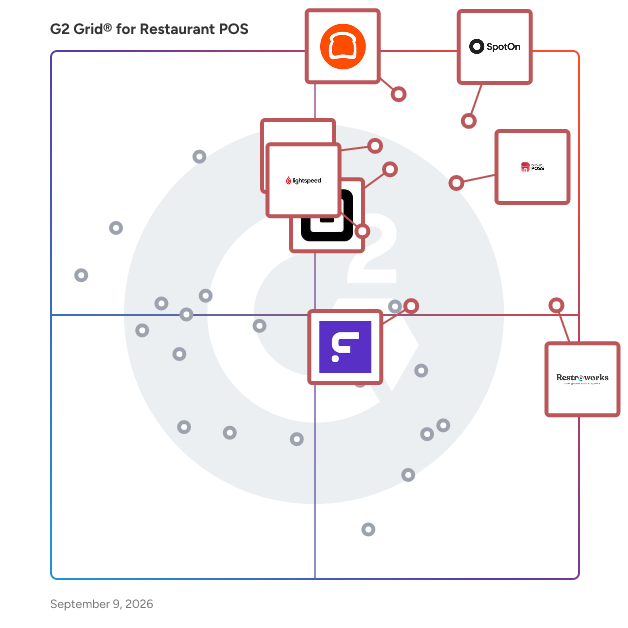



---
## What Are the Most Common Questions About Restaurant POS Systems?

### What are the key features to look for in a Restaurant POS system?

Key features to look for in a Restaurant POS system include ease of use, which is highlighted by users who prioritize intuitive interfaces; robust reporting and analytics capabilities, essential for tracking sales and inventory; integration with payment processing systems for seamless transactions; and customer relationship management tools to enhance guest experiences. Additionally, mobile accessibility is increasingly valued, allowing staff to take orders and process payments on the go. Security features are also critical, ensuring customer data protection.


### How does pricing vary among different Restaurant POS solutions?

Pricing for Restaurant POS solutions varies significantly. For instance, Toast typically starts around $69 per month, while Square for Restaurants offers a free tier with additional features at $60 per month. Lightspeed Restaurant pricing begins at $69 per month, and TouchBistro starts at $69 per month as well. Other solutions like Clover and Revel Systems have more customized pricing based on features and business size, often requiring direct consultation for accurate quotes. Overall, the pricing structure reflects the range of features and services offered by each provider.


### What integrations should a Restaurant POS have for optimal performance?

For optimal performance, a Restaurant POS should integrate with payment processors, inventory management systems, employee scheduling tools, and customer relationship management (CRM) software. Key integrations frequently highlighted by users include Square, Toast, and Lightspeed, which enhance transaction efficiency, streamline inventory tracking, and improve staff management. Additionally, integration with delivery services like DoorDash and UberEats is crucial for expanding reach and improving customer service. These integrations collectively contribute to a more efficient and responsive restaurant operation.


### How user-friendly are the top-rated Restaurant POS systems?

The top-rated Restaurant POS systems are generally considered user-friendly, with high ratings for ease of use. For instance, Toast POS has an average ease of use rating of 4.7 out of 5, while Square for Restaurants scores 4.6. Lightspeed Restaurant also receives a 4.5 rating, indicating that users find these systems intuitive and straightforward to navigate. Overall, the consensus among users highlights a strong emphasis on user-friendly interfaces across these leading solutions.


### What support options are typically available for Restaurant POS users?

Restaurant POS users typically have access to a variety of support options, including 24/7 customer support, online resources such as FAQs and knowledge bases, live chat assistance, and dedicated account managers. Many systems also offer training sessions and onboarding support to help users maximize their software&#39;s capabilities. For instance, products like Toast, Square for Restaurants, and Lightspeed Restaurant are noted for their comprehensive support services, with Toast receiving high ratings for its customer service responsiveness.


### How scalable are Restaurant POS systems for growing businesses?

Restaurant POS systems are generally highly scalable, accommodating the needs of growing businesses. Many users report that systems like Toast, Square for Restaurants, and Lightspeed Restaurant offer features that support expansion, such as multi-location management and customizable integrations. For instance, Toast users highlight its ability to handle increased transaction volumes seamlessly, while Square for Restaurants is praised for its flexibility in adding new locations. Additionally, Lightspeed Restaurant&#39;s cloud-based architecture allows for easy updates and scalability, making it suitable for businesses of various sizes.


### What are common implementation challenges with Restaurant POS systems?

Common implementation challenges with Restaurant POS systems include integration issues with existing hardware and software, which can lead to operational disruptions. Users frequently report difficulties in training staff on new systems, resulting in a steep learning curve. Additionally, data migration from legacy systems often presents complications, causing delays. Some users also mention the need for ongoing technical support during the transition period, as well as concerns about system reliability and downtime affecting service. These challenges are consistently highlighted across various user reviews.


### How do Restaurant POS systems handle inventory management?

Restaurant POS systems typically manage inventory through features like real-time tracking, automated stock updates, and integration with suppliers. For instance, Toast offers comprehensive inventory management tools that allow users to monitor stock levels and receive alerts for low inventory. Square POS provides inventory tracking that syncs with sales data, ensuring accurate stock counts. Lightspeed POS includes advanced reporting features that help identify trends in inventory usage, while TouchBistro allows for ingredient-level tracking to optimize menu offerings. These functionalities enhance operational efficiency and reduce waste.


### What reporting capabilities should I expect from a Restaurant POS?

Expect robust reporting capabilities from a Restaurant POS, including sales reports, inventory tracking, employee performance metrics, and customer analytics. Top products like Toast POS, Square for Restaurants, and Lightspeed Restaurant offer customizable reporting features, enabling users to generate detailed insights on sales trends, peak hours, and menu performance. Additionally, many systems provide real-time data visualization and integration with accounting software, enhancing operational efficiency and decision-making. User reviews highlight the importance of these features in optimizing restaurant management and improving profitability.


### How do Restaurant POS systems improve customer experience?

Restaurant POS systems enhance customer experience by streamlining order processing, reducing wait times, and improving order accuracy. Features like mobile ordering and table-side payment options allow for quicker service, which 78% of users find significantly enhances their dining experience. Additionally, integrated loyalty programs and personalized promotions help build customer relationships, with 65% of users noting increased customer satisfaction. Systems such as Toast, Square for Restaurants, and Lightspeed Restaurant are noted for their user-friendly interfaces and robust customer support, further contributing to a positive dining atmosphere.


### What security features are essential in a Restaurant POS system?

Essential security features in a Restaurant POS system include end-to-end encryption for payment processing, user access controls to restrict sensitive data access, compliance with PCI DSS standards, and regular software updates to protect against vulnerabilities. Additionally, features like secure cloud backups and fraud detection mechanisms are highly valued by users. Systems such as Toast POS, Square for Restaurants, and Lightspeed Restaurant are noted for their robust security measures, ensuring data protection and compliance.


### How do Restaurant POS systems facilitate online ordering and delivery?

Restaurant POS systems enhance online ordering and delivery by integrating features such as mobile ordering, real-time inventory management, and customer relationship management. Products like Toast, Square for Restaurants, and TouchBistro offer seamless online ordering capabilities, allowing customers to place orders directly through the restaurant&#39;s website or app. These systems also facilitate efficient order processing and tracking, ensuring timely delivery. User reviews highlight the importance of user-friendly interfaces and reliable payment processing, which are critical for enhancing customer satisfaction and operational efficiency.


