# Best Work Management Software for Small Business - Page 3

*By [Subhransu Sahu](https://research.g2.com/insights/author/subhransu-sahu)*


Products classified in the overall Work Management category are similar in many regards and help companies of all sizes solve their business problems. However, small business features, pricing, setup, and installation differ from businesses of other sizes, which is why we match buyers to the right Small Business Work Management to fit their needs. Compare product ratings based on reviews from enterprise users or connect with one of G2&#39;s buying advisors to find the right solutions within the Small Business Work Management category.

In addition to qualifying for inclusion in the Work Management Software category, to qualify for inclusion in the Small Business Work Management Software category, a product must have at least 10 reviews left by a reviewer from a small business.


## Top Work Management Software at a Glance
| # | Product | Rating | Best For | What Users Say |
|---|---------|--------|----------|----------------|
| 1 | [Slack](https://www.g2.com/products/slack/reviews) | 4.5/5.0 (37,460 reviews) | Real-time team communication with threaded context | "[With &quot;Slack: where team communication really happens&quot;](https://www.g2.com/survey_responses/slack-review-13132270)" |
| 2 | [Asana](https://www.g2.com/products/asana/reviews) | 4.4/5.0 (13,251 reviews) | Cross-functional project visibility with multi-homing tasks | "[Asana Keeps Me Organized—Fast, Fair-Priced, and Great Support](https://www.g2.com/survey_responses/asana-review-13108618)" |
| 3 | [ClickUp](https://www.g2.com/products/clickup/reviews) | 4.6/5.0 (12,656 reviews) | Cross-functional task visibility with workflow automation | "[Integrated screen recording that streamlines bug reporting in QA](https://www.g2.com/survey_responses/clickup-review-13140987)" |
| 4 | [monday AI Work Platform](https://www.g2.com/products/monday-com/reviews) | 4.7/5.0 (16,500 reviews) | Visual project boards with cross-team automations | "[Best-in-Class Project Management Performance with an Easy-to-Use Interface](https://www.g2.com/survey_responses/monday-ai-work-platform-review-13095078)" |
| 5 | [Smartsheet](https://www.g2.com/products/smartsheet/reviews) | 4.4/5.0 (22,187 reviews) | Spreadsheet-style project tracking with cross-team automation | "[Turns Scattered Workflows Into a Clear, Trackable System](https://www.g2.com/survey_responses/smartsheet-review-13093527)" |
| 6 | [Confluence](https://www.g2.com/products/confluence/reviews) | 4.1/5.0 (4,246 reviews) | Atlassian-native documentation with Jira workflow integration | "[The Ultimate Source of Truth for Engineering and Product Teams](https://www.g2.com/survey_responses/confluence-review-12546661)" |
| 7 | [Quickbase](https://www.g2.com/products/quickbase/reviews) | 4.5/5.0 (1,525 reviews) | No-code workflow apps with relational data | "[Flexible, Custom Workflows That Grow With Us](https://www.g2.com/survey_responses/quickbase-review-13119808)" |
| 8 | [Keka](https://www.g2.com/products/keka/reviews) | 4.4/5.0 (2,035 reviews) | Payroll-integrated attendance and leave workflows | "[Streamlined HR Tasks with Some Room for Improvement](https://www.g2.com/survey_responses/keka-review-13070476)" |
| 9 | [Microsoft Planner](https://www.g2.com/products/microsoft-planner/reviews) | 4.2/5.0 (233 reviews) | — | "[Lightweight Project Management Made Easy](https://www.g2.com/survey_responses/microsoft-planner-review-12375025)" |
| 10 | [Wrike](https://www.g2.com/products/wrike/reviews) | 4.2/5.0 (4,456 reviews) | Cross-functional marketing workflows with blueprint automation | "[Makes Collaboration EASY](https://www.g2.com/survey_responses/wrike-review-10927348)" |


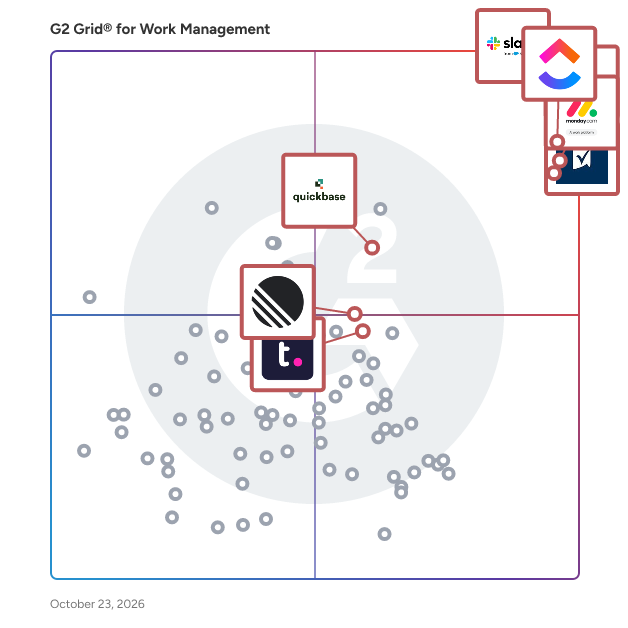
## G2 Grid® for Work Management Software
![G2 Grid® for Work Management Software plotting products by satisfaction and market presence](https://www.g2.com/categories/work-management/grids.png?focus%5B%5D=3437&focus%5B%5D=278&focus%5B%5D=25675&focus%5B%5D=16194&focus%5B%5D=530&focus%5B%5D=931&focus%5B%5D=5095&focus%5B%5D=280)
Highlighted products: Slack, Asana, ClickUp, monday AI Work Platform, Smartsheet, Quickbase, Teamwork.com, and Confluence.
Underlying data: [Grid® JSON](https://www.g2.com/categories/work-management/grids.json?focus%5B%5D=slack&amp;focus%5B%5D=asana&amp;focus%5B%5D=clickup&amp;focus%5B%5D=monday-com&amp;focus%5B%5D=smartsheet&amp;focus%5B%5D=quickbase&amp;focus%5B%5D=teamwork-com&amp;focus%5B%5D=confluence&amp;segment=small-business)


## How Many Work Management Software Products Does G2 Track?
**Total Products under this Category:** 188

### Category Stats (Jul 2026)
- **Average Rating**: 4.51/5 The average rating of products in this category, based on all submitted ratings
- **Top Trending Product**: Furious (+0.97%) - Among all products in this category, Furious recorded the largest rating increase compared to last month
*Last updated: July 21, 2026*


## How Does G2 Rank Work Management Software Products?

**Why You Can Trust G2's Software Rankings:**

- 30 Analysts and Data Experts
- 142,300+ Authentic Reviews
- 188+ Products
- Unbiased Rankings

G2's software rankings are built on verified user reviews, rigorous moderation, and a consistent research methodology maintained by a team of analysts and data experts. Each product is measured using the same transparent criteria, with no paid placement or vendor influence. While reviews reflect real user experiences, which can be subjective, they offer valuable insight into how software performs in the hands of professionals. Together, these inputs power the G2 Score, a standardized way to compare tools within every category.


---

**Sponsored**

### RedFlag

RedFlag is a comprehensive communication solution designed to facilitate emergency and proactive notifications for organizations of all sizes. This platform enables users to deliver critical messages in real time across various channels, including text messages, emails, voice calls, push app notifications, desktop alerts, and Microsoft Teams. By ensuring that important information reaches the right individuals promptly, RedFlag enhances organizational communication and preparedness. The target audience for RedFlag includes small businesses, large enterprises, and any organization that requires reliable communication during emergencies or routine operations. This solution is particularly beneficial for sectors such as healthcare, education, corporate environments, and public safety, where timely information dissemination can significantly impact outcomes. RedFlag is designed to address specific use cases, such as alerting employees about emergencies, coordinating responses during critical incidents, or communicating important updates during routine operations. Key features of RedFlag include multi-channel notifications, which allow users to send alerts through various platforms, ensuring that messages are received regardless of the recipient&#39;s location. The real-time alert functionality enables organizations to disseminate critical information with just one click, streamlining communication processes during emergencies. Additionally, the user-friendly interface allows for easy setup and management of notifications, minimizing the need for extensive training. Scalability is another significant advantage, as RedFlag can be customized to suit the needs of both small and large organizations, adapting as they grow. Moreover, RedFlag supports data-informed decision-making by providing real-time visibility into ongoing events. This feature allows organizations to access valuable data that can help coordinate resources effectively and make informed decisions during critical situations. By enhancing safety, improving operational efficiency, and maintaining continuity, RedFlag fosters a culture of preparedness and responsiveness, ultimately reducing the impact of unforeseen events. In essence, RedFlag serves as an all-in-one solution for organizations looking to optimize their communication strategies. With a starting price of $250 per month, it offers a cost-effective and scalable option for enhancing communication capabilities, safeguarding teams, and improving response strategies. By prioritizing timely and effective communication, RedFlag empowers organizations to navigate emergencies and routine operations with confidence.


[Visit website](https://www.g2.com/external_clickthroughs/record?secure%5Bad_program%5D=ppc&amp;secure%5Bad_slot%5D=category_product_list&amp;secure%5Bcategory_id%5D=2360&amp;secure%5Bchosen_at%5D=2026-07-22T17%3A22%3A57Z&amp;secure%5Bdisplayable_resource_id%5D=258&amp;secure%5Bdisplayable_resource_type%5D=Category&amp;secure%5Bmedium%5D=sponsored&amp;secure%5Bplacement_reason%5D=retargeted_product&amp;secure%5Bplacement_resource_ids%5D%5B%5D=72424&amp;secure%5Bprioritized%5D=false&amp;secure%5Bproduct_id%5D=72424&amp;secure%5Bresource_id%5D=2360&amp;secure%5Bresource_type%5D=Category&amp;secure%5Bsource_type%5D=llm_category_page&amp;secure%5Bsource_url%5D=https%3A%2F%2Fwww.g2.com%2Fcategories%2Fwork-management%2Fsmall-business%3Fpage%3D3&amp;secure%5Btoken%5D=e4f8ddd2e716c8c7b37172db2f76ae9d34001bd60bfd06804e3d4fd0c26ffa3f&amp;secure%5Burl%5D=https%3A%2F%2Fredflagalerts.com%2F%3F%26utm_medium%3Dreferral%26utm_source%3Dg2&amp;secure%5Burl_type%5D=book_demo)

---

## What Are the Top-Rated Work Management Software Products in 2026?
### 1. [Daylite](https://www.g2.com/products/daylite/reviews)
Feeling like your business is running you instead of the other way around? Daylite is here to help! It’s an all-in-one app built just for small business owners like you—designed to make managing clients, sales, and projects easier so you can focus on what matters: growing your business and doing what you love. Daylite works seamlessly across your Mac, iPhone, and iPad, keeping everything organized and in one place. No more jumping between apps or getting lost in messy spreadsheets. It’s your business, simplified. Choose the Plan That Works for You: CRM: Keep track of all your client info in one spot. With Daylite, it’s easier than ever to manage relationships, follow up on conversations, and stay organized, so you can spend less time chasing details and more time building connections. Sales: Keep your sales pipeline on track. Daylite helps you stay organized and focused, so you can move deals forward, close sales faster, and watch your revenue grow. Projects: Keep your projects running smoothly from start to finish. With Daylite, you’ll have everything you need to stay on top of tasks, deadlines, and milestones—all in one place. Business: Get the full package with Daylite Business. All the benefits of CRM, Sales, and Projects, plus extra features to keep everything running smoothly. It’s everything you need to manage your business in one easy-to-use app. Ready to Take Control? If you’re tired of feeling overwhelmed and ready to streamline your business, give Daylite a try. It’s designed to help you stay organized, save time, and focus on what you love. Download it today and start your free trial! Daylite is developed by Marketcircle in Toronto, Canada. Marketcircle has been developing business apps for Apple devices for over 25 years and has customers in over 80 countries.


**Average Rating:** 4.5/5.0
**Total Reviews:** 160
**How Do G2 Users Rate Daylite?**

- **Has the product been a good partner in doing business?:** 8.9/10 (Category avg: 9.2/10)
- **Planning:** 9.1/10 (Category avg: 9.0/10)
- **Procedures:** 9.0/10 (Category avg: 8.5/10)
- **Insights:** 9.3/10 (Category avg: 8.6/10)

**Who Is the Company Behind Daylite?**

- **Seller:** [Marketcircle](https://www.g2.com/sellers/marketcircle)
- **Year Founded:** 1999
- **HQ Location:** Ontario, Canada
- **Twitter:** @marketcircle (2,812 Twitter followers)
- **LinkedIn® Page:** https://www.linkedin.com/company/118735/ (41 employees on LinkedIn®)

**Who Uses This Product?**
- **Who Uses This:** Director, Owner
- **Top Industries:** Marketing and Advertising, Management Consulting
- **Company Size:** 87% Small-Business, 9% Mid-Market


#### What Are Daylite's Pros and Cons?

**Pros:**

- Customer Management (4 reviews)
- Customer Support (3 reviews)
- Organization (3 reviews)
- Project Management (3 reviews)
- Easy Access (2 reviews)

**Cons:**

- Limited Integrations (3 reviews)
- CRM Issues (2 reviews)
- Limited Features (2 reviews)
- Overwhelming Experience (2 reviews)
- App Limitations (1 reviews)


### What Do G2 Reviewers Say About Daylite?
*AI-generated summary from verified user reviews*

**Pros:**

- Users value the **seamless customer management** features of Daylite, enjoying easy access and comprehensive integration across devices.
- Users praise Daylite&#39;s **excellent customer support** , always responsive and helping them maintain smooth operations.
- Users value the **organizational capabilities** of Daylite, seamlessly managing clients, tasks, and schedules in one place.
- Users appreciate the **comprehensive project management features** of Daylite, enhancing their organization and efficiency.
- Users value the **easy access** to their data across all devices with Daylite, ensuring constant connectivity and convenience.

**Cons:**

- Users find the **limited integrations** with Microsoft 365 and other platforms a significant drawback for their workflows.
- Users find **CRM issues** with Daylite due to its overwhelming interface and lack of updates, affecting usability.
- Users find the **limited features** of Daylite frustrating, especially its exclusive focus on Apple platforms.
- Users find the **user interface overwhelming** , especially those used to traditional cloud CRMs, needing time to adapt.
- Users find **app limitations** frustrating as it only works on Apple and lacks updates with CRM advancements.

#### What Are Recent G2 Reviews of Daylite?

**"[All-in-One CRM with Customization Challenges](https://www.g2.com/survey_responses/daylite-review-12285532)"**

**Rating:** 5.0/5.0 stars
*— Yash G.*

[Read full review](https://www.g2.com/survey_responses/daylite-review-12285532)

---

**"[Centralized Organization, Excellent Support](https://www.g2.com/survey_responses/daylite-review-5221110)"**

**Rating:** 5.0/5.0 stars
*— Allen D.*

[Read full review](https://www.g2.com/survey_responses/daylite-review-5221110)

---


#### What Are G2 Users Discussing About Daylite?

- [What is Daylite used for?](https://www.g2.com/discussions/what-is-daylite-used-for) - 1 comment

### 2. [Upbase](https://www.g2.com/products/upbase/reviews)
Upbase is project management software built specifically for small agencies running client work. Most project management tools are built for internal teams. They treat clients as an afterthought: invite a client to a project and they see everything or nothing. Work for one client is scattered across projects, with no single place to see it all. And you don&#39;t find out if a project was profitable until it&#39;s too late. Upbase is built around the client, not the project. That means: - Profit tracking by project and by client, updating as your team logs time — so you catch margin problems before they eat your profit - Client-level dashboards that show every project, deliverable, and open item for a client in one place - Granular client sharing — share individual tasks or files with clients instead of opening up the whole project - Time tracking with timesheets by client, making invoicing and reporting effortless - Built-in daily planner that keeps each team member focused on today&#39;s work - Everything lives in one clean workspace: projects, tasks, docs, files, chat, and client collaboration. No bloat. No nested menus. No three-month onboarding. Built for agencies of 1–20 people.


**Average Rating:** 4.3/5.0
**Total Reviews:** 18
**How Do G2 Users Rate Upbase?**

- **Has the product been a good partner in doing business?:** 8.3/10 (Category avg: 9.2/10)
- **Planning:** 8.8/10 (Category avg: 9.0/10)
- **Procedures:** 8.0/10 (Category avg: 8.5/10)
- **Insights:** 7.9/10 (Category avg: 8.6/10)

**Who Is the Company Behind Upbase?**

- **Seller:** [Upbase LLC](https://www.g2.com/sellers/upbase-llc)
- **Year Founded:** 2019
- **HQ Location:** Houston, US
- **LinkedIn® Page:** https://www.linkedin.com/company/upbase-io/about/ (4 employees on LinkedIn®)

**Who Uses This Product?**
- **Company Size:** 95% Small-Business, 5% Mid-Market


#### What Are Upbase's Pros and Cons?

**Pros:**

- Simple (6 reviews)
- Ease of Use (5 reviews)
- User Interface (4 reviews)
- Flexibility (3 reviews)
- Daily Use (2 reviews)

**Cons:**

- Limited Customization (2 reviews)
- Group Management (1 reviews)
- Limited Features (1 reviews)
- Missing Features (1 reviews)
- Performance Issues (1 reviews)


### What Do G2 Reviewers Say About Upbase?
*AI-generated summary from verified user reviews*

**Pros:**

- Users appreciate the **thoughtfully designed features** of Upbase, making project management simple and enjoyable.
- Users appreciate the **ease of use** of Upbase, noting its simplicity and thoughtful design across all features.
- Users praise Upbase for its **intuitive and minimalist interface** , making productivity enjoyable and effective for all tasks.
- Users value the **flexibility** of Upbase, allowing personalization for both simple and complex task management.
- Users find Upbase to be a **game-changing productivity app** , seamlessly combining features for personal and professional use.

**Cons:**

- Users express frustration over **limited customization** , feeling it doesn&#39;t fully meet their needs despite its easy implementation.
- Users face challenges with **notification issues** , missing updates on tasks and chats, impacting their overall experience.
- Users find Upbase&#39;s **limited features** hinder their experience, as it does not fully meet their frequent usage needs.
- Users find the **inability to create subtasks of subtasks** a significant limitation in Upbase&#39;s functionality.
- Users experience **performance issues** with Upbase, citing glitches that slow down the application’s responsiveness.

#### What Are Recent G2 Reviews of Upbase?

**"[Instant File Uploads and Shareable Links Make Upbase a Breeze](https://www.g2.com/survey_responses/upbase-review-12649105)"**

**Rating:** 5.0/5.0 stars
*— Sheung Chun Y.*

[Read full review](https://www.g2.com/survey_responses/upbase-review-12649105)

---

**"[BEST All in One Project Management Platform](https://www.g2.com/survey_responses/upbase-review-11591622)"**

**Rating:** 5.0/5.0 stars
*— Marcelina H.*

[Read full review](https://www.g2.com/survey_responses/upbase-review-11591622)

---


### 3. [Plutio](https://www.g2.com/products/plutio/reviews)
The all-in-one business management platform designed for freelancers and small businesses. Manage projects, communicate with clients, share files, create proposals, send invoices and get paid - all from one app.


**Average Rating:** 4.3/5.0
**Total Reviews:** 56
**How Do G2 Users Rate Plutio?**

- **Has the product been a good partner in doing business?:** 8.3/10 (Category avg: 9.2/10)
- **Planning:** 8.7/10 (Category avg: 9.0/10)
- **Procedures:** 8.1/10 (Category avg: 8.5/10)
- **Insights:** 5.5/10 (Category avg: 8.6/10)

**Who Is the Company Behind Plutio?**

- **Seller:** [Plutio](https://www.g2.com/sellers/plutio)
- **Year Founded:** 2015
- **HQ Location:** London
- **Twitter:** @Plutio_app (1,674 Twitter followers)
- **LinkedIn® Page:** https://www.linkedin.com/company/10304140/ (2 employees on LinkedIn®)

**Who Uses This Product?**
- **Who Uses This:** Owner
- **Top Industries:** Marketing and Advertising, Information Technology and Services
- **Company Size:** 98% Small-Business, 2% Mid-Market


#### What Are Plutio's Pros and Cons?

**Pros:**

- Customizability (2 reviews)
- Customization (2 reviews)
- Project Management (2 reviews)
- Time Tracking (2 reviews)
- Communication (1 reviews)

**Cons:**

- Missing Features (2 reviews)
- Performance Issues (2 reviews)
- App Limitations (1 reviews)
- Difficult Navigation (1 reviews)
- Limited Features (1 reviews)


### What Do G2 Reviewers Say About Plutio?
*AI-generated summary from verified user reviews*

**Pros:**

- Users enjoy the **customizability** of Plutio, allowing them to tailor it to their unique branding needs.
- Users enjoy the **extensive customization options** in Plutio, allowing for a tailored experience to fit their brand.
- Users find that **Plutio streamlines project management** effectively, consolidating multiple tasks into a single platform for efficiency.
- Users find the **time tracking** feature of Plutio invaluable for managing projects alongside invoicing and client communication.
- Users value Plutio for its **effective communication tools** , streamlining project management and client interactions seamlessly.

**Cons:**

- Users are frustrated by **missing linking features** in Plutio, hindering their workflow and task management efficiency.
- Users report persistent **performance issues** with Plutio, citing slow support and unresolved bugs that hinder productivity.
- Users express concerns over **app limitations** , highlighting unfulfilled promises and a lack of functional updates from Plutio.
- Users struggle with **difficult navigation** as some portal functions lack logical flow and smooth mapping.
- Users are frustrated with Plutio&#39;s **limited features** , feeling that essential updates and support are inconsistently addressed.

#### What Are Recent G2 Reviews of Plutio?

**"[Great all-round software for small businesses](https://www.g2.com/survey_responses/plutio-review-7776427)"**

**Rating:** 4.0/5.0 stars
*— Kelly W.*

[Read full review](https://www.g2.com/survey_responses/plutio-review-7776427)

---

**"[All-in-One Business Management Platform](https://www.g2.com/survey_responses/plutio-review-11581983)"**

**Rating:** 4.5/5.0 stars
*— Mark D.*

[Read full review](https://www.g2.com/survey_responses/plutio-review-11581983)

---


#### What Are G2 Users Discussing About Plutio?

- [How do you use Plutio?](https://www.g2.com/discussions/how-do-you-use-plutio)
- [What does Plutio do?](https://www.g2.com/discussions/what-does-plutio-do) - 1 comment
- [What is Plutio app?](https://www.g2.com/discussions/what-is-plutio-app)
- [Is Plutio a CRM?](https://www.g2.com/discussions/is-plutio-a-crm) - 2 comments

### 4. [Rev.io PSA formerly Tigerpaw One](https://www.g2.com/products/rev-io-psa-formerly-tigerpaw-one/reviews)
Rev.io PSA, formerly Tigerpaw, is a business management platform for managed service providers. Our PSA platform was created as an end-to-end software solution that ties all aspects of your business into a single, robust application. Rev.io combines our PSA platform with a billing and customer management platform also designed for managed service providers. Our billing platform helps MSPs successfully monetize new voice products by consolidating billing and tax compliance.


**Average Rating:** 3.3/5.0
**Total Reviews:** 41
**How Do G2 Users Rate Rev.io PSA formerly Tigerpaw One?**

- **Has the product been a good partner in doing business?:** 7.2/10 (Category avg: 9.2/10)
- **Procedures:** 8.3/10 (Category avg: 8.5/10)

**Who Is the Company Behind Rev.io PSA formerly Tigerpaw One?**

- **Seller:** [Rev.io PSA formerly Tigerpaw One](https://www.g2.com/sellers/rev-io-psa-formerly-tigerpaw-one)
- **Year Founded:** 2002
- **HQ Location:** Atlanta, GA
- **Twitter:** @rev_io_hq (453 Twitter followers)
- **LinkedIn® Page:** https://www.linkedin.com/company/rev.io/ (191 employees on LinkedIn®)

**Who Uses This Product?**
- **Top Industries:** Telecommunications, Information Technology and Services
- **Company Size:** 78% Small-Business, 15% Mid-Market


#### What Are Rev.io PSA formerly Tigerpaw One's Pros and Cons?

**Pros:**

- Easy Tracking (1 reviews)
- Integration (1 reviews)
- Seamless Integration (1 reviews)

**Cons:**

- Expensive (1 reviews)


### What Do G2 Reviewers Say About Rev.io PSA formerly Tigerpaw One?
*AI-generated summary from verified user reviews*

**Pros:**

- Users value the **easy tracking** capabilities of Rev.io PSA, effectively managing tickets, stock, and QuickBooks integration.
- Users value the **seamless integration** with QuickBooks, enhancing efficiency in managing their telecom operations.
- Users value the **seamless integration** of Rev.io PSA with QuickBooks, streamlining operations for their telecom business.

**Cons:**

- Users feel that the **cost is a little high** for small companies, making it less accessible for them.

#### What Are Recent G2 Reviews of Rev.io PSA formerly Tigerpaw One?

**"[Tigerpaw One Review](https://www.g2.com/survey_responses/rev-io-psa-formerly-tigerpaw-one-review-7248812)"**

**Rating:** 5.0/5.0 stars
*— Dean K.*

[Read full review](https://www.g2.com/survey_responses/rev-io-psa-formerly-tigerpaw-one-review-7248812)

---

**"[Powerful All-in-One Customer Database for Quotes, Sales Tracking, and Reporting](https://www.g2.com/survey_responses/rev-io-psa-formerly-tigerpaw-one-review-12713207)"**

**Rating:** 4.0/5.0 stars
*— Matthew W.*

[Read full review](https://www.g2.com/survey_responses/rev-io-psa-formerly-tigerpaw-one-review-12713207)

---


#### What Are G2 Users Discussing About Rev.io PSA formerly Tigerpaw One?

- [What does Tigerpaw One do?](https://www.g2.com/discussions/what-does-tigerpaw-one-do)
- [What does Tiger paw do?](https://www.g2.com/discussions/what-does-tiger-paw-do)
- [Is tigerpaw cloud based?](https://www.g2.com/discussions/is-tigerpaw-cloud-based)

### 5. [Proteus](https://www.g2.com/products/xergy-proteus/reviews)
​​Proteus is an end to end project management solution, providing real-time visibility over key metrics. This gives you the power to make data-driven decisions that will improve your project profitability and deliver higher quality project outcomes. Use Proteus to implement simple, robust project performance controls for your business, helping you achieve digital acceleration. Low-cost and feature-rich, Proteus provides an integrated platform for project planning, project management and project controls. Starting at the earliest project planning or proposal stage, Proteus hard-wires data accuracy and consistency into the full project life cycle. Designed to sit at the heart of your business, Proteus connects to your existing business systems and provides full, real-time visibility over key metrics. If you need to make a demonstrable change to the way your organisation manages projects, if you want to achieve digital acceleration, if your remit is business success, you have a responsibility to implement the right digital system. Proteus comes with a team of project management experts, strategists and developers designed to deliver success for our customers. Our configurable project management system uses a uniquely dynamic work breakdown structure to give you consistency and accuracy over your proposals, pre-project planning and project delivery framework. All project related details, work packages and allocated resources, WIP, budget versus actuals, can be easily managed for instant visibility, and collaborated and communicated to all other teams involved. Proteus is designed to be a key application in any company’s digital transformation journey as the tool that brings all systems together and all departments together, rather than replacing existing legacy softwares. Integrating seamlessly with your ecosystem, Proteus connects with CRM, HR, data visualisation, accounting, ERP or other proprietary systems using our APIs and integration services. Proteus serves as the single source of truth for all your organisation’s project time, supporting your HR and finance teams with complete real-time visibility into project hours and how they relate to financial metrics like costs, billing, chargebacks and more.


**Average Rating:** 4.4/5.0
**Total Reviews:** 23
**How Do G2 Users Rate Proteus?**

- **Has the product been a good partner in doing business?:** 8.3/10 (Category avg: 9.2/10)
- **Planning:** 8.0/10 (Category avg: 9.0/10)
- **Procedures:** 8.6/10 (Category avg: 8.5/10)
- **Insights:** 7.1/10 (Category avg: 8.6/10)

**Who Is the Company Behind Proteus?**

- **Seller:** [Xergy](https://www.g2.com/sellers/xergy)
- **Year Founded:** 2018
- **HQ Location:** Aberdeen, Scotland
- **Twitter:** @joinproteus (647 Twitter followers)
- **LinkedIn® Page:** https://www.linkedin.com/company/xergy-in/ (5 employees on LinkedIn®)

**Who Uses This Product?**
- **Top Industries:** Electrical/Electronic Manufacturing
- **Company Size:** 50% Small-Business, 38% Mid-Market


#### What Are Proteus's Pros and Cons?

**Pros:**

- Ease of Use (1 reviews)
- Intuitive (1 reviews)
- Real-time Updates (1 reviews)
- Simple (1 reviews)

**Cons:**

- Missing Features (1 reviews)


### What Do G2 Reviewers Say About Proteus?
*AI-generated summary from verified user reviews*

**Pros:**

- Users appreciate the **ease of use** of Proteus, finding it simple to operate and effective for real-time simulations.
- Users appreciate the **intuitive operation** of Proteus, making it easy to simulate and debug designs in real-time.
- Users value the **real-time updates** from Proteus, enhancing their operational speed and debugging capabilities.
- Users love the **real-time operation** of Proteus, enhancing speed and ease of use for various simulations.

**Cons:**

- Users express concern over **missing features** like advanced routing and realistic analog modeling, limiting design capabilities.

#### What Are Recent G2 Reviews of Proteus?

**"[Use during my FYP.](https://www.g2.com/survey_responses/proteus-review-9616176)"**

**Rating:** 4.0/5.0 stars
*— Shahzad A.*

[Read full review](https://www.g2.com/survey_responses/proteus-review-9616176)

---

**"[Flexible and Convenient Project Management Tool](https://www.g2.com/survey_responses/proteus-review-8005599)"**

**Rating:** 5.0/5.0 stars
*— Ahmet Savaş G.*

[Read full review](https://www.g2.com/survey_responses/proteus-review-8005599)

---


#### What Are G2 Users Discussing About Proteus?

- [What is Proteus and how it works?](https://www.g2.com/discussions/what-is-proteus-and-how-it-works) - 1 comment
- [What is Proteus function?](https://www.g2.com/discussions/what-is-proteus-function) - 1 comment
- [What are the advantages of Proteus software?](https://www.g2.com/discussions/what-are-the-advantages-of-proteus-software) - 1 comment
- [What are the features of Proteus?](https://www.g2.com/discussions/what-are-the-features-of-proteus) - 1 comment

### 6. [Birdview](https://www.g2.com/products/birdview/reviews)
Birdview is a comprehensive, full-cycle platform designed to assist organizations in planning, managing, and forecasting resources, finances, and projects in a unified environment. This solution provides total project visibility, enabling teams and clients to oversee their projects effectively, thereby fostering growth and promoting streamlined processes. Targeted at a diverse range of businesses, Birdview is particularly beneficial for organizations that handle multiple projects simultaneously. It offers customizable views and centralized data management, which allows users to maintain balanced workloads and adapt to evolving business needs. The platform&#39;s capabilities extend to precise financial management and budgeting, ensuring that organizations can keep their projects on track financially while optimizing resource allocation. Birdview features two distinct products tailored to meet varied client requirements. Birdview Project Management simplifies the lives of project managers by streamlining the entire project lifecycle, from intake and planning to execution and project accounting. This product is designed to enhance efficiency and control, allowing project managers to focus on delivering results rather than getting bogged down by administrative tasks. On the other hand, Birdview Professional Services is specifically crafted for service-oriented organizations, facilitating client project management and collaboration. This ensures smooth service delivery while also providing robust financial tracking capabilities. Each product is equipped with advanced features that provide control over every stage of the project. Business Intelligence (BI)-powered dashboards and reports enable data-driven decision-making, which is crucial for enhancing productivity, profitability, and overall efficiency. These tools allow organizations to visualize their project data in real-time, making it easier to identify trends, assess performance, and make informed adjustments as necessary. Furthermore, Birdview integrates seamlessly with over 5,000 applications, enhancing its utility in various organizational contexts. This extensive integration capability ensures that users can manage their projects more effectively, leveraging existing tools and systems to create a cohesive workflow. By providing a centralized platform that encompasses project management, financial oversight, and resource allocation, Birdview stands out as a versatile solution for organizations aiming to optimize their project management processes.


**Average Rating:** 4.2/5.0
**Total Reviews:** 391
**How Do G2 Users Rate Birdview?**

- **Has the product been a good partner in doing business?:** 8.9/10 (Category avg: 9.2/10)
- **Planning:** 8.5/10 (Category avg: 9.0/10)
- **Procedures:** 7.9/10 (Category avg: 8.5/10)
- **Insights:** 8.5/10 (Category avg: 8.6/10)

**Who Is the Company Behind Birdview?**

- **Seller:** [Birdview PSA](https://www.g2.com/sellers/birdview-psa)
- **Company Website:** https://birdviewpsa.com/
- **Year Founded:** 2003
- **HQ Location:** Toronto
- **Twitter:** @birdviewpsa (1,202 Twitter followers)
- **LinkedIn® Page:** https://www.linkedin.com/company/birdviewpsa/ (34 employees on LinkedIn®)

**Who Uses This Product?**
- **Who Uses This:** Project Manager
- **Top Industries:** Marketing and Advertising, Information Technology and Services
- **Company Size:** 43% Mid-Market, 34% Small-Business


#### What Are Recent G2 Reviews of Birdview?

**"[Birdview product review](https://www.g2.com/survey_responses/birdview-review-11666311)"**

**Rating:** 4.5/5.0 stars
*— Roshan R.*

[Read full review](https://www.g2.com/survey_responses/birdview-review-11666311)

---

**"[Consultant - review after 6 months of work](https://www.g2.com/survey_responses/birdview-review-9723891)"**

**Rating:** 4.5/5.0 stars
*— Ravi Shankar P.*

[Read full review](https://www.g2.com/survey_responses/birdview-review-9723891)

---


#### What Are G2 Users Discussing About Birdview?

- [What is PSA in technology?](https://www.g2.com/discussions/what-is-psa-in-technology) - 1 comment
- [What are simple projects?](https://www.g2.com/discussions/what-are-simple-projects) - 2 comments
- [What is PSA in ERP?](https://www.g2.com/discussions/what-is-psa-in-erp) - 1 comment
- [What are some unique features of project management software?](https://www.g2.com/discussions/easy-projects-what-are-some-unique-features-of-project-management-software) - 1 comment
- [What is a PSA platform?](https://www.g2.com/discussions/what-is-a-psa-platform) - 1 comment


## What Is Work Management Software?

[Project, Portfolio &amp; Program Management Software](https://www.g2.com/categories/project-portfolio-program-management)

## What Software Categories Are Similar to Work Management Software?

- [Project Management Software](https://www.g2.com/categories/project-management)
- [Professional Services Automation Software](https://www.g2.com/categories/professional-services-automation)
- [Time Tracking Software](https://www.g2.com/categories/time-tracking-software)
- [Task Management Software](https://www.g2.com/categories/task-management-software)
- [Project and Portfolio Management Software](https://www.g2.com/categories/project-and-portfolio-management)
- [Resource Management Software](https://www.g2.com/categories/resource-management)
- [Project Collaboration Software](https://www.g2.com/categories/project-collaboration)


---

## How Do You Choose the Right Work Management Software?

### What You Should Know About Work Management Software

### Work management software buying insights at a glance

[Work management software](https://www.g2.com/categories/work-management) enables organizations to coordinate projects, tasks, and operational processes across teams. These platforms provide a centralized workspace where teams can assign responsibilities, monitor deadlines, and track progress throughout the lifecycle of work. By consolidating planning, collaboration, and execution in a single system, work management software helps organizations maintain clarity around priorities and responsibilities. It acts as a foundation for coordinating work across multiple teams and functions, maintaining operational alignment as the volume and complexity of work grow.

According to G2 review data, work management software receives consistently high ratings across usability and support indicators. The category averages 4.53 out of 5 stars and an average likelihood-to-recommend score of 9.05 out of 10. Ease-of-use metrics are also strong, including 6.31/7 for Ease of Use, 6.24/7 for Ease of Setup, and 6.28/7 for Quality of Support. These ratings indicate that many organizations are able to implement work management solutions effectively once teams establish clear workflows.

Review trends suggest that organizations evaluating the best work management software often prioritize both flexibility and visibility. Buyers look for platforms that allow teams to customize workflows while maintaining clear oversight of tasks, deadlines, and project progress. The most effective work management platforms typically combine collaboration features, workflow automation, and reporting capabilities that support coordinated work across departments.

Organizations adopt work management software to coordinate projects, manage tasks, and maintain visibility into ongoing work. These platforms support cross-team collaboration, enable structured workflows for recurring operational processes, and provide managers with insight into workloads and project timelines. By centralizing work tracking in a shared system, work management tools help reduce communication gaps and improve coordination across teams.

Pricing for work management solutions typically depends on the number of users, the level of workflow automation, integrations, and the reporting functionality included in each plan. Entry-level options often focus on task management and collaboration for smaller teams, while enterprise work management systems provide more advanced automation, analytics, and governance features designed to support large organizations.

### Top 5 FAQs from software buyers

- What capabilities should organizations evaluate when selecting work management software?
- How does work management software differ from [project management platforms](https://www.g2.com/categories/project-management)?
- Which integrations are most valuable for work management tools?
- Can work management systems support multiple workflows across departments?
- What is the best work management software for coordinating cross-functional teams?

G2’s top-rated work management software, based on G2 review data, includes [Slack](https://www.g2.com/products/slack/reviews), [Asana](https://www.g2.com/products/asana/reviews), [Smartsheet](https://www.g2.com/products/smartsheet/reviews), [monday Work Management](https://www.g2.com/products/monday-com/reviews), and [ClickUp](https://www.g2.com/products/clickup/reviews).

### What are the top-reviewed work management software on G2?

[**Slack**](https://www.g2.com/products/slack/reviews)

- Number of Reviews: 1713
- Satisfaction: 100
- Market Presence: 99
- G2 Score: 100

[**Asana**](https://www.g2.com/products/asana/reviews)

- Number of Reviews: 3217
- Satisfaction: 98
- Market Presence: 87
- G2 Score: 93

[**Smartsheet**](https://www.g2.com/products/smartsheet/reviews)

- Number of Reviews: 5990
- Satisfaction: 98
- Market Presence: 85
- G2 Score: 91

[**monday Work Management**](https://www.g2.com/products/monday-com/reviews)

- Number of Reviews: 7739
- Satisfaction: 100
- Market Presence: 82
- G2 Score: 91

[**ClickUp**](https://www.g2.com/products/clickup/reviews)

- Number of Reviews: 5702
- Satisfaction: 92
- Market Presence: 81
- G2 Score: 86

Satisfaction reflects how users rate their experience with the product based on review signals such as usability, support quality, and likelihood to recommend. ([Source 2](https://www.g2.com/reports/5ea7e79b-a3bf-4700-a833-6bd58a7d37e2/preview?tab=scores))

Market Presence represents a product’s footprint in the market using signals such as company size, user adoption, and product growth indicators. ([Source 2](https://www.g2.com/reports/5ea7e79b-a3bf-4700-a833-6bd58a7d37e2/preview?tab=scores))

G2 Score combines Satisfaction and Market Presence to provide a category-level comparison between products. ([Source 2](https://www.g2.com/reports/5ea7e79b-a3bf-4700-a833-6bd58a7d37e2/preview?tab=scores))

Learn more about how G2 calculates these scores. ([Source 1](https://documentation.g2.com/docs/research-scoring-methodologies))

### What I Often See in Work Management Software

#### Feedback Pros: What Users Consistently Appreciate

- **Flexible workflow customization supports different projects and operational processes**

_“What I like best about monday Work Management is its clear visual structure and flexibility. It makes it easy to track tasks, responsibilities, and deadlines in one centralized place, while still allowing customization to fit different workflows. The automation features also help reduce manual follow-ups and improve overall team transparency and efficiency.”_

- [monday Work Management Review](https://www.g2.com/products/monday-com/reviews/monday-work-management-review-12416698), Verified User in Consumer Goods

- **Clear task organization improves visibility into responsibilities and deadlines**

_“I really like how ClickUp keeps me in the loop with my projects and those from other teams. The &#39;followers&#39; feature is really helpful for that. I also enjoy receiving notifications in my inbox and email. These features help me review what&#39;s happening from a broader perspective and remind me of things I have forgotten.”_

- [ClickUp Review](https://www.g2.com/products/clickup/reviews/clickup-review-12398953), Ricardo J.

- **Collaboration features help teams coordinate work across projects efficiently**

_“Confluence&#39;s enterprise collaboration features are the best because of their adaptability and integration with all your work processes, facilitating tasks automation and the resolution of problems related to your work processes. I can also say that Confluence stands out for its AI capabilities to create secure and professional work environments for active collaboration among all its users, facilitating communication and the transmission of professional ideas.”_

- [Confluence Review](https://www.g2.com/products/confluence/reviews/confluence-review-12419363), Karen C.

#### Cons: Where Many Platforms Fall Short

- **Advanced features may require additional setup or training**

_“One downside is that I wish the AI functionality (excluding the Super Agents - those are amazing) had stronger memory and training capabilities. Right now, it’s incredibly helpful in the moment, but it doesn’t retain long-term context about our brand voice, processes, or recurring workflows the way a fully trainable AI model can. If ClickUp’s AI could be trained on our internal documentation and retain memory across projects and time, it would become even more powerful. That would allow us to centralize not just project management, but also strategic thinking and content support, eliminating the need for additional AI tools. The AI is strong, but the ability to personalize and “teach” it over time would take it from helpful to indispensable.”_

- [ClickUp Review](https://www.g2.com/products/clickup/reviews/clickup-review-10453135), Danielle W.

- **Reporting capabilities sometimes require configuration to surface useful insights**

_“One thing I’ve noticed is that when there are too many tasks and notifications, it can feel slightly overwhelming, especially during busy sprints. It takes some effort to organize projects properly in the beginning; otherwise, things can look cluttered. Also, some advanced features like automation and detailed reporting are limited unless you upgrade, which can be a drawback for smaller teams or startups.”_

- [Asana Review](https://www.g2.com/products/asana/reviews/asana-review-12330470), Radhika R.

- **Performance may slow when managing large volumes of projects or tasks**

_“High-volume workspace often leads to &quot;notification fatigue and constant pings from numerous channels. The real-time nature of Slack can create a &quot;hyper-responsive&quot; environment where employees feel pressured to respond instantly, often at the expense of deep work and thoughtful decision-making.”_

- [Slack Review](https://www.g2.com/products/slack/reviews/slack-review-12438507), Venkat R.

### My Expert Takeaway on Work Management Software in 2026

Analysis of G2 review data indicates that work management software performs particularly well in areas that support sustained adoption. The category averages 4.53 out of 5 stars, alongside a 9.05 out of 10 likelihood-to-recommend score, suggesting that organizations frequently see operational benefits once these platforms become embedded in daily workflows.

Organizations that gain the most value from work management tools typically use them to structure operational processes rather than relying solely on basic task tracking. Defining clear workflow stages, assigning ownership, and automating routine coordination activities help teams maintain visibility into work progress while reducing manual oversight.

Industry trends within the review data show strong adoption among technology organizations, marketing teams, and professional services firms, where projects often involve multiple stakeholders and overlapping responsibilities. In these environments, work management systems provide a centralized view of tasks, deadlines, and ownership, helping teams coordinate complex initiatives.

Usability also appears to influence adoption patterns. Platforms that receive higher recommendation scores often combine customizable workflows with interfaces that remain accessible to everyday users. Metrics such as Ease of Use (6.31/7) and Quality of Support (6.28/7) indicate that many organizations are able to implement work management solutions without significant onboarding challenges.

Organizations evaluating the best work management software frequently prioritize three factors: the ability to customize workflows, visibility into project progress and workload distribution, and integrations with collaboration or productivity tools. Platforms that perform well across these areas often become central systems for coordinating work across teams.

### Work Management Software FAQs

#### Who are the leaders in work management software?

Several vendors consistently rank among the leaders in the work management software category, based on platform adoption, collaboration capabilities, and user satisfaction, as reflected in G2 review data. Commonly recognized leaders include:

- [Slack](https://www.g2.com/products/slack/reviews) is widely used as a collaboration hub that connects conversations, workflows, and integrations with productivity and project tools.
- [Asana](https://www.g2.com/products/asana/reviews) is known for structured project planning features such as timelines, task dependencies, and cross-team coordination workflows.
- [Smartsheet](https://www.g2.com/products/smartsheet/reviews) is often adopted by organizations that need spreadsheet-style work management combined with automation and reporting.

These platforms are frequently referenced in G2 review data when organizations evaluate the best work management software for managing tasks, projects, and cross-team collaboration.

#### What is the best work management tool for cross-functional teams?

Cross-functional teams typically need platforms that allow multiple departments to collaborate on shared projects while maintaining visibility into responsibilities. Popular work management tools for cross-team collaboration include:

- [monday Work Management](https://www.g2.com/products/monday-work-management/reviews) provides customizable workflow boards and dashboards that help teams track work across multiple departments.
- [ClickUp](https://www.g2.com/products/clickup/reviews) offers shared workspaces, automation rules, and reporting tools to coordinate projects across teams.
- [Teamwork.com](https://www.g2.com/products/teamwork/reviews) focuses on project coordination with task tracking, timelines, and collaboration tools for distributed teams.

These work management platforms are commonly adopted by organizations that manage projects involving multiple stakeholders.

#### What is the most affordable work management software for SMBs?

[Small and midsize businesses](https://www.g2.com/categories/work-management/small-business) often prioritize work management systems that are easy to implement while still supporting task tracking and workflow automation. Affordable options frequently chosen by SMB teams include:

- [Slack](https://www.g2.com/products/slack/reviews) provides channel-based collaboration, integrations, and lightweight workflow automation that help smaller teams coordinate work and communication.
- [Asana](https://www.g2.com/products/asana/reviews) offers structured project tracking with timelines, task assignments, and workflow visibility designed for growing teams.
- [monday Work Management](https://www.g2.com/products/monday-work-management/reviews) provides flexible workflow customization with entry-level plans suited to small organizations.

#### What is the top-rated work management platform for enterprises?

Large organizations typically need work management platforms that support complex workflows, integrations, and reporting capabilities. Platforms commonly used by enterprise teams include:

- [Smartsheet](https://www.g2.com/products/smartsheet/reviews) is frequently adopted for large-scale project coordination, reporting, and operational workflow management.
- [Wrike](https://www.g2.com/products/wrike/reviews) is known for advanced reporting dashboards and workflow customization used by large teams.
- [monday Work Management](https://www.g2.com/products/monday-work-management/reviews) provides scalable workflow automation and visibility across multiple departments.

#### What platform integrates work management with collaboration tools?

Many organizations prefer work management software that connects with communication platforms, document tools, and productivity apps. Platforms with strong collaboration integrations include:

- [Slack](https://www.g2.com/products/slack/reviews) integrates communication channels with task updates, workflow automation, and productivity tools.
- [Confluence](https://www.g2.com/products/confluence/reviews) provides documentation-driven workflows that enable teams to manage work alongside shared knowledge and collaboration spaces.
- [ClickUp](https://www.g2.com/products/clickup/reviews) connects task management with collaboration tools through integrations with communication and [productivity platforms](https://www.g2.com/categories/collaboration-productivity).

#### Sources

1. [G2 Research Scoring Methodologies](https://documentation.g2.com/docs/research-scoring-methodologies)
2. [G2 Market Presence Score Overview](https://www.g2.com/reports/5ea7e79b-a3bf-4700-a833-6bd58a7d37e2/preview?tab=scores)

**Researched By:** [Subhransu Sahu](https://research.g2.com/insights/author/subhransu-sahu)

Last updated on: March 16, 2026


---
## What Are the Most Common Questions About Work Management Software?
*AI-generated · Last updated: June  3, 2026*
### Which vendor offers AI-powered work prioritization features
Based on G2 reviews, several work management products are associated with AI-assisted prioritization, planning, or workflow guidance in recent feedback.

- [Asana](https://www.g2.com/products/asana) — task prioritization and workflow planning.
- [monday Work Management](https://www.g2.com/products/monday-com) — AI-supported boards and automation setup.
- [ClickUp](https://www.g2.com/products/clickup) — AI summaries and task organization.
- [Slack](https://www.g2.com/products/slack) — AI summaries for busy channels.


### Which work management platform offers the most comprehensive task and project tracking
Based on G2 reviews, buyers most often compare platforms by how well they centralize tasks, deadlines, ownership, and visibility.

- [Asana](https://www.g2.com/products/asana) — task timelines and ownership tracking.
- [monday Work Management](https://www.g2.com/products/monday-com) — customizable boards and status visibility.
- [ClickUp](https://www.g2.com/products/clickup) — dashboards, views, and dependencies.
- [Smartsheet](https://www.g2.com/products/smartsheet) — spreadsheet-style tracking and dashboards.


### Which vendor provides real-time work progress dashboards
Based on G2 reviews, several products are described as giving teams real-time visibility into work, workloads, and project status.

- [monday Work Management](https://www.g2.com/products/monday-com) — live project and workload dashboards.
- [Asana](https://www.g2.com/products/asana) — real-time progress and team visibility.
- [ClickUp](https://www.g2.com/products/clickup) — dashboard views for active work.
- [Smartsheet](https://www.g2.com/products/smartsheet) — dashboards and auto-updating project data.


### What are work management platforms
Work management platforms are tools teams use to organize tasks, timelines, ownership, updates, and collaboration in one place. Across recent G2 reviews, users describe them as replacing scattered work across email, spreadsheets, chat threads, and separate apps. Common capabilities mentioned include task assignment, project tracking, dashboards, reminders, file sharing, workload visibility, and automations. Reviewers also highlight the value of having a central place to see priorities, deadlines, and progress across teams. In practice, buyers use these platforms to reduce follow-up work, improve accountability, and keep projects moving with clearer visibility into who is doing what and when.


### What features define modern work management
According to verified users, modern work management is defined by visibility, coordination, and flexibility. In recent reviews, buyers repeatedly mention task assignment, due dates, subtasks, dashboards, workload views, timelines, automations, and reporting as core capabilities. They also value integrations that connect work with tools like Slack, Google Drive, Outlook, GitHub, Jira, and calendars so updates stay in one workflow. Search, notifications, reminders, and customizable views also come up often because they help teams stay organized without losing context. Across products, the strongest theme is centralization: users want one place to track ownership, progress, documents, approvals, and team communication without relying on scattered systems.


