  # Best Text Expanders Software

  *By [Jeffrey Lin](https://research.g2.com/insights/author/jeffrey-lin)*

   Text expander software improves worker productivity by automatically inserting sections of text through predetermined shortcuts like abbreviations and programmed keystrokes. For example, When a predetermined keystroke is entered by the user, text expanders can automatically insert phrases, sentences, or larger blocks of text.

The tool is best used by employees who are expected to perform repetitive tasks while typing. Tasks like data entry, customer support, recruitment outreach, insurance documentation, healthcare documentation, and manual transcription use text expanders to improve productivity, input accuracy, and consistency in messaging.

Text expanders integrate with common socialization platforms like [email software](https://www.g2.com/categories/email), [help desk software](https://www.g2.com/categories/help-desk-software), and [applicant tracking systems](https://www.g2.com/categories/applicant-tracking-systems-ats), as well as administration focused platforms like [healthcare claims management software](https://www.g2.com/categories/healthcare-claims-management), [medical coding software](https://www.g2.com/categories/medical-coding), [core hr software](https://www.g2.com/categories/core-hr), etc.

Whether it’s responding to customer inquiries, filling out medical records, or sending recruitment outreach messages, text expanders simplify and accelerate these workflows, enabling teams to work more efficiently.

To qualify for inclusion in the Text Expanders category, a product must:

- Automatically insert or recommend a predefined text when a keyword or abbreviation is recognized
- Have a content library for editing and archiving an inventory of predefined text snippets
- Create shareable text snippet templates


  ## How Many Text Expanders Software Products Does G2 Track?
**Total Products under this Category:** 28

  
## How Does G2 Rank Text Expanders Software Products?

**Why You Can Trust G2's Software Rankings:**

- 30 Analysts and Data Experts
- 700+ Authentic Reviews
- 28+ Products
- Unbiased Rankings

G2's software rankings are built on verified user reviews, rigorous moderation, and a consistent research methodology maintained by a team of analysts and data experts. Each product is measured using the same transparent criteria, with no paid placement or vendor influence. While reviews reflect real user experiences, which can be subjective, they offer valuable insight into how software performs in the hands of professionals. Together, these inputs power the G2 Score, a standardized way to compare tools within every category.

  
## Which Text Expanders Software Is Best for Your Use Case?

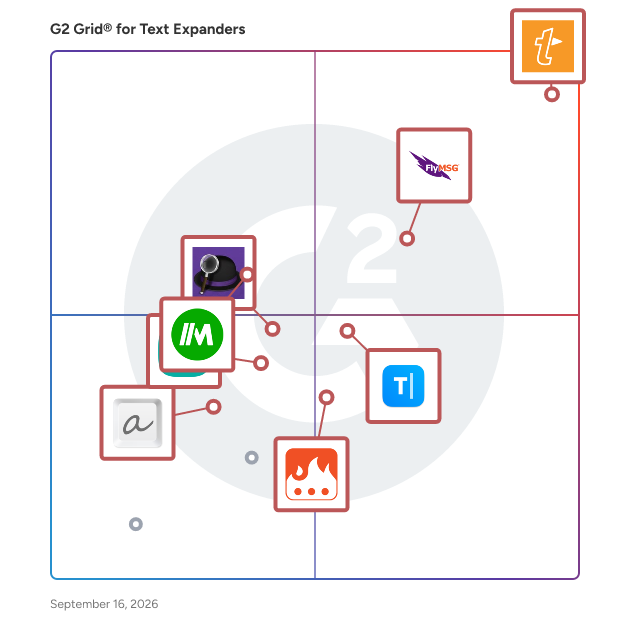
- **Leader:** [TextExpander](https://www.g2.com/products/textexpander/reviews)
- **Highest Performer:** [Alfred](https://www.g2.com/products/alfred/reviews)
- **Easiest to Use:** [TextExpander](https://www.g2.com/products/textexpander/reviews)
- **Top Trending:** [TextExpander](https://www.g2.com/products/textexpander/reviews)
- **Best Free Software:** [TextExpander](https://www.g2.com/products/textexpander/reviews)

  
  ## What Are the Top-Rated Text Expanders Software Products in 2026?
### 1. [TextExpander](https://www.g2.com/products/textexpander/reviews)
  TextExpander is a typing productivity tool that helps teams manage recurring writing tasks, create snippets, correct spellings, share content, and more. Keep your whole team communicating efficiently and with consistent language. Share messaging snippets, signatures, and descriptions with everyone who works on projects with you.


  **Average Rating:** 4.8/5.0
  **Total Reviews:** 451

**Who Is the Company Behind TextExpander?**

- **Seller:** [Text Expander](https://www.g2.com/sellers/text-expander)
- **Company Website:** https://textexpander.com/
- **Year Founded:** 2005
- **HQ Location:** San Francisco, US
- **Twitter:** @TextExpander (12,196 Twitter followers)
- **LinkedIn® Page:** https://linkedin.com/company/textexpander/ (51 employees on LinkedIn®)

**Who Uses This Product?**
  - **Who Uses This:** Owner, Account Executive
  - **Top Industries:** Computer Software, Information Technology and Services
  - **Company Size:** 39% Small-Business, 29% Mid-Market


#### What Are TextExpander's Pros and Cons?

**Pros:**

- Ease of Use (212 reviews)
- Time-saving (157 reviews)
- Time-Saving (151 reviews)
- Daily Use (93 reviews)
- Useful (84 reviews)

**Cons:**

- Software Bugs (51 reviews)
- App Issues (32 reviews)
- Learning Curve (24 reviews)
- Missing Features (21 reviews)
- Complexity (20 reviews)

### 2. [FlyMSG](https://www.g2.com/products/flymsg/reviews)
  AI Writing, Grammar Checker, Text Expander, Snippets, Paraphrasing, Sales Engagement, Coaching, Role Play &amp; Prospecting Training! 🚀 𝐅𝐥𝐲𝐌𝐒𝐆: 𝐓𝐡𝐞 𝐚𝐥𝐥-𝐢𝐧-𝐨𝐧𝐞 𝐬𝐮𝐢𝐭𝐞 𝐨𝐟 𝐀𝐈 𝐚𝐬𝐬𝐢𝐬𝐭𝐚𝐧𝐭𝐬 𝐭𝐨 𝐖𝐫𝐢𝐭𝐞 𝐒𝐦𝐚𝐫𝐭𝐞𝐫. 𝐏𝐢𝐭𝐜𝐡 𝐁𝐞𝐭𝐭𝐞𝐫. 𝐖𝐢𝐧 𝐌𝐨𝐫𝐞. Welcome to FlyMSG, your all-in-one suite of AI assistants designed to perfect your writing and pitch. This is a complete ecosystem of assistants for any professional writer, salesperson, business owner and marketer. It combines a powerful text expander, an advanced AI Writer, a meticulous grammar checker, and a full suite of sales engagement tools. Think of FlyMSG as an AI-powered productivity &amp; engagement suite, crafted to streamline your workflow and supercharge your sales and marketing efforts. This extension offers a suite of assistants that saves you time, creates engagement and boosts your efficiency. Whether you&#39;re a salesperson focused on social selling, a recruiter, a marketer, or a customer support agent, FlyMSG helps you: ✅ Write faster anywhere online ✅ Reuse your best content instantly with smart snippets and shortcuts (aka FlyCuts) ✅ Fix grammar and polish tone in real-time ✅ Scale sales messaging and outreach across any online SaaS application like email and LinkedIn ✅ Learn effective LinkedIn prospecting with our sales training ✅ Master cold-calling with AI sales roleplay 🦅 More than magical, it’s FLY! FlyMSG is a browser extension that combines: - A powerful Text Expander for ultimate productivity. - An intelligent AI email writer &amp; sentence rewrite tool. - An AI Grammar Checker. - Full set of AI engagement tools for social selling. - Expert sales prospecting training. - AI sales roleplay and coaching for cold calling. It’s the only extension that brings tools + sales training into a single suite. Any writer engaging with customers will become faster and more consistent with their messaging. 𝐂𝐨𝐫𝐞 𝐟𝐞𝐚𝐭𝐮𝐫𝐞𝐬 𝐜𝐨𝐧𝐭𝐚𝐢𝐧𝐞𝐝 𝐰𝐢𝐭𝐡𝐢𝐧 𝐅𝐥𝐲𝐌𝐒𝐆: ✍️ AI Rewriter Tools FlyMSG Sentence Rewrite: Our tool will rephrase or rewrite any sentence. This is a key tool for any writer looking to improve their writing. You can choose to make the text sound more human, improve it or any of the other seven other writing assistant features. This is the ultimate sentence rewrite tool. FlyMSG Paragraph Rewrite: You can also rephrase or rewrite any paragraph. Just highlight the text and our paragraph rewriter will provide a new version, make it shorter, make it longer, translate it or even continue the thought process. You can paraphrase the content to ensure it is unique. 🧩 FlyMSG - Auto Text Expander Save, reuse, and deploy message snippets or shortcuts anywhere online. Think of this autofill text expander as the key to unlocking hours of lost productivity. Avoid repetitive tasks by leveraging shortcuts and templates and autofill any form. This is automation at its finest. 📩 AI Social Engagement Suite FlyMSG AI Post Generator: Create compelling social media posts and autofill the content directly on LinkedIn. This post generator is the most powerful on the market for social selling. Grab a blog or YouTube URL and we’ll draft up a social post in your tone of voice in less than 9 seconds. FlyMSG AI Comment Generator: Write high-converting LinkedIn comments in your voice or industry. This comment generator helps create engagement with your buyers. Use this social post generator and auto comment generator to master LinkedIn prospecting. 📝 FlyMSG AI Grammar Checker Fix grammar, tone, and spelling instantly with our AI Grammar Checker. This is a powerful tool for any writer focused on quality writing. Our Grammar Checker is a must-have for professional messages for any role but especially for sales, marketers and business owners. 📚 FlyMSG Sales Prospecting Training / OnDemand Learning Our platform includes over 15 hours of sales prospecting training. This sales training covers everything from mastering email messaging to video selling to LinkedIn prospecting (aka social selling). 🎙️ FlyMSG AI Sales Roleplay and Coaching Practice cold calling with our AI sales roleplay and coaching tool. This software gives your reps everything they need to perfect their pitch. This is the best way to practice cold calling. Our sales roleplay software is a game-changer. 𝐔𝐬𝐞 𝐂𝐚𝐬𝐞𝐬 𝐛𝐲 𝐑𝐨𝐥𝐞: Sales Professionals: - Reuse cold email templates and follow-ups. - Create posts with our social post generator and comments with our comment generator. - Prospect smarter with our sales training. - Improve cold calling with AI sales roleplay and land your next meeting faster. Recruiting &amp; HR Professionals: - Create job descriptions and outreach templates magically. - Organize your top-performing messages and deploy them with snippets (aka FlyCuts). This is a key productivity tool for any recruiter. Customer Service &amp; Support: - Answer FAQs quickly with saved replies and templates. - Automate ticket responses with consistency. - Ensure every customer support message is grammatically sound. Marketers &amp; Creators: - Reuse brand messaging, copy, and campaign snippets - Generate content and social posts fast - Expand frequently used disclaimers, CTAs, links Educators &amp; Admins: - Create course templates, response shortcuts, and personalized feedback - Maintain tone and grammar quality in all communication Medical &amp; Legal Professionals: - Use FlyCuts to insert standard snippets, templates, messages forms, clauses, codes, or disclaimers - Reduce documentation time while increasing accuracy ✨ 𝐕𝐚𝐥𝐮𝐞 𝐨𝐟 𝐇𝐚𝐯𝐢𝐧𝐠 𝐚𝐧 𝐀𝐥𝐥-𝐢𝐧-𝐎𝐧𝐞: 📝 Auto Text Expander &amp; Writing Assistant - Save Time: Automate repetitive typing tasks with customizable shortcuts. - Consistency: Maintain brand voice across all communications. Every writer on your team will sound consistent. 📚 On-Demand Sales Training - Our sales prospecting training curriculum covers LinkedIn prospecting and more. ✍️ AI Grammar Checker Tool - Our Grammar Checker helps improve clarity in your writing. Every writer needs this. 📈 Proven Results: - Time Savings: Our automation saves 30+ hours monthly per user. - Sales Growth: Up to 3,600% growth in pipeline as a result of our sales training and engagement strategies. Join thousands of professionals who have transformed their workflow with our productivity suite. Experience the power of automation and better writing. Install FlyMSG today. 𝐓𝐫𝐲 𝐭𝐨𝐝𝐚𝐲 𝐅𝐥𝐲𝐌𝐒𝐆 𝐭𝐡𝐞 𝐚𝐥𝐥-𝐢𝐧-𝐨𝐧𝐞 𝐬𝐮𝐢𝐭𝐞 𝐨𝐟 𝐀𝐈 𝐚𝐬𝐬𝐢𝐬𝐭𝐚𝐧𝐭𝐬 𝐭𝐨 𝐖𝐫𝐢𝐭𝐞 𝐒𝐦𝐚𝐫𝐭𝐞𝐫. 𝐏𝐢𝐭𝐜𝐡 𝐁𝐞𝐭𝐭𝐞𝐫. 𝐖𝐢𝐧 𝐌𝐨𝐫𝐞.


  **Average Rating:** 4.7/5.0
  **Total Reviews:** 47

**Who Is the Company Behind FlyMSG?**

- **Seller:** [Vengreso](https://www.g2.com/sellers/vengreso)
- **Year Founded:** 2017
- **HQ Location:** Walnut Creek, US
- **Twitter:** @GoVengreso (9,851 Twitter followers)
- **LinkedIn® Page:** https://www.linkedin.com/company/vengreso (59 employees on LinkedIn®)

**Who Uses This Product?**
  - **Top Industries:** Consulting, Computer Software
  - **Company Size:** 83% Small-Business, 11% Mid-Market


#### What Are FlyMSG's Pros and Cons?

**Pros:**

- Time-Saving (9 reviews)
- Ease of Use (8 reviews)
- Time-saving (8 reviews)
- Useful (7 reviews)
- Features (5 reviews)

**Cons:**

- Expensive (3 reviews)
- Learning Curve (2 reviews)
- Missing Features (2 reviews)
- Workflow Disruption (2 reviews)
- Confusion (1 reviews)

### 3. [Magical](https://www.g2.com/products/magical/reviews)
  Magical is a productivity app that speeds up repetitive tasks as you work - no APIs or integrations required. Just an browser extension. With a simple keystroke, Magical automates mundane tasks like messaging, data entry, sourcing, and prospecting workflows. Unlike existing automation solutions that are expensive, clunky, and require a technical team to set up, Magical is designed for non-technical users, offering no-build task automations that works across any app. Use Magical to quickly personalize and expand messages as you type, move data from app to app to keep data bases up to date or move data into spreadsheets instantly. You can even use AI to write new messages for your using quick replies or custom prompts - where ever you work. Invite your entire team onto Magical and make everyone more productive by sharing your best message templates or productivity hacks. Magical is free to use!


  **Average Rating:** 4.7/5.0
  **Total Reviews:** 73

**Who Is the Company Behind Magical?**

- **Seller:** [Magical](https://www.g2.com/sellers/magical)
- **Year Founded:** 2020
- **HQ Location:** San Francisco, CA
- **Twitter:** @get_magical (1,682 Twitter followers)
- **LinkedIn® Page:** https://www.linkedin.com/company/getmagical/ (96 employees on LinkedIn®)

**Who Uses This Product?**
  - **Top Industries:** Consumer Services, Hospital &amp; Health Care
  - **Company Size:** 46% Mid-Market, 36% Small-Business


#### What Are Magical's Pros and Cons?

**Pros:**

- Ease of Use (19 reviews)
- Time-saving (19 reviews)
- Automation (16 reviews)
- Time-Saving (12 reviews)
- Efficiency (7 reviews)

**Cons:**

- Learning Curve (5 reviews)
- Technical Issues (4 reviews)
- Complexity (2 reviews)
- Difficult Settings (2 reviews)
- Not Intuitive (2 reviews)

### 4. [Alfred](https://www.g2.com/products/alfred/reviews)
  Alfred is an app for Mac OS X designed to boost efficiency with hotkeys, keywords, text expansion and others.


  **Average Rating:** 4.5/5.0
  **Total Reviews:** 34

**Who Is the Company Behind Alfred?**

- **Seller:** [Alfred](https://www.g2.com/sellers/alfred)
- **HQ Location:** United Kingdom
- **Twitter:** @alfredapp (49,594 Twitter followers)
- **LinkedIn® Page:** https://www.linkedin.com/company/No-Linkedin-Presence-Added-Intentionally-By-DataOps (1 employees on LinkedIn®)

**Who Uses This Product?**
  - **Top Industries:** Computer Software
  - **Company Size:** 65% Small-Business, 21% Enterprise


#### What Are Alfred's Pros and Cons?

**Pros:**

- Ease of Use (1 reviews)
- Efficiency (1 reviews)

**Cons:**

- Learning Difficulty (1 reviews)
- Poor UI Design (1 reviews)

### 5. [typedesk](https://www.g2.com/products/typedesk/reviews)
  If you can type it, you can automate it with Typedesk! Typedesk is the leading app to reclaim time wasted typing the same things over and over again! Create text templates of your everyday sentences and messages, and typedesk makes reusing them quick and easy. ➤ How it works Use the / character followed by your custom shortcuts to quickly insert your response. For instance, typedesk can transform &quot;/eml&quot; into your email address, or &quot;/tmpl&quot; into a full email with your opening line and signature. Need something more visual? Hit Alt+C, and typedesk&#39;s search bar opens up instantly to quickly and easily find and insert the responses you need. ➤ It works where you do Whether you need your snippets within your email client, Word document, code editor, or back office, typedesk works out of the box with all the apps and websites you use daily. Our apps for Windows, Mac, and all the major browsers are giving you typing superpowers everywhere you work! ➤ Powerful variables for personalized responses Personalizing messages can be daunting, let alone making sure you didn&#39;t leave a placeholder before hitting &quot;Send&quot;! typedesk&#39;s powerful engine allows you to create interactive forms to personalize each response quickly and easily, so you always hit the right spot! ➤ Designed for teams typedesk has been designed from the ground up to work great with teams. Invite as many users as you want to your account, and share one or more folders with specific permissions for each user. ➤ Built for privacy Unlike most text expanders, typedesk never listens to your keyboard before you request it with a shortcut. Your data is encrypted with LUKS and SSL to ensure complete peace of mind. ➤ Get our desktop apps Need your responses outside of your browser? No problem, get our apps for Windows and Mac to experience the same typing speed in your favorite native apps. ➤ Don&#39;t take our word for it! typedesk is acclaimed on many review platforms! &quot;We&#39;re loving typedesk! It&#39;s easy to use, and saves us tons of time when it comes to sending emails to our customers.&quot; Seb Fontan, Founder @ TripHitz Marketing Agency &quot;We keep finding new ways to use typedesk. It started with the obvious canned email responses, especially for the repetitive emails we get every day. Recently, we&#39;ve implemented it with social media posts, especially YouTube video descriptions, and this is where Variables comes in handy.&quot; Ninos M., Creative Director &quot;The setup was quick and painless, and adding in new templates or using the templates after they are added takes no time at all, making working with emails a short and simple process.&quot; Tori, Customer Success @ BookRetreats


  **Average Rating:** 4.7/5.0
  **Total Reviews:** 20

**Who Is the Company Behind typedesk?**

- **Seller:** [typedesk](https://www.g2.com/sellers/typedesk)
- **Year Founded:** 2018
- **HQ Location:** Lille, FR
- **LinkedIn® Page:** https://www.linkedin.com/company/18701477 (2 employees on LinkedIn®)

**Who Uses This Product?**
  - **Company Size:** 90% Small-Business, 5% Mid-Market


#### What Are typedesk's Pros and Cons?

**Pros:**

- Ease of Use (9 reviews)
- Time-saving (5 reviews)
- Automation (4 reviews)
- Helpful (4 reviews)
- Customer Support (3 reviews)

**Cons:**

- Slow Loading (2 reviews)
- Data Duplication (1 reviews)
- Lack of Integrations (1 reviews)
- Limited Customization (1 reviews)
- Manual Input (1 reviews)

### 6. [Text Blaze](https://www.g2.com/products/text-blaze/reviews)
  Text Blaze allows users to save programmable text snippets and insert them anywhere on the web using keyboard shortcuts. Snippets can be plain text, but they can also be turned into dynamic templates with placeholders, business logic (if/else), reading any information from any webpage, and integrations with other apps.


  **Average Rating:** 4.9/5.0
  **Total Reviews:** 21

**Who Is the Company Behind Text Blaze?**

- **Seller:** [Text Blaze](https://www.g2.com/sellers/text-blaze)
- **HQ Location:** N/A
- **Twitter:** @text_blaze (1,467 Twitter followers)
- **LinkedIn® Page:** https://www.linkedin.com/company/19114105 (19 employees on LinkedIn®)

**Who Uses This Product?**
  - **Company Size:** 62% Small-Business, 29% Mid-Market


#### What Are Text Blaze's Pros and Cons?

**Pros:**

- Time-saving (4 reviews)
- Customizability (2 reviews)
- Ease of Use (2 reviews)
- Automation (1 reviews)
- Customization (1 reviews)

**Cons:**

- Expensive (2 reviews)
- Integration Issues (1 reviews)
- Limited Credits (1 reviews)
- Limited Features (1 reviews)
- Software Bugs (1 reviews)

### 7. [ActiveWords](https://www.g2.com/products/activewords/reviews)
  ActiveWords is a semantic interface for Windows. It&#39;s a productivity tool that dramatically increases your productivity. ActiveWords lets you name computing events with your own language, i.e. text expansion, open documents, navigate to websites, by typing a a letter, a word or an acronym, in any app, any time, anywhere. It gives you back 10-60 seconds a hundred times a day.


  **Average Rating:** 4.3/5.0
  **Total Reviews:** 21

**Who Is the Company Behind ActiveWords?**

- **Seller:** [ActiveWords Systems](https://www.g2.com/sellers/activewords-systems)
- **Year Founded:** 1997
- **HQ Location:** Winter Park, Florida
- **LinkedIn® Page:** https://www.linkedin.com/company/33240536 (2 employees on LinkedIn®)

**Who Uses This Product?**
  - **Company Size:** 62% Small-Business, 19% Mid-Market


### 8. [aText](https://www.g2.com/products/atext/reviews)
  aText accelerates your typing by replacing abbreviations with frequently used phrases you define


  **Average Rating:** 4.5/5.0
  **Total Reviews:** 17

**Who Is the Company Behind aText?**

- **Seller:** [Tran Ky Nam](https://www.g2.com/sellers/tran-ky-nam)
- **HQ Location:** N/A
- **LinkedIn® Page:** https://www.linkedin.com/company/No-Linkedin-Presence-Added-Intentionally-By-DataOps (1 employees on LinkedIn®)

**Who Uses This Product?**
  - **Top Industries:** Internet
  - **Company Size:** 61% Mid-Market, 22% Small-Business


### 9. [Typinator](https://www.g2.com/products/typinator/reviews)
  Typinator is a text expansion tool for Mac and iOS, that allows teams to create abbreviations that automatically expand into standardized text, images, or scripts across all applications. Organizations use it to enforce consistent communication in customer support, sales, and documentation workflows, reducing both repetitive typing and error rates. Typinator processes all data locally with AES-256 encryption; ergonis Software holds ISO 27001 certification.


  **Average Rating:** 4.9/5.0
  **Total Reviews:** 11

**Who Is the Company Behind Typinator?**

- **Seller:** [Ergonis](https://www.g2.com/sellers/ergonis)
- **Year Founded:** 2002
- **HQ Location:** Perg, AT
- **LinkedIn® Page:** https://www.linkedin.com/company/ergonis (8 employees on LinkedIn®)

**Who Uses This Product?**
  - **Company Size:** 64% Small-Business, 9% Mid-Market


### 10. [Phrase Express](https://www.g2.com/products/phrase-express/reviews)
  PhraseExpress is available for Windows and the Autotext App for Android provides the productivity benefits on tablet or smartphone devices. PhraseExpress can organize canned responses not only in a simple folder structure but also in multiple dimensions. PhraseExpress integrates a powerful Macro Recorder to record and playback repetitive tasks.


  **Average Rating:** 3.3/5.0
  **Total Reviews:** 13

**Who Is the Company Behind Phrase Express?**

- **Seller:** [Bartels Media](https://www.g2.com/sellers/bartels-media)
- **HQ Location:** Trier, de
- **Twitter:** @BartelsMedia (34 Twitter followers)
- **LinkedIn® Page:** https://www.linkedin.com/company/bartels-media-gmbh/ (1 employees on LinkedIn®)

**Who Uses This Product?**
  - **Company Size:** 43% Small-Business, 29% Mid-Market


### 11. [PhraseExpander](https://www.g2.com/products/phraseexpander/reviews)
  PhraseExpander provides autocompletion (and smartphrases) in any application to save time typing. It also gives access to fill-in-the-blanks templates that are available by typing an abbreviation.


  **Average Rating:** 4.1/5.0
  **Total Reviews:** 5

**Who Is the Company Behind PhraseExpander?**

- **Seller:** [Nagarsoft](https://www.g2.com/sellers/nagarsoft)
- **Year Founded:** 2006
- **HQ Location:** Torino, IT
- **Twitter:** @PhraseExpander (264 Twitter followers)
- **LinkedIn® Page:** https://www.linkedin.com/company/phraseexpander/ (1 employees on LinkedIn®)

**Who Uses This Product?**
  - **Company Size:** 60% Mid-Market, 40% Small-Business


### 12. [Lightning Assist](https://www.g2.com/products/lightning-assist/reviews)
  Lightning Assist is a cross-platform text expander and AI productivity tool for Windows, macOS, and Linux. It combines snippet management, AI-powered writing assistance, and push-to-talk voice-to-text into a single native desktop application — no browser extension required. Unlike browser-based tools, Lightning Assist runs at the operating system level. Your snippets, hotkeys, and AI commands work in every app: Gmail, Outlook, Slack, VS Code, terminal emulators, SSH sessions, CRM platforms, helpdesk tools, and any other desktop application you use. Text Expansion &amp; Snippet Management Create keyboard shortcuts for any text you type repeatedly — email templates, canned responses, code snippets, SQL queries, legal disclaimers, Markdown blocks, or standard support replies. Assign a hotkey or abbreviation and Lightning Assist inserts the full text instantly, anywhere on your system. Works in terminal and IDE environments where browser extensions cannot reach. Quick Access Palette Press Alt+C to open a searchable snippet launcher — a system-wide command palette for all your shortcuts. Type a few characters to filter and trigger the right snippet immediately, without leaving your keyboard or switching windows. AI Commands &amp; Writing Assistance Build custom AI hotkeys that rewrite, enhance, summarize, translate, or generate text on demand. Trigger AI actions directly from your keyboard in any application — no copy-pasting into ChatGPT, no tab switching, no context loss. AI Commands work with any text field on your system. Push-to-Talk Voice-to-Text Hold a configurable hotkey, speak, and your words appear as typed text in any app — including terminals, IDEs, and desktop applications that browser-based voice tools cannot support. Lightning Assist is the only text expander with system-wide push-to-talk voice input built in. Team Sharing &amp; Collaboration Share snippet libraries across your team to standardize communication, accelerate onboarding, and keep messaging consistent. Ideal for customer support teams, sales teams, and development teams that rely on shared templates and responses. Security Data is encrypted at rest. Lightning Assist does not read your screen or intercept keystrokes beyond what is required for snippet triggering. Suitable for enterprise environments with strict data handling requirements. Who Uses Lightning Assist? Software developers and technical leads who need terminal and IDE support Customer support and helpdesk teams who rely on fast, consistent canned responses Writers, marketers, and content creators who use AI writing assistance daily Sales and operations teams managing high-volume repetitive communication Linux users who need a GUI text expander with AI capabilities — unavailable elsewhere Pricing Two plans, all features included — no tiers, no hidden limits. Monthly — $5.99/month Annual — $4.99/month (billed as $59.99/year, save ~17%) Both plans include unlimited snippets, AI commands, voice-to-text, and team sharing across Windows, macOS, and Linux. 14-day free trial, no credit card required. Lightning Assist is the only text expander that combines snippet management, AI commands, and voice-to-text in a single cross-platform desktop app — built for professionals who type for a living.


  **Average Rating:** 5.0/5.0
  **Total Reviews:** 3

**Who Is the Company Behind Lightning Assist?**

- **Seller:** [Lightning Assist](https://www.g2.com/sellers/lightning-assist)
- **Year Founded:** 2022
- **HQ Location:** Iasi, RO
- **LinkedIn® Page:** https://www.linkedin.com/company/lightning-assist/ (1 employees on LinkedIn®)

**Who Uses This Product?**
  - **Company Size:** 100% Small-Business


### 13. [Fastfox](https://www.g2.com/products/fastfox/reviews)
  Instant Word Expansion, Keyboard Shortcuts &amp; Macro Recorder Software


  **Average Rating:** 4.5/5.0
  **Total Reviews:** 1

**Who Is the Company Behind Fastfox?**

- **Seller:** [NCH Software](https://www.g2.com/sellers/nch-software)
- **Year Founded:** 1993
- **HQ Location:** Greenwood Village, CO
- **Twitter:** @nchsoftware (9,911 Twitter followers)
- **LinkedIn® Page:** https://www.linkedin.com/company/285305/ (80 employees on LinkedIn®)

**Who Uses This Product?**
  - **Company Size:** 100% Small-Business


### 14. [aBreevy8](https://www.g2.com/products/abreevy8/reviews)
  Taken from thier site &quot;aBreevy8 – formerly known as Breevy – is a major productivity enhancer that has been relied upon and trusted by thousands of individuals, hospitals, tech companies, customer support teams, charities, authors, editors, journalists, medical transcriptionists, courtroom reporters, law offices, teachers, professors, Fortune 500 companies and small businesses, and everyone in between for 15 years – and counting!&quot;


  **Average Rating:** 5.0/5.0
  **Total Reviews:** 1

**Who Is the Company Behind aBreevy8?**

- **Seller:** [16 Software](https://www.g2.com/sellers/16-software)
- **HQ Location:** N/A
- **LinkedIn® Page:** https://www.linkedin.com/company/No-Linkedin-Presence-Added-Intentionally-By-DataOps (1 employees on LinkedIn®)

**Who Uses This Product?**
  - **Company Size:** 100% Small-Business


### 15. [Briskine](https://www.g2.com/products/briskine/reviews)
  Briskine is a text expander browser extension that speeds up writing emails or messages. ⚡ Write emails, messages, and replies faster by inserting templates in Gmail, Outlook.com, LinkedIn, or any other website. 🖌️ Briskine templates can have rich text (bold, italic, text color, text alignment) and even images, tables, or emojis. 🪄 Use variables and helpers to insert dynamic content like today&#39;s date or a person&#39;s name. ✨ Automatically add attachments to an email, set the to/cc/bcc address, or send the email from a different address. 📘 Share and edit template with your whole team, to keep them consistent and up to date when replying to your customers.


**Who Is the Company Behind Briskine?**

- **Seller:** [Briskine](https://www.g2.com/sellers/briskine)
- **HQ Location:** Târgu Mureș, RO
- **LinkedIn® Page:** https://www.linkedin.com/company/briskine (1 employees on LinkedIn®)


### 16. [Chartnote](https://www.g2.com/products/chartnote/reviews)
  Chartnote has everything you need to expedite your medical documentation.


**Who Is the Company Behind Chartnote?**

- **Seller:** [Chartnote](https://www.g2.com/sellers/chartnote)
- **Year Founded:** 2019
- **HQ Location:** Davis, US
- **LinkedIn® Page:** https://www.linkedin.com/company/chartnote/ (6 employees on LinkedIn®)


### 17. [Espanso](https://www.g2.com/products/espanso/reviews)
  Discover the incredible power of a full-blown text expander.


**Who Is the Company Behind Espanso?**

- **Seller:** [Espanso](https://www.g2.com/sellers/espanso)
- **HQ Location:** N/A
- **LinkedIn® Page:** https://www.linkedin.com/company/No-Linkedin-Presence-Added-Intentionally-By-DataOps (1 employees on LinkedIn®)


### 18. [Fastkeys](https://www.g2.com/products/fastkeys/reviews)
  Expand abbreviations for frequently used text and save hours of typing. Including Auto Complete with learning.


**Who Is the Company Behind Fastkeys?**

- **Seller:** [Fastkeys](https://www.g2.com/sellers/fastkeys)
- **HQ Location:** N/A
- **LinkedIn® Page:** https://www.linkedin.com/company/No-Linkedin-Presence-Added-Intentionally-By-DataOps (1 employees on LinkedIn®)


### 19. [Keyboard Maestro](https://www.g2.com/products/keyboard-maestro/reviews)
  Keyboard Maestro is a comprehensive automation software for macOS that empowers users to streamline repetitive tasks and enhance productivity. By creating custom macros, users can automate a wide range of actions, from launching applications and managing windows to controlling system functions and executing complex workflows with a single keystroke. The intuitive interface facilitates the creation and management of macros, while advanced features like text expansions, clipboard management, and automated script execution offer extensive customization options to meet individual needs. Seamlessly integrating with various macOS applications, Keyboard Maestro is designed to make your Mac experience more efficient and tailored to your preferences. Key Features and Functionality: - Macro Creation: Design and record custom macros to automate repetitive tasks. - Triggers: Activate macros using hotkeys, typed strings, application events, system events, and more. - Clipboard Management: Access previous clipboards and work with multiple saved clipboards. - Application Control: Navigate through running applications and open windows efficiently. - Macro Groups: Organize macros into groups that can be activated or deactivated based on specific conditions. - Synchronization: Sync macros across multiple Macs using file-sharing systems like Dropbox. - Macro Debugger: Detailed control and debugging of macros in action. - Status Menu: Access macros from a global system status menu. - Custom Icons: Customize macro icons with the Icon Chooser and creator. - Dark Mode Support: Use Dark Mode or Light Mode for a comfortable user experience. Primary Value and User Solutions: Keyboard Maestro significantly enhances productivity by automating routine and complex tasks, allowing users to focus on more critical aspects of their work. It offers a high degree of customization, enabling users to tailor their Mac experience to their specific needs and preferences. By automating tasks, users can perform complex actions quickly and efficiently, reducing the time spent on repetitive processes. The software&#39;s flexibility, with a wide range of triggers and actions, allows for the automation of almost any task, from simple to complex workflows. Its user-friendly interface makes it accessible to both beginners and power users, streamlining tedious tasks and improving overall workflow. Additionally, Keyboard Maestro ensures tasks are performed consistently and accurately every time, enhancing reliability and efficiency.


  **Average Rating:** 5.0/5.0
  **Total Reviews:** 1

**Who Is the Company Behind Keyboard Maestro?**

- **Seller:** [Keyboard Maestro](https://www.g2.com/sellers/keyboard-maestro)
- **HQ Location:** N/A
- **LinkedIn® Page:** https://www.linkedin.com/company/No-Linkedin-Presence-Added-Intentionally-By-DataOps (1 employees on LinkedIn®)

**Who Uses This Product?**
  - **Company Size:** 100% Small-Business


### 20. [Lintalist](https://www.g2.com/products/lintalist/reviews)
  Lintalist allows you to store and (incrementally) search and edit texts in bundles and paste a selected text in your active program. The text can be interactive, for example you can automatically insert the current time and date, ask for (basic) user input or make a selection from a list etc and finally it can also run a script. You can use keyboard shortcuts or abbreviations to paste the text (or run the script) without opening the search window.


**Who Is the Company Behind Lintalist?**

- **Seller:** [Lintalist](https://www.g2.com/sellers/lintalist)
- **HQ Location:** N/A
- **LinkedIn® Page:** https://www.linkedin.com/company/No-Linkedin-Presence-Added-Intentionally-By-DataOps (1 employees on LinkedIn®)


### 21. [NexoPad Text Expander](https://www.g2.com/products/nexopad-text-expander/reviews)
  What is NexoPad Text Expander? NexoPad is an all-in-one browser workspace designed to eliminate tab-switching and extension bloat. By consolidating a powerful Smart Text Expander, Secure Markdown Notes, an advanced Link Manager, and an optional BYOK (Bring Your Own Key) AI Assistant into a single lightweight Chrome extension, NexoPad helps professionals and teams centralize their daily workflows. Built for customer support teams, sales representatives, recruiters, and developers, NexoPad allows you to automate repetitive typing and access your team&#39;s knowledge base without ever leaving your current web page, CRM, or email client. Key Capabilities: Smart Text Expander: Instantly inject pre-written templates into any text field across the web (Gmail, LinkedIn, Salesforce, Zendesk) using short keyboard triggers. It supports dynamic variables, A/B/C spintax rotation, and a unique &quot;Visual Data Inspector&quot; that auto-extracts on-screen data (like a lead&#39;s name or company) to personalize messages instantly. Team Collaboration (Shared Vault): Keep your entire organization aligned with a shared workspace. Manage role-based permissions, share winning snippets, and use global company variables to ensure consistent communication across departments. Secure Markdown Notes &amp; Web Clipper: Capture text from any website with one click, or jot down ideas using the Notion-style rich text editor. Notes can be secured with a local PIN and opened as floating windows. Tab &amp; Link Manager: Save open tabs, organize frequently used URLs into groups, and launch them instantly using the omnibox or the command palette (Ctrl+K). Optional Private AI (BYOK): Plug in your own API key (OpenAI, Anthropic, Gemini) to summarize pages, rewrite text, or translate snippets directly within your active tab, avoiding expensive third-party AI subscriptions. NexoPad operates with a privacy-first approach, keeping data encrypted and stored locally, while offering optional cloud synchronization for multi-device and team setups.


**Who Is the Company Behind NexoPad Text Expander?**

- **Seller:** [NexoPad](https://www.g2.com/sellers/nexopad)
- **HQ Location:** N/A
- **LinkedIn® Page:** https://www.linkedin.com/company/No-Linkedin-Presence-Added-Intentionally-By-DataOps (1 employees on LinkedIn®)


### 22. [PhraseVault](https://www.g2.com/products/phrasevault/reviews)
  PhraseVault is a desktop text expander and snippet manager for Windows and macOS that helps individuals and teams eliminate repetitive typing. Users store frequently used text — email templates, customer support responses, code snippets, AI prompts, legal clauses, and more — and insert them into any application with a keyboard shortcut. The application runs entirely offline. All data is stored locally in SQLite databases on the user&#39;s device. No cloud account, internet connection, or sign-up is required. PhraseVault does not collect telemetry, analytics, or usage data. The source code is publicly available on GitHub for inspection (source available). Core capabilities include instant text expansion (press a global hotkey, fuzzy-search stored phrases, and paste into the active application in milliseconds — no abbreviations or trigger phrases to memorize), dynamic placeholders (live dates, user input prompts, dropdown selections, clipboard embedding, and nested phrases), and rich content types (plain text, Markdown, or HTML with automatic format conversion on paste). PhraseVault supports importing existing snippets from TextExpander (CSV), Espanso (YAML), PhraseExpress, or JSON files with built-in conflict resolution. Users can create, open, and switch between multiple phrase databases. Databases are portable SQLite files that can be shared via network drives, NAS, or cloud-synced folders for team collaboration. Organization features include full-text fuzzy search with Unicode normalization, and usage-count sorting so the most-used phrases appear first. Native applications are available for Windows 10/11 and macOS 12+, with 7 UI languages (German, English, Spanish, Japanese, Italian, French, Portuguese). PhraseVault uses a one-time lifetime license model. There are no subscription fees, no recurring charges, and free updates are included. Pricing starts at $29 for a single license, with volume discounts for teams and special pricing for education. The application is designed for solo professionals, freelancers, small businesses, and teams that need a straightforward way to manage reusable text without enterprise complexity. Common use cases include customer support (canned responses, FAQ answers), sales outreach (email templates, follow-ups), software development (code boilerplates, Git templates), AI workflows (ChatGPT/Claude/Midjourney prompt management), healthcare documentation, legal templates, and general office productivity. PhraseVault is developed in Austria and operates under EU data protection jurisdiction. A 14-day free trial with full feature access is available — no credit card required. All purchases include a 30-day money-back guarantee.


**Who Is the Company Behind PhraseVault?**

- **Seller:** [SPQRK Web Solutions](https://www.g2.com/sellers/spqrk-web-solutions)
- **HQ Location:** N/A
- **LinkedIn® Page:** https://www.linkedin.com/company/No-Linkedin-Presence-Added-Intentionally-By-DataOps (1 employees on LinkedIn®)


### 23. [ProKeys](https://www.g2.com/products/prokeys/reviews)
  This user-friendly text expander lets you save largish text expansions and associate them with short abbreviations. We support plain or styled text, local and sync browser storage, clipboard macros, date and time macros, dynamic value fields in expansions, dynamic math, omnibox support, and much more!


**Who Is the Company Behind ProKeys?**

- **Seller:** [Aquila Softworks](https://www.g2.com/sellers/aquila-softworks)
- **HQ Location:** N/A
- **LinkedIn® Page:** https://www.linkedin.com/company/No-Linkedin-Presence-Added-Intentionally-By-DataOps (1 employees on LinkedIn®)


### 24. [RapidKey](https://www.g2.com/products/rapidkey/reviews)
  RapidKey provides you with a new Windows functionality. This software autocompletes text phrases and autoexpands shorthands in any Windows applications.


**Who Is the Company Behind RapidKey?**

- **Seller:** [Neuber Software](https://www.g2.com/sellers/neuber-software)
- **Year Founded:** 1993
- **HQ Location:** Halle (Saale), DE
- **LinkedIn® Page:** https://www.linkedin.com/company/neuber-software/ (1 employees on LinkedIn®)


### 25. [Rocket Typist](https://www.g2.com/products/rocket-typist/reviews)
  During our daily routines, we often find ourselves repeatedly typing similar text over and over again. Rocket Typist is your solution for saving valuable time while typing. Let Rocket Typist create and insert text and image snippets on your Mac, iPhone, or iPad.


**Who Is the Company Behind Rocket Typist?**

- **Seller:** [Witt Software](https://www.g2.com/sellers/witt-software)
- **HQ Location:** N/A
- **LinkedIn® Page:** https://www.linkedin.com/company/No-Linkedin-Presence-Added-Intentionally-By-DataOps (1 employees on LinkedIn®)


    ## What Is Text Expanders Software?
  [Collaboration &amp; Productivity Software](https://www.g2.com/categories/collaboration-productivity)


