Best Project Management Software - Page 5

How Many Project Management Software Products Does G2 Track?

Total Products under this Category: 1,422

Category Stats (Oct 2026)

  • Average Rating: 4.39/5 The average rating of products in this category, based on all submitted ratings
  • Top Trending Product: Semsto (+11.11%) - Among all products in this category, Semsto recorded the largest rating increase compared to last month

Last updated: October 14, 2026

How Does G2 Rank Project Management Software Products?

Why You Can Trust G2's Software Rankings:

  • 30 Analysts and Data Experts
  • 152,100+ Authentic Reviews
  • 1,422+ Products
  • Unbiased Rankings

G2's software rankings are built on verified user reviews, rigorous moderation, and a consistent research methodology maintained by a team of analysts and data experts. Each product is measured using the same transparent criteria, with no paid placement or vendor influence. While reviews reflect real user experiences, which can be subjective, they offer valuable insight into how software performs in the hands of professionals. Together, these inputs power the G2 Score, a standardized way to compare tools within every category.

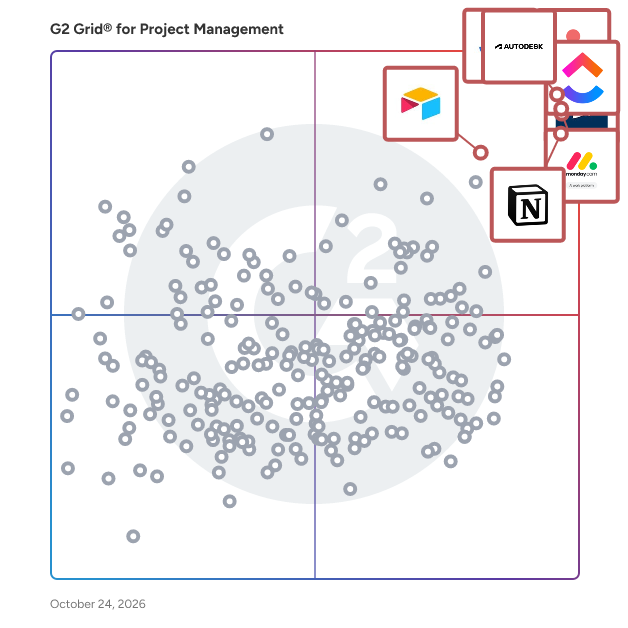
G2 Grid® for Project Management Software

G2 Grid® for Project Management Software plotting products by satisfaction and market presence

Highlighted products: Jira, Autodesk Forma (formerly Autodesk Construction Cloud), Asana, monday AI Work Platform, Smartsheet, ClickUp, Notion, and Airtable.

Underlying data: [Grid® JSON](https://www.g2.com/categories/project-management/grids.json?focus%5B%5D=jira&focus%5B%5D=autodesk-forma-formerly-autodesk-construction-cloud&focus%5B%5D=asana&focus%5B%5D=monday-com&focus%5B%5D=smartsheet&focus%5B%5D=clickup&focus%5B%5D=notion&focus%5B%5D=airtable)

Kytes

Kytes is an AI-enabled Professional Services Automation (PSA) and Project & Portfolio Management (PPM) platform that digitises the entire project lifecycle on a single data foundation - from opportunity to cash, and from idea to launch. Rather than a point tool for timesheets or task boards, Kytes unifies project management, resource management, project financials, estimation and proposals, timesheets and leave, workflow automation and analytics in one system. Enterprises run it as their system of record for delivery, utilisation and margin. Purpose-built for verticals: Kytes ships with domain templates and best-practice workflows for IT and engineering services, pharmaceuticals and life sciences, EPC, and Global Capability Centres (GCCs), so teams configure rather than build from scratch. One platform covers three project journeys. Customer Projects runs the full Opportunity-to-Cash process, including estimation, proposals, revenue recognition, billing and project P&L. New Product Development covers stage-gate NPD and NPI, dossier management, portfolio prioritisation and launch readiness. Internal Initiatives brings governance and visibility to transformation programmes. AI sits at the core. Conversational intelligence lets teams query project data and generate reports in plain language. Predictive intelligence forecasts delays, flags resource conflicts before they bite, and auto-generates charters, WBS, minutes and executive decks. Knowledge intelligence searches by meaning and extracts skills from resumes. Customers report 14% higher resource utilisation, 21% faster delivery cycles, a 12% increase in billable hours and 9% margin uplift through predictive forecasting. Enterprise-ready by design: multi-currency and multi-entity financials with intra-company transactions, pre-built integrations to SAP, Oracle, Workday, Darwinbox, Power BI and Tableau, and a mobile app. Kytes has served project-driven enterprises since 2006, including Volkswagen Group Digital Solutions India, Mitsubishi Electric India, Quest Global, Alkem Laboratories, Mega Lifesciences, TVS and Egnyte.

Average Rating: 4.3/5.0

Total Reviews: 95

How Do G2 Users Rate Kytes?

  • Has the product been a good partner in doing business?: 9.3/10 (Category avg: 8.9/10)
  • Planning: 9.0/10 (Category avg: 8.8/10)
  • Creation & Assignment: 7.9/10 (Category avg: 8.9/10)
  • Resource Allocation: 8.6/10 (Category avg: 8.4/10)

Who Is the Company Behind Kytes?

  • Seller: Kytes
  • Company Website:
  • Year Founded: 2006
  • HQ Location: Pune, IN
  • LinkedIn® Page: in.linkedin.com
    170 employees on LinkedIn®

Who Uses This Product?

  • Who Uses This: Project Manager
  • Top Industries: Information Technology and Services, Computer Software
  • Company Size: 68% Medium, 21% Large

What Do G2 Reviewers Say About Kytes?

AI-generated summary from verified user reviews

Pros
  • Users praise the ease of use of Kytes, enjoying its intuitive interface and smooth implementation process.
  • Users value the comprehensive project management features of Kytes, effectively streamlining activities and resource tracking.
  • Users value the comprehensive project tracking features of Kytes, enhancing resource management and productivity across teams.
  • Users appreciate the comprehensive resource management capabilities of Kytes, enhancing project delivery and visibility across projects.
  • Users value the effective team collaboration features of Kytes, enhancing project management and resource planning seamlessly.
Cons
  • Users experience slow loading times, especially with volume-based reports, affecting overall performance and efficiency.
  • Users experience slow performance with Kytes, especially during report generation and file uploads, impacting overall efficiency.
  • Users experience a challenging learning curve with Kytes due to confusing layouts, though support is helpful.
  • Users find the limited reporting capabilities of Kytes frustrating, affecting their analysis and decision-making processes.
  • Users find missing features like limited reporting and lack of AI/ML integration to be significant drawbacks.

What Are Recent G2 Reviews of Kytes?

What Are G2 Users Discussing About Kytes?

Moovila

Moovila Perfect Project is an AI-powered project management and automation platform developed by Moovila to help organizations plan, predict, and deliver projects with precision. Built for Managed Service Providers (MSPs), IT service firms, and other project-driven organizations, Moovila enables teams to manage complex, resource-dependent workflows while eliminating uncertainty in project timelines. Unlike traditional project management tools, the platform uses artificial intelligence to dynamically create and maintain optimized project schedules, ensuring that teams can adapt in real time while staying on track for on-time delivery. Moovila is designed for organizations that manage a high volume of concurrent projects, particularly MSPs, consulting firms, and professional services teams that rely on structured workflows and accurate resource planning. Its ideal users are teams working within PSA environments such as ConnectWise PSA, Autotask PSA, and HaloPSA, where alignment between sales, operations, and project delivery is critical. These organizations often face challenges such as missed deadlines, limited visibility into project health, and inefficient resource allocation, all of which Moovila is built to solve through automation and intelligent forecasting. What differentiates Moovila Perfect Project from other platforms is its focus on predictability and real-time intelligence rather than manual tracking. At the core of the platform is its AI-driven Critical Path Engine, which automatically maps task dependencies and continuously recalculates the most efficient path to project completion as conditions evolve. This is paired with real-time risk detection, which monitors projects for potential delays or bottlenecks and proactively alerts teams with recommended actions to mitigate those risks before they impact delivery timelines. Another key advantage of Moovila is its native bi-directional integration with major PSA systems, including ConnectWise PSA, Autotask PSA, and HaloPSA, allowing for seamless, real-time synchronization of project data without the need for middleware or manual data entry. This integration ensures that all teams are working from the same source of truth. In addition, Moovila has read-only integrations with Box, Dropbox, Google Drive, Microsoft OneDrive, Microsoft SharePoint, Google Calendar, Microsoft Outlook, Microsoft Teams, Cisco Webex, Salesforce, HubSpot, QuickBooks Online, Jira, Microsoft Excel, Microsoft 365, Microsoft Exchange Online, Visual Studio Team Services (Azure DevOps). The platform also features Smart Scheduling, which automatically generates and adjusts timelines based on real-time inputs, ensuring that project plans remain accurate without constant manual updates. Moovila supports structured, dependency-driven workflows through a waterfall methodology, with optional Gantt chart visualization for teams that require a visual representation of project timelines. Its Project Hub further enhances efficiency by providing a library of pre-built templates, enabling teams to quickly launch standardized, well-structured projects with confidence and consistency. Moovila Perfect Project is used across a variety of use cases, including client project delivery such as onboarding, migrations, and implementations, as well as internal operations management and cross-functional coordination. It is equally effective for both short-term initiatives and long-term strategic projects, making it a flexible solution for organizations that require both structure and adaptability. By automating scheduling, monitoring risks, and optimizing resources, Moovila helps teams stay aligned, accountable, and in control of even the most complex project environments. By combining automation, real-time intelligence, and seamless integration, Moovila Perfect Project enables organizations to move from simply managing projects to delivering them with consistency and precision.

Average Rating: 4.8/5.0

Total Reviews: 54

How Do G2 Users Rate Moovila?

  • Has the product been a good partner in doing business?: 9.9/10 (Category avg: 8.9/10)
  • Planning: 9.3/10 (Category avg: 8.8/10)
  • Creation & Assignment: 9.6/10 (Category avg: 8.9/10)
  • Resource Allocation: 9.3/10 (Category avg: 8.4/10)

Who Is the Company Behind Moovila?

  • Seller: Moovila
  • Company Website:
  • HQ Location: Mount Pleasant, South Carolina
  • Twitter: @Moovila_App
    767 Twitter followers
  • LinkedIn® Page: www.linkedin.com
    26 employees on LinkedIn®

Who Uses This Product?

  • Who Uses This: Project Manager
  • Top Industries: Information Technology and Services, Computer & Network Security
  • Company Size: 54% Small, 40% Medium

What Do G2 Reviewers Say About Moovila?

AI-generated summary from verified user reviews

Pros
  • Users commend Moovila for its user-friendly interface and efficient project management capabilities, facilitating seamless collaboration and organization.
  • Users find Moovila's ease of use invaluable, simplifying project management with its friendly UI and dashboard customization.
  • Users value how Moovila's automation reduces human errors, significantly enhancing team efficiency and project management.
  • Users value the effective project tracking features of Moovila, enhancing organization and resource planning significantly.
  • Users commend the outstanding customer support of Moovila, highlighting responsiveness and helpful onboarding experiences.
Cons
  • Users find the limited customization options of Moovila frustrating, impacting ease of use and interface intuitiveness.
  • Users face integration issues with Moovila, finding discrepancies in functionality across different ticketing platforms.
  • Users find the steep learning curve challenging, making it difficult to navigate and utilize the platform effectively.
  • Users find Moovila's limited features hinder intuitive use and customization, impacting their overall project management experience.
  • Users find Moovila's interface not intuitive, citing a steep learning curve and overwhelming design challenges.

What Are Recent G2 Reviews of Moovila?

What Are G2 Users Discussing About Moovila?

Swit

Swit is every team's work hub that consolidates collaboration essentials in one place - task, chat, goals, approvals, and integrations with Google Workspace and Microsoft 365. It's purpose-built to drive Employee Connection Where It Counts. Bring your entire company together on a unified platform that supports communication, work management, task tracking, goal setting, and so much more! Swit is flexible and scalable to meet the needs of any organization of any size. Drag and drop emails into Channels or convert them into task cards. Drag and drop task cards into Channels or DMs. Attach Approvals or OKRs directly to task cards. See why Swit is loved by organizations of all sizes from Small Businesses to Enterprise customers.

Average Rating: 4.7/5.0

Total Reviews: 350

How Do G2 Users Rate Swit?

  • Has the product been a good partner in doing business?: 8.9/10 (Category avg: 8.9/10)
  • Planning: 8.6/10 (Category avg: 8.8/10)
  • Creation & Assignment: 9.0/10 (Category avg: 8.9/10)
  • Resource Allocation: 8.4/10 (Category avg: 8.4/10)

Who Is the Company Behind Swit?

  • Seller: Swit
  • Year Founded: 2018
  • HQ Location: San Francisco, California
  • Twitter: @GetSwit
    207 Twitter followers
  • LinkedIn® Page: www.linkedin.com
    180 employees on LinkedIn®

Who Uses This Product?

  • Who Uses This: CEO, Deputy General Manager
  • Top Industries: Airlines/Aviation, Computer Software
  • Company Size: 50% Small, 42% Medium

What Are Recent G2 Reviews of Swit?

What Are G2 Users Discussing About Swit?

AI can help you find the answers. G2 helps you trust them.

Connect G2 to Claude or ChatGPT for answers grounded in G2's trusted reviews, comparisons, and pricing from real user insights.

How it works

Redbooth

Redbooth is an easy to use project management software available for teams to stay organized and get work done. Redbooth allows teams to manage an unlimited number of projects in collaborative workspaces that combine tasks, files and feedback into a centralized, searchable, and in-sync experience; it is the perfect workflow management system! Available on Android, iOS, web, and desktop, Redbooth teams are more productive because they can easily work together on their favorite device. Founded in 2008, the company is privately held and headquartered in Palo Alto, California. START FAST - Create an account in minutes - Easily set up dedicated workspaces for each project or task you want to manage - Super intuitive interface for creating and assigning new tasks - Just the right level of functionality for busy teams UPDATE ANYWHERE - View and organize your work from anywhere - Create tasks, conversations or update projects anytime - Add due dates, assignees or comments to any task - Update tasks as work is completed or notify others about changes - Everything is automatically saved and synced TRACK EVERYTHING - See your favorite workspaces and task management lists - Assess the progress of shared projects and spot dependencies early - Visualize progress as you complete projects STAY CONNECTED - Get notified of important updates - Speed up feedback with integrated messaging tools - Notification settings are fully customizable - Use Redbooth conversations to chat within the app PRICING -Free: 10 users and 2 workspaces for teams getting started with project management -Professional: From $9/mo: subtasks, reporting, and guest users for growing teams -Business: From $15/mo: assignable subtasks, Smart Redbooth and priority support for large teams

Average Rating: 4.4/5.0

Total Reviews: 103

How Do G2 Users Rate Redbooth?

  • Has the product been a good partner in doing business?: 8.5/10 (Category avg: 8.9/10)
  • Planning: 7.6/10 (Category avg: 8.8/10)
  • Creation & Assignment: 8.8/10 (Category avg: 8.9/10)
  • Resource Allocation: 7.6/10 (Category avg: 8.4/10)

Who Is the Company Behind Redbooth?

  • Seller: Redbooth
  • Year Founded: 2008
  • HQ Location: Palo Alto, CA
  • Twitter: @RedboothHQ
    6,425 Twitter followers
  • LinkedIn® Page: www.linkedin.com
    18 employees on LinkedIn®

Who Uses This Product?

  • Top Industries: Information Technology and Services, Marketing and Advertising
  • Company Size: 59% Small, 35% Medium

What Do G2 Reviewers Say About Redbooth?

AI-generated summary from verified user reviews

Pros
  • Users appreciate the easy task assignment in Redbooth, simplifying collaboration without unnecessary complexity.
  • Users appreciate the clean and organized digital office experience Redbooth provides, enhancing their workflow efficiency.
  • Users enjoy the simplicity in task assignment and collaboration that Redbooth offers, avoiding unnecessary complexity.
  • Users value the task tracking capabilities of Redbooth, enhancing team productivity through effective time management.
  • Users find team collaboration easy with Redbooth, appreciating its straightforward task assignment and lack of complexity.
Cons
  • Users find automation difficulties with Redbooth due to limited advanced features like reporting and resource forecasting.
  • Users feel the product suffers from feature limitations, notably in advanced reporting and automation capabilities.
  • Users find Redbooth's functionality limited compared to newer project management tools, impacting their overall experience.
  • Users face challenges with limited reporting capabilities in Redbooth, hindering effective project management and resource tracking.
  • Users find Redbooth somewhat not user-friendly and suggest improvements for a better interface experience.

What Are Recent G2 Reviews of Redbooth?

What Are G2 Users Discussing About Redbooth?

Astravue

Because "Task Management" isn't enough. Most project management apps are just digital to-do lists. They tell you what’s due, but they don't help you deliver. For agencies, consultancies, and service firms, a "completed task" doesn't matter if the client is frustrated and your margins are shrinking. Astravue is not a project management app. It is a Delivery Assurance platform. We built Astravue to solve the "hidden mess" that happens when service teams grow. As you take on more clients, visibility blurs and the "I hope we’re on track" feeling starts to keep you up at night. We replace that guesswork with total clarity: For the CEO: Stop chasing people for status updates. See the pulse of every client project in one glance. For the Team: Kill the constant tool-switching. One source of truth that keeps communication and work in one place. For the Client: Transparency that builds trust and stops the "where are we at?" emails before they’re sent. We are here to protect your project profit margin.

Average Rating: 5.0/5.0

Total Reviews: 10

How Do G2 Users Rate Astravue?

  • Has the product been a good partner in doing business?: 10.0/10 (Category avg: 8.9/10)
  • Planning: 6.9/10 (Category avg: 8.8/10)
  • Creation & Assignment: 9.4/10 (Category avg: 8.9/10)
  • Resource Allocation: 4.0/10 (Category avg: 8.4/10)

Who Is the Company Behind Astravue?

  • Seller: Astravue
  • Year Founded: 2020
  • HQ Location: Chennai, IN
  • LinkedIn® Page: www.linkedin.com
    15 employees on LinkedIn®

Who Uses This Product?

  • Company Size: 82% Small, 9% Medium

What Do G2 Reviewers Say About Astravue?

AI-generated summary from verified user reviews

Pros
  • Users value the transparency and collaboration in project management offered by Astravue, enhancing workflow efficiency and accountability.
  • Users find Astravue's ease of use remarkable, allowing for quick integration and effective daily task management.
  • Users love the user-friendly interface of Astravue that simplifies navigation and enhances productivity.
  • Users value Astravue's clean and user-friendly UI, enhancing navigation and streamlining daily tasks effectively.
  • Users love the flexible customization of Astravue, allowing easy adaptation for their specific business needs.
Cons
  • Users express dissatisfaction with the incomplete Android and iOS apps, noting they are still under development.
  • Users report a minor billing management issue that is expected to be resolved soon.
  • Users find the lack of a comprehensive task list view limiting for tracking team progress effectively.
  • Users experience some organization difficulties with Astravue, but support helps resolve these issues effectively.

What Are Recent G2 Reviews of Astravue?

ProjectManager

ProjectManager is project and portfolio management software with world-class project scheduling, native ERP integrations and AI integration with ChatGPT. Project managers, PMOs and operations leaders use it to plan, schedule, staff and track projects in one cloud platform. Project scheduling ProjectManager offers scheduling depth on par with desktop tools like Microsoft Project, with the real-time collaboration of the cloud. Teams build plans with interactive Gantt charts, task dependencies, lag, critical path and baselines, then track actual progress against the plan. Kanban boards, task lists, sheets and calendars give every team member a view that fits their work. ERP project management Native, bi-directional integrations with Acumatica and MYOB Acumatica sync projects, tasks, resources and hours between ProjectManager and the ERP, so project and financial data stay consistent. A QuickBooks Online integration connects project data to accounting, and an open API supports custom integrations with other business systems. AI integration with ChatGPT Users can work in ProjectManager from ChatGPT in plain language: check project status, find tasks, see who is assigned, create projects and tasks, set dates and costs, and update progress. Each user signs in with their own account, so the assistant only sees what that user can access. Managers control access by role, and the assistant asks for approval before changing data. Resource and cost management Workload charts show who is over- or under-allocated, and managers can reassign work to balance the team. Team availability, PTO, labor rates and timesheets are built in, so labor costs are tracked against budget automatically. Portfolio visibility Live dashboards, portfolio roadmaps and reports give PMOs and executives a real-time view of progress, cost, workload and risk across every project. Why teams choose ProjectManager - Advanced scheduling without desktop software - Native, bi-directional ERP integration with Acumatica and MYOB Acumatica - QuickBooks Online integration and an open API - Secure, permission-based ChatGPT integration - Resource, time and cost tracking in the same platform as the schedule Trusted by thousands of teams worldwide. Available in English, Spanish, French, German and Portuguese.

Average Rating: 4.4/5.0

Total Reviews: 95

How Do G2 Users Rate ProjectManager?

  • Has the product been a good partner in doing business?: 8.7/10 (Category avg: 8.9/10)
  • Planning: 8.7/10 (Category avg: 8.8/10)
  • Creation & Assignment: 9.0/10 (Category avg: 8.9/10)
  • Resource Allocation: 8.4/10 (Category avg: 8.4/10)

Who Is the Company Behind ProjectManager?

  • Seller: ProjectManager
  • Year Founded: 2008
  • HQ Location: Austin, Texas
  • Twitter: @ProjectTips
    52,588 Twitter followers
  • LinkedIn® Page: www.linkedin.com
    103 employees on LinkedIn®

Who Uses This Product?

  • Who Uses This: Project Manager
  • Top Industries: Information Technology and Services, Construction
  • Company Size: 50% Small, 32% Medium

What Do G2 Reviewers Say About ProjectManager?

AI-generated summary from verified user reviews

Pros
  • Users praise ProjectManager for its ease of use, enabling smooth project management from start to finish.
  • Users appreciate the helpful support from the knowledgeable staff, enhancing their experience with ProjectManager.
  • Users value ProjectManager for its effortless planning and smart execution, enhancing project management from start to finish.
  • Users value the centralized information of ProjectManager, enhancing project organization and collaboration for smooth execution.
  • Users value ProjectManager for its effective communication, enhancing collaboration and coordination throughout the project lifecycle.
Cons
  • Users face challenges with frequent refreshing due to slow updates, complicating their project management experience.
  • Users often face app crashes, requiring browser refreshes that disrupt their workflow and experience with ProjectManager.
  • Users find the integration limitations of ProjectManager frustrating, negatively impacting their workflows with existing tools.
  • Users often face website errors, necessitating a browser refresh that disrupts their workflow.

What Are Recent G2 Reviews of ProjectManager?

What Are G2 Users Discussing About ProjectManager?

MeisterTask

MeisterTask is a web-based task and project management tool that is perfect for agile project management. Beautifully-designed interface, intuitive functionality, and seamless integrations with other tools make it a logical choice for project teams. MeisterTask offers a free Basic plan (up to 3 projects), with paid subscriptions from €12,50 per user per month. Alongside customizable, Kanban-style project boards, MeisterTask boasts numerous powerful features designed to streamline project work. Workload can be managed with Timeline: a Gantt-style overview of tasks that pinpoints bottlenecks and keeps projects flowing smoothly. Set up Automations to speed up manual work or complete specific tasks automatically. MeisterTask is part of the Meister Suite, a group of products for flawless workflow management. From ideation in our mind mapping tool, MindMeister, to online documentation in MeisterNote, your team unlocks a powerful toolkit that drives projects every step of the way.

Average Rating: 4.6/5.0

Total Reviews: 166

How Do G2 Users Rate MeisterTask?

  • Has the product been a good partner in doing business?: 9.3/10 (Category avg: 8.9/10)
  • Planning: 8.7/10 (Category avg: 8.8/10)
  • Creation & Assignment: 9.3/10 (Category avg: 8.9/10)
  • Resource Allocation: 8.3/10 (Category avg: 8.4/10)

Who Is the Company Behind MeisterTask?

  • Seller: MeisterLabs
  • Year Founded: 2006
  • HQ Location: Vienna, Austria
  • Twitter: @mindmeister
    20,018 Twitter followers
  • LinkedIn® Page: www.linkedin.com
    124 employees on LinkedIn®

Who Uses This Product?

  • Who Uses This: Owner
  • Top Industries: Marketing and Advertising, Computer Software
  • Company Size: 72% Small, 20% Medium

What Are Recent G2 Reviews of MeisterTask?

What Are G2 Users Discussing About MeisterTask?

TimeHero

TimeHero is an automated task and project planner for teams. It automatically schedules work around meetings, events, and appointments, so you don't need to spend time planning your day. Easily launch team-wide projects in seconds with TimeHero's built-in workflow automation. Timelines, timesheets, and Gantt charts are instantly updated, so you know when things are at risk before they ever get behind. Sign up for TimeHero today and become a more productive team with less effort.

Average Rating: 4.5/5.0

Total Reviews: 22

How Do G2 Users Rate TimeHero?

  • Has the product been a good partner in doing business?: 10.0/10 (Category avg: 8.9/10)
  • Planning: 9.2/10 (Category avg: 8.8/10)
  • Creation & Assignment: 9.1/10 (Category avg: 8.9/10)
  • Resource Allocation: 9.1/10 (Category avg: 8.4/10)

Who Is the Company Behind TimeHero?

  • Seller: TimeHero
  • Year Founded: 2015
  • HQ Location: Ontario, Canada
  • Twitter: @timehero
    310 Twitter followers
  • LinkedIn® Page: www.linkedin.com
    1 employees on LinkedIn®

Who Uses This Product?

  • Top Industries: Marketing and Advertising
  • Company Size: 59% Small, 37% Medium

What Do G2 Reviewers Say About TimeHero?

AI-generated summary from verified user reviews

Pros
  • Users appreciate the easy integration of TimeHero, enabling a smooth transition for managing their workloads effortlessly.
  • Users find TimeHero's progress tracking essential for effective planning and enhanced time-management capabilities.
  • Users value the team collaboration features in TimeHero, enhancing productivity and simplifying task management.
  • Users find TimeHero to be a valuable tool for planning and time management, effectively meeting their expectations.
  • Users appreciate the time-saving capabilities of TimeHero, enhancing their planning and time-management efficiency.
Cons
  • Users find the steep learning curve challenging, especially with customizable reports and platform glitches affecting usability.
  • Users note the limited features of TimeHero, which hinders functionality and makes the learning process challenging.
  • Users find the reporting issues challenging, with glitches and a steep learning curve affecting usability.

What Are Recent G2 Reviews of TimeHero?

What Are G2 Users Discussing About TimeHero?

Shortcut

Shortcut is a fast, lightweight, and enjoyable project management platform built for high-performing engineering teams. From issue tracking to sprints and roadmaps, Shortcut streamlines development so teams can move quickly. Tens of thousands of teams build products with Shortcut, including companies like Dataiku, Geckoboard, and Crossbeam.

Average Rating: 4.4/5.0

Total Reviews: 174

How Do G2 Users Rate Shortcut?

  • Has the product been a good partner in doing business?: 8.8/10 (Category avg: 8.9/10)
  • Planning: 9.6/10 (Category avg: 8.8/10)
  • Creation & Assignment: 10.0/10 (Category avg: 8.9/10)
  • Resource Allocation: 7.2/10 (Category avg: 8.4/10)

Who Is the Company Behind Shortcut?

  • Seller: Shortcut
  • Year Founded: 2014
  • HQ Location: New York
  • Twitter: @shortcut
    12,336 Twitter followers
  • LinkedIn® Page: www.linkedin.com
    71 employees on LinkedIn®

Who Uses This Product?

  • Who Uses This: Product Manager, Software Engineer
  • Top Industries: Computer Software, Information Technology and Services
  • Company Size: 53% Small, 42% Medium

What Do G2 Reviewers Say About Shortcut?

AI-generated summary from verified user reviews

Pros
  • Users find Shortcut extremely easy to use, effectively organizing tasks and enhancing clarity in project management.
  • Users find the user-friendly interface of Shortcut enhances efficiency, making task management and collaboration seamless.
  • Users highlight the seamless integration of Shortcut with tools like GitHub and Slack, enhancing their workflow significantly.
  • Users love the ease of use and comprehensive features of Shortcut, enhancing task management and collaboration efficiently.
  • Users love the seamless team collaboration in Shortcut, enhancing project management and improving overall productivity.
Cons
  • Users feel that Shortcut lacks essential technical features, such as timelines and milestones, compared to competitors like Jira.
  • Users feel that the lack of technical features in Shortcut limits its competitiveness compared to Jira and Asana.
  • Users find the complexity of features distracting, especially when team sizes are small and needs are simple.
  • Users find the learning curve challenging, particularly for non-technical staff adapting to Shortcut's features.
  • Users note the poor reporting capabilities in Shortcut, emphasizing a need for more varied metrics and options.

What Are Recent G2 Reviews of Shortcut?

What Are G2 Users Discussing About Shortcut?

Freelo

Freelo is a Project Management tool for teams who want to be in control of their work. Get rid of unnecessary internal email communication and finally start communicating effectively over tasks. With Freelo, everyone knows what to do, when the deadline is, and what priority the task has. Thanks to the clear Dashboard, no task gets lost anymore and thanks to the sophisticated filters in it, you can easily see how the tasks you delegated to your colleagues are doing. Organize your tasks in Kanban or plan projects in a Gantt chart. Built-in time tracking helps you keep track of how much time you've spent on a task and track the financial side of projects in Reports. Try Freelo for 14 days for free, then choose the plan that best suits your needs.

Average Rating: 4.7/5.0

Total Reviews: 241

How Do G2 Users Rate Freelo?

  • Has the product been a good partner in doing business?: 9.5/10 (Category avg: 8.9/10)
  • Planning: 8.9/10 (Category avg: 8.8/10)
  • Creation & Assignment: 9.2/10 (Category avg: 8.9/10)
  • Resource Allocation: 7.9/10 (Category avg: 8.4/10)

Who Is the Company Behind Freelo?

  • Seller: FreeloCZ
  • Year Founded: 2015
  • HQ Location: Pardubice V, CZ
  • Twitter: @FreeloCZ
    688 Twitter followers
  • LinkedIn® Page: www.linkedin.com
    34 employees on LinkedIn®

Who Uses This Product?

  • Who Uses This: Project manager, CEO
  • Top Industries: Non-Profit Organization Management, Civic & Social Organization
  • Company Size: 87% Small, 11% Medium

What Do G2 Reviewers Say About Freelo?

AI-generated summary from verified user reviews

Pros
  • Users value the ease of use of Freelo, appreciating its intuitive design and efficient project management capabilities.
  • Users love the intuitive task management in Freelo, simplifying project coordination and enhancing team communication effectively.
  • Users appreciate the intuitive project management features of Freelo, enhancing collaboration and productivity within teams.
  • Users value Freelo's clear organization, enhancing project communication and supporting efficient collaboration for effective management.
  • Users value the intuitive and well-organized workspace of Freelo, making project management accessible for all team members.
Cons
  • Users face a steep learning curve with Freelo, requiring time to understand its complex features and setup.
  • Users are frustrated by the limited app functionality, particularly the lack of task assignment options and usability issues.
  • Users find some aspects of Freelo not intuitive, making navigation and workflows feel confusing and cumbersome.
  • Users find the task management limitations in Freelo frustrating, particularly the lack of multiple assignee options.
  • Users find the beginner difficulty of Freelo challenging, requiring extensive training for less experienced team members.

What Are Recent G2 Reviews of Freelo?

What Are G2 Users Discussing About Freelo?

Prism PPM (formerly WorkOtter)

Prism PPM is a sophisticated Project Portfolio Management (PPM) solution designed to assist organizations in effectively managing their strategic projects. Recognized in the 2025 Gartner Magic Quadrant for Adaptive Project Management and Reporting, Prism PPM addresses the limitations of traditional spreadsheets and task management tools by providing a comprehensive platform that enhances project visibility, reporting accuracy, and overall portfolio management efficiency. Targeted at project management offices (PMOs), project managers, and organizational leaders, Prism PPM is particularly beneficial for those who oversee multiple projects and require a structured approach to resource allocation, capacity planning, and project intake processes. The solution is designed to facilitate informed decision-making by allowing users to prioritize projects that align with their business objectives and resource availability. This capability enables organizations to adapt to changes and understand the potential impacts on their project portfolio. One of the key features of Prism PPM is its robust project management capabilities grounded in PMBOK best practices. Users can efficiently manage resources and track project risks at both the project and portfolio levels. This functionality not only streamlines project execution but also enhances communication among stakeholders, ensuring that everyone is aligned on project goals and potential challenges. The platform’s advanced reporting and analytics dashboards provide critical insights into PPM KPIs, allowing organizations to monitor performance and make data-driven decisions. Prism PPM also emphasizes visibility across all project data. With the option to utilize embedded analytics or integrate with external tools like Power BI and Databricks, users can customize their reporting to meet specific needs. This flexibility ensures that stakeholders have access to relevant information, fostering transparency and accountability throughout the project lifecycle. To further enhance PMO and project governance, Prism PPM offers customizable templates and visual workflows that streamline processes. By establishing standards and feedback loops, organizations can ensure continuity across projects, leading to smoother operations and continuous process improvement. This structured approach not only supports project success but also empowers PMOs to drive strategic initiatives effectively. With a dedicated team of project management professionals available for implementation and support, Prism PPM is committed to helping organizations maximize the benefits of PPM software. Users can reach out for guidance on optimizing their PMO practices and leveraging the full potential of Prism PPM to achieve their project management goals.

Average Rating: 4.8/5.0

Total Reviews: 52

How Do G2 Users Rate Prism PPM (formerly WorkOtter)?

  • Has the product been a good partner in doing business?: 10.0/10 (Category avg: 8.9/10)
  • Planning: 9.9/10 (Category avg: 8.8/10)
  • Creation & Assignment: 9.7/10 (Category avg: 8.9/10)
  • Resource Allocation: 9.7/10 (Category avg: 8.4/10)

Who Is the Company Behind Prism PPM (formerly WorkOtter)?

Who Uses This Product?

  • Top Industries: Information Technology and Services
  • Company Size: 57% Small, 29% Medium

What Do G2 Reviewers Say About Prism PPM (formerly WorkOtter)?

AI-generated summary from verified user reviews

Pros
  • Users praise Prism PPM for its ease of use, making project management efficient and straightforward.
  • Users value the effective organization capabilities of Prism PPM, enhancing decision-making and project prioritization significantly.
  • Users value the streamlined resource management features of Prism PPM that enhance decision-making and project prioritization.
  • Users value the automation capabilities of Prism PPM, streamlining tasks and enhancing project management efficiency.
  • Users commend Prism PPM for its exceptional customer support and commitment to continuous improvement, enhancing overall experience.
Cons
  • Users find the limited features of Prism PPM restrict effective project management and hinder financial tracking capabilities.
  • Users face collaboration issues due to ineffective personalization and insufficient guidance, hindering team functionality and project tracking.
  • Users face feature issues with Prism PPM, finding personalization and tracking capabilities inadequate and user guides lacking depth.
  • Users express concerns about integration issues with Jira syncing, which limits advanced feature capabilities in projects.
  • Users find the learning curve steep, requiring time and training to become proficient with Prism PPM.

What Are Recent G2 Reviews of Prism PPM (formerly WorkOtter)?

What Are G2 Users Discussing About Prism PPM (formerly WorkOtter)?

Kantata Professional Services Automation (formerly Mavenlink+ Kimble)

Kantata helps professional services organizations of 50 to 5,000+ employees ensure consistent excellence and profitability across every project. With a platform that connects everything from scoping to resourcing to forecasting, you can always deliver amazing. The real challenge for most PS organizations is that their projects are so unpredictable. They never really know how an engagement is going to play out until it’s too late to do anything about it. And that undermines profits, strains resources, and leaves clients wondering what they’re really paying for. Kantata PSA puts an end to unpredictable projects by enabling you to: • Instantly assemble the ideal team – so you can deploy resources based on the best match for scope, scheduling, skillsets, and more • Easily amplify institutional knowledge – by turning past experience into real-time intelligence so all your expertise is available to all your people • Confidently forecast every outcome – with an accurate, comprehensive view of everything from revenue and margins to capacity and sentiment Not every services firm operates the same way — and your PSA shouldn’t either. Kantata is the only PSA offering both a Salesforce-native and an open infrastructure option, so you can choose the ecosystem that fits your business. With over 1,200 prebuilt connectors — including Salesforce, NetSuite, HubSpot, Workday, Sage Intacct, Microsoft Dynamics 365, Google Workspace, and Jira — Kantata extends the value of your existing tech stack while keeping all your operational data connected in one AI-powered platform. That’s why professional services organizations across software, IT services, management consulting, and marketing agencies rely on Kantata to operate with greater precision, predictability, and profitability. Leading organizations like Deloitte, Sage, and Hitachi trust Kantata, and our customers consistently achieve a 33% increase in on-time project delivery.

Average Rating: 4.2/5.0

Total Reviews: 1,515

How Do G2 Users Rate Kantata Professional Services Automation (formerly Mavenlink+ Kimble)?

  • Has the product been a good partner in doing business?: 8.6/10 (Category avg: 8.9/10)
  • Planning: 7.9/10 (Category avg: 8.8/10)
  • Creation & Assignment: 8.2/10 (Category avg: 8.9/10)
  • Resource Allocation: 7.9/10 (Category avg: 8.4/10)

Who Is the Company Behind Kantata Professional Services Automation (formerly Mavenlink+ Kimble)?

Who Uses This Product?

  • Who Uses This: Project Manager, Consultant
  • Top Industries: Information Technology and Services, Marketing and Advertising
  • Company Size: 57% Medium, 30% Small

What Do G2 Reviewers Say About Kantata Professional Services Automation (formerly Mavenlink+ Kimble)?

AI-generated summary from verified user reviews

Pros
  • Users value the integration of project management, resource planning, and finances, streamlining workflows and improving visibility.
  • Users value the effective project tracking of Kantata, enhancing workflow with real-time data and tailored features.
  • Users value the user-friendly interface of Kantata, simplifying project management and enhancing forecasting accuracy effortlessly.
  • Users commend Kantata for its robust reporting efficiency, allowing access to comprehensive data and real-time insights.
  • Users appreciate the custom report generation features of Kantata, which significantly enhance project management and data analysis.
Cons
  • Users find the dashboard creation process challenging and the overall interface unintuitive and overly manual.
  • Users experience a significant learning curve with Kantata PSA, necessitating extensive training and adjustment for optimal use.
  • Users note the not intuitive interface that complicates task management and slows down training for new users.
  • Users find the task management process overly manual, making it cumbersome to mark tasks complete and manage entries.
  • Users find the lack of customization frustrating, especially for unique reporting and intuitive project management tasks.

What Are Recent G2 Reviews of Kantata Professional Services Automation (formerly Mavenlink+ Kimble)?

What Are G2 Users Discussing About Kantata Professional Services Automation (formerly Mavenlink+ Kimble)?

Acclaim Projects

Deliver innovation on time and within budget! Acclaim Projects empowers product, innovation, and project people to deliver innovation on time and on budget. Unlike simple workflow tools, Acclaim Projects informs project lifecycle decisions by providing an integrated change management workflow, real-time project health, and detailed resource and financial management information. Integrated with Sopheon’s Accolade, people managing innovation projects can do so with ease and accuracy. Clients report a 10-15% improvement in project schedule and financials with Acclaim Projects.

Average Rating: 4.9/5.0

Total Reviews: 13

How Do G2 Users Rate Acclaim Projects?

  • Has the product been a good partner in doing business?: 10.0/10 (Category avg: 8.9/10)
  • Planning: 10.0/10 (Category avg: 8.8/10)
  • Creation & Assignment: 10.0/10 (Category avg: 8.9/10)
  • Resource Allocation: 10.0/10 (Category avg: 8.4/10)

Who Is the Company Behind Acclaim Projects?

Who Uses This Product?

  • Company Size: 50% Large, 29% Small

What Are Recent G2 Reviews of Acclaim Projects?

What Are G2 Users Discussing About Acclaim Projects?

Nozbe

You need Nozbe to organize your work! It's an easy-to-use app that helps you and your team communicate & manage all your projects. And it works on all devices! With Nozbe, you will: - Organize your team & personal tasks in projects - Communicate with your team, clients, and partners - through tasks - Work offline & keep all your projects in sync - Always stay on top of things with the Incoming view - Prioritize your tasks in the Priority view - Track the progress of your key projects in the Activity thread - Synchronize with your Calendar Get started for free!

Average Rating: 4.5/5.0

Total Reviews: 36

How Do G2 Users Rate Nozbe?

  • Has the product been a good partner in doing business?: 9.0/10 (Category avg: 8.9/10)
  • Planning: 7.8/10 (Category avg: 8.8/10)
  • Creation & Assignment: 9.8/10 (Category avg: 8.9/10)
  • Resource Allocation: 5.0/10 (Category avg: 8.4/10)

Who Is the Company Behind Nozbe?

  • Seller: Nozbe
  • Year Founded: 2007
  • HQ Location: Gdynia, Poland
  • Twitter: @nozbe
    5,909 Twitter followers
  • LinkedIn® Page: www.linkedin.com
    15 employees on LinkedIn®

Who Uses This Product?

  • Company Size: 76% Small, 16% Medium

What Do G2 Reviewers Say About Nozbe?

AI-generated summary from verified user reviews

Pros
  • Users love the ease of use of Nozbe, finding it simple to set up and manage tasks daily.
  • Users value the simplicity of project management in Nozbe, finding it easy to set up and control tasks.
  • Users love the simplicity of Nozbe, finding it easy to set up and manage tasks daily.
  • Users love the effortless task tracking of Nozbe, making it indispensable for daily project management.

What Are Recent G2 Reviews of Nozbe?

Project Insight

Project Insight is a strategic project and portfolio management software that gives companies a complete picture of the work happening across their entire organization. Streamline workflows, automate processes, enhance collaboration, and capture project data points from all your teams and systems in one central command center so you can make confident decisions about business. Manage work at the project, program or portfolio levels and integrate with the tools you already use, including Azure DevOps, Jira, Microsoft, Salesforce, and ServiceNow, and HubSpot to eliminate the need to manually key in data across teams. With the most views of any project management platform, teams can keep tabs on assignments, status, risks, resources, capacity, schedules, budgets, and more. Project Insight also offers free view only seats for clients. The power of AI can be used to assign action items after meetings, predict future capacity, balance workloads, & select the right resources.

Average Rating: 4.2/5.0

Total Reviews: 20

How Do G2 Users Rate Project Insight?

  • Has the product been a good partner in doing business?: 8.0/10 (Category avg: 8.9/10)
  • Planning: 6.7/10 (Category avg: 8.8/10)
  • Creation & Assignment: 9.4/10 (Category avg: 8.9/10)
  • Resource Allocation: 6.7/10 (Category avg: 8.4/10)

Who Is the Company Behind Project Insight?

  • Seller: Project Insight
  • Company Website:
  • Year Founded: 2001
  • HQ Location: Irvine, CA
  • Twitter: @ProjectInsight
    2,592 Twitter followers
  • LinkedIn® Page: www.linkedin.com
    32 employees on LinkedIn®

Who Uses This Product?

  • Top Industries: Information Technology and Services
  • Company Size: 40% Medium, 30% Large

What Do G2 Reviewers Say About Project Insight?

AI-generated summary from verified user reviews

Pros
  • Users value the automation in Project Insight, allowing them to focus on work rather than manual tasks.
  • Users value the ease of use of Project Insight, enhancing productivity through automation and streamlined task management.
  • Users value the easy integration of Project Insight, allowing seamless connectivity and automation for improved productivity.
  • Users appreciate the seamless integrations in Project Insight, enhancing efficiency and streamlining project management tasks.
  • Users value the robust security features of Project Insight, ensuring automated protection for their project data.
Cons
  • Users find the learning curve steep due to the plethora of features that require significant time and patience.
  • Users find that time-consumption due to numerous features can be challenging and requires significant patience to navigate.

What Are Recent G2 Reviews of Project Insight?

What Are G2 Users Discussing About Project Insight?

Subhransu Sahu
SS
Researched and written by Subhransu Sahu
Updated April 9, 2026