Best Presentation Management Software - Page 2

How Many Presentation Management Software Products Does G2 Track?

Total Products under this Category: 44

Category Stats (Sep 2026)

  • Average Rating: 4.58/5 The average rating of products in this category, based on all submitted ratings
  • Top Trending Product: Ampler (+0.24%) - Among all products in this category, Ampler recorded the largest rating increase compared to last month

Last updated: September 05, 2026

How Does G2 Rank Presentation Management Software Products?

Why You Can Trust G2's Software Rankings:

  • 30 Analysts and Data Experts
  • 1,300+ Authentic Reviews
  • 44+ Products
  • Unbiased Rankings

G2's software rankings are built on verified user reviews, rigorous moderation, and a consistent research methodology maintained by a team of analysts and data experts. Each product is measured using the same transparent criteria, with no paid placement or vendor influence. While reviews reflect real user experiences, which can be subjective, they offer valuable insight into how software performs in the hands of professionals. Together, these inputs power the G2 Score, a standardized way to compare tools within every category.

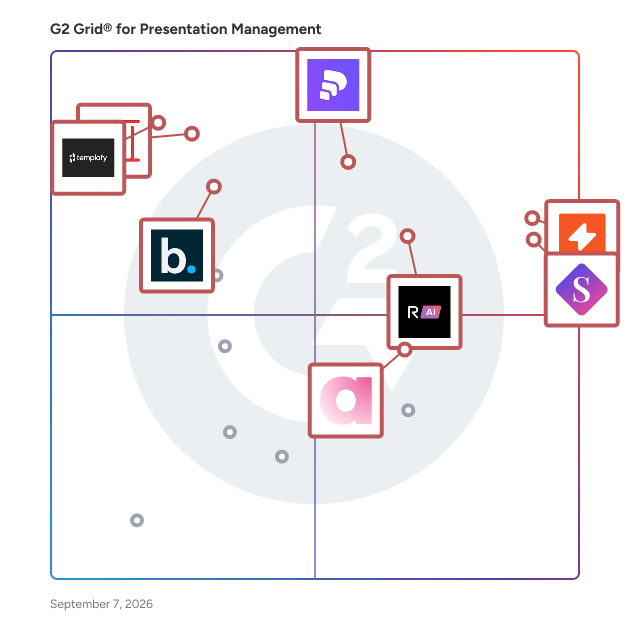
G2 Grid® for Presentation Management Software

G2 Grid® for Presentation Management Software plotting products by satisfaction and market presence

Highlighted products: UpSlide, SlideHub, Pitch, RELAYTO AI, Zoho Show, Ampler, Templafy, and Beautiful.ai.

Underlying data: [Grid® JSON](https://www.g2.com/categories/presentation-management/grids.json?focus%5B%5D=upslide&focus%5B%5D=slidehub&focus%5B%5D=pitch-pitch&focus%5B%5D=relayto-ai&focus%5B%5D=zoho-show&focus%5B%5D=ampler&focus%5B%5D=templafy&focus%5B%5D=beautiful-ai-beautiful-ai)

Slideshow City

Slideshow City is a presentation management solution that helps AV teams and stage managers handle the full lifecycle of conference presentations in one system. It covers speaker file uploads, automated format validation, review and approval workflows, live stage transitions, and digital signage across multiple rooms. The platform is designed for professional multi-session events such as medical symposia, academic conferences, and corporate meetings. Speakers upload their files through a portal where the system checks formats, fonts, codecs, and dimensions. AV teams review and approve presentations before they reach the stage, reducing the risk of technical issues during live sessions. Key capabilities include: - Centralized control room for managing back-to-back sessions, launching slide decks, and keeping multi-room events on schedule, with built-in vMix and Bitfocus Companion integration for hardware control surfaces like Elgato Stream Deck - Automated presentation validation supporting PowerPoint, Keynote, and PDF, flagging format issues before files go live - Self-check kiosk mode where speakers preview and verify their slides independently before going on stage - Digital signage that updates room screens, lobby monitors, and stage displays automatically with speaker names, session titles, and timing - Speaker room management with check-in tracking, preview stations, and visibility into who has arrived and verified their materials While the platform runs in the cloud, its local applications distribute presentation files across rooms over the venue's local network. This avoids internet speed bottlenecks and keeps large files moving between stage machines, even in venues with limited connectivity. Slideshow City syncs with Registration Town, Summitware's conference registration product, so speaker data, schedules, and program updates flow between the two systems automatically. It also offers a REST API, CLI, and MCP for custom integrations. Target users include AV teams, stage managers, and conference organizers managing events with multiple sessions and speakers.

Average Rating: 5.0/5.0

Total Reviews: 2

Who Is the Company Behind Slideshow City?

Who Uses This Product?

  • Company Size: 100% Small

What Are Recent G2 Reviews of Slideshow City?

ChartKit

ChartKit is a browser extension that brings professional, presentation-ready charts to Google Slides. Instead of wrestling with Slides' basic native charts, you build clean bar, line, waterfall, and column charts directly in the editor - styled to your brand palette and dropped straight onto the slide. Add data-driven annotations (deltas, CAGR, reference lines) to make the point without manual text boxes. Free for up to 10 charts a month, with an €8/month Pro plan for unlimited use.

Average Rating: 5.0/5.0

Total Reviews: 1

Who Is the Company Behind ChartKit?

Who Uses This Product?

  • Company Size: 100% Medium

What Are Recent G2 Reviews of ChartKit?

Efficient Elements

Are you interested in a quick tour of Efficient Elements? We will show you in just about 3 minutes how Efficient Elements can help you create more professional slides in no time.

Average Rating: 5.0/5.0

Total Reviews: 1

Who Is the Company Behind Efficient Elements?

Who Uses This Product?

  • Company Size: 100% Small

What Do G2 Reviewers Say About Efficient Elements?

AI-generated summary from verified user reviews

Pros
  • Users find Efficient Elements to be an easily navigable tool that simplifies PowerPoint slide preparation, saving valuable time.
  • Users value the easy setup of Efficient Elements, enabling quick creation of professionally designed PowerPoint slides.
  • Users value the efficiency of Efficient Elements, appreciating its time-saving tools for quick slide preparation.
  • Users value the great features of Efficient Elements, particularly for simplifying slide preparation under tight deadlines.
  • Users find the helpful features of Efficient Elements to be essential for quickly preparing professional PowerPoint slides.
Cons
  • Users find the cost of Efficient Elements high compared to PowerUser, impacting its perceived value.
  • Users note that Efficient Elements is expensive, especially compared to alternatives like PowerUser.
  • Users report PowerPoint issues with Efficient Elements, including crashes and lag during presentations.
  • Users report software instability, experiencing crashes and lag when using Efficient Elements during presentations.

What Are Recent G2 Reviews of Efficient Elements?

Seidat

Seidat is a cloud-based sales platform that works on any device. It enables smooth sales flow for your whole team through interactive and easy-to-use sales materials and collaboration features. You can create, edit, present (f2f/online), share, manage, analyze and e-sign your sales materials in Seidat. Integrate it as part of your software ecosystem easily through our API. Seidat is a perfect tool for online sales meetings because of its live share feature that works without screen-share on all devices. Also sharing proposals and meeting minutes simply by a link makes it easier to do business remotely. What makes Seidat different from other presentation tools? - It is made for sales teams - Matrix structure for presentations and wide presenter view - Advanced user rights management and collaboration features - Various content options from videos to interactive 3D product models and 360-panorama views - Very active customer support and quick responses in the customer service chat - All-in-one sales tool

Average Rating: 3.5/5.0

Total Reviews: 12

Who Is the Company Behind Seidat?

  • Seller: Seidat
  • Year Founded: 2015
  • HQ Location: Helsinki, FI
  • Twitter: @SeidatApp
    213 Twitter followers
  • LinkedIn® Page: www.linkedin.com
    16 employees on LinkedIn®

Who Uses This Product?

  • Company Size: 54% Medium, 31% Large

What Do G2 Reviewers Say About Seidat?

AI-generated summary from verified user reviews

Pros
  • Users appreciate the user-friendly interface and powerful analytical tools of Seidat for effective presentations and collaboration.
  • Users love the user-friendly interface of Seidat, making it easy for anyone to manage their content effectively.
  • Users appreciate the team collaboration features of Seidat, enabling seamless integration and task management among team members.
  • Users value the ease of access with Seidat, making it simple for anyone to utilize its features.
  • Users find Seidat to be cost-effective, enhancing teamwork and data management without exceeding budget constraints.
Cons
  • Users express concern over the limited features in the free trial, hindering effective workflow and customization.
  • Users find Seidat's internet dependency restrictive, hindering access and presentation capabilities in low connectivity areas.
  • Users find the limited customization options inadequate for sophisticated presentations, impacting overall usability and flexibility.
  • Users find the missing features in Seidat limits its suitability for professional presentations and design needs.

What Are Recent G2 Reviews of Seidat?

What Are G2 Users Discussing About Seidat?

ClearSlide

The most complete sales engagement platform for content, communications, and sales intelligence to make every buyer interaction count

Who Is the Company Behind ClearSlide?

  • Seller: Bigtincan
  • Year Founded: 2011
  • HQ Location: Waltham, MA
  • Twitter: @bigtincan
    2,236 Twitter followers
  • LinkedIn® Page: www.linkedin.com
    160 employees on LinkedIn®
  • Phone: 781-405-2376

Deckary

Deckary is an Agentic AI slide builder for PowerPoint — generate and edit consulting-grade decks through conversation. Deckary is an agentic AI slide builder that works inside PowerPoint. Describe what you need in plain language and the AI generates consulting-grade slides with action titles, structured arguments, and data visualization. Once slides exist, keep editing through conversation — the AI reads your current content, plans multi-step changes, and executes them across slides without you touching the ribbon. This agentic workflow handles the tasks that eat hours in PowerPoint. Restructure a 30-slide deck. Convert bullet points into a waterfall chart. Rewrite every title to be action-oriented. Add a new section with supporting data pulled from web research. The AI reasons through each step and applies changes in sequence, so you stay in the conversation instead of clicking through menus. Deckary also includes consulting-grade charts (waterfall, Mekko, Gantt, bridge) with live Excel linking, 2,000+ business icons, keyboard shortcuts, and a team slide library. Built for consultants, strategy teams, investment bankers, and anyone who builds high-stakes presentations on tight deadlines. Works on both Windows and Mac, directly inside PowerPoint. No export step, no separate app.

Who Is the Company Behind Deckary?

DeckTrue

Most PowerPoint templates look fine on the surface. Underneath, their XML tells a different story, and it's the story Microsoft Copilot reads when it generates your slides. DeckTrue finds the structural problems that cause Copilot to ignore your brand and fixes them. Upload your template, get a 100-point Copilot Readiness Score in 30 seconds, and auto-fix issues with one click. Microsoft's own Copilot Starter Template scores 51 out of 100. WHAT DECKTRUE DOES Copilot Readiness Score -- Automated structural analysis with one-click fixes for the issues that matter most. Rogue Master Cleaner -- Removes unused slide masters and layouts. Most templates drop 50-80% in file size. Brand Check -- Slide-by-slide color and font compliance. Fix or ignore each issue individually. WHO IT'S FOR - IT administrators rolling out Microsoft 365 Copilot - Template owners at consulting firms and agencies - Brand managers who need consistent slide output across teams WHY IT'S DIFFERENT DeckTrue works at the structural level, not the surface. It catches problems that visual inspection and PowerPoint's built-in tools miss entirely. Fix the template first, then Copilot works correctly.

Who Is the Company Behind DeckTrue?

Decky

Decky is an AI-powered presentation automation platform built to help enterprise teams create and scale high quality slide decks without the manual work. Enterprise teams rely on presentations for marketing and internal communication, but creating them over and over is slow and painstakingly repetitive. Decky solves this by accurately combining AI generation with structured team specific templates, helping users turn simple prompts or outlines into fully designed, on brand presentations in minutes. With Decky, enterprise teams can instantly generate complete decks and enforce specific brand consistency across every presentation. Its template system makes sure that all finished products align with company guidelines, eliminating the need for constant design oversight while maintaining a polished, professional standard. Unlike traditional presentation tools, Decky is built for speed and scalability. Marketing teams can produce presentations at volume, and operators can create internal reports without starting from scratch. By reducing repetitive work, Decky allows teams to focus on messaging instead of formatting. Decky is designed for growing companies and enterprises that need to produce presentations consistently and efficiently. By integrating AI-driven content generation with flexible design systems, Decky transforms presentations from a bottleneck into a scalable workflow.

Who Is the Company Behind Decky?

Display

Who Is the Company Behind Display?

  • Seller: EPAM Systems, Inc.
  • Year Founded: 1993
  • HQ Location: Newburyport, Massachusetts
  • Twitter: @EPAMSYSTEMS
    9,431 Twitter followers
  • LinkedIn® Page: www.linkedin.com
    69,255 employees on LinkedIn®
  • Ownership: NYSE:EPAM

Docutree

Docutree is a version control and review platform for PowerPoint. It helps teams track every change across deck versions, run structured approval workflows, and maintain a clear audit trail from first draft to final sign-off. Instead of managing high-stakes decks over email chains and shared drives, teams can compare any two versions side-by-side, see exactly what changed at the slide and object level, and assign reviewers with deadline and approval status tracking. Key features: • Visual diff: Automatically detects and highlights every change between PowerPoint versions — text edits, shape moves, color changes, added or removed slides. • Review workflows: Assign reviewers, track approval status, and maintain a full audit trail for every deck version. • AI-powered risk analysis: Flags slides that may contain errors, inconsistencies, or compliance risks before sign-off. • Version history: A complete record of all deck versions in one place. Docutree is built for teams that work with high-stakes presentations: consulting, finance, legal, marketing, and agencies.

Who Is the Company Behind Docutree?

eformity

eformity is a SaaS platform for template and asset management, headquartered in Alblasserdam, The Netherlands. Established in 2013, eformity provides businesses with a seamless solution for managing corporate templates and automating document workflows. The platform is deeply integrated into the Microsoft 365 suite and is designed to streamline document standardization across organizations. eformity serves a diverse customer base across various industries and is used in over 100 countries. With more than 200,000 active users and over 75,000 templates used daily. The eformity platform enables businesses to centralize template management, automate document generation, and ensure brand consistency across Microsoft Word, Outlook, PowerPoint, Excel, SharePoint, and Teams. The solution supports over 200 languages, allowing users to create multilingual documents from a single template. Additionally, eformity offers a structured asset library where organizations can store and manage images, icons, shapes, and graphs for consistent branding. The platform is available on both the web and desktop version of Microsoft 365, providing flexibility across different devices and work environments. Next to that eformity integrates with various CRM and business applications, enabling seamless data synchronization and reducing the need for manual data entry. By automating document creation and ensuring standardized workflows, eformity helps businesses reduce manual errors, improve efficiency, and maintain compliance with corporate guidelines. Organizations benefit from a streamlined workflow where users can generate professional, branded documents quickly and accurately. The ability to integrate with existing business systems enhances collaboration and ensures that employees always work with up-to-date content. Whether for legal, financial, healthcare, educational, or governmental use, eformity supports companies in enforcing document consistency, reducing administrative overhead, and increasing productivity.

Who Is the Company Behind eformity?

  • Seller: eformity
  • Year Founded: 1997
  • HQ Location: Alblasserdam, NL
  • Twitter: @eformity
    69 Twitter followers
  • LinkedIn® Page: nl.linkedin.com
    8 employees on LinkedIn®

Imprint

Who Is the Company Behind Imprint?

InfoSlides

InfoSlides is digital signage software that turns smart TVs and browser-capable displays into information screens without proprietary hardware. It converts PowerPoint presentations into HLS video streams, enabling simultaneous updates across screens. Users can create content via PowerPoint uploads, a drag-and-drop slide designer, or AI Studio, which generates slides from text, voice, photos, links, or documents with branding applied. The platform integrates live data like weather, news, and calendars, displaying them as slides. Scheduling and smart rules automate content rotation based on time or data. A scrolling ticker bar shows real-time updates, and the software supports various screen resolutions and orientations. Team collaboration is enabled with role-based access control, while multi-workspace functionality isolates content, devices, and settings. Developers can automate workflows and integrate systems using the command-line interface, REST API, and MCP server.

Who Is the Company Behind InfoSlides?

Neeraja Prakash
NP
Researched and written by Neeraja Prakash
Updated August 20, 2025