Top Free Presentation Management Software

How Many Presentation Management Software Products Does G2 Track?

Total Products under this Category: 45

Category Stats (Sep 2026)

  • Average Rating: 4.58/5 The average rating of products in this category, based on all submitted ratings
  • Top Trending Product: Pitch (+0.65%) - Among all products in this category, Pitch recorded the largest rating increase compared to last month

Last updated: September 16, 2026

How Does G2 Rank Presentation Management Software Products?

Why You Can Trust G2's Software Rankings:

  • 30 Analysts and Data Experts
  • 1,300+ Authentic Reviews
  • 45+ Products
  • Unbiased Rankings

G2's software rankings are built on verified user reviews, rigorous moderation, and a consistent research methodology maintained by a team of analysts and data experts. Each product is measured using the same transparent criteria, with no paid placement or vendor influence. While reviews reflect real user experiences, which can be subjective, they offer valuable insight into how software performs in the hands of professionals. Together, these inputs power the G2 Score, a standardized way to compare tools within every category.

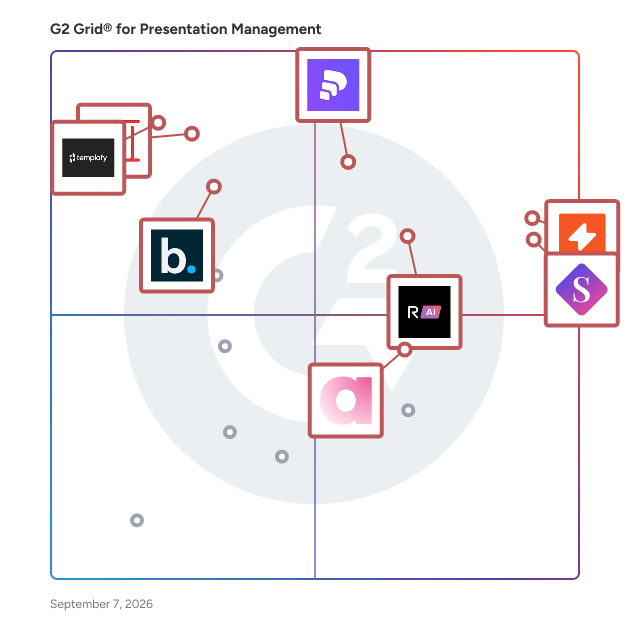
G2 Grid® for Presentation Management Software

G2 Grid® for Presentation Management Software plotting products by satisfaction and market presence

Highlighted products: UpSlide, SlideHub, Pitch, RELAYTO AI, Zoho Show, Ampler, Templafy, and Beautiful.ai.

Underlying data: [Grid® JSON](https://www.g2.com/categories/presentation-management/grids.json?focus%5B%5D=upslide&focus%5B%5D=slidehub&focus%5B%5D=pitch-pitch&focus%5B%5D=relayto-ai&focus%5B%5D=zoho-show&focus%5B%5D=ampler&focus%5B%5D=templafy&focus%5B%5D=beautiful-ai-beautiful-ai)

UpSlide

UpSlide is a document production solution specifically designed for the financial services sector, enabling firms to create and manage high-stakes documents within the Microsoft 365 environment. With over 15 years of experience, UpSlide focuses on enhancing the accuracy, consistency, and control of document creation, ensuring that financial professionals can deliver polished and compliant materials efficiently. Targeted primarily at finance firms, UpSlide caters to a diverse audience that includes investment banks, asset managers, and consulting firms. The platform is particularly beneficial for teams involved in the production of pitchbooks, investment memorandums (IMs), and financial reports. By streamlining the document creation process, UpSlide allows users to focus on the content and strategy rather than the formatting and compliance aspects, which are critical in the financial industry. One of the standout features of UpSlide is its ability to bridge the gap between AI-generated drafts and client-ready documents. The solution integrates AI agents with Microsoft 365, enabling seamless orchestration and deterministic workflows. This ensures that all documents remain on-brand and are thoroughly verified from the initial draft to the final version. The platform's robust capabilities help finance teams maintain high standards of quality while reducing the time spent on document production. UpSlide is trusted by over 900 teams, including prominent firms such as KPMG, Deloitte, PwC, and Rothschild & Co. The platform boasts a remarkable 98% renewal rate, reflecting its effectiveness and reliability in the industry. Additionally, UpSlide has earned a reputation as a Leader on G2, underscoring its strong market presence. The in-house implementation team provides comprehensive support throughout the rollout process, ensuring a smooth transition for new users. With an impressive customer satisfaction score of 4.9 out of 5 and an average deployment time of under six weeks, UpSlide demonstrates its commitment to delivering value to its clients. In summary, UpSlide stands out in the document production landscape for financial services by offering a powerful combination of AI integration, workflow automation, and dedicated support. This enables finance professionals to produce high-quality documents that meet the rigorous demands of their industry while enhancing overall productivity and efficiency.

Average Rating: 4.6/5.0

Total Reviews: 68

Who Is the Company Behind UpSlide?

  • Seller: UpSlide
  • Company Website:
  • Year Founded: 2009
  • HQ Location: Paris, Ile-de-France
  • Twitter: @Up_Slide
    3,510 Twitter followers
  • LinkedIn® Page: www.linkedin.com
    183 employees on LinkedIn®

Who Uses This Product?

  • Top Industries: Financial Services, Accounting
  • Company Size: 48% Medium, 38% Large

What Do G2 Reviewers Say About UpSlide?

AI-generated summary from verified user reviews

Pros
  • Users appreciate the ease of use with UpSlide, enabling efficient document creation and enhancing productivity significantly.
  • Users praise the responsive customer support of UpSlide, ensuring seamless integration and efficient content management.
  • Users find UpSlide to be a major time-saver, streamlining document preparation and boosting overall productivity.
  • Users appreciate the seamless integration with Microsoft Office, enhancing productivity and streamlining document creation.
  • Users rave about UpSlide as a significant time-saver, streamlining document creation and enhancing productivity effortlessly.
Cons
  • Users report that complex features in UpSlide can lead to muddled functions and decreased usability, impacting efficiency.
  • Users feel the lack of features in UpSlide limits customization and slows down content management processes.
  • Users express concerns about missing features, like slow content addition and lack of flexibility in slide management.
  • Users experience significant performance issues with slow loading times and efficiency interruptions in UpSlide functionalities.
  • Users experience slow performance with UpSlide, facing delays while updating the library and navigating content.

What Are Recent G2 Reviews of UpSlide?

RELAYTO AI

How do you 100× your content’s impact? RELAYTO is the AI-powered interactive content experience platform that turns every static PDF, PowerPoint, MP4, or image into a choose-your-own-path experience. Check out our own RELAYTO-powered buying journey that started as a conventional presentation here: https://rla.to/pitch In minutes, no code required, you can drag and drop files into our intuitive builder, layer in video, audio, forms, and CTAs, and publish a responsive microsite that feels more like Netflix than a flipbook. The result is an interactive sales-collateral hub, digital sales room, or secure proposal microsite that buyers binge on any device while they self-educate at their own pace. Behind the scenes, RELAYTO’s AI-driven content-engagement analytics capture 360° digital body language—page-level heatmaps, scroll depth, dwell time, replays, document heat-map insights, and intent scoring—delivering the PDF analytics legacy sales-enablement suites can’t. Real-time alerts surface high-intent viewers so revenue teams, account-based marketers, and customer-success managers can prioritize follow-up, shorten deal cycles, and prove content ROI with data-backed confidence. Security and scale come standard: create unlimited public or private interactive experiences, lock them down with granular permissions, SSO, watermarking, and compliance controls, or open them up with SEO-friendly embedding links across email, LinkedIn, HubSpot, Salesforce, your CMS, and anywhere a single link can travel. From AI-powered flipbook e-books and white papers to interactive pitch decks, proposal microsites, demo portals, and digital sales rooms, RELAYTO is the simplest way to transform boring documents into captivating, measurable experiences that boost engagement, conversion, and revenue. https://relayto.com/showcase

Average Rating: 4.7/5.0

Total Reviews: 457

Who Is the Company Behind RELAYTO AI?

  • Seller: Relayto
  • Year Founded: 2023
  • HQ Location: San Francisco , California
  • Twitter: @relayter
    2,206 Twitter followers
  • LinkedIn® Page: www.linkedin.com
    42 employees on LinkedIn®

Who Uses This Product?

  • Who Uses This: Student, Executive Assistant
  • Top Industries: Marketing and Advertising, Information Technology and Services
  • Company Size: 62% Small, 23% Medium

What Do G2 Reviewers Say About RELAYTO AI?

AI-generated summary from verified user reviews

Pros
  • Users love the ease of use of RELAYTO AI, making interactive content creation accessible to everyone.
  • Users appreciate the ability to customize PDF documents easily with RELAYTO AI, enhancing their workflow and creativity.
  • Users appreciate the high-quality templates and intuitive interface of RELAYTO AI, streamlining their workflow effectively.
  • Users love RELAYTO's user-friendly interface, making it easy to create and customize interactive content effortlessly.
  • Users love the easy creation of content with RELAYTO, thanks to its user-friendly interface and customizable templates.
Cons
  • Users experience a challenging learning curve with RELAYTO but find it rewarding as they become proficient.
  • Users find that there is a learning difficulty with Relayto AI, especially for new users navigating its features.
  • Users may face a steep learning curve with Relayto AI, especially when starting to use its advanced features.
  • Users find the initial difficulty in navigating RELAYTO AI can be challenging before becoming proficient with its features.
  • New users may experience a learning curve with Relayto AI, affecting their initial experience with the platform.

What Are Recent G2 Reviews of RELAYTO AI?

What Are G2 Users Discussing About RELAYTO AI?

Ampler

Ampler is a time-saving add-in for Microsoft Office including PowerPoint, Excel, Word, and Outlook. Features include 'Library' which makes all your content directly available in all the programs, 'Charts' which allows creation of beautiful charts including Gantt and Mekko charts, 'Signature management' to easily distribute brand compliant signatures that adapt to season, time or Active Directory, and a treasure trove of other indispensable, time-saving functions. Ampler is a great PowerPoint add-in for charts and productivity tools and is often evaluated alongside other chart add-ins for PowerPoint and PowerPoint productivity tools.

Average Rating: 5.0/5.0

Total Reviews: 10

Who Is the Company Behind Ampler?

  • Seller: Ampler
  • Year Founded: 2015
  • HQ Location: Copenhagen, DK
  • LinkedIn® Page: www.linkedin.com
    18 employees on LinkedIn®

Who Uses This Product?

  • Company Size: 40% Large, 30% Medium

What Do G2 Reviewers Say About Ampler?

AI-generated summary from verified user reviews

Pros
  • Users value the seamless integration of Ampler with Microsoft Office, enhancing productivity and consistency in communications.
  • Users highlight Ampler's cost-effectiveness, benefiting from flexible licensing and a strong return on investment.
  • Users praise the seamless integration of Ampler into workflows, enhancing productivity and user experience significantly.
  • Users love the seamless integration of Ampler with Microsoft Office, enhancing productivity and ensuring consistent branding effortlessly.
  • Users highlight the exceptional quality of Ampler, enhancing productivity and elevating user experience across teams.
Cons
  • Users note a need for improved onboarding experience, especially for first-time users to better navigate the platform.
  • Users feel the unclear instructions can hinder new users from fully utilizing Ampler's features quickly.

What Are Recent G2 Reviews of Ampler?

Templafy

Templafy is the leading AI-powered document generation platform, enabling enterprise organizations to create accurate, compliant, and on-brand documents with maximum efficiency and control. Accessible directly within M365, Google Workspace, Salesforce, Claude or any AI agent Templafy simplifies document workflows through AI and automation, to reduce risk and and boost productivity. Founded in 2014, Templafy is a global organization with offices across Europe and the US. Trusted by industry leaders like KPMG and BDO, Templafy saves teams over 30% of the time they typically spend on repetitive work like proposals, engagement letters, and audit reports, so they can focus on revenue-driving tasks instead. Join more than 4 million users worldwide who rely on Templafy to accelerate business content creation with AI.

Average Rating: 4.4/5.0

Total Reviews: 58

Who Is the Company Behind Templafy?

  • Seller: Templafy
  • Company Website:
  • HQ Location: New York, USA
  • Twitter: @Templafy
    1,082 Twitter followers
  • LinkedIn® Page: www.linkedin.com
    196 employees on LinkedIn®

Who Uses This Product?

  • Top Industries: Accounting, Consulting
  • Company Size: 46% Large, 41% Medium

What Do G2 Reviewers Say About Templafy?

AI-generated summary from verified user reviews

Pros
  • Users find Templafy to be easy to use, streamlining document creation and ensuring brand consistency effortlessly.
  • Users appreciate the seamless integration and automated features of Templafy, enhancing efficiency and brand consistency.
  • Users appreciate the ease of use and integration of Templafy's templates, enhancing efficiency and brand consistency.
  • Users value the time-saving features of Templafy, enabling faster document creation and enhanced productivity.
  • Users appreciate the seamless branding integration in Templafy, ensuring consistency and efficiency across documents and proposals.
Cons
  • Users find the complex usability of Templafy frustrating due to integration issues and challenges with template creation.
  • Users find Templafy quite expensive, especially since many features can be replicated in Word.
  • Users find missing features in Templafy, including limited templates and frustrating file size constraints.
  • Users face technical issues with Templafy, dealing with bugs and integration challenges that hinder their experience.
  • Users find Templafy has adifficult learning curve, especially for newcomers, making full utilization challenging.

What Are Recent G2 Reviews of Templafy?

What Are G2 Users Discussing About Templafy?

Beautiful.ai

Beautiful.ai is the AI presentation maker designed for professionals who need to move fast and look polished. Whether you’re building a client pitch, investor deck, or internal strategy presentation, Beautiful.ai combines the speed of AI with the control of smart design tools—so you get stunning, brand-ready results in minutes, not hours. Unlike traditional slide tools or lightweight “PowerPoint generators,” Beautiful.ai goes beyond static templates. Our Smart Slides automatically format, align, and animate your content, so every deck looks consistent and professional. With built-in AI assistance, you can generate images, edit copy, and swap visuals directly in your slides, while keeping full control to refine your message. Why Beautiful.ai is the Best AI Presentation Maker AI + Smart Design: Generate an entire presentation with AI, then refine it with Smart Slides that auto-adjust layouts, fonts, and colors for a polished finish. Themes & Branding: Apply your brand colors, fonts, and logos across decks instantly with our Theme Builder—ideal for scaling design consistency across teams. Professional Quality: Outputs aren’t just “AI demos.” You get editable, animated, stakeholder-ready decks that impress clients, executives, and investors. Stock Library Included: Access millions of free stock photos, icons, and videos without leaving the editor. Beautiful.ai Plans for Every Stage of Growth Pro Plan: Perfect for consultants, freelancers, and individual professionals who want to create AI presentations quickly and look credible without hiring a designer. Generate decks with AI, customize with Smart Slides, and export to PowerPoint, PDF, or share online. Team Plan: Built for small businesses and growing teams who need brand control and collaboration. Apply consistent branding across every deck, collaborate in real time, and ensure every presentation—sales, marketing, product, or boardroom—is on brand and professional. Enterprise Plan: Designed for larger organizations with advanced needs. Enterprise customers get everything in Pro and Team, plus dedicated account management, SSO and security features, advanced admin controls, and integrations for scaling Beautiful.ai across the business. Who Uses Beautiful.ai? Consultants and agencies who need client-ready decks, fast. Marketers and sales teams who want consistent, on-brand presentations without design bottlenecks. Founders and executives who need credible investor decks and board presentations. Enterprise teams rolling out standardized, AI-powered storytelling across the organization. With Beautiful.ai, presentations stop being a time sink. You can start with AI-generated outlines, refine with Smart Slides, and present a board-ready or client-ready deck the same day. If you’re searching for the best AI presentation maker, a smarter PowerPoint generator, or simply a faster way to create professional decks, Beautiful.ai is the tool built for real work.

Average Rating: 4.6/5.0

Total Reviews: 197

Who Is the Company Behind Beautiful.ai?

  • Seller: Beautiful.ai
  • Year Founded: 2016
  • HQ Location: San Francisco, California
  • Twitter: @BeautifulAI_
    5,263 Twitter followers
  • LinkedIn® Page: www.linkedin.com
    104 employees on LinkedIn®

Who Uses This Product?

  • Who Uses This: CEO, Founder
  • Top Industries: Marketing and Advertising, Management Consulting
  • Company Size: 69% Small, 16% Medium

What Do G2 Reviewers Say About Beautiful.ai?

AI-generated summary from verified user reviews

Pros
  • Users love the ease of use in Beautiful.ai, enhancing their experience with customizable templates for presentations.
  • Users love the templates and engaging slide designs of Beautiful.ai, making presentations more interactive and visually appealing.
  • Users love the ease of use and customizable templates in Beautiful.ai, enhancing their presentation creation experience.
  • Users love the high-quality presentations produced by Beautiful.ai, appreciating its speed and ease of use.
  • Users appreciate the time-saving AI features of Beautiful.ai, enabling focus on content rather than design.
Cons
  • Users find the limited customization options frustrating, as they hinder personal adjustments to slides and layouts.
  • Users find the limited templates restrictive when needing specific designs for graphical slides and infographics.
  • Users find that PowerPoint issues hinder their experience with Beautiful.ai, particularly with editing and content limitations.
  • Users find template issues frustrating, as flexibility and frequent updates are lacking in Beautiful.ai's offerings.
  • Users find the cost of Beautiful.ai to be a major concern, especially for larger organizations seeking adoption.

What Are Recent G2 Reviews of Beautiful.ai?

TeamSlide

TeamSlide is a presentation management and slide library solution that works inside PowerPoint. Search and insert approved slides, images, and videos without ever leaving your presentation; synced directly from SharePoint, Box, OneDrive, Google Drive, Dropbox, or any other content management system. No migration required; your content management system stays the single source of truth. Keep every presentation on-brand automatically. Version control flags out-of-date slides and lets your team replace them with one click. Slide check catches typos, formatting problems, and off-brand fonts, colors, and layouts before they reach your audience. Template management ensures every deck starts from an approved design. TeamSlide also use generates fully designed slides using your own PowerPoint design system, so AI output reflects your brand and voice instead of looking generic. Includes SSO, manage access rights, and deploy in the cloud or on-premise. Maximize the value of your content and ensure your entire team builds on-brand presentations.

Average Rating: 4.7/5.0

Total Reviews: 43

Who Is the Company Behind TeamSlide?

  • Seller: Aploris
  • Company Website:
  • Year Founded: 2015
  • HQ Location: Hamburg, Germany
  • LinkedIn® Page: www.linkedin.com
    6 employees on LinkedIn®

Who Uses This Product?

  • Top Industries: Consulting
  • Company Size: 51% Small, 35% Medium

What Do G2 Reviewers Say About TeamSlide?

AI-generated summary from verified user reviews

Pros
  • Users praise the ease of use of TeamSlide, highlighting its friendly interface and effective search capabilities.
  • Users value the effective search functionality of TeamSlide, enabling quick access to needed slides and enhancing productivity.
  • Users value the easy access to resources, enhancing efficiency and consistency across their organization's presentations.
  • Users love the collaboration features of TeamSlide, enhancing productivity and ensuring access to approved content seamlessly.
  • Users rave about the responsive customer support from TeamSlide, enhancing their overall experience and satisfaction.
Cons
  • Users may face a learning curve with TeamSlide, with initial setup causing some frustration before becoming easier.
  • Users find a learning difficulty with TeamSlide, as the setup and implementation can be challenging for beginners.
  • Users experience slow loading times with TeamSlide, which affects usability and increases wait times for features.
  • Users experience update issues with TeamSlide, as changes are delayed and slide management can be challenging.
  • Users find the access issues frustrating, particularly with the learning curve and lack of offline availability.

What Are Recent G2 Reviews of TeamSlide?

empower

The empower® Suite is a software solution integrated into Microsoft 365 that simplifies the creation of presentations, charts, documents, and emails while ensuring consistency and efficiency. It enables companies to produce professional, brand-compliant content with significantly reduced effort. The suite consists of three modules that can be used individually or together. empower® Slide Generation combines artificial intelligence, templates, automation, and shared corporate content to create professional PowerPoint presentations in minutes rather than hours. It eliminates manual formatting and ensures full compliance with corporate design standards. empower® Chart Creation is designed specifically for building complex business charts in PowerPoint and is ideal for data-driven, professional presentations. With more than 40 chart types, including waterfall, Mekko, and Gantt charts, as well as Excel linking, intelligent add-on elements, and automatic layout adjustments, users can create and edit charts approximately 50 percent faster than with standard PowerPoint features. In addition, empower® Chart Creation makes adoption and transition easy. Existing PowerPoint charts and charts from other PowerPoint charting add-ins can be converted into fully editable empower® charts with a single click. empower® Template Management centrally provides up-to-date Office templates, automatically applies them across PowerPoint, Word, Excel, and Outlook, and helps ensure brand and legal compliance in significantly less time.

Average Rating: 4.6/5.0

Total Reviews: 29

Who Is the Company Behind empower?

  • Seller: empower
  • Year Founded: 2005
  • HQ Location: Cologne, DE
  • Twitter: @empower_suite
    37 Twitter followers
  • LinkedIn® Page: www.linkedin.com
    103 employees on LinkedIn®

Who Uses This Product?

  • Company Size: 41% Large, 31% Small

What Do G2 Reviewers Say About empower?

AI-generated summary from verified user reviews

Pros
  • Users love the time-saving tools and seamless integration with PowerPoint, enhancing their productivity and creativity.
  • Users highlight the time-saving tools of Empower, which simplify tasks and enhance productivity significantly.
  • Users love the flexible customization options, easily adapting templates and charts to fit their unique branding needs.
  • Users find Empower's efficiency remarkable, significantly reducing time spent on creating and managing compliant materials.
  • Users value the exceptional customer support from empower, enhancing their experience and optimizing their presentations.
Cons
  • Users experience poor customer support with Empower, facing issues like failed updates and upload errors needing assistance.
  • Users face update issues with Empower, often requiring manual intervention and support for automatic updates.
  • Users occasionally face API issues that can complicate content management and lead to potential overwrites.
  • Users experience error handling issues, particularly with bulk uploads, affecting the overall usability of Empower.
  • Users face challenges with hidden features, as some options require customer support for access and uploads may fail.

What Are Recent G2 Reviews of empower?

Macabacus

Macabacus is the world's leading suite of M365 productivity tools, used by thousands of professionals and teams in investment banking, corporate finance, private equity, and other finance capacities to prepare financial models and presentations with the highest levels of accuracy, efficiency and brand consistency.

Average Rating: 4.7/5.0

Total Reviews: 93

Who Is the Company Behind Macabacus?

  • Seller: Macabacus
  • Company Website:
  • Year Founded: 2008
  • HQ Location: New York, New York, United States
  • Twitter: @macabacus
    374 Twitter followers
  • LinkedIn® Page: www.linkedin.com
    39 employees on LinkedIn®

Who Uses This Product?

  • Who Uses This: Associate
  • Top Industries: Financial Services, Venture Capital & Private Equity
  • Company Size: 51% Small, 26% Medium

What Do G2 Reviewers Say About Macabacus?

AI-generated summary from verified user reviews

Pros
  • Users find Macabacus to be easy to use, significantly enhancing efficiency and productivity in their daily work.
  • Users appreciate the plethora of functions in Macabacus, which significantly enhances efficiency in daily tasks.
  • Users value the time-saving features of Macabacus, significantly enhancing efficiency in Excel and PowerPoint tasks.
  • Users love the time-saving features of Macabacus, enhancing formatting and usability across MS Office applications.
  • Users love the easy editing features of Macabacus, which significantly save time in financial tasks.
Cons
  • Users face challenges with update issues, leading to outdated software and slow performance during updates in PowerPoint.
  • Users report persistent bug issues with Macabacus, including crashes and unresponsive features that hinder usability.
  • Users report several editing issues with Macabacus, including problematic undo functionality and chart pasting errors.
  • Users struggle with difficult editing, especially with unreliable undo functionality and challenges when pasting into PowerPoint.
  • Users find the difficulty in mastering Macabacus due to its complex features and shortcuts, causing initial confusion.

What Are Recent G2 Reviews of Macabacus?

Pickit

Pickit aims to be the smartest, simplest DAM platform on the planet, making it easier than ever to source, store, share, organize, and optimize digital assets. Statistically, 70% of digital assets are underused or never used at all due to scattered files, multiple storage systems, and complicated DAMs nobody wants to use. Pickit solves that with a single source of truth for all your visual assets, documents, templates, and guidelines, all integrated with your favorite applications. The award-winning Microsoft 365 and the Google workspace integration by Pickit takes your file management to the next level by making it faster, smarter, and more intuitive to import and discover assets from M365, Pickit Stock, and all other assets in Pickit without leaving M365 or Google apps. DAM smart. DAM simple.™

Average Rating: 4.5/5.0

Total Reviews: 116

G2 Deal: Pickit Business

Purchase any Pickit plan on G2 and receive a 20% discount. Prefer to try the platform before purchasing? Register for a free 14-day trial, and we’ll apply the discount at the end of your trial.

Price: ~~$99/month~~ → $79/month

View this exclusive G2 deal

Who Is the Company Behind Pickit?

  • Seller: Pickit
  • Year Founded: 2013
  • HQ Location: Visby
  • Twitter: @pickit
    6,395 Twitter followers
  • LinkedIn® Page: www.linkedin.com
    21 employees on LinkedIn®

Who Uses This Product?

  • Top Industries: Information Technology and Services, Computer Software
  • Company Size: 43% Small, 41% Medium

What Do G2 Reviewers Say About Pickit?

AI-generated summary from verified user reviews

Pros
  • Users find Pickit remarkably easy to use, streamlining access to assets and enhancing team productivity.
  • Users value Pickit's organization of assets, streamlining access to company resources and enhancing collaboration across teams.
  • Users appreciate the centralized management of brand assets in Pickit, greatly enhancing teamwork and efficiency.
  • Users love the centralized content management in Pickit, enhancing efficiency with easy access to brand assets and guidelines.
  • Users appreciate the intuitive interface of Pickit, enabling quick onboarding and efficient asset management for everyone.
Cons
  • Users often experience software bugs in Pickit, which can lead to frustrations and navigation difficulties.
  • Users express concerns about storage limitations for larger media files, impacting overall affordability and usability.
  • Users face access issues with permissions and inconsistent functionality between Mac and PC, complicating their experience.
  • Users find access permissions complex, complicating management and impacting the overall usability of the product.
  • Users find complex workflows in Pickit challenging, especially related to platform discrepancies and metadata management.

What Are Recent G2 Reviews of Pickit?

What Are G2 Users Discussing About Pickit?

Showcase Workshop

Sales content is often stored in SharePoint, shared drives, and cloud folders - but most sales enablement strategies fail when reps can’t deliver the right content at the right moment. Showcase Workshop is a modern sales enablement platform that replaces fragmented content systems with a single, secure, branded sales presentation app for iOS, Android, and Windows devices. It enables organizations to centralize, control, and deliver high-impact interactive sales content that teams can use anywhere - online or offline. Built for marketing control and sales execution, Showcase Workshop ensures every customer-facing interaction is consistent, up to date, and aligned with your brand and messaging. Designed to help teams sell more effectively: - Create interactive presentations in minutes using PDFs, videos, product content, links, animations, and interactive forms and calculators - Deliver a consistent, on-brand sales narrative across every rep and every interaction - Present anywhere - fully offline or online, without reliance on connectivity - Share content instantly and gain visibility into what prospects engage with and for how long - Track usage and engagement to improve coaching, messaging, and conversion outcomes - Integrate with leading CRM platforms such as Salesforce - API access and Single Sign-On (SSO) for secure deployment within your existing tech stack - Dedicated Customer Success Manager to support onboarding, adoption, and ongoing optimisation Unlike traditional sales enablement tools, Showcase Workshop is designed for rapid deployment, simple administration, and real-world usability - enabling teams to go live in under 48 hours without developer dependency or complex implementation cycles. Replace fragmented content systems, outdated presentations, and inconsistent messaging with one platform that gives your teams clarity, control, and confidence in every sales conversation.

Average Rating: 4.6/5.0

Total Reviews: 27

Who Is the Company Behind Showcase Workshop?

  • Seller: Showcase Workshop
  • Year Founded: 2011
  • HQ Location: Auckland, NZ
  • Twitter: @showcaseworks
    6,121 Twitter followers
  • LinkedIn® Page: www.linkedin.com
    3 employees on LinkedIn®

Who Uses This Product?

  • Top Industries: Marketing and Advertising
  • Company Size: 44% Medium, 33% Small

What Are Recent G2 Reviews of Showcase Workshop?

What Are G2 Users Discussing About Showcase Workshop?

ChartKit

ChartKit is a browser extension that brings professional, presentation-ready charts to Google Slides. Instead of wrestling with Slides' basic native charts, you build clean bar, line, waterfall, and column charts directly in the editor - styled to your brand palette and dropped straight onto the slide. Add data-driven annotations (deltas, CAGR, reference lines) to make the point without manual text boxes. Free for up to 10 charts a month, with an €8/month Pro plan for unlimited use.

Average Rating: 5.0/5.0

Total Reviews: 1

Who Is the Company Behind ChartKit?

Who Uses This Product?

  • Company Size: 100% Medium

What Are Recent G2 Reviews of ChartKit?

Seidat

Seidat is a cloud-based sales platform that works on any device. It enables smooth sales flow for your whole team through interactive and easy-to-use sales materials and collaboration features. You can create, edit, present (f2f/online), share, manage, analyze and e-sign your sales materials in Seidat. Integrate it as part of your software ecosystem easily through our API. Seidat is a perfect tool for online sales meetings because of its live share feature that works without screen-share on all devices. Also sharing proposals and meeting minutes simply by a link makes it easier to do business remotely. What makes Seidat different from other presentation tools? - It is made for sales teams - Matrix structure for presentations and wide presenter view - Advanced user rights management and collaboration features - Various content options from videos to interactive 3D product models and 360-panorama views - Very active customer support and quick responses in the customer service chat - All-in-one sales tool

Average Rating: 3.5/5.0

Total Reviews: 12

Who Is the Company Behind Seidat?

  • Seller: Seidat
  • Year Founded: 2015
  • HQ Location: Helsinki, FI
  • Twitter: @SeidatApp
    213 Twitter followers
  • LinkedIn® Page: www.linkedin.com
    16 employees on LinkedIn®

Who Uses This Product?

  • Company Size: 54% Medium, 31% Large

What Do G2 Reviewers Say About Seidat?

AI-generated summary from verified user reviews

Pros
  • Users appreciate the user-friendly interface and powerful analytical tools of Seidat for effective presentations and collaboration.
  • Users love the user-friendly interface of Seidat, making it easy for anyone to manage their content effectively.
  • Users appreciate the team collaboration features of Seidat, enabling seamless integration and task management among team members.
  • Users value the ease of access with Seidat, making it simple for anyone to utilize its features.
  • Users find Seidat to be cost-effective, enhancing teamwork and data management without exceeding budget constraints.
Cons
  • Users express concern over the limited features in the free trial, hindering effective workflow and customization.
  • Users find Seidat's internet dependency restrictive, hindering access and presentation capabilities in low connectivity areas.
  • Users find the limited customization options inadequate for sophisticated presentations, impacting overall usability and flexibility.
  • Users find the missing features in Seidat limits its suitability for professional presentations and design needs.

What Are Recent G2 Reviews of Seidat?

What Are G2 Users Discussing About Seidat?

Decky

Decky is an AI-powered presentation automation platform built to help enterprise teams create and scale high quality slide decks without the manual work. Enterprise teams rely on presentations for marketing and internal communication, but creating them over and over is slow and painstakingly repetitive. Decky solves this by accurately combining AI generation with structured team specific templates, helping users turn simple prompts or outlines into fully designed, on brand presentations in minutes. With Decky, enterprise teams can instantly generate complete decks and enforce specific brand consistency across every presentation. Its template system makes sure that all finished products align with company guidelines, eliminating the need for constant design oversight while maintaining a polished, professional standard. Unlike traditional presentation tools, Decky is built for speed and scalability. Marketing teams can produce presentations at volume, and operators can create internal reports without starting from scratch. By reducing repetitive work, Decky allows teams to focus on messaging instead of formatting. Decky is designed for growing companies and enterprises that need to produce presentations consistently and efficiently. By integrating AI-driven content generation with flexible design systems, Decky transforms presentations from a bottleneck into a scalable workflow.

Who Is the Company Behind Decky?

eformity

eformity is a SaaS platform for template and asset management, headquartered in Alblasserdam, The Netherlands. Established in 2013, eformity provides businesses with a seamless solution for managing corporate templates and automating document workflows. The platform is deeply integrated into the Microsoft 365 suite and is designed to streamline document standardization across organizations. eformity serves a diverse customer base across various industries and is used in over 100 countries. With more than 200,000 active users and over 75,000 templates used daily. The eformity platform enables businesses to centralize template management, automate document generation, and ensure brand consistency across Microsoft Word, Outlook, PowerPoint, Excel, SharePoint, and Teams. The solution supports over 200 languages, allowing users to create multilingual documents from a single template. Additionally, eformity offers a structured asset library where organizations can store and manage images, icons, shapes, and graphs for consistent branding. The platform is available on both the web and desktop version of Microsoft 365, providing flexibility across different devices and work environments. Next to that eformity integrates with various CRM and business applications, enabling seamless data synchronization and reducing the need for manual data entry. By automating document creation and ensuring standardized workflows, eformity helps businesses reduce manual errors, improve efficiency, and maintain compliance with corporate guidelines. Organizations benefit from a streamlined workflow where users can generate professional, branded documents quickly and accurately. The ability to integrate with existing business systems enhances collaboration and ensures that employees always work with up-to-date content. Whether for legal, financial, healthcare, educational, or governmental use, eformity supports companies in enforcing document consistency, reducing administrative overhead, and increasing productivity.

Who Is the Company Behind eformity?

  • Seller: eformity
  • Year Founded: 1997
  • HQ Location: Alblasserdam, NL
  • Twitter: @eformity
    69 Twitter followers
  • LinkedIn® Page: nl.linkedin.com
    8 employees on LinkedIn®

Journeys

Journeys - Intelligent Sales Presentation Platform Transform static PowerPoint decks into dynamic, trackable sales experiences. Journeys helps sales teams create personalized presentations in minutes instead of hours, while providing real-time engagement analytics and AI-powered content generation. Key Capabilities: • Rapid Presentation Creation - Generate customized sales decks in under 2 minutes using AI and template libraries • Interactive Web Experiences - Convert static slides into responsive, web-based presentations that prospects can explore at their own pace • Engagement Analytics - Track slide views, time spent, and engagement patterns to identify buying signals and optimize follow-up • CRM Integration - Native Salesforce integration keeps presentation activity synced with your pipeline • Template Management - Centralize and govern approved content while empowering reps to personalize for their prospects • Mobile-Optimized - Presentations render perfectly on any device without plugins or downloads Built for Sales Teams Who: • Waste 15+ hours per week rebuilding presentations • Lose deals to competitors who respond faster • Lack visibility into how prospects engage with proposals • Struggle with presentation version control and brand consistency • Need to scale personalized sales content across growing teams Results: Sales teams using Journeys reduce presentation prep time by 85%, increase proposal engagement rates by 3x, and close deals 18% faster through better buyer insights and faster response times.

Who Is the Company Behind Journeys?

Neeraja Prakash
NP
Researched and written by Neeraja Prakash
Updated August 20, 2025