Top Free Payroll Software - Page 2

How Many Payroll Software Products Does G2 Track?

Total Products under this Category: 845

Category Stats (Sep 2026)

  • Average Rating: 4.36/5 The average rating of products in this category, based on all submitted ratings
  • Top Trending Product: ichris (+175.0%) - Among all products in this category, ichris recorded the largest rating increase compared to last month

Last updated: September 01, 2026

How Does G2 Rank Payroll Software Products?

Why You Can Trust G2's Software Rankings:

  • 30 Analysts and Data Experts
  • 129,600+ Authentic Reviews
  • 845+ Products
  • Unbiased Rankings

G2's software rankings are built on verified user reviews, rigorous moderation, and a consistent research methodology maintained by a team of analysts and data experts. Each product is measured using the same transparent criteria, with no paid placement or vendor influence. While reviews reflect real user experiences, which can be subjective, they offer valuable insight into how software performs in the hands of professionals. Together, these inputs power the G2 Score, a standardized way to compare tools within every category.

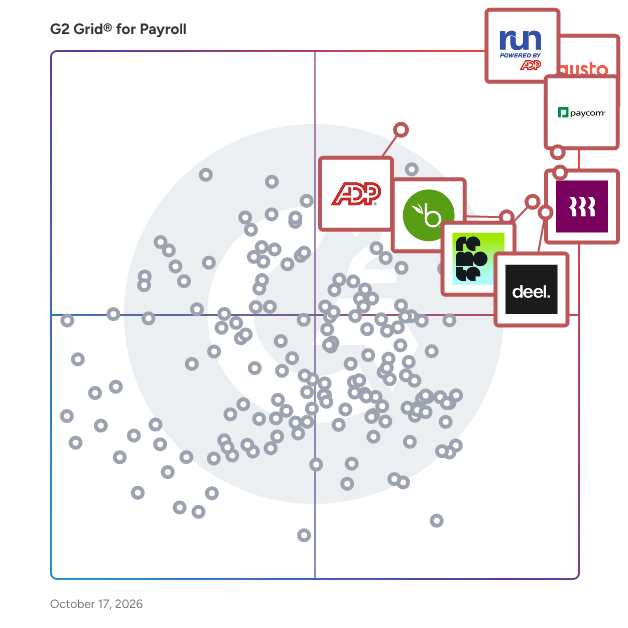
G2 Grid® for Payroll Software

G2 Grid® for Payroll Software plotting products by satisfaction and market presence

Highlighted products: RUN Powered by ADP, Gusto, Paycom, Rippling, Deel Payroll, Remote, TriNet PEO, and BambooHR.

Underlying data: [Grid® JSON](https://www.g2.com/categories/payroll/grids.json?focus%5B%5D=run-powered-by-adp&focus%5B%5D=gusto&focus%5B%5D=paycom&focus%5B%5D=rippling&focus%5B%5D=deel-payroll&focus%5B%5D=remote&focus%5B%5D=trinet-peo&focus%5B%5D=bamboohr)

Oyster

Hire in 180+ countries with compliant onboarding in as little as 48 hours. Get dedicated HR experts, predictable (and transparent) pricing, and support for complex employee situations—without juggling multiple vendors. Oyster is an Employer of Record that helps you employ and care for talent in 180+ countries—without opening legal entities or stitching together local vendors. From one intuitive platform, you can generate compliant contracts, run payroll, and offer competitive, country-specific benefits to employees and contractors around the world. But software is only half the story. When you are navigating a termination in France, figuring out benefits benchmarks in Singapore, or supporting someone who wants to move from Germany to Portugal, a help article isn’t enough. With Oyster, you get in-house HR and legal experts who know local laws and cultural nuances and can respond in minutes, not days. They’re not an add-on or an outsourced call center. They’re part of what you’re paying for. For your US workforce, Oyster PEO lets you outsource payroll, benefits, and HR administration through a co-employment model. We act as the administrative employer, managing payroll, benefits, retirement, and compliance, while you stay focused on directing work, performance, compensation, and career growth. It’s a simple way to stay compliant and competitive in the US without building a large HR function in-house. We also believe how you build your team matters as much as who you hire. Oyster is the only B Corp-certified global employment provider in the market, which means we’re independently vetted for how we treat people and run our business. Our pricing is transparent and predictable—no surprise fees for offboarding, benefits administration, or “gotchas” buried in the invoice. For HR, Legal, Finance, and C-suite leaders, that adds up to less risk, fewer distractions, and more room to focus on growth. You move into new markets faster, give every team member a fair and consistent experience, and know you have a partner who’ll tell you the right thing to do, not just the easy thing. If you’re planning to expand globally—or want more confidence in how you run your US and international teams—Oyster is here to help you do it right.

Average Rating: 4.4/5.0

Total Reviews: 1,518

How Do G2 Users Rate Oyster?

  • Has the product been a good partner in doing business?: 8.6/10 (Category avg: 8.7/10)
  • Performance and Reliability: 8.7/10 (Category avg: 8.7/10)
  • Scalability: 8.4/10 (Category avg: 8.7/10)
  • User, Role, and Access Management: 8.3/10 (Category avg: 8.7/10)

Who Is the Company Behind Oyster?

  • Seller: Oyster
  • Company Website:
  • Year Founded: 2020
  • HQ Location: San Francisco , US
  • Twitter: @heyoyster
    1,966 Twitter followers
  • LinkedIn® Page: www.linkedin.com
    595 employees on LinkedIn®

Who Uses This Product?

  • Who Uses This: Software Engineer, Customer Success Manager
  • Top Industries: Information Technology and Services, Computer Software
  • Company Size: 34% Medium, 33% Small

What Do G2 Reviewers Say About Oyster?

AI-generated summary from verified user reviews

Pros
  • Users find Oyster easy to use, especially valuing the straightforward onboarding and responsive support throughout the process.
  • Users highlight the excellent customer support and smooth onboarding process, enhancing their hiring experience with Oyster.
  • Users appreciate the helpful and friendly support team of Oyster, making onboarding and usage straightforward.
  • Users find the onboarding process simple and efficient, making it easy to manage contracts and days off.
  • Users value the quick and responsive support from Oyster, enhancing their overall experience with the platform.
Cons
  • Users report poor customer support from Oyster, experiencing slow responses and unprofessional partner management, causing significant stress.
  • Users experience significant delays in processes, causing stress and complications when managing new employment through Oyster.
  • Users experience unclear information regarding tax calculations and document requirements, leading to confusion and frustration.
  • Users experience long waiting times for support, causing frustration and delays in resolving issues effectively.
  • Users find the invoicing process confusing, especially with delayed approvals and constant email notifications.

What Are Recent G2 Reviews of Oyster?

What Are G2 Users Discussing About Oyster?

Deputy

Deputy is the leading workforce management software and unified end-to-end people platform for shift-based work.Trusted by over 390,000 workplaces globally, Deputy simplifies the entire employee lifecycle by combining HR, advanced scheduling, time tracking, and compliance tools into a single seamless software. Move beyond employee scheduling with a platform that provides a centralised source of visibility for navigating complex labor laws, streamlining team communication, and controlling costs in real-time. Whether you need to simplify recruitment and onboarding with Deputy HR, capture accurate timesheets with GPS verification, or bridge the gap to pay with 300+ payroll integrations, Deputy empowers you to manage your entire workforce infrastructure from anywhere.

Average Rating: 4.6/5.0

Total Reviews: 647

How Do G2 Users Rate Deputy?

  • Has the product been a good partner in doing business?: 9.2/10 (Category avg: 8.7/10)

Who Is the Company Behind Deputy?

  • Seller: Deputy
  • Company Website:
  • Year Founded: 2008
  • HQ Location: Sydney, Australia
  • Twitter: @deputyapp
    4,306 Twitter followers
  • LinkedIn® Page: www.linkedin.com
    471 employees on LinkedIn®

Who Uses This Product?

  • Who Uses This: Owner, Barista
  • Top Industries: Hospitality, Retail
  • Company Size: 53% Small, 33% Medium

What Do G2 Reviewers Say About Deputy?

AI-generated summary from verified user reviews

Pros
  • Users find Deputy to be extremely user-friendly, making it simple to manage shifts and availabilities effortlessly.
  • Users appreciate Deputy for its user-friendly scheduling, making employee management and notifications seamless and efficient.
  • Users appreciate the scheduling ease of Deputy, finding it simple and reliable for managing their shifts and time off.
  • Users appreciate the intuitive setup of Deputy, making it easy to manage shifts with minimal hassle.
  • Users find the intuitive user interface of Deputy easy to navigate, enhancing their shift management experience significantly.
Cons
  • Users find scheduling issues troublesome, citing long schedules and lack of a search feature as notable drawbacks.
  • Users find shift management tedious, struggling with unavailability settings and lack of transparency in schedule changes.
  • Users face clocking issues due to app loading delays and location pin changes, affecting timely shift starts.
  • Users are disappointed by the lack of essential features and the unresponsive technical support from Deputy.
  • Users experience slow loading times and glitches, affecting clock ins and overall app performance.

What Are Recent G2 Reviews of Deputy?

What Are G2 Users Discussing About Deputy?

Central

Central is a payroll and benefits platform designed for founders that handles all the painful compliance work automatically. Unlike traditional HR platforms that require expertise and make you do the work, Central acts as a proactive teammate that takes cares of everything. The platform is built specifically for busy founders who want to focus on building their product, not drowning in administrative tasks. When you get started with Central, you'll experience: 1. Automated compliance: Central handles all state registrations, tax filings, and worker's compensation setup automatically. No more interfacing with confusing government portals or risking expensive fines. 2. Complete benefits management: Get expert guidance on choosing the right health insurance plans, plus automated setup of 401k and life insurance with seamless payroll integration. 3. Global hiring support: Pay employees across all 50 U.S. states and contractors in 200+ countries. Central manages everything from offer letters and NDAs to reimbursements and tax documentation. 4. Proactivity: Central monitors government mail through a virtual address system, catching issues before they become problems. If you receive any scary government notices or fines, the team handles it for you. 5. Instant support: Ask questions directly through Slack and get responses in minutes. The platform's AI-powered assistant can handle common requests like retrieving documents or updating employee information instantly. The platform currently serves hundreds of startups, helping them avoid fines, save countless hours, and maintain perfect compliance without needing to become HR experts themselves. The platform integrates seamlessly with existing systems and requires minimal setup time - most founders spend less than 10 minutes getting started. Whether you're hiring your first employee or managing a growing team, Central ensures you never have to worry about back-office operations again.

Average Rating: 5.0/5.0

Total Reviews: 37

How Do G2 Users Rate Central?

  • Has the product been a good partner in doing business?: 10.0/10 (Category avg: 8.7/10)
  • Performance and Reliability: 9.8/10 (Category avg: 8.7/10)
  • Scalability: 9.5/10 (Category avg: 8.7/10)
  • User, Role, and Access Management: 9.4/10 (Category avg: 8.7/10)

Who Is the Company Behind Central?

  • Seller: Central
  • Year Founded: 2023
  • HQ Location: San Francisco, CA
  • Twitter: @centralhqx
    490 Twitter followers
  • LinkedIn® Page: www.linkedin.com
    62 employees on LinkedIn®

Who Uses This Product?

  • Who Uses This: CEO, Founder
  • Top Industries: Computer Software, Information Technology and Services
  • Company Size: 84% Small

What Do G2 Reviewers Say About Central?

AI-generated summary from verified user reviews

Pros
  • Users highlight the responsive and knowledgeable customer support of Central, making tasks feel manageable and stress-free.
  • Users highlight the quick response times of Central, appreciating the accessible and friendly support team ready to assist.
  • Users love the significant time savings with Central, allowing them to focus on growing their business instead.
  • Users find Central's effortless payroll and benefits management invaluable, appreciating the seamless support and cost-effectiveness it provides.
  • Users love Central's automation, saving time and simplifying payroll management with responsive support and efficient service.
Cons
  • Users find the clarity issues regarding pricing and processes with Central to be quite frustrating and unhelpful.
  • Users find the date issues regarding tax filing processes to be less thorough and timely than expected.
  • Users find the absence of key HR features a limitation, though improvements are reportedly in progress.
  • Users note integration issues with Central, as not all tools are currently supported, limiting seamless functionality.
  • Users find Central's user interface not intuitive, affecting their ability to accomplish tasks efficiently compared to Slack.

What Are Recent G2 Reviews of Central?

Thera

Thera is a comprehensive payroll and compliance solution designed to assist businesses in managing their global workforce, whether they employ full-time staff or contractors on the United States or abroad. This platform streamlines the complexities associated with payroll processing, benefits administration, and compliance management, allowing organizations to focus on their core operations and growth strategies. Targeted primarily at businesses with international teams, Thera caters to a diverse audience that includes small startups, mid-sized companies, and large enterprises looking to expand their reach. The platform is particularly beneficial for organizations that engage contractors or remote employees across different countries, as it simplifies the intricacies of international payroll and compliance regulations. By providing a user-friendly interface and robust features, Thera enhances the overall experience for both employers and their global workforce. Key features of Thera include instant payment processing for contractors, competitive exchange rates, and multiple payment methods. This flexibility ensures that contractors receive their payments quickly and efficiently, which can significantly improve their satisfaction and engagement. Additionally, Thera's compliance tools help businesses navigate the often complex legal landscape of international employment, reducing the risk of costly penalties and ensuring adherence to local labor laws. The platform also offers dedicated support to its users, which is essential for businesses operating in multiple jurisdictions. With competitive pricing structures, Thera enables companies to manage their payroll and compliance needs without compromising on quality or service. By empowering organizations to hire, manage, and pay their global teams with confidence, Thera stands out as a valuable resource for businesses aiming to thrive in an increasingly interconnected world.

Average Rating: 4.8/5.0

Total Reviews: 114

How Do G2 Users Rate Thera?

  • Has the product been a good partner in doing business?: 9.2/10 (Category avg: 8.7/10)
  • Performance and Reliability: 10.0/10 (Category avg: 8.7/10)
  • User, Role, and Access Management: 10.0/10 (Category avg: 8.7/10)

Who Is the Company Behind Thera?

  • Seller: Thera
  • Company Website:
  • Year Founded: 2021
  • HQ Location: New York, NY
  • Twitter: @getthera
    320 Twitter followers
  • LinkedIn® Page: www.linkedin.com
    26 employees on LinkedIn®

Who Uses This Product?

  • Who Uses This: CEO, Founder
  • Top Industries: Staffing and Recruiting, Information Technology and Services
  • Company Size: 69% Small, 36% Medium

What Do G2 Reviewers Say About Thera?

AI-generated summary from verified user reviews

Pros
  • Users value the ease of use of Thera, which streamlines payments and simplifies managing global operations.
  • Users love the fast transaction speed with Thera, making it easy to pay contractors and manage payroll.
  • Users appreciate the pricing transparency of Thera, enjoying clear costs without hidden fees or deductions.
  • Users commend timely payments with Thera, enjoying transparency and minimal fees that enhance their financial management.
  • Users love the easy payroll management with Thera, streamlining payments and improving overall efficiency and transparency.
Cons
  • Users desire a mobile app for on-the-go access, enhancing convenience for frequent travelers and status updates.
  • Users note a lack of detailed custom reporting options, limiting the ability to generate specific financial summaries.
  • Users find the mobile app under-featured compared to the desktop version, impacting their on-the-go productivity.
  • Users note a limitation on payment options in some regions, requiring verification before transaction completion.
  • Users experience chatbot issues with Thera, specifically a lack of instant-chat support for quicker resolutions.

What Are Recent G2 Reviews of Thera?

Personio

Personio is the intelligent HR platform built for the way European businesses actually work. Most HR software was designed in the US and adapted for Europe as an afterthought. Personio was built here from the start, for companies navigating multiple languages, varying labor laws, and a patchwork of local compliance requirements that change faster than most platforms can keep up with. Manage the full employee lifecycle in one place: hiring, onboarding, time tracking, absence management, payroll, performance, and workforce reporting. No more switching between systems or maintaining spreadsheets on the side. Everything your HR team needs lives in one place, connected and up to date. Smart automations handle the repetitive admin that consumes your HR team's day. Approval workflows, absence tracking, contract generation, and onboarding checklists run in the background so your team can focus on the work that actually moves the business forward. Proactive insights turn workforce data into clear, shareable intelligence, helping HR leaders spot trends, anticipate change, and walk into leadership meetings with something worth saying. The platform adapts to how your organisation works, not the other way around. Customise workflows, approval chains, and reporting to fit your structure, whether you are running one office or coordinating teams across five countries. Personio connects with over 200 tools European businesses rely on, including DATEV, Slack, and Google Workspace. It runs natively in German, English, Spanish, French, Dutch, and Italian, among other languages and is built for GDPR compliance across every market you operate in. More than 14,000 companies across Germany, Austria, Switzerland, the UK, and Spain trust Personio to run their HR. It is the intelligent platform that grows with European businesses, because it was made for them.

Average Rating: 4.4/5.0

Total Reviews: 930

How Do G2 Users Rate Personio?

  • Has the product been a good partner in doing business?: 8.5/10 (Category avg: 8.7/10)
  • Performance and Reliability: 9.0/10 (Category avg: 8.7/10)
  • Scalability: 7.5/10 (Category avg: 8.7/10)
  • User, Role, and Access Management: 8.3/10 (Category avg: 8.7/10)

Who Is the Company Behind Personio?

  • Seller: Personio
  • Company Website:
  • Year Founded: 2015
  • HQ Location: München, Bayern
  • LinkedIn® Page: www.linkedin.com
    1,745 employees on LinkedIn®

Who Uses This Product?

  • Who Uses This: HR Manager, CEO
  • Top Industries: Computer Software, Information Technology and Services
  • Company Size: 60% Medium, 27% Small

What Do G2 Reviewers Say About Personio?

AI-generated summary from verified user reviews

Pros
  • Users find Personio's interface easy to use, with clear navigation and helpful resources for quick onboarding.
  • Users appreciate the intuitive navigation of Personio, enhancing efficiency and making tasks straightforward and accessible.
  • Users appreciate the intuitive and comprehensive features of Personio, benefiting from centralized solutions for HR challenges.
  • Users appreciate the centralized HR management of Personio, enhancing team efficiency and employee satisfaction.
  • Users value the comprehensive features of Personio, appreciating its user-friendly interface and seamless integration capabilities.
Cons
  • Users desire missing features in Personio, especially in mobile functions and automated notifications, impacting overall usability.
  • Users find the limited customization options frustrating, impacting their ability to tailor the product to their specific needs.
  • Users find the limited features of Personio hinder their experience and require time to adapt to changes.
  • Users find lacking features in Personio, particularly in reporting and mobile functionality, leading to inefficiencies.
  • Users express frustration over limited customization options and reporting tools in Personio, leading to dissatisfaction.

What Are Recent G2 Reviews of Personio?

What Are G2 Users Discussing About Personio?

Asanify AI

Asanify is an AI-powered global HR, payroll, and Employer of Record (EOR) platform that enables companies to hire, manage, and pay teams across countries—without setting up local entities or stitching together multiple tools. Built for speed and simplicity, Asanify replaces fragmented HR operations with an intelligent system that automates workflows, reduces manual effort, and ensures compliance across geographies. From onboarding to payroll to global contractor payouts, Asanify acts as a single operating system for people operations—helping founders, HR, and finance teams run global teams with minimal overhead. Key capabilities include: • AI-assisted onboarding, payroll processing, and HR workflows to reduce manual intervention • Global hiring through Employer of Record (EOR) across multiple countries without entity setup • Automated multi-country payroll and contractor payments with built-in compliance • Unified employee data layer with real-time insights and reporting • Integrations and automation that eliminate repetitive HR and finance tasks Asanify is designed to be intuitive from day one—requiring minimal training and enabling teams to go live quickly without heavy implementation. Rated #1 globally for ease of use on G2, Asanify helps companies scale global teams without scaling operational complexity.

Average Rating: 4.9/5.0

Total Reviews: 373

How Do G2 Users Rate Asanify AI?

  • Has the product been a good partner in doing business?: 9.6/10 (Category avg: 8.7/10)
  • Performance and Reliability: 9.2/10 (Category avg: 8.7/10)
  • Scalability: 8.6/10 (Category avg: 8.7/10)
  • User, Role, and Access Management: 9.2/10 (Category avg: 8.7/10)

Who Is the Company Behind Asanify AI?

Who Uses This Product?

  • Who Uses This: Associate Developer, Senior Executive
  • Top Industries: Information Technology and Services, Hospital & Health Care
  • Company Size: 61% Small, 39% Medium

What Do G2 Reviewers Say About Asanify AI?

AI-generated summary from verified user reviews

Pros
  • Users find Asanify AI extremely easy to use, simplifying attendance and leave management across various platforms seamlessly.
  • Users love the simplicity and user-friendliness of Asanify AI, finding tasks like attendance and salary generation relaxing.
  • Users value the user-friendly payroll system of Asanify, streamlining attendance and payslip management effortlessly.
  • Users love the tracking ease of Asanify AI, making time management and leave applications hassle-free.
  • Users praise Asanify for its effective payroll automation, significantly reducing time spent on employee payments and compliance.
Cons
  • Users are disappointed by the absence of essential features like work-from-home applications and employee photograph uploads.
  • Users find Asanify AI's features limited and clumsy, particularly for larger teams and advanced needs.
  • Users find the limited customization options frustrating, as more flexibility in features would enhance their experience.
  • Users express frustration over the lack of a dedicated mobile app, requesting availability on both Android and iOS platforms.
  • Users find missing features like hiring and analytics clumsy, limiting usability for larger teams and startups.

What Are Recent G2 Reviews of Asanify AI?

SAP SuccessFactors HCM

SAP SuccessFactors HCM is a global, AI-powered cloud HR suite designed to help organizations thrive in a fast-moving world. With 100+ localizations, it delivers real-time visibility and connected solutions across core HR, payroll, talent management, learning, analytics, planning, and employee experience. More than 10,000 organizations trust SAP SuccessFactors HCM to enhance every employee experience, workforce decision, and people process—turning each employee into a success story. With SAP SuccessFactors HCM, you can: - Empower your workforce with AI-driven tools for self-service, learning, performance, and development to help people work faster and smarter. - Identify and develop top talent with a unified source of people and skills data that supports both HR strategies and business goals. - Stay compliant and agile with built-in legal and regulatory updates tailored to local business requirements. - Accelerate time to value by leveraging proven HR best practices and the strength of a global partner ecosystem.

Average Rating: 4.1/5.0

Total Reviews: 1,473

How Do G2 Users Rate SAP SuccessFactors HCM?

  • Has the product been a good partner in doing business?: 8.3/10 (Category avg: 8.7/10)
  • Performance and Reliability: 8.5/10 (Category avg: 8.7/10)
  • Scalability: 8.0/10 (Category avg: 8.7/10)
  • User, Role, and Access Management: 8.4/10 (Category avg: 8.7/10)

Who Is the Company Behind SAP SuccessFactors HCM?

  • Seller: SAP
  • Company Website:
  • Year Founded: 1972
  • HQ Location: Walldorf
  • Twitter: @SAP
    297,052 Twitter followers
  • LinkedIn® Page: www.linkedin.com
    141,955 employees on LinkedIn®

Who Uses This Product?

  • Who Uses This: Recruiter, Consultant
  • Top Industries: Information Technology and Services, Computer Software
  • Company Size: 56% Large, 34% Medium

What Do G2 Reviewers Say About SAP SuccessFactors HCM?

AI-generated summary from verified user reviews

Pros
  • Users appreciate the user-friendly interface of SAP SuccessFactors HCM, making navigation and integration seamless.
  • Users appreciate the extensive integration and module options in SAP SuccessFactors, streamlining HR activities within a single app.
  • Users appreciate the centralization of HR functions in SAP SuccessFactors, enhancing efficiency and ease of use daily.
  • Users appreciate the comprehensive features of SAP SuccessFactors HCM, which simplify task management and enhance accessibility.
  • Users find the interface straightforward and intuitive, making data entry and task management effortless and efficient.
Cons
  • Users find the limited customization options frustrating, wishing for greater flexibility in the SAP SuccessFactors HCM system.
  • Users find the interface not user-friendly, citing a steep learning curve and complexity in navigating features.
  • Users find the software not intuitive, requiring time to adjust and often facing usability challenges.
  • Users face a steep learning curve with SAP SuccessFactors HCM, requiring extensive training and adaptation to the interface.
  • Users find the limited features of SAP SuccessFactors HCM hinder effective use and understanding of its capabilities.

What Are Recent G2 Reviews of SAP SuccessFactors HCM?

What Are G2 Users Discussing About SAP SuccessFactors HCM?

Pocket HRMS

Pocket HRMS is India's leading AI-powered HR software designed to simplify and automate the complete employee lifecycle from hiring to retirement. Built specifically for modern Indian businesses, this comprehensive cloud-based HR platform combines payroll processing, attendance tracking, leave management, recruitment, and performance analytics into one unified system. Trusted by over 2000 businesses across India, Pocket HRMS helps startups, SMBs, and large enterprises reduce manual HR tasks, ensure absolute payroll accuracy, and maintain strict statutory compliance. With advanced conversational AI tools like smHRty, HRMS Copilot, and smHRt searcHR, human resource teams can shift their focus from daily administration to strategic workforce planning and delivering a smarter employee experience. Why Choose Pocket HRMS for Your Business? AI-Powered HR Automation: Automate repetitive HR workflows, payroll processing, and employee queries with smart AI assistants to drastically reduce manual intervention. Custom Built for Indian Businesses: Seamlessly handle complex Indian payroll processes, statutory compliance updates, multi-location workforce management, and local industry requirements. Comprehensive Hire to Retire Platform: Manage everything from candidate recruitment, digital onboarding, and daily attendance to performance appraisals and exit management in a single HR system. Future Ready AI Tools: Leverage conversational AI assistants and intelligent search functions to resolve employee queries instantly and analyze workforce data in real time. Mobile First Employee Experience: Empower your team with a dedicated mobile HRMS app to access payslips, apply for leave, submit expenses, and mark attendance on the go. Automated Payroll and Compliance: Eliminate errors in statutory deductions, tax updates, PF, ESI, PT, TDS, and Form 16 generation with compliance-ready payroll software. Scalable and Integration Ready: Easily scale your HR operations and integrate the platform with biometric attendance devices, ERP systems, and third-party accounting applications. Dedicated Customer Support: Ensure a smooth implementation process and continuous success with a reliable support team focused on quick issue resolution. What are the Key Features of Pocket HRMS? Smart Payroll Processing: Automate salary calculations, tax deductions, reimbursements, full and final settlements, and generate accurate payslips instantly. AI Attendance Management: Track employee time in real time using biometric device integration, facial recognition, geo-tagging, geo-fencing, and mobile punch-ins. Flexible Leave Management: Configure custom company leave policies, manage approval workflows, track leave balances, and automate holiday calendars and comp-offs. Employee Self-Service Portal: Provide employees with a secure portal to submit expense claims, download tax documents, and manage HR requests independently. Digital Recruitment and Onboarding: Streamline your hiring process from candidate sourcing and offer letter generation to paperless onboarding and digital document collection. Performance Management System: Drive employee growth by setting clear KPIs, tracking goals, managing appraisal cycles, and gathering continuous manager feedback. AI HR Assistants: Use HRMS Copilot and smHRty to deliver instant round the clock support for company policy answers and routine HR self-help tasks. Intelligent Workforce Analytics: Make data driven decisions with customizable dashboards and detailed MIS reports covering payroll, compliance, and attendance trends. Expense and Helpdesk Tracking: Enable staff to raise internal support tickets and expense claims quickly, allowing HR and finance teams to resolve and approve them efficiently.

Average Rating: 4.6/5.0

Total Reviews: 33

How Do G2 Users Rate Pocket HRMS?

  • Has the product been a good partner in doing business?: 8.3/10 (Category avg: 8.7/10)
  • Performance and Reliability: 7.2/10 (Category avg: 8.7/10)
  • Scalability: 7.4/10 (Category avg: 8.7/10)
  • User, Role, and Access Management: 7.5/10 (Category avg: 8.7/10)

Who Is the Company Behind Pocket HRMS?

  • Seller: Pocket HRMS
  • Year Founded: 2013
  • HQ Location: Mumbai, Maharashtra
  • Twitter: @PocketHRMS
    3,526 Twitter followers
  • LinkedIn® Page: vi.linkedin.com
    120 employees on LinkedIn®
  • Phone: +91 99871 44643

Who Uses This Product?

  • Top Industries: Information Technology and Services
  • Company Size: 82% Medium, 12% Large

What Do G2 Reviewers Say About Pocket HRMS?

AI-generated summary from verified user reviews

Pros
  • Users find the payroll process fast and efficient with convenient data access and excellent support.
  • Customers highlight the helpful and quick customer support from Pocket HRMS, enhancing user satisfaction and experience.
  • Users find Pocket HRMS to enhance efficiency by streamlining processes and providing quick solutions for payroll and data management.
  • Users value the helpful support team of Pocket HRMS, ensuring quick resolutions and customized solutions.
  • Users praise the interactive and user-friendly interface of Pocket HRMS, making it easy for HR professionals to navigate.
Cons
  • Users face date issues in Pocket HRMS, such as attendance not updating and ineffective tax calculation.
  • Users feel the need for limited features in Pocket HRMS, particularly requesting enhanced ATS functionalities and advanced tools.
  • Users express dissatisfaction with the poor customer support of Pocket HRMS, citing slow responses and lack of clarity.
  • Users experience occasional minor bugs with the punch in/out feature, affecting their overall experience with Pocket HRMS.
  • Users struggle with the restricted functionality of Pocket HRMS due to its inadequate customization of HR processes.

What Are Recent G2 Reviews of Pocket HRMS?

What Are G2 Users Discussing About Pocket HRMS?

Access PeopleHR

Access PeopleHR Suite is the UK's trusted, AI-powered HR software suite built specifically for small-to-medium businesses. Trusted by over 7,000 UK organisations, we've transformed how SMBs manage their people, eliminating the chaos of multiple systems, duplicate data entry, and fragmented employee experiences. Our next-gen HR platform integrates everything you need under one roof: core HR management, automated payroll (HMRC approved and RTI compliant), performance management, learning content, employee benefits, and people analytics. Our suite provides one platform, one log-in, and one contract experience.

Average Rating: 4.0/5.0

Total Reviews: 459

How Do G2 Users Rate Access PeopleHR?

  • Has the product been a good partner in doing business?: 8.0/10 (Category avg: 8.7/10)
  • Performance and Reliability: 7.9/10 (Category avg: 8.7/10)
  • Scalability: 10.0/10 (Category avg: 8.7/10)
  • User, Role, and Access Management: 10.0/10 (Category avg: 8.7/10)

Who Is the Company Behind Access PeopleHR?

  • Seller: The Access Group
  • Company Website:
  • Year Founded: 1991
  • HQ Location: Loughborough, Leicestershire
  • Twitter: @theaccessgroup
    4,212 Twitter followers
  • LinkedIn® Page: www.linkedin.com
    7,362 employees on LinkedIn®

Who Uses This Product?

  • Who Uses This: HR Manager, Manager
  • Top Industries: Information Technology and Services, Financial Services
  • Company Size: 64% Medium, 23% Small

What Do G2 Reviewers Say About Access PeopleHR?

AI-generated summary from verified user reviews

Pros
  • Users value the ease of use of Access PeopleHR, benefiting from straightforward holiday management and data access.
  • Users value the centralized HR platform of Access PeopleHR, enhancing efficiency and simplifying data management across teams.
  • Users value the convenience of centralized HR information in Access PeopleHR, streamlining processes and enhancing productivity.
  • Users appreciate the easy-to-use leave management in Access PeopleHR, streamlining both annual leave and appraisals.
  • Users appreciate the comprehensive features of Access PeopleHR, which centralizes HR data and enhances efficiency across processes.
Cons
  • Users feel the interface is not user-friendly, citing a lack of interactivity and poor organizational features.
  • Users report missing features, including poor customizability and limited functionality that hinder the overall experience.
  • Users express frustration with the limited features of PeopleHR, finding the system complicated and not user-friendly.
  • Users find the interface of Access PeopleHR not intuitive, suggesting improvements for better clarity and user experience.
  • Users face navigation difficulties with Access PeopleHR, finding it unintuitive and cluttered with unused sections.

What Are Recent G2 Reviews of Access PeopleHR?

What Are G2 Users Discussing About Access PeopleHR?

Friday

Friday is a cloud-based team management and payroll software for small businesses with 1-50 employees. The platform offers time tracking, payroll management, and mobile access. Key features include clock in/out, automated payroll processing, and a mobile app enabling remote work hour tracking. This helps companies track employee hours, calculate payroll, and manage teams.

Average Rating: 5.0/5.0

Total Reviews: 16

How Do G2 Users Rate Friday?

  • Has the product been a good partner in doing business?: 10.0/10 (Category avg: 8.7/10)
  • Performance and Reliability: 9.8/10 (Category avg: 8.7/10)
  • Scalability: 10.0/10 (Category avg: 8.7/10)

Who Is the Company Behind Friday?

  • Seller: FRIDAY Inc
  • Year Founded: 2022
  • HQ Location: Brooklyn, NY
  • Twitter: @FridayAppHQ
    11 Twitter followers
  • LinkedIn® Page: www.linkedin.com
    51 employees on LinkedIn®

Who Uses This Product?

  • Company Size: 100% Small

What Do G2 Reviewers Say About Friday?

AI-generated summary from verified user reviews

Pros
  • Users highlight the exceptionally responsive customer support of Friday, ensuring quick resolutions and assistance at any time.
  • Users rave about the ease of use of Friday, appreciating its simplicity and responsive customer support.
  • Users love the simplicity and ease of use of Friday, making payroll processing quick and hassle-free.
  • Users commend the easy setup and quick payroll processing, highlighting excellent customer service throughout the experience.
  • Users highlight the easy setup of Friday, making payroll processing and employee onboarding straightforward and efficient.
Cons
  • Users feel that email issues hinder timely reminders about holidays affecting payroll and miss celebratory notifications.
  • Users find the limited features of Friday restrict their ability to fully utilize the platform's potential.

What Are Recent G2 Reviews of Friday?

OnTheClock Employee Time Clock

OnTheClock is a comprehensive employee time clock, scheduling, and payroll solution specifically designed for small and medium-sized businesses. It enhances timecard accuracy and ensures compliance with time tracking, payroll, and tax laws. Launched in 2004, this user-friendly platform simplifies employee time tracking, allowing businesses to save time and improve payroll efficiency. By collecting time data in real-time, OnTheClock enables managers to monitor employee productivity and attendance seamlessly. OnTheClock caters to a diverse range of industries that require accurate time tracking for payroll and employee management. It is particularly beneficial for businesses with hourly employees and offers features that streamline payroll processes while reducing the likelihood of errors. With its robust time clock capabilities, OnTheClock helps businesses maintain compliance with labor laws while providing employees with a reliable way to track their hours worked. This focus on accuracy and compliance is crucial for small businesses that may not have extensive HR resources. One of OnTheClock's standout features is its extensive self-service payroll, which allows employers to utilize a single, easy-to-use system to track hours and directly pay employees. With OnTheClock, payroll takes less than 10 minutes to complete, saving users countless hours each month. In addition to its built-in payroll system, OnTheClock integrates with several popular third-party platforms, such as QuickBooks, Gusto, and Thomson Reuters. These integrations simplify the payroll process by enabling businesses to easily transfer time data to their existing payroll systems. Additionally, OnTheClock offers advanced time clock features, such as GPS tracking, geofencing, biometric recognition, and IP recognition, allowing businesses to accurately monitor employee attendance, regardless of location. The platform also includes tools for PTO tracking, employee scheduling, project and job costing, and tracking tips, bonuses, and commissions, making it a versatile solution for various operational needs. OnTheClock allows administrators and managers to create departments and assign specific jobs to employees, facilitating accurate billing and resource allocation. The platform also features a mobile app that enables employees to clock in and out from their smartphones, enhancing flexibility and convenience. Comprehensive reporting tools further empower businesses to analyze time data effectively, aiding in decision-making and operational efficiency. This level of detail and accessibility is particularly valuable for small businesses that need to optimize their resources. Customer support is a key aspect of OnTheClock, with American-based representatives available to assist users. The support team is dedicated to helping customers navigate the platform and resolve any issues that may arise. Users can reach out through various channels, including live chat, ticket submission, email, and phone, ensuring assistance is readily available when needed. Overall, OnTheClock is a leading solution for small businesses looking to enhance their payroll processes and improve overall efficiency.

Average Rating: 4.4/5.0

Total Reviews: 266

How Do G2 Users Rate OnTheClock Employee Time Clock?

  • Has the product been a good partner in doing business?: 9.3/10 (Category avg: 8.7/10)
  • Performance and Reliability: 9.1/10 (Category avg: 8.7/10)
  • Scalability: 9.2/10 (Category avg: 8.7/10)
  • User, Role, and Access Management: 8.6/10 (Category avg: 8.7/10)

Who Is the Company Behind OnTheClock Employee Time Clock?

  • Seller: OnTheClock
  • Company Website:
  • Year Founded: 2004
  • HQ Location: Clinton Township, Michigan
  • Twitter: @OnTheClockLLC
    226 Twitter followers
  • LinkedIn® Page: www.linkedin.com
    37 employees on LinkedIn®

Who Uses This Product?

  • Who Uses This: Office Manager
  • Top Industries: Hospital & Health Care, Medical Practice
  • Company Size: 80% Small, 18% Medium

What Do G2 Reviewers Say About OnTheClock Employee Time Clock?

AI-generated summary from verified user reviews

Pros
  • Users love the ease of use of OnTheClock, appreciating its quick onboarding and accessibility across devices.
  • Users value the ease of time tracking with OnTheClock, finding it simple and convenient to manage work hours.
  • Users appreciate the ease of tracking work hours and schedules with OnTheClock, enhancing their time management experience.
  • Users appreciate the simplicity and straightforwardness of OnTheClock, making time management effortless and efficient.
  • Users appreciate the time-saving convenience of OnTheClock, enabling quick clocking in and out to focus on work.
Cons
  • Users face clocking issues due to lack of automatic clock out and inability to edit their own time.
  • Users experience punching issues due to connection problems and lack of flexibility for clocking out remotely.
  • Users experience slow loading issues, with delays affecting their ability to clock in and out efficiently.
  • Users struggle with time tracking issues, experiencing delays in corrections and difficulties managing time off requests.
  • Users find the limited features of OnTheClock inadequate for tracking and managing employee clock-in data effectively.

What Are Recent G2 Reviews of OnTheClock Employee Time Clock?

What Are G2 Users Discussing About OnTheClock Employee Time Clock?
QuickBooks Desktop Pro

QuickBooks helps you organize your business finances all in one place so you can complete your frequent tasks in fewer steps. Easily get set up, learn and use. No accounting knowledge is necessary and you can quickly import your data from a spreadsheet. Easily create invoices and manage expenses. And, QuickBooks ensures you’ll have reliable records for tax time. Have questions? Step-by-step tutorials show you how to create invoices, record expenses and more. Includes a 60 day money-back guarantee.

Average Rating: 4.3/5.0

Total Reviews: 1,710

How Do G2 Users Rate QuickBooks Desktop Pro?

  • Has the product been a good partner in doing business?: 8.2/10 (Category avg: 8.7/10)
  • Performance and Reliability: 8.7/10 (Category avg: 8.7/10)
  • Scalability: 8.7/10 (Category avg: 8.7/10)
  • User, Role, and Access Management: 8.9/10 (Category avg: 8.7/10)

Who Is the Company Behind QuickBooks Desktop Pro?

  • Seller: Intuit
  • Year Founded: 1983
  • HQ Location: Mountain View, California
  • Twitter: @Intuit
    80,559 Twitter followers
  • LinkedIn® Page: www.linkedin.com
    18,185 employees on LinkedIn®
  • Ownership: VIE:INTU

Who Uses This Product?

  • Who Uses This: Owner, Office Manager
  • Top Industries: Accounting, Construction
  • Company Size: 80% Small, 15% Medium

What Do G2 Reviewers Say About QuickBooks Desktop Pro?

AI-generated summary from verified user reviews

Pros
  • Users find QuickBooks Desktop Pro to be very user-friendly, making transaction logging and report generation effortless.
  • Users value the comprehensive features of QuickBooks Desktop Pro, especially for its flexibility and robust accounting capabilities.
  • Users value the reliability of QuickBooks Desktop Pro, appreciating its consistent performance and strong customer support.
  • Users appreciate the easy navigation and convenience of accessing QuickBooks Desktop Pro from anywhere, enhancing productivity.
  • Users value the customizability of QuickBooks Desktop Pro, enhancing invoice management to suit specific business needs.
Cons
  • Users often find limited features in QuickBooks Desktop Pro, making it less fulfilling and more challenging to use.
  • Users express frustration over high fees and insufficient support, making QuickBooks Desktop Pro less appealing for small businesses.
  • Users find QuickBooks Desktop Pro not intuitive, requiring extensive training and effort to navigate effectively.
  • Users find the complex reporting in QuickBooks Desktop Pro limits sharing and usability within their company.
  • Users experience missing features in QuickBooks Desktop Pro, limiting its utility and complicating navigation and usability.

What Are Recent G2 Reviews of QuickBooks Desktop Pro?

What Are G2 Users Discussing About QuickBooks Desktop Pro?

QuickBooks Desktop Enterprise

Enhanced visibility and control to help power your business. QuickBooks Enterprise helps improve decision-making, efficiency, and productivity with a clear line of sight across your business. Manage more of your business with Enterprise • Get best-in-class accounting, inventory management, reporting, pricing rules, job costing, integrated payroll*, time tracking, and more • Capacity for 1 million customers, vendors and inventory items, 100,000 classes, 45 custom fields, and up to 40 users • Boost productivity, enhance collaboration and free your team to work from anywhere with hosting • Automate your work with our best integrated time tracking and payroll tools, plus the optional Salesforce CRM connector. And plug in more than 200 applications to extend the value of your Enterprise Improve your productivity and make quicker decisions by seeing of more of your data in real-time • Industry-focused editions give you tools and reporting built with your business in mind. Specialized industry editions offer customized capabilities, reports, and features designed for your company type and industry. • Store vendors, inventory, pricing, and customer information all right in QuickBooks for easy access, faster workflows, and better decision making • Work faster with batch transactions to speed up your workflows and reduce data entry • Get a picture of with what’s incoming and outgoing with a cash flow hub to track payments, bills, invoices, sales receipts, and more Get more transparency-more efficiently • Maintain control of your data with out-of-the box (# here) user permissions and custom user permissions - you decide who has access to what data • Work with multiple companies. Seamlessly track and report on intercompany transactions from one simple dashboard. Manage inventory more effectively • Organize and track inventory across warehouses right down to the specific bin or pallet with intuitive, multi-level categorization • Manage sales orders and inventory from a single dashboard with Enhanced Pick, Pack and Ship • Reduce business losses by assigning expiration dates to inventory Call Intuit to partner with one of our Customer Success Managers to help you choose the right edition of Enterprise for your business, and work with our best on-boarding specialists to get you up and running quickly. * Additional fees may apply

Average Rating: 4.3/5.0

Total Reviews: 1,035

How Do G2 Users Rate QuickBooks Desktop Enterprise?

  • Has the product been a good partner in doing business?: 8.4/10 (Category avg: 8.7/10)
  • Performance and Reliability: 8.4/10 (Category avg: 8.7/10)
  • Scalability: 8.3/10 (Category avg: 8.7/10)
  • User, Role, and Access Management: 8.5/10 (Category avg: 8.7/10)

Who Is the Company Behind QuickBooks Desktop Enterprise?

  • Seller: Intuit
  • Company Website:
  • Year Founded: 1983
  • HQ Location: Mountain View, California
  • Twitter: @Intuit
    80,559 Twitter followers
  • LinkedIn® Page: www.linkedin.com
    18,185 employees on LinkedIn®

Who Uses This Product?

  • Who Uses This: Accountant, Controller
  • Top Industries: Accounting, Construction
  • Company Size: 67% Small, 29% Medium

What Do G2 Reviewers Say About QuickBooks Desktop Enterprise?

AI-generated summary from verified user reviews

Pros
  • Users find QuickBooks Desktop Enterprise to be very easy to use, facilitating data entry and report generation effortlessly.
  • Users appreciate the user-friendly interface of QuickBooks Desktop Enterprise, making accounting accessible for beginners and startups.
  • Users appreciate the comprehensive features of QuickBooks Desktop Enterprise, making it ideal for startups and small businesses.
  • Users value the excellent reporting features of QuickBooks Desktop Enterprise, making data analysis straightforward and effective.
  • Users appreciate the excellent reporting features of QuickBooks Desktop Enterprise, making complex accounting tasks much easier.
Cons
  • Users find the high fees for QuickBooks Desktop Enterprise to be a drawback, impacting overall satisfaction.
  • Users find the limited features of QuickBooks Desktop Enterprise outdated and lacking compared to competitors.
  • Users experience slow loading times, particularly with large files, impacting overall productivity and usability.
  • Users criticize the absence of multicurrency support and the inability to open multiple screens simultaneously.
  • Users find the interface not intuitive, along with a cumbersome setup and outdated features affecting usability.

What Are Recent G2 Reviews of QuickBooks Desktop Enterprise?

What Are G2 Users Discussing About QuickBooks Desktop Enterprise?

Thareja AI

Thareja is an AI customer support platform that lets businesses build custom AI agents trained on their own content — websites, help centers, docs, PDFs, and internal knowledge bases. Unlike generic chatbots, Thareja agents deliver accurate, company-specific answers around the clock across web chat, email, Zendesk, WhatsApp, Slack, Instagram, and more. When the AI can't resolve an issue, it automatically creates a support ticket for your team. Thareja includes a built-in project and task management platform with time tracking and live productivity analytics, so teams can manage escalations, track workload, and measure performance in one place. Thareja also offers marketing tools like MagicReel, which helps teams create short-form video content for social channels. From automating support and qualifying leads to managing tickets and producing marketing content, Thareja gives growing teams a unified platform to handle more without hiring more.

Average Rating: 4.9/5.0

Total Reviews: 29

How Do G2 Users Rate Thareja AI?

  • Has the product been a good partner in doing business?: 10.0/10 (Category avg: 8.7/10)
  • Performance and Reliability: 9.8/10 (Category avg: 8.7/10)
  • Scalability: 9.6/10 (Category avg: 8.7/10)
  • User, Role, and Access Management: 9.7/10 (Category avg: 8.7/10)

Who Is the Company Behind Thareja AI?

Who Uses This Product?

  • Top Industries: Computer Software, Information Technology and Services
  • Company Size: 86% Small, 10% Medium

What Do G2 Reviewers Say About Thareja AI?

AI-generated summary from verified user reviews

Pros
  • Users value the efficient time tracking of Thareja AI, enjoying seamless management and prompt global payments.
  • Users value the time-saving capabilities of Thareja AI, streamlining invoicing and enhancing collaboration effortlessly.
  • Users love the simplicity and efficiency of Thareja AI, enhancing project management and time tracking effortlessly.
  • Users love the automation features of Thareja AI, simplifying tasks and enhancing efficiency for freelancers and remote teams.
  • Users find Thareja AI's platform to be exceptionally easy to use, streamlining project management and time tracking effortlessly.
Cons
  • Users note a challenging learning curve initially, but find the platform smooth once familiar with its features.
  • Users report a steep learning curve with Thareja AI, requiring time to navigate and understand the interface effectively.
  • Users report display issues with Thareja AI, noting slow transitions and the need for UI improvements.
  • Users note the limited features of the mobile app, wishing for more customization and integrations for enhanced functionality.
  • Users face integration issues with third-party apps, suggesting improvements could enhance overall functionality.

What Are Recent G2 Reviews of Thareja AI?

247HRM

247HRM is a leading HR & Payroll Software that empowers organizations to manage their people operations with ease, accuracy, and efficiency. Designed for modern workplaces, 247HRM offers a comprehensive, cloud-based HRMS that automates payroll, attendance, performance, compliance, and more all from a single, intuitive platform. With 400,000+ users across 20+ industry verticals, 247HRM is trusted by some of India’s most respected names including Apollo 247, Harsha Toyota, Apollo Institute, ICAI, Vimta Labs, Illumifin, Mangalya Shopping Mall, Swayamvar, Relaxwell, and the Fortune Group, among many other reputed organizations. 247HRM ensures your workforce stays connected anywhere, anytime with dedicated Android and iOS mobile apps, enabling employees and HR teams to manage attendance, leaves, payroll information, and performance on the go. Key Features: ✅Payroll & Statutory Compliance Management ✅Leave & Attendance Automation ✅Performance & Appraisal Management ✅360 Degree Review & Feeback ✅Learning Management System ✅Recruitment & Onboarding ✅Employee Self-Service (ESS) Portal ✅HR Document Management ✅HR Analytics & Dashboards Mobile Access via Android & iOS Apps With over 16+ years of HR tech expertise, 247HRM combines powerful automation with user-friendly design to deliver a secure, scalable, and reliable HRMS trusted across India. Whether you’re a startup or an enterprise, 247HRM helps your HR team focus less on paperwork and more on people. To know more, visit our website: https://www.247hrm.com/

Average Rating: 4.5/5.0

Total Reviews: 278

How Do G2 Users Rate 247HRM?

  • Has the product been a good partner in doing business?: 8.9/10 (Category avg: 8.7/10)
  • Performance and Reliability: 8.6/10 (Category avg: 8.7/10)
  • Scalability: 8.6/10 (Category avg: 8.7/10)
  • User, Role, and Access Management: 8.6/10 (Category avg: 8.7/10)

Who Is the Company Behind 247HRM?

  • Seller: 247HRM
  • Company Website:
  • Year Founded: 2000
  • HQ Location: Hyderabad, Telangana
  • Twitter: @247HRMS
    113 Twitter followers
  • LinkedIn® Page: www.linkedin.com
    31 employees on LinkedIn®

Who Uses This Product?

  • Who Uses This: HR Manager, HR
  • Top Industries: Information Technology and Services, Automotive
  • Company Size: 57% Medium, 28% Small

What Do G2 Reviewers Say About 247HRM?

AI-generated summary from verified user reviews

Pros
  • Users value the ease of use of 247HRM, appreciating its user-friendly interface and supportive customer assistance.
  • Users appreciate the ultimate support from the 247HRM team, with prompt resolutions and a user-friendly application experience.
  • Users value the helpful support from 247HRM, ensuring prompt issue resolution and enhancing employee engagement.
  • Users value the easy payroll processing of 247HRM, enhancing efficiency and engagement across HR functions.
  • Users highlight the user-friendly interface of 247HRM, making it easy to navigate and use effectively.
Cons
  • Users often experience slow loading times, which can hinder performance and frustrate their overall experience.
  • Users experience login issues with 247HRM, including slow performance and unexpected logouts, complicating their access.
  • Users experience slow performance at times, citing server issues that hinder a seamless experience.
  • Users often face connectivity issues with 247HRM, experiencing difficulty in accessing the platform frequently.
  • Users find the limited customization options of 247HRM restrictive, impacting their ability to tailor the software to specific needs.

What Are Recent G2 Reviews of 247HRM?

What Are G2 Users Discussing About 247HRM?