Top Free Payroll Software - Page 4

How Many Payroll Software Products Does G2 Track?

Total Products under this Category: 845

Category Stats (Sep 2026)

  • Average Rating: 4.36/5 The average rating of products in this category, based on all submitted ratings
  • Top Trending Product: ichris (+175.0%) - Among all products in this category, ichris recorded the largest rating increase compared to last month

Last updated: September 01, 2026

How Does G2 Rank Payroll Software Products?

Why You Can Trust G2's Software Rankings:

  • 30 Analysts and Data Experts
  • 129,600+ Authentic Reviews
  • 845+ Products
  • Unbiased Rankings

G2's software rankings are built on verified user reviews, rigorous moderation, and a consistent research methodology maintained by a team of analysts and data experts. Each product is measured using the same transparent criteria, with no paid placement or vendor influence. While reviews reflect real user experiences, which can be subjective, they offer valuable insight into how software performs in the hands of professionals. Together, these inputs power the G2 Score, a standardized way to compare tools within every category.

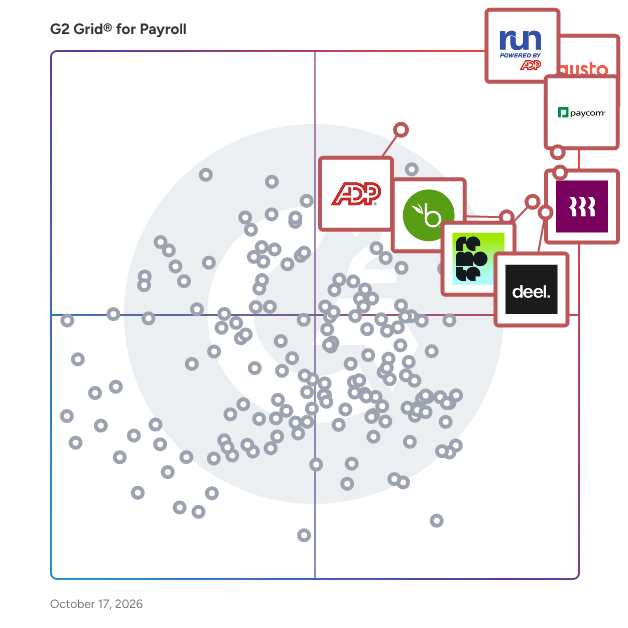
G2 Grid® for Payroll Software

G2 Grid® for Payroll Software plotting products by satisfaction and market presence

Highlighted products: RUN Powered by ADP, Gusto, Paycom, Rippling, Deel Payroll, Remote, TriNet PEO, and BambooHR.

Underlying data: [Grid® JSON](https://www.g2.com/categories/payroll/grids.json?focus%5B%5D=run-powered-by-adp&focus%5B%5D=gusto&focus%5B%5D=paycom&focus%5B%5D=rippling&focus%5B%5D=deel-payroll&focus%5B%5D=remote&focus%5B%5D=trinet-peo&focus%5B%5D=bamboohr)

datascalehr

datascalehr connects any HR system to any payroll provider in 150+ countries in hours, not months. Your payroll data sits in different systems in every country, each with a different file format and a different set of compensation rules. Traditional implementations take 6 months per country. datascalehr eliminates the manual mapping entirely. The same platform handles EU Pay Transparency reporting, global payroll-to-GL posting, real-time labor cost visibility across every country, and full control over your provider ecosystem — switch payroll vendors without re-integration. Deploy one use case and the hard work for every other payroll data problem is already done. No more software vendor lock-in, no more payroll provider lock-in, no more walled-gardens. datascalehr lets you regain control and your agility. Three leading payroll service providers, a $150B multinational manufacturer, a global money movement platform, and the world’s largest SAP HCM consulting firm all run datascalehr in production. They chose it because the AI has mapped 7,000+ schemas and predicts correct field mappings using 1.5M+ validated decisions. Every correction by any user makes the system smarter for every other user, instantly. For Workday customers, datascalehr provides pre-built connectivity to the Global Payroll Connect stack with DCOD across 150+ countries. Your top 3 countries may have native integrations. datascalehr handles the rest in hours. No custom connectors. No middleware project. Upload the file, confirm the mappings, go live. datascalehr provides industrial-grade AI that never hallucinates. Production results from enterprise clients: a top 3 global PSP reaches 90% AI mapping accuracy. The #1 European payroll provider cut data comparison from 4 hours to 15 minutes. The UK’s largest payroll provider auto-matched 74% of 10,000+ data points on first pass with zero manual entry. datascalehr is not a payroll provider. It connects them. 1,000+ live connectors across 150+ countries. The world’s largest SAP HCM consulting firm uses datascalehr for its own client implementations and deploys it for enterprise customers. Implementation support from setup to production.

Average Rating: 4.8/5.0

Total Reviews: 12

How Do G2 Users Rate datascalehr?

  • Has the product been a good partner in doing business?: 10.0/10 (Category avg: 8.7/10)
  • Performance and Reliability: 10.0/10 (Category avg: 8.7/10)
  • Scalability: 10.0/10 (Category avg: 8.7/10)
  • User, Role, and Access Management: 10.0/10 (Category avg: 8.7/10)

Who Is the Company Behind datascalehr?

Who Uses This Product?

  • Company Size: 58% Large, 17% Medium

What Do G2 Reviewers Say About datascalehr?

AI-generated summary from verified user reviews

Pros
  • Users value the automation of payroll validation, which enhances efficiency and supports scalability as their payroll grows.
  • Users appreciate the automated payroll validation of DatascaleHR, which supports scalability and enhances reporting accuracy.
Cons
  • Users find that the steep learning curve requires extensive configuration knowledge, hindering initial usability.

What Are Recent G2 Reviews of datascalehr?

Symmetry Payroll Point

The leader in accurate & precise local tax withholding rates. Build powerful local payroll that combines location data with the Symmetry Tax Engine® to deliver precise tax withholding information based on latitude and longitude coordinates. With access to thousands of geospatial tax boundary shapefiles, Symmetry Payroll Point® boosts tax and wage rate accuracy at every level — federal, state, and local.

Average Rating: 4.9/5.0

Total Reviews: 9

How Do G2 Users Rate Symmetry Payroll Point?

  • Has the product been a good partner in doing business?: 10.0/10 (Category avg: 8.7/10)
  • Performance and Reliability: 9.4/10 (Category avg: 8.7/10)
  • Scalability: 9.4/10 (Category avg: 8.7/10)
  • User, Role, and Access Management: 9.4/10 (Category avg: 8.7/10)

Who Is the Company Behind Symmetry Payroll Point?

  • Seller: Symmetry
  • Year Founded: 1984
  • HQ Location: Scottsdale, AZ
  • Twitter: @SymmetrySftware
    1,042 Twitter followers
  • LinkedIn® Page: www.linkedin.com
    82 employees on LinkedIn®
  • Phone: (480) 596-1500

Who Uses This Product?

  • Company Size: 44% Medium, 33% Large

What Do G2 Reviewers Say About Symmetry Payroll Point?

AI-generated summary from verified user reviews

Pros
  • Users value the easy integrations of Symmetry Payroll Point, appreciating its seamless fit with existing HR software.
  • Users praise the top-notch customer support of Symmetry Payroll Point for its clear and quick responses.
  • Users appreciate the ease of use of Symmetry Payroll Point, simplifying operations without the need for constant training.
  • Users value the seamless integration of Payroll Point, enhancing their payroll process with minimal customization required.
  • Users value the reliability of Symmetry Payroll Point, as it ensures accurate tax calculations consistently and effortlessly.

What Are Recent G2 Reviews of Symmetry Payroll Point?

What Are G2 Users Discussing About Symmetry Payroll Point?

CheckMark Payroll

CheckMark Payroll Software is an affordable software solution packed with advanced features and functionalities. It allows users to easily create and manage unlimited databases, companies, and employees, making it a valuable tool for business owners, employers, CPAs, and payroll service providers. With CheckMark Payroll Software, users can process unlimited payrolls, making it a scalable solution that can grow with your business. Our payroll program integrates seamlessly with many accounting programs, making it easy to use and manage. One of the standout features of CheckMark Payroll Software is its flexibility when it comes to creating and printing checks. Users can choose to use direct deposit, paper checks, or both in the same check run, and the software even offers the ability to print signatures on checks. Additionally, the software can print MICR encoding on blank check stock or use pre-printed checks. For those receiving the direct deposit, CheckMark Payroll Software also allows users to easily email check stubs. The software also offers a range of features to help users manage their taxes and compliance. It allows users to print 941’s, 940’s, 944’s, and 943’s on blank paper, and it can print W-2 and W-3 forms on blank, pre-printed paper, or e-file them. Best of all, CheckMark Payroll Software offers a simple and attractive pricing model that is perfect for small and medium-sized businesses. Whether you’re a solo entrepreneur or a growing company, CheckMark Payroll Software has the features and flexibility you need to manage your payroll with ease.

Average Rating: 4.4/5.0

Total Reviews: 8

How Do G2 Users Rate CheckMark Payroll?

  • Has the product been a good partner in doing business?: 6.7/10 (Category avg: 8.7/10)
  • Performance and Reliability: 8.9/10 (Category avg: 8.7/10)
  • Scalability: 9.2/10 (Category avg: 8.7/10)
  • User, Role, and Access Management: 9.7/10 (Category avg: 8.7/10)

Who Is the Company Behind CheckMark Payroll?

  • Seller: CheckMark
  • Year Founded: 1984
  • HQ Location: Fort Collins, CO
  • Twitter: @CheckMark_Inc
    396 Twitter followers
  • LinkedIn® Page: www.linkedin.com
    50 employees on LinkedIn®

Who Uses This Product?

  • Company Size: 75% Small, 25% Medium

What Do G2 Reviewers Say About CheckMark Payroll?

AI-generated summary from verified user reviews

Pros
  • Users value the ease of use of CheckMark Payroll, appreciating its user-friendly interface and flexibility for remote access.
  • Users appreciate the automation features of CheckMark Payroll, making tax updates and transfers seamless and easy.
  • Users appreciate the quick and efficient customer support of CheckMark Payroll, enhancing their payroll experience.
  • Users value the easy access of CheckMark Payroll, allowing them to work flexibly from any location.
  • Users appreciate the seamless integrations of CheckMark Payroll, making data transfer to accounting software effortless.
Cons
  • Users often face complex reporting issues, which can disrupt the overall payroll experience and create frustration.
  • Users feel the product has limited options for tax benefits in India, which hinders its overall usefulness.
  • Users experience software glitches that disrupt payroll processing and complicate custom reporting tasks.
  • Users often struggle with file duplication, leading to time-consuming tasks without proper batch setup.

What Are Recent G2 Reviews of CheckMark Payroll?

QkrHR

What is QkrHR? QkrHR is a complete Human Resource Management System (HRMS) built for businesses that want powerful HR software without the steep learning curve. From your first hire to an employee's last day, QkrHR handles every step of the employee lifecycle — reliably, simply, and all in one place. HR software should not be hard. QkrHR is proof. QkrHR handles everything Hire To Retire — that means it handles every part of the employee journey, from the day someone applies for a job at your company to the day they leave. Onboarding. Attendance. Leave. Payroll. Task. Field Force Management. Expenses. Exit. All of it, in one place, without needing to buy separate tools or stitch things together with integrations. And the part we're most proud of? It's genuinely easy to use. Not "easy once you've done the 3-day training" easy. Easy like your HR manager figures it out on day one, your employees actually use the app without being forced to, and your payroll runs without anyone staying late. What QkrHR actually does Let's walk through it properly — because "complete HRMS" gets thrown around a lot and we want to be specific. Onboarding — First week at a new job shouldn't mean drowning in paperwork. QkrHR lets you build onboarding checklists, collect documents digitally, assign tasks to the right people, and make sure every new joiner actually has what they need before they start — not three days after. Attendance — We handle offices, remote teams, field staff, and shift workers. Biometric, GPS, web check-in — whatever your setup is, attendance comes into QkrHR automatically. Your managers see who's in. Your HR team stops chasing daily reports. Late alerts go out without anyone having to check manually. Leave — Employees apply. Managers approve. Balances update. That's it. No email threads, no "did you get my leave request?", no manual balance calculations at year end. Every leave type your company has — casual, sick, earned, maternity, any custom type — is configured in QkrHR and it works exactly how you set it up. Payroll — This one matters a lot and we know it. Payroll errors cost trust. QkrHR pulls attendance, approved leaves, reimbursements, and salary changes together automatically, calculates all statutory deductions — PF, ESI, TDS, PT, gratuity — and generates payslips in minutes. The compliance piece is built in and stays updated. Your payroll team doesn't need to track every circular from the labour ministry. We do that for them. Field Force Management — A lot of businesses have half their workforce on the road and no real way to manage them. Sales reps, service technicians, delivery staff, site supervisors — their attendance is a guess, their location is a phone call, and their work gets tracked in a WhatsApp group. QkrHR fixes that. Field employees mark attendance from the mobile app with live GPS — no proxy, no calls. Managers assign daily visits and tasks from QkrHR, track completion in real time, and see where the team is without chasing anyone. Expenses get logged on the go, flow straight into payroll, and your field staff get the same clean HR experience as everyone else in the company. One system. No separate app. Task -QkrHR's task management is built inside the same system your team already uses for HR. You can create tasks and assign them to anyone in the organisation — HR, finance, IT, the employee themselves. Set due dates, add context, track completion. Managers see what's pending on their team. HR sees what's stuck in an onboarding or exit flow. Everyone knows what they're responsible for without a separate project management tool. Self-service — Your employees shouldn't have to email HR every time they want their payslip or need to know how many leaves they have left. In QkrHR, everything they need is in their own account — payslips, tax documents, leave history, attendance records, and reimbursement status. Most HR teams tell us this alone saves them hours every week. Expenses — Staff submit claims with receipts. Managers approve. Finance sees everything in one report. It connects to payroll so reimbursements go out with the salary. Nobody follows up with nobody. Analytics — When leadership asks "what's our attrition looking like?" or "how much did payroll cost by department this quarter?" — the answers are right there. No data pulling, no formatting. Just the report, ready to share. Offboarding — Exits handled badly create real problems. QkrHR tracks notice periods, runs full and final settlement calculations, manages asset returns, generates experience and relieving letters, and keeps the whole process documented. Clean exits. Every time. Who uses QkrHR We work with companies across industries and sizes. A 12-person startup that's setting up HR properly for the first time. A 400-person manufacturer managing shift workers and complex payroll. A 2,500-person company that needed to replace three separate HR tools with one system that actually talks to itself. The thing they all have in common is that they wanted HR software that works — not software that requires a project team to implement, a manual to explain, or a vendor call every time something changes. HR managers like QkrHR because it takes work off their plate instead of adding to it. Business owners like it because they finally have real-time visibility into their workforce. Employees like it because they're not dependent on HR for every small thing. And finance teams like it because payroll and compliance data is clean, consistent, and easy to audit. Why people switch to QkrHR From Keka and Darwinbox — usually because implementation took too long, the system was more complex than what the team could realistically manage day-to-day, or the pricing made less sense as they grew. From greytHR — usually because payroll and compliance was solid but they needed recruitment, performance, and a better employee experience without paying for a separate tool. From Zoho People or Spine — usually because they'd outgrown it and needed something that could handle the scale and the compliance requirements without breaking. From nothing — startups and mid-sized companies who were managing everything in Excel and WhatsApp and finally decided to do it properly. In all of these cases, what they find with QkrHR is that they expected to compromise somewhere. They didn't. The honest version of what makes us different We're not going to claim we're the only HRMS you'll ever consider. What we will say is this — most of our customers tell us two things after they've been using QkrHR for a few months. First: they wish they'd switched earlier. Second: they can't believe something this complete is this easy to use. Setup takes days, not months. No implementation partner needed. Your HR team owns it from day one and doesn't need to raise a ticket for every configuration change. Everything is included. Not "basic features plus premium add-ons." Everything. Payroll, compliance, recruitment, performance, analytics — it's all there. It works reliably. Payroll runs on time. Reports load fast. The system doesn't go down at 9am on salary day. For something as sensitive as HR and payroll, reliability isn't a bonus feature — it's the whole point. Support that actually helps. Our support team knows HR, not just software. When you have a question about configuring gratuity or handling a complex FnF settlement, you get an answer from someone who understands what you're asking. QkrHR is for companies that are done settling for "good enough" in HR software — and ready for something that's just good.

Average Rating: 4.8/5.0

Total Reviews: 13

How Do G2 Users Rate QkrHR?

  • Has the product been a good partner in doing business?: 10.0/10 (Category avg: 8.7/10)
  • Performance and Reliability: 8.3/10 (Category avg: 8.7/10)
  • Scalability: 8.3/10 (Category avg: 8.7/10)
  • User, Role, and Access Management: 8.3/10 (Category avg: 8.7/10)

Who Is the Company Behind QkrHR?

  • Seller: Qkrbiz
  • Year Founded: 1991
  • HQ Location: New Delhi, IN
  • LinkedIn® Page: www.linkedin.com
    12 employees on LinkedIn®

Who Uses This Product?

  • Company Size: 100% Medium

What Do G2 Reviewers Say About QkrHR?

AI-generated summary from verified user reviews

Pros
  • Users find QkrHR's ease of use exceptional, enabling effortless management of HR tasks with just a few clicks.
  • Users value the seamless attendance tracking of QkrHR, which directly integrates with payroll for impressive accuracy.
  • Users love the easy setup of QkrHR, enabling quick navigation and efficient management of HR tasks.
  • Users find the intuitive and mobile-first interface of QkrHR makes managing HR tasks incredibly easy and efficient.
  • Users love the easy access of QkrHR, simplifying HR tasks and providing information on any device with just a few clicks.
Cons
  • Users experience slow loading times, particularly during login and dashboard refresh, impacting overall efficiency.
  • Users find a learning difficulty due to customizable features, making initial setup challenging for new admins.
  • Users feel the limited customization in QkrHR restricts flexibility, particularly in reports and dashboards.
  • Users face login issues with errors and slow loading times, impacting access and user experience.
  • Users feel that while the software is easy to use, the learning curve for customization can be challenging without training.
What Are Recent G2 Reviews of QkrHR?

PeopleWorks

PeopleWorks works on 3 motto, Build transparency, Increase productivity and align employees towards common organization goal. PeopleWorks is a complete suite for an organization to manage employee related activities. It integrates various department like HR, Finance, Payroll, IT, Management and Admin who interact and assist employees in their respective arears. PeopleWorks builds automation to entire Employees journey in the organization and helps them to be productive, accessible and independent.

Average Rating: 4.4/5.0

Total Reviews: 20

How Do G2 Users Rate PeopleWorks?

  • Has the product been a good partner in doing business?: 9.2/10 (Category avg: 8.7/10)
  • Performance and Reliability: 9.2/10 (Category avg: 8.7/10)
  • Scalability: 10.0/10 (Category avg: 8.7/10)
  • User, Role, and Access Management: 9.2/10 (Category avg: 8.7/10)

Who Is the Company Behind PeopleWorks?

  • Seller: PeopleWorks
  • Year Founded: 2013
  • HQ Location: Bangalore, India
  • Twitter: @PeopleWorksBiz
    378 Twitter followers
  • LinkedIn® Page: www.linkedin.com
    101 employees on LinkedIn®

Who Uses This Product?

  • Top Industries: Construction
  • Company Size: 65% Medium, 25% Large

What Do G2 Reviewers Say About PeopleWorks?

AI-generated summary from verified user reviews

Pros
  • Users appreciate the easy and simple onboarding process provided by PeopleWorks, enhancing their HR experience.
  • Users value the convenience of integrated attendance management within PeopleWorks for seamless employee detail handling.
  • Users value the ease of managing attendance with PeopleWorks, streamlining employee details and payroll in one platform.
  • Users appreciate the convenience of managing attendance seamlessly within PeopleWorks alongside employee details and payroll.
  • Users appreciate the customisable features of PeopleWorks, enhancing user-friendliness and streamlining HR processes.
Cons
  • Users find the interface not intuitive, noting that the system can also feel slow at times.
  • Users experience a not user-friendly interface, and the system can be sluggish at times, hindering productivity.
  • Users find the interface design lacking, often experiencing slowness that hinders their overall experience with PeopleWorks.
  • Users report experiencing slow loading times, which detracts from the overall user experience of PeopleWorks.
  • Users experience slow performance with PeopleWorks, as the system can feel sluggish and less user-friendly.

What Are Recent G2 Reviews of PeopleWorks?

What Are G2 Users Discussing About PeopleWorks?

Workstream

Workstream is the modern HR, payroll, and hiring platform built specifically for multi-location restaurants. Trusted by 46 of the top 50 restaurant brands, Workstream centralizes the entire employee lifecycle, from sourcing and onboarding to scheduling, payroll, benefits, and compliance, in one mobile-first and multi-lingual system. With Workstream, restaurants can grow with confidence, build repeatable systems, and reduce compliance risk while navigating complex wage rules, multi-location operations, and high-turnover hiring. From text-to-apply recruiting to ACA compliance and labor optimization, Workstream is designed to support restaurant operators and their teams at every stage of growth, accelerated by AI solutions that automate tasks and surface smarter insights. Workstream is headquartered in San Francisco, CA and serves more than 35,000+ locations across the U.S. and is backed by Founders Fund, CRV, GGV Capital, Basis Set, Coatue, and more.

Average Rating: 4.7/5.0

Total Reviews: 60

How Do G2 Users Rate Workstream?

  • Has the product been a good partner in doing business?: 9.2/10 (Category avg: 8.7/10)
  • Performance and Reliability: 10.0/10 (Category avg: 8.7/10)
  • Scalability: 10.0/10 (Category avg: 8.7/10)
  • User, Role, and Access Management: 10.0/10 (Category avg: 8.7/10)

Who Is the Company Behind Workstream?

  • Seller: Workstream
  • Company Website:
  • Year Founded: 2017
  • HQ Location: San Francisco, California
  • Twitter: @workstream_us
    625 Twitter followers
  • LinkedIn® Page: www.linkedin.com
    259 employees on LinkedIn®

Who Uses This Product?

  • Top Industries: Food & Beverages, Restaurants
  • Company Size: 64% Medium, 25% Small

What Do G2 Reviewers Say About Workstream?

AI-generated summary from verified user reviews

Pros
  • Users find the ease of use of Workstream essential, simplifying recruitment tasks and enhancing overall efficiency.
  • Users highlight the exceptional customer support of Workstream, noting responsiveness and helpfulness during inquiries.
  • Users value the excellent customer service of Workstream, making onboarding and hiring processes smoother and more efficient.
  • Users highlight the time-saving efficiency of Workstream, streamlining hiring processes and candidate communication effectively.
  • Users value the easy onboarding process and swift customer support, streamlining hiring efficiently.
Cons
  • Users highlight integration issues with corporate systems, limiting compatibility and functionality with proprietary tools.
  • Users face challenges with reporting issues, citing confusion and inconsistent support impacting essential operations like payroll.
  • Users face challenges with change management in Workstream, as updates can disrupt reliability and lead to confusion.
  • Users find the difficult setup of Workstream time-consuming and sometimes confusing, impacting their overall experience.
  • Users find the missing features frustrating, affecting hiring efficiency and complicating payroll integration and support access.

What Are Recent G2 Reviews of Workstream?

What Are G2 Users Discussing About Workstream?

eFACiLiTY

eFACiLiTY® is the most comprehensive and leading web-based Computer-aided Facility Management/Integrated Workplace Management (IWMS/CAFM) Software that also serves the Environmental Sustainability, Health & Well-being needs of your Smart Buildings. eFACiLiTY® is a contemporary solution that works together with businesses to provide a complete perspective on facilities operation by bringing together space, people, assets, and maintenance into a single system. Being a modular facilities management system eFACiLiTY® works together with your business and allows day-to-day management of the processes, automates operations, provides a management dashboard for critical analysis, and enables enterprise-wide control in the most intelligent & efficient way. • Extremely easy single or multi-site/tenant implementations for enterprises/facilities of any size • Smart Facility Management with seamless integration with most BAS / BMS software, IoT Devices • Artificial Intelligence/Machine Learning (AI / ML) support for Predictive Maintenance, Energy Predictions, etc. • Cloud, On-premise rental & Perpetual models supporting Web/Mobile/Tablet platforms A complete FM Suite Best suited for Airports, Business/IT Parks, Commercial Complexes, Government Organizations, Residential Complexes, Manufacturing Facilities, Healthcare, Corporate Houses, Educational Institutions, Hospitality

Average Rating: 4.5/5.0

Total Reviews: 15

How Do G2 Users Rate eFACiLiTY?

  • Has the product been a good partner in doing business?: 10.0/10 (Category avg: 8.7/10)
  • Performance and Reliability: 9.6/10 (Category avg: 8.7/10)
  • Scalability: 10.0/10 (Category avg: 8.7/10)
  • User, Role, and Access Management: 9.6/10 (Category avg: 8.7/10)

Who Is the Company Behind eFACiLiTY?

  • Seller: Sierra ODC
  • Year Founded: 1998
  • HQ Location: Coimbatore, Tamil Nadu
  • Twitter: @sierratecdotcom
    16 Twitter followers
  • LinkedIn® Page: www.linkedin.com
    221 employees on LinkedIn®

Who Uses This Product?

  • Company Size: 40% Small, 33% Medium

What Do G2 Reviewers Say About eFACiLiTY?

AI-generated summary from verified user reviews

Pros
  • Users praise the ease of use of eFACiLiTY, finding it simple and effective for facility management tasks.
  • Users value the automation capabilities of eFACiLiTY, enhancing efficiency and simplifying facility management tasks.
  • Users value the efficiency of eFACiLiTY, enabling better resource allocation and streamlined operations for optimal productivity.
  • Users value the seamless integration capabilities of eFACiLiTY, enhancing overall facility management efficiency and connectivity.
  • Users value the flexibility of eFACiLiTY, enabling easy access and seamless collaboration for all stakeholders.
Cons
  • Users find the clarity issues challenging, often requiring guidance to navigate the multitude of modules effectively.
  • Users find the lagging chat feature frustrating during one-to-one interactions with customer support.
  • Users report poor customer support due to lagging chat features, leading to frustrating interactions and delays.
  • Users find the steep learning curve of eFACiLiTY challenging due to its detailed and tedious input requirements.

What Are Recent G2 Reviews of eFACiLiTY?

What Are G2 Users Discussing About eFACiLiTY?

LinovHR

LinovHR is a product of PT Linov Roket Prestasi which is engaged in providing professional business platforms with a strong focus on Human Resource Information System (HRIS) & Talent Management. LinovHR is a software product that we offer to become a solution to help manage Human Resources by adjusting the needs of your company in all industries.

Average Rating: 4.6/5.0

Total Reviews: 11

How Do G2 Users Rate LinovHR?

  • Performance and Reliability: 10.0/10 (Category avg: 8.7/10)

Who Is the Company Behind LinovHR?

Who Uses This Product?

  • Company Size: 58% Medium, 33% Small

What Do G2 Reviewers Say About LinovHR?

AI-generated summary from verified user reviews

Pros
  • Users appreciate the user-friendly interface of LinovHR, which simplifies access to essential HR functions.
  • Users applaud the user-friendly interface of LinovHR, appreciating its quick access and intuitive navigation for HR tasks.
  • Users value the ease of understanding of LinovHR, appreciating its quick and intuitive interface for efficient use.
  • Users appreciate the easy management features of LinovHR, finding the user-friendly interface essential for streamlined HR tasks.
  • Users value the user-friendly interface of LinovHR, enabling easy access to essential HR activities.
Cons
  • Users express frustration with the restricted reporting capabilities of LinovHR, limiting in-depth analytics and decision-making.

What Are Recent G2 Reviews of LinovHR?

Bitákora

Bitákora es el software de nómina colombiano diseñado para cumplir con la complejidad regulatoria del mercado laboral y fiscal. A diferencia de otras soluciones, integra inteligencia artificial (IA) para automatizar procesos complejos y simplificar la gestión de personal sin uso de formularios. Es un sistema de nómina que cumple con los requerimientos legales en el país al estar autorizado por la DIAN y recibir el aval de la UGPP. El 65% de empresas en Colombia gasta 30-40 horas mensuales en liquidación manual de nómina, generando errores contables costosos y riesgo de multas desde distintas entidades regulatorias. Bitákora reduce los tiempos de operaciones críticas en un 50%, convirtiéndose en una solución precisa y confiable. Características más importantes de Bitákora 1. Modo Crucero (IA Conversacional): sistema de nómina con IA para optimizar el trabajo manual. Traduce voz, texto o documentos en operaciones. Registra novedades (vacaciones, incapacidades, licencias, préstamos) mediante lenguaje natural, sin formularios complejos. El chat IA ejecuta directamente en el sistema. 2. Automatización desde la nube: accesible desde cualquier dispositivo (PC, tablet, móvil). Todo desde la web. 3. Cumplimiento legal garantizado: nómina electrónica habilitada por la DIAN y con aval de la UGPP en materia de seguridad social. Otro de los beneficios de adquirir este software es que se anticipa a cambios legales, como reformas laborales y ajustes de año nuevo de manera automática. 4. Integración biométrica completa: Bitákora cuenta con una sincronización bidireccional con sistemas biométricos (ARHI, Falcon, GeoVictoria, PeopleForce). 5. Portal miBitákora: es la aplicación móvil para empleados que sirve para gestionar incapacidades con IA, solicitar vacaciones y permisos y descargar documentos laborales. Estas solicitudes se sincronizan automáticamente en la nube. 6. Precisión contable garantizada: Bitákora genera provisiones automáticas mes a mes, segmenta la nómina por centros de costo y genera planes de cuentas contables que necesita toda organización. También permite crear reportes a medida para hacer proyecciones en gastos y tomar decisiones informadas dentro de la organización. 7. Escalabilidad garantizada: gestiona desde 10 hasta +5.000 empleados en una misma plataforma. Paga por cada empleado liquidado. ¿Por qué debería elegir Bitákora como sistema de nómina? A diferencia de competidores internacionales u otros software en Colombia, Bitákora cuenta con un equipo de expertos con +20 años en la industria que ofrece atención personalizada para todo tipo de empresa. Además, tiene una interfaz intuitiva y fácil de usar desde el primer clic. Esto lo convierte en una solución integral y actualizada que siempre está lanzando nuevas actualizaciones para hacer la vida de los contadores y especialistas más sencilla.

Average Rating: 4.7/5.0

Total Reviews: 5

How Do G2 Users Rate Bitákora?

  • User, Role, and Access Management: 10.0/10 (Category avg: 8.7/10)

Who Is the Company Behind Bitákora?

Who Uses This Product?

  • Company Size: 60% Medium, 40% Small

What Are Recent G2 Reviews of Bitákora?

ezPaycheck

ezPaycheck is the refreshingly simple payroll and check-printing software built for real small businesses, accountants, and professionals who want power and control—without the high monthly fees. Trusted by thousands of organizations since 2003, ezPaycheck helps employers run payroll confidently with a clean, intuitive design that anyone can learn in minutes. Designed for both Windows and Mac, ezPaycheck uses a straightforward one-time purchase model—no subscriptions, no contracts, no surprise charges. You own the software. That’s why so many CPAs choose ezPaycheck: it supports unlimited companies and unlimited employees, making it the perfect tool for managing payroll across multiple clients without paying per-company or per-employee fees. ezPaycheck includes everything small and midsize businesses need to stay compliant and efficient. The software automatically calculates federal and state taxes, prints professional paychecks, supports direct deposit, and prepares W-2, W-3, 940, 941, 943, and other essential payroll tax forms. With built-in reporting, customizable deductions and benefits, time data importing, and secure local storage, ezPaycheck puts accuracy and control back into your hands. Banks, insurance companies, accountants, nonprofits, professional offices, and thousands of small businesses rely on ezPaycheck because it’s dependable, secure, and extremely easy to use. All calculations happen locally on your computer, keeping sensitive payroll data private—ideal for organizations with strict compliance or security requirements. If you’re tired of complicated payroll systems, expensive monthly subscriptions, or software that forces you into add-ons you don’t need, ezPaycheck is the modern alternative. With over 20 years of proven reliability, unlimited-company capability, and everything you need built right in, ezPaycheck delivers professional, accurate payroll year after year—at a price every business can afford.

Average Rating: 4.8/5.0

Total Reviews: 5

How Do G2 Users Rate ezPaycheck?

  • Has the product been a good partner in doing business?: 8.3/10 (Category avg: 8.7/10)
  • Performance and Reliability: 10.0/10 (Category avg: 8.7/10)
  • Scalability: 10.0/10 (Category avg: 8.7/10)
  • User, Role, and Access Management: 10.0/10 (Category avg: 8.7/10)

Who Is the Company Behind ezPaycheck?

Who Uses This Product?

  • Company Size: 60% Small, 40% Medium

What Do G2 Reviewers Say About ezPaycheck?

AI-generated summary from verified user reviews

Pros
  • Users appreciate the ease of payroll processing with ezPaycheck, making employee and vendor payments seamless and efficient.
  • Users appreciate the payroll ease of ezPaycheck, finding it simplifies both employee and vendor payments effectively.
  • Users find ezPaycheck to be very user-friendly, ensuring a smooth payroll process with just a click.
Cons
  • Users express frustration with the lack of customer service, reporting difficulties in getting assistance when needed.

What Are Recent G2 Reviews of ezPaycheck?

What Are G2 Users Discussing About ezPaycheck?

Juntrax

Juntrax is an integrated business operations solution for global offices, customers can now get visibility into their operations worldwide and stay connected with their organization. By uniting HRMS, PSA and Financial modules on one integrated software customers can use one solution to manage their operations worldwide. Modules available in our integrated solution: 1. Workforce 2. Leaves 3. Attendance 4. Timesheets 5. Payroll 6. Projects 7. Assets 8. Sales (Quotation, PO, Invoices-Receivables) 9. Purchases ((Quotation, PO, Invoices-Receivables-Payables) 10. Expenses and Reimbursements Why Choose Juntrax as Your ERP Partner? • All-in-One Platform: Replace multiple tools with a single, integrated solution for streamlined workflows. • Global Operations Made Simple: Manage global activities from one unified platform. • Enterprise-Grade Security: Protect your data with robust security and compliance measures. • Transparent Pricing: Enjoy competitive pricing with no hidden costs. • Automation-Driven Efficiency: Save time and reduce errors with intelligent automation features. • Actionable Insights: Leverage real-time dashboards to make data-driven decisions. • Scalable for Growth: Designed to adapt as your business grows and evolves. • User-Friendly Interface: Simplify operations with a platform built for ease of use and productivity.

Average Rating: 4.3/5.0

Total Reviews: 38

How Do G2 Users Rate Juntrax?

  • Has the product been a good partner in doing business?: 9.6/10 (Category avg: 8.7/10)
  • Performance and Reliability: 9.4/10 (Category avg: 8.7/10)
  • Scalability: 9.4/10 (Category avg: 8.7/10)
  • User, Role, and Access Management: 10.0/10 (Category avg: 8.7/10)

Who Is the Company Behind Juntrax?

  • Seller: Juntrax Solutions
  • Year Founded: 2016
  • HQ Location: San Francisco, CA
  • Twitter: @Juntrax
    30 Twitter followers
  • LinkedIn® Page: linkedin.com
    22 employees on LinkedIn®

Who Uses This Product?

  • Top Industries: Design, Semiconductors
  • Company Size: 79% Medium, 21% Small

What Do G2 Reviewers Say About Juntrax?

AI-generated summary from verified user reviews

Pros
  • Users find Juntrax to be user-friendly, making it easy to manage leaves, timesheets, and projects effortlessly.
  • Users find the time tracking features of Juntrax invaluable for analyzing team performance and project management.
  • Users commend the tracking ease of Juntrax, facilitating daily task management and team performance analysis effortlessly.
  • Users find Juntrax incredibly useful for daily task management, simplifying project planning and time tracking effortlessly.
  • Users find the invoicing options helpful for billing projects and analyzing team performance efficiently.
Cons
  • Users experience slow loading times with Juntrax, particularly after extended use, impacting their overall satisfaction.
  • Users face slow performance with Juntrax, especially during peak times, affecting usability and experience.
  • Users report slow performance in certain modules and suggest improvements for the UI and mobile app usability.
  • Users experience a slow system in certain modules, along with UI issues and lag in displaying leave balances.
  • Users find the interface not intuitive, often experiencing delays and sluggishness in various modules.

What Are Recent G2 Reviews of Juntrax?

Aatrix

Aatrix is a fast, accurate, and affordable W-2/1099/ACA 1095 solution. Aatrix processes millions of W-2s/1099s/ACA 1095s annually. 96% of Aatrix customers say they would recommend our service to others. Aatrix serves hundreds of thousands of businesses through over 60 payroll software partners. Go to https://www.aatrix.com/efile.

Average Rating: 4.0/5.0

Total Reviews: 4

How Do G2 Users Rate Aatrix?

  • Performance and Reliability: 8.3/10 (Category avg: 8.7/10)
  • Scalability: 10.0/10 (Category avg: 8.7/10)
  • User, Role, and Access Management: 7.5/10 (Category avg: 8.7/10)

Who Is the Company Behind Aatrix?

  • Seller: Aatrix Software
  • Year Founded: 1986
  • HQ Location: Grand Forks, US
  • Twitter: @AATRIXSoftware
    224 Twitter followers
  • LinkedIn® Page: www.linkedin.com
    55 employees on LinkedIn®

Who Uses This Product?

  • Company Size: 75% Medium, 25% Small

What Do G2 Reviewers Say About Aatrix?

AI-generated summary from verified user reviews

Pros
  • Users find Aatrix to be easy to understand, requiring little experience or training for effective use.
  • Users find Aatrix to be easy to use, requiring little experience or training to get started.
Cons
  • Users experience inaccurate tracking when combining data, leading to random deletions and lost information.

What Are Recent G2 Reviews of Aatrix?

What Are G2 Users Discussing About Aatrix?

Clan

Clan – Next Gen HR Management OS is your modern solution to everything HR. Whether you're a startup or a growing business, Clan helps you ditch spreadsheets and messy manual processes by bringing all your HR tasks into one clean, easy-to-use platform. From tracking attendance with geo-fencing to managing leaves, shifts, payroll, expenses, and even employee performance, Clan takes care of it all — so you don’t have to juggle between multiple tools. It’s like having an HR department in your pocket, designed to save you time, reduce errors, and keep your team connected. With features like a digital notice board, policy center, and automated reports, it’s built not just to manage employees, but to empower them. If you're looking for a smarter, faster, and more organized way to run your team — Clan makes HR feel effortless.

Average Rating: 4.6/5.0

Total Reviews: 4

How Do G2 Users Rate Clan?

  • Performance and Reliability: 10.0/10 (Category avg: 8.7/10)
  • Scalability: 10.0/10 (Category avg: 8.7/10)
  • User, Role, and Access Management: 10.0/10 (Category avg: 8.7/10)

Who Is the Company Behind Clan?

Who Uses This Product?

  • Company Size: 75% Small

What Do G2 Reviewers Say About Clan?

AI-generated summary from verified user reviews

Pros
  • Users find Clan remarkably easy to use, simplifying HR tasks with a seamless, all-in-one dashboard experience.
  • Users value the easy management features of Clan, streamlining HR tasks with a simple and efficient dashboard.
  • Users commend the simple and smooth experience of Clan, enhancing organization and efficiency for HR and employees.
  • Users value the automation features in Clan HRMS, enhancing efficiency through timely notifications and seamless task management.
  • Users enjoy the easy integrations of Clan HRMS, enhancing communication and simplifying the management of daily tasks.
Cons
  • Users experience slow loading times on the Clan app, leading to frustrating performance issues during use.

What Are Recent G2 Reviews of Clan?

Deskera All-in-One

Deskera All In One is the only business software you need to run your business. Get integrated accounting, inventory, CRM, payroll, and employee management in one package. All the benefits of an ERP, without any of the hassles. From the get-go, the dashboard is where it all comes together, giving you a real-time view of your business. You can view invoices, receivables, bank balances, and tax calculations, plus check how your sales team is performing and how much revenue they’re raking in. There’s even space to see salary liability, employee attendance, and claims/reimbursements. Deskera has it all front and center, with a winning mobile app that handles every desktop feature with ease. Features 1.Scan documents with your phone to record bills, expenses, and purchase invoices 2.Connect to over 10,000 banks for faster bank reconciliation 3.Multi-currency transactions in over 110 currencies with forex gain/loss calculations 4.Manage your finances the way you want, with job accounting, project accounting, or cost-center accounting 5.Advanced inventory management with serial, batch, bill of materials, multiple warehouses, stock transfers & adjustments, and more Built-in financial and business reports which can be sliced and diced as you need for better insights and decisions 6.Complete audit trail to keep a track of all accounting, financial and transactional activities 7.Automate marketing, lead generation, sales, and after-sales operations. 8.Run email marketing campaigns for lead generation, nurturing, or engaging your customers and prospects. 9.Configure rules to create dynamic segments from your contact lists and personalize your marketing outreach. 10.Create custom forms to capture new potential leads from multiple channels. 11.Add contacts and leads to mailing lists for nurturing or to sales pipelines for closing deals. 12.Configure custom sales pipelines and track deals across different sales stages 13.Schedule activities, calls, or meeting with your contacts regarding deals, and even sync your Microsoft 365 account 14.Setup an email helpdesk and an online help-site to provide world-class support to your customers. 15.Self-service portal for employees and managers to manage payslips, loans, leaves, appraisals, and expenses/claims 16.Employees can use their phone to scan receipts and submit claims, apply leaves and view payslips. 17.Setup multiple teams and departments for appraisals, leave approvals, and claim approvals. 18.Schedule and run payrolls with automatic tax, contributions, and benefits calculations keep different groups of employees on different pay schedules as per your needs. 19.Maintain detailed records for each employee, including personal details, payroll, time-offs, leaves, advances, and more 20.Setup custom pay components and automatically calculate wages based on specific conditions such as pre and post-tax deductions. 21.Automatic journals posted to accounting on payroll finalization.

Average Rating: 4.3/5.0

Total Reviews: 12

How Do G2 Users Rate Deskera All-in-One?

  • Has the product been a good partner in doing business?: 7.5/10 (Category avg: 8.7/10)
  • Performance and Reliability: 10.0/10 (Category avg: 8.7/10)
  • Scalability: 9.2/10 (Category avg: 8.7/10)
  • User, Role, and Access Management: 10.0/10 (Category avg: 8.7/10)

Who Is the Company Behind Deskera All-in-One?

  • Seller: Deskera
  • Year Founded: 2008
  • HQ Location: Minneapolis, Minnesota
  • Twitter: @deskera
    5,787 Twitter followers
  • LinkedIn® Page: www.linkedin.com
    109 employees on LinkedIn®

Who Uses This Product?

  • Company Size: 75% Small, 25% Medium

What Do G2 Reviewers Say About Deskera All-in-One?

AI-generated summary from verified user reviews

Pros
  • Users appreciate the speed of loading in Deskera All-in-One, enhancing efficiency for inventory management and invoicing.
  • Users benefit from the automation capabilities of Deskera All-in-One, enhancing efficiency in stock management and payroll.
  • Users love the fast loading speed of Deskera All-in-One, enhancing their experience across various modules.
  • Users praise the responsive customer support of Deskera, highlighting its assistance with system customization and issue resolution.
  • Users value the customizability of Deskera All-in-One, enabling tailored solutions for their specific business needs.
Cons
  • Users often face call issues with Deskera All-in-One, leading to frustrating delays in support response times.
  • Users find the UI not intuitive, making it challenging to input details quickly and efficiently.
  • Users face challenges with poor customer support, struggling to get timely responses and resolutions to their issues.
  • Users report poor support with Deskera All-in-One, struggling to receive timely responses and resolutions to issues.
  • Users find customer support time-consuming, often struggling to get timely responses and solutions to issues.

What Are Recent G2 Reviews of Deskera All-in-One?

What Are G2 Users Discussing About Deskera All-in-One?

Gloroots

Gloroots helps companies build and run global teams. We bring recruiting, employment, payroll, and compliance into one place, so you can hire talent anywhere and manage it without stitching together separate vendors. We're primarily an HR partner, with EOR, COR, hiring and payroll support in global markets that feed directly into compliant employment. A candidate can move from shortlist to onboarded employee without the usual handoffs between a recruiting agency and an EOR provider. With Gloroots, teams can: 1. Hire full-time employees or contractors in 150+ countries, with correct worker classification and localized contracts handled for you. 2. Run payroll in local currencies, with statutory taxes, filings, and benefits managed end-to-end. 3. Stay compliant with local labor laws, backed by 24/7 human support and in-house legal expertise. 4. Set up India capability centers (GCCs) or remote teams with on-the-ground help. 5. Add devices, equity (ESOPs), background checks, and immigration support as the team grows. 6. Expand into new countries on the same employment setup, with no hidden fees or surprise FX charges. Companies on Gloroots have cut time to hire by around 70%. And reduced leadership hours spent on HR by about 50%, with zero compliance incidents and no delayed payroll.

Average Rating: 4.9/5.0

Total Reviews: 25

How Do G2 Users Rate Gloroots?

  • Has the product been a good partner in doing business?: 9.0/10 (Category avg: 8.7/10)

Who Is the Company Behind Gloroots?

  • Seller: Gloroots
  • Year Founded: 2022
  • HQ Location: San Francisco, US
  • Twitter: @gloroots_remote
    42 Twitter followers
  • LinkedIn® Page: www.linkedin.com
    21 employees on LinkedIn®

Who Uses This Product?

  • Top Industries: Information Technology and Services
  • Company Size: 68% Medium, 36% Small

What Do G2 Reviewers Say About Gloroots?

AI-generated summary from verified user reviews

Pros
  • Users value Gloroots for its reliable support and seamless management of payroll and compliance on a global scale.
  • Users commend the excellent customer support from Gloroots, facilitating smooth transitions and personalized assistance for operations.
  • Users value the ease of use of Gloroots, finding smooth transitions and support throughout their global operations.
  • Users value Gloroots for its reliable payroll management, simplifying international expansion and ensuring compliance effortlessly.
  • Users commend Gloroots for its reliable payroll management, making HR tasks smooth and hassle-free globally.
Cons
  • Users find limited customization options for specific regions on Gloroots, affecting overall adaptability and integration capabilities.
  • Users find limited regional customization challenging, especially regarding HRMS integration and benefits adjustments.
  • Users experience onboarding issues that initially complicate the setup process, although improvements are noted over time.
  • Users find the geographical limitations of Gloroots restricting, with minimal customization options available for their regions.
  • Users express concern over poor customer support, particularly regarding limited availability and response times during setup challenges.

What Are Recent G2 Reviews of Gloroots?