Best Network Monitoring Software - Page 3

How Many Network Monitoring Software Products Does G2 Track?

Total Products under this Category: 228

Category Stats (Sep 2026)

  • Average Rating: 4.49/5 (↓0.01 vs Aug 2026) The average rating of products in this category, based on all submitted ratings
  • Top Trending Product: Netcrunch (+1.38%) - Among all products in this category, Netcrunch recorded the largest rating increase compared to last month

Last updated: September 26, 2026

How Does G2 Rank Network Monitoring Software Products?

Why You Can Trust G2's Software Rankings:

  • 30 Analysts and Data Experts
  • 19,900+ Authentic Reviews
  • 228+ Products
  • Unbiased Rankings

G2's software rankings are built on verified user reviews, rigorous moderation, and a consistent research methodology maintained by a team of analysts and data experts. Each product is measured using the same transparent criteria, with no paid placement or vendor influence. While reviews reflect real user experiences, which can be subjective, they offer valuable insight into how software performs in the hands of professionals. Together, these inputs power the G2 Score, a standardized way to compare tools within every category.

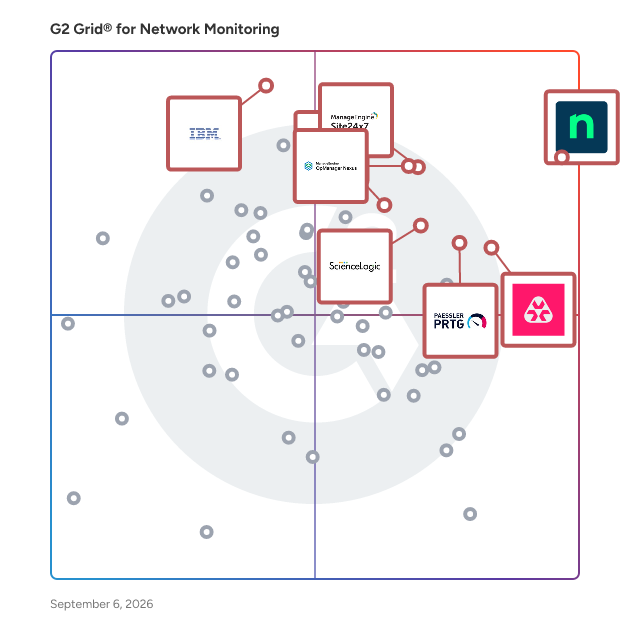
G2 Grid® for Network Monitoring Software

G2 Grid® for Network Monitoring Software plotting products by satisfaction and market presence

Highlighted products: NinjaOne, OpManager Nexus, Site24x7, Remote Monitoring and Management, Paessler PRTG, ScienceLogic AI Platform, IBM SevOne, and TeamViewer.

Underlying data: [Grid® JSON](https://www.g2.com/categories/network-monitoring/grids.json?focus%5B%5D=ninjaone&focus%5B%5D=opmanager-nexus&focus%5B%5D=site24x7&focus%5B%5D=remote-monitoring-and-management&focus%5B%5D=paessler-prtg&focus%5B%5D=sciencelogic-ai-platform&focus%5B%5D=ibm-sevone&focus%5B%5D=teamviewer)

Nagios XI

Nagios XI is an enterprise-grade IT infrastructure monitoring and alerting solution designed to provide comprehensive oversight of servers, networks, applications, and services. Built upon the robust Nagios Core monitoring engine, Nagios XI offers a user-friendly web interface, advanced visualization tools, and customizable dashboards, enabling IT teams to proactively identify and resolve issues before they impact business operations. Its scalable architecture supports monitoring from small environments to large-scale infrastructures with thousands of devices. Key Features and Functionality: - Comprehensive Monitoring: Nagios XI delivers full-stack monitoring capabilities, covering networks, servers, databases, and applications. It supports native cloud and virtualization platforms, including AWS, Azure, VMware, and Hyper-V. - Advanced Alerting and Reporting: The platform provides event-driven automation with multi-channel alerting options such as email, SMS, Slack, and Microsoft Teams. It includes customizable dashboards with performance graphs and capacity planning tools to aid in proactive infrastructure management. - User Management and Security: Nagios XI features role-based access control with multi-tenant capabilities, ensuring secure and efficient user management across the organization. - Flexible Deployment and Licensing: Offering hybrid deployment options, Nagios XI supports both on-premises and cloud environments. Its perpetual licensing model eliminates subscription fees, providing cost-effective monitoring solutions. Primary Value and Problem Solving: Nagios XI addresses the critical need for real-time visibility into IT infrastructures, enabling organizations to detect and resolve issues promptly, thereby minimizing downtime and maintaining optimal performance. By consolidating monitoring tools into a single platform, it reduces complexity and operational costs. The solution's proactive alerting and reporting capabilities empower IT teams to anticipate potential problems and implement corrective measures before they escalate, ensuring business continuity and enhancing overall efficiency.

Average Rating: 4.5/5.0

Total Reviews: 51

How Do G2 Users Rate Nagios XI?

  • Has the product been a good partner in doing business?: 8.2/10 (Category avg: 8.8/10)
  • Performance Monitoring: 9.5/10 (Category avg: 8.9/10)
  • Multi-Network Capability: 9.1/10 (Category avg: 8.7/10)
  • Path Analysis: 9.1/10 (Category avg: 8.4/10)

Who Is the Company Behind Nagios XI?

  • Seller: Nagios
  • Year Founded: 2007
  • HQ Location: Saint Paul, MN
  • Twitter: @nagiosinc
    5,495 Twitter followers
  • LinkedIn® Page: www.linkedin.com
    80 employees on LinkedIn®

Who Uses This Product?

  • Who Uses This: Network Engineer
  • Top Industries: Information Technology and Services, Internet
  • Company Size: 66% Medium, 24% Large

What Do G2 Reviewers Say About Nagios XI?

AI-generated summary from verified user reviews

Pros
  • Users value Nagios XI for its comprehensive monitoring, effectively handling diverse endpoints and infrastructure components.
  • Users find Nagios XI to be a cost-effective all-in-one solution that simplifies monitoring across diverse infrastructure.
  • Users value the extensive compatibility of Nagios XI, allowing seamless integration with various endpoints and protocols.
  • Users value the responsive customer support of Nagios XI, which enhances their overall monitoring experience and effectiveness.
  • Users value the intuitive dashboard features of Nagios XI for effective monitoring of various infrastructure components.
Cons
  • Users find the initial configuration complex, especially if lacking technical expertise, making setup challenging.
  • Users find the complex setup challenging, particularly for teams with limited technical expertise.
  • Users find the initial configuration challenging, particularly for teams with limited technical expertise, creating a steep learning curve.
  • Users note the expertise required for setup, which can be challenging for teams lacking technical skills.
  • Users find Nagios XI has inadequate monitoring for detailed SQL database performance insights, limiting troubleshooting capabilities.

What Are Recent G2 Reviews of Nagios XI?

What Are G2 Users Discussing About Nagios XI?

Azure Network Watcher

Azure Network Watcher is a regional service that enables you to monitor and diagnose conditions at a network scenario level in, to, and from Azure. Network diagnostic and visualization tools available with Network Watcher help you understand, diagnose, and gain insights to your network in Azure.

Average Rating: 4.4/5.0

Total Reviews: 13

How Do G2 Users Rate Azure Network Watcher?

  • Has the product been a good partner in doing business?: 8.7/10 (Category avg: 8.8/10)
  • Performance Monitoring: 8.3/10 (Category avg: 8.9/10)
  • Multi-Network Capability: 7.5/10 (Category avg: 8.7/10)
  • Path Analysis: 7.9/10 (Category avg: 8.4/10)

Who Is the Company Behind Azure Network Watcher?

  • Seller: Microsoft
  • Year Founded: 1975
  • HQ Location: Redmond, Washington
  • Twitter: @microsoft
    13,091,739 Twitter followers
  • LinkedIn® Page: www.linkedin.com
    232,750 employees on LinkedIn®
  • Ownership: MSFT

Who Uses This Product?

  • Company Size: 53% Large, 33% Small

What Do G2 Reviewers Say About Azure Network Watcher?

AI-generated summary from verified user reviews

Pros
  • Users appreciate the ease of use of Azure Network Watcher, enabling quick identification of security flaws and issues.
  • Users value the real-time network visibility provided by Azure Network Watcher, enhancing security and speeding up issue detection.
  • Users value Azure Network Watcher's real-time network visibility, enabling quick identification of security flaws and issues.
Cons
  • Users struggle with inefficient search functionality, making it hard to find necessary data among numerous logs.

What Are Recent G2 Reviews of Azure Network Watcher?

What Are G2 Users Discussing About Azure Network Watcher?

NetBeez Network Monitoring

NetBeez is a SaaS company that provides network engineers with data and intelligence to successfully manage the most complex network infrastructures. The NetBeez platform is a distributed performance monitoring solution that detects network and application problems before users do. Dedicated hardware and software monitoring agents test LAN, WAN, and WiFi networks from the user perspective, measuring and reporting KPI of service quality. The solution enables enterprise organizations to cut costs and reduce downtime by allowing IT to quickly detect, troubleshoot, and repair network issues.

Average Rating: 4.8/5.0

Total Reviews: 14

How Do G2 Users Rate NetBeez Network Monitoring?

  • Has the product been a good partner in doing business?: 9.4/10 (Category avg: 8.8/10)
  • Performance Monitoring: 9.4/10 (Category avg: 8.9/10)
  • Multi-Network Capability: 9.1/10 (Category avg: 8.7/10)
  • Path Analysis: 9.2/10 (Category avg: 8.4/10)

Who Is the Company Behind NetBeez Network Monitoring?

  • Seller: NetBeez
  • Year Founded: 2013
  • HQ Location: Pittsburgh, Pennsylvania
  • Twitter: @NetBeez
    1,003 Twitter followers
  • LinkedIn® Page: www.linkedin.com
    10 employees on LinkedIn®

Who Uses This Product?

  • Company Size: 59% Large, 29% Small

What Are Recent G2 Reviews of NetBeez Network Monitoring?

What Are G2 Users Discussing About NetBeez Network Monitoring?

PingPlotter

Sometimes solving a network problem takes more than rebooting the router. When that's the case, understanding the cause of the problem is essential to finding a solution. Is it your local network, the website you're accessing, or something in between? PingPlotter makes finding and proving the source of network problems easier. It tests the route between your computer and a target website then graphs the results. Visual evidence helps diagnose problems faster. It also helps persuade others to make changes if you find a problem with a network you do not control. Analyzing network performance with PingPlotter can be as simple or complex and you need. All it takes to get started is entering a target and clicking the trace button. From there, the tool will collect latency and packet loss data until you capture the information you need. If you're interested in more in depth analysis, plenty of features are available for testing with different packet types, getting alerted about problems, and perpetually monitoring entire networks. Free trials available at www.pingplotter.com/download.html

Average Rating: 4.6/5.0

Total Reviews: 46

How Do G2 Users Rate PingPlotter?

  • Has the product been a good partner in doing business?: 8.3/10 (Category avg: 8.8/10)
  • Performance Monitoring: 9.2/10 (Category avg: 8.9/10)
  • Multi-Network Capability: 7.9/10 (Category avg: 8.7/10)
  • Path Analysis: 8.5/10 (Category avg: 8.4/10)

Who Is the Company Behind PingPlotter?

  • Seller: Pingman Tools
  • Year Founded: 1998
  • HQ Location: Boise, ID
  • Twitter: @PingmanTools
    154 Twitter followers
  • LinkedIn® Page: www.linkedin.com
    1 employees on LinkedIn®

Who Uses This Product?

  • Top Industries: Information Technology and Services, Insurance
  • Company Size: 57% Small, 34% Medium

What Do G2 Reviewers Say About PingPlotter?

AI-generated summary from verified user reviews

Pros
  • Users find PingPlotter to be very easy to set up and use, providing instant access to needed information.
  • Users find the easy setup of PingPlotter quick and straightforward, providing instant access to necessary information.
  • Users find PingPlotter's monitoring services invaluable for effectively tracking and managing their internet connections.
  • Users find PingPlotter to be very helpful for monitoring network connectivity, ensuring smooth and reliable connections.
  • Users find PingPlotter to be a reliable tool for effective network diagnostics and monitoring performance.
Cons
  • Users find configuration difficulties in PingPlotter, especially when exporting information for sharing with others.
  • Users find the navigation issues in PingPlotter frustrating, wishing for a smoother user experience.

What Are Recent G2 Reviews of PingPlotter?

What Are G2 Users Discussing About PingPlotter?

SuperOps

SuperOps is an AI-native, unified platform built for modern Managed Service Providers (MSPs) and internal IT teams. It addresses one of the biggest operational challenges in IT- tool sprawl. Many organizations rely on multiple disconnected solutions for Professional Services Automation (PSA), Remote Monitoring and Management (RMM), Mobile Device Management (MDM), asset management, help desk, and network monitoring. Managing these separate tools often leads to complex integrations, fragmented data, and increased operational overhead. SuperOps eliminates this complexity by bringing everything together in a single platform built on a unified architecture. Unlike traditional solutions that connect multiple products through integrations, SuperOps is built on a shared data layer, allowing every feature to work seamlessly together. This unified approach enables IT teams to manage their entire environment from one platform while providing AI with the complete operational context needed to automate tasks and improve decision-making. Key Features 1) Professional Services Automation (PSA) for managing MSP business operations, contracts, billing, SLAs, and service delivery. 2) Remote Monitoring & Management (RMM) with unified endpoint management capabilities. 3) Help Desk & Ticketing with ITSM workflows for incidents, service requests, problems, and change management. 4) Mobile Device Management (MDM) for iOS, iPadOS, and Android devices. 5)Asset Management to maintain complete visibility across IT infrastructure. 6) Network Monitoring using SNMP and ICMP across more than **250+ network vendors. 7) Patch Management** for operating systems as well as third-party applications. 8) IT Documentation** and a modern **self-service portal** for end users. 9) Cross-platform endpoint management** supporting Windows, macOS, Linux, iOS, iPadOS, and Android. Monica AI: AI-Native IT Operations At the heart of SuperOps is **Monica AI**, an agentic AI layer designed alongside the platform from day one. Unlike AI assistants that operate as standalone chatbots, Monica has access to the platform's unified data layer, enabling it to understand the complete IT environment. Monica AI helps teams by: 1) Automatically triaging and prioritizing tickets. 2) Summarizing customer conversations and technician communications. 3) Drafting worklogs and technician notes. 4) Recommending relevant knowledge base articles. 5) Proactively identifying patch vulnerabilities and CVE risks. 6) Automating repetitive tasks such as password resets, software access requests, and recurring remediation workflows. Because Monica operates with complete visibility into tickets, devices, assets, patches, and policies, it can take context-aware actions rather than simply making recommendations. Integrations SuperOps integrates with a broad ecosystem of business, security, and productivity applications, including: - Slack - Microsoft Teams - Microsoft Outlook - Azure Active Directory - Okta - QuickBooks - Xero - Bitdefender - SentinelOne - ESET - Acronis - TeamViewer - ConnectWise Control - Chocolatey - Winget The platform also includes Splashtop and ISL Online remote access at no additional cost, helping organizations reduce software licensing expenses. Benefits for MSPs SuperOps enables MSPs to scale efficiently with features designed for operational growth and profitability. 1) Multi-tenant client management. 2) Real-time profitability tracking using live operational data. 3) Contract and SLA management. 4) Automated billing and invoicing. 5) AI-powered workflow automation to reduce manual effort. 6) Operational scalability without increasing headcount proportionally. Benefits for Internal IT Teams For enterprise IT departments, SuperOps provides centralized visibility and control across modern hybrid environments. - Unified endpoint management across multiple operating systems. - Infrastructure monitoring and asset visibility. - Compliance-ready audit trails. - Structured ITSM workflows. - AI-driven automation for routine IT operations. - Improved efficiency for hybrid and distributed workforces. Why Choose SuperOps? SuperOps combines modern architecture with enterprise-grade capabilities in a single platform designed for today's IT operations. - AI-native platform built from the ground up. - Single unified solution replacing multiple standalone tools. - Shared data architecture that eliminates data silos. - Fast implementation, typically measured in days rather than months. - Transparent pricing with no hidden complexity. - 24/5 human customer support. - Dedicated onboarding and migration assistance. - Continuous innovation from a founder-led product company. SuperOps helps MSPs and internal IT teams consolidate their IT operations stack into one unified platform, replacing reactive, tool-driven workflows with proactive, AI-powered service delivery. By reducing operational complexity and automating repetitive work, organizations can improve efficiency, enhance service quality, and scale without adding unnecessary overhead.

Average Rating: 4.4/5.0

Total Reviews: 204

How Do G2 Users Rate SuperOps?

  • Has the product been a good partner in doing business?: 9.3/10 (Category avg: 8.8/10)
  • Performance Monitoring: 8.2/10 (Category avg: 8.9/10)
  • Multi-Network Capability: 7.7/10 (Category avg: 8.7/10)
  • Path Analysis: 7.5/10 (Category avg: 8.4/10)

Who Is the Company Behind SuperOps?

  • Seller: SuperOps Inc
  • Company Website:
  • Year Founded: 2020
  • HQ Location: Claymont, US
  • LinkedIn® Page: www.linkedin.com
    172 employees on LinkedIn®

Who Uses This Product?

  • Who Uses This: Owner, Director
  • Top Industries: Information Technology and Services, Computer & Network Security
  • Company Size: 84% Small, 14% Medium

What Do G2 Reviewers Say About SuperOps?

AI-generated summary from verified user reviews

Pros
  • Users highlight the ease of use of SuperOps, allowing quick onboarding and effortless integration for all team members.
  • Users commend SuperOps for its exceptional customer support, highlighting quick responses and practical solutions from the team.
  • Users appreciate the user-friendly interface and feature-rich capabilities of SuperOps, making it an essential MSP tool.
  • Users praise SuperOps for its intuitive and attractive user interface, enhancing the efficiency of IT support operations.
  • Users love the intuitive interface of SuperOps, making multitasking and operations management effortless and efficient.
Cons
  • Users note a lack of features in SuperOps compared to competitors, affecting functionality and user experience.
  • Users note several feature issues with SuperOps, including limited integrations and cumbersome workflows affecting usability.
  • Users note integration issues with SuperOps, suggesting the need for more enhancements to existing integrations.
  • Users find access limitations frustrating, needing to download files and facing constraints with RMM and file size uploads.
  • Users find a lack of integrations in SuperOps, which limits functionality and potential enhancements.

What Are Recent G2 Reviews of SuperOps?

ConnectWise RMM

ConnectWise RMM is a cloud-native remote monitoring and management (RMM) solution designed for IT professionals who need to monitor, manage, and support diverse IT environments. It provides centralized visibility, intelligent alerting, and advanced automation to help teams proactively address IT challenges and prevent downtime. Comprehensive Monitoring and Visibility ConnectWise RMM delivers 24/7 monitoring across endpoints, networks, backups, cloud health and availability, and security posture. Unified dashboards bring this information together in one place, making it easier to identify issues and act before issues affect end users. With more than 1,200 expert-maintained alerts, the system can reduce typical RMM alerting noise by up to 90% without sacrificing visibility, helping technicians focus on meaningful issues instead of spending time reviewing false positives. Automated Patch Management The solution includes automated OS and third-party patch management for over 7,000 applications. Uniquely, Windows OS security updates are reviewed and approved by ConnectWise NOC experts before each release. This helps teams' patch faster and with more confidence to reduce vulnerabilities, streamline compliance, and keep systems optimized. Advanced Automation and Scripting ConnectWise RMM provides automation capabilities such as built-in automation to select intelligent alerts, AI-assisted script generation, and multi-solution workflow orchestration. These tools simplify routine maintenance tasks, enforce consistent standards, and enable faster response to common IT events. Teams can complete work up to 75% faster, reducing repetitive manual effort and creating more time for strategic projects. Scalability and Endpoint Management ConnectWise RMM is built to support a wide range of businesses, including large and complex environments, with the ability to manage more than 100,000 devices in a single tenant. By unifying monitoring, patching, automation, and scripting into one solution, IT professionals can deliver reliable service, reduce ticket volume, and improve overall IT performance. Multi-site visibility, flexible add-ons, and seamless integration with security, backup, and business management tools make it easy to adapt as environments grow without adding unnecessary complexity.

Average Rating: 4.1/5.0

Total Reviews: 77

How Do G2 Users Rate ConnectWise RMM?

  • Has the product been a good partner in doing business?: 8.2/10 (Category avg: 8.8/10)
  • Performance Monitoring: 8.6/10 (Category avg: 8.9/10)
  • Multi-Network Capability: 7.5/10 (Category avg: 8.7/10)
  • Path Analysis: 7.8/10 (Category avg: 8.4/10)

Who Is the Company Behind ConnectWise RMM?

  • Seller: ConnectWise
  • Company Website:
  • Year Founded: 1982
  • HQ Location: Tampa, FL
  • Twitter: @ConnectWise
    14,926 Twitter followers
  • LinkedIn® Page: www.linkedin.com
    3,401 employees on LinkedIn®

Who Uses This Product?

  • Top Industries: Information Technology and Services, Computer & Network Security
  • Company Size: 66% Small, 29% Medium

What Do G2 Reviewers Say About ConnectWise RMM?

AI-generated summary from verified user reviews

Pros
  • Users find ConnectWise RMM very easy to use, appreciating its accessibility and helpful customer support.
  • Users value the ease of remote access with ConnectWise RMM, enabling seamless support from any location.
  • Users value automation in ConnectWise RMM, finding it convenient for managing assets and enhancing accessibility.
  • Users value the all-in-one solution of ConnectWise RMM, enhancing productivity and simplifying management tasks effectively.
  • Users value the user-friendly interface of ConnectWise RMM, enhancing visibility and ease of management in organizations.
Cons
  • Users are frustrated by missing features in ConnectWise RMM, hindering usability and lacking essential functionality.
  • Users often face poor customer support, with slow response times and communication issues impacting their experience.
  • Users report feature issues with ConnectWise RMM, citing complexity, poor documentation, and a cumbersome user interface.
  • Users face integration issues, with limited connectivity, reporting, and automation affecting overall functionality with ConnectWise RMM.
  • Users find ConnectWise RMM to be expensive, preferring more affordable cloud backup options that integrate seamlessly.

What Are Recent G2 Reviews of ConnectWise RMM?

What Are G2 Users Discussing About ConnectWise RMM?

Motadata ObserveOps

Motadata ObserveOps (formerly known as AIOps) is a full-stack observability platform that gives IT and operations teams complete visibility across their infrastructure, networks, and applications. It unifies metrics, logs, and traces in one place, replacing scattered point tools with a single source of truth for the health of the environment. Built on DFIT (Deep Learning Framework for IT Operations), ObserveOps applies AI and machine learning to correlate signals, detect anomalies, and identify the root cause of incidents faster. Core capabilities include real-time monitoring, customizable dashboards and reports, intelligent alerting, network and flow analysis, log analytics, and automated network configuration backups. ObserveOps covers on-premises, cloud, and hybrid environments, and supports on-premises deployment for organizations with data control requirements. Teams use it to reduce downtime, resolve issues proactively, and base operational decisions on reliable, correlated data.

Average Rating: 4.6/5.0

Total Reviews: 31

How Do G2 Users Rate Motadata ObserveOps?

  • Has the product been a good partner in doing business?: 9.6/10 (Category avg: 8.8/10)
  • Performance Monitoring: 9.6/10 (Category avg: 8.9/10)
  • Multi-Network Capability: 9.2/10 (Category avg: 8.7/10)
  • Path Analysis: 9.0/10 (Category avg: 8.4/10)

Who Is the Company Behind Motadata ObserveOps?

  • Seller: Mindarray Systems
  • Year Founded: 2010
  • HQ Location: Ahmedabad, India
  • Twitter: @MotadataSystems
    152 Twitter followers
  • LinkedIn® Page: www.linkedin.com
    25 employees on LinkedIn®
  • Phone: 1800 889 1915

Who Uses This Product?

  • Top Industries: Computer & Network Security
  • Company Size: 53% Medium, 31% Small

What Do G2 Reviewers Say About Motadata ObserveOps?

AI-generated summary from verified user reviews

Pros
  • Users love the powerful dashboard with customizable widgets, enhancing their ability to monitor and analyze data effectively.
  • Users value the powerful dashboards of Motadata ObserveOps for their detailed features and ease of use.
  • Users appreciate the ease of use of Motadata ObserveOps, valuing its clear interface and straightforward configuration.
  • Users appreciate the detailed implementation of features in Motadata ObserveOps, enhancing technical functionality and graphical representation.
  • Users value the comprehensive monitoring capabilities of Motadata ObserveOps, appreciating its detailed technical and graphical representations.
Cons
  • Users face challenges with complex configuration, including licensing for technicians and dual LAN issues.
  • Users face configuration difficulties with licensing for technicians and issues with dual LAN settings in Motadata ObserveOps.
  • Users express concern over licensing issues related to technicians, which complicates their operational experience with ObserveOps.
  • Users face technical issues with licensing for technicians and dual LAN configuration problems affecting usability.

What Are Recent G2 Reviews of Motadata ObserveOps?

What Are G2 Users Discussing About Motadata ObserveOps?

Observium

Observium is a comprehensive network monitoring and management platform designed to provide real-time visibility into network health and performance. It automatically discovers network devices and services, collects performance metrics, and generates alerts when issues arise, enabling administrators to proactively manage their networks. The platform features an intuitive web-based interface that displays live network status, performance metrics, and historical trends, facilitating efficient troubleshooting and capacity planning. Key Features and Functionality: - Automatic Device Discovery: Observium supports a wide range of devices and operating systems, including Cisco, Windows, Linux, HP, Juniper, Dell, FreeBSD, Brocade, Netscaler, and NetApp. It can automatically detect and map network devices, reducing manual configuration efforts. - Comprehensive Monitoring: The platform collects detailed performance data on various network components, such as routers, switches, firewalls, load balancers, wireless access points, servers, storage systems, and environmental sensors. This includes metrics like CPU usage, memory utilization, interface traffic, and device health indicators. - Flexible Alerting System: Observium's threshold alerting system allows users to configure alerts for a wide range of entities. Some types support automatic collection of thresholds from the monitored device itself. Alerting entries are automatically created during the discovery process, ensuring the alerting system stays up to date with network configurations. - Integration with Third-Party Applications: Observium supports integration with various third-party tools, including collectd, munin, smokeping, and RANCID. This integration allows users to view metrics and configuration data collected by these tools within the Observium interface, streamlining diagnostics and daily operations. - Traffic Accounting: Available in the Professional Edition, this feature is designed to ease the process of tracking and billing customer bandwidth usage. It independently polls and stores measurements, supporting accounting by both total transferred data and 95th percentile. Primary Value and Problem Solved: Observium enhances network reliability and performance by providing administrators with the tools to proactively monitor and manage their infrastructure. Its automatic discovery and comprehensive monitoring capabilities reduce the time and effort required for network management, allowing for quick identification and resolution of issues. The flexible alerting system ensures that potential problems are addressed before they impact operations. Additionally, integration with third-party applications and support for a wide range of devices make Observium a versatile solution suitable for diverse IT environments.

Average Rating: 4.2/5.0

Total Reviews: 13

How Do G2 Users Rate Observium?

  • Has the product been a good partner in doing business?: 8.7/10 (Category avg: 8.8/10)
  • Performance Monitoring: 9.0/10 (Category avg: 8.9/10)
  • Multi-Network Capability: 8.1/10 (Category avg: 8.7/10)
  • Path Analysis: 8.8/10 (Category avg: 8.4/10)

Who Is the Company Behind Observium?

Who Uses This Product?

  • Company Size: 38% Medium, 31% Large

What Do G2 Reviewers Say About Observium?

AI-generated summary from verified user reviews

Pros
  • Users value the real-time alerting features of Observium, enhancing their ability to monitor network performance effectively.
  • Users value the intuitive dashboard features of Observium for efficient monitoring and easy access to device performance data.
  • Users find Observium to be user-friendly, with a clean interface and minimal maintenance for seamless monitoring.
  • Users find the easy setup of Observium perfect for quick and efficient monitoring of multiple networking devices.
  • Users appreciate the real-time alerting features of Observium, enhancing their network monitoring efficiency effortlessly.
Cons
  • Users often face documentation issues that complicate setup and hinder effective alerting and reporting in Observium.
  • Users find the integration issues challenging, particularly with complex alert setups and inadequate reporting functionality.
  • Users find reporting and alerting setup complex, often needing extensive documentation to resolve issues effectively.

What Are Recent G2 Reviews of Observium?

What Are G2 Users Discussing About Observium?

Splunk Infrastructure Monitoring

SignalFx is the only real-time cloud monitoring platform for infrastructure, microservices, and applications. The platform discovers and collects metrics across every component in your cloud environment, replacing traditional point tools and providing real-time predictive analytics. The massively scalable SignalFx architecture is optimized for cloud infrastructure and microservices-based applications, It provides powerful visualization, proactive alerting, and collaborative triage capabilities for organizations of all sizes. SignalFx is used by leading enterprises across high tech, financial services, consumer products, retail, communications, media, entertainment, and web-scale players like Yelp, HubSpot, Acquia, and Kayak. SignalFx is venture-funded by Andreessen Horowitz, Charles River Ventures, and General Catalyst

Average Rating: 4.3/5.0

Total Reviews: 49

How Do G2 Users Rate Splunk Infrastructure Monitoring?

  • Has the product been a good partner in doing business?: 9.2/10 (Category avg: 8.8/10)
  • Performance Monitoring: 9.2/10 (Category avg: 8.9/10)
  • Multi-Network Capability: 8.8/10 (Category avg: 8.7/10)
  • Path Analysis: 8.7/10 (Category avg: 8.4/10)

Who Is the Company Behind Splunk Infrastructure Monitoring?

  • Seller: Cisco
  • Year Founded: 1984
  • HQ Location: San Jose, CA
  • Twitter: @Cisco
    720,366 Twitter followers
  • LinkedIn® Page: www.linkedin.com
    95,294 employees on LinkedIn®
  • Ownership: NASDAQ:CSCO

Who Uses This Product?

  • Who Uses This: Software Engineer
  • Top Industries: Information Technology and Services, Computer Software
  • Company Size: 45% Large, 37% Medium

What Do G2 Reviewers Say About Splunk Infrastructure Monitoring?

AI-generated summary from verified user reviews

Pros
  • Users value the real-time monitoring capabilities of Splunk Infrastructure Monitoring for ensuring seamless performance and uptime.
  • Users appreciate the real-time alerting systems in Splunk, ensuring smooth performance and minimal downtime across all environments.
  • Users value the versatile cloud monitoring capabilities of Splunk Infrastructure Monitoring, facilitating quick insights and alerts.
  • Users value the comprehensive monitoring capabilities of Splunk Infrastructure Monitoring, enhancing insights and operational efficiency.
Cons
  • Users find the difficult learning curve of Splunk Infrastructure Monitoring challenging, impacting their ability to utilize its features effectively.
  • Users face a steep learning curve with Splunk Infrastructure Monitoring, making it challenging to master the application.
  • Users criticize the complex pricing structure based on data volume, making it costly for large enterprises.
  • Users find the cost increase concerning, especially for large enterprises with high log data volumes.
  • Users raise concerns about data limitations, as costs escalate with high volumes of logs processed by Splunk.

What Are Recent G2 Reviews of Splunk Infrastructure Monitoring?

What Are G2 Users Discussing About Splunk Infrastructure Monitoring?

Zabbix

Zabbix is an all-in-one, open source monitoring and observability solution that makes any hardware, software, service, or web application more efficient and reliable. Available on-premise and in the cloud, Zabbix can deploy anywhere and monitor any device, system, or app in any environment – while providing comprehensive data protection, easy integration, and limitless data visualization options. Zabbix uses a wide range of data collection methods to collect metrics, defining smart problem thresholds and harnessing the power of machine learning to suppress unwanted alert storms and notify users regarding the root cause of issues. Metrics are displayed on intuitive, easy-to-understand dashboards that allow users to access issues, reports, and maps with a single click. Users can monitor anything from physical and virtual servers or containers to network infrastructure and applications. Zabbix allows users to: • Control their infrastructure by collecting any metric from any source • Detect problems instantly • Get alerted on critical issues • Gain additional insights and extend observability via powerful data visualization • Leverage a single pane of glass for an entire infrastructure • Keep track of KPI's with business service monitoring • Seamlessly deploy Zabbix within any infrastructure • Deploy with just a few clicks, either on-premise or in the cloud • Scale quickly and without limits • Do business with the peace of mind that enterprise-grade security provides Zabbix also offers a full range of professional services, including: • Technical support subscriptions • Zabbix professional training • Migration • Upgrades • Template building • Development • Integration • Consulting • Turnkey solution

Average Rating: 4.3/5.0

Total Reviews: 206

How Do G2 Users Rate Zabbix?

  • Has the product been a good partner in doing business?: 8.1/10 (Category avg: 8.8/10)
  • Performance Monitoring: 9.3/10 (Category avg: 8.9/10)
  • Multi-Network Capability: 9.0/10 (Category avg: 8.7/10)
  • Path Analysis: 7.8/10 (Category avg: 8.4/10)

Who Is the Company Behind Zabbix?

  • Seller: Zabbix
  • Company Website:
  • Year Founded: 2005
  • HQ Location: Riga, Latvia
  • Twitter: @zabbix
    9,943 Twitter followers
  • LinkedIn® Page: www.linkedin.com
    170 employees on LinkedIn®

Who Uses This Product?

  • Top Industries: Information Technology and Services, Telecommunications
  • Company Size: 61% Medium, 27% Large

What Do G2 Reviewers Say About Zabbix?

AI-generated summary from verified user reviews

Pros
  • Users appreciate the custom alert capabilities and fast alerts of Zabbix for effective monitoring of infrastructure.
  • Users find Zabbix to have a user-friendly integration process, making monitoring and alerting effortless.
  • Users value Zabbix's monitoring capabilities, effectively managing networks, servers, applications, and more across diverse infrastructures.
  • Users appreciate the monitoring ease of Zabbix, enjoying prompt alerts and intuitive dashboards for effective system management.
  • Users value the real-time monitoring capabilities of Zabbix, providing fast alerts and comprehensive infrastructure oversight.
Cons
  • Users find a steep learning curve when starting with Zabbix, complicating the setup of dashboards and integrations.
  • Users face dashboard limitations that hinder customization and fail to meet expectations, suggesting a need for enhancements.
  • Users highlight data limitations in Zabbix, finding it fails to meet expectations for customizable dashboards and features.
  • Users find the difficult configuration of Zabbix challenging, especially for new joiners and initial setups.
  • Users find the difficult learning curve challenging at first, especially with dashboards and calculations.

What Are Recent G2 Reviews of Zabbix?

What Are G2 Users Discussing About Zabbix?

Riverbed Network Observability

Alluvio Network Performance Management makes it easy to monitor, troubleshoot, and analyze what’s happening across your hybrid network environment. With end-to-end visibility and actionable insights, you can quickly and proactively resolve any network-based performance issues. Alluvio unified NPM collects all packets, all flows, all device metrics, all the time, across all environments -cloud, virtual, and on-prem, providing enterprise-wide, business-centric monitoring of critical business initiatives.

Average Rating: 4.4/5.0

Total Reviews: 14

How Do G2 Users Rate Riverbed Network Observability?

  • Has the product been a good partner in doing business?: 9.7/10 (Category avg: 8.8/10)
  • Performance Monitoring: 9.6/10 (Category avg: 8.9/10)
  • Multi-Network Capability: 9.6/10 (Category avg: 8.7/10)
  • Path Analysis: 9.6/10 (Category avg: 8.4/10)

Who Is the Company Behind Riverbed Network Observability?

  • Seller: Riverbed Technology
  • Year Founded: 2002
  • HQ Location: San Francisco, CA
  • Twitter: @RIVERBED
    23,829 Twitter followers
  • LinkedIn® Page: www.linkedin.com
    1,590 employees on LinkedIn®

Who Uses This Product?

  • Company Size: 50% Large, 43% Medium

What Do G2 Reviewers Say About Riverbed Network Observability?

AI-generated summary from verified user reviews

Pros
  • Users value the detailed event analysis provided by Riverbed Network Observability, enhancing their network monitoring capabilities.
  • Users value the detailed network activity observation provided by Riverbed Network Observability, enhancing their analysis capabilities.
  • Users benefit from the comprehensive monitoring capabilities of Riverbed Network Observability, enabling detailed analysis of network activity.
  • Users value the comprehensive system monitoring of Riverbed Network Observability, enabling thorough analysis of network activities.
Cons
  • Users face device limitations that can lead to capacity and financial issues based on traffic volume.
  • Users face expensive capacity issues that can lead to financial strains based on their traffic volume needs.
  • Users face capacity-related financial issues with Riverbed Network Observability, impacting overall performance under heavy traffic.
  • Users face pricing issues due to capacity limitations that depend on their network traffic volume.
  • Users report resource limitations affecting financial planning and performance, especially with high traffic volumes.

What Are Recent G2 Reviews of Riverbed Network Observability?

Intermapper

A Key Part of Fortra (the new face of HelpSystems) Intermapper is proud to be part of Fortra’s comprehensive cybersecurity portfolio. Fortra simplifies today’s complex cybersecurity landscape by bringing complementary products together to solve problems in innovative ways. These integrated, scalable solutions address the fast-changing challenges you face in safeguarding your organization. With the help of the powerful protection from Intermapper and others, Fortra is your relentless ally, here for you every step of the way throughout your cybersecurity journey.

Average Rating: 4.3/5.0

Total Reviews: 82

How Do G2 Users Rate Intermapper?

  • Has the product been a good partner in doing business?: 8.4/10 (Category avg: 8.8/10)
  • Performance Monitoring: 9.1/10 (Category avg: 8.9/10)
  • Multi-Network Capability: 9.2/10 (Category avg: 8.7/10)
  • Path Analysis: 8.1/10 (Category avg: 8.4/10)

Who Is the Company Behind Intermapper?

  • Seller: Fortra
  • Year Founded: 1982
  • HQ Location: Eden Prairie, Minnesota
  • Twitter: @fortraofficial
    2,773 Twitter followers
  • LinkedIn® Page: www.linkedin.com
    1,784 employees on LinkedIn®

Who Uses This Product?

  • Top Industries: Primary/Secondary Education, Education Management
  • Company Size: 49% Medium, 36% Large

What Do G2 Reviewers Say About Intermapper?

AI-generated summary from verified user reviews

Pros
  • Users appreciate the comprehensive monitoring capabilities of Intermapper, enabling proactive network management with effective visual alerts.
  • Users value the easy-to-implement monitoring of Intermapper, enabling proactive management of network status effortlessly.
  • Users value the efficient monitoring services of Intermapper, enabling proactive network management with clear visual alerts.
  • Users praise the effective alerting system of Intermapper, enabling quick identification of network issues and outages.
  • Users value the data accuracy of Intermapper, enabling proactive network status monitoring with effective alerts.
Cons
  • Users found the previous licensing issues for Intermapper cumbersome, though recent changes have improved the experience.

What Are Recent G2 Reviews of Intermapper?

What Are G2 Users Discussing About Intermapper?

Galgus

Galgus helps companies and entities to optimize their digital experience and improve the decision-making process through the provision of intelligence to Wi-Fi networks, so that they are automatically managed to guarantee the best connectivity in all environments and at the same time offer real-time location and presence data so that authorities and managers can know what is really happening in their businesses, cities and institutions. ​ Innovation is in our DNA, which is why we are constantly working to create products that respond to the connectivity and location needs of the future. ​

Average Rating: 4.9/5.0

Total Reviews: 31

How Do G2 Users Rate Galgus?

  • Has the product been a good partner in doing business?: 10.0/10 (Category avg: 8.8/10)
  • Performance Monitoring: 9.8/10 (Category avg: 8.9/10)
  • Multi-Network Capability: 9.8/10 (Category avg: 8.7/10)
  • Path Analysis: 9.7/10 (Category avg: 8.4/10)

Who Is the Company Behind Galgus?

  • Seller: Galgus
  • Year Founded: 2013
  • HQ Location: Camas, Seville
  • Twitter: @galgus_
    956 Twitter followers
  • LinkedIn® Page: www.linkedin.com
    13 employees on LinkedIn®

Who Uses This Product?

  • Top Industries: Marketing and Advertising
  • Company Size: 50% Small, 38% Medium

What Are Recent G2 Reviews of Galgus?

What Are G2 Users Discussing About Galgus?

LiveNX

BlueCat LiveNX is a network observability and performance monitoring platform that provides complete, real-time visibility into applications, devices, and users across hybrid, multicloud, and on-premises environments. It empowers IT and NetOps teams to monitor, analyze, and optimize network performance at every layer, helping organizations maintain reliability, security, and consistent user experiences across complex, distributed environments. LiveNX unifies flow, packet, and application data into a single, intuitive interface that simplifies how enterprises manage and troubleshoot their networks. Teams can navigate seamlessly from a high-level network overview down to individual hops or packets, identifying bottlenecks, detecting anomalies, and resolving issues before they impact users. With built-in automation and AI-driven analytics, LiveNX improves operational efficiency, reduces mean time to repair, and ensures performance consistency across multi-vendor and multi-domain networks of any scale. The platform delivers customizable dashboards, automated reporting, and intelligent alerts that visualize network health, bandwidth usage, and application performance. It supports application-aware monitoring, integrated packet-level analysis, and predictive analytics that allow teams to proactively manage capacity, plan for growth, and prevent downtime or service degradation before it occurs. LiveNX integrates with BlueCat LiveWire and LiveNCA to extend observability to the network edge. These integrations provide packet-level visibility, configuration automation, and AI-guided troubleshooting through LiveAssist, which accelerates resolution and strengthens network reliability. With BlueCat LiveNX, organizations gain end-to-end network visibility, actionable intelligence, and automation to support digital transformation and cloud adoption. It delivers the performance, scalability, security, and control required to manage modern hybrid networks and ensure seamless, high-performing connectivity for every user and application across the enterprise.

Average Rating: 4.2/5.0

Total Reviews: 12

How Do G2 Users Rate LiveNX?

  • Has the product been a good partner in doing business?: 9.2/10 (Category avg: 8.8/10)
  • Performance Monitoring: 10.0/10 (Category avg: 8.9/10)
  • Multi-Network Capability: 10.0/10 (Category avg: 8.7/10)
  • Path Analysis: 10.0/10 (Category avg: 8.4/10)

Who Is the Company Behind LiveNX?

  • Seller: BlueCat
  • Company Website:
  • Year Founded: 2001
  • HQ Location: Toronto, Ontario
  • Twitter: @BlueCatNetworks
    2,228 Twitter followers
  • LinkedIn® Page: www.linkedin.com
    752 employees on LinkedIn®

Who Uses This Product?

  • Company Size: 58% Large, 33% Small

What Are Recent G2 Reviews of LiveNX?

Pulseway

Pulseway is RMM software, built to help MSPs and IT teams reduce downtime, take control and become more efficient. Pulseway provides all-in-one IT monitoring and management software, filled with features and modules to boost your productivity straight out of the box and never miss critical alerts. - Pulseway’s comprehensive remote monitoring and management (RMM) software provides a complete view across your network. View operational data for workstations, servers, VMs, network devices and more, while resolving issues straight from the same interface. - Be instantly alerted to issues, resolve them before they become a problem and minimize downtime – across the network. - Let you and your team be fully productive from anywhere to deliver first-class customer service wherever you are. - Automate repetitive IT tasks and automatically fix issues before they become a problem. - Pulseway built-in Mobile Remote Control enables simple, reliable, and fluid remote access to any monitored systems. Access files, applications and control remote systems as if you were sitting right in front of them. Try Pulseway RMM today with a free 14-day no-commitment trial to see for yourself.

Average Rating: 4.5/5.0

Total Reviews: 122

How Do G2 Users Rate Pulseway?

  • Has the product been a good partner in doing business?: 9.3/10 (Category avg: 8.8/10)
  • Performance Monitoring: 9.7/10 (Category avg: 8.9/10)
  • Multi-Network Capability: 9.9/10 (Category avg: 8.7/10)
  • Path Analysis: 8.8/10 (Category avg: 8.4/10)

Who Is the Company Behind Pulseway?

  • Seller: MMSoft Design
  • Year Founded: 2011
  • HQ Location: Dublin, Ireland
  • Twitter: @pulsewayapp
    6,073 Twitter followers
  • LinkedIn® Page: www.linkedin.com
    47 employees on LinkedIn®

Who Uses This Product?

  • Who Uses This: IT Manager, Owner
  • Top Industries: Information Technology and Services, Computer & Network Security
  • Company Size: 52% Small, 42% Medium

What Do G2 Reviewers Say About Pulseway?

AI-generated summary from verified user reviews

Pros
  • Users praise the intuitive interface of Pulseway, making it easy to implement and enhancing business operations seamlessly.
  • Users commend the easy setup of Pulseway, enabling seamless integration and management for their computer repair services.
  • Users appreciate the implementation ease of Pulseway, enjoying its quick setup and seamless integrations with existing tools.
  • Users appreciate the easy integrations of Pulseway, enhancing efficiency in monitoring and managing infrastructure seamlessly.
  • Users value the s seamless integrations of Pulseway with other software, enhancing efficiency and support capabilities.
Cons
  • Users note the limited features of Pulseway, particularly in network monitoring and mobile app updates.
  • Users find limited compatibility with Pulseway, particularly regarding Microsoft Office and Linux integration issues.
  • Users find the slow performance of Pulseway frustrating, particularly during peak hours, affecting overall usability.
  • Users find the pricing very high compared to other comparable remote monitoring management solutions.
  • Users are frustrated with constant upselling and unfinished features, alongside issues with logging out and reporting quality.

What Are Recent G2 Reviews of Pulseway?

What Are G2 Users Discussing About Pulseway?

Tian Lin
TL
Researched and written by Tian Lin
Updated April 1, 2025