Best Mind Mapping Software - Page 2

How Many Mind Mapping Software Products Does G2 Track?

Total Products under this Category: 89

Category Stats (Sep 2026)

  • Average Rating: 4.48/5 (↑0.01 vs Aug 2026) The average rating of products in this category, based on all submitted ratings
  • Top Trending Product: MyMap (+5.26%) - Among all products in this category, MyMap recorded the largest rating increase compared to last month

Last updated: September 17, 2026

How Does G2 Rank Mind Mapping Software Products?

Why You Can Trust G2's Software Rankings:

  • 30 Analysts and Data Experts
  • 44,400+ Authentic Reviews
  • 89+ Products
  • Unbiased Rankings

G2's software rankings are built on verified user reviews, rigorous moderation, and a consistent research methodology maintained by a team of analysts and data experts. Each product is measured using the same transparent criteria, with no paid placement or vendor influence. While reviews reflect real user experiences, which can be subjective, they offer valuable insight into how software performs in the hands of professionals. Together, these inputs power the G2 Score, a standardized way to compare tools within every category.

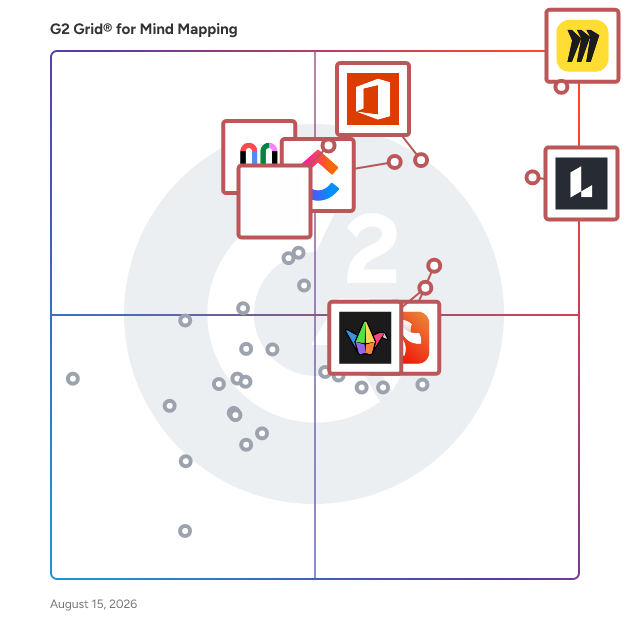
G2 Grid® for Mind Mapping Software

G2 Grid® for Mind Mapping Software plotting products by satisfaction and market presence

Highlighted products: Miro, Lucid Visual Collaboration Suite, Visio, ClickUp, FigJam, Xmind, Padlet, and Mural.

Underlying data: [Grid® JSON](https://www.g2.com/categories/mind-mapping-software/grids.json?focus%5B%5D=miro&focus%5B%5D=lucid-software-inc-lucid-visual-collaboration-suite&focus%5B%5D=visio&focus%5B%5D=clickup&focus%5B%5D=fig-jam&focus%5B%5D=xmind&focus%5B%5D=padlet&focus%5B%5D=mural)

AYOA

About AYOA AYOA is a revolutionary AI-powered productivity platform and mind mapping software that brings visual thinking, project planning, and task management together in one neuro-inclusive workspace. Founded on the principles of organic mind mapping and cognitive science, we've created an all-in-one productivity solution that supports neurodivergent individuals, students, business professionals, and creative teams seeking better organisation, collaboration, and workflow efficiency. Comprehensive Productivity Solution AYOA combines four powerful tools in one seamless digital workspace: mind mapping software for structured planning and visual learning, online whiteboards for creative brainstorming and ideation, task management boards for project execution and team collaboration, and AI-powered features that eliminate blank page syndrome and boost productivity. Unlike traditional project management tools or basic mind mapping apps, AYOA adapts to different thinking styles and learning preferences, whether you're a visual learner, linear thinker, neurodivergent professional, or student managing complex coursework. Our organic mind mapping methodology follows curved branches that mirror natural thought patterns, scientifically proven to enhance memory retention, information processing, and creative problem-solving. Neuro-Inclusive Design for Neurodivergent Users At the heart of AYOA is our commitment to neurodiversity, accessibility, and inclusive design. We've developed every feature to support different cognitive approaches and learning styles, making AYOA the ideal productivity tool for individuals with dyslexia, ADHD, autism, dyspraxia, and other neurodivergent conditions. Our accessibility features include customisable fonts for dyslexia support, adjustable background colours to reduce visual stress, Auto Focus mode that minimises distractions for ADHD users, the Idea Bank for capturing racing thoughts without immediate organisation, and voice note capabilities for verbal processors. AYOA is DSA-approved software (Disabled Students' Allowance), supporting thousands of university students across the UK, and meets WCAG 2.1 international accessibility standards with full screen reader compatibility for visually impaired users. AI-Enhanced Mind Mapping and Whiteboarding Our artificial intelligence capabilities distinguish AYOA from traditional mind mapping software, brainstorming tools, and project management platforms. Generate comprehensive mind maps instantly from simple prompts or topics, create structured digital whiteboards for SWOT analysis, pros and cons evaluation, or strategic planning sessions, and transform visual ideas into actionable task lists with automated workflows. AI-powered content generation helps overcome writer's block, supports essay planning for students, accelerates business strategy development, and enhances creative brainstorming for marketing teams and designers. Flexible Task Management and Collaboration AYOA's task management features provide multiple viewing options to suit different work styles and project types. Workflow view offers Kanban-style boards for agile project management and visual task tracking, Canvas view provides spatial organisation for creative projects and complex planning, and Gantt chart timelines enable detailed project scheduling and deadline management. Collaborate seamlessly with team members through real-time editing, built-in chat functionality, project sharing capabilities, and free account collaboration that allows your entire team to work together regardless of subscription level. Enterprise-Grade Security We prioritise data protection and information security for all users. AYOA is ISO 27001 certified for information security management, uses 256-bit TLS encryption for all data transmission, and hosts information securely within Amazon EC2 cloud infrastructure with 24/7 monitoring. We maintain GDPR compliance and never share user data or generated content to train AI models. Available as a browser-based web application plus native mobile apps for iOS and Android, AYOA provides consistent cross-platform access with automatic cloud synchronisation. Whether you're searching for mind mapping software, project management tools, collaborative whiteboards, neurodivergent-friendly productivity apps, or AI-powered planning assistants, AYOA provides the visual clarity, creative flexibility, and structured execution you need. Stop imagining productivity and experience it with AYOA.

Average Rating: 4.4/5.0

Total Reviews: 63

How Do G2 Users Rate AYOA?

  • Has the product been a good partner in doing business?: 8.8/10 (Category avg: 9.1/10)
  • Quality of Support: 8.8/10 (Category avg: 8.7/10)

Who Is the Company Behind AYOA?

Who Uses This Product?

  • Top Industries: Information Technology and Services
  • Company Size: 44% Small, 41% Medium

What Do G2 Reviewers Say About AYOA?

AI-generated summary from verified user reviews

Pros
  • Users find AYOA's ease of use and intuitive design enhances productivity and project coordination effectively.
  • Users value the intuitive task management features of AYOA, enhancing productivity through visual and effective organization.
  • Users value the effective mind mapping capabilities of AYOA, enhancing project coordination and brainstorming sessions.
  • Users love the ability to convert mind map branches into tasks, enhancing productivity and organization effortlessly.
  • Users love AYOA for its effective organization features, enabling clear task ownership and real-time progress tracking.
Cons
  • Users struggle with diagramming issues, as it's easy to forget map organization and names among numerous maps.
  • While Ayoa’s interface is user-friendly, some users may face learning curve challenges when transitioning to digital management tools.
  • Users are frustrated by the lack of comprehensive features due to paywalls and potential categorization challenges.
  • Users note that AYOA can be expensive due to paywalled features, limiting access to its full potential.
  • Users face integration issues, finding AYOA insufficient for complex projects and reliant on other tools.

What Are Recent G2 Reviews of AYOA?

What Are G2 Users Discussing About AYOA?

MindManager

MindManager is a powerful visualization tool and mind mapping software. Because with the right map, you can go anywhere. Transform scattered ideas and data into dynamic visual mind maps, flowcharts, concept maps, matrices, and other diagrams. MindManager gets you and your team on the path to personal and organizational success.

Average Rating: 4.5/5.0

Total Reviews: 189

How Do G2 Users Rate MindManager?

  • Has the product been a good partner in doing business?: 8.7/10 (Category avg: 9.1/10)
  • Quality of Support: 8.6/10 (Category avg: 8.7/10)

Who Is the Company Behind MindManager?

  • Seller: Corel Corporation
  • Year Founded: 2006
  • HQ Location: Bellevue, WA
  • Twitter: @corelsoftware
    83 Twitter followers
  • LinkedIn® Page: www.linkedin.com
    1 employees on LinkedIn®

Who Uses This Product?

  • Who Uses This: CEO, Project Manager
  • Top Industries: Information Technology and Services, Computer Software
  • Company Size: 47% Small, 31% Medium

What Do G2 Reviewers Say About MindManager?

AI-generated summary from verified user reviews

Pros
  • Users value the deep integrations with business tools, enhancing collaboration and workflow efficiency in MindManager.
  • Users admire the versatility of MindManager for effective visualization and seamless business tool integration.
Cons
  • Users find the complex setup of MindManager to be daunting, hindering prompt and effective usage.
  • Users find the steep learning curve of MindManager challenging, making it complex and potentially overwhelming to navigate.

What Are Recent G2 Reviews of MindManager?

What Are G2 Users Discussing About MindManager?

MindMap AI

MindMap AI is an AI mind map generator that turns thoughts, PDFs, documents, images, audio, video, and webpages into editable mind maps grounded in the source content, using a visible Thinking Mode reasoning step to keep maps accurate. It is used by more than 750,000 people worldwide and is operated by 3axislabs, Inc., a Delaware corporation. What makes MindMap AI different: Unlike one-shot AI generators, MindMap AI keeps working on the map after creation. Users refine maps through continuous AI chat, expanding branches, summarizing sections, and restructuring on request, and manual edits are preserved rather than overwritten by the AI. Every map stays grounded in the user's actual content instead of invented structure. The full manual editor is free on every plan. Creating maps: Maps can be generated from a text prompt, PDF, document, image, audio file, video file, meeting transcript, Markdown, CSV, or any webpage via the browser extension. Thinking Mode shows the AI's reasoning while it builds the map, and generation works in 29+ languages, including right-to-left scripts. Retrying a generation is free. Editing and customization: Each project switches between four structures on the same data: Mind Map, Logic Chart, Org Chart, and Outline view. The editor supports drag-and-drop restructuring, node-level styling, themes, relationship arrows for concept maps, summary brackets, tags, widgets, and images inside nodes. Manual editing is unlimited and free on every plan, with unlimited projects, nodes, and file storage. Working with AI: The AI copilot chat can expand any branch, summarize long sections, reorganize structure, restyle the map, and answer questions about the map's content. Chat history is kept per project, and AI changes never overwrite the user's manual layout and edits. Import and export: MindMap AI imports from XMind, MindManager, Coggle, FreeMind, Freeplane, SimpleMind, and Mapify, so teams can migrate existing map libraries. Maps export to PNG, SVG, PDF, Markdown, CSV, and the MindMap AI project format. Teams and sharing: Shared team workspaces support email invitations, live sync across editors, public and private share links, and iframe embedding for wikis and internal sites. Platforms and integrations: MindMap AI runs on the web, on native iOS and Android apps, and through browser extensions, with cross-device sync. It also works inside Claude (via the Claude connector directory) and ChatGPT (via the ChatGPT app store) through its MCP connector, so users can create, edit, and export their maps directly from an AI assistant conversation. The MCP server follows the open Model Context Protocol standard and can be added manually to other MCP-compatible tools. Pricing: The Free plan is free forever, includes monthly renewing AI credits, and includes unlimited maps and full manual editing. Basic ($4.99 per month billed annually, or $9.99 monthly) and Pro ($7.99 per month billed annually, or $14.99 monthly) add larger monthly AI credit allowances, larger uploads, and additional export formats. Payments are processed by Stripe. Who uses MindMap AI: Students and educators use it to turn lectures, readings, and study material into visual summaries. Professionals use it for meeting synthesis, research organization, project planning, and presentations. Teams use shared workspaces to brainstorm and keep a single living map instead of scattered notes.

Average Rating: 4.7/5.0

Total Reviews: 32

How Do G2 Users Rate MindMap AI?

  • Has the product been a good partner in doing business?: 9.5/10 (Category avg: 9.1/10)
  • Quality of Support: 8.0/10 (Category avg: 8.7/10)

Who Is the Company Behind MindMap AI?

  • Seller: 3axislabs
  • Year Founded: 2024
  • HQ Location: Wilmington, USA
  • LinkedIn® Page: www.linkedin.com
    8 employees on LinkedIn®

Who Uses This Product?

  • Company Size: 81% Small, 9% Medium

What Do G2 Reviewers Say About MindMap AI?

AI-generated summary from verified user reviews

Pros
  • Users commend the ease of use of MindMap AI, creating quick and clear visual representations effortlessly.
  • Users value the simplicity and intuitiveness of MindMap AI, making it accessible for efficient idea mapping.
  • Users love how MindMap AI offers time-saving benefits, quickly transforming chaotic ideas into organized visual maps.
  • Users find MindMap AI to be easy to create mind maps quickly, enhancing their productivity and workflow.
  • Users find MindMap AI's interface to be highly intuitive, seamlessly facilitating the organization of complex ideas.
Cons
  • Users face quality issues with MindMap AI, including inaccurate suggestions and unclear credit usage for uploads.
  • Users find the limited access to credits frustrating, as it shortens their enjoyment of MindMap AI.
  • Users find MindMap AI to be expensive, struggling with limited credits and wishing for more affordable options.
  • Users are frustrated by the lack of transparency in credit usage when uploading documents, impacting their overall experience.
  • Users criticize the insufficient tutorials for using MindMap AI, leading to a lack of understanding in its functionality.

What Are Recent G2 Reviews of MindMap AI?

Creately

Creately is an AI-powered diagramming and visual collaboration platform used by teams and professionals worldwide. From genograms and flowcharts to org charts, UML, and network diagrams, Creately makes complex visuals simple with its intuitive editor. It is also the first tool to introduce template-based AI diagram generation for advanced diagram types, saving hours of manual work. With real-time collaboration, smart templates, and integrations, Creately helps teams turn ideas into clear, actionable plans.

Average Rating: 4.4/5.0

Total Reviews: 1,381

G2 Deal: 50% Off Exclusive 3-Year Creately Subscription!

Creately is a visual collaboration platform. It enables teams to go from ideation to planning and execution in the same visual space. Grab your exclusive Creately 3-year subscription just for $89 instead of $180! - that's unbeatable 50% off, only for G2 Users.

Price: ~~$180~~ → $89 for 3 Years

View this exclusive G2 deal

How Do G2 Users Rate Creately?

  • Has the product been a good partner in doing business?: 9.2/10 (Category avg: 9.1/10)
  • Quality of Support: 8.5/10 (Category avg: 8.7/10)

Who Is the Company Behind Creately?

  • Seller: Creately
  • Year Founded: 2008
  • HQ Location: Melbourne, Australia
  • Twitter: @creately
    5,018 Twitter followers
  • LinkedIn® Page: www.linkedin.com
    29 employees on LinkedIn®

Who Uses This Product?

  • Who Uses This: Student, Software Engineer
  • Top Industries: Computer Software, Information Technology and Services
  • Company Size: 77% Small, 14% Medium

What Do G2 Reviewers Say About Creately?

AI-generated summary from verified user reviews

Pros
  • Users find Creately to be intuitive and user-friendly, enabling easy collaboration and diagram creation without prior experience.
  • Users love the user-friendly templates in Creately, making it easy to create professional diagrams effortlessly.
  • Users appreciate the versatile diagramming options of Creately, enhancing brainstorming and collaboration effectively across teams.
  • Users appreciate the real-time collaboration in Creately, enabling seamless editing and commenting in shared diagrams.
  • Users value the real-time collaboration in Creately, enhancing teamwork and productivity during brainstorming and diagramming tasks.
Cons
  • Users experience performance lags and inefficiencies with complex diagrams, impacting usability and offline functionality.
  • Users experience slow loading with Creately, especially involving large diagrams, impacting collaboration and workflow efficiency.
  • Users find the limited features of Creately restrictive, hindering their ability to effectively manage complex diagrams.
  • Users report performance issues with Creately, particularly with large diagrams causing slow loading and inefficiencies.
  • Users find the pricing structure of Creately expensive, especially for limited free tier access and no trial for premium features.

What Are Recent G2 Reviews of Creately?

What Are G2 Users Discussing About Creately?

Minitab Workspace

Minitab Workspace is a visual toolset designed to assist teams in mapping, analyzing, and enhancing processes, thereby providing a clear understanding of how work is executed and identifying areas for improvement. This software solution is particularly valuable for organizations aiming to streamline operations and foster a culture of continuous improvement. By offering a comprehensive suite of diagramming and problem-solving tools, Minitab Workspace empowers users to visualize complex processes and collaborate effectively on improvement initiatives. The target audience for Minitab Workspace includes professionals involved in process improvement, quality management, and operational excellence. This includes teams working within frameworks such as Lean and Six Sigma, who require structured methodologies to identify root causes and implement effective solutions. The software's capabilities are particularly beneficial for project managers, quality assurance teams, and operational leaders who need to communicate workflows and insights clearly across various departments. By providing a centralized platform for collaboration, Minitab Workspace enhances team alignment and drives standardized approaches to problem-solving. Key features of Minitab Workspace include a variety of diagramming tools such as process maps, value stream maps, and fishbone diagrams, which facilitate structured problem-solving. These tools enable users to break down complex processes into manageable components, making it easier to identify inefficiencies and areas for improvement. Additionally, brainstorming tools are integrated into the platform, allowing teams to generate and organize ideas collaboratively. This structured approach not only aids in identifying root causes but also fosters a culture of innovation and continuous improvement. Another significant advantage of Minitab Workspace is its cloud availability through the Minitab Solution Center. This feature allows teams to access, create, and collaborate on visual tools from any location, enhancing visibility and supporting distributed workforces. The cloud capability ensures that process knowledge and improvement efforts are centralized, making it easier for teams to share insights and updates in real time. This flexibility is particularly important in today’s increasingly remote work environments, where collaboration across geographies is essential for successful project execution. Overall, Minitab Workspace stands out in the realm of process improvement tools by combining powerful visualization capabilities with collaborative features, making it an essential resource for teams dedicated to enhancing operational efficiency and driving continuous improvement initiatives.

Average Rating: 4.3/5.0

Total Reviews: 87

How Do G2 Users Rate Minitab Workspace?

  • Has the product been a good partner in doing business?: 8.3/10 (Category avg: 9.1/10)
  • Quality of Support: 8.3/10 (Category avg: 8.7/10)

Who Is the Company Behind Minitab Workspace?

  • Seller: Minitab
  • Company Website:
  • Year Founded: 1972
  • HQ Location: State College, Pennsylvania, United States
  • Twitter: @Minitab
    5,017 Twitter followers
  • LinkedIn® Page: www.linkedin.com
    732 employees on LinkedIn®

Who Uses This Product?

  • Who Uses This: Student
  • Top Industries: Automotive, Medical Devices
  • Company Size: 40% Medium, 36% Small

What Do G2 Reviewers Say About Minitab Workspace?

AI-generated summary from verified user reviews

Pros
  • Users find Minitab Workspace easy to use, enabling efficient project organization and quick data processing without expertise.
  • Users find Minitab Workspace's ease of learning invaluable, especially with its supportive training and intuitive features.
  • Users praise Minitab Workspace for its efficiency, delivering quick results and enhancing project organization seamlessly.
  • Users find Minitab Workspace's organization features exceptional, streamlining project workflows and enhancing efficiency with reliable tools.
  • Users appreciate the innovative features of Minitab Workspace, enhancing organization, speed, and efficiency in project management.
Cons
  • Users often face difficult navigation within Minitab Workspace, making it hard to utilize its features effectively.
  • Users find Minitab Workspace to be expensive, particularly affecting students and researchers seeking cost-effective solutions.
  • Users find integration issues with Minitab Workspace, particularly with accessing Minitab directly and limited software compatibility.
  • Users are frustrated by the access limitations of Minitab Workspace, as it cannot directly access Minitab software.
  • Users face connection issues preventing direct access to Minitab Workspace, hindering their experience and workflow.

What Are Recent G2 Reviews of Minitab Workspace?

What Are G2 Users Discussing About Minitab Workspace?

Milanote

Milanote is an easy-to-use tool to organize your ideas and projects into visual boards.

Average Rating: 4.5/5.0

Total Reviews: 42

How Do G2 Users Rate Milanote?

  • Has the product been a good partner in doing business?: 8.3/10 (Category avg: 9.1/10)
  • Quality of Support: 8.9/10 (Category avg: 8.7/10)

Who Is the Company Behind Milanote?

  • Seller: Milanote
  • Year Founded: 2016
  • HQ Location: Melbourne, Australia
  • LinkedIn® Page: www.linkedin.com
    23 employees on LinkedIn®

Who Uses This Product?

  • Top Industries: Marketing and Advertising
  • Company Size: 71% Small, 26% Medium

What Do G2 Reviewers Say About Milanote?

AI-generated summary from verified user reviews

Pros
  • Users love the beautiful and intuitive interface of Milanote, which enhances their creative workflow effortlessly.
  • Users love the beautiful, visual interface of Milanote, making it perfect for organizing creative ideas and projects.
  • Users appreciate the beautiful, visual interface of Milanote, making organization of creative projects effortless and enjoyable.
  • Users admire the beautiful, visual interface of Milanote, which enhances creativity and organization in projects.
Cons
  • Users find integration issues with Milanote limiting, especially desiring more connections to third-party tools and automations.
  • Users experience limited features on the free plan, wishing for more integrations and automation options.
  • Users find Milanote's free plan limitations restrictive, especially when heavily utilizing the tool without third-party integrations.

What Are Recent G2 Reviews of Milanote?

What Are G2 Users Discussing About Milanote?

MindMeister

MindMeister is an intuitive mind mapping tool that provides an infinite canvas for collaboration and project planning. Whether used alone or with a team, MindMeister is an easy-to-use, beautifully-designed platform that boosts creativity and productivity. Launched in 2007 as Meister’s first product, MindMeister is now the market-leading online mind mapping solution with 20+ million users generating over one million maps per month. A dedicated mind mapping tool built by and for mind mappers, MindMeister has everything users need to keep their teams creative and engaged. From group brainstorming and project planning to information sharing and knowledge management, MindMeister helps you get the most out of your projects. MindMeister is part of the Meister Suite, a group of products for flawless workflow management. From intuitive, secure task management in MeisterTask, to online documentation in MeisterNote, your team unlocks a powerful toolkit that drives projects every step of the way.

Average Rating: 4.2/5.0

Total Reviews: 34

How Do G2 Users Rate MindMeister?

  • Has the product been a good partner in doing business?: 7.5/10 (Category avg: 9.1/10)
  • Quality of Support: 7.7/10 (Category avg: 8.7/10)

Who Is the Company Behind MindMeister?

  • Seller: MeisterLabs
  • Year Founded: 2006
  • HQ Location: Vienna, Austria
  • Twitter: @mindmeister
    20,018 Twitter followers
  • LinkedIn® Page: www.linkedin.com
    128 employees on LinkedIn®

Who Uses This Product?

  • Top Industries: Information Technology and Services
  • Company Size: 59% Small, 29% Medium

What Are Recent G2 Reviews of MindMeister?

What Are G2 Users Discussing About MindMeister?

Coggle

Coggle is an intuitive, web-based mind mapping and flowcharting tool designed to help individuals and teams visualize and organize complex information. By enabling users to create hierarchically structured documents, Coggle facilitates clear representation of ideas, processes, and relationships, making it an invaluable resource for brainstorming, planning, and note-taking. Key Features and Functionality: - Real-Time Collaboration: Multiple users can simultaneously edit diagrams, enhancing teamwork and collective idea development. - Unlimited Diagrams and Image Uploads: Users can create an unlimited number of diagrams and incorporate images without restrictions, allowing for rich and detailed visual representations. - Version History: Every change is saved, enabling users to review and revert to previous versions as needed. - Floating Text and Images: Add annotations and images that are not part of the main diagram structure to provide additional context. - Loops and Branch Joins: Create complex diagrams by joining branches and forming loops to represent intricate processes. - Multiple Starting Points: Initiate diagrams from multiple central items to map related topics within a single workspace. - Flowcharting Capabilities: Utilize a range of shapes and line styles to construct expressive flowcharts and process maps. - Integration with Google Drive: Organize mind maps within Google Drive and easily share them with existing contacts. Primary Value and User Solutions: Coggle simplifies the process of capturing and sharing complex information through visual diagrams, making it easier for users to understand and communicate ideas. Its collaborative features support teamwork by allowing multiple contributors to work on diagrams in real time, fostering a more dynamic and interactive planning process. By offering an accessible and user-friendly platform, Coggle addresses the need for efficient information organization and enhances productivity across various fields, including education, business, and personal project management.

Average Rating: 4.7/5.0

Total Reviews: 12

How Do G2 Users Rate Coggle?

  • Has the product been a good partner in doing business?: 8.3/10 (Category avg: 9.1/10)
  • Quality of Support: 8.9/10 (Category avg: 8.7/10)

Who Is the Company Behind Coggle?

  • Seller: Coggle
  • Year Founded: 2013
  • HQ Location: Cambridge, Cambridgeshire
  • Twitter: @Coggleit
    3,653 Twitter followers
  • LinkedIn® Page: www.linkedin.com
    4 employees on LinkedIn®

Who Uses This Product?

  • Company Size: 58% Small, 25% Large

What Do G2 Reviewers Say About Coggle?

AI-generated summary from verified user reviews

Pros
  • Users enjoy the ease of creating professional visual diagrams in Coggle, enhancing their planning and organization.
  • Users find Coggle's easy creation tools perfect for crafting professional diagrams for planning and organizing activities.
  • Users love the easy integrations in Coggle, facilitating seamless creation of professional and visually appealing diagrams.
  • Users appreciate the ease of creating professional visual diagrams in Coggle, enhancing their planning and organization skills.
  • Users love the real-time collaboration and visual clarity for effective project planning and task management.
Cons
  • Users note the inability to access Coggle offline, which limits usability in certain situations.

What Are Recent G2 Reviews of Coggle?

MindMup

MindMup 2 for Google Drive is an online mind mapping tool that seamlessly integrates with Google Apps, enabling users to create, edit, and share mind maps directly within their Google Drive environment. Designed for zero-friction collaboration, MindMup 2 facilitates efficient brainstorming, project planning, and information organization for individuals and teams. Key Features and Functionality: - Google Drive Integration: Save and manage mind maps directly in Google Drive, supporting standard workflows such as renaming, folder organization, and sharing permissions. - Collaborative Editing: Multiple users can edit maps simultaneously, with real-time updates enhancing teamwork and classroom engagement. - User-Friendly Interface: A clean, intuitive design with powerful keyboard shortcuts allows for rapid idea capture and organization. - Rich Content Support: Attach files from Google Drive, insert images, and add textual notes to map nodes, enriching the mind mapping experience. - Versatile Export Options: Convert mind maps into PDFs, PowerPoint presentations, outlines, and more, facilitating easy sharing and presentation. - Multiple Visual Themes: Choose from various visual themes, including top-down orientations and straight-line connectors, to customize the appearance of mind maps. Primary Value and User Solutions: MindMup 2 addresses the need for a streamlined, collaborative mind mapping solution within the Google ecosystem. By integrating directly with Google Drive, it eliminates the need for additional software, allowing users to manage mind maps alongside other documents seamlessly. The platform's real-time collaboration features enhance teamwork, making it ideal for educational settings, project planning, and brainstorming sessions. Its user-friendly interface and rich content support enable users to capture and organize ideas efficiently, transforming complex information into clear, visual representations.

Average Rating: 4.3/5.0

Total Reviews: 16

How Do G2 Users Rate MindMup?

  • Has the product been a good partner in doing business?: 10.0/10 (Category avg: 9.1/10)
  • Quality of Support: 8.3/10 (Category avg: 8.7/10)

Who Is the Company Behind MindMup?

  • Seller: MindMup 2
  • HQ Location: N/A
  • Twitter: @MindMup
    2,212 Twitter followers
  • LinkedIn® Page: www.linkedin.com
    1 employees on LinkedIn®

Who Uses This Product?

  • Company Size: 63% Medium, 31% Small

What Do G2 Reviewers Say About MindMup?

AI-generated summary from verified user reviews

Pros
  • Users value the extensive customizability of MindMup, enabling personalized designs and efficient organization of mind maps.
  • Users love the extensive customization options in MindMup, enhancing their mind maps with graphics and personal touches.
  • Users appreciate the organization features of MindMup, enabling easy customization and seamless management of their mind maps.

What Are Recent G2 Reviews of MindMup?

What Are G2 Users Discussing About MindMup?

MindNode

MindNode is a mind mapping and outlining application designed exclusively for Apple devices, including Mac, iPhone, iPad, and Apple Vision Pro. It empowers users to capture, organize, and visualize their thoughts, transforming complex ideas into clear, structured diagrams. With an intuitive interface and seamless integration across the Apple ecosystem, MindNode facilitates brainstorming, project planning, and idea development for individuals and teams alike. Key Features and Functionality: - Mind Mapping: Create dynamic mind maps on an infinite canvas, allowing ideas to branch and evolve freely. - Outlining: Switch to Outline View to edit your mind map as a structured, hierarchical list, catering to different organizational preferences. - Visual Enhancements: Incorporate images, over 250 custom-designed stickers, and emojis to add context and visual appeal to your ideas. - Live Collaboration: Work with others in real time, making collaborative brainstorming and project planning seamless. - Cross-Device Compatibility: Access and edit your mind maps across all your Apple devices, with secure iCloud synchronization ensuring your data is always up to date. - AI Integration: Utilize on-device AI features for brainstorming, text generation, summarization, and image background removal, enhancing productivity and creativity. - Task Management: Transform ideas into actionable tasks, integrating with Apple Reminders, Things, or OmniFocus to keep track of your projects. - Customization: Personalize your mind maps with dynamic themes, various node shapes, and layout options to suit your style and project requirements. Primary Value and User Solutions: MindNode addresses the need for an efficient and user-friendly tool to capture and organize thoughts, making complex information more digestible and actionable. By combining mind mapping and outlining capabilities, it caters to diverse thinking styles, enhancing creativity and productivity. The application's seamless integration across Apple devices ensures that users can brainstorm and plan anytime, anywhere, without disruption. Its collaborative features foster teamwork, while AI-powered tools streamline content creation and refinement. Ultimately, MindNode simplifies the process of turning abstract ideas into concrete plans, benefiting professionals, students, and anyone seeking to organize their thoughts effectively.

Average Rating: 4.3/5.0

Total Reviews: 32

How Do G2 Users Rate MindNode?

  • Has the product been a good partner in doing business?: 8.8/10 (Category avg: 9.1/10)
  • Quality of Support: 8.6/10 (Category avg: 8.7/10)

Who Is the Company Behind MindNode?

  • Seller: Mindnode
  • HQ Location: N/A
  • Twitter: @mindnode
    8,580 Twitter followers
  • LinkedIn® Page: www.linkedin.com
    1 employees on LinkedIn®

Who Uses This Product?

  • Top Industries: Information Technology and Services
  • Company Size: 55% Small, 27% Medium

What Do G2 Reviewers Say About MindNode?

AI-generated summary from verified user reviews

Pros
  • Users love the ease of use in MindNode, appreciating its seamless iCloud integration and minimalistic design for outlining thoughts.
  • Users praise the easy presentations in MindNode, enjoying seamless access to organized outlines across all their devices.
  • Users appreciate the visual templates of MindNode, making idea structuring effortless and visually appealing.

What Are Recent G2 Reviews of MindNode?

What Are G2 Users Discussing About MindNode?

SimpleMind

SimpleMind is a mind mapping application designed to help users organize thoughts, remember information, and generate new ideas. With its intuitive interface, SimpleMind allows for the creation of visually engaging mind maps that can be customized to suit individual preferences. Available across multiple platforms—including Windows, macOS, iOS, and Android—SimpleMind ensures seamless synchronization of mind maps via popular cloud services, enabling users to access and edit their work from any device. Key Features and Functionality: - Flexible Layouts: Choose between free-form layouts, where topics can be placed anywhere, and various auto-layouts that are ideal for brainstorming sessions. - Rich Content Integration: Enhance mind maps by adding images, icons, labels, checkboxes, and links to documents or webpages, providing a comprehensive visual representation of ideas. - Customization Options: Utilize over 15 built-in style sheets or create custom styles to personalize the appearance of mind maps, including borders, lines, colors, and backgrounds. - Focus and Organization Tools: Collapse and expand branches to maintain focus, use autofocus to block out distractions, and employ the Outline view to see the entire mind map in a structured format. - Cross-Platform Synchronization: Access and edit mind maps across devices with seamless synchronization through cloud services like Dropbox or OneDrive. Primary Value and User Solutions: SimpleMind addresses the need for effective idea organization and visualization, catering to professionals, educators, students, and anyone seeking to structure their thoughts efficiently. By offering a user-friendly platform with extensive customization and synchronization capabilities, SimpleMind enhances productivity, facilitates better information retention, and supports creative problem-solving across various personal and professional applications.

Average Rating: 4.6/5.0

Total Reviews: 11

How Do G2 Users Rate SimpleMind?

  • Quality of Support: 10.0/10 (Category avg: 8.7/10)

Who Is the Company Behind SimpleMind?

  • Seller: SimpleMind App
  • Year Founded: 2008
  • HQ Location: Nijmegen, NL
  • Twitter: @simplemindapp
    1,177 Twitter followers
  • LinkedIn® Page: www.linkedin.com
    3 employees on LinkedIn®

Who Uses This Product?

  • Company Size: 82% Small, 18% Medium

What Do G2 Reviewers Say About SimpleMind?

AI-generated summary from verified user reviews

Pros
  • Users value the visual flexibility of SimpleMind for organizing ideas in diverse layouts and intuitive editing.
  • Users appreciate the visual flexibility of SimpleMind, allowing intuitive organization of ideas in multiple layouts.
  • Users value the intuitive editing features of SimpleMind, making idea organization and enhancement effortless and flexible.
  • Users value the visual flexibility of SimpleMind, making it easy to organize ideas in multiple layouts.

What Are Recent G2 Reviews of SimpleMind?

What Are G2 Users Discussing About SimpleMind?

Popplet

Popplet is an intuitive mind-mapping and brainstorming tool designed to help users visually organize ideas, projects, and concepts. It enables individuals and teams to create dynamic diagrams, fostering creativity and enhancing understanding through visual representation. With its user-friendly interface, Popplet is suitable for students, educators, professionals, and anyone seeking to structure their thoughts effectively. Key Features and Functionality: - Visual Mapping: Create and connect ideas using customizable nodes and links to form comprehensive mind maps. - Collaboration: Invite others to collaborate in real-time, facilitating teamwork and shared brainstorming sessions. - Multimedia Integration: Incorporate images, videos, and drawings to enrich the visual content and provide context. - Presentation Mode: Seamlessly present ideas directly from the platform, making it ideal for educational and professional settings. - Cross-Platform Accessibility: Access and edit Popplets on various devices, including tablets and computers, ensuring flexibility and convenience. Primary Value and Solutions: Popplet addresses the need for an effective visual thinking tool that simplifies the process of organizing and presenting ideas. By offering a platform that combines simplicity with powerful features, it helps users enhance creativity, improve comprehension, and streamline project planning. Whether for educational purposes, business projects, or personal use, Popplet provides a versatile solution for visualizing and sharing information.

Average Rating: 4.2/5.0

Total Reviews: 17

How Do G2 Users Rate Popplet?

  • Has the product been a good partner in doing business?: 10.0/10 (Category avg: 9.1/10)
  • Quality of Support: 9.1/10 (Category avg: 8.7/10)

Who Is the Company Behind Popplet?

  • Seller: Popplet
  • HQ Location: New York, US
  • Twitter: @popplet
    8 Twitter followers
  • LinkedIn® Page: www.linkedin.com
    1 employees on LinkedIn®

Who Uses This Product?

  • Top Industries: Education Management
  • Company Size: 65% Medium, 35% Small

What Do G2 Reviewers Say About Popplet?

AI-generated summary from verified user reviews

Pros
  • Users value the ease of use of Popplet, allowing seamless collaboration and effortless image integration during planning sessions.
  • Users value the efficiency of Popplet's real-time collaboration and easy integration of images, enhancing planning sessions.
  • Users value the presentation mode of Popplet, allowing smooth navigation through visuals during collaborative planning sessions.
  • Users value the real-time collaboration feature of Popplet, enhancing teamwork and efficiency during planning sessions.
  • Users love the visibility offered by Popplet, enabling seamless real-time collaboration and easy navigation through presentations.
Cons
  • Users find the limited visual customization options for colors and fonts to be restrictive and unsatisfactory.

What Are Recent G2 Reviews of Popplet?

Boardmix

Boardmix is an innovative online whiteboard that enables seamless brainstorming, discussion, and collaborative creation. Harness the power of AI and redefine your remote work experience.

Average Rating: 4.5/5.0

Total Reviews: 23

How Do G2 Users Rate Boardmix?

  • Has the product been a good partner in doing business?: 8.9/10 (Category avg: 9.1/10)
  • Quality of Support: 8.9/10 (Category avg: 8.7/10)

Who Is the Company Behind Boardmix?

Who Uses This Product?

  • Company Size: 70% Small, 39% Medium

What Do G2 Reviewers Say About Boardmix?

AI-generated summary from verified user reviews

Pros
  • Users find Boardmix easy to use with flexible templates and helpful AI, enhancing their collaborative efforts.
  • Users value the real-time collaboration features of Boardmix, enhancing teamwork and communication effectively.
  • Users value Boardmix for its all-in-one collaborative whiteboard with built-in AI that enhances brainstorming and teamwork.
  • Users love the variety of templates in Boardmix, enhancing their brainstorming and project planning experiences effortlessly.
  • Users commend the fast customer support of Boardmix, enhancing their experience and resolving issues promptly.
Cons
  • Users find Boardmix expensive due to extra subscription costs and locked features affecting overall value.
  • Users find the limited features of Boardmix restrictive, often feeling overwhelmed by the templates provided.
  • Users feel overwhelmed by the limited templates, encountering repetitive content and insufficient pricing information in Boardmix.
  • Users find the software overwhelming due to its numerous tools and complex offline editing options.
  • Users find the overwhelming features of Boardmix daunting, complicating learning and requiring internet dependence for basic functions.

What Are Recent G2 Reviews of Boardmix?

ProcessOn

ProcessOn is One tool for diverse diagramming needs.Product capabilities are mainly divided into five aspects: Mind Map: It supports drawing mind maps, tree diagrams, timelines, fishbone diagrams, organizational charts, bracket diagrams, matrix diagrams, and more to unleash your inspiration. Flowchart: Supports drawing Flowcharts, Swimlane Diagrams, UML Diagrams, Gantt Charts, Network Topology Diagrams, and many other graphics. Whiteboard: A smart canvas enables innovation everywhere.A visual diagram makes work more efficient.A free space fosters closer teamwork. Mermaid: It supports generating flowcharts directly in the browser using Mermaid syntax code, with real-time preview of the results. Furthermore, it seamlessly integrates with ProcessOn, and the graphs generated by Mermaid support secondary editing. Formula Editor: This free online LaTeX formula editor includes a comprehensive collection of LaTeX symbols, covering mathematical, physical, and chemical formulas. It can download SVG, PNG, and JPG image formats and export various code formats. Most importantly, ProcessOn supports AI-powered graphing, empowering tools through intelligent AI.

Average Rating: 4.4/5.0

Total Reviews: 14

How Do G2 Users Rate ProcessOn?

  • Has the product been a good partner in doing business?: 8.3/10 (Category avg: 9.1/10)
  • Quality of Support: 9.5/10 (Category avg: 8.7/10)

Who Is the Company Behind ProcessOn?

  • Seller: ProcessOn
  • Year Founded: 2012
  • HQ Location: New York, US
  • Twitter: @ProcessOn
    536 Twitter followers
  • LinkedIn® Page: www.linkedin.com
    7 employees on LinkedIn®

Who Uses This Product?

  • Company Size: 71% Small, 29% Medium

What Are Recent G2 Reviews of ProcessOn?

What Are G2 Users Discussing About ProcessOn?

Bubbl.us

Bubbl.us is an easy-to-use, online brainstorming software. With Bubbl.us you can create colorful mind maps and share them with others. To view examples of mind maps that were created using Bubbl.us, see https://bubbl.us/help/examples

Average Rating: 4.0/5.0

Total Reviews: 25

How Do G2 Users Rate Bubbl.us?

  • Has the product been a good partner in doing business?: 6.7/10 (Category avg: 9.1/10)
  • Quality of Support: 8.4/10 (Category avg: 8.7/10)

Who Is the Company Behind Bubbl.us?

  • Seller: LkCollab
  • Year Founded: 2005
  • HQ Location: Houston, TX
  • Twitter: @bubbl_us
    485 Twitter followers
  • LinkedIn® Page: www.linkedin.com
    1 employees on LinkedIn®

Who Uses This Product?

  • Company Size: 65% Small, 23% Medium

What Do G2 Reviewers Say About Bubbl.us?

AI-generated summary from verified user reviews

Pros
  • Users value the easy integrations of Bubbl.us, effortlessly sharing diagrams and enhancing collaborative efforts with just a link.
  • Users value the easy-to-use presentation tools of Bubbl.us, simplifying the creation and sharing of visual ideas.
  • Users appreciate the clean interface of Bubbl.us, making it easy to visualize and share ideas efficiently.
Cons
  • Users find access limitations frustrating, as upgrading is often necessary for full functionality after initial map creation.
  • Users find the limited features restrict their ability to create and reuse maps effectively without upgrading.

What Are Recent G2 Reviews of Bubbl.us?

What Are G2 Users Discussing About Bubbl.us?

Neeraja Prakash
NP
Researched and written by Neeraja Prakash
Updated March 10, 2025