Best Help Authoring Tools (HAT)

How Many Help Authoring Tools (HAT) Products Does G2 Track?

Total Products under this Category: 64

Category Stats (Sep 2026)

  • Average Rating: 4.07/5 The average rating of products in this category, based on all submitted ratings

Last updated: September 01, 2026

How Does G2 Rank Help Authoring Tools (HAT) Products?

Why You Can Trust G2's Software Rankings:

  • 30 Analysts and Data Experts
  • 1,700+ Authentic Reviews
  • 64+ Products
  • Unbiased Rankings

G2's software rankings are built on verified user reviews, rigorous moderation, and a consistent research methodology maintained by a team of analysts and data experts. Each product is measured using the same transparent criteria, with no paid placement or vendor influence. While reviews reflect real user experiences, which can be subjective, they offer valuable insight into how software performs in the hands of professionals. Together, these inputs power the G2 Score, a standardized way to compare tools within every category.

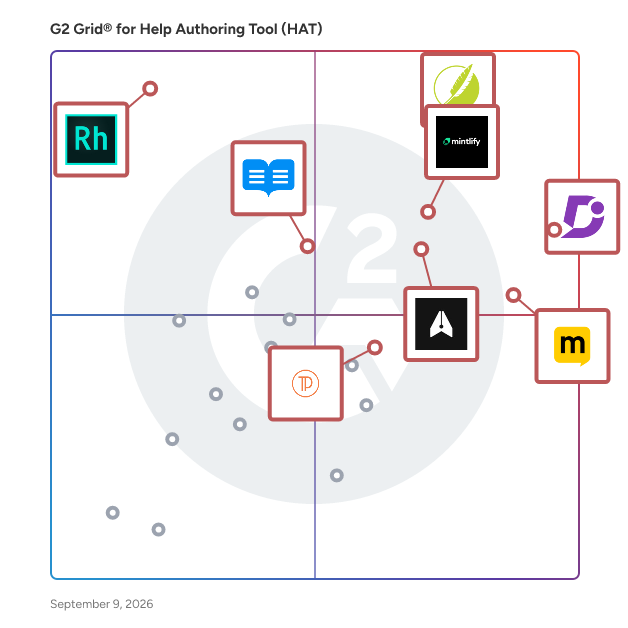
G2 Grid® for Help Authoring Tools (HAT)

G2 Grid® for Help Authoring Tools (HAT) plotting products by satisfaction and market presence

Highlighted products: Document360, MadCap Flare, Manual.to, Mintlify, Author-It, Adobe RoboHelp, ReadMe, and Docsie.

Underlying data: [Grid® JSON](https://www.g2.com/categories/help-authoring-tool-hat/grids.json?focus%5B%5D=document360&focus%5B%5D=madcap-flare&focus%5B%5D=manual-to&focus%5B%5D=mintlify&focus%5B%5D=author-it&focus%5B%5D=adobe-robohelp&focus%5B%5D=readme&focus%5B%5D=docsie)

Document360

Document360 is an AI-powered knowledge base platform for enterprises needing secure, scalable documentation. It centralizes organizational knowledge into one workspace, including public help centers, internal wikis, SOPs, user manuals, API docs, or product playbooks. Who It's For By Role: Support teams (deflect tickets), technical writers (publish faster), product managers (align teams), engineers (document APIs and workflows). By Industry: SaaS, IT & consulting, finance, healthcare, education, manufacturing. Key Capabilities: 1. Editors: Markdown and WYSIWYG with real-time previews and drag-and-drop media. 2. Step-by-Step Guides: Capture on-screen actions to create editable interactive guides. 3. Category Manager: Drag-and-drop content organization. 4. Interactive Demos: Clickable walkthroughs embedded in articles. 5. Custom Workflows: Automate reviews, roles, and approvals. 6. Pro Analytics: Track performance, engagement, search trends, and ticket deflection. 7. Brand Customization: Tailor design, layout, and themes. 8. Security: SOC 2 and GDPR-aligned; SSO, JWT, SAML, IP restriction. 9. Localization: 50+ languages. Powered by Eddy AI: 1. AI Search: ChatGPT-style answers from your docs for instant self-service. 2. AI Writing Agent: Generate structured docs from video, audio, text, or prompts. 3. AI Chatbot: 24/7 documentation-driven support that cuts costs. 4. AI Glossary Generator: Auto-creates glossaries for complex terms. 5. Article Summarizer: Condenses long docs into bite-sized summaries. 6. MCP Server: Connects your knowledge base to LLMs. 7. Duplicate Content Detection: Flags redundancy with precision. 8. SEO Automation: Auto-generates titles, tags, and glossaries for discoverability. Document360 is shortlisted for Best AI Assistant in the 2026 A.I. Awards, run by the Cloud Awards. Whether scaling support, streamlining internal knowledge, or building world-class product docs, Document360 brings it all together in one platform.

Average Rating: 4.7/5.0

Total Reviews: 531

How Do G2 Users Rate Document360?

  • Ease of Use: 9.4/10 (Category avg: 8.1/10)
  • Ease of Admin: 9.1/10 (Category avg: 8.7/10)
  • Has the product been a good partner in doing business?: 9.5/10 (Category avg: 8.6/10)

Who Is the Company Behind Document360?

  • Seller: Kovai Limited
  • Company Website:
  • Year Founded: 2009
  • HQ Location: London
  • Twitter: @BizTalk360
    1,920 Twitter followers
  • LinkedIn® Page: www.linkedin.com
    330 employees on LinkedIn®

Who Uses This Product?

  • Who Uses This: Technical Writer, Senior Technical Writer
  • Top Industries: Computer Software, Information Technology and Services
  • Company Size: 45% Medium, 38% Small

What Do G2 Reviewers Say About Document360?

AI-generated summary from verified user reviews

Pros
  • Users love the ease of use of Document360, especially its intuitive interface and efficient support, enhancing their workflow.
  • Users admire the customization options of Document360, facilitating tailored documentation and seamless integration with existing platforms.
  • Users commend the fast and efficient customer support of Document360, enhancing their experience and resolving issues promptly.
  • Users value the versatility and customization of Document360, enhancing their platform with seamless integration and support.
  • Users appreciate the versatile and customizable interface of Document360, enhancing brand integration and user experience.
Cons
  • Users highlight the missing features in Document360, particularly for complex document handling and visual editing tools.
  • Users find editing difficulties with Document360, highlighting issues with copying, image uploads, and text formatting inconsistencies.
  • Users find the editing limitations in Document360 frustrating, particularly with lag and clunky tools for image uploads.
  • Users feel that the pricing is high and many essential features are not accessible without extra costs.
  • Users encounter formatting issues in Document360, struggling with table editing and inconsistent font adjustments.

What Are Recent G2 Reviews of Document360?

What Are G2 Users Discussing About Document360?

MadCap Flare

Empowering teams to create, manage, and deliver exceptional content at scale MadCap Flare is the go-to solution for technical content teams that need to streamline workflows and deliver consistent, high-quality content across every channel. Trusted by documentation, training, and knowledge management professionals worldwide, Flare combines the precision of XML-based authoring with the flexibility of multi-channel publishing—all from a single, centralized platform. Why leading teams rely on Flare: Scalable, topic-based authoring: XML-based structure ensures precision and scalability for complex documentation projects. Single-source publishing: Manage all outputs from one project to eliminate redundancy and simplify updates. Multi-channel delivery: Publish effortlessly to self-service portals, online Help, documentation hubs, and training guides. Advanced content reuse: Reuse variables, snippets, and conditions to save time and maintain accuracy. Real-time collaboration with Flare Online: Co-author, review, and manage content simultaneously in the cloud—no check-in delays or version conflicts. Integrated translation management: Accelerate localization and expand your global reach. Flexible publishing formats: Deliver content in HTML5, PDF, Word, SCORM, and more to meet diverse audience needs. Proven ROI: Cut production costs, speed release cycles, and boost customer satisfaction. What sets Flare apart: Unlike traditional content management tools, Flare is purpose-built for technical content teams—offering unmatched flexibility, control, and scalability. With Flare Online, teams gain cloud-based collaboration and instant publishing capabilities for faster, more connected workflows. Together, they form a unified platform for creating, managing, and delivering knowledge at scale—ensuring efficiency, brand consistency, and an exceptional user experience. That’s why thousands of organizations trust Flare to power their global content strategy.gy."

Average Rating: 4.4/5.0

Total Reviews: 484

How Do G2 Users Rate MadCap Flare?

  • Ease of Use: 7.4/10 (Category avg: 8.1/10)
  • Ease of Admin: 8.0/10 (Category avg: 8.7/10)
  • Has the product been a good partner in doing business?: 8.9/10 (Category avg: 8.6/10)

Who Is the Company Behind MadCap Flare?

  • Seller: MadCap Software
  • Company Website:
  • Year Founded: 2005
  • HQ Location: Denver, CO
  • Twitter: @MadCapSoftware
    1,678 Twitter followers
  • LinkedIn® Page: www.linkedin.com
    124 employees on LinkedIn®

Who Uses This Product?

  • Who Uses This: Technical Writer, Senior Technical Writer
  • Top Industries: Computer Software, Information Technology and Services
  • Company Size: 52% Medium, 29% Large

What Do G2 Reviewers Say About MadCap Flare?

AI-generated summary from verified user reviews

Pros
  • Users appreciate the user-friendly content management of MadCap Flare, enhancing efficiency in documentation and review processes.
  • Users praise MadCap Flare for its exceptional efficiency, allowing for streamlined authoring and documentation tasks with ease.
  • Users value the user-friendly interface of MadCap Flare, enhancing efficiency in both authoring and technical documentation tasks.
  • Users commend the excellent customer support from MadCap Flare, particularly praising their responsive and knowledgeable tech team.
  • Users value the customization options in MadCap Flare, allowing for diverse project applications and ongoing discovery.
Cons
  • Users find the steep learning curve of MadCap Flare challenging, requiring consistent use to retain knowledge and skills.
  • Users find the complexity of MadCap Flare challenging, especially when not using it regularly between jobs.
  • Users find the cost of entry and travel for conferences too high, limiting access for many documentation professionals.
  • Users find learning difficulty with MadCap Flare due to its complexity, making it challenging to remember processes over time.
  • Users report experiencing performance issues with MadCap Flare, particularly slowdowns during large project builds.

What Are Recent G2 Reviews of MadCap Flare?

What Are G2 Users Discussing About MadCap Flare?

Mintlify

Mintlify is the AI-native knowledge platform that helps teams maintain accurate information for both people and LLMs. Trusted by leading startups and enterprises like Microsoft, Notion, PayPal, and Anthropic.

Average Rating: 4.6/5.0

Total Reviews: 18

How Do G2 Users Rate Mintlify?

  • Ease of Use: 9.2/10 (Category avg: 8.1/10)
  • Ease of Admin: 10.0/10 (Category avg: 8.7/10)
  • Has the product been a good partner in doing business?: 10.0/10 (Category avg: 8.6/10)

Who Is the Company Behind Mintlify?

  • Seller: Mintlify
  • Company Website:
  • Year Founded: 2022
  • HQ Location: San Francisco, US
  • Twitter: @mintlify
    19,708 Twitter followers
  • LinkedIn® Page: www.linkedin.com
    76 employees on LinkedIn®

Who Uses This Product?

  • Top Industries: Computer Software
  • Company Size: 47% Small, 37% Medium

What Do G2 Reviewers Say About Mintlify?

AI-generated summary from verified user reviews

Pros
  • Users appreciate the customization options of Mintlify, adapting the app easily to their needs for enhanced productivity.
  • Users love the clean and easy-to-use editing features of Mintlify, enhancing teamwork and efficiency in document creation.
  • Users appreciate the ease of creation with Mintlify, finding its interface intuitive and features helpful for productivity.
  • Users appreciate the clean and easy-to-use interface of Mintlify, making it accessible for everyone.
  • Users value the efficiency of Mintlify, appreciating how it streamlines teamwork and enhances productivity.

What Are Recent G2 Reviews of Mintlify?

What Are G2 Users Discussing About Mintlify?

Manual.to

Manual.to is an AI-powered digital work instruction platform that helps frontline teams capture, create, translate, and share operational know-how in minutes. In many factories, warehouses, field operations, and service environments, critical know-how still lives in PDFs, printed binders, SharePoint folders, or in the heads of experienced workers. When that knowledge is hard to find or out of date, onboarding slows down, mistakes happen, and experts end up explaining the same procedures again and again. Manual.to helps companies turn that know-how into clear, visual, step-by-step instructions that workers can access anywhere. Teams can record a process on a smartphone, upload existing videos or documents, and use AI to help structure the content into easy-to-follow guides with steps, descriptions, images, videos, warnings, confirmations, and translations. Once published, instructions can be shared through QR codes or links, so workers can scan a machine, workstation, product, or training area and instantly open the right guide on any device. When a procedure changes, the guide can be updated centrally, and the same QR code or link always points to the latest version. Manual.to is built for manufacturing, logistics, maintenance, field service, safety, quality, training, operations, automotive, and food and beverage teams. Common use cases include digital work instructions, SOPs, machine setup, changeovers, preventive maintenance, safety procedures, quality checks, onboarding, troubleshooting, cleaning routines, and customer-facing manuals. The platform helps teams onboard employees faster, standardize procedures across sites, reduce repeated explanations, support multilingual workforces, improve safety, and retain expert knowledge before it disappears. Manual.to is used by teams at companies including BekaertDeslee, Aperam, Sioen, Audi, ABB, Microsoft, P&G, G4S, Barilla, CEVA Logistics, Umicore, and others. Founded in Belgium, Manual.to combines AI-assisted content creation with practical frontline usability: the right know-how, at the right moment, in the right language.

Average Rating: 4.7/5.0

Total Reviews: 17

How Do G2 Users Rate Manual.to?

  • Ease of Use: 9.3/10 (Category avg: 8.1/10)
  • Ease of Admin: 8.3/10 (Category avg: 8.7/10)
  • Has the product been a good partner in doing business?: 9.7/10 (Category avg: 8.6/10)

Who Is the Company Behind Manual.to?

Who Uses This Product?

  • Company Size: 53% Medium, 41% Small

What Do G2 Reviewers Say About Manual.to?

AI-generated summary from verified user reviews

Pros
  • Users find Manual.to to be extremely easy to use, making manual creation quick and efficient.
  • Users find Manual.to to be a game-changing tool that simplifies and enhances their daily productivity.
  • Users highlight the easy creation process of Manual.to, making manual development quick and efficient.
  • Users find that Manual.to greatly enhances their workflow, making efficiency improvement an essential aspect of their daily tasks.
  • Users value the easy and quick instruction creation feature of Manual.to, enhancing their workflow and efficiency.
Cons
  • Users find it challenging to track instructions effectively as the volume of content increases, especially with video formats.
  • Users find it increasingly challenging to manage the organizational difficulties of instructions when adding more content in Manual.to.
  • Users find poor organization management challenging, making it hard to track instructions effectively while creating content.
  • Users find it challenging to track instructions effectively, especially as more are created, leading to confusion.

What Are Recent G2 Reviews of Manual.to?

Author-It

Create. Collaborate. Manage. Reuse. Translate. Publish. All on one platform. Author-it is a true and complete Component Content Management System (CCMS) for the creation, management, localization, and publishing of a wide variety of information products. Single sourcing is the core of Author-it, and with loads of functionality like multi-channel publishing, variant management, review and approval workflows, and authoring assistance, we offer a collaborative solution capable of dealing with the needs of any organization, from SMBs to Enterprise. Unlike DITA and XML solutions, Author-it makes importing and authoring content a snap. And with no coding expertise required, collaborating in real time with SMEs and non-technical writers breaks down silos and increases productivity. Manage large content libraries easily without losing control, create modern, personalized courses, reuse and translate content without leaving the platform, and publish to multiple outputs, including HTML5, mobile, PDF, print and more. Save time and eliminate content chaos with Author-it.

Average Rating: 4.0/5.0

Total Reviews: 43

How Do G2 Users Rate Author-It?

  • Ease of Use: 7.4/10 (Category avg: 8.1/10)
  • Ease of Admin: 7.0/10 (Category avg: 8.7/10)
  • Has the product been a good partner in doing business?: 8.1/10 (Category avg: 8.6/10)

Who Is the Company Behind Author-It?

Who Uses This Product?

  • Top Industries: Computer Software, Machinery
  • Company Size: 49% Medium, 28% Small

What Do G2 Reviewers Say About Author-It?

AI-generated summary from verified user reviews

Cons
  • Users find the difficult setup of Author-It challenging, impacting usability and complicating tasks like exporting.
  • Users find the UI not intuitive, which complicates workflows and makes exporting to other systems challenging.

What Are Recent G2 Reviews of Author-It?

What Are G2 Users Discussing About Author-It?

Adobe RoboHelp

Adobe RoboHelp 11 software empowers you to deliver differentiated content for different screens using multiscreen HTML5. Generate stunning responsive HTML5 output with a single click, even for legacy projects, or publish content in EPUB 3, KF8, and MOBI formats.

Average Rating: 4.0/5.0

Total Reviews: 36

How Do G2 Users Rate Adobe RoboHelp?

  • Ease of Use: 8.0/10 (Category avg: 8.1/10)
  • Ease of Admin: 7.5/10 (Category avg: 8.7/10)
  • Has the product been a good partner in doing business?: 7.1/10 (Category avg: 8.6/10)

Who Is the Company Behind Adobe RoboHelp?

  • Seller: Adobe
  • Year Founded: 1982
  • HQ Location: San Jose, CA
  • Twitter: @Adobe
    956,842 Twitter followers
  • LinkedIn® Page: www.linkedin.com
    42,975 employees on LinkedIn®
  • Ownership: NASDAQ:ADBE

Who Uses This Product?

  • Who Uses This: Technical Writer, Senior Technical Writer
  • Top Industries: Information Technology and Services, Computer Software
  • Company Size: 50% Medium, 29% Large

What Are Recent G2 Reviews of Adobe RoboHelp?

What Are G2 Users Discussing About Adobe RoboHelp?

ReadMe

ReadMe is a documentation platform built around the full customer journey, not just content creation. Teams can sync their OpenAPI spec to auto-generate interactive API docs, publish guides and changelogs in a fully branded hub, and collaborate with branching workflows and bi-directional sync. Built-in AI features like Ask AI and an AI writing assistant help developers get answers faster and improve content quality, while real-time usage insights show how APIs are actually being used. Enterprise-ready controls including SSO, granular permissions, and audit logs ensure security and compliance at scale. Leading brands like NVIDIA, Amazon, and PagerDuty trust ReadMe to power their developer experience.

Average Rating: 4.5/5.0

Total Reviews: 45

How Do G2 Users Rate ReadMe?

  • Ease of Use: 9.0/10 (Category avg: 8.1/10)
  • Ease of Admin: 9.5/10 (Category avg: 8.7/10)
  • Has the product been a good partner in doing business?: 9.2/10 (Category avg: 8.6/10)

Who Is the Company Behind ReadMe?

  • Seller: ReadMe
  • Company Website:
  • Year Founded: 2015
  • HQ Location: San Francisco, US
  • LinkedIn® Page: www.linkedin.com
    79 employees on LinkedIn®

Who Uses This Product?

  • Top Industries: Computer Software, Financial Services
  • Company Size: 57% Small, 39% Medium

What Do G2 Reviewers Say About ReadMe?

AI-generated summary from verified user reviews

Pros
  • Users find ReadMe to be super easy to use, allowing quick setup and seamless contributions from all team members.
  • Users love the ease of use and quick publishing capabilities of ReadMe, making documentation creation seamless.
  • Users love the theme customizations available in ReadMe, allowing for a personalized and engaging experience.
  • Users find the easy setup of ReadMe appealing, appreciating its clean design and straightforward branding.
  • Users find ReadMe exceptionally helpful for publishing clear docs and gaining valuable insights through analytics.
Cons
  • Users face billing issues due to limited finance team roles, leading to unnecessary contact and complications.
  • Users find the learning curve steep for deeper customizations, though support helps ease the process.
  • Users note the limited customization options, making it less flexible despite improvements in features over time.
  • Users face limited reporting capabilities with ReadMe, impacting their ability to analyze and track essential information.
  • Users note the limited features of ReadMe, though recent improvements show potential for future growth.

What Are Recent G2 Reviews of ReadMe?

Docsie

Docsie is an innovative documentation management tool designed for ease of use and efficiency. It stands out with its AI-powered features, enabling automated content creation and updates. Ideal for technical writers, product managers, and developers, Docsie supports multi-language documentation and integrates seamlessly into various workflows. It is particularly popular in the manufacturing sector for its ability to handle extensive product manuals and technical documents. With Docsie, businesses can significantly streamline their documentation processes, improving overall productivity and user experience. You can access Docsie through a SaaS web application to create and edit documentation from any location. Then, you can publish content to a dynamic knowledge portal that end-users and employees can access whenever they need information! Docsie offers a range of powerful business-grade features to help you write and manage product documentation with ease. Onboarding Service: • Free onboarding with Docsie Pilot to import your content and help you get the most value from the platform. • Get help with custom portal design, and an optional training session so your employees can maximize their productivity in Docsie. Knowledge Base and Documentation Portal: • Internal knowledge portals to share self-service knowledge with employees. • External customer knowledge bases to share self-service help documentation and reduce customer support workloads. • Built-in knowledge base statistics and documentation feedback surveys with Docsie Vocally. • Use the default Docsie portal design or deploy a custom knowledge base design based on your brand style and image. • A free custom domain on the free plan for everyone, with additional domains available on paid plans. • Deploy knowledge portals using Docsie hosting, custom deployments, or on-premise instances (Organization plan) Documents and Content Editor: • Support for Markdown syntax and import or export Markdown content. • Docsie Editor allows you to create content in a WYSIWYG editor that supports rich text formatting, emoji symbols, section headers, tables and lists, image and video, iFrame embedded content, tooltip callouts, code snippets, URL hyperlinks • Grammar or spell checking with a configurable rule-based content linter. • Create API documentation, standard operating procedures (SOPs), and technical documents from scratch or with built-in templates. • Create your own snippet and fragment templates to reuse content across your documents with one click. Help Centers and In-App Help Interfaces: • Deploy help centers and in-app support interfaces to share contextual point-in-time help documentation with end-users using a HTML footer script. • Create product and software guided tours to walk end-users through step-by-step workflows. • Add in-app help interfaces to your web application so users can access documentation on the same page. Languages, Versions, and Translations: • Version management allows end-users to view historical documentation in your knowledge base via canonical URLs rather than duplicate pages. • Language management and extended localization helps you automate the deployment of multilingual content without the need for professional translators. • Ghost AI language translation converts source documents automatically to the target language. Docsie AI translation supports these languages: English, French, Spanish, German, Dutch, Norwegian, Portuguese, Danish, Swedish, Arabic, Chinese, and Japanese. Collaboration and Project Management: • Create workspaces for each team, business department, or product and service in your portfolio and organize your content. • Add comments, notes, and tasks to documents and tag team members to assign tasks. • Project management tools based on Agile working methodologies, with Kanban style status indicators for Draft-Review-Approval, per task user assignment, due dates and timelines, and target document or topic selection. • Webhook support enables you to share updates when content is created, edited, deleted, and published in Slack, Mattermost and other business IM tools. Security, Compliance, User Roles, and Data Protection: • Role-based access controls (RBAC) and granular permissions for each workspace. • JWT token authentication with strict and lax options. • Temporary passwords to enable access for contractors and freelancers. • Single sign on via corporate SSO, Google, LinkedIn, or Microsoft logins.

Average Rating: 4.8/5.0

Total Reviews: 115

How Do G2 Users Rate Docsie?

  • Ease of Use: 9.5/10 (Category avg: 8.1/10)
  • Ease of Admin: 10.0/10 (Category avg: 8.7/10)
  • Has the product been a good partner in doing business?: 9.7/10 (Category avg: 8.6/10)

Who Is the Company Behind Docsie?

  • Seller: Docsie
  • Company Website:
  • Year Founded: 2022
  • HQ Location: Ontario, Canada
  • Twitter: @likalo_llc
    18,887 Twitter followers
  • LinkedIn® Page: www.linkedin.com
    17 employees on LinkedIn®

Who Uses This Product?

  • Who Uses This: Technical Writer, Project Manager
  • Top Industries: Information Technology and Services, Management Consulting
  • Company Size: 78% Small, 19% Large

What Do G2 Reviewers Say About Docsie?

AI-generated summary from verified user reviews

Pros
  • Users value the centralization of documentation in Docsie, enhancing collaboration and management for all team members.
  • Users value the collaboration features of Docsie, enabling simultaneous work and seamless version control for all team members.
  • Users appreciate the centralized documentation management of Docsie, making collaboration and version control seamless for all teams.
  • Users appreciate the centralized documentation management of Docsie, enjoying its intuitive interface and collaboration features.
  • Users love the ease of use of Docsie, enjoying its intuitive interface for seamless documentation collaboration.
Cons
  • Users face integration issues with Docsie, longing for better compatibility with popular tools and smoother experience.
  • Users find the lack of integrations with popular tools limits their workflow and overall productivity in Docsie.
  • Users find a steep learning curve with Docsie, particularly regarding advanced features and intuitive UI elements.
  • Users face a learning difficulty with Docsie, particularly regarding advanced features and UI intuitiveness.
  • Users experience a steep learning curve with Docsie, especially for advanced features and UI intuitiveness.

What Are Recent G2 Reviews of Docsie?

What Are G2 Users Discussing About Docsie?

Dr. Explain

Overview - Dr.Explain is developed by a dedicated team with over 20 years of expertise in help authoring tools. - It is designed for technical writers, developers, and product managers who need to create user manuals and online help. - The company is headquartered in Serbia and serves a global customer base across various industries. Key Features - Automatically captures application interfaces or web pages and analyzes all UI elements. - Generates a draft help system with screenshots and ready‑to‑use callouts placed directly on images. - Eliminates manual screenshot taking and annotation through intelligent UI analysis. - Exports to WEB, CHM, PDF, and DOCX formats while preserving structure and formatting. Primary Value - Reduces documentation time from days or weeks to hours by automating the most labor‑intensive part—screenshots and callouts. - Keeps documentation in sync with the actual product interface; easily update projects when the application changes. - Lowers the learning curve for new team members—no manual layout of hundreds of images and callouts required.

Average Rating: 4.5/5.0

Total Reviews: 30

How Do G2 Users Rate Dr. Explain?

  • Ease of Use: 9.2/10 (Category avg: 8.1/10)
  • Ease of Admin: 9.3/10 (Category avg: 8.7/10)
  • Has the product been a good partner in doing business?: 9.1/10 (Category avg: 8.6/10)

Who Is the Company Behind Dr. Explain?

Who Uses This Product?

  • Top Industries: Computer Software
  • Company Size: 73% Small, 27% Medium

What Are Recent G2 Reviews of Dr. Explain?

What Are G2 Users Discussing About Dr. Explain?

Help & Manual

Help+Manual is the most popular authoring tool for writing and publishing help and technical documentation in multiple formats. While it is as easy to use like Word, Help+Manual gives you the full power of a true WYSIWYG XML editor. You can focus your energy on writing and immediately get productive! This is combined with powerful features for editing documentation files, including full support for multimedia and complex modular projects. Some of the power features are: ► Multi-channel publishing - this includes all standard Windows help formats, from Microsoft HTML Help to Webhelp to Visual Studio Help, Adobe PDF, Microsoft Word documents and ePUB e-books - the standard format supported by the Apple iPad - as well as Amazon Kindle. ► Responsive Webhelp - Webhelp is a context-sensitive format and allows seamless integration of the documentation into your website. This output format can be highly customized and displays equally well on desktop and mobile devices. ► True single source - all publishing formats supported by Help+Manual are generated from the same project. This means you only have to edit your help and documentation once. Forget about the nightmare of "converting" your documentation every time you change anything. ► Multi-user editing and team authoring - multiple authors can work on the same project at the same time. No databases or additional server components are required. ► Version control, remote editing - Help+Manual has active support for Subversion, Microsoft Team Foundation Server and Microsoft Visual SourceSafe compatibles. ► Translation - projects are 100% XML and can be translated directly by tools like SDL Trados (configuration files are included).

Average Rating: 4.8/5.0

Total Reviews: 20

How Do G2 Users Rate Help & Manual?

  • Ease of Use: 8.7/10 (Category avg: 8.1/10)
  • Ease of Admin: 9.5/10 (Category avg: 8.7/10)
  • Has the product been a good partner in doing business?: 9.8/10 (Category avg: 8.6/10)

Who Is the Company Behind Help & Manual?

  • Seller: EC Software
  • Year Founded: 2000
  • HQ Location: Stockholm, Sweden
  • Twitter: @helpandmanual
    109 Twitter followers
  • LinkedIn® Page: www.linkedin.com
    75 employees on LinkedIn®

Who Uses This Product?

  • Top Industries: Computer Software
  • Company Size: 86% Small, 9% Large

What Are Recent G2 Reviews of Help & Manual?

ClickHelp

ClickHelp is an AI-powered online documentation tool. Create, translate, and publish your technical documentation in a single portal! Here is how ClickHelp makes your tech writing more effective: * Easy to use WYSIWYG topic editor, as well as HTML source mode. * Simple customization with a block-based Home page editor. * Single-sourcing and content reuse. * AI features (AnswerGenius, WriteAssist, AskYourDocs) * In-depth analytics and reporting. * Readability scores and metrics. * Easy importing and exporting. ClickHelp can import content from Microsoft Word, HTML, Markdown, RTF, CHM, ODT, etc., and export to CHM, HTML5 Web Help, PDF, DOCX, etc. * Translation ecosystem to create multi-language documentation. * Machine translation support. * API features. * Swagger/OpenAPI Definition import. * RTL language support. * Audit trail and IP Allowlist for enhanced security. * Optional block-based editor * Automatic domain management * TwoFactor Authentication * Multi-site setup Integrations: Google Analytics, Google Search Console, Zendesk, Zapier, AddThis, Google Translate, DeepL, YouTube, and much more.

Average Rating: 4.7/5.0

Total Reviews: 65

How Do G2 Users Rate ClickHelp?

  • Ease of Use: 9.3/10 (Category avg: 8.1/10)
  • Ease of Admin: 9.4/10 (Category avg: 8.7/10)
  • Has the product been a good partner in doing business?: 9.5/10 (Category avg: 8.6/10)

Who Is the Company Behind ClickHelp?

  • Seller: ClickHelp
  • Year Founded: 2010
  • HQ Location: Yerevan, Armenia
  • Twitter: @ClickHelpNews
    853 Twitter followers
  • LinkedIn® Page: www.linkedin.com
    20 employees on LinkedIn®

Who Uses This Product?

  • Top Industries: Computer Software, Information Technology and Services
  • Company Size: 60% Small, 33% Medium

What Do G2 Reviewers Say About ClickHelp?

AI-generated summary from verified user reviews

Pros
  • Users appreciate ClickHelp's AI features, enhancing workflow and content quality through tools like Answer Genius and Write Assist.
  • Users appreciate the accessibility of ClickHelp, as it can be used anytime with just a browser and Internet connection.
  • Users praise ClickHelp's AI features for streamlining workflows, enhancing clarity, and improving documentation efficiency.
  • Users praise ClickHelp's AI features, like Answer Genius and Write Assist, for significantly boosting productivity and document quality.
  • Users praise ClickHelp's helpful tech support, available even on weekends for assistance with any questions.

What Are Recent G2 Reviews of ClickHelp?

What Are G2 Users Discussing About ClickHelp?

Archbee

Archbee: Your All-in-One Documentation Platform Archbee is a complete documentation platform designed to help teams and customers quickly find the information they need. Whether it's developer guides, API references, or onboarding documentation, Archbee centralizes knowledge and provides instant, AI-powered answers to user queries. By unifying product, engineering, support, marketing, and sales documentation, Archbee streamlines workflows and enhances collaboration for teams of all sizes. With an intuitive interface and robust integrations, Archbee makes it easy to create, manage, and share documentation that drives productivity and customer success. What is Archbee? Archbee is the first complete documentation platform built for teams to consolidate all their knowledge in one place. It helps teams write and publish trusted documentation that serves as the single source of truth—whether it’s for internal use, customer support, or onboarding. Archbee also stands out by offering AI-driven instant answers, making it easier for users to find exactly what they need, right when they need it. Stop piecing together multiple tools—Archbee does it all. Who is Archbee For? • Product Teams creating user guides and product FAQs. • Developers writing API documentation and technical references. • Customer Support Teams providing in-app, contextual support with widgets. • HR & Operations Teams onboarding and training new hires. • Sales & Marketing Teams building knowledge portals for customer-facing needs. Why Choose Archbee? • Centralizes all documentation in one place, eliminating silos. • Enhances team collaboration with live editing and review systems. • Integrates with over 30 popular tools, including GitHub, Slack, Airtable, Figma, and Google Analytics. • Supports gated portals for private customer documentation. • Offers AI-powered search to deliver instant answers from your documentation. Use Cases: • Create stunning developer and API docs. • Build complete documentation sites. • Add real-time, in-app support with contextual widgets. • Standardize internal processes. • Simplify onboarding and training with easy-to-navigate resources. 300+ Happy Customers and Counting We work closely with our customers to continuously refine and improve the platform. By listening to feedback and implementing changes rapidly, we ensure Archbee is always optimized to meet your needs.

Average Rating: 4.6/5.0

Total Reviews: 112

How Do G2 Users Rate Archbee?

  • Ease of Use: 9.4/10 (Category avg: 8.1/10)
  • Ease of Admin: 9.2/10 (Category avg: 8.7/10)
  • Has the product been a good partner in doing business?: 9.4/10 (Category avg: 8.6/10)

Who Is the Company Behind Archbee?

  • Seller: Archbee
  • Year Founded: 2019
  • HQ Location: N/A
  • Twitter: @AiurLabs
    10 Twitter followers
  • LinkedIn® Page: www.linkedin.com
    14 employees on LinkedIn®

Who Uses This Product?

  • Who Uses This: CEO, Founder
  • Top Industries: Computer Software, Marketing and Advertising
  • Company Size: 91% Small, 8% Medium

What Do G2 Reviewers Say About Archbee?

AI-generated summary from verified user reviews

Pros
  • Users value the ease of use of Archbee, appreciating its intuitive interface and fast, clean editing experience.
  • Users find Archbee to be a super easy and effective solution for their Knowledge Base needs.
  • Users appreciate the simplicity and powerful features of Archbee, enhancing their documentation experience effortlessly.
  • Users value the high customization options in Archbee, allowing for tailored documentation styles that enhance presentation.
  • Users find Archbee's easy setup and integration incredibly beneficial for both administration and content creation tasks.
Cons
  • Users face formatting issues with Archbee, particularly with page management and inconsistent results after edits.
  • Users experience occasional software bugs that can disrupt tasks like block creation and editing imported content.
  • Users find layout issues with Archbee, particularly regarding API access and documentation organization.
  • Users note the limited reporting capabilities in Archbee, impacting detailed analysis and insight generation.
  • Users note the missing features like basic API access and limitations in the Swagger API doc generator.

What Are Recent G2 Reviews of Archbee?

What Are G2 Users Discussing About Archbee?

HelpNDoc

HelpNDoc is an easy to use yet powerful help authoring tool which can generate various documentation formats from a single source: HTML and CHM help files, PDF and Word manuals, ePub and Kindle eBooks, cross-platform Qt Help files, Markdown documents as well as mobile web-sites for iPhone and Android. Forget about bloated user interfaces and incomprehensible help authoring tools: HelpNDoc provides the most advanced functionalities in their simplest form. Creating HTML and CHM help files is usually a painful process but thanks to HelpNDoc you may surprise yourself enjoying it! Producing Word and PDF manuals, ePub and Kindle eBooks as well as Qt Help is as easy while the amazing template engine will let you generate iPhone or Android specific documentation websites in a snap. You know how to use the Windows explorer and your favorite word processor? Then you already know how to use HelpNDoc: it's that easy! Add to that many powerful features such as live spell checking in a fully WYSIWYG (What You See Is What You Get) environment, a state-of-the-art template engine, an integrated media library, a project analyzer, and you'll begin to imagine how fast and easy it will be for you to create your next help file and how professional it will look like.

Average Rating: 4.1/5.0

Total Reviews: 18

How Do G2 Users Rate HelpNDoc?

  • Ease of Use: 8.6/10 (Category avg: 8.1/10)
  • Ease of Admin: 8.3/10 (Category avg: 8.7/10)
  • Has the product been a good partner in doing business?: 8.3/10 (Category avg: 8.6/10)

Who Is the Company Behind HelpNDoc?

  • Seller: IBE Software
  • Year Founded: 2003
  • HQ Location: La Colle-sur-Loup, France
  • Twitter: @IBE_Software
    21 Twitter followers
  • LinkedIn® Page: www.linkedin.com
    1 employees on LinkedIn®

Who Uses This Product?

  • Company Size: 67% Small, 17% Medium

What Are Recent G2 Reviews of HelpNDoc?

What Are G2 Users Discussing About HelpNDoc?

ProProfs Knowledge Base Software

ProProfs Knowledge Base is built to run your customer help center and internal knowledge base in one place, powered by AI to help organizations create, manage, and deliver help content for both audiences without switching tools. Teams use it to build public help centers, internal wikis, product documentation, SOPs, and onboarding resources, all from one workspace, reducing support tickets and centralizing company knowledge along the way. Popular use cases: Customer help centers and self-service portals Internal wikis and company knowledge hubs Product documentation and user manuals SOPs and process documentation Employee onboarding and training material AI Knowledge Brain: the engine behind the platform The AI Knowledge Brain learns continuously from your existing articles, FAQs, documentation, and videos, keeping answers accurate as your content grows. It powers: AI Writer: drafts full articles from a topic or brief, and refines or simplifies existing content AI Search Assistant: gives a direct, synthesized answer instead of a list of links AI Article Suggestions: reads natural language queries and surfaces the most relevant content AI Translation: translates articles into multiple languages while preserving tone and formatting AI Insights & Reports: flags failed searches, broken links, and knowledge gaps AI SEO Optimization: generates optimized titles and meta descriptions automatically AI Style Guides: keeps brand tone and terminology consistent across every writer AI Guide Creator: converts screen recordings into annotated step-by-step guides Everything else you'd expect from a modern knowledge base: WYSIWYG editor with professionally designed templates Branding and customization (colors, fonts, custom CSS/HTML, custom domains) Roles and permissions, workflows, and conditional content Version control and revision history Ticket forms, deflection, and help widgets SSO/SAML support and multilingual content Detailed reporting and analytics Whether the goal is cutting support volume, keeping internal knowledge from scattering across tools, or building a help center customers actually want to use, ProProfs Knowledge Base brings it all together in one platform.

Average Rating: 4.6/5.0

Total Reviews: 31

How Do G2 Users Rate ProProfs Knowledge Base Software?

  • Ease of Use: 9.5/10 (Category avg: 8.1/10)
  • Ease of Admin: 9.0/10 (Category avg: 8.7/10)
  • Has the product been a good partner in doing business?: 8.8/10 (Category avg: 8.6/10)

Who Is the Company Behind ProProfs Knowledge Base Software?

  • Seller: ProProfs
  • Year Founded: 2009
  • HQ Location: Los Angeles, CA
  • Twitter: @ProProfs
    4,731 Twitter followers
  • LinkedIn® Page: www.linkedin.com
    214 employees on LinkedIn®

Who Uses This Product?

  • Top Industries: Computer Software, Information Technology and Services
  • Company Size: 48% Medium, 48% Small

What Are Recent G2 Reviews of ProProfs Knowledge Base Software?

What Are G2 Users Discussing About ProProfs Knowledge Base Software?

HelpSmith

HelpSmith is a help authoring tool that you can use to create HTML Help (CHM), Web Help, Printed Manuals, Adobe PDF, MS Word, ePub eBooks, and Markdown documentation from a single source. HelpSmith includes a rich feature set combined with an easy-to-use user interface with a slight learning curve. Among the advanced features available in HelpSmith is the built-in Image Tool that significantly simplifies the way of writing documentation for user interfaces. For example, you can easily capture screenshots, create various annotations for images (balloons, arrows, ellipses, text labels, etc.), add clickable hotspots, and also use control annotations for UI elements that can be exported into the help topic where you can provide a detailed description for each control.

Average Rating: 4.8/5.0

Total Reviews: 16

How Do G2 Users Rate HelpSmith?

  • Ease of Use: 9.8/10 (Category avg: 8.1/10)
  • Ease of Admin: 10.0/10 (Category avg: 8.7/10)
  • Has the product been a good partner in doing business?: 10.0/10 (Category avg: 8.6/10)

Who Is the Company Behind HelpSmith?

Who Uses This Product?

  • Top Industries: Computer Software
  • Company Size: 75% Small, 25% Medium

What Are Recent G2 Reviews of HelpSmith?

What Are G2 Users Discussing About HelpSmith?

Adam Crivello
AC
Researched and written by Adam Crivello
Updated October 3, 2024

Learn More About Help Authoring Tools (HAT)

What are Help Authoring Tools (HAT)?

Help authoring tools (HAT) are programs designed to assist technical writers in designing, publishing, and maintaining software help documentation. The resulting text is used in explanation guides, FAQs, manuals, and help files. They are aimed at reducing the time and effort needed when creating assistance materials for both employees and end users. Many help authoring tools (HAT) also provide the functionalities of knowledge base software, which allows technical writers to maintain and update a central knowledge base containing all software help text that they created about their product. This knowledge base, which is often a user-accessible web page or document, can be updated as soon as technical writers add new text or images. Despite being used by specialized technical writers, HATs are often considered development tools since they allow development teams to create and maintain help documentation for their existing software products and any new features that might be added.

Technical writers use help authoring tools to create software help documents and online help resources from start to finish. With these programs, they can write, edit, and export documents to be shared with editors, administrators, and other coworkers. Depending on the documentation tool used, creators can even design images or simply use a screen capture feature to supplement their software help text and enrich the user experience. When the documentation is in a user-ready state, the help authoring tool allows writers to publish the documentation digitally. In some cases, HATs also allow teams to manage other aspects of their customers’ self-help experiences. For example, some tools allow product teams to create and embed widgets at various points in the user journey, guiding the user towards a software help knowledge base if needed.

Most HATs allow technical writers to centralize their software help documentation in a single database, which can then be exported in various formats such as HTML, CHM help files, XML, PDFs, and more. Help authoring software also allows technical writers to use and update their pre-existing software program documentation by supporting various file types for import. This also provides flexibility for writers who prefer to use a separate writing tool outside of the HAT, as they can simply import the source text when it’s complete and use the HAT to design, publish, and maintain the finished product.

Ultimately, HATs help companies produce, add to, and manage a single source of truth for their users’ software help needs. By streamlining the writing process and providing useful features like content collaboration and file importing, HATs help teams produce technical documentation, content for faqs, help manuals, and more.

What Does HAT Stand For?

HAT stands for Help Authoring Tool. However, HATs can extend beyond documentation authoring to allow teams to manage various aspects of their customers’ software program self-help experiences. 

What are the Common Features of Help Authoring Tools (HAT)?

The following are some core features within help authoring tools (HAT) that can help users create and maintain software help documentation:

Text editing: At their most basic, HATs provide text-editing functionality to create software help documentation. These editors will often include several features to make the help authoring process more efficient, such as templates, automated style and grammar suggestions, and more. In many cases, a HAT’s user interface will act as a full-fledged word processor.

Code editing: Many HATs include a code view that allows front-end web developers to manipulate help documentation webpages. This type of editing usually includes HTML, CSS, and JS code editing capabilities so that technical writers can create software documentation that lives in a web-based format as opposed to a text document. Some solutions also include features for HTML help and suggestions, allowing teams to build web pages more easily.

WYSIWYG editing: Many HATs provide WYSIWYG (what you see is what you get) editors, so technical writers without experience in front-end development can author and manage software documentation web pages via an intuitive visual user interface. These types of editors can also be helpful for quickly adding useful images to a product’s help documentation.

File importing: HATs allow technical writers to import source text or source code from various file formats, such as Microsoft Word documents, CHM files, HTML files, and more. The text and images from these source files can then be manipulated and managed within the HAT to produce the desired result for publication.

Content management: While HATs are used explicitly to author and manage software help documentation, they typically share similar features with content management systems (CMS). Like CMS tools, HATs allow users to manage, store, and track content projects from creation to publication. The key difference is that each content project is specifically related to software explanation guides, faqs, manuals, and help files.

Templates and libraries: Most HATs provide templates that provide base-level formatting and visual layouts for technical writers to work off of. These templates provide suggested layouts for various software help formats. Along with these templates, many HATs offer media libraries for authors to pull images, motion graphics, and more.

Content collaboration: Help authoring software allows multiple technical writers to work on the same guides and documents concurrently. This streamlines communication about projects and enables efficient productivity in a remote environment. HATs’ content collaboration capabilities include version control systems; meaning teams can keep track of historical changes and revert to older versions of their documentation when necessary.

What are the Benefits of Help Authoring Tools (HAT)?

The common benefits of help authoring tools (HAT) include:

Scalability: Software providers must supplement their products with a lot of documentation to guide their users. From simple user guides to complex technical documentation for APIs, user knowledge management must be constantly considered and supported as a company adds to its product lines and features. HATs make this process scalable and manageable by both importing existing documentation and providing standardized tools for adding to that documentation. 

Efficiency: Most HATs centralize all of a company’s technical documentation, online help content, etc., to a single source. By storing all software help source files in a central database, HATs facilitate more efficient content reuse. Technical writers can manage, edit, and add to their existing documentation once, then use the HAT to choose where, when, and how that documentation is presented. In some cases, teams can even set conditional publishing standards so that different help documentation is shown to different users. This prevents teams from wasting time with repeated tasks, allowing them to focus on new documentation rather than manually managing existing content. 

Better customer support: HATs primarily boost a company’s ability to provide helpful documentation to its customers. By curating user-friendly documentation with clear elements like a table of contents, visual aids, and more, companies empower their users to self help rather than rely on customer support channels. Having thorough self-help systems in place saves companies time and mitigates costs related to supporting their customers.

Who Uses Help Authoring Tools (HAT)?

Technical writers: Technical writers produce documentation to facilitate clear and thorough communication between two parties. They use HATs to create user manuals, tutorials, and other software help documentation for the benefit of their company’s employees and customers. 

Developers: Developers can use HATs to add helpful documentation to their consumer-facing software. A common use case for developers using HATs is API documentation, which guides other developers on how to properly interface with their API. Front-end developers building software help web pages can also utilize HATs and take advantage of their HTML help suggestions to tackle issues and solve problems with their design.

Software Related to Help Authoring Tools (HAT)

Related solutions that can be used together with help authoring tools (HAT) include:

Knowledge base software: Knowledge base software stores and organizes information about businesses and their products, services, and processes in a central repository accessible by the rest of the organization. Businesses use knowledge bases to bring information from different sources, such as internal communications platforms or email software, into a self-serve digital library that acts as a single source of truth. HATs often interact with and add to a company’s help documentation stored in a central knowledge base.

Enterprise content management (ECM) systems: Enterprise content management (ECM) systems help companies organize, manage, and distribute unstructured content such as documents, images, health or accounting records, surveys, product information, emails, and web pages. Companies use this software to store, track, edit, and collaborate on content creation and other information-related projects. In many ways, HATs are a more narrow version of a content management system.

Challenges with Help Authoring Tools (HAT)

Software solutions can come with their own set of challenges. 

File support: Companies onboarding a new HAT must be mindful of the tool’s supported file types. If the tool can’t seamlessly import a company’s existing help documentation, then the company is faced with the frustrating task of repeating work. Given that technical help documentation is often formatted with specific layouts in mind, especially when dealing with web pages, the process of recreating that formatting can be particularly tedious. Buyers should be mindful of which file types a prospective HAT supports, such as CHM help files, HTML files, Markdown files, and more.

Standardization: One key element companies should strive to achieve when authoring help documentation is standardization. Employees and customers engaging with a company’s self-help systems should experience a consistent user journey to avoid confusion. A good HAT will help teams produce consistent technical writing via templates and customizable writing guidelines. 

Learning curve: Using a new HAT can come with a learning curve, especially for newer employees in technical writing. Choosing a HAT with a smooth learning curve is important so that the efficiency gained by using the tool isn’t canceled out by the effort involved in learning it. 

How to Buy Help Authoring Tools (HAT)

Requirements Gathering (RFI/RFP) for Help Authoring Tools (HAT)

G2.com can assist buyers in finding the best help authoring tool (HAT), whether a buyer is searching for HATs for the first time or looking to replace legacy software.

Generally, the most important considerations are price, feature set, and file support. One of the primary purposes of HATs is to make software documentation management more convenient, so ensuring that the tool of choice can seamlessly import the company’s existing documentation is often essential. Using G2 reviews as a reference, buyers can determine the features that will best help them manage their software help documentation, ensuring a pain-free learning curve and comprehensive solution. 

After narrowing down a potential pool of products, teams can then apply further considerations for budget, requirements, and more. Using this approach, buyers can move forward in the buying process with confidence, referencing their checklist in conjunction with G2 scores to find the right solution for their needs.

Compare Help Authoring Tools (HAT) Products

Create a long list

Buyers should consider the many HAT solutions on the market. Some HATs include WYSIWYG functionality to provide technical writers with a non-developer solution to publishing web pages, while others shine in the hands of users proficient in HTML, CSS, and JavaScript. Buyers should consider options like these to produce a long list of potentially viable products.

Create a short list

Once a long list is created, buyers should employ a more granular approach to trim it down. Along with a matrix of must-have functionality and pricing, buyers can use G2 reviews to explore any potential advantages and disadvantages among the products they’re considering. With these factors in mind, buyers should narrow down their search to a list of three to five products.

Conduct demos

All software products on a company’s short list need to be investigated firsthand via demos to ensure that real-time functionality matches on-paper expectations. During demos, buyers should make inquiries based on the requirements gathering they’ve done prior; for example, one might ask to be walked through a HAT’s collaborative content management features to ensure the company’s needs will be met. 

Selection of Help Authoring Tools (HAT)

Choose a selection team

Companies of any size should try to involve the most relevant personas when beginning the HAT selection process. Large companies might have the resources to include individual team members to fill roles such as project manager, decision maker, and technical writer. Smaller companies can overlap roles to compensate for their relatively fewer employees. 

Negotiation

Some vendors offer HATs that can do far more than what the buyer requires, such as full-featured web design. While some vendors may only offer an all-or-nothing package, buyers who want to optimize spending should try to negotiate a fairly priced package, including only the functionalities that matter to them. For example, a product’s pricing page could show that the buyer’s must-have features are only included with an expensive all-in-one package, whereas a sales conversation may prove otherwise. 

Final decision

To conclude the process, performing a trial run with a small pool of technical writers or developers is essential. This will aid buyers in ensuring that their chosen HAT is easy to use, integrates well with existing workflows, and meets team members’ needs. If the HAT is received well and utilized often, the buyer’s selection is probably the right one. If not, it may be time to try another product from the short list.